fuel AUDI TT COUPE 2014 User Guide
[x] Cancel search | Manufacturer: AUDI, Model Year: 2014, Model line: TT COUPE, Model: AUDI TT COUPE 2014Pages: 284, PDF Size: 34.42 MB
Page 61 of 284
Downloaded from www.Manualslib.com manuals search engine 0
N
co
....
\D L/'l
N
L/'l
.... Avoid
driving at high speed
Avoid travelling at top speed. Fuel consumption,
exhaust emissions and noise Levels all increase
very rapidly at higher speeds. Driving at moder
ate speeds will help to save fuel.
Do not let the engine idle for longer than
necessary
Engine idling periods are automatically reduced
on vehicles with start/stop system*. On vehicles
without start/stop system*, it is worthwhile
switching off the engine at Level crossings, for in
stance, or at traffic lights with a Long red phase.
The fuel saved after only 30 -40 seconds is great
er than the amount of fuel needed to restart the
engine.
The engine takes a very Long time to warm up
when it is running at idling speed. Mechanical
wear and pollutant emissions are also especially
high during this initial warm-up phase. It is
therefore best to drive off immediately after
starting the engine. Avoid running the engine at
high speed.
Regular ser vicing
Regular servicing can establish a basis for good
fuel economy before you start driving. A well
serviced engine gives you the benefit of im
proved fuel efficiency as well as maximum relia
bility and an enhanced resale value.
A poorly maintained engine can consume up to
ten percent more fuel than necessary.
Check the oil level when filling the tank. Oil con
su mption depends to a great extent on the en
gine load and engine speed. It is quite normal
that the oil consumption of a new engine only
reaches its lowest level after a certain mileage.
This means that the oil consumption can only be
properly assessed after about 5,000 km. Depend
ing on your personal driving style, oil consump
tion can be up to 0.5 Ltr./1,000 km.
Avoid short trips
The engine and emission control system need to
reach their proper working temperature in order
to minimise fuel consumption and emissions . Driving
A cold engine uses disproportionately more fuel.
The engine only reaches its working temperature
after about four kilometres, when fuel consump
tion will return to a normal level.
Check tyre pressures
Always make sure the tyres are inflated to the
correct tyre pressures to save fuel. If the tyre
pressures are just 0.5 bar too Low, this can in
crease the fuel consumption by as much as 5 %.
Due to the greater rolling resistance, under-infla
tion also increases tyre wear and impairs han
dling.
The tyre pressures should always be checked
when the tyres are cold.
Do not use winter tyres all through the year; they
will increase fuel consumption by up to 10 %.
Avoid carrying unnecessary loads
Every kilo of extra weight will increase the fuel
consumption, so it is worth checking the Luggage
compartment occasionally to make sure that no
unnecessary Loads are being transported.
Save electrical energy
The engine drives the alternator to generate elec
tricity. This means that fuel consumption rises
when more power is required for electrical equip
ment. Switch off electrical equipment when it is
not needed. Electrical equipment which uses a
Lot of electricity includes the blower (at a high
setting), the rear window heating and the seat
heating*.
59
Page 65 of 284
Downloaded from www.Manualslib.com manuals search engine 0
N
co
....
\D Lfl
N
Lfl
.... Starting
the engine after a malfunction
If the remote control key battery is exhausted or
if radio interference or a system malfunction oc
curs, extra steps may be necessary in order to
start the engine.
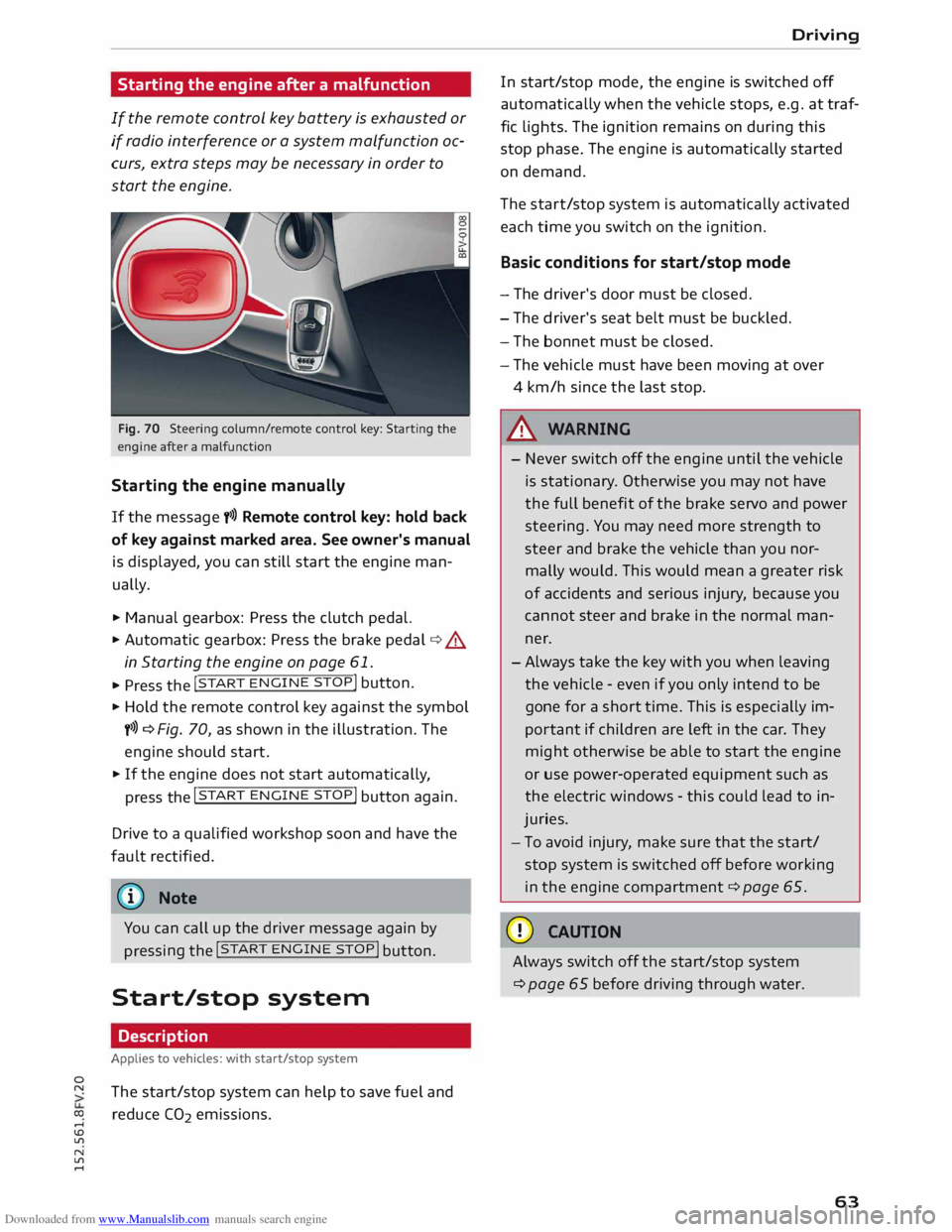
Fig. 70 Steering column/rem ote control key: Starting the
engine after a malfunction
Starting the engine manually
If the message y>>) Remote control key: hold back
of key against marked area. See owner's manual
is displayed, you can still start the engine man
ually.
.,.. Manual gearbox: Press the clutch pedal.
.,.. Automatic gearbox:
Press the brake pedal¢.&
in Starting the engine on page 61 .
... Press the !
START ENGINE
STOP!
button.
.,.. Hold the remote control key against the symbol
y>>) ¢ Fig. 70, as shown in the illustration. The
engine should start .
.,.. If the engine does not start automatically,
press the !START
ENGINE
STOP!
button again.
Drive to a qualified workshop soon and have the
fault rectified.
{D Note
You can call up the driver message again by pressing
the !START
ENG
INE
STOP! button.
Start/stop system
Description
Applies to vehicles: with start/stop system
The start/stop system can help to save fuel and
reduce CO2 emissions. Driving
In start/stop mode, the engine is switched off
automatically when the vehicle stops, e.g. at traf
fic lights. The ignition remains on during this
stop phase. The engine is automatically started
on demand.
The start/stop system is automatically activated
each time you switch on the ignition.
Basic conditions for start/stop mode
- The driver's door must be closed.
- The driver's seat belt must be buckled.
- The bonnet must be closed.
- The vehicle must have been moving at over
4 km/h since the last stop .
.&, WARNING
- Never switch off the engine until the vehicle
is stationary . Otherwise you may not have
the full benefit of the brake servo and power
steering. You may need more strength to
steer and brake the vehicle than you nor
mally would. This would mean a greater risk
of accidents and serious injury, because you
cannot steer and brake in the normal man
ner.
-Always take the key with you when leaving
the vehicle -even if you only intend to be
gone for a short time. This is especially im
portant if children are left in the car. They
might otherwise be able to start the engine
or use power-operated equipment such as
the electric windows -this could lead to in
juries.
- To avoid injury, make sure that the start/
stop system is switched off before working
in the engine compartment ¢ page 65.
CD CAUTION
Always switch off the start/stop system
¢page 65 before driving through water.
63
Page 72 of 284
Downloaded from www.Manualslib.com manuals search engine Automatic
gearbox
Automatic gearbox
S tronic
Introduction
Applies to vehicles: with S tronic gearbox
The vehicle is equipped with an electronically
controlled dual-clutch gearbox (S tronic). Torque
between the engine and the gearbox is transmit
ted via two independent clutches. They enable
smooth, uninterrupted acceleration of the vehi
cle.
The gearbox shifts up or down automatically and
continuously adapts the timing of the gear
changes to your driving style.
When you drive at moderate speeds the gearbox
will select the most economical shift programme.
It will then change up early and delay the down
shifts to give better fuel economy.
If you drive at higher speeds with heavy accelera
tion, if you open the throttle quickly, or if you use
the kick-down or the car's maximum speed, the
gearbox will automatically select the more "spor
ty" shift programmes.
If desired, you can also select the gears manually
(tiptronic mode).
Selector lever positions
Applies to vehicles: with S tronic gearbox
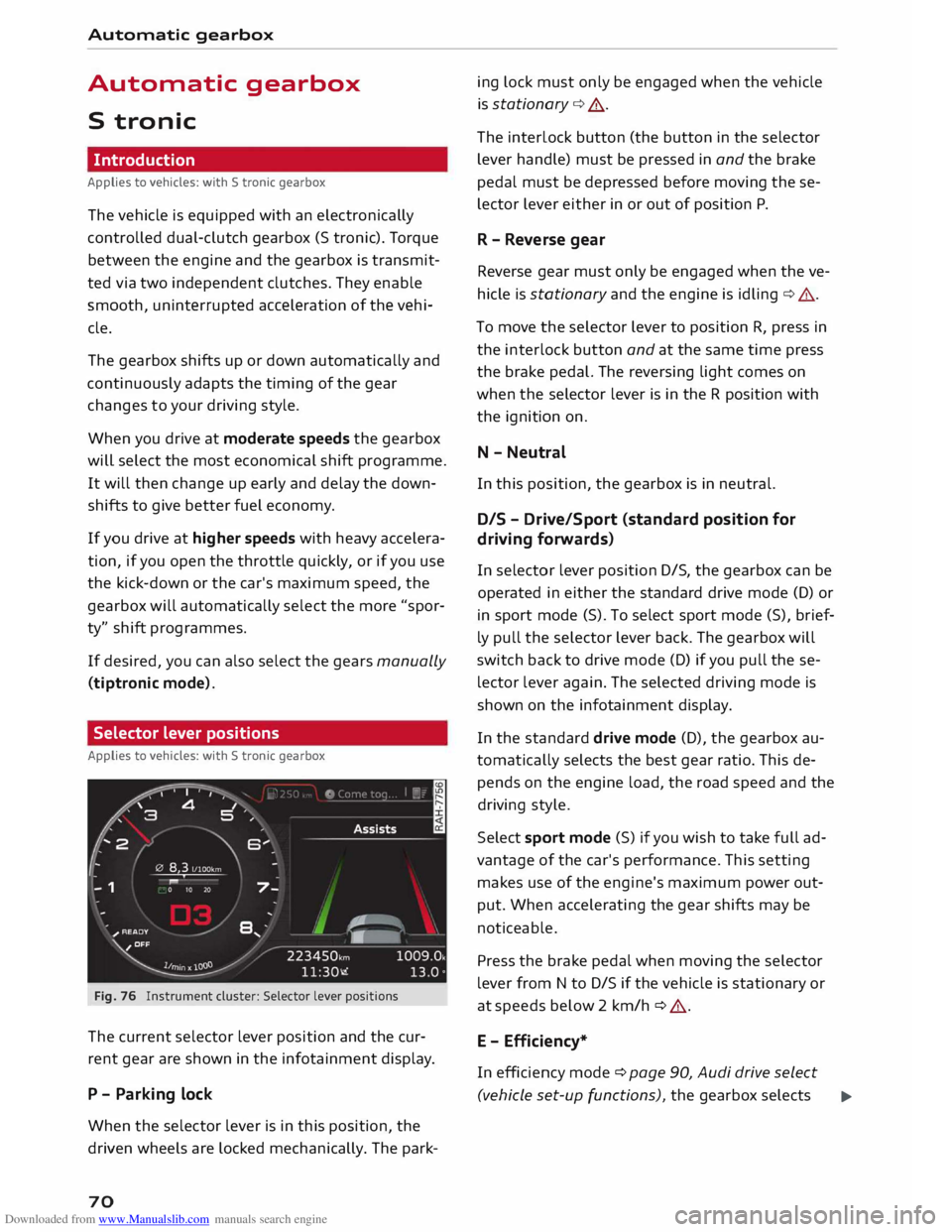
Fig. 76 Instrument cluster: Selector lever positions
The current selector lever position and the cur
rent gear are shown in the infotainment display.
P - Parking lock
When the selector lever is in this position, the
driven wheels are locked mechanically. The park-
70 ing
lock must only be engaged when the vehicle
is stationary ¢.&. .
The interlock button (the button in the selector
lever handle) must be pressed in and the brake
pedal must be depressed before moving these
lector lever either in or out of position P.
R - Reverse gear
Reverse gear must only be engaged when the ve
hicle is stationary and the engine is idling ¢.&..
To move the selector lever to position R, press in
the interlock button and at the same time press
the brake pedal. The reversing light comes on
when the selector lever is in the R position with
the ignition on.
N - Neutral
In this position, the gearbox is in neutral.
DIS -Drive/Sport (standard position for
driving forwards)
In selector lever position D/S, the gearbox can be
operated in either the standard drive mode (D) or
in sport mode (S). To select sport mode (S), brief
ly pull the selector lever back. The gearbox will
switch back to drive mode (D) if you pull these
lector lever again. The selected driving mode is
shown on the infotainment display.
In the standard drive mode (D), the gearbox au
tomatically selects the best gear ratio. This de
pends on the engine load, the road speed and the
driving style.
Select sport mode (S) if you wish to take full ad
vantage of the car's performance. This setting
makes use of the engine's maximum power out
put. When accelerating the gear shifts may be
noticeable.
Press the brake pedal when moving the selector
lever from N to D/S if the vehicle is stationary or
at speeds below 2 km/h ¢ .&..
E - Efficiency*
In efficiency mode ¢ page 90, Audi drive select
(vehicle set-up functions), the gearbox selects ..,.
Page 73 of 284
Downloaded from www.Manualslib.com manuals search engine 0
N
co
....
\D L/'l
N
L/'l
.... the
next gear at lower engine speeds. Earlier up
shifts give improved fuel economy because the
full power reserves of the engine are not used.
In this mode, Eis shown on the display instead of
D ¢Fig. 76.
A WARNING
- The car can roll away even if the ignition is
switched off.
- Never move the selector lever to R or P
when driving, as this could cause an acci
dent.
- In all selector lever positions except P the
vehicle must always be held with the foot
brake when the engine is running. This is be
cause an automatic gearbox still transmits
power even at idling speed, and the vehicle
tends to "creep" -risk of accident!
- The accelerator pedal must on no account
be pressed inadvertently when a gear is en
gaged with the vehicle stationary . The vehi
cle could otherwise start moving immedi
ately (in some cases even if the parking
brake is engaged) and possibly cause an ac
cident.
- Do not press the accelerator while selecting
a gear with the vehicle stationary and the
engine running, as this could cause an acci
dent.
- The driver should never get out of the vehi
cle when the engine is running and a gear is
engaged. If you have to leave your vehicle
while the engine is running, you must apply
the parking brake and engage the parking
lock P.
- To avoid accidents, apply the parking brake
and put the selector lever in position P be
fore opening the bonnet and working on the
vehicle with the engine running. Please ob
serve the important safety warnings
¢ page 220, Working on components in
the engine compartment.
((D) Note
- Drive select: You can select the sport pro
gram for gear changes by activating the dy- Automatic
gearbox
namic mode. The infotainment display will
show S instead of D.
- If the lever is moved accidentally to N when
driving, take your foot off the accelerator
and let the engine speed drop to idling be
fore selecting Dor S again.
- It is not possible to move the selector lever
out of position P if the electrical power sup
ply fails. In this case, the selector lever can
be released manually. Left-hand drive
vehicles ¢ page 78, right-hand drive
vehicles ¢ page 79.
Selector lever lock
Applies to vehicles: with S tronic gearbox
The selector Lever Lock prevents gears from being
engaged inadvertently, so that the vehicle is not
set in motion unintentionally.
•
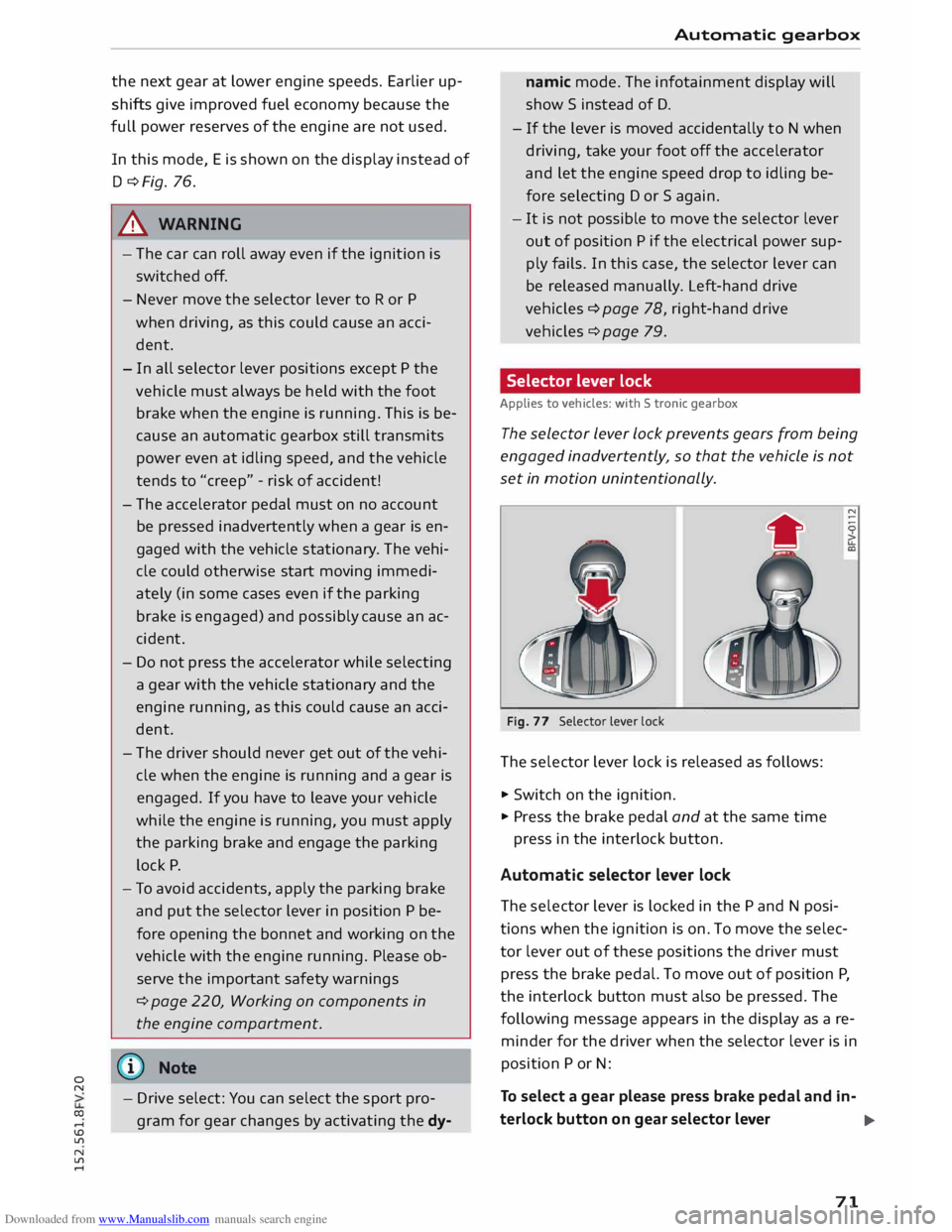
Fig. 77 Selector lever lock
The sele ctor lever lock is released as follows:
... Switch on the ignition.
... Pr ess the brake pedal and at the same time
press in the interlock button.
Automatic selector lever lock
The sele ctor lever is locked in the P and N posi
tions when the ignition is on. To move the selec
tor lever out of these positions the driver must
press the brake pedal. To move out of position P,
the interlock button must also be pressed. The
following message appears in the display as a re
minder for the driver when the selector lever is in
position P or N:
To select a gear please press brake pedal and in-
terlock button on gear selector lever
..,.
71
Page 77 of 284
Downloaded from www.Manualslib.com manuals search engine 0
N
co
....
\D L/'l
N
L/'l
.... Manual
gear selection (tiptronic mode)
Applies to vehicles: with S tronic gearbox/paddle levers
The tiptronic feature allows the driver to also
change gears manually.
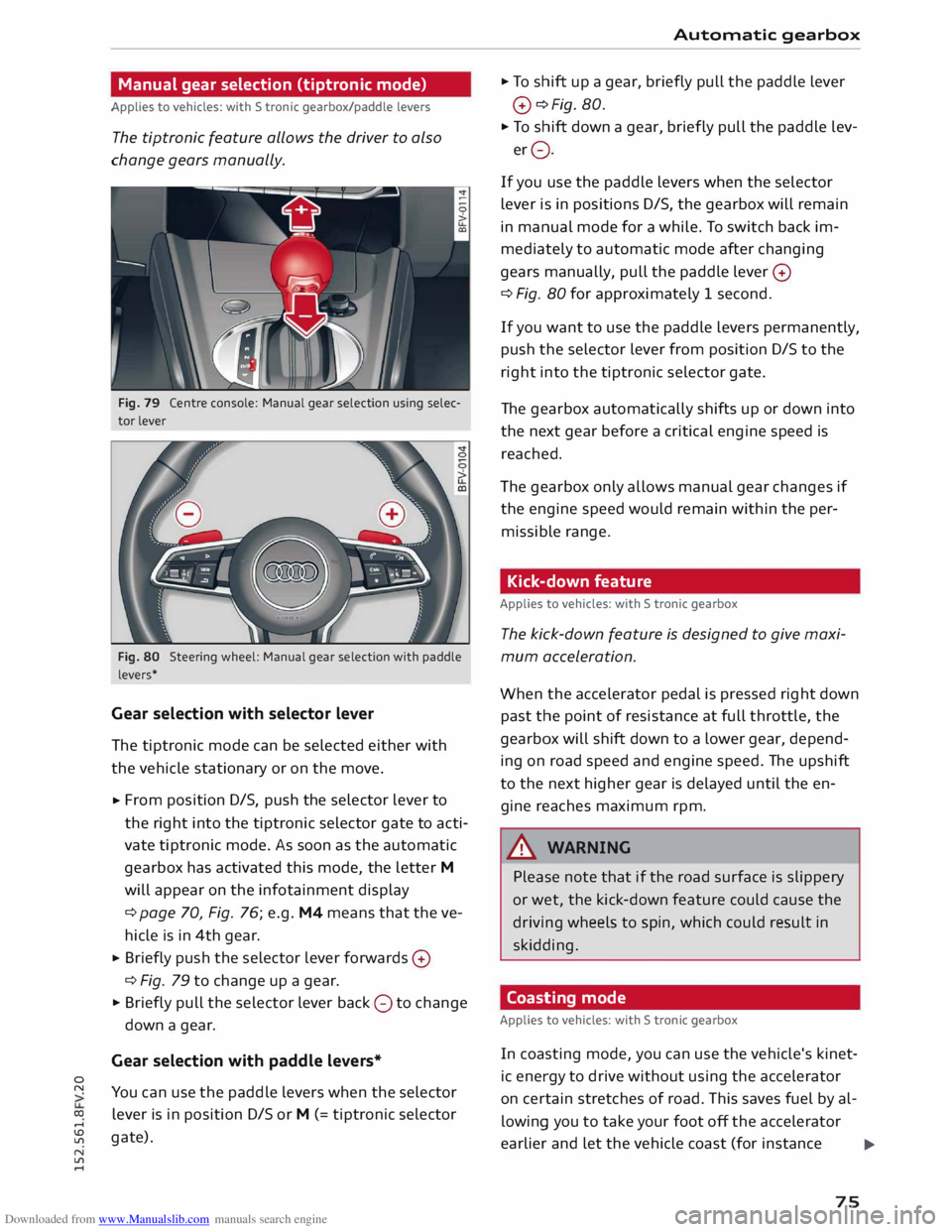
Fig. 79 Centre console: Manual gear selection using selec
tor lever
Fig. 80 Steering wheel: Manual gear selection with paddle
levers*
Gear selection with selector lever
The tiptronic mode can be selected either with
the vehicle stationary or on the move.
,.. From
position D/S, push the selector lever to
the right into the tiptronic selector gate to acti
vate tiptronic mode. As soon as the automatic
gearbox has activated this mode, the letter M
will appear on the infotainment display
¢ page 70, Fig. 76; e.g. M4 means that the ve
hicle is in 4th gear.
,.. Briefly
push the selector lever forwards 0
¢ Fig. 79 to change up a gear.
,.. Briefly pull the selector lever back 0 to change
down a gear.
Gear selection with paddle levers*
You can use the paddle levers when the selector
lever is in position D/S or M (= tiptronic selector
gate). Automatic
gearbox
,.. To shift up a gear, briefly pull the paddle lever
0 ¢Fig. 80.
,.. To shift down a gear, briefly pull the paddle lev-
er 0.
If you use the paddle levers when the selector
lever is in positions D/S, the gearbox will remain
in manual mode for a while. To switch back im
mediately to automatic mode after changing
gears manually, pull the paddle lever 0
¢ Fig. 80 for approximately 1 second.
If you want to use the paddle levers permanently,
push the selector lever from position D/S to the
right into the tiptronic selector gate.
The gearbox automatically shifts up or down into
the next gear before a critical engine speed is
reached.
The gearbox only allows manual gear changes if
the engine speed would remain within the per
missible range.
Kick-down feature
Applies to vehicles: with S tronic gearbox
The kick-down feature is designed to give maxi
mum acceleration.
When the accelerator pedal is pressed right down
past the point of resistance at full throttle, the
gearbox will shift down to a lower gear, depend
ing on road speed and engine speed. The upshift
to the next higher gear is delayed until the en
gine reaches maximum rpm.
A WARNING
Please note that if the road surface is slippery
or wet, the kick-down feature could cause the
driving wheels to spin, which could result in
skidding.
Coasting mode
Applies to vehicles: with S tronic gearbox
In coasting mode, you can use the vehicle's kinet
ic energy to drive without using the accelerator
on certain stretches of road. This saves fuel by al
lowing you to take your foot off the accelerator
earlier and let the vehicle coast (for instance
.,...
75
Page 78 of 284
Downloaded from www.Manualslib.com manuals search engine Automatic
gearbox
when approaching a speed restriction in a built
up area).
Switching on coasting mode
Important: Selector lever must be in D, gradient
must be less than 12 %.
"' Select efficiency mode in drive select*
9page 90 (you only have to do this once).
"' Ta ke your foot off the accelerator.
If you have selected the "on-board computer"
display, the message Coasting will then appear.
The gearbox automatically disengages the clutch
at speeds above 20 km/h and lets the vehicle
coast without the engine braking effect. The en
gine ticks over at idling speed while the vehicle is
coasting.
Stopping coasting mode
"' Press the brake pedal or accelerator.
To use the engine braking effect and overrun fuel
cut-off again, all you need to do is tap the brake
pedal briefly.
You can improve your fuel economy and help to
reduce emissions by using a combination of the
coasting mode (i.e. coasting with low fuel con
sumption on a longer stretch of road) and the
overrun fuel cut-off (i.e. using the engine brak
ing effect with no fuel consumption on a shorter
stretch of road).
A WARNING
- If you are approaching an obstruction when
coasting mode is switched on, please re
member that the vehicle will not slow down
as quickly as usual when you take your foot
off the accelerator -risk of accident!
- The vehicle can pick up speed if you are driv
ing down a slope in coasting mode -risk of
accident!
l l
The ESC lamp lights up permanently and the message
Stabilisation control (ESC): sport. Warning! Restricted
stability appears temporarily in the infotainment display
to indicate the deactivation status.
76 -
If other people are using your car, you
should draw their attention to the coasting
mode.
@ Note
- Coasting mode is only available in efficiency
mode (drive select*).
- The message Coasting only appears when
the current fuel consumption display is se
lected. The gear is no longer displayed when
you are in coasting mode (e.g. E instead of
E6).
- The coasting mode is deactivated tempora
rily on gradients of 15 % or greater.
' Launch control programme
Applies to vehicles: with S tronic gearbox and launch control
The launch control programme enables maxi
mum acceleration.
Important: The engine must be warm and the
steering wheel must be pointing straight-ahead.
"' Deactivate the start/stop system*¢ page 65.
The LED in the button l(A)'*'I will light up.
"' Deactivate the hold assist* ¢ page 68. The LED
in the button will go out.
"' Press the IJ'}OFF!
button once briefly while the
engine is running 1
).
"' Briefly pull the selector lever back from posi
tion D/S to select position S, or move the selec
tor lever to the right into the tiptronic gate, or
select dynamic mode in drive select*
¢page 90.
"' Press the brake pedal firmly with your left foot
and hold it down for at least one second.
"'At the same time, press the accelerator all the
way down with your right foot until the engine
revs are high and steady.
"' Ta ke your left foot off the brake.
�
Page 93 of 284
Downloaded from www.Manualslib.com manuals search engine 0
N
co
....
\D U'l
N
U'l
.... lower engine
speeds and the coasting mode is ac
tivated ¢ page 75. This helps to reduce fuel con
sumption.
Suspension control (Audi magnetic ride)*
The suspension control uses sensors to collect in
formation on steering movements, braking and
acceleration input by the driver, road surface
quality, road speed and vehicle Loading. With
drive select you can choose between dynamic and
comfort-oriented suspension set-ups (dynamic
and comfort modes), or opt for a more balanced
set-up (auto mode).
Steering
The degree of power assistance can be varied.
Various modes are possible ¢ page 92.
The steering response is even more agile on
vehicles with progressive steering*.
Air conditioner*
The air conditioner runs in a particularly econom
ical mode when the efficiency* setting is selec
ted. When this function is selected, eco* is shown
in the display of the automatic air conditioner.
Cruise control system*
The acceleration response is particularly econom
ical in efficiency* mode.
@ Note
- On vehicles with manual gearbox, an E ap
pears in the gear-change indicator when ef
ficiency* mode is activated.
- On vehicles with automatic gearbox, if you
select efficiency* mode when the selector
Lever is in position D, E will automatically
appear on the infotainment display. Driver
assist systems
Selecting the driving mode
Applies to vehicles: with Audi drive select
You can choose between efficiency*, comfort, au
to, dynamic and individual.
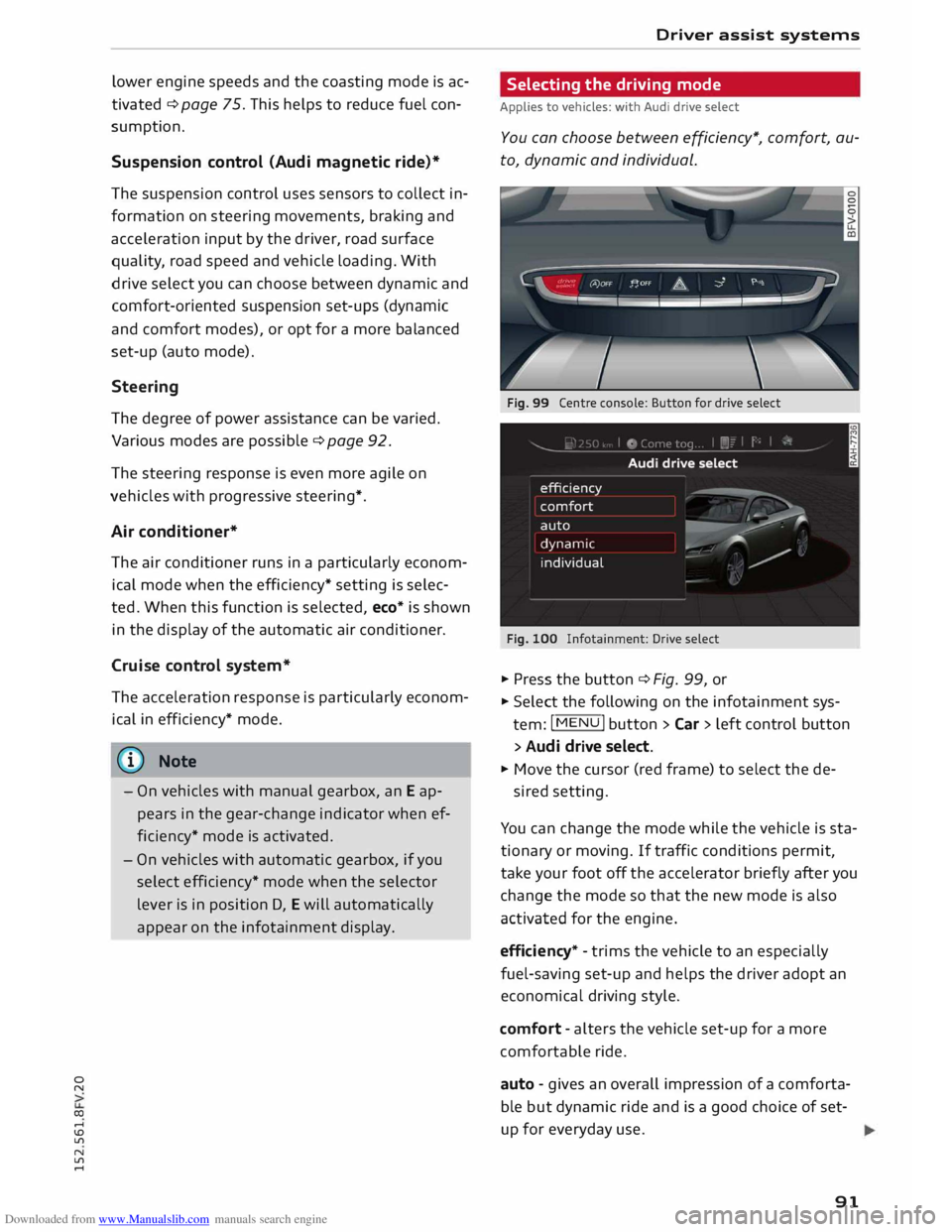
Fig. 99 Centre console: Button for drive select
Fig. 100 Infotainment: Drive select
� Press the button ¢ Fig. 99, or
� Select the following on the infotainment sys
tem: I MENU
I button >Car> Left control button
> Audi drive select.
� Move the cursor (red frame) to select the de-
sired setting.
You can change the mode while the vehicle is sta
tionary or moving. If traffic conditions permit,
take your foot off the accelerator briefly after you
change the mode so that the new mode is also
activated for the engine.
efficiency* -trims the vehicle to an especially
fuel-saving set-up and helps the driver adopt an
economical driving style.
comfort -alters the vehicle set-up for a more
comfortable ride.
auto -gives an overall impression of a comforta
ble but dynamic ride and is a good choice of set
up for everyday use .
91
Page 117 of 284
Downloaded from www.Manualslib.com manuals search engine 0
N
co
....
\D L/'l
N
L/'l
.... •
Telephone
• Audi connect
• Navigation
• Directory
• Radio
• Media
• Sound
• Help
• Help Speech Dialogue System
• Help Telephone
• Help Audi connect
• Help Navigation
• Help Map
• Help Radio
• Help Media
• Enter
number
• Delete
number/ correct number
• Directory
• Call (XY)
• business / private / land line/ mobile
• Drive
me to (XY)
• Business address/ Private address
• Start/ stop route guidance
• Directory
• Last destinations
• Navigation
favourites
• Drive
home
• Enter
address
• Enter
country / town / street
• Exclude
route/ Exclude route for (XY) km / m
• Map
• Day map/ Night map/ Route info Speech
dialogue system
• Favourites
• Call (XY)
• Enter number
• Redial
• Read new text message
• Drive
me to (XY)
• Enter address
• Stop route guidance
• Map
• Line (XY)
• Next page/ previous page
• Cancel
• Online destinations
• No, I meant (XY)
• Correct
• Call
list
• Redial
• Call
mailbox
• Enter
PIN / delete PIN
• Telephone favourites
• Exclude
next route section / Exclude
next street
• Manual / Automatic traffic
avoidance
• Route
list
• Calculate
alternative routes
• Online destinations
• Special
destination •
• 20 driving position map/ 20 north position map/ 30 map / Destination map/ Overview map
• Audi connect
• Travel information / Parking information
• Fuel prices
• Weather
R � D IO
• Radio
favourites
• Last
stations
• FM and DAB
•FM/ DAB/ AM
• Station (XY) / Frequency (XY)
• Ensemble (XY)
• Traffic programme on I off
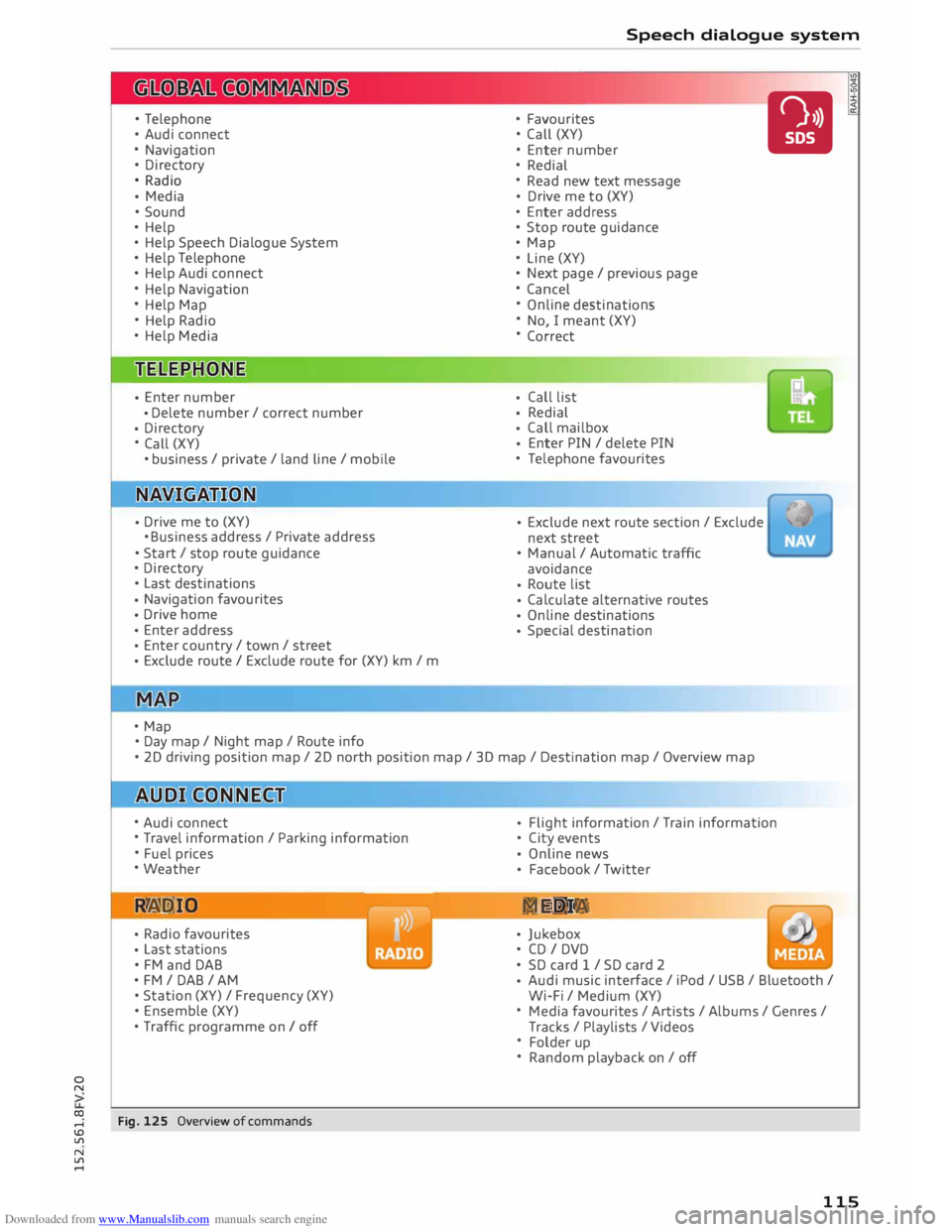
Fig. 125 Overview of commands •
Flight
information / Train information
• City events
• Online
news
• Facebook
/ Twitter
ME DIA
• Jukebox
• CD I DVD
• SD card 1 / SD card 2
• Audi
music interface / iPod / USB / Bluetooth /
Wi-Fi / Medium (XY)
• Media favourites / Artists / Albums / Genres /
Tracks / Playlists / Videos
• Folder up
• Random playback on / off
115
Page 124 of 284
Downloaded from www.Manualslib.com manuals search engine Speech
dialogue system
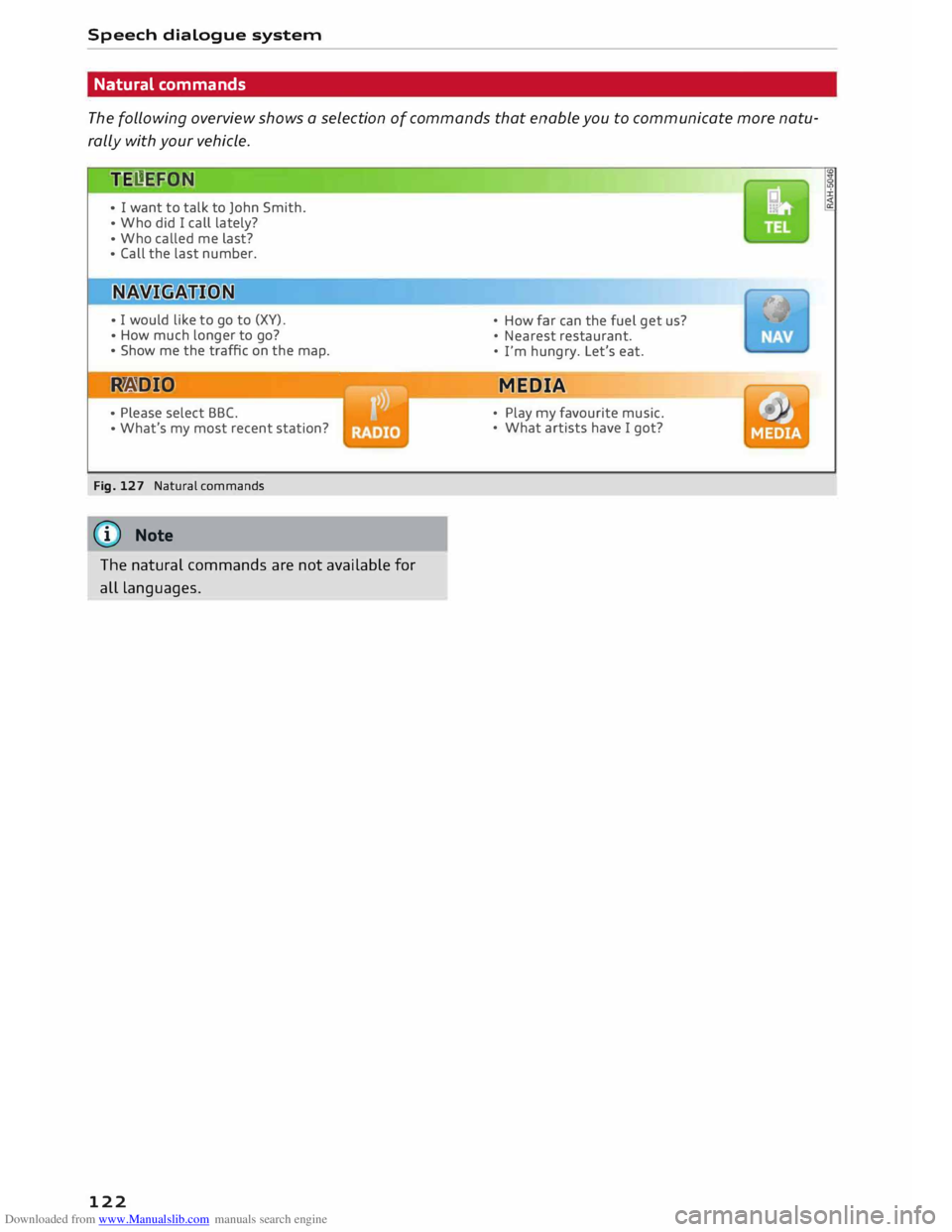
Natural commands
The following overview shows a selection of commands that enable you to communicate more natu
rally with your vehicle.
JE l!.E!GJN
• I want to talk to John Smith.
• Who did I call lately?
• Who called me last?
• Call the last number.
• I would like to go to (XV).
• How much longer to go?
• Show me the traffic on the map.
R A DI©
• Please select BBC.
• What's my most recent station?
Fig. 127 Natural commands
@ Note
The natural commands are not available for
all languages.
122 •
How far can the fuel get us?
• Nearest restaurant.
• I'm hungry. Let's eat.
MEDIA
• Play
my favourite music.
• What artists have I got?
Page 125 of 284
Downloaded from www.Manualslib.com manuals search engine 0
N
co
,-j
\D U'l
N
U'l
,-j Telephone
Introduction
Applies to vehicles: with telephone
Depending on your vehicle's equipment and the
number of functions available, you have different
options for making calls via the MMI:
Option 1
Connecting the mobile phone via Bluetooth. See
¢page 123.
Option 2
Using a separate SIM card in the SIM card read
er*. See¢ page 126.
,&. WARNING
- According to health organisations, mobile
phones may interfere with the function of
pacemakers. A minimum distance of 20 cm
should be kept between the mobile phone
aerial and the pacemaker.
- Do not carry a mobile phone in your breast
pocket directly over the pacemaker when
the phone is switched on.
- If you suspect interference, switch the
mobile phone off immediately.
-The speech dialogue system ¢page 116
must not be used in cases of emergency,
since the voice changes in stressful situa
tions. This could result in a failed or delayed
telephone connection. Always dial emergen
cy numbers manually!
-Switch off your mobile phones in all areas
where there may be a risk of explosion. Re
member that these areas may not always be
adequately marked. Such places are filling
stations, fuel and chemical storage facilities
or transport vehicles and other places where
fumes, chemicals (e.g. from leaking propane
or fuel vapours in vehicles or buildings) or
large quantities of dust particles (e.g. from
flour, wood or metal) could accumulate in
the air. This warning also applies to all other
places where you would normally switch off
your engine.
- To day's driving conditions require the full at
tention of drivers. Please see ¢page 192.-
Telephone
CD CAUTION
- Always obey the laws regulating the use of
telephones in vehicles.
- You must switch off the telephone in areas
where the use of mobile telephones is pro
hibited. Please observe all relevant caution
notices and regulations.
- The car telephone kit may be installed, serv
iced and repaired only by an Audi workshop
or other qualified workshop.
(D) Note
The maximum range of the Bluetooth connec
tion is limited to the interior of the vehicle.
The connection can be susceptible to interfer
ence from other electronic devices.
Connecting a telephone
Bluetooth profiles
Applies to vehicles: with telephone
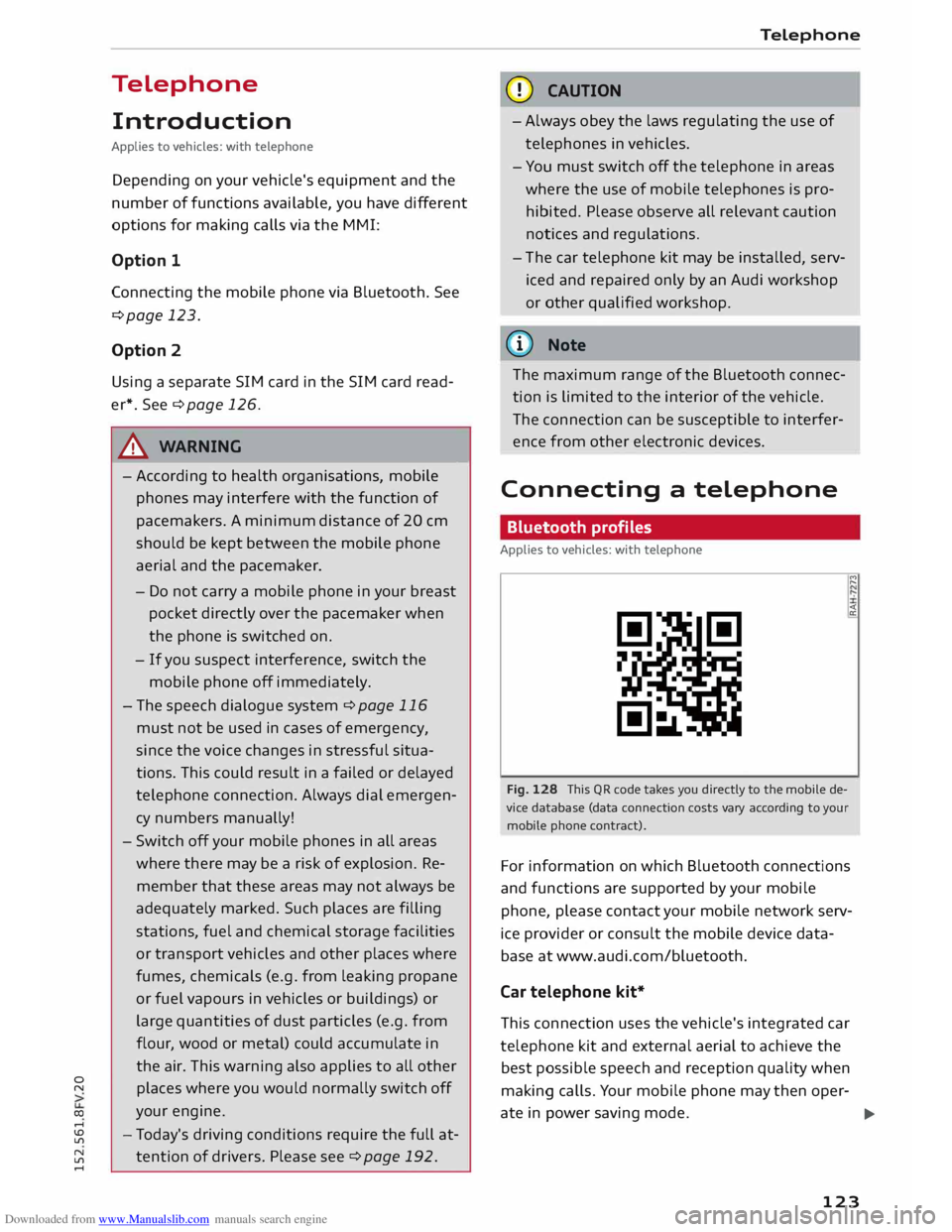
Fig. 128 This QR code takes you directly to the mobile de
vice database (data connection costs vary according to your
mobile phone contract). "'
,...
<
a:
For information on which Bluetooth connections
and functions are supported by your mobile
phone, please contact your mobile network serv
ice provider or consult the mobile device data
base at www.audi.com/bluetooth.
Car telephone kit*
This connection uses the vehicle's integrated car
telephone kit and external aerial to achieve the
best possible speech and reception quality when
making calls. Your mobile phone may then oper-
ate in power saving mode.
..,.
123