fuel AUDI TT COUPE 2014 Owners Manual
[x] Cancel search | Manufacturer: AUDI, Model Year: 2014, Model line: TT COUPE, Model: AUDI TT COUPE 2014Pages: 284, PDF Size: 34.42 MB
Page 6 of 284
Downloaded from www.Manualslib.com manuals search engine Table
of Contents
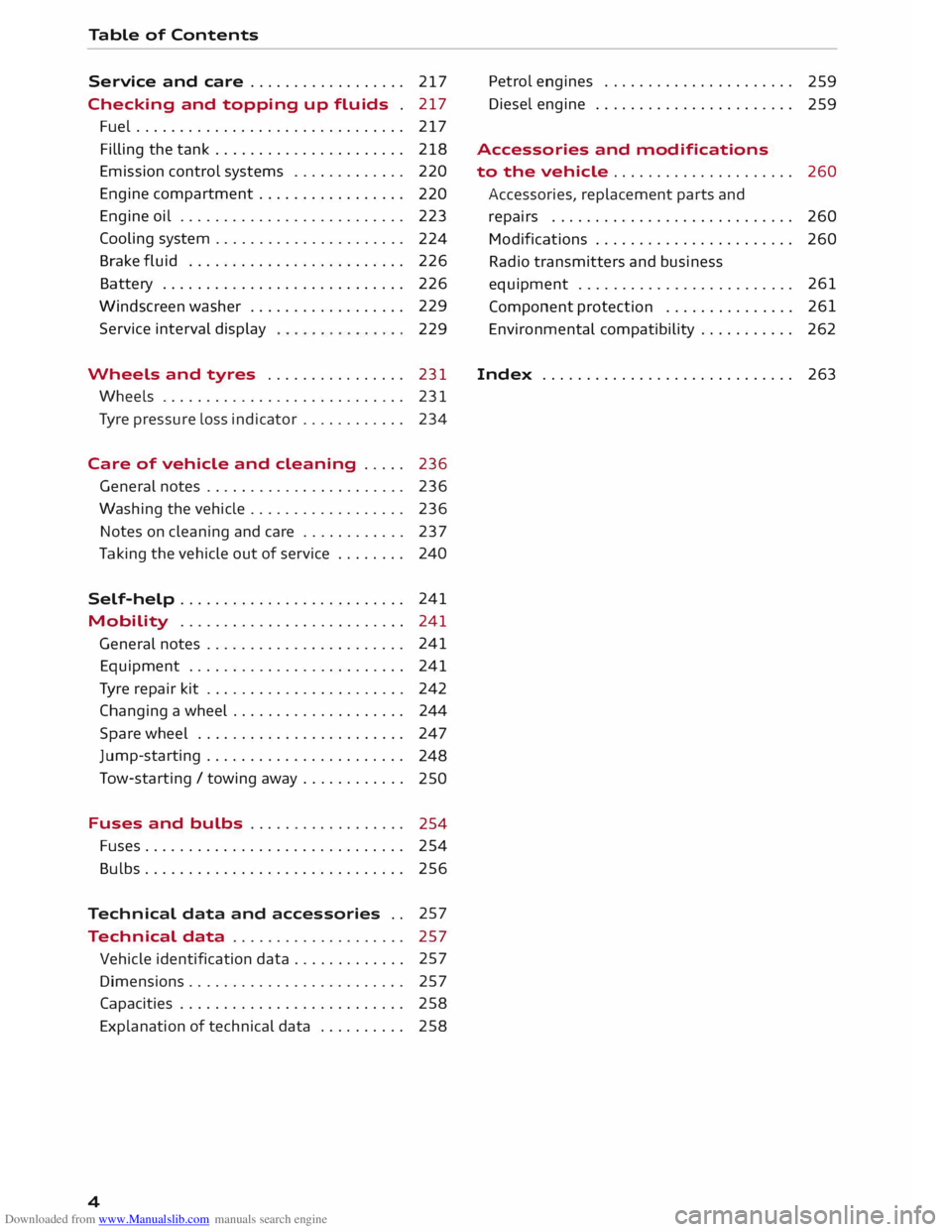
Service and care . . . . . . . . . . . . . . . . . . 217
Checking and topping up fluids . 217
Fuel ............................... 217
Filling the tank ...................... 218
Emission control systems . . . . . . . . . . . . .
220
Engine compartment . . . . . . . . . . . . . . . . .
220
Engine oil . . . . . . . . . . . . . . . . . . . . . . . . . .
223
Cooling system . . . . . . . . . . . . . . . . . . . . . .
224
Brake fluid . . . . . . . . . . . . . . . . . . . . . . . . .
226
Battery . . . . . . . . . . . . . . . . . . . . . . . . . . . .
226
Windscreen washer . . . . . . . . . . . . . . . . . . 229
Service interval display
229
Wheels and tyres . . . . . . . . . . . . . . . . 231
Wheels . . . . . . . . . . . . . . . . . . . . . . . . . . . . 231
Tyre pressure loss indicator . . . . . . . . . . . .
234
Care of vehicle and cleaning . . . . . 236
General notes . . . . . . . . . . . . . . . . . . . . . . . 236
Washing the vehicle .. . . . . . . . . . . . . . . . .
236
Notes on cleaning and care . . . . . . . . . . . . 237
Taking the vehicle out of service . . . . . . . .
240
Self-help . . . . . . . . . . . . . . . . . . . . . . . . . . 241
Mobility . . . . . . . . . . . . . . . . . . . . . . . . . . 241
General notes . . . . . . . . . . . . . . . . . . . . . . . 241
Equipment . . . . . . . . . . . . . . . . . . . . . . . . . 241
Tyre repair kit . . . . . . . . . . . . . . . . . . . . . . . 242
Changing a wheel . . . . . . . . . . . . . . . . . . . . 244
Spare wheel . . . . . . . . . . . . . . . . . . . . . . . .
247
Jump-starting . . . . . . . . . . . . . . . . . . . . . . . 248
Tow-starting/ towing away . . . . . . . . . . . .
250
Fuses and bulbs . . . . . . . . . . . . . . . . . .
254
Fuses.............................. 254
Bulbs......... ..................... 256
Technical data and accessories . . 257
Technical data . . . . . . . . . . . . . . . . . . . . 257
Vehicle identification data . . . . . . . . . . . . . 257
Dimensions . . . . . . . . . . . . . . . . . . . . . . . . . 257
Capacities . . . . . . . . . . . . . . . . . . . . . . . . . . 258
Explanation of technical data . . . . . . . . . . 258
4 Petrol
engines . . . . . . . . . . . . . . . . . . . . . .
259
Diesel engine . . . . . . . . . . . . . . . . . . . . . . .
259
Accessories and modifications
to the vehicle . . . . . . . . . . . . . . . . . . . . .
260
Accessories, replacement parts and
repairs . . . . . . . . . . . . . . . . . . . . . . . . . . . . 260
Modifications . . . . . . . . . . . . . . . . . . . . . . .
260
Radio transmitters and business
equipment . . . . . . . . . . . . . . . . . . . . . . . . . 261
Component protection . . . . . . . . . . . . . . . 261
Environmental compatibility . . . . . . . . . . . 262
Index .............. ............... 263
Page 10 of 284
Downloaded from www.Manualslib.com manuals search engine Instruments
and warning/indicator lamps
Instruments and warning/indicator lamps
Instruments Instrument cluster overview
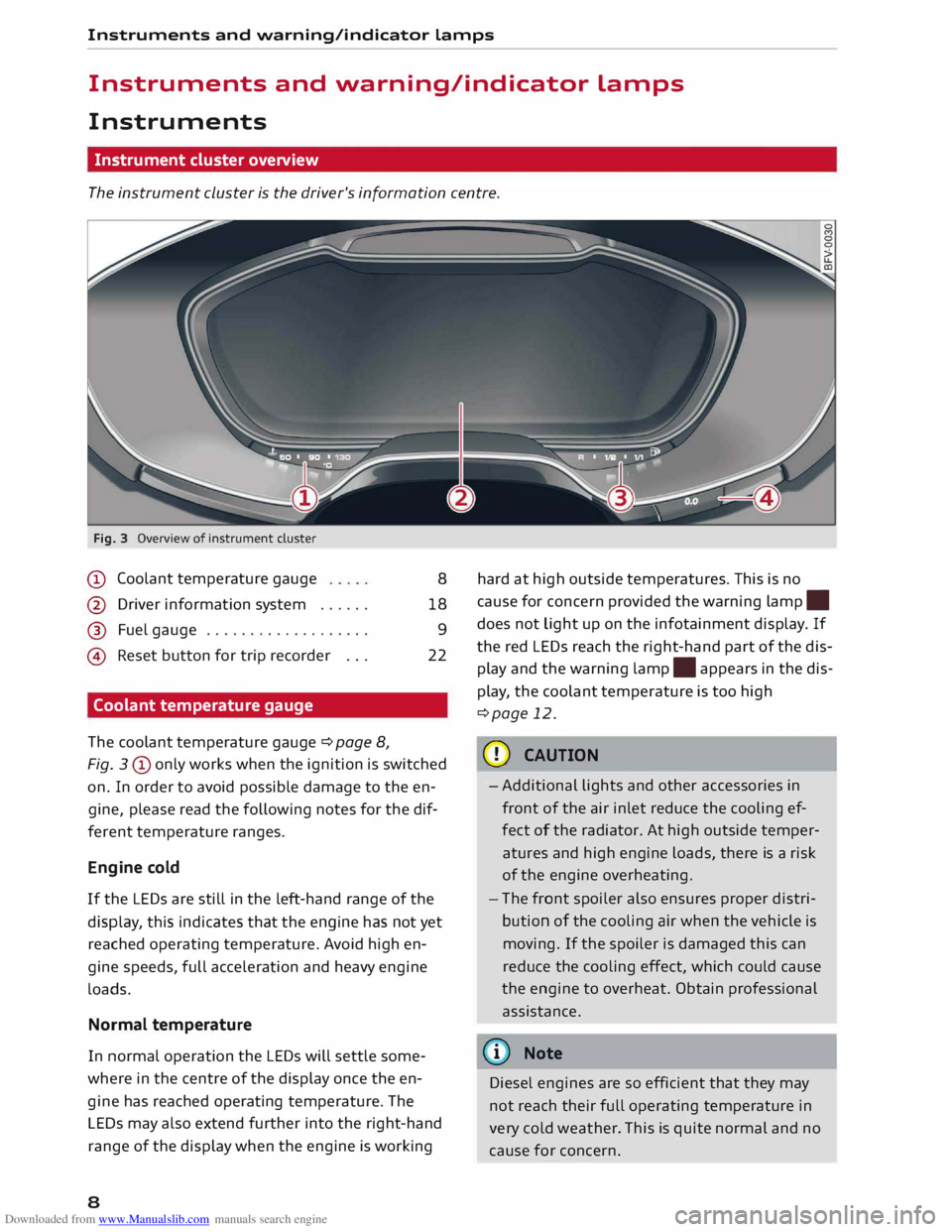
The instrument cluster is the driver's information centre.
Fig. 3 Overview of instrument cluster
CD Coolant temperature gauge
@ Driver information system ..... .
@ Fuel gauge .................. .
@ Reset button for trip recorder .. .
Coolant temperature gauge
The coolant temperature gauge ¢page 8, 8
18 9
22
Fig. 3 CD only works when the ignition is switched
on. In order to avoid possible damage to the en
gine, please read the following notes for the dif
ferent temperature ranges.
Engine cold
If the LEDs are still in the left-hand range of the
display, this indicates that the engine has not yet
reached operating temperature. Avoid high en
gine speeds, full acceleration and heavy engine
loads.
Normal temperature
In normal operation the LEDs will settle some
where in the centre of the dis play once the en
gine has reached operating temperature. The
LEDs may also extend further into the right-hand
range of the display when the engine is working
8 hard
at high outside temperatures. This is no
cause for concern provided the warning lamp.
does not Light up on the infotainment display. If
the red LEDs reach the right-hand part of the dis
play and the warning lamp.
appears in the dis
play, the coolant temperature is too high
¢page 12.
CD CAUTION
- Additional lights and other accessories in
front of the air inlet reduce the cooling ef
fect of the radiator. At high outside temper
atures and high engine loads, there is a risk
of the engine overheating.
- The front spoiler also ensures proper distri
bution of the cooling air when the vehicle is
moving. If the spoiler is damaged this can
reduce the cooling effect, which could cause
the engine to overheat. Obtain professional
assistance.
� Note
Diesel engines are so efficient that they may
not reach their full operating temperature in
very cold weather. This is quite normal and no
cause for concern.
Page 11 of 284
Downloaded from www.Manualslib.com manuals search engine Instruments
and warning/indicator lamps
Fuel gauge
The gauge @ only works when the ignition is
switched on. If there is less than 7 litres of fuel in
the tank, the LED at the bottom of the dial will
light up in red and the indicator lamp tD will ap
pear c:::>page 16. The LED at the bottom of the
dial will flash in red if the fuel level is very low.
The tank capacity of your vehicle is given in the
Technical data section c:::> page 258.
CD CAUTION
Never run the tank completely dry. If there is
an irregular fuel supply, misfiring can occur.
Unburnt fuel can then enter the exhaust sys
tem. This can lead to overheating and dam
age to the catalytic converter.
Warning and indicator
lamps
Description
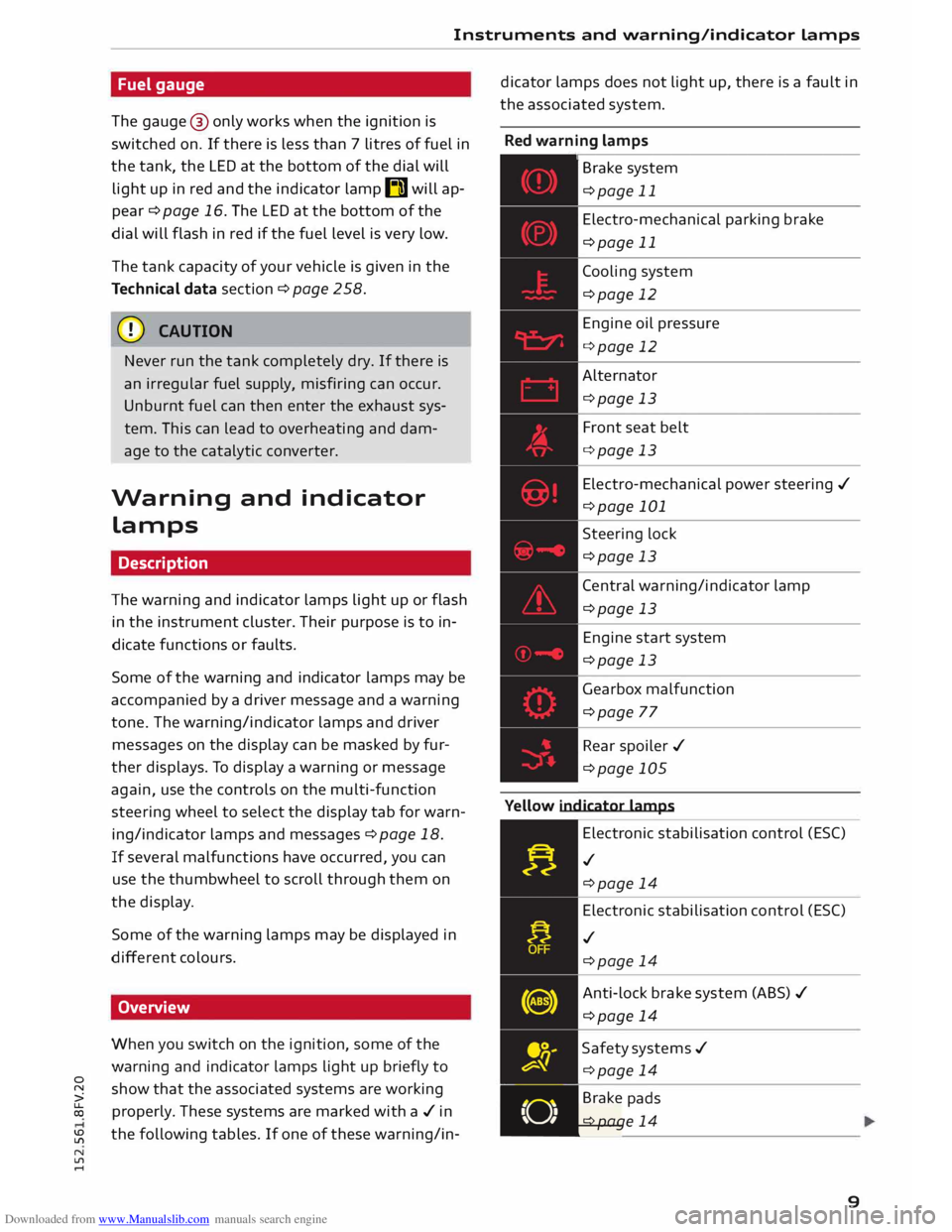
The warning and indicator lamps light up or flash
in the instrument cluster. Their purpose is to in
dicate functions or faults.
Some of the warning and indicator lamps may be
accompanied by a driver message and a warning
tone. The warning/indicator lamps and driver
messages on the display can be masked by fur
ther displays. To display a warning or message
again, use the controls on the multi-function
steering wheel to select the display tab for warn
ing/indicator lamps and messages c:::> page 18.
If several malfunctions have occurred, you can
use the thumbwheel to scroll through them on
the display.
Some of the warning lamps may be displayed in
different colours.
Overview
When you switch on the ignition, some of the
warning and indicator lamps light up briefly to
0
� show
that the associated systems are working
� properly.
These systems are marked with a./ in
� the
following tables. If one of these warning/in-
N
ll'l
.... dicator
lamps does not light up, there is a fault in
the associated system.
Red warning lamps
,---------------
Br a k e system
c:::>page 11
Electro-mechanical parking brake
c:::>page 11
Cooling system
c:::>page 12
Engine oil pressure
c:::>page 12
Alternator c:::>page 13
Front seat belt
c:::>page 13
Electro-mechanical power steering ./
c:::>page 101
Steering lock
c:::>page 13
Central warning/indicator lamp
c:::>page 13
Engine start system
c:::>page 13
Gearbox malfunction
c:::>page 77
Rear spoiler ./
c:::>page 105
Yellow indicator lamps
Electronic stabilisation control (ES()
./ c:::>page 14
Electronic stabilisation control (ES()
./ c:::>page 14
Anti-lock brake system (ABS)./
c:::>page 14
Safety systems ./
c:::>page 14
• Brake
pads
. c:::>page 14
9
Page 12 of 284
Downloaded from www.Manualslib.com manuals search engine Instruments
and warning/indicator lamps
10 Electro-mechanical
parking brake
¢page 11
Tyre pressure loss indicator ./
¢page 234
Tyre pressure loss indicator
¢page 234
Engine management./
¢page 15
Engine management system (diesel
engines)./ ¢page 15
Emission control system
¢page 15
Diesel particulate filter*
¢page 15
Engine speed governing
¢page 15
Engine oil level
¢page 15
Engine oil sensor
¢page 16
Battery charge
¢page 13
Fuel tank system
¢page 16
Washer fluid level
¢page 16
Windscreen wipers
¢page 16
Remote control key
¢page 62
Battery in remote control key
¢page 27
Bulb monitor*
¢page 16
Headlight range control
¢page 17
Adaptive light*
¢page 17
Light sensor/rain sensor*
¢page 17 Active
lane assist*
¢page 85
Gearbox ¢page 77
Steering lock
¢page 13
Engine start system
¢page 13
Central warning/indicator lamp
¢page 13
Electro-mechanical power steering ./
¢page 101
Suspension control*
¢page 17
Rear spoiler ./
¢page 105
Speed warning function*
¢page 80
Electro-mechanical power steering
¢page 101
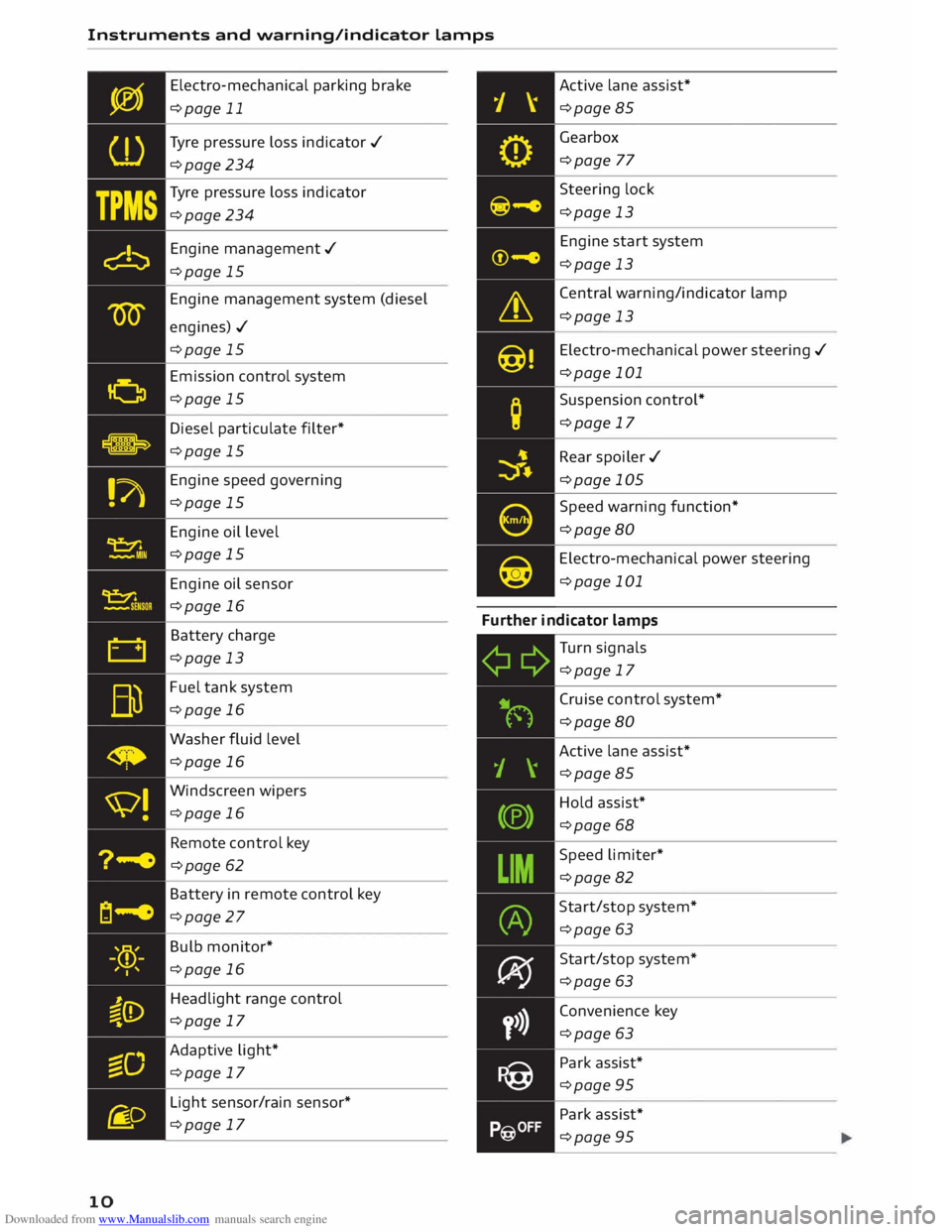
Further indicator lamps
Turn signals
¢page 17
Cruise control system*
¢page 80
Active lane assist*
¢page 85
Hold assist*
¢page 68
Speed limiter*
¢page 82
Start/stop system*
¢page 63
Start/stop system*
¢page 63
Convenience key
¢page 63
Park assist*
¢page 95
Park assist*
¢page 95
Page 18 of 284
Downloaded from www.Manualslib.com manuals search engine Instruments
and warning/indicator lamps
- If the engine oil level is normal but the indica
tor lamp stays on, drive to a qualified workshop
without delay and avoid high engine speeds.
-e:r ..,. Engine oil sensor
l!I Oil level sensor system: fault. Please contact
workshop
The sensor for checking the engine oil level has
failed. Drive to a qualified workshop soon and
have the fau Lt rectified.
Bu Fuel tank system (petrol/diesel)
Applies to vehicles: with petrol or diesel engine, without nat
ural gas engine
GD Please refuel
When the indicator lamp lights up for the first
time and the message appears, there are still
about 7 litres of fuel left in the tank.
GD Please refuel immediately
If the indicator lamp lights up and the message
appears , the fuel tank is almost empty. Drive to a
filling station without delay.
GD Tank system malfunction! Please contact
workshop
If the indicator lamp lights up and the message
appears:
- there is a malfunction in the tank system, or
- on vehicles with a diesel engine, water may
have collected in the fuel filter.
Drive to a qualified workshop without delay and
have the fau Lt rectified.
CD CAUTION
Applies to vehicles with diesel engine: If poor
quality diesel fuel is used, it may be necessary
to have the water separator 1
>
on the fuel fil
ter drained more frequently than is specified
in the Service Schedule. This helps to prevent
potential engine faults.
l l
This function is not available on all export versions.
16 (®
For the sake of the environment
Never pour fuel down drains or into the
ground.
(CD) Note
For more information about filling the tank,
refer to¢ page 218.
• Washer fluid level
C Please add washer fluid
With the ignition switched off, top up the fluid
for the winds creen washer and headlight washer
system* ¢ page 229.
'V! Winds creen wipers
B] Windscreen
wipers: fault. Please contact
workshop
There is a malfunction in the windscreen wipers.
Drive to a qualified workshop without delay and
have the fault rectified.
-:cp:- Bulb monitor
If the indicator lamp II lights up, a bulb has
failed. The message indicates the location of the
bulb.
You should have the bulb replaced without delay.
Vehicle lights: fault. Please contact workshop
There is a fault with the headlights or light
switch. Drive to a qualified workshop soon and
have the fault rectified.
_& WARNING
- Bulbs are sensitive to pressure. The glass
can break when you touch the bulb, causing
injury.
- Incorrect handling of the high-voltage ele
ment of xenon gas-discharge bulbs* can
have potentially fatal consequences.
Page 23 of 284
Downloaded from www.Manualslib.com manuals search engine 0
N
co
....
\D Lfl
N
Lfl
.... ®
l<)NAVI button
- To have the last navigation cue repeated: Press
the� button while route guidance is active.
- To adjust the volume of the navigation cues:
Scroll the right thumbwheel up/down during
route guidance while a navigation cue is being
spoken.
Multi-function steering
wh
eel
with !MODE! button
How to use the multi-function steering
wheel
Applies to vehicles: with multi-function steering wheel
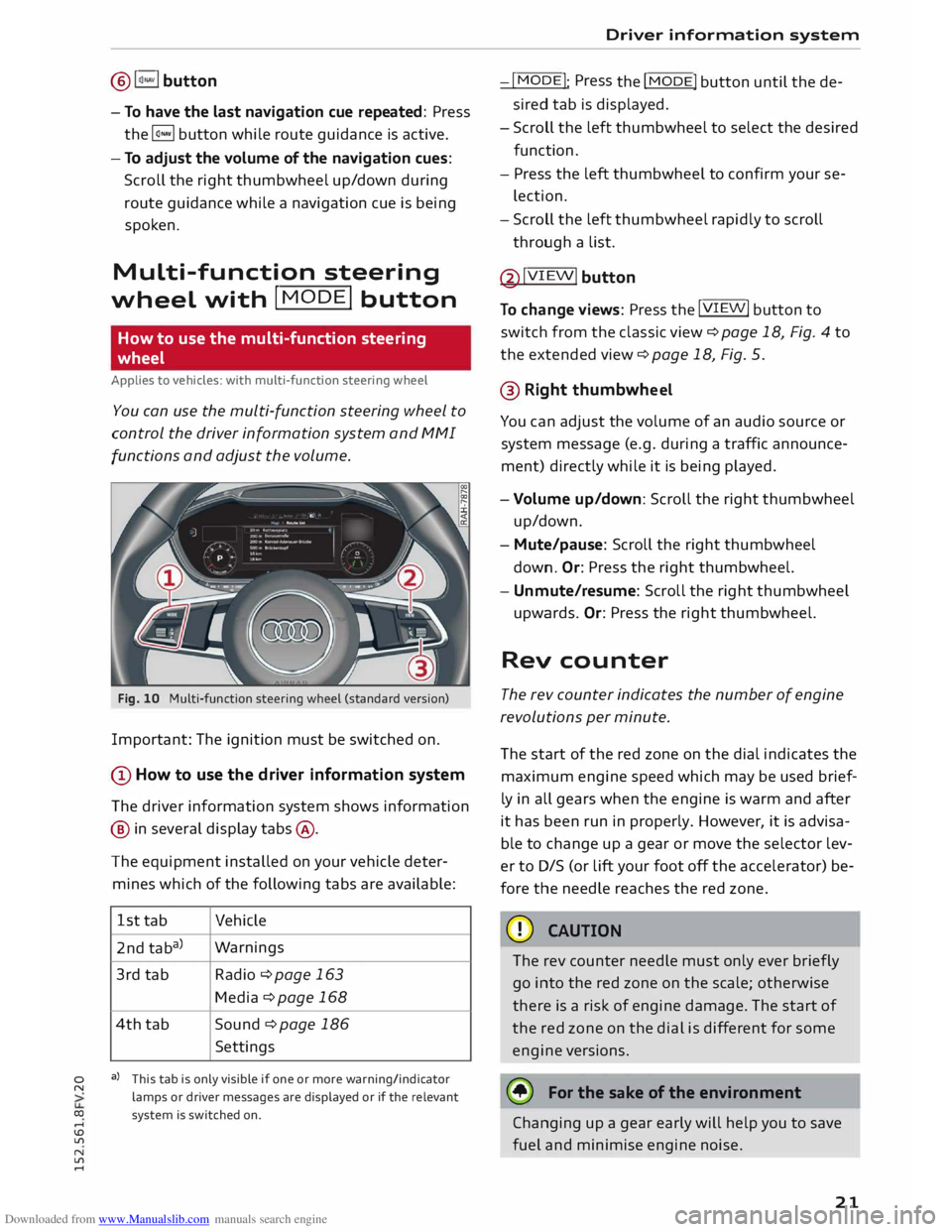
You can use the multi-function steering wheel to
control the driver information system and MMI
functions and adjust the volume.
Fig. 10 Multi-function steering wheel (standard version)
Important: The ignition must be switched on.
(D How to use the driver information system
The driver information system shows information
@ in several display tabs@.
The equipment installed on your vehicle deter
mines which of the following tabs are available:
1st tab Vehicle
2nd taba) Warnings
3rd tab
Radio ¢page 163
Media ¢ page 168
4th tab
Sound ¢ page 186
Settings
a) This tab is only visible if one or more warning/indicator
lamps or driver messages are displayed or if the relevant
system is switched on. Driver
information system
-I MODE!
: Press
the I
MODE! button until the de
sired tab is displayed.
- Scroll the left thumbwheel to select the desired
function.
- Press the left thumbwheel to confirm your se
lection.
- Scroll the left thumbwheel rapidly to scroll
through a list.
@ !VIEW!
button
To change views: Press the !VIEW!
button to
switch from the classic view¢ page 18, Fig. 4 to
the extended view¢ page 18, Fig. 5.
@ Right thumbwh eel
You can adjust the volume of an audio source or
system message (e.g. during a traffic announce
ment) directly while it is being played.
- Volume up/down: Scroll the right thumbwheel
up/down.
- Mute/pause: Scroll the right thumbwheel
down. Or:
Press the right thumbwheel.
- Unmute/resume: Scroll the right thumbwheel
upwards. Or: Press the right thumbwheel.
Rev counter
The rev counter indicates the number of engine
revolutions per minute.
The start of the red zone on the dial indicates the
maximum engine speed which may be used brief
ly in all gears when the engine is warm and after
it has been run in properly. However, it is advisa
ble to change up a gear or move the selector lev
er to D/S (or lift your foot off the accelerator) be
fore the needle reaches the red zone.
CD CAUTION
The rev counter needle must only ever briefly
go into the red zone on the scale; otherwise
there is a risk of engine damage. The start of
the red zone on the dial is different for some
engine versions.
@ For the sake of the environment
Changing up a gear early will help you to save
fuel and minimise engine noise.
21
Page 24 of 284
Downloaded from www.Manualslib.com manuals search engine Driver
information system
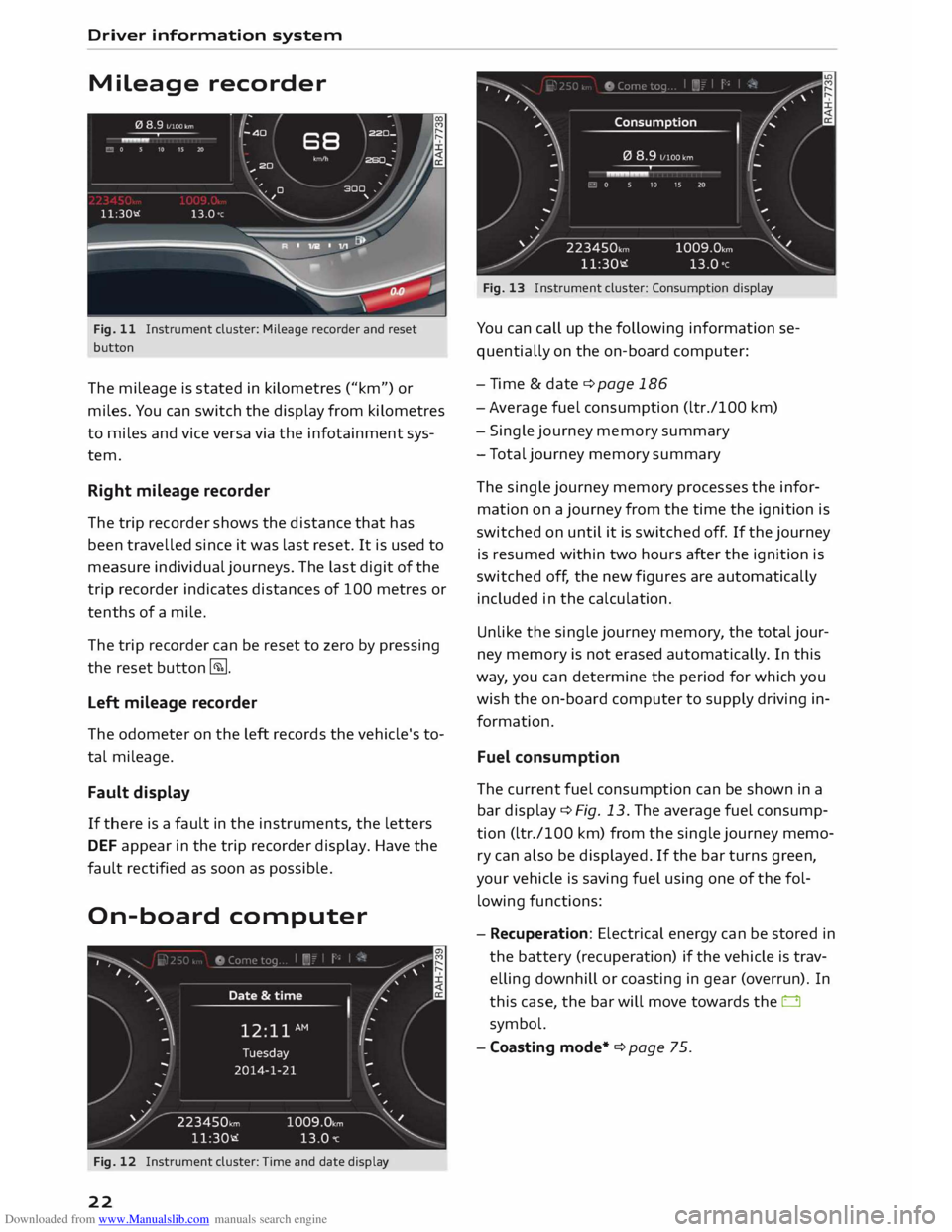
Mileage recorder
Fig. 11 Instrument cluster: Mileage recorder and reset
button
The mileage is stated in kilometres ("km") or
miles. You can switch the display from kilometres
to miles and vice versa via the infotainment sys
tem.
Right mileage recorder
The trip recorder shows the distance that has
been travelled since it was last reset. It is used to
measure individual journeys. The last digit of the
trip recorder indicates distances of 100 metres or
tenths of a mile.
The trip recorder can be reset to zero by pressing
the reset button �-
Left mileage recorder
The odometer on the left records the vehicle's to
tal mileage.
Fault display
If there is a fault in the instruments, the letters
DEF appear in the trip recorder display. Have the
fault rectified as soon as possible.
On-board computer
Fig. 12 Instrument cluster: Time and date display
22 Fig.
13 Instrument cluster: Consumption display
You can call up the following information se
quentially on the on-board computer:
- Time & date ¢ page 186
- Average fuel consumption (ltr./100 km)
- Single journey memory summary
- Total journey memory summary
The single journey memory processes the infor
mation on a journey from the time the ignition is
switched on until it is switched off. If the journey
is resumed within two hours after the ignition is
switched off, the new figures are automatically
included in the calculation.
Unlike the single journey memory, the total jour
ney memory is not erased automatical ly. In this
way, you can determine the period for which you
wish the on-board computer to supply driving in
formation.
Fuel consumption
The current fuel consumption can be shown in a
bar display ¢ Fig. 13. The average fuel consump
tion (ltr./100 km) from the single journey memo
ry can also be displayed. If the bar turns green,
your vehicle is saving fuel using one of the fol
lowing functions:
- Recuperation: Electrical energy can be stored in
the battery (recuperation) if the vehicle is trav
elling downhill or coasting in gear (overrun). In
this case, the bar will move towards the 0
symbol.
- Coasting mode*¢ page 75.
Page 54 of 284
Downloaded from www.Manualslib.com manuals search engine Seats
and storage
Roof carrier
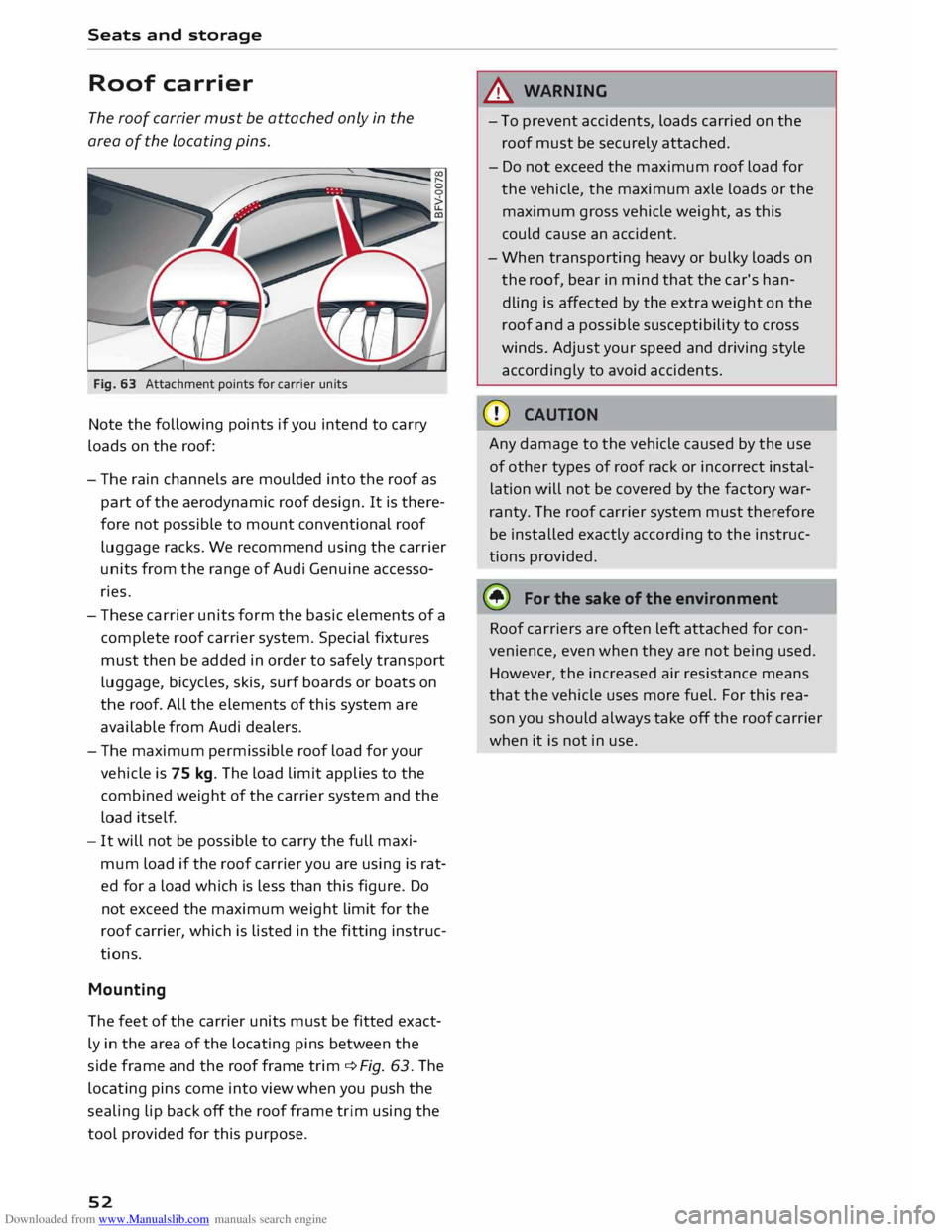
The roof carrier must be attached only in the
area of the Locating pins.
Fig. 63 Attachment points for carrier units
Note the following points if you intend to carry
loads on the roof:
- The rain channels are moulded into the roof as
part of the aerodynamic roof design. It is there
fore not possible to mount conventional roof
luggage racks. We recommend using the carrier
units from the range of Audi Genuine accesso
ries.
- These carrier units form the basic elements of a
complete roof carrier system. Special fixtures
must then be added in order to safely transport
luggage, bicycles, skis, surf boards or boats on
the roof. All the elements of this system are
available from Audi dealers.
- The maximum permissible roof load for your
vehicle is 75 kg. The load limit applies to the
combined weight of the carrier system and the
load itself.
- It will not be possible to carry the full maxi
mum load if the roof carrier you are using is rat
ed for a load which is less than this figure. Do
not exceed the maximum weight limit for the
roof carrier, which is listed in the fitting instruc
tions.
Mounting
The feet of the carrier units must be fitted exact
ly in the area of the locating pins between the
side frame and the roof frame trim qfig. 63. The
locating pins come into view when you push the
sealing lip back off the roof frame trim using the
tool provided for this purpose.
52 &
WARNING
- To prevent accidents, loads carried on the
roof must be securely attached.
- Do not exceed the maximum roof load for
the vehicle, the maximum axle loads or the
maximum gross vehicle weight, as this
could cause an accident.
- When transporting heavy or bulky loads on
the roof, bear in mind that the car's han
dling is affected by the extra weight on the
roof and a possible susceptibility to cross
winds. Adjust your speed and driving style
accordingly to avoid accidents.
Any damage to the vehicle caused by the use
of other types of roof rack or incorrect instal
lation will not be covered by the factory war
ranty. The roof carrier system must therefore
be installed exactly according to the instruc
tions provided.
it!) For the sake of the environment
Roof carriers are often left attached for con
venience, even when they are not being used.
However, the increased air resistance means
that the vehicle uses more fuel. For this rea
son you should always take off the roof carrier
when it is not in use.
Page 55 of 284
Downloaded from www.Manualslib.com manuals search engine 0
N
co
....
\D Lfl
N
Lfl
.... Heating
and cooling
Air conditioner
Description
The air conditioner heats, cools and dehumidifies
the air inside the vehicle. It operates most effec
tively with the windows closed. If the vehicle has
been standing in the sun, it may cool down faster
if you open the windows briefly to let the hot air
escape.
The pollution filter removes impurities, such as
dust and pollen, from the air.
@ For the sake of the environment
If you wish to save fuel, switch off the cooling
mode on the air conditioner by pressing the
Controls for manual air conditioner
Applies to vehicles: with manual air conditioner
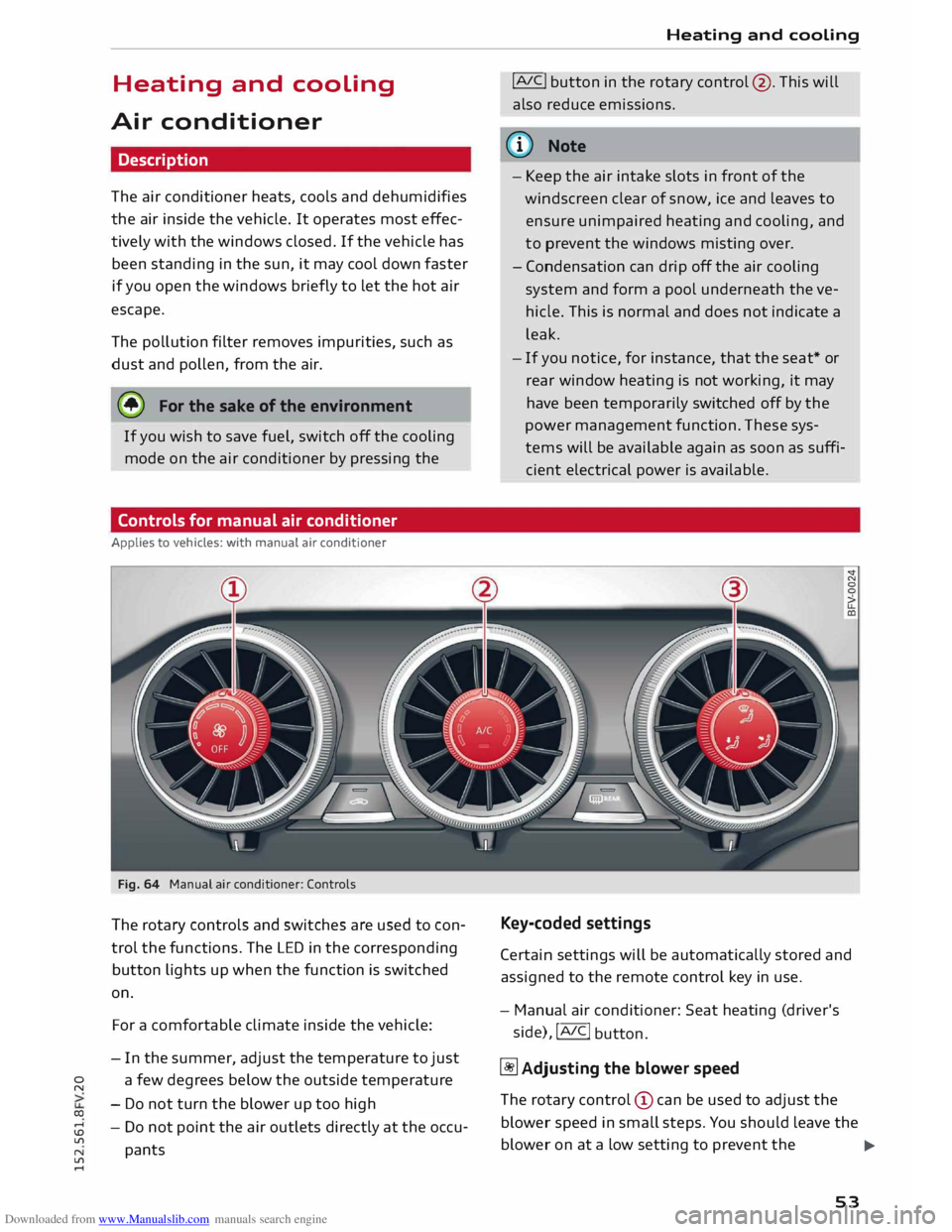
Fig. 64 Manual air conditioner: Controls
The rotary controls and switches are used to con
trol the functions. The LED in the corresponding
button lights up when the function is switched
on.
For a comfortable climate inside the vehicle:
- In the summer, adjust the temperature to just
a few degrees below the outside temperature
- Do not turn the blower up too high
- Do not point the air outlets directly at the occu-
pants Heating
and cooling
!AJC! button in the rotary control @. This will
also reduce emissions.
ijJ} Note
- Keep the air intake slots in front of the
windscreen clear of snow, ice and leaves to
ensure unimpaired heating and cooling, and
to prevent the windows misting over.
- Condensation can drip off the air cooling
system and form a pool underneath the ve
hicle. This is normal and does not indicate a
leak.
- If you notice, for instance, that the seat* or
rear window heating is not working, it may
have been temporarily switched off by the
power management function. These sys
tems will be available again as soon as suffi
cient electrical power is available.
Key-coded settings
Certain settings will be automatically stored and
assigned to the remote control key in use.
- Manual air conditioner: Seat heating (driver's
side), !AIC!
button.
� Adjusting the blower speed
The rotary control (!) can be used to adjust the
blower speed in small steps. You should Leave the
blower on at a Low setting to prevent the
...,
53
Page 60 of 284
Downloaded from www.Manualslib.com manuals search engine Driving
Driving
General notes
Running in
A new vehicle should be run in over a distance of
1,500 km. For the first 1,000 km the engine
speed should not exceed 2/3 of the maximum
per missible engine speed -do not use full throt
tle. From 1,000 to 1,500 km you can gradually
increase the engine rpm and road speed.
During its first few hours of running, the internal
friction in the engine is greater than later on
when all the moving parts have bedded down.
How the vehicle is driven for the first 1,500 km
also influences the engine quality. After this peri
od you should continue driving at moderate en
gine speeds, in particular when the engine is
cold. This helps to reduce wear and tear on the
engine and increases the potential mileage which
can be covered by the engine.
You should also avoid driving with the engine
speed too Low. Change down to a lower gear
when the engine no longer runs "smoothly". Ex
cessively high engine speeds are prevented by an
automatic rev limiter.
Driving through water on roads
Please note the following in order to prevent
damage to the vehicle when driving through wa
ter (e.g. on flooded roads):
- The water level must not be higher than the ve
hicle's underbody.
- Do not drive faster than walking pace.
A WARNING
After driving through water, mud, sludge,
etc., the braking effect can be delayed slightly
due to moisture on the discs and brake pads.
Applying the brakes carefully several times
will remove the moisture and restore the full
braking effect.
58 CD
CAUTION
Parts of the vehicle (e.g. engine, gearbox, run
ning gear or electrical components) can be
badly damaged when driving through water.
ij} Note
- It is advisable to check the depth at the
deepest point before approaching the wa-
ter.
- Do NOT stop the vehicle, drive in reverse or
switch off the engine before you are out of
the water.
- Bear in mind that waves created by oncom
ing traffic could exceed the permissible
wading depth of your vehicle.
- Avoid driving through salt water (corrosion).
How to improve economy and minimise
pollution
Fuel econom y, environmental impact and wear
on the engine, brakes and tyres depend largely
on the way you drive the vehicle. By adopting an
economical driving style and anticipating the
traffic situation ahead, you can reduce fuel con
sumption by 10-15%. The following section gives
you some tips on lessening the impact on the en
vironment and reducing your operating costs at
the same time.
Anticipate well in advance
A car uses most fuel when accelerating. If you an
ticipate hazards and speed changes well in ad
vance, you will need to brake less and thus accel
erate less. Wherever possible, let the car slow
down gradually with a gear engaged, for in
stance when you can see that the next traffic
lights are red.
Change gear early to save fuel
An effective way of saving fuel is to change up
quickly through the gears. Running the engine at
high rpm in the lower gears uses an unnecessary
amount offuel. Press the accelerator slowly and
avoid using the "kick-down" feature.
...,