headlights AUDI TT COUPE 2014 User Guide
[x] Cancel search | Manufacturer: AUDI, Model Year: 2014, Model line: TT COUPE, Model: AUDI TT COUPE 2014Pages: 284, PDF Size: 34.42 MB
Page 45 of 284
Downloaded from www.Manualslib.com manuals search engine 0
N
co
....
\D U'l
N
U'l
.... the
position of switch @ is), the sooner the wind
screen wipers react to moisture on the wind
screen. You can deactivate the rain sensor mode*
on the infotainment system (this will activate the
intermittent wipe mode). Select the following on
the infotainment system: I MENU! button
> Car >
left control button > Vehicle settings > Rain sen
sor > off.
@ -Slow wipe
@- Fast wipe
©- Single wipe. If you hold the lever in this posi
tion, the wipers will switch from slow continuous
wiping to fast continuous wiping after a while.
® -Wash/wipe. The screen is given an extra wipe
a few seconds later to remove any dribbles of wa
ter (if the vehicle is moving and the temperature
is above approx. 4 °C). You can deactivate this
function by moving the lever to position® again
within 10 seconds after the extra wipe. The extra
wipe function is activated again the next time you
switch on the ignition.
Headlight washers*. The headlight washer sys
tem* only operates when the lights are switched
on. The headlights are automatically washed the
first time and every fifth time you move the lever
to position ®·
.&_ WARNING
- The rain sensor* is only intended to assist
the driver. The driver is still obliged to man
ually operate the windscreen wipers as re
quired depending on visibility.
- Do not use water-repellent coatings on the
windscreen. In bad visibility conditions such
as light rain, low sun or when driving at
night these coatings can cause increased
dazzle, which is a serious safety hazard.
Such coatings can also cause the wiper
blades to judder.
- Poor visibility can cause accidents. Always
ensure that the wiper blades are in good
condition ¢ page 44, Changing the wind
screen wiper blades. Lights
and vision
CD CAUTION
- In icy conditions, check that the wiper
blades are not frozen to the windscreen. If
the wiper blades are frozen to the wind
screen when you switch on the windscreen
wipers, this could damage the wiper blades.
- Make sure you switch off the windscreen
wiper system (lever in position 0) before you
use an automatic car wash. This will avoid
inadvertent triggering of the wipers and
possible damage to the wiper system.
(1)) Note
- The windscreen wipers are deactivated when
the ignition is switched off. You can activate
the windscreen wipers after switching the
ignition on again by moving the windscreen
wiper lever to any position.
- Worn or dirty wiper blades can cause smear
ing on the glass. This can also impair the ef
fectiveness of the rain sensor*. Please check
the wiper blades regularly.
- The windscreen washer jets are heated*
when the ignition is switched on if the out
side temperature is low.
- If you stop briefly, e.g. at traffic lights, the
wiper speed setting will automatically be re
duced by one level.
Cleaning windscreen wiper blades
Clean the wiper blades if the wipers leave smear
ing on the glass. Clean the wiper blades using a
soft cloth and a glass cleaning solution.
..,. Set the wiper arms to the service position
¢page 44.
..,. Lift the wiper arms away from the glass.
.&_ WARNING
Dirty wiper blades can impair the driver's view
- risk of accident!
43
Page 67 of 284
Downloaded from www.Manualslib.com manuals search engine 0
N
co
....
\D L/'l
N
L/'l
.... -
The engine has not yet reached the minimum
temperature required for start/stop mode.
- The interior temperature selected on the air
conditioner has not yet been reached.
- The exterior temperature is very high/Low.
- The windscreen is being defrosted ®.
- The parking aid* or park assist* is switched on.
- The battery charge is too Low.
- The steering wheel is close to full Lock or the
vehicle is being steered.
- Reverse gear has just been selected.
- The vehicle is on a steep gradient.
rj,J will
appear in the infotainment display to in
dicate this status.
Engine cuts in again automatically
The stop phase is interrupted in the following sit
uations, for example. The engine cuts in auto
matically without intervention from the driver.
-The vehicle starts to roll (e.g. on a hill).
- The interior temperature deviates from the air
conditioner setting.
- The windscreen is being defrosted ®.
- The brake pedal is pressed several times in suc-
cession.
- The battery charge drops to an insufficient Lev-
el.
- The power consumption is high.
Ignition is switched off automatically
To prevent the battery from being discharged,
the ignition will be switched off automatically if
certain conditions are met. For instance:
- The vehicle has already been driven.
- The start/stop system has switched off the en-
gine.
- The driver's door is opened.
- The driver's seat belt is unbuckled.
- The brake pedal is not pressed.
- The vehicle is stationary.
If the dipped beam headlights are on when this
happens, the side Lights will be turned on instead
and the message Side lights will be automatical
ly switched off in 30 minutes. See owner's man
ual will appear on the infotainment display. After Driving
approx. 30 minutes, or when you Lock the vehicle,
the side Lights will be switched off.
If the start/stop system has not stopped the en
gine or if you have switched off the start/stop
system manually, the engine will continue run
ning and the ignition will not be switched off au
tomatically¢,&..
A WARNING
Never run the engine in confined spaces. The
exhaust gases are toxic -risk of poisoning!
(Q) Note
If you select D, N or S (on vehicles with auto
matic gearbox) after selecting reverse gear,
the car must have been moving at over
10 km/h before the system can switch off the
engine again.
Switching the start/stop system off and on
manually
Applies to vehicles: with start/stop system
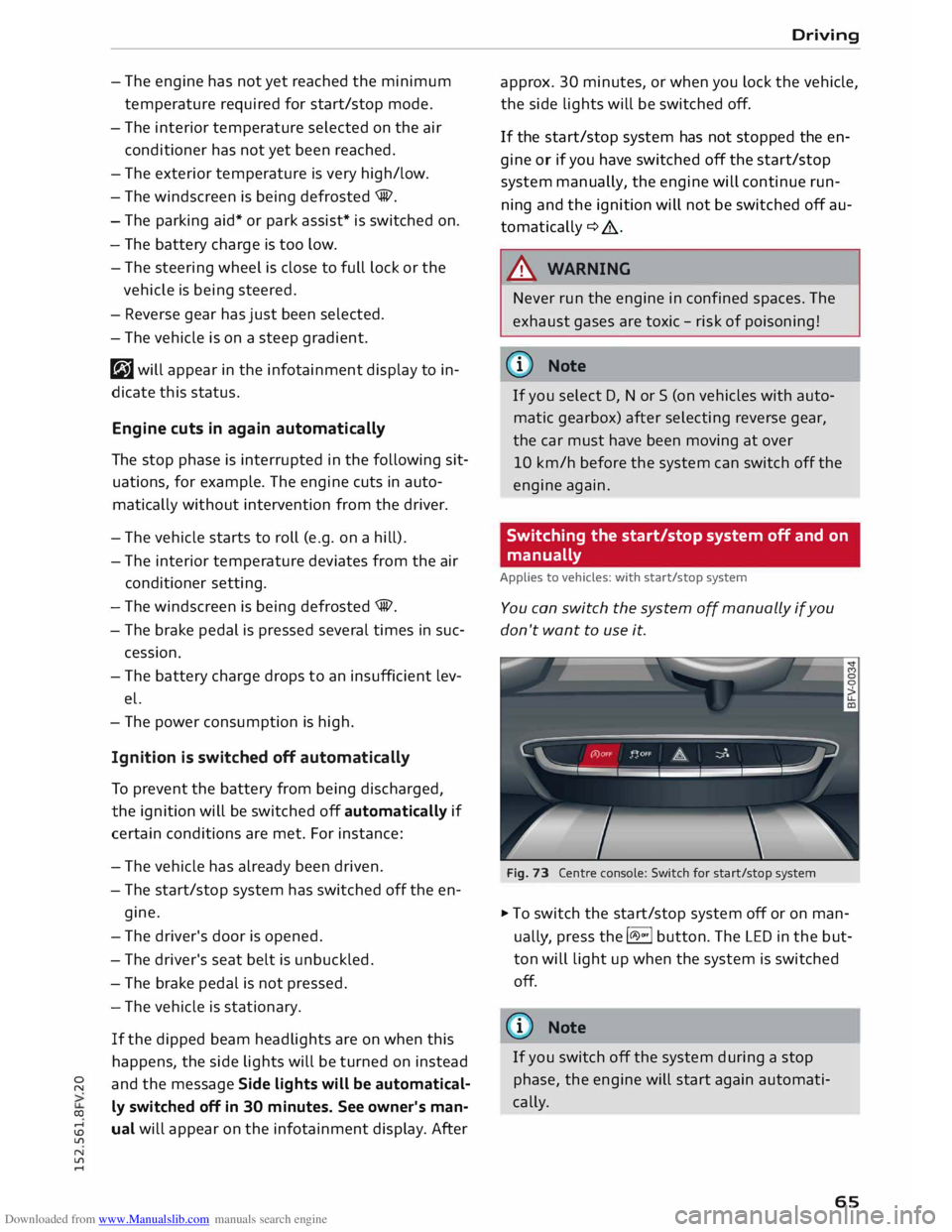
You can switch the system off manually if you
don't want to use it.
Fig. 73 Centre console: Switch for start/stop system
� To switch the start/stop system off or on man
ually, press the l(il.)"'
I button. The LED in the but
ton will Light up when the system is switched
off.
(1)) Note
If you switch off the system during a stop
phase, the engine will start again automati
cally.
65
Page 239 of 284
Downloaded from www.Manualslib.com manuals search engine 0
N
co
....
\D L/'l
N
L/'l
.... vehicle
with the ignition switched on - risk
of accident!
- To avoid cutting yourself on sharp metal
parts, always wear suitable protection when
cleaning the underside of the car or inside
the wheel arches.
- After the car has been washed, the full brak
ing effect can be delayed by moisture (or in
winter by ice) on the discs and brake pads -
risk of accident! The brakes should be dried
by pressing the pedal to restore full braking
effect.
CD CAUTION
- Before washing the vehicle in an automatic
car wash, please make sure to retract the
exterior mirrors and, if necessary, retract
the automatic rear spoiler* to prevent dam
age. Always use the electrical power control
to fold the mirrors in/out on vehicles with
electrically retractable exterior mirrors*.
Notes on cleaning and care
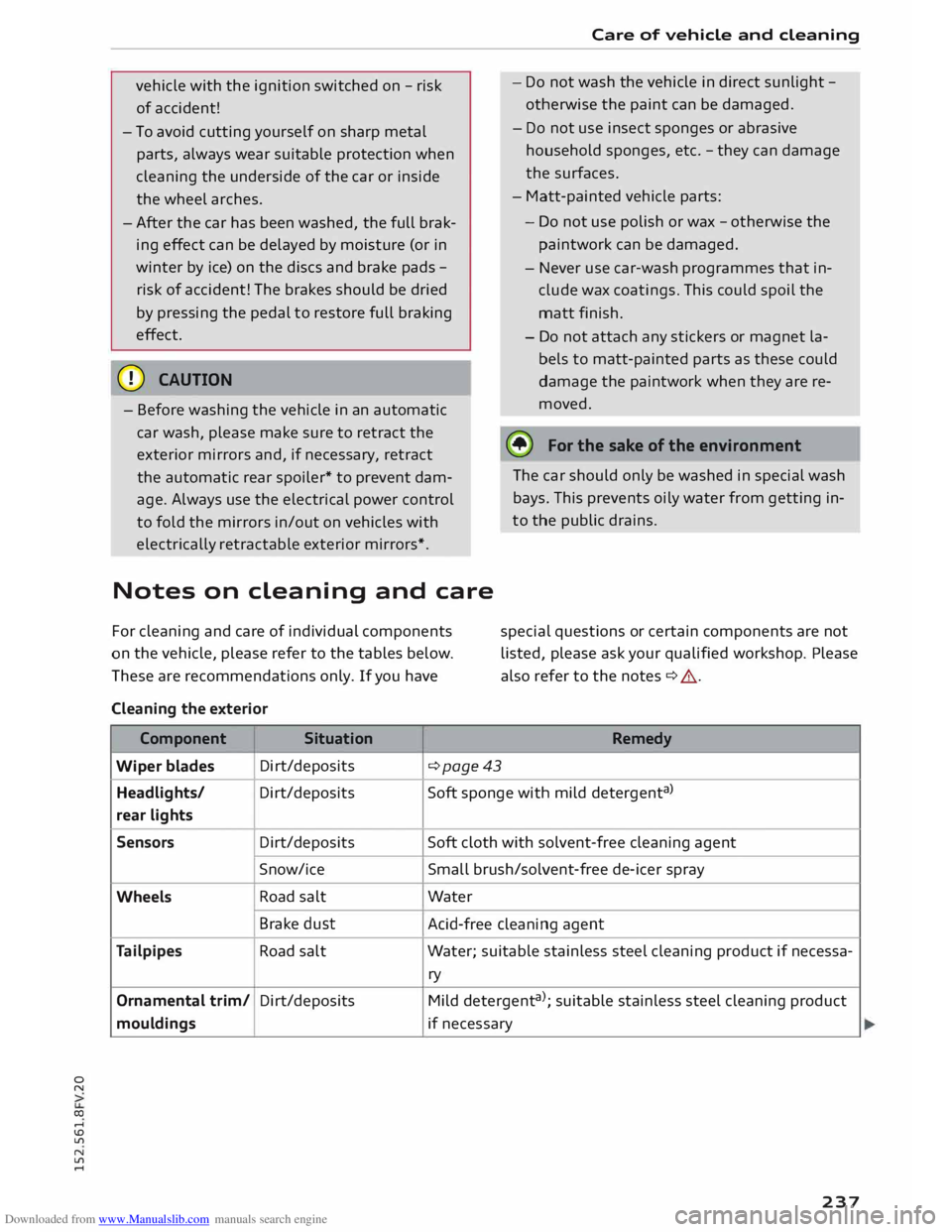
For cleaning and care of individual components
on the vehicle, please refer to the tables below.
These are recommendations only. If you have
Cleaning the exterior
Component Situation Care
of vehicle and cleaning
- Do not wash the vehicle in direct sunlight -
otherwise the paint can be damaged.
- Do not use insect sponges or abrasive
household sponges, etc. -they can damage
the surfaces.
- Matt-painted vehicle parts:
- Do not use polish or wax -otherwise the
paintwork can be damaged.
- Never use car-wash programmes that in
clude wax coatings. This could spoil the
matt finish.
- Do not attach any stickers or magnet la
bels to matt-painted parts as these could
damage the paintwork when they are re
moved.
@ For
the sake of the environment
The car should only be washed in special wash
bays. This prevents oily water from getting in
to the public drains.
special questions or certain components are not
listed, please ask your qualified workshop. Please
also refer to the notes ¢ &. .
Remedy
Wiper blades Di
rt/deposits
¢page43
Headlights/ Di rt/deposits Soft
sponge with mild detergent a
>
rear lights
Sensors Dirt/deposits
Soft
cloth with solvent-free cleaning agent
Snow/ice Small brush/solvent-free de-icer spray
Wheels Road
salt Water
Brake dust
Acid-free cleaning agent
Tailpipes Road
salt Water; suitable stainless steel cleaning product if necessa-
ry
Ornamental trim/ Dirt/deposits
Mild detergent a
>
; suitable stainless steel cleaning product
mouldings if necessary
237
Page 241 of 284
Downloaded from www.Manualslib.com manuals search engine 0
N
co
....
\D Lfl
N
Lfl
.... Care
of vehicle and cleaning
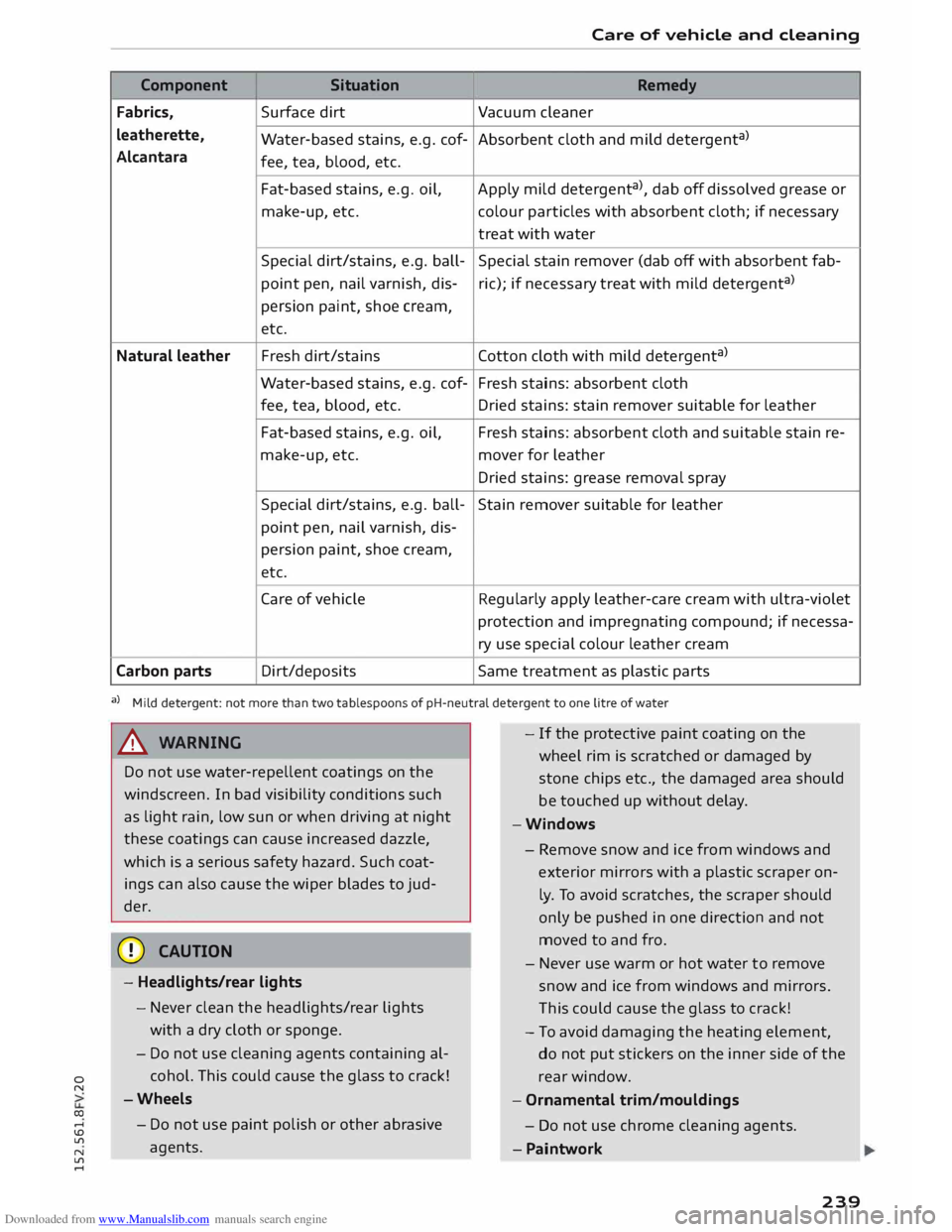
Component Situation
Remedy
Fabrics, Surface
dirt
Vacuum cleaner
leatherette, Water-based stains, e.g. cof- Absorbent cloth and mild detergent a
)
Alcantara fee, tea, blood, etc.
Fat-based stains, e.g. oil,
Apply mild detergent a
), dab off dissolved grease or
make-up, etc. colour
particles with absorbent cloth; if necessary
treat with water
Special dirt/stains, e.g. ball- Special stain remover (dab off with absorbent fab-
point pen, nail varnish, dis-ric);
if necessary treat with mild detergent a
)
persion paint, shoe cream,
etc.
Natural leather Fresh
dirt/stains Cotton cloth with mild detergent a
)
Water-based stains, e.g. cof- Fresh stains: absorbent cloth
fee, tea, blood, etc.
Dried stains: stain remover suitable for leather
Fat-based stains, e.g. oil, Fresh stains: absorbent cloth and suitable stain re-
make-up, etc. mover for leather
Dried stains: grease removal spray
Special dirt/stains, e.g. ball-
Stain remover suitable for leather
point pen, nail varnish, dis-
persion paint, shoe cream,
etc.
Care of vehicle Regularly apply leather-care cream with ultra-violet
protection and impregnating compound; if necessa-
ry use special colour leather cream
Carbon parts Dirt/deposits
Same treatment as plastic parts
a) Mild detergent: not more than two tablespoons of pH-neutral detergent to one litre of water
A WARNING
Do not use water-repellent coatings on the
windscreen. In bad visibility conditions such
as light rain, low sun or when driving at night
these coatings can cause increased dazzle,
which is a serious safety hazard. Such coat
ings can also cause the wiper blades to jud
der.
CD CAUTION
- Headlights/rear lights
- Never clean the headlights/rear lights
with a dry cloth or sponge.
- Do not use cleaning agents containing al
cohol. This could cause the glass to crack!
-Wheels
- Do not use paint polish or other abrasive
agents. -
If the protective paint coating on the
wheel rim is scratched or damaged by
stone chips etc., the damaged area should
be touched up without delay.
-Windows
- Remove snow and ice from windows and
exterior mirrors with a
plastic
scraper on
ly. To avoid scratches, the scraper should
only be pushed in one direction and not
moved to and fro.
- Never use warm or hot water to remove
snow and ice from windows and mirrors.
Th is could cause the glass to crack!
- To avoid damaging the heating element,
do not put stickers on the inner side of the
rear window.
- Ornamental trim/mouldings
- Do not use chrome cleaning agents .
- Paintwork
239
Page 251 of 284
Downloaded from www.Manualslib.com manuals search engine N
....
Lfl
N
Lfl
.... Starting
the engine
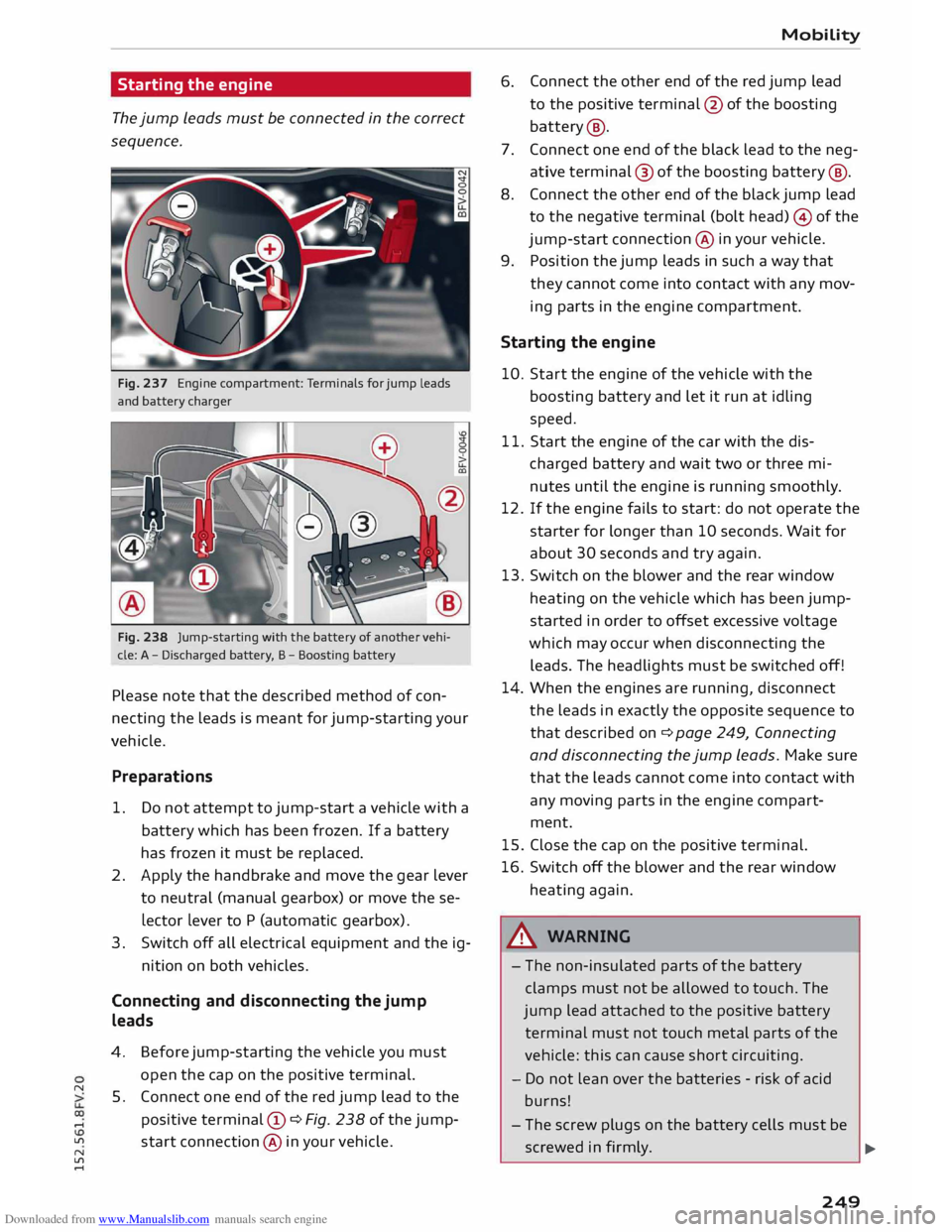
The jump leads must be connected in the correct
sequence.
Fig. 237 Engine compartment: Terminals for jump leads
and battery charger
Fig. 238 Jump-starting with the battery of another vehi
cle: A -Discharged battery, B -Boosting battery
Please note that the described method of con
necting the leads is meant for jump-starting your
vehicle.
Preparations
1. Do not attempt to jump-start a vehicle with a
battery which has been frozen. If a battery
has frozen it must be replaced.
2. Apply the handbrake and move the gear lever
to neutral (manual gearbox) or move these
lector Lever to P (automatic gearbox).
3. Switch off all electrical equipment and the ig-
nition on both vehicles.
Connecting and disconnecting the jump
leads
4.
5. Before
jump-starting the vehicle you must
open the cap on the positive terminal.
Connect one end of the red jump lead to the
positive terminal (!) ¢Fig. 238 ofthejump
start connection @ in your vehicle. Mobility
6. Connect
the other end of the red jump lead
to the positive terminal @ofthe boosting
battery @.
7. Connect one end of the black lead to the neg
ative terminal@ of the boosting [email protected] the other end of the black jump lead
to the negative terminal (bolt head) © of the
jump-start connection@ in your vehicle.
9.
Position the jump leads in such a way that
they cannot come into contact with any mov
ing parts in the engine compartment.
Starting the engine
10. Start the engine of the vehicle with the
boosting battery and let it run at idling
speed.
11. Start the engine of the car with the dis
charged battery and wait two or three mi
nutes until the engine is running smoothly.
12. If the engine fails to start: do not operate the
starter for longer than 10 seconds. Wait for
about 30 seconds and try again.
13. Switch
on the blower and the rear window
heating on the vehicle which has been jump
started in order to offset excessive voltage
which may occur when disconnecting the
leads. The headlights must be switched off!
14. When the engines are running, disconnect
the leads in exactly the opposite sequence to
that described on¢ page 249, Connecting
and disconnecting the jump leads. Make sure
that the leads cannot come into contact with
any moving parts in the engine compart
ment.
15. Close the cap on the positive terminal.
16. Switch off the blower and the rear window
heating again.
_& WARNING
- The non-insulated parts of the battery
clamps must not be allowed to touch. The
jump lead attached to the positive battery
terminal must not touch metal parts of the
vehicle: this can cause short circuiting.
- Do not lean over the batteries -risk of acid
burns!
- The screw plugs on the battery cells must be
screwed in firmly.
.,..
249
Page 258 of 284
Downloaded from www.Manualslib.com manuals search engine Fuses
and bulbs
No. Electrical
equipment
F40 Cigarette lighter, electrical sockets
F41 SCR relay and delivery unit
F42 Central locking system
F43 On-board computer
F45 Electrically
adjustable seat (driver's side)
F49 Starter, clutch sensor
FSO ESC
valves
F53 Rear window heating
Th e seats with electric adjustment* are protected
by circuit breakers. These reset automatically af
ter a few seconds when the overload has been
corrected.
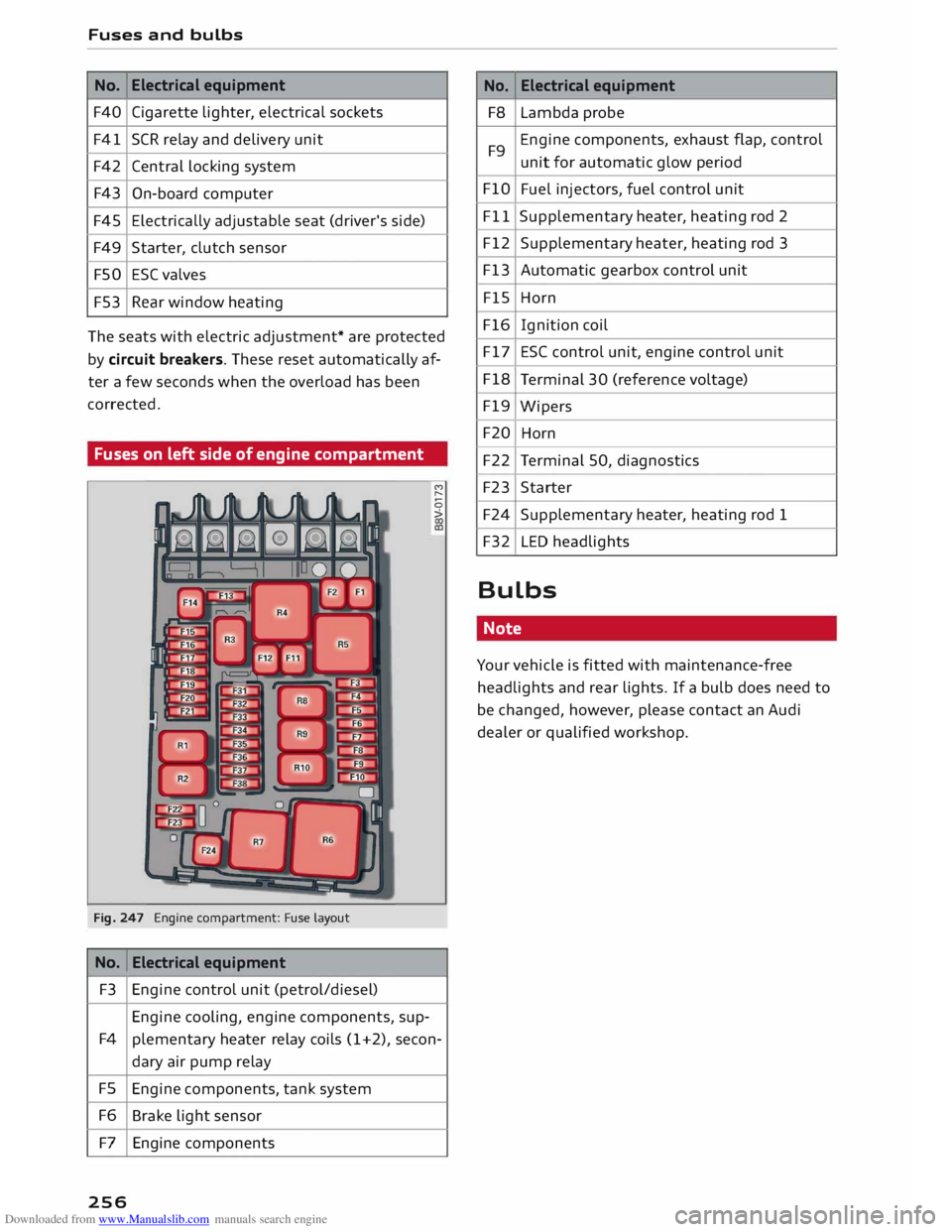
Fuses on left side of engine compartment
Fig. 247 Engine compartment: Fuse la
yout
No. Electrical
equipment
F3 Engine control unit (petrol/diesel)
Engine cooling, engine components, sup-M
,...,
0
>
F4 plementary heater relay coils (1+2), secon-
dary air pump relay
FS Engine components, tank system
F6 Brake light sensor
F7 Engine components
256 No.
Electrical
equipment
F8 Lambda probe
F9 Engine
components, exhaust flap, control
unit for automatic glow period
FlO Fuel injectors, fuel control unit
Fll Supplementary
heater, heating rod 2
F12 Supplementary heater, heating rod 3
F13 Automatic gearbox control unit
FlS Horn
F16 Ignition coil
F17 ESC control unit, engine control unit
F18 Terminal 30 (reference voltage)
F19 Wipers
F20 Horn
F22 Terminal 50, diagnostics
F23 Starter
F24 Supplementary heater, heating rod 1
F32 LED headlights
Bulbs Note
Your vehicle is fitted with maintenance-free
headlights and rear lights. If a bulb does need to
be changed, however, please contact an Audi
dealer or qualified workshop.
Page 266 of 284
Downloaded from www.Manualslib.com manuals search engine Index
Google Earth
Google Street View
................. .
Import ing myAudi contacts .......... .
Logging into myAudi ................ . 159
159
133
140
myAudi destination . . . . . . . . . . . . . . . . . . 151
Navigation . . . . . . . . . . . . . . . . . . . . . 140, 151
Notes . . . . . . . . . . . . . . . . . . . . . . . . . . . . . 145
Online traffic information . . . . . . . . . . . . . 161
Options menu . . . . . . . . . . . . . . . . . . . . . . .
143
Personal hotspot . . . . . . . . . . . . . . . . . . . .
139
Preview . . . . . . . . . . . . . . . . . . . . . . . . . . . . 140
Requirements . . . . . . . . . . . . . . . . . . . . . . .
137
Search area . . . . . . . . . . . . . . . . . . . . . . . . .
140
Settings . . . . . . . . . . . . . . . . . . . . . . . . . . .
143
SIM card reader . . . . . . . . . . . . . . . . . . . . .
138
Troubleshooting . . . . . . . . . . . . . . . . . . . . .
146
Audi connect services
Media . . . . . . . . . . . . . . . . . . . . . . . . . . . . . 143
Navigation . . . . . . . . . . . . . . . . . . . . . . . . . 142
Options . . . . . . . . . . . . . . . . . . . . . . . . . . . .
143
Telephone . . . . . . . . . . . . . . . . . . . . . . . . . .
143
Audi connect services, using
MMI control console . . . . . . . . . . . . . . . . . 137
Speech dialogue system 118
Audi magnetic ride
see Suspension control . . . . . . . . . . . . . . . . 90
Audi music interface . . . . . . . . . . . . . . . . . . .
174
Cables . . . . . . . . . . . . . . . . . . . . . . . . . . . . .
174
USB adapters . . . . . . . . . . . . . . . . . . . . . . .
174
Audi music stream
see Wi-Fi audio player . . . . . . . . . . . . . . . .
172
Audio files . . . . . . . . . . . . . . . . . . . . . . . . . . .
179
Audio input
see AUX input ................... 175,
176
Audio player
Bluetooth audio player . . . . . . . . . . . . . . . 171
Wi-Fi audio player . . . . . . . . . . . . . . . . . . . 172
Audio track . . . . . . . . . . . . . . . . . . . . . . . . . . 181
Audi phone box . . . . . . . . . . . . . . . . . . . . . . . 125
Audi side assist
see Side assist . . . . . . . . . . . . . . . . . . . . . . .
87
AUTO Automatic air conditioner . . . . . . . . . . . . . . 55
Automatic headlights . . . . . . . . . . . . . . . . . 37
Auto Lock (central locking system) . . . . . . . .
25
Automatic air conditioner
see Air conditioner (automatic) . . . . . . . . . .
55
264 Automatic
gearbox . . . . . . . . . . . . . . . . . . . . . 70
Back-up programme . . . . . . . . . . . . . . . . . . 77
Downhill speed control . . . . . . . . . . . . . . . . 74
Driving tips . . . . . . . . . . . . . . . . . . . . . . . . . . 72
Kick-down . . . . . . . . . . . . . . . . . . . . . . . . . . . 75
Launch control programme . . . . . . . . . . . . . 76
Malfunction . . . . . . . . . . . . . . . . . . . . . . . . . 71
Manual gear selection . . . . . . . . . . . . . . . . . 75
Manual release of selector lever (left-hand
drive) . . . . . . . . . . . . . . . . . . . . . . . . . . . . . .
78
Manual release of selector lever (right-hand
drive) . . . . . . . . . . . . . . . . . . . . . . . . . . . . . .
79
Selector lever lock . . . . . . . . . . . . . . . . . . . . 71
Selector lever positions . . . . . . . . . . . . . . . . 70
Steering wheel with paddle levers . . . . . . . 75
tiptronic . . . . . . . . . . . . . . . . . . . . . . . . . . . .
75
Automatic zoom . . . . . . . . . . . . . . . . . . . . . . 158
AUX input ....................... 175,176
Average fuel consumption . . . . . . . . . . . . . . . 22
Average speed . . . . . . . . . . . . . . . . . . . . . . . . . 22
B
Background lighting . . . . . . . . . . . . . . . . . . . . 40
Balance (sound) . . . . . . . . . . . . . . . . . . . . . . 190
Bandages see First-aid kit . . . . . . . . . . . . . . . . . . . . . . 241
Bass (sound) . . . . . . . . . . . . . . . . . . . . . . . . . 190
Battery . . . . . . . . . . . . . . . . . . . . . . . . . . . . . 226
Charge . . . . . . . . . . . . . . . . . . . . . . . . . 13, 106
Charging . . . . . . . . . . . . . . . . . . . . . . . . . . . 228
Connecting/disconnecting . . . . . . . . . . . . . 226
Indicator lamp . . . . . . . . . . . . . . . . . . . . . . . 13
Long periods of non-use . . . . . . . . . . . . . .
226
Power management . . . . . . . . . . . . . . . . . .
106
Replacing . . . . . . . . . . . . . . . . . . . . . . . . . .
228
Winter conditions . . . . . . . . . . . . . . . . . . .
226
Battery, charging . . . . . . . . . . . . . . . . . . . . .
125
Belts see Seat belts . . . . . . . . . . . . . . . . . . . . . . .
204
Better route . . . . . . . . . . . . . . . . . . . . . . . . .
160
Biodiesel . . . . . . . . . . . . . . . . . . . . . . . . . . . . 217
Bioethanol (fuel) . . . . . . . . . . . . . . . . . . . . . 217
Blower Automatic air conditioner . . . . . . . . . . . . . .
55
Manual air conditioner. . . . . . . . . . . . . . . . .
53
Page 269 of 284
Downloaded from www.Manualslib.com manuals search engine Deleting
Bluetooth device . . . . . . . . . . . . . . . . . . . .
134
Call list . . . . . . . . . . . . . . . . . . . . . . . . . . . .
134
Contact . . . . . . . . . . . . . . . . . . . . . . . .
133, 135
Entry .......................... 111, 113
Favourites . . . . . . . . . . . . . . . . . . . . . .
129, 153
Home address . . . . . . . . . . . . . . . . . . . . . .
153
myAudi special destinations . . . . . . . . . . . 153
Text messages . . . . . . . . . . . . . . . . . . . . . . 130
Deluxe automatic air conditioner
see Air conditioner (automatic) . . . . . . . . . . 55
Demo mode
see Presentation mode . . . . . . . . . . . . . . . 153
Destination from map . . . . . . . . . . . . . . . . .
149
Destination, entering . . . . . . . . . . . . . . 147, 148
Address . . . . . . . . . . . . . . . . . . . . . . . . . . . . 148
Coordinates . . . . . . . . . . . . . . . . . . . . . . . . 151
Favourites . . . . . . . . . . . . . . . . . . . . . . . . . .
149
From directory . . . . . . . . . . . . . . . . . . . . . .
149
Home address . . . . . . . . . . . . . . . . . . . . . .
149
Last destination . . . . . . . . . . . . . . . . . . . . .
148
myAudi . . . . . . . . . . . . . . . . . . . . . . . . . . . . 151
Online search . . . . . . . . . . . . . . . . . . . . . . . 151
Search function . . . . . . . . . . . . . . . . . . . . .
148
Special destination . . . . . . . . . . . . . . . . . . 150
Speech dialogue system . . . . . . . . . . . . . . 119
Stopover . . . . . . . . . . . . . . . . . . . . . . . . . . . 152
Diagnostic connection . . . . . . . . . . . . . . . . . 107
Diesel Diesel particulate filter . . . . . . . . . . . . . . . 220
Draining fuel filter . . . . . . . . . . . . . . . . . . . . 16
Engine oil . . . . . . . . . . . . . . . . . . . . . . . . . . 223
Fuel ............................... 217
Indicator lamp . . . . . . . . . . . . . . . . . . . . . . . 15
Preheating (glow plugs) . . . . . . . . . . . . . . .
60
Digital compass . . . . . . . . . . . . . . . . . . . . . . . 44
Dimensions Vehicle dimensions . . . . . . . . . . . . . . . . . .
257
Dipped headlights . . . . . . . . . . . . . . . . . . . . . 37
Directional tread
(tyres) . . . . . . . . . . . . . . . . 247
Directory . . . . . . . . . . . . . . . . . . . . . . . . . . . . 131
Connection settings . . . . . . . . . . . . . . . . . . 188
Memor y capacity . . . . . . . . . . . . . . . . . . . . 135
MMitouch ......................... 111
� Navigation
destination . . . . . . . . . . . . . . . 149
co Postal address . . . . . . . . . . . . . . . . . . . . . . 149
� Search
function ................. 131, 132
N
ll'l
.... Index
Settings . . . . . . . . . . . . . . . . . . . . . . . . . . .
135
Sort order . . . . . . . . . . . . . . . . . . . . . . . . . .
135
Storage locations . . . . . . . . . . . . . . . . . . . .
131
Storing a destination . . . . . . . . . . . . . . . . .
153
Symbols . . . . . . . . . . . . . . . . . . . . . . . . . . . 149
Directory entry
see Contact . . . . . . . . . . . . . . . . . . . . . . . . .
133
Display Brightness . . . . . . . . . . . . . . . . . . . . . . . . . 186
Multi-function steering wheel. . . . . . . . 19, 21
Navigation map . . . . . . . . . . . . . . . . . . . . .
156
Settings . . . . . . . . . . . . . . . . . . . . . . . . . . .
186
Traffic information . . . . . . . . . . . . . . . . . . .
160
see also Infotainment display . . . . . . . . . .
186
Distance covered . . . . . . . . . . . . . . . . . . . . . . .
22
Door catches, bonnet and boot lid warning .
18
Doors Locking doors manually . . . . . . . . . . . . . . . .
30
Door safelock . . . . . . . . . . . . . . . . . . . . . . . . .
31
Downhill speed control . . . . . . . . . . . . . . . . . 74
Draining fuel
filter (diesel) . . . . . . . . . . . . . . . 16
Driver information system . . . . . . . . . . . . . . . 21
CD/radio display . . . . . . . . . . . . . . . . . . . . . . 18
Door catches, bonnet and boot lid warning
18
Driver messages . . . . . . . . . . . . . . . . . . . . . . . 9
On-board computer . . . . . . . . . . . . . . . . . . .
22
Outside temperature display . . . . . . . . . . . . 18
Service interval display . . . . . . . . . . . . . . . 229
Switching between displays . . . . . . . . . 19, 21
Warning and
indicator lamps . . . . . . . . . . . . 9
Drives see Media drives . . . . . . . . . . . . . . . . . . . . .
168
Drive select . . . . . . . . . . . . . . . . . . . . . . . . . . .
90
Indicator lamp . . . . . . . . . . . . . . . . . . . . . . . 17
Driving away from a standstill
Hill hold assist . . . . . . . . . . . . . . . . . . . . . . .
69
Hold assist . . . . . . . . . . . . . . . . . . . . . . . . . .
68
Parking brake auto release . . . . . . . . . . . . . 67
Driving on left . . . . . . . . . . . . . . . . . . . . . . . . .
40
Driving on right . . . . . . . . . . . . . . . . . . . . . . . .
40
Driving through water . . . . . . . . . . . . . . . . . .
58
Driving time . . . . . . . . . . . . . . . . . . . . . . . . . . 22
Dust filter
see Pollution filter . . . . . . . . . . . . . . . . . . . . 53
DVD ..... ........................... 169
Child lock . . . . . . . . . . . . . . . . . . . . . . . . . . 183
Drive . . . . . . . . . . . . . . . . . . . . . . . . . . . . . . 169
267
Page 271 of 284
Downloaded from www.Manualslib.com manuals search engine 0
N
co
....
\D L/'l
N
L/'l
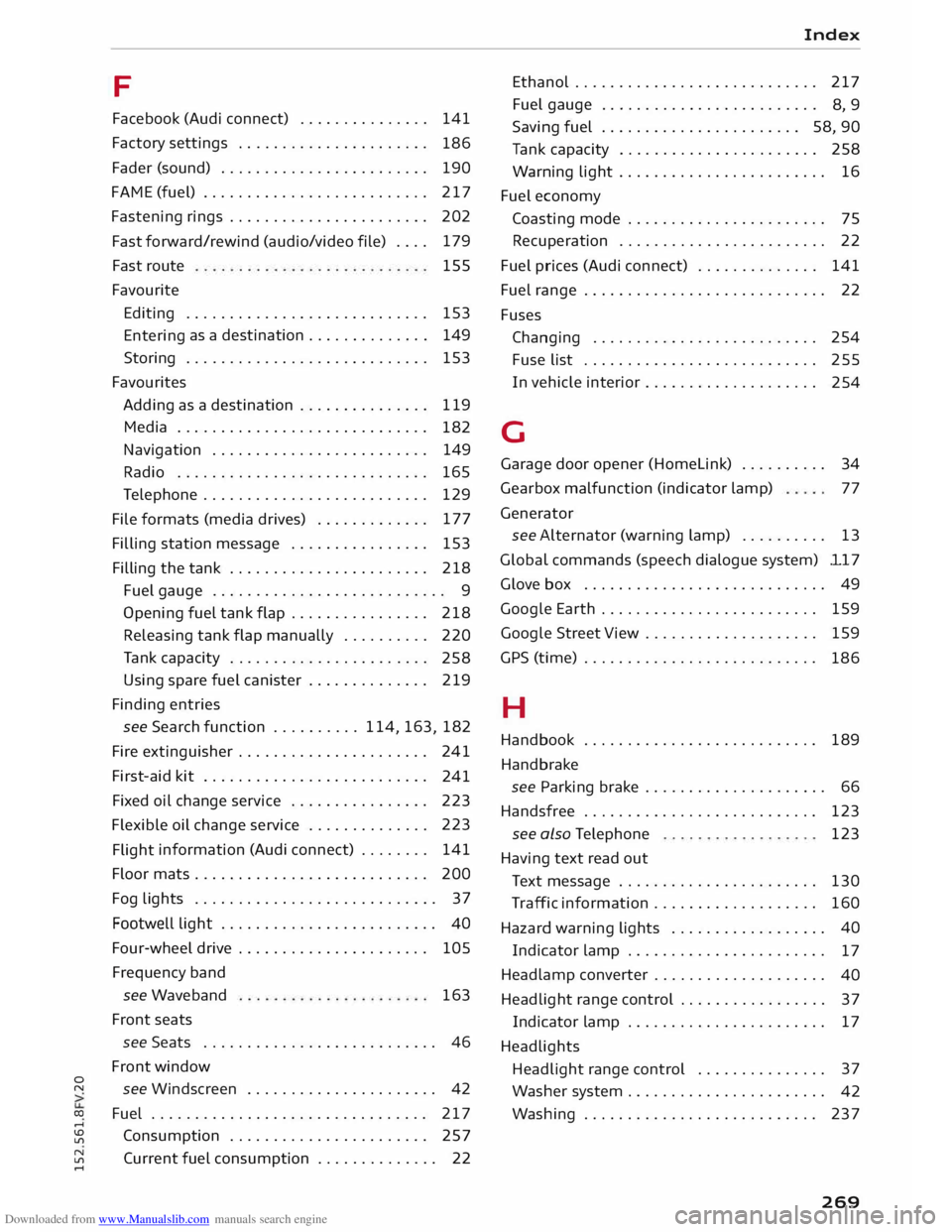
.... F
Facebook (Audi connect) . . . . . . . . . . . . . . . 141
Factory settings . . . . . . . . . . . . . . . . . . . . . .
186
Fader (sound) . . . . . . . . . . . . . . . . . . . . . . . .
190
FAME (fuel) .......................... 217
Fastening rings . . . . . . . . . . . . . . . . . . . . . . . 202
Fast forward/rewind (audio/video file) . . . . 179
Fast route
Favourite 155
Editing . . . . . . . . . . . . . . . . . . . . . . . . . . . . 153
Entering as
a destination . . . . . . . . . . . . . . 149
Storing . . . . . . . . . . . . . . . . . . . . . . . . . . . . 153
Favourites Adding as a destination . . . . . . . . . . . . . . . 119
Media . . . . . . . . . . . . . . . . . . . . . . . . . . . . .
182
Navigation . . . . . . . . . . . . . . . . . . . . . . . . .
149
Radio . . . . . . . . . . . . . . . . . . . . . . . . . . . . . 165
Telephone . . . . . . . . . . . . . . . . . . . . . . . . . . 129
File formats (media drives) . . . . . . . . . . . . . 177
Filling station message . . . . . . . . . . . . . . . .
153
Filling the tank . . . . . . . . . . . . . . . . . . . . . . .
218
Fuel gauge . . . . . . . . . . . . . . . . . . . . . . . . . . . 9
Opening fuel tank flap . . . . . . . . . . . . . . . .
218
Releasing tank flap manually . . . . . . . . . . 220
Tank capacity . . . . . . . . . . . . . . . . . . . . . . .
258
Using spare fuel canister . . . . . . . . . . . . . . 219
Finding entries
see Search function .......... 114, 163, 182
Fire extinguisher . . . . . . . . . . . . . . . . . . . . . .
241
First-aid kit . . . . . . . . . . . . . . . . . . . . . . . . . .
241
Fixed oil change service . . . . . . . . . . . . . . . . 223
Flexible oil change service . . . . . . . . . . . . . . 223
Flight information
(Audi connect) . . . . . . . . 141
Floor mats . . . . . . . . . . . . . . . . . . . . . . . . . . . 200
Fog lights . . . . . . . . . . . . . . . . . . . . . . . . . . . . 37
Footwell light . . . . . . . . . . . . . . . . . . . . . . . . . 40
Four-wheel drive . . . . . . . . . . . . . . . . . . . . . . 105
Frequency band
see Waveband
Front seats 163
see Seats . . . . . . . . . . . . . . . . . . . . . . . . . . . 46
Front window
see Windscreen . . . . . . . . . . . . . . . . . . . . . . 42
Fuel ................................ 217
Consumption . . . . . . . . . . . . . . . . . . . . . . .
257
Current fuel consumption . . . . . . . . . . . . . . 22 Index
Ethanol . . . . . . . . . . . . . . . . . . . . . . . . . . . . 217
Fuel gauge . . . . . . . . . . . . . . . . . . . . . . . . .
8, 9
Saving fuel . . . . . . . . . . . . . . . . . . . . . . . 58, 90
Tank capacity . . . . . . . . . . . . . . . . . . . . . . . 258
Warning light . . . . . . . . . . . . . . . . . . . . . . . . 16
Fuel economy
Coasting mode . . . . . . . . . . . . . . . . . . . . . . . 75
Recuperation . . . . . . . . . . . . . . . . . . . . . . . .
22
Fuel prices (Audi connect) . . . . . . . . . . . . . . 141
Fuel range . . . . . . . . . . . . . . . . . . . . . . . . . . . . 22
Fuses Changing . . . . . . . . . . . . . . . . . . . . . . . . . .
254
Fuse list . . . . . . . . . . . . . . . . . . . . . . . . . . . 255
In vehicle interior . . . . . . . . . . . . . . . . . . . .
254
G
Garage door opener (Homelink) . . . . . . . . . . 34
Gearbox malfunction (indicator lamp) 77
Generator see Alternator (warning lamp) . . . . . . . . . . 13
Global commands (speech dialogue system) ll 7
Glove box . . . . . . . . . . . . . . . . . . . . . . . . . . . . 49
Google Earth . . . . . . . . . . . . . . . . . . . . . . . . .
159
Google Street View . . . . . . . . . . . . . . . . . . . .
159
GPS (time) . . . . . . . . . . . . . . . . . . . . . . . . . . .
186
H
Handbook . . . . . . . . . . . . . . . . . . . . . . . . . . . 189
Handbrake see Parking brake . . . . . . . . . . . . . . . . . . . . . 66
Handsfree . . . . . . . . . . . . . . . . . . . . . . . . . . . 123
see also Telephone
Having text read out 123
Text message . . . . . . . . . . . . . . . . . . . . . . . 130
Traffic information . . . . . . . . . . . . . . . . . . .
160
Hazard warning lights . . . . . . . . . . . . . . . . . . 40
Indicator lamp . . . . . . . . . . . . . . . . . . . . . . .
17
Headlamp converter . . . . . . . . . . . . . . . . . . . .
40
Headlight range control . . . . . . . . . . . . . . . . . 37
Indicator lamp . . . . . . . . . . . . . . . . . . . . . . . 17
Headlights Headlight range control . . . . . . . . . . . . . . . 37
Washer system . . . . . . . . . . . . . . . . . . . . . . .
42
Washing . . . . . . . . . . . . . . . . . . . . . . . . . . . 237
269
Page 273 of 284
Downloaded from www.Manualslib.com manuals search engine 0
N
co
....
\D L/'l
N
L/'l
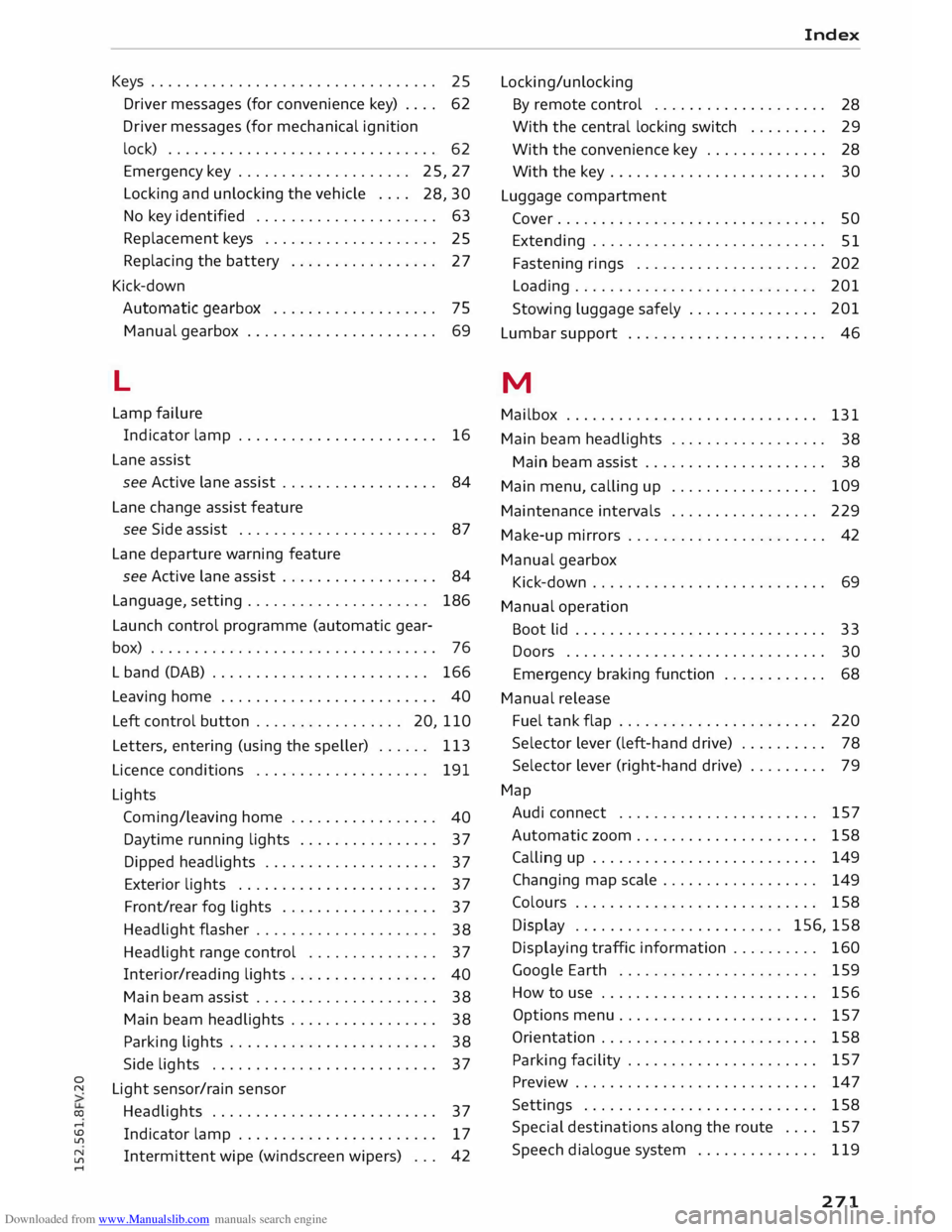
.... Keys
. . . . . . . . . . . . . . . . . . . . . . . . . . . . . . . . .
25
Driver messages (for convenience key) . . . . 62
Driver messages (for mechanical ignition
lock) . . . . . . . . . . . . . . . . . . . . . . . . . . . . . . .
62
Emergency key . . . . . . . . . . . . . . . . . . . .
25, 27
Locking and unlocking the vehicle . . . .
28, 30
No key identified . . . . . . . . . . . . . . . . . . . . .
63
Replacement keys . . . . . . . . . . . . . . . . . . . .
25
Replacing the battery . . . . . . . . . . . . . . . . .
27
Kick-down Automatic gearbox . . . . . . . . . . . . . . . . . . . 75
Manual gearbox . . . . . . . . . . . . . . . . . . . . . .
69
L
Lamp failure
Indicator lamp . . . . . . . . . . . . . . . . . . . . . . . 16
Lane assist
see Active lane assist . . . . . . . . . . . . . . . . . .
84
Lane change assist feature
see Side assist . . . . . . . . . . . . . . . . . . . . . . .
87
Lane departure warning feature
see Active lane assist . . . . . . . . . . . . . . . . . . 84
Language, setting . . . . . . . . . . . . . . . . . . . . .
186
Launch control programme (automatic gear-
box) . . . . . . . . . . . . . . . . . . . . . . . . . . . . . . . . . 76
L band (DAB) . . . . . . . . . . . . . . . . . . . . . . . . . 166
Leaving home . . . . . . . . . . . . . . . . . . . . . . . . . 40
Left control button . . . . . . . . . . . . . . . . . 20, llO
Letters, entering (using the speller) . . . . . .
113
Licence conditions . . . . . . . . . . . . . . . . . . . . 191
Lights Coming/lea ving home . . . . . . . . . . . . . . . . .
40
Daytime running lights . . . . . . . . . . . . . . . .
37
Dipped headlights . . . . . . . . . . . . . . . . . . . .
37
Exterior lights . . . . . . . . . . . . . . . . . . . . . . .
37
Front/rear fog lights . . . . . . . . . . . . . . . . . .
37
Headlight flasher . . . . . . . . . . . . . . . . . . . . .
38
Headlight range control . . . . . . . . . . . . . . .
37
Interior/reading lights . . . . . . . . . . . . . . . . .
40
Main beam assist . . . . . . . . . . . . . . . . . . . . .
38
Main beam headlights . . . . . . . . . . . . . . . . .
38
Parking lights . . . . . . . . . . . . . . . . . . . . . . . . 38
Side lights . . . . . . . . . . . . . . . . . . . . . . . . . .
37
Light sensor/rain sensor
Headlights . . . . . . . . . . . . . . . . . . . . . . . . . .
37
Indicator lamp . . . . . . . . . . . . . . . . . . . . . . . 17
Intermittent wipe (windscreen wipers) . . .
42 Index
Locki n g/u n locki ng
By remote control . . . . . . . . . . . . . . . . . . . .
28
With the central locking switch . . . . . . . . .
29
With the convenience key . . . . . . . . . . . . . . 28
With the key . . . . . . . . . . . . . . . . . . . . . . . . .
30
Luggage compartment
Cover. . . . . . . . . . . . . . . . . . . . . . . . . . . . . . .
50
Extending . . . . . . . . . . . . . . . . . . . . . . . . . . .
51
Fastening rings . . . . . . . . . . . . . . . . . . . . . 202
Loading............................ 201
Stowing luggage safely . . . . . . . . . . . . . . . 201
Lumbar support . . . . . . . . . . . . . . . . . . . . . . . 46
M
Mailbox . . . . . . . . . . . . . . . . . . . . . . . . . . . . .
131
Main beam headlights . . . . . . . . . . . . . . . . . .
38
Main beam assist . . . . . . . . . . . . . . . . . . . . . 38
Main menu, calling up . . . . . . . . . . . . . . . . . 109
Maintenance intervals . . . . . . . . . . . . . . . . .
229
Make-up mirrors . . . . . . . . . . . . . . . . . . . . . . . 42
Manual gearbox
Kick-down . . . . . . . . . . . . . . . . . . . . . . . . . . .
69
Manual operation
Boot lid . . . . . . . . . . . . . . . . . . . . . . . . . . . . .
33
Doors . . . . . . . . . . . . . . . . . . . . . . . . . . . . . .
30
Emergency braking function . . . . . . . . . . . . 68
Manual release
Fuel tank flap . . . . . . . . . . . . . . . . . . . . . . . 220
Selector lever (left-hand drive) . . . . . . . . . . 78
Selector lever (right-hand drive) . . . . . . . . .
79
Map Audi connect . . . . . . . . . . . . . . . . . . . . . . .
157
Automatic zoom... . . . . . . . . . . . . . . . . . .
158
Calling up . . . . . . . . . . . . . . . . . . . . . . . . . .
149
Changing map scale . . . . . . . . . . . . . . . . . .
149
Colours . . . . . . . . . . . . . . . . . . . . . . . . . . . . 158
Display . . . . . . . . . . . . . . . . . . . . . . . . 156, 158
Displaying traffic information . . . . . . . . . . 160
Google Earth . . . . . . . . . . . . . . . . . . . . . . .
159
How to use . . . . . . . . . . . . . . . . . . . . . . . . . 156
Options menu. . . . . . . . . . . . . . . . . . . . . . .
157
Orientation . . . . . . . . . . . . . . . . . . . . . . . . . 158
Parking facility . . . . . . . . . . . . . . . . . . . . . . 157
Preview . . . . . . . . . . . . . . . . . . . . . . . . . . . .
147
Settings . . . . . . . . . . . . . . . . . . . . . . . . . . . 158
Special destinations along the route . . . .
157
Speech dialogue system . . . . . . . . . . . . . .
119
271