instrument cluster AUDI TT COUPE 2014 User Guide
[x] Cancel search | Manufacturer: AUDI, Model Year: 2014, Model line: TT COUPE, Model: AUDI TT COUPE 2014Pages: 284, PDF Size: 34.42 MB
Page 72 of 284
Downloaded from www.Manualslib.com manuals search engine Automatic
gearbox
Automatic gearbox
S tronic
Introduction
Applies to vehicles: with S tronic gearbox
The vehicle is equipped with an electronically
controlled dual-clutch gearbox (S tronic). Torque
between the engine and the gearbox is transmit
ted via two independent clutches. They enable
smooth, uninterrupted acceleration of the vehi
cle.
The gearbox shifts up or down automatically and
continuously adapts the timing of the gear
changes to your driving style.
When you drive at moderate speeds the gearbox
will select the most economical shift programme.
It will then change up early and delay the down
shifts to give better fuel economy.
If you drive at higher speeds with heavy accelera
tion, if you open the throttle quickly, or if you use
the kick-down or the car's maximum speed, the
gearbox will automatically select the more "spor
ty" shift programmes.
If desired, you can also select the gears manually
(tiptronic mode).
Selector lever positions
Applies to vehicles: with S tronic gearbox
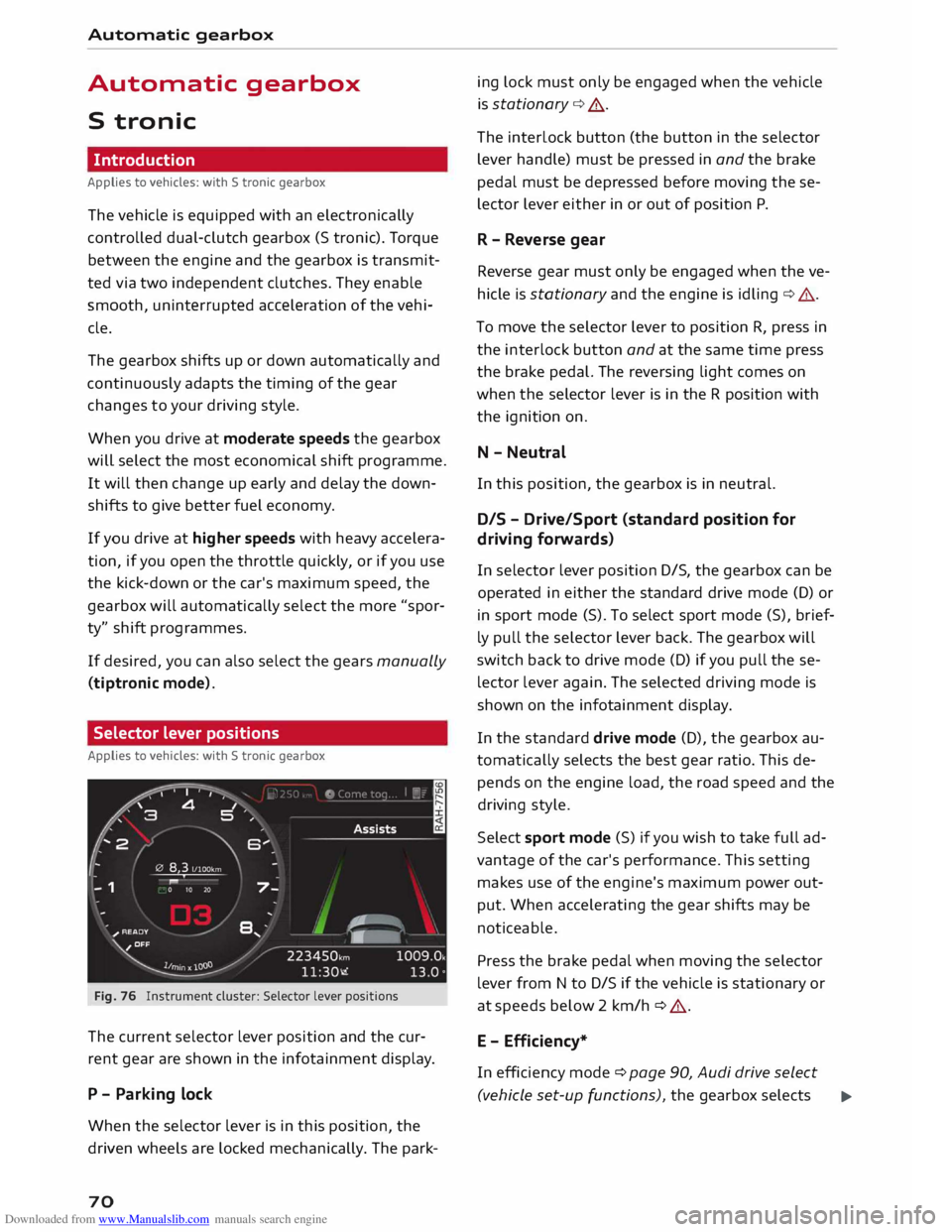
Fig. 76 Instrument cluster: Selector lever positions
The current selector lever position and the cur
rent gear are shown in the infotainment display.
P - Parking lock
When the selector lever is in this position, the
driven wheels are locked mechanically. The park-
70 ing
lock must only be engaged when the vehicle
is stationary ¢.&. .
The interlock button (the button in the selector
lever handle) must be pressed in and the brake
pedal must be depressed before moving these
lector lever either in or out of position P.
R - Reverse gear
Reverse gear must only be engaged when the ve
hicle is stationary and the engine is idling ¢.&..
To move the selector lever to position R, press in
the interlock button and at the same time press
the brake pedal. The reversing light comes on
when the selector lever is in the R position with
the ignition on.
N - Neutral
In this position, the gearbox is in neutral.
DIS -Drive/Sport (standard position for
driving forwards)
In selector lever position D/S, the gearbox can be
operated in either the standard drive mode (D) or
in sport mode (S). To select sport mode (S), brief
ly pull the selector lever back. The gearbox will
switch back to drive mode (D) if you pull these
lector lever again. The selected driving mode is
shown on the infotainment display.
In the standard drive mode (D), the gearbox au
tomatically selects the best gear ratio. This de
pends on the engine load, the road speed and the
driving style.
Select sport mode (S) if you wish to take full ad
vantage of the car's performance. This setting
makes use of the engine's maximum power out
put. When accelerating the gear shifts may be
noticeable.
Press the brake pedal when moving the selector
lever from N to D/S if the vehicle is stationary or
at speeds below 2 km/h ¢ .&..
E - Efficiency*
In efficiency mode ¢ page 90, Audi drive select
(vehicle set-up functions), the gearbox selects ..,.
Page 83 of 284
Downloaded from www.Manualslib.com manuals search engine 0
N
co
....
\D Lfl
N
Lfl
.... -
For safety reasons, the cruise control system
must not be used in city traffic, stop-and-go
traffic, on roads with a Lot of bends or in dif
ficult or slippery driving conditions (such as
ice, fog, Loose grit or gravel, heavy rain, etc.)
- risk of accident!
- When you take a turn-off, drive along a mo-
torway exit Lane or pass through roadwork
sections, please temporarily switch off the
cruise control system.
- Make sure you do not unintentionally rest
your foot on the accelerator -this will over
ride the cruise control system which, as a re
sult, will not brake the vehicle.
- The automatic braking function may be de
activated if a system fault occurs in the
brake system (e.g. if the brakes overheat)
while the cruise control system is activated.
All the other cruise control functions remain
activated as Long as the indicator Lamp ii is
Lit.
CD CAUTION
Before driving down a Long, steep gradient, it
is advisable to reduce speed and move these
lector Lever to a Lower gear. In this way you
will make use of the engine braking effect and
relieve the Load on the brakes.
w) Note
- Vehicles with manual gearbox: The set
speed cannot be reached if the currently se
lected gear is too high or too Low or if the
engine would overrev or fail to run smoothly
at the target speed. Make sure to change up
or down a gear in good time.
- The brake Lights come on when the system
brakes the vehicle.
Adjusting the speed
Applies to vehicles: with cruise control system
• To increase or reduce the cruising speed in
steps of 1 km/h, briefly push the Lever one Lev
el upwards or downwards towards 010
¢ page 80, Fig. 85.
• To increase or reduce the cruising speed in
steps of 10 km/h, briefly push the Lever two Driver assist
systems
Levels upwards or downwards towards (!)1 0
¢ page 80, Fig. 85.
• To increase or reduce the speed gradually, hold
the Lever towards GY0 until you reach the de
sired cruising speed.
Overruling the set speed
You can use the accelerator pedal to increase
speed in the normal way, for example to overtake
another vehicle. Once you release the accelerator,
the system will revert to the speed you stored ini
tially.
However, if the vehicle exceeds the programmed
speed significantly for a Long time, the cruise
control system will be deactivated temporarily.
The indicator Lamp ii in the instrument cluster
will go out, but the programmed speed will re
main stored.
Pre-selecting a speed
Applies to vehicles: with cruise control system
You can pre-select a desired speed while the ve
hicle is stationary.
• Switch on the ignition.
• Pull the Lever to position (D ¢ page 80, Fig. 85.
• Press the Lever up towards 0 or down towards
0 in order to increase or reduce the cruising
speed setting.
This function allows you to enter the desired
cruise control setting speed ahead of time, for
example before joining a motorway. Once you are
on the motor way, you can activate the cruise con
trol system by pulling the Lever to position (D.
Switching off
Applies to vehicles: with cruise control system
Switching off temporarily
• Press the brake pedal, or
• Push the Lever towards @
(click stop not en
gaged) ¢page 80, Fig. 85.
Switching off completely
• Push the lever to position @
(click stop engag-
ed), or
..,.
81
Page 84 of 284
Downloaded from www.Manualslib.com manuals search engine Driver
assist systems
.. Switch off the ignition.
The speed setting will remain stored after the
system is temporarily deactivated. To resume the
programmed cruising speed, release the clutch or
brake pedal and pull the lever to position (!).
The stored speed will be deleted once the igni
tion is switched off.
_& WARNING
Do not resume the programmed cruising
speed if this is too high for the traffic condi
tions -this can cause accidents.
Speed limiter
Description
Applies to vehicles: with speed limiter
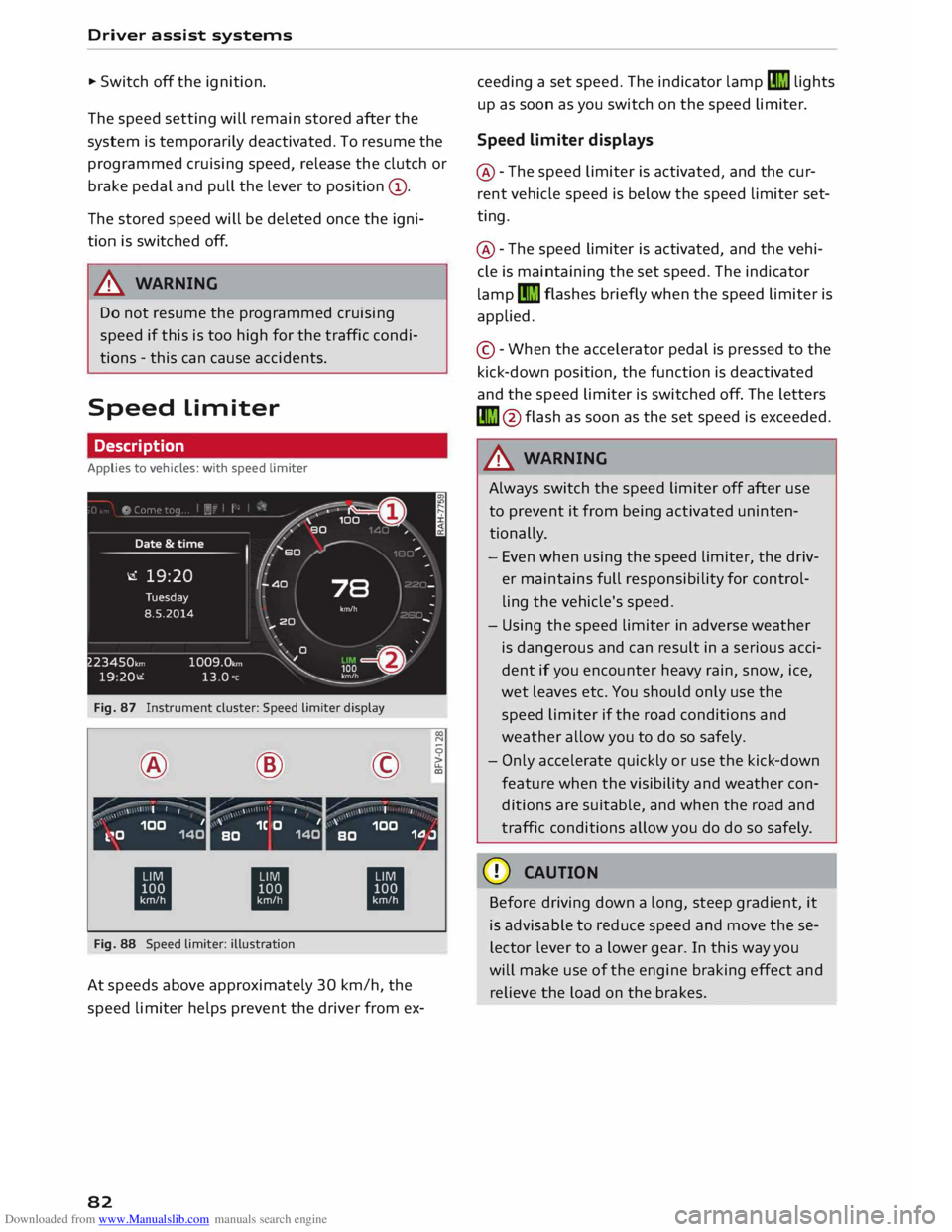
Fig. 87 Instrument cluster: Speed limiter display
® ·-
' I I @
,.,...---:-;- ·-
/ \ \ •
I I ©
·-
, ' I
' 00
N
0
>
LL
a,
,, _ ,\ 100 1
k.�0 140 '
1C O 1
BO 140 '
100
BO 1.0.J
ti ti
ti
Fig. 88 Speed limiter: illustration
At speeds above approximately 30 km/h, the
speed limiter helps prevent the driver from ex-
82 ceeding
a set speed. The indicator lamp�
lights
up as soon as you switch on the speed limiter.
Speed limiter displays
@ -The speed limiter is activated, and the cur
rent vehicle speed is below the speed limiter set
ting.
@ -The speed limiter is activated, and the vehi
cle is maintaining the set speed. The indicator
lamp �
flashes briefly when the speed limiter is
applied.
© -When the accelerator pedal is pressed to the
kick-down position, the function is deactivated
and the speed limiter is switched off. The letters
� @flash as soon as the set speed is exceeded.
_& WARNING
Always switch the speed limiter off after use
to prevent it from being activated uninten
tionally.
- Even when using the speed limiter, the driv
er maintains full responsibility for control
ling the vehicle's speed.
- Using the speed limiter in adverse weather
is dangerous and can result in a serious acci
dent if you encounter heavy rain, snow, ice,
wet leaves etc. You should only use the
speed limiter if the road conditions and
weather allow you to do so safely.
- Only accelerate quickly or use the kick-down
feature when the visibility and weather con
ditions are suitable, and when the road and
traffic conditions allow you do do so safely.
CD CAUTION
Before driving down a long, steep gradient, it
is advisable to reduce speed and move these
lector lever to a lower gear. In this way you
will make use of the engine braking effect and
relieve the load on the brakes.
Page 88 of 284
Downloaded from www.Manualslib.com manuals search engine Driver
assist systems
Indicator lamps
• Ready: The indicator Lamp Lights up when the
system is fully functional. The system is ready to
intervene .
• Not ready: The indicator Lamp Lights up when
the system is switched on but not ready to inter
vene. The causes for this can include the follow
ing:
- There are no Lane markings.
- The system cannot detect the relevant Lane
markings (e.g. temporary markings for road
works or markings obscured by snow, dirt, rain
or adverse Light).
- The vehicle's speed is below 65 km/h, the
speed at which the Lane assist system is activa
ted (the threshold may vary in different export
markets).
- The Lane is narrower than 2.1 m or wider than
5.5 m.
- The bend is too tight.
- You have taken your hands off the steering
wheel.
@ Note
- Make sure that the camera window
¢ Fig. 92 is not covered with stickers or sim
ilar objects. Notes on cleaning ¢ page 236.
- On vehicles for some export markets: once
the system is activated, it is "ready" each
time the ignition is switched on.
Infotainment display
Applies to vehicles: with Audi active lane assist
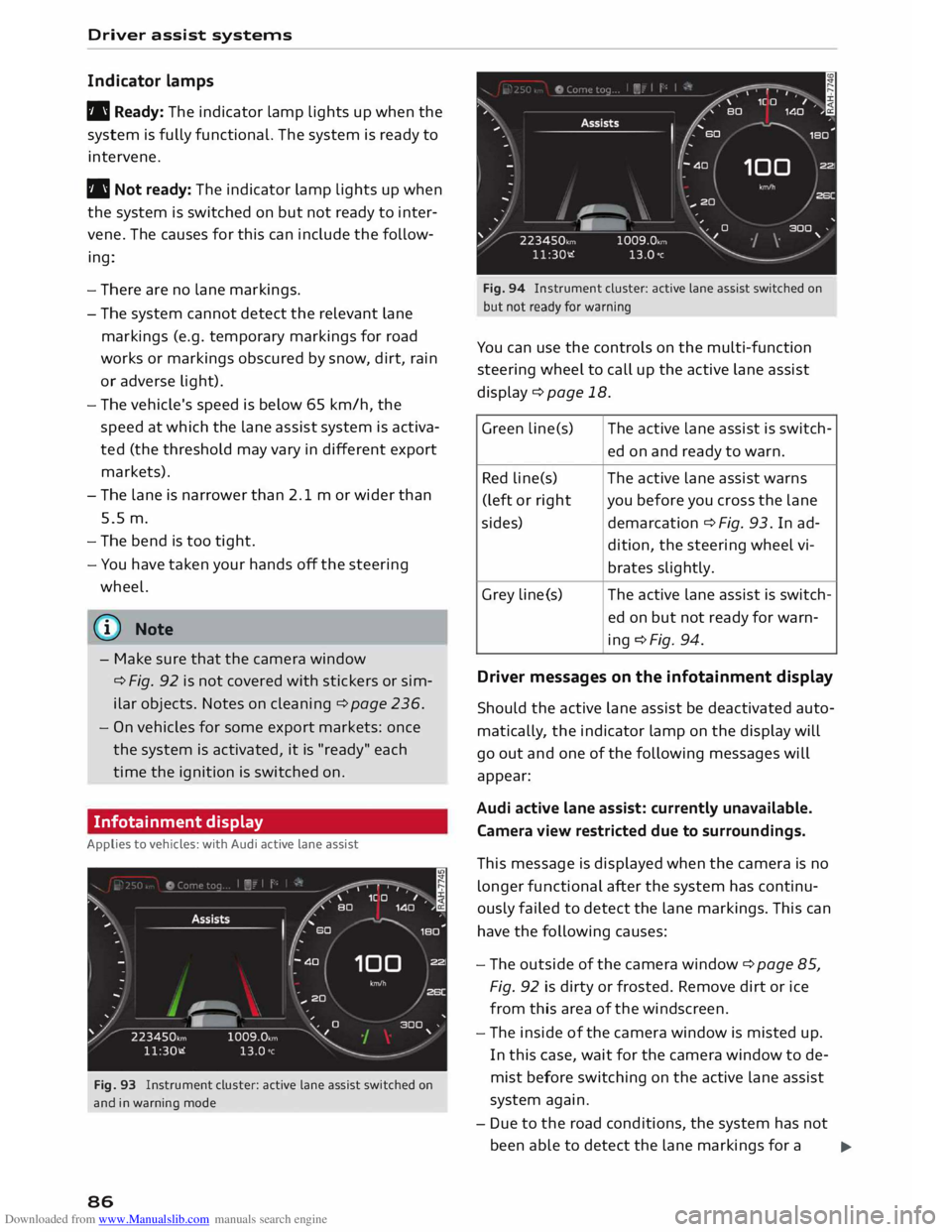
Fig. 93 Instrument cluster: active lane assist switched on
and in warning mode
86 Fig.
94 Instrument cluster: active lane assist switched on
but not ready for warning
You can use the controls on the multi-function
steering wheel to call up the active lane assist
display¢ page 18.
Green Lin e(s) The active Lane assist is switch-
ed on and ready to warn.
Red line(s) The active lane assist warns
(left or right you before you cross the lane
sides) demarcation¢ Fig. 93. In ad-
dition, the steering wheel vi-
brates slightly.
Grey Line(s) The
active lane assist is switch-
ed on but not ready for warn-
ing ¢Fig. 94.
Driver messages on the infotainment display
Should the active lane assist be deactivated auto
matically, the indicator lamp on the display will
go out and one of the following messages will
appear:
Audi active lane assist: currently unavailable.
Camera view restricted due to surroundings.
This message is displayed when the camera is no
longer functional after the system has continu
ously failed to detect the lane markings. This can
have the following causes:
- The outside of the camera window¢ page 85,
Fig. 92 is dirty or frosted. Remove dirt or ice
from this area of the windscreen.
- The inside of the camera window is misted up.
In this case, wait for the camera window to de
mist before switching on the active lane assist
system again.
- Due to the road conditions, the system has not
been able to detect the lane markings for a .,..
Page 99 of 284
Downloaded from www.Manualslib.com manuals search engine 0
N
co
,-j
\D U'l
N
U'l
,-j Switching
on and off
Applies to vehicles: with park assist
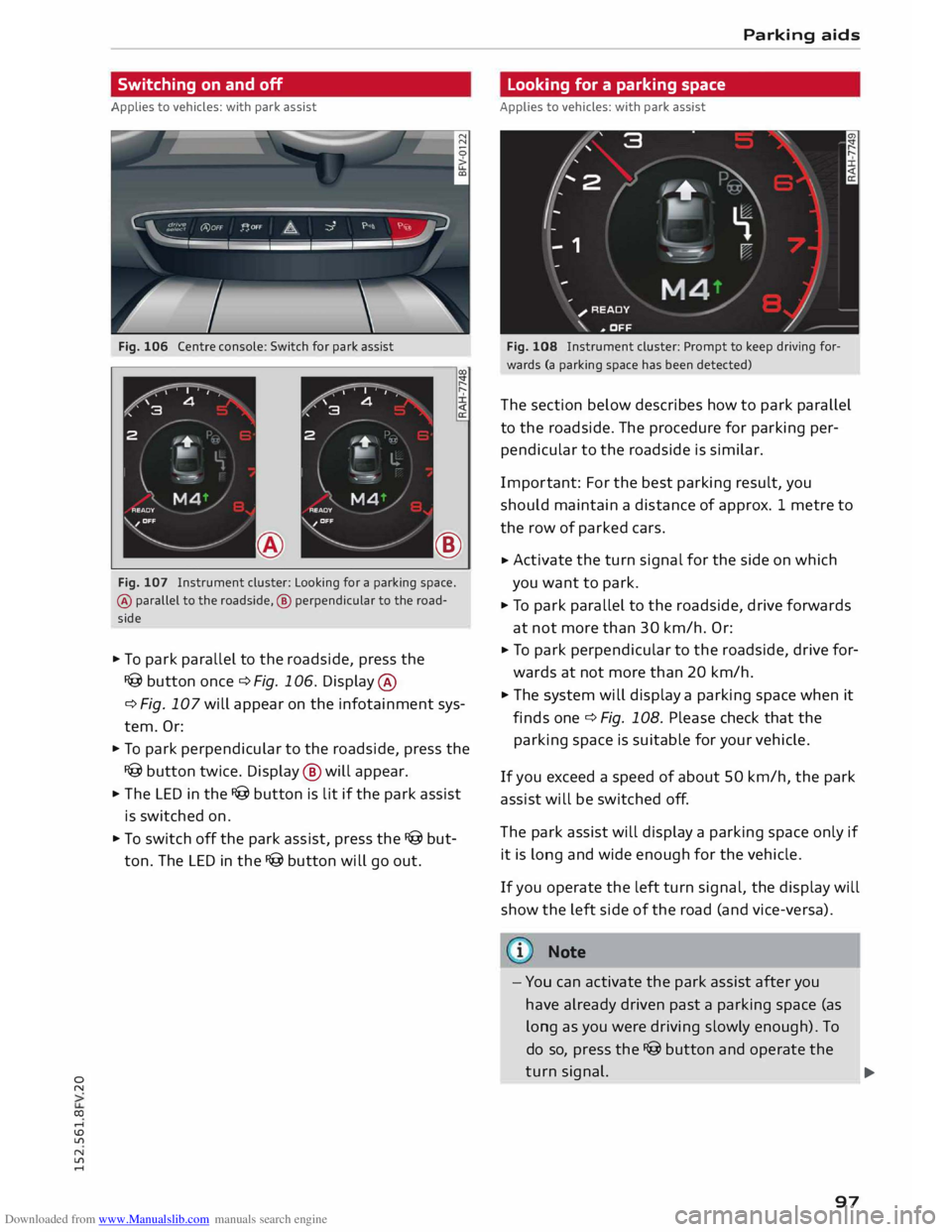
Fig. 106 Centre console: Switch for park assist
®
Fig. 107 Instrument cluster: Looking for a parking space.
® parallel to the roadside, ® perpendicular to the road
side
.. To park parallel to the roadside, press the
I@ button once c::> Fig. 106. Display ®
c:> Fig. 107 will appear on the infotainment sys
tem. Or:
.. To park perpendicular to the roadside, press the
I@ button twice. Display @ will appear.
.. The LED in the I@ button is lit if the park assist
is switched on.
.. To switch off the park assist, press the I@ but
ton. The LED in the I@ button will go out. Parking
aids
Looking for a parking space
Applies to vehicles: with park assist
Fig. 108 Instrument cluster: Prompt to keep driving for
wards (a parking space has been detected)
The section below describes how to park parallel
to the roadside. The procedure for parking per
pendicular to the roadside is similar.
Impor tant: For the best parking result, you
should maintain a distance of approx. 1 metre to
the row of parked cars.
.. Activate
the turn signal for the side on which
you want to park.
.. To park parallel to the roadside, drive forwards
at not more than 30 km/h. Or:
.. To
park perpendicular to the roadside, drive for
wards at not more than 20 km/h.
.. The system will display a parking space when it
finds one c::> Fig. 108. Please check that the
parking space is suitable for your vehicle .
If you exceed a speed of about 50 km/h, the park
assist will be switched off.
The park assist will display a parking space only if
it is long and wide enough for the vehicle.
If you operate the left turn signal, the display will
show the left side of the road (and vice-versa).
Note
- You can activate the park assist after you
have already driven past a parking space (as
long as you were driving slowly enough). To
do so, press the I@ button and operate the
turn signal.
97 ...
Page 100 of 284
Downloaded from www.Manualslib.com manuals search engine Parking
aids
- The best parking results will be achieved if
you position the vehicle as parallel as possi
ble to the line of parked cars or the kerb be
fore you start the actual parking manoeu
vre.
- If there are suitable parking spaces on both
sides of the road (for instance on a one-way
street), you can change the direction of the
turn signals to park on the other side, even
if you have already activated the park assist.
Parking parallel to the roadside
Applies to vehicles: with park assist
The driver is responsible for parking the vehicle.
�' 3 "
I
- IR t;
-
- 1 '"*-� )
,-...-
\ D�
)__
�
READY
\. ,. OFF
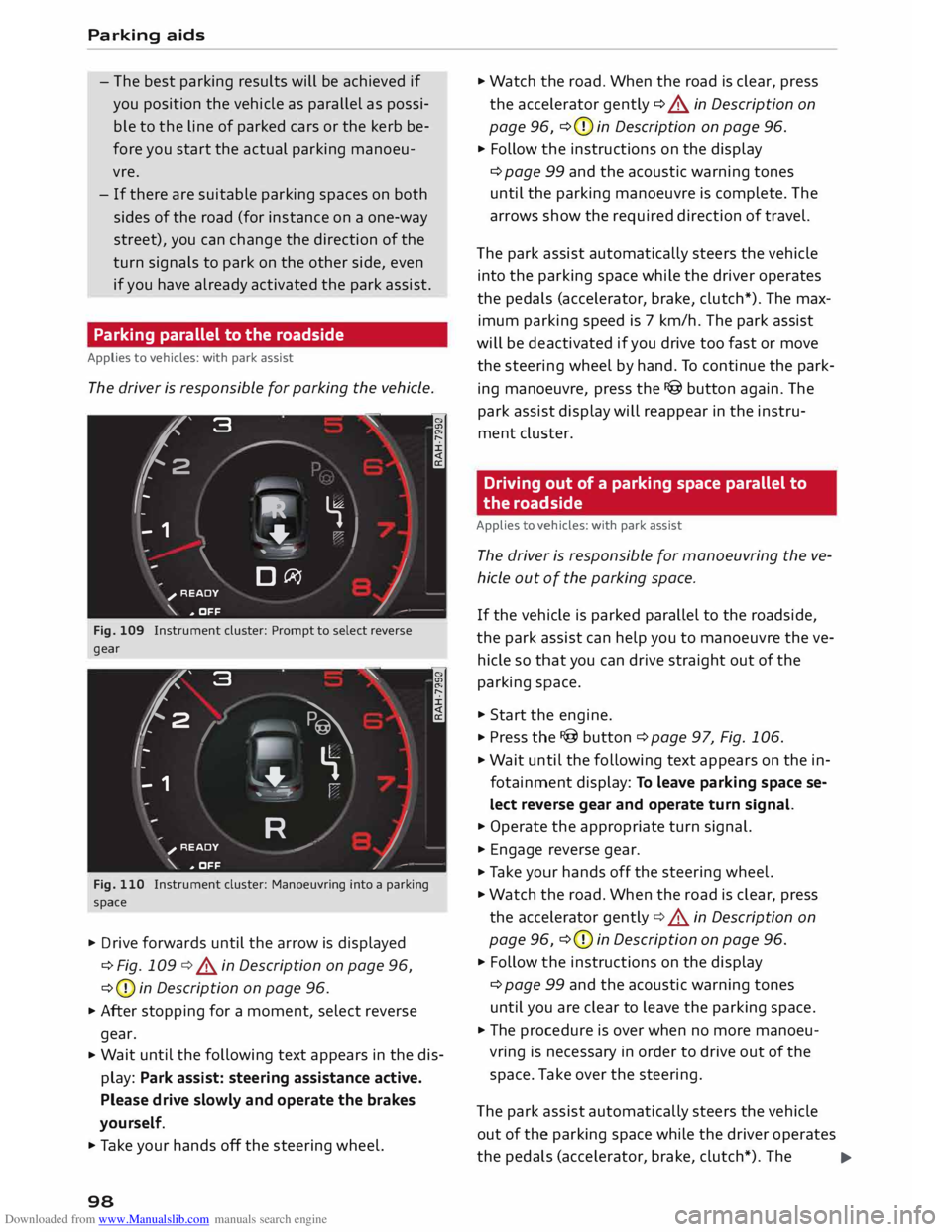
Fig. 109 Instrument cluster: Prompt to select reverse
gear
t' 3
2 ,
I I
-
-
- 1 "
� \
�
"'+-
, -- ':" ' I
R )__
�
READY
_,..-
\. ,. OFF
Fig. 110 Instrument cluster: Manoeuvring into a parking
space
... Drive forwards until the arrow is displayed
¢ Fig. 109 ¢&. in Description on page 96,
¢ (D
in Description on page 96.
... After stopping for a moment, select reverse
gear.
... Wait
until the following text appears in the dis
play: Park assist: steering assistance active.
Please drive slowly and operate the brakes
yourself.
... Take your hands off the steering wheel.
98 ...
Watch the road. When the road is clear, press
the accelerator gently ¢ &. in Description on
page 96, ¢(D
in Description on page 96.
... Follow the instructions on the display
¢ page 99 and the acoustic warning tones
until the parking manoeuvre is complete. The
arrows show the required direction of travel.
The park assist automatically steers the vehicle
into the parking space while the driver operates
the pedals (accelerator, brake, clutch*). The max
imum parking speed is 7 km/h. The park assist
will be deactivated if you drive too fast or move
the steering wheel by hand. To continue the park
ing manoeuvre, press the I@ button again. The
park assist display will reappear in the instru
ment cluster.
Driving out of a parking space parallel to
the roadside
Applies to vehicles: with park assist
The driver is responsible for manoeuvring the ve
hicle out of the parking space.
If the vehicle is parked parallel to the roadside,
the park assist can help you to manoeuvre the ve
hicle so that you can drive straight out of the
parking space .
... Start the engine .
.., Press the !@button ¢page 97, Fig. 106 .
... Wait until the following text appears on the in
fotainment display: To leave parking space se
lect reverse gear and operate turn signal.
... Operate the appropriate turn signal.
... Engage reverse gear .
.., Ta ke your hands off the steering wheel.
... Watch the road. When the road is clear, press
the accelerator gently¢&. in Description on
page 96, ¢(D
in Description on page 96 .
... Follow the instructions on the display
¢ page 99 and the acoustic warning tones
until you are clear to leave the parking space .
... The procedure is over when no more manoeu
vring is necessary in order to drive out of the
space. Take over the steering.
The park assist automatically steers the vehicle
out of the parking space while the driver operates
the pedals (accelerator, brake, clutch*). The
..,.
Page 104 of 284
Downloaded from www.Manualslib.com manuals search engine Intelligent
technology
The effectiveness of the brakes can also be tem
porarily reduced if the car is driven for some dis
tance without using the brakes when there is a
lot of salt on the road in winter. The layer of salt
that accumulates on the discs and pads can be re
moved with a few cautious brake applications.
Corrosion
There may be a tendency for dirt to build up on
the brake pads and corrosion to form on the discs
if the car is used infrequently, or if you only drive
low mileages without using the brakes very
much.
If the brakes are not used frequently, or if corro
sion has formed on the discs, it is advisable to
clean off the pads and discs by braking firmly a
few times from a moderately high speed ¢.&,..
Faults in the brake system
If the brake pedal travel should ever increase
suddenly, this may mean that one of the two
brake circuits has failed. Drive immediately to the
nearest qualified workshop and have the fault
rectified. On the way to the dealer, be prepared
to use more pressure on the brake pedal and al
low for longer stopping distances.
Low brake fluid level
Malfunctions can occur in the brake system if the
brake fluid level is too low. The brake fluid level is
monitored electronically.
Brake servo
The brake servo amplifies the pressure you apply
to the brake pedal. It only works when the engine
is running.
& WARNING
- When applying the brakes to clean off de
posits on the pads and discs, select a clear,
dry road. Be sure not to inconvenience or en
danger other road users; do not risk an acci
dent.
- Never let the car coast with the engine
switched off (this can cause accidents).
102 CD
CAUTION
- Never let the brakes "drag" by leaving your
foot on the pedal when you do not really in
tend to brake. This overheats the brakes, re
sulting in longer stopping distances and
greater wear.
- Before driving down a long, steep gradient,
it is advisable to reduce speed and move the
selector lever to a lower gear. In this way
you will make use of the engine braking ef
fect and relieve the load on the brakes. If
you still have to use the brakes, it is better
to brake firmly at intervals than to apply the
brakes continuously.
Note
- If the brake servo is out of action, you must
apply considerably more pressure to the
brake pedal than you normally would.
- If you wish to equip the car with accessories
such as a front spoiler or wheel covers, it is
important that the flow of air to the front
wheels is not obstructed, otherwise the
brakes can overheat.
Electronic stabilisation
control (ESC)
Description
The electronic stabilisation control (ES() increa
ses the car's stability. It reduces the tendency to
skid and improves the stability and road holding
of the vehicle. The ESC detects critical handling
situations, such as understeer, oversteer and
wheelspin on the driven wheels. It stabilises the
vehicle by braking individual wheels or by reduc
ing the engine torque. The indicator lamp Ii] in
the instrument cluster starts flashing as soon as
the ESC intervenes.
The following systems are integrated in the ESC:
Anti-lock brake system (ABS)
ABS prevents the wheels from locking up under
braking until the vehicle has reached a virtual
standstill. You can continue to steer the vehicle
even when the brakes are on full. Keep your foot
•
Page 110 of 284
Downloaded from www.Manualslib.com manuals search engine Intelligent
technology
event of faults or anomalies in the vehicle data,
only these data are saved. As a rule, faults are
shown by the warning lamps in the instrument
cluster.
Data saved in the control units can only be read
and analysed with special equipment.
A qualified workshop is only able to recognise
and deal with faults by using the relevant saved
data. Among other things, the saved data may
contain the following information:
- Data relating to the engine and the gearbox
-Speed
- Dire ction of travel
- Braking force
- Seat belt warning system data
The control
units
installed will not under any cir
cumstances record conversations in the vehicle.
On vehicles with an automatic SOS dial system
via a mobile phone or another connected device,
the current location of the vehicle can be trans
mitted. In accidents where the control units reg
ister that airbags have been triggered, a signal
can automatically be sent by the system. This de
pends on the service provider. The signal can only
be sent in areas with sufficient mobile phone cov
erage.
Event data recorder
Your vehicle is not equipped with an event data
recorder.
In an event data recorder, information about the
vehicle is temporarily saved. In the event of an
accident, you can therefore obtain detailed infor
mation about the course of events. On vehicles
with an airbag system, accident-related data such
as impact speed, seat belt status, seat positions
and trigger times can be saved. The exact infor
mation saved depends on the manufacturer.
The installation of an event data recorder is sub
ject to the agreement of the vehicle's owner. This
process is governed by legislation in some coun
tries.
108 Reprogram
ming control units
All data for controlling components are saved in
the control units. Some convenience features,
such as one-touch signalling, single door unlock
ing and display messages can be reprogrammed
using special workshop equipment. If any con
venience features are reprogrammed, the infor
mation in this Owner's Manual will no longer be
accurate for the features that have been
changed. We recommend having the reprogram
ming confirmed by an Audi workshop in the
"Workshop remarks" section of your Service
Schedule.
Your Audi dealer will be able to provide you with
information about possible reprogramming op
tions.
Event memory
There is a diagnostic connection for reading out
the event memory located in the footwell on the
driver's side of the vehicle. Information regarding
the operation and status of the vehicle's elec
tronic control units is stored in the event memo
ry. The event memory should only be read out
and erased by a qualified workshop.
A WARNING
The diagnostic connection must not be used
for other purposes. Incorrect use can cause
malfunctions -risk of accident!
Page 211 of 284
Downloaded from www.Manualslib.com manuals search engine 0
N
co
....
\D L/'l
N
L/'l
.... Airbag
system
Description of airbag
system
General notes on airbag system
The airbag is an integral part of the car's passive
safety system.
In conjunction with the seat belts, the airbag sys
tem gives the front occupants additional protec
tion for the head and chest in the event of a se
vere frontal collision.
In a side collision the side airbags reduce the risk
of injury to the areas of the body facing the im
pact ¢_&.
In addition to their normal function of protecting
the occupants in a collision, the seat belts also
hold them in a position where the airbags can in
flate properly and provide maximum protection.
The airbag system will only work with the igni
tion on. The airbag system is monitored electron
ically; the airbag warning lamp indicates whether
the system is functioning properly.
The main parts of the airbag system are:
- The electronic monitoring system (control unit
and sensors)
- The two front airbags
- The two side airbags
- The warning lamp El in the instrument cluster
There is a fault in the airbag system if the
warning lamp
- does not come on when the ignition is switched
on.
- does not go out about 4 seconds after the igni
tion is switched on.
- goes out and then comes on again after the ig
nition is switched on.
- comes on or flickers while the car is moving.
A WARNING
- The airbags are not a substitute for the seat
belts; they are an integral part of the car's
overall passive safety system. The airbags
can only offer effective protection if the oc- Airbag system
cupants are wearing their seat belts. For
this reason it is very important to wear the
seat belts at all times ¢ page 204, Why is it
so important to use seat belts?.
- The seat belts and airbags can only provide
maximum protection if the occupants are
seated correctly ¢ page 46, Seats and stor
age.
- If you do not wear a seat belt, if you lean
for ward, or are not seated correctly while
the vehicle is in motion, you are at greater
risk of injury should the airbag system be
triggered in an accident.
- Components of the airbag system are loca
ted in various parts of the vehicle. If repairs
to other vehicle components make it neces
sary to perform work on the airbag system
or to remove or install parts of the airbag
system, this may cause damage to the air
bag system. As a result, the airbags may not
inflate correctly or may not be triggered at
all in an accident situation. For this reason,
you should always have the work carried out
by a qualified workshop.
- If a fault should occur in the airbag system,
have the system checked immediately by a
qualified workshop. Otherwise the system
may fail to trigger in an accident.
- Do not attempt to modify components of
the airbag system in any way.
- Never make any alterations to the front
bumper or the body.
- Do not remove the front seats.
- The airbag system can only be activated
once; if the airbag has been triggered, the
system must be replaced. Should the airbag
system or airbag modules have to be re
placed, the qualified workshop carrying out
the replacement will document all details.
- If you sell the vehicle, remember to pass on
the complete Service Wallet to the new
owner. If any of the airbags have been deac
tivated, it is important that the new owner
is also given the relevant documents.
- The relevant safety requirements must be
observed when the vehicle or components
of the airbag or belt tensioner systems are
scrapped.
209
Page 225 of 284
Downloaded from www.Manualslib.com manuals search engine 0
N The
positions of the engine oil dipstick and en
gine oil filler cap ¢Fig. 211 (items @and @)
may be different on some engine versions.
Engine oil
Choosing the correct engine oil grade
The service interval display in the instrument
cluster of your vehicle will inform you when it is
time for an oil change. We recommend having
the oil changed by a qualified workshop.
If you have to top up the oil between oil changes,
use the grades of oil specified in the table in ac
cordance with VW standards. You will need to
know whether
- the vehicle is being serviced based on the flexi
ble or fixed oil change service (see Last service
record in Service Schedule).
- the vehicle has a petrol or diesel engine (see
sticker on inside of fuel tank flap).
- a diesel particulate filter is fitted on the vehicle
(see Delivery Inspection section of Service
Schedule).
Oil Change Serv-
Oil Change Serv-
ice (flexible)
ice (fixed)
Petrol VW50400 vw
502 00
engine Alternatively:
vw 504 ooa)
Diesel VW50700 With
diesel par-
engine ticulate
filter:
VW 507 00
Without diesel
particulate filter:
vw 505 01
Alternatively: vw 507 oob
>
al When using fuel complying with EN 228 or DIN 51626-1
b) When using fuel complying with EN 590 or DIN 51628
CD} Note
If the oil grades specified in the table are not
available, you can use one of the following
....
� grades
as a substitute. To prevent damage to
� the
engine, this should not be done more
.... Checking
and topping up fluids
than once between oil changes and no more
than 0.5 Litres should be used.
- Petrol engines: ACEA A3 or API SN (API SM)
standard
- Diesel engines: ACEA C3 or API CJ-4 stand
ard
(©) Note
- For China: Only oil complying with VW
standard 502 00 with viscosity SAE 5W-40
may be used on vehicles with a petrol en-
gine.
- The flexible oil change service is not availa
ble in all countries.
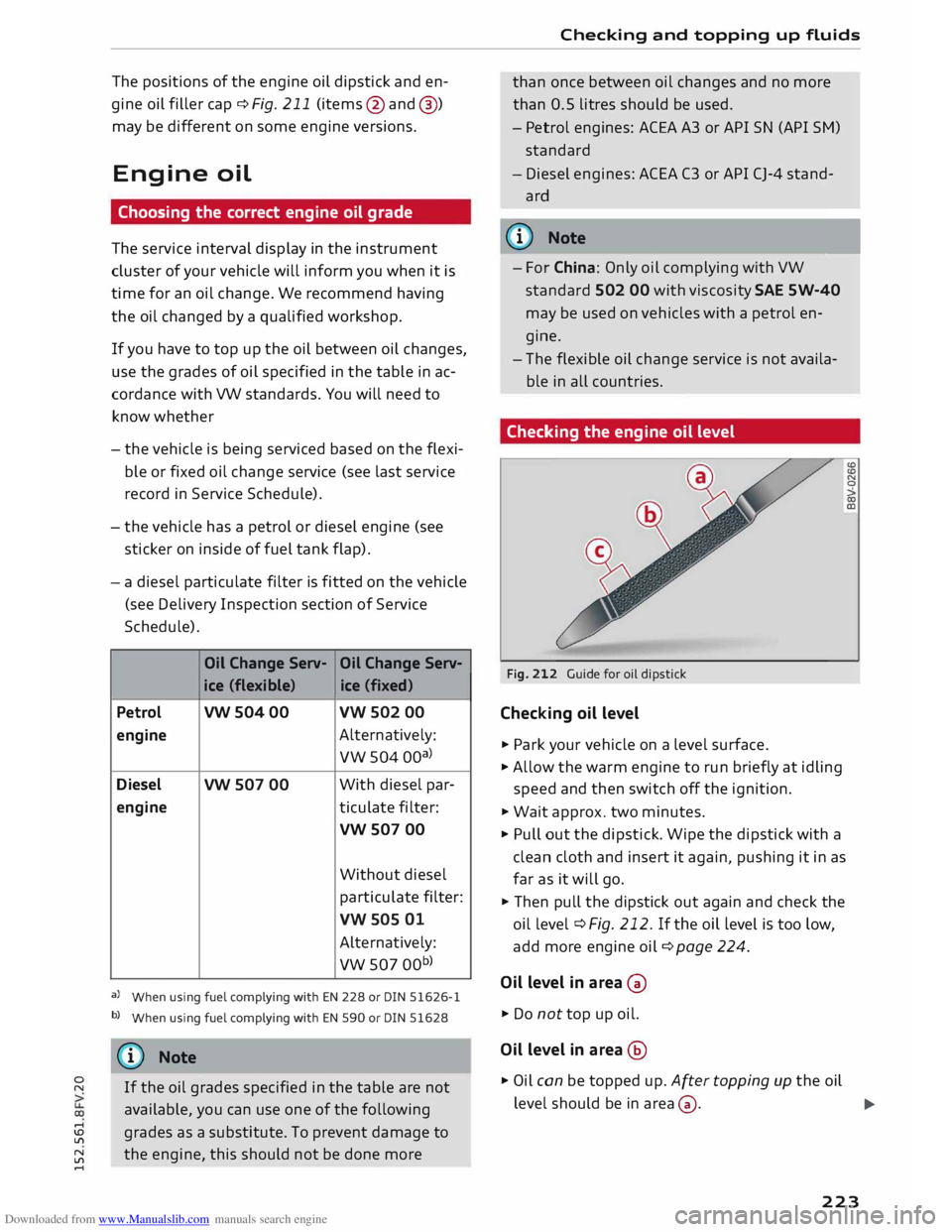
Checking the engine oil level
Fig. 212 Guide for oil dipstick
Checking oil level
.,. Park your vehicle on a Level surface.
.,. Allow the warm engine to run briefly at idling
speed and then switch off the ignition.
.,. Wait approx. two minutes.
.,. Pull out the dipstick. Wipe the dipstick with a
clean cloth and insert it again, pushing it in as
far as it will go.
.,. Then pull the dipstick out again and check the
oil level ¢ Fig. 212. If the oi L Level is too Low,
add more engine oil¢ page 224.
Oil level in area 0
.,. Do not top up oil.
Oil level in area @
.,. Oil can be topped up. After topping up the oil (£)
(£)
N
0
co
(Il
Level should be in area 0·
..,
223