tow AUDI TT COUPE 2014 User Guide
[x] Cancel search | Manufacturer: AUDI, Model Year: 2014, Model line: TT COUPE, Model: AUDI TT COUPE 2014Pages: 284, PDF Size: 34.42 MB
Page 52 of 284
Downloaded from www.Manualslib.com manuals search engine Seats
and storage
@ Note
The storage compartment will hold a maxi
mum weight of 1 kg.
Coat hooks
Applies to vehicles: with coat hooks
.&_ WARNING
- Make sure that any items of clothing hang
ing from the coat hooks do not obstruct
your view to the rear.
- Only use the coat hooks for light items of
clothing and make sure that there are no
heavy or sharp objects in the pockets.
Luggage compartment
General notes
.&_ WARNING
Please refer to the important safety notes on
¢ page 201, Stowing luggage safely.
Luggage compartment cover
The luggage compartment cover blocks the view
into the luggage compartment.
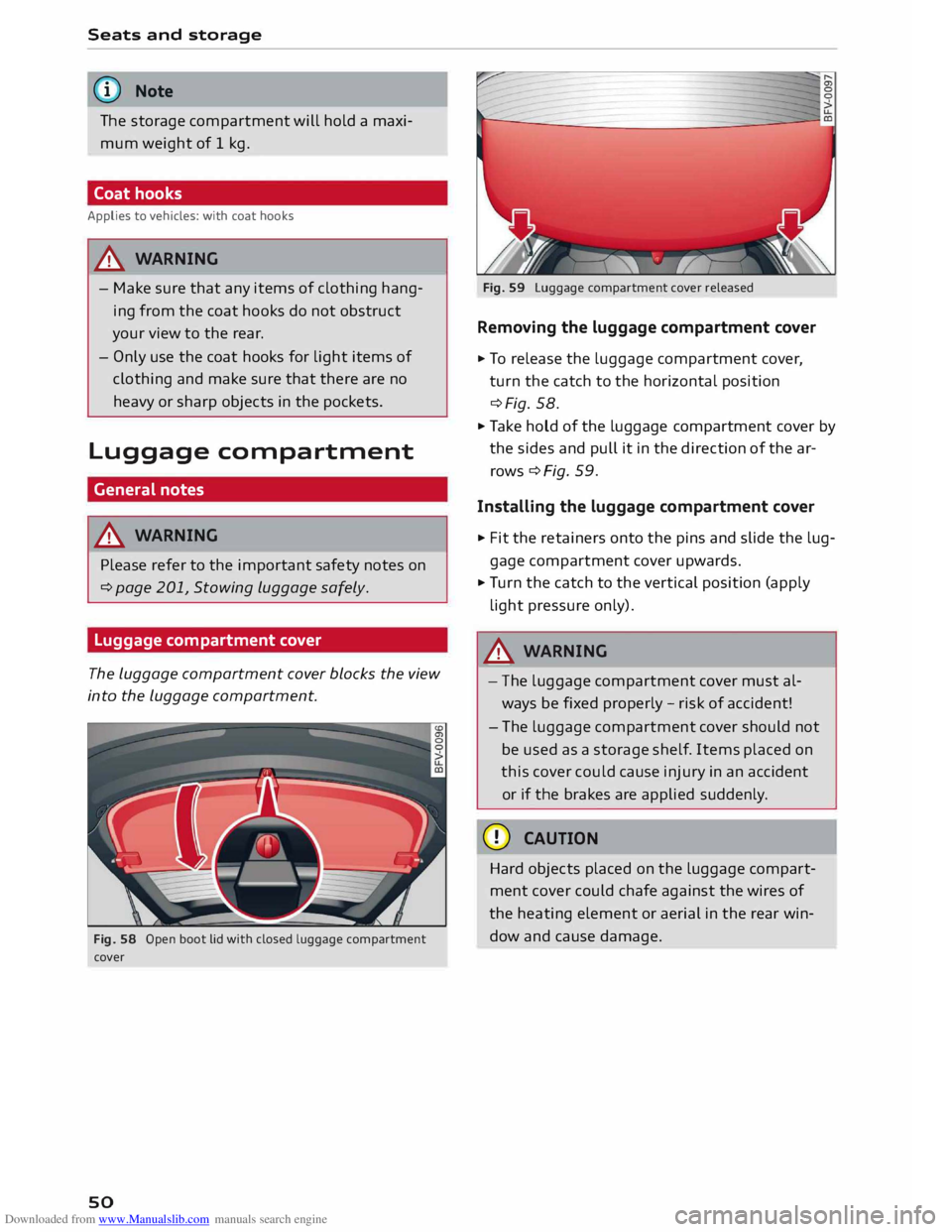
Fig. 58 Open boot Lid with closed luggage compartment
cover
so Fig.
59 Luggage compartment cover released
Removing the luggage compartment cover
� To release the luggage compartment cover,
turn the catch to the horizontal position
¢Fig. 58.
� Take hold of the luggage compartment cover by
the sides and pull it in the direction of the ar
rows ¢Fig. 59.
Installing the luggage compartment cover
� Fit the retainers onto the pins and slide the lug
gage comp artment cover upwards.
� Turn the catch to the vertical position (apply
light pressure only).
.&_ WARNING
- The luggage compartment cover must al
ways be fixed properly -risk of accident!
- Th e luggage compartment cover should not
be used as a storage shelf. Items placed on
this cover could cause injury in an accident
or if the brakes are applied suddenly.
CD CAUTION
Hard objects placed on the luggage compart
ment cover could chafe against the wires of
the heating element or aerial in the rear win
dow and cause damage.
Page 62 of 284
Downloaded from www.Manualslib.com manuals search engine Driving
Steering Adjusting the steering wheel position
The height and reach of the steering wheel can
be adjusted as required to suit the driver.
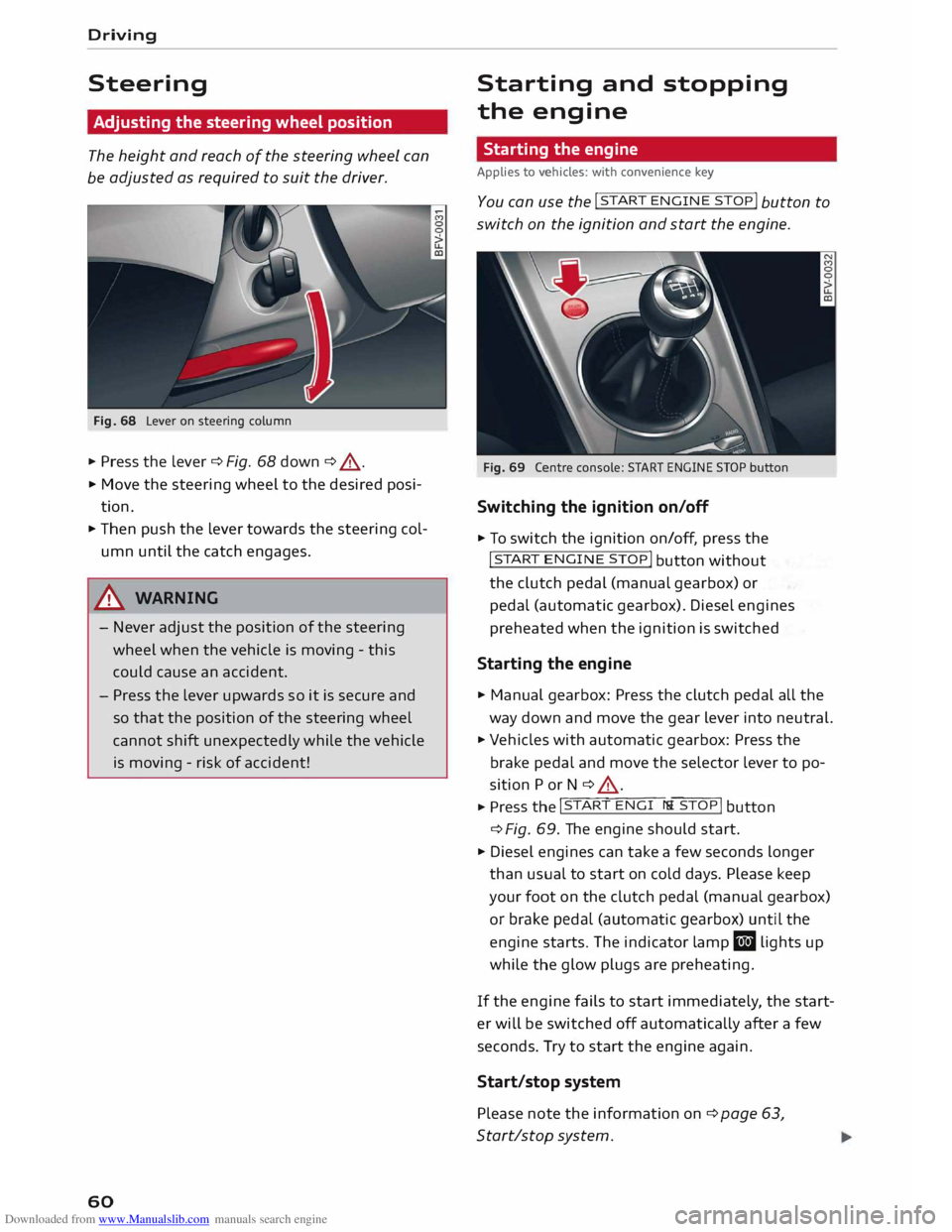
Fig. 68 Lever on steering column
... Press the lever ¢ Fig. 68 down ¢ &_
.
... Move the steering wheel to the desired posi
tion .
... Then push the lever towards the steering col
umn until the catch engages.
& WARNING
- Never adjust the position of the steering
wheel when the vehicle is moving -this
could cause an accident.
- Press the lever upwards so it is secure and
so that the position of the steering wheel
cannot shift unexpectedly while the vehicle
is moving -risk of accident!
60 Starting
and stopping
the engine
Starting the engine
Applies to vehicles: with convenience key
Y ou can u
se the !START
ENGINE STOP!
button to
switch on the ignition and start the engine.
Fig. 69 Centre console: START ENGINE STOP button
Switching the ignition on/off
... To switch the ignition on/off, press the
!START ENGIN
E STOP!
button without
the clutch pedal (manual gearbox) or
pedal (automatic gearbox). Diesel engines
preheated when the ignition is switched
Starting the engine
... Manual gearbox: Press the clutch pedal all the
way down and move the gear lever into neutral.
... Vehicles with automatic gearbox: Press the
brake pedal and move the selector lever to po
sition P or N ¢ &_
. ... Press th
e l�
S�
T_
A_R_T_ E_N�G_I _N_
E_S� T -
O �
P �I button
¢ Fig.
69. The engine should start .
... Diesel engines can take a few seconds longer
than usual to start on cold days. Please keep
your foot on the clutch pedal (manual gearbox)
or brake pedal (automatic gearbox) until the
engine starts. The indicator lamp El lights up
while the glow plugs are preheating.
If the engine fails to start immediately, the start
er will be switched off automatically after a few
seconds. Try to start the engine again.
Start/stop system
Please note the information on ¢ page 63,
Start/stop system.
Page 76 of 284
Downloaded from www.Manualslib.com manuals search engine Automatic
gearbox
CD CAUTION
- When you have stopped on a gradient, do
not try to stop the vehicle rolling back by ac
celerating when a gear is engaged. This
could cause the automatic gearbox to over
heat and become damaged. Apply the park
ing brake or press the brake pedal in order
to prevent the vehicle from rolling back.
- If you allow the car to roll with the selector
lever in position N with the engine switched
off, the automatic gearbox will be damaged
as it will not be lubricated.
- In certain driving and traffic conditions, for
instance in stop-and-go traffic, if you have
to pull away frequently or if the vehicle
creeps forwards over a long distance, the
gearbox can overheat and become dam
aged. If the warning lamp. lights up,
stop the vehicle at the first opportunity and
let the gearbox cool down ¢ page 77.
- In certain driving and traffic conditions, for
instance in stop-and-go traffic, if you have
to pull away frequently or if the vehicle
creeps forwards over a long distance, the
gearbox can overheat and become dam
aged. If the warning lamp� Lights up,
stop the vehicle at the first opportunity and
let the gearbox cool down ¢ page 77.
- If you allow the car to roll with the engine
switched off, the 5 tronic gearbox will be
damaged as it will not be lubricated
¢ page 250, Tow-starting I towing away.
(1) Note
For safety reasons the parking brake will only
release automatically if the driver's seat belt
is engaged in its buckle.
Downhill speed control
Applies to vehicles: with S tronic gearbox
The downhill speed control function helps the
driver when driving down steep gradients.
Downhill speed control is activated on a downhill
gradient when the selector lever is in 0/5 and the
driver presses the brake pedal. The gearbox auto
matically selects a suitable gear for the gradient.
74 The
downhill speed control function attempts to
maintain the speed at which the vehicle was trav
elling when the foot brake was applied (subject
to the laws of physics and technical limitations of
the power train). It may be necessary to adjust
the speed again using the foot brake. The down
hill speed control can change down to 3rd gear
but no further, so it may be necessary to change
to tiptronic mode on very steep gradients. In this
case, change down manually to 2nd or 1st gear in
tiptronic mode to use the engine braking effect
and reduce the load on the brakes.
Downhill speed control is deactivated as soon as
the road levels out again or you press the acceler
ator pedal.
On vehicles with cruise control system*
¢ page 80, downhill speed control is activated
when you set a cruising speed.
& WARNING
The downhill speed control function cannot
defy the laws of physics and may therefore
not be able to maintain a constant speed in
certain circumsta nces. Always be prepared to
use the brakes! -
Page 80 of 284
Downloaded from www.Manualslib.com manuals search engine Automatic
gearbox
Releasing the selector lever manually Cleft
hand drive vehicles)
Applies to vehicles: with S tronic gearbox
The selector lever can be released manually if
the electrical power supply should fail.
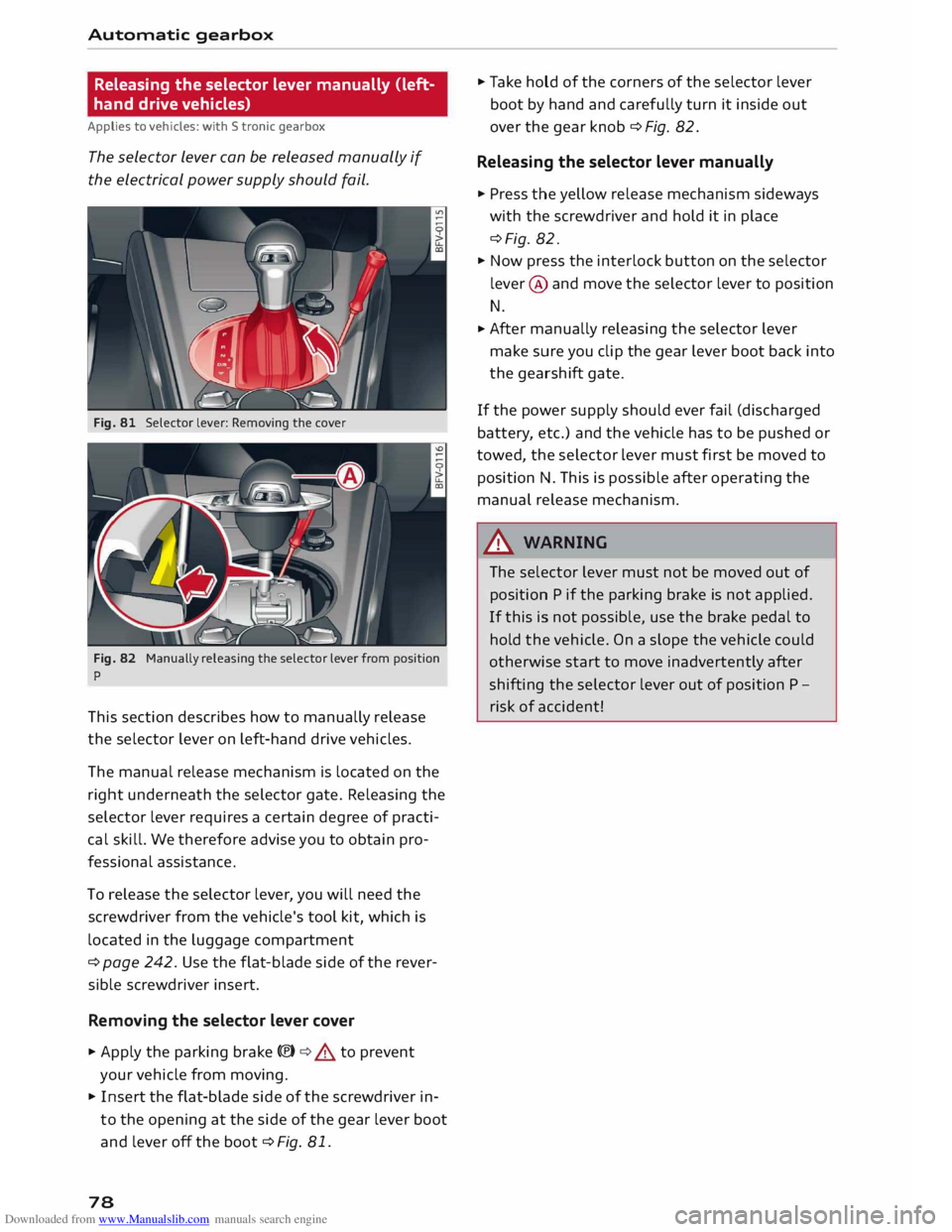
Fig. 81 Selector lever: Removing the cover
Fig. 82 Manually releasing the selector lever from position
p
This section describes how to manually release
the selector lever on left-hand drive vehicles.
The manual release mechanism is located on the
right underneath the selector gate. Releasing the
selector lever requires a certain degree of practi
cal skill. We therefore advise you to obtain pro
fessional assistance.
To release the selector lever, you will need the
screwdriver from the vehicle's tool kit, which is
located in the luggage compartment
¢ page 242. Use the flat-blade side of the rever
sible screwdriver insert.
Removing the selector lever cover
� Apply the parking brake C®) ¢&. to prevent
your vehicle from moving.
� Insert the flat-blade side of the screwdriver in
to the opening at the side of the gear lever boot
and lever off the boot ¢Fig. 81.
78 �
Take hold of the corners of the selector lever
boot by hand and carefully turn it inside out
over the gear knob ¢ Fig. 82.
Releasing the selector lever manually
� Press the yellow release mechanism sideways
with the screwdriver and hold it in place
¢Fig. 82.
� Now press the interlock button on the selector
lever @ and move the selector lever to position
N.
� After
manually releasing the selector lever
make sure you clip the gear lever boot back into
the gearshift gate.
If the power supply should ever fail (discharged
battery, etc.) and the vehicle has to be pushed or
towed, the selector Lever must first be moved to
position N. This is possible after operating the
manual release mechanism.
_& WARNING
The selector lever must not be moved out of
position P if the parking brake is not applied.
If this is not possible, use the brake pedal to
hold the vehicle. On a slope the vehicle could
otherwise start to move inadvertently after
shifting the selector lever out of position P -
risk of accident!
Page 81 of 284
Downloaded from www.Manualslib.com manuals search engine 0
N
co
....
\D Lfl
N
Lfl
.... Releasing
the selector lever manually
(right-hand drive vehicles)
Applies to vehicles: with S tronic gearbox
The selector Lever can be released manually if
the electrical power supply should fail.
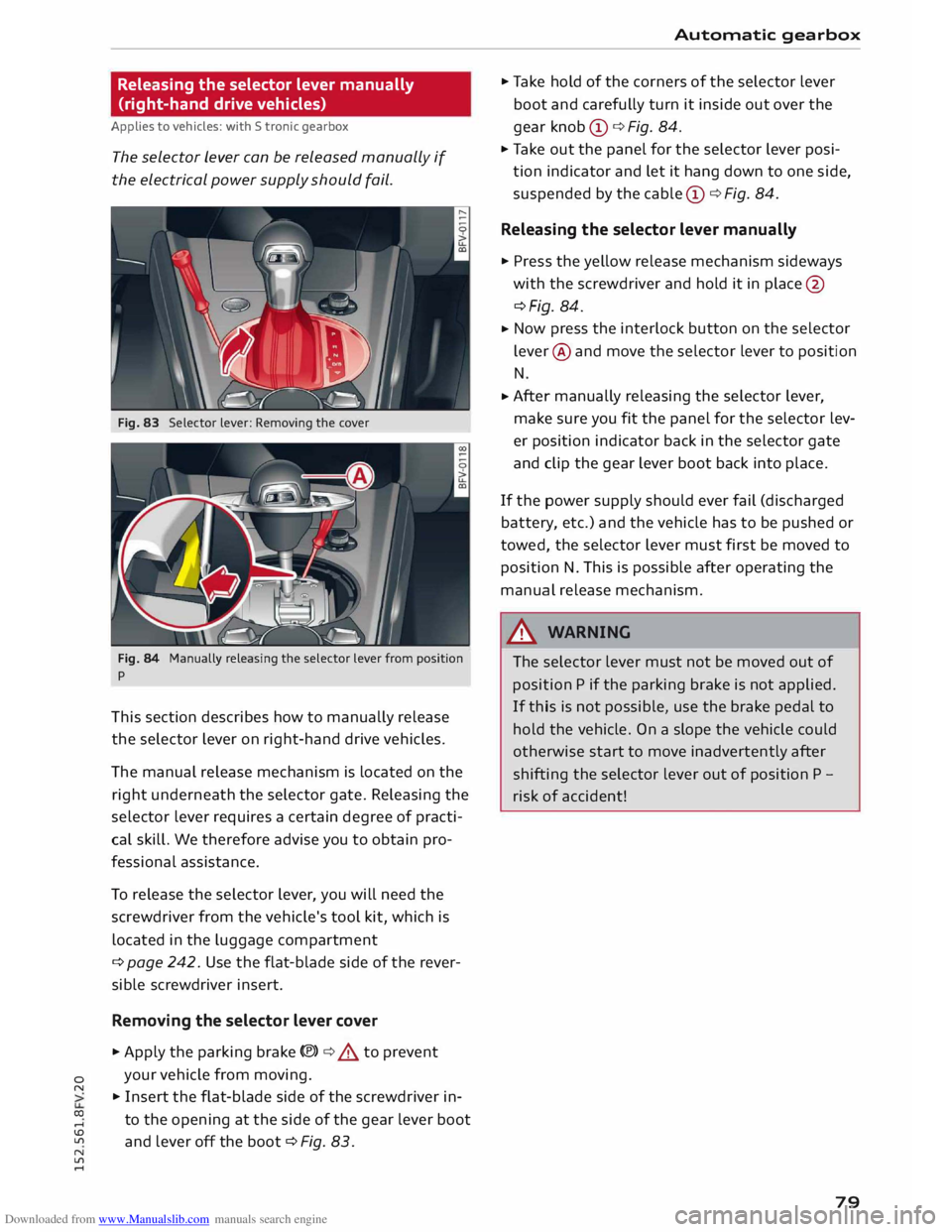
Fig. 83 Selector lever: Removing the cover
Fig. 84 Manually releasing the selector lever from position
p
This section describes how to manually release
the selector lever on right-hand drive vehicles.
The manual release mechanism is located on the
right underneath the selector gate. Releasing the
selector lever requires a certain degree of practi
cal skill. We therefore advise you to obtain pro
fessional assistance.
To release the selector lever, you will need the
screwdriver from the vehicle's tool kit, which is
located in the luggage compartment
¢ page 242. Use the flat-blade side of the rever
sible screwdriver insert.
Removing the selector lever cover
... Apply the parking brake(®)¢.,& to prevent
your vehicle from moving.
... Insert the flat-blade side of the screwdriver in
to the opening at the side of the gear lever boot
and lever off the boot ¢ Fig. 83. Automatic
gearbox
... Take hold of the corners of the selector lever
boot and carefully turn it inside out over the
gear knob CD¢ Fig. 84.
... Take out the panel for the selector lever posi
tion indicator and let it hang down to one side,
suspended by the cable CD¢ Fig. 84.
Releasing the selector lever manually
... Press the yellow release mechanism sideways
with the screwdriver and hold it in place @
¢Fig. 84 .
... Now
press the interlock button on the selector
lever @and move the selector lever to position
N
... After
manually releasing the selector lever,
make sure you fit the panel for the selector lev
er position indicator back in the selector gate
and clip the gear lever boot back into place.
If the power supply should ever fail (discharged
battery, etc.) and the vehicle has to be pushed or
tow ed, the selector lever must first be moved to
position N. This is possible after operating the
manual release mechanism.
&_ WARNING
The selector lever must not be moved out of
position P if the parking brake is not applied.
If this is not possible, use the brake pedal to
hold the vehicle. On a slope the vehicle could
otherwise start to move inadvertently after
shifting the selector lever out of position P -
risk of accident!
79
Page 83 of 284
Downloaded from www.Manualslib.com manuals search engine 0
N
co
....
\D Lfl
N
Lfl
.... -
For safety reasons, the cruise control system
must not be used in city traffic, stop-and-go
traffic, on roads with a Lot of bends or in dif
ficult or slippery driving conditions (such as
ice, fog, Loose grit or gravel, heavy rain, etc.)
- risk of accident!
- When you take a turn-off, drive along a mo-
torway exit Lane or pass through roadwork
sections, please temporarily switch off the
cruise control system.
- Make sure you do not unintentionally rest
your foot on the accelerator -this will over
ride the cruise control system which, as a re
sult, will not brake the vehicle.
- The automatic braking function may be de
activated if a system fault occurs in the
brake system (e.g. if the brakes overheat)
while the cruise control system is activated.
All the other cruise control functions remain
activated as Long as the indicator Lamp ii is
Lit.
CD CAUTION
Before driving down a Long, steep gradient, it
is advisable to reduce speed and move these
lector Lever to a Lower gear. In this way you
will make use of the engine braking effect and
relieve the Load on the brakes.
w) Note
- Vehicles with manual gearbox: The set
speed cannot be reached if the currently se
lected gear is too high or too Low or if the
engine would overrev or fail to run smoothly
at the target speed. Make sure to change up
or down a gear in good time.
- The brake Lights come on when the system
brakes the vehicle.
Adjusting the speed
Applies to vehicles: with cruise control system
• To increase or reduce the cruising speed in
steps of 1 km/h, briefly push the Lever one Lev
el upwards or downwards towards 010
¢ page 80, Fig. 85.
• To increase or reduce the cruising speed in
steps of 10 km/h, briefly push the Lever two Driver assist
systems
Levels upwards or downwards towards (!)1 0
¢ page 80, Fig. 85.
• To increase or reduce the speed gradually, hold
the Lever towards GY0 until you reach the de
sired cruising speed.
Overruling the set speed
You can use the accelerator pedal to increase
speed in the normal way, for example to overtake
another vehicle. Once you release the accelerator,
the system will revert to the speed you stored ini
tially.
However, if the vehicle exceeds the programmed
speed significantly for a Long time, the cruise
control system will be deactivated temporarily.
The indicator Lamp ii in the instrument cluster
will go out, but the programmed speed will re
main stored.
Pre-selecting a speed
Applies to vehicles: with cruise control system
You can pre-select a desired speed while the ve
hicle is stationary.
• Switch on the ignition.
• Pull the Lever to position (D ¢ page 80, Fig. 85.
• Press the Lever up towards 0 or down towards
0 in order to increase or reduce the cruising
speed setting.
This function allows you to enter the desired
cruise control setting speed ahead of time, for
example before joining a motorway. Once you are
on the motor way, you can activate the cruise con
trol system by pulling the Lever to position (D.
Switching off
Applies to vehicles: with cruise control system
Switching off temporarily
• Press the brake pedal, or
• Push the Lever towards @
(click stop not en
gaged) ¢page 80, Fig. 85.
Switching off completely
• Push the lever to position @
(click stop engag-
ed), or
..,.
81
Page 85 of 284
Downloaded from www.Manualslib.com manuals search engine 0
N
co
....
\D Lfl
N
Lfl
.... How
to use the speed limiter
Applies to vehicles: with speed limiter
0
,
� 0 °'
N
® Driver
assist systems
® ©u.
cc
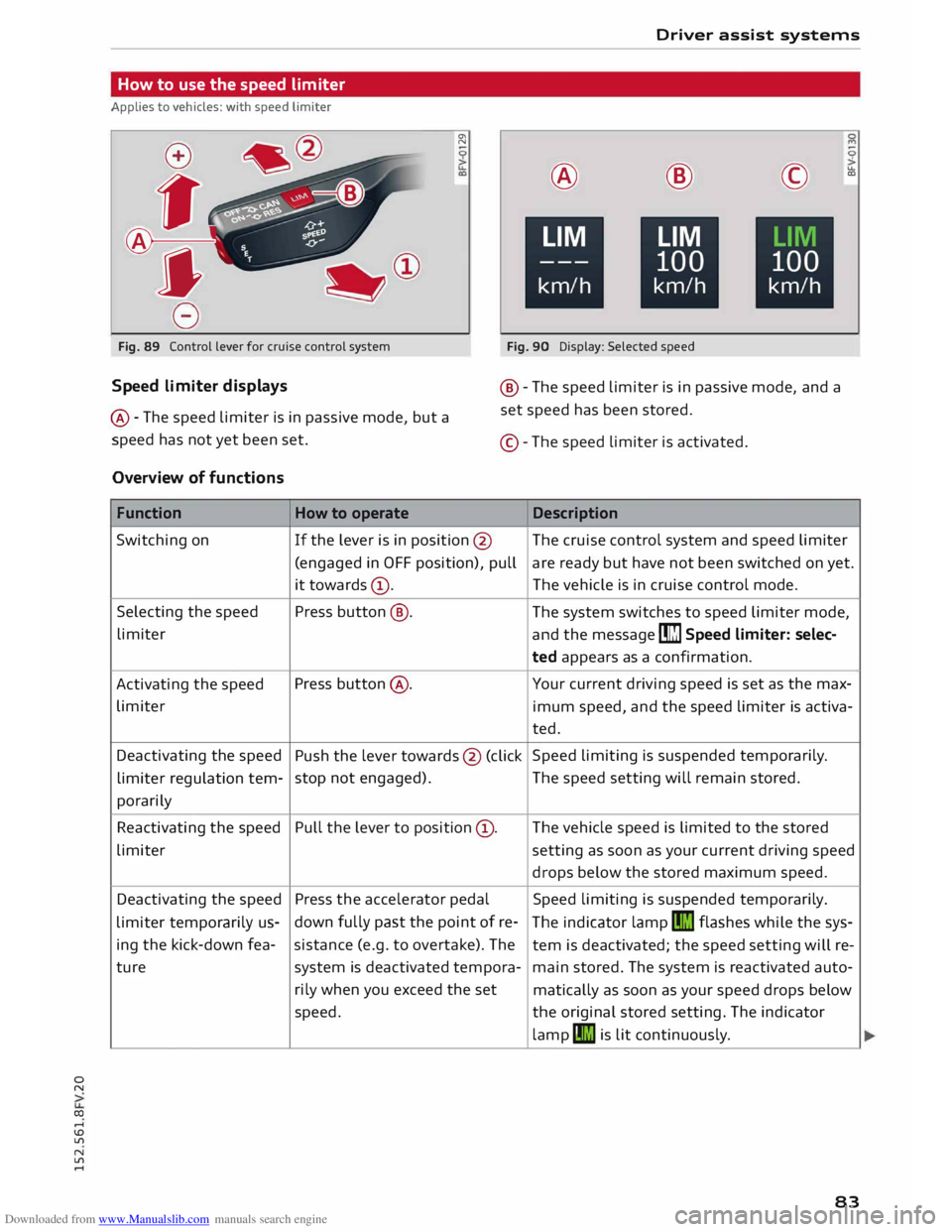
Fig. 89 Control lever for cruise control system
Fig. 90 Display: Selected speed
Speed limiter displays
@ -The speed Limiter is in passive mode, but a
speed has not yet been set. @
-The speed Limiter is in passive mode, and a
set speed has been stored.
©- The speed Limiter is activated.
Overview of functions
Function How to operate Description
Switching on If
the lever is in position @ The cruise control system and speed limiter
(engaged in OFF position), pull are ready but have not been switched on yet.
it towards (D. The
vehicle is in cruise control mode.
Selecting the speed
Press button @.
The system switches to speed Limiter mode,
Limiter and the message [m] Speed limiter: selec-
ted appears as a confirmation.
Activating the speed Press
button @. Your current driving speed is set as the max-
Limiter imum speed, and the speed Limiter is activa-
ted.
Deactivating the speed
Push the lever towards @ (click Speed
Limiting is suspended temporarily.
Limiter regulation tern-stop
not engaged). The
speed setting will remain stored.
porarily
Reactivating the speed Pull
the lever to position (D.
The vehicle speed is limited to the stored
Limiter setting as soon as your current driving speed
drops below the stored maximum speed.
Deactivating the speed
Press the accelerator pedal Speed
limiting is suspended temporarily.
Limiter temporarily us-down
fully past the point of re-
The indicator lamp II) flashes while the sys-
ing the kick-down fea-sistance
(e.g. to overtake). The
tern is deactivated; the speed setting will re-
ture system
is deactivated tempora-
main stored. The system is reactivated auto-
rily when you exceed the set
matically as soon as your speed drops below
speed. the original stored setting. The indicator
lamp II) is Lit continuously.
83
Page 90 of 284
Downloaded from www.Manualslib.com manuals search engine Driver
assist systems
critical, the warning lamp@ on the exterior mir
ror lights up¢ Fig. 96.
The warning lamp on the left-hand mirror assists
the driver when changing lane towards the left
and the warning lamp on the right-hand mirror
assists the driver when changing lane towards
the right.
Information mode
As long as you do not operate the turn signal, the
side assist will merely inform you of the presence
of vehicles that it has detected and judges to be
critical. In this case, the warning lamp on the rel
evant exterior mirror will light up at low intensi
ty.
The intensity of the warning lamp in this infor
mation mode is kept relatively low, so that it
does not distract you while you are looking at the
road in front.
Warning mode
If you operate the turn signal, the side assist will
warn you if it registers what it judges to be a crit
ical vehicle. In this case, the warning lamp on the
relevant exterior mirror will flash brightly. Please
check the situation in the exterior mirror and by
looking back over your shoulder ¢.&. in General
notes on page 89.
@ Note
You can adjust the brightness of the warning
lamp on the exterior mirror¢ page 90.
88 General
notes
Applies to vehicles: with Audi side assist
®
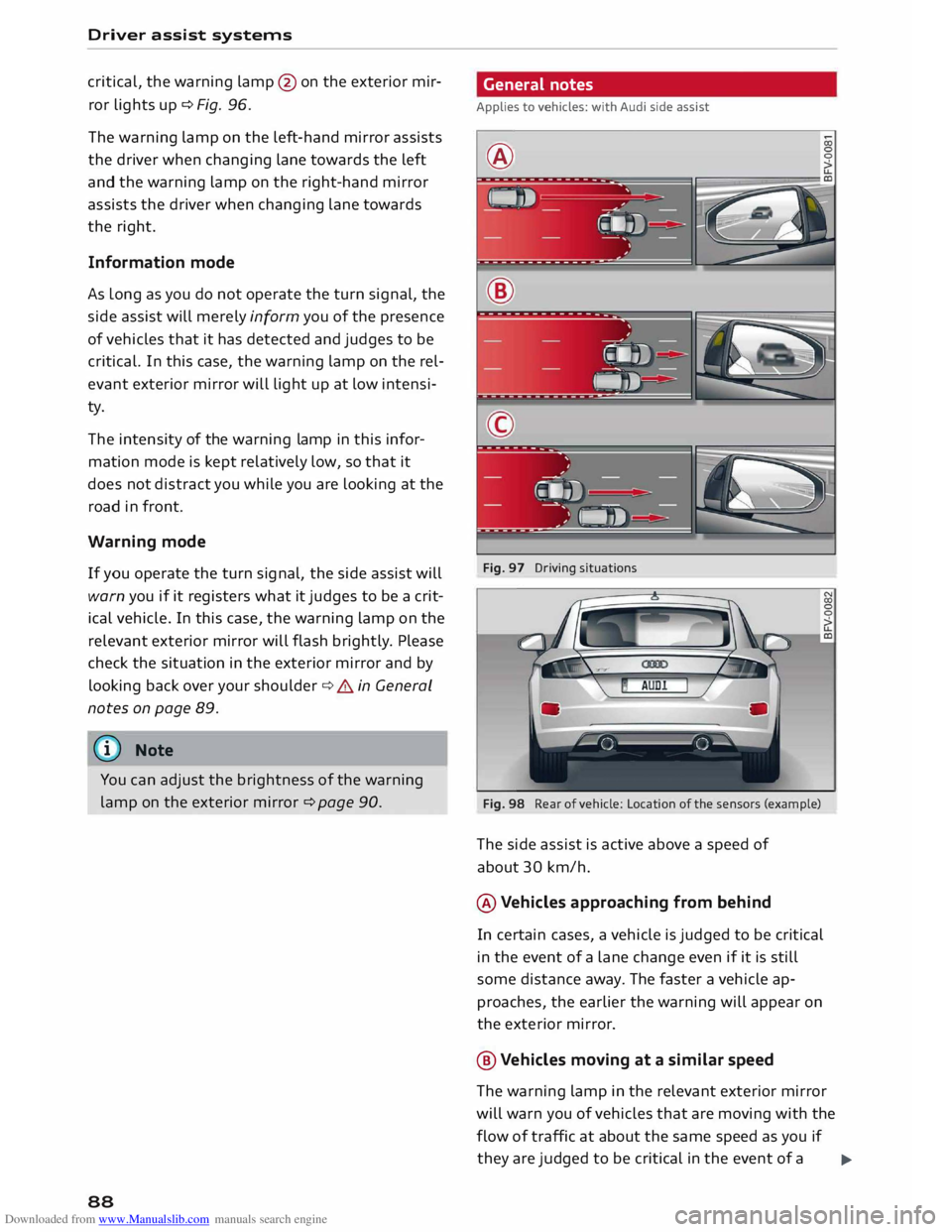
Fig. 97 Driving situations
Fig. 98 Rear of vehicle: Location of the sensors (example)
The side assist is active above a speed of
about 30 km/h.
® Vehicles approaching from behind
In certain cases, a vehicle is judged to be critical
in the event of a lane change even if it is still
some distance away. The faster a vehicle ap
proaches, the earlier the warning will appear on
the exterior mirror.
@ Vehicles moving at a similar speed
The warning lamp in the relevant exterior mirror
will warn you of vehicles that are moving with the
flow of traffic at about the same speed as you if
they are judged to be critical in the event of a ..,.
Page 97 of 284
Downloaded from www.Manualslib.com manuals search engine 0
N
co
....
\D L/'l
N
L/'l
.... Switching
on/off
Applies to vehicles: with parking system plus
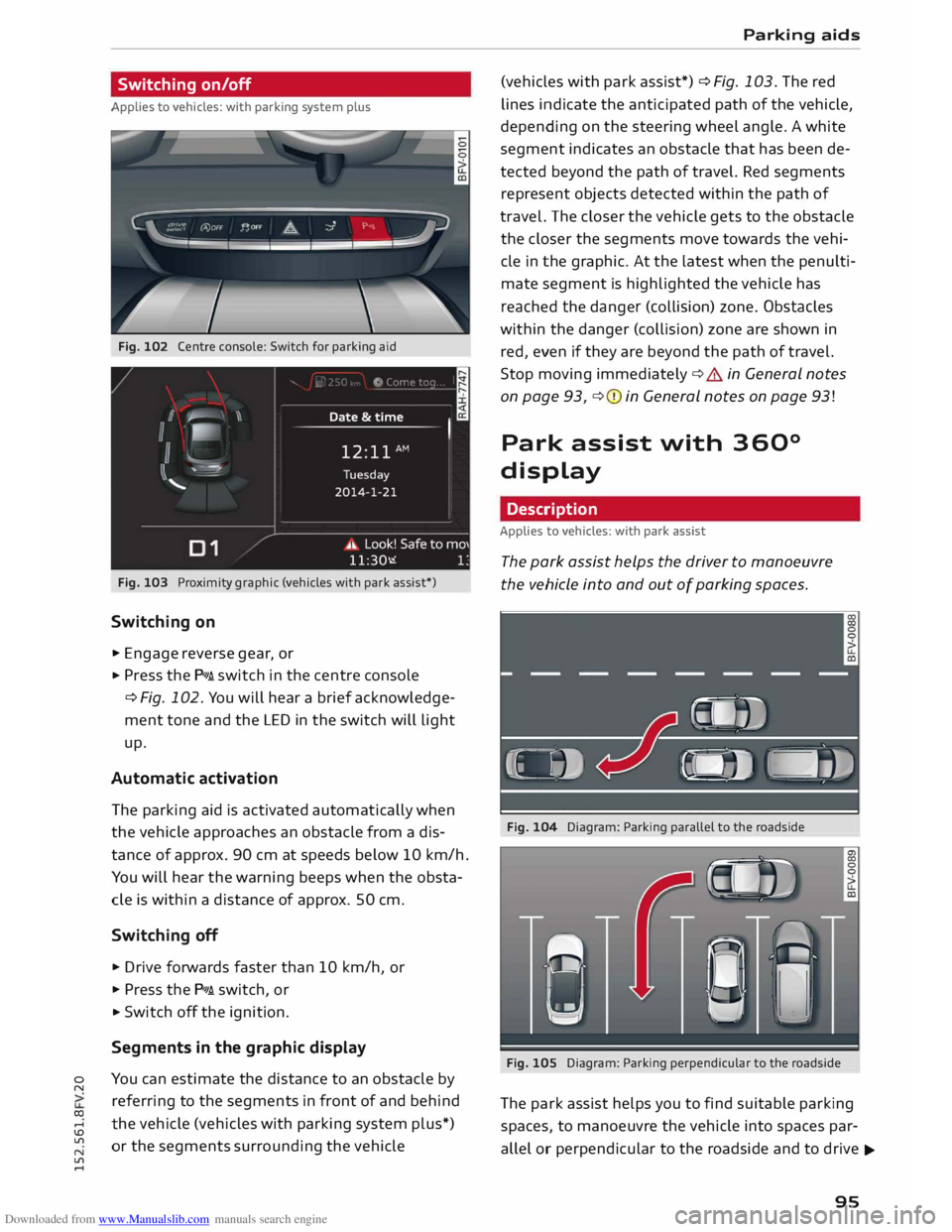
Fig. 102 Centre console: Switch for parking aid
Fig. 103 Proximity graphic (vehicles with park assist*)
Switching on
.,. Engage reverse gear, or
... Press the P111A. switch in the centre console
¢ Fig. 102. You will hear a brief acknowledge
ment tone and the LED in the switch will light
up.
Automatic activation
The parking aid is activated automatically when
the vehicle approaches an obstacle from a dis
tance of approx. 90 cm at speeds below 10 km/h.
You will hear the warning beeps when the obsta
cle is within a distance of approx. 50 cm.
Switching off
... Drive forwards faster than 10 km/h, or
.,. Press the P111A. switch, or
... Switch off the ignition.
Segments in the graphic display
You can estimate the distance to an obstacle by
referring to the segments in front of and behind
the vehicle (vehicles with parking system plus*)
or the segments surrounding the vehicle Parking
aids
(vehicles with park assist*) ¢ Fig. 103. The red
lines indicate the anticipated path of the vehicle,
depending on the steering wheel angle. A white
segment indicates an obstacle that has been de
tected beyond the path of travel. Red segments
represent objects detected within the path of
travel. The closer the vehicle gets to the obstacle
the closer the segments move towards the vehi
cle in the graphic. At the Latest when the penulti
mate segment is highlighted the vehicle has
reached the danger (collision) zone. Obstacles
within the danger (collision) zone are shown in
red, even if they are beyond the path of travel.
Stop moving immediately ¢.&. in General notes
on page 93, ¢(I) in General notes on page 93!
Park assist with 360°
display
Description
Applies to vehicles: with park assist
The park assist helps the driver to manoeuvre
the vehicle into and out of parking spaces.
Fig. 104 Diagram: Parking parallel to the roadside
Fig. 105 Diagram: Parking perpendicular to the roadside
The park assist helps you to find suitable parking
spaces, to manoeuvre the vehicle into spaces par
allel or perpendicular to the roadside and to drive ...,.
95
Page 103 of 284
Downloaded from www.Manualslib.com manuals search engine Intelligent
technology
Electro-mechanical
power steering
Electro-mechanical power steering assists the
driver when steering.
The degree of power assistance is adapted elec
tronically, depending on the speed.
If the power steering should fail at any time or
the engine is switched off (for instance when be
ing towed), the car can still be steered. However,
substantially more effort than normal will be re
quired to turn the steering wheel.
Warning/indicator lamps and driver
messages
• Steering: fault. Please stop vehicle
If the warning lamp lights up permanently and
the message appears, there may be a power
steering failure.
Do NOT drive on. Obtain professional assistance.
• Steering: fault. Please stop vehicle
There is a malfunction in the electronic steering
lock. The ignition can no longer be switched on.
Do not have the vehicle towed away, because you
won't be able to steer it. Obtain professional as
sistance.
G'!b Steering:
fault. You can continue driving
If the indicator lamp lights up, the steering re
sponse may be heavier or lighter than usual. In
addition, it is possible that the steering wheel
will be off centre when driving in a straight line.
Drive slowly to a qualified workshop and have the
fault rectified.
Ive Steering
lock: fault. Please contact work
shop
There is a malfunction in the electronic steering
lock.
� Drive
to a qualified workshop soon and have the
a: fault rectified.
....
\D Lfl
N
Lfl
.... Intelligent
technology
A WARNING
Have the system malfunction repaired by a
qualified workshop as soon as possible -risk
of accident!
«]} Note
You can drive on if the warning/indicator lamp
• or mJ lights up only briefly.
Brakes
New brake pads
New brake pads do not give full braking effect for
the first 400 km, they must first be "bedded in".
However, you can compensate for the slightly re
duced braking effect by applying more pressure
on the brake pedal. Avoid placing a heavy load on
the brakes during the running-in period.
Wear The rate of wear on the brake pads depends a
great deal on how you drive and the conditions in
which the vehicle is operated. Negative factors
are, for instance, city traffic, frequent short trips
or hard driving with abrupt starts and stops.
Noises Brake noise may develop in certain situations, de
pending on the speed, braking force and ambient
conditions (such as temperature and relative hu
midity).
Effect of moisture and salt
In certain conditions, such as in heavy rain, or af
ter washing the car or driving through water, the
full braking effect can be delayed by moisture (or
in winter by ice) on the discs and brake pads. The
brakes should be "dried" by pressing the pedal to
restore full braking effect.
When you are driving at higher speeds with the
windscreen wipers on, the brake pads are very
briefly brought into contact with the brake discs.
This automatic process which goes unnoticed by
the driver is carried out at regular intervals and is
intended to improve braking response in wet con-
ditions. ..,..
101