bluetooth AUDI TT COUPE 2014 Owner's Manual
[x] Cancel search | Manufacturer: AUDI, Model Year: 2014, Model line: TT COUPE, Model: AUDI TT COUPE 2014Pages: 284, PDF Size: 34.42 MB
Page 175 of 284
Downloaded from www.Manualslib.com manuals search engine once.
Depending on the device, a media
player that has already been bonded will au
tomatically be reconnected to the Wi-Fi hot
spot of the MMI when it is within range.
- Inserting or removing a SIM card from the
SIM card reader* causes the Wi-Fi connec
tion to be reconfigured. This may cause a
short interruption in the audio playback of
some media players.
- Please observe the notes in the chapter
Notes on Audi connect ¢ page 145.
- Please note that the Wi-Fi connection does
not automatically enable you to use the In
ternet. Further information can be found
from ¢page 137onwards.
- To avoid interruptions in audio playback, de
activate the energy saving function on your
media player, or connect the player to a
charger.
- The time it takes to load audio files depends
on the media player in use and on the num
ber of fi Les stored.
-A maximum of 2,000 entries per directory
are shown on the MMI.
- Audi dealerships will be able to provide you
with further information on Wi-Fi audio
players.
Online media
Applies to vehicles: with Audi connect
You can start and operate various online media
services via the MMI.
� Audi
music interface
AUX External
audio player
@ Bluetooth audio player
'9' Wi-Fi audio player
0 �
.
O nlin e media
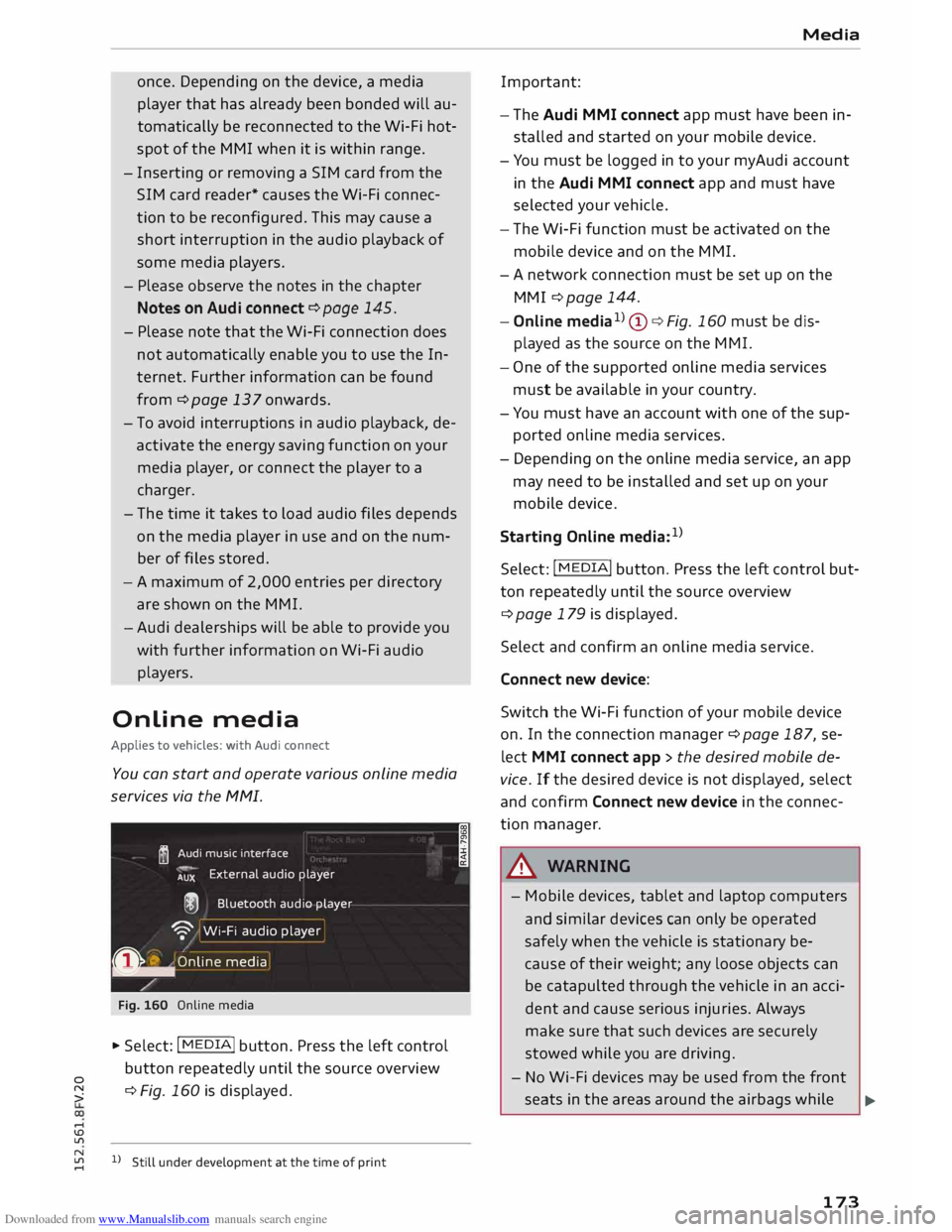
Fig. 160 Online media
... Select: I MEDIA
!
button. Press the left control
button repeatedly until the source overview
� ¢
Fig. 160 is displayed.
....
\D L/'l
� 1)Still under development at the time of print
.... I Media
Important:
- The Audi MMI connect app must have been in
stalled and started on your mobile device.
- You must be logged in to your myAudi account
in the Audi MMI connect app and must have
selected your vehicle.
- The Wi-Fi function must be activated on the
mobile device and on the MMI.
- A network connection must be set up on the
MMI ¢ page 144.
- Online media1
)
(!) ¢Fig. 160 must be dis
played as the source on the MMI.
- One of the supported on line media services
must be available in your country.
- You must have an account with one of the sup
ported online media services.
- Depending on the online media service, an app
may need to be installed and set up on your
mobile device.
Starting Online media:1
)
Select: I MEDIA
! button. Press the Left control but
ton repeatedly until the source overview
¢page 179 is displayed.
Select and confirm an online media service.
Connect new device:
Switch the Wi-Fi function of your mobile device
on. In the connection manager¢ page 187, se
lect MMI connect app > the desired mobile de
vice. If the desired device is not displayed, select
and confirm Connect new device in the connec
tion manager .
.&_ WARNING
- Mobile devices, tablet and laptop computers
and similar devices can only be operated
safely when the vehicle is stationary be
cause of their weight; any loose objects can
be catapulted through the vehicle in an acci
dent and cause serious injuries. Always
make sure that such devices are securely
stowed while you are driving.
- No Wi-Fi devices may be used from the front
seats in the areas around the airbags while .,..
173
Page 178 of 284
Downloaded from www.Manualslib.com manuals search engine Media
- The AUX adapter cable is available from
Audi dealers or specialist retailers.
- It cannot be guaranteed that mobile devices
which do not meet the specification USB 2.0
will function properly.
- USB hubs are not supported.
- Some iPod versions (e.g. iPod shuffle) can-
not be connected with the USB adapter for
devices with Apple dock connector*. You can
connect these devices using the AUX adapt
er cable.
- It is not possible to play videos via the Audi
music interface if the device is connected
using a USB adapter ¢page 174, Fig. 161.
- iPod/iPhone/iPad malfunctions also affect
the operation of the MMI. In this case,
please reset your iPod/iPhone/iPad.
- Please refer to the iPod/iPhone/iPad operat
ing instructions for important information
on how
to
use your iPod/iPhone/iPad. We
recommend that you update the iPod/
iPhone/iPad software to the Latest status.
- For more information on the Audi music in
terface and on which devices are supported,
please see the Audi mobile device database
at www.audi.com/bluetooth or contact an
Audi dealer.
AUX input/USB charging socket
Applies to vehicles: with AUX input/USS charging socket
You can charge the batteries of your mobile devi
ces using the USB charging socket. You can con
nect mobile devices using the analogue AUX in
terface.
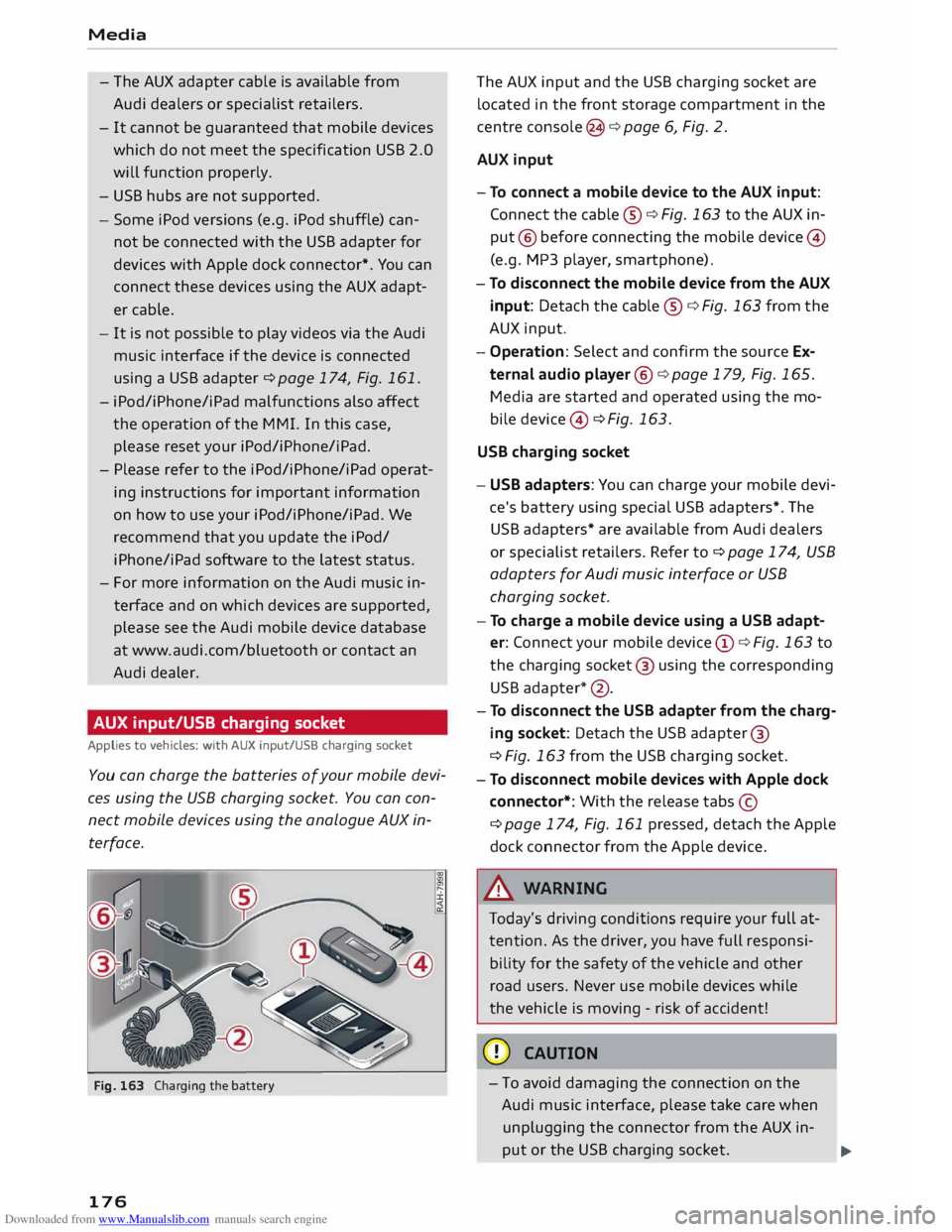
Fig. 163 Charging the battery
176 The
AUX input and the USB charging socket are
located in the front storage compartment in the
centre console (3 ¢ page 6, Fig. 2.
AUX input
- To connect a mobile device to the AUX input:
Connect the cable ®¢ Fig. 163 to the AUX in
put @ before connecting the mobile device@
(e.g. MP3 player , smartphone).
- To disconnect the mobile device from the AUX
input: Detach the cable ®¢ Fig. 163 from the
AUX input.
- Operation: Select and confirm the source Ex
ternal audio player @¢ page 179, Fig. 165.
Media are started and operated using the mo
bi le device @ ¢ Fig. 163.
USB charging socket
- USB adapters: You can charge your mobile devi
ce's battery using special USB adapters*. The
USB adapters* are available from Audi dealers
or specialist retailers. Refer to¢ page 174, USB
adapters for Audi music interface or USB
charging socket.
- To charge a mobile device using a USB adapt
er: Connect your mobile device@¢ Fig. 163 to
the charging socket@ using the corresponding
USB adapter *@ .
- To disconnect the USB adapter from the charg
ing socket: Detach the USB adapter ®
¢ Fig. 163 from the USB charging socket.
- To disconnect mobile devices with Apple dock
connector*: With the release tabs©
¢page 174, Fig. 161 pressed, detach the Apple
dock connector from the Apple device.
A WARNING
Today's driving conditions require your full at
tention. As the driver, you have full responsi
bility for the safety of the vehicle and other
road users. Never use mobile devices while
the vehicle is moving -risk of accident!
CD CAUTION
- To avoid damaging the connection on the
Audi music interface, please take care when
unplugging the connector from the AUX in-
put or the USB charging socket.
.,.
Page 181 of 284
Downloaded from www.Manualslib.com manuals search engine 0
N
co
.-I
\D L/'l
N
L/'l
.-I -
The display of country-specific characters
(e.g.
for
ID3 tag information) depends on
the language set on the system; it cannot
be ensured that these characters are always
displayed correctly.
Playing media
Calling up media
You can start and operate various types of media
via the MMI control console.
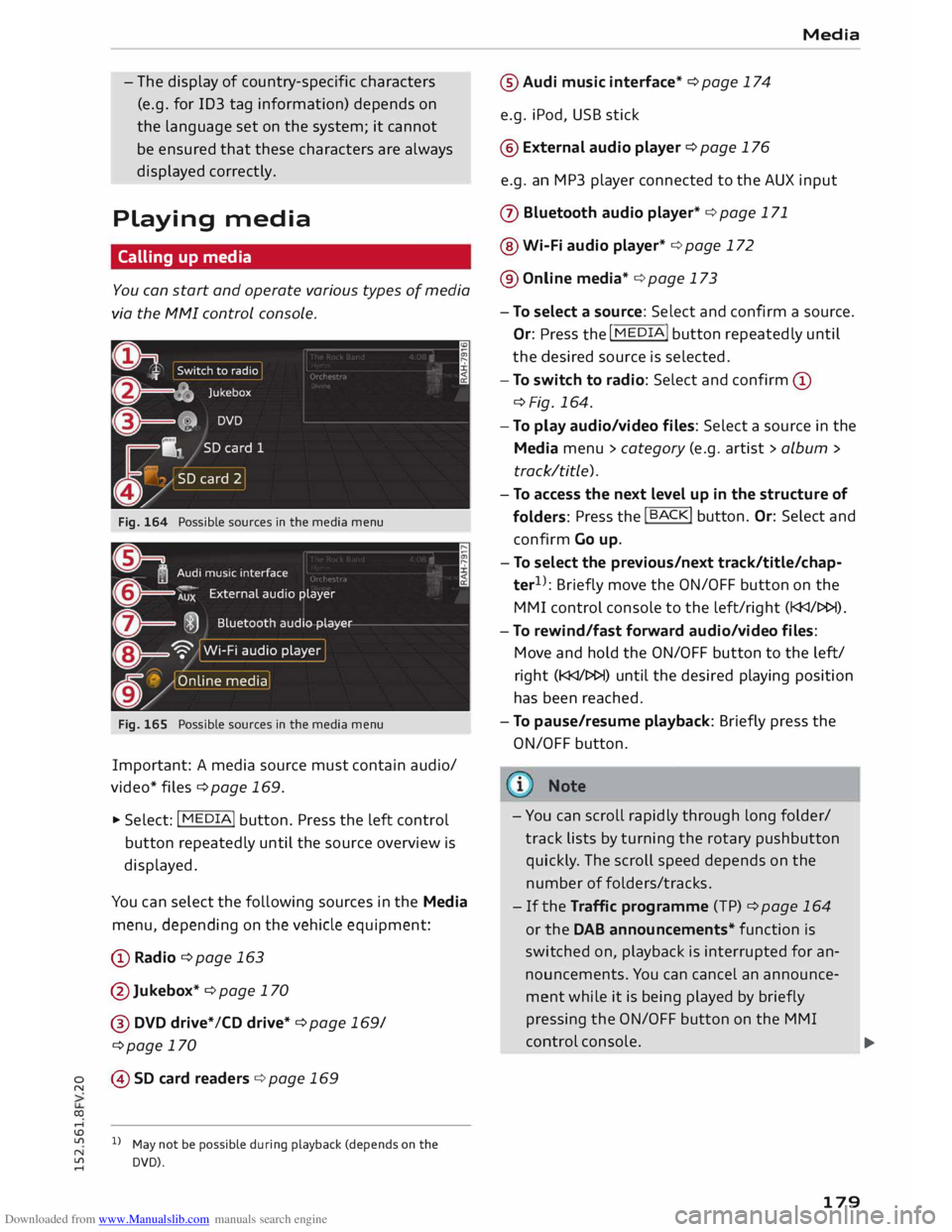
Fig. 164 Possible sources in the media menu
Fig. 165 Possible sources in the media menu
Important: A media source must contain audio/
video* files ¢page 169.
.,. Select: I MEDIA!
button. Press the left control
button repeatedly until the source overview is
displayed.
You can select the following sources in the Media
menu, depending on the vehicle equipment:
(D Radio ¢page 163
@Jukebox* ¢ page 170
@ DVD drive*/CD drive* ¢page 169/
¢page 170
© SD card readers ¢ page 169
l l
May not be possible during playback (depends on the
DVD). Media
® Audi music interface* ¢ page 174
e.g. iPod, USB stick
@ External audio player ¢ page 176
e.g. an MP3 player connected to the AUX input
(J) Bluetooth audio player* ¢ page 171
@ Wi-Fi audio player* ¢ page 172
® Online media* ¢ page 173
- To select a source: Select and confirm a source.
Or:
Press
the I MEDIA! button
repeatedly until
the desired source is selected.
- To switch to radio: Select and confirm (D
¢Fig. 164.
- To play audio/video files: Select a source in the
Media menu> category (e.g. artist > album >
track/title).
- To access the next level up in the structure of
folders: Press
the I B A
CK! button.
Or: Select and
confirm Go up.
- To select the previous/next track/title/chap
ter 1
>
: Briefly move the ON/OFF button on the
MMI control console to the left/right (l
- To rewind/fas t forward audio/video files:
Move and hold the ON/OFF button to the left/
right (l
has been reached.
- To pause/resume playback: Briefly press the
ON/OFF button.
- You can scroll rapidly through long folder/
track lists by turning the rotary pushbutton
quickly . The scroll speed depends on the
number of folders/tracks.
-If the Traffic programme (TP) ¢page 164
or the DAB announcements* function is
swit ched on, playback is interrupted for an
nouncements. You can cancel an announce
ment while it is being played by briefly
pressing the ON/OFF button on the MMI
control console.
..,.
179
Page 185 of 284
Downloaded from www.Manualslib.com manuals search engine 0
N
co
....
\D Lfl
N
Lfl
.... until
the source overview ¢ page 179 is dis
played. Select a source which supports Catego
ries ¢ page 180 (e.g. an SD card). Select the Fa
vourites category.
Important: The favourites list must be displayed.
- To listen to a favourite: Select and confirm an
item in the favourites list.
- To move a favourite: Select the desired item
from the favourites list. Select: right control
button > Move favourite. Select and confirm
the desired memory position.
- To delete a favourite: Select the desired item
from the favourites list. Select: right control
button > Move favourite > Delete this favour
ite or Delete all favourites.
Other settings
Media settings
� Select: I MEDIA! button > right control button >
Media settings.
Depending on the active source and the storage
device used, you can select the following set
tings:
Sound settings
Refer to¢ page 190.
Input level
Important: A mobile device must be connected
via an AUX adapter cable* or a USB adapter*.
The volume of the mobile device will be adapted
to the MMI system. We recommend setting the
volume of the mobile device to about 70 percent
of the maximum volume.
Bluetooth settings
Refer to¢ page 188.
Wi-Fi settings
Refer to ¢ page 143, Wi-Fi hotspot.
Connection manager
Refer to¢ page 187. Media
Child lock*
Important: A video DVD must be playing.
You can use the child lock to restrict video DVD
playback.
Enter the child lock password. The password set
at the factory is 1234. The following options are
available:
- Safety level: Select and confirm a safety level
(e.g. level 5). Eight safety levels are available
for the child lock function. If you select child
lock level 5, all DVDs with safety levels 1-5 can
be played. Playback of DVDs with a higher safe
ty level will be blocked. Select No restriction to
remove all restrictions.
- Change password: You can change the current
password.
Detailed track info
When this function is switched on [;1 and the
playlist is open, information on the selected track
(e.g. the artist, album, album cover*) as well as
the total and remaining playing time will be dis
played.
Jukebox memory capacity
Information on the jukebox memory capacity and
the number tracks stored on the jukebox will be
displayed.
{!) Note
- Not all video DVDs have a child lock feature.
- The child lock safety levels comply with the
US standards of the Motion Picture Associa
tion of America (MPAA). Please note that
age ratings for DVDs may vary between dif
ferent European countries.
- If you enter the wrong child lock password
three times in a row, you will not be able to
enter a password for approximately one mi
nute. The password can only be reset by an
Audi worksho p.
183
Page 186 of 284
Downloaded from www.Manualslib.com manuals search engine Media
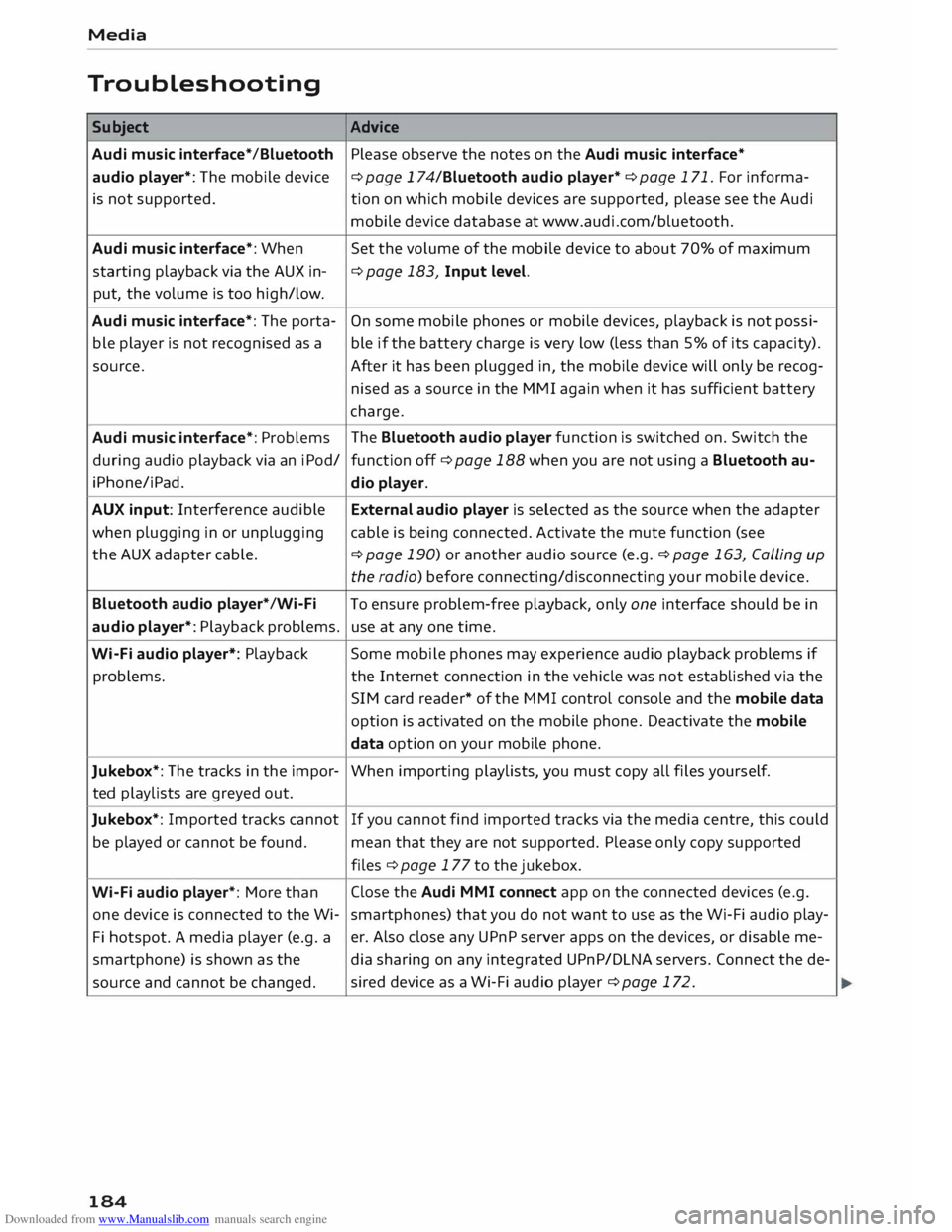
Troubleshooting Subject Advice
Audi music interface* /Bluetooth Please observe the notes on the Audi music interface*
audio player*: The mobile device
¢ page 174/Bluetooth audio player* ¢ page 171. For informa-
is not supported. tion on which mobile devices are supported, please see the Audi
mobile device database at www.audi.com/bluetooth.
Audi music interface*: When
Set the volume of the mobile device to about 70% of maximum
starting playback via the AUX in- ¢
page 183, Input level.
put, the volume is too high/low.
Audi music interface*: The porta- On
some mobile phones or mobile devices, playback is not possi-
ble player is not recognised as a ble if the battery charge is very low (less than 5% of its capacity).
source. After it has been plugged in, the mobile device will only be recog-
nised as a source in the MMI again when it has sufficient battery
charge.
Audi music interface*: Problems The
Bluetooth audio player function is switched on. Switch the
during audio playback via an iPod/
function off¢ page 188 when you are not using a Bluetooth au-
i Phone/i Pad.
dio player.
AUX input: Interference audible External audio player is selected as the source when the adapter
when plugging in or unplugging cable is being connected. Activate the mute function (see
the AUX adapter cable.
¢ page 190) or another audio source (e.g.¢ page 163, Calling up
the radio) before connecting/disconnecting your mobile device.
Bluetooth audio player*/Wi-Fi
To ensure problem-free playback, only one interface should be in
audio player*: Playback problems. use at any one time.
Wi-Fi audio player*: Playback Some
mobile phones may experience audio playback problems if
problems. the Internet connection in the vehicle was not established via the
SIM card reader* of the MMI control console and the mobile data
option is activated on the mobile phone. Deactivate the mobile
data option on your mobile phone.
Jukebox*: The tracks in the impor-
When importing playlists, you must copy all files yours elf.
ted playlists are greyed out.
Jukebox*: Imported tracks cannot If
you cannot find imported tracks via the media centre, this could
be played or cannot be found.
mean that they are not supported. Please only copy supported
files ¢ page 177 to the jukebox.
Wi-Fi audio player*: More than Close
the Audi MMI connect app on the connected devices (e.g.
one device is connected to the Wi- smartphones) that you do not want to use as the Wi-Fi audio play-
Fi hotspot. A media player (e.g. a er.
Also close any UPnP server apps on the devices, or disable me-
smartphone) is shown as the
dia sharing on any integrated UPnP/DLNA servers. Connect the de-
source and cannot be changed. sired
device as a Wi-Fi audio player ¢ page 172.
184
Page 189 of 284
Downloaded from www.Manualslib.com manuals search engine 0
N
co
....
\D L/'l
N
L/'l
.... Factory
settings
You can reset the following functions to the fac
tory settings:
- Sound settings
-Radio
- Media settings
-Jukebox*
- Directory*
- Telephone*
- Bluetooth and Wi-Fi*
- Navigation settings*
- Navigation and online memory*
- Speech dialogue system*
- Message settings*
-Apps*
- Usage tips
- Audi connect*
You can select the desired options individually or
mark Select all entries. Select and confirm Re
store factory settings.
i Note
Please note that not only settings will be de
leted when you do this;
saved
data may also
be erased.
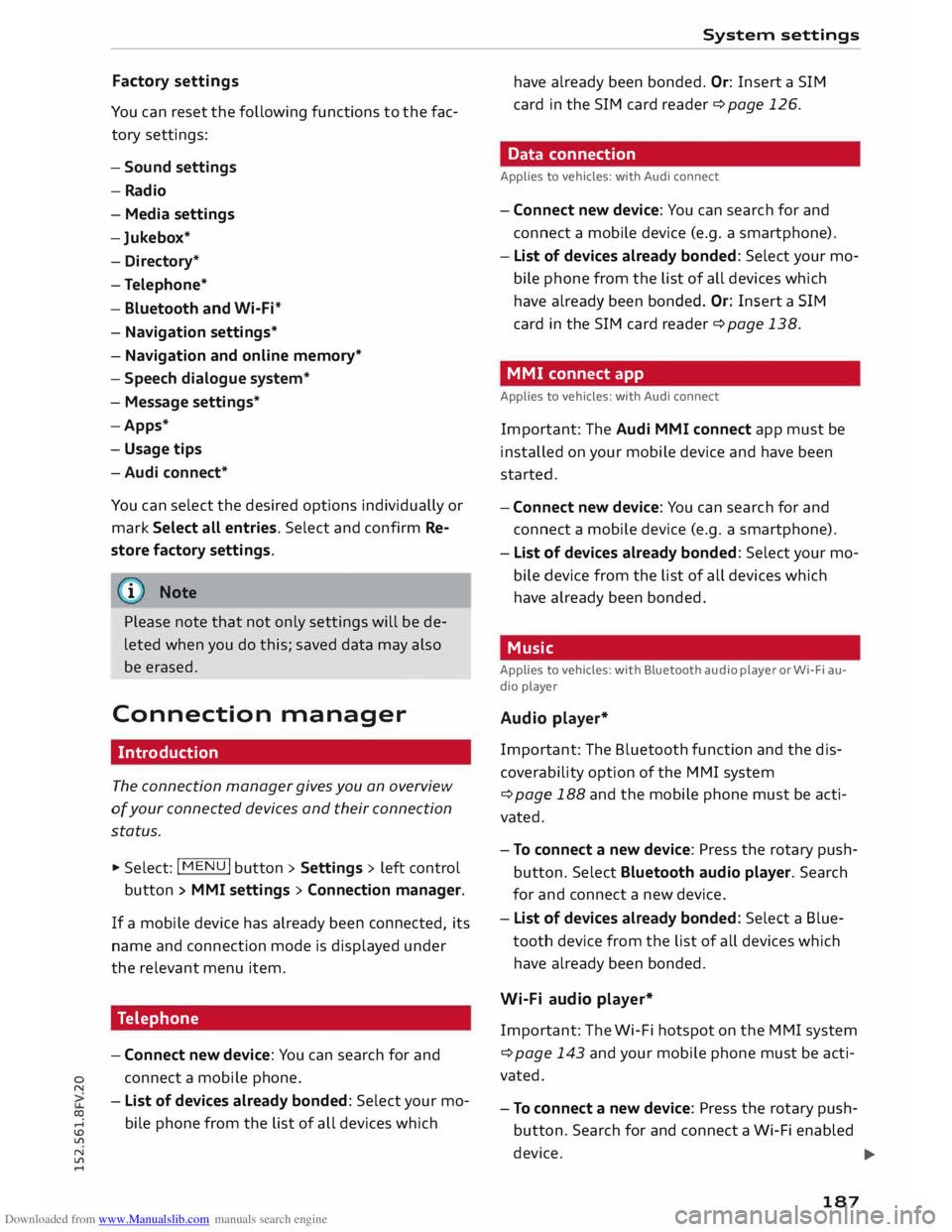
Connection manager
Introduction
The connection manager gives you an overview
of your connected devices and their connection
status.
.. Select: I MENU
I button
>Settings> left control
button > MMI settings > Connection manager.
If a mobile device has already been connected, its
name and connection mode is displayed under
the relevant menu item.
Telephone
- Connect new device: You can search for and
connect a mobile phone.
- List of devices already bonded: Select your mo
bile phone from the list of all devices which System
settings
have already been bonded. Or: Insert a SIM
card in the SIM card reader¢ page 126.
Data connection
Applies to vehicles: with Audi connect
- Connect new device: You can search for and
connect a mobile device (e.g. a smartphone).
- List of devices already bonded: Select your mo
bile phone from the list of all devices which
have already been bonded. Or: Insert a SIM
card in the SIM card reader¢ page 138.
MMI connect app
Applies to vehicles: with Audi connect
Important: The Audi MMI connect app must be
installed on your mobile device and have been
started.
- Connect new device: You can search for and
connect a mobile device (e.g. a smartphone).
- List of devices already bonded: Select your mo
bile device from the list of all devices which
have already been bonded.
Music
Applies to vehicles: with Bluetooth audio player or Wi-Fi au
dio player
Audio player*
Important: The Bluetooth function and the dis
coverability option of the MMI system
¢ page 188 and the mobile phone must be acti
vated.
- To connect a new device: Press the rotary push
button. Select Bluetooth audio player. Search
for and connect a new device.
- List of devices already bonded: Select a Blue
tooth device from the list of all devices which
have already been bonded.
Wi-Fi audio player*
Important: The Wi-Fi hotspot on the MMI system
¢ page 143 and your mobile phone must be acti
vated.
- To connect a new device: Press the rotary push
button. Search for and connect a Wi-Fi enabled
device. ...,.
187
Page 190 of 284
Downloaded from www.Manualslib.com manuals search engine System
settings
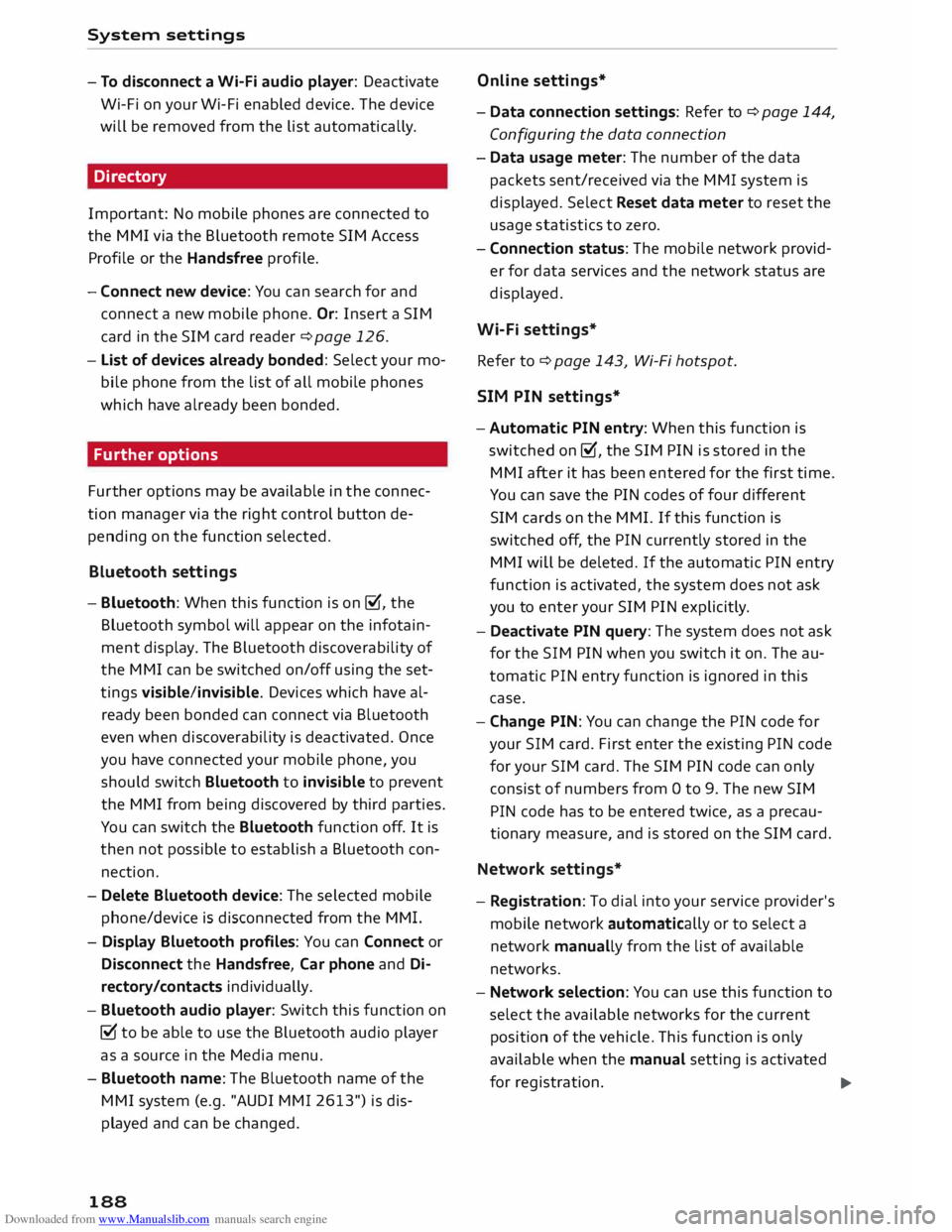
- To disconnect a Wi-Fi audio player: Deactivate
Wi-Fi on your Wi-Fi enabled device. The device
will be removed from the list automatically.
Directory
Important: No mobile phones are connected to
the MMI via the Bluetooth remote SIM Access
Profile or the Handsfree profile.
- Connect new device: You can search for and
connect a new mobile phone. Or: Insert a SIM
card in the SIM card reader ¢ page 126.
- List of devices already bonded: Select your mo
bile phone from the list of all mobile phones
which have already been bonded.
Further options
Further options may be available in the connec
tion manager via the right control button de
pending on the function selected.
Bluetooth settings
- Bluetooth: When this function is on �. the
Bluetooth symbol will appear on the infotain
ment display. The Bluetooth discoverability of
the MMI can be switched on/off using the set
tings visible/invisible. Devices which have al
ready been bonded can connect via Bluetooth
even when discoverability is deactivated. Once
you have connected your mobile phone, you
should switch Bluetooth to invisible to prevent
the MMI from being discovered by third parties.
You can switch the Bluetooth function off. It is
then not possible to establish a Bluetooth con
nection.
- Delete Bluetooth device: The selected mobile
phone/device is disconnected from the MMI.
- Display Bluetooth profiles: You can Connect or
Disconnect the Handsfree, Car phone and Di
rectory/contacts individually.
- Bluetooth audio player: Switch this function on
� to be able to use the Bluetooth audio player
as a source in the Media menu.
- Bluetooth name: The Bluetooth name of the
MMI system (e.g. "AUDI MMI 2613") is dis
played and can be changed.
188 Online
settings*
- Data conne ction settings: Refer to ¢ page 144,
Configuring the data connection
- Data usage meter: The number of the data
packets sent/received via the MMI system is
displayed. Select Reset data meter to reset the
usage statistics to zero.
- Connection status: The mobile network provid
er for data services and the network status are
displayed.
Wi-Fi settings*
Refer to¢ page 143, Wi-Fi hotspot.
SIM PIN settings*
- Automatic PIN entry: When this function is
switched on�, the SIM PIN is stored in the
MMI after it has been entered for the first time.
You can save the PIN codes of four different
SIM cards on the MMI. If this function is
switched off, the PIN currently stored in the
MMI will be deleted. If the automatic PIN entry
function is activated, the system does not ask
you to enter your SIM PIN explicitly.
- Deactivate PIN query: The system does not ask
for the SIM PIN when you switch it on. The au
tomatic PIN entry function is ignored in this
case.
- Change PIN: You can change the PIN code for
your SIM card. First enter the existing PIN code
for your SIM card. The SIM PIN code can only
consist of numbers from Oto 9. The new SIM
PIN code has to be entered twice, as a precau
tionary measure, and is stored on the SIM card.
Network settings*
- Registration: To dial into your service provider's
mobile network automatically or to select a
network manually from the list of available
networks.
- Network selection: You can use this function to
select the available networks for the current
position of the vehicle. This function is only
available when the manual setting is activated
for registration.
�
Page 266 of 284
Downloaded from www.Manualslib.com manuals search engine Index
Google Earth
Google Street View
................. .
Import ing myAudi contacts .......... .
Logging into myAudi ................ . 159
159
133
140
myAudi destination . . . . . . . . . . . . . . . . . . 151
Navigation . . . . . . . . . . . . . . . . . . . . . 140, 151
Notes . . . . . . . . . . . . . . . . . . . . . . . . . . . . . 145
Online traffic information . . . . . . . . . . . . . 161
Options menu . . . . . . . . . . . . . . . . . . . . . . .
143
Personal hotspot . . . . . . . . . . . . . . . . . . . .
139
Preview . . . . . . . . . . . . . . . . . . . . . . . . . . . . 140
Requirements . . . . . . . . . . . . . . . . . . . . . . .
137
Search area . . . . . . . . . . . . . . . . . . . . . . . . .
140
Settings . . . . . . . . . . . . . . . . . . . . . . . . . . .
143
SIM card reader . . . . . . . . . . . . . . . . . . . . .
138
Troubleshooting . . . . . . . . . . . . . . . . . . . . .
146
Audi connect services
Media . . . . . . . . . . . . . . . . . . . . . . . . . . . . . 143
Navigation . . . . . . . . . . . . . . . . . . . . . . . . . 142
Options . . . . . . . . . . . . . . . . . . . . . . . . . . . .
143
Telephone . . . . . . . . . . . . . . . . . . . . . . . . . .
143
Audi connect services, using
MMI control console . . . . . . . . . . . . . . . . . 137
Speech dialogue system 118
Audi magnetic ride
see Suspension control . . . . . . . . . . . . . . . . 90
Audi music interface . . . . . . . . . . . . . . . . . . .
174
Cables . . . . . . . . . . . . . . . . . . . . . . . . . . . . .
174
USB adapters . . . . . . . . . . . . . . . . . . . . . . .
174
Audi music stream
see Wi-Fi audio player . . . . . . . . . . . . . . . .
172
Audio files . . . . . . . . . . . . . . . . . . . . . . . . . . .
179
Audio input
see AUX input ................... 175,
176
Audio player
Bluetooth audio player . . . . . . . . . . . . . . . 171
Wi-Fi audio player . . . . . . . . . . . . . . . . . . . 172
Audio track . . . . . . . . . . . . . . . . . . . . . . . . . . 181
Audi phone box . . . . . . . . . . . . . . . . . . . . . . . 125
Audi side assist
see Side assist . . . . . . . . . . . . . . . . . . . . . . .
87
AUTO Automatic air conditioner . . . . . . . . . . . . . . 55
Automatic headlights . . . . . . . . . . . . . . . . . 37
Auto Lock (central locking system) . . . . . . . .
25
Automatic air conditioner
see Air conditioner (automatic) . . . . . . . . . .
55
264 Automatic
gearbox . . . . . . . . . . . . . . . . . . . . . 70
Back-up programme . . . . . . . . . . . . . . . . . . 77
Downhill speed control . . . . . . . . . . . . . . . . 74
Driving tips . . . . . . . . . . . . . . . . . . . . . . . . . . 72
Kick-down . . . . . . . . . . . . . . . . . . . . . . . . . . . 75
Launch control programme . . . . . . . . . . . . . 76
Malfunction . . . . . . . . . . . . . . . . . . . . . . . . . 71
Manual gear selection . . . . . . . . . . . . . . . . . 75
Manual release of selector lever (left-hand
drive) . . . . . . . . . . . . . . . . . . . . . . . . . . . . . .
78
Manual release of selector lever (right-hand
drive) . . . . . . . . . . . . . . . . . . . . . . . . . . . . . .
79
Selector lever lock . . . . . . . . . . . . . . . . . . . . 71
Selector lever positions . . . . . . . . . . . . . . . . 70
Steering wheel with paddle levers . . . . . . . 75
tiptronic . . . . . . . . . . . . . . . . . . . . . . . . . . . .
75
Automatic zoom . . . . . . . . . . . . . . . . . . . . . . 158
AUX input ....................... 175,176
Average fuel consumption . . . . . . . . . . . . . . . 22
Average speed . . . . . . . . . . . . . . . . . . . . . . . . . 22
B
Background lighting . . . . . . . . . . . . . . . . . . . . 40
Balance (sound) . . . . . . . . . . . . . . . . . . . . . . 190
Bandages see First-aid kit . . . . . . . . . . . . . . . . . . . . . . 241
Bass (sound) . . . . . . . . . . . . . . . . . . . . . . . . . 190
Battery . . . . . . . . . . . . . . . . . . . . . . . . . . . . . 226
Charge . . . . . . . . . . . . . . . . . . . . . . . . . 13, 106
Charging . . . . . . . . . . . . . . . . . . . . . . . . . . . 228
Connecting/disconnecting . . . . . . . . . . . . . 226
Indicator lamp . . . . . . . . . . . . . . . . . . . . . . . 13
Long periods of non-use . . . . . . . . . . . . . .
226
Power management . . . . . . . . . . . . . . . . . .
106
Replacing . . . . . . . . . . . . . . . . . . . . . . . . . .
228
Winter conditions . . . . . . . . . . . . . . . . . . .
226
Battery, charging . . . . . . . . . . . . . . . . . . . . .
125
Belts see Seat belts . . . . . . . . . . . . . . . . . . . . . . .
204
Better route . . . . . . . . . . . . . . . . . . . . . . . . .
160
Biodiesel . . . . . . . . . . . . . . . . . . . . . . . . . . . . 217
Bioethanol (fuel) . . . . . . . . . . . . . . . . . . . . . 217
Blower Automatic air conditioner . . . . . . . . . . . . . .
55
Manual air conditioner. . . . . . . . . . . . . . . . .
53
Page 267 of 284
Downloaded from www.Manualslib.com manuals search engine 0
N
co
....
\D L/'l
N
L/'l
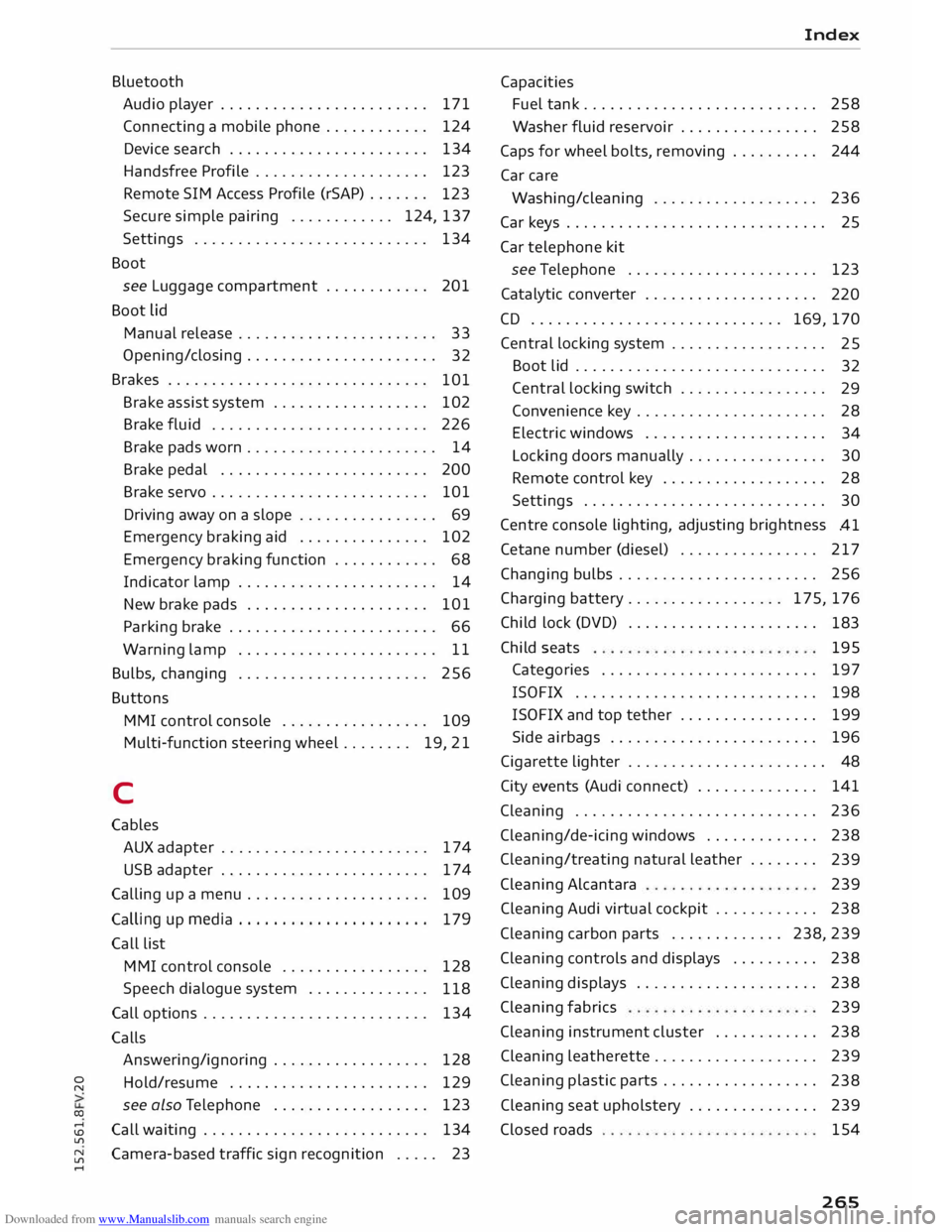
.... Bluetooth
Audio player ........................ 171
Connecting a mobile phone . . . . . . . . . . . .
124
Device search . . . . . . . . . . . . . . . . . . . . . . .
134
Handsfree Profile . . . . . . . . . . . . . . . . . . . .
123
Remote SIM Access Profile (rSAP) . . . . . . .
123
Secure simple pairing . . . . . . . . . . . . 124, 137
Settings . . . . . . . . . . . . . . . . . . . . . . . . . . . 134
Boot see Luggage compartment . . . . . . . . . . . . 201
Boot lid
Manual release . . . . . . . . . . . . . . . . . . . . . . .
33
Opening/closing . . . . . . . . . . . . . . . . . . . . . .
32
Brakes . . . . . . . . . . . . . . . . . . . . . . . . . . . . . .
101
Brake assist system . . . . . . . . . . . . . . . . . .
102
Brake fluid . . . . . . . . . . . . . . . . . . . . . . . . .
226
Brake pads worn . . . . . . . . . . . . . . . . . . . . . . 14
Brake pedal . . . . . . . . . . . . . . . . . . . . . . . .
200
Brake servo . . . . . . . . . . . . . . . . . . . . . . . . .
101
Driving away on a slope . . . . . . . . . . . . . . . . 69
Emergency braking aid . . . . . . . . . . . . . . . 102
Emergency braking function . . . . . . . . . . . .
68
Indicator lamp . . . . . . . . . . . . . . . . . . . . . . .
14
New brake pads . . . . . . . . . . . . . . . . . . . . . 101
Parking brake . . . . . . . . . . . . . . . . . . . . . . . . 66
Warning lamp . . . . . . . . . . . . . . . . . . . . . . . 11
Bulbs, changing . . . . . . . . . . . . . . . . . . . . . . 256
Buttons MMI control console . . . . . . . . . . . . . . . . . 109
Multi-function steering wheel.. . . . . . . 19, 21
C
Cables AUX adapter . . . . . . . . . . . . . . . . . . . . . . . .
174
USB adapter . . . . . . . . . . . . . . . . . . . . . . . .
174
Calling up a menu . . . . . . . . . . . . . . . . . . . . .
109
Calling up media . . . . . . . . . . . . . . . . . . . . . . 179
Call list
MMI control console . . . . . . . . . . . . . . . . .
128
Speech dialogue system . . . . . . . . . . . . . .
118
Call options . . . . . . . . . . . . . . . . . . . . . . . . . .
134
Calls Answering/ignoring . . . . . . . . . . . . . . . . . . 128
Hold/resume . . . . . . . . . . . . . . . . . . . . . . . 129
see also Telephone . . . . . . . . . . . . . . . . . .
123
Call waiting . . . . . . . . . . . . . . . . . . . . . . . . . .
134
Camera-based traffic sign recognition . . . . . 23 Index
Capacities Fuel tank .......................... .
258
Washer fluid reservoir . . . . . . . . . . . . . . . .
258
Caps for wheel bolts, removing . . . . . . . . . .
244
Car care
Washing/cleaning . . . . . . . . . . . . . . . . . . .
236
Car keys . . . . . . . . . . . . . . . . . . . . . . . . . . . . . . 25
Car telephone kit
see Telephone . . . . . . . . . . . . . . . . . . . . . .
123
Catalytic converter . . . . . . . . . . . . . . . . . . . .
220
CD ............................. 169, 170
Central locking system . . . . . . . . . . . . . . . . . .
25
Boot lid . . . . . . . . . . . . . . . . . . . . . . . . . . . . .
32
Central locking switch . . . . . . . . . . . . . . . . .
29
Convenience key . . . . . . . . . . . . . . . . . . . . . .
28
Electric windows . . . . . . . . . . . . . . . . . . . . .
34
Locking doors manually . . . . . . . . . . . . . . . .
30
Remote control key . . . . . . . . . . . . . . . . . . .
28
Settings . . . . . . . . . . . . . . . . . . . . . . . . . . . .
30
Centre console lighting, adjusting brightness
.41
Cetane number (diesel) . . . . . . . . . . . . . . . .
217
Changing bulbs . . . . . . . . . . . . . . . . . . . . . . .
256
Charging battery... . . . . . . . . . . . . . . . 175, 176
Child lock (DVD) . . . . . . . . . . . . . . . . . . . . . .
183
Child seats 195
Categories . . . . . . . . . . . . . . . . . . . . . . . . .
197
ISOFIX . . . . . . . . . . . . . . . . . . . . . . . . . . . . 198
ISOFIX and top tether . . . . . . . . . . . . . . . . 199
Side airbags . . . . . . . . . . . . . . . . . . . . . . . . 196
Cigarette lighter . . . . . . . . . . . . . . . . . . . . . . . 48
City events (Audi connect) . . . . . . . . . . . . . . 141
Cleaning . . . . . . . . . . . . . . . . . . . . . . . . . . . .
236
Cleaning/de-icing windows . . . . . . . . . . . . .
238
Cleaning/ treating natural leather . . . . . . . .
239
Cleaning Alcantara
239
Cleaning Audi virtual cockpit . . . . . . . . . . . . 238
Cleaning carbon parts . . . . . . . . . . . . . 238, 239
Cleaning controls and displays . . . . . . . . . .
238
Cleaning displays . . . . . . . . . . . . . . . . . . . . .
238
Cleaning fabrics
239
Cleaning instrument cluster . . . . . . . . . . . .
238
Cleaning leatherette . . . . . . . . . . . . . . . . . . .
239
Cleaning plastic parts . . . . . . . . . . . . . . . . . .
238
Cleaning seat upholstery . . . . . . . . . . . . . . . 239
Closed roads
154
265
Page 268 of 284
Downloaded from www.Manualslib.com manuals search engine Index
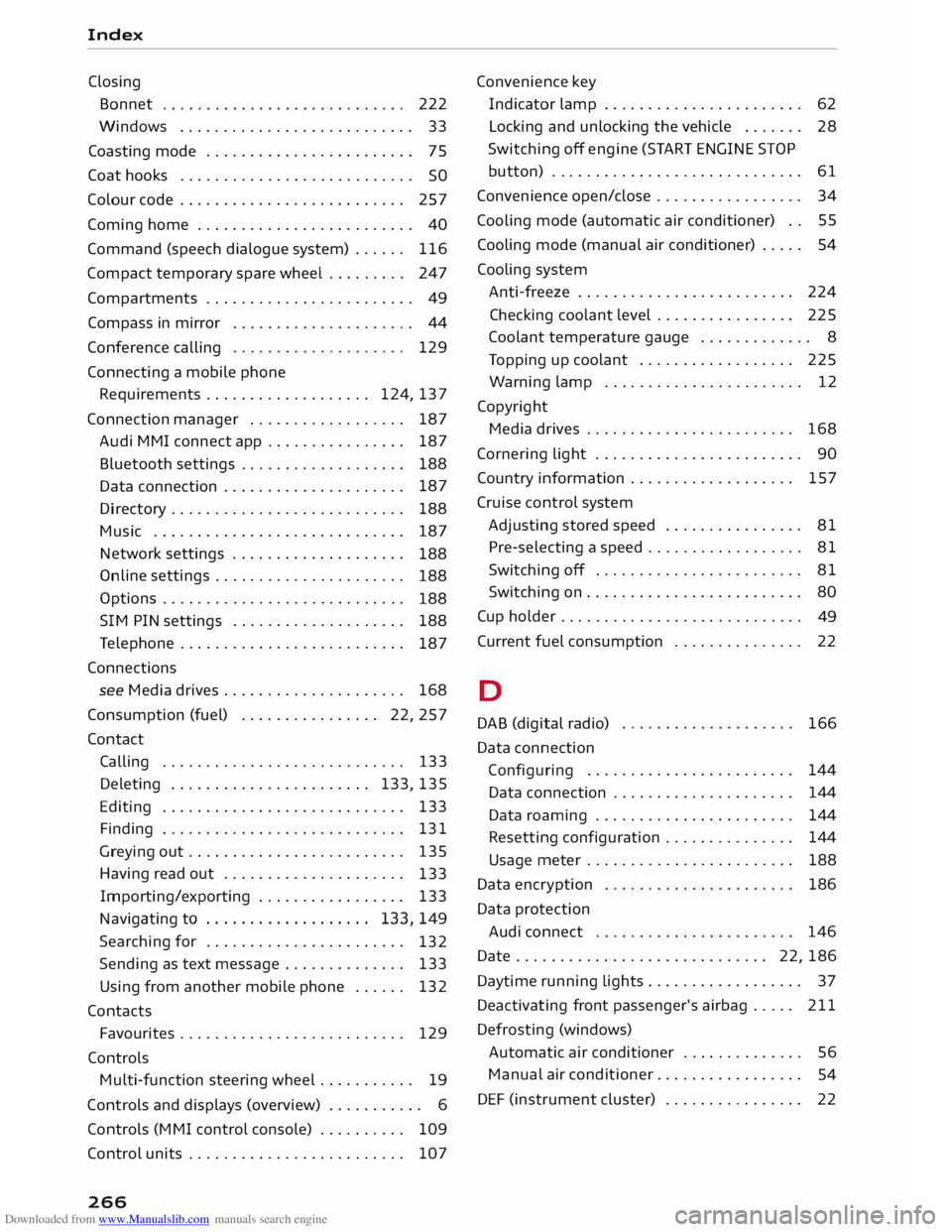
Closing Bonnet 222
Windows ........................... 33
Coasting mode . . . . . . . . . . . . . . . . . . . . . . . .
75
Coat hooks . . . . . . . . . . . . . . . . . . . . . . . . . . .
SO
Colour code . . . . . . . . . . . . . . . . . . . . . . . . . . 257
Coming home . . . . . . . . . . . . . . . . . . . . . . . . . 40
Command (speech dialogue system) . . . . . .
116
Compact temporary spare wheel . . . . . . . . . 247
Compartments . . . . . . . . . . . . . . . . . . . . . . . . 49
Compass in mirror
Conference calling
Connecting a mobile phone 44
129
Requirements . . . . . . . . . . . . . . . . . . . 124, 137
Connection manager . . . . . . . . . . . . . . . . . .
187
Audi MMI connect app . . . . . . . . . . . . . . . .
187
Bluetooth settings . . . . . . . . . . . . . . . . . . .
188
Data connection . . . . . . . . . . . . . . . . . . . . . 187
Directory . . . . . . . . . . . . . . . . . . . . . . . . . . .
188
Music . . . . . . . . . . . . . . . . . . . . . . . . . . . . . 187
Network settings . . . . . . . . . . . . . . . . . . . .
188
Online settings . . . . . . . . . . . . . . . . . . . . . .
188
Options . . . . . . . . . . . . . . . . . . . . . . . . . . . .
188
SIM PIN settings . . . . . . . . . . . . . . . . . . . .
188
Telephone . . . . . . . . . . . . . . . . . . . . . . . . . .
187
Connections see Media drives. . . . . . . . . . . . . . . . . . . . .
168
Consumption (fuel) . . . . . . . . . . . . . . . . 22, 257
Contact Calling . . . . . . . . . . . . . . . . . . . . . . . . . . . . 133
Deleting . . . . . . . . . . . . . . . . . . . . . . . 133, 135
Editing . . . . . . . . . . . . . . . . . . . . . . . . . . . .
133
Finding . . . . . . . . . . . . . . . . . . . . . . . . . . . . 131
Greying out . . . . . . . . . . . . . . . . . . . . . . . . .
135
Having read out . . . . . . . . . . . . . . . . . . . . .
133
Importing/exporting . . . . . . . . . . . . . . . . . 133
Navigating to . . . . . . . . . . . . . . . . . . . 133, 149
Searching for . . . . . . . . . . . . . . . . . . . . . . .
132
Sending as text message . . . . . . . . . . . . . .
133
Using from another mobile phone . . . . . .
132
Contacts Favourites . . . . . . . . . . . . . . . . . . . . . . . . . . 129
Controls Multi-function steering wheel . . . . . . . . . . .
19
Controls and displays (overview) . . . . . . . . . . . 6
Controls (MMI control console) . . . . . . . . . .
109
Control units . . . . . . . . . . . . . . . . . . . . . . . . . 107
266 Convenience key
Indicator lamp . . . . . . . . . . . . . . . . . . . . . . . 62
Locking and unlocking the vehicle . . . . . . .
28
Switching off engine (START ENGINE STOP
button) . . . . . . . . . . . . . . . . . . . . . . . . . . . . . 61
Convenience open/close . . . . . . . . . . . . . . . . . 34
Cooling mode (automatic air conditioner) . . 55
Cooling mode (manual air conditioner) . . . . . 54
Cooling system
Anti-freeze . . . . . . . . . . . . . . . . . . . . . . . . . 224
Checking coolant level . . . . . . . . . . . . . . . .
225
Coolant temperature gauge . . . . . . . . . . . . . 8
Topping up coolant . . . . . . . . . . . . . . . . . . 225
Warning lamp . . . . . . . . . . . . . . . . . . . . . . . 12
Copyright Media drives . . . . . . . . . . . . . . . . . . . . . . . . 168
Cornering light . . . . . . . . . . . . . . . . . . . . . . . . 90
Country information . . . . . . . . . . . . . . . . . . . 157
Cruise control system
Adjusting stored speed . . . . . . . . . . . . . . . .
81
Pre-selecting a speed . . . . . . . . . . . . . . . . . .
81
Switching off . . . . . . . . . . . . . . . . . . . . . . . .
81
Switching on . . . . . . . . . . . . . . . . . . . . . . . . .
80
Cup holder . . . . . . . . . . . . . . . . . . . . . . . . . . . .
49
Current fuel consumption . . . . . . . . . . . . . . . 22
D
DAB (digital radio)
Data connection
Configuring ....................... .
Data connection .................... .
Data roaming ...................... .
Resetting configuration .............. .
Usage meter ....................... .
Data encryption
Data protection
Audi connect 166
144 144
144
144
188
186
146
Date . . . . . . . . . . . . . . . . . . . . . . . . . . . . . 22, 186
Daytime running Lights.. . . . . . . . . . . . . . . . . 37
Deactivatiing front passenger's airbag . . . . . 211
Defrosting (windows)
Automatic air conditioner . . . . . . . . . . . . . .
56
Manual air conditioner. . . . . . . . . . . . . . . . .
54
DEF (instrument cluster) . . . . . . . . . . . . . . . .
22