brake light AUDI TT COUPE 2014 Owner's Manual
[x] Cancel search | Manufacturer: AUDI, Model Year: 2014, Model line: TT COUPE, Model: AUDI TT COUPE 2014Pages: 284, PDF Size: 34.42 MB
Page 75 of 284
Downloaded from www.Manualslib.com manuals search engine 0
N
co
....
\D U'l
N
U'l
.... can
roll away. Doors do not lock if lever is not in
P appears on vehicles with convenience key*. A
buzzer will also sound.
,. Pr ess and hold the brake pedal¢ A_ .
,. Apply the parking brake.
,. Move the selector lever to P.
Stopping on a slope
,. Always keep your foot on the brake pedal to
hold the vehicle and prevent it from rolling
back down the slope ¢ A_ . Do not try to stop
the vehicle "rolling back" by increasing the en
gine speed when a gear is engaged ¢(D.
Driving away on a slope (vehicles without hill
hold assist* / Audi hold assist*)
,. Apply the parking brake.
,. Once you have engaged a gear press the accel
erator carefully. The parking brake will be re
leased automatically if you are wearing your
seat belt.
Driving away on a slope (vehicles with hill
hold assist*)
,. Once you have engaged a gear, release the foot
brake and press the accelerator ¢ page 69, Hill
hold assist.
Driving away on a slope (vehicles with hold
assist*)
,. Once you have engaged a gear, release the foot
brake and press the accelerator ¢ page 68,
Hold assist.
In some situations (such as when driving on
mountain roads) it can be advantageous to
switch temporarily to the manual shift pro
gramme so that the gear ratios can be selected
manually to suit the driving conditions
¢page 75.
On level ground it is sufficient to move the selec
tor lever to P. On a gradient the parking brake
should be applied first and the selector lever
should be moved to P ¢ page 66. This reduces
the load on the locking mechanism and makes it
easier to move the selector lever out of position
P Automatic
gearbox
_&. WARNING
- The driver should never get out of the vehi
cle when the engine is running and a gear is
engaged. If you have to leave your vehicle
while the engine is running, you must apply
the parking brake and engage the parking
lock P.
- If the engine is running and a gear is engag
ed {D/S or R) or the vehicle is in "tiptronic"
mode, you will need to hold the car with the
footbrake. Otherwise, the car will "creep"
forwards as the power transmission is not
fully interrupted even when the engine is
idling.
- The accelerator pedal must on no account
be pressed inadvertently when the vehicle is
stationary . The vehicle could otherwise start
moving immediately (in some cases even if
the parking brake is engaged) and possibly
cause an accident.
- Do not press the accelerator while selecting
a gear with the vehicle stationary and the
engine running, as this could cause an acci
dent.
- Never move the selector lever to R or P
when driving at normal speeds, as this could
cause an accident.
- Before you drive down a steep gradient, re
duce the speed and use "tiptronic" to select
a low gear.
- Never allow the brake to drag when driving
downhill and do not use the brake pedal too
often or for long periods. Constant braking
will cause the brakes to overheat and will
considerably reduce the effectiveness of the
brakes. It will increase the braking distance
and could cause the brake system to fail.
- To avoid rolling back on gradients always
hold the vehicle with the footbrake or park
ing brake if you have to stop.
- Never attempt to hold the vehicle with the
clutch when stopping on a gradient. The
clutch is disengaged automatically if it is
overloaded and becomes too hot -accident
risk! If the clutch is overloaded, the indica
tor lamp [!l will light up and a message will
appear¢ page 77.
�
73
Page 76 of 284
Downloaded from www.Manualslib.com manuals search engine Automatic
gearbox
CD CAUTION
- When you have stopped on a gradient, do
not try to stop the vehicle rolling back by ac
celerating when a gear is engaged. This
could cause the automatic gearbox to over
heat and become damaged. Apply the park
ing brake or press the brake pedal in order
to prevent the vehicle from rolling back.
- If you allow the car to roll with the selector
lever in position N with the engine switched
off, the automatic gearbox will be damaged
as it will not be lubricated.
- In certain driving and traffic conditions, for
instance in stop-and-go traffic, if you have
to pull away frequently or if the vehicle
creeps forwards over a long distance, the
gearbox can overheat and become dam
aged. If the warning lamp. lights up,
stop the vehicle at the first opportunity and
let the gearbox cool down ¢ page 77.
- In certain driving and traffic conditions, for
instance in stop-and-go traffic, if you have
to pull away frequently or if the vehicle
creeps forwards over a long distance, the
gearbox can overheat and become dam
aged. If the warning lamp� Lights up,
stop the vehicle at the first opportunity and
let the gearbox cool down ¢ page 77.
- If you allow the car to roll with the engine
switched off, the 5 tronic gearbox will be
damaged as it will not be lubricated
¢ page 250, Tow-starting I towing away.
(1) Note
For safety reasons the parking brake will only
release automatically if the driver's seat belt
is engaged in its buckle.
Downhill speed control
Applies to vehicles: with S tronic gearbox
The downhill speed control function helps the
driver when driving down steep gradients.
Downhill speed control is activated on a downhill
gradient when the selector lever is in 0/5 and the
driver presses the brake pedal. The gearbox auto
matically selects a suitable gear for the gradient.
74 The
downhill speed control function attempts to
maintain the speed at which the vehicle was trav
elling when the foot brake was applied (subject
to the laws of physics and technical limitations of
the power train). It may be necessary to adjust
the speed again using the foot brake. The down
hill speed control can change down to 3rd gear
but no further, so it may be necessary to change
to tiptronic mode on very steep gradients. In this
case, change down manually to 2nd or 1st gear in
tiptronic mode to use the engine braking effect
and reduce the load on the brakes.
Downhill speed control is deactivated as soon as
the road levels out again or you press the acceler
ator pedal.
On vehicles with cruise control system*
¢ page 80, downhill speed control is activated
when you set a cruising speed.
& WARNING
The downhill speed control function cannot
defy the laws of physics and may therefore
not be able to maintain a constant speed in
certain circumsta nces. Always be prepared to
use the brakes! -
Page 78 of 284
Downloaded from www.Manualslib.com manuals search engine Automatic
gearbox
when approaching a speed restriction in a built
up area).
Switching on coasting mode
Important: Selector lever must be in D, gradient
must be less than 12 %.
"' Select efficiency mode in drive select*
9page 90 (you only have to do this once).
"' Ta ke your foot off the accelerator.
If you have selected the "on-board computer"
display, the message Coasting will then appear.
The gearbox automatically disengages the clutch
at speeds above 20 km/h and lets the vehicle
coast without the engine braking effect. The en
gine ticks over at idling speed while the vehicle is
coasting.
Stopping coasting mode
"' Press the brake pedal or accelerator.
To use the engine braking effect and overrun fuel
cut-off again, all you need to do is tap the brake
pedal briefly.
You can improve your fuel economy and help to
reduce emissions by using a combination of the
coasting mode (i.e. coasting with low fuel con
sumption on a longer stretch of road) and the
overrun fuel cut-off (i.e. using the engine brak
ing effect with no fuel consumption on a shorter
stretch of road).
A WARNING
- If you are approaching an obstruction when
coasting mode is switched on, please re
member that the vehicle will not slow down
as quickly as usual when you take your foot
off the accelerator -risk of accident!
- The vehicle can pick up speed if you are driv
ing down a slope in coasting mode -risk of
accident!
l l
The ESC lamp lights up permanently and the message
Stabilisation control (ESC): sport. Warning! Restricted
stability appears temporarily in the infotainment display
to indicate the deactivation status.
76 -
If other people are using your car, you
should draw their attention to the coasting
mode.
@ Note
- Coasting mode is only available in efficiency
mode (drive select*).
- The message Coasting only appears when
the current fuel consumption display is se
lected. The gear is no longer displayed when
you are in coasting mode (e.g. E instead of
E6).
- The coasting mode is deactivated tempora
rily on gradients of 15 % or greater.
' Launch control programme
Applies to vehicles: with S tronic gearbox and launch control
The launch control programme enables maxi
mum acceleration.
Important: The engine must be warm and the
steering wheel must be pointing straight-ahead.
"' Deactivate the start/stop system*¢ page 65.
The LED in the button l(A)'*'I will light up.
"' Deactivate the hold assist* ¢ page 68. The LED
in the button will go out.
"' Press the IJ'}OFF!
button once briefly while the
engine is running 1
).
"' Briefly pull the selector lever back from posi
tion D/S to select position S, or move the selec
tor lever to the right into the tiptronic gate, or
select dynamic mode in drive select*
¢page 90.
"' Press the brake pedal firmly with your left foot
and hold it down for at least one second.
"'At the same time, press the accelerator all the
way down with your right foot until the engine
revs are high and steady.
"' Ta ke your left foot off the brake.
�
Page 79 of 284
Downloaded from www.Manualslib.com manuals search engine 0
N
co
....
\D U'l
N
U'l
.... ,&.
WARNING
- Always adapt your driving style to the traffic
conditions.
- Only use the launch control programme
when road and traffic conditions permit,
and make sure your manner of driving and
accelerating the vehicle does not inconven
ience or endanger other road users.
- Please note that the driven wheels may
start to spin when the sport mode is switch
ed on, causing the vehicle to lose grip, in
particular on slippery or wet roads -danger
of skidding!
- When acceleration has been completed, you
should deactivate the sport mode again by
briefly pressing
the I� OFF! button.
ij)) Note
- The gearbox may be hot after you have used
the launch control programme. In this case,
the programme may not be available for
several minutes. The programme will be
available again after a cool-down period.
- Accelerating with the launch control pro
gramme places a heavy load on all parts of
the vehicle. This can result in increased wear
and tear.
Back-up programme
Applies to vehicles: with S tronic gearbox
A back-up programme is in place should a fault
occur in the control system.
If all selector lever positions are highlighted in
the infotainment display, a system malfunction
has occurred. In this case, the S tronic gearbox
will switch to a backup programme. The vehicle
can still be driven in the backup programme,
however only at reduced speed and not in all
gears. In certain cases, you may not be able to se
lect reverse gear.
CD CAUTION
If the gearbox switches to the back-up pro
gramme, drive to a qualified workshop with
out delay and have the fault rectified . Automatic
gearbox
Gearbox malfunction
• Gearbox malfunction! Please stop the vehi
cle and select P
There is a malfunction in the gearbox. Park the
vehicle safely and do not drive on. Obtain profes
sional assistance.
• Gearbox overheating: please stop vehicle
The gearbox is overheating and could be dam
aged. Stop the vehicle and let the gearbox cool
down with the engine idling and the selector lev
er in pos ition P. If the indicator lamp and the
message disappear, drive to a qualified workshop
soon and have the fault rectified. Do not drive on
if the warning lamp stays on and the message
does not disappear. You should obtain professio
nal assista nce.
DD Gearbox malfunction: you can continue driv
ing
Drive to a qualified workshop soon and have the
fault rectified.
DD Gearbox malfunction: no reverse gear. You
can continue driving
Drive to a qualified workshop without delay and
have the fault rectified.
DD Gearbox malfunction: you can continue driv
ing in D until engine off
Park your vehicle well away from moving traffic.
Obtain professional assistance.
DD Gearbox overheating: please adapt driving
style
You can continue driving at moderate speed. You
can resume normal driving if the indicator lamp
goes out.
DD Gearbox: please press brake pedal and select
gear again
If a gearbox malfunction has occurred due to
overheating, this message will appear once the
gearbox has cooled down again.
77
Page 83 of 284
Downloaded from www.Manualslib.com manuals search engine 0
N
co
....
\D Lfl
N
Lfl
.... -
For safety reasons, the cruise control system
must not be used in city traffic, stop-and-go
traffic, on roads with a Lot of bends or in dif
ficult or slippery driving conditions (such as
ice, fog, Loose grit or gravel, heavy rain, etc.)
- risk of accident!
- When you take a turn-off, drive along a mo-
torway exit Lane or pass through roadwork
sections, please temporarily switch off the
cruise control system.
- Make sure you do not unintentionally rest
your foot on the accelerator -this will over
ride the cruise control system which, as a re
sult, will not brake the vehicle.
- The automatic braking function may be de
activated if a system fault occurs in the
brake system (e.g. if the brakes overheat)
while the cruise control system is activated.
All the other cruise control functions remain
activated as Long as the indicator Lamp ii is
Lit.
CD CAUTION
Before driving down a Long, steep gradient, it
is advisable to reduce speed and move these
lector Lever to a Lower gear. In this way you
will make use of the engine braking effect and
relieve the Load on the brakes.
w) Note
- Vehicles with manual gearbox: The set
speed cannot be reached if the currently se
lected gear is too high or too Low or if the
engine would overrev or fail to run smoothly
at the target speed. Make sure to change up
or down a gear in good time.
- The brake Lights come on when the system
brakes the vehicle.
Adjusting the speed
Applies to vehicles: with cruise control system
• To increase or reduce the cruising speed in
steps of 1 km/h, briefly push the Lever one Lev
el upwards or downwards towards 010
¢ page 80, Fig. 85.
• To increase or reduce the cruising speed in
steps of 10 km/h, briefly push the Lever two Driver assist
systems
Levels upwards or downwards towards (!)1 0
¢ page 80, Fig. 85.
• To increase or reduce the speed gradually, hold
the Lever towards GY0 until you reach the de
sired cruising speed.
Overruling the set speed
You can use the accelerator pedal to increase
speed in the normal way, for example to overtake
another vehicle. Once you release the accelerator,
the system will revert to the speed you stored ini
tially.
However, if the vehicle exceeds the programmed
speed significantly for a Long time, the cruise
control system will be deactivated temporarily.
The indicator Lamp ii in the instrument cluster
will go out, but the programmed speed will re
main stored.
Pre-selecting a speed
Applies to vehicles: with cruise control system
You can pre-select a desired speed while the ve
hicle is stationary.
• Switch on the ignition.
• Pull the Lever to position (D ¢ page 80, Fig. 85.
• Press the Lever up towards 0 or down towards
0 in order to increase or reduce the cruising
speed setting.
This function allows you to enter the desired
cruise control setting speed ahead of time, for
example before joining a motorway. Once you are
on the motor way, you can activate the cruise con
trol system by pulling the Lever to position (D.
Switching off
Applies to vehicles: with cruise control system
Switching off temporarily
• Press the brake pedal, or
• Push the Lever towards @
(click stop not en
gaged) ¢page 80, Fig. 85.
Switching off completely
• Push the lever to position @
(click stop engag-
ed), or
..,.
81
Page 84 of 284
Downloaded from www.Manualslib.com manuals search engine Driver
assist systems
.. Switch off the ignition.
The speed setting will remain stored after the
system is temporarily deactivated. To resume the
programmed cruising speed, release the clutch or
brake pedal and pull the lever to position (!).
The stored speed will be deleted once the igni
tion is switched off.
_& WARNING
Do not resume the programmed cruising
speed if this is too high for the traffic condi
tions -this can cause accidents.
Speed limiter
Description
Applies to vehicles: with speed limiter
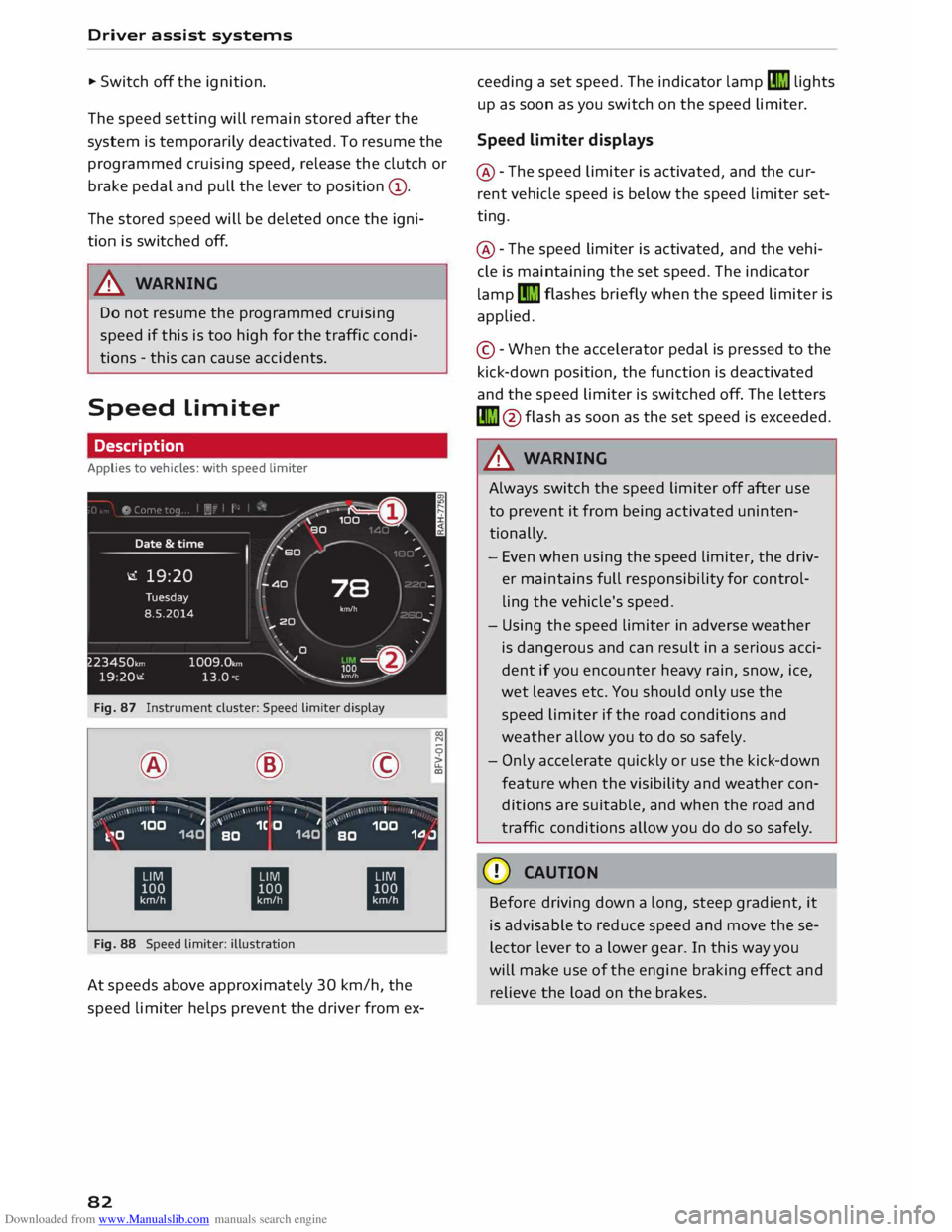
Fig. 87 Instrument cluster: Speed limiter display
® ·-
' I I @
,.,...---:-;- ·-
/ \ \ •
I I ©
·-
, ' I
' 00
N
0
>
LL
a,
,, _ ,\ 100 1
k.�0 140 '
1C O 1
BO 140 '
100
BO 1.0.J
ti ti
ti
Fig. 88 Speed limiter: illustration
At speeds above approximately 30 km/h, the
speed limiter helps prevent the driver from ex-
82 ceeding
a set speed. The indicator lamp�
lights
up as soon as you switch on the speed limiter.
Speed limiter displays
@ -The speed limiter is activated, and the cur
rent vehicle speed is below the speed limiter set
ting.
@ -The speed limiter is activated, and the vehi
cle is maintaining the set speed. The indicator
lamp �
flashes briefly when the speed limiter is
applied.
© -When the accelerator pedal is pressed to the
kick-down position, the function is deactivated
and the speed limiter is switched off. The letters
� @flash as soon as the set speed is exceeded.
_& WARNING
Always switch the speed limiter off after use
to prevent it from being activated uninten
tionally.
- Even when using the speed limiter, the driv
er maintains full responsibility for control
ling the vehicle's speed.
- Using the speed limiter in adverse weather
is dangerous and can result in a serious acci
dent if you encounter heavy rain, snow, ice,
wet leaves etc. You should only use the
speed limiter if the road conditions and
weather allow you to do so safely.
- Only accelerate quickly or use the kick-down
feature when the visibility and weather con
ditions are suitable, and when the road and
traffic conditions allow you do do so safely.
CD CAUTION
Before driving down a long, steep gradient, it
is advisable to reduce speed and move these
lector lever to a lower gear. In this way you
will make use of the engine braking effect and
relieve the load on the brakes.
Page 103 of 284
Downloaded from www.Manualslib.com manuals search engine Intelligent
technology
Electro-mechanical
power steering
Electro-mechanical power steering assists the
driver when steering.
The degree of power assistance is adapted elec
tronically, depending on the speed.
If the power steering should fail at any time or
the engine is switched off (for instance when be
ing towed), the car can still be steered. However,
substantially more effort than normal will be re
quired to turn the steering wheel.
Warning/indicator lamps and driver
messages
• Steering: fault. Please stop vehicle
If the warning lamp lights up permanently and
the message appears, there may be a power
steering failure.
Do NOT drive on. Obtain professional assistance.
• Steering: fault. Please stop vehicle
There is a malfunction in the electronic steering
lock. The ignition can no longer be switched on.
Do not have the vehicle towed away, because you
won't be able to steer it. Obtain professional as
sistance.
G'!b Steering:
fault. You can continue driving
If the indicator lamp lights up, the steering re
sponse may be heavier or lighter than usual. In
addition, it is possible that the steering wheel
will be off centre when driving in a straight line.
Drive slowly to a qualified workshop and have the
fault rectified.
Ive Steering
lock: fault. Please contact work
shop
There is a malfunction in the electronic steering
lock.
� Drive
to a qualified workshop soon and have the
a: fault rectified.
....
\D Lfl
N
Lfl
.... Intelligent
technology
A WARNING
Have the system malfunction repaired by a
qualified workshop as soon as possible -risk
of accident!
«]} Note
You can drive on if the warning/indicator lamp
• or mJ lights up only briefly.
Brakes
New brake pads
New brake pads do not give full braking effect for
the first 400 km, they must first be "bedded in".
However, you can compensate for the slightly re
duced braking effect by applying more pressure
on the brake pedal. Avoid placing a heavy load on
the brakes during the running-in period.
Wear The rate of wear on the brake pads depends a
great deal on how you drive and the conditions in
which the vehicle is operated. Negative factors
are, for instance, city traffic, frequent short trips
or hard driving with abrupt starts and stops.
Noises Brake noise may develop in certain situations, de
pending on the speed, braking force and ambient
conditions (such as temperature and relative hu
midity).
Effect of moisture and salt
In certain conditions, such as in heavy rain, or af
ter washing the car or driving through water, the
full braking effect can be delayed by moisture (or
in winter by ice) on the discs and brake pads. The
brakes should be "dried" by pressing the pedal to
restore full braking effect.
When you are driving at higher speeds with the
windscreen wipers on, the brake pads are very
briefly brought into contact with the brake discs.
This automatic process which goes unnoticed by
the driver is carried out at regular intervals and is
intended to improve braking response in wet con-
ditions. ..,..
101
Page 196 of 284
Downloaded from www.Manualslib.com manuals search engine Safe
driving
.. Adjust the longitudinal position of the steering
wheel so that your arms are slightly bent and
you can read the dials and instruments easily.
.. Make sure that you can comfortably reach the
top of the steering wheel.
.. Fasten
your seat belt correctly ¢ page 204 .
.. Keep both feet in the footwell so that you are in
full control of the vehicle at all times.
For detailed information on how to adjust the
driver's seat, see¢ page 46, Seats and storage.
A WARNING
A driver who is not sitting in the correct posi
tion or who is not wearing a seat belt can be
fatally injured if the airbag is triggered.
- Adjust the driver's seat and steering wheel
so there is a distance of at least 25 cm be
tween your breastbone and the centre of the
steering wheel¢ Fig. 172.
- While driving, always hold the steering
wheel with both hands on the outside of the
rim at about the 9 o'clock and 3 o'clock posi
tion. This reduces the risk of injury if the
driver's airbag inflates.
- Never hold the steering wheel at the 12
o'clock position, or with your hands inside
the rim or on the steering wheel hub. This
could result in serious injuries to the arms,
hands and head if the driver's airbag in
flates.
- To reduce any risk of injury to the driver dur
ing a sudden brake application or in an acci
dent, never drive with the backrest tilted
too far back. The airbag system and seat
belts can only provide proper protection
when the backrest is in an upright position
and the driver is wearing the seat belt in the
correct position. The further the backrest is
tilted back, the greater the risk of injury due
to incorrect positioning of the belt webbing
or an incorrect sitting position.
194 Correct
position for the front passenger
The front seat passenger must sit at least 25 cm
away from the dash panel so that the airbag has
enough room to inflate and give maximum pro
tection in an accident.
For your own safety and to reduce the risk of in
jury in the event of an accident, we recommend
adjusting the front passenger's seat as follows:
.. Adjust the backrest to an upright position so
that your back remains in contact with the up
holstery .
.. Keep both feet in the footwell in front of the
seat.
.. Fasten your seat belt correctly ¢ page 206.
In exceptional cases you can disable the front
passenger's airbag via the key-operated switch*
¢page 211.
For detailed information on how to adjust the
front passenger's seat, see ¢ page 46, Seats and
storage.
A WARNING
A passenger who is not sitting in the correct
position or who is not wearing a seat belt can
be fatally injured if the airbag is triggered.
- Adjust the front passenger's seat so there is
a distance of at least 25 cm between your
breastbone and the dash panel.
- Always keep your feet on the floor when the
vehicle is moving; never rest them on the in
strument panel, out of the window or on the
seat. If you sit in an incorrect position, you
increase your risk of injury in the event of
sudden braking or an accident. If the airbag
is triggered, you could sustain potentially
fatal injuries by sitting out of position.
- To reduce the risk of injury to the front pas
senger in the case of sudden braking or an
accident, the passenger should never travel
in a moving vehicle with the backrest re
clined. The airbag system and seat belt can
only provide proper protection when the
backrest is in an upright position and the
passenger is wearing the seat belt in the
correct position. The further the backrest is
�
Page 222 of 284
Downloaded from www.Manualslib.com manuals search engine Checking
and topping up fluids
CD CAUTION
Remove any fuel spills from the paintwork im
mediately.
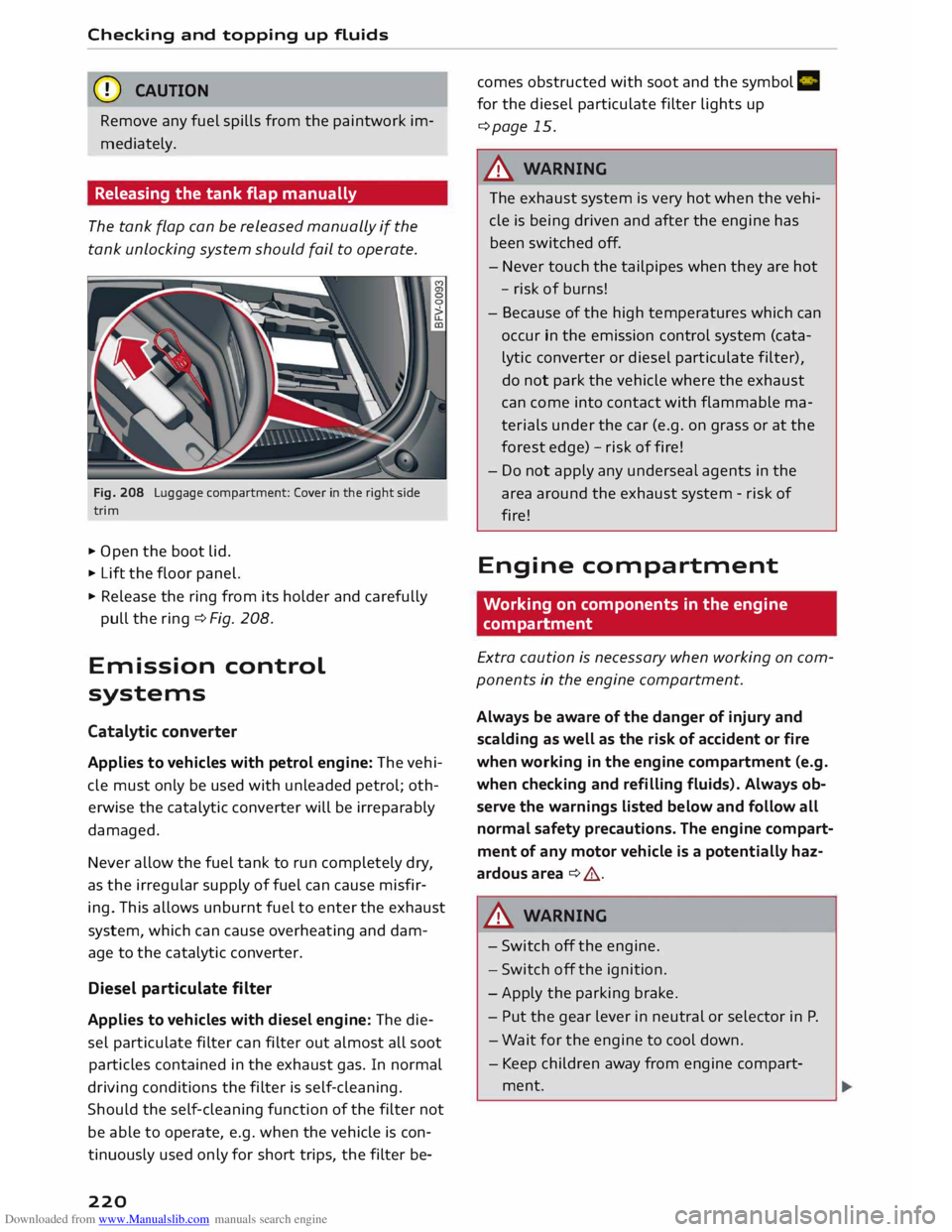
Releasing the tank flap manually
The tank flap can be released manually if the
tank unlocking system should fail to operate.
Fig. 208 Luggage compartment: Cover in the right side
trim
.. Open the boot lid.
.. Lift the floor panel.
.. Release the ring from its holder and carefully
pull the ring ¢ Fig. 208.
Em ission control
systems
Catalytic converter
Applies to vehicles with petrol engine: The vehi
cle must only be used with unleaded petrol; oth
erwise the catalytic converter will be irreparably
damaged.
Never allow the fuel tank to run completely dry,
as the irregular supply of fuel can cause misfir
ing. This allows unburnt fuel to enter the exhaust
system, which can cause overheating and dam
age to the catalytic converter.
Diesel particulate filter
Applies to vehicles with diesel engine: The die
sel particulate filter can filter out almost all soot
particles contained in the exhaust gas. In normal
driving conditions the filter is self-cleaning.
Should the self-cleaning function of the filter not
be able to operate, e.g. when the vehicle is con
tinuously used only for short trips, the filter be-
220 comes
obstructed with soot and the symbol Cl
for the diesel particulate filter lights up
¢page 15.
A WARNING
The exhaust system is very hot when the vehi
cle is being driven and after the engine has
been switched off.
- Never touch the tailpipes when they are hot
- risk of burns!
- Because of the high temperatures which can
occur in the emission control system (cata
lytic converter or diesel particulate filter),
do not park the vehicle where the exhaust
can come into contact with flammable ma
terials under the car (e.g. on grass or at the
forest edge) -risk of fire!
- Do not apply any undersea[ agents in the
area around the exhaust system -risk of
fire!
Engine compartment
Working on components in the engine
compartment
Extra caution is necessary when working on com
ponents in the engine compartment.
Always be aware of the danger of injury and
scalding as well as the risk of accident or fire
when working in the engine compartment (e.g.
when checking and refilling fluids). Always ob
serve the warnings listed below and follow all
normal safety precautions. The engine compart
ment of any motor vehicle is a potentially haz
ardous area ¢ .,&.
A WARNING
- Switch off the engine.
- Switch off the ignition.
- Apply the parking brake.
- Pu t the gear lever in neutral or selector in P.
- Wait for the engine to cool down.
- Keep children away from engine compart-
ment.
Page 228 of 284
Downloaded from www.Manualslib.com manuals search engine Checking
and topping up fluids
Brake fluid
&
8cm DOT 4 0
0
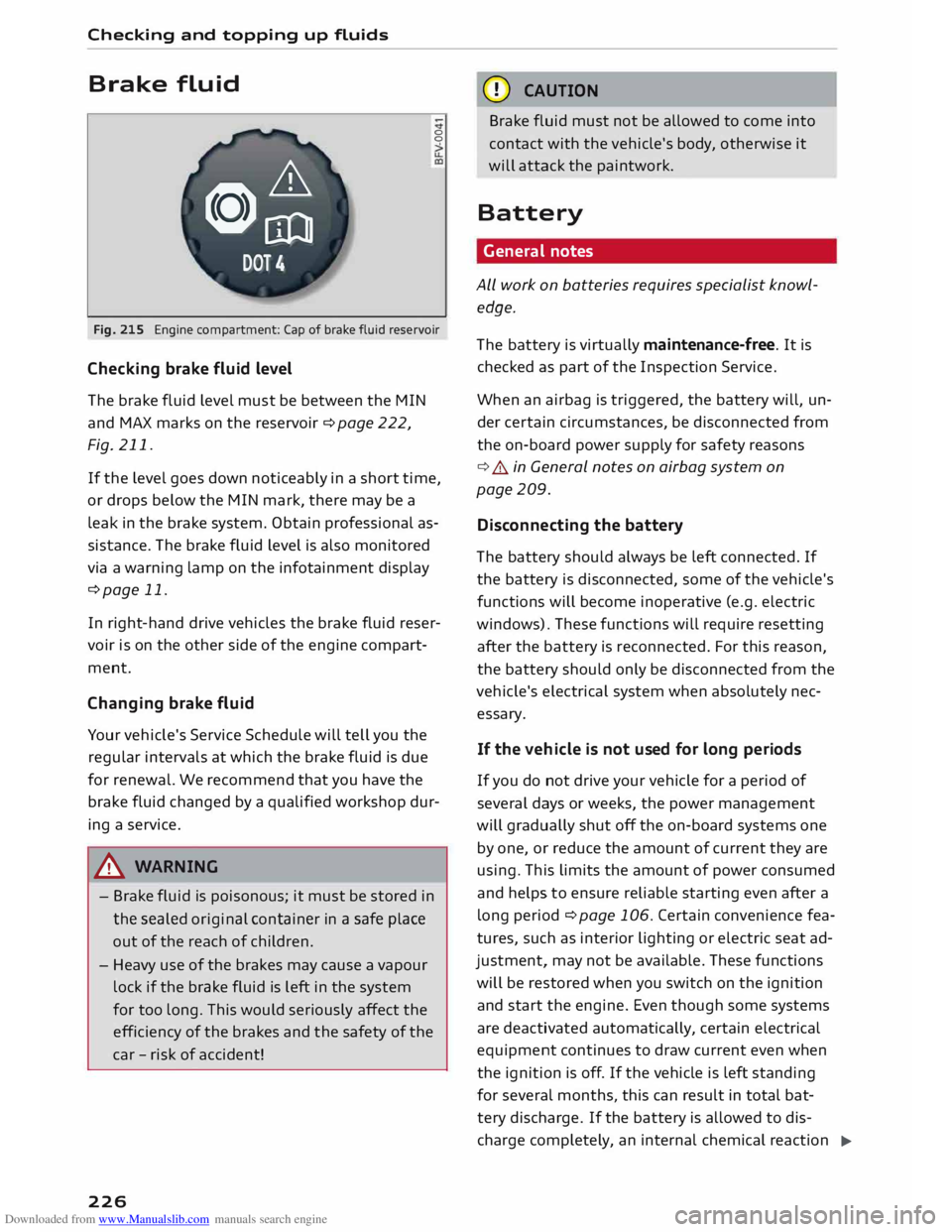
Fig. 215 Engine compartment: Cap of brake fluid reservoir
Checking brake fluid level
The brake fluid Level must be between the MIN
and MAX marks on the reservoir ¢ page 222,
Fig. 211.
If the Level goes down noticeably in a short time,
or drops below the MIN mark, there may be a
Leak in the brake system. Obtain professional as
sistance. The brake fluid Level is also monitored
via a warning Lamp on the infotainment display
¢page 11.
In right-hand drive vehicles the brake fluid reser
voir is on the other side of the engine compart
ment.
Changing brake fluid
Your vehicle's Service Schedule will tell you the
regular intervals at which the brake fluid is due
for renewal. We recommend that you have the
brake fluid changed by a qualified workshop dur
ing a service.
A WARNING
- Brake fluid is poisonous; it must be stored in
the sealed original container in a safe place
out of the reach of children.
- Heavy use of the brakes may cause a vapour
Lock if the brake fluid is left in the system
for too Long. This would seriously affect the
efficiency of the brakes and the safety of the
car -risk of accident!
226 CD
CAUTION
Brake fluid must not be allowed to come into
contact with the vehicle's body, otherwise it
will attack the paintwork.
Battery General notes
ALL work on batteries requires specialist knowl
edge.
The battery is virtually maintenance-free. It is
checked as part of the Inspection Service.
When an airbag is triggered, the battery will, un
der certain circumstances, be disconnected from
the on-board power supply for safety reasons
¢ .&.. in General notes on airbag system on
page 209.
Disconnecting the battery
The battery should always be Left connected. If
the battery is disconnected, some of the vehicle's
functions will become inoperative (e.g. electric
windows). These functions will require resetting
after the battery is reconnected. For this reason,
the battery should only be disconnected from the
vehicle's electrical system when absolutely nec
essary.
If the vehi cle is not used for long periods
If you do not drive your vehicle for a period of
several days or weeks, the power management
will gradually shut off the on-board systems one
by one, or reduce the amount of current they are
using. This Limits the amount of power consumed
and helps to ensure reliable starting even after a
Long period ¢ page 106. Certain convenience fea
tures, such as interior Lighting or electric seat ad
justment, may not be available. These functions
will be restored when you switch on the ignition
and start the engine. Even though some systems
are deactivated automatically, certain electrical
equipment continues to draw current even when
the ignition is off. If the vehicle is Left standing
for several months, this can result in total bat-
tery discharge. If the battery is allowed to dis
charge completely, an internal chemical reaction
..,_