child seat AUDI TT COUPE 2014 Owner's Manual
[x] Cancel search | Manufacturer: AUDI, Model Year: 2014, Model line: TT COUPE, Model: AUDI TT COUPE 2014Pages: 284, PDF Size: 34.42 MB
Page 215 of 284
Downloaded from www.Manualslib.com manuals search engine 0
N
co
....
\D U'l
N
U'l
.... Important
safety notes on the front airbag
system
There are a number of safety points concerning
the airbag system which you should remember.
This will help to reduce the risk of injury in an ac
cident.
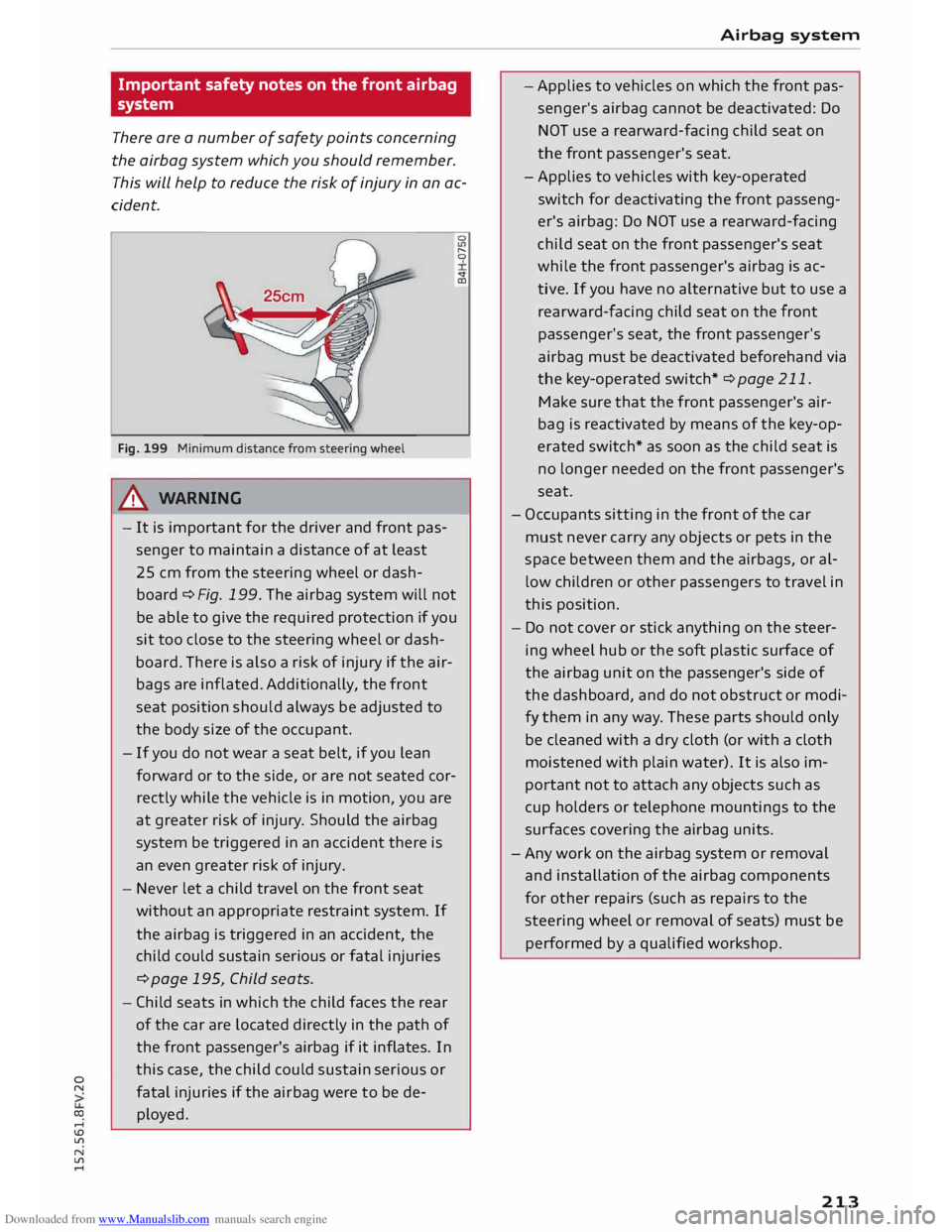
Fig. 199 Minimum distance from steering wheel
A WARNING
- It is important for the driver and front pas
senger to maintain a distance of at least
25 cm from the steering wheel or dash
board ¢Fig. 199. The airbag system will not
be able to give the required protection if you
sit too close to the steering wheel or dash
board. There is also a risk of injury if the air
bags are inflated. Additionally, the front
seat position should always be adjusted to
the body size of the occupant.
- If you do not wear a seat belt, if you lean
forward or to the side, or are not seated cor
rectly while the vehicle is in motion, you are
at greater risk of injury. Should the airbag
system be triggered in an accident there is
an even greater risk of injury.
- Never let a child travel on the front seat
without an appropriate restraint system. If
the airbag is triggered in an accident, the
child could sustain serious or fatal injuries
¢page 195, Child seats.
- Child seats in which the child faces the rear
of the car are located directly in the path of
the front passenger's airbag if it inflates. In
this case, the child could sustain serious or
fatal injuries if the airbag were to be de
ployed. 0
lt')
"
0
sf
CD
- Airbag
system
- Applies to vehicles on which the front pas
senger's airbag cannot be deactivated: Do
NOT use a rearward-facing child seat on
the front passenger's seat.
- Applies to vehicles with key-operated
switch for deactivating the front passeng
er's airbag: Do NOT use a rearward-facing
child seat on the front passenger's seat
while the front passenger's airbag is ac
tive. If you have no alternative but to use a
rear ward-facing child seat on the front
passenger's seat, the front passenger's
airbag must be deactivated beforehand via
the key-operated switch* ¢ page 211.
Make sure that the front passenger's air
bag is reactivated by means of the key-op
erated switch* as soon as the child seat is
no longer needed on the front passenger's
seat.
- Occupants sitting in the front of the car
must never carry any objects or pets in the
space between them and the airbags, or al
low children or other passengers to travel in
this position.
- Do not cover or stick anything on the steer
ing wheel hub or the soft plastic surface of
the airbag unit on the passenger's side of
the dashboard, and do not obstruct or modi
fy them in any way. These parts should only
be cleaned with a dry cloth (or with a cloth
moistened with plain water). It is also im
portant not to attach any objects such as
cup holders or telephone mountings to the
surfaces covering the airbag units.
- Any work on the airbag system or removal
and installation of the airbag components
for other repairs (such as repairs to the
steering wheel or removal of seats) must be
performed by a qualified workshop.
213
Page 216 of 284
Downloaded from www.Manualslib.com manuals search engine Airbag
system
Side airbags
Description of side airbags
Applies to vehicles: with side airbags
The airbag system is not a substitute for the seat
belts.
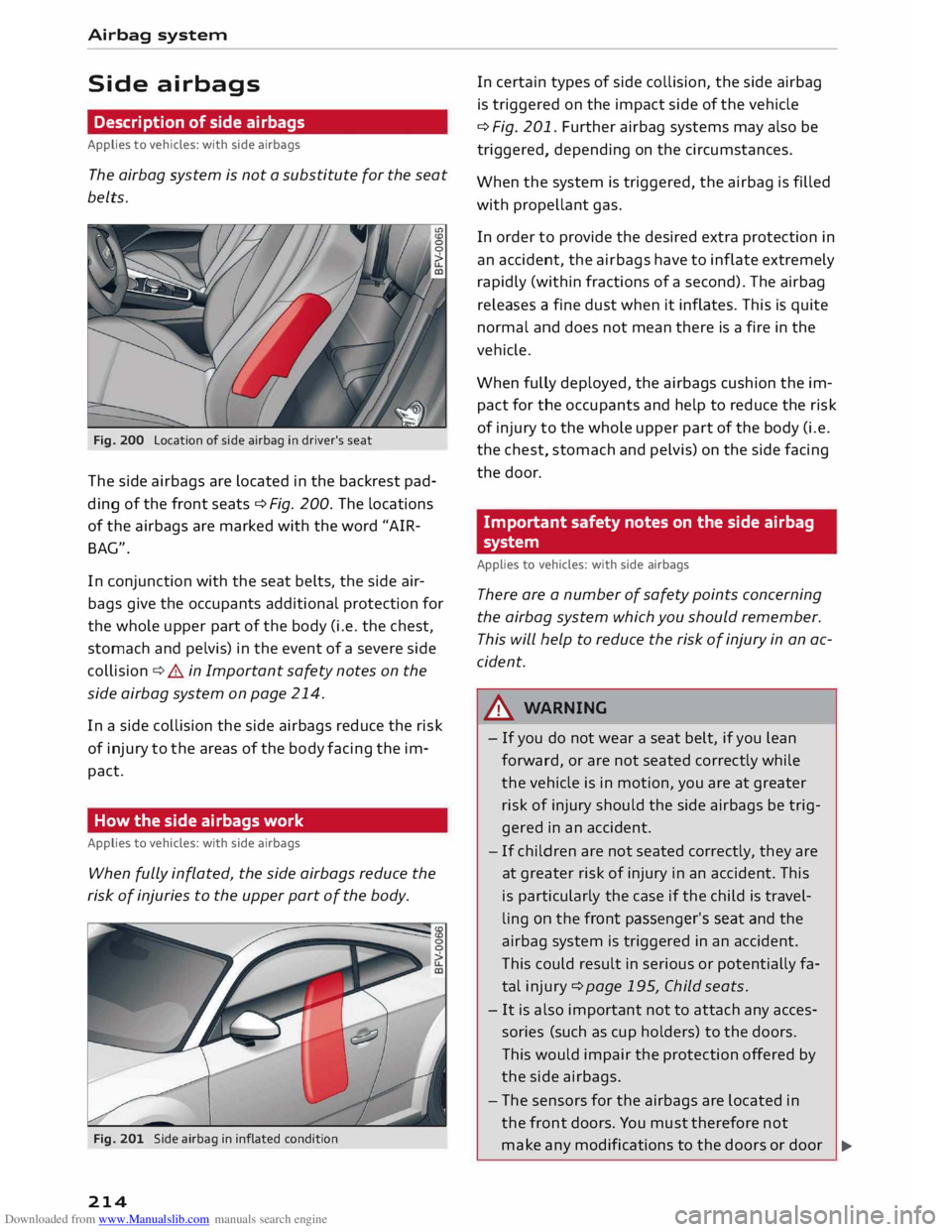
Fig. 200 Location of side airbag in driver's seat
The side airbags are located in the backrest pad
ding of the front seats¢ Fig. 200. The locations
of the airbags are marked with the word "AIR
BAG".
In conjunction with the seat belts, the side air
bags give the occupants additional protection for
the whole upper part of the body (i.e. the chest,
stomach and pelvis) in the event of a severe side
collision ¢&. in Important safety notes on the
side airbag system on page 214.
In a side collision the side airbags reduce the risk
of injury to the areas of the body facing the im
pact.
How the side airbags work
Applies to vehicles: with side airbags
When fully inflated, the side airbags reduce the
risk of injuries to the upper part of the body.
Fig. 201 Side airbag in inflated condition
214 In
certain types of side collision, the side airbag
is triggered on the impact side of the vehicle
¢ Fig. 201. Further airbag systems may also be
triggered, depending on the circumstances.
When the system is triggered, the airbag is filled
with propellant gas.
In order to provide the desired extra protection in
an accident, the airbags have to inflate extremely
rapidly (within fractions of a second). The airbag
releases a fine dust when it inflates. This is quite
normal and does not mean there is a fire in the
vehicle.
When fully deployed, the airbags cushion the im
pact for the occupants and help to reduce the risk
of injury to the whole upper part of the body (i.e.
the chest, stomach and pelvis) on the side facing
the door.
Important safety notes on the side airbag
system
Applies to vehicles: with side airbags
There are a number of safety points concerning
the airbag system which you should remember.
This will help to reduce the risk of injury in an ac
cident.
A WARNING
- If you do not wear a seat belt, if you lean
forward, or are not seated correctly while
the vehicle is in motion, you are at greater
risk of injury should the side airbags be trig
gered in an accident.
- If children are not seated correctly, they are
at greater risk of injury in an accident. This
is particularly the case if the child is travel
ling on the front passenger's seat and the
airbag system is triggered in an accident.
This could result in serious or potentially fa
tal injury ¢page 195, Child seats.
- It is also important not to attach any acces
sories (such as cup holders) to the doors.
This would impair the protection offered by
the side airbags.
- The sensors for the airbags are located in
the front doors. You must therefore not
make any modifications to the doors or door
�
Page 228 of 284
Downloaded from www.Manualslib.com manuals search engine Checking
and topping up fluids
Brake fluid
&
8cm DOT 4 0
0
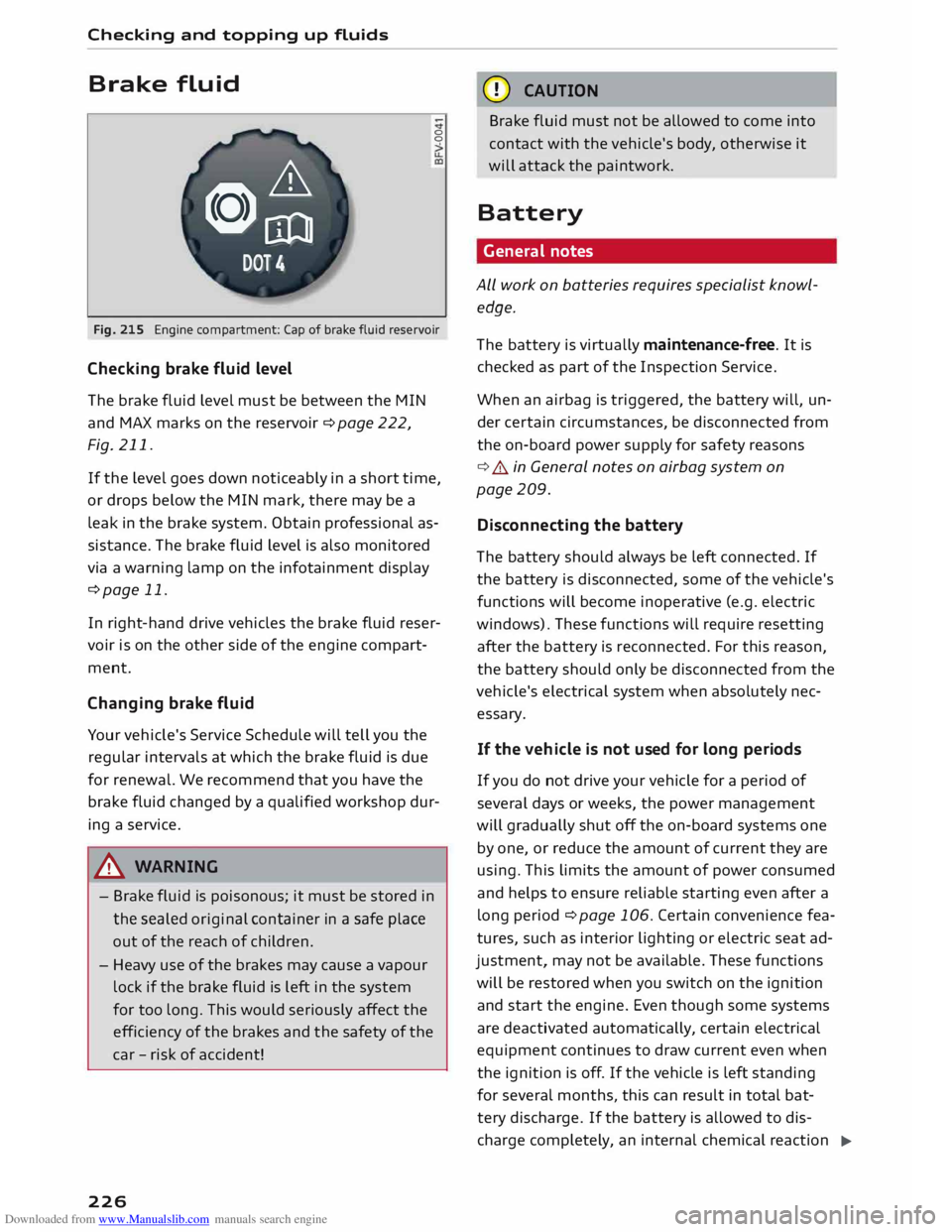
Fig. 215 Engine compartment: Cap of brake fluid reservoir
Checking brake fluid level
The brake fluid Level must be between the MIN
and MAX marks on the reservoir ¢ page 222,
Fig. 211.
If the Level goes down noticeably in a short time,
or drops below the MIN mark, there may be a
Leak in the brake system. Obtain professional as
sistance. The brake fluid Level is also monitored
via a warning Lamp on the infotainment display
¢page 11.
In right-hand drive vehicles the brake fluid reser
voir is on the other side of the engine compart
ment.
Changing brake fluid
Your vehicle's Service Schedule will tell you the
regular intervals at which the brake fluid is due
for renewal. We recommend that you have the
brake fluid changed by a qualified workshop dur
ing a service.
A WARNING
- Brake fluid is poisonous; it must be stored in
the sealed original container in a safe place
out of the reach of children.
- Heavy use of the brakes may cause a vapour
Lock if the brake fluid is left in the system
for too Long. This would seriously affect the
efficiency of the brakes and the safety of the
car -risk of accident!
226 CD
CAUTION
Brake fluid must not be allowed to come into
contact with the vehicle's body, otherwise it
will attack the paintwork.
Battery General notes
ALL work on batteries requires specialist knowl
edge.
The battery is virtually maintenance-free. It is
checked as part of the Inspection Service.
When an airbag is triggered, the battery will, un
der certain circumstances, be disconnected from
the on-board power supply for safety reasons
¢ .&.. in General notes on airbag system on
page 209.
Disconnecting the battery
The battery should always be Left connected. If
the battery is disconnected, some of the vehicle's
functions will become inoperative (e.g. electric
windows). These functions will require resetting
after the battery is reconnected. For this reason,
the battery should only be disconnected from the
vehicle's electrical system when absolutely nec
essary.
If the vehi cle is not used for long periods
If you do not drive your vehicle for a period of
several days or weeks, the power management
will gradually shut off the on-board systems one
by one, or reduce the amount of current they are
using. This Limits the amount of power consumed
and helps to ensure reliable starting even after a
Long period ¢ page 106. Certain convenience fea
tures, such as interior Lighting or electric seat ad
justment, may not be available. These functions
will be restored when you switch on the ignition
and start the engine. Even though some systems
are deactivated automatically, certain electrical
equipment continues to draw current even when
the ignition is off. If the vehicle is Left standing
for several months, this can result in total bat-
tery discharge. If the battery is allowed to dis
charge completely, an internal chemical reaction
..,_
Page 267 of 284
Downloaded from www.Manualslib.com manuals search engine 0
N
co
....
\D L/'l
N
L/'l
.... Bluetooth
Audio player ........................ 171
Connecting a mobile phone . . . . . . . . . . . .
124
Device search . . . . . . . . . . . . . . . . . . . . . . .
134
Handsfree Profile . . . . . . . . . . . . . . . . . . . .
123
Remote SIM Access Profile (rSAP) . . . . . . .
123
Secure simple pairing . . . . . . . . . . . . 124, 137
Settings . . . . . . . . . . . . . . . . . . . . . . . . . . . 134
Boot see Luggage compartment . . . . . . . . . . . . 201
Boot lid
Manual release . . . . . . . . . . . . . . . . . . . . . . .
33
Opening/closing . . . . . . . . . . . . . . . . . . . . . .
32
Brakes . . . . . . . . . . . . . . . . . . . . . . . . . . . . . .
101
Brake assist system . . . . . . . . . . . . . . . . . .
102
Brake fluid . . . . . . . . . . . . . . . . . . . . . . . . .
226
Brake pads worn . . . . . . . . . . . . . . . . . . . . . . 14
Brake pedal . . . . . . . . . . . . . . . . . . . . . . . .
200
Brake servo . . . . . . . . . . . . . . . . . . . . . . . . .
101
Driving away on a slope . . . . . . . . . . . . . . . . 69
Emergency braking aid . . . . . . . . . . . . . . . 102
Emergency braking function . . . . . . . . . . . .
68
Indicator lamp . . . . . . . . . . . . . . . . . . . . . . .
14
New brake pads . . . . . . . . . . . . . . . . . . . . . 101
Parking brake . . . . . . . . . . . . . . . . . . . . . . . . 66
Warning lamp . . . . . . . . . . . . . . . . . . . . . . . 11
Bulbs, changing . . . . . . . . . . . . . . . . . . . . . . 256
Buttons MMI control console . . . . . . . . . . . . . . . . . 109
Multi-function steering wheel.. . . . . . . 19, 21
C
Cables AUX adapter . . . . . . . . . . . . . . . . . . . . . . . .
174
USB adapter . . . . . . . . . . . . . . . . . . . . . . . .
174
Calling up a menu . . . . . . . . . . . . . . . . . . . . .
109
Calling up media . . . . . . . . . . . . . . . . . . . . . . 179
Call list
MMI control console . . . . . . . . . . . . . . . . .
128
Speech dialogue system . . . . . . . . . . . . . .
118
Call options . . . . . . . . . . . . . . . . . . . . . . . . . .
134
Calls Answering/ignoring . . . . . . . . . . . . . . . . . . 128
Hold/resume . . . . . . . . . . . . . . . . . . . . . . . 129
see also Telephone . . . . . . . . . . . . . . . . . .
123
Call waiting . . . . . . . . . . . . . . . . . . . . . . . . . .
134
Camera-based traffic sign recognition . . . . . 23 Index
Capacities Fuel tank .......................... .
258
Washer fluid reservoir . . . . . . . . . . . . . . . .
258
Caps for wheel bolts, removing . . . . . . . . . .
244
Car care
Washing/cleaning . . . . . . . . . . . . . . . . . . .
236
Car keys . . . . . . . . . . . . . . . . . . . . . . . . . . . . . . 25
Car telephone kit
see Telephone . . . . . . . . . . . . . . . . . . . . . .
123
Catalytic converter . . . . . . . . . . . . . . . . . . . .
220
CD ............................. 169, 170
Central locking system . . . . . . . . . . . . . . . . . .
25
Boot lid . . . . . . . . . . . . . . . . . . . . . . . . . . . . .
32
Central locking switch . . . . . . . . . . . . . . . . .
29
Convenience key . . . . . . . . . . . . . . . . . . . . . .
28
Electric windows . . . . . . . . . . . . . . . . . . . . .
34
Locking doors manually . . . . . . . . . . . . . . . .
30
Remote control key . . . . . . . . . . . . . . . . . . .
28
Settings . . . . . . . . . . . . . . . . . . . . . . . . . . . .
30
Centre console lighting, adjusting brightness
.41
Cetane number (diesel) . . . . . . . . . . . . . . . .
217
Changing bulbs . . . . . . . . . . . . . . . . . . . . . . .
256
Charging battery... . . . . . . . . . . . . . . . 175, 176
Child lock (DVD) . . . . . . . . . . . . . . . . . . . . . .
183
Child seats 195
Categories . . . . . . . . . . . . . . . . . . . . . . . . .
197
ISOFIX . . . . . . . . . . . . . . . . . . . . . . . . . . . . 198
ISOFIX and top tether . . . . . . . . . . . . . . . . 199
Side airbags . . . . . . . . . . . . . . . . . . . . . . . . 196
Cigarette lighter . . . . . . . . . . . . . . . . . . . . . . . 48
City events (Audi connect) . . . . . . . . . . . . . . 141
Cleaning . . . . . . . . . . . . . . . . . . . . . . . . . . . .
236
Cleaning/de-icing windows . . . . . . . . . . . . .
238
Cleaning/ treating natural leather . . . . . . . .
239
Cleaning Alcantara
239
Cleaning Audi virtual cockpit . . . . . . . . . . . . 238
Cleaning carbon parts . . . . . . . . . . . . . 238, 239
Cleaning controls and displays . . . . . . . . . .
238
Cleaning displays . . . . . . . . . . . . . . . . . . . . .
238
Cleaning fabrics
239
Cleaning instrument cluster . . . . . . . . . . . .
238
Cleaning leatherette . . . . . . . . . . . . . . . . . . .
239
Cleaning plastic parts . . . . . . . . . . . . . . . . . .
238
Cleaning seat upholstery . . . . . . . . . . . . . . . 239
Closed roads
154
265
Page 272 of 284
Downloaded from www.Manualslib.com manuals search engine Index
Heated Exterior mirrors . . . . . . . . . . . . . . . . . . . . . . 41
Rear window...................... 54, 56
Washer jets . . . . . . . . . . . . . . . . . . . . . . . . .
42
Heater (supplementary heater for diesel en-
gine) . . . . . . . . . . . . . . . . . . . . . . . . . . . . . . . . 57
Heating Seats ............................... 56
Heating/ventilation system
Adjusting air outlets . . . . . . . . . . . . . . . . . . 56
Controls . . . . . . . . . . . . . . . . . . . . . . . . . . . .
53
Help Audi connect . . . . . . . . . . . . . . . . . . . . . . .
146
Emergency calls . . . . . . . . . . . . . . . . . . . . .
131
Media . . . . . . . . . . . . . . . . . . . . . . . . . . . . . 184
Navigation . . . . . . . . . . . . . . . . . . . . . . . . .
162
Radio . . . . . . . . . . . . . . . . . . . . . . . . . . . . .
167
Speech dialogue system . . . . . . . . . . . . . . 117
Telephone . . . . . . . . . . . . . . . . . . . . . . . . . . 136
Hill hold assist . . . . . . . . . . . . . . . . . . . . . . . . 69
Hill starting
see Hill hold assist . . . . . . . . . . . . . . . . . . . . 69
Home address
Editing . . . . . . . . . . . . . . . . . . . . . . . . . . . .
153
Navigation . . . . . . . . . . . . . . . . . . . . . . . . . 153
Storing . . . . . . . . . . . . . . . . . . . . . . . . . . . . 153
Homelink (garage door opener) . . . . . . . . . . 34
Horn . . . . . . . . . . . . . . . . . . . . . . . . . . . . . . . . . 6
How to use
M MI control console . . . . . . . . . . . . . . . . . 109
Multi-function steering wheel . . . . . . . . 19, 21
Speech dialogue system . . . . . . . . . . . . . . 116
Hubcaps, removing . . . . . . . . . . . . . . . . . . . .
244
I
Identification data
Chassis number
Ignition 257
Warning lamp . . . . . . . . . . . . . . . . . . . . . . .
13
Immobiliser . . . . . . . . . . . . . . . . . . . . . . . 22, 25
Importing/exporting contacts . . . . . . . . . . . 133
Indicator lamps
see Warning lamps . . . . . . . . . . . . . . . . . . . . 9
Individual speech training . . . . . . . . . . . . . . 186
Inflation pressure (tyres) ........... 233, 234
270 Infotainment
display
Brightness . . . . . . . . . . . . . . . . . . . . . . . . .
186
Google Earth map . . . . . . . . . . . . . . . . . . .
159
Navigation map . . . . . . . . . . . . . . . . . . . . .
156
Input help . . . . . . . . . . . . . . . . . . . . . . . . . . .
153
Input level (media) . . . . . . . . . . . . . . . . . . . .
183
Inspection intervals . . . . . . . . . . . . . . . . . . .
229
Instrument cluster . . . . . . . . . . . . . . . . . . . . . .
8
Instruments . . . . . . . . . . . . . . . . . . . . . . . . . . . 8
Adjusting brightness . . . . . . . . . . . . . . . . . . 41
Interference (radio) . . . . . . . . . . . . . . . . . . . 167
Interior lights . . . . . . . . . . . . . . . . . . . . . . . . .
40
Interior monitor . . . . . . . . . . . . . . . . . . . . . . .
31
Intermittent wipe (windscreen wipers) . . . . .
42
Internet see Audi connect . . . . . . . . . . . . . . . . . . . .
137
Internet connection, establishing . . . . 138, 139
Internet radio . . . . . . . . . . . . . . . . . . . . . . . . 172
iPod see Audi music interface .......... 174,175
ISOFIX (securing child seats) . . . . . . . . . . . . 198
l
Jack ........................ 242, 245, 247
Jacking points . . . . . . . . . . . . . . . . . . . . . . . 245
Jack plug (3.5 mm)
see AUX input ...................
175, 176
Joystick Adjusting balance/fader . . . . . . . . . . . . . .
112
Adjusting sound focus . . . . . . . . . . . . . . . . 112
Moving map . . . . . . . . . . . . . . . . . . . . . . . . 112
Operating DVD main menu . . . . . . . . . . . .
112
Jukebox . . . . . . . . . . . . . . . . . . . . . . . . . . . . . 170
Deleting . . . . . . . . . . . . . . . . . . . . . . . . . . .
170
Filling . . . . . . . . . . . . . . . . . . . . . . . . . . . . .
170
Memory status . . . . . . . . . . . . . . . . . . . . .
. 170
Jump-starting . . . . . . . . . . . . . . . . . . . . . . . .
248
K
Kerb weight...... . . . . . . . . . . . . . . . . . . . . 258
Key-coded settings
Automatic air conditioner . . . . . . . . . . . . . . 55
Manual air conditioner. . . . . . . . . . . . . . . . .
53
Key-operated switch for front passenger's air-
bag . . . . . . . . . . . . . . . . . . . . . . . . . . . . . . . . 211
Page 277 of 284
Downloaded from www.Manualslib.com manuals search engine Q
quattro (four-wheel drive) . . . . . . . . . . . . . . 105
R
Radio . . . . . . . . . . . . . . . . . . . . . . . . . . . . . . . 163
Alternative frequency . . . . . . . . . . . . . . . . 166
Announcements . . . . . . . . . . . . . . . . . . . . . 164
Detailed station information . . . . . . . . . . .
164
Favourites . . . . . . . . . . . . . . . . . . . . . . . . . .
165
Manual station search . . . . . . . . . . . . . . . .
163
Menu.............................. 165
MMI control console . . . . . . . . . . . . . . . . . 163
Options . . . . . . . . . . . . . . . . . . . . . . . . . . . .
163
Programme guide . . . . . . . . . . . . . . . . . . .
163
Radio settings . . . . . . . . . . . . . . . . . . . . . .
166
Radio text . . . . . . . . . . . . . . . . . . . . . . . . . .
164
Searching for a radio station . . . . . . . . . . .
163
Seek . . . . . . . . . . . . . . . . . . . . . . . . . . . . . .
163
Sound settings . . . . . . . . . . . . . . . . . . . . . .
163
Speech dialogue system . . . . . . . . . . . . . . 121
Station list . . . . . . . . . . . . . . . . . . . . . . . . .
163
Station names . . . . . . . . . . . . . . . . . . . . . .
164
Troubleshooting . . . . . . . . . . . . . . . . . . . . .
167
Waveband . . . . . . . . . . . . . . . . . . . . . . . . .
165
Radio-operated remote control
see Remote control keys . . . . . . . . . . . . . . . 25
Radio equipment . . . . . . . . . . . . . . . . . . . . .
261
Radio settings . . . . . . . . . . . . . . . . . . . . . . . .
166
Alternative frequency . . . . . . . . . . . . . . . .
166
Detailed station information . . . . . . . . . . .
166
Preferred image . . . . . . . . . . . . . . . . . . . . .
166
Radio transmitters . . . . . . . . . . . . . . . . . . . .
261
Rain sensor/light sensor
Headlights . . . . . . . . . . . . . . . . . . . . . . . . . .
37
Indicator lamp . . . . . . . . . . . . . . . . . . . . . . .
17
Intermittent wipe (windscreen wipers) . . .
42
Reading lights . . . . . . . . . . . . . . . . . . . . . . . . . 40
Rear seats, folding down . . . . . . . . . . . . . . . . 51
Rear spoiler . . . . . . . . . . . . . . . . . . . . . . . . . . 105
Rear window heating . . . . . . . . . . . . . . . . 54, 56
Recuperation . . . . . . . . . . . . . . . . . . . . . . . . . . 22
Redial . . . . . . . . . . . . . . . . . . . . . . . . . . . . . .
134
o
Refuelling with spare fuel canister .
. . . . . . 219
a: Regional
stations (radio) . . . . . . . . . . . . . . . 166
co
....
\D Lfl
N
Lfl
.... Index
Remote control keys . . . . . . . . . . . . . . . . . . . . 25
LED . . . . . . . . . . . . . . . . . . . . . . . . . . . . . . . . 27
Locking and unlocking the vehicle . . . . . . . 28
Perso nalised key . . . . . . . . . . . . . . . . . . . . . 25
Replacing the battery . . . . . . . . . . . . . . . . .
27
Remote SIM Access Profile (rSAP) . . . . . . . . 123
Repair kit
Tyre Mobility System (tyre repair kit) . . . . 242
Repairs . . . . . . . . . . . . . . . . . . . . . . . . . . . . .
260
Replacement keys . . . . . . . . . . . . . . . . . . . . . . 25
Replacement parts . . . . . . . . . . . . . . . . . . . . 260
Requirements Connecting a mobile phone . . . . . . . . . . . .
137
Reset button (trip recorder) . . . . . . . . . . . . . . 22
Resetting (data connection) . . . . . . . . . . . . .
144
Restart (reset) . . . . . . . . . . . . . . . . . . . . . . . .
191
Restricted use of telephone . . . . . . . . . 124, 137
Rev counter . . . . . . . . . . . . . . . . . . . . . . . . . 8, 21
Reverse gear (automatic gearbox) . . . . . . . . . 70
Rewind (audio/video file) . . . . . . . . . . . . . . . 179
Right control button ................ 20, 110
Ring tone settings . . . . . . . . . . . . . . . . 134, 190
Roaming see Data connection . . . . . . . . . . . . . . . . . .
144
Roof carrier . . . . . . . . . . . . . . . . . . . . . . . . . . .
52
Roof load . . . . . . . . . . . . . . . . . . . . . . . . . . .
52
Roof rack . . . . . . . . . . . . . . . . . . . . . . . . . . . . .
52
Rotary pushbutton . . . . . . . . . . . . . . . . . . . .
109
Rotary pushbutton with joystick function . .
112
Route criteria . . . . . . . . . . . . . . . . . . . . . . . .
154
Route guidance
see Navigation . . . . . . . . . . . . . . . . . . . . . .
148
Route information . . . . . . . . . . . . . . . . . . . .
158
Route list ........................ 157, 158
Running in
New brake pads . . . . . . . . . . . . . . . . . . . . . 101
New engine . . . . . . . . . . . . . . . . . . . . . . . . . 58
New tyres . . . . . . . . . . . . . . . . . . . . . . . . . . 231
s
Safe driving . . . . . . . . . . . . . . . . . . . . . . . . . . 192
Safelock mechanism................. 25, 31
Safety Airbag system . . . . . . . . . . . . . . . . . . . . . .
209
Child seats . . . . . . . . . . . . . . . . . . . . . . . . .
195
275
Page 278 of 284
Downloaded from www.Manualslib.com manuals search engine Index
Correct sitting position . . . . . . . . . . . . . . .
193
Luggage . . . . . . . . . . . . . . . . . . . . . . . . . . . 201
Navigation . . . . . . . . . . . . . . . . . . . . . . . . .
147
Pedal area . . . . . . . . . . . . . . . . . . . . . . . . . . 200
Seat belts . . . . . . . . . . . . . . . . . . . . . . . . . .
204
Speech dialogue system . . . . . . . . . . . . . . 116
Telephone . . . . . . . . . . . . . . . . . . . . . . . . . . 123
Safety features . . . . . . . . . . . . . . . . . . . . . . .
192
Safety systems (warning lamp) . . . . . . . . . . . 14
Screen see Display . . . . . . . . . . . . . . . . . . . . . . .
19, 21
Screwdriver . . . . . . . . . . . . . . . . . . . . . . . . . .
242
SD card readers . . . . . . . . . . . . . . . . . . . . . . .
169
Search function . . . . . . . . . . . . . . . . . . . . . . .
114
Directory . . . . . . . . . . . . . . . . . . . . . . . . . . . 132
Media . . . . . . . . . . . . . . . . . . . . . . . . . . . . .
182
Navigation . . . . . . . . . . . . . . . . . . . . . . . . .
148
Radio . . . . . . . . . . . . . . . . . . . . . . . . . . . . . 163
Searching for an entry . . . . . . . . . . . . . . . . .
114
Seat belts . . . . . . . . . . . . . . . . . . . . . . . . . . .
204
Adjusting seat belts . . . . . . . . . . . . . . . . . .
207
Belt tensioners . . . . . . . . . . . . . . . . . . . . . .
208
Cleaning . . . . . . . . . . . . . . . . . . . . . . . . . . .
238
During pregnancy . . . . . . . . . . . . . . . . . . . . 207
Indicator lamp (rear) . . . . . . . . . . . . . . . . . . 17
Putting on . . . . . . . . . . . . . . . . . . . . . . . . .
206
Securing child seats . . . . . . . . . . . . . . . . . .
200
Taking off . . . . . . . . . . . . . . . . . . . . . . . . . .
208
Warning lamp . . . . . . . . . . . . . . . . . . . . . . .
13
Seat heating . . . . . . . . . . . . . . . . . . . . . . . . . . 56
Seats Adjusting . . . . . . . . . . . . . . . . . . . . . . . . . . . 46
Correct sitting position . . . . . . . . . . . . . . . 193
Easy entry function . . . . . . . . . . . . . . . . . . . 47
Folding down . . . . . . . . . . . . . . . . . . . . . . . .
51
Secure simple pairing . . . . . . . . . . . . . . . . . . 124
Security Audi connect . . . . . . . . . . . . . . . . . . . . . . .
143
Copyright (media drives) . . . . . . . . . . . . . .
168
Selecting and confirming (MMI control con-
sole) . . . . . . . . . . . . . . . . . . . . . . . . . . . . . . . .
109
Selection menu
Multi-function steering wheel . . . . . . . . . . . 20
Selection menu (MMI control console) . . . . 110
Selective wheel torque control . . . . . . . . . . 102
276 Selector
lever (automatic gearbox)
Manual release (left-hand drive) . . . . . . . . . 78
Manual release (right-hand drive) . . . . . . . .
79
Positions . . . . . . . . . . . . . . . . . . . . . . . . . . . .
70
Self-help . . . . . . . . . . . . . . . . . . . . . . . . . . . .
241
Serial number (telephone) . . . . . . . . . . . . . .
134
Service interval display . . . . . . . . . . . . . . . . . 229
Service intervals . . . . . . . . . . . . . . . . . . . . . .
223
Service position
see Wiper blades, changing . . . . . . . . . . . . 44
Settings . . . . . . . . . . . . . . . . . . . . . . . . . . . . .
186
Directory . . . . . . . . . . . . . . . . . . . . . . . . . . . 135
Map......................... ...... 158
Media . . . . . . . . . . . . . . . . . . . . . . . . . . . . .
183
Speech dialogue system . . . . . . . . . . 116, 186
System . . . . . . . . . . . . . . . . . . . . . . . . . . . .
186
Telephone . . . . . . . . . . . . . . . . . . . . . . . . . . 134
Setting up traffic programme (TP) . . . . . . .
164
Short dialogue . . . . . . . . . . . . . . . . . . . . . . .
186
Show on map . . . . . . . . . . . . . . . . . . . . . . . .
153
Side assist . . . . . . . . . . . . . . . . . . . . . . . . . . . .
87
Adjusting brightness . . . . . . . . . . . . . . . . . .
90
Area covered by sensors . . . . . . . . . . . . . . .
88
Switching on and off . . . . . . . . . . . . . . . . . .
89
Side lights . . . . . . . . . . . . . . . . . . . . . . . . . . . . 37
SIM card reader . . . . . . . . . . . . . . . . . . 126, 138
Telephone options . . . . . . . . . . . . . . . . . . . 126
Smartphone see Mobile phone . . . . . . . . . . . . . . . . . . . .
124
SMS see Text messages . . . . . . . . . . . . . . . . . . . 130
Snow chains . . . . . . . . . . . . . . . . . . . . . . . . .
234
Software licences . . . . . . . . . . . . . . . . . . . . .
191
Software update . . . . . . . . . . . . . . . . . . . . . .
186
see also Navigation map update . . . . . . . . 142
Software version . . . . . . . . . . . . . . . . . . . . . . 186
sos see Emergency calls . . . . . . . . . . . . . . . . . .
131
Sound adjustment (Tone) . . . . . . . . . . . . . . .
190
Source overview . . . . . . . . . . . . . . . . . . . . . .
179
Spanner . . . . . . . . . . . . . . . . . . . . . . . . . . . . .
242
Spare key . . . . . . . . . . . . . . . . . . . . . . . . . . . . . 25
Spare wheel . . . . . . . . . . . . . . . . . . . . . . . . . 247
Special destination Entering . . . . . . . . . . . . . . . . . . . . . . . 119, 150
Search area . . . . . . . . . . . . . . . . . . . . . . . . . 150
Page 280 of 284
Downloaded from www.Manualslib.com manuals search engine Index
Main functions . . . . . . . . . . . . . . . . . . . . . .
127
Microphone on/off . . . . . . . . . . . . . . . . . . . 129
M MI control console . . . . . . . . . . . . . . . . .
123
Options during a call . . . . . . . . . . . . . . . . . 129
Replacing a call . . . . . . . . . . . . . . . . . . . . .
129
Settings SIM card 134
126
Speech dialogue system . . . . . . . . . . . . . . 118
Troubleshooting . . . . . . . . . . . . . . . . . . . . .
136
Telephone mode . . . . . . . . . . . . . . . . . . . . . .
134
Telephone number
Call list . . . . . . . . . . . . . . . . . . . . . . . . . . . .
128
Dialling . . . . . . . . . . . . . . . . . . . . . . . . . . . . 128
Directory . . . . . . . . . . . . . . . . . . . . . . . . . . . 128
Favourites . . . . . . . . . . . . . . . . . . . . . . . . . .
128
Temperature display
Coolant . . . . . . . . . . . . . . . . . . . . . . . . . . . . . . 8
Outside temperature . . . . . . . . . . . . . . . . . . 18
Temperature selection
Automatic air conditioner . . . . . . . . . . . . . .
55
Temperature setting
Manual air conditioner . . . . . . . . . . . . . . . . . 54
Tethering . . . . . . . . . . . . . . . . . . . . . . . . . . . .
139
Text messages . . . . . . . . . . . . . . . . . . . . . . .
130
Deleting . . . . . . . . . . . . . . . . . . . . . . . . . . .
130
Having read out . . . . . . . . . . . . . . . . . . . . .
119
Options . . . . . . . . . . . . . . . . . . . . . . . . . . . .
130
Sending contact . . . . . . . . . . . . . . . . . . . . .
133
Writing . . . . . . . . . . . . . . . . . . . . . . . . . . . .
130
Ti ghtening torque (wheel bolts) . . . . . . . . . 247
Ti me . . . . . . . . . . . . . . . . . . . . . . . . . . . . 22, 186
tiptronic (automatic gearbox) . . . . . . . . . . . . 75
TMC/TMCpro see Traffic information (TM() . . . . . . . . . . 160
Tone (sound) . . . . . . . . . . . . . . . . . . . . . . . . .
190
Tools . . . . . . . . . . . . . . . . . . . . . . . . . . . . . . .
242
Top speed . . . . . . . . . . . . . . . . . . . . . . . . . . .
156
Top tether and ISOFIX (securing child seats)
199
Torque Wheel bolts 247
Tow-away protection . . . . . . . . . . . . . . . . . . . 31
Tow-starting . . . . . . . . . . . . . . . . . . . . . . . . .
250
Towing away . . . . . . . . . . . . . . . . . . . . . . . . .
250
Towline anchorage . . . . . . . . . . . . . . . . . . . .
242
TPMS (tyre pressure loss indicator) . . . . . . .
234
Traction control system . . . . . . . . . . . . . . . . 103
278 Traffic
avoidance . . . . . . . . . . . . . . . . . .
154, 160
Traffic information (TMC) . . . . . . . . . . . . . . .
160
Calling up . . . . . . . . . . . . . . . . . . . . . . . . . .
160
Having read out . . . . . . . . . . . . . . . . . . . . . 160
Showing on map
160
Volume . . . . . . . . . . . . . . . . . . . . . . . . . . . .
190
Traffic safety . . . . . . . . . . . . . . . . . . . . . . . . .
192
Traffic sign recognition
see Camera-based traffic sign recognition . 23
Train information (Audi connect) . . . . . . . . .
141
Travel information (Audi connect) . . . . . . . .
140
Treble (sound) . . . . . . . . . . . . . . . . . . . . . . . .
190
Trip recorder, resetting . . . . . . . . . . . . . . . . . . 22
Troubleshooting Audi connect . . . . . . . . . . . . . . . . . . . . . . . 146
Media drives . . . . . . . . . . . . . . . . . . . . . . . . 184
Navigation . . . . . . . . . . . . . . . . . . . . . . . . .
162
Radio . . . . . . . . . . . . . . . . . . . . . . . . . . . . .
167
Telephone . . . . . . . . . . . . . . . . . . . . . . . . . . 136
Turn signals . . . . . . . . . . . . . . . . . . . . . . . . . . . 38
Indicator lamp . . . . . . . . . . . . . . . . . . . . . . .
17
Twitter (Audi connect) . . . . . . . . . . . . . . . . . 142
Type plate
Chassis number . . . . . . . . . . . . . . . . . . . . .
257
Tyres . . . . . . . . . . . . . . . . . . . . . . . . . . . . . . . 242
Changing . . . . . . . . . . . . . . . . . . . . . . . . . .
244
Directional tread . . . . . . . . . . . . . . . . . . . .
247
Four-wheel drive . . . . . . . . . . . . . . . . . . . .
105
Inflation pressure .................. .
Repair kit ......................... .
Service life 233
242
232
Tyre pressure loss indicator . . . . . . . . . . . . 234
Wear indicator 232
u
Un locking/ locking
By remote control . . . . . . . . . . . . . . . . . . . .
28
With the central locking switch . . . . . . . . . 29
With the convenience key . . . . . . . . . . . . . . 28
With the key . . . . . . . . . . . . . . . . . . . . . . . . . 30
USB adapters . . . . . . . . . . . . . . . . . . . . . . . .
174
USB charging socket . . . . . . . . . . . . . . . . . . .
176
USB stick
see Audi music interface ..........
174, 175
Using phone book from another mobile
phone . . . . . . . . . . . . . . . . . . . . . . . . . . . . . . 132