lights AUDI TT COUPE 2014 Owner's Manual
[x] Cancel search | Manufacturer: AUDI, Model Year: 2014, Model line: TT COUPE, Model: AUDI TT COUPE 2014Pages: 284, PDF Size: 34.42 MB
Page 42 of 284
Downloaded from www.Manualslib.com manuals search engine Lights
and vision
Main beam assist* -You can switch the main
beam assist* on and off.
Audi adaptive light* -You can switch the adap
tive light on and off.
Headlight dip settings for driving at home
and abroad
If you drive a right-hand drive vehicle in a left
hand drive country, or vice versa, it is not neces
sary to adjust the headlights, as they are de
signed for use when driving on the left or right.
Coming home/ leaving home
The coming home function lights up the area
round the vehicle after dark when the ignition
has been switched off and the driver's door
opened. To activate this function, select Entry/
exit lights.
The leaving home function lights up the area
round the vehicle after dark when the vehicle is
unlocked. To activate this function, select Entry/
exit lights.
The coming home and leaving home functions
are operational after dark when the light switch
is set to AUTO.
Hazard warning lights
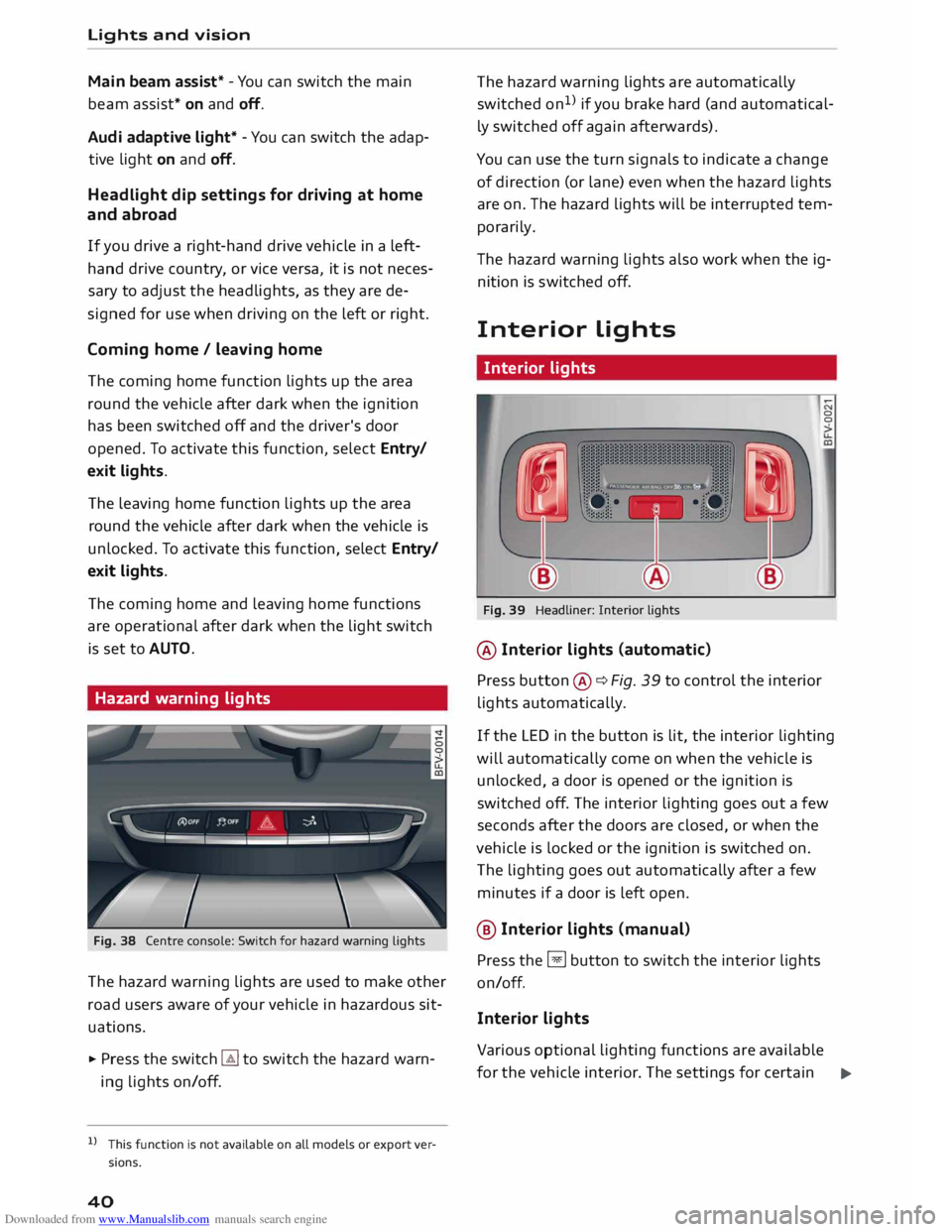
Fig. 38 Centre console: Switch for hazard warning lights
The hazard warning lights are used to make other
road users aware of your vehicle in hazardous sit
uations.
.,. Press the switch � to switch the hazard warn
ing lights on/off.
l l
This function is not available on all models or export ver
sions.
40 The
hazard warning lights are automatically
switched on1
>
if you brake hard (and automatical
ly switched off again afterwards).
You can use the turn signals to indicate a change
of direction (or lane) even when the hazard lights
are on. The hazard lights will be interrupted tem
porarily.
Th e hazard warning lights also work when the ig
nition is sw itched off.
Interior Lights
Interior lights
Fig. 39 Headliner: Interior lights
@ Interior lights (automatic)
Press button ®¢ Fig. 39 to control the interior
lights automatically. 0
0
If the LED in the button is lit, the interior lighting
will automatically come on when the vehicle is
unlocked, a door is opened or the ignition is
switched off. The interior lighting goes out a few
seconds after the doors are closed, or when the
vehicle is locked or the ignition is switched on.
The lighting goes out automatically after a few
minutes if a door is left open.
@ Interior Lights (manu al)
Press the §J button to switch the interior lights
on/off.
Interior lights
Various optional lighting functions are available
for the vehicle interior. The settings for certain .,.
Page 43 of 284
Downloaded from www.Manualslib.com manuals search engine 0
N
co
,-j
\D L/'l
N
L/'l
,-j functions
can be adjusted on the infotainment
system. Select the following on the infotainment
system: I MENU! button> Car > Left control button
> Vehicle settings > Background lighting.
Instrument lighting
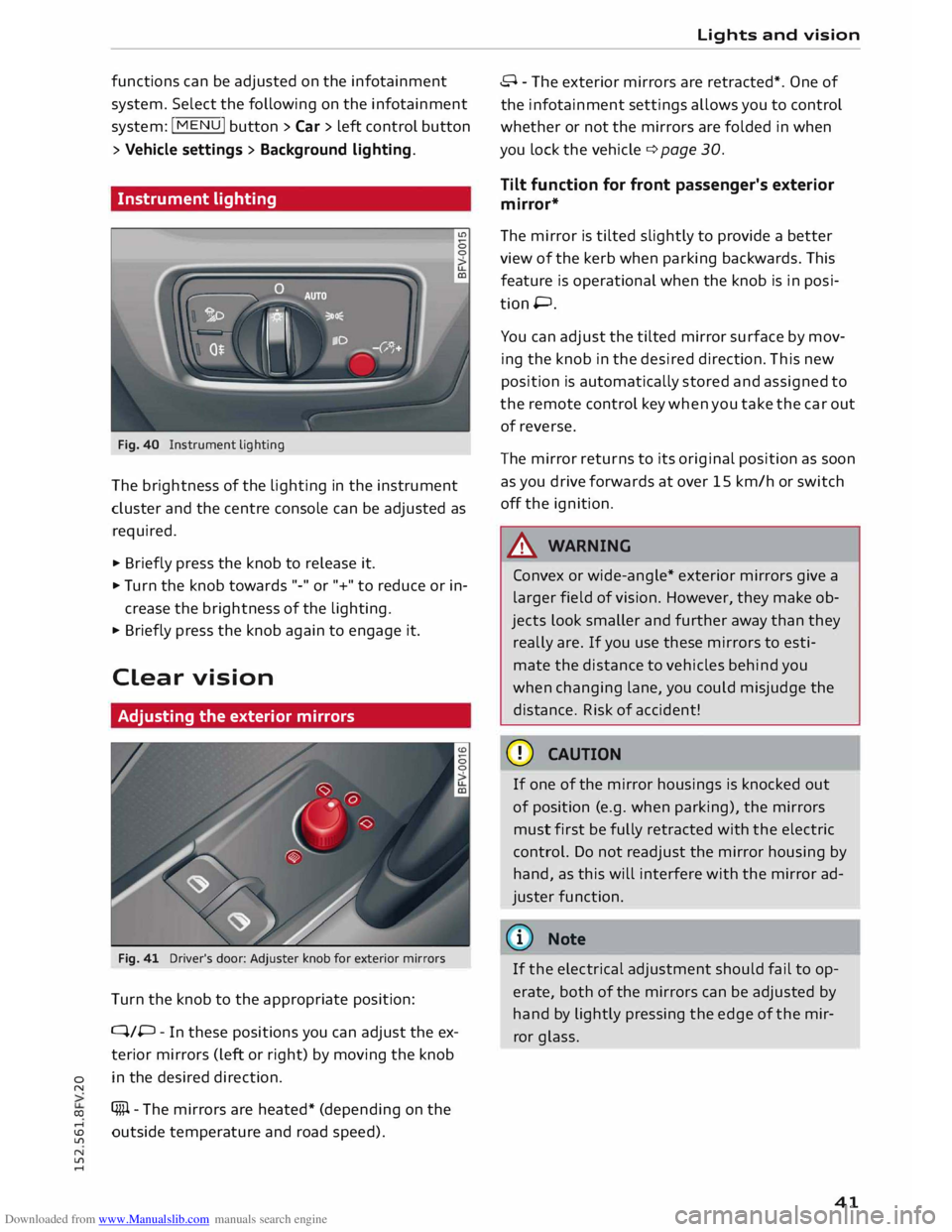
Fig. 40 Instrument lighting
The brightness of the Lighting in the instrument
cluster and the centre console can be adjusted as
required.
.,. Briefly press the knob to release it.
.,. Tu rn the knob towards "-" or"+" to reduce or in
crease the brightness of the lighting.
.,. Briefly press the knob again to engage it.
Clear vision
Adjusting the exterior mirrors
Fig. 41 Driver's door: Adjuster knob for exterior mirrors
Turn the knob to the appropriate position:
Q/P -In these positions you can adjust the ex
terior mirrors (Left or right) by moving the knob
in the desired direction.
(fill - The mirrors are heated* (depending on the
outside temperature and road speed). Lights
and vision
8 - The exterior mirrors are retracted*. One of
the infotainment settings allows you to control
whether or not the mirrors are folded in when
you Lock the vehicle q page 30.
Tilt function for front passenger's exterior
mirror*
The mirror is tilted slightly to provide a better
view of the kerb when parking backwards. This
feature is operational when the knob is in posi
tion P.
You can adjust the tilted mirror surface by mov
ing the knob in the desired direction. This new
position is automatically stored and assigned to
the remote control key when you take the car out
of reverse.
The mirror returns to its original position as soon
as you drive forwards at over 15 km/h or switch
off the ignition.
A WARNING
Convex or wide-angle* exterior mirrors give a
Larger field of vision. However, they make ob
jects Look smaller and further away than they
really are. If you use these mirrors to esti
mate the distance to vehicles behind you
when changing Lane, you could misjudge the
distance. Risk of accident!
CD CAUTION
If one of the mirror housings is knocked out
of position (e.g. when parking), the mirrors
must first be fully retracted with the electric
control. Do not readjust the mirror housing by
hand, as this will interfere with the mirror ad
juster function.
{CD) Note
If the electrical adjustment should fail to op
erate, both of the mirrors can be adjusted by
hand by Lightly pressing the edge of the mir
ror glass.
41
Page 44 of 284
Downloaded from www.Manualslib.com manuals search engine Lights
and vision
Anti-dazzle setting
Your vehicle is equipped with a manual or auto
matic* anti-dazzle interior mirror.
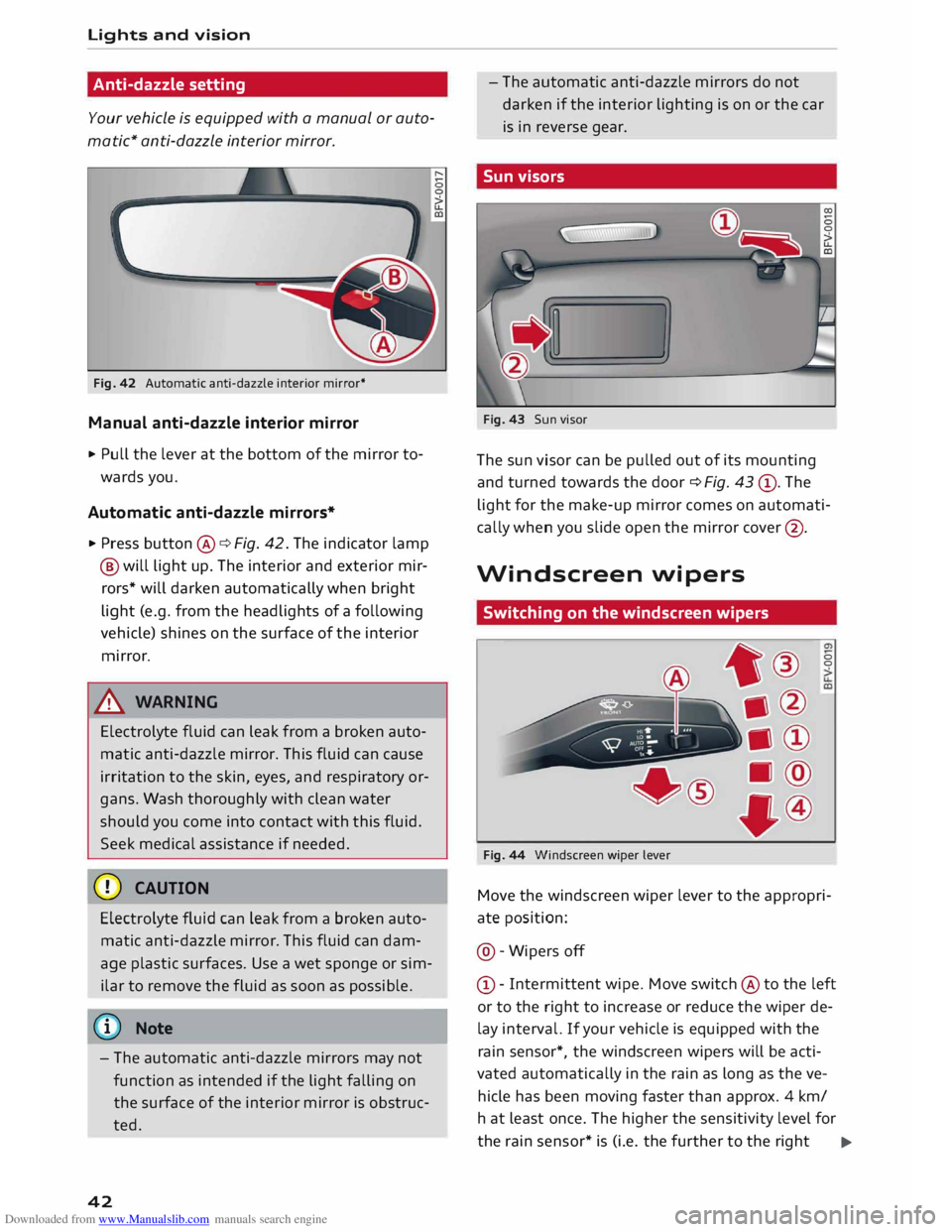
Fig. 42 Automatic anti-dazzle interior mirror*
Manual anti-dazzle interior mirror
.,. Pull the lever at the bottom of the mirror to
wards you.
Automatic anti-dazzle mirrors*
.,. Press button @¢ Fig. 42. The indicator lamp
@ will light up. The interior and exterior mir
rors* will darken automatically when bright
light (e.g. from the headlights of a following
vehicle) shines on the surface of the interior
mirror.
& WARNING
Electrolyte fluid can leak from a broken auto
matic anti-dazzle mirror. This fluid can cause
irritation to the skin, eyes, and respiratory or
gans. Wash thoroughly with clean water
should you come into contact with this fluid.
Seek medical assistance if needed.
CD CAUTION
Electrolyte fluid can Leak from a broken auto
matic anti-dazzle mirror. This fluid can dam
age plastic surfaces. Use a wet sponge or sim
ilar to remove the fluid as soon as possible.
(©) Note
- The automatic anti-dazzle mirrors may not
function as intended if the light falling on
the surface of the interior mirror is obstruc
ted.
42 -
The automatic anti-dazzle mirrors do not
darken if the interior lighting is on or the car
is in reverse gear.
Sun visors
Fig. 43 Sun visor
The sun visor can be pulled out of its mounting
and turned towards the door ¢ Fig. 43 ®· The
light for the make-up mirror comes on automati
cally when you slide open the mirror cover@ .
Windscreen wipers
Switching on the windscreen wipers
Fig. 44 Windscreen wiper Lever 0
0
Move the windscreen wiper lever to the appropri
ate position:
@ -Wipers off
© -Intermittent wipe. Move switch @ to the left
or to the right to increase or reduce the wiper de
lay interval. If your vehicle is equipped with the
rain sensor*, the windscreen wipers will be acti
vated automatically in the rain as long as the ve
hicle has been moving faster than approx. 4 km/
ha t least once. The higher the sensitivity level for
the rain sensor* is (i.e. the further to the right ..,.
Page 45 of 284
Downloaded from www.Manualslib.com manuals search engine 0
N
co
....
\D U'l
N
U'l
.... the
position of switch @ is), the sooner the wind
screen wipers react to moisture on the wind
screen. You can deactivate the rain sensor mode*
on the infotainment system (this will activate the
intermittent wipe mode). Select the following on
the infotainment system: I MENU! button
> Car >
left control button > Vehicle settings > Rain sen
sor > off.
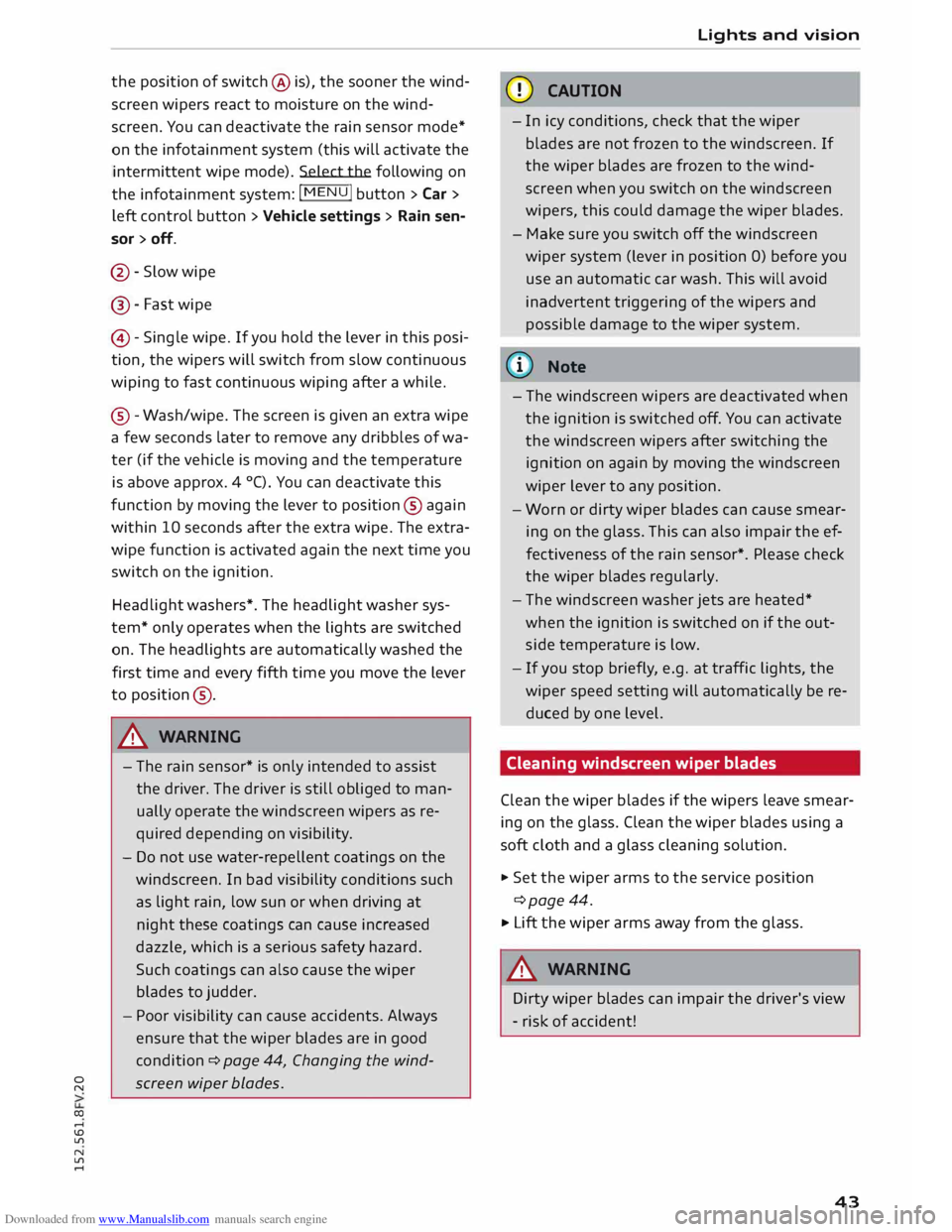
@ -Slow wipe
@- Fast wipe
©- Single wipe. If you hold the lever in this posi
tion, the wipers will switch from slow continuous
wiping to fast continuous wiping after a while.
® -Wash/wipe. The screen is given an extra wipe
a few seconds later to remove any dribbles of wa
ter (if the vehicle is moving and the temperature
is above approx. 4 °C). You can deactivate this
function by moving the lever to position® again
within 10 seconds after the extra wipe. The extra
wipe function is activated again the next time you
switch on the ignition.
Headlight washers*. The headlight washer sys
tem* only operates when the lights are switched
on. The headlights are automatically washed the
first time and every fifth time you move the lever
to position ®·
.&_ WARNING
- The rain sensor* is only intended to assist
the driver. The driver is still obliged to man
ually operate the windscreen wipers as re
quired depending on visibility.
- Do not use water-repellent coatings on the
windscreen. In bad visibility conditions such
as light rain, low sun or when driving at
night these coatings can cause increased
dazzle, which is a serious safety hazard.
Such coatings can also cause the wiper
blades to judder.
- Poor visibility can cause accidents. Always
ensure that the wiper blades are in good
condition ¢ page 44, Changing the wind
screen wiper blades. Lights
and vision
CD CAUTION
- In icy conditions, check that the wiper
blades are not frozen to the windscreen. If
the wiper blades are frozen to the wind
screen when you switch on the windscreen
wipers, this could damage the wiper blades.
- Make sure you switch off the windscreen
wiper system (lever in position 0) before you
use an automatic car wash. This will avoid
inadvertent triggering of the wipers and
possible damage to the wiper system.
(1)) Note
- The windscreen wipers are deactivated when
the ignition is switched off. You can activate
the windscreen wipers after switching the
ignition on again by moving the windscreen
wiper lever to any position.
- Worn or dirty wiper blades can cause smear
ing on the glass. This can also impair the ef
fectiveness of the rain sensor*. Please check
the wiper blades regularly.
- The windscreen washer jets are heated*
when the ignition is switched on if the out
side temperature is low.
- If you stop briefly, e.g. at traffic lights, the
wiper speed setting will automatically be re
duced by one level.
Cleaning windscreen wiper blades
Clean the wiper blades if the wipers leave smear
ing on the glass. Clean the wiper blades using a
soft cloth and a glass cleaning solution.
..,. Set the wiper arms to the service position
¢page 44.
..,. Lift the wiper arms away from the glass.
.&_ WARNING
Dirty wiper blades can impair the driver's view
- risk of accident!
43
Page 46 of 284
Downloaded from www.Manualslib.com manuals search engine Lights
and vision
Changing the windscreen wiper blades
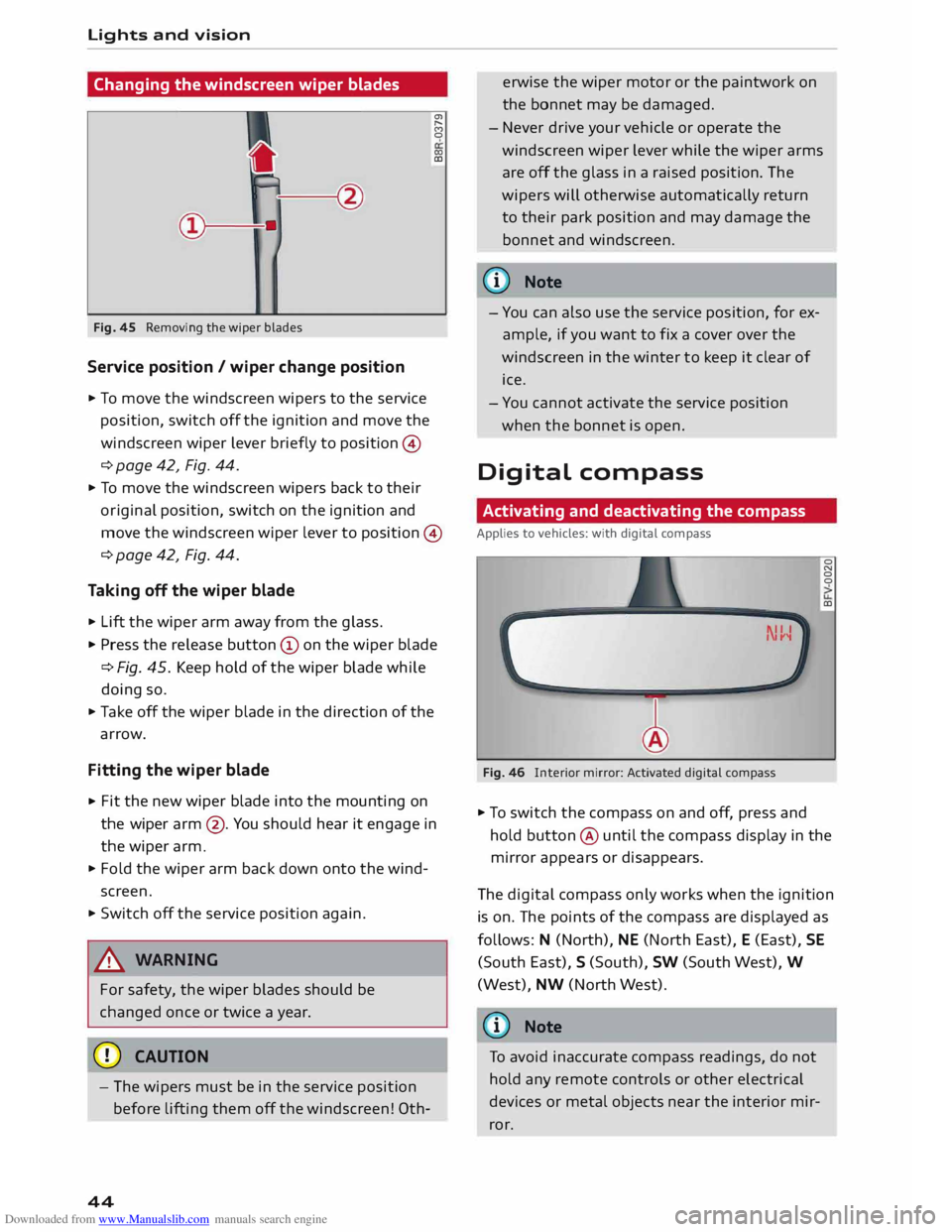
Fig. 45 Removing the wiper blades
Service position / wiper change position
.., To move the windscreen wipers to the service
position, switch off the ignition and move the
windscreen wiper lever briefly to position ©
¢ page 42, Fig. 44. a,
,.....
f')
0
(X)
co
.., To move the windscreen wipers back to their
or iginal position, switch on the ignition and
move the windscreen wiper lever to position ©
¢ page 42, Fig. 44.
Taking off the wiper blade
.., Lift the wiper arm away from the glass .
.., Press the release button© on the wiper blade
¢Fig. 45. Keep hold of the wiper blade while
doing so .
.., Take off the wiper blade in the direction of the
arrow.
Fitting the wiper blade
.., Fit
the new wiper blade into the mounting on
the wiper arm@. You should hear it engage in
the wiper arm.
.., Fold the wiper arm back down onto the wind
screen .
.., Switch off the service position again.
& WARNING
For safety, the wiper blades should be
changed once or twice a year.
CD CAUTION
- The wipers must be in the service position
before lifting them off the windscreen! 0th-
44 erwise
the wiper motor or the paintwork on
the bonnet may be damaged.
- Never drive your vehicle or operate the
windscreen wiper lever while the wiper arms
are off the glass in a raised position. The
wipers will otherwise automatically return
to their park position and may damage the
bonnet and windscreen.
@ Note
- You can also use the service position, for ex
ample, if you want to fix a cover over the
windscreen in the winter to keep it clear of
ice .
- You cannot activate the service position
when the bonnet is open.
Digital compass
Activating and deactivating the compass
Applies to vehicles: with digital compass
Fig. 46 lllterior mirror: Activated digital compass 0
N
0
0
co
.., To switch the compass on and off, press and
hold button @ until the compass display in the
mirror appears or disappears .
The digital compass only works when the ignition
is on. The points of the compass are displayed as
follows: N (North), NE (North East), E (East), SE
(South East), S (South), SW (South West), W
(West), NW (North West).
(D Note
To avoid inaccurate compass readings, do not
hold any remote controls or other electrical
devices or metal objects near the interior mir
ror.
Page 47 of 284
Downloaded from www.Manualslib.com manuals search engine 0
N
co
.-I
\D L/'l
N
L/'l
.-I Lights
and vision
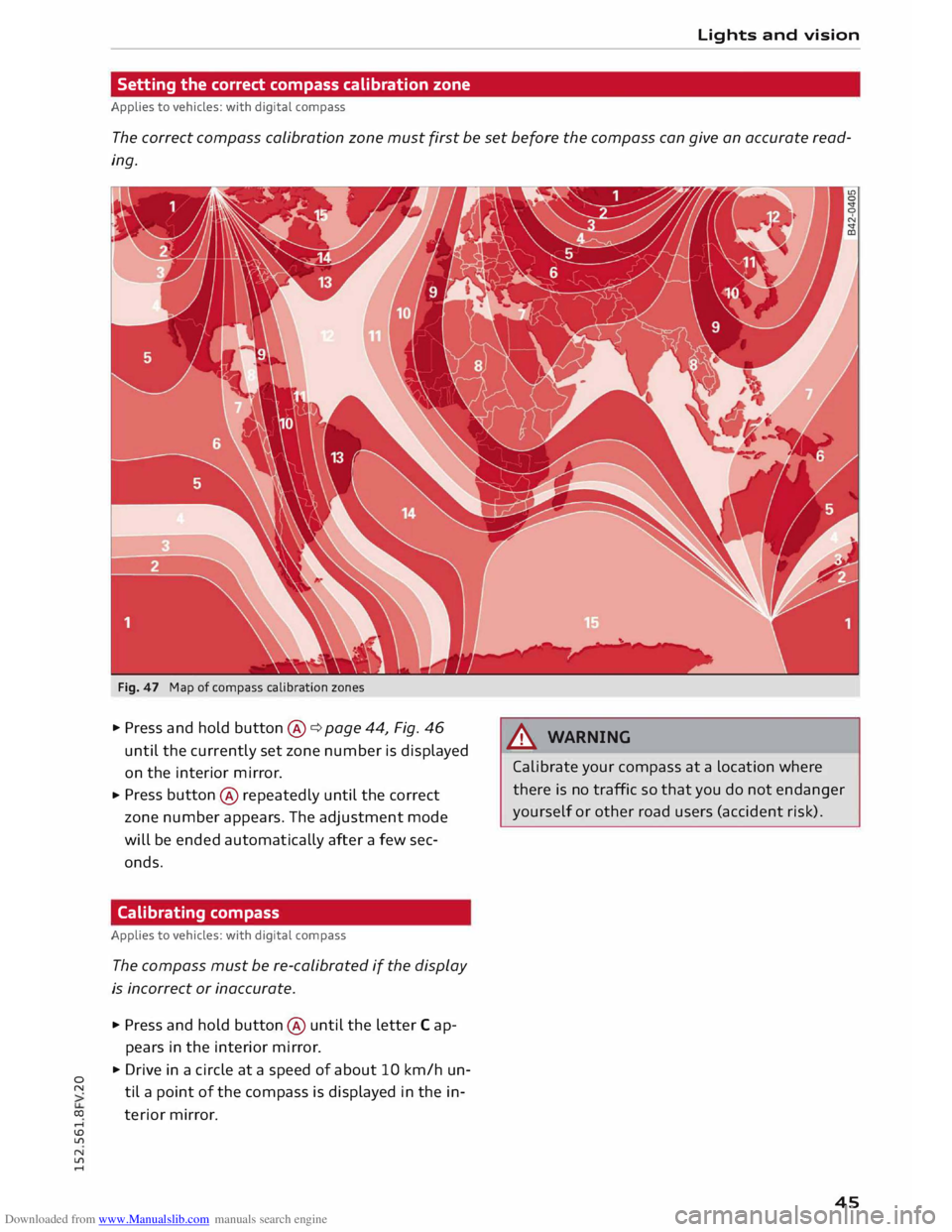
Setting the correct compass calibration zone
Applies to vehicles: with digital compass
The correct compass calibration zone must first be set before the compass can give an accurate read
ing.
Fig. 47 Map of compass calibration zones
..,. Press and hold button @
¢ page 44, Fig. 46
until the currently set zone number is displayed
on the interior mirror.
..,. Press
button @
repeatedly until the correct
zone number appears. The adjustment mode
will be ended automatically after a few sec
onds.
Calibrating compass
Applies to vehicles: with digital compass
The compass must be re-calibrated if the display
is incorrect or inaccurate .
..,. Press and hold button @
until the letter Cap
pears in the interior mirror .
..,. Drive in a circle at a speed of about 10 km/h un
til a point of the compass is displayed in the in
terior mirror. A
WARNING
Calibrate your compass at a location where
there is no traffic so that you do not endanger
yourself or other road users (accident risk).
45
Page 55 of 284
Downloaded from www.Manualslib.com manuals search engine 0
N
co
....
\D Lfl
N
Lfl
.... Heating
and cooling
Air conditioner
Description
The air conditioner heats, cools and dehumidifies
the air inside the vehicle. It operates most effec
tively with the windows closed. If the vehicle has
been standing in the sun, it may cool down faster
if you open the windows briefly to let the hot air
escape.
The pollution filter removes impurities, such as
dust and pollen, from the air.
@ For the sake of the environment
If you wish to save fuel, switch off the cooling
mode on the air conditioner by pressing the
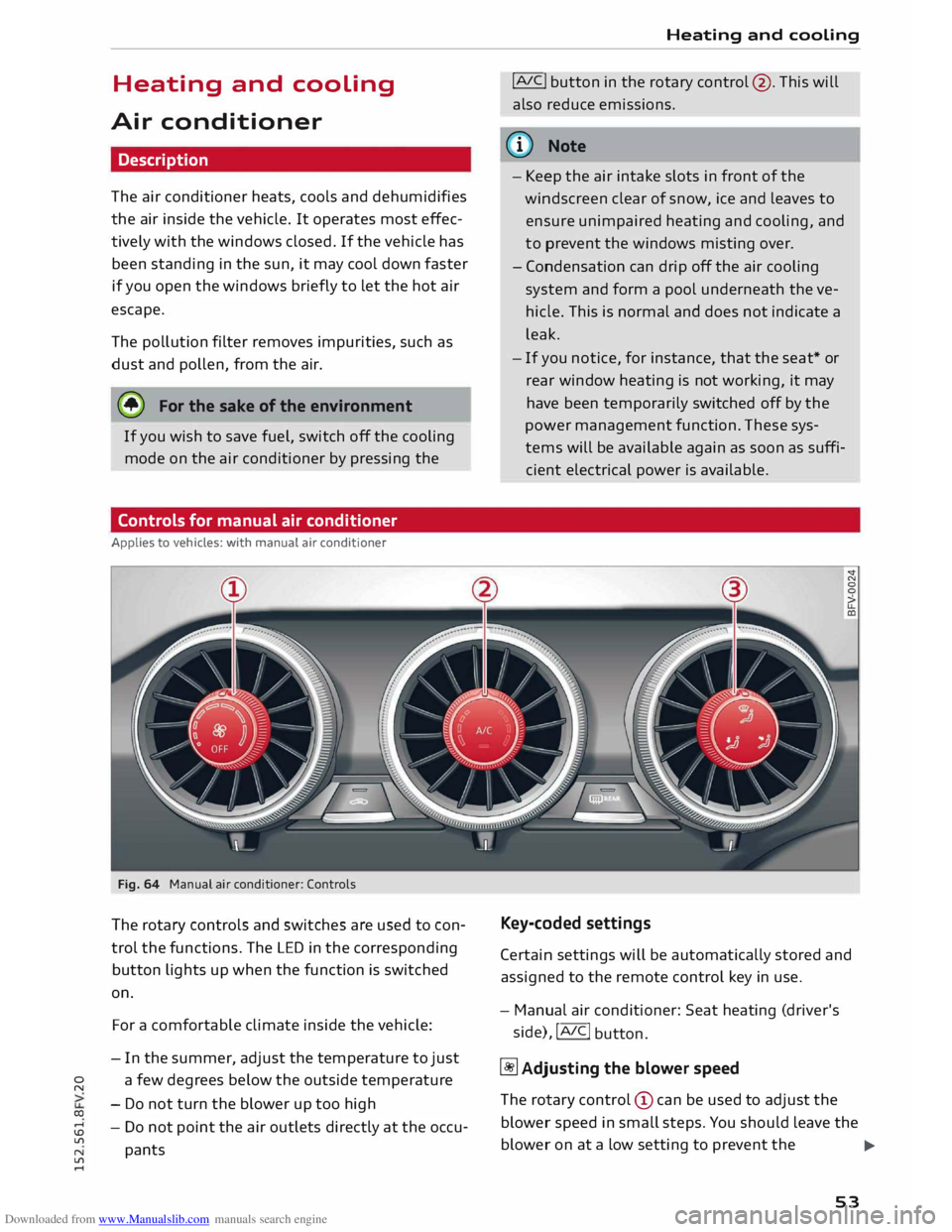
Controls for manual air conditioner
Applies to vehicles: with manual air conditioner
Fig. 64 Manual air conditioner: Controls
The rotary controls and switches are used to con
trol the functions. The LED in the corresponding
button lights up when the function is switched
on.
For a comfortable climate inside the vehicle:
- In the summer, adjust the temperature to just
a few degrees below the outside temperature
- Do not turn the blower up too high
- Do not point the air outlets directly at the occu-
pants Heating
and cooling
!AJC! button in the rotary control @. This will
also reduce emissions.
ijJ} Note
- Keep the air intake slots in front of the
windscreen clear of snow, ice and leaves to
ensure unimpaired heating and cooling, and
to prevent the windows misting over.
- Condensation can drip off the air cooling
system and form a pool underneath the ve
hicle. This is normal and does not indicate a
leak.
- If you notice, for instance, that the seat* or
rear window heating is not working, it may
have been temporarily switched off by the
power management function. These sys
tems will be available again as soon as suffi
cient electrical power is available.
Key-coded settings
Certain settings will be automatically stored and
assigned to the remote control key in use.
- Manual air conditioner: Seat heating (driver's
side), !AIC!
button.
� Adjusting the blower speed
The rotary control (!) can be used to adjust the
blower speed in small steps. You should Leave the
blower on at a Low setting to prevent the
...,
53
Page 57 of 284
Downloaded from www.Manualslib.com manuals search engine Controls
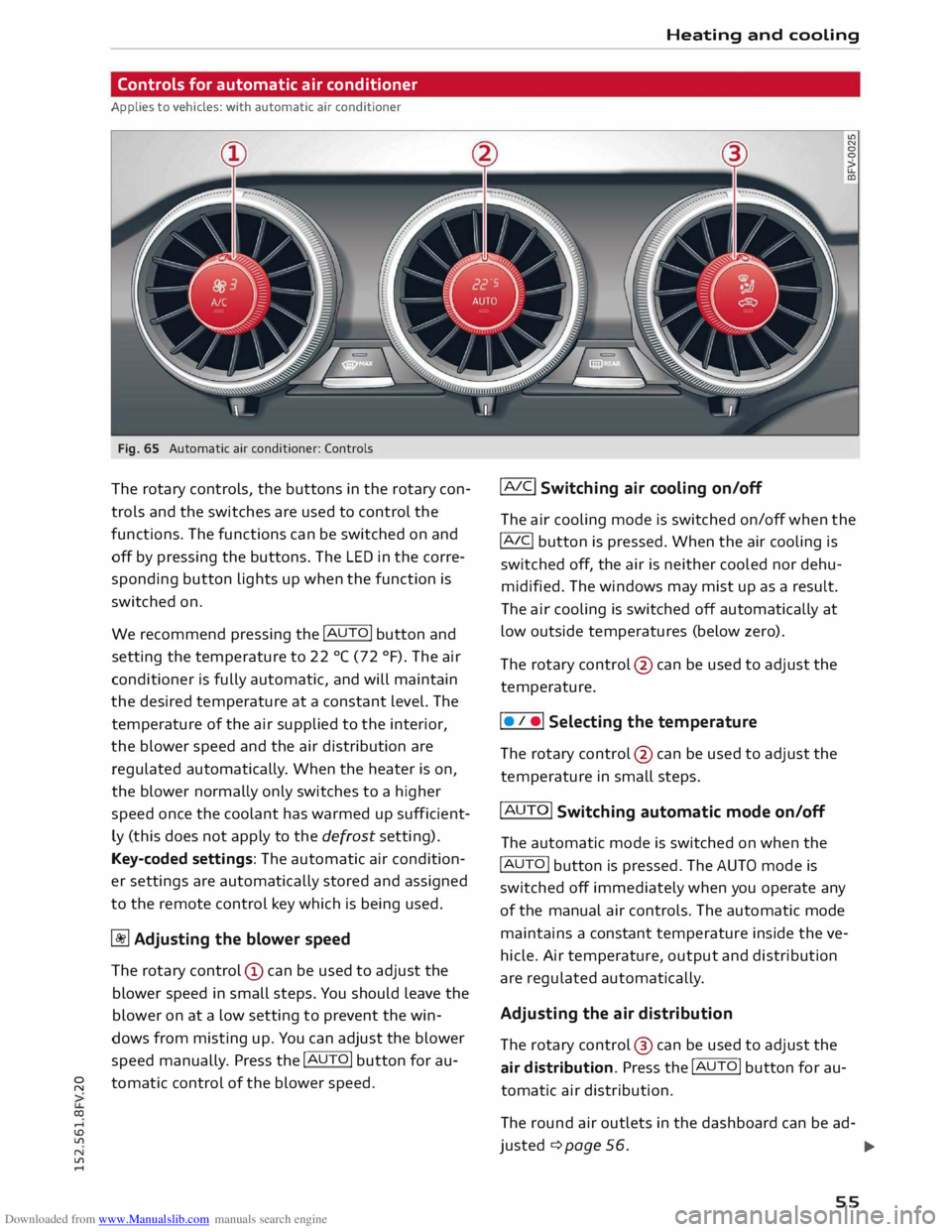
for automatic air conditioner
Applies to vehicles: with automatic air conditioner
Fig. 65 Automatic air conditioner: Controls
The rotary controls, the buttons in the rotary con
trols and the switches are used to control the
functions. The functions can be switched on and
off by pressing the buttons. The LED in the corre
sponding button lights up when the function is
switched on.
We recommend pressing the !AUTO! button and
setting the temperature to 22 °C (72 °F). The air
conditioner is fully automatic, and will maintain
the desired temperature at a constant level. The
temperature of the air supplied to the interior,
the blower speed and the air distribution are
regulated automatically. When the heater is on,
the blower normally only switches to a higher
speed once the coolant has warmed up suff icient
ly (this does not apply to the defrost setting).
Key-coded settings: The automatic air condition
er settings are automatically stored and assigned
to the remote control key which is being used.
� Adjusting the blower speed
The rotary control (D can be used to adjust the
blower speed in small steps. You should leave the
blower on at a low setting to prevent the win
dows from misting up. You can adjust the blower
speed manually. Press the !AUTO! button for au-
� tomatic
control of the blower speed.
co ....
\D L/'l
N
L/'l
.... Heating
and cooling
IAIC! Switching air cooling on/off
The air cooling mode is switched on/off when the
!A IC
! button
is pressed. When the air cooling is
switched off, the air is neither cooled nor dehu
midified. The windows may mist up as a result.
The air cooling is switched off automatically at
low outside temperatures (below zero).
The rotary control @ can be used to adjust the
temperature.
I • I •I Selecting
the temperature
The rotary control @ can be used to adjust the
temperature in small steps.
IAUTO! Switching automatic mode on/off
The automatic mode is switched on when the
!AUTO I
button is pressed. The AUTO mode is
switched off immediately when you operate any
of the manual air controls. The automatic mode
maintains a constant temperature inside the ve
hicle. Air temperature, output and distribution
are regulated automatically.
Adjusting the air distribution
The rotary control @ can be used to adjust the
air distribution. Press the !AUTO! button for au
tomatic air distribution.
The round air outlets in the dashboard can be ad-
justed ¢ page 56.
..,.
55
Page 60 of 284
Downloaded from www.Manualslib.com manuals search engine Driving
Driving
General notes
Running in
A new vehicle should be run in over a distance of
1,500 km. For the first 1,000 km the engine
speed should not exceed 2/3 of the maximum
per missible engine speed -do not use full throt
tle. From 1,000 to 1,500 km you can gradually
increase the engine rpm and road speed.
During its first few hours of running, the internal
friction in the engine is greater than later on
when all the moving parts have bedded down.
How the vehicle is driven for the first 1,500 km
also influences the engine quality. After this peri
od you should continue driving at moderate en
gine speeds, in particular when the engine is
cold. This helps to reduce wear and tear on the
engine and increases the potential mileage which
can be covered by the engine.
You should also avoid driving with the engine
speed too Low. Change down to a lower gear
when the engine no longer runs "smoothly". Ex
cessively high engine speeds are prevented by an
automatic rev limiter.
Driving through water on roads
Please note the following in order to prevent
damage to the vehicle when driving through wa
ter (e.g. on flooded roads):
- The water level must not be higher than the ve
hicle's underbody.
- Do not drive faster than walking pace.
A WARNING
After driving through water, mud, sludge,
etc., the braking effect can be delayed slightly
due to moisture on the discs and brake pads.
Applying the brakes carefully several times
will remove the moisture and restore the full
braking effect.
58 CD
CAUTION
Parts of the vehicle (e.g. engine, gearbox, run
ning gear or electrical components) can be
badly damaged when driving through water.
ij} Note
- It is advisable to check the depth at the
deepest point before approaching the wa-
ter.
- Do NOT stop the vehicle, drive in reverse or
switch off the engine before you are out of
the water.
- Bear in mind that waves created by oncom
ing traffic could exceed the permissible
wading depth of your vehicle.
- Avoid driving through salt water (corrosion).
How to improve economy and minimise
pollution
Fuel econom y, environmental impact and wear
on the engine, brakes and tyres depend largely
on the way you drive the vehicle. By adopting an
economical driving style and anticipating the
traffic situation ahead, you can reduce fuel con
sumption by 10-15%. The following section gives
you some tips on lessening the impact on the en
vironment and reducing your operating costs at
the same time.
Anticipate well in advance
A car uses most fuel when accelerating. If you an
ticipate hazards and speed changes well in ad
vance, you will need to brake less and thus accel
erate less. Wherever possible, let the car slow
down gradually with a gear engaged, for in
stance when you can see that the next traffic
lights are red.
Change gear early to save fuel
An effective way of saving fuel is to change up
quickly through the gears. Running the engine at
high rpm in the lower gears uses an unnecessary
amount offuel. Press the accelerator slowly and
avoid using the "kick-down" feature.
...,
Page 61 of 284
Downloaded from www.Manualslib.com manuals search engine 0
N
co
....
\D L/'l
N
L/'l
.... Avoid
driving at high speed
Avoid travelling at top speed. Fuel consumption,
exhaust emissions and noise Levels all increase
very rapidly at higher speeds. Driving at moder
ate speeds will help to save fuel.
Do not let the engine idle for longer than
necessary
Engine idling periods are automatically reduced
on vehicles with start/stop system*. On vehicles
without start/stop system*, it is worthwhile
switching off the engine at Level crossings, for in
stance, or at traffic lights with a Long red phase.
The fuel saved after only 30 -40 seconds is great
er than the amount of fuel needed to restart the
engine.
The engine takes a very Long time to warm up
when it is running at idling speed. Mechanical
wear and pollutant emissions are also especially
high during this initial warm-up phase. It is
therefore best to drive off immediately after
starting the engine. Avoid running the engine at
high speed.
Regular ser vicing
Regular servicing can establish a basis for good
fuel economy before you start driving. A well
serviced engine gives you the benefit of im
proved fuel efficiency as well as maximum relia
bility and an enhanced resale value.
A poorly maintained engine can consume up to
ten percent more fuel than necessary.
Check the oil level when filling the tank. Oil con
su mption depends to a great extent on the en
gine load and engine speed. It is quite normal
that the oil consumption of a new engine only
reaches its lowest level after a certain mileage.
This means that the oil consumption can only be
properly assessed after about 5,000 km. Depend
ing on your personal driving style, oil consump
tion can be up to 0.5 Ltr./1,000 km.
Avoid short trips
The engine and emission control system need to
reach their proper working temperature in order
to minimise fuel consumption and emissions . Driving
A cold engine uses disproportionately more fuel.
The engine only reaches its working temperature
after about four kilometres, when fuel consump
tion will return to a normal level.
Check tyre pressures
Always make sure the tyres are inflated to the
correct tyre pressures to save fuel. If the tyre
pressures are just 0.5 bar too Low, this can in
crease the fuel consumption by as much as 5 %.
Due to the greater rolling resistance, under-infla
tion also increases tyre wear and impairs han
dling.
The tyre pressures should always be checked
when the tyres are cold.
Do not use winter tyres all through the year; they
will increase fuel consumption by up to 10 %.
Avoid carrying unnecessary loads
Every kilo of extra weight will increase the fuel
consumption, so it is worth checking the Luggage
compartment occasionally to make sure that no
unnecessary Loads are being transported.
Save electrical energy
The engine drives the alternator to generate elec
tricity. This means that fuel consumption rises
when more power is required for electrical equip
ment. Switch off electrical equipment when it is
not needed. Electrical equipment which uses a
Lot of electricity includes the blower (at a high
setting), the rear window heating and the seat
heating*.
59