lock AUDI TT COUPE 2014 Owner's Guide
[x] Cancel search | Manufacturer: AUDI, Model Year: 2014, Model line: TT COUPE, Model: AUDI TT COUPE 2014Pages: 284, PDF Size: 34.42 MB
Page 80 of 284
Downloaded from www.Manualslib.com manuals search engine Automatic
gearbox
Releasing the selector lever manually Cleft
hand drive vehicles)
Applies to vehicles: with S tronic gearbox
The selector lever can be released manually if
the electrical power supply should fail.
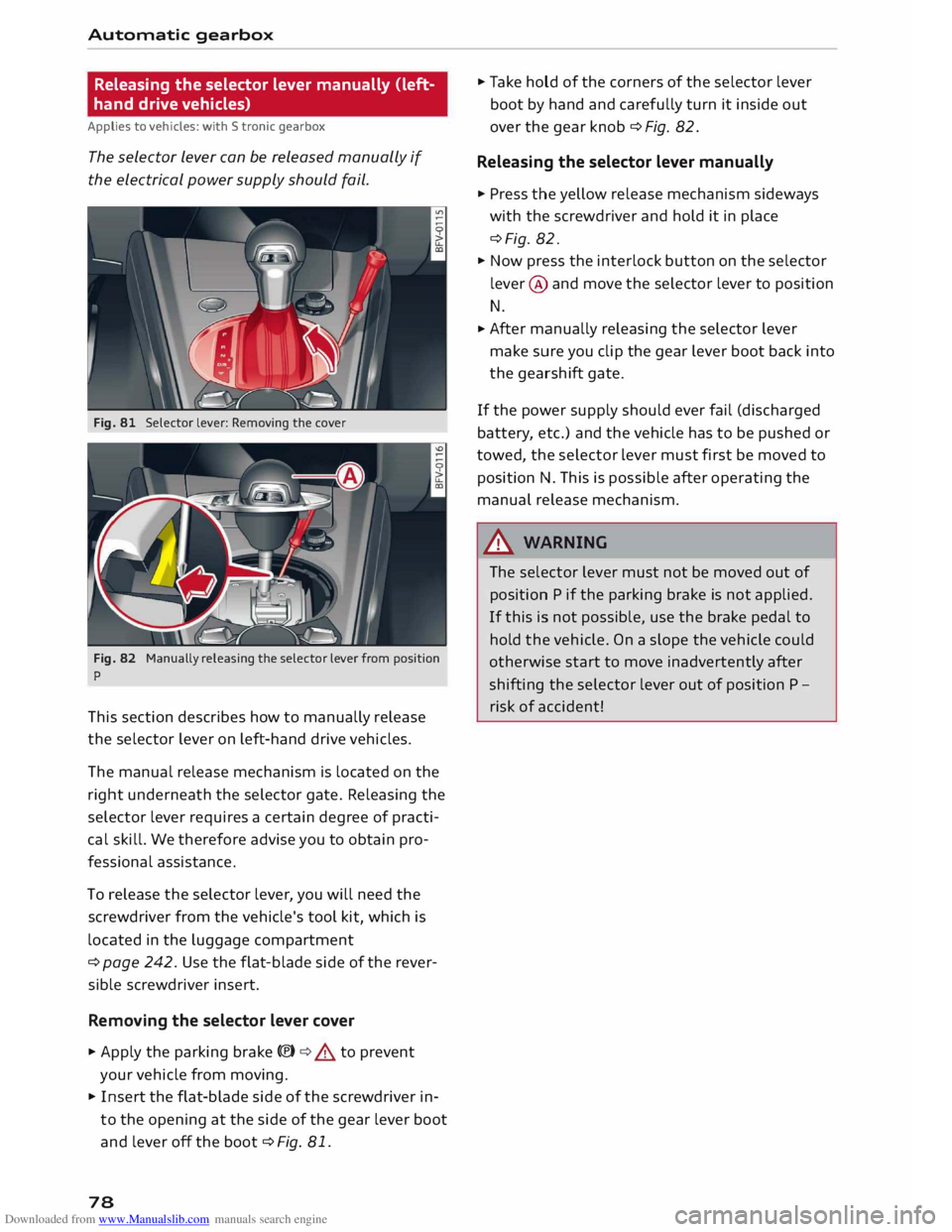
Fig. 81 Selector lever: Removing the cover
Fig. 82 Manually releasing the selector lever from position
p
This section describes how to manually release
the selector lever on left-hand drive vehicles.
The manual release mechanism is located on the
right underneath the selector gate. Releasing the
selector lever requires a certain degree of practi
cal skill. We therefore advise you to obtain pro
fessional assistance.
To release the selector lever, you will need the
screwdriver from the vehicle's tool kit, which is
located in the luggage compartment
¢ page 242. Use the flat-blade side of the rever
sible screwdriver insert.
Removing the selector lever cover
� Apply the parking brake C®) ¢&. to prevent
your vehicle from moving.
� Insert the flat-blade side of the screwdriver in
to the opening at the side of the gear lever boot
and lever off the boot ¢Fig. 81.
78 �
Take hold of the corners of the selector lever
boot by hand and carefully turn it inside out
over the gear knob ¢ Fig. 82.
Releasing the selector lever manually
� Press the yellow release mechanism sideways
with the screwdriver and hold it in place
¢Fig. 82.
� Now press the interlock button on the selector
lever @ and move the selector lever to position
N.
� After
manually releasing the selector lever
make sure you clip the gear lever boot back into
the gearshift gate.
If the power supply should ever fail (discharged
battery, etc.) and the vehicle has to be pushed or
towed, the selector Lever must first be moved to
position N. This is possible after operating the
manual release mechanism.
_& WARNING
The selector lever must not be moved out of
position P if the parking brake is not applied.
If this is not possible, use the brake pedal to
hold the vehicle. On a slope the vehicle could
otherwise start to move inadvertently after
shifting the selector lever out of position P -
risk of accident!
Page 81 of 284
Downloaded from www.Manualslib.com manuals search engine 0
N
co
....
\D Lfl
N
Lfl
.... Releasing
the selector lever manually
(right-hand drive vehicles)
Applies to vehicles: with S tronic gearbox
The selector Lever can be released manually if
the electrical power supply should fail.
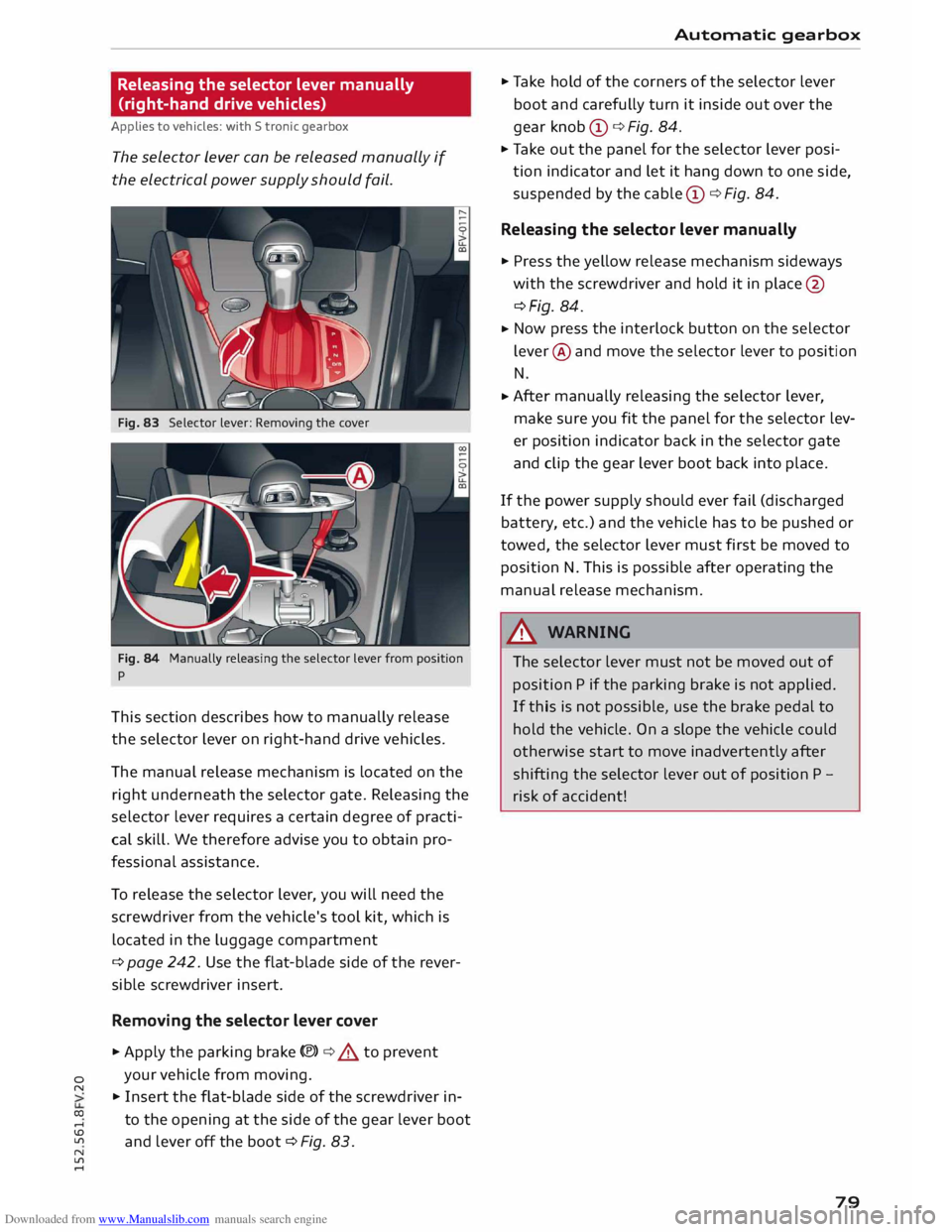
Fig. 83 Selector lever: Removing the cover
Fig. 84 Manually releasing the selector lever from position
p
This section describes how to manually release
the selector lever on right-hand drive vehicles.
The manual release mechanism is located on the
right underneath the selector gate. Releasing the
selector lever requires a certain degree of practi
cal skill. We therefore advise you to obtain pro
fessional assistance.
To release the selector lever, you will need the
screwdriver from the vehicle's tool kit, which is
located in the luggage compartment
¢ page 242. Use the flat-blade side of the rever
sible screwdriver insert.
Removing the selector lever cover
... Apply the parking brake(®)¢.,& to prevent
your vehicle from moving.
... Insert the flat-blade side of the screwdriver in
to the opening at the side of the gear lever boot
and lever off the boot ¢ Fig. 83. Automatic
gearbox
... Take hold of the corners of the selector lever
boot and carefully turn it inside out over the
gear knob CD¢ Fig. 84.
... Take out the panel for the selector lever posi
tion indicator and let it hang down to one side,
suspended by the cable CD¢ Fig. 84.
Releasing the selector lever manually
... Press the yellow release mechanism sideways
with the screwdriver and hold it in place @
¢Fig. 84 .
... Now
press the interlock button on the selector
lever @and move the selector lever to position
N
... After
manually releasing the selector lever,
make sure you fit the panel for the selector lev
er position indicator back in the selector gate
and clip the gear lever boot back into place.
If the power supply should ever fail (discharged
battery, etc.) and the vehicle has to be pushed or
tow ed, the selector lever must first be moved to
position N. This is possible after operating the
manual release mechanism.
&_ WARNING
The selector lever must not be moved out of
position P if the parking brake is not applied.
If this is not possible, use the brake pedal to
hold the vehicle. On a slope the vehicle could
otherwise start to move inadvertently after
shifting the selector lever out of position P -
risk of accident!
79
Page 92 of 284

Downloaded from www.Manualslib.com manuals search engine Driver
assist systems
Adjusting brightness of warning lamp
Applies to vehicles: with Audi side assist
The brightness of the warning Lamp can be ad
justed on the infotainment system.
.. Select the following on the infotainment sys
tem: IM E
N u I
button > Car > left control button
> Driver assist> Audi side assist.
The brightness of the warning lamp in both the
information and warning modes is regulated au
tomatically according to the ambient light level.
If you are in very dark or very light surroundings
when you adjust the brightness of the warning
lamp, the automatic brightness control may al
ready have reached the lowest or the brightest
setting. In such a case it is possible that you
won't notice a difference while you are adjusting
the brightness or that you will only notice it once
the light surroundings have changed.
Please adjust the brightness of the warning lamp
for the information mode so that it does not dis
tract you while you are looking at the road in
front. When you change the brightness, the
warning lamp on the exterior mirror will light up
briefly with the intensity set for the information
mode. The intensity of the lamp in the warning
mode is linked to the intensity in the information
mode and is adjusted automatically.
(CO} Note
- The side assist is not active while the set
tings are being adjusted.
- Your personal settings are stored automati
cally and assigned to the remote control key
which is being used.
Driver messages
Applies to vehicles: with Audi side assist
Should the side assist be deactivated automati
cally, a driver message will appear on the info
tainment display.
@j Audi side
assist: currently unavailable.
Sensor view restricted due to surroundings.
See owner's manual
The radar sensors are blocked. The area in front
of the sensors must not be obstructed by bicycle
90 racks,
stickers, deposits or any other substances.
If necessary, clean the area in front of the sen
sors ¢ page 88, Fig. 98.
@j Audi
side assist: currently unavailable.
See owner's manual
The side assist is temporarily inoperative and
cannot be switched on (for instance if the battery
is not sufficiently charged).
@j Audi
side assist: fault. Please contact
workshop
The system cannot detect vehicles reliably and
will be deacti vated. The sensors are out of align
ment or defective. Have the system checked by a
qualified workshop soon.
Audi drive select (vehicle
set-up functions)
Introduction
Applies to vehicles: with Audi drive select
Drive select allows you to use different set-ups on
your vehicle. The four modes efficiency*, com
fort, auto and dynamic allow the driver, for ex
ample, to change from a sporty mode to a more
comfortable one via the �:11
� button in the centre
console or via the infotainment system. In addi
tion, the individual mode allows you to adapt the
vehicle set-up to suit your personal driving style.
For example, you might choose to combine a
more dynamic engine set-up with a lighter steer
ing response.
Description
Applies to vehicles: with Audi drive select
The possible vehicle set-up in each mode de
pends on which equipment is installed on your
vehicle. The engine and steering are basic parts
of your vehicle which are always included in the
set-up.
Engine and automatic gearbox*
The response of the engine and automatic gear
box* to accelerator pedal movements will be
more spontaneous or balanced, depending on
which mode you select. In efficiency* mode the
automatic gearbox* selects the next gear at
..,.
Page 103 of 284
Downloaded from www.Manualslib.com manuals search engine Intelligent
technology
Electro-mechanical
power steering
Electro-mechanical power steering assists the
driver when steering.
The degree of power assistance is adapted elec
tronically, depending on the speed.
If the power steering should fail at any time or
the engine is switched off (for instance when be
ing towed), the car can still be steered. However,
substantially more effort than normal will be re
quired to turn the steering wheel.
Warning/indicator lamps and driver
messages
• Steering: fault. Please stop vehicle
If the warning lamp lights up permanently and
the message appears, there may be a power
steering failure.
Do NOT drive on. Obtain professional assistance.
• Steering: fault. Please stop vehicle
There is a malfunction in the electronic steering
lock. The ignition can no longer be switched on.
Do not have the vehicle towed away, because you
won't be able to steer it. Obtain professional as
sistance.
G'!b Steering:
fault. You can continue driving
If the indicator lamp lights up, the steering re
sponse may be heavier or lighter than usual. In
addition, it is possible that the steering wheel
will be off centre when driving in a straight line.
Drive slowly to a qualified workshop and have the
fault rectified.
Ive Steering
lock: fault. Please contact work
shop
There is a malfunction in the electronic steering
lock.
� Drive
to a qualified workshop soon and have the
a: fault rectified.
....
\D Lfl
N
Lfl
.... Intelligent
technology
A WARNING
Have the system malfunction repaired by a
qualified workshop as soon as possible -risk
of accident!
«]} Note
You can drive on if the warning/indicator lamp
• or mJ lights up only briefly.
Brakes
New brake pads
New brake pads do not give full braking effect for
the first 400 km, they must first be "bedded in".
However, you can compensate for the slightly re
duced braking effect by applying more pressure
on the brake pedal. Avoid placing a heavy load on
the brakes during the running-in period.
Wear The rate of wear on the brake pads depends a
great deal on how you drive and the conditions in
which the vehicle is operated. Negative factors
are, for instance, city traffic, frequent short trips
or hard driving with abrupt starts and stops.
Noises Brake noise may develop in certain situations, de
pending on the speed, braking force and ambient
conditions (such as temperature and relative hu
midity).
Effect of moisture and salt
In certain conditions, such as in heavy rain, or af
ter washing the car or driving through water, the
full braking effect can be delayed by moisture (or
in winter by ice) on the discs and brake pads. The
brakes should be "dried" by pressing the pedal to
restore full braking effect.
When you are driving at higher speeds with the
windscreen wipers on, the brake pads are very
briefly brought into contact with the brake discs.
This automatic process which goes unnoticed by
the driver is carried out at regular intervals and is
intended to improve braking response in wet con-
ditions. ..,..
101
Page 104 of 284
Downloaded from www.Manualslib.com manuals search engine Intelligent
technology
The effectiveness of the brakes can also be tem
porarily reduced if the car is driven for some dis
tance without using the brakes when there is a
lot of salt on the road in winter. The layer of salt
that accumulates on the discs and pads can be re
moved with a few cautious brake applications.
Corrosion
There may be a tendency for dirt to build up on
the brake pads and corrosion to form on the discs
if the car is used infrequently, or if you only drive
low mileages without using the brakes very
much.
If the brakes are not used frequently, or if corro
sion has formed on the discs, it is advisable to
clean off the pads and discs by braking firmly a
few times from a moderately high speed ¢.&,..
Faults in the brake system
If the brake pedal travel should ever increase
suddenly, this may mean that one of the two
brake circuits has failed. Drive immediately to the
nearest qualified workshop and have the fault
rectified. On the way to the dealer, be prepared
to use more pressure on the brake pedal and al
low for longer stopping distances.
Low brake fluid level
Malfunctions can occur in the brake system if the
brake fluid level is too low. The brake fluid level is
monitored electronically.
Brake servo
The brake servo amplifies the pressure you apply
to the brake pedal. It only works when the engine
is running.
& WARNING
- When applying the brakes to clean off de
posits on the pads and discs, select a clear,
dry road. Be sure not to inconvenience or en
danger other road users; do not risk an acci
dent.
- Never let the car coast with the engine
switched off (this can cause accidents).
102 CD
CAUTION
- Never let the brakes "drag" by leaving your
foot on the pedal when you do not really in
tend to brake. This overheats the brakes, re
sulting in longer stopping distances and
greater wear.
- Before driving down a long, steep gradient,
it is advisable to reduce speed and move the
selector lever to a lower gear. In this way
you will make use of the engine braking ef
fect and relieve the load on the brakes. If
you still have to use the brakes, it is better
to brake firmly at intervals than to apply the
brakes continuously.
Note
- If the brake servo is out of action, you must
apply considerably more pressure to the
brake pedal than you normally would.
- If you wish to equip the car with accessories
such as a front spoiler or wheel covers, it is
important that the flow of air to the front
wheels is not obstructed, otherwise the
brakes can overheat.
Electronic stabilisation
control (ESC)
Description
The electronic stabilisation control (ES() increa
ses the car's stability. It reduces the tendency to
skid and improves the stability and road holding
of the vehicle. The ESC detects critical handling
situations, such as understeer, oversteer and
wheelspin on the driven wheels. It stabilises the
vehicle by braking individual wheels or by reduc
ing the engine torque. The indicator lamp Ii] in
the instrument cluster starts flashing as soon as
the ESC intervenes.
The following systems are integrated in the ESC:
Anti-lock brake system (ABS)
ABS prevents the wheels from locking up under
braking until the vehicle has reached a virtual
standstill. You can continue to steer the vehicle
even when the brakes are on full. Keep your foot
•
Page 105 of 284
Downloaded from www.Manualslib.com manuals search engine on
the brake pedal and do not pump the brakes.
You will feel the brake pedal pulsate while the
anti-lock brake system is working.
Brake assist system
The brake assist system can shorten the braking
distance. The braking force is automatically boos
ted if you press the brake pedal quickly in an
emergency. You must keep pressing the brake
pedal until the danger has passed.
Traction control system (ASR)
In the event of wheelspin, the traction control
system reduces the engine torque to match the
amount of grip available. This helps the car to
start moving, accelerate or climb a gradient.
Electronic differential lock (EDL)
When the EDL detects wheelspin, it brakes the
spinning wheel and directs the power to the oth
er driven wheel (or wheels on quattro* versions).
This function is not available at high speeds.
To prevent the disc brake of the braked wheel
from overheating, the EDL cuts out automatically
if subjected to excessive loads. The vehicle can
still be driven. The EDL will switch on again auto
matically when the brake has cooled down.
Steering recommendation
The ESC helps to stabilise the vehicle by changing
the steering wheel torque.
Selective wheel torque control
Selective wheel torque control intervenes when
cornering by braking the wheel(s) on the inside of
the bend individually as required. This enables
precision cornering. The relevant system may not
intervene in the wet or snow.
Multicollision brake assist system
The "multicollision brake assist system" can help
to reduce the risk of skidding and further colli
sions during an accident. If the airbag control
unit detects that a collision has taken place up-
� wards
of a certain speed, the vehicle is braked by
a'.: the ESC.
co
....
\D U'l
N
U'l
.... Intelligent
technology
The vehicle will not be braked automatically if:
- the driver presses the accelerator,
- the brake pressure applied by pressing the
brake pedal is higher than the brake pressure
initiated by the system,
- or the ESC, the brake system or the vehicle's
electrical system are not fully functional.
A WARNING
- The grip provided by the ESC and the inte
grated systems is still subject to the physi
cal limits of adhesion. Always bear this in
mind, especially on wet or slippery roads. If
you notice the systems cutting in, you
should reduce your speed immediately to
suit the road and traffic conditions. Do not
let the extra safety provided tempt you into
taking any risks when driving -this can
cause accidents.
- Remember that the accident risk always in
creases if you drive fast, especially in cor
ners or on a wet or slippery road, or if you
follow too close behind the vehicle in front
of you. Please bear in mind that even the
ESC and the integrated systems cannot
compe nsate for the increased accident risk.
- When accelerating on a uniformly slippery
surface (for instance all four wheels on ice
or snow), press the accelerator gradually
and carefully. The driven wheels may other
wise start to spin (in spite of the integrated
control systems), which would impair the
car's stability and could lead to an accident.
{D Note
- To ensure that the ABS and ASR systems
work properly, all four wheels must be fit
ted with identical tyres. Any differences in
the rolling radius of the tyres can cause the
system to reduce engine power when this is
not desired.
- The systems can make noises when they in
tervene.
- If the indicator lamp DJ orr§J appears,
there may be a malfunction ¢ page 14. -
103
Page 109 of 284
Downloaded from www.Manualslib.com manuals search engine 0
N
co
....
\D Lfl
N
Lfl
.... Dynamic
power management
While the vehicle is moving, this function distrib
utes the available power to the various electrical
components and systems according to their re
quirements. The power management ensures
that on-board systems do not consume more
electrical power than the alternator can supply,
and thus maintains the maximum possible bat
tery power Level.
ijJ Note
- The power management system is not able
to overcome the given physical Limits.
Please remember that the power and Life of
the battery are Limited.
- If the indicator Lamp ril c:> page 13 appears,
the starting ability may be impaired.
Points to remember
Starting ability has first priority.
Short trips, city traffic and Low temperatures all
place a heavy Load on the battery . In these condi
tions a Large amount of power is consumed, but
only a small amount is supplied. The situation is
also critical if electrical equipment is in use when
the engine is not running. In this case power is
consumed when none is being generated.
In these situations you will be aware that the
power management system is intervening to con
trol the distribution of electrical power.
When the vehicle is parked for long periods
If you do not drive your vehicle for a period of
several days or weeks, the power management
will gradually shut off the on-board systems one
by one, or reduce the amount of current they are
using. This Limits the amount of power consumed
and helps to ensure reliable starting even after a
Long period. Certain convenience features, such
as remote control unlocking, may not be availa
ble. These functions will be restored when you
switch on the ignition and start the engine. Intelligent
technology
With the engine switched off
If you Listen to the radio or use other electrical
equipment when the engine is not running, this
will discharge the battery.
A message will appear on the infotainment dis
play before the battery power drops to a Level
where the starting ability is impaired.
This message warns you that the system you are
using will soon be switched off automatically.
You should therefore start the engine if you wish
to continue using the system.
When the engine is running
Although the alternator generates electrical pow
er, the battery can still become discharged while
the vehicle is being driven. This can occur when a
Lot of power is being consumed but only a small
amount supplied, especially if the battery is not
fully charged initially.
To restore the necessary energy balance, the sys
tem will then temporarily shut off the electrical
components that are using a Lot of power, or re
duce the current they are consuming. Heating
systems in particular use a Large amount of elec
trical power. If you notice, for instance, that the
seat heating* or the rear window heater is not
working, they may have been temporarily switch
ed off or regulated to a Lower heat output. These
systems will be available again as soon as suffi
cient electrical power is available.
You may also notice that the engine runs at a
slightly faster idling speed. This is quite normal,
and no cause for concern. The increased idling
speed allows the alternator to meet the greater
power requirement and charge the battery at the
same time.
Information saved in the
control units
The vehicle is fitted in the factory with electronic
control units that, among other things, control
the engine and the gearbox. The control units al
so monitor the exhaust system and the airbags.
The control units continually analyse data rele-
vant to the vehicle while you are driving. In the
...,.
107
Page 110 of 284
Downloaded from www.Manualslib.com manuals search engine Intelligent
technology
event of faults or anomalies in the vehicle data,
only these data are saved. As a rule, faults are
shown by the warning lamps in the instrument
cluster.
Data saved in the control units can only be read
and analysed with special equipment.
A qualified workshop is only able to recognise
and deal with faults by using the relevant saved
data. Among other things, the saved data may
contain the following information:
- Data relating to the engine and the gearbox
-Speed
- Dire ction of travel
- Braking force
- Seat belt warning system data
The control
units
installed will not under any cir
cumstances record conversations in the vehicle.
On vehicles with an automatic SOS dial system
via a mobile phone or another connected device,
the current location of the vehicle can be trans
mitted. In accidents where the control units reg
ister that airbags have been triggered, a signal
can automatically be sent by the system. This de
pends on the service provider. The signal can only
be sent in areas with sufficient mobile phone cov
erage.
Event data recorder
Your vehicle is not equipped with an event data
recorder.
In an event data recorder, information about the
vehicle is temporarily saved. In the event of an
accident, you can therefore obtain detailed infor
mation about the course of events. On vehicles
with an airbag system, accident-related data such
as impact speed, seat belt status, seat positions
and trigger times can be saved. The exact infor
mation saved depends on the manufacturer.
The installation of an event data recorder is sub
ject to the agreement of the vehicle's owner. This
process is governed by legislation in some coun
tries.
108 Reprogram
ming control units
All data for controlling components are saved in
the control units. Some convenience features,
such as one-touch signalling, single door unlock
ing and display messages can be reprogrammed
using special workshop equipment. If any con
venience features are reprogrammed, the infor
mation in this Owner's Manual will no longer be
accurate for the features that have been
changed. We recommend having the reprogram
ming confirmed by an Audi workshop in the
"Workshop remarks" section of your Service
Schedule.
Your Audi dealer will be able to provide you with
information about possible reprogramming op
tions.
Event memory
There is a diagnostic connection for reading out
the event memory located in the footwell on the
driver's side of the vehicle. Information regarding
the operation and status of the vehicle's elec
tronic control units is stored in the event memo
ry. The event memory should only be read out
and erased by a qualified workshop.
A WARNING
The diagnostic connection must not be used
for other purposes. Incorrect use can cause
malfunctions -risk of accident!
Page 120 of 284
Downloaded from www.Manualslib.com manuals search engine Speech
dialogue system
Telephone
Applies to vehicles: with speech dialogue system and telephone
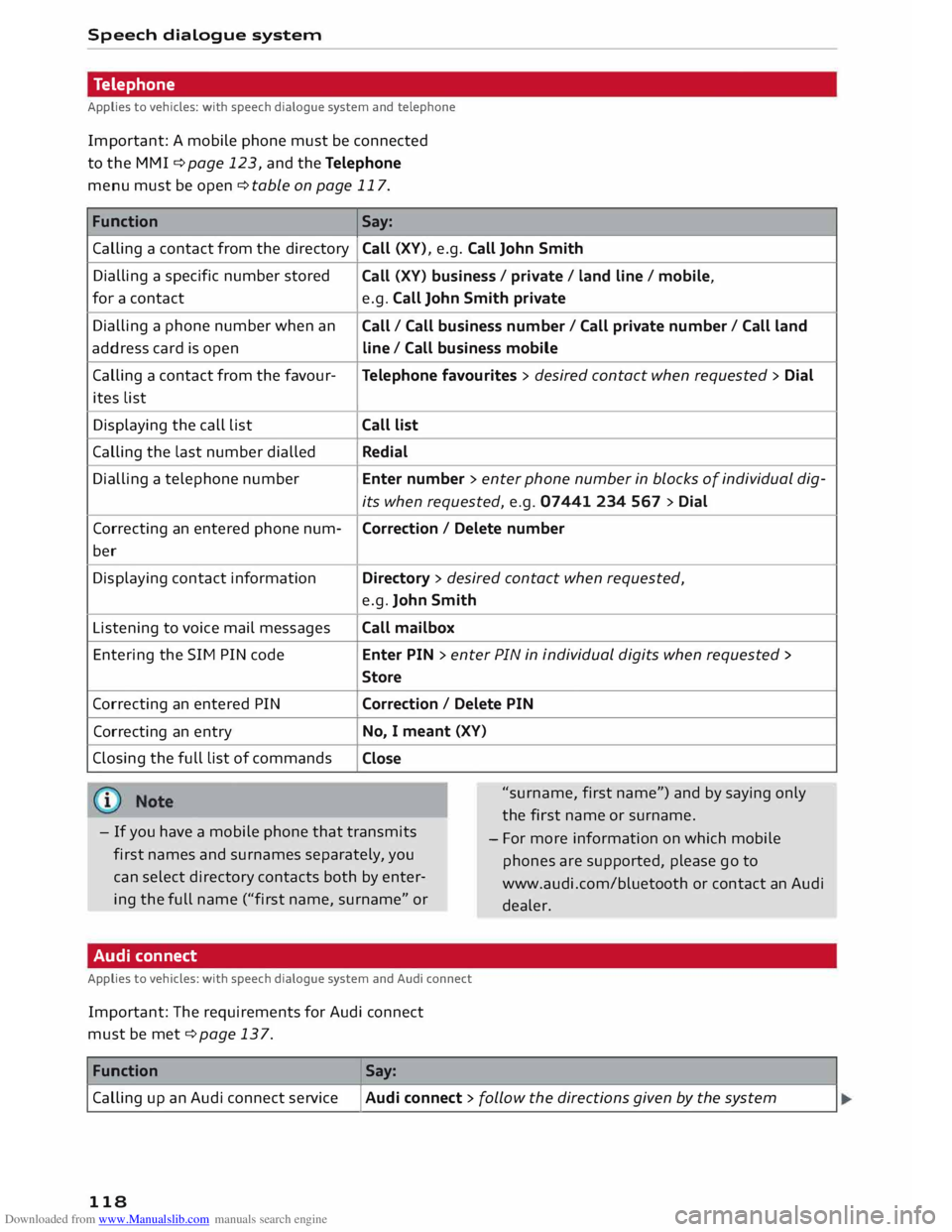
Important: A mobile phone must be connected
to the MMI ¢page 123, and the Telephone
menu must be open ¢ table on page 117.
Function Say:
Calling a contact from the directory Call
(XV), e.g. Call John Smith
Dialling a specific number stored
for a contact
Dialling a phone number when an
address card is open
Calling a contact from the favour-
ites List
Displaying the call List
Calling the Last number dialled
Dialling a telephone number
Correcting an entered phone num-
ber
Displaying contact information
Listening to voice mail messages
Entering the SIM PIN code
Correcting an entered PIN
Correcting an entry
Closing the full List of commands Call
(XV) business / private / land line/ mobile,
e.g. Call John Smith private
Call / Call business number/ Call private number/ Call land
line / Call business mobile
Telephone favourites > desired contact when requested > Dial
Call list
Redial
Enter number > enter phone number in blocks of individual dig-
its when requested, e.g. 07441 234 567 > Dial
Correction / Delete number
Directory > desired contact when requested,
e.g. John Smith
Call mailbox
Enter PIN > enter PIN in individual digits when requested >
Store
Correction / Delete PIN
No, I meant (XV)
Close
"surname, first name") and by saying only
the first name or surname.
- If you have a mobile phone that transmits
first names and surnames separately, you
can select directory contacts both by enter
ing the full name ("first name, surname" or -
For more information on which mobile
phones are supported, please go to
www.audi.com/bluetooth or contact an Audi
dealer.
Audi connect
Applies to vehicles: with speech dialogue system and Audi connect
Important: The requirements for Audi connect
must be met ¢page 137.
Function Say:
Calling up an Audi connect service
I Audi connect > follow the directions given by the system
118
Page 127 of 284
Downloaded from www.Manualslib.com manuals search engine 0
N
co
....
\D Lfl
N
Lfl
.... In
addition, the contacts on the mobile phone are
automatically Loaded into the directory of the
MMI. This may take several minutes, depending
on how many contacts are stored on the mobile
phone.
After you have connected your mobile phone to
the MMI successfully, you can immediately begin
configuring Audi connect ¢page 137.
{i)) Note
- You can adjust further settings for connec
ted mobile phones using the connection
manager ¢page 187.
- Bluetooth devices only have to be bonded
once. Any devices that have already been
bonded to the MMI system are connected
automatically when they are within range
and the ignition is on.
- You will need to authorise the MMI connec
tion on your mobile phone to enable auto
matic connection.
- Please note any system queries on your mo
bile phone, e.g. whether the phone should
connect automatically in the future. On
some mobile phones, you may also need to
download the directory and allow access to
your text messages separately.
- You receive the SIM PIN code from your mo
bile network service provider together with
the SIM card. If you enter the SIM PIN code
incorrectly three times1
)
in a row, the SIM
card will be be blocked. A PUK (personal un
blocking key) must be entered in order to re
activate the SIM card.
- You can bond several mobile phones to the
MMI system; however only one connection
is active at a time.
- Any Bluetooth device that is already connec
ted to the MMI system is disconnected
when another device is connected to the
system.
- The Bluetooth connection between the sys
tem and the mobile phone is automatically
terminated when you Leave the car.
l l
The number of possible attempts depends on the SIM
card. Telephone
- For further information regarding your mo
bile phone, contact your mobile network
service provider or refer to the operating in
structions for your mobile phone. For infor
mation on using a phone in your car, please
go online (e.g. www.audi.com/bluetooth) or
ask an Audi dealer.
Using the Audi phone box
Applies to vehicles: with Audi phone box
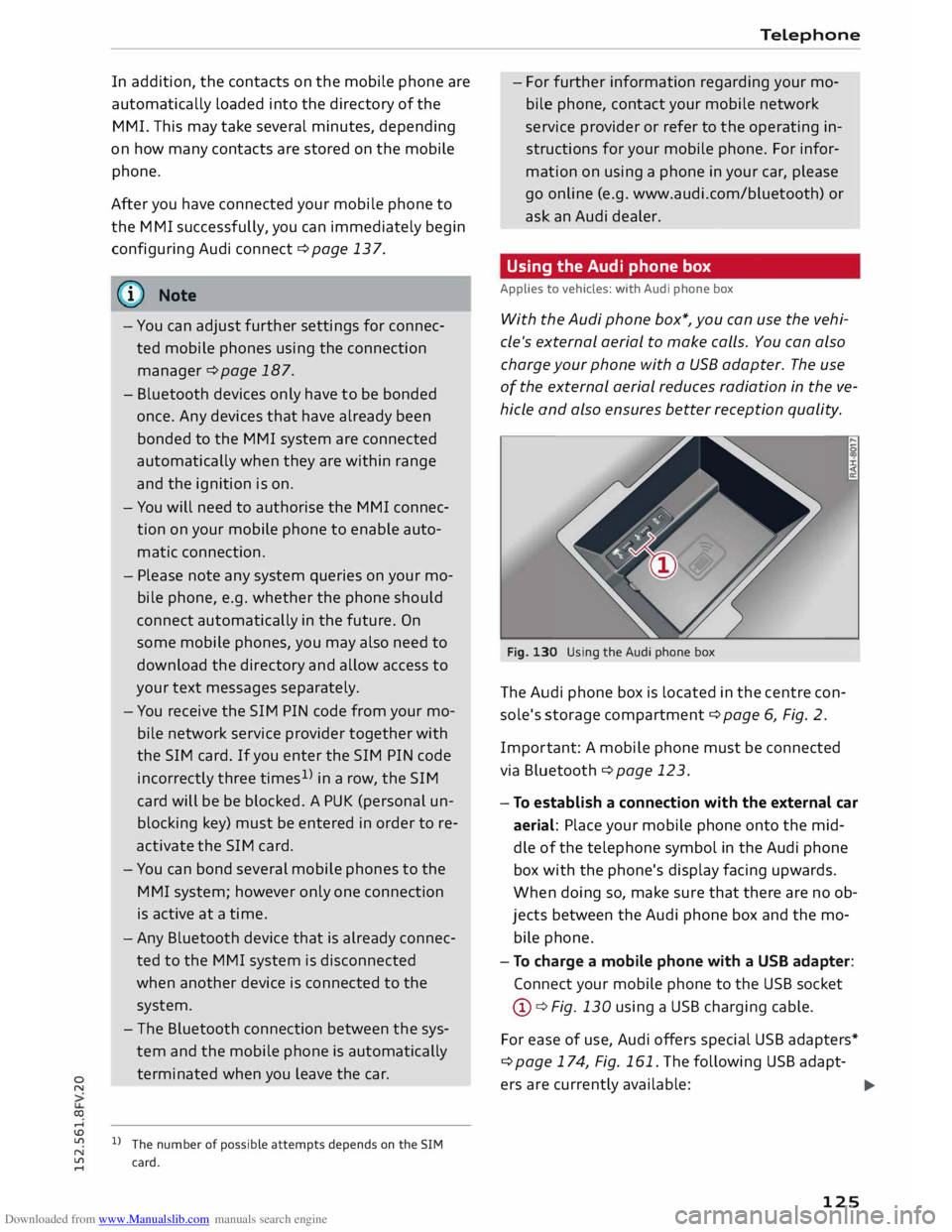
With the Audi phone box*, you can use the vehi
cle's external aerial to make calls. You can also
charge your phone with a USB adapter. The use
of the external aerial reduces radiation in the ve
hicle and also ensures better reception quality.
Fig. 130 Using the Audi phone box
The Audi phone box is Located in the centre con
sole's storage compartment¢ page 6, Fig. 2.
Impor tant: A mobile phone must be connected
via Bluetooth ¢ page 123.
- To establish a connection with the external car
aerial: Place your mobile phone onto the mid
dle of the telephone symbol in the Audi phone
box with the phone's display facing upwards.
When doing so, make sure that there are no ob
jects between the Audi phone box and the mo
bile phone.
- To charge a mobile phone with a USB adapter:
Connect your mobile phone to the USB socket
@ ¢Fig. 130 using a USB charging cable.
For ease of use, Audi offers special USB adapters*
¢ page 174, Fig. 161. The following USB adapt-
ers are currently available:
.,..
125