warning lights AUDI TT COUPE 2014 Owner's Guide
[x] Cancel search | Manufacturer: AUDI, Model Year: 2014, Model line: TT COUPE, Model: AUDI TT COUPE 2014Pages: 284, PDF Size: 34.42 MB
Page 78 of 284
Downloaded from www.Manualslib.com manuals search engine Automatic
gearbox
when approaching a speed restriction in a built
up area).
Switching on coasting mode
Important: Selector lever must be in D, gradient
must be less than 12 %.
"' Select efficiency mode in drive select*
9page 90 (you only have to do this once).
"' Ta ke your foot off the accelerator.
If you have selected the "on-board computer"
display, the message Coasting will then appear.
The gearbox automatically disengages the clutch
at speeds above 20 km/h and lets the vehicle
coast without the engine braking effect. The en
gine ticks over at idling speed while the vehicle is
coasting.
Stopping coasting mode
"' Press the brake pedal or accelerator.
To use the engine braking effect and overrun fuel
cut-off again, all you need to do is tap the brake
pedal briefly.
You can improve your fuel economy and help to
reduce emissions by using a combination of the
coasting mode (i.e. coasting with low fuel con
sumption on a longer stretch of road) and the
overrun fuel cut-off (i.e. using the engine brak
ing effect with no fuel consumption on a shorter
stretch of road).
A WARNING
- If you are approaching an obstruction when
coasting mode is switched on, please re
member that the vehicle will not slow down
as quickly as usual when you take your foot
off the accelerator -risk of accident!
- The vehicle can pick up speed if you are driv
ing down a slope in coasting mode -risk of
accident!
l l
The ESC lamp lights up permanently and the message
Stabilisation control (ESC): sport. Warning! Restricted
stability appears temporarily in the infotainment display
to indicate the deactivation status.
76 -
If other people are using your car, you
should draw their attention to the coasting
mode.
@ Note
- Coasting mode is only available in efficiency
mode (drive select*).
- The message Coasting only appears when
the current fuel consumption display is se
lected. The gear is no longer displayed when
you are in coasting mode (e.g. E instead of
E6).
- The coasting mode is deactivated tempora
rily on gradients of 15 % or greater.
' Launch control programme
Applies to vehicles: with S tronic gearbox and launch control
The launch control programme enables maxi
mum acceleration.
Important: The engine must be warm and the
steering wheel must be pointing straight-ahead.
"' Deactivate the start/stop system*¢ page 65.
The LED in the button l(A)'*'I will light up.
"' Deactivate the hold assist* ¢ page 68. The LED
in the button will go out.
"' Press the IJ'}OFF!
button once briefly while the
engine is running 1
).
"' Briefly pull the selector lever back from posi
tion D/S to select position S, or move the selec
tor lever to the right into the tiptronic gate, or
select dynamic mode in drive select*
¢page 90.
"' Press the brake pedal firmly with your left foot
and hold it down for at least one second.
"'At the same time, press the accelerator all the
way down with your right foot until the engine
revs are high and steady.
"' Ta ke your left foot off the brake.
�
Page 84 of 284
Downloaded from www.Manualslib.com manuals search engine Driver
assist systems
.. Switch off the ignition.
The speed setting will remain stored after the
system is temporarily deactivated. To resume the
programmed cruising speed, release the clutch or
brake pedal and pull the lever to position (!).
The stored speed will be deleted once the igni
tion is switched off.
_& WARNING
Do not resume the programmed cruising
speed if this is too high for the traffic condi
tions -this can cause accidents.
Speed limiter
Description
Applies to vehicles: with speed limiter
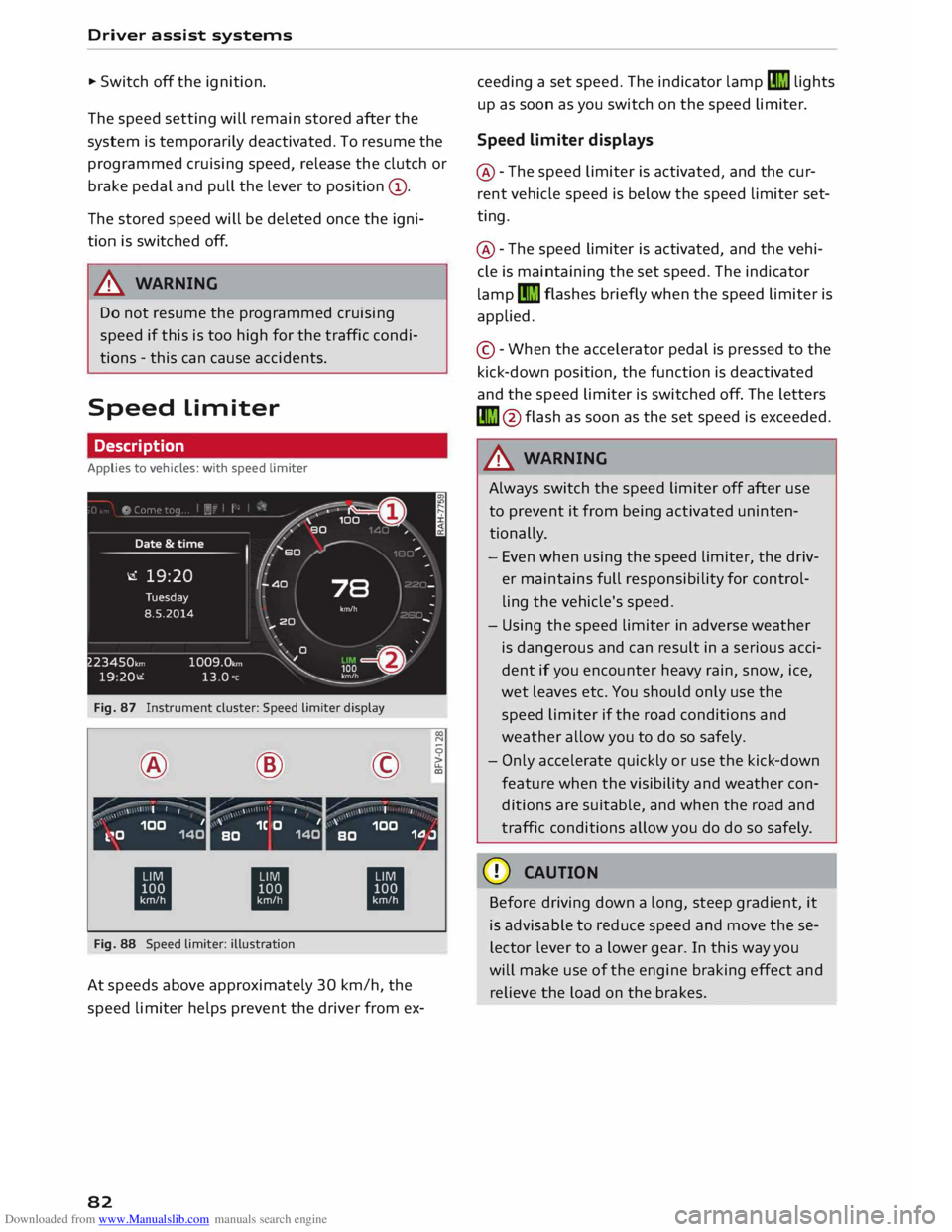
Fig. 87 Instrument cluster: Speed limiter display
® ·-
' I I @
,.,...---:-;- ·-
/ \ \ •
I I ©
·-
, ' I
' 00
N
0
>
LL
a,
,, _ ,\ 100 1
k.�0 140 '
1C O 1
BO 140 '
100
BO 1.0.J
ti ti
ti
Fig. 88 Speed limiter: illustration
At speeds above approximately 30 km/h, the
speed limiter helps prevent the driver from ex-
82 ceeding
a set speed. The indicator lamp�
lights
up as soon as you switch on the speed limiter.
Speed limiter displays
@ -The speed limiter is activated, and the cur
rent vehicle speed is below the speed limiter set
ting.
@ -The speed limiter is activated, and the vehi
cle is maintaining the set speed. The indicator
lamp �
flashes briefly when the speed limiter is
applied.
© -When the accelerator pedal is pressed to the
kick-down position, the function is deactivated
and the speed limiter is switched off. The letters
� @flash as soon as the set speed is exceeded.
_& WARNING
Always switch the speed limiter off after use
to prevent it from being activated uninten
tionally.
- Even when using the speed limiter, the driv
er maintains full responsibility for control
ling the vehicle's speed.
- Using the speed limiter in adverse weather
is dangerous and can result in a serious acci
dent if you encounter heavy rain, snow, ice,
wet leaves etc. You should only use the
speed limiter if the road conditions and
weather allow you to do so safely.
- Only accelerate quickly or use the kick-down
feature when the visibility and weather con
ditions are suitable, and when the road and
traffic conditions allow you do do so safely.
CD CAUTION
Before driving down a long, steep gradient, it
is advisable to reduce speed and move these
lector lever to a lower gear. In this way you
will make use of the engine braking effect and
relieve the load on the brakes.
Page 88 of 284
Downloaded from www.Manualslib.com manuals search engine Driver
assist systems
Indicator lamps
• Ready: The indicator Lamp Lights up when the
system is fully functional. The system is ready to
intervene .
• Not ready: The indicator Lamp Lights up when
the system is switched on but not ready to inter
vene. The causes for this can include the follow
ing:
- There are no Lane markings.
- The system cannot detect the relevant Lane
markings (e.g. temporary markings for road
works or markings obscured by snow, dirt, rain
or adverse Light).
- The vehicle's speed is below 65 km/h, the
speed at which the Lane assist system is activa
ted (the threshold may vary in different export
markets).
- The Lane is narrower than 2.1 m or wider than
5.5 m.
- The bend is too tight.
- You have taken your hands off the steering
wheel.
@ Note
- Make sure that the camera window
¢ Fig. 92 is not covered with stickers or sim
ilar objects. Notes on cleaning ¢ page 236.
- On vehicles for some export markets: once
the system is activated, it is "ready" each
time the ignition is switched on.
Infotainment display
Applies to vehicles: with Audi active lane assist
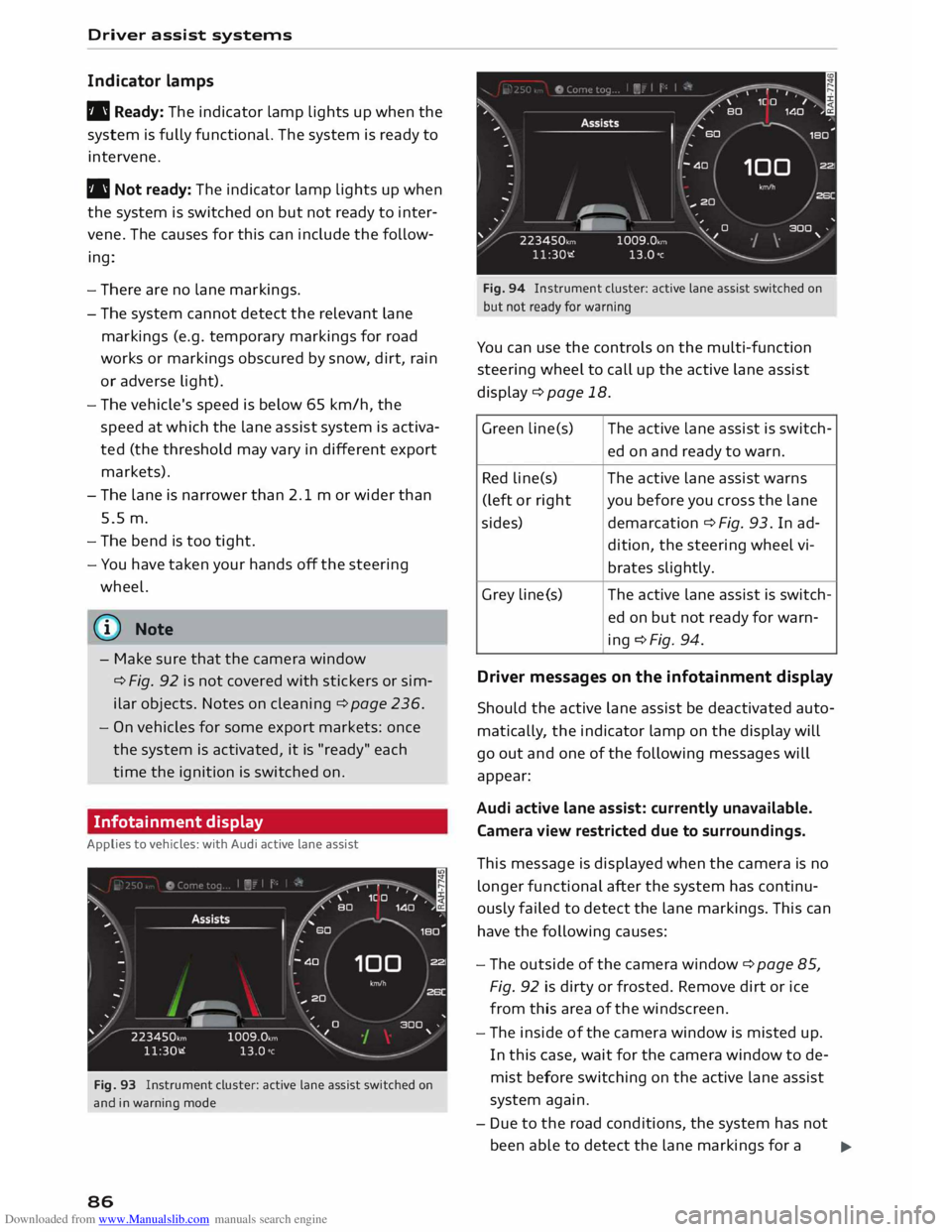
Fig. 93 Instrument cluster: active lane assist switched on
and in warning mode
86 Fig.
94 Instrument cluster: active lane assist switched on
but not ready for warning
You can use the controls on the multi-function
steering wheel to call up the active lane assist
display¢ page 18.
Green Lin e(s) The active Lane assist is switch-
ed on and ready to warn.
Red line(s) The active lane assist warns
(left or right you before you cross the lane
sides) demarcation¢ Fig. 93. In ad-
dition, the steering wheel vi-
brates slightly.
Grey Line(s) The
active lane assist is switch-
ed on but not ready for warn-
ing ¢Fig. 94.
Driver messages on the infotainment display
Should the active lane assist be deactivated auto
matically, the indicator lamp on the display will
go out and one of the following messages will
appear:
Audi active lane assist: currently unavailable.
Camera view restricted due to surroundings.
This message is displayed when the camera is no
longer functional after the system has continu
ously failed to detect the lane markings. This can
have the following causes:
- The outside of the camera window¢ page 85,
Fig. 92 is dirty or frosted. Remove dirt or ice
from this area of the windscreen.
- The inside of the camera window is misted up.
In this case, wait for the camera window to de
mist before switching on the active lane assist
system again.
- Due to the road conditions, the system has not
been able to detect the lane markings for a .,..
Page 90 of 284
Downloaded from www.Manualslib.com manuals search engine Driver
assist systems
critical, the warning lamp@ on the exterior mir
ror lights up¢ Fig. 96.
The warning lamp on the left-hand mirror assists
the driver when changing lane towards the left
and the warning lamp on the right-hand mirror
assists the driver when changing lane towards
the right.
Information mode
As long as you do not operate the turn signal, the
side assist will merely inform you of the presence
of vehicles that it has detected and judges to be
critical. In this case, the warning lamp on the rel
evant exterior mirror will light up at low intensi
ty.
The intensity of the warning lamp in this infor
mation mode is kept relatively low, so that it
does not distract you while you are looking at the
road in front.
Warning mode
If you operate the turn signal, the side assist will
warn you if it registers what it judges to be a crit
ical vehicle. In this case, the warning lamp on the
relevant exterior mirror will flash brightly. Please
check the situation in the exterior mirror and by
looking back over your shoulder ¢.&. in General
notes on page 89.
@ Note
You can adjust the brightness of the warning
lamp on the exterior mirror¢ page 90.
88 General
notes
Applies to vehicles: with Audi side assist
®
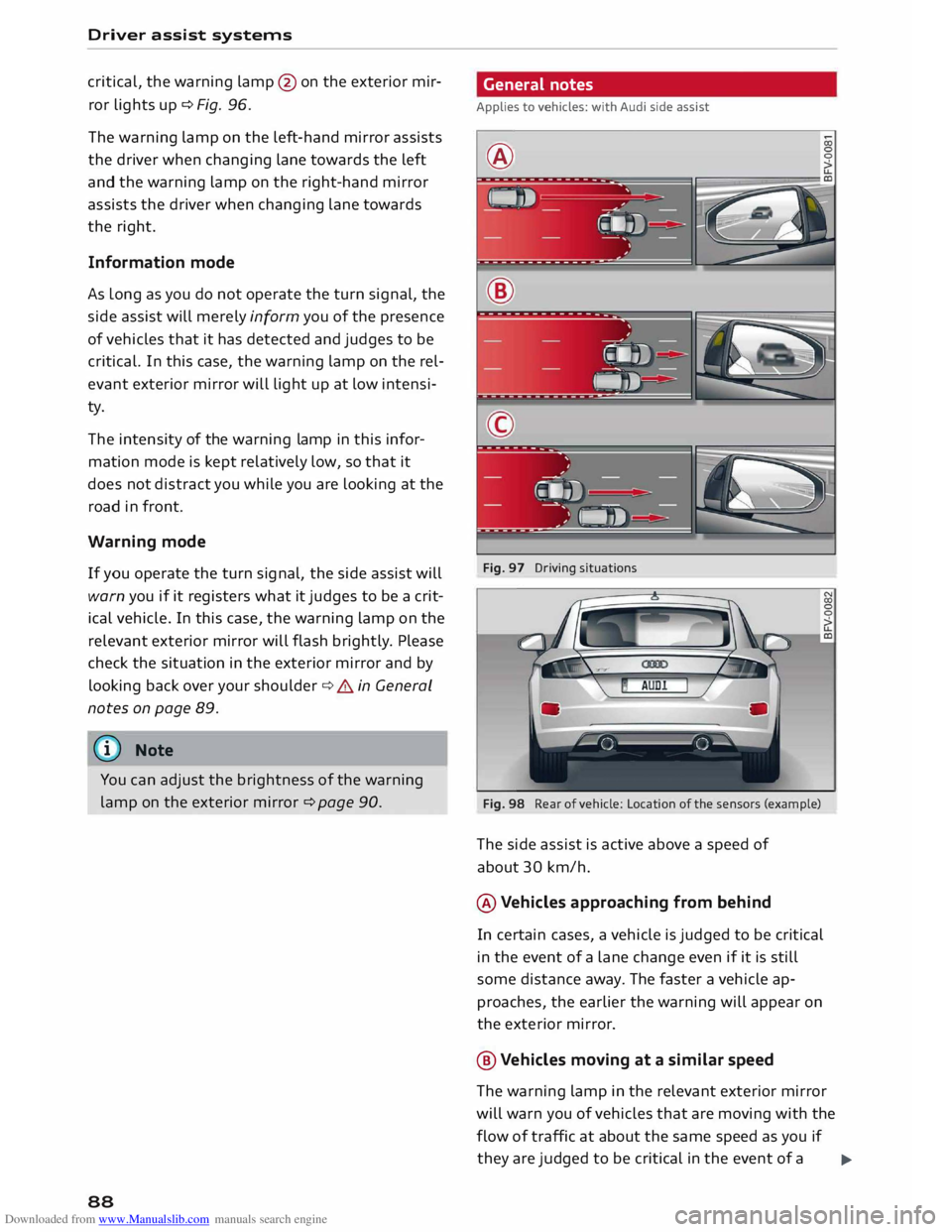
Fig. 97 Driving situations
Fig. 98 Rear of vehicle: Location of the sensors (example)
The side assist is active above a speed of
about 30 km/h.
® Vehicles approaching from behind
In certain cases, a vehicle is judged to be critical
in the event of a lane change even if it is still
some distance away. The faster a vehicle ap
proaches, the earlier the warning will appear on
the exterior mirror.
@ Vehicles moving at a similar speed
The warning lamp in the relevant exterior mirror
will warn you of vehicles that are moving with the
flow of traffic at about the same speed as you if
they are judged to be critical in the event of a ..,.
Page 103 of 284
Downloaded from www.Manualslib.com manuals search engine Intelligent
technology
Electro-mechanical
power steering
Electro-mechanical power steering assists the
driver when steering.
The degree of power assistance is adapted elec
tronically, depending on the speed.
If the power steering should fail at any time or
the engine is switched off (for instance when be
ing towed), the car can still be steered. However,
substantially more effort than normal will be re
quired to turn the steering wheel.
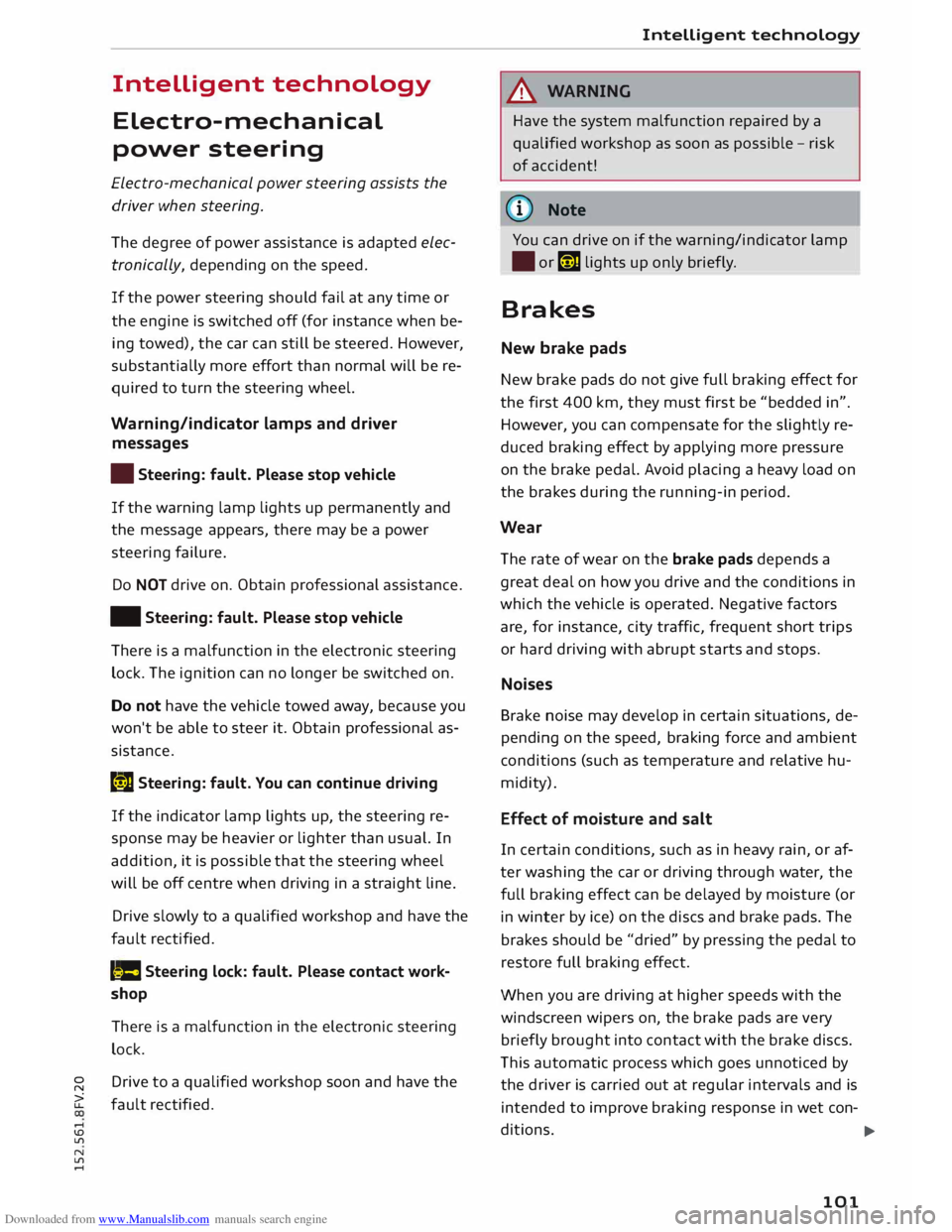
Warning/indicator lamps and driver
messages
• Steering: fault. Please stop vehicle
If the warning lamp lights up permanently and
the message appears, there may be a power
steering failure.
Do NOT drive on. Obtain professional assistance.
• Steering: fault. Please stop vehicle
There is a malfunction in the electronic steering
lock. The ignition can no longer be switched on.
Do not have the vehicle towed away, because you
won't be able to steer it. Obtain professional as
sistance.
G'!b Steering:
fault. You can continue driving
If the indicator lamp lights up, the steering re
sponse may be heavier or lighter than usual. In
addition, it is possible that the steering wheel
will be off centre when driving in a straight line.
Drive slowly to a qualified workshop and have the
fault rectified.
Ive Steering
lock: fault. Please contact work
shop
There is a malfunction in the electronic steering
lock.
� Drive
to a qualified workshop soon and have the
a: fault rectified.
....
\D Lfl
N
Lfl
.... Intelligent
technology
A WARNING
Have the system malfunction repaired by a
qualified workshop as soon as possible -risk
of accident!
«]} Note
You can drive on if the warning/indicator lamp
• or mJ lights up only briefly.
Brakes
New brake pads
New brake pads do not give full braking effect for
the first 400 km, they must first be "bedded in".
However, you can compensate for the slightly re
duced braking effect by applying more pressure
on the brake pedal. Avoid placing a heavy load on
the brakes during the running-in period.
Wear The rate of wear on the brake pads depends a
great deal on how you drive and the conditions in
which the vehicle is operated. Negative factors
are, for instance, city traffic, frequent short trips
or hard driving with abrupt starts and stops.
Noises Brake noise may develop in certain situations, de
pending on the speed, braking force and ambient
conditions (such as temperature and relative hu
midity).
Effect of moisture and salt
In certain conditions, such as in heavy rain, or af
ter washing the car or driving through water, the
full braking effect can be delayed by moisture (or
in winter by ice) on the discs and brake pads. The
brakes should be "dried" by pressing the pedal to
restore full braking effect.
When you are driving at higher speeds with the
windscreen wipers on, the brake pads are very
briefly brought into contact with the brake discs.
This automatic process which goes unnoticed by
the driver is carried out at regular intervals and is
intended to improve braking response in wet con-
ditions. ..,..
101
Page 106 of 284
Downloaded from www.Manualslib.com manuals search engine Intelligent
technology
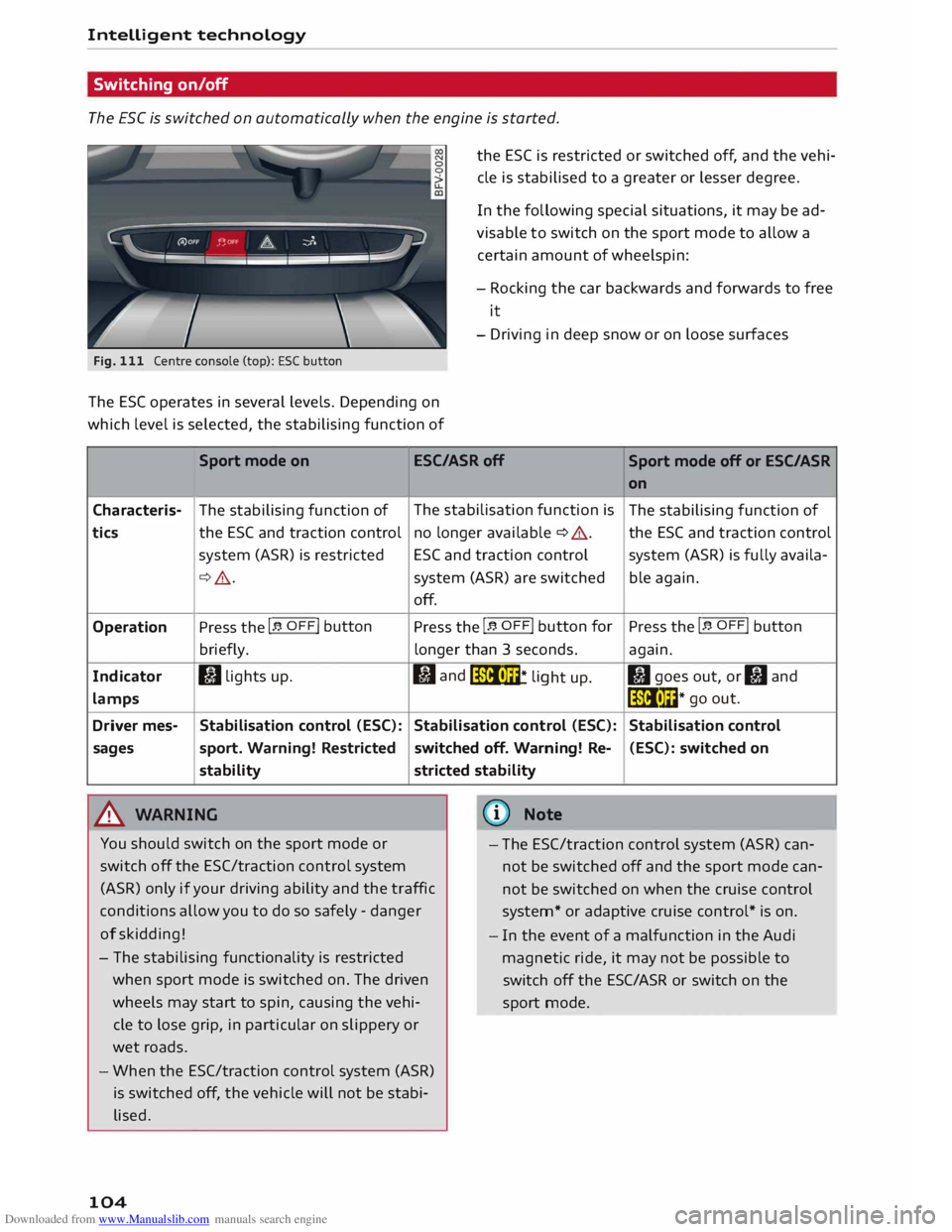
Switching on/off
The ESC is switched on automatically when the engine is started.
Fig. 111 Centre console (top): ESC button
The ES( operates in several levels. Depending on
which level is selected, the stabilising function of the
ESC is restricted or switched off, and the vehi
cle is stabilised to a greater or lesser degree.
In the following special situations, it may be ad
visable to switch on the sport mode to allow a
certain amount of wheelspin:
- Rocking the car backwards and forwards to free
it
- Driving in deep snow or on loose surfaces
Sport mode on ESC/ASRoff
Sport mode off or ESC/ASR
Characteris-
tics
Operation
Indicator
lamps
Driver mes-
sages The
stabilising function of
the ESC and traction control
system (ASR) is restricted
¢ .&_.
Press the I� OFF! button
briefly.
I) lights up.
Stabilisation control (ESC):
sport. Warning! Restricted
stability
.&_ WARNING The
stabilisation function is
no longer available ¢ A.
ESC and traction control
system (ASR) are switched
off.
Press the I� OFF! button
for
longer than 3 seconds.
fl and
liiii• m
* li
ght up.
Stabilisation control (ESC):
switched off. Warning! Re-
stricted stability
@ Note on
The stabilising function of
the ESC and traction control
system (ASR) is fully availa-
ble again.
Press the I� OFF! button
again.
II goes out, or II and
liiii• l��* go
out.
Stabilisation control (ESC): switched on
You should switch on the sport mode or
switch off the ESC/traction control system
(ASR) only if your driving ability and the traffic
conditions allow you to do so safely -danger
of skidding! -
The ESC/traction control system (ASR) can
not be switched off and the sport mode can
not be switched on when the cruise control
system* or adaptive cruise control* is on.
- The stabilising functionality is restricted
when sport mode is switched on. The driven
wheels may start to spin, causing the vehi
cle to lose grip, in particular on slippery or
wet roads.
- When the ESC/traction control system (ASR)
is switched off, the vehicle will not be stabi
lised.
104 -
In the event of a malfunction in the Audi
magnetic ride, it may not be possible to
switch off the ESC/ASR or switch on the
sport mode.
Page 118 of 284
Downloaded from www.Manualslib.com manuals search engine Speech
dialogue system
Speech dialogue system
How to use the system
Applies to vehicles: with speech dialogue system
You can operate many infotainment functions
conveniently by voice.
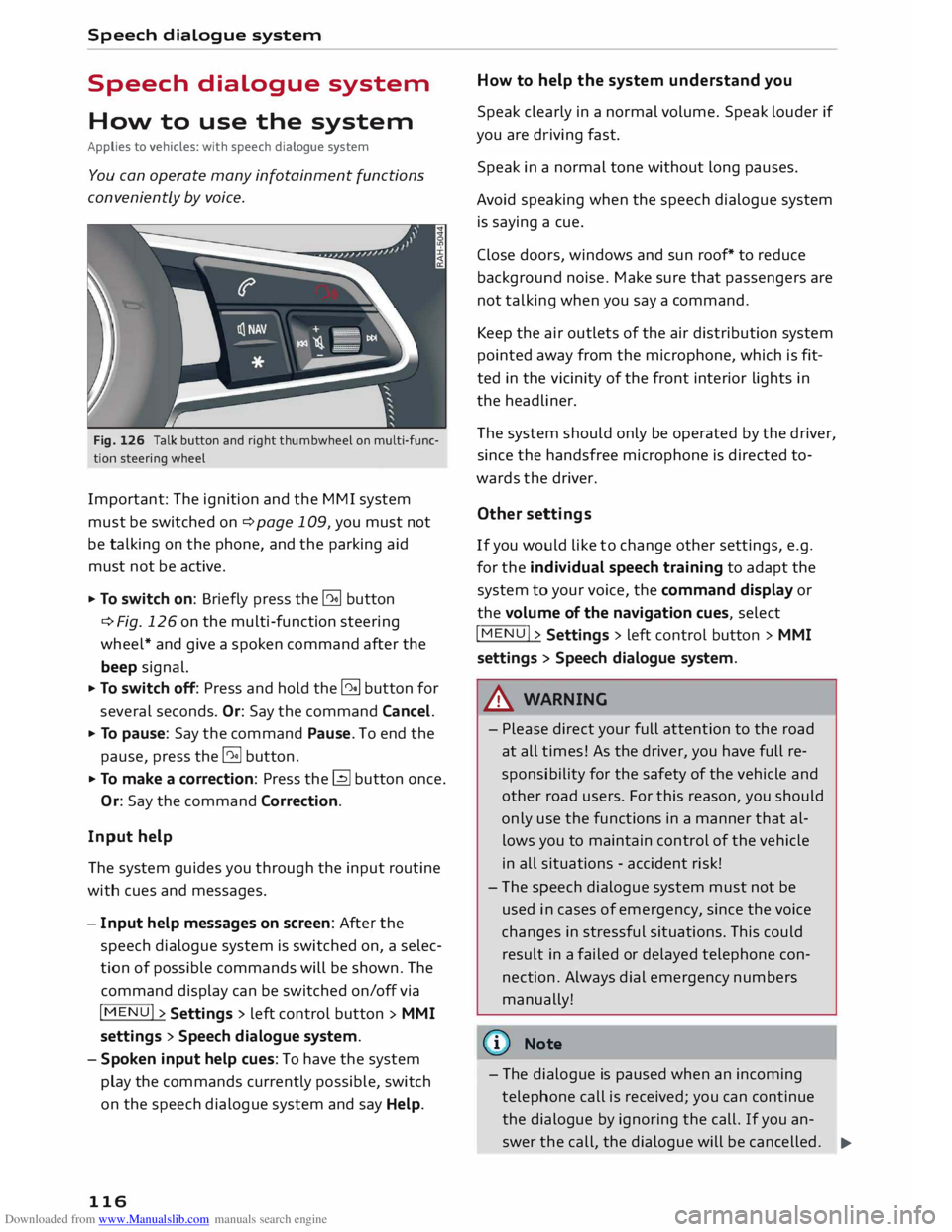
Fig. 126 Talk button and right thumbwheel on multi-func
tion steering wheel
Important: The ignition and the MMI system
must be switched on ¢page 109, you must not
be talking on the phone, and the parking aid
must not be active.
... To switch on: Briefly press the [2!] button
c:::> Fig. 126 on the multi-function steering
wheel* and give a spoken command after the
beep signal.
... To switch off: Press and hold the [2!] button for
several seconds. Or: Say the command Cancel.
... To pause: Say the command Pause. To end the
pause, press the l2!l button.
... To make a correction: Press the� button once.
Or: Say the command Correction.
Input help
The system guides you through the input routine
with cues and messages.
- Input help messages on screen: After the
speech dialogue system is switched on, a selec
tion of possible commands will be shown. The
command display can be switched on/off via
I MENU I>
Settings > left control button >
MMI
settings > Speech dialogue system.
- Spoken input help cues: To have the system
play the commands currently possible, switch
on the speech dialogue system and say Help.
116 How
to help the system understand you
Speak clearly in a normal volume. Speak louder if
you are driving fast.
Speak in a normal tone without long pauses.
Avoid speaking when the speech dialogue system
is saying a cue.
Close doors, windows and sun roof* to reduce
background noise. Make sure that passengers are
not talking when you say a command.
Keep the air outlets of the air distribution system
pointed away from the microphone, which is fit
ted in the vicinity of the front interior lights in
the headliner.
The system should only be operated by the driver,
since the handsfree microphone is directed to
wards the driver.
Other settings
If you would like to change other settings, e.g.
for the individual speech training to adapt the
system to your voice, the command display or
the volume of the navigation cues, select
I MENU I>
Settings > left control button >
MMI
settings > Speech dialogue system.
A WARNING
- Please direct your full attention to the road
at all times! As the driver, you have full re
sponsibility for the safety of the vehicle and
other road users. For this reason, you should
only use the functions in a manner that al
lows you to maintain control of the vehicle
in all situations -accident risk!
- The speech dialogue system must not be
used in cases of emergency, since the voice
changes in stressful situations. This could
result in a failed or delayed telephone con
nection. Always dial emergency numbers
manually!
{tI)) Note
- The dialogue is paused when an incoming
telephone call is received; you can continue
the dialogue by ignoring the call. If you an-
swer the call, the dialogue will be cancelled.
..,.
Page 149 of 284
Downloaded from www.Manualslib.com manuals search engine 0
N
co
.-I
\D Lfl
N
Lfl
.-I Navigation
Navigation
Calling up the navigation menu
Applies to vehicles: with navigation system
The navigation system guides you directly to your destination, avoiding traffic obstructions and using
alternative routes if desired.
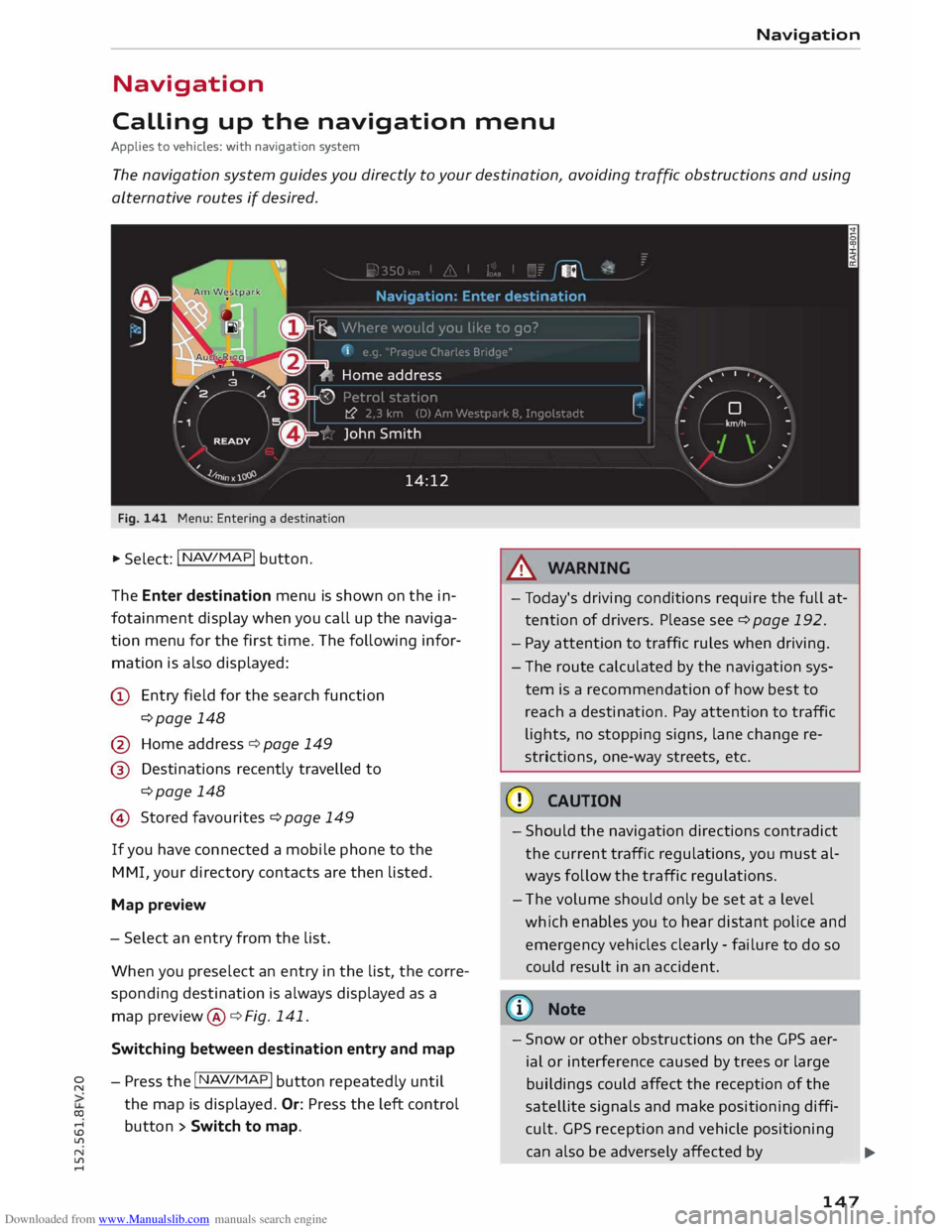
Fig. 141 Menu: Entering a destination
.. Select: I N AV/MAP
!
button.
The Enter destination menu is shown on the in
fotainment display when you call up the naviga
tion menu for the first time. The following infor
mation is also displayed:
@ Entry field for the search function
¢page 148
@ Home address ¢ page 149
@ Destinations recently travelled to
¢page 148
© Stored favourites ¢page 149
If you have connected a mobile phone to the
MMI, your directory contacts are then listed.
Map preview
- Select an entry from the list.
When you preselect an entry in the list, the corre
sponding destination is always displayed as a
map preview @¢ Fig. 141.
Switching between destination entry and map
- Press the I N
AV/MAP !
button repeatedly until
the map is displayed. Or: Press the left control
button > Switch to map. A
WARNING
- Today's driving conditions require the full at
tention of drivers. Please see¢ page 192.
- Pay attention to traffic rules when driving.
- The route calculated by the navigation sys-
tem is a recommendation of how best to
reach a destination. Pay attention to traffic
lights, no stopping signs, lane change re
strictions, one-way streets, etc.
CD CAUTION
- Should the navigation directions contradict
the current traffic regulations, you must al
ways follow the traffic regulations.
- The volume should only be set at a level
which enables you to hear distant police and
emergency vehicles clearly -failure to do so
could result in an accident.
@ Note
- Snow or other obstructions on the GPS aer
ial or interference caused by trees or large
buildings could affect the reception of the
satellite signals and make positioning diffi
cult. GPS reception and vehicle positioning
can also be adversely affected by
--- �
IJII.
147
Page 195 of 284
Downloaded from www.Manualslib.com manuals search engine Before
every trip
The driver is responsible for the safety of the
passengers and the safe operation of the vehicle
at all times.
For your own safety and the safety of your pas
sengers, always note the following points before
every trip:
.,. Make sure that all lights and turn signals are
working properly.
.,. Check the tyre pressures.
.,. Make sure that all windows are clean and give
good visibility to the outside.
.,. Secure all luggage and other items carefully
¢page 201.
.,. Make sure that no objects can interfere with the
pedals.
.,. Adjust
the mirrors and the front seat according
to your body height.
.,. Make sure that children are protected with suit
able safety seats and properly worn seat belts
¢page 195.
.,. Sit in the correct position in your seat. Make
sure that your passengers are sitting in the cor
rect positions ¢ page 46 .
.,. Fasten your seat belt correctly. Make sure that
your passengers do the same ¢page 204.
What factors can impair your safety?
Safety on the road is directly related to how you
drive, and can also be affected by the passengers
in the vehicle.
The driver is responsible for the safety of the ve
hicle and all its occupants. If your ability to drive
is impaired in any way, you endanger yourself and
other road users ¢& . Therefore:
.,. Do not let yourself be distracted by passengers
or by using a mobile phone, etc.
.,. Never drive when your driving ability is im
paired (by medication, alcohol, drugs, etc.).
.,. Obey all traffic regulations and speed limits
and always maintain a safe distance to the vehi-
� de
in front.
� .,.
Always adjust your speed to suit the road, traf-
� fie
and weather conditions.
U'l
N
U'l
.-1 Safe
driving
.,. Take frequent breaks on long trips. Do not drive
for more than two hours without a stop.
.,. If possible, avoid driving when you are tired or
stressed.
A WARNING
- Distractions while driving or any kind of im
pairment to your driving ability increase the
risk of accident and injury .
- Do not place loose objects on the dash pan
el. These objects could fly around the interi
or when the vehicle is moving (under accel
eration or whilst cornering) and distract the
driver -risk of accident!
Correct sitting positions
Correct driving position
The correct driving position is important for safe
driving.
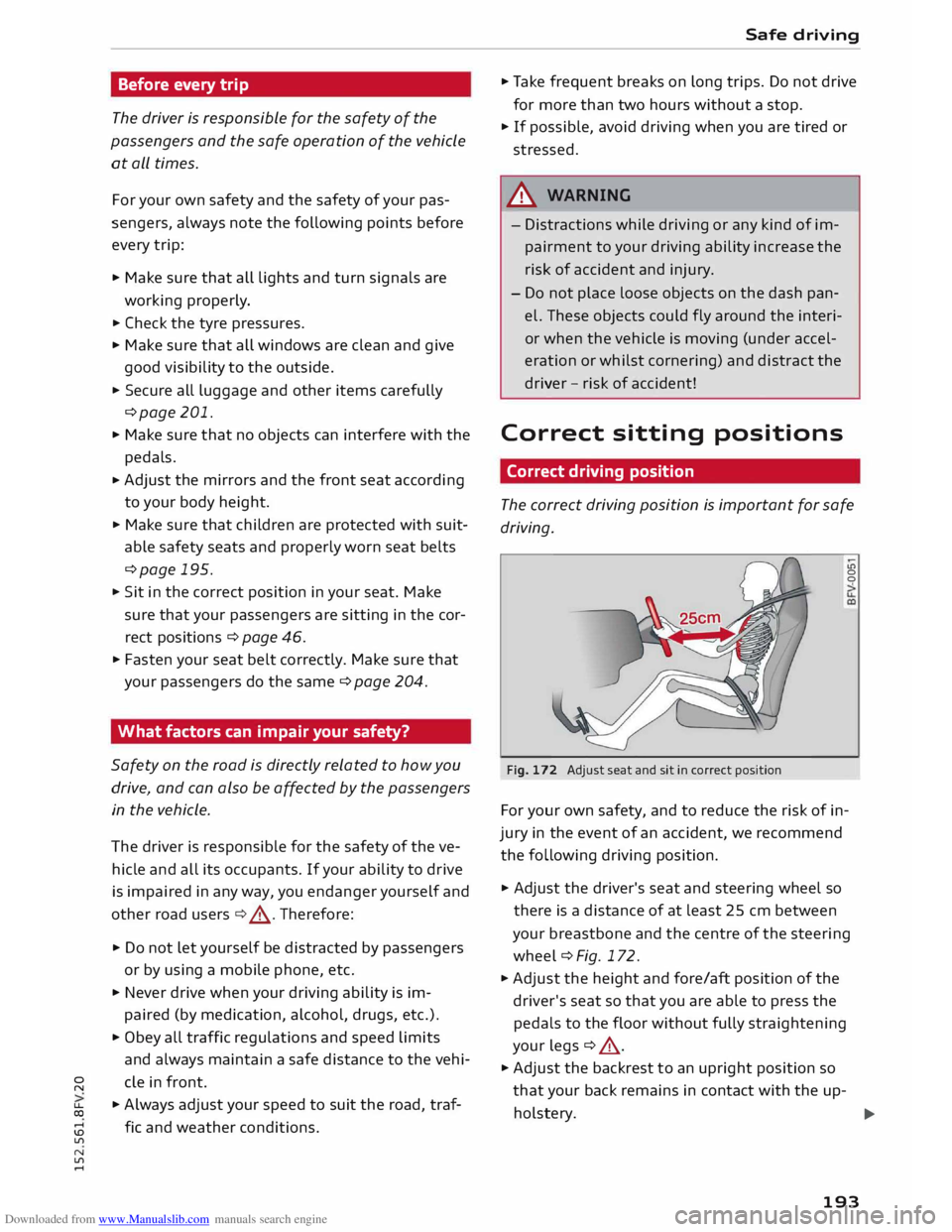
Fig. 172 Adjust seat and sit in correct position LO
0
0
For your own safety, and to reduce the risk of in
jury in the event of an accident, we recommend
the following driving position.
.,. Adjust the driver's seat and steering wheel so
there is a distance of at least 25 cm between
your breastbone and the centre of the steering
wheel¢ Fig. 172.
.,. Adjust the height and fore/aft position of the
driver's seat so that you are able to press the
pedals to the floor without fully straightening
your legs ¢ .&_ .
.,. Adjust the backrest to an upright position so
that your back remains in contact with the up-
holstery. ...,
193
Page 213 of 284
Downloaded from www.Manualslib.com manuals search engine Deactivating
the front passenger's airbag
Applies to vehicles: with key-operated switch for front pas
senger's airbag
If an airbag has been deactivated, it should be
reactivated as soon as possible so that it can
continue to give the required protection.
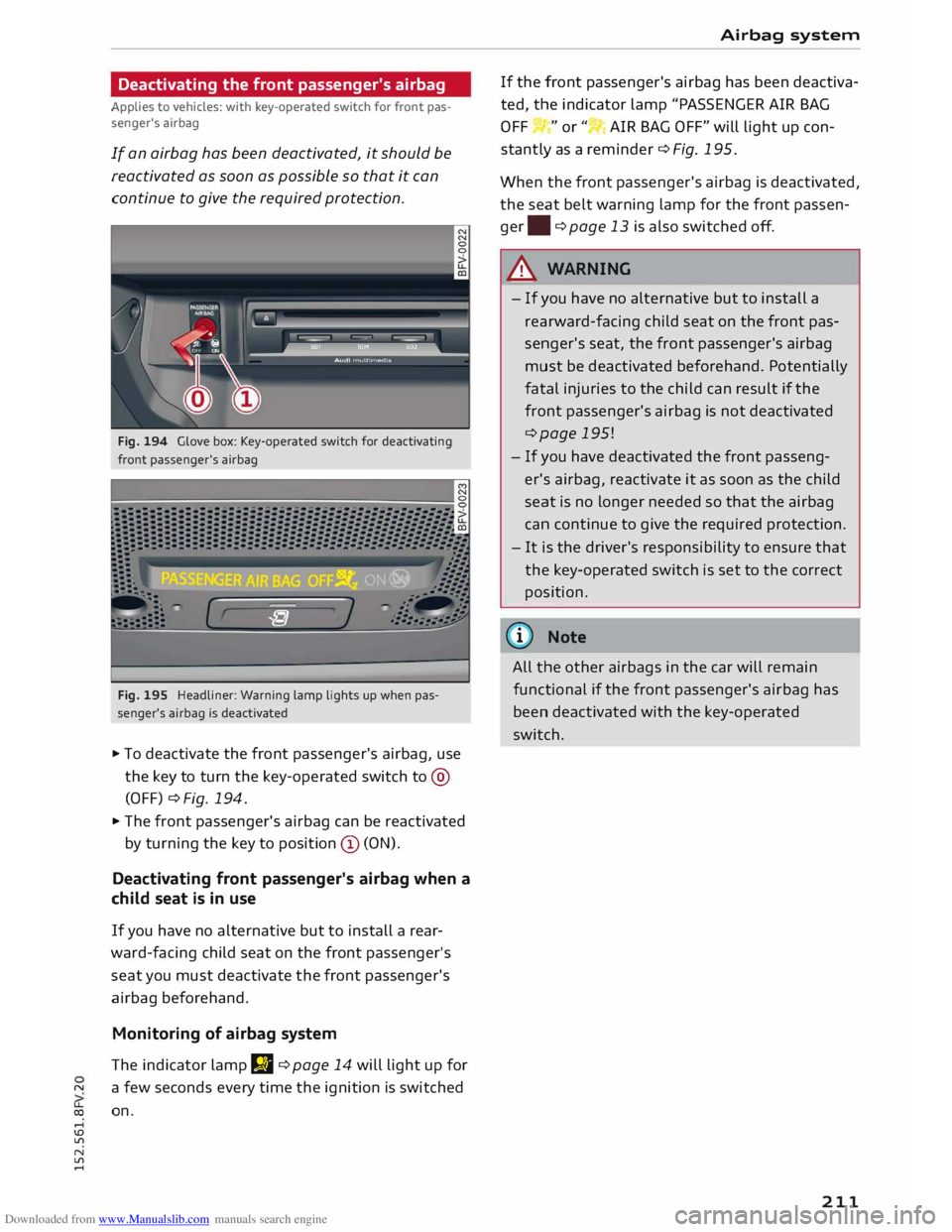
Fig. 194 Glove box: Key-operated switch for deactivating
front passenger's airbag
Fig. 195 Headliner: Warning lamp lights up when pas
senger's airbag is deactivated
... To deactivate the front passenger's airbag, use
the key to turn the key-operated switch to@
(OFF) ¢ Fig. 194 .
... The front passenger's airbag can be reactivated
by turning the key to position (D (ON).
Deactivating front passenger's airbag when a
child seat is in use
If you have no alternative but to install a rear
ward-facing child seat on the front passenger's
seat you must deactivate the front passenger's
airbag beforehand.
Monitoring of airbag system
The indicator lamp JJI ¢ page 14 will light up for
"' a few seconds every time the ignition is switched
� on.
,-1
\D U'l
N
U'l
,-1 Airbag
system
If the front passenger's airbag has been deactiva
ted, the indicator lamp "PASSENGER AIR BAG
OFF "or" AIR BAG OFF" will light up con
stantly as a reminder ¢Fig. 195.
When the front passenger's airbag is deactivated,
the seat belt warning lamp for the front passen
ger. ¢ page 13 is also switched off.
A WARNING
- If you have no alternative but to install a
rearw ard-facing child seat on the front pas
senger's seat, the front passenger's airbag
must be deactivated beforehand. Potentially
fatal injuries to the child can result if the
front passenger's airbag is not deactivated
¢page 195!
- If you have deactivated the front passeng
er's airbag, reactivate it as soon as the child
seat is no longer needed so that the airbag
can continue to give the required protection.
- It is the driver's responsibility to ensure that
the key-operated switch is set to the correct
position.
((J) Note
All the
other
airbags in the car will remain
functional if the front passenger's airbag has
been deactivated with the key-operated
switch .
211