light AUDI TT COUPE 2014 Workshop Manual
[x] Cancel search | Manufacturer: AUDI, Model Year: 2014, Model line: TT COUPE, Model: AUDI TT COUPE 2014Pages: 284, PDF Size: 34.42 MB
Page 74 of 284
Downloaded from www.Manualslib.com manuals search engine Automatic
gearbox
The selector lever lock only works if the vehicle is
stationary or driving at speeds up to 2 km/h. At
higher speeds the selector lever lock in the N po
sition is disengaged automatically.
The selector lever lock is not engaged if the selec
tor lever is moved quickly through position N
(e.g. when shifting from R to D). This makes it
possible, for instance, to "rock" the vehicle back
wards and forwards if it is stuck in snow or mud.
The selector lever lock engages automatically if
the brake pedal is not depressed and the lever is
in position N for more than about two seconds.
Interlock button
The interlock button on the selector lever handle
prevents the driver from inadvertently engaging
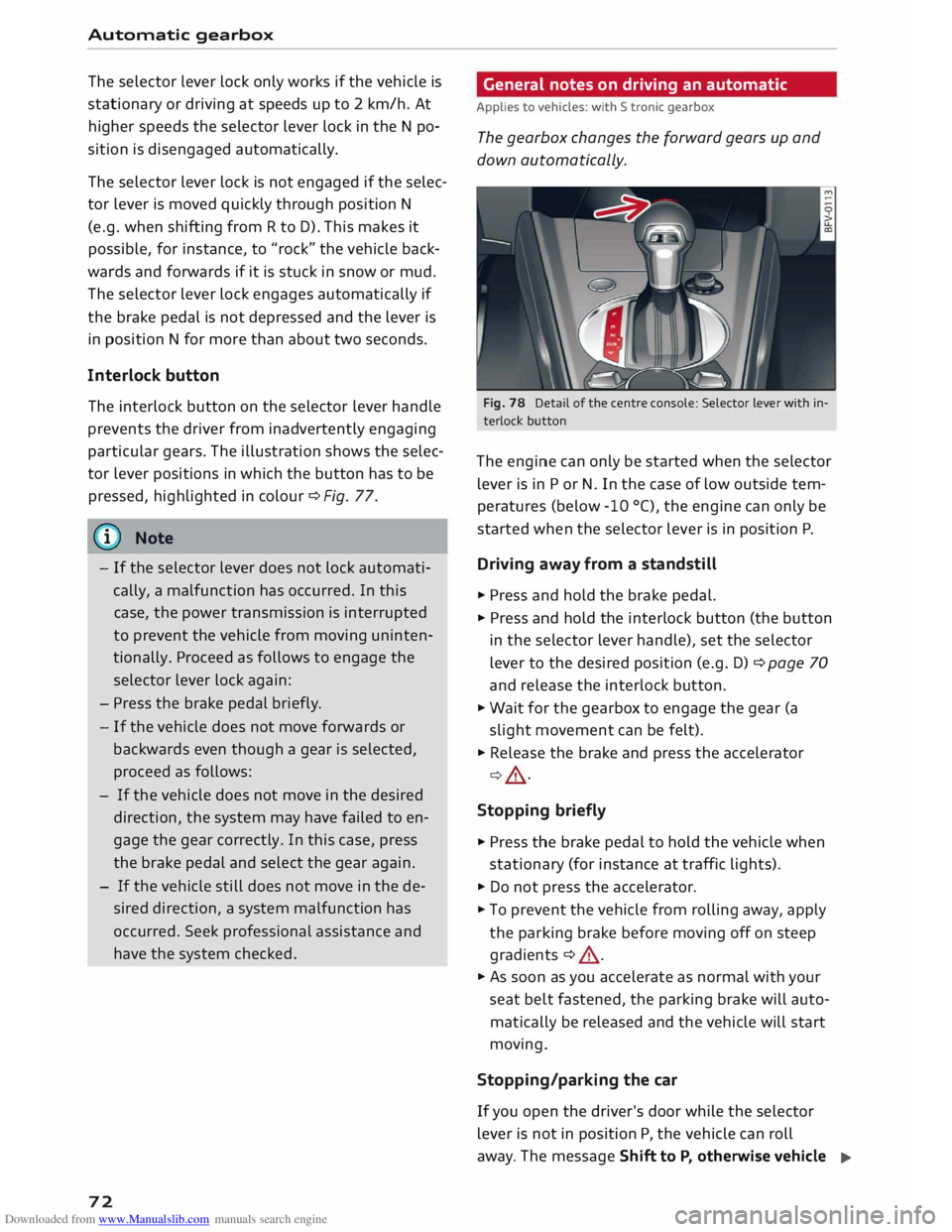
particular gears. The illustration shows the selec
tor lever positions in which the button has to be
pressed, highlighted in colour¢ Fig. 77.
@ Note
- If the selector lever does not lock automati
cally, a malfunction has occurred. In this
case, the power transmission is interrupted
to prevent the vehicle from moving uninten
tionally. Proceed as follows to engage the
selector lever lock again:
- Press the brake pedal briefly.
- If the vehicle does not move forwards or
backwards even though a gear is selected,
proceed as follows:
- If the vehicle does not move in the desired
direction, the system may have failed to en
gage the gear correctly. In this case, press
the brake pedal and select the gear again.
- If the vehicle still does not move in the de
sired direction, a system malfunction has
occurred. Seek professional assistance and
have the system checked.
72 General
notes on driving an automatic
Applies to vehicles: with S tronic gearbox
The gearbox changes the forward gears up and
down automatically.
Fig. 78 Detail of the centre console: Selector Lever with in
terlock button
The engine can only be started when the selector
lever is in P or N. In the case of low outside tem
peratures (below -10 °(), the engine can only be
started when the selector lever is in position P.
Driving away from a standstill
� Press and hold the brake pedal.
� Press and hold the interlock button (the button
in the selector lever handle), set the selector
lever to the desired position (e.g. D) ¢ page 70
and release the interlock button.
� Wait for the gearbox to engage the gear (a
slight movement can be felt).
� Release the brake and press the accelerator
¢ A .
Stopping briefly
� Press the brake pedal to hold the vehicle when
stationary (for instance at traffic lights).
� Do not press the accelerator.
� To prevent the vehicle from rolling away, apply
the parking brake before moving off on steep
gradients ¢ A.
� As soon as you accelerate as normal with your
seat belt fastened, the parking brake will auto
matically be released and the vehicle will start
moving.
Stopping/parking the car
If you open the driver's door while the selector
lever is not in position P, the vehicle can roll
away. The message Shift to P, otherwise vehicle
�
Page 75 of 284
Downloaded from www.Manualslib.com manuals search engine 0
N
co
....
\D U'l
N
U'l
.... can
roll away. Doors do not lock if lever is not in
P appears on vehicles with convenience key*. A
buzzer will also sound.
,. Pr ess and hold the brake pedal¢ A_ .
,. Apply the parking brake.
,. Move the selector lever to P.
Stopping on a slope
,. Always keep your foot on the brake pedal to
hold the vehicle and prevent it from rolling
back down the slope ¢ A_ . Do not try to stop
the vehicle "rolling back" by increasing the en
gine speed when a gear is engaged ¢(D.
Driving away on a slope (vehicles without hill
hold assist* / Audi hold assist*)
,. Apply the parking brake.
,. Once you have engaged a gear press the accel
erator carefully. The parking brake will be re
leased automatically if you are wearing your
seat belt.
Driving away on a slope (vehicles with hill
hold assist*)
,. Once you have engaged a gear, release the foot
brake and press the accelerator ¢ page 69, Hill
hold assist.
Driving away on a slope (vehicles with hold
assist*)
,. Once you have engaged a gear, release the foot
brake and press the accelerator ¢ page 68,
Hold assist.
In some situations (such as when driving on
mountain roads) it can be advantageous to
switch temporarily to the manual shift pro
gramme so that the gear ratios can be selected
manually to suit the driving conditions
¢page 75.
On level ground it is sufficient to move the selec
tor lever to P. On a gradient the parking brake
should be applied first and the selector lever
should be moved to P ¢ page 66. This reduces
the load on the locking mechanism and makes it
easier to move the selector lever out of position
P Automatic
gearbox
_&. WARNING
- The driver should never get out of the vehi
cle when the engine is running and a gear is
engaged. If you have to leave your vehicle
while the engine is running, you must apply
the parking brake and engage the parking
lock P.
- If the engine is running and a gear is engag
ed {D/S or R) or the vehicle is in "tiptronic"
mode, you will need to hold the car with the
footbrake. Otherwise, the car will "creep"
forwards as the power transmission is not
fully interrupted even when the engine is
idling.
- The accelerator pedal must on no account
be pressed inadvertently when the vehicle is
stationary . The vehicle could otherwise start
moving immediately (in some cases even if
the parking brake is engaged) and possibly
cause an accident.
- Do not press the accelerator while selecting
a gear with the vehicle stationary and the
engine running, as this could cause an acci
dent.
- Never move the selector lever to R or P
when driving at normal speeds, as this could
cause an accident.
- Before you drive down a steep gradient, re
duce the speed and use "tiptronic" to select
a low gear.
- Never allow the brake to drag when driving
downhill and do not use the brake pedal too
often or for long periods. Constant braking
will cause the brakes to overheat and will
considerably reduce the effectiveness of the
brakes. It will increase the braking distance
and could cause the brake system to fail.
- To avoid rolling back on gradients always
hold the vehicle with the footbrake or park
ing brake if you have to stop.
- Never attempt to hold the vehicle with the
clutch when stopping on a gradient. The
clutch is disengaged automatically if it is
overloaded and becomes too hot -accident
risk! If the clutch is overloaded, the indica
tor lamp [!l will light up and a message will
appear¢ page 77.
�
73
Page 76 of 284
Downloaded from www.Manualslib.com manuals search engine Automatic
gearbox
CD CAUTION
- When you have stopped on a gradient, do
not try to stop the vehicle rolling back by ac
celerating when a gear is engaged. This
could cause the automatic gearbox to over
heat and become damaged. Apply the park
ing brake or press the brake pedal in order
to prevent the vehicle from rolling back.
- If you allow the car to roll with the selector
lever in position N with the engine switched
off, the automatic gearbox will be damaged
as it will not be lubricated.
- In certain driving and traffic conditions, for
instance in stop-and-go traffic, if you have
to pull away frequently or if the vehicle
creeps forwards over a long distance, the
gearbox can overheat and become dam
aged. If the warning lamp. lights up,
stop the vehicle at the first opportunity and
let the gearbox cool down ¢ page 77.
- In certain driving and traffic conditions, for
instance in stop-and-go traffic, if you have
to pull away frequently or if the vehicle
creeps forwards over a long distance, the
gearbox can overheat and become dam
aged. If the warning lamp� Lights up,
stop the vehicle at the first opportunity and
let the gearbox cool down ¢ page 77.
- If you allow the car to roll with the engine
switched off, the 5 tronic gearbox will be
damaged as it will not be lubricated
¢ page 250, Tow-starting I towing away.
(1) Note
For safety reasons the parking brake will only
release automatically if the driver's seat belt
is engaged in its buckle.
Downhill speed control
Applies to vehicles: with S tronic gearbox
The downhill speed control function helps the
driver when driving down steep gradients.
Downhill speed control is activated on a downhill
gradient when the selector lever is in 0/5 and the
driver presses the brake pedal. The gearbox auto
matically selects a suitable gear for the gradient.
74 The
downhill speed control function attempts to
maintain the speed at which the vehicle was trav
elling when the foot brake was applied (subject
to the laws of physics and technical limitations of
the power train). It may be necessary to adjust
the speed again using the foot brake. The down
hill speed control can change down to 3rd gear
but no further, so it may be necessary to change
to tiptronic mode on very steep gradients. In this
case, change down manually to 2nd or 1st gear in
tiptronic mode to use the engine braking effect
and reduce the load on the brakes.
Downhill speed control is deactivated as soon as
the road levels out again or you press the acceler
ator pedal.
On vehicles with cruise control system*
¢ page 80, downhill speed control is activated
when you set a cruising speed.
& WARNING
The downhill speed control function cannot
defy the laws of physics and may therefore
not be able to maintain a constant speed in
certain circumsta nces. Always be prepared to
use the brakes! -
Page 78 of 284
Downloaded from www.Manualslib.com manuals search engine Automatic
gearbox
when approaching a speed restriction in a built
up area).
Switching on coasting mode
Important: Selector lever must be in D, gradient
must be less than 12 %.
"' Select efficiency mode in drive select*
9page 90 (you only have to do this once).
"' Ta ke your foot off the accelerator.
If you have selected the "on-board computer"
display, the message Coasting will then appear.
The gearbox automatically disengages the clutch
at speeds above 20 km/h and lets the vehicle
coast without the engine braking effect. The en
gine ticks over at idling speed while the vehicle is
coasting.
Stopping coasting mode
"' Press the brake pedal or accelerator.
To use the engine braking effect and overrun fuel
cut-off again, all you need to do is tap the brake
pedal briefly.
You can improve your fuel economy and help to
reduce emissions by using a combination of the
coasting mode (i.e. coasting with low fuel con
sumption on a longer stretch of road) and the
overrun fuel cut-off (i.e. using the engine brak
ing effect with no fuel consumption on a shorter
stretch of road).
A WARNING
- If you are approaching an obstruction when
coasting mode is switched on, please re
member that the vehicle will not slow down
as quickly as usual when you take your foot
off the accelerator -risk of accident!
- The vehicle can pick up speed if you are driv
ing down a slope in coasting mode -risk of
accident!
l l
The ESC lamp lights up permanently and the message
Stabilisation control (ESC): sport. Warning! Restricted
stability appears temporarily in the infotainment display
to indicate the deactivation status.
76 -
If other people are using your car, you
should draw their attention to the coasting
mode.
@ Note
- Coasting mode is only available in efficiency
mode (drive select*).
- The message Coasting only appears when
the current fuel consumption display is se
lected. The gear is no longer displayed when
you are in coasting mode (e.g. E instead of
E6).
- The coasting mode is deactivated tempora
rily on gradients of 15 % or greater.
' Launch control programme
Applies to vehicles: with S tronic gearbox and launch control
The launch control programme enables maxi
mum acceleration.
Important: The engine must be warm and the
steering wheel must be pointing straight-ahead.
"' Deactivate the start/stop system*¢ page 65.
The LED in the button l(A)'*'I will light up.
"' Deactivate the hold assist* ¢ page 68. The LED
in the button will go out.
"' Press the IJ'}OFF!
button once briefly while the
engine is running 1
).
"' Briefly pull the selector lever back from posi
tion D/S to select position S, or move the selec
tor lever to the right into the tiptronic gate, or
select dynamic mode in drive select*
¢page 90.
"' Press the brake pedal firmly with your left foot
and hold it down for at least one second.
"'At the same time, press the accelerator all the
way down with your right foot until the engine
revs are high and steady.
"' Ta ke your left foot off the brake.
�
Page 79 of 284
Downloaded from www.Manualslib.com manuals search engine 0
N
co
....
\D U'l
N
U'l
.... ,&.
WARNING
- Always adapt your driving style to the traffic
conditions.
- Only use the launch control programme
when road and traffic conditions permit,
and make sure your manner of driving and
accelerating the vehicle does not inconven
ience or endanger other road users.
- Please note that the driven wheels may
start to spin when the sport mode is switch
ed on, causing the vehicle to lose grip, in
particular on slippery or wet roads -danger
of skidding!
- When acceleration has been completed, you
should deactivate the sport mode again by
briefly pressing
the I� OFF! button.
ij)) Note
- The gearbox may be hot after you have used
the launch control programme. In this case,
the programme may not be available for
several minutes. The programme will be
available again after a cool-down period.
- Accelerating with the launch control pro
gramme places a heavy load on all parts of
the vehicle. This can result in increased wear
and tear.
Back-up programme
Applies to vehicles: with S tronic gearbox
A back-up programme is in place should a fault
occur in the control system.
If all selector lever positions are highlighted in
the infotainment display, a system malfunction
has occurred. In this case, the S tronic gearbox
will switch to a backup programme. The vehicle
can still be driven in the backup programme,
however only at reduced speed and not in all
gears. In certain cases, you may not be able to se
lect reverse gear.
CD CAUTION
If the gearbox switches to the back-up pro
gramme, drive to a qualified workshop with
out delay and have the fault rectified . Automatic
gearbox
Gearbox malfunction
• Gearbox malfunction! Please stop the vehi
cle and select P
There is a malfunction in the gearbox. Park the
vehicle safely and do not drive on. Obtain profes
sional assistance.
• Gearbox overheating: please stop vehicle
The gearbox is overheating and could be dam
aged. Stop the vehicle and let the gearbox cool
down with the engine idling and the selector lev
er in pos ition P. If the indicator lamp and the
message disappear, drive to a qualified workshop
soon and have the fault rectified. Do not drive on
if the warning lamp stays on and the message
does not disappear. You should obtain professio
nal assista nce.
DD Gearbox malfunction: you can continue driv
ing
Drive to a qualified workshop soon and have the
fault rectified.
DD Gearbox malfunction: no reverse gear. You
can continue driving
Drive to a qualified workshop without delay and
have the fault rectified.
DD Gearbox malfunction: you can continue driv
ing in D until engine off
Park your vehicle well away from moving traffic.
Obtain professional assistance.
DD Gearbox overheating: please adapt driving
style
You can continue driving at moderate speed. You
can resume normal driving if the indicator lamp
goes out.
DD Gearbox: please press brake pedal and select
gear again
If a gearbox malfunction has occurred due to
overheating, this message will appear once the
gearbox has cooled down again.
77
Page 82 of 284
Downloaded from www.Manualslib.com manuals search engine Driver
assist systems
Driver assist systems
Speed warning function
Introduction
Applies to vehicles: with speed warning function
The speed warning function can help you keep
below a pre-set maximum speed.
The speed warning function will warn you if the
vehicle exceeds the pre-set maximum speed. The
system gives an audible warning signal if the set
speed is exceeded by about 3 km/h. The indicator
lamp [9] simultaneously appears on the infotain
ment display. The indicator lamp [9J goes out
when the speed drops below the set speed limit
again.
You are recommended to store this speed limit
warning if you wish to be reminded of a particu
lar speed limit. This could be when driving in
countries with general speed limits, or if you
need to keep below a particular speed when win
ter tyres are fitted, etc.
Note
- Please bear in mind that, even with the
speed warning function, it is still important
to keep a check on the car's speed with the
speedometer and to observe the statutory
speed limits.
- On vehicles for some markets, the speed
warning function warns you when you reach
a speed of 120 km/h. This speed limit warn
ing is preset at the factory.
Setting speed limit warning
Applies to vehicles: with speed warning function
The infotainment system is used to set, alter or
cancel the speed limit warning.
.. Select the following on the infotainment sys
tem: IM E
N u I
button > Car > left control button
> Driver assist> Speed warning.
The speed limit warning can be adjusted in incre
ments of 10 km/h between 30 and 240 km/h.
80 Cruise
control system
Switching on
Applies to vehicles: with cruise control system
The cruise control system allows you to drive at a
constant speed of 20 km/h or higher.
0
'
� 0
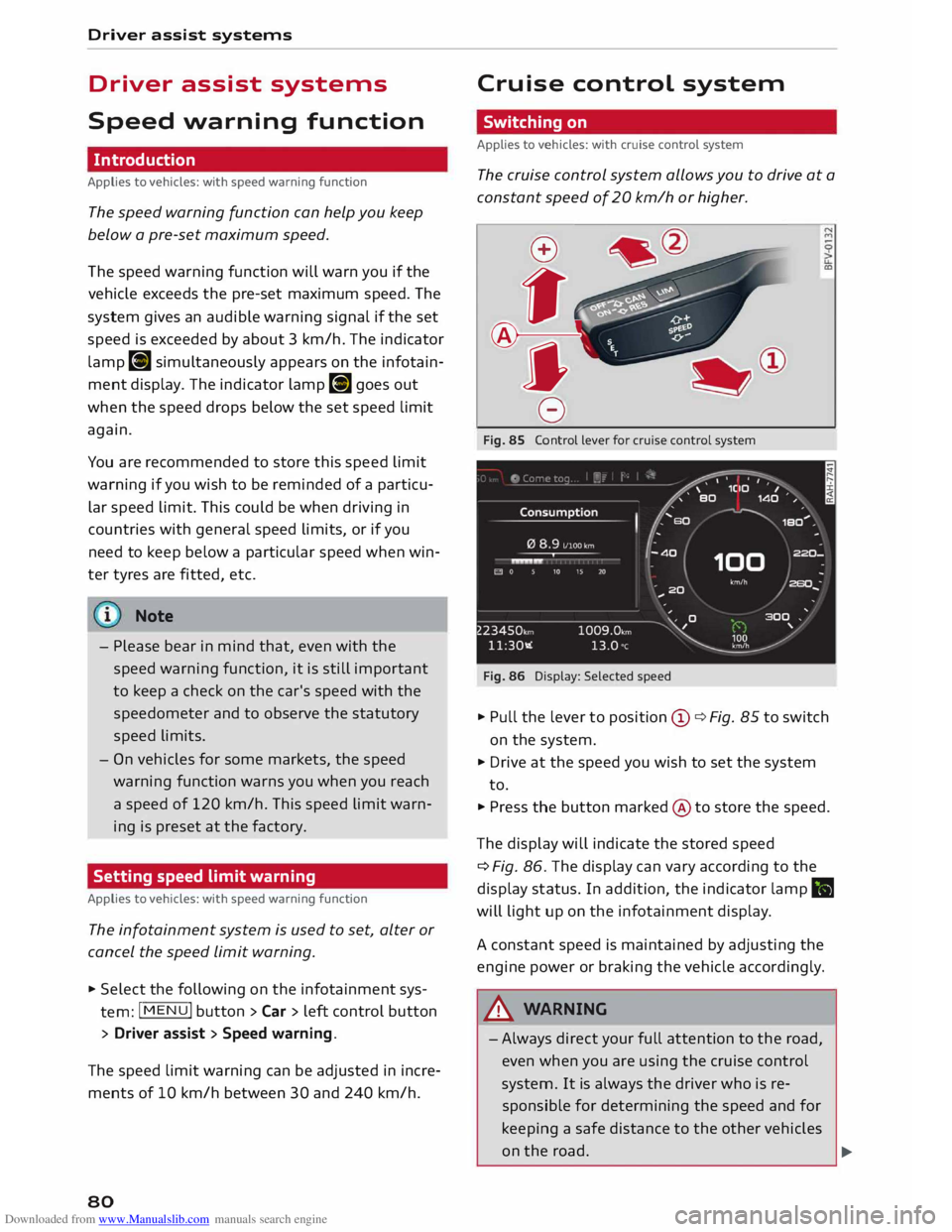
Fig. 85 Control lever for cruise control system
Fig. 86 Display: Selected speed
.. Pull the lever to position (D ¢ Fig. 85 to switch
on the system.
.. Drive at the speed you wish to set the system
to.
.. Press the button marked @to store the speed.
The display will indicate the stored speed
¢ Fig. 86. The display can vary according to the
display status. In addition, the indicator lamp.
will light up on the infotainment display.
A constant speed is maintained by adjusting the
engine power or braking the vehicle accordingly .
A WARNING
- Always direct your full attention to the road,
even when you are using the cruise control
system. It is always the driver who is re
sponsible for determining the speed and for
keeping a safe distance to the other vehicles
on the road.
�
Page 83 of 284
Downloaded from www.Manualslib.com manuals search engine 0
N
co
....
\D Lfl
N
Lfl
.... -
For safety reasons, the cruise control system
must not be used in city traffic, stop-and-go
traffic, on roads with a Lot of bends or in dif
ficult or slippery driving conditions (such as
ice, fog, Loose grit or gravel, heavy rain, etc.)
- risk of accident!
- When you take a turn-off, drive along a mo-
torway exit Lane or pass through roadwork
sections, please temporarily switch off the
cruise control system.
- Make sure you do not unintentionally rest
your foot on the accelerator -this will over
ride the cruise control system which, as a re
sult, will not brake the vehicle.
- The automatic braking function may be de
activated if a system fault occurs in the
brake system (e.g. if the brakes overheat)
while the cruise control system is activated.
All the other cruise control functions remain
activated as Long as the indicator Lamp ii is
Lit.
CD CAUTION
Before driving down a Long, steep gradient, it
is advisable to reduce speed and move these
lector Lever to a Lower gear. In this way you
will make use of the engine braking effect and
relieve the Load on the brakes.
w) Note
- Vehicles with manual gearbox: The set
speed cannot be reached if the currently se
lected gear is too high or too Low or if the
engine would overrev or fail to run smoothly
at the target speed. Make sure to change up
or down a gear in good time.
- The brake Lights come on when the system
brakes the vehicle.
Adjusting the speed
Applies to vehicles: with cruise control system
• To increase or reduce the cruising speed in
steps of 1 km/h, briefly push the Lever one Lev
el upwards or downwards towards 010
¢ page 80, Fig. 85.
• To increase or reduce the cruising speed in
steps of 10 km/h, briefly push the Lever two Driver assist
systems
Levels upwards or downwards towards (!)1 0
¢ page 80, Fig. 85.
• To increase or reduce the speed gradually, hold
the Lever towards GY0 until you reach the de
sired cruising speed.
Overruling the set speed
You can use the accelerator pedal to increase
speed in the normal way, for example to overtake
another vehicle. Once you release the accelerator,
the system will revert to the speed you stored ini
tially.
However, if the vehicle exceeds the programmed
speed significantly for a Long time, the cruise
control system will be deactivated temporarily.
The indicator Lamp ii in the instrument cluster
will go out, but the programmed speed will re
main stored.
Pre-selecting a speed
Applies to vehicles: with cruise control system
You can pre-select a desired speed while the ve
hicle is stationary.
• Switch on the ignition.
• Pull the Lever to position (D ¢ page 80, Fig. 85.
• Press the Lever up towards 0 or down towards
0 in order to increase or reduce the cruising
speed setting.
This function allows you to enter the desired
cruise control setting speed ahead of time, for
example before joining a motorway. Once you are
on the motor way, you can activate the cruise con
trol system by pulling the Lever to position (D.
Switching off
Applies to vehicles: with cruise control system
Switching off temporarily
• Press the brake pedal, or
• Push the Lever towards @
(click stop not en
gaged) ¢page 80, Fig. 85.
Switching off completely
• Push the lever to position @
(click stop engag-
ed), or
..,.
81
Page 84 of 284
Downloaded from www.Manualslib.com manuals search engine Driver
assist systems
.. Switch off the ignition.
The speed setting will remain stored after the
system is temporarily deactivated. To resume the
programmed cruising speed, release the clutch or
brake pedal and pull the lever to position (!).
The stored speed will be deleted once the igni
tion is switched off.
_& WARNING
Do not resume the programmed cruising
speed if this is too high for the traffic condi
tions -this can cause accidents.
Speed limiter
Description
Applies to vehicles: with speed limiter
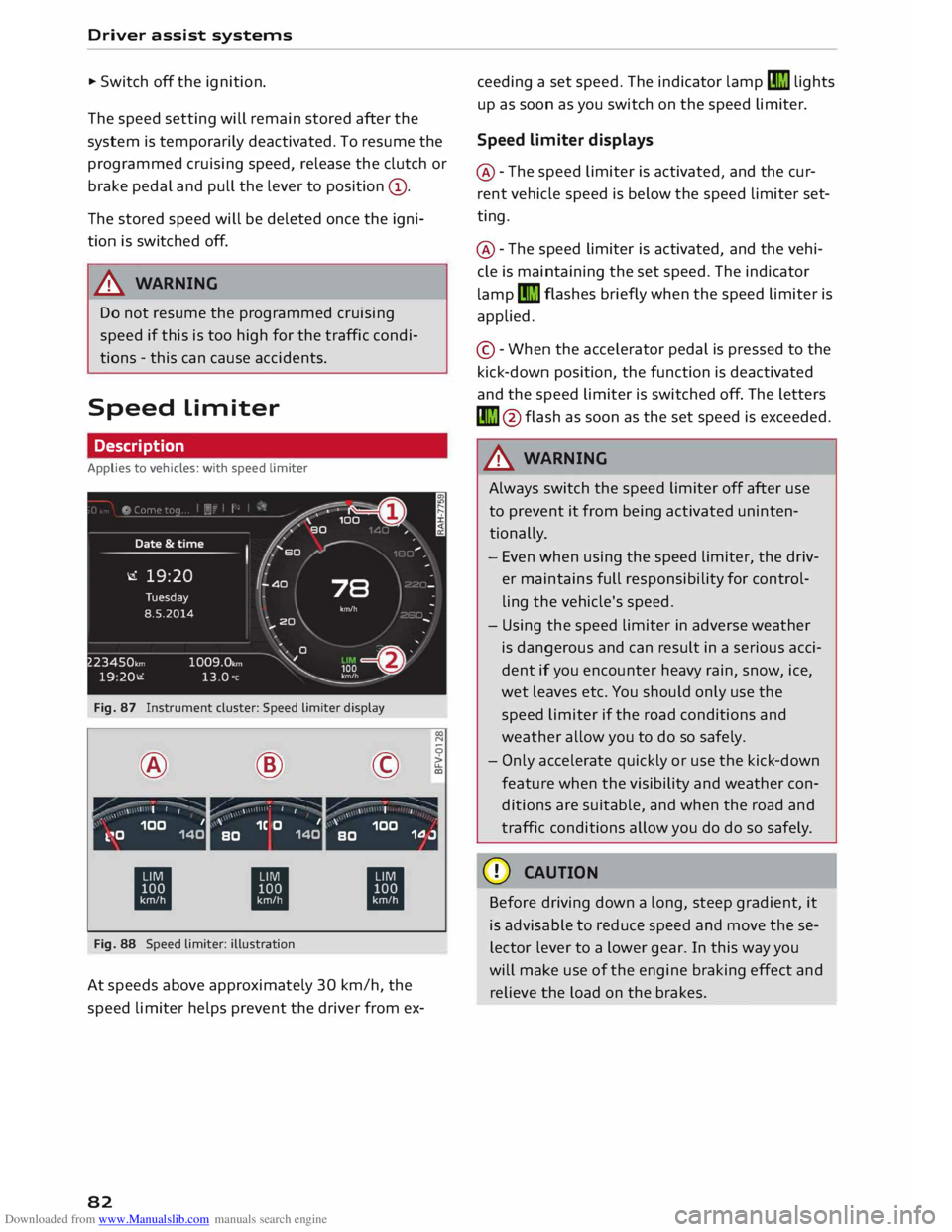
Fig. 87 Instrument cluster: Speed limiter display
® ·-
' I I @
,.,...---:-;- ·-
/ \ \ •
I I ©
·-
, ' I
' 00
N
0
>
LL
a,
,, _ ,\ 100 1
k.�0 140 '
1C O 1
BO 140 '
100
BO 1.0.J
ti ti
ti
Fig. 88 Speed limiter: illustration
At speeds above approximately 30 km/h, the
speed limiter helps prevent the driver from ex-
82 ceeding
a set speed. The indicator lamp�
lights
up as soon as you switch on the speed limiter.
Speed limiter displays
@ -The speed limiter is activated, and the cur
rent vehicle speed is below the speed limiter set
ting.
@ -The speed limiter is activated, and the vehi
cle is maintaining the set speed. The indicator
lamp �
flashes briefly when the speed limiter is
applied.
© -When the accelerator pedal is pressed to the
kick-down position, the function is deactivated
and the speed limiter is switched off. The letters
� @flash as soon as the set speed is exceeded.
_& WARNING
Always switch the speed limiter off after use
to prevent it from being activated uninten
tionally.
- Even when using the speed limiter, the driv
er maintains full responsibility for control
ling the vehicle's speed.
- Using the speed limiter in adverse weather
is dangerous and can result in a serious acci
dent if you encounter heavy rain, snow, ice,
wet leaves etc. You should only use the
speed limiter if the road conditions and
weather allow you to do so safely.
- Only accelerate quickly or use the kick-down
feature when the visibility and weather con
ditions are suitable, and when the road and
traffic conditions allow you do do so safely.
CD CAUTION
Before driving down a long, steep gradient, it
is advisable to reduce speed and move these
lector lever to a lower gear. In this way you
will make use of the engine braking effect and
relieve the load on the brakes.
Page 86 of 284
Downloaded from www.Manualslib.com manuals search engine Driver
assist systems
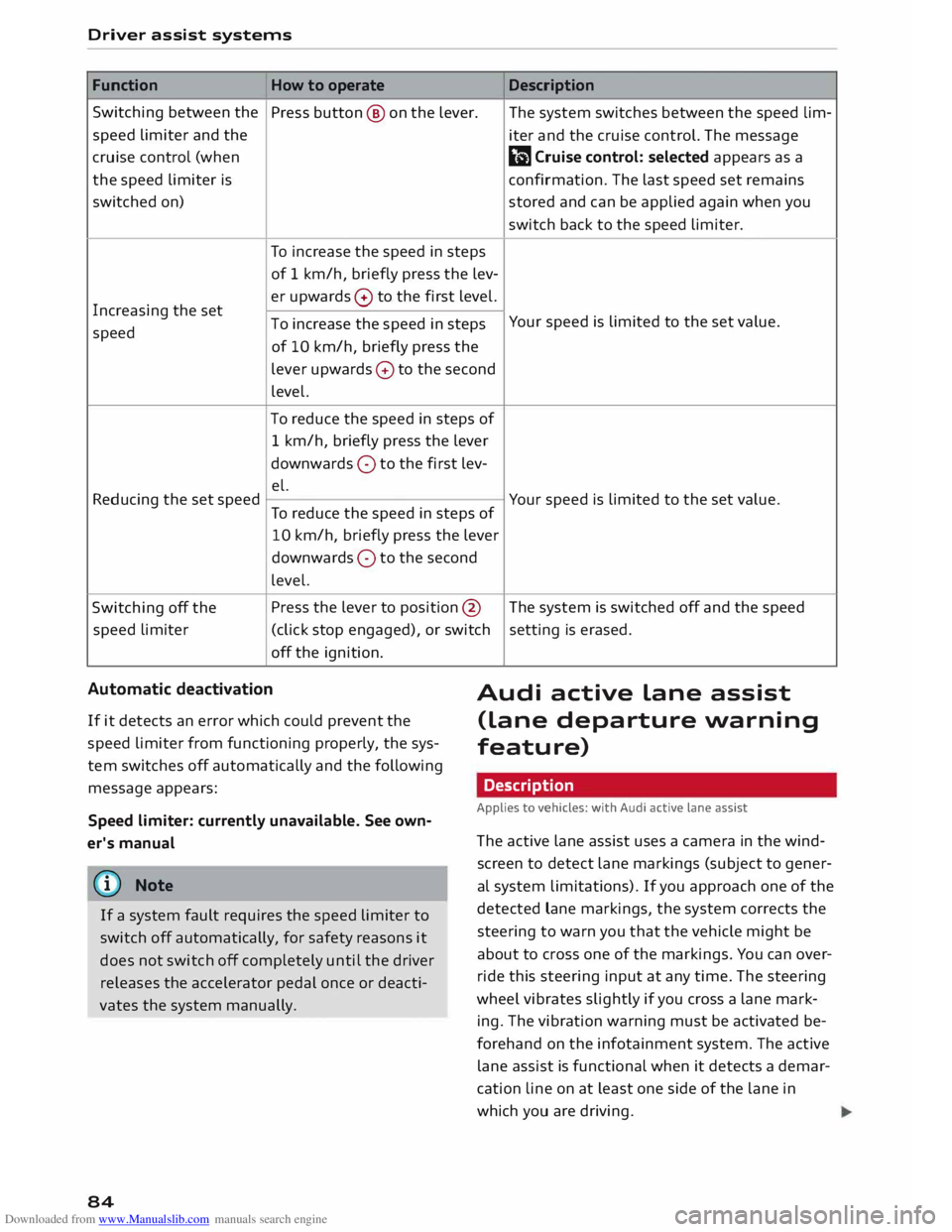
Function How to operate Description
Switching between the
Press button @ on the Lever.
The system switches between the speed lim-
speed Limiter and the
iter and the cruise control. The message
cruise control (when
El) Cruise control: selected appears as a
the speed Limiter is
confirmation. The Last speed set remains
switched on) stored and can be applied again when you
switch back to the speed Limiter.
To increase the speed in steps
of 1 km/h, briefly press the Lev-
Increasing the set er
upwards 0 to the first Level.
To increase the speed in steps Your
speed is Limited to the set value.
speed
of 10 km/h, briefly press the
Lever upwards 0 to the second
Level.
To reduce the speed in steps of
1 km/h, briefly press the Lever
downwards 0 to the first Lev-
el.
Reducing the set speed
To reduce the speed in steps of Your
speed is Limited to the set value.
10 km/h, briefly press the Lever
downwards 0 to the second
Level.
Switching off the Press
the Lever to position @ The system is switched off and the speed
speed limiter
(click stop engaged), or switch setting
is erased.
off the ignition.
Automatic deactivation
Audi active Lane assist
(Lane departure warning
feature)
If
it detects an error which could prevent the
speed Limiter from functioning properly, the sys
tem switches off automatically and the following
message appears:
Speed limiter: currently unavailable. See own
er's manual
@ Note
If a system fault requires the speed Limiter to
switch off automatically, for safety reasons it
does not switch off completely until the driver
releases the accelerator pedal once or deacti
vates the system manually.
84 Description
Applies to vehicles: with Audi active lane assist
The active Lane assist uses a camera in the wind
screen to detect Lane markings (subject to gener
al system Limitations). If you approach one of the
detected lane markings, the system corrects the
steering to warn you that the vehicle might be
about to cross one of the markings. You can over
ride this steering input at any time. The steering
wheel vibrates slightly if you cross a Lane mark
ing. The vibration warning must be activated be
forehand on the infotainment system. The active
Lane assist is functional when it detects a demar
cation line on at least one side of the Lane in
which you are driving.
Page 87 of 284
Downloaded from www.Manualslib.com manuals search engine 0
N
co
....
\D Lfl
N
Lfl
.... As
the system is designed for driving on motor
ways and other major roads, it is only active
above a speed of about 65 km/h (may vary in dif
ferent export markets).
Applies to vehicles with side assist*: If you oper
ate the turn signals while the active lane assist
and side assist are active, the steering will be cor
rected just before you cross the lane demarcation
if the side assist detects vehicles approaching
quickly or travelling at about the same speed as
your own vehicle and judges the situation to be
critical. This intervention is intended to keep the
vehicle in the lane.
Applies to vehicles without side assist*: The sys
tem does not warn you if you operate the turn
signal before crossing a lane demarcation. In this
case, it assumes that you intend to change lanes.
_&. WARNING
- The system initiates a corrective steering in
put to warn the driver that the vehicle is
about to leave the lane. As the driver you are
always responsible for staying in your own
lane.
- The system can assist you to keep the vehi
cle in the lane, however it is not capable of
driving on its own. Never take your hands off
the steering wheel.
- In certain situations, e.g. during heavy brak
ing, the system may not correct the steer
ing.
- In certain circumstances, not all of the lane
markings may be detected by the camera. A
corrective steering input can only be initi
ated if the system detects a lane marking on
the side in question.
- Variations in the road surface or objects on
the road may be misinterpreted as lane
markings. In this case, the steering may be
corrected unexpectedly or not at all.
- The camera's view might be obstructed, for
example by vehicles travelling in front, rain,
snow, a lot of water on the road, adverse
light or dirt on the windscreen. If this hap-
l l
The steering input function is not available on all export
versions Driver
assist systems
pens, the active lane assist may not detect
the lane markings or may respond incorrect
ly.
- In certain circumstances, for instance if visi
bility is poor, the setting for the steering in
put may be switched from "early" to "late"
1)
- In certain driving conditions, such as ruts in
the road surface, adverse cambers or side
winds, the assistance provided by the steer
ing correction may be insufficient to keep
the vehicle in the middle of the lane.
- For safety reasons, the active lane assist
must not be used in poor weather or in diffi
cult or slippery road conditions (such as ice,
fog, loose grit or gravel, heavy rain, snow,
etc.) -risk of accident!
Switching on/off
Applies to vehicles: with Audi active lane assist
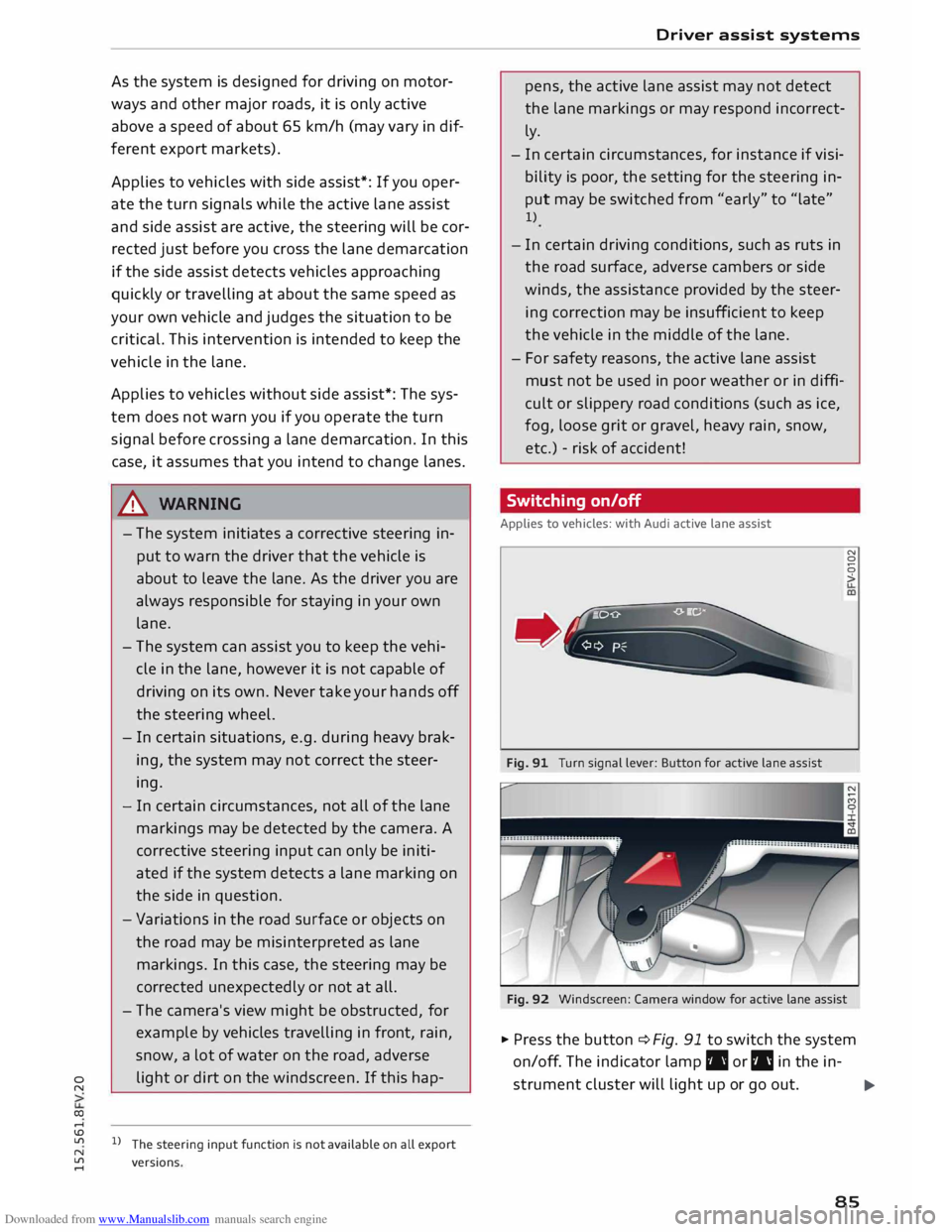
Fig. 91 Turn signal lever: Button for active lane assist N
0
0
>
Fig. 92 Windscreen: Camera window for active lane assist
� Press the button ¢ Fig. 91 to switch the system
on/off. The indicator lamp. or IIJ in the in-
strument cluster will light up or go out.
.,..
85