change time AUDI TT COUPE 2014 Owners Manual
[x] Cancel search | Manufacturer: AUDI, Model Year: 2014, Model line: TT COUPE, Model: AUDI TT COUPE 2014Pages: 284, PDF Size: 34.42 MB
Page 25 of 284
Downloaded from www.Manualslib.com manuals search engine 0
N
co
....
\D Lfl
N
Lfl
.... Camera-based
traffic
sign recognition
Description
Applies to vehicles: with camera-based traffic sign recognition
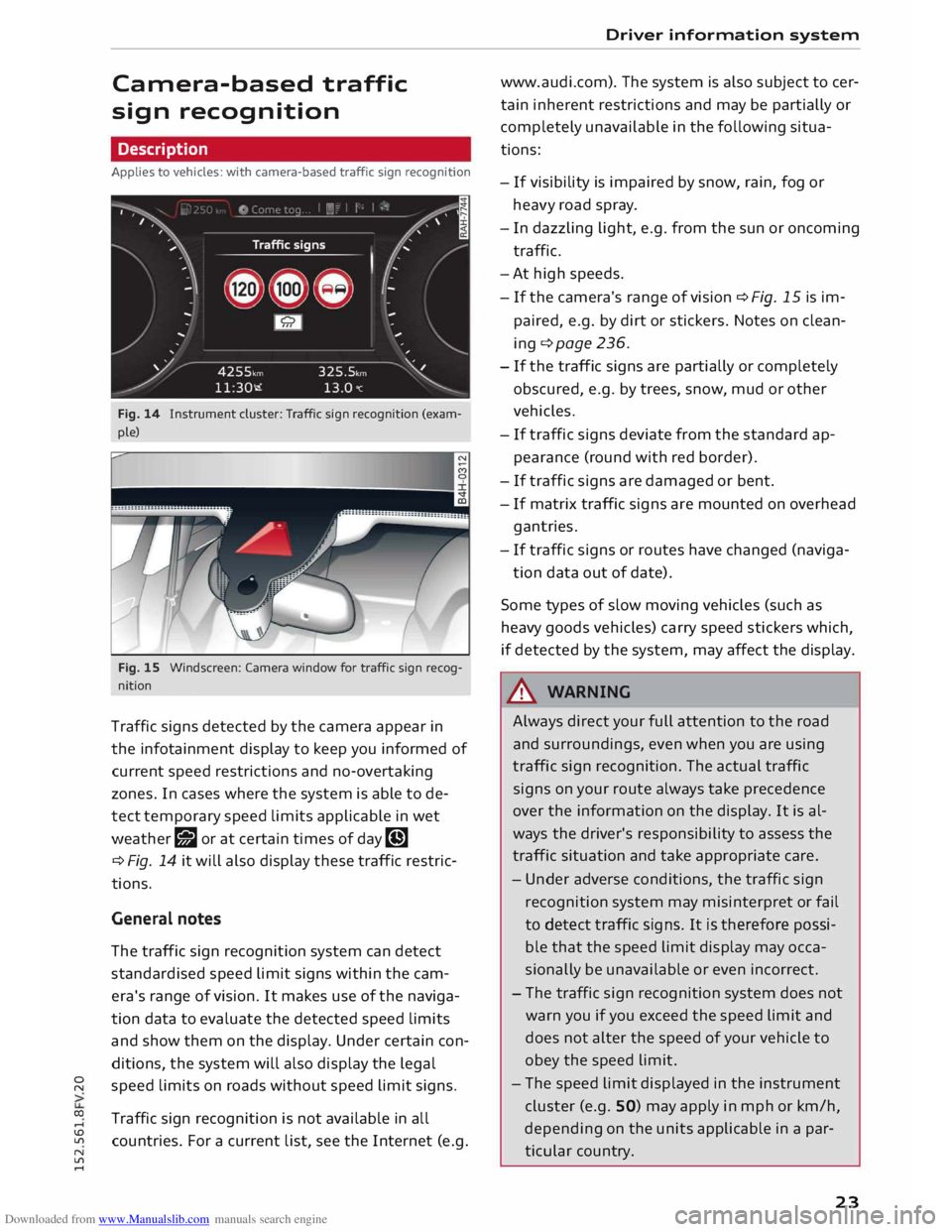
Fig. 14 Instrument cluster: Traffic sign recognition (exam
ple)
Fig. 15 Windscreen: Camera window for traffic sign recog
nition
Traffic signs detected by the camera appear in
the infotainment display to keep you informed of
current speed restrictions and no-overtaking
zones. In cases where the system is able to de
tect temporary speed limits applicable in wet
weather g;J or at certain times of day�
¢ Fig. 14 it will also display these traffic restric
tions.
General notes
The traffic sign recognition system can detect
standardised speed limit signs within the cam
era's range of vision. It makes use of the naviga
tion data to evaluate the detected speed limits
and show them on the display. Under certain con
ditions, the system will also display the legal
speed limits on roads without speed limit signs.
Traffic sign recognition is not available in all
countries. For a current list, see the Internet (e.g. Driver
information system
www.audi.com). The system is also subject to cer
tain inherent restrictions and may be partially or
completely unavailable in the following situa
tions:
- If visibility is impaired by snow, rain, fog or
heavy road spray.
- In dazzling light, e.g. from the sun or oncoming
traffic.
-At high speeds.
- If the camera's range of vision � Fig. 15 is im-
paired, e.g. by dirt or stickers. Notes on clean
ing ¢ page 236.
- If the traffic signs are partially or completely
obscured, e.g. by trees, snow, mud or other
vehicles.
- If traffic signs deviate from the standard ap
pearance (round with red border).
- If traffic signs are damaged or bent.
- If matrix traffic signs are mounted on overhead
gantries.
- If traffic signs or routes have changed (naviga-
tion data out of date).
Some types of slow moving vehicles (such as
heavy goods vehicles) carry speed stickers which,
if detected by the system, may affect the display.
& WARNING
Always direct your full attention to the road
and surroundings, even when you are using
traffic sign recognition. The actual traffic
signs on your route always take precedence
over the information on the display. It is al
ways the driver's responsibility to assess the
traffic situation and take appropriate care.
- Under adverse conditions, the traffic sign
recognition system may misinterpret or fail
to detect traffic signs. It is therefore possi
ble that the speed limit display may occa
sionally be unavailable or even incorrect.
- The traffic sign recognition system does not
warn you if you exceed the speed limit and
does not alter the speed of your vehicle to
obey the speed limit.
- The speed limit displayed in the instrument
cluster (e.g. SO) may apply in mph or km/h,
depending on the units applicable in a par
ticular country.
23
Page 29 of 284
Downloaded from www.Manualslib.com manuals search engine 0
N
co
....
\D Lfl
N
Lfl
.... Removing
the emergency key
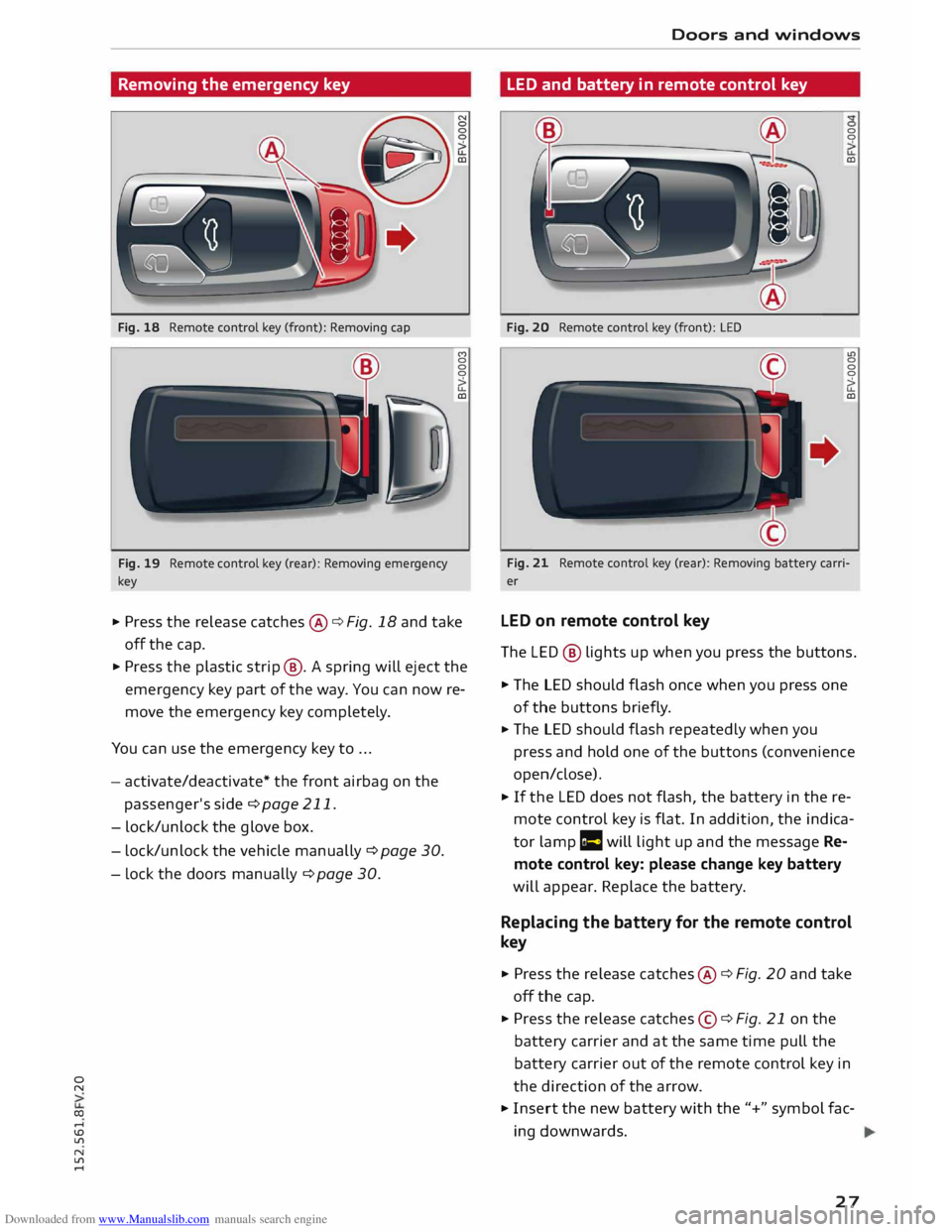
Fig. 18 Remote control key (front): Removing cap
Fig. 19 Remote control key (rear): Removing emergency
key (")
0
0
0
�
CD
... Press the release catches@¢ Fig. 18 and take
off the cap.
... Press the plastic strip@. A spring will eject the
emergency key part of the way. You can now re
move the emergency key completely.
You can use the emergency key to ...
- activate/deactivate* the front airbag on the
passenger's side ¢page 211.
- lock/unlock the glove box.
- lock/unlock the vehicle manually ¢ page 30.
- Lock the doors manually ¢page 30. Doors
and windows
LED and battery in remote control key
Fig. 20 Remote control key (front): LED 0
0
CD
u>
0
0
0
�
CD
Fig. 21 Remote control key (rear): Removing battery carri
er
LED on remote control key
The LED® lights up when you press the buttons .
... The LED should flash once when you press one
of the buttons briefly.
... The LED should flash repeatedly when you
press and hold one of the buttons (convenience
open/close).
... If the LED does not flash, the battery in the re
mote control key is flat. In addition, the indica
tor lamp r= will light up and the message Re
mote control key: please change key battery
will appear. Replace the battery.
Replacing the battery for the remote control
key
... Press the release catches@¢ Fig. 20 and take
off the cap .
... Press the release catches©¢ Fig. 21 on the
battery carrier and at the same time pull the
battery carrier out of the remote control key in
the direction of the arrow.
... Insert the new battery with the"+" symbol fac
ing downwards.
27
Page 33 of 284

Downloaded from www.Manualslib.com manuals search engine 0
N
co
,-j
\D U'l
N
U'l
,-j rig
ht* side) or to the left (if the door is on the
left side).
Once the passenger's door has been closed it can
no longer be opened from the outside. The door
can be opened from the inside by pulling the
door handle.
A WARNING
On vehicles with an anti-theft alarm system*,
do not Leave anyone (especially children) in
the car if it is locked from the outside and the
safelock mechanism* is activated: the doors
and windows cannot then be opened from the
inside ¢page 31. Locked doors could delay
assistance in an emergency, potentially put
ting lives at risk.
Anti-theft alarm system
Applies to vehicles: with anti-theft alarm system
Fig. 27 End face of (open) driver's door: Button for interior
monitor/tow-away protection
If the anti-theft alarm system senses interfer
ence with the vehicle it triggers an audible and
visible alarm. The anti-theft alarm system is acti
vated when you lock the vehicle in the usual way
and is switched off again when you unlock the ve
hicle.
The anti-theft alarm system comprises the fol
lowing components:
Anti-theft alarm
The alarm is triggered if the bonnet, the boot lid
or any of the doors are forced open. The alarm
system is armed whenever the vehicle is locked.
l l
This function is not available on all export versions/equip
ment versions. Doors
and windows
If you unlock the vehicle by turning the key in the
driver's door lock, you should switch on the igni
tion within 15 seconds to prevent the alarm from
being triggered. On some export versions, the
alarm is triggered immediately when you open a
door.
To deactivate the alarm, switch on the ignition or
press the@J button on the remote control key.
Interior monitor and tow-away protection
When the vehicle is locked, the alarm will be trig
gered if movements are detected in the interior
(e.g. by animals) or if the vehicle's inclination is
changed (e.g. during transport). You can prevent
the alarm from being triggered accidentally by
switching off the interior monitor and/or tow
away protection. To do so, proceed as follows:
� Press the� button ¢ Fig. 27. The LED in the
button will light up.
� If you now lock the vehicle, the interior monitor
and tow-away protection will remain deactiva
ted until the vehicle is unlocked again.
Safelock 1
)
The doors can no longer be opened from the in
side. This makes it more difficult to break into
the vehicle ¢ ,A. The message Be aware of door
safelock. See owner's manual appears on the in
fotainment display when you switch off the igni
tion as a reminder that the safe lock mechanism*
will be activated. You can switch off the safelock
mechanism* by using one of the following op
tions:
� Press the� button on the remote control key a
second time within 2 seconds. Or:
� Touch the sensor on the door handle a second
time within 2 seconds (applies to vehicles with
convenience key). Or:
� Turn the emergency key in the door lock to the
lock position a second time within 2 seconds.
IJJI,-
31
Page 41 of 284
Downloaded from www.Manualslib.com manuals search engine speed,
and on other traffic and ambient condi
tions.
On vehicles with matrix LED headlights, individu
al segments of the main beam are activated or
deactivated. The relevant sector in front of the
vehicle is masked, while the surrounding areas
remain lit. The ambient surroundings are thus il
luminated optimally without dazzling other road
users.
Activating the main beam assist
Important: The light switch must be set to AUTO,
the dipped beam headlights must be on and the
main beam assist must be activated on the info
tainment system¢ page 39.
.,. Press the lever forwards CD to activate the main
beam assist. The indicator lamp I! will light
up in the infotainment display and the main
beams will be switched on/off automatically.
An indicator lamp II lights up when the main
beams are switched on.
Switching the main beams on/off manually
If the main beams are not switched on or if the
headlights are not dipped as expected, you can
control the dip function manually:
.,. To switch on the main beams manually, push
the lever to position (D. The indicator lamp II
will light up.
.,. To dip the headlights manually, pull the lever
towards you@. The main beam assist will be
deactivated.
Flashing the headlights
.,. Pull the lever towards you @ to flash the head
lights when the main beam assist is activated
and the main beams are dipped. The main
beam assist will remain activated.
Driver messages on the infotainment display
Main beam assist: fault. See owner's manual
Drive to a qualified workshop soon and have the
fault rectified. You can still switch the main beam
0
"' headlights on and off manually.
co ....
\D U'l
N
U'l
.... Lights
and vision
Main beam assist: currently unavailable. Cam
era view restricted due to surroundings. See
owner's manual
The camera vision is impaired, e.g. by stickers or
dirt.
The sensor is located between the interior mirror
and the windscreen. Do not affix any stickers on
this section of the windscreen.
& WARNING
The main beam assist is only intended to as
sist the driver. The driver must always ensure
that the headlights are used when required,
and may have to switch them on or off man
ually, e.g. when the light conditions or visibili
ty are poor. In the following situations man
ual interve ntion may be necessary:
- Hazardous weather conditions such as fog,
heavy rain and snow or water splashes
- Roads on which oncoming traffic is partially
concealed (e.g. on motorways)
- Indi scernible road users (e.g. cyclists with
insufficient lighting or vehicles with dirty
rear lights)
- Tight corners, steep hill crests or valleys
- Poorly lit towns
- Highly reflective objects, such as road signs
- Windscreen misted up, dirty, frosted or cov-
ered by stickers in front of the sensor
Adjusting the settings for the exterior
light ing
You can change the settings for these functions
on the infotainment system .
.,. Select the following on the infotainment sys
tem: I MENU
I button >Car> left control button
> Vehicle settings > Exterior lighting.
Automatic headlights
The following settings are available in the Auto
matic headlights menu:
Activa tion time -You can determine how soon
the lights are switched on by using the settings
early, medium or late to adjust the sensitivity of
the light sensor.
IJi,,
39
Page 60 of 284
Downloaded from www.Manualslib.com manuals search engine Driving
Driving
General notes
Running in
A new vehicle should be run in over a distance of
1,500 km. For the first 1,000 km the engine
speed should not exceed 2/3 of the maximum
per missible engine speed -do not use full throt
tle. From 1,000 to 1,500 km you can gradually
increase the engine rpm and road speed.
During its first few hours of running, the internal
friction in the engine is greater than later on
when all the moving parts have bedded down.
How the vehicle is driven for the first 1,500 km
also influences the engine quality. After this peri
od you should continue driving at moderate en
gine speeds, in particular when the engine is
cold. This helps to reduce wear and tear on the
engine and increases the potential mileage which
can be covered by the engine.
You should also avoid driving with the engine
speed too Low. Change down to a lower gear
when the engine no longer runs "smoothly". Ex
cessively high engine speeds are prevented by an
automatic rev limiter.
Driving through water on roads
Please note the following in order to prevent
damage to the vehicle when driving through wa
ter (e.g. on flooded roads):
- The water level must not be higher than the ve
hicle's underbody.
- Do not drive faster than walking pace.
A WARNING
After driving through water, mud, sludge,
etc., the braking effect can be delayed slightly
due to moisture on the discs and brake pads.
Applying the brakes carefully several times
will remove the moisture and restore the full
braking effect.
58 CD
CAUTION
Parts of the vehicle (e.g. engine, gearbox, run
ning gear or electrical components) can be
badly damaged when driving through water.
ij} Note
- It is advisable to check the depth at the
deepest point before approaching the wa-
ter.
- Do NOT stop the vehicle, drive in reverse or
switch off the engine before you are out of
the water.
- Bear in mind that waves created by oncom
ing traffic could exceed the permissible
wading depth of your vehicle.
- Avoid driving through salt water (corrosion).
How to improve economy and minimise
pollution
Fuel econom y, environmental impact and wear
on the engine, brakes and tyres depend largely
on the way you drive the vehicle. By adopting an
economical driving style and anticipating the
traffic situation ahead, you can reduce fuel con
sumption by 10-15%. The following section gives
you some tips on lessening the impact on the en
vironment and reducing your operating costs at
the same time.
Anticipate well in advance
A car uses most fuel when accelerating. If you an
ticipate hazards and speed changes well in ad
vance, you will need to brake less and thus accel
erate less. Wherever possible, let the car slow
down gradually with a gear engaged, for in
stance when you can see that the next traffic
lights are red.
Change gear early to save fuel
An effective way of saving fuel is to change up
quickly through the gears. Running the engine at
high rpm in the lower gears uses an unnecessary
amount offuel. Press the accelerator slowly and
avoid using the "kick-down" feature.
...,
Page 72 of 284
Downloaded from www.Manualslib.com manuals search engine Automatic
gearbox
Automatic gearbox
S tronic
Introduction
Applies to vehicles: with S tronic gearbox
The vehicle is equipped with an electronically
controlled dual-clutch gearbox (S tronic). Torque
between the engine and the gearbox is transmit
ted via two independent clutches. They enable
smooth, uninterrupted acceleration of the vehi
cle.
The gearbox shifts up or down automatically and
continuously adapts the timing of the gear
changes to your driving style.
When you drive at moderate speeds the gearbox
will select the most economical shift programme.
It will then change up early and delay the down
shifts to give better fuel economy.
If you drive at higher speeds with heavy accelera
tion, if you open the throttle quickly, or if you use
the kick-down or the car's maximum speed, the
gearbox will automatically select the more "spor
ty" shift programmes.
If desired, you can also select the gears manually
(tiptronic mode).
Selector lever positions
Applies to vehicles: with S tronic gearbox
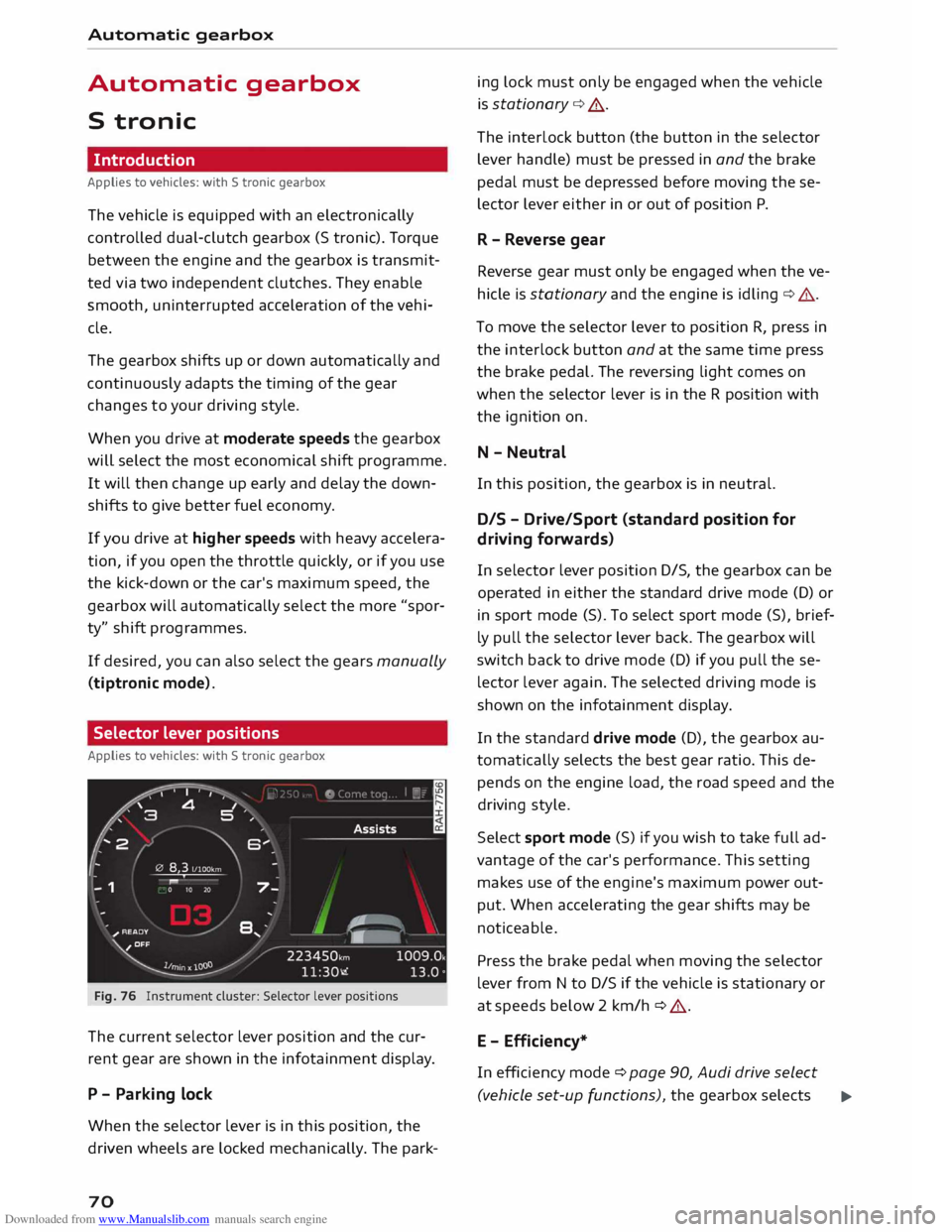
Fig. 76 Instrument cluster: Selector lever positions
The current selector lever position and the cur
rent gear are shown in the infotainment display.
P - Parking lock
When the selector lever is in this position, the
driven wheels are locked mechanically. The park-
70 ing
lock must only be engaged when the vehicle
is stationary ¢.&. .
The interlock button (the button in the selector
lever handle) must be pressed in and the brake
pedal must be depressed before moving these
lector lever either in or out of position P.
R - Reverse gear
Reverse gear must only be engaged when the ve
hicle is stationary and the engine is idling ¢.&..
To move the selector lever to position R, press in
the interlock button and at the same time press
the brake pedal. The reversing light comes on
when the selector lever is in the R position with
the ignition on.
N - Neutral
In this position, the gearbox is in neutral.
DIS -Drive/Sport (standard position for
driving forwards)
In selector lever position D/S, the gearbox can be
operated in either the standard drive mode (D) or
in sport mode (S). To select sport mode (S), brief
ly pull the selector lever back. The gearbox will
switch back to drive mode (D) if you pull these
lector lever again. The selected driving mode is
shown on the infotainment display.
In the standard drive mode (D), the gearbox au
tomatically selects the best gear ratio. This de
pends on the engine load, the road speed and the
driving style.
Select sport mode (S) if you wish to take full ad
vantage of the car's performance. This setting
makes use of the engine's maximum power out
put. When accelerating the gear shifts may be
noticeable.
Press the brake pedal when moving the selector
lever from N to D/S if the vehicle is stationary or
at speeds below 2 km/h ¢ .&..
E - Efficiency*
In efficiency mode ¢ page 90, Audi drive select
(vehicle set-up functions), the gearbox selects ..,.
Page 73 of 284
Downloaded from www.Manualslib.com manuals search engine 0
N
co
....
\D L/'l
N
L/'l
.... the
next gear at lower engine speeds. Earlier up
shifts give improved fuel economy because the
full power reserves of the engine are not used.
In this mode, Eis shown on the display instead of
D ¢Fig. 76.
A WARNING
- The car can roll away even if the ignition is
switched off.
- Never move the selector lever to R or P
when driving, as this could cause an acci
dent.
- In all selector lever positions except P the
vehicle must always be held with the foot
brake when the engine is running. This is be
cause an automatic gearbox still transmits
power even at idling speed, and the vehicle
tends to "creep" -risk of accident!
- The accelerator pedal must on no account
be pressed inadvertently when a gear is en
gaged with the vehicle stationary . The vehi
cle could otherwise start moving immedi
ately (in some cases even if the parking
brake is engaged) and possibly cause an ac
cident.
- Do not press the accelerator while selecting
a gear with the vehicle stationary and the
engine running, as this could cause an acci
dent.
- The driver should never get out of the vehi
cle when the engine is running and a gear is
engaged. If you have to leave your vehicle
while the engine is running, you must apply
the parking brake and engage the parking
lock P.
- To avoid accidents, apply the parking brake
and put the selector lever in position P be
fore opening the bonnet and working on the
vehicle with the engine running. Please ob
serve the important safety warnings
¢ page 220, Working on components in
the engine compartment.
((D) Note
- Drive select: You can select the sport pro
gram for gear changes by activating the dy- Automatic
gearbox
namic mode. The infotainment display will
show S instead of D.
- If the lever is moved accidentally to N when
driving, take your foot off the accelerator
and let the engine speed drop to idling be
fore selecting Dor S again.
- It is not possible to move the selector lever
out of position P if the electrical power sup
ply fails. In this case, the selector lever can
be released manually. Left-hand drive
vehicles ¢ page 78, right-hand drive
vehicles ¢ page 79.
Selector lever lock
Applies to vehicles: with S tronic gearbox
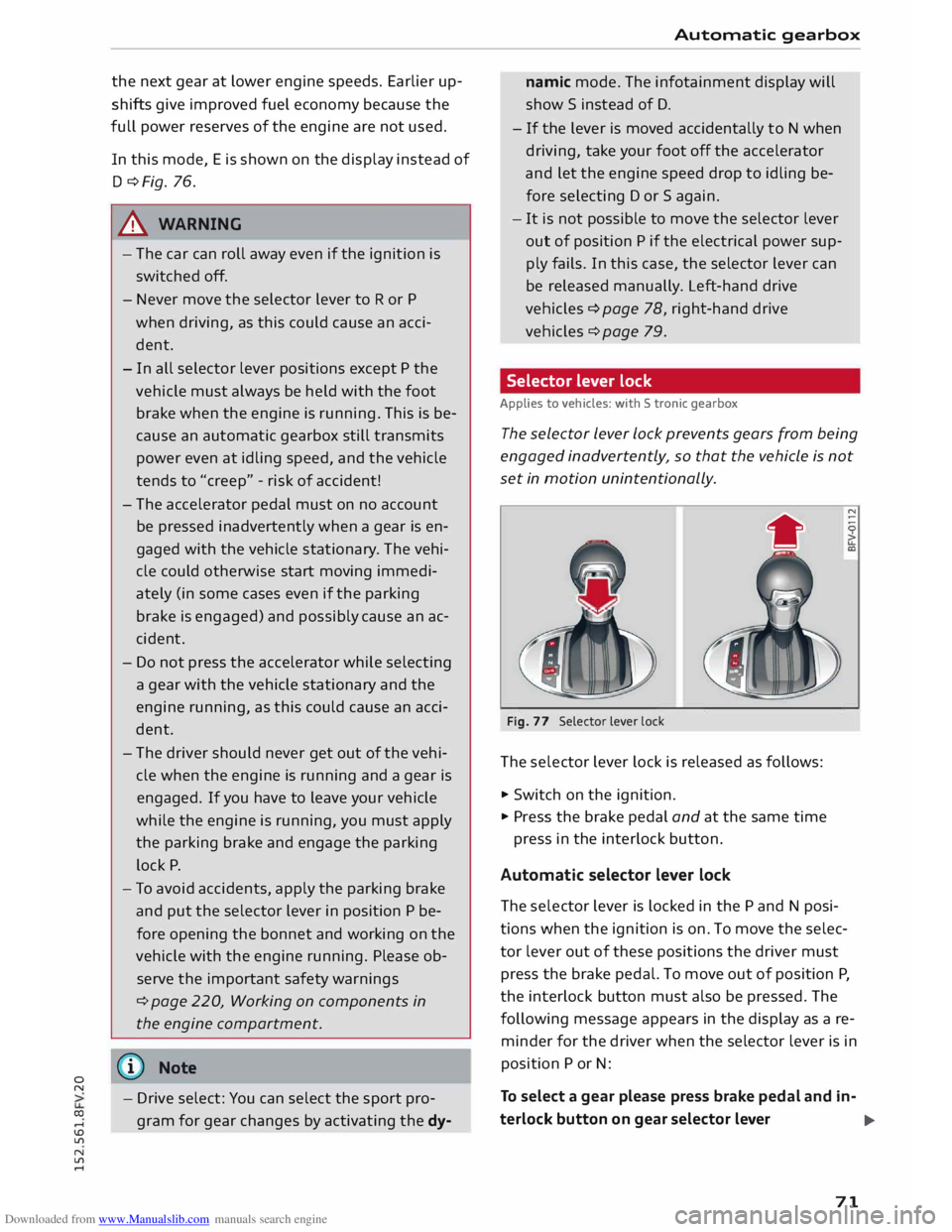
The selector Lever Lock prevents gears from being
engaged inadvertently, so that the vehicle is not
set in motion unintentionally.
•
Fig. 77 Selector lever lock
The sele ctor lever lock is released as follows:
... Switch on the ignition.
... Pr ess the brake pedal and at the same time
press in the interlock button.
Automatic selector lever lock
The sele ctor lever is locked in the P and N posi
tions when the ignition is on. To move the selec
tor lever out of these positions the driver must
press the brake pedal. To move out of position P,
the interlock button must also be pressed. The
following message appears in the display as a re
minder for the driver when the selector lever is in
position P or N:
To select a gear please press brake pedal and in-
terlock button on gear selector lever
..,.
71
Page 83 of 284
Downloaded from www.Manualslib.com manuals search engine 0
N
co
....
\D Lfl
N
Lfl
.... -
For safety reasons, the cruise control system
must not be used in city traffic, stop-and-go
traffic, on roads with a Lot of bends or in dif
ficult or slippery driving conditions (such as
ice, fog, Loose grit or gravel, heavy rain, etc.)
- risk of accident!
- When you take a turn-off, drive along a mo-
torway exit Lane or pass through roadwork
sections, please temporarily switch off the
cruise control system.
- Make sure you do not unintentionally rest
your foot on the accelerator -this will over
ride the cruise control system which, as a re
sult, will not brake the vehicle.
- The automatic braking function may be de
activated if a system fault occurs in the
brake system (e.g. if the brakes overheat)
while the cruise control system is activated.
All the other cruise control functions remain
activated as Long as the indicator Lamp ii is
Lit.
CD CAUTION
Before driving down a Long, steep gradient, it
is advisable to reduce speed and move these
lector Lever to a Lower gear. In this way you
will make use of the engine braking effect and
relieve the Load on the brakes.
w) Note
- Vehicles with manual gearbox: The set
speed cannot be reached if the currently se
lected gear is too high or too Low or if the
engine would overrev or fail to run smoothly
at the target speed. Make sure to change up
or down a gear in good time.
- The brake Lights come on when the system
brakes the vehicle.
Adjusting the speed
Applies to vehicles: with cruise control system
• To increase or reduce the cruising speed in
steps of 1 km/h, briefly push the Lever one Lev
el upwards or downwards towards 010
¢ page 80, Fig. 85.
• To increase or reduce the cruising speed in
steps of 10 km/h, briefly push the Lever two Driver assist
systems
Levels upwards or downwards towards (!)1 0
¢ page 80, Fig. 85.
• To increase or reduce the speed gradually, hold
the Lever towards GY0 until you reach the de
sired cruising speed.
Overruling the set speed
You can use the accelerator pedal to increase
speed in the normal way, for example to overtake
another vehicle. Once you release the accelerator,
the system will revert to the speed you stored ini
tially.
However, if the vehicle exceeds the programmed
speed significantly for a Long time, the cruise
control system will be deactivated temporarily.
The indicator Lamp ii in the instrument cluster
will go out, but the programmed speed will re
main stored.
Pre-selecting a speed
Applies to vehicles: with cruise control system
You can pre-select a desired speed while the ve
hicle is stationary.
• Switch on the ignition.
• Pull the Lever to position (D ¢ page 80, Fig. 85.
• Press the Lever up towards 0 or down towards
0 in order to increase or reduce the cruising
speed setting.
This function allows you to enter the desired
cruise control setting speed ahead of time, for
example before joining a motorway. Once you are
on the motor way, you can activate the cruise con
trol system by pulling the Lever to position (D.
Switching off
Applies to vehicles: with cruise control system
Switching off temporarily
• Press the brake pedal, or
• Push the Lever towards @
(click stop not en
gaged) ¢page 80, Fig. 85.
Switching off completely
• Push the lever to position @
(click stop engag-
ed), or
..,.
81
Page 89 of 284
Downloaded from www.Manualslib.com manuals search engine 0
N
co
....
\D U'l
N
U'l
.... long
period. Do not switch the active lane assist
system on again before the lane markings are
discernible.
Audi active lane assist: currently unavailable.
See owner's manual
A temporary fault is preventing the active lane
assist system from functioning. Try switching on
the active lane assist system again later.
Audi active lane assist: fault. See owner's man
ual
Drive to a qualified workshop soon and have the
fault rectified.
Audi active lane assist: please take over steering
This message will appear if you do not steer the
vehicle yourself. In this case, the active lane as
sist will switch to "not ready for warning" but will
not be deactivated completely. The system can
assist you to keep the vehicle in the lane. Howev
er it is your own responsibility to steer and con
trol the vehicle.
Setting the steering input time and
vibration warning
Applies to vehicles: with Audi active lane assist
You can change the active lane assist settings on
the infotainment system to suit your individual
preferences.
Select the following on the infotainment system:
I MENU!
button> Car> left control button> Driv
er assist > Audi active lane assist.
Steering input1
>
early: If this setting is selected, a continuous
steering input assists the driver to keep the vehi
cle in the middle of the lane.
late: If this setting is selected, the steering is not
corrected until just before a wheel touches a de
tected lane marking.
l l
The steering input function is not available on all export
versions Driver
assist systems
Vibration warning
You can switch the additional steering wheel vi
bration warning on/off.
(!} Note
Your personal settings are stored automati
cally and assigned to the remote control key
which is being used (only applies to some
countries).
Audi side assist (Lane
change assist feature)
Description
Applies to vehicles: with Audi side assist
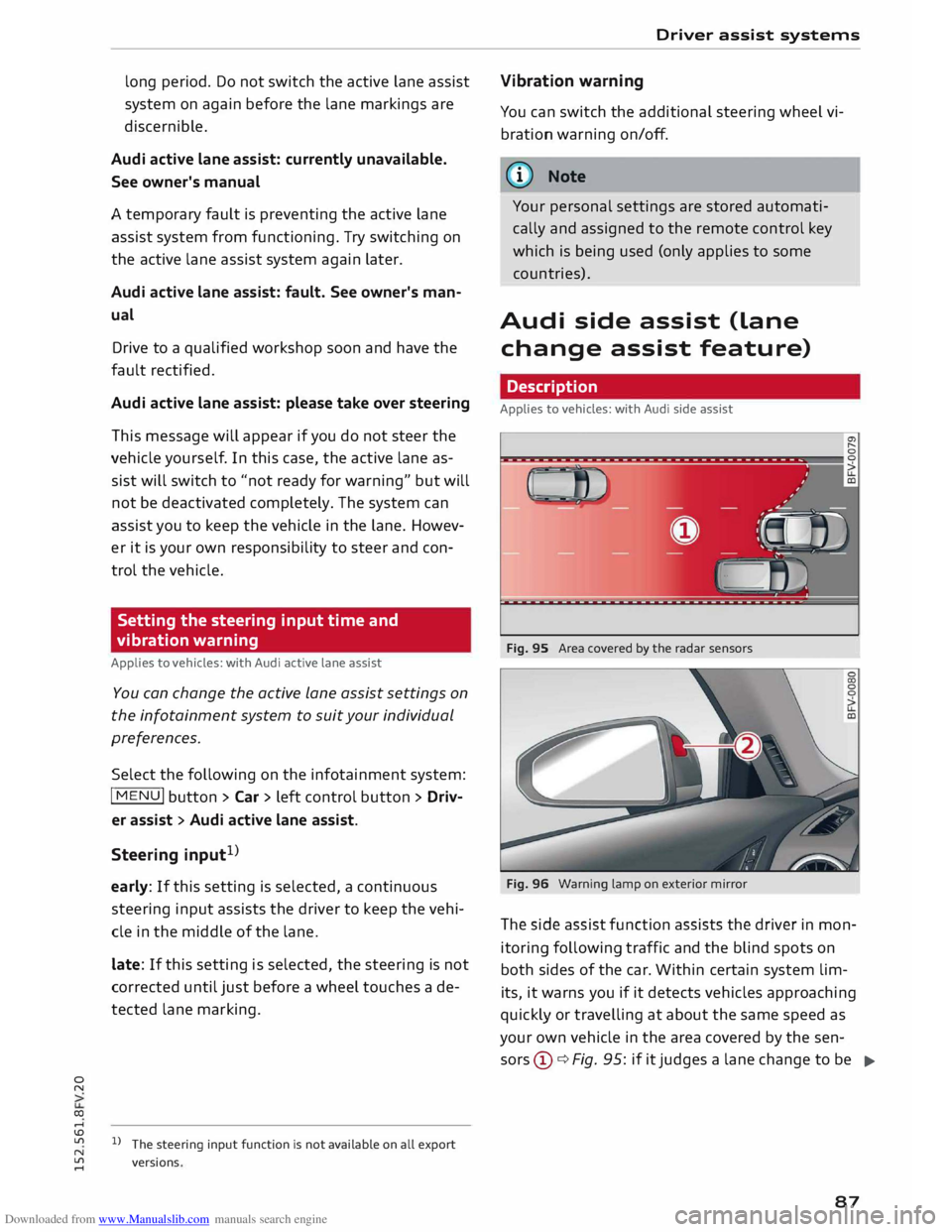
Fig. 95 Area covered by the radar sensors
Fig. 96 Warning lamp on exterior mirror
The side assist function assists the driver in mon
itoring following traffic and the blind spots on
both sides of the car. Within certain system lim-
its, it warns you if it detects vehicles approaching
quickly or travelling at about the same speed as
your own vehicle in the area covered by the sen
sors ©¢ Fig. 95: if it judges a lane change to be
..,.
87
Page 91 of 284
Downloaded from www.Manualslib.com manuals search engine 0
N
co
....
\D Lfl
N
Lfl
.... lane
change. In all cases, the side assist will give
a warning for the vehicles it has detected at the
latest when they enter the "blind spot".
© Other vehicles being overtaken
When you are overtaking another vehicle slowly,
with a speed differential of less than 15 km/h,
the warning lamp in the exterior mirror will light
up as soon as the other vehicle enters your blind
spot.
If you are overtaking another vehicle quickly, with
a speed differential of more than 15 km/h, the
warning lamp will not light up.
System limitations
The radar sensors are designed for normal lane
widths and monitor the lanes immediately to the
left and right of your vehicle. In certain situations
the warning lamp on one of the exterior mirrors
may light up even if no vehicle is travelling in an
area that could be critical in the event of a lane
change. For example:
- When you are travelling in a narrow lane or
when you are not travelling in the centre of the
lane. In this case the system may monitor an
other lane and register a vehicle that is not in
fact travelling in an adjacent lane.
- When you are driving into a bend. The side as
sist may react to a vehicle two lanes away.
- If the system detects other objects (such as
crash barriers, etc).
- In poor weather conditions. The functionality of
the side assist is then restricted.
The radar sensors ¢ Fig. 98 must not be obstruc
ted by stickers, bicycle racks, deposits or any oth
er substances which could impair the function of
the system. For notes on cleaning, please refer to
¢page 236.
.&_ WARNING
-Always watch the road and the area sur
rounding the vehicle. The side assist feature
is not a substitute for the full concentration
of the driver. The driver is always responsi
ble for the safety of lane changes and other
manoeuvres. Driver
assist systems
- In certain situations, the system may not
function properly, or the functionality of the
system may be restricted. For example:
- If other vehicles are approaching very
qui ckly, or if you are overtaking other
vehicles quickly. The warning lamp may
not light up in time.
- In poor weather conditions, such as heavy
rain, snow or road spray.
- If you are travelling in very wide lanes, in
tight bends or over crests. The system may
not detect vehicles in the adjacent lane
because they are outside the area covered
by the sensors.
CD CAUTION
Impacts or damage to the bumper, wheel
arches or underbody can cause misalignment
of the sensors. This can impair the functional
ity of the system. Have the systems checked
by a qualified workshop.
� Note
The warning lamps on the exterior mirrors
may not be properly visible if tinted foil is af
fixed to the side windows on the driver's or
passenger's side.
Switching on and off
Applies to vehicles: with Audi side assist
The system can be switched on and off on the in
fotainment system.
... Select the following on the infotainment sys
tem: I MENU I button >Car> left control button
> Driver assist> Audi side assist.
The warning lamps in the exterior mirrors light
up briefly each time the ignition is switched on to
indicate that the system is activated .
89