ECO mode AUDI TT COUPE 2016 User Guide
[x] Cancel search | Manufacturer: AUDI, Model Year: 2016, Model line: TT COUPE, Model: AUDI TT COUPE 2016Pages: 322, PDF Size: 52.86 MB
Page 69 of 322
Downloaded from www.Manualslib.com manuals search engine Starting on a hill
.. Set the parking brake.
.. With the driving gear selected, press the accel
erator pedal carefully. The parking brake will
re l
ease automatically if your safety belt is fas
tened.
Under certain circumstances, such as driving in
the mountains, it may be useful to switch tempo
rarily
to the manual shift program in order to
manually adjust the gears to the driving condi
tions¢ page 68.
When parking on a level surface, simply place the
selector lever in the P position. On inclines, acti
vate the parking brake first and then move the
selector lever to the P position ¢ page 61. This
prevents the loc kin g mechanism from being
loaded too heavily and will make it easier to
move the selector lever out of the P position.
A WARNING
-The vehicle can roll even when the engine is
switched off.
-Unintended vehicle movement can lead to
serious injuri es.
- Never leave
your vehicle with the engine
running while in gear. If you must leave
your vehicle when the engine is running , set
the parking brake and move the selector lev
er to the P position.
- Power is still
transferred to the wheels
when the engine is running at idle. To pre
vent the ve hicle from "creeping", you must
keep your foot on the brake when the en
gine is running and the selector lever is in
the D, Sor R position or "tiptronic" mode is
selected.
-Do not inadvertently press the accelerator
pedal when the vehicle is stationary. Other
wise the vehicle will start to move immedi
ately, even if the parking brake is set. T his
could resu
lt in a crash.
-
Do not press the accelerator pedal when
changing the selector lever position while
the vehicle is stationary and the engine is
running .
Automatic transmission
-Never engage the R or P selector level posi
tions while driving. It could cause a crash .
- Before driving
down a steep slope, reduce
your speed and shift into a lower gear with
"ti ptronic".
-Do not ride the brakes or press the brake
pedal too often or too long when driving
down a hill. Constant braking causes the
brakes to overheat and substantially re
duces braking performance, increases brak
ing
distance or causes complete failure of
the brake system.
-If you must stop on an incline, always hold
the vehicle in place with the foot brake or
parking brake to prevent it from rolling
back.
- N
ever hold the vehicle on an incline with a
slipping clutch. The
clutch opens automati
cally when it becomes too hot from the
overload. The mJ indicator light turns on
and a message appears¢ page 70 when
the clutch is overloaded.
-If the engine must run while you are work
ing
in the engine compartment with the
hood open, make sure a gear is not engag
ed. The selector lever must be firmly in the
P position and loc ked in place and the park
ing brake must be set¢ page 236. Other
wise, the vehicle could begin moving when
increasing the engine speed, even with the
parking brake set.
@Note
-When stopping on an incline, do not try to
hold the veh icle in place by pressing the ac
celerator pedal while a driving gear is se
lected. This can cause the automatic trans
mission to overheat and can damage it. Ac
tivate the parking brake or press the brake
pedal to prevent the vehicle from rolling.
- Allowing
the vehicle to roll when the engine
is stopped and the selector lever is in the N
position will
damage the automatic trans
mission because it is not lubricated under
those circumstances.
67
Page 71 of 322
Downloaded from www.Manualslib.com manuals search engine ..... N
G'. CX)
.... ID IJ' .... ID ....
.,. To shift down one gear, tap the shift paddle Q.
If the shift paddles are tapped while in the D/S
selector lever position, automatic mode switches
off briefly. To switch from manually shifting back
to automatic shifting immediately, tap the shift
paddle 0 Q fig. 67 for 1 second.
To keep shifting using the shift paddles, move
the selector lever to the right out of the D/S posi
tion into
the tiptronic shift gate.
The transmission automatically shifts up or down
before critical
engine speed is reached.
The
transmission only allows manual shifting
when
the engine speed is within the permitted
rang e.
(D Tips
-If you shift to the next lowest gear, the
transmission will only shift if the engine will
not be over-rewed.
- With kick-down, the transmission shifts to a
lower
gear, depending on vehicle speed and
engine speed.
-tiptronic does not work if the transmission
is running in emergency mode.
Kick-down
Kick-down enables maximum acceleration.
When you press the accelerator pedal down be
yond
the resistance point, the automatic trans
mission downshifts into a lower gear, depending
on vehicle speed and engine RPM. It shifts up in
to the next higher gear once the max imum speci
fied
engine RPM is reached.
A WARNING
Please note that the wheels could spin on
s
lick or slippery roads when kick-down is ac
tive.
ll The ESC light turns on continuously and the message Sta·
bilization control (ESC): sport. Warning! Reduced stabil
ity appears temporarily to indicate in the Infotainment
system
that the syste m was deactivate d.
Automatic transmission
Launch Control-Program
The Launch Control Program enables maximum
acceleration.
Requirement: the engine must be at operating
temperature and the steering wheel must not be
turned.
... With the engine running, press the l.eoFFI but
ton briefly one time ll .
.,. Pull the selector lever back out of the D/S posi
tion briefly to select the S pos ition, or press it
toward the right into the tiptronic position or
select the Dynamic driving mode in drive se
lect* Q page 79.
.,. Press the brake pedal firmly with your left foot
and hold it all the way down for at least 1 sec
ond .
... At the same time, press the gas pedal all the
way down with your right foot until the engine
reaches and stays at a high RPM level.
.,. Remove your left foot from the brake.
A WARNING
-Always adapt your driving to the traffic flow.
-
Only use Launch Control when road and traf-
fic conditions allow it and other drivers will
not be endangered or impacted by your driv
ing and the vehicle's acceleration.
-
Please note that the drive wheels can spin
and the vehicle can break away when sport
mode is sw itched on, especially when the
road is slippery.
-
Once the vehicle has started moving, press
the l.t'l OFFI button briefly to turn the sport
mode off.
(D Tips
- The transmission temperature may increase
s ignificantly
after using the launch control
program. If that happens, the program may
not be available for a few minutes. It w ill be
available again after a cool-down period. "'
69
Page 72 of 322
Downloaded from www.Manualslib.com manuals search engine Automatic transmission
-When accelerating using the launch control
program, all vehicle
parts are subject to
heavy loads . This can lead to increased
wear.
Emergency mode
In the event of a system malfunction, there is on
emergency program.
If all of the selecto r lever positions are highlight
ed wit h a light background
in the Infotainment
display, there is a system malfunction and the S
tronic transmiss ion is running in the emergency
program . The vehicle can still be driven
in emer
gency mode,
but only with reduced speed and
not in a
ll gears. In some cases, the vehicle can
n ot dri
ve in rever se .
@Note
If the transmission runs in emergency mode,
drive
to an author ized Audi dealer or author
ized
Audi Service Facility immediately to have
the malfunction corrected.
Transmission malfunction
• Transmission : malfunction! Please stop ve
hicle and s
hift to P
There is a malfunction in the t ra nsmission. Park
the vehicle securely and do not continue driving.
See an authorized
Audi dealer or authorized Audi
Service Facility for assistance .
• Transmis sio n : too hot. Please stop vehicle
The transmission is too hot and can become dam
aged .
Stop and let the transmission cool with the
engine running (at idle) in the P selector lever po
sition. Then
the indicato r light and the message
turn off, drive to an authorized Audi dea le r or a u
thorized Audi Se rvice Facility immediately to have
the ma lfunction cor rected . If the indicator light
and
the driver message do not turn off, do not
continue driving. See an authorized
Audi dealer
or authorized Audi Service Facility for assistance .
[o] Tran smission : malfunction! You can contin
ue dri
ving. See owner's manual
70
Drive to an au thorized Audi dealer or authori zed
Audi Service Facility immediate ly to have the
malfunction corrected.
[o] Transmiss ion : malfunction! You may contin
ue driving. No rever se gear
Drive to an authorized Audi dealer or authorized
Audi Service Facility immed iately to have the
malfunction corrected .
ml Transmi ss ion: malfunction! You may contin
ue driving in D
until engin e off
Drive the vehicle away from moving traffic and
park . See an
authorized Audi dealer or authorized
Audi Service Facility for assistance.
ml Tran smiss ion: too hot. Please adapt driving
style
Continue driving moderately. When the indicator
light turns off, you can continue driving normal
l
y.
ml Tran smission: please press brake pedal a nd
s elect gear again
If the transmiss ion mal f u nct ions because the
temperatu re is too high, a message appears
when
the transmission is cooled .
Page 74 of 322
Downloaded from www.Manualslib.com manuals search engine Assis t
Assist
Electronic speed limiter
Your vehicle may be factory equipped with tires
that are rated for a maximum speed of 130 mph
(210 km/h). This is less than the maximum speed
of your vehicle. To reduce the risk of sudden tire
failure and loss of control if the vehicle is operat
ed at excessive speeds, your vehicle also has an
electronic speed limiter. The electronic speed
limiter prevents your vehicle from going faster
than the tire speed rating. For more information
9page257.
If the engine control unit receives faulty vehicle
road
speed s ignals, the Malfunction In d icator
Lamp (MIL) m will illuminate. If this occurs,
contact the nearest authorized Audi dealer for
assistance.
. _&WARNING
Always observe the posted speed limits and
adjust your speed to suit prevailing road, traf
fic and weather conditions. Never drive your
vehicle faster than the maximum speed rating
of the tires installed.
Speed warning system
Introduction
Applies to: vehicles with speed warning system
The speed warning system helps you to stay un
der a specified maximum speed.
The speed warning system warns you if yo u are
exceeding
the max imum speed that you have set.
You will hear a warning tone when your speed ex
ceeds the stored value by approximately 3 mph
(3 km/h). The (e] indicator light turns on at the
same time in the Infotainment display. The[•)
indicator light turns off when the speed decreas
es below the stored maximum speed.
Setting a threshold is recommended if you would
like to be reminded when you reach a certain
maximum speed. Situations where you may want
to do so include driving in a country with a gener
al speed limit or if there is a specified maximum
speed for winter tires.
72
('D Tips
Regard less of the speed warning system, you
should always monitor your speed using the
speedometer and make sure you are following
the legal speed limit.
Setting the threshold
Applies to: vehicles with speed warning system
You can set, change and delete the warning
threshold
in the Infotainment system.
... Select in the Infotainment system: I MENU! but
ton> Vehicl e> left control button >Dr ive r as
sistance > Speed warnin g .
You can set any threshold between 20 mph
(30 km/h) and lSO mph (240 km/h). Settings
can each be adjusted in increments of 5 mph
(10 km/h) .
Cruise control system
Switching on
Applies to: vehicles with cruise control system
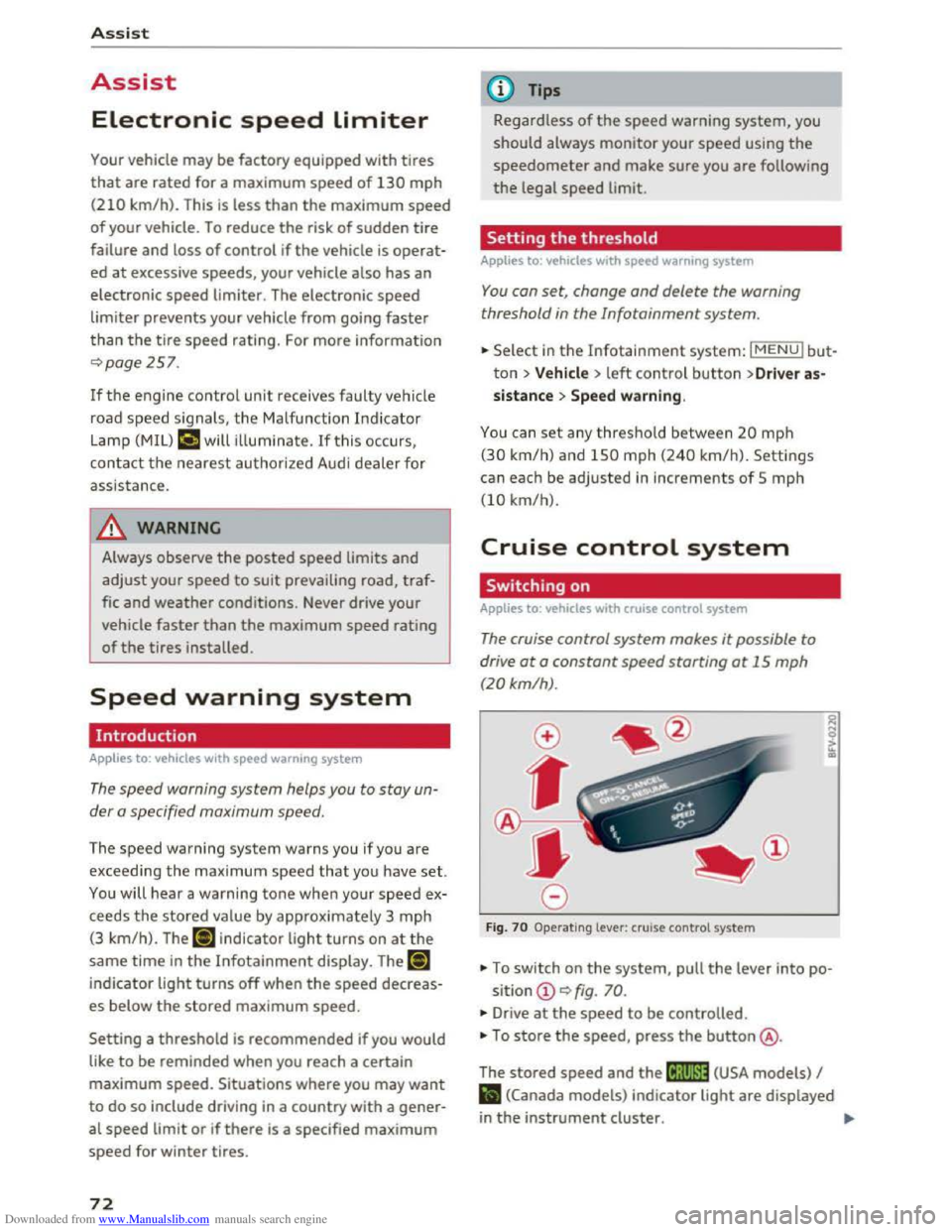
The cruise control system makes it possible to
drive
at a constant speed starting ot 15 mph
(20 km/h).
Fig . 70 Operating lever: cruise control system
... To switch on the system, pull the lever into po-
sition CD 9 fig. 70.
... Drive at the speed to be controlled.
• To store the speed, press the button@.
The
stored speed and the (lj;llJ~1# (USA models) I
Iii (Canada models) indicator light are displayed
in the instrument cluster. !)I>
Page 75 of 322
Downloaded from www.Manualslib.com manuals search engine The speed is kept constant by modifying engine
power or through an active brake intervention.
A WARNING
-Always pay attention to the traffic around
you when the cruise control is in operation.
You are always responsible for your speed
and the distance between your vehicle and
other vehicles.
- For
reasons of safety, cruise control should
not be used in the city, in stop-and-go traf
fic, on winding roads and when road condi
tions are poor (such as ice, fog, gravel,
heavy rain
and hydroplaning) -you could
have
an accident.
- Switch
the cruise control off temporarily
when driving in turning lanes, highway exits
or in construction zones.
-Please note that unconsciously "resting"
your foot on the accelerator pedal prevents
the cruise control from braking. This is due
to the control system being overridden by
the driver's acceleration.
-If a brake system malfunction such as over
heating occurs when the cruise control sys
tem is switched on, the braking function in
the system may be switched off. The rest of
the cruise control system functions remain
active as long as the (1!;(1)~14 (USA models) I
B (Canada models) indicator light is on.
@ Tips
The brake lights illuminate as soon as the
brakes apply automatically.
Changing speed
Applies to: vehicles with cruise control system
.. To increase/decrease the speed in xx mph (1
km/h) increments, briefly tap the lever up/
down in the 0 10 ¢ page 72, fig. 70 direction
to the first level.
.. To increase/decrease the speed in xx mph (10
km/h) increments, briefly tap the lever up/
down in the 010 ¢page 72, fig. 70 direction
to the second level.
Assist
.. To increase or decrease the speed quickly, hold
the lever in the 0 I 0 direction until the de
sired speed is reached.
Overriding the speed
Applies to: vehicles with cruise control system
You can press the accelerator pedal down to in
crease your speed, for example if you want to
pass someone. The speed you saved earlier will
resume as soon as you let off of the accelerator
pedal.
However, if you are exceeding the stored speed
by a considerable amount for a long time, the
cruise control system will temporarily switch off.
The
lij;lil~14 (USA model s) !Iii (Canada models) in
dicator light in the instrument cluster turns off
and the stored speed is maintained.
Preselecting the speed
Applies to: vehicles with cruise control system
You can pre-select your desired speed while the
vehicle is not moving.
.. Switch on the ignition .
.. Pull the lever into position@¢ page 72,
fig. 70.
.. To increase or decrease the speed, tap the lever
in the 010 direction.
This
function makes i t possible, for example, to
save the speed you want before driving on the
highway. Once on the exp ressway, activate the
cruise control by pulling the lever into position
@.
Switching off
Applies to: vehicles with cruise control system
Temporary deactivation
.. Step on the brake pedal, or
.. Press the lever in direction @ (not locked into
place) 9page 72, fig. 70 .
Switching off completely
.. Press the lever into position @(clicked into
place), or
.. switch the ignition off.
73
Page 82 of 322
Downloaded from www.Manualslib.com manuals search engine Assist
& WARNING
Using Audi drive select incorrectly can lead to
collisions, other accidents and serious inju
ries.
Description
Applies to: vehicles with Audi drive select
The vehicle setup in each mode depends on the
vehicle's features. However, the engine and
steering are always affected.
Engine and automatic transmission
Depending on the mode, the engine and auto
matic transmission respond more quickly or i n a
more balanced
manner to accelerator pedal
movements.
Adaptive dampers (Audi magnetic ride)*
The adaptive dampers use sensors to record in
formation regarding steering movements, brak
ing and acceleration operations by the driver,
road
surface, driving speed, and load. With dri ve
select, you can adjust the adaptive dampers to
sporty (dynamic), comfortable (comfort) or ba l
anced (auto).
Steering
The power steering adapts. Indirect steering that
moves easily as in comfort mode is especially
suited to long drives on a highway. The dynamic
mode provides sporty, direct steering.
Cruise control system*
The acceleration performance is especially fuel
efficient in efficiency* mode.
Engine sound*
The engine sound is adapted to the applied mode
and can be subtle to sporty.
@ Tips
In some models, the maximum vehicle speed
can only be reached in the auto and dynamic
modes.
80
Selecting the driving mode
Applies to: vehicles with A ud i drive select
You can select between efficiency*, comfort, au
to, dynamic and individual.
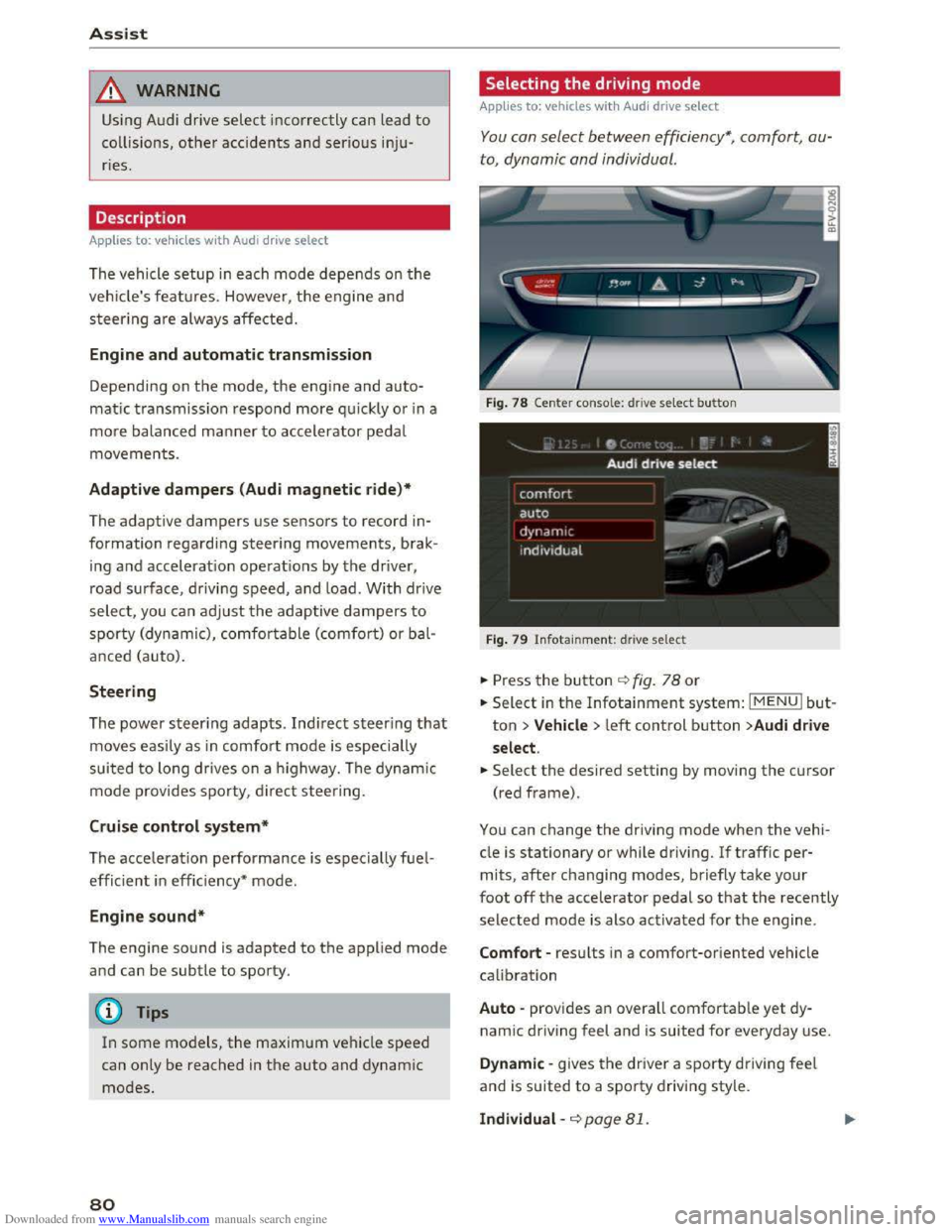
Fig. 78 Center conso le: drive select button
Fig. 79 Infotainment: drive select
.. Press the button ¢fig. 78 or
.. Select in the Infotainment system: IMENUI but
ton >Vehicle > left control button >Audi drive
select .
.. Select the desired setting by moving the cursor
(red frame).
You can change the driving mode when the vehi
cle is stationary or while driving. If traffic per
mits, after changing modes, briefly take your
foot off the accelerator pedal so that the recently
selected mode is also activated for the engine.
Comfort -results in a comfort-oriented vehicle
calibration
Auto -provides an overall comfortable yet dy
namic driving feel and is suited for everyday use.
Dynamic -gives the driver a sporty driving feel
and is suited to a sporty driving style.
Individual -¢page 81.
Page 91 of 322
Downloaded from www.Manualslib.com manuals search engine ...... N
> u. CX> ...... u:>
"' ...... u:> ......
-There is no vehicle stabilization when ESC/
ASR are switched off.
(D Tips
-When the cruise control system is switched
on, ESC/ ASR cannot be switched off or sport
mode cannot
be switched on.
- Malfunctions in the rear spoiler
or the Audi
magnetic ride may make
it impossible to
switch the ESC/ ASR off or to switch sport
mode on.
Brakes
New brake pads
New brake pads do not achieve their full braking
effect during the first 250 mi (400 km) . They
must be "broken in" first. However, you can com
pensate
for the slightly reduced braking force by
pressing
firmly on the brake pedal. Avoid heavy
braking during the break-in period.
Wear
Brake pad wear depends largely on the way the
vehicle is driven and on operating conditions.
This is especially true
if you are driving frequently
in
the city and on curves or with a sporty driving
style.
Operating noise
Noises may occur when braking depending on the
speed, braking force and outside conditions such
as temperature and humidity.
Effect of water and road salt
In certain situations, for example after driving
through water, in heavy
rain, after overnight con
densation
or after washing your car, the braking
effect can be reduced by moisture or ice on the
brake rotors and brake pads. The brakes
must be
"dried" first with a few careful brake applica
tions.
At higher speeds and with the windshield wipers
turned
on, the brake pads press against the brake
rotors
for a short amount of time. This action
which is
not felt by the driver happens at regular
Intelligent Technology
intervals and facilitates a better reaction time for
the brakes in wet weather.
T
he braking effect can also be reduced if you are
driving on salted roads and you do
not apply the
brakes for Long periods of time. The Layer of salt
on the brake rotors and pads must be worn off
first when the brakes are applied.
Corrosion
Leaving the vehicle parked for Long periods of
time, Low mileage and avoiding heavy braking
can contribute
to corrosion on the brake rotors
and
dirty brake pads.
If you usually avoid heavy braking or ifthere is
corrosion present, occasiona l heavy braking
at
high speeds is recommended to clean the brake
rotors and
pads¢.&..
Brake system malfunction
if you notice that the brake pedal travel has sud
denly gotten Larger, then a brake circuit may have
failed. Drive
to an authorized Audi dealer or au
thorized Audi Service Facility immediately to have
the problem corrected. On the way there, drive
with reduced speed and keep in mind that a Long
braking distance and increased pressure on the
brake pedal will be necessary.
Low brake fluid level
When the brake fluid Level is Low, malfunctions in
the brake system may occur. The brake fluid Level
is electronically monitored.
Brake booster
The brake booster amplifies the pressure you ap
ply to the brake pedal. It only works when the en
gine is running.
A WARNING
-New brake pads do not achieve their full
braking effect during the first 250 mi
(400 km). They must be "broken in" first.
However, you
can compensate for the
slightly reduced braking force by pressing
firmly on the brake pedal. Avoid heavy brak-
ing during
the break-in period. ~
89
Page 93 of 322
Downloaded from www.Manualslib.com manuals search engine ..... N
G: CX)
.....
"' U"I
.....
"' .....
If the indicator light turns on, the steering wheel
may be more difficult to move or more sensitive
than usual. The steering wheel may also be at an
angle when driving straight.
Drive slow ly to an authorized Audi dealer or au
thorized Audi Service Facility to have the mal
function corrected.
@ Tips
If the. or '~ij indicator light only stays on
for a short time, you may continue driving.
ALL wheel drive (quattro)
In all wheel drive, all four wheels ore powered.
General information
In all wheel drive, the driving power is divided be
tween all four wheels. This happens automatical
ly depending on your driving behavior as well as
the current road conditions. c::> page 87, Electron
ic
stabilization control (ESC).
The all wheel drive concept is designed for high
engine power. Your vehicle is exceptionally pow
erful and has excellent driving characteristics
both under normal driving conditions and on
snow and ice. Always read and follow safety pre
cautions c::> &..
Winter tires
By using all wheel drive, your vehicle has good
forward motion with standard tires in winter con
ditions. However,
in winter we recommend using
winter or all season tires on all four wheels, be
cause this will improve the broking effect.
Snow chains
If there are snow chain laws, snow chains must
also be used on vehicles with all wheel drive
c::> page 265, Snow chains.
Replacing tires
For vehicles with all wheel drive, only wheels with
the same rolling circumference should be used.
Avoid
wheels with different tread depths
c::> page 257, New tires or wheels.
Intelligent Technology
Offroad vehicle?
Your Audi is not an offroad vehicle -there is not
enough ground clearance. For this reason, avoid
difficult
terrain.
&,,!!_ARNING
-I
-Also, in vehicles with all wheel drive, adapt
your driving style to the current road and
traffic conditions. Do not let the increased
safety provided tempt you into taking risks,
because this increases the risk of an acc i
dent.
- The braking ability
of your vehicle is limited
to the traction of the wheels. In this way, it
is not different from a two wheel drive vehi
cle.
Do not be tempted to accelerate to a
h
igh speed when the road is slippery this in
creases the risk of an accident.
- Note
that on wet streets, the front wheels
can "hydrop lane" if driving at speeds that
are too high. Unlike front wheel drive
veh icl
es, the engine does not rev higher sud
denly when the vehicle begins hydroplaning .
For
this reason, pay attention to the road
conditions
regard less of your speed.
Rear spoiler
The extendoble rear spoiler increases driving sta
bility.
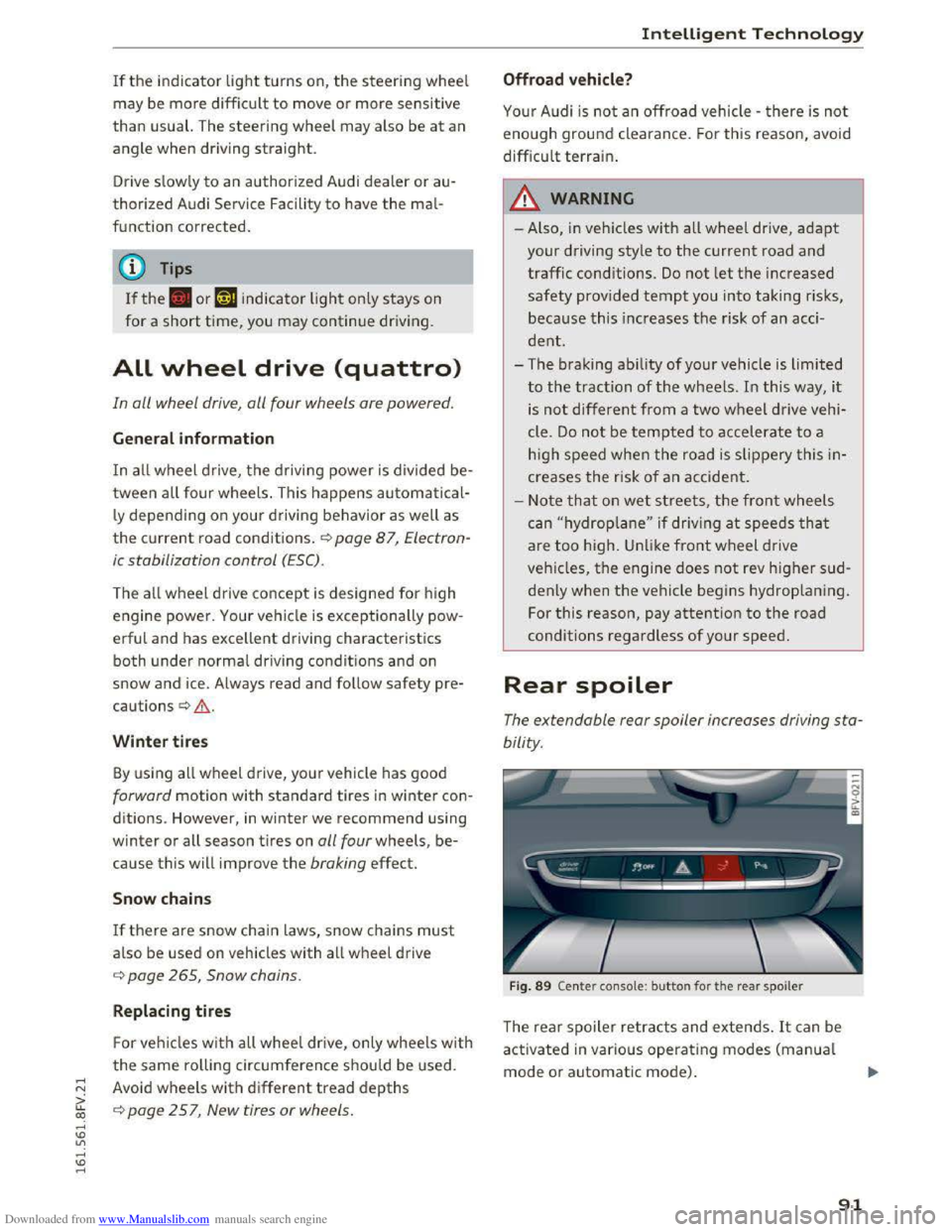
Fig. 89 Center console: button for the rear spoiler
The rear spoiler retracts and extends. It can be
activated in various operating modes (manual
mode or automatic mode) .
91
Page 116 of 322
Downloaded from www.Manualslib.com manuals search engine Telephone
Additional functions include:
Mute: if you select and confirm this function, the
other person on the phone cannot hear you. You
can hear the other person .
Hold call/
Resume: you can place the existing call
on hold and resume it again . To resume the call,
select and confirm the call you would like to re
sume.
Transfer call to cell phone* : select and confirm
Transfer call to cell phone to transfer the exist
ing call
from the MM! to your cell phone .
Switch
to hands-free mode*: select and confirm
Switch
to hands-free mode to transfer the call
from your cell phone back to the MMI.
Toggle call:
alterna te between two phone calls
w hile one
of the ca lls is on hold. Selecting End
call will end
the active phone call. A pho ne call on
h old can be
resumed through the right control
bu
tton > Resume.
Add
to conference: a party on hold and up to five
active
parties (depending on the network) can be
added to a conference call. To make an additional
call,
put all parti c ipants in the current conference
call on hold
using the right control button > Hold
conference. Press the left control button. Select
and confirm Call
list/Directory /Favorites > Entry
in list.
You can add called contacts to the confer
ence using the right contro l button >Add to con·
ference. Resume takes all parties off hold.
3-way conferencing : selec t the right control bu t
ton > Telephone settings> Call options. Wh en
the function is sw itched on g you can accept an
a dd
itio nal call using Accept call or i gno re a call
using Ignore call . W hen the function is switched
off, you can Replace
the call or Ignore call .
Connection
manager: Q page 167.
Telephone settings: Qpage 119.
(D Tips
-To be notified of an incoming call during a
phone call, the Call waiting function in your
cell phone
must be switched on when using
the hands-free profile (Handsfree).
114
-You can obtain more information from your
cell phone service provider
or from your cell
phone
user guide.
- The display
of an incoming phone call in the
Infotainment display may still be visib le for
a few seconds depending on the cell phone
in use. Using the Replace or Ignore func
tions may then end the active phone call.
Favorites
Applies to: veh icles with telephone
Up to SO contacts, in addition to the voicemail
number, can be stored in any order in the favor
ites list.
.. Se le ct : IMENUI button> Telephone> left con
trol button .
-
Storing an existing phone number as a favor
ite : select and confirm Call list/Contacts. Se
lect and confi rm a contact in the list. Select a
phone number. Select the right control button
> Store as favorite . Enter a name for the favor
ite or select a suggestion. Select and confirm
with Save.
-Renaming a stored favor ite: select and confirm
Favorites >
a favorite from the list. Select the
right control button >Rename favorite.
- Moving a
stored favorite: select and confirm
Favorites >
a favorite from the list. Select the
right control button >Move favorite . Select
and confirm
the locat ion of the selected favor
ite.
-
Deleting a stored favorite : select and con fir m
Favorites >
a favorite from the list. Se lec t th e
r
ight control button > Delete favorite > Delete
this favorite/Delete all favorites.
Messages
Text message
Appl ies to: vehicles with Audi connect and cell phone with
B
luetooth Message Access Profile (MAP)
Depending on the type of cell phone being used
and the cell phone plan, you can rece ive and
send text messages through the MM!.
Requirement .,..
Page 128 of 322
Downloaded from www.Manualslib.com manuals search engine Audi connect
Wi-Fi Hotspot
Applies to: vehicles with Wi-Fi hotspot
You con use the MMI as a Wi-Fi hotspot to con
nect up to eight Wi-Fi devices to the Internet.
While driving, restricted use
of non-secured,
light, small wireless devices is only possible from
the rear of the vehicle.
Requirement: the ignition must be switched on.
.,. Select: I MENU I button >Telephone > right con
trol button > Wi-Fi settings.
The
following settings can be modified in the Wi·
Fi settings menu:
Wi-Fi mode
The MMI Wi-Fi hotspot is deactivated at the fac
tory. Switch the Wi-Fi hotspot to Hotspot before
establishing a connection between your vehicle
and your Wi
-Fi device.
-
Hotspot: the MMI Wi-Fi hotspot is active and
visible
to other devices. A connection can be es
tablished with new wireless devices.
-
Hotspot and client: the MMI Wi-Fi hotspot is
active. An internet connection to a personal Wi
Fi hotspot (such as a smartphone) can be estab
lished. Using Network searc h c:? page 126, you
can search for your personal hotspot and con
nect to the MMI.
-
Off: the MMI Wi-Fi hotspot is deactivated. An
Internet connection is not possible.
Hotspot settings
The Wi-Fi connection between your vehicle and
your Wi-
Fi device (laptop, cell phone) is e ncr ypt
ed. To establish a connection, you must enter the
following values when setting up your wireless
device.
You can change them if necessary.
- Access
point (SSID): name of the Wi-Fi net
work.
-
Passwo rd: a random password was set at the
factory for the MMI. The password can be
changed. The WPA2 encryption method
re
quires a password to be at least 8 characters
long. Select a secure password.
- Visible
to others : your Wi-Fi network visibility
can be switched on or off.
126
Network search*
A list of available Wi-Fi networks in your area is
displayed.
A WARNING
~ --As the driver, do not allow usage of the Wi-
Fi hotspot to distract you from driving, as
this could increase the risk of an accident.
-
It is only safe to use laptops and similar mo
bile devices when the vehicle is stationary
because, like
all loose objects, they could be
thrown around the inside of the vehicle in a
crash and cause serious injuries. Store these
t ypes
of devices securely while driving.
-
Do not use any wireless devices on the front
seats within range of the airbags while driv
ing. Also note the warnings in the "Airbag
System" chapter under "Important Informa
tion on the Front Airbag System"
c:? page 192, Front airbags.
@Note
You are responsible for all precautions taken
for data protection, anti-virus protection and
protection against loss
of data on mobile de
vices that are used to access the Internet
through the Wi-Fi hotspot.
(D Tips
-A separate, paid mobile subscription may be
needed
to use the Wi-Fi hotspot. You can
obtain more information from your cell
phone servi
ce provider.
- Being able
to receive the data packet from
th e internet via the Wi-Fi hotspot, may re
sult in add itiona l costs, especially when op
erating in foreign countries, depending on
your cellular phone plan: the use
of a flat
rate data plan is highly recommended! You
can obtain more information from your cell
phone service provider.
-Additional information can be found under
www.audiusa.com/audiconnect