USB AUDI TT COUPE 2016 User Guide
[x] Cancel search | Manufacturer: AUDI, Model Year: 2016, Model line: TT COUPE, Model: AUDI TT COUPE 2016Pages: 322, PDF Size: 52.86 MB
Page 159 of 322
Downloaded from www.Manualslib.com manuals search engine Media
Supported media and file formats
Overview
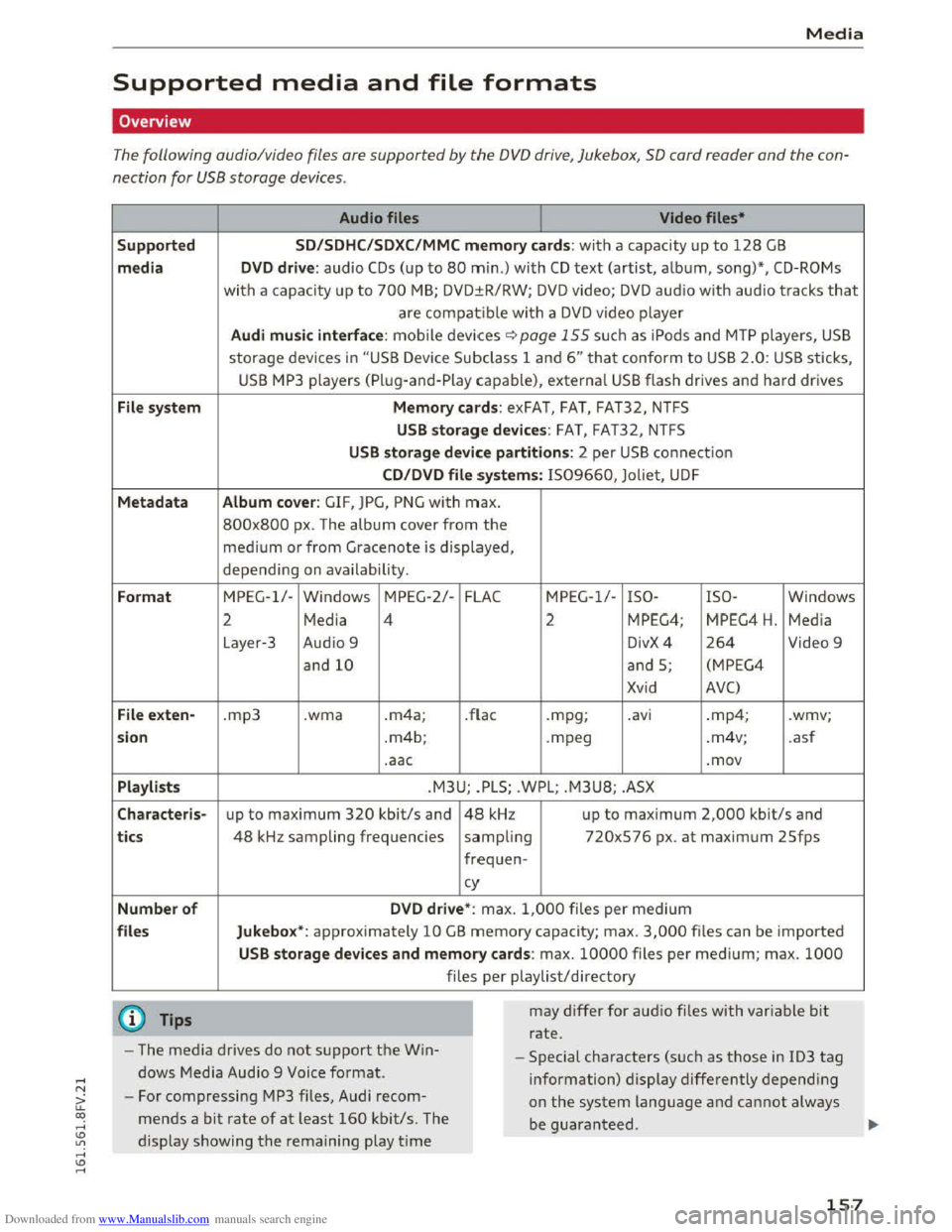
The following audio/video files are supported by the DVD drive, Jukebox, SO card reader and the con
nection
for USB storage devices.
Suppo rted
media
File sy s
tem
M etadata
Form at
File ex
ten-
sio n
Pla ylis ts
C haracte
ris-
t
ics
Number of
files Audio
files
Video files•
SD/SDH C/S DXC/MMC memory cards: with a capacity up to 128 GB
DVD drive: audio CDs (up to 80 min.) with CD text (artist, album, song)*, CD-ROMs
with a capacity up to 700 MB; DVD±R/RW; DV D video; DVD aud io w ith audio tracks that
are compatible with a DVD video player
Audi music interface : mobile devices ~page 155 su ch a s iPods and MTP players, USB
storage devices in "USB Device Subclass 1 and 6" that conform to USB 2.0: USB sticks,
USB MP3 p layers (Pl ug-and-Play capable), external USB flash drives and hard drives
Memory cards: exFAT, FAT, FAT32, NTFS
USB storage devices: FAT, FAT32, NTFS
USB storage device partitions: 2 per USB conne ct ion
C D /DVD file systems: IS09660, Joliet, UDF
Album cov er : GIF, JPG, PNG with max.
800x800 px . The album cover from the
medium or from Gracenote is displayed,
depending on availabili ty.
MPEG-1/-Windows MPEG-2/-FLAC MPEG-1/-ISO- ISO-Windows
2 Media 4 2 MPEG4; MPEG4 H. Media
Layer-3
Audi o 9 DivX4 264 Video 9
and
10 and S; (MPEG4
Xvid AVC)
.mp3 .wma .m4a; .flac .mpg; .a vi .mp4; .wmv;
. m4b;
.mpeg .
m4v;
.asf
.aac .mov
.M3U; .PLS; .WPL; .M3U8; .ASX
up to maximum 320 kbit/s and 48 kHz up to maximum 2,000 kbit/s and
48 kHz sampling frequencies
sampling 720xS76
px. at maximum 2Sfps
frequen- cy
D VD driv e*: max. 1,000 files per medium
Jukebo x*: approximately 10 GB memory capacity; max. 3,000 files can be imported
U SB storage devices and memory cards: max. 10000 files per med ium; max. 1000
files per playlist/directory
may
differ for aud io files with var iable bit
rate.
- The media drives do
not support the Win
dows Media Audio 9 Voice
format.
- Special characters (such as those in ID3 tag
information) display differently depend ing
on
the system language and cannot always
be guaranteed .
-
For compressing MP3 files, Audi recom
mends a
bit rate of at least 160 kbit/s. The
display showing
the remaining play time
157
Page 160 of 322
Downloaded from www.Manualslib.com manuals search engine Media
-The manufactu rer of the storage device can
provide information about its "USB Device
Subclass" .
-Some MTP player fu nctions are not support
ed, su
ch as rating music tracks and video
playback.
CD drive
Applies to: vehi cles with a CD drive
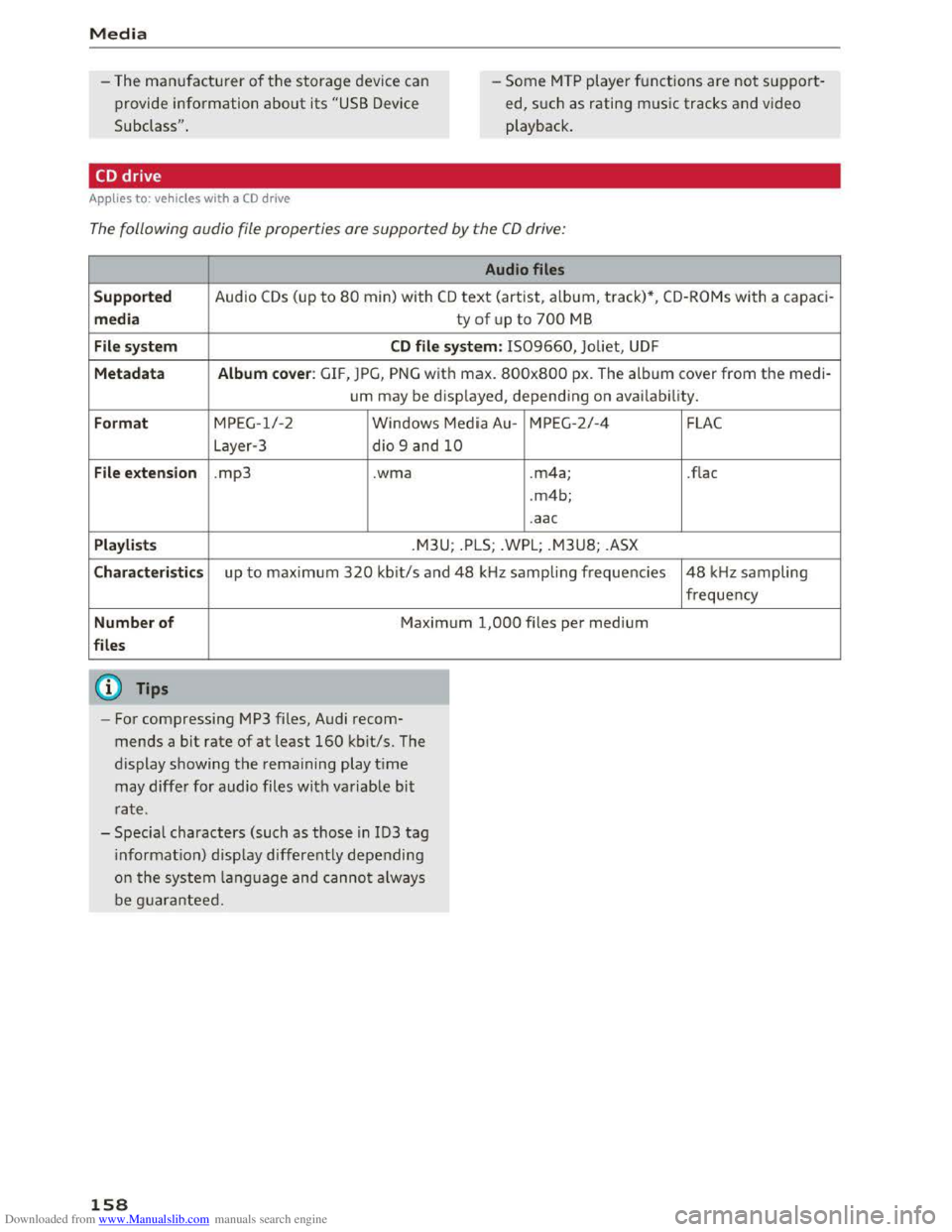
The following audio file properties are supported by the CD drive:
Audio files
Supported Audio CDs (up to 80 min) with CD text (artist, album, track) *, CD-ROMs with a capac i-
media ty of up to 700 M B
File system CD file system: 1509660, Joliet, UDF
Metadata Album cover : GIF, JPG, P N G w it h max . 800x800 px. The album cover from the medi-
um may
be disp layed, depend ing on avai lab ility.
Format MPEG-1/-2
Windows Media Au-MPEG -2 /-4
L ayer-3 dio 9 and
10
File extension .mp3 .wma .m4a;
.
m4b;
.aac
Playlists .M3U; . P LS; .WPL; .M3U8; .ASX
Characteristics up to maximum 320 kb it/s and 48 kHz sampling frequencies
Number of Maximum 1,000 files per medium
files
@ Tips
- For compressing MP3 files, Audi recom
mends a
bit rate of at least 160 kbit/s. The
display sh owing
the remaining play time
may
differ for audio files with var iable bit
ra te .
- Specia l characters (such
as those in ID3 tag
i
nformati o n) disp lay differently depending
o n
the system la nguage and cannot always
b e g uarantee d.
158
FLAC
.flac
48 kH z sampling
frequency
Page 161 of 322
Downloaded from www.Manualslib.com manuals search engine .... N
G'. co ..... ID VI .... ID .....
Playing media
Accessing media
You can start and operate various media
through the MMI control panel.
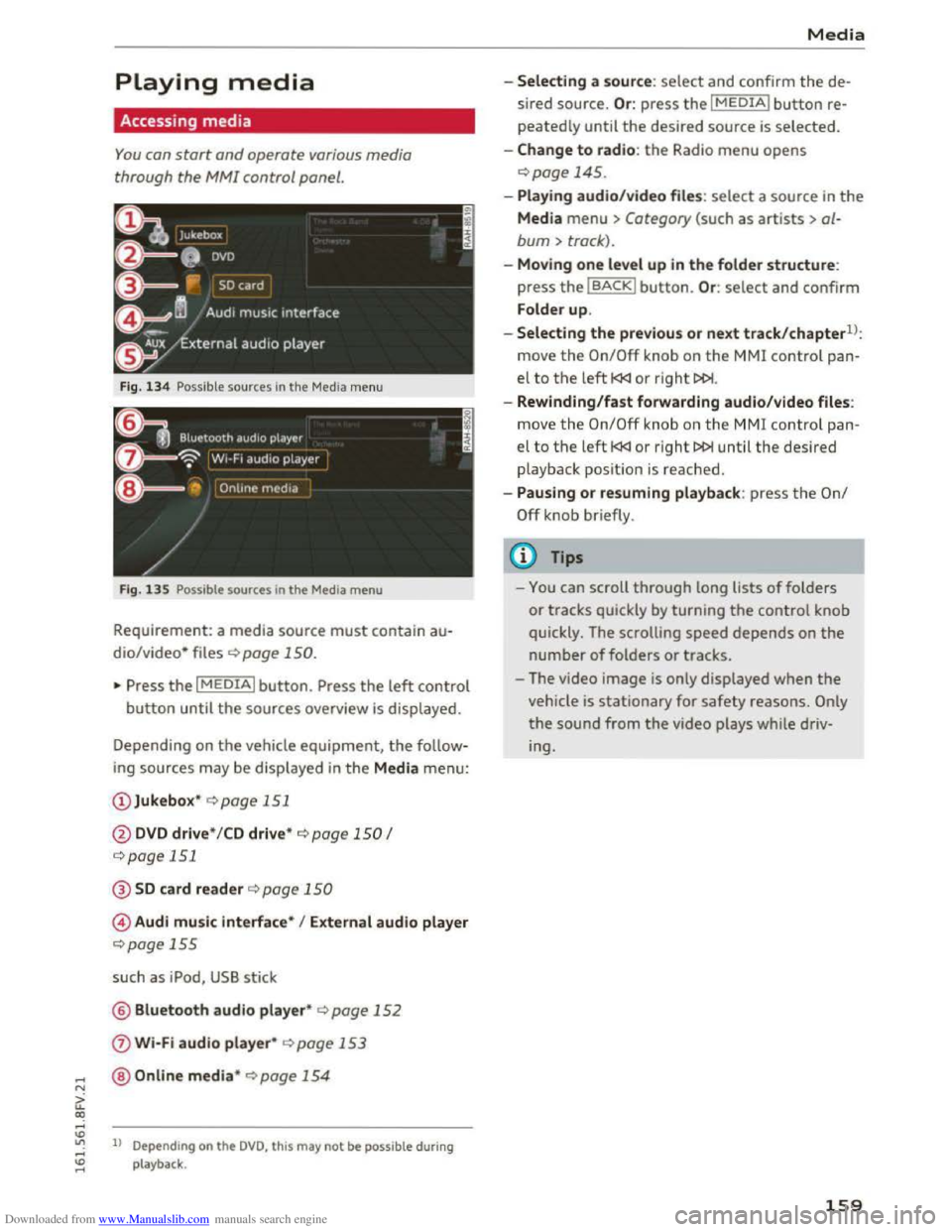
Fig. 134 Possible sources in the Media menu
F ig .
135 Possible sources in the Media menu
Requirement: a media source must contain au
dio/video* files c::> page 150.
"Press the I MEDIAi button. Press the left control
button until the sources overview is displayed.
Depending on
the vehicle equipment, the follow
ing sources may be displayed in the Media menu:
@ Jukebox* c::>page 151
@DVD drive * /CD drive* c::> page 150 I
c::>page 151
@SD card reader c::> page 150
© Audi music interface* I External audio player
c::>page 155
such as iPod, USB stick
@ Bluetooth audio player* c::> page 152
0 Wi-Fi audio player* c::> page 153
@Online media* c::>page 154
ll Depend ing on the DVD, this may not be possible during
playback .
Media
-Selecting a source: select and confirm the de
sired
source. Or : press the I MEDIAi button re
peatedly until the desired source is selected.
-Change to radio: the Radio menu opens
c::> page 145.
-Playing audio/video file s: select a source in the
Media menu > Category (such as artists > al
bum > track).
-Moving one level up in the folder structure:
press the IBACKI button. Or : select and confirm
Folder
up.
-
Selecting the previous or next track/chapterll:
move the On/Off knob on the MMI control pan
el to the left l
-Rewinding/fast forwarding audio/video files:
move
the On/Off knob on the MMI control pan
el to the left l
playback posit ion is reached .
-
Pausing or resuming playback: press the On/
Off knob briefly.
(D Tips
-You can scroll through long lists of folders
or tracks quickly by turning the control knob
quickly. The scrolling
speed depends on the
number of folders or tracks.
- The video
image is only displayed when the
vehicle is stationary for safety reasons. Only
the sound from the video plays while driv
ing.
159
Page 162 of 322
Downloaded from www.Manualslib.com manuals search engine Media
Media center
Various categories for selecting audio/video*
files are available
in the media center.
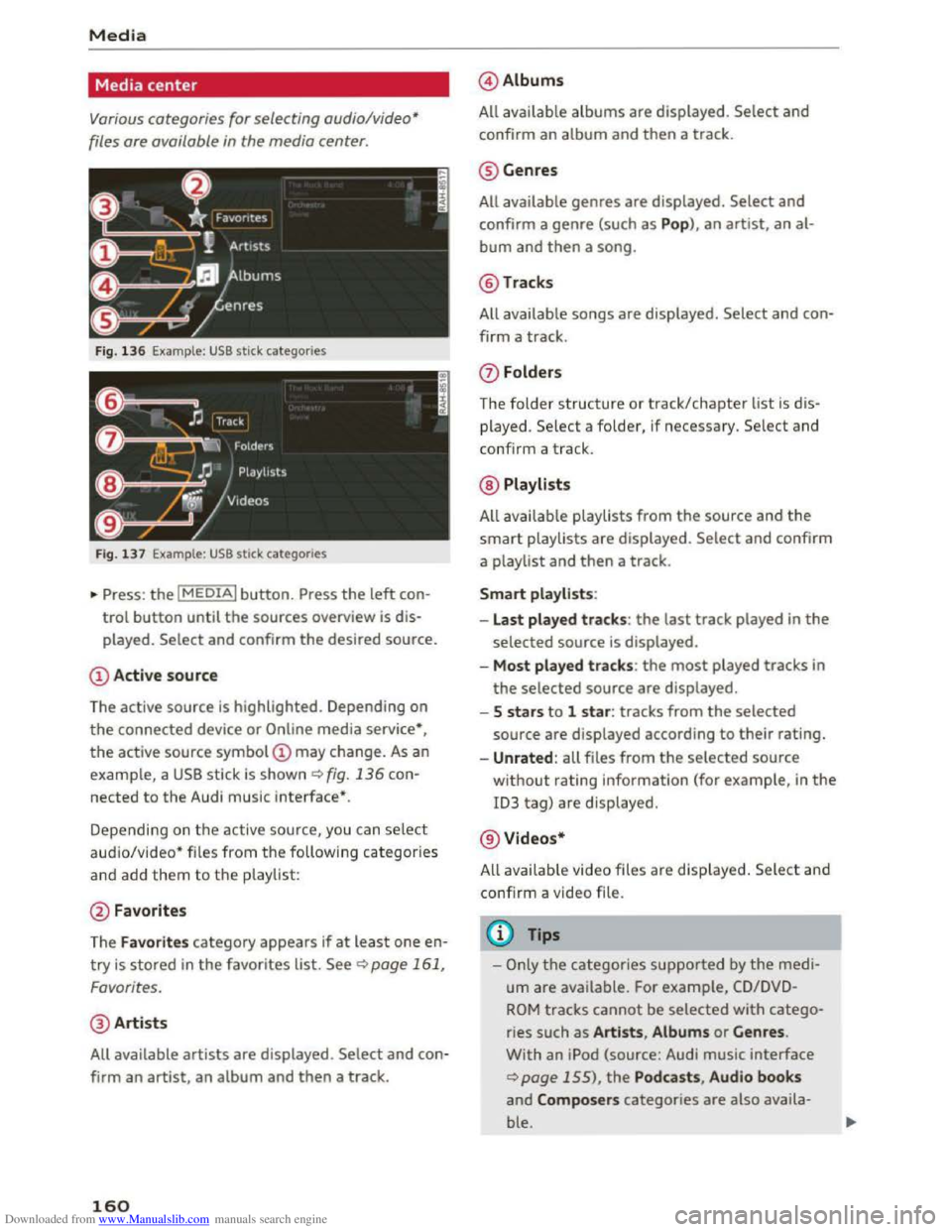
Fig. 136 Example : USB stick categories
Fig. 137 Example: USB stick categorie s
•Press : the I MEDIAi button. Press the left con
trol button until the sources overview is dis
played.
Select and confirm the desired source.
(!) Active source
The active source
is highlighted. Depending on
the connected device or Online media service*,
the active source symbol @ may change. As an
example, a USB stick is shown¢ fig. 136 con
nected to the Audi music interface*.
Depending on
the active source, you can select
aud io/video* files from the following categories
and add them to the p laylist:
@ Favorites
The
Favorites category appears if at leas t one en
try is stored in the favorites list. See¢ page 161,
Favorites.
@ Artists
All available artists are displayed . Select and con
firm
an artist, an album and then a track.
160
@ Albums
All available
albums are displayed . Select and
confirm
an album and then a track.
@ Genres
All available genres are displayed. Select and
confirm a genre (such as Pop), an artist, an al
bum and then a song.
@Tracks
All available songs are displayed. Select and con
firm a
track.
0 Folders
The
folder structure or track/chapter list is d is
played. Select a folder, if necessary. Select and
confirm a track.
@ Playlists
All avai l
able playlists from the source and the
smart playlists are displayed. Select and confirm
a playlist and
then a track.
Smart playlists :
- Last played
tracks: the last track played in the
selected source is displayed.
-Most p lay ed track s: the most played tracks in
the selected source are displayed.
- 5 stars to 1 star : tracks from the selected
source are displayed according to their rating.
-Unrated : all files from the selected source
without rating information (for example, in the
ID3 tag) are displayed.
@ Videos*
A ll availab le video files
are displayed. Select and
confirm a video file.
@Tips
-Only the categories supported by the medi
um are available. For example, CD/DVD
ROM tracks cannot be selected with catego
ries such as Artists , Album s or Genres .
With an iPod (source: Audi music interface
¢page 155), the Podcasts , Audio books
and Composers categories are also availa
ble.
Page 164 of 322
Downloaded from www.Manualslib.com manuals search engine Media
-Move favorit e: select the desired entry from
the favorites list. Select the right control but
ton > Move fa vorite. Select and confirm the
desired presets lo cation.
- Deleting a fa vo rite:
select the desired entry
from the favorites list. Select the right control
button > Delete favorite > Delete this favorite
or Delete all favorites.
Additional settings
Options menu
Context-specific functions and settings are avail
able depending on the selected source.
.. Press the right control button.
Sound settings
See Q page 169.
Input level
Requirement: a mobile device must be connected
to the AUX connection cable* or to a USB adapt
er*.
The volume
of the mobile device is adapted to
the MMI. Audi recommends adjusting the volume
on
the mobile device to 70o/o of the maximum
volume
output.
Bluetooth settings
See Q page 168.
Connection manager
See Qpage 167.
Additional track information
When the function is switched on~ and a play
list is open, various information
about the cur
rent track (such as artist, album, album cover*)
as well as the elapsed playing time and the re
maining playing time are displayed .
ll The func tion automatically switc hes off when th e sou rce
is ch
anged.
162
Jukebox memory capacity
Information on the Jukebox memory capacity and
the number of stored tracks in the Jukebox is dis
played.
Change playing position
Turn the control knob to the left or to the right.
Or: move your finger across the MMI touch con
trol pad from left to right.
Shuffle1>
With the function switched on~' all files in the
playlist are played and shown in random order.
Repeat trackll
When the funct ion is switched on~, the current
track repeats.
Back
to "Now playing"
The options menu is closed. The track being cur
rently played
appears in the playlist.
Play
similar music*
The track being played is quickly analyzed (such
as artists, genres, mood , beat) and a smart play
list with similar
tracks is shown.
Play more ...
A
smart playlist is shown based on the track be
ing played. You can select between a playlist with
more tracks by this artist, from this album or of
this genre.
Gracenote online database*
Requirement : the MMI must be connected to the
Internet.
Depending on ava
ilability, various information
will
Load about the track being currently played
when
this function is switched on~.
Copy to jukebox
See Q page 151 , Adding to the Jukebox.
Favorites
See ~page 161.
Page 305 of 322
Downloaded from www.Manualslib.com manuals search engine c
Cable (USB adapter/AUX connection cable) 1S5
California Proposition 65 Warning . . . . . . . 237
Battery specific . . . . . . . . . . . . . . . . . . . . . 246
Call
Accepting/rejecting . . . . . . . . . . . . . . . . . . 113
Holding/resuming . . . . . . . . . . . . . . . . . . . 113
Call list . . . . . . . . . . . . . . . . . . . . . . . . . . . . . 112
Call waiting (telephone) . . . . . . . . . . . . . . . . 119
Canceling route guidance . . . . . . . . . . . . . . . 136
Capacities
Fuel tank. . . . . . . . . . . . . . . . . . . . . . . . . . . 299
Washer fluid reservoir . . . . . . . . . . . . . . . . 299
Care . . . . . . . . . . . . . . . . . . . . . . . . . . . . . . . . 270
Cargo area
refer to Luggage compartment . . . . . . . . . 176
Catalytic converter . . . . . . . . . . . . . . . . . . . . 23S
CD ..... .. .. .. .. ............. .. . 150, 151
Cell phone
Audi phone box . . . . . . . . . . . . . . . . . . . . . 111
Connecting . . . . . . . . . . . . . . . . . . . . . . . . . 110
Playing music . . . . . . . . . . . . . . . . . . . . . . . 152
also refer to Telephone . . . . . . . . . . . . . . . 110
Cell phone compartment
refer to Audi phone box.......... .. .. . 111
Central locking . . . . . . . . . . . . . . . . . . . . . . . . 2S
Central locking switch . . . . . . . . . . . . . . . . . 29
Convenience key . . . . . . . . . . . . . . . . . . . . . . 28
Emergency locking . . . . . . . . . . . . . . . . . . . . 30
Luggage compartment lid . . . . . . . . . . . . . . 30
Power windows . . . . . . . . . . . . . . . . . . . . . . 32
Remote control key . . . . . . . . . . . . . . . . . . . 27
Setting . . . . . . . . . . . . . . . . . . . . . . . . . . . . . 29
Certification . . . . . . . . . . . . . . . . . . . . . . . . . 297
Changing engine oil . . . . . . . . . . . . . . . . . . . 241
Changing light bulbs . . . . . . . . . . . . . . . . . . 287
Changing the scale . . . . . . . . . . . . . . . . . . . . . 20
Characters
Map... .. .. .. .. ............. .. .. .. . 139
Navigation . . . . . . . . . . . . . . . . . . . . . . . . . 139
Charging the battery .............. 111, 155
Child restraint
Danger of using child restraints in the front
seat... .. .. .. .. ............. .. ..... 189
Index
Child restraints
Where can I get additional information
about child restraints and their use? . . . . 230
Child restraint system anchors . . . . . . . . . . 226
Child safety . . . . . . . . . . . . . . . . . . . . . . . . . . 212
Important safety instructions for us ing child
safety seats . . . . . . . . . . . . . . . . . . . . . . . . 215
Tether anchors . . . . . . . . . . . . . . . . . . . . . . 228
Tether straps . . . . . . . . . . . . . . . . . . . . . . . 228
Child safety seat
Unused safety belts on the rear seat 217
Child safety seats
Booster seats . . . . . . . . . . . . . . . . . . . . . . . 221
Convertible child seats . . . . . . . . . . . . . . . 219
How do I properly install a child safety seat
in my vehicle? .. .. ................... 215
Infant seats . . . . . . . . . . . . . . . . . . . . . . . . 218
Installing a child restraint using the LATCH
system ......... .. ................. 227
LATCH system . . . . . . . . . . . . . . . . . . . . . . 227
Lower anchorages . . . . . . . . . . . . . . . . . . . 227
Mounting and releasing the anchorage
hook ....... .. .. ................... 227
Safety instructions................... 215
Child seats . . . . . . . . . . . . . . . . . . . . . . . . . . 218
Securing . . . . . . . . . . . . . . . . . . . . . . . . . . . 223
Cigarette lighter . . . . . . . . . . . . . . . . . . . . . . . 47
City events (Audi connect) . . . . . . . . . . . . . . 123
Cleaning . . . . . . . . . . . . . . . . . . . . . . . . . . . . 270
Cleaning/removing ice from windows . . . . . 272
Cleaning Alcantara . . . . . . . . . . . . . . . . . . . . 273
Cleaning artificial leather . . . . . . . . . . . . . . . 273
Cleaning carbon parts . . . . . . . . . . . . . 272, 273
Cleaning controls . . . . . . . . . . . . . . . . . . . . . 272
Cleaning decorative parts and trim ... 271, 272
Cleaning displays . . . . . . . . . . . . . . . . . . . . . 272
Cleaning exhaust tail pipes . . . . . . . . . . . . . 271
Cleaning plastic parts . . . . . . . . . . . . . . . . . . 272
Cleaning rims . . . . . . . . . . . . . . . . . . . . . . . . 271
Cleaning seat covers . . . . . . . . . . . . . . . . . . . 273
Cleaning tail lights . . . . . . . . . . . . . . . . . . . . 271
Cleaning textiles . . . . . . . . . . . . . . . . . . . . . . 273
Cleaning the Audi virtual cockpit . . . . . . . . . 272
Cleaning the instrument cluster . . . . . . . . . 272
303
Page 317 of 322
Downloaded from www.Manualslib.com manuals search engine .....
Temperature display
Exterior
temperature . . . . . . . . . . . . . . . . . . 19
Temperature indicator
Coolant . . . . . . . . . . . . . . . . . . . . . . . . . . . . . . 8
T ether anchors . . . . . . . . . . . . . . . . . . . . . . .
228
Tether strap . . . . . . . . . . . . . . . . . . . . . . . . . 228
Text message .. .................. 114, 115
Sending a contact . . . . . . . . . . . . . . . . . . . 118
Text messages
refer to Text message . . . . . . . . . . . . 1 14, 115
Tie-downs . . . . . . . . . . . . . . . . . . . . . . . . . . .
177
Time . . . . . . . . . . . . . . . . . . . . . . . . . . . . 23 , 166
tiptronic (automatic transmission) . . . . . . . . 68
Tire Mobility System (tire repair set) . . . . . . 275
Tires .. .. .. .. .. ................. .. .. . 250
A ll wheel drive . . . . . . . . . . . . . . . . . . . . . . . 91
L ow aspect ratio tires . . . . . . . . . . . . . . . .
265
Repair set .. .. ................. .... . 275
Replacing . . . . . . . . . . . . . . . . . . . . . . . . . . 277
Service life . . . . . . . . . . . . . . . . . . . . . . . . . 258
Tire pressure . . . . . . . . . . . . . . . . . . . . . . . 260
Tire pressure monitoring system . . . 26 7, 268
Tire pressure ta ble . . . . . . . . . . . . . . . . . . . 261
Tread wear indicators . . . . . . . . . . . . . . . .
258
Unidirectional . . . . . . . . . . . . . . . . . . . . . . . 252
Uniform
tire quality grading . . . . . . . . . . . 266
T ires and wheels
Glossary
of tire and loading terminology . 252
Tires and vehicle load limits . . . . . . . . . . . 262
TMC/TMCpro
re fer to Traffic information (TMC) . . . . . . 143
Tone (sound) . . . . . . . . . . . . . . . . . . . . . . . . . 169
Tool .... .. .. .. .. ............. .. .. .. . 275
Towing
Tow trucks . . . . . . . . . . . . . . . . . . . . . . . . .
290
Towing loop . . . . . . . . . . . . . . . . . . . . . . . . . 275
TPMS (tire pressure monitoring system) . . . 268
Traffic information (TMC) . . . . . . . . . . . . . . 142
Opening . . . . . . . . . . . . . . . . . . . . . . . . . . . 143
Reading aloud . . . . . . . . . . . . . . . . . . . . . .
143
Showing on the map . . . . . . . . . . . . . . . . . 143
Volume . . . . . . . . . . . . . . . . . . . . . . . . . . . .
169
Transmission malfunction (indicator light) . . 70
r.1 Transport Canada . . . . . . . . . . . . . . . . . . . . . 178
a: co Treb le (sound) . . . . . . . . . . . . . . . . . . . . . . . 169 .....
Troub leshooting
Audi connect . . . . . . . . . . . . . . . . . . . . . . .
130
Media drives . . . . . . . . . . . . . . . . . . . . . . . . 164
Navigation . . . . . . . . . . . . . . . . . . . . . . . . . 144
Radio . . . . . . . . . . . . . . . . . . . . . . . . . . . . . 148
Telephone . . . . . . . . . . . . . . . . . . . . . . . . . . 120
Turn signals . . . . . . . . . . . . . . . . . . . . . . . . . . 37
T w i
tter (Aud i connect) . . . . . . . . . . . . . . . . . 124
u
Unfastening safety belts . . . . . . . . . . . . . . . 186
Uniform tire quality grading . . . . . . . . . . . . 266
Units of measurement
Unlocking/locking 166
by remote control . . . . . . . . . . . . . . . . . . . . 27
with the central locking switch . . . . . . . . . . 29
with the convenience key. . . . . . . . . . . . . . . 28
Unlocking and locking
On the door lock cylinder . . . . . . . . . . . . . . . 30
Updating station (radio) . . . . . . . . . . . . . . . . 145
USB adapter (Audi) . . . . . . . . . . . . . . . . . . . . 155
USB stick
refer to Audi music interface . . . . . . . . . . . 155
Using Audi connect services
MMI control panel . . . . . . . . . . . . . . . . . . . 121
Voice recognition system 106
v
Vanity mirror . . . . . . . . . . . . . . . . . . . . . . . . . . 40
Vehicle
Care/cleaning . . . . . . . . . . . . . . . . . . . . . . .
270
Dimensions . . . . . . . . . . . . . . . . . . . . . . . . . 299
Out of serv ice . . . . . . . . . . . . . . . . . . . . . . . 274
Vehicle identification label . . . . . . . . . . . . . 298
V ehicl e Identification Number (VIN) . . . . . . 298
Vehicle jack ... .. .. ........... 275, 280, 283
Vehicle
tool kit . . . . . . . . . . . . . . . . . . . . . . . 275
Version information . . . . . . . . . . . . . . . . . . . 166
View (multifunction steering wheel) . . . . 20, 22
Voice guidance . . . . . . . . . . . . . . . . . . . . . . .
138
During a call . . . . . . . . . . . . . . . . . . . . . . . . 138
T raffic . . . . . . . . . . . . . . . . . . . . . . . . . . . . . 138
also refer to Multifunction
steering wheel .
................ 20, 21, 22
Voice
mail . . . . . . . . . . . . . . . . . . . . . . . . . . . 116
315