ad blue AUDI TT COUPE 2016 User Guide
[x] Cancel search | Manufacturer: AUDI, Model Year: 2016, Model line: TT COUPE, Model: AUDI TT COUPE 2016Pages: 322, PDF Size: 52.86 MB
Page 118 of 322
Downloaded from www.Manualslib.com manuals search engine Telephone
Writing a new e-mail
-Usi ng a template : select and confirm the de
sired template from the list.
- Ente r
one or more recip ients.
-Select and confirm Send .
In
box
All received e-mails are d isplayed.
S ent
All sent e-mails are d isplayed.
Outbox
All e-mails to be sent are displayed.
Draft s
All e-mails that have not yet been sent and saved
e-mails are d isplayed .
- For
more information on supported cell
phones, vis it www .audiusa.com/bluetooth
or contact your authorized Audi dealer or
authorized Audi Service Facility .
-
To ensure that e-mai ls will be sent and re
ceived, connect your cell phone to the Wi-Fi
Hotspot* in
the vehicle so that the e -mail
app o n your cell phone maintains internet
access. If you are not receiving e-mails de
spite havi ng a succe ssful connection, con
tact your e-mail service provider or your cell
phone service provider.
Message options
Applies to: cell phones with Bluetooth Message Access Profile
~Select: I MENU I button >Telephone > left con
trol button > E-mail (c ell pho ne)> In box/Sent /
Outbo x
> right control button.
The follow ing options may be availab le, depend
ing on the selected menu.
Store as template
Ten e-mail templates are stored in the M MI. You
can save up
to ten additional templates.
-Create an e-mail.
-
Select and confirm Stor e as te mpl ate.
116
Resume last edited e-mail
The last edited e-mail can be resumed.
Replying*
A reply can be sent for the selected e-mail in the
In box.
Reply to all*
A reply can be sent for the selected e-mai l in the
Inbox and it will be sent to all of the entered re
cipients.
Forward
The selected e -mail can be forwarded to a differ
ent recipient .
Delete this message*
The selected e-mail can be deleted.
Conne ction manager
See c:> page 167.
Telephone settings
See <=>page 119.
@ Tips
Messages that are deleted in the MMI are also
a u
tomatically deleted in the connected ce ll
phone.
Listening to voicemail
Appl ies to: vehicles with telephone
~Select: IMENUI button> Telephone > left con
trol button. Select and confirm Call list /Direc
tory /
Favor ites > Voicem ail.
- Ente ring
the voicemail number: enter the de
sired number. Select and confirm OK.
-Dialing the voicemail number : select and con
firm Voicemail.
@Tips
- This servi ce must be set up a nd acti va ted in
adva n
ce in the cell phone network. You can
obtain more information from your cell
phone service provider.
Page 119 of 322
Downloaded from www.Manualslib.com manuals search engine -The voicemail number depends on the cell
phone service provider.
Emergency call functions
Applies to: vehicles with telephone
.. Select: I MENU I button >Telephone > left con
trol button > Enter numbe r > Enter emergency
call
number (for example, 911) > OK .
A WARNING
-
-Because your phone works with radio sig
nals, a connection
cannot be guaranteed un
der all circumstances. Do not rely on only
your
phone when it comes to essential com
munication (such
as a medical emergency).
-Always follow the instructions given by the
emergency personnel during an emergency
call and only end the call when they instruct
you
to do so.
Tips
Emergency numbers are not the same every
where. Find out which emergency number is
used in your current location.
Directory
· Opening the directory
Applies to: vehicles with telephone
After connecting the cell phone, the contacts in
it are automatically imported into the MM!.
.. Select: I MENU I button >Telephone > left con
trol button > Directory.
- Selecti
ng a contact : select and confirm a con
tact from the directory. The phone numbers for
your
selected contact open. Select and confirm
a
phone number to start a call.
-Free text search for a contact : refer to
Qpage 102.
Contacts are displayed in alphabetical order and
can
be sorted by first or last name Q page 119.
The directory can be opened through the Tele
phone*
menu as well as through the Navigat ion*
menu.
Telephone
Tips
- Additional information on free text search
ing can be found under Qpage 102.
-Check for a possible request to synchronize
on
your cell phone. Requests to synchronize
the directory must be confirmed so that
your cell phone contacts can be loaded into
the MMI.
-The contact display in the MMI depends on
the cell phone used. For more information
on the supported cell phones, visit
www .
audiusa.com/bluetooth or your au
thorized Audi dealer.
-The directory from the cell phone with the
active connection will always be displayed.
- The
contacts from the cell phone may not
be transferred in alphabetical order. If there
are too many entries, contacts with differ
ent first letters may be missing in the MMI.
-The public contacts in the local MMI memo
ry are always visible and can be accessed by
other users.
Free text search for a contact
Applies to: vehicles with telephone
.. Select: IMENUI button> Telephone > left con
trol button >Directory .
.. To limit the search, enter the initials of the con
tact being searched with each initial separated
by a space. Enter additional letters if necessary.
.. Select and confirm a contact from the directo
ry. The
phone numbers for your selected con
tact open.
.. To make the call, selec t and confirm a phone
number.
Tips
-You can scroll through long lists quickly by
turning the control knob quickly.
- Additional
information on free text search
ing can be found under Qpage 102.
117
Page 121 of 322
Downloaded from www.Manualslib.com manuals search engine -Importing con tacts fro m your myAudi ac
countll: select and confirm Impo rt c ontacts >
m yAudi acc ount Enter your myAudi user data.
You must have a myAudi account in order to im
port contacts from
the account. Entering your
myAudi user data or your myAudi PIN is only re
qu ired one time.
You will rece ive the myAudi PIN
in your my Audi account once you have registered
a vehicle
in the account.
@ Tips
- Read and follow to the notes about Audi
connect
c> page 128.
-For additional information on the myAudi
account, visit http://my.audiusa.com.
- The imported contacts are stored
in the lo
cal memory of
the directory.
-A maximum of 1000 contacts can be im
ported. You can check the memory capacity
for
the directory at any time c> page 119.
-Never save important data on memory cards
or
USB storage devices. Audi is not responsi
ble for damaged or lost files and media.
-
Contacts that were downloaded from a cell
phone cannot be exported.
Additional settings
Telephone settings
App lies to: vehicles with telep hone
"'Select: I MENU I button> T elep ho ne> right con
t rol button
>Teleph one setting s.
Call options *
3-wa y c
onferencing : can be switched on/off.
Blu e
tooth settings
See c> page 168, Bluetooth settings.
Ringtone and volume settings2
)
Using the Mute teleph one function, you can
switch the ringtone on your
MMI on or off. The
1) The requi rements for using Audi connect services• must
be met and you must have a myAudi account set up at
http://my.a udiusa.com. You must have a vehicle stored in
your myAudi account and you
must have contacts stored.
2) Depends on th e connected cell phone.
Telepho n e
ringtones are played using the Ringtone func
tion.
Press the contro l knob to save the selected
ringtone . The
Microphone sensitivity can be ad
justed during a phone call using
the contro l knob.
For the Ringto ne volume /Message volume set
tings, refer to c> page 169.
@ Tips
-Severa l cell phones can be paired to the
MMI, but only one cell phone can be actively
connected.
-
To delete all paired Bluetooth devices, the
Blu etooth function can be reset to the fac
tory default settings
c> page 166.
Directory settings
Applies to: vehicles with telephone
... Select : IMENUI button> Telephone > left con
trol button >
Directory.
"' Select: righ t control button > Dire ctor y set
tings.
Memory capacity
Shows the M emory cap acit y for the directory .
You can manage up to 17,000 contacts with the
directory. You can load up to 4,000 contacts
from your cell phone into each directory .
You can
also import up to
1,000 contacts from a storage
device .
Sort order
You can sort the contacts in your directory alpha
betically according to
Last nam e or First name .
Import contact s
See c> page 118, Importing/exporting contacts.
Export contacts
See c> page 118, Importing/exporting contacts. .,,.
119
Page 122 of 322
Downloaded from www.Manualslib.com manuals search engine Telephone
Refresh directory Hide contacts without phon e number
To update the contacts in the MMI, you can man
ually download yo ur ce ll phone contacts. De
pending on the cell phone, the Bluetooth connec
tion may need to be disconnected and reconnect
ed to update the contacts.
When this fu nction is swi tched on@°, contacts
that do not have any numbers assigned to them
will be grayed out in the directory .
Troubleshooting
Appl ie s to: vehi cles with telephone
Problem Solution
Connecting
the cell phone to the Check if the requirements for connecting a cell phone have been
MMI failed. met ¢page 110.
Or: check if you accidentally declined the connection setup PIN on
your cell phone.
After pai ring, not all cont acts/no Avoid using speci.al characters in names.
contact s are loaded in the MMI. Avoid using contact groups on your cell phone.
Certa in
te le phon e functions are The telephone fu n ct ions depend o n the cell phone service provider
grayed out o r not availab le. and the cell phone you are using. You can obtain more info rma-
tion from your cell phone service provider, in your cell phone user
guide or in the database for mobile devices at www .audi.com/
bluetooth.
Some telephone functions are O n corporate phones, some Bluetooth settings may not be com-
switched off or not availab le, even patible or the cell phone Bluetooth f u nct io n may be deactivated.
though the cell phone is support-You can obtain more i n formatio n from your system administrator.
ed.
120
Page 124 of 322
Downloaded from www.Manualslib.com manuals search engine Audi connect
After connecting successfully
After connecting successfully, the signal strength
is indicated in the Infotainment system display
status line with one or two symbols, depending
on the connection type @I@ Q page 101,
fig. 101.
You can now use Audi connect.
... Select: the IMENUl button> Aud i connect.
... Confirm the system prompt asking to connect
to the Internet with Yes, always if required.
Removing the SIM card
... Press on the SIM card briefly. The card is re
leased from the slot. Remove th e SIM card.
CD Note
Audi connect i s designed for use only with the
provided SIM card. Audi AG is not liable for
the consequences of using other SIM cards.
Tips
-You can connect a cell phone with Bluetooth
(handsfree) to make phone calls
Qpage 110.
- Audi does not provide support for other SIM
cards. Audi
recommends using only the pro
vided SIM card.
-You can specify when the MMI establishes
a n Internet connection. The Internet con
nection disconnects automatically once the
requested Audi connect service no longer re
quires any data packets.
-The data connection for Audi co nnect serv
ices is preconfig ured at the factory. H owev
er, if you need to adjust the configur ation,
you can
change the data connection at any
time.
122
Configuration through
my Audi
Activating/configuring specific Audi
connect services
Applies to vehicles with Audi connect
Some Audi connect services must be activated/
configured through your personal myAudi ac
count before using them for the first time .
-
If you do not have a personal myAudi account
yet, you can register online at my.audiusa.com.
-Add your vehicle to your myAud i accoun t.
-Activate/configure the Audi connect services
you wou
ld like for your vehicle in your myAudi
account.
-For some Aud i connect services, you may also
have
to enter your myAudi user data or your
myAudi
PIN when accessing services in the MMI
to connect your vehicle to myAudi.
For
detailed configuration information, see
my.audiusa.com.
Logging into myAudi in the vehicle
Applies to vehicles with Audi connect
To use some Audi connect services (such as Face
book*), you must first connect your vehicle with
myAudi to transfer
your personal settings from
your myAudi account.
... Select: lMENUI button> Audi connect> right
control button > Log in.
... Enter your myAud i user data. Or: enter your 8-
dig it myAud i PIN.
... Confi rm your entry w it h OK.
Then you can
open your personal settings from
your myAudi account in your vehicle.
Tips
You can receive your myAudi PIN if you have
set up a myAudi account. For additional infor
mation, see my.audiusa.com.
Page 154 of 322
Downloaded from www.Manualslib.com manuals search engine Media
Requirement: the playlist must be open. See
¢page 161.
-Selecting a track: select the track that is cur
rently playing. Select: right control button>
Copy to Jukebox> This track or Entire album
or This artist.
Requirement: a video file must be playing .
- Select:
right control button > Copy to Jukebox.
The copying
process begins. The status of the
copying process is shown in the MM!.
-Hiding the importing process: select and con
firm
Continue copying in background. The im
porting process is hidden .
-
Canceling the importing process: select and
confirm Cancel copying: Or : remove the source
that is being imported. Files already copied re
main.
When importing, the audio files are automatical
ly sorted into the media center categories based
on the stored additional information
¢ page 160. The copie d video files are stored in
the media center under the Videos category.
CD Note
Do not import audio/video files when the en
gine is turned off because this will drain the
vehicle battery.
Tips
-Tracks from audio CDs cannot be impo rted
to the Jukebox for legal reasons.
- Files that have already been imported are
automatically recognized and cannot be
copied to the Jukebox again.
-
It is not possible to play audio/video* files
in
the CD/DVD* drive while importing them.
-The Jukebox does not provide an export
function due to legal reasons.
-Files or tracks without stored additional in
formation are listed as Unknown. Audi rec
ommends adding additional information
(such as ID3 tags) to audio files.
-
Reset the Jukebox to the factory default set
tings when selling your vehicle ¢ page 166.
152
Bluetooth audio player
Applies to: vehicles with Bluetooth
With the Bluetooth audio player, you can play
music wirelessly from your Bluetooth-capab/e
device (such as a cell phone) through the MM!.
Requirement: th e vehicle must be stationary and
the Bluetooth function on your Bluetooth device
and the Bluetooth audio player¢ page 168 in
the MM! must both be switched on.
-Connecting a Bluetooth device : press the
I MEDIAi button. Press the left control button
until the sources overview is displayed. Select
and confirm Bluetooth audio player@
<=;>page 159, fig. 135.
-If necessary, select and confirm, Not connected
>Connect Bluetooth audio player. The Blu e
tooth device search starts. Follow the instruc
tions in the MM!.
-Select and confirm the desired Bluetooth de
vice from the list. The MMI generates a PIN for
the connection.
-Select and confirm Yes .
-Enter the PI N for connecting on yo ur Bluetooth
devi ce. Or: if the PIN is already di splayed on
your Bluetooth device, confirm it in the Blue
tooth device and in the MMI. The time a llowed
for entering the PIN is limited to approximately
30 seconds.
The media is started and operated through the
mobile device or the MMI, depending on the de
vice being
used.
(!) Tips
-Check for any connection requests on your
Bluetooth device.
-
You only have to pair your device one time.
Bluetooth devices that are already paired
automatically connect to the MMI when
they are within range.
-Multiple Bluetooth audio players can be
connected to the MMI, but only one mobile
device can be acti ve.
-
Bluetooth protocols AVRCP (1.0/1.3/1.4)
and A20P are supported.
Page 155 of 322
Downloaded from www.Manualslib.com manuals search engine ..... N
a:
-Note the volume setting on your Bluetooth
device. Audi recommends setting your mo
bile device to the maximum volume when
using it as a Bluetooth audio player.
- The
supported media functions (such as
shuffle) depend on the Bluetooth device be
ing used.
- For
more information on the supported de
vices, visit www.audiusa.com/bluetooth or
contact your authorized Audi dealer.
Wi-Fi audio player
Applies to: vehicles with Wi·F i
Using the Wi-Fi audio player media source on the
MMI, you can connect and operate your Wi·Fi ca·
pable media player (such as a smartphone) to
wirelessly play music from your media player Ii·
brary. The media player is connected to the MMI
through the Wi-Fi hotspot. An UPnP Server opp
or an integrated UPnPIDLNA server on your me
dia
player is required to access your media player
library. The Audi MMI connect opp also offers ac
cess to Internet radio*.
Requirement: the Wi·Fi function on your media
player must be switched on. The Audi MMI con
nect app or an UPnP server app is installed on
your media player or your media player has an in·
tegrated UPnP/DLNA server.
-
Connecting a media player: press the I MEDIAi
button. Press the left control button until the
sources overview c::;, page 159 is displayed. Se·
lect and confirm Wi-Fi audio player@
c::;,page 159, fig. 135.
-If necessary, select and confirm Wi-Fi turned
off> Turn on Wi-Fi to activate Wi-Fi in the
MMI. Select Wi-Fi settings, if necessary. Select
the same settings on the wireless medi a p layer
that are used for the Wi-Fi hotspot.
-
Starting the Wi-Fi audio player: start the Audi
MMI
connect app or a UPnP serve r app, or set
media permissions on you r media pla ye r. The
first song in the media cente r on your media
player will begin playing.
co .....
:=: 1) Only ava ilable with the Audi MMI connect app.
Media
-Operating the media player: the media player
is operated through the MMI.
-
Starting Online radio1> : press the left control
button repeatedly until the Folders menu item
appears. Select and confirm Folders > Online
radio. Select and confirm a station from one of
the folders shown.
A WARNING
t-==
-As the driver, do not allow usage of the Wi-
Fi hotspot to distract you from driving, as
this could increase the r isk of an accident.
-It is only safe to use laptops and similar mo
bile dev ices when the veh icle is stationary
because, like all loose objects, they could be
thrown around the inside of the vehicle in a
crash and cause serious injuries. Store these
types of devices securely while driving.
-
Do not use any wireless devices on the front
seats within range of the airbags while driv
ing . A l
so read and follow the warnings on
c::;, page 192, Front airbags.
@Note
You are responsible for all precautions taken
fo r data protection, anti-v irus protection and
protection against loss of data on mobile de
vices that are used to access the Internet
through the Wi-Fi hotspot.
(!) Tips
- T he Wi-Fi audio player only needs to be
paired one time to the MMI using the Wi-Fi
hotspot. Depending on the media player be·
ing used, a device that was already paired
w ill
connect automatically with the MMI Wi
Fi hotspot when it is within range.
-The Wi-Fi connection is reconfigured when
inserting or removing the SIM card in the
SIM card reader* . There may be a temporary
interruption in audio playback, depending
on the media player.
- Also
note the instructions in the chapter
c::;, page 128, About Audi connect .
153
Page 158 of 322
Downloaded from www.Manualslib.com manuals search engine Media
connected at the same time, then both devices
can be used as playback sources.
You can connect mobile devices using the analog
AUX port.
-Connect ing a mobile device to the AUX input:
connect the cable® Q fig . 133 to the AUX in
put@ on the Audi music interface and then to
the mobile device @ (such as an MP3 player or
smartphone).
-Disconnecting a mobile device from the AUX
input: remove the cable® Q fig. 133 from the
Audi music interface.
-Operation : select and confirm the External au
dio player source @ Q page 159, fig. 135. The
med ia are started and operated through the
mobile
device @Q fig. 133.
A WARNING r--·
Driving requires your complete and undivided
attention.
As the driver, you have complete
responsibility
for safety in traffic. Never oper
ate mobile devices while driving, because
this
increases the risk of an accident.
(D Note
-Remove the connector from the Audi music
interface carefully so
it is not damaged.
-
Use a USB extension cable to connec t devi
ces that have an integrated USB connector
(such
as a USB stick) to prevent damage to
your USB device and the Audi music inter
face.
- E
xtremely high or low temperatures that
can occur inside vehicles can damage mobile
devices
and/or impair their performance.
Never leave mobile devices in
the vehicle in
extremely high or
low temperatures.
Tips
-Do not use an additional adapter or USB ex
tension cable to connect mobile devices to
156
the Audi music interface that already have a
cable or
that must be connected with a USB
adapter (Q page 155). They may impair the
functionality.
-
You can purchase the AUX connector cable
from an authorized Audi dealer or at spe
cialty stores .
- Functionality
is not guaranteed for mobile
devices
that do not meet the USB 2.0 speci
fication.
-
USB hubs are not supported.
- Some
iPod versions, such as the iPod shuf-
fle, cannot be connected
to the USB adapte r
for devices with Apple Dock connector *.
Connect these devices using a AUX connec
tor cable.
- Video playback through the Audi music in
terface
is only supported if the connected
device
is r ecognized as a USB storage device
(for example a USB stick). Apple devices and
MTP devices (such as smartphones) are not
recognized as USB storage devices.
-
iPod/iPhone/iPad malfunctions also affect
the operation of the MM!. Reset your iPod/
i P hone/iPad
if this happens .
- For i
mportant information on operating
your
iPod/iPhone/iPad, refer to the user
guide
for that device. Audi recommends up
dating
the iPod/iPhone/iPad software to the
latest version .
- For more
information about the Audi music
in terface and supported devices, check
the
Audi database for mobile devices at
www. aud
iusa.com/bluetooth or contact an
authorized Audi dealer or
authorized Audi
Service Facility.
Page 161 of 322
Downloaded from www.Manualslib.com manuals search engine .... N
G'. co ..... ID VI .... ID .....
Playing media
Accessing media
You can start and operate various media
through the MMI control panel.
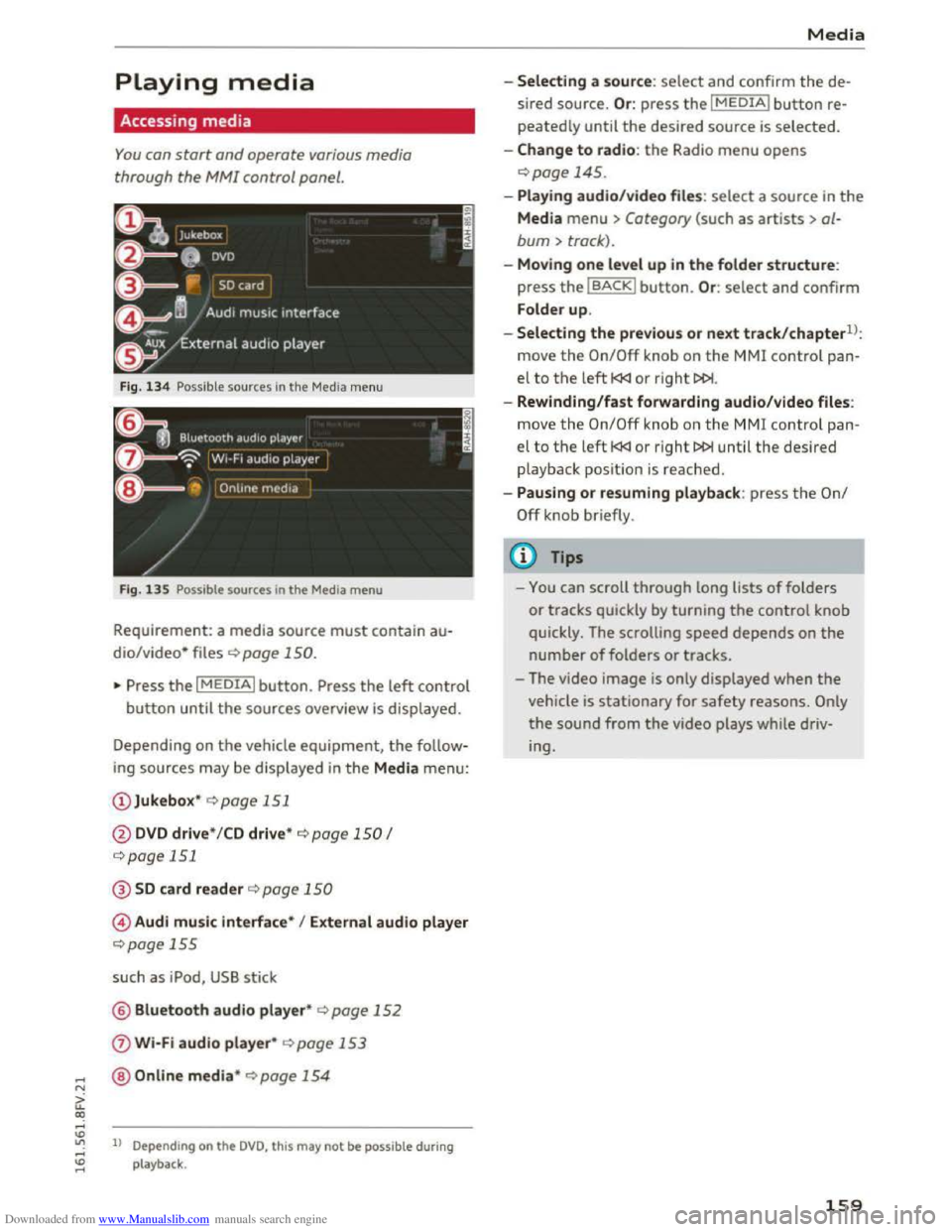
Fig. 134 Possible sources in the Media menu
F ig .
135 Possible sources in the Media menu
Requirement: a media source must contain au
dio/video* files c::> page 150.
"Press the I MEDIAi button. Press the left control
button until the sources overview is displayed.
Depending on
the vehicle equipment, the follow
ing sources may be displayed in the Media menu:
@ Jukebox* c::>page 151
@DVD drive * /CD drive* c::> page 150 I
c::>page 151
@SD card reader c::> page 150
© Audi music interface* I External audio player
c::>page 155
such as iPod, USB stick
@ Bluetooth audio player* c::> page 152
0 Wi-Fi audio player* c::> page 153
@Online media* c::>page 154
ll Depend ing on the DVD, this may not be possible during
playback .
Media
-Selecting a source: select and confirm the de
sired
source. Or : press the I MEDIAi button re
peatedly until the desired source is selected.
-Change to radio: the Radio menu opens
c::> page 145.
-Playing audio/video file s: select a source in the
Media menu > Category (such as artists > al
bum > track).
-Moving one level up in the folder structure:
press the IBACKI button. Or : select and confirm
Folder
up.
-
Selecting the previous or next track/chapterll:
move the On/Off knob on the MMI control pan
el to the left l
-Rewinding/fast forwarding audio/video files:
move
the On/Off knob on the MMI control pan
el to the left l
playback posit ion is reached .
-
Pausing or resuming playback: press the On/
Off knob briefly.
(D Tips
-You can scroll through long lists of folders
or tracks quickly by turning the control knob
quickly. The scrolling
speed depends on the
number of folders or tracks.
- The video
image is only displayed when the
vehicle is stationary for safety reasons. Only
the sound from the video plays while driv
ing.
159
Page 164 of 322
Downloaded from www.Manualslib.com manuals search engine Media
-Move favorit e: select the desired entry from
the favorites list. Select the right control but
ton > Move fa vorite. Select and confirm the
desired presets lo cation.
- Deleting a fa vo rite:
select the desired entry
from the favorites list. Select the right control
button > Delete favorite > Delete this favorite
or Delete all favorites.
Additional settings
Options menu
Context-specific functions and settings are avail
able depending on the selected source.
.. Press the right control button.
Sound settings
See Q page 169.
Input level
Requirement: a mobile device must be connected
to the AUX connection cable* or to a USB adapt
er*.
The volume
of the mobile device is adapted to
the MMI. Audi recommends adjusting the volume
on
the mobile device to 70o/o of the maximum
volume
output.
Bluetooth settings
See Q page 168.
Connection manager
See Qpage 167.
Additional track information
When the function is switched on~ and a play
list is open, various information
about the cur
rent track (such as artist, album, album cover*)
as well as the elapsed playing time and the re
maining playing time are displayed .
ll The func tion automatically switc hes off when th e sou rce
is ch
anged.
162
Jukebox memory capacity
Information on the Jukebox memory capacity and
the number of stored tracks in the Jukebox is dis
played.
Change playing position
Turn the control knob to the left or to the right.
Or: move your finger across the MMI touch con
trol pad from left to right.
Shuffle1>
With the function switched on~' all files in the
playlist are played and shown in random order.
Repeat trackll
When the funct ion is switched on~, the current
track repeats.
Back
to "Now playing"
The options menu is closed. The track being cur
rently played
appears in the playlist.
Play
similar music*
The track being played is quickly analyzed (such
as artists, genres, mood , beat) and a smart play
list with similar
tracks is shown.
Play more ...
A
smart playlist is shown based on the track be
ing played. You can select between a playlist with
more tracks by this artist, from this album or of
this genre.
Gracenote online database*
Requirement : the MMI must be connected to the
Internet.
Depending on ava
ilability, various information
will
Load about the track being currently played
when
this function is switched on~.
Copy to jukebox
See Q page 151 , Adding to the Jukebox.
Favorites
See ~page 161.