brake AUDI TT COUPE 2016 User Guide
[x] Cancel search | Manufacturer: AUDI, Model Year: 2016, Model line: TT COUPE, Model: AUDI TT COUPE 2016Pages: 322, PDF Size: 52.86 MB
Page 46 of 322

Downloaded from www.Manualslib.com manuals search engine Seats and storage
Seats and storage
General information
Why is your seat adjustment so important?
The safety belts and the airbag system can only
provide
maximum protection if the front seats
are correctly adjusted.
There are various ways of adjusting the front
seats to provide safe and comfortable support
for the driver and the front passenger. Adjust
your seat properly so that:
- you can easily and quickly reach all the switches
and controls in the instrument panel
-your body is properly supported thus reducing
physical
stress and fatigue
-the safety belts and a irbag system can offer
maximum protection ¢ page 188.
In the following sections, you will see exactly
how you can
best adjust your seats.
There are special regulations and instructions for
installing a ch ild
seat on the front passenger's
seat. Always follow the information regarding
child
safety provided in ¢ page 212, Child safe
ty .
A WARNING
Incorrect seating position of the driver and all
other passengers can result in serious person
al injury.
- Always keep
your feet on the floor when the
vehicle is in motion - never put your feet on
top of the instrument panel, out of the win
dow or
on top of the seat cushion. This ap
plies especi ally to the passengers. If your
seating pos ition is i nco rrect, you increase
the risk of injury in the case of sudden brak
ing
or an accident. If the airbag inflates and
the seating position is incorr ect, this could
result in personal injury or even death.
-It is important for both the driver and front
passenger to keep a distance of at least
10 in (25 cm) between themselves and the
steering wheel and/or instrument panel. If
yo u'r e sitting any closer than this, the air
bag system cannot protect you properly . In
44
addition, the front seats and head restraints
m ust be adjusted to yo ur body height so
that they can give you maximum protection.
-Always try to keep as much distance as pos
sible
between yourself and the steeri ng
wheel or instrument panel.
-Do not adjust the driver's or front passeng
er's seat while the veh icle is moving. Your
seat may move unexpectedly, causing sud
den loss of vehicle control and personal in
jury. If you adjust yo ur seat while the veh icle
is moving, you are o ut of pos ition.
Driver's seat
The correct seat position is important for safe
and relaxed driving.
We recommend that you adjust the driver's seat
in the following manner:
.... Adjust the seat in fore and aft direction so that
you can easi ly push the pedals to the floor
while keeping your knees slightly
bent¢ f1::::.. in
Why is your seat adjustment so important? on
page
44.
I
.... Adjust the backrest so that when you sit w ith
your back against the backrest, you can still
grasp the top of the steering wheel.
A WARNING
Neve r place any objects in the driver's foot
well. An object could get into the pedal area
and interfere with pedal function . In case of
sudden braking or an accident, you would not
be able to brake or accelerate.
Front passenger's seat
Always move the front passenger seat into the
rearmost position.
-
To avoid con tact wit h the airbag while it is de
ploying ,
do not sit any closer to the instrument
panel than necessary and always wear th e three
po int safety belt provided adjusted correctly . We
r
ecommend that you adjust the passenger's seat
i n the following manner: .,..
Page 58 of 322
Downloaded from www.Manualslib.com manuals search engine Driving
Driving
General information
New engine
The engine needs to be run-in during the first
1,000 mi (1,500 km).
For the first 600 mi (1,000 km):
... Do not use full throttle.
... Do not drive at engine speeds that are more
than 2/3 of the maximum permitted RPM.
... Avoid high engine speeds.
From 600 to 1,000 mi (1 ,000 to 1,500 km):
... Speeds can gradually be increased to the maxi
mum permissible road or engine speed.
During and after break-in period
... Do not rev th e engine u p to high speeds when it
is cold. This
applies whether the transmission is
in N
(Neutral) or in gear.
After the break-in period
... Do not exceed maximum engine speed under
any cir cu
mstances .
... Upshift into th e nex t higher gear before reach
ing th e red
area at th e end of the tachometer
sea le r=:> page 8 .
During the firs t few hours of drivi ng, the engine's
interna l fric tion is higher than later when a ll th e
moving parts have been broken in . How well this
break-in process is done depends to a considera
ble extent on the way the vehicle is driven during
the first 1,000 mi (1,500 km).
@Note
Extremely high engine speeds are automati
cally reduced. However, these rpm limits are
programmed for an engine well r un -in, not a
new engine.
@ For the sake of the environment
Do not drive with unnecessarily high engine
speeds -upshi fting early saves fuel, reduces
noise and protects the environment.
56
·New tires
If your veh icle is runni ng on new tires, d rive par
t icula rly careful for the first 350 m i (500 km) af
ter fitting.
.&. WARNING
-New tires tend to be slippery and must a lso
be "broken-in". Be sure to remember this dur
ing the first 350 m i (500 km). Brake gently .
Avoid following closely behind other vehicles
or other situations that might req uire sudden,
hard braking.
Avoid damaging the vehicle
When you are driv ing on poor roads, or over
cu r
bs, steep ramps, etc., make certain that l ow
l y i
ng parts such as sp oile rs and exhaust system
parts do not bottom out and get damaged.
This is especially true for veh icles with low-s lu ng
c h
assis (sports chassis) * and fully loaded
vehicles .
Driving through water on roads
Note th e following to avo id vehicl e damage when
driv ing thro ugh water, for example on flooded
roads:
- The wat
er must not be any higher than the bot
t
om of the vehicle body.
-
Do not dri ve faster than walking speed.
_&. WARNING
Af te r driving through water or mu d, the brak
ing e
ffect can be reduced due to moisture on
the brake d iscs and brake pads. A few careful
b rake applications should dry off the bra kes.
@Note
Vehicle components such as the engi ne,
transmission, su s pension o r electrica l system
can be severely damaged by driving through
water. ..,.
Page 59 of 322
Downloaded from www.Manualslib.com manuals search engine @ Tips
-Determine the depth before driving through
water.
-Do not stop the vehicle, drive in reverse or
switch the engine off when driving through
water.
- Keep in mind that oncoming vehicles may
create waves that raise the water level and
make it too deep for your vehicle to drive
through safely.
- Avoid driving
through salt water (corrosion).
Economical and environmentally-friendly
driving
The amount of fuel consumption, the envi ron
mental impact and the wear to the engine,
b rakes and tires depends mostly on yo ur driving
style. Wit h
an anticipatory and economic driv ing
style, fu
el consumption can be reduced by ap
proximately 10-lSo/o. The following tips will help
you conserve the environment and your money at
the same time.
Anticip atory driv ing
A veh icle uses the most fuel when a ccele rating.
When you drive with anticipation, you do not
need to brake as often and thus acce lerate less.
When possible, let your vehicle coast with a gea r
engaged -for example, when you notice that the
next traffic light is red.
Avoid full acceleration
You should rarely travel at the maximum vehicle
speed. High speeds cause a disproportionately
high increase in fuel consumption, emissions and
traffic noise. Slower driving saves fuel.
Reduce idling time
It pays off to stop the engine, for example when
at railroad crossings or traffic lights with longer
red lights. Stopping the engine for 30-40 sec
onds already saves more fuel than the amount of
extra fuel needed to restart the engine.
It takes a very long time in idle to warm the en
gine up to operating temperature. Wear and
emissions are especially high in the warm-up
Driving
phase. Therefore, you should begin driving im
mediately after starting the engine. Avoid high
RPMs while doing this.
Service regularly
By servic ing you r vehicle regularly, you can help
to reduce fuel consumption before you even start
to drive . The maintenance condition of your vehi
cle not only affects traffic safety and long-term
val ue b ut also impacts fuel co nsumptio n.
A poorly serviced engine can lead to fuel con
sumption that is 10% higher than normal.
Also check the oil level when refueling. The oil
con sumpti on
depends largely on the engine load
and speed. It is no rmal for the oil consumption
of a new engine to reach its lowest point only af
ter a certain amount of use. Therefore, the oil
consumption can only be properly judged after
approximately 3,000 mi (5,000 km) have been
driven.
Avoi d short trip s
The engine and exhaust cleaning system must
reach their optimal operating tempera tu re to ef
fectively reduce consumption and emissions.
A cold engine consumes a disproportionately
high
amount of f u el. The engine is at operating
temperature and consumption has normalized
only after approximately four kilometers.
Q) Note
Do not leave engine idling unattended after
starting. If warning lights should come on to
indicate improper operation, they would go
unheeded. Extended idling also produces
heat, which could result in overheating or
other damage to the vehicle or other proper
ty.
CD Note
-Have your vehicle maintained properly and
in accordance with the service recommenda
tions in your Warranty & M ain tenance book-
let. Lac k of proper mai ntenance as well as
improper use of th e vehi cle w il l impair the
function of the emission control system and
cou ld lead to damage. .,..
57
Page 61 of 322
Downloaded from www.Manualslib.com manuals search engine ...... N
G'. CX)
..... ID VI ..... ID .....
Switching the ignit ion on/off
""To switch the ignition on/off, press the
I START ENGINE STOPI button. Do not press the
brake pedal while doing this.
Starting the engine
"" Press the brake pedal and move the selector
lever
into the P or N position~.&_.
... Press the I START ENGINE STOPI button
~fig. 60. The engine will start.
If the engine should not start immediately, the
starting process is automatically stopped after a
short time. Repeat
the starting process.
.&. WARNING
-I
-Never allow the engine to run in confined
spaces -danger
of asp hyxia tion.
- Never
turn off the engine before the vehicle
has come to a complete stop.
- The brake booster and power steering only
work when
the engine is running. If the en
gine
is off, you have to use more force when
steering
or braking. Because you cannot
steer and brake
as you usually would, this
could lead to crashes and serious injuries.
CD Note
Avoid high engine speed, full throttle, and
heavy engine load
as long as the engine has
not reached operating temperature yet. You
could damage the engine.
@ For the sake of the environment
Do not let the engine run while parked to
warm up. Begin driving immediately. This re
duces unnecessary emission
s.
Tips
-Some noise after starting the engine is nor
mal and is no cause for concern.
-
If you leave the vehicle with the ignition
switched on,
the ignition will switch off af
ter a certain amount of time. Make sure that
electrical equipment such as the exterior
lights are switched off.
Driving
Stopping the engine
... Bring the vehicle to a full stop.
""Move the selector lever into the P position.
... Press the I START ENGINE STOPI button
~page 58, fig. 60.
Emergency off
If it is necessary in unusual circumstances, the
eng i
ne can be switched off while the vehicle is
moving. Briefly press the I START ENGINE STOPI
button twice in a row or press and hold for longer
than
two seconds.
.&. WARNING
!-='
- Never turn off the eng ine before the vehicle
has come to a complete stop.
-
Please note that the brake booster and pow
er steering
only work when the engine is
r unn ing. When
the engine off, you must use
more force
to steer or brake the vehicle. Be
cause the usual steering and braking capa
bility is not available, the risk of accidents or
injuries increases.
- For safety reasons, always park
the vehicle
with the selector lever in the P position.
Otherwise, there
is the risk that the vehicle
could roll.
-
After the engine has been switched off, the
radiator fan can continue to run for up to 10
minutes -even with the ignition switched
off. It can also switch on again after some
time if the coolant temperature rises as the
result of heat buildup or ifthe eng ine com
partment is heated by the sun's rays and the
engine is hot.
CD Note
If the engine has been under heavy load for
an extended period of time, heat builds up in
the engine compartment after the engine is
switched off -there is a risk of damaging the
engine. For this reason, let the engine run for
at idle for approximately two minutes before
shutting it off.
59
Page 62 of 322
Downloaded from www.Manualslib.com manuals search engine Driving
Messages
Turn off ignition before leaving vehicle. Battery
is discharging
This message appears and a warning tone sounds
if you open the driver's door when the ignition is
switched on. Switch
the ignition off so that the
battery will not discharge.
Pressing start/stop b utton again will switch off
engine.
This
message appears when you press the
I START ENGINE STOPI button while driving .
Engine
start system: malfunction! Please con
tact Service
The engine automatic start system has a mal
function. Drive
to an authorized Audi dealer or
authorized Audi Service Facility immediately to
have the malfunction corrected. To start the en
gine,
press and hold the I START ENGINE STOPI
button.
II Remote control key : hold back of key
against the designated area. See owner's man
ual
This message appears if there is no convenience
key inside
the vehicle or ifthe system does not
recognize the key. The convenience key may not
be recognized, for example, if it is covered by an
object that disrupts the signal (such as a brief
case), or if
the key battery is weak. Electronic de
vices su ch as cell phones can also interfere with
the signal.
To still be able to start or stop the engine, refer
to "Correct ing a malfunction" Q page 60.
ml Remote control key : key not recognized . Is
the key still in the vehicle?
The
ml indicator light turns on and this message
appears if the convenience key was removed from
the vehicle when the engine was running. If the
convenience key is no longer in the vehicle, you
cannot switch the ignition on or start the engine
once you stop it. In addition, you cannot lock the
vehicle from the outside.
Please press brake pedal
60
This message appears if you do not press the
brake pedal when starting the engine.
Please select N or P
This
message appears when starting or stopping
the engine if the selector lever is not in the N or P
posi tion. The engine will not start/stop.
Shift to P, otherwise vehicle can roll away.
Doors
can be locked only in P
This
message appears for safety reasons along
with a warning
tone. It appears if the selector
lever for the automatic transmission is not in the
P position when switch ing the ignition off w ith
the I START ENGIN E STOPI button. Sh ift these
lector lever to the P pos ition. Otherwise, the vehi
cl e could roll.
You also cannot lock the ve hicl e us
ing
the loc kin g sensor on the door hand le or us
ing
the convenience key.
Starting the engine when there is a
malfunction
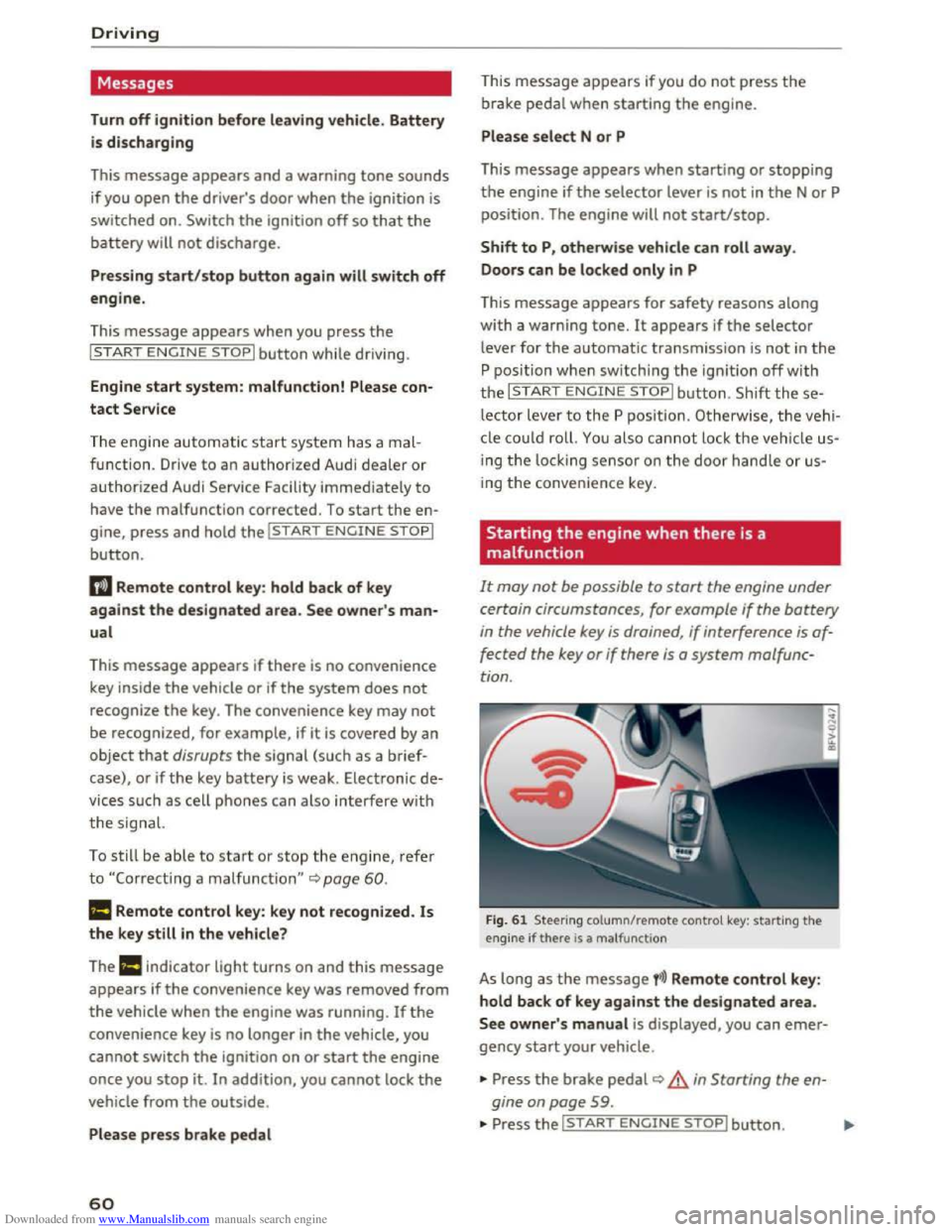
It may not be possible to start the engine under
certain circumstances, for example
if the battery
in the vehicle key is drained , if interference is af
fected
the key or if there is a system malfunc
tion .
Fig. 61 Steering column/remote control key: starting the
engine if there is a ma lfunction
As long as the message fi)) Remote control key:
hold back of key against the designated area.
See owner' s manual is displayed, you can emer
gency start your vehicle .
... Press the brake pedal~ A in Starting the en
gine on page
59 .
... Press the~, S~T~A~R~T~E_N _G ~l-N~E-S_T_ O_P~I button. ....
Page 63 of 322
Downloaded from www.Manualslib.com manuals search engine ..... N
G: CX)
.....
"' U"I
.....
"' .....
.,.. Hold the master key in the location indicated as
shown in the illustration y») ¢fig. 61. The en
gine will
start.
.. If the engine does not automatically start,
press the I START ENGINE STOP! button again.
{!) Tips
You can view the message again by pressing
the I START ENGINE STOPI button.
Electromechanical
parking brake
Operating
The electromechanical parking brake replaces
the hand brake.
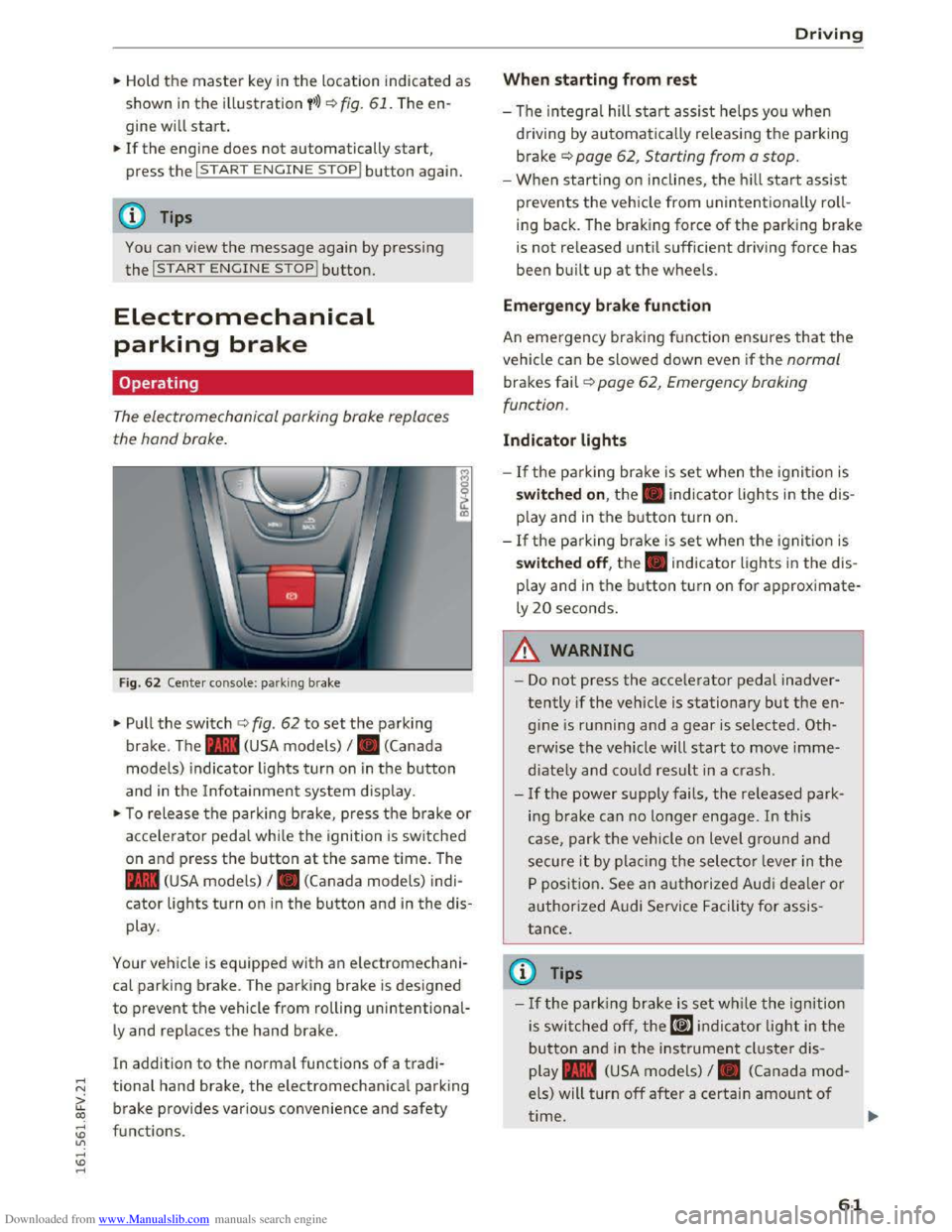
Fig. 62 Center console: park ing brake
.,.. Pull the switch ¢ fig. 62 to set the parking
brake. The . (USA models) I. (Canada
model s) indicator lights turn on in the button
and in the Info tainment system display.
.,.. To release the parking brake, press th e b rake or
acce le rator pedal while the ignition is switched
on and p ress the button at the same time. The
• (USA models) I. (Canada models) indi
cator lights turn on in the button and in the dis
play .
Your vehicle is equipped with an electromechani
cal parking brake. T
he parking brake is designed
to prevent the vehicle from rolling unintentional
ly and replaces the hand brake.
In addition to the normal functions of a tradi
tional hand brake, the electromechanical parking
brake provides various convenience
and safety
functions .
Driving
When starting from rest
-The integral hill start assist helps you when
driving by automatically releasing the parking
brake¢ page 62, Starting from a stop.
-When starting on inclines, the hill start assist
prevents the veh icle from un intentionally roll
ing back . The braking force
of the parking brake
is
not re leased unti l sufficient driving force has
been built up at the wheels.
Emergen cy brake function
An emergency braking fu nction ensures that the
vehicle can be slowed down even if the normal
brakes fail¢ page 62, Emergency braking
functi on.
Indicator lights
- If the parking brake is set when th e ignit io n is
switched on , the. indicator lights in the dis
play
and in the button tur n on .
- I f
the parking brak e is set when the ignit io n is
switched off, the. indicator lights in the dis
play
and in the b utton turn on for approximate
ly 20 seconds.
A WARNING
t-==
-Do not press the acce lerator pedal inadver-
tently if the vehicle is stationary but the en
gine is ru nning and a gear is selected. Oth
erwise the vehicle will start to move imme
diately and co uld result in a crash.
-
If the power supply fails, the released park
ing brake
can no longer engage. In this
case, park t he vehicle on level ground and
secure it by plac ing the selector l eve r in the
P position. See an authorized Audi deale r o r
authorized A udi Service Facil ity for assis
tance.
©Tips
-If the park ing brak e is set while the igni tion
is swi tc h
ed off, the((@)) indi cator light in the
button and in the ins trument cluster dis
play .
(USA models) I. (Canada mod
els) will turn off after a certain amount of
time.
61
Page 64 of 322
Downloaded from www.Manualslib.com manuals search engine Driving
-If driver's door is opened while the ignition
is
switched on, the parking brake sets auto
matically. This prevents unintended rolling
of the vehicle.
- Occasional noises
when the parking brake is
applied
and released are normal and are not
a cause for concern.
-
When the vehicle is parked, the parking
brake goes through a self-test cycle at regu
lar intervals. Any noises associated with this
are normal.
-If the. (USA models) I. (Cana-
da models) indicator lights or llJ indicator
lig ht
turn on, there could be a malfunction
in the park ing brake ~page 11.
-If there is a power failure, the parking brake
will not set if it is released, and it will not
release if it is set~.&.. See an authorized
Audi dealer or authorized Audi Service Fa
cility for
assistance.
Parking
.... Press the brake pedal to stop the vehicle.
.... Pull the switch~ to set the parking brake .
.... Place the selector lever in the P position.
.... Turn the engine off~,&.
.... Turn the steering wheel when parking on in
clines
so that the wheels will roll into the curb
if the vehicle starts moving .
A WARNING
-Always take the vehicle key with you when
leaving the vehicle, even for a short period
of time. This applies particularly when chi l
dren remai n in the vehicle. Otherwise the
children could start the engine, release the
parking brake or operate electrical equip
ment (e.g. power windows). There is the risk
of an accident.
-
When the vehicle is locked, no one -particu
larly
not children should remain in the vehi
cle. Locked
doors make it more difficult for
emergency workers to get into the vehicle,
which
puts lives at risk.
62
Starting from a stop
The start assist function ensures that the park
ing brake
is released automatically upon start
mg.
Stopping and applying parking brake
.... Pull the switch~ to set the parking brake.
Starting and automatically releasing the
parking brake
Requirement: the driver's door must be closed
and the driver's safety belt must be fastened.
.... When you press the accelerator pedal, the
parking brake is automatically released and
your vehicle begins to move.
When stopping at a traffic signal or stopping in
city traffic, the park ing brake can be applied. The
vehicle
does not have to be held with the brake
pedal. The parking brake eliminates the tendency
to creep when a selector lever position is engag
ed. As soon as you press the accelerator pedal,
the parking brake releases automatically and the
vehicle starts to move .
Starting on slope s
When starting on inclines, the hill start assist
prevents the vehicle from unintentionally rolling
back. The braking force
of the parking brake is
not released until sufficient driving force has
been built up at the wheels.
(0 Tips
For safety reasons, the parking brake is re
l
eased automatically onl y when the driver's
safety be lt is fastened and the driver's door is
l ocked.
Emergency braking function
In the event that the conventional brake system
fails or locks.
.... To brake your vehicle in an emergency, pull the
~switch and hold it pulled.
.... As soon as you release the button or accelerate,
the braking stops. .,..
Page 65 of 322
Downloaded from www.Manualslib.com manuals search engine Pulling and holding the switch while driving at a
speed
of about 2 mph (3 km/h) or higher ini
tiates
the emergency braking function. The vehi
cle
is braked at all four wheels by activating the
hydraulic brake system . The brake performance is
similar to heavy braking. c> &.
In order not to activate the emergency braking by
mistake,
an audib le warning tone (buzzer)
sounds when
the switch is pulled. As soon as the
switch is released, or the accelerator pedal is de
pressed, emergency braking stops .
A WARNING
Emergency braking should only be used in an
emergency, when the normal brake pedal has
fai led or the brake pedal is obstructed. During
emergency braking, your vehicle
will brake
simi lar
to heavy braking. ESC and the associ
ated components
(ABS, ASR, EDL) cannot
overcome
the laws of physics. In corners and
when road or weather condi
tions are bad, a
full brake application can cause the vehicle to
skid or the rear end to break away, which in
creases the risk of an accident.
Trailer towing
General information
Your Audi TT Coupe is not designed to tow a trail
er.
Towing a trailer with your Aud i T T Coupe is not
r e commended and can cause damage to the car.
D amaged caused by
towing a trailer is not cov
e r
ed by you r A udi Warranty.
Driving
63
Page 66 of 322
Downloaded from www.Manualslib.com manuals search engine Automatic transmission
Automatic transmission
S tronic
Introduction
Your vehicle is equipped with an electronically
controlled DSG transmission called S tronic. Two
independent clutches transfer the power be
tween the engine and transmission. It allows the
vehicle to accelerate without a noticeable inter
ruption in traction.
The transmission upshifts or downshifts auto
matically. The driving style continuously influen
ces the selection of the driving program.
When a moderate driving style is used, the
transmission selects the most economical driving
mode. The transmission upshifts at a lower RPM
and downshifts at a higher RPM to improve fuel
efficiency.
The
transmi ssion switches to a sporty mode after
a kick-down or when the driver uses a sporty
driving style
characterized by quick accelerator
pedal movements, heavy acceleration, frequent
changes in speed and traveling at the maximum
speed.
If desired, the driver can also select the gears
manually (tiptronic mode).
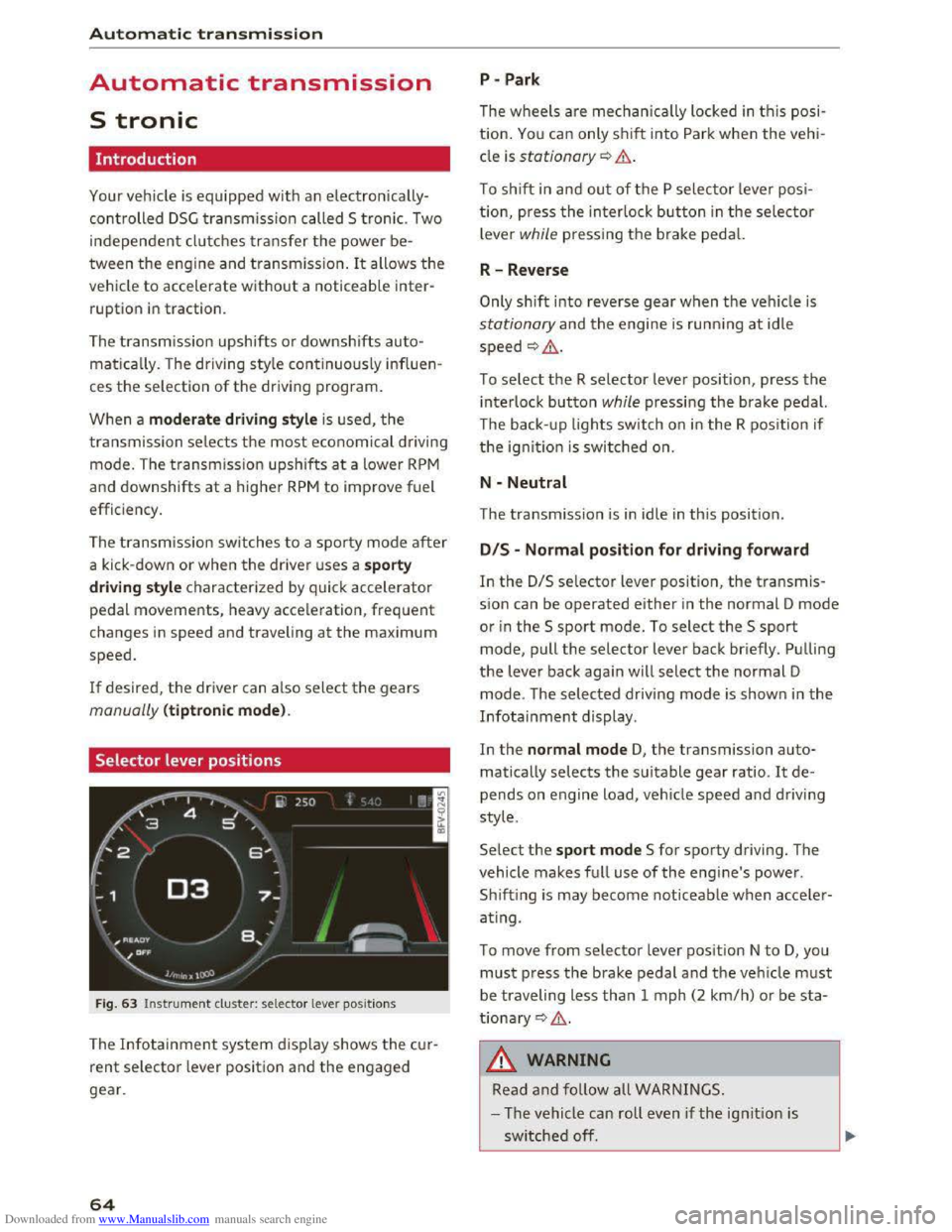
Selector lever positions
Fig. 63 Instrument cluster: selector lever positions
The Infotainment system d isplay shows the cur
rent selector lever position and the engaged
gear.
64
P -Park
The wheels are mechanica lly locked in this posi
tion. You can only shift into Park when the vehi
cle is stationary¢&.
To shift in and out of the P selector lever posi
tion, press the interlock button in the selector
lever while pressing the brake pedal.
R-Reverse
Only shift into reverse gear when the vehicle is
stationary and the engine is running at idle
speed ¢,6.
To select the R selector lever position, press the
interlock button while pressing the brake pedal.
The back- up
lights switch on in the R position if
the ignition is switched on.
N -Neutral
The transmission is in idle in this position.
DIS -Normal position for driving forward
In the D/S selector lever position, the transmis
sion can be operated either in the normal D mode
or in the S sport mode. To select the S sport
mode, pull the selector lever back briefly. Pulling
the lever back again will select the normal D
mode. The selected driving mode is shown in the
Infotainment display.
In
the normal mode D, the transmission auto
matically selects the suitable gear ratio. It de
pends on engine load, vehicle speed and driving
style.
Select the sport mode S for sporty driving. The
vehicle
makes full use of the engine's power.
Sh i
fting is may become noticeable when acce ler
ating.
To move from selector lever position N to D, you
must press the brake pedal and the vehicle must
be traveling less than 1 mph (2 km/h) or be sta
tionary ¢,6.
A WARNING
Read and follow all WARNINGS.
- The vehicle can roll
even if the ignition is
switched off.
Page 67 of 322
Downloaded from www.Manualslib.com manuals search engine ..... N
G: CX)
.....
"' U"I
.....
"' .....
-Never select R or P while driving, because
this increases the risk of an accident.
- Power
is still transmitted to the wheels
when
the engine is running at idle. To pre
vent
the vehicle from "creeping", you must
keep your foot on the brake in all selector
lever positions (except
P) when the engine is
runn ing. Otherwise,
this increases the risk
of an accident.
-
Do not i nadvertently press the accelerator
peda l when
the veh icle is stopped if a gear is
engaged. Otherwise the vehicle will start to
move immediately, even if the par king brake
is set. This coul d result in a crash.
-
Do not press the accelerator pedal when
changing
the selector lever position while
the vehicle is stationary and the engine is
running.
- Never leave
your vehicle with t he engine
running wh
ile in gear. If you must leave
your vehicle when
the engine is running, set
the parking brake and move the selector lev
er to the P position.
- Before opening
the hood and working on a
running engine, select
the P position with
the selector lever and activate the parking
brake. Always read and
follow the applica
ble warnings
c> page 236, Working in the
engine compartment.
CD Note
Never let the vehicle roll downhill with engine
off and the selector lever in the N position,
because
this could damage the automatic
transmission and cata l
ytic converter .
@ Tips
-Drive select: sporty shifting character istics
can
be selected using the Dynamic driving
mode. The
Infotainment display shows Sas
the selector lever position instead of D.
-If you accidentally select N while driving,
take your
foot off the accelerator pedal im
mediately and
wait for the engine to slow
down
to idle before selecting D or S.
-If there is a powe r failure, the sel ector lever
will not move out of the P position. The
Automatic tran smission
emergency release can be used if this hap
pens. Left-hand drive vehicles
c> page 71.
Selector lever lock
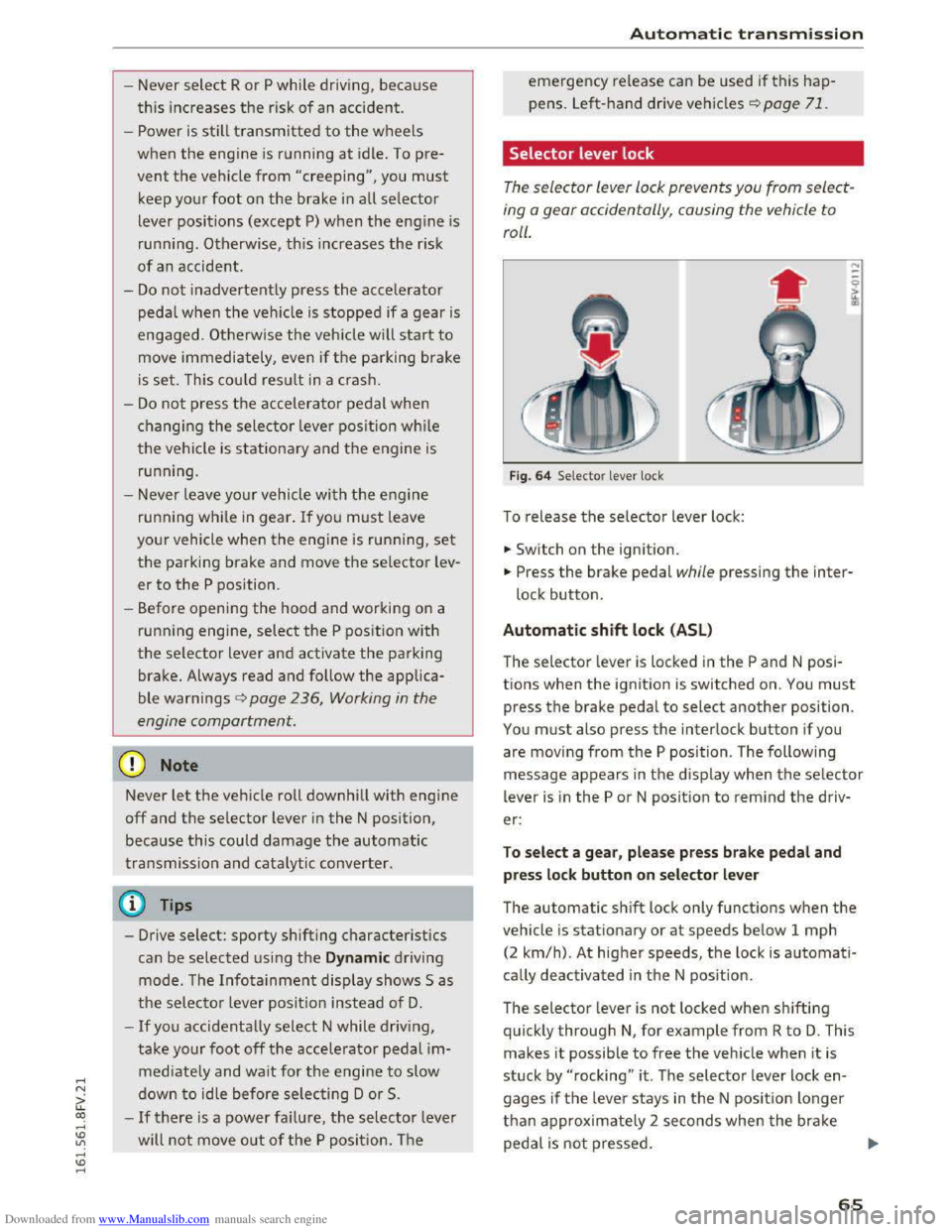
The selector lever lock prevents you from select
ing
o gear occidentally, causing the vehicle to
roll.
F ig . 64 Selector lever lock
To release the selector lever lock:
... Switch on the ignition.
... Press the brake pedal while pressing the inter
lock button.
Automatic shift lock (ASL)
The selector lever is locked in the P and N posi
tions when
the ignition is switched on. You must
press the brake pedal to select another position.
You must also press the interlock button if you
are moving
from the P position. The following
message appears in
the display when the selector
lever
is i n the P or N position to rem ind the driv
er:
To sel e ct a g ear, pl ease pr ess brake pedal and
pre
ss lock button on selector le ver
The automatic shift lock only functions when the
vehicle is stationary or at speeds below 1 mph
(2
km/h). At higher speeds, th e lock is automati
cally deactivated in
the N pos ition.
The selector lever
is not locked when shifting
quickly through N, for example from R to D. This
makes
it possible to free the veh icle when it is
stuck by "rocking" it . The selector lever lock en
gages
if the leve r stays in the N posit ion longer
than approx imately 2 seconds when t
he brake
peda l
is not pressed.
65