mirror AUDI TT COUPE 2016 User Guide
[x] Cancel search | Manufacturer: AUDI, Model Year: 2016, Model line: TT COUPE, Model: AUDI TT COUPE 2016Pages: 322, PDF Size: 52.86 MB
Page 80 of 322
Downloaded from www.Manualslib.com manuals search engine Assis t
are indicated by the time they enter your "blind
spot",
at the latest.
© Vehicles left behind
If you slowly pass a vehicle that side assist has
detected ( the difference in speed betwee n the
vehicle and your vehicle is less than 9 mph or 15
km/h), the display in the exterior mirror turns on
as soon as the vehicle enters your blind spot.
The display will not turn o n if you quick ly pass a
vehicle that side assist has detected (the differ
ence in speed between
the vehicle and your vehi
cle
is greater than 9 mph or 15 km/h).
Functional limitations
The radar senso rs a re designed to detect the left
and right adjacent lanes when the road lanes are
the normal width. In some situations, the display
in the exter ior mirr or may turn on even though
there
is no vehicle located in the area that is criti
cal
for a lane change. For example:
-
If the lanes are narrow or if your are driving on
the edge of your lane. If this is the case, the
system may have detected the vehicle in anoth
er lane
that is not adjacent to your current lane.
-
If you are driving through a curve. Side assist
may react
to a vehicle that is one lane over
from the adjacent lane.
-
If side assist reacts to other objects (such as
high or displaced guard rails).
-
In poor weather conditions . The side assist
functions are limited.
Do not cover the radar senso rs c::> fig. 77 w it h
stic kers, deposits, bicycle wheels or
other ob
jects,
because this will affect the function. For in
formation on cleaning, see c::>poge 270.
.&. WARNING
-Always pay attention to traffic and to the
area around your vehicle. Side assist cannot
replace a
driver's attention. The driver alone
is always responsible for lane changes and
similar driving maneuvers.
-
In some situati ons, the system may not
function or its function may be limited. For
example:
78
-If vehicles are app roaching or being left
behind very quickly . The display may not
turn on in time.
-
In poor weather condit ions such as heavy
r ain, snow or heavy
mist.
-
On very wide lanes, in tight curves, or if
there is a r ise in the road surface. Vehicles
i n
the adjacent lane may not be detected
because they are outside
of the sensor
range.
-
Audi side assist cannot detect all vehicles
under
all conditions, which can increase the
risk of acciden ts.
-Please note that side assist only disp lays ap
proach ing vehicles
or veh icles in your blind
spot if your vehicle is traveling at l east
19 mph (30 km/h).
-In certain situations, th e system may not
work or its function may be limited. For ex
ample:
- The displ
ay may not turn on at the right
time if vehicles are approaching or passing
very quickly.
-In poor weathe r condit ions, such as heavy
rain, snow or fog .
-
In very wide lanes, in tight cu rves or when
there are slopes in the roadway, vehicles
i n
the neighboring lanes may not be de
tected because they a re outside
of the
senso r range.
CD Note
The sensors can be displaced by impacts or
damage
to the bumper, wheel housing and
underbody. This
can affect the system. Have
an authorized Audi dealer or authorized Audi
Service
Facility check thei r f unct ion .
(D Tips
-If the window glass in the driver's door or
front passenger 's door has been tinted, the
display in th e exterior mirror may be misin
terpreted.
- For
an explanation on conform ity with the
FCC reg ulations in the United States and the
Industry Canada regulatio ns, refer to
c::>poge 297.
Page 81 of 322
Downloaded from www.Manualslib.com manuals search engine Switching on and off
App lies to: vehicles with Audi side assist
The system can be switched on/off in the Info
tainment system.
"'Select in the Infotainment system: IM ENUI but
ton >Vehicle > left control button >Driver as
sistance >Audi side assist
An activated system will signal every time the ig
nition is switched on by turning the displays in
the exterior mirrors on briefly.
Adjusting the display brightness
Applies to: vehicles with Audi side assist
The display brightness can be adjusted in the In
fotainment system.
"'Select in the Infotainment system: IM ENUI but
ton >Vehicle > left control button >Driver as
sistance >Audi side assist
The display brightness adjusts automatically to
the brightness of the surroundings, both in the
information and in the warning stage. In very
dark or very bright surroundings, the display is
already set to the minimum or maximum level by
the automatic adjustment. In such cases, you
may notice no
change when adjusting the bright
ness, or the change may only be noticeable once
the surroundings change.
Adjust
the brightness to a level where the display
in the information stage will not disrupt your
view forward. If you change the brightness, the
display in the exterior mirror will briefly show the
brightness level in the information stage. The
brightness of the warning stage is linked to the
brightness in the information stage and is adjust
ed along with the information stage adjustment.
-Side assist is not active while you are mak
ing the adjustment.
- Your settings are automatically stored and
assigned to the remote control key being
used.
Assist
Driver messages
Applies to: vehicles with Audi side assist
If the side assist switches off automatically, a
message appears in the Infotainment system dis
play.
@i Audi side assist: currently unavailable.
Sensor vision restricted due to surroundings.
See owner's
manual
The radar sensors' vision is affected. Do not cover
the area in front of the sensors with bike wheels,
stickers, dirt or other objects. Clean the area in
front of the sensors, if necessary q page 77,
fig. 77.
@i Audi side assist: currently unavailable.
See owner's
manual
Side assist cannot be switched on temporarily be
cause there is a malfunction (for example, the
battery charge level may be too low).
@i Audi side assist: malfunction! Please
contact
Service
The system cannot guarantee that it will detect
vehicles correctly and it is switched off. The sen
sors have been displaced or are faulty. Have the
system checked by an authorized Audi dealer or
authorized Audi Service Facility soon.
Audi drive select (drive
settings)
Introduction
Applies to: vehicles with Audi drive select
Drive select makes it possible to experience dif
ferent types of vehicle settings in one vehicle.
The driver can
select from three modes, Comfort,
Auto and Dynamic, using the~.~;\,~ button in the
center console or by using the Infotainment sys
tem. This allows you to switch between a sporty
and a comfortable driving mode, for example. In
the Individual mode, the settings can be adjust
ed to your personal preferences. This makes it
possible to combine settings such as a sporty en-
gine
tuning with light steering. .,.
79
Page 87 of 322
Downloaded from www.Manualslib.com manuals search engine ..... N
G: CX)
.....
"' U"I
.....
"' .....
use the system for safety reasons. Have it
checked by an authorized Audi dealer or au
thorized Audi Serv ice Facility.
-
Only use the rearview camera to assist you if
it shows a good, clear picture. For example,
the image may be affected by the sun shin
ing into
the lens, dirt on the lens or ifthere
is a defect.
-Use the rearview camera only ifthe luggage
compartment lid is completely closed. Make
sure any objects you may have mounted on
the luggage compartment lid do not block
the rearview camer a.
- T
he camera lens enlarges and distorts the
field of vi sion. The object appears both al
tered and inaccurate on the screen.
-In certain situations, people or objects in
the display appear close r or further away :
- For objects
that do not touch the ground,
such as the bumper of a parked vehicle, a
trailer hitch or the rear of a truck. Do not
use the help lines in this case.
-
If driven from a level surface onto an in
cline, or a downward slope.
-
If driven toward protrudi ng objects.
-If the vehicle is carrying too much load in
the rear.
CD Note
- Always re ad and follow the applicable warn
ings¢(!) in General information on
page82.
-The orange colo red orientation lines in the
Infotainment display show the vehicle path
depending on the steering wheel angle. The
front of the vehicle front swings out more
than the rear of the vehicle. Maintain plenty
of distance so that your outside mirror or a
corner of your vehicle does not collide with
any
obstacles.
Switching on/off
App lies to: vehi cles with rearv iew camera
Switching on
•Shift into reverse , or
Parking systems
•Press the P'#! button in the cen ter conso le
~page 83, fig . 81 . A short confirmation tone
sounds and the LE D in the button turns on.
Switching off
•Drive faster than 6 mph (10 km/h), o r
• Press the P'#! button, or
• switch the ign it ion off.
(!} Tips
- The visua l display in the left part of the dis
play
shoul d he lp you detect the critical vehi
cle areas.
-You can change the volume and display for
the signals ¢ page 86.
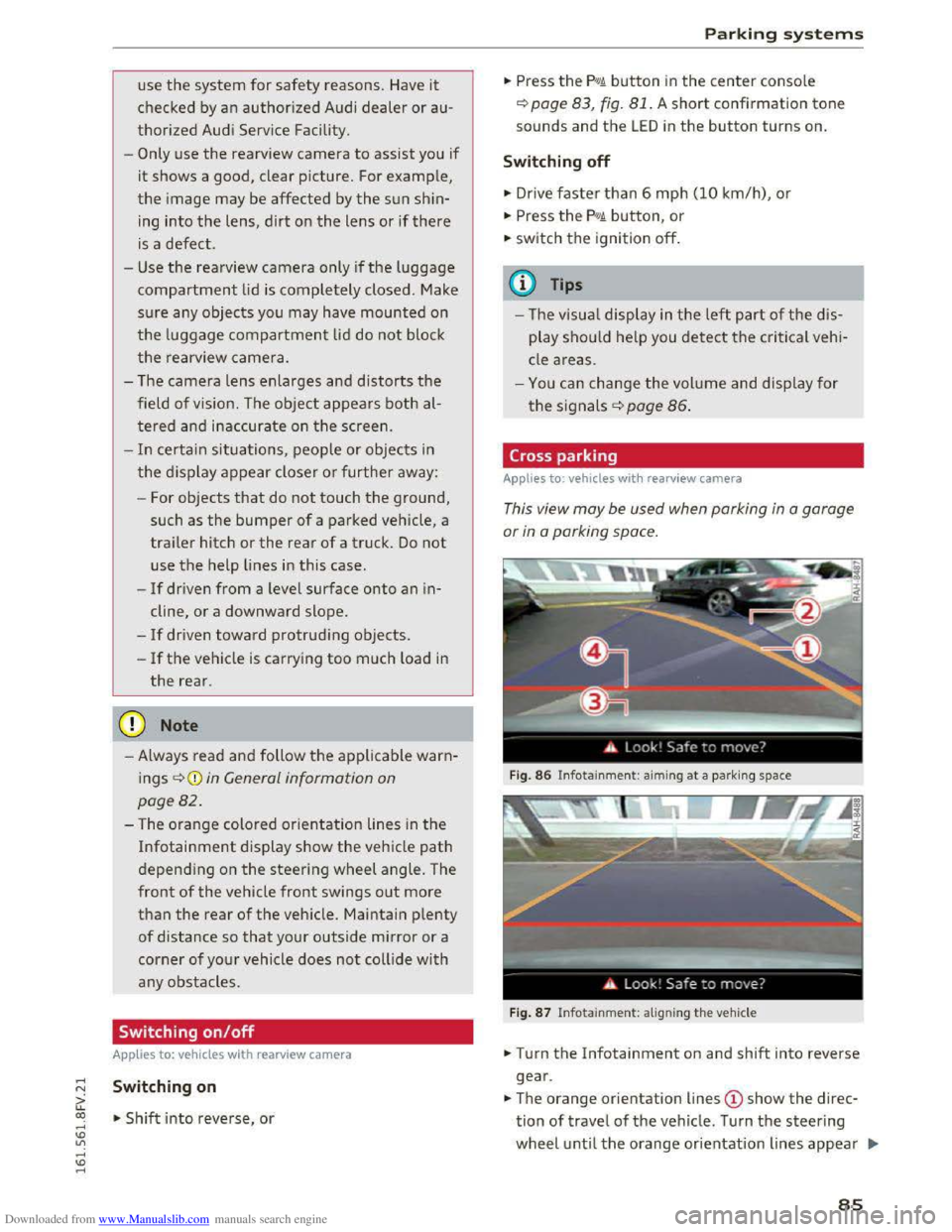
Cross parking
Applies to: veh icles wit h rearv iew camera
This view may be used when parking in a garage
or
in a parking space.
Fig. 86 Infotainme nt: aiming at a par king space
Fig. 87 Infotainme nt: al igning the vehicle
• Turn the Infotainment on and shift into reverse
gear .
•The orange orientation lines @show the direc
tion of travel of the vehicle. Turn the steering
wheel until the orange or ientation lines appear .,..
85
Page 173 of 322
Downloaded from www.Manualslib.com manuals search engine ...... N
> u. CX> ...... u:>
"' ...... u:> ......
Safe driving
Basics
Safe driving habits
Please remember -safety first!
This chapter contains important information,
tips, instructions and warnings that you need to
read and observe for your own safety, the safety
of your passengers and others. We have summar
ized here what you need to know about safety
belts, airbags, child restraints as well as child
safety. Your safety is for us priority number 1. Al
ways observe the information and warnings in
this section -for your own safety as well as that
of your passengers.
The information in this section applies to all
model versions of your vehicle. Some of the fea
tures described in this sections may be standard
equipment on some models, or may be optional
equipment on others. If you are not sure, ask
your authorized Audi dealer.
A WARNING
---Always make sure that you follow the in-
structions and heed the WARNINGS in this
Manual. It is in your interest and in the in
terest of your passengers.
-Always keep the complete Owner's Litera
ture in your Audi when you lend or sell your
vehicle so that this important information
will always be available to the driver and
passengers.
-Always keep the Owner's literature handy so
that you can find it easily if you have ques
tions.
Safety equipment
The safety features are part of the occupant re
straint
system and work together to help reduce
the risk
of injury in a wide variety of accident sit
uations.
Your safety and the safety of your passengers
should not be left to chance. Advances in tech
nology have made a variety of features available
to help reduce the risk of injury in an accident .
Safe driving
The following is a list of just a few of the safety
features in your Audi:
-
sophisticated safety belts for driver and all pas-
senger seating positions,
-
safety belt pretensioners,
-safety belt force limiters for the front seats,
-front airbags,
- knee airbags for the front seats*
-side airbags in the front seats,
-side curtain airbags with ejection mitigation
features,
-special LATCH anchorages for child restraints,
-adjustable steering column.
These indiv idual safety features, can work to
gether as a system to he lp protect you and your
passengers in a wide range of accidents. These
features cannot work as a system if they are not
always correctly adjusted and correctly used.
Safety is everybody's responsibility!
Important things to do before driving
Safety is everybody's job! Vehicle and occupant
safety always depends on the informed and care
ful driver.
For your safety and the safety of your passen
gers, before driving always:
... Make sure that all lights and signals are operat
ing correctly .
... Make sure that the tire pressure is correct.
... Make sure that all windows are clean and afford
good vis ibility to the outside.
... Secure all luggage and other items carefu lly
c::> page 176, c::> page 48.
... Make sure that nothing can interfere with the
pedals .
... Adjust front seat and mirrors correctly for your
height.
... Make sure to use the right child restraint cor
rectly
to protect chi Id ren Q page 212, Child
safety.
... Sit properly in your seat and make sure that
your passengers do the same Q page 44, Seats
and storage. ..,.
171
Page 273 of 322
Downloaded from www.Manualslib.com manuals search engine -To reduce the risk of cuts, protect yourself
from sharp metal components when wash
ing th e underbody or the inside of the wheel
housings.
- After
washing the vehicle, the brak ing effect
may be delayed due to moisture on the
brake rotors or ice in the w inter. The brakes
must be dried first w ith a few careful brake
applications.
CD Note
-If you wash the vehicle in an automatic car
wash, yo u must retract the extendable rear
spoiler* if necessary, and fold the exterior
mirrors in to red uce the risk of damage.
Power folding exterior mirrors* must on ly
be fol
ded in and ou t u sing the power folding
function.
-
To p reve nt paint d amage, d o not wash th e
vehicle in dir
ect sunlight.
Care and cleaning
- To red uce the risk of damage to the surface,
do
not use insect removing sponges, kitchen
sponges or s imilar items.
-
Matte finish painted veh icle components:
-To reduce the risk of damage to the sur-
face, do not use polishing agents or hard
wax.
- Never u
se protective wax. It can destroy
the matte finish effect.
-
Do not place any stickers or magnetic
signs on vehicle parts painted with matte
finish paint. The paint could be damaged
when the stickers or magnets are re
moved .
@ For the sake of the environment
Only wash the vehicle in facilities sp ec ia ll y de
signed for that pu rpose. This will reduce the
risk of dirty water contamina ted with oil from
entering the sewer sys tem.
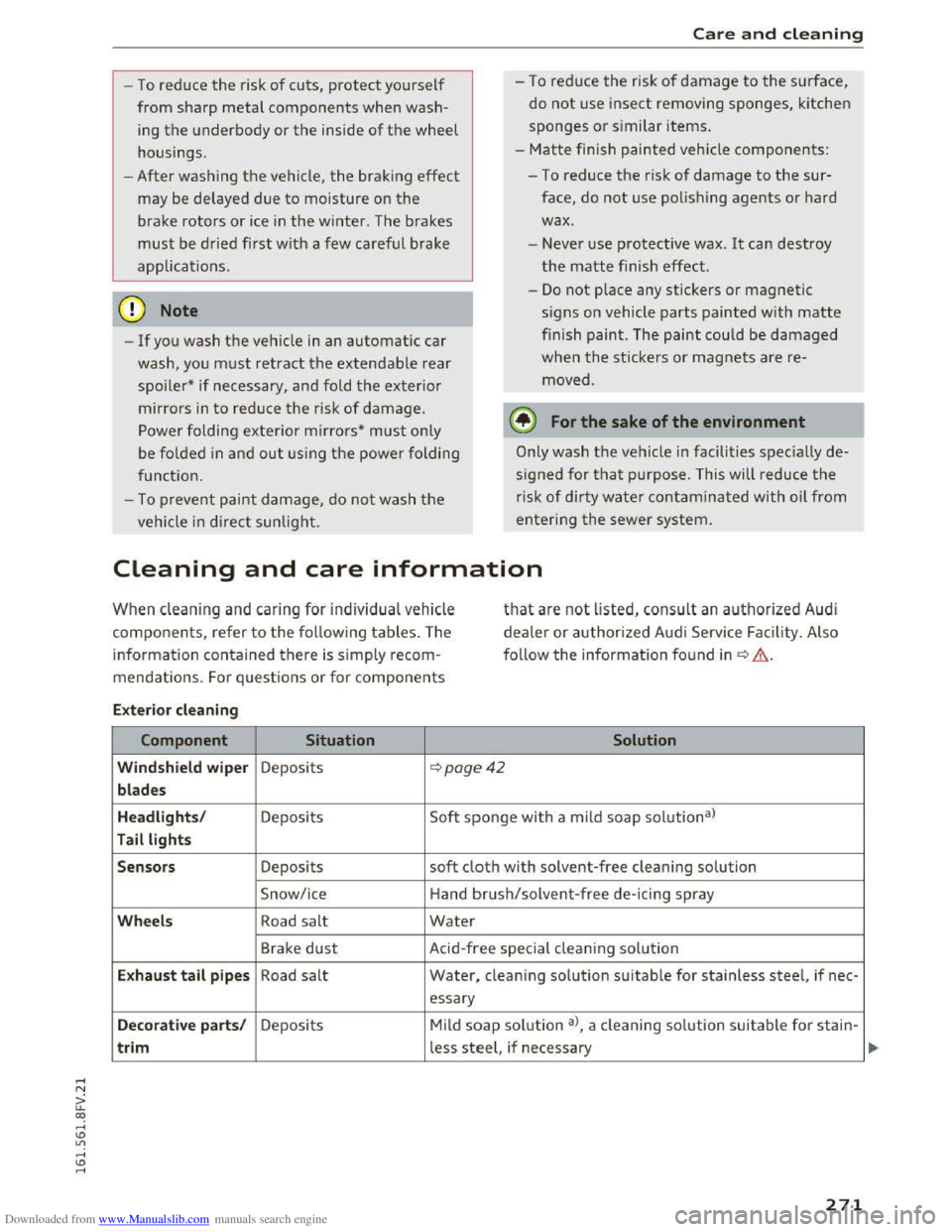
Cleaning and care information
When cleaning and ca ring for individua l vehicle
components, refer to the follow ing tables. The
information contained there is simply recom
mendations. For q uestions or for components
that are not listed, consult an authoriz e d Audi
de a
ler or authorized Audi Service Facility. Also
f o ll
ow the informa tion found in~.&..
Ext erior cleaning
Component Situation Solution
Windshield wiper Deposits ~poge42
blades
Headlights /
Deposits Soft sponge with
a mild soap solutiona)
Tail lights
Sensors
Deposits soft cloth with solvent-free clean ing solution
Snow/ice Hand brush/solvent
-free de-icing spray
Wheels Road salt Water
Brake dust Acid-free special cleaning sol u tion
E x haust tail p ipes Road salt Water, clean ing solution suitable for stainless steel, if nee -
essary
Decorative parts/ Deposits Mild soap solution a>, a cleaning solution suitable for stain-
trim less steel, if necessary
271
Page 275 of 322
Downloaded from www.Manualslib.com manuals search engine Care and cleaning
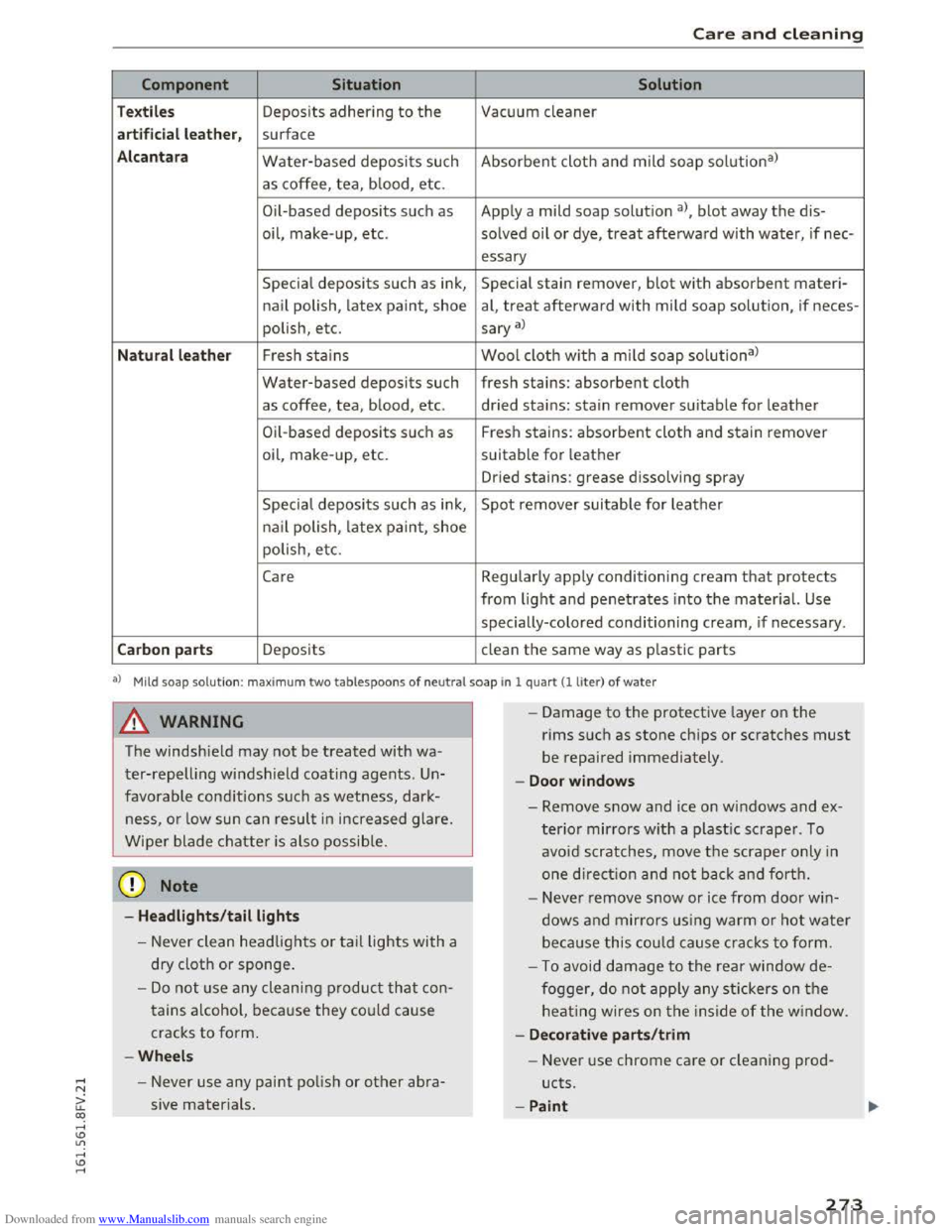
Component Situation Solution
Textiles Deposits adhering to the Vacuum cleaner
a rt ificial leat her , surface
Alc an tara Water-based deposits such Absorbent cloth and mild soap solu tion3>
as coffee, tea, b lood, etc.
O il-based
deposits such as Apply a mild soap solutio n a), blot away the dis-
oil,
make- up, etc. solved oil or dye, treat afterward with water, if nee-
essary
Special deposits such as ink, Special stain remover, blot with absorbent materi-
nail polish, latex paint, shoe al, treat afterward with mild soap solution, if neces-
polish, etc.
sary a)
Natural leather Fresh stains Wool cloth w ith a mild soap solutiona )
Water-based deposits such fresh stains: absorbent cloth
as coffee, tea, blood, etc. dried stains: stain remover suitable for leather
Oil-based deposits su ch as Fresh stains: absorbent cloth and stain remover
oil, make-up, etc. suitable for leather
Dried stains: grease dissolving spray
Specia l deposits such as ink, Spot remover suitable for leather
na il polish, latex paint, shoe
polish, etc.
Care Regularly apply conditioning cream that protects
from light and penetrates into the material. Use
specially-colored conditioning cream, if necessary .
Carbon parts Deposits clean the same way as plastic parts
al M ild soap sol u tion: max im um two tablespoons of ne u tra l soap in 1 quart(! liter) of water
A WARNING
The windshield may not be treated with wa
ter-repelling windshield coating agents. Un
favorable conditions such as wetness, dark
ness, or low sun can result in increased glare.
Wiper blade chatter is also possib le.
@ Note
-Headlights /tail lights
-Never clean headlights or tail lights with a
dry
cloth or sponge.
-Do not use any cleaning product that con
tains a lcohol, because they could cause
cracks to form.
-Wheels
- Never use any paint polish or other abra-
sive materials.
- I
-Damage to the protective layer on the
rims such as stone chips or scratches must
be repaired immediately.
-Doo r window s
-Remove snow and ice on windows and ex-
terior mirrors with a plastic scraper. To
avoid scratches, move the scraper only in
one direction a nd not back and forth.
- Neve r remove snow or ice from door win
dows and mirrors us ing warm o r hot water
beca u
se this could cause cracks to form.
- To avoid damage to the rear window de
fogger, do not apply any stickers on the
heating wires on the inside of the window.
- De corati ve parts/trim
- Never use chrome care or cleaning prod-
ucts.
-Paint
273
Page 288 of 322
Downloaded from www.Manualslib.com manuals search engine Fuses and bulbs
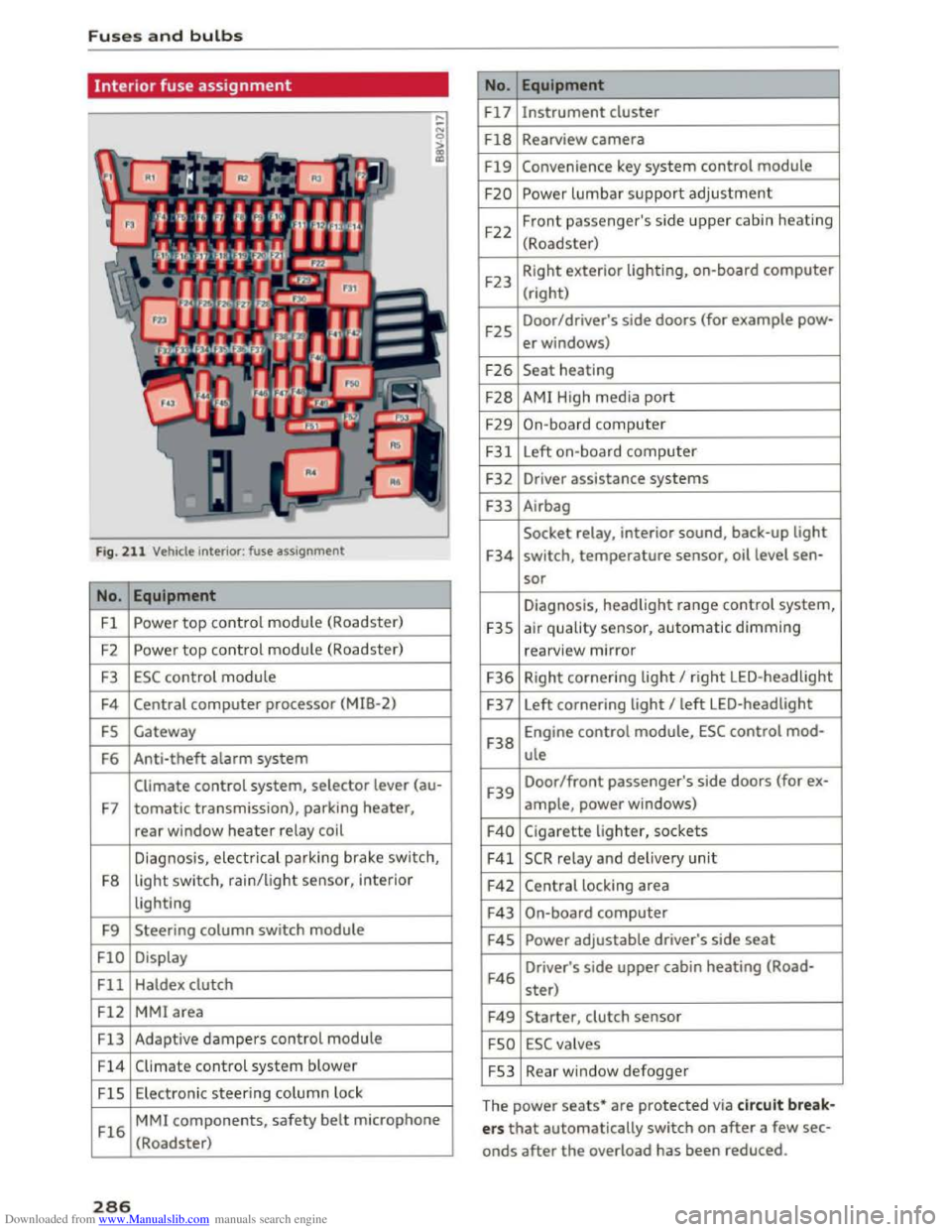
Interior fuse assignment
Fig. 211 Vehicle interior: fuse assignment
No. Equipment
Fl Powe r top control module (Roadster)
F2
Power top control module (Roadster)
F3 ESC control module
F4 Central computer processor (MIB-2)
FS Gateway
F6
Anti-theft alarm system
Climate control system, selector lever (au-
F7 tomatic transmission), parking heater,
rear window heater relay coil
Diagnosis,
electr ical parking brake switch,
F8
light switch, rain/light sensor, inter ior
lighting
F9
Steering column switch module
FlO Display
Fll Haldex clutch
F12 MMI area
Fl3 Adaptive dampers control module
F14 Climate control system blower
FlS Electronic steering column l ock
Fl6
MMI components, safety belt microphone
(Roadster)
286
No . Equipment
Fl7 Instrument cluster
Fl8 Rearview camera
F19 Convenience key system control module
F20 Power lumbar support adjustment
F22
Front passenger's side upper cabin heating
(Roadster)
F23 Right
exterior lighting, on-board computer
(right)
F25 Door/driver's
side doors (for example pow-
er windows)
F26 Seat heating
F28 AMI High media port
F29 On-board computer
F31 Left on-board computer
F32
Driver assistance systems
F33
Airbag
Socket relay, interior sound, back-up light
F34 switch, temperature sensor, oil level sen-
sor
Diagnosis, headlight range control system,
F35 air quality sensor, automatic dimming
rearview mirror
F36 Right cornering light I right LED-headlight
F37 Left
cornering light I left LED-headlight
F38
Engine control module, ESC control mod-
ule
F39
Door/front passenger's side doors (for ex-
ample, power windows)
F40 Cigarette lighter, sockets
F41 SCR relay and delivery unit
F42 Central locking area
F43 On-board computer
F45 Power adjustable driver's side seat
F46
Driver's side upper cabin heating (Road-
ster)
F49 Starter, clutch sensor
FSO ESC valves
FS3 Rear window defogger
The
power seats* are protected via circuit break
ers that automatically switch on after a few sec
onds after the overload has been reduced.
Page 301 of 322

Downloaded from www.Manualslib.com manuals search engine Vehicle capacity weight
The vehicle capacity weight (max. load) is listed
either on the driver's side B-pillar or inside the
fuel filler flap.
& WARNING
- The
actual Gross Axle Weight Rating at the
front and rear axles should not exceed the
permissible weights, and their combination
must not exceed the Gross Vehicle Weight
Rating .
- Exceeding
permissible weight ratings can
result in vehicle damage, accidents and per
sonal injury .
Dimensions
The dimensions can vary depending on the model
and equipment.
Length
Width
Width
across the mirrors
Height at curb weight
When driving on poor roads, by curbs and on
steep ramps, make sure that low-lying compo
nents such as the spoiler and exhaust system do
Capacities
Fuel tank
Windshield and headlight washer system*
Technical data
@ Note
- The vehicle capacity
weight figures apply
when the load is distributed evenly in the
vehicle (passengers and luggage). When
transporting a heavy load in the luggage
compartment, carry the load as near to the
rear axle as possible so that the vehicle's
handling is not impaired.
-Do not exceed the maximum permissible
axle loads or the maximum gross vehicle
weight. Always remember that the vehicle's
handling will be affected by the extra load.
Therefore, adjust your speed accordingly.
- Always
observe local regulations.
in (mm) 164.7 (4,184)
in (mm) 72.l (1832)
in (mm) 77.4 (1966)
in (mm) 53.3 (1353)
not come into contact with these or they could be
damaged. This applies especially when the vehi
cle is fully loaded.
gal (l) approx. 14.5 (55)
gal (l) approx. 2.4 (9.0)
299
Page 306 of 322
Downloaded from www.Manualslib.com manuals search engine Index
Climate control system (automatic)
Adjusting air vents . . . . . . . . . . . . . . . . . . . . 53
Adjusting
the air vents. . . . . . . . . . . . . . . . . 54
Adjusting the temperature . . . . . . . . . . . . . 53
Air
distribution, air vents . . . . . . . . . . . . . . . 53
AUTO (automatic mode) . . . . . . . . . . . . . . . 53
Blower . . . . . . . . . . . . . . . . . . . . . . . . . . . . . 53
Controls . . . . . . . . . . . . . . . . . . . . . . . . . . . . 53
Defrosting
the windows . . . . . . . . . . . . . . . 54
Drive select . . . . . . . . . . . . . . . . . . . . . . . . . . 80
Rear window defogger . . . . . . . . . . . . . . . . . 54
Recirculation mode . . . . . . . . . . . . . . . . . . . 53
Climate control system (manual)
Adjusting
the air vents . . . . . . . . . . . . . . . . . 54
Closing
Hood . . . . . . . . . . . . . . . . . . . . . . . . . . . . . . 237
W indows . . . . . . . . . . . . . . . . . . . . . . . . . . . 32
Closing/opening by remote
control . . . . . . . . . . . . . . . . . . . . 27
with the central locking switch . . . . . . . . . . 29
with the convenience key . . . . . . . . . . . . . . . 28
Closing and opening
With the door lock . . . . . . . . . . . . . . . . . . . . 30
Cockpit (overview) . . . . . . . . . . . . . . . . . . . . . . 6
Coming home . . . . . . . . . . . . . . . . . . . . . . . . . 38
Command (voice recognition system) . . . . . 104
Compartments . . . . . . . . . . . . . . . . . . . . . . . . 48
Compass in the mirror . . . . . . . . . . . . . . . . . . 42
Compliance . . . . . . . . . . . . . . . . . . . . . . . . . . 297
Connection manager . . . . . . . . . . . . . . . . . . 167
Audi MMI connect app . . . . . . . . . . . . . . . . 167
Bluetooth settings . . . . . . . . . . . . . . . . . . . 168
Data connection . . . . . . . . . . . . . . . . . . . . . 167
Network settings . . . . . . . . . . . . . . . . . . . . 168
Importing/exporting . . . . . . . . . . . . . . . . . 118
Navigating . . . . . . . . . . . . . . . . . . . . . . . . . 133
Searching . . . . . . . . . . . . . . . . . . . . . . . . . . 117
Sending as text message . . . . . . . . . . . . . . 118
Contacting NHTSA . . . . . . . . . . . . . . . . . . . . 178
Control knob with joystick function . . . . . . . . 98
Controls
Multifunction steering wheel . . . . . . . . . . . 20
Convenience key
Indicator light . . . . . . . . . . . . . . . . . . . . . . . 60
Stopping the engine (START ENGINE STOP
button) . . . . . . . . . . . . . . . . . . . . . . . . . . . . . 59
unlocking/locking . . . . . . . . . . . . . . . . . . . . 28
Convenience opening/closing
Convertible child safety seats
Convertib le locking retractor 32
219
Activating . . . . . . . . . . . . . . . . . . . . . . . . . . 225
Deactivating . . . . . . . . . . . . . . . . . . . . . . . . 225
Using to secure a child safety seat . . . . . . 225
Cooling mode (climate control system) . . . . 53
Cooling system
Adding coolant . . . . . . . . . . . . . . . . . . . . . .
242
Coolant level checking . . . . . . . . . . . . . . . . 242
Coolant temperature indicator . . . . . . . . . . . 8
Indicator light . . . . . . . . . . . . . . . . . . . . . . . 12
Cornering light . . . . . . . . . . . . . . . . . . . . . . . . 80
Crash data recorder (EDR) . . . . . . . . . . . . . . . 94
Cruise control system
Changing speed . . . . . . . . . . . . . . . . . . . . . . 73
Preselecting speed . . . . . . . . . . . . . . . . . . . . 73
Switching
off . . . . . . . . . . . . . . . . . . . . . . . . 73
switching on . . . . . . . . . . . . . . . . . . . . . . . . .
72
C up ho lders . . . . . . . . . . . . . . . . . . . . . . . . . . . 48
C urrent consumpt ion 23
Online settings . . . . . . . . . . . . . . . . . . . . . . 168
Options . . . . . . . . . . . . . . . . . . . . . . . . . . . .
168 D
SIM PIN settings . . . . . . . . . . . . . . . . . . . . 168
Connections
refer to Media drives . . . . . . . . . . . . . . . . . 149
Consumer information . . . . . . . . . . . . . . . . . 294
Consumer Information . . . . . . . . . . . . . . . . . 178
Consumption (fuel) . . . . . . . . . . . . . . . . . . . . 23
Contact
Deleting . . . . . . . . . . . . . . . . . . . . . . . . . . . 119
Displaying . . . . . . . . . . . . . . . . . . . . . . . . . . 118
Editing . . . . . . . . . . . . . . . . . . . . . . . . . . . . 118
Favorites . . . . . . . . . . . . . . . . . . . . . . . . . . . 114
304
Data connection
Configuring . . . . . . . . . . . . . . . . . . . . . . . .
127
Data usage . . . . . . . . . . . . . . . . . . . . . . . . . 168
Data encryption
Data protection 166
Audi connect . . . . . . . . . . . . . . . . . . . . . . . 129
Media drives . . . . . . . . . . . . . . . . . . . . . . . . 149
Data recorder . . . . . . . . . . . . . . . . . . . . . . . . . 94
Date . . . . . . . . . . . . . . . . . . . . . . . . . . . . . 23, 166
daylight saving time . . . . . . . . . . . . . . . . . . . 166
Page 307 of 322
Downloaded from www.Manualslib.com manuals search engine Daytime running light . . . . . . . . . . . . . . . . . . 36
Declarat ion of compliance
Audi side assist . . . . . . . . . . . . . . . . . . . . . 297
Cell phone package . . . . . . . . . . . . . . . . . . 297
Convenience key . . . . . . . . . . . . . . . . . . . . . 297
Electronic immobilizer. . . . . . . . . . . . . . . . 297
Garage door opener (Home link) . . . . . . . . 297
Remote control key . . . . . . . . . . . . . . . . . . 297
Defrosting the windshie ld . . . . . . . . . . . . . . . 54
Defrosting (windows) . . . . . . . . . . . . . . . . . . . 54
DEF (instrument cluster) . . . . . . . . . . . . . . . . 23
Deleting
Bluetooth device . . . . . . . . . . . . . . . . . . . .
119
Call list . . . . . . . . . . . . . . . . . . . . . . . . . . . . 119
Contact.... ................... ..... 119
Favorites ... ................... . 114, 137
Home address . . . . . . . . . . . . . . . . . . . . . . 136
Deluxe automatic climate control
refer to Climate control system (automatic) .53
Demo mode
refer to Presentation mode . . . . . . . . . . . . 137
Destination on the map . . . . . . . . . . . . . . . . 133
Determining correct load limit . . . . . . . . . . 263
Digital compass . . . . . . . . . . . . . . . . . . . . . . . 42
Dimensions . . . . . . . . . . . . . . . . . . . . . . . . . . 299
Dimming the rearview mirror . . . . . . . . . . . . 40
Directory .... .. ................. . 117, 133
Connection settings . . . . . . . . . . . . . . . . . . 167
Free text search .......... .. .. .. ..... 117
Memory capacity . . . . . . . . . . . . . . . . . . . . 119
Navigation destination . . . . . . . . . . . . . . . 133
Settings . . . . . . . . . . . . . . . . . . . . . . . . . . . 119
Sort order . . . . . . . . . . . . . . . . . . . . . . . . . . 119
Storing a destination . . . . . . . . . . . . . . . . . 13 7
Symbo ls . . . . . . . . . . . . . . . . . . . . . . . . . . .
133
Directory entry
refer to Contact . . . . . . . . . . . . . . . . . . . . . 118
Display
Multifunction steering wheel . . . . . . . .
20, 22
Navigation map . . . . . . . . . . . . . . . . . . . . . 139
Traffic information . . . . . . . . . . . . . . . . . . 143
also refer to Infotainment system display 166
Distance . . . . . . . . . . . . . . . . . . . . . . . . . . . . . 23
Door/rear lid warning . . . . . . . . . . . . . . . . . . . 19
Driver information system . . . . . . . . . . . . . . . 22
CD/radio display . . . . . . . . . . . . . . . . . . . . . . 19
Door/rear lid warning . . . . . . . . . . . . . . . . . 19
Index
Exterior temperature display . . . . . . . . . . . 19
Indicator lights . . . . . . . . . . . . . . . . . . . . . . . 9
Messages . . . . . . . . . . . . . . . . . . . . . . . . . . . . 9
On-board
computer . . . . . . . . . . . . . . . . . . . 23
Service interval display . . . . . . . . . . . . . . . 249
Switching displays . . . . . . . . . . . . . . . . . 20, 22
Drives
refer to Media drives . . . . . . . . . . . . . . . . . 149
Drive select . . . . . . . . . . . . . . . . . . . . . . . . . . . 79
Driving economically . . . . . . . . . . . . . . . . . . . 57
Driving safely . . . . . . . . . . . . . . . . . . . . . . . . 171
Driving through water . . . . . . . . . . . . . . . . . . 56
Driving time . . . . . . . . . . . . . . . . . . . . . . . . . . 23
Dust filter
refer to Pollutant filter . . . . . . . . . . . . . . . . 52
DVD . . . . . . . . . . . . . . . . . . . . . . . . . . . . . . . . 150
Drive . . . . . . . . . . . . . . . . . . . . . . . . . . . . . . 150
Parental control . . . . . . . . . . . . . . . . . . . . . 162
Voice recognit ion system . . . . . . . . . . . . . 108
Dynamic volume
refer to Entertainment volume . . . . . . . . . 169
E
E-mail 115
Economy route . . . . . . . . . . . . . . . . . . . . . . . 138
Electromechanical parking brake
refer to Parking brake . . . . . . . . . . . . . . . . . 61
Electromechanical steering . . . . . . . . . . . . . . 90
Electronic differentia l lock . . . . . . . . . . . . . . . 87
Electronic immobilizer . . . . . . . . . . . . . . . . . . 25
Electronic speed limiter . . . . . . . . . . . . . . . . . 72
Electronic stabilization control (ESC) . . . . . . 87
Automatic post-collision braking system . . 87
Ind icator light . . . . . . . . . . . . . . . . . . . . . . . 14
Sport mode . . . . . . . . . . . . . . . . . . . . . . . . . 88
Emergency assistance . . . . . . . . . . . . . . . . . 275
Emergency call (911) . . . . . . . . . . . . . . . . . . 117
Emergency flasher . . . . . . . . . . . . . . . . . . . . . 38
Emergency fueling . . . . . . . . . . . . . . . . . . . . 234
Emergency locking the doo rs . . . . . . . . . . . . . 30
Emergency locking the front passenger door 30
Emergency operation
Doors . . . . . . . . . . . . . . . . . . . . . . . . . . . . . .
30
Emergency braking function . . . . . . . . . . . . 62
Fuel filler door . . . . . . . . . . . . . . . . . . . . . . 235
Luggage compartment lid . . . . . . . . . . . . . . 31
305