parking brake AUDI TT COUPE 2016 User Guide
[x] Cancel search | Manufacturer: AUDI, Model Year: 2016, Model line: TT COUPE, Model: AUDI TT COUPE 2016Pages: 322, PDF Size: 52.86 MB
Page 69 of 322
Downloaded from www.Manualslib.com manuals search engine Starting on a hill
.. Set the parking brake.
.. With the driving gear selected, press the accel
erator pedal carefully. The parking brake will
re l
ease automatically if your safety belt is fas
tened.
Under certain circumstances, such as driving in
the mountains, it may be useful to switch tempo
rarily
to the manual shift program in order to
manually adjust the gears to the driving condi
tions¢ page 68.
When parking on a level surface, simply place the
selector lever in the P position. On inclines, acti
vate the parking brake first and then move the
selector lever to the P position ¢ page 61. This
prevents the loc kin g mechanism from being
loaded too heavily and will make it easier to
move the selector lever out of the P position.
A WARNING
-The vehicle can roll even when the engine is
switched off.
-Unintended vehicle movement can lead to
serious injuri es.
- Never leave
your vehicle with the engine
running while in gear. If you must leave
your vehicle when the engine is running , set
the parking brake and move the selector lev
er to the P position.
- Power is still
transferred to the wheels
when the engine is running at idle. To pre
vent the ve hicle from "creeping", you must
keep your foot on the brake when the en
gine is running and the selector lever is in
the D, Sor R position or "tiptronic" mode is
selected.
-Do not inadvertently press the accelerator
pedal when the vehicle is stationary. Other
wise the vehicle will start to move immedi
ately, even if the parking brake is set. T his
could resu
lt in a crash.
-
Do not press the accelerator pedal when
changing the selector lever position while
the vehicle is stationary and the engine is
running .
Automatic transmission
-Never engage the R or P selector level posi
tions while driving. It could cause a crash .
- Before driving
down a steep slope, reduce
your speed and shift into a lower gear with
"ti ptronic".
-Do not ride the brakes or press the brake
pedal too often or too long when driving
down a hill. Constant braking causes the
brakes to overheat and substantially re
duces braking performance, increases brak
ing
distance or causes complete failure of
the brake system.
-If you must stop on an incline, always hold
the vehicle in place with the foot brake or
parking brake to prevent it from rolling
back.
- N
ever hold the vehicle on an incline with a
slipping clutch. The
clutch opens automati
cally when it becomes too hot from the
overload. The mJ indicator light turns on
and a message appears¢ page 70 when
the clutch is overloaded.
-If the engine must run while you are work
ing
in the engine compartment with the
hood open, make sure a gear is not engag
ed. The selector lever must be firmly in the
P position and loc ked in place and the park
ing brake must be set¢ page 236. Other
wise, the vehicle could begin moving when
increasing the engine speed, even with the
parking brake set.
@Note
-When stopping on an incline, do not try to
hold the veh icle in place by pressing the ac
celerator pedal while a driving gear is se
lected. This can cause the automatic trans
mission to overheat and can damage it. Ac
tivate the parking brake or press the brake
pedal to prevent the vehicle from rolling.
- Allowing
the vehicle to roll when the engine
is stopped and the selector lever is in the N
position will
damage the automatic trans
mission because it is not lubricated under
those circumstances.
67
Page 70 of 322
Downloaded from www.Manualslib.com manuals search engine Automatic transmission
-The transmission can overheat and be dam
aged under certain driving and traffic condi
tions such as frequent starts, creeping for a
l
ong time, or stop-and-go traffic. When the
@]or. indicator light turns on, stop the
vehicle at the next opportunity and let the
transmission cool r::!;> page 70.
- Allowing the veh icle to roll when the engine
is stopped will damage the S troni c trans
mission because it is not lubricated
r::!;> page 290, Towing with a tow truck.
@ Tips
For
safety reasons, the parking brake is re
leased automatically only when the driver's
safety belt is engaged i n the buckle.
Hill descent control
The hill descent control system assists the driv
ing when driving down declines .
Hill descent control is activated when the selec
tor lever is in the Dor S position and you press
the brake pedal. The transmission automatically
selects a gear that is suitable for the incline. Hill
descent control tries to maintain the speed ach
ieved at the time of braking, within physical and
technical
limitations. If may still be necessary to
adj ust the speed with the brakes. Because hill de
scent control cannot shift down farther than 3rd
gear, it may be necessary to shift into tiptronic
mode in very steep areas. In this case, shift into
1st or 2nd gear in tiptronic mode to use the en
g ine 's braki ng force to relieve the brakes.
Hill
descent control switches off once the decline
levels
out or you press the accelerator pedal.
On vehicles with a cruise control system*
r::!;> page 72, hill descent control is also activated
when the speed is set.
A WARNING
Hill descent control cannot overcome physical
limitations,
so it may not be able to maintain
a
constant speed under all conditions. Always
be ready to apply the brakes.
68
Shifting manually (tiptronic mode)
The tiptronic allow the driver to shi~ the gears
manually.
Fig. 66 Center conso le : ma nua l shifting with the selector
lever
Fig.
67 Steer ing whee l: ma nual shifting with the shift pad
dles•
Shifting with the selector lever
You can shift into tiptronic mode while stationary
and while dri ving.
""To shift into tiptronic mode, push the selector
lever from
the D/S setting to the right in the
tiptronic shift gate. Once the transmission has
switched modes, the selector lever position M
is shown in the Infotainment system display
r::!;>poge 64, fig. 63. For example M4 means the
fourth gear is engaged.
""To shift up a gear, tap the selector lever for
ward G ¢fig. 66.
""To shift down a gear, tap the selector lever to
backQ.
Shifting with the shift paddles*
You can operate the shift paddles in the D/S or M
(tiptronic shift gate) selector lever positions.
""To shift up one gear, tap the shift paddle G
r::!;> fig. 67.
Page 73 of 322
Downloaded from www.Manualslib.com manuals search engine ..... N
G: CX)
.....
"' U"I
.....
"' .....
Selector lever emergency release
If the vehicle's power supply fails, the selector
lever can
be released in an emergency.
Fig. 68 Selector lever: removing the cover
Fig. 69 Selector lever: us ing the emergency release to
move
out of the Park position
This section describes using the selector lever
emergency release in left-hand drive vehicles.
The
emergency release mechanism is located in
the right area under the selector lever shift gate.
Using the emergency release can be complicated.
We recommend contacting your authorized Audi
dealer for assistance, if necessary.
The screwdriver
from the vehicle tool kit located
in the luggage compartment is needed to for the
emergency release c:> page 2 75. Use the flat side
of the reversible screwdriver blade.
Removing the selector lever cover
.. Set the parking brake<®> c:> A to secure your
vehicle
from rolling .
.. Insert the flat side of the screwdriver sideways
i n
the slot near the shift cover and pry the shift
cover up c:> fig. 68 .
.. Carefully pull the shift cover upward by hand
and fold it over the shifter knob c:> fig. 69 .
Automatic transmission
Selector lever emergency release
.. Press and hold the yellow release button with
the screwdriver c:> fig. 69.
.. Press the re lease button in the selector lever @
and move
the lever into the N position .
.. Clip the shift cover back into the shift gate after
using the emergency release.
If the vehicle must be pushed or towed due to a
power failure (for example, the battery is dead),
the selector lever must first be moved to the N
pos ition using
the emergency release mecha
nism.
_&WARNING
Only move the selector lever out of the P posi
tion
when the parking brake is set. If that
does not work, secure the veh icle w ith the
brake pedal. Otherwise,
the vehicle could
start to move unintentionally when the selec
tor lever is moved out of the P position.
71
Page 238 of 322
Downloaded from www.Manualslib.com manuals search engine Checking and Filling
function of the emission control system
and could lead to damage.
@ For the sake of the environment
Even when the Emission Control System is op
erating properly, the exhaust gas can have a
sulfur-like
exhaust gas smell under some op
erating states. This depends on the sulfur
content of the fuel being used. Using a differ
ent brand of fuel may help, or filling the tank
with lead-free super grade gasoline.
Engine compartment
Working in the engine compartment
Special care is required if you are working in the
engine compartment
For work in the engine compartment such as
checking and filling fluids, there is a risk of in
jury, scald ing , accidents, and burns. For this
reason, follow all the following listed warnings
and general safety precautions. The engine
compartment is a dangerous area. ~ & .
I'
A WARNING
-Turn the engine off.
-switch the ignition off.
-
Set the parking brake.
-
Place the selector lever in the P position.
- Let
the engine cool down.
- Never
open the hood when you see that
steam or coolant drips from the engine
compartment-there is a danger of burns!
Wait unti l no steam or coolant flows out.
- Keep children away from the engine com
partment.
- Never spill fluids on a hot engine. These flu
ids (such
as the freeze protection contained
in the coolant) can catch fire.
- Avoid
short circuits in the electrical system,
especially the battery.
-When working in the engine compartment,
remember that the radiator fan can switch
on even
if the ignition is switched off, which
increases
the risk of personal injury.
236
- Never open the cap on the coolant expan
sion
tank when the engine is warm. The
cooling
system is under pressure.
-To protect your face, hands, and arms from
hot steam or coolant, cover the cap with a
large cloth when opening.
-Do not remove the engine cover under any
circumstances. This increases the risk of
burns.
-
If tests need to be performed with the en
gine running, there is additional danger due
to moving components (such as the ribbed
belt, alternator and radiator fan) and from
the high voltage ignition system.
-Do not under any circumstances give gas in
advertently (for example, by hand from the
engine compartment) if the vehicle is sta
tionary but the engine is running and a gear
is engaged. Otherwise the veh icle will start
to move immediately and could result in a
crash.
-
Pay attention to the following warnings list
ed when work on the fuel system or on the
electrical equipment is required.
- Always
disconnect the vehicle battery
from the vehicle electrical system.
-Do not smoke.
-Never work near open flames.
-Always have a working fire extinguisher
nearby
- To reduce
the risk of electric shock and in
jury, never
touch the follow ing components
when t he engine is running or is being start
ed:
- Ignition cable
-
Other components in the electronic high
voltage ignition system
-If you must check or perform work on the
engine while it is running:
-
Set the parking brake and place the selec
tor lever in the P (park) position first.
- Always
proceed with extreme caution so
that clothing, jewelry or long hair do not
become caught in the radiator fan, fan
belt or other moving components or do
not come into contact with hot compo-
nents. Tie back long hair before beginning .,..
Page 277 of 322
Downloaded from www.Manualslib.com manuals search engine ..... N
a: CX)
.....
"' U"I
.....
"' .....
Emergency assistance
General information
"'Park th e vehicle as far as possible from moving
traffic in the event of a flat tire. In the event of
a flat tire, park the vehicle on a level surface. It
you are on a steep incline, be especially careful.
"'Set the parking brake.
"'Place the selector lever in the P position.
"'Switch the emergency flashers on.
"'Have the passengers exit the vehicle. They
should move to a safe place, for example be
hind a
guard rail.
A WARNING
Follow the steps given above. This is for your
protection and the for the safety of other driv
ers.
Equipment
Vehicle tool kit/tire mobility kit/
compressor
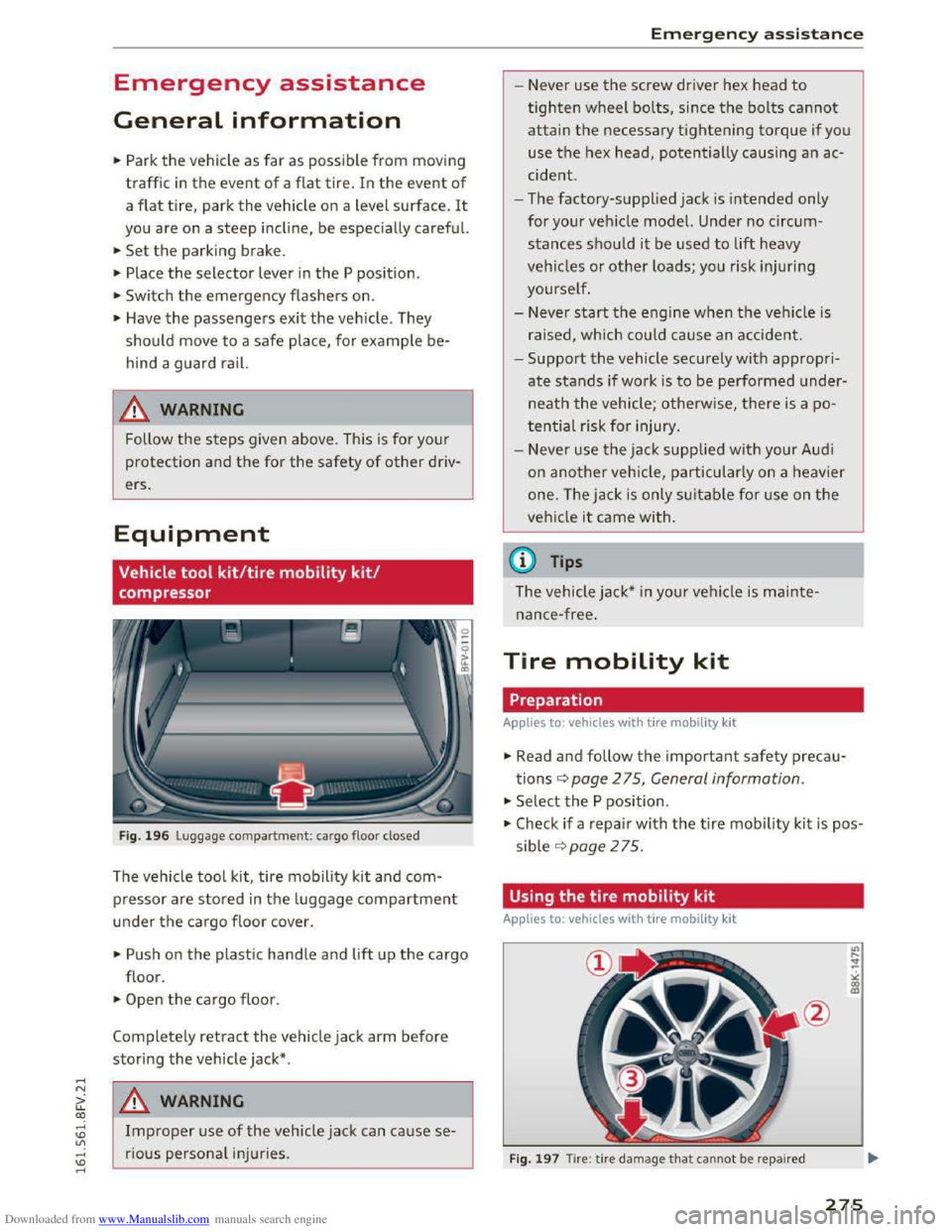
Fig. 196 Luggage compartment: cargo floo r closed
The vehicle tool kit, tire mobility kit and com
pressor are stored in the luggage compartment
u nder the ca rgo floor cover.
"'Push on the plastic handle and lift up the cargo
floor.
"'Open the cargo floor.
Completely retract the vehicle jack arm before
storing the vehicle jack* .
A WARNING
Improper use of the vehicle jack can ca use se
rious personal inju ries .
Emergency assistance
- Never use the screw driver hex head to
tighten wheel bolts, since the bolts cannot
attain the necessary tightening torque if you
use the hex head, potentially causing an ac
cide nt.
- The
factory-supplied jack is intended only
for your vehicle model. Under no circum
stances should it be used to lift heavy
vehicles or other loads; you risk injuring
yourself.
- Never
start the engine when the vehicle is
raised, which could cause an accident.
-Support the vehicle securely with a ppropri
ate stands if wo rk is to be performed under
neat h the vehicle; otherwise, there is a po
tential risk for injury.
- Never
use the jack supplied with your Audi
on another veh icle, particularly on a heavier
one. The jack is only suitable for use on the
vehicle it came with.
(D Tips
The vehicle jack* in your vehicle is mainte
nance-free.
Tire mobility kit
Preparation
Applies to: vehicles with tire mobili ty kit
"' Read and follow the important safety precau
tions<=> page 2 75, General information.
"' Select the P position .
"' Check if a repair with the tire mobility kit is pos
sible ¢page 275.
Using the tire mobility kit
Applies to: vehicles with tire mobility k it
F
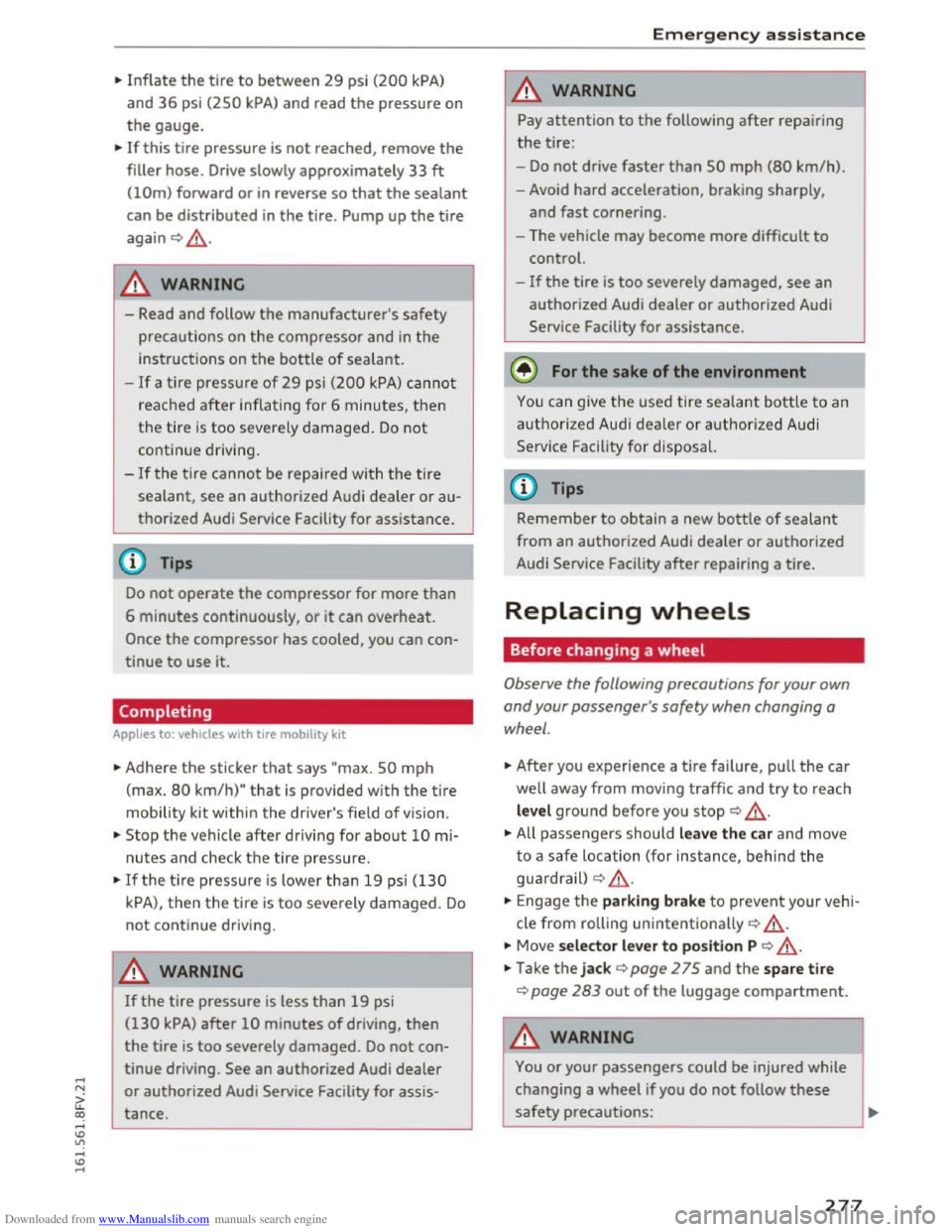
ig. 1 97 Tire : tire damage that cannot be repaired
275
Page 279 of 322
Downloaded from www.Manualslib.com manuals search engine ...... N
G'. CX)
..... ID IJ' ..... ID .....
.,. Inflate the tire to between 29 psi (200 kPA)
and 36 psi (2SO kPA) and read the pressure on
the gauge.
... If this tire pressure is not reached, remove the
filler hose. Drive slowly approximately 33 ft
(!Om) forward or in reverse so that the sealant
can be distributed in the tire. Pump up the tire
again Q ,&..
A WARNING
-Read and follow the manufacturer's safety
precautions on the compressor and in
the
instructions on the bottle of sealant.
-If a tire pressure of 29 psi (200 kPA) cannot
reached
after inflating for 6 minutes, then
the
tire i s too severely damaged . Do not
continue driving.
-If the tire cannot be repaired with the tire
sealant, see an authorized Audi dealer or au
thorized Audi Service Facility
for assistance .
(D Tips
Do not operate the compressor for more than
6 minutes continuously, or it can overheat.
Once the compressor has cooled, you can con
tinue
to use it.
Completing
Applies to: vehicles with tire mobility kit
.,. Adhere the sticker that says "max. SO mph
(max. 80 km/h)" that is provided with the tire
mobility kit within the driver's field of vision .
.,. Stop the vehicle after driving for about 10 mi
nutes and check th e tire pressure.
.,. If the ti re pressure is lower than 19 psi (130
kPA), then the tire is too severely damaged. Do
not continue driving.
A WARNING
If the tire pressure is less than 19 psi
(130 kPA) after 10 minutes of driving, then
the tire is too severely damaged. Do not con
tinue driving.
See an authorized Audi dealer
or authorized Audi Service Facility for assis
tance.
Emergency assistance
A WARNING
"" Pay attention to the following after repairing
the tire:
-Do not drive faster than SO mph (80 km/h).
- Avoid hard acceleration, braking sharply,
and
fast cornering.
- The vehicle may become more
difficult to
control.
-
If the tire is too severely damaged, see an
authorized Audi dealer or authorized Audi
Service Facility
for assistance.
@ For the sake of the environment
You can give the used tire sealant bottle to an
authorized Audi deale r or authorized Audi
Service
Facility for disposal.
(D Tips
Remember to obtain a new bottle of sealant
from an authorized Audi dealer or authorized
Audi Service Facility
after repairing a tire.
Replacing wheels
Before changing a wheel
Observe the following precautions for your own
and
your passenger 's safety when changing a
wheel.
.,. After you experience a tire failure, pull the car
well away from moving traffic and try to reach
level ground before you stop Q .&_.
.,. All passengers should leave the car and move
to a safe location (for instance, behind the
guardra il)
Q & .
... Engag e the parking brake to prevent your vehi
cle
from rolling unintentionally Q ,&..
... Move selector lever to position P Q ,&..
.,. Take the jack Q page 2 75 and the spare tire
Q page 283 out of the luggage compartment.
A WARNING
You or your passengers could be injured while
changing a wheel
if you do not follow these
safety precautions:
-
277
Page 280 of 322
Downloaded from www.Manualslib.com manuals search engine Emergency assista nce
-If you have a flat tire, move a safe distance
off the road. Turn off the engine, turn the
emergency flashers on and use other warn
ing devices to alert other motorists.
-Make sure that passengers wait in a safe
place away from the vehicle and well away
from the road and traffic.
-
To help prevent the vehicle from moving
suddenly and possibly slipping off the jack,
always fully
set the parking brake and block
the wheel diagonally opposite the wheel be
ing changed. When one front wheel is lifted
off the ground, placing the Automatic
Transmission in P (Park) will not prevent the
vehicle from moving.
- Before you
change a wheel, be sure the
ground is level and firm. If necessary, use a
sturdy board under the jack.
- Always
store the veh icle tool k it, the jack
and the replaced tire in the luggage com
partment¢ page 176.
Changing a wheel
When you change a wheel, follow the sequence
described
below step-by-step and in exactly that
order .
1. Remove the decorative wheel co ver*. For
more de tails see also¢ page 2 78, Decora
tive wheel covers or c::> page 2 79, Wheels
with wheel bolt caps.
2. Loosen the wheel bolts ¢page 2 79.
3. Locate the proper mounting point for the
jack and align the jack below that point
c::>page280.
4. Raise the car with the jack c::> page 280.
5. Remove the wheel with the flat tire and then
install the s pare ¢ page 281.
6. Tighten all wheel bolts lightly.
7.
Lower the veh icle with the jack .
8. Use the wheel bolt wrench and firml y tighten
all wheel bolts ¢page 279.
9. Replace the decorative wheel cover*.
278
A WARNING
Always read and follow all WARNINGS and in
formation c::> .& in Raising the vehicle on
page
280 and c::>page 282.
After changing a wheel
A wheel change is not complete without the do
ing the following.
.. Always store the vehicle tool kit, the jack* and
the replaced tire in the luggage compartment
c::>page 176.
.. Check the tire pressu re on the spare wheel im
mediately after mounting it.
.,. As soon as possib le, have the tightening tor
que s on all wheel bolts checked with a torque
wrench. The correct tightening torque is 90 ft
lb (120 Nm).
.. Have the flat t ire replac ed as soon as possible .
(0 Tips
-If you notice tha t the wheel bolts are cor
roded and difficult to turn while changing a
t ire,
they s hou ld be replaced before you
check
the tightening torque.
- Drive
at reduced speed unti l yo u have the
tightening torques checked.
-
After changing a wheel, the tire pressure in
all four tires must be checked/corrected and
the tire pressure monitoring indicator must
be stored in the Infotainment c::> page 269.
Decorative wheel covers
Gilt for: with decorative wheel covers
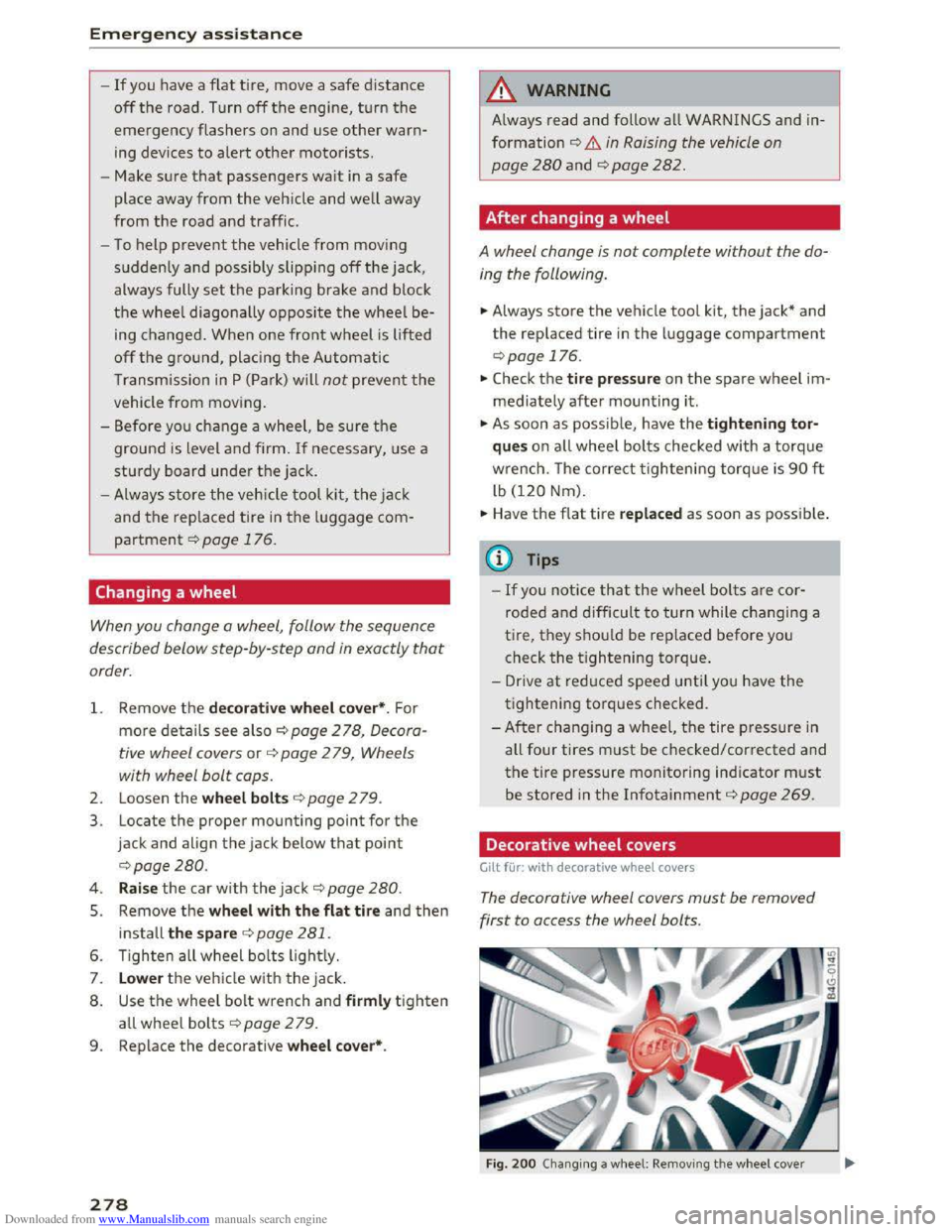
The decorative wheel covers must be removed
first to access the wheel bolts.
Fig. 200 Changing a w heel: Removing th e w heel cover
Page 282 of 322
Downloaded from www.Manualslib.com manuals search engine Emergency assistance
car to keep your balance and take care not
to slip.
Raising the vehicle
The vehicle must be li~ed w ith the jock first be
fore the wheel can be removed.
-fi·--
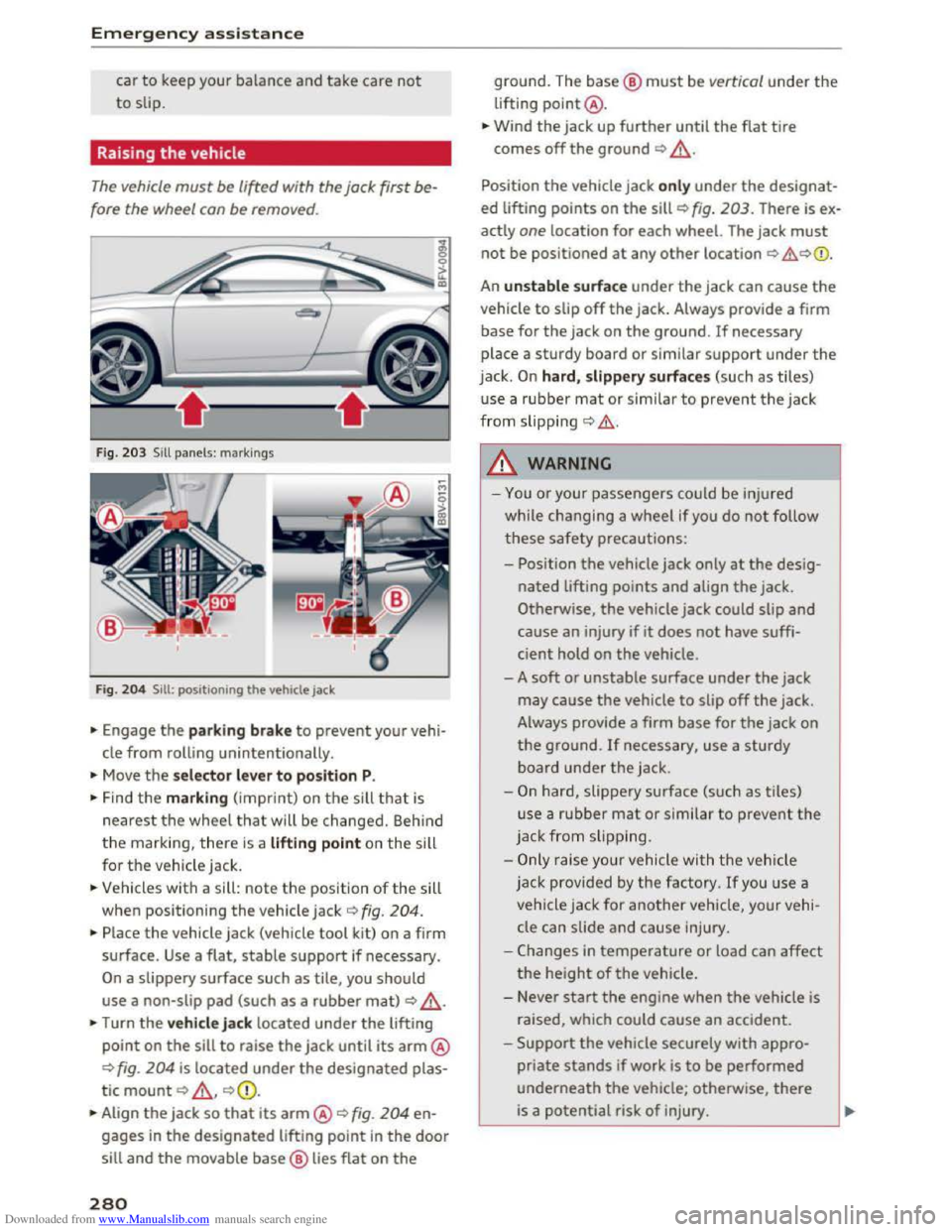
Fig. 203 Sill panels: markings
Fig.
204 Sill : po sitioning th e ve hicl e jack
... Engage the parking brake to prevent your vehi
cle from rolling unintentionally.
... Move the selector lever to position P.
... Find the marking (imprint) on the sill that is
nearest the wheel that will be changed. Behind
the marking, there is a lifting point on the sill
for
the vehicle jack.
... Vehicles with a sill: note the position of the sill
when positioning
the vehicle jack o fig. 204.
... Place the vehicle jack (vehicle tool kit) on a firm
surface.
Use a flat, stable support if necessary.
On a slippery surface such as tile, you should
use a non-slip pad (such as a rubber mat) o _&.
... Turn the vehicle jack located under the lifting
point on the sill to raise the jack until its arm@
c:> fig. 204 is located under the designated plas
tic
mount c:> _&, c:>Q).
... Align the jack so that its arm@o fig. 204 en
gages in the designated lifting point in the door
sill and the movable base@ lies flat on the
280
ground. The base@ must be vertical under the
lifting point@ .
... Wind the jack up further until the flat tire
comes off the ground c:> _&.
Position the vehicle jack only under the designat
ed lifting points on the sill c:> fig. 203. There is ex
actly
one location for each wheel. The jack must
not be positioned at any other location c:> .&,c:>Q).
An unstable surface under the jack can cause the
vehicle to slip off the jack. Always provide a firm
base for the jack on the ground. If necessary
place a
sturdy board or similar support under the
jack. On hard, slippery surfaces (such as tiles)
u
se a rubber mat or similar to prevent the jack
from slipping c:> .&..
A WARNING
- I
-You or your passengers could be injured
while changing a
wheel if you do not follow
these safety precautions:
- Position
the vehicle jack only at the desig
nated lifting points and align the jack.
Otherwise,
the vehicle jack could slip and
cause an injury if it does not have suffi
cient hold on the vehicle.
- A
soft or unstable surface under the jack
may cause the vehicle to slip off the jack .
Always provide a firm
base for the jack on
the ground. If necessary, use a sturdy
board under the jack .
-
On hard, slippery surface (such as tiles)
use a
rubber mat or similar to prevent the
jack
from s lipp ing.
-
Only rais e your vehicle with the vehicle
jack provided by
the factory. If you use a
vehicle jack for
another vehicle, your vehi
cle can slide
and cause injury .
- Changes
in temperature or load can affect
the height of the vehicle.
- Never
start the engine when the vehicle is
raised, which could
cause an accident .
-
Support the vehicle securely with appro
priate stands if work is to be performed
underneath the vehicle; otherwise, there
is a potential risk of injury.
Page 288 of 322
Downloaded from www.Manualslib.com manuals search engine Fuses and bulbs
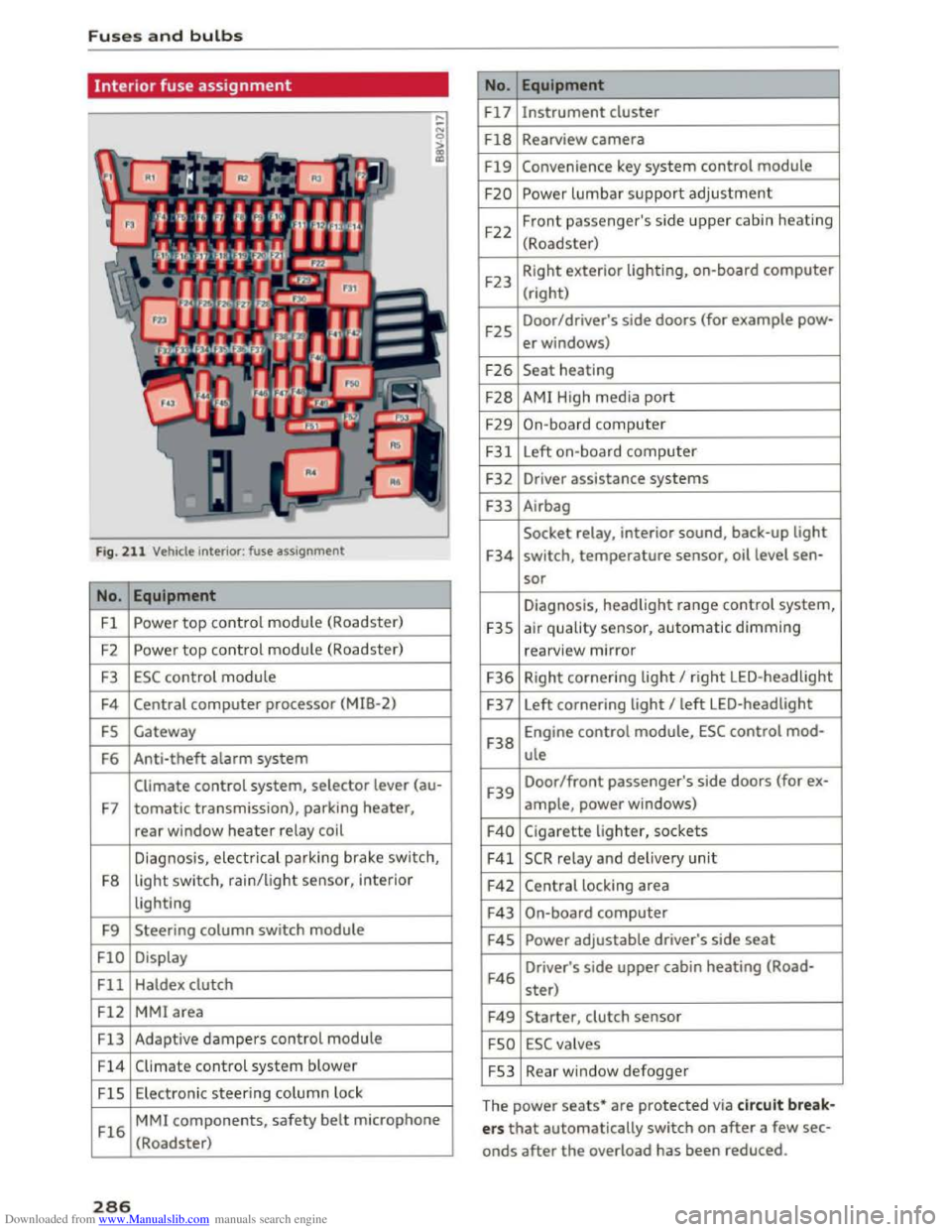
Interior fuse assignment
Fig. 211 Vehicle interior: fuse assignment
No. Equipment
Fl Powe r top control module (Roadster)
F2
Power top control module (Roadster)
F3 ESC control module
F4 Central computer processor (MIB-2)
FS Gateway
F6
Anti-theft alarm system
Climate control system, selector lever (au-
F7 tomatic transmission), parking heater,
rear window heater relay coil
Diagnosis,
electr ical parking brake switch,
F8
light switch, rain/light sensor, inter ior
lighting
F9
Steering column switch module
FlO Display
Fll Haldex clutch
F12 MMI area
Fl3 Adaptive dampers control module
F14 Climate control system blower
FlS Electronic steering column l ock
Fl6
MMI components, safety belt microphone
(Roadster)
286
No . Equipment
Fl7 Instrument cluster
Fl8 Rearview camera
F19 Convenience key system control module
F20 Power lumbar support adjustment
F22
Front passenger's side upper cabin heating
(Roadster)
F23 Right
exterior lighting, on-board computer
(right)
F25 Door/driver's
side doors (for example pow-
er windows)
F26 Seat heating
F28 AMI High media port
F29 On-board computer
F31 Left on-board computer
F32
Driver assistance systems
F33
Airbag
Socket relay, interior sound, back-up light
F34 switch, temperature sensor, oil level sen-
sor
Diagnosis, headlight range control system,
F35 air quality sensor, automatic dimming
rearview mirror
F36 Right cornering light I right LED-headlight
F37 Left
cornering light I left LED-headlight
F38
Engine control module, ESC control mod-
ule
F39
Door/front passenger's side doors (for ex-
ample, power windows)
F40 Cigarette lighter, sockets
F41 SCR relay and delivery unit
F42 Central locking area
F43 On-board computer
F45 Power adjustable driver's side seat
F46
Driver's side upper cabin heating (Road-
ster)
F49 Starter, clutch sensor
FSO ESC valves
FS3 Rear window defogger
The
power seats* are protected via circuit break
ers that automatically switch on after a few sec
onds after the overload has been reduced.
Page 291 of 322
Downloaded from www.Manualslib.com manuals search engine ..... N
G: CX)
.....
"' U"I
.....
"' .....
When jump starting or charging the battery,
never connect the negative ground cable to
the battery negative post because the battery
manager system must be able to detect the
battery's state of charge. Always connect the
negative ground cable to the negative ground
post of the battery manager control unit.
Use of jumper cables
Make sure to connect the jumper cable clamps in
exactly the order described below!
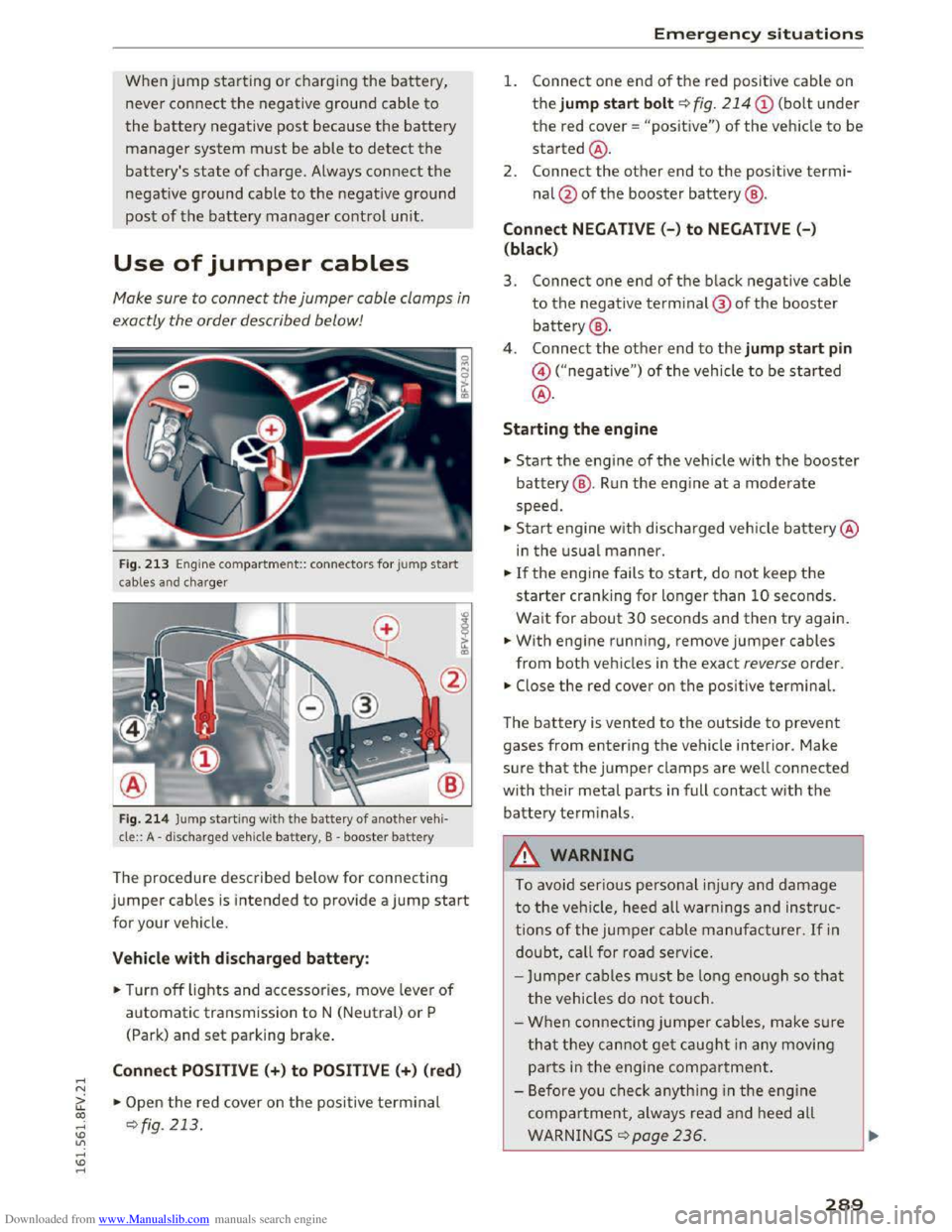
Fig. 213 Engine compa rtment:: connecto rs for jump start
cables and cha rger
Fig.
214 Jump starti ng with the battery of another vehi·
cle:: A -discharged vehicle battery, B -booster battery
The procedure described below for connecting
jumper cables is intended to provide a jump start
for your vehicle.
Vehicle with discharged battery:
.. Turn off lights and accessories, move lever of
automatic transmission to N (Neutral) or P
(Park)
and set parking brake.
Connect POSITIVE (+) to POSITIVE(+) (red)
.,.. Open the red cover on the positive terminal
~fig. 213 .
Emergency situations
1. Connect one end of the red positive cable on
the jump start bolt~ fig. 214
the red cover = "positive") of the veh icle to be
started@ .
2.
Connect the other end to the positi ve termi
nal@of the booster battery@ .
Connect NEGATIVE(-) to NEGATIVE (- )
(black)
3. Connect one end of the black negative cable
to the negative terminal@ of the booster
battery@ .
4 .
Connect the other end to the jump start pin
@("negative") of the vehicle to be started
@.
Starting the engine
.. Start the engine of the vehicle with the booster
battery@. Run the engine at a moderate
speed .
.,.. Start engine w ith discharged vehicle battery@
in the usual manner.
.,.. If the engine fails to start, do not keep the
starter cranking for longer than 10 seconds.
Wait for about 30 seconds and then try again .
.. With engine running, remove jumper cables
from both vehicles in the exact reverse order .
.. Close the red cover on the positive terminal.
The battery is vented to the outside to prevent
gases from entering the vehicle interior. Make
sure that the jumper clamps are well connected
with their metal parts in full contact with the
battery terminals .
.&. WARNING
t-==
To avoid serious personal injury and damage
to the vehicle, heed all warnings and instruc
tions of the jumper cable manufacturer. If in
doubt, call for road service.
-
Jumper cables must be long enough so that
the vehicles do not touch.
-
When connecting jumper cables, make s u re
that they cannot get caught in any moving
parts in the engine compartment.
- Before you check anything in the engine
compartment, always read and heed all
WARNINGS q page 236.
289