warning light AUDI TT COUPE 2016 User Guide
[x] Cancel search | Manufacturer: AUDI, Model Year: 2016, Model line: TT COUPE, Model: AUDI TT COUPE 2016Pages: 322, PDF Size: 52.86 MB
Page 19 of 322

Downloaded from www.Manualslib.com manuals search engine Drive to an authorized Audi dealer or authorized
Audi Service Facility immediately to have the
malfunction corrected.
~O Audi adaptive light
Applies to: vehicles with Audi adaptive light
rJJ Audi adaptive light: malfunction! See own
er's manual
There is a malfunction in the adaptive lights. The
headlights still function.
Drive to an authorized Audi dealer or authorized
Audi Service Facility immediately to have the
malfunction corrected.
li,D Light/rain sensor
El Automatic headlights: malfunction! See
owner's manual
II Automatic wipers: malfunction! See owner's
manual
The light/rain sensor is malfunctioning.
The low
beams remain switched on at all times
for safety reasons when the light switch is in the
AUTO position. You can continue to turn the
lights on and off using the light switch. You can
still control all wiper functions that are inde
pendent of the rain sensor.
Drive to an authorized Audi dealer or authorized
Audi Service Facility immediately to have the
malfunction corrected.
; Damper control
App lies to: vehicles with Audi drive select
R Suspension: malfunction! You may continue
driving
There is an adaptive damper malfunction.
Drive to an authorized Audi dealer or authorized
Audi Service Facility immediately to have the
malfunction corrected.
Instruments and indicator lights
¢ Q Turn signals
If the. or B indicator light blinks, a turn sig
nal is turned on. If both indicator lights are blink
ing,
the emergency flashers are on.
In
an indicator light blinks twice as fast as usual,
then a turn signal bulb has failed. Replace the
bulb immediately.
CJ! 4f. Rear safety belt
Applies to: vehicles with rear safety belt detection
The respective indicator light will turn on briefly
when a safety belt on the rear seats is fastened
or unfastened.
f!l-If this indicator light turns on briefly, the
safety belt on the rear seat is not fastened.
II-If this indicator light turns on briefly, the
safety belt on the rear seat was fastened.
·-If this indicator light blinks, the safety belt
was unfastened while driving. Above a certain
speed, there will also be a warning tone.
(D Tips
For additional information on safety belts, re
fer to ~page 180.
On-Board Diagnostic
system (OBD)
System indicator light (MIL)
The system indicator light (MIL) Ill in the instru
ment cluster is part of the On Board Diagnostic
System (OBD II).
The
warning/indicator light turns on when the ig
nition is
switched on and turns off once the en
gine is started and is running in idle at a stable
speed. This indicates that the MIL is functioning
correctly.
If the light does not turn off after starting the
engine or turns on while driving, this may indi
cate there is a malfunction in the engine. If the
indicator turns on, the catalytic converter may be
damaged. ..,.
17
Page 20 of 322
Downloaded from www.Manualslib.com manuals search engine Instruments and indicator lights
Drive with reduced engine performance (avoid
high
speeds for extended periods of time and/ or
fast acceleration) and have the malfunction cor
rected. See an authorized Audi dealer or author
ized Audi Service Facility.
The
indicator may turn on if the electronic speed
lim iter is faulty. For additional information, refer
to c:> page 72, Electronic speed limiter.
On-Board Diagnostics
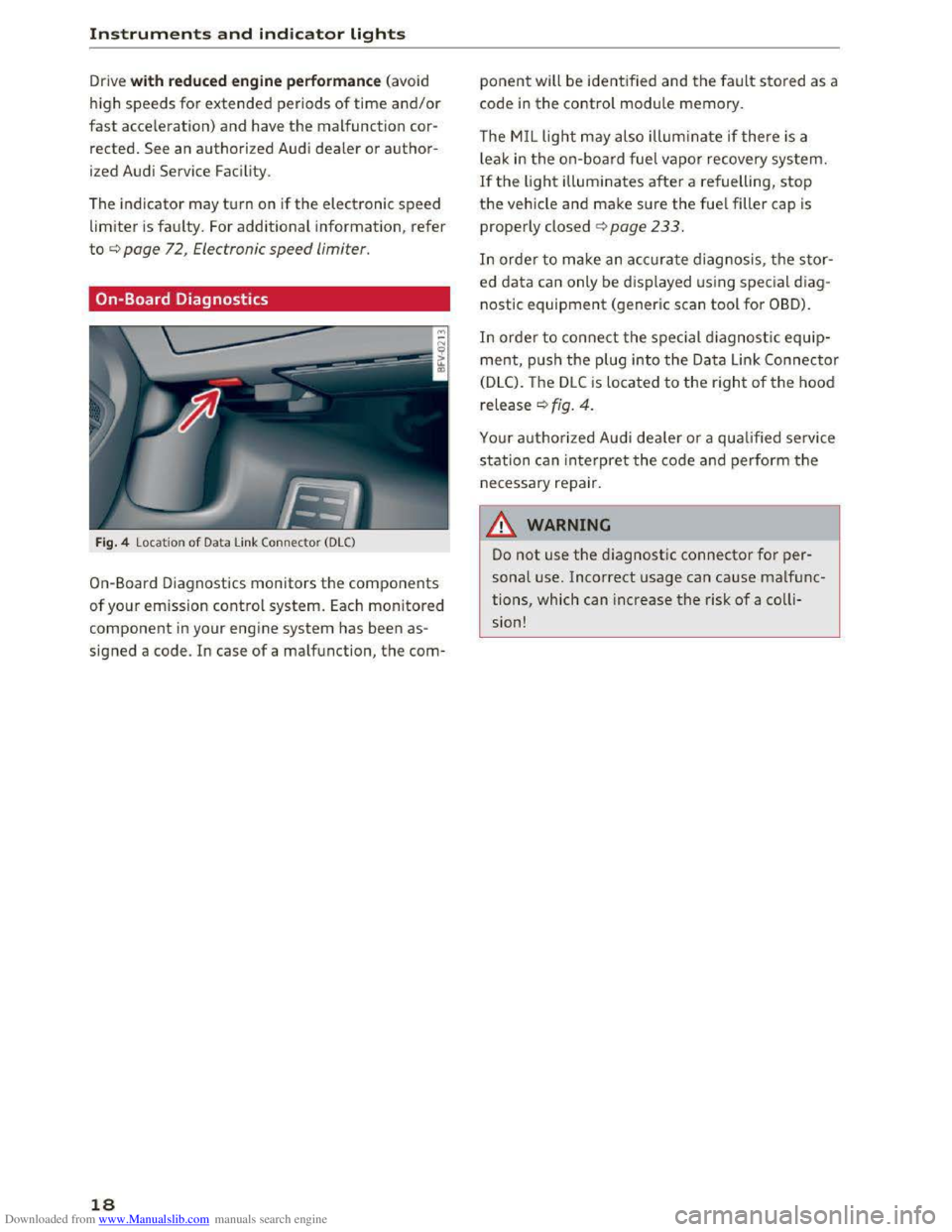
Fig. 4 Locat ion of Data Link Connector (DLC)
On-Board Diagnostics monitors the components
of your emission control system. Each monitored
component in your engine system has been as
signed a code. In case of a malfunction, the com-
18
ponent will be identified and the fault stored as a
code in the control module memory.
The MIL light may also illum inate if there is a
l
eak in the on-boar d fuel vapor recovery system.
If the light illuminates after a refuelling, stop
the vehicle and make sure the fuel filler cap is
properly closed c:> page 233.
In order to make an accurate diagnosis, the stor
ed data can only be displayed using special d iag
nostic equipment (generic scan tool for OBD).
In order to connect the special diagnostic equip
ment, push the plug into the Data Link Connector
(DLC). The DLC is located to the right of the hood
release c:> fig. 4.
Your authorized Audi dealer or a qualified service
station can interpret the code and perform the
necessary repair.
11. WARNING
Do not use the diagnostic connector for per
sonal use. Incorrect usage can cause malfunc
tions, which can increase the risk of a colli
sion!
- I
Page 21 of 322
Downloaded from www.Manualslib.com manuals search engine ..... N
G: CX)
.....
"' U"I
.....
"' .....
Driver information system
Overview
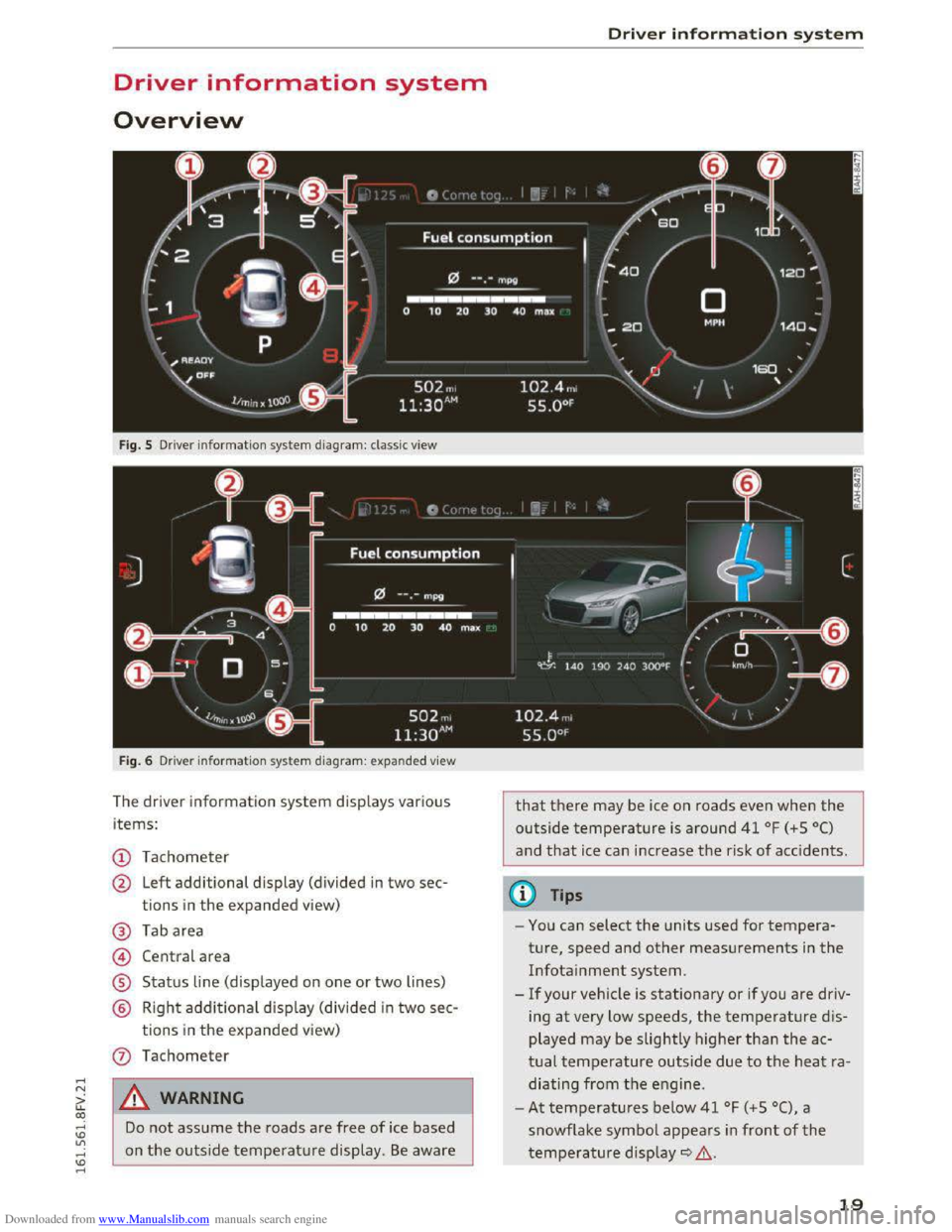
Fig. S Driver information system diagram: classic view
Fig. 6 Dri
ver in formation system diagram : expanded view
The driver information system displays various
items:
(!) Tachometer
@ Left additional display (divided in two sec-
tions in
the expanded view)
@ Tab area
@ Central area
® Status line (displayed on one or two lines)
@ Right additional display (divided in two sec-
tions in the expanded view)
Do not assume the roads are free of ice based
on
the outside temperature display. Be aware
Driver information system
that there may be ice on roads even when the
outside temperature is around 41 °F (+ S 0()
and that ice can increase the risk of accidents.
(0 Tips
-You can select the units used for tempera
ture, speed and other measurements in
the
Infotainment system.
-
If your vehicle is stationary or if you are driv
ing
at very low speeds, the temperature dis
played may
be slightly higherthan the ac
tual temperature outside due to the heat ra
diating
from the engine .
-
At temperatures below 41 °F (+S 0(), a
snowflake symbol appears in
front of the
temperature display~.&.
19
Page 22 of 322
Downloaded from www.Manualslib.com manuals search engine Driver information system
Multifunction steering
wheel plus
Operating
Apples to: vehicles with multifunction steering wheel plus
The Multifunction steering wheel plus* hos 14
buttons. You con use them to operate the driver
information
system and the MMI functions,
change the volume and switch the voice recogni
tion system* on and off.
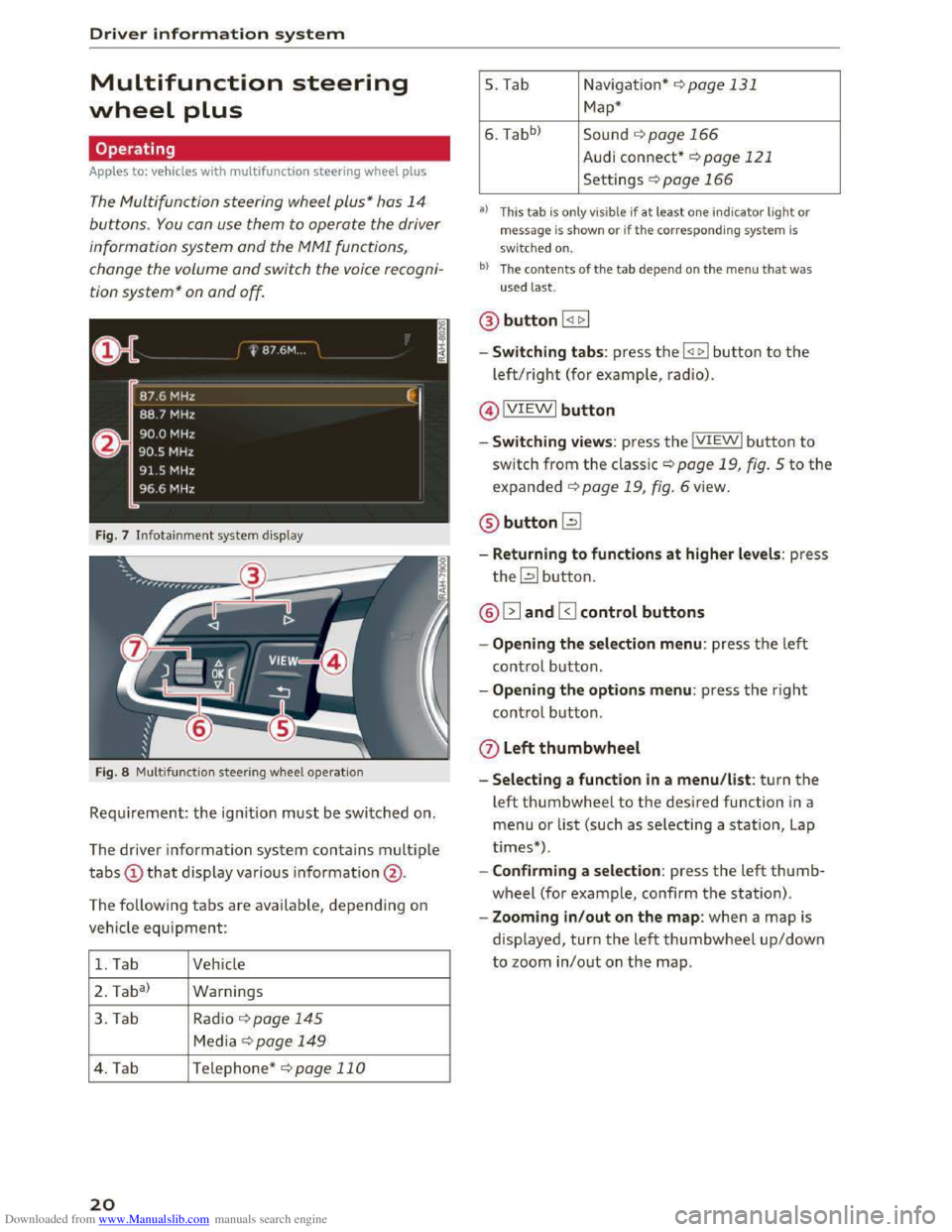
Fig. 7 Infotainment system display
Fig. 8 Multifunction
steering wheel operation
Requ irement: the ignition must be switched on.
The driver information
system contains multiple
tabs CD that display various information @.
The
following tabs are available, depend ing on
vehicle
equipment:
1. Tab Vehicle
2 . Ta
ba)
Warnings
3. Tab
Rad io¢ page 145
Media~ page 149
4. Tab Telephone* ¢page 110
20
5. Tab Navigation*¢ page 131
Map*
6. Tabb >
Sound ¢page 166
Audi connect* ¢page 121
Settings ¢page 166
a) This tab is only visible if at least o ne indicator light or
message is shown or if the correspon ding system is
sw i
tched on.
bl The contents of the tab depen d on the men u that was
used last.
® button I <11> I
- Switching tabs: press the I
left/right (for example, radio).
@IVIEWI button
-Switching views: press the IVIEWI button to
switch from the classic¢ page 19, fig. 5 to the
expanded ¢ page 19, fig. 6 view.
® buttonl2J
-Returning to functions at higher levels: press
the~ button.
@ 12] and 0 control buttons
-Opening the selection menu: press the left
control button.
-Opening the options menu: press the right
control button.
Q) Left thumbwheel
-Selecting a function in a menu/list: turn the
left thumbwheel to the desired function in a
menu or list (such as selecting a station, Lap
times*) .
-
Confirming a selection: press the left thumb
wheel (for example, confirm the station).
-Zooming in/out on the map: when a map is
displayed, turn the left thumbwheel up/down
to zoom in/out on the map.
Page 29 of 322
Downloaded from www.Manualslib.com manuals search engine ..... N
G: CX)
.....
"' U"I
LED and batteries in the remote control key
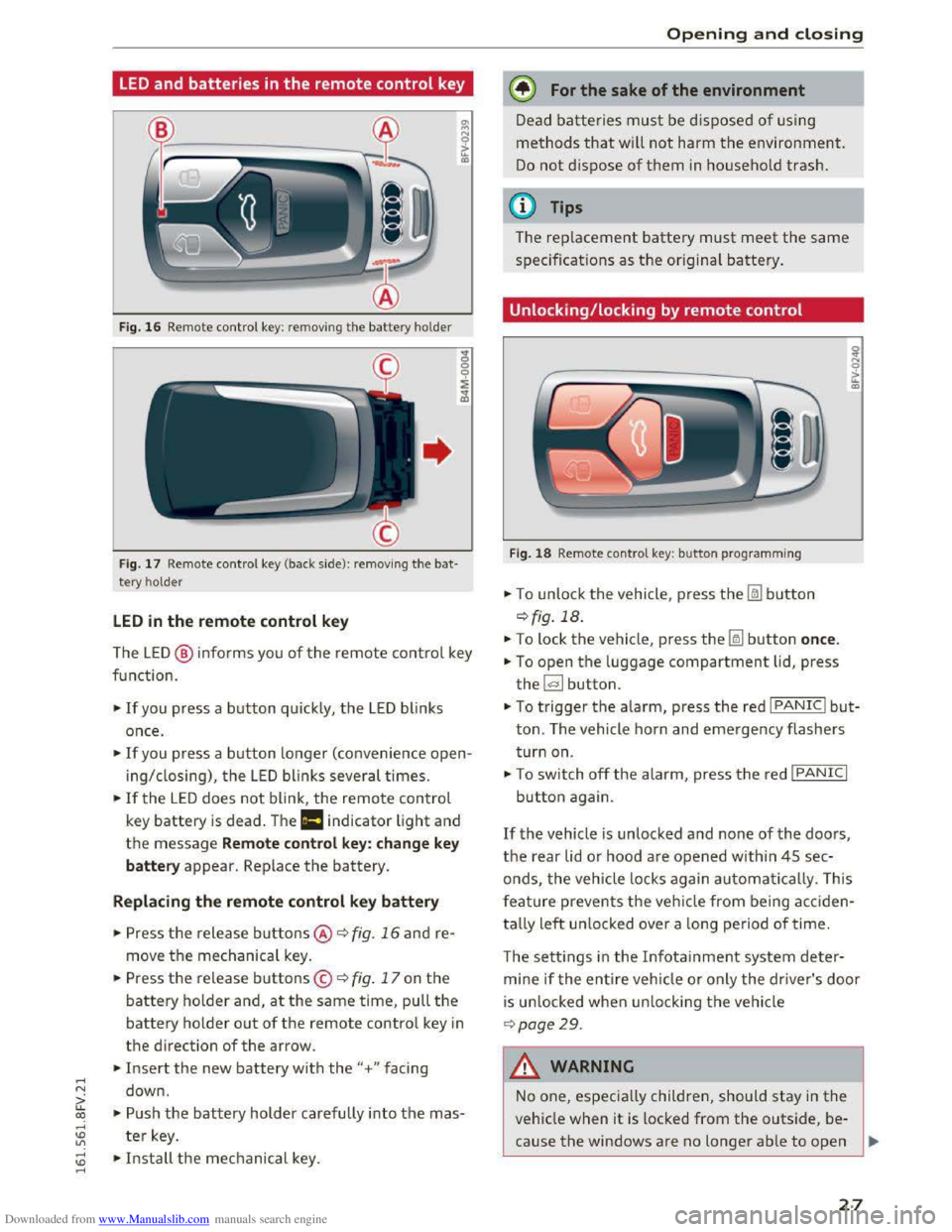
Fig. 16 Rem ote contro l key: rem ov ing the battery hol der
Fig. 17 Remote control key (back side ): remov ing the ba t
tery ho lder
LED in the remote control key
The LE D @ info rms you of the remote control key
function.
•If you press a button quick ly, the LED blinks
once .
• If you press a button longer (convenience open
ing/ closing), the LED blinks several times.
•If the LED does not blink, the remote control
key battery is dead . The Ill indicator light and
the message Remote control key: change key
battery appear. Replace the battery.
Replacing the remote control key battery
• Press the release buttons@ ¢ fig. 16 and re
move the mechanical key.
.. Press the release buttons© ¢ fig. 17 on the
battery holder and, at the same time, pull the
battery holder out of the remote contro l key in
the direction of the arrow .
.. Insert the new battery with the"+ " facing
down .
.. Push the battery holder carefully into the mas
ter key.
~ •Install the mechanical key . .....
Opening and closing
@) For the sake of the environment
Dead batteries must be disposed of using
methods that will not harm the environment.
Do not dispose of them in household trash.
@Tips
The replacement battery must meet the same
specificat ions as th e origina l battery.
Unlocking/locking by remote control
Fig. 18 Remote contro l key : button programming
.. To unlock the vehicle , press the Im button
¢ fig. 18.
.. To lock the vehicle, press the~ button once.
.. To open the luggage compartment lid, press
the~ button .
.. To trigger the alarm, press the red I PANIC I but
ton. The vehicle horn and emergency flashers
turn on.
•To switch off the alarm, press the red I PANIC I
button again .
If the vehicle is unlocked and none of the doors,
the rear lid or hood are opened within 45 sec
onds,
the veh icle locks again automatically. This
f
eature prevents the vehicle from being acciden
tally
left un locked over a long period of time.
T
he setti ngs in the Infota inment system deter
mine if the entire vehicle or only the driver's door
is un locked when un locking the vehicle
¢page 29.
A WARNING
--1
No one, especially children, should stay in the
vehicle when it is locked from the outside, be
cause the windows are no longer able to open
27
Page 31 of 322

Downloaded from www.Manualslib.com manuals search engine ..... N
G: CX)
.....
"' U"I
Central locking switch
Fig. 20 Driver's door: central loc king switch
... To lock the veh icle, press the@! button ¢,&. .
... Press the !ill button to unlock the veh icle .
When locking
the vehicle with the central locking
switch, the
following applies :
- Opening
the door and the lu ggage compart
ment lid from the outside is not possible (f or
sec urity such as when stopped
at a light) .
- The
LED in the central locking switch turns on
when all doors are closed and locked.
-
You can open the doors individually from the
inside
by pulling the door handle .
- In the event of a crash with airbag deployment,
the doors unlock automatically to allow access
to the vehicle .
.&. WARNING
-The power locking switch works with the ig
nition off and automatically locks the entire
vehicle when
the~ button is pressed .
- The centra l loc kin g switc h is inoperative
when
the veh icle is l ocked from the outside.
-
Locked doors make it more difficult for
eme rgency workers
to get into the veh icle,
whic h puts lives at risk. Do not leav e anyone
behi nd i n
the ve hicle , especially children.
@ Tips
Your vehicle locks a u
tomatically when it
reaches a speed of 9 mph (15 km/h) (Auto
Lock) q page 25. You can unlock the vehicle
ag
ain usi ng the [ill button in the ce ntral loc k
ing switch.
.....
"' l) This functio n is not availa ble in all countries . .....
Opening and closing
Setting the central locking system
In the Infotainment system, you can set which
doors the central locking system will unlock .
... Select in the Infotainment system: I MENU! but
ton> Vehicle> left control button >Vehicle set
tings .
Door unlocking
-you can decide if All doors or
only
the Driver door should unlock. The luggage
compartment
lid also unl ocks when All is select
ed. If you select Driver i n a vehicle with a conve n
ience key*, only the doo r whose handle you pull
will un
lock .
If you select Driver , all the doors and luggage
compartment
lid will unlock if you press the@l
button on the remote control key twice.
Fold mirrors * -if you select On, the exterior rear
view mirrors fold in automatically when you press
the l:ru button on the remo te contro l master key
or touch th e s ensor* in th e handle .
Lock when driving l) -if you select On, the vehi
cle locks automatically when driving. All of the
doo rs and the luggage compartment lid lock.
29
Page 35 of 322

Downloaded from www.Manualslib.com manuals search engine ..... N
G: CX)
.....
"' U"I
.....
"' .....
-For security reasons, the windows can only
be
opened and closed with the remote con
trol key at a maximum distance of approxi
mately 6 ft (2 m) away from the vehicle.
When pressing the[@ button, always watch
the windows while they are closing so that
no one is pinched in the window. The closing
process will
stop immediately when the~
button is released.
Correcting power window malfunctions
After disconnecting the vehicle battery, the one
touch up
and down feature must be activated
again.
~ Pull the power window switch until the window
is completely ra ised.
~Release the switch and pull it again for at least
one second.
Garage door opener
(Homelink)
Description
Applies to: vehicles with garage door opener (Homelink}
Fig.
27 Garage door opener: examp les of usage for diffe r
ent system s
W ith the garage door opener (Homelink), you
can activate
systems such as the garage doors,
security
systems or house lights from inside your
vehicle. Up to three remote control functions can
be
programmed to the three buttons that are in
tegrated in the control unit above the rearview
mirror .
T o
be able to operate systems using the garage
door opener, the buttons in the control unit must
first be programmed .
Opening and closing
A WARNING
f=
When operating or programming the garage
door opener, make sure that no people or ob
jects are in the area immediately surrounding
the system. People can be inju red o r property
can be damaged if struck when closing.
@ Tips
-For security reasons, we recommend that
you clear the programmed buttons before
selling the vehicle.
- For
further information regarding Home
Link,
refer to www.homelink.com .
-For the Declaration of Conformity with the
prov is ions from the FCC in the United States
and Industry Canada, refer to~ page 297.
Operation
Applies to: vehicles with garage door opener (Home link)
Fig .
28 Contro l panel above the interio r rearv iew mirro r
Requirement: the button in the control panel
must be programmed~ page 34 and the vehi
cle
must be located within range of the system,
suc h
as the garage door.
~ Press the button to open the garage door. The
green LED@ blinks or turns on.
~ Press the button again to close the garage
door.
(j) Tips
To open or close the garage door, do not
press the button longer than 20 seconds or
the garage door opener will switch to pro
gramming mode.
33
Page 38 of 322
Downloaded from www.Manualslib.com manuals search engine Lights and Vision
Lights and Vision
Exterior Lighting
Switching lights on and off
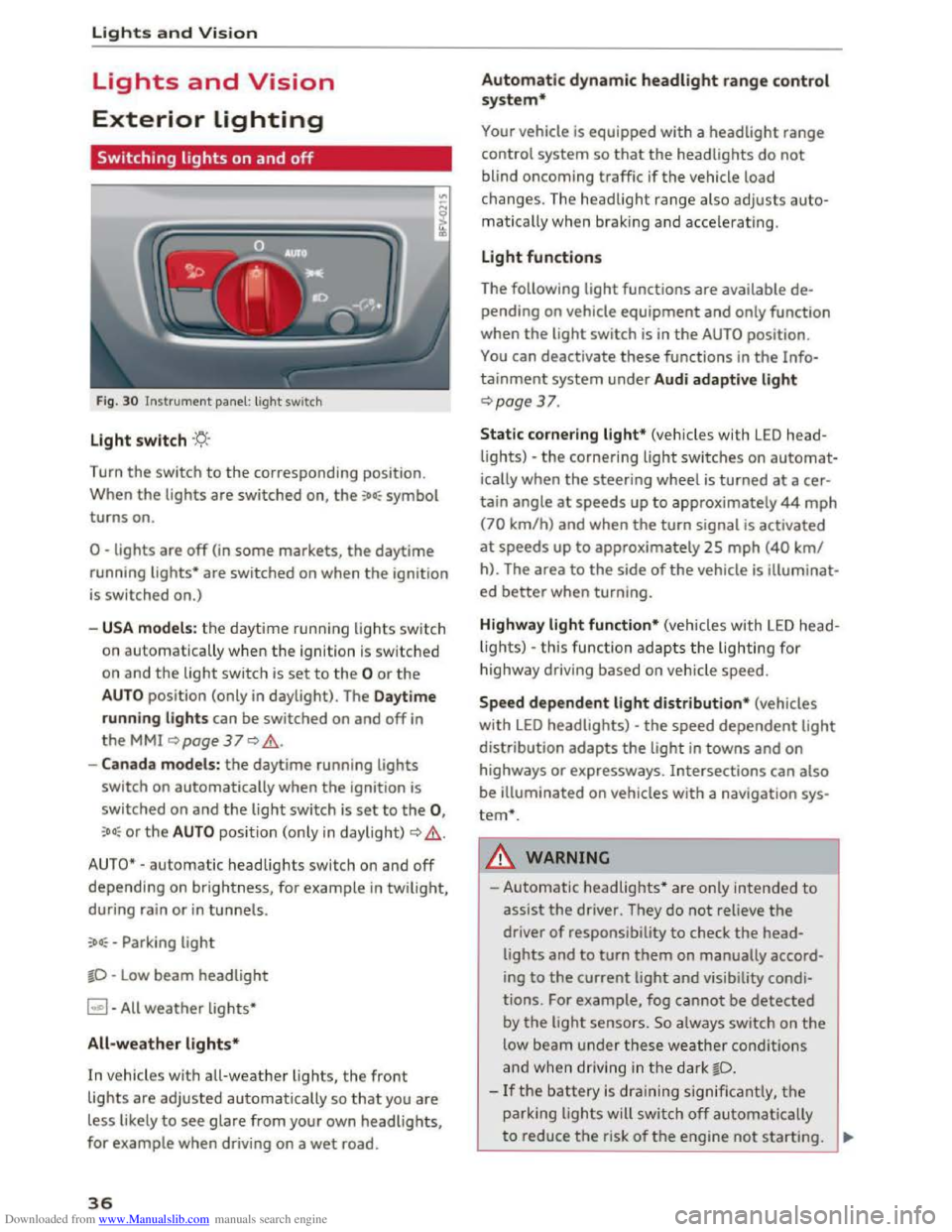
Fig. 30 Instrument panel: light switch
Light switch ·'t/;
Turn the switch to the corresponding position.
When
the lights are switched on, the :oo: symbol
turns on.
0 -lights are off (in some markets, the daytime
running
lights* are switched on when the ignition
is switched on.)
-USA models: the daytime running lights sw itch
on automatica
lly when the ignition is sw itched
on and
the light switch is set to the 0 or the
AUTO position (only in daylight). The Daytime
running lights
can be switched on and off in
the MMI ~page 37 Q &.
-Canada models: the daytime running lights
switch on automatically when the ignition is
switched on and the light switch is set to the 0,
:oo: or the AUTO position (only in daylight) QA .
AUTO* -automatic headlights switch on and off
depending on brightness, for example in twilight,
during rain
or in tunnels.
:oo: -Parking light
~D -Low beam headlight
~ -All weather lights*
All-weather lights*
In vehicles with all-weather lights, the front
lights are adjusted automatically so that you are
less likely
to see glare from your own headlights,
for example when driving on a wet road.
36
Automatic dynamic headlight range control
system*
Your vehicle is equipped with a headlight range
control system
so that the headlights do not
blind oncoming traffic if the vehicle load
changes. The headlight range also
adjusts auto
matically when braking and accelerating .
Light functions
The following light functions are available de
pending on vehicle equipment and only function
when the
light switch is in the AUTO position.
You can deactivate these functions in the Info
tainment system under Audi adaptive light
Qpage 37.
Static cornering light* (vehicles with LED head
lights) -the cornering light switches on automat
ically when the steeri ng wheel is turned at acer
tain angle at speeds up to approximately 44 mph
(70 km/h) and when the turn signal is activated
at speeds up to approxim ately 25 mph (40 km/
h). The area
to the side of the vehicle is illuminat
ed better when turning.
Highway light function* (vehicles with LED head
lights) -this function adapts the lighting for
highwa y driving based on vehicle speed.
Speed dependent light distribution* (vehicles
with LED headlights) -the speed dependent light
distribution adapts the light in towns and on
highways
or expressways. Intersections can also
be illuminated on vehicles
with a navigation sys
tem*.
A WARNING
- Automatic headlights * are only intended to
assist the driver. They do not reliev e the
driver
of responsibility to check the head
lights and to turn them on manually accord
ing to the current ligh t and visibility condi
tions. For example, fog cannot be detected
by
the light sensors . So always switch on the
low beam under these weather conditions
and when
driving in the dark ~D.
-If the battery is dra ining significantly, the
parking lights will switch off automatically
to reduce the risk of the engine not starting . ..,..
Page 39 of 322
Downloaded from www.Manualslib.com manuals search engine Always make sure your vehicle is parked and
adequately lit according to the laws. Avoid
using
the parking lights for several hours.
Switch
on the right or left parking light if
possible.
-
Please observe legal regulations when using
the lighting systems described.
Tips
-The light sensor for the automatic head
lights*
is in the rearview mirror mount.
Therefore, do not place any stickers in this
area on the w indshield.
-
Some functions of the exterior lighting can
be
adjusted ~page 3 7.
-
If yo u turn off the ign ition whil e the exterior
lights are on and open the door, you will
hear a warning tone.
- In some markets, the tail lights will switch
on when the daytime running lights switch
on.
- In cool
or damp weather, the inside of the
headlights, turn signals and tail lights can
fog over due to the temperature difference
between the inside and outside. They will
clear shortly after switching them on. This
does not affect the service life of the light
ing.
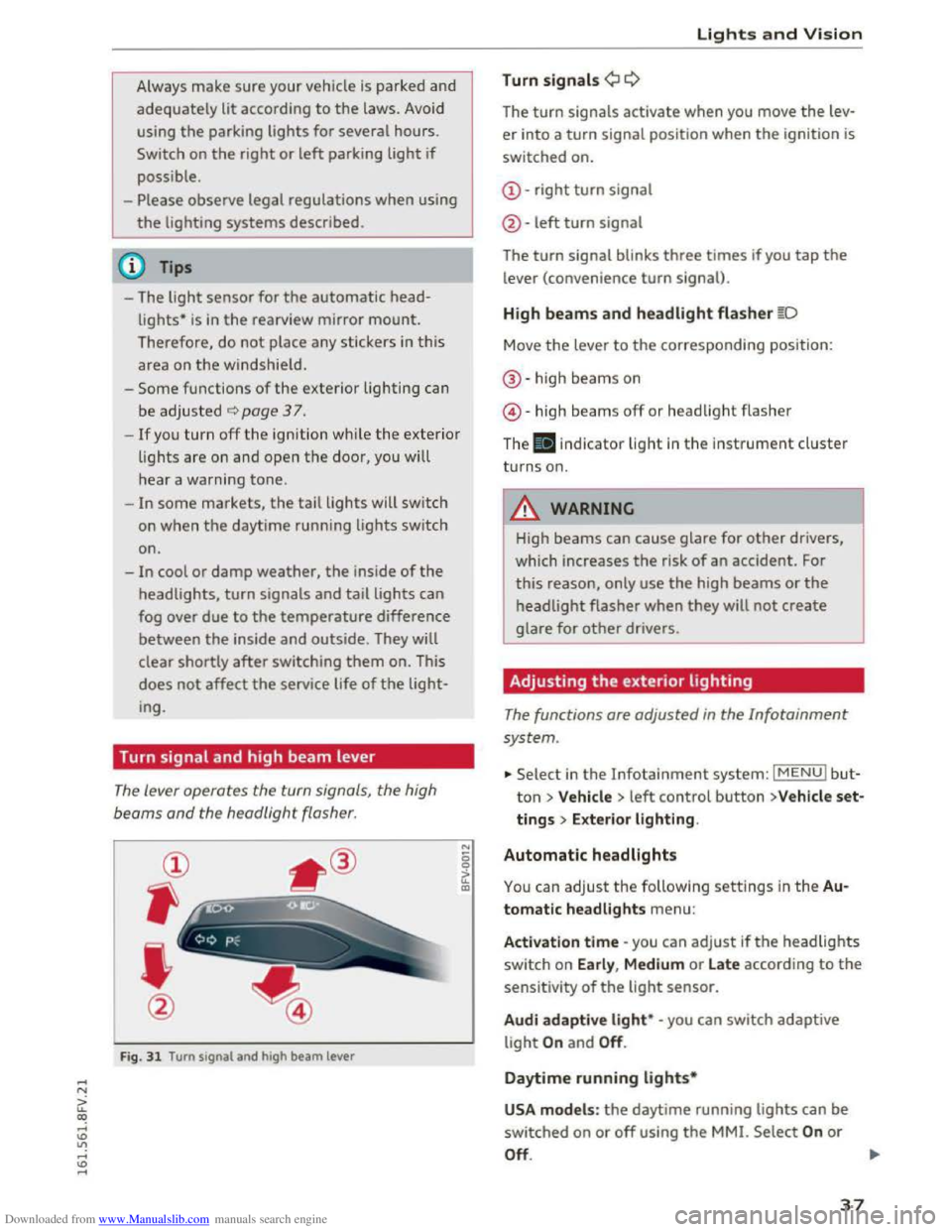
Turn signal and high beam lever
The lever operates the turn signals, the high
beoms
and the headlight flasher.
@
,
I
@
Fig. 31 Turn signal and high beam lever
"' 0 0
a'.: CXl
Lights and Vision
Turn signals¢ Q
The turn signals activate when you move the lev
er into a turn signal position when the ignition is
switched on.
@-right turn signal
@
-left turn signal
The turn signal blinks three times if you tap the
lever (convenience turn signal).
High beams and headlight flasher §D
Move the lever to the corresponding position:
®-high beams on
@-high beams off or headlight flasher
The . indicator light in the instrument cluster
turns on.
A WARNING
High beams can cause glare for other drivers,
which increases
the risk of an accident. For
this reason, only use the high beams or the
headlight flasher when they will not create
glare for other drivers.
Adjusting the exterior lighting
The functions are adjusted in the Infotainment
system .
... Select in the Infotainment system: IMENUI but
ton> Vehicle > left control button >V ehicle set
tings > Exterior lighting.
Automatic headlights
You can adjust the following settings in the Au
tomatic headlights
menu:
Activation time -you can adjust ifthe headlights
switch on Early, Medium or Late according to the
sensitivity of the light sensor.
Audi adapti ve light* -you can switch adaptive
light On and Off.
Daytime running lights*
USA models : the daytime running lights can be
switched on or off using the MMI. Select On or
Off. ....
37
Page 41 of 322

Downloaded from www.Manualslib.com manuals search engine ..... N
G'. co ..... ID VI ..... ID .....
Instrument illumination
Fig. 34 Instrument illumination
The brightness of the instrument cluster and the
center console can be adjusted.
• Press th e knob to release it.
•Turn the knob toward"-" or"+" to reduce or in
crease
the brightness.
•Press the knob again to return it to its original
position.
Vision
Adjusting the exterior mirrors
Fig. 35 Driver's door: knob for the exterior mirrors
Turn the knob to the desired posit ion:
Q/P -adjusting the left/right exterior mirror.
Move
the knob in the desired direction .
4iil -Heating the mirror glass depending on the
outside temperature .
8 -Folding exterior mirrors*. In the Infotain
ment system, you can select if the mirrors fold in
automatically when you lock
the vehicle
~page29.
Lights and Vision
Front passenger's exterior mirror tilt
function*
To help you see the curb when backing into a
parking space,
the surface of the mirror tilts
slightly. For this to happen, the knob must be in
the position for the front passenger 's outside
mirror.
You can adjust the tilted mirror surface by turn
ing the knob in the desired direction . When you
move
out of reverse and into another gear, the
new
mirror position is stored and assigned to the
key you are using.
The
mirror goes back into its original position
once you drive forward faster than 9
mph
(15 km/h) or turn the ignition off.
A WARNING
Curved mirror surfaces (convex) enlarge the
field of vision. However, they make objects in
the mirror appear smaller and further away.
Your may estimate incorrectly when you use
these mirrors
to gauge your distance from the
vehicles behind you when changing lanes -ac
cident risk!
CJ) Note
If the mirror housing was moved by outside
f orces (such
as an impact when maneuver
ing), you
must use the power folding function
to fold the mirror all the way out. The mirror
housing must not be moved back into place
by hand because
this would impair the func
tion of the mirror mechanism.
@ Tips
If the power adjusting function malfunctions,
the glass in both mirrors can be adjusted by
pressing on
the edge of it by hand.
39