warning light AUDI TT COUPE 2016 Service Manual
[x] Cancel search | Manufacturer: AUDI, Model Year: 2016, Model line: TT COUPE, Model: AUDI TT COUPE 2016Pages: 322, PDF Size: 52.86 MB
Page 77 of 322
Downloaded from www.Manualslib.com manuals search engine Switching on and off
Applies to: vehicles with Audi active lane assist
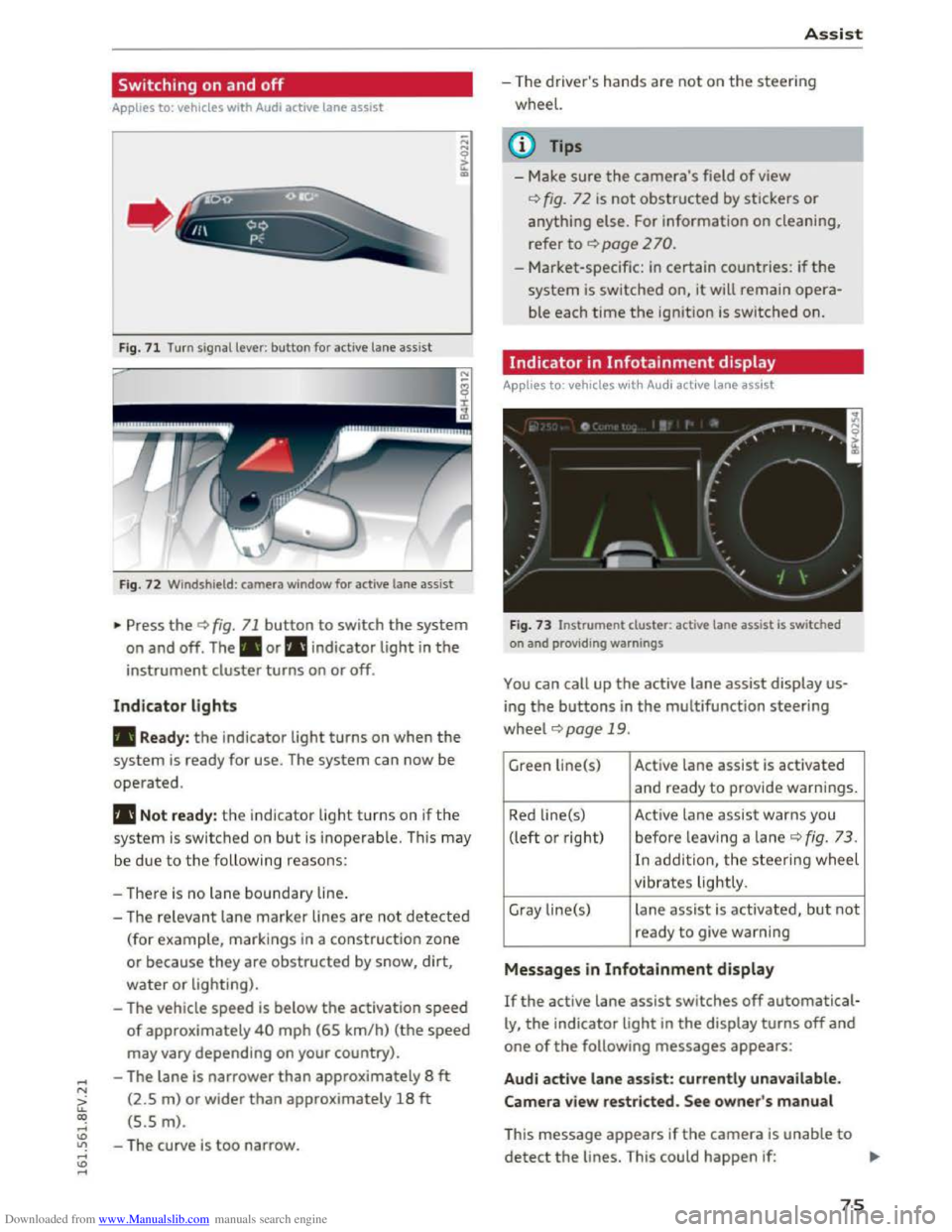
F ig.
71 Turn signal lever: button for active lane assist
Fig. 72 Windshield : camera window for active lane assist
... Press the¢ fig. 71 button to switch the system
on and off. The . or rl1 indicator light in the
instrument cluster turns on or off.
Indicator lights
• Ready: the indicator light turns on when the
system is ready for use. The system can now be
operated.
rl1 Not ready: the indicator light turns on if the
system is switched on but is inoperable. This may
be
due to the following reasons:
- There
is no lane boundary line.
-
The relevant lane marker lines are not detected
(for example, markings in a construction zone
or because they
are obstructed by snow, dirt,
water or lighting).
- The vehicle
speed is below the activation speed
of approximately 40 mph (65 km/h) (the speed
may vary depending on your country).
- The lane
is narrower than approximately 8 ft
(2.5 m) or wider than approximately 18 ft
(5.5 m).
- The curve
is too narrow.
Assist
-The driver's hands are not on the steering
wheel.
{!) Tips
- Make sure the camera's field of view
¢fig. 72 is not obstructed by stickers or
anything else. For information on cleaning,
refer
to ¢ page 2 70.
- Market-specific: in certain countries: if the
system is switched on, it will remain opera
ble each time the ignition is switched on.
Indicator in Infotainment display
Applies to: vehicles with Audi active lane assist
Fig.
73 Instrument clu ster: active lane assist is switched
on and providing warnings
You can call up the active lane assist display us
ing the buttons in the multifunction steering
wheel ¢page 19 .
Green Li ne(s) Active lane assist is activated
and ready to provide warnings.
Red line(s) Active lane assist warns you
(left or right) before leav ing a lane
¢ fig. 73 .
In addit ion, the steering wheel
vibrates lightly.
Gray line(s)
lane assist is activated, but not
ready to give warning
Messages in Infotainment display
If the active lane assist switches off automatical
ly, the indicator light in the display turns off and
one of the following messages appears:
Audi active lane assist: currently unavailable.
Camera view restricted. See owner's manual
This message appears if the camera is unable to
detect the lines. This could happen if: ..,.
75
Page 81 of 322
Downloaded from www.Manualslib.com manuals search engine Switching on and off
App lies to: vehicles with Audi side assist
The system can be switched on/off in the Info
tainment system.
"'Select in the Infotainment system: IM ENUI but
ton >Vehicle > left control button >Driver as
sistance >Audi side assist
An activated system will signal every time the ig
nition is switched on by turning the displays in
the exterior mirrors on briefly.
Adjusting the display brightness
Applies to: vehicles with Audi side assist
The display brightness can be adjusted in the In
fotainment system.
"'Select in the Infotainment system: IM ENUI but
ton >Vehicle > left control button >Driver as
sistance >Audi side assist
The display brightness adjusts automatically to
the brightness of the surroundings, both in the
information and in the warning stage. In very
dark or very bright surroundings, the display is
already set to the minimum or maximum level by
the automatic adjustment. In such cases, you
may notice no
change when adjusting the bright
ness, or the change may only be noticeable once
the surroundings change.
Adjust
the brightness to a level where the display
in the information stage will not disrupt your
view forward. If you change the brightness, the
display in the exterior mirror will briefly show the
brightness level in the information stage. The
brightness of the warning stage is linked to the
brightness in the information stage and is adjust
ed along with the information stage adjustment.
-Side assist is not active while you are mak
ing the adjustment.
- Your settings are automatically stored and
assigned to the remote control key being
used.
Assist
Driver messages
Applies to: vehicles with Audi side assist
If the side assist switches off automatically, a
message appears in the Infotainment system dis
play.
@i Audi side assist: currently unavailable.
Sensor vision restricted due to surroundings.
See owner's
manual
The radar sensors' vision is affected. Do not cover
the area in front of the sensors with bike wheels,
stickers, dirt or other objects. Clean the area in
front of the sensors, if necessary q page 77,
fig. 77.
@i Audi side assist: currently unavailable.
See owner's
manual
Side assist cannot be switched on temporarily be
cause there is a malfunction (for example, the
battery charge level may be too low).
@i Audi side assist: malfunction! Please
contact
Service
The system cannot guarantee that it will detect
vehicles correctly and it is switched off. The sen
sors have been displaced or are faulty. Have the
system checked by an authorized Audi dealer or
authorized Audi Service Facility soon.
Audi drive select (drive
settings)
Introduction
Applies to: vehicles with Audi drive select
Drive select makes it possible to experience dif
ferent types of vehicle settings in one vehicle.
The driver can
select from three modes, Comfort,
Auto and Dynamic, using the~.~;\,~ button in the
center console or by using the Infotainment sys
tem. This allows you to switch between a sporty
and a comfortable driving mode, for example. In
the Individual mode, the settings can be adjust
ed to your personal preferences. This makes it
possible to combine settings such as a sporty en-
gine
tuning with light steering. .,.
79
Page 84 of 322
Downloaded from www.Manualslib.com manuals search engine Parking systems
Parking systems
General information
Applies to: vehicles with rear parking system/parking system
plus
Depending on your vehicle's equipment, various
parking aids will
help you when parking and ma
neuvering.
The r
ear pa rk ing syst em is an audible parking aid
that warns you of obstacles behind the vehicle
9page82.
The parking syste m plus assists you when park
ing by audibly and visually indicating
objects de
tected in front of and behind the vehicle
9page 83.
The rearv iew cam era shows the area behind the
vehicle in the Infotainment d isplay. The lines in
the rearview camera image help you to park or
maneuver~ page 84. The parking system plus
functions are also available~ page 83.
A WARNING
r-= ---'
-Always look for traffic and check the area
around your vehicle by looking at it directly
as well. The parking system cannot replace
the driver's attention. The driver is always
responsible when entering or leaving a park
ing
space and during similar maneuvers.
-
Please note that some surfaces, such as
clothing,
are not detected by the system.
-Sensors and cameras have blind spots in
which people and objects cannot be detect
ed. Be especia lly cautious of small children
and animals.
- The
sensors can be displaced by impacts or
damage to the radiator grille, bumper,
wheel housing and the underbody. The park
ing
system may become impaired as a re
sult. Have an authorized Audi dealer or au
thorized Audi Service Facility check their
function.
- Make
sure the sensors are not obstructed by
stickers,
deposits or other materials. If they
are, the sensor function could be impaired.
For
additional information on cleaning, re
fer to ~page 2 70.
82
-Some objects are not detected or displayed
by
the system under certain circumstances:
- Objects
such as barrier chains, trailer draw
bars, vertical poles or fences
- Objects above
the sensors such as wall ex
tensions
-Objects with specific surfaces or struc
tures such as chain link fences or powder
snow
-If you continue driving closer to a low-lying
object, it may
disappear from the sensor
range. Note that you will no longer be
warned about this obstacle.
- Keep enough distance from the curb to
avoid damage to the rims.
(D Tips
-The system may provide a warning even
though there are no obstacles in the cover
age area in some situations, such as:
-
certain road surfaces or for long grass.
-external ultrasonic sources e.g. from
cleaning vehicles.
- heavy rain, snow,
or thick vehicle exhaust.
-We recommend that you practice parking in
a traffic-free location or parking lot to be
come familiar with the system. When doing
this,
there should be good light and weath
er conditions.
-
You can change the volume of the signals.
-
What appears in the display is slightly de-
layed.
- The
sensors must be kept clean and free of
snow and ice for the park assist to operate.
Rear parking system
Description
Applies to: vehicles with rear parking assist
The rear parking system is an audible parking
aid.
Description
There is a sensor in the rear bumper cover. If
these detect an obstacle, audible signals warn
you.
Page 89 of 322
Downloaded from www.Manualslib.com manuals search engine ...... N
G'. CX)
..... ID IJ' ..... ID .....
Intelligent Technology
Electronic stabilization
control (ESC)
· Description
The Electronic Stabilization Control (ESC) reinfor
ces driver safety. It reduces the risk of slipping
and improves driving stability.
ESC detects criti
cal situations such
as the vehicle oversteering
and understeering or the wheels are spinning.
The vehicle
is stabilized by applying the brakes or
reducing engine torque. Once the ESC is activat
ed,
the indicator light DJ blinks in the instru
ment cluster.
The following systems are integrated in the ESC:
Anti-lock braking system (ABS)
ABS prevents the wheels from locking when brak
ing. The vehicle
can still be steered even during
hard braking. Apply steady pressure
to the brake
pedal.
Do not pump the pedal. A pulsing in the
brake pedal indicates that the system is acting to
stabilize the vehicle .
Brake assist system
The brake assist system can decrease braking dis
tance.
It increases braking power when the driver
presses
the brake pedal quickly in emergency sit
uations .
You must press and hold the brake pedal
until the dangerous situation is over.
Anti-slip regulation (ASR)
ASR reduces engine power when the drive wheels
begin spinning and adapts
the force to the road
conditions. This makes
it easie r to start, acceler
ate and drive up inclines.
Electron ic differential lock (EDL)
EDL applies the brakes to a wheel that starts
spinning and transfers
the drive power to the
other driving wheels. This function is not availa
ble
at higher speeds.
In extreme cases, EDL automatically switches off
to keep the brake on the braked wheel from over
heating . The vehicle
is still working correctly. EDL
Intelligent Technology
will switch on again automatically when condi
tions have returned
to normal.
Steering recommendation
The ESC helps to stabilize the vehicle by changing
the steering torque.
Selective wheel torque control
Selective wheel torque control is used when driv
ing on curves. The
front wheel on the inside of
the curve or both wheels on the inside of the
curve are braked selectively as needed. This al
lows more preci
se driving in curves . The applica
ble system may
not activate when driving in wet
or snowy condit ions.
Automatic post-collision braking system
The "Automatic post-collision braking system"
can help to reduce the risk of sliding and of other
collisions after an accident. If the airbag control
module detects a collision above a certain vehicle
speed,
the vehicle is braked by the ESC.
The vehicle does not brake automatically if:
-the driver presses the accelerator pedal, or
-the braking force generated by the pressed
brake pedal
is greater than the braking force
that would be initiated by the system, or
-the ESC, the brake system or the vehicle electri
cal system are not functioning.
A WARNING ,..:-
-The ESC and its integrated systems cannot
overcome
the limits posed by natura l physi
cal laws. This is especially important on slip
pery o r wet roads. If the systems begin act
ing
to stabilize your vehicle, you should im
mediately alter your speed to match the
road and traffic conditions. Do not let the
increased safety provided tempt you into
taking risks. This could increase your risk of
a collision.
- Please note
the risk of a collision increases
when driving fast, especially through curves
and on slippery
or wet roads, and when driv-
ing
too close to objects ahead. The ESC and .,..
87
Page 90 of 322
Downloaded from www.Manualslib.com manuals search engine Intelligent Technology
its integrated systems cannot always pre
vent collisions -there is still a risk of acci
dents!
-Press the accelerator pedal carefully when
accelerating on even, slippery surfaces such
as ice and snow. The drive wheels can spin
even when these control systems are instal-
Switching on and off
led and this can affect driving stability and
increase the risk of a collision.
@ Tips
-ABS and ASR only function correctly when
all four wheels are equipped with identical
tires. Different tire sizes can lead to a reduc
tion in engine power.
-You may hear noises when the systems de
scribed are working.
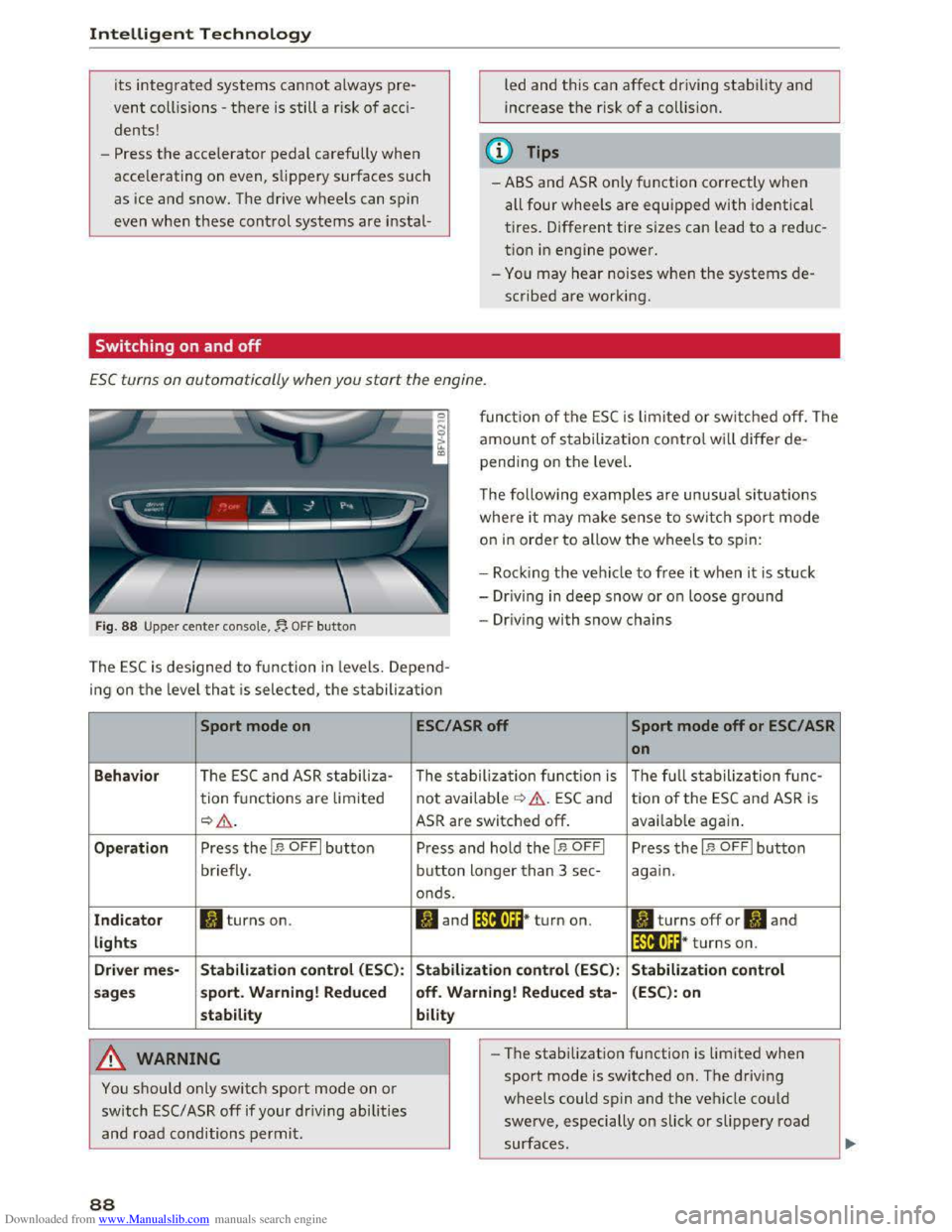
ESC turns on automatically when you start the engine .
Fig. 88 Upper center console,~ OFF button
function of the ESC is limited or switched off. The
amount of stabilization control will differ de
pending on the level.
The following
examples are unusual situations
where it may make sense to switch sport mode
on in order to allow the wheels to spin:
- Rock i
ng the vehicle to free it when it is stuck
-Dr iving in deep snow or on loose ground
-Driving with snow chains
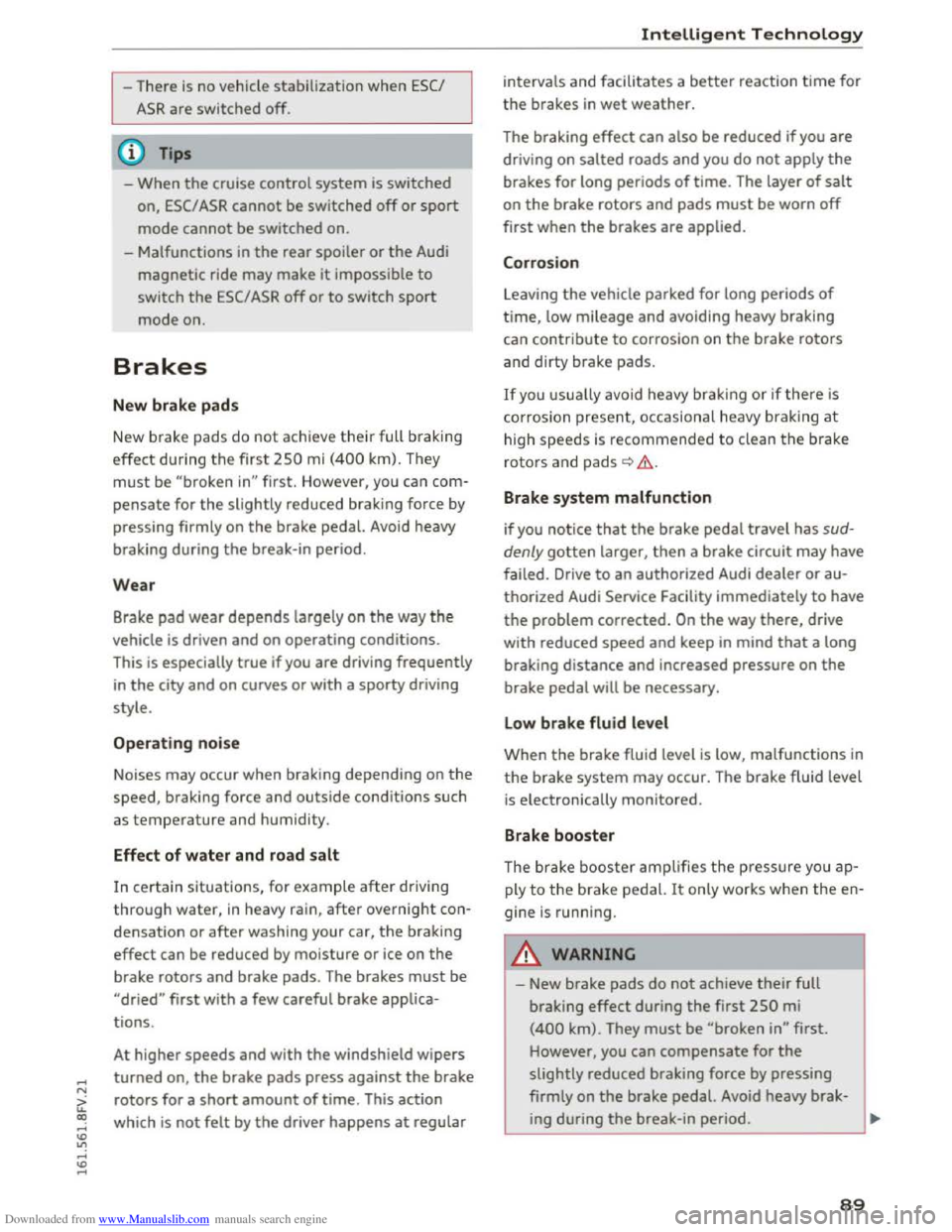
The ESC is designed to function in levels. Depend
ing
on the level that is selected, the stabilization
Sport mode on
Behavior The ESC and ASR stabiliza-
tion functions are lim ited
~&.
Operation Press the I.$ OFFI button
briefly .
Indicator II turns on.
lights
Driver
mes-Stabilization control (ESC):
sages sport.
Warning! Reduced
stability
A WARNING
You should only switch sport mode on or
switch ESC/ ASR off if your driving abilities
and road conditions permit.
88
ESC/ASR off Sport mode off or ESC/ ASR
on
The stabilization function is The full stabilization func-
not available ¢ &. ESC and tion of the ESC and ASR is
ASR are switched off. available again.
Press and hold the I.$ OFFI Press the I.$ OFFI button
button longer than 3 sec-again.
onds.
II and lfif1U~* turn on. II turns off or II and
lfil•l~~* turns on.
Stabilization control (ESC): Stabilization control
off. Warning! Reduced
sta-(ESC): on
bility
- I
-The stabilization function is limited when
sport mode is switched on. The driving
wheels could spin and the vehicle could
swerve, especially on slick or slippery road
surfaces.
Page 91 of 322
Downloaded from www.Manualslib.com manuals search engine ...... N
> u. CX> ...... u:>
"' ...... u:> ......
-There is no vehicle stabilization when ESC/
ASR are switched off.
(D Tips
-When the cruise control system is switched
on, ESC/ ASR cannot be switched off or sport
mode cannot
be switched on.
- Malfunctions in the rear spoiler
or the Audi
magnetic ride may make
it impossible to
switch the ESC/ ASR off or to switch sport
mode on.
Brakes
New brake pads
New brake pads do not achieve their full braking
effect during the first 250 mi (400 km) . They
must be "broken in" first. However, you can com
pensate
for the slightly reduced braking force by
pressing
firmly on the brake pedal. Avoid heavy
braking during the break-in period.
Wear
Brake pad wear depends largely on the way the
vehicle is driven and on operating conditions.
This is especially true
if you are driving frequently
in
the city and on curves or with a sporty driving
style.
Operating noise
Noises may occur when braking depending on the
speed, braking force and outside conditions such
as temperature and humidity.
Effect of water and road salt
In certain situations, for example after driving
through water, in heavy
rain, after overnight con
densation
or after washing your car, the braking
effect can be reduced by moisture or ice on the
brake rotors and brake pads. The brakes
must be
"dried" first with a few careful brake applica
tions.
At higher speeds and with the windshield wipers
turned
on, the brake pads press against the brake
rotors
for a short amount of time. This action
which is
not felt by the driver happens at regular
Intelligent Technology
intervals and facilitates a better reaction time for
the brakes in wet weather.
T
he braking effect can also be reduced if you are
driving on salted roads and you do
not apply the
brakes for Long periods of time. The Layer of salt
on the brake rotors and pads must be worn off
first when the brakes are applied.
Corrosion
Leaving the vehicle parked for Long periods of
time, Low mileage and avoiding heavy braking
can contribute
to corrosion on the brake rotors
and
dirty brake pads.
If you usually avoid heavy braking or ifthere is
corrosion present, occasiona l heavy braking
at
high speeds is recommended to clean the brake
rotors and
pads¢.&..
Brake system malfunction
if you notice that the brake pedal travel has sud
denly gotten Larger, then a brake circuit may have
failed. Drive
to an authorized Audi dealer or au
thorized Audi Service Facility immediately to have
the problem corrected. On the way there, drive
with reduced speed and keep in mind that a Long
braking distance and increased pressure on the
brake pedal will be necessary.
Low brake fluid level
When the brake fluid Level is Low, malfunctions in
the brake system may occur. The brake fluid Level
is electronically monitored.
Brake booster
The brake booster amplifies the pressure you ap
ply to the brake pedal. It only works when the en
gine is running.
A WARNING
-New brake pads do not achieve their full
braking effect during the first 250 mi
(400 km). They must be "broken in" first.
However, you
can compensate for the
slightly reduced braking force by pressing
firmly on the brake pedal. Avoid heavy brak-
ing during
the break-in period. ~
89
Page 94 of 322
Downloaded from www.Manualslib.com manuals search engine Intelligent Technology
Automatic mode (normal operation)
-Automatic extension: the rear spoiler will auto
matically extend when speeds exceed approxi
mately 75 mph (120 km/h)
-Automatic retraction: the rear spoiler will auto
matically retract when speeds decrease to un
der approximately 50 mph (80 km/h).
Manual mode
-Extending manually: briefly tap the~ fig. 89
button to fully extend the rear spoiler.
- Retracting manually:
when driving at speeds
below approximately 10 mph (20 km/h), press
and hold the button to retract the rear spoiler.
When at speeds between 10 mph (20 km/h)
and 75 mph (120 km/h), the rear spoiler will
completely retract when you tap the button.
Indicator lights
Ii) I. Rear spoiler: malfunction!
The
rear spoiler may not have extended due to a
malfunction.
This could change the veh icle's driv
ing characteristics
at high speeds. Do not drive
faster than 85 mph (140 km/h). Drive to an au
thorized Audi dealer or authorized Audi Service
Facility
immediately to have the malfunction cor
rected. The color
of the indicator light depends
on the vehicle speed.
..&. WARNING
-
Driving at higher speeds without the rear
spoiler deployed can impair handling charac
teristics, making
the vehicle harder to con
trol.
- Always
make sure that the spoiler is de
ployed when driving at
speeds ove r 85 mph
(140 km/h). If the rear spoiler warning/indi
cator light in the instrument cluster comes
on, the rear spoiler may not have deployed.
- Never drive
at speeds higher than 85 mph
(140 km/h) ifthe spoiler is not deployed.
Have
the spoiler inspected as soon as possi
ble by an
authorized Audi dealer or qualified
workshop.
- Always obey
speed limits and other traffic
laws.
92
..&. WARNING
Improper operation of the rear spoiler can
cause crushing injuries.
-Always make sure that nobody, especially
children, is
in the way when the rear spoiler
is deployed or retracted.
«J:) Note
-Never push on the vehicle on the rear spoil
er. This could
cause damage.
- To
prevent damage to the rear spoiler do
not lean or place anything on it.
-
-Only operate the rear spoiler manually when
the luggage compartment lid is close and
the rear spoiler moving parts are not
blocked. Otherwise, damage could occur.
(D Tips
Clean the rear spoiler compartment every 2 to
3 months. To function correctly, the rear
spoiler must be free of ice, snow and leaves.
Energy management
The starting ability is optimized
The energy management system manages the
electrical energy distribution
and optimizes the
availability
of electrical energy for starting the
engine.
When a vehicle with a conventiona l energy sys
tem is not driven for a long time, the battery is
drained by equipment (for example the immobil
izer). In
certain circumstances, there could may
not be enough energy to start the engine.
Your vehicle
is equipped with an intelligent ener
gy
management system for distributing electrici
ty. T his sign ificant
ly improves the starting ability
and increases the battery life.
The
energy management system Is made up of
battery diagnosis, Idling current management
and dynamic energy management.
Battery diagnosis
The battery diagnosis determines the battery
charge level. The sensors determine the battery Ill>
Page 114 of 322
Downloaded from www.Manualslib.com manuals search engine Telephone
For ease of use, Audi offers a special USB adapt
er* ~page 155, fig. 132. The following USB
adapters are availab le at this time:
CD USB adapter for cell phones wit h a micro USB
connection*
@ USB adapter for cell phones with an Apple
Lightn ing connection*
® USB adapter for cell phones with an Apple
Dock connector*
.&. WARNING
Loose objects can be thrown around the vehi
cle
inter ior during sudden driving or braki ng
maneuvers. T his can cause serious inj uries
and loss of control of the vehicle. Always keep
the center armrest closed while driving.
- The Audi
phone box is not availab le in all
countries. Contact your authorized A udi
dealer for additional information.
-If the cell phone is placed in a bag or protec
tive sleeve inside the Audi phone box, this
can interfere with the connection to the ex
ternal antenna.
-
Strong transmission quality cannot be guar
anteed if more than one cel l phone is insert
ed.
- Audi recommends using original Audi acces
sories. Audi
has established their reliability,
safety and suitability.
-
You can purchase a USB adapter from an au
thorized Audi dealer or authorized Audi
Service Facility,
or at specialty stores.
-To prevent malfunctions, make sure the cell
phone is positioned correctly in the Audi
phone box .
- The Audi
phone box is only availab le in the
Canadian market.
112
Using the telephone
Accessing the telephone
Applies to: vehicles with telephone
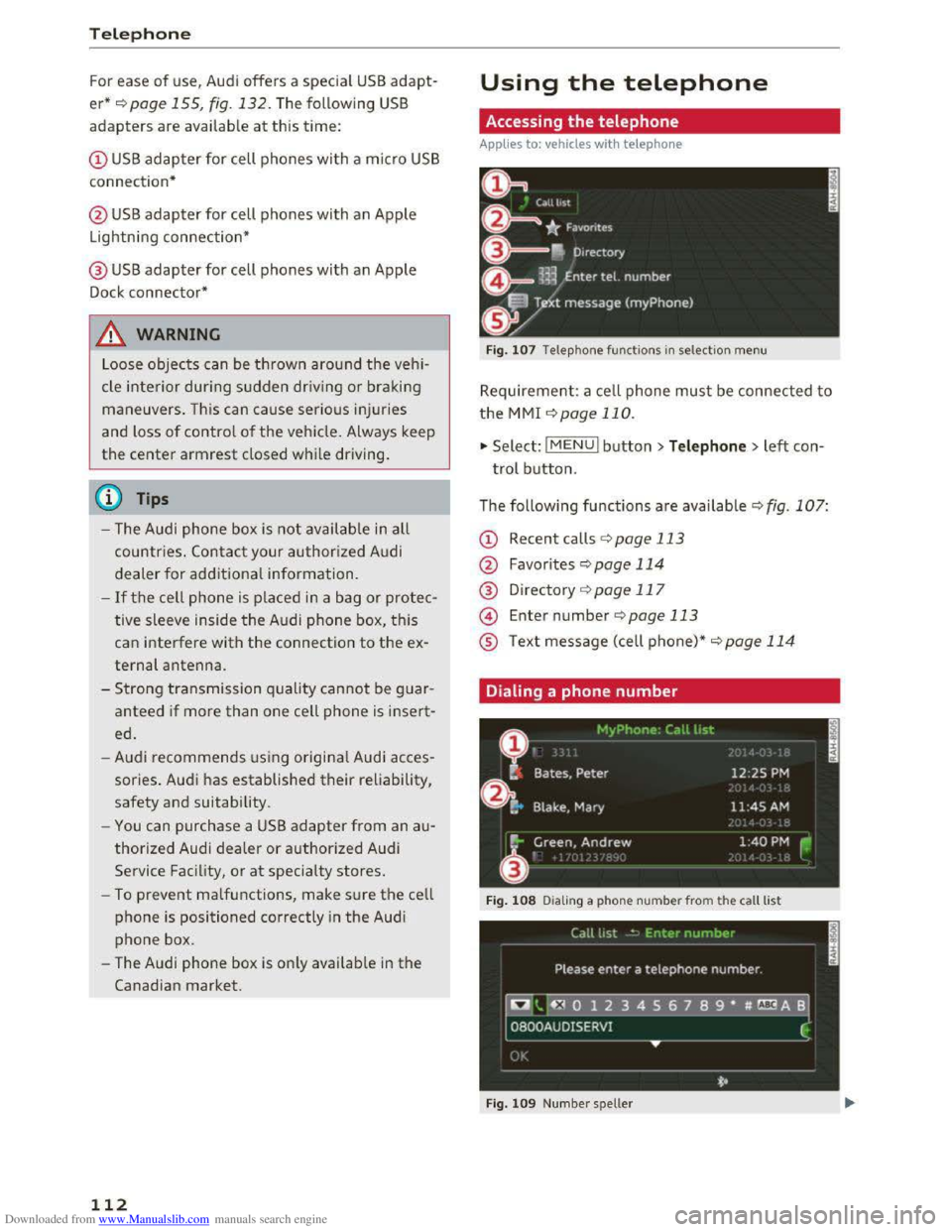
Fig. 107 Telephone functio ns in selection menu
Requirement: a cell phone must be connected to
the MMI ~page 110.
.,. Select: l M ENUI button> Telephone > left con
trol button.
The following
functions are available Q fig. 107:
CD Recent calls ¢ page 113
@ Favorites ¢page 114
® Directory ¢page 117
@ Enter number ¢page 113
® Text message (cell phone)*~ page 114
Dialing a phone number
Fig. 108 Dia ling a phone nu mber from the call list
Fig.
109 Numbe r sp eller
Page 128 of 322
Downloaded from www.Manualslib.com manuals search engine Audi connect
Wi-Fi Hotspot
Applies to: vehicles with Wi-Fi hotspot
You con use the MMI as a Wi-Fi hotspot to con
nect up to eight Wi-Fi devices to the Internet.
While driving, restricted use
of non-secured,
light, small wireless devices is only possible from
the rear of the vehicle.
Requirement: the ignition must be switched on.
.,. Select: I MENU I button >Telephone > right con
trol button > Wi-Fi settings.
The
following settings can be modified in the Wi·
Fi settings menu:
Wi-Fi mode
The MMI Wi-Fi hotspot is deactivated at the fac
tory. Switch the Wi-Fi hotspot to Hotspot before
establishing a connection between your vehicle
and your Wi
-Fi device.
-
Hotspot: the MMI Wi-Fi hotspot is active and
visible
to other devices. A connection can be es
tablished with new wireless devices.
-
Hotspot and client: the MMI Wi-Fi hotspot is
active. An internet connection to a personal Wi
Fi hotspot (such as a smartphone) can be estab
lished. Using Network searc h c:? page 126, you
can search for your personal hotspot and con
nect to the MMI.
-
Off: the MMI Wi-Fi hotspot is deactivated. An
Internet connection is not possible.
Hotspot settings
The Wi-Fi connection between your vehicle and
your Wi-
Fi device (laptop, cell phone) is e ncr ypt
ed. To establish a connection, you must enter the
following values when setting up your wireless
device.
You can change them if necessary.
- Access
point (SSID): name of the Wi-Fi net
work.
-
Passwo rd: a random password was set at the
factory for the MMI. The password can be
changed. The WPA2 encryption method
re
quires a password to be at least 8 characters
long. Select a secure password.
- Visible
to others : your Wi-Fi network visibility
can be switched on or off.
126
Network search*
A list of available Wi-Fi networks in your area is
displayed.
A WARNING
~ --As the driver, do not allow usage of the Wi-
Fi hotspot to distract you from driving, as
this could increase the risk of an accident.
-
It is only safe to use laptops and similar mo
bile devices when the vehicle is stationary
because, like
all loose objects, they could be
thrown around the inside of the vehicle in a
crash and cause serious injuries. Store these
t ypes
of devices securely while driving.
-
Do not use any wireless devices on the front
seats within range of the airbags while driv
ing. Also note the warnings in the "Airbag
System" chapter under "Important Informa
tion on the Front Airbag System"
c:? page 192, Front airbags.
@Note
You are responsible for all precautions taken
for data protection, anti-virus protection and
protection against loss
of data on mobile de
vices that are used to access the Internet
through the Wi-Fi hotspot.
(D Tips
-A separate, paid mobile subscription may be
needed
to use the Wi-Fi hotspot. You can
obtain more information from your cell
phone servi
ce provider.
- Being able
to receive the data packet from
th e internet via the Wi-Fi hotspot, may re
sult in add itiona l costs, especially when op
erating in foreign countries, depending on
your cellular phone plan: the use
of a flat
rate data plan is highly recommended! You
can obtain more information from your cell
phone service provider.
-Additional information can be found under
www.audiusa.com/audiconnect
Page 133 of 322
Downloaded from www.Manualslib.com manuals search engine ..... N
Navigation
Opening navigation
Applies to: veh icles with navigation system
Nav igation
The navigation system directs you to your destination, around traffic incidents and on alternative
routes, if desired.
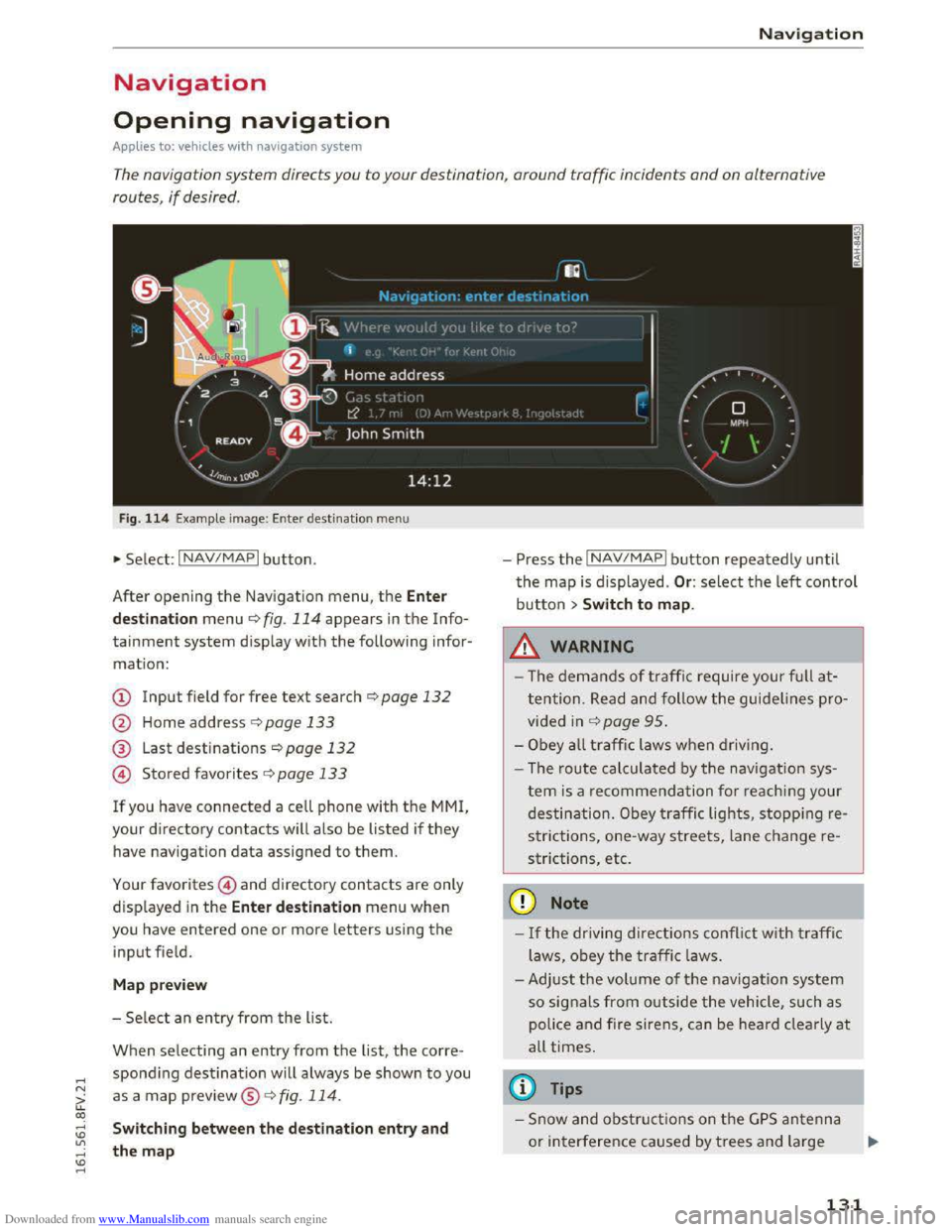
Fig. 114 Example image: Enter destination menu
•Select: INAV/MAPI button.
After opening
the Navigation menu, the Enter
d
est ina tion menu ¢ fig. 114 appears in the Info
tainment system display with the following infor
mation:
CD Input field for free text search¢ page 132
@ Home address r:!;> page 133
® Last destinations¢ page 132
@ Stored favorites C>page 133
If you have connected a cell phone with the MMI,
your directory contacts w ill also be listed if they
have navigation data assigned to them.
Your favorites@) and directory contacts are only
displayed
in the Ente r de stination menu when
you have entered one or more letters using the
input field.
M ap pre view
- Se lect an entry from the list.
When selecting an entry from the list, the corre
spondi ng destination will always be shown to you
as a map preview®~ fig. 114.
Switching between the destination entry and
the map
- Press the INAV/MAPI button repeatedly until
the map is displayed . Or: select the left control
button > Swit ch to map .
_&.WARNING
-The demands of traffic require your ful l at
tention. Read and follow the guidelines pro
vided in r:!;>page 95.
-Obey a ll traffic laws when driving.
- The r
oute calculated by the navigation sys-
tem is a recommendation fo r reaching your
destination. Obey traffic lights, stopping re
s trictions, one-way streets, lane change re
strictions, etc.
CD Note
-If the driving directions conflict with traffi c
laws, obey
the traffic laws.
- Adjust th e
volume of th e navigation system
so signals from outside the vehicle, such as
police
and fire siren s, can be heard cle arly at
all times.
@ Tips
-Snow and obstru ct ions on the G PS antenna
or interference caused by trees and large
- 1
131