brake light AUDI TT COUPE 2016 Owner's Manual
[x] Cancel search | Manufacturer: AUDI, Model Year: 2016, Model line: TT COUPE, Model: AUDI TT COUPE 2016Pages: 322, PDF Size: 52.86 MB
Page 72 of 322
Downloaded from www.Manualslib.com manuals search engine Automatic transmission
-When accelerating using the launch control
program, all vehicle
parts are subject to
heavy loads . This can lead to increased
wear.
Emergency mode
In the event of a system malfunction, there is on
emergency program.
If all of the selecto r lever positions are highlight
ed wit h a light background
in the Infotainment
display, there is a system malfunction and the S
tronic transmiss ion is running in the emergency
program . The vehicle can still be driven
in emer
gency mode,
but only with reduced speed and
not in a
ll gears. In some cases, the vehicle can
n ot dri
ve in rever se .
@Note
If the transmission runs in emergency mode,
drive
to an author ized Audi dealer or author
ized
Audi Service Facility immediately to have
the malfunction corrected.
Transmission malfunction
• Transmission : malfunction! Please stop ve
hicle and s
hift to P
There is a malfunction in the t ra nsmission. Park
the vehicle securely and do not continue driving.
See an authorized
Audi dealer or authorized Audi
Service Facility for assistance .
• Transmis sio n : too hot. Please stop vehicle
The transmission is too hot and can become dam
aged .
Stop and let the transmission cool with the
engine running (at idle) in the P selector lever po
sition. Then
the indicato r light and the message
turn off, drive to an authorized Audi dea le r or a u
thorized Audi Se rvice Facility immediately to have
the ma lfunction cor rected . If the indicator light
and
the driver message do not turn off, do not
continue driving. See an authorized
Audi dealer
or authorized Audi Service Facility for assistance .
[o] Tran smission : malfunction! You can contin
ue dri
ving. See owner's manual
70
Drive to an au thorized Audi dealer or authori zed
Audi Service Facility immediate ly to have the
malfunction corrected.
[o] Transmiss ion : malfunction! You may contin
ue driving. No rever se gear
Drive to an authorized Audi dealer or authorized
Audi Service Facility immed iately to have the
malfunction corrected .
ml Transmi ss ion: malfunction! You may contin
ue driving in D
until engin e off
Drive the vehicle away from moving traffic and
park . See an
authorized Audi dealer or authorized
Audi Service Facility for assistance.
ml Tran smiss ion: too hot. Please adapt driving
style
Continue driving moderately. When the indicator
light turns off, you can continue driving normal
l
y.
ml Tran smission: please press brake pedal a nd
s elect gear again
If the transmiss ion mal f u nct ions because the
temperatu re is too high, a message appears
when
the transmission is cooled .
Page 75 of 322
Downloaded from www.Manualslib.com manuals search engine The speed is kept constant by modifying engine
power or through an active brake intervention.
A WARNING
-Always pay attention to the traffic around
you when the cruise control is in operation.
You are always responsible for your speed
and the distance between your vehicle and
other vehicles.
- For
reasons of safety, cruise control should
not be used in the city, in stop-and-go traf
fic, on winding roads and when road condi
tions are poor (such as ice, fog, gravel,
heavy rain
and hydroplaning) -you could
have
an accident.
- Switch
the cruise control off temporarily
when driving in turning lanes, highway exits
or in construction zones.
-Please note that unconsciously "resting"
your foot on the accelerator pedal prevents
the cruise control from braking. This is due
to the control system being overridden by
the driver's acceleration.
-If a brake system malfunction such as over
heating occurs when the cruise control sys
tem is switched on, the braking function in
the system may be switched off. The rest of
the cruise control system functions remain
active as long as the (1!;(1)~14 (USA models) I
B (Canada models) indicator light is on.
@ Tips
The brake lights illuminate as soon as the
brakes apply automatically.
Changing speed
Applies to: vehicles with cruise control system
.. To increase/decrease the speed in xx mph (1
km/h) increments, briefly tap the lever up/
down in the 0 10 ¢ page 72, fig. 70 direction
to the first level.
.. To increase/decrease the speed in xx mph (10
km/h) increments, briefly tap the lever up/
down in the 010 ¢page 72, fig. 70 direction
to the second level.
Assist
.. To increase or decrease the speed quickly, hold
the lever in the 0 I 0 direction until the de
sired speed is reached.
Overriding the speed
Applies to: vehicles with cruise control system
You can press the accelerator pedal down to in
crease your speed, for example if you want to
pass someone. The speed you saved earlier will
resume as soon as you let off of the accelerator
pedal.
However, if you are exceeding the stored speed
by a considerable amount for a long time, the
cruise control system will temporarily switch off.
The
lij;lil~14 (USA model s) !Iii (Canada models) in
dicator light in the instrument cluster turns off
and the stored speed is maintained.
Preselecting the speed
Applies to: vehicles with cruise control system
You can pre-select your desired speed while the
vehicle is not moving.
.. Switch on the ignition .
.. Pull the lever into position@¢ page 72,
fig. 70.
.. To increase or decrease the speed, tap the lever
in the 010 direction.
This
function makes i t possible, for example, to
save the speed you want before driving on the
highway. Once on the exp ressway, activate the
cruise control by pulling the lever into position
@.
Switching off
Applies to: vehicles with cruise control system
Temporary deactivation
.. Step on the brake pedal, or
.. Press the lever in direction @ (not locked into
place) 9page 72, fig. 70 .
Switching off completely
.. Press the lever into position @(clicked into
place), or
.. switch the ignition off.
73
Page 76 of 322
Downloaded from www.Manualslib.com manuals search engine Assist
The speed you saved will be retained ifthe cruise
control has been switched off temporarily. To re
sume the stored speed, release the brake or
clutch pedal and pull the lever to position(!).
Switching the ignition off will erase the stored
speed.
A WARNING
-You should only resume the saved speed if it
is not too high for existing traffic conditions.
Otherwise you risk an accident.
Audi active lane assist
Description
App lies to: ve h icles with Audi active lane assis t
Active lane assist detects lane marker lines with
in the limits of the system using a camera in the
windshield. If you are approaching a detected
lane marker line and it appears likely that you
will leave
the lane, the system will warn you with
corrective
steering. You can override this steering
at any time. If you pass over a line, the steering
wheel will vibrate lightly. In order for this warn
ing vibration to occur, it must first be switched
on in the Infotainment system. Active lane assist
is operable when the lane marker line is detected
on at least one side of the vehicle.
The
system is designed for driving on express
ways and highways and
therefore only activates
at speeds above approximately 40 mph (65 km/
h) (depending on the market).
Appl i
es to vehicles with side assist*: if you acti
vate a turn s ignal when active lane assist is ready
and it classifies a lane change as critical because
of vehicles traveling alongside you or approach
ing you, there will be noticeable corrective steer
ing
shortly before you leave the lane. This will at
tempt to keep your vehicle in the lane.
Applies
to vehicles without side assist*: the sys
tem does not warn when it is ready if you activate
the turn signal before crossing the lane marker
ll The co rrective steering function is not a va ilable in all mar
kets.
7 4
line. In this case, it assumes that you are chang
ing lanes intentionally.
A WARNING
!-="' -
-The system warns the driver that the vehicle
is leaving the lane using corrective steering.
The driver is always responsible for keeping
the vehicle within the lane.
- The
system can help you keep the vehicle in
the lane, but it does not drive by itself. Al
ways keep your hands on the steering
wheel.
- Corrective
steering may not occur in certain
situations, such as during heavy braking.
- There
may be cases where the camera does
not recognize all lane marker lines. Correc
tive steering can only take place on the side
of the vehicle where lane marker lines are
detected.
-Other road structures or objects could possi
bly be identified unintentionally as lane
marker lines. As a result, corrective steering
may be
unexpected or may not occur.
- The
camera view can be restricted, for ex
ample by vehicles driving ahead or by rain,
snow, heavy spray light shining into the
camera or by dirt on the window. This can
result in active lane assist not detecting the
lane marker lines or detecting them incor
rectly.
- In
certain situations where visibility is low,
the vehicle may switch internally from "ear
ly" to "late" steering correction ll.
-Under certain cond itions such as ruts in the
road, an inclined roadway or crosswinds, the
corrective steering alone may not be enough
to keep the vehicle in the middle of the lane.
- For
safety reasons, active lane assist must
not be used when there are poor road and/
or weather conditions such as slippery
roads, fog, gravel, heavy rain,
snow and the
potential for hydroplaning . Using active lane
assist under these conditions may increase
the risk of a crash.
Page 89 of 322
Downloaded from www.Manualslib.com manuals search engine ...... N
G'. CX)
..... ID IJ' ..... ID .....
Intelligent Technology
Electronic stabilization
control (ESC)
· Description
The Electronic Stabilization Control (ESC) reinfor
ces driver safety. It reduces the risk of slipping
and improves driving stability.
ESC detects criti
cal situations such
as the vehicle oversteering
and understeering or the wheels are spinning.
The vehicle
is stabilized by applying the brakes or
reducing engine torque. Once the ESC is activat
ed,
the indicator light DJ blinks in the instru
ment cluster.
The following systems are integrated in the ESC:
Anti-lock braking system (ABS)
ABS prevents the wheels from locking when brak
ing. The vehicle
can still be steered even during
hard braking. Apply steady pressure
to the brake
pedal.
Do not pump the pedal. A pulsing in the
brake pedal indicates that the system is acting to
stabilize the vehicle .
Brake assist system
The brake assist system can decrease braking dis
tance.
It increases braking power when the driver
presses
the brake pedal quickly in emergency sit
uations .
You must press and hold the brake pedal
until the dangerous situation is over.
Anti-slip regulation (ASR)
ASR reduces engine power when the drive wheels
begin spinning and adapts
the force to the road
conditions. This makes
it easie r to start, acceler
ate and drive up inclines.
Electron ic differential lock (EDL)
EDL applies the brakes to a wheel that starts
spinning and transfers
the drive power to the
other driving wheels. This function is not availa
ble
at higher speeds.
In extreme cases, EDL automatically switches off
to keep the brake on the braked wheel from over
heating . The vehicle
is still working correctly. EDL
Intelligent Technology
will switch on again automatically when condi
tions have returned
to normal.
Steering recommendation
The ESC helps to stabilize the vehicle by changing
the steering torque.
Selective wheel torque control
Selective wheel torque control is used when driv
ing on curves. The
front wheel on the inside of
the curve or both wheels on the inside of the
curve are braked selectively as needed. This al
lows more preci
se driving in curves . The applica
ble system may
not activate when driving in wet
or snowy condit ions.
Automatic post-collision braking system
The "Automatic post-collision braking system"
can help to reduce the risk of sliding and of other
collisions after an accident. If the airbag control
module detects a collision above a certain vehicle
speed,
the vehicle is braked by the ESC.
The vehicle does not brake automatically if:
-the driver presses the accelerator pedal, or
-the braking force generated by the pressed
brake pedal
is greater than the braking force
that would be initiated by the system, or
-the ESC, the brake system or the vehicle electri
cal system are not functioning.
A WARNING ,..:-
-The ESC and its integrated systems cannot
overcome
the limits posed by natura l physi
cal laws. This is especially important on slip
pery o r wet roads. If the systems begin act
ing
to stabilize your vehicle, you should im
mediately alter your speed to match the
road and traffic conditions. Do not let the
increased safety provided tempt you into
taking risks. This could increase your risk of
a collision.
- Please note
the risk of a collision increases
when driving fast, especially through curves
and on slippery
or wet roads, and when driv-
ing
too close to objects ahead. The ESC and .,..
87
Page 91 of 322
Downloaded from www.Manualslib.com manuals search engine ...... N
> u. CX> ...... u:>
"' ...... u:> ......
-There is no vehicle stabilization when ESC/
ASR are switched off.
(D Tips
-When the cruise control system is switched
on, ESC/ ASR cannot be switched off or sport
mode cannot
be switched on.
- Malfunctions in the rear spoiler
or the Audi
magnetic ride may make
it impossible to
switch the ESC/ ASR off or to switch sport
mode on.
Brakes
New brake pads
New brake pads do not achieve their full braking
effect during the first 250 mi (400 km) . They
must be "broken in" first. However, you can com
pensate
for the slightly reduced braking force by
pressing
firmly on the brake pedal. Avoid heavy
braking during the break-in period.
Wear
Brake pad wear depends largely on the way the
vehicle is driven and on operating conditions.
This is especially true
if you are driving frequently
in
the city and on curves or with a sporty driving
style.
Operating noise
Noises may occur when braking depending on the
speed, braking force and outside conditions such
as temperature and humidity.
Effect of water and road salt
In certain situations, for example after driving
through water, in heavy
rain, after overnight con
densation
or after washing your car, the braking
effect can be reduced by moisture or ice on the
brake rotors and brake pads. The brakes
must be
"dried" first with a few careful brake applica
tions.
At higher speeds and with the windshield wipers
turned
on, the brake pads press against the brake
rotors
for a short amount of time. This action
which is
not felt by the driver happens at regular
Intelligent Technology
intervals and facilitates a better reaction time for
the brakes in wet weather.
T
he braking effect can also be reduced if you are
driving on salted roads and you do
not apply the
brakes for Long periods of time. The Layer of salt
on the brake rotors and pads must be worn off
first when the brakes are applied.
Corrosion
Leaving the vehicle parked for Long periods of
time, Low mileage and avoiding heavy braking
can contribute
to corrosion on the brake rotors
and
dirty brake pads.
If you usually avoid heavy braking or ifthere is
corrosion present, occasiona l heavy braking
at
high speeds is recommended to clean the brake
rotors and
pads¢.&..
Brake system malfunction
if you notice that the brake pedal travel has sud
denly gotten Larger, then a brake circuit may have
failed. Drive
to an authorized Audi dealer or au
thorized Audi Service Facility immediately to have
the problem corrected. On the way there, drive
with reduced speed and keep in mind that a Long
braking distance and increased pressure on the
brake pedal will be necessary.
Low brake fluid level
When the brake fluid Level is Low, malfunctions in
the brake system may occur. The brake fluid Level
is electronically monitored.
Brake booster
The brake booster amplifies the pressure you ap
ply to the brake pedal. It only works when the en
gine is running.
A WARNING
-New brake pads do not achieve their full
braking effect during the first 250 mi
(400 km). They must be "broken in" first.
However, you
can compensate for the
slightly reduced braking force by pressing
firmly on the brake pedal. Avoid heavy brak-
ing during
the break-in period. ~
89
Page 92 of 322
Downloaded from www.Manualslib.com manuals search engine Intelligent Technology
-Only apply the brakes for the purpose of
cleaning the brake system when road and
traffic conditions permit. You must not en
danger other road users. This increases the
risk of an accident.
-
On steep slopes, reduce the speed and se
lect a lower gear or lower selector lever po
sition . Drive
as little as possible while press
ing the brake pedal and avoid putting your
left foot on the brake pedal while driving.
This could
cause the brakes to overheat and
impair the efficiency of the brakes.
-
Do not let the brakes "grind" by always
keeping
your foot on the brake pedal. This
can
cause the brakes to over heat, increase
wear and increase brak ing distance u nneces
sari ly.
-
Certa in weather and operating cond it io ns
such as driving through water, driving in
heavy rain or driving after washing your ve
hicle
can impair the effectiveness of the
brakes. In the winter, ice may build up on
the brake pads, rotors and drums. Check
these components by braking carefully. Ap
plying
the brakes carefully several times
dries the brakes and removes ice build-up.
- The efficiency
of the brakes can also be im
paired by driving
for long stretches on roads
covered with salt without using the brakes.
You can remove salt deposits from the
brake rotors and pads by carefully applying
the brakes several times.
-If the front spoiler is damaged or you install
another spoiler, make sure the front wheel
brakes are ventilated properly. Otherwise,
the brake system could overheat, wh ic h re
duces
thei r effectiveness.
- Failure
of a brake circuit impairs braking
performance, which increases braking dis
tance.
Avoid driving the vehicle and have it
towed it to the nearest authorized Audi
dealer or authorized Audi Service Facility.
- Never
let the vehicle roll while the engine is
stopped because this increases the risk of an
accident.
-
If the brake booster is not working, you will
have
to press much harder on the brake
90
pedal to compensate for the lack of the
booster.
@ Note
-Never let the brakes "rub" by pressing the
pedal lightly when braking is not really nec
essary. This
causes the brakes to overheat
and increases braking distance and causes
wear.
- Before driving a long
distance on a steep
slope, decrease your speed and select a low
er driving gear. This makes use of the en
gine braking effect and relieves the brakes.
If you need to brake additionally, brake in
interva ls and not continuously.
(D Tips
-Ifthe brake booster is not work ing, you
must press the brake pedal w ith much more
force than normal.
-
If you retrofit your vehicle with a front spoil
er wheel covers or similar items, make sure '
that the air flow to the front wheels is not
interrupted. Otherwise the brake system
can become too hot.
Electromechanical
steering
The electromechanical steering supports the
driver's steering movements.
Power steering adapts electronically based on
the vehicle speed.
Indicator lights and messages
• Steering: malfunction! Please stop vehicle
If this indicator light turns on and stays on and
this message appears, the power steering may
have failed.
Stop the vehicle in a safe location as soon as pos
sible.
Do not continue driving. See an authorized
Audi dealer or authorized Audi Service Facility for
assistance.
i:t-D Steering: malfunction! You may continue
driving
Page 246 of 322
Downloaded from www.Manualslib.com manuals search engine Checking and Filling
-The auxiliary radiator fan switches on auto
matically when the engine coolant reaches a
certain temperature and will continue to run
until the coolant temperature drops.
Brake fluid
Checking brake fluid level
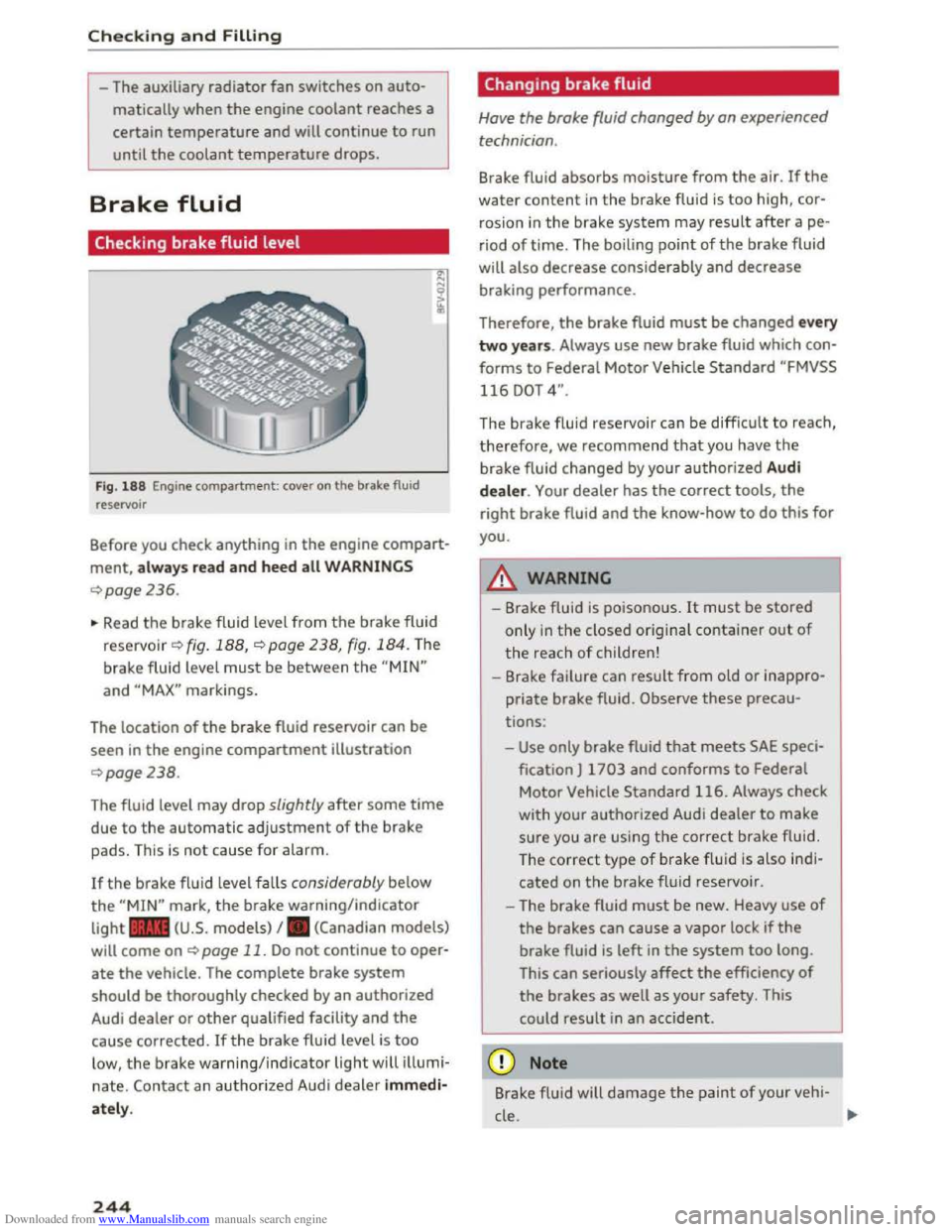
Fig. 188 Engine compartment: cover on the brake fluid
reservoir
Before you check anything in the engine compart
ment, always read and heed all WARNINGS
¢page 236.
~ Read the brake fluid level from the brake fluid
reservo ir ¢ fig. 188, ¢page 238, fig. 184. The
brake fluid level must be between the "MIN"
and "MAX" markings.
The location
of the brake fluid reservoir can be
seen in the engine compartment illustration
¢page238.
The fluid level may drop slightly after some time
due to the automatic adjustment of the brake
pads. This is not cause for alarm.
If the brake fluid level falls considerably below
the "MIN" mark, the brake warning/indicator
light .. (U.S. models) I. (Canadian models)
will come on ¢ page 11. Do not continue to oper
ate the vehicle. The complete brake system
should be thoroughly checked by an authorized
Audi dealer or other qualified facility and the
cause corrected. Ifthe brake fluid level is too
low, the brake warning/indicator light will illumi
nate. Contact an authorized Audi dealer immedi
ately.
244
Changing brake fluid
Have the brake fluid changed by an experienced
technician .
Brake fluid absorbs moisture from the air. If the
water content in the brake fluid is too high, cor
rosion in
the brake system may result after ape
riod of time. The boiling point of the brake fluid
will
also decrease considerably and decrease
braking performance.
Therefore, the brake fluid must be changed every
two years. Always use new brake fluid which con
forms to Federal Motor Vehicle Standard "FMVSS
116 DOT 4".
The brake fluid reservoir can be difficult to reach,
therefore, we recommend that you have the
brake fluid changed by your authorized Audi
dealer. Your dealer has the correct tools, the
right brake fluid and the know-how to do this for
you.
8._ WARNING
- Brake fluid is poisonous. It must be stored
only in the closed original container out of
the reach of children!
-Brake failure can result from old or inappro
priate brake fluid. Observe these precau
tions:
-Use only brake fluid that meets SAE speci
fication
J 1703 and conforms to Federal
Motor Vehicle Standard 116. Always check
with
your authorized Audi dealer to make
sure you are using the correct brake fluid.
The
correct type of brake f lui d is also ind i
cated on the brake fluid reservoir .
- The
brake fluid must be new. Heavy use of
the brakes can cause a vapor lock if the
brake fluid is left in the system too long.
This
can seriously affect the efficiency of
the brakes as well as your safety. This
could
result in an accident.
CD Note
Brake flu id will damage the paint of your veh i-
cle .
JIJ.
Page 247 of 322
Downloaded from www.Manualslib.com manuals search engine ~ For the sake of the environment
Because of the problem of proper disposal of
brake fluid as well as the special tools re
quired
and the ne cessary expertise, we rec
ommend that you have the brake fluid
changed by your authorized Audi dealer.
Battery
General information
The battery in your Audi does not need any main
tenance under normal operating conditions. Audi
recommends having the electrolyte level check
by an
authorized Audi dealer or authorized Audi
Service Facility
when there are high outside tem
peratures or when driving all day. The electrolyte
level should also be checked each time the bat
tery is charged ~page 247.
Have the battery checked when you bring your ve
hicle
in for an inspection . It is a good idea to re
place
the battery if it is more than S years old.
Sometimes when the airbags deploy, the battery
will be disconnected from the vehicle electrical
system for safety reasons ~.&in Repair, care
and disposal
of the airbags on page 203.
Disconnecting the battery
The battery should not be disconnected. Several
vehicle functions (power windows, for
example)
will be lost when the battery is disconnected. The
functions must be reprogrammed after connect
ing the battery. To avo id this, the battery should
only be disconnected from the vehicle electrica l
system when it is absolutely necessary.
Not running the vehicle for long periods of
time
If you do not drive your vehicle for several days or
weeks, electrical consumers are gradually scaled
back
or switched off. This reduces energy use and
ensures the vehicle will be able to start after long
periods of time~ page 92. Some convenience
functions, su ch
as interior lighting or power seat
adjustment, may not be available under certain
circumstances. These convenience functions will
be available again once you switch
the ignition on
and start the engine.
Checking and Filling
Winter operation
A lot of stress is placed on the battery during
cold weather, which results in reduced starting
ability. Have the battery checked and recharged if
necessary
before the cold weather begins.
A WARNING
- Work on the battery requires expert know l
edge. Contact an authorized Audi dealer or
authorized Audi Service Facility for informa
tion regarding the vehicle battery. There is a
risk for chemical
burns or explosions.
- Never
open the vehicle battery. Do not try to
change the battery electrolyte level. Other
wise explosive
gas will escape from the bat
tery and increase the risk of an exp losion. ___ ....J
Working on the battery
Be especially careful when working on or near
the battery.
The battery is located in the luggage compart
ment under the floor . Before you check anything
in the luggage compartment, read and heed all
WARNINGS~_&.
Always heed the safety warnings , when working
on
the vehicle battery or the vehicle electrical
system to prevent injury.
The following WARNINGS are very important
when working on the battery:
Always heed the following WARNING SYM-
BOLS and safety precautions when working on
the battery.
®
Always wear eye protection.
&
Battery acid contain s sulfuric acid. Al-
ways wear gloves and
eye protection .
@
No
- sparks
- flames
- smoking.
245
Page 273 of 322
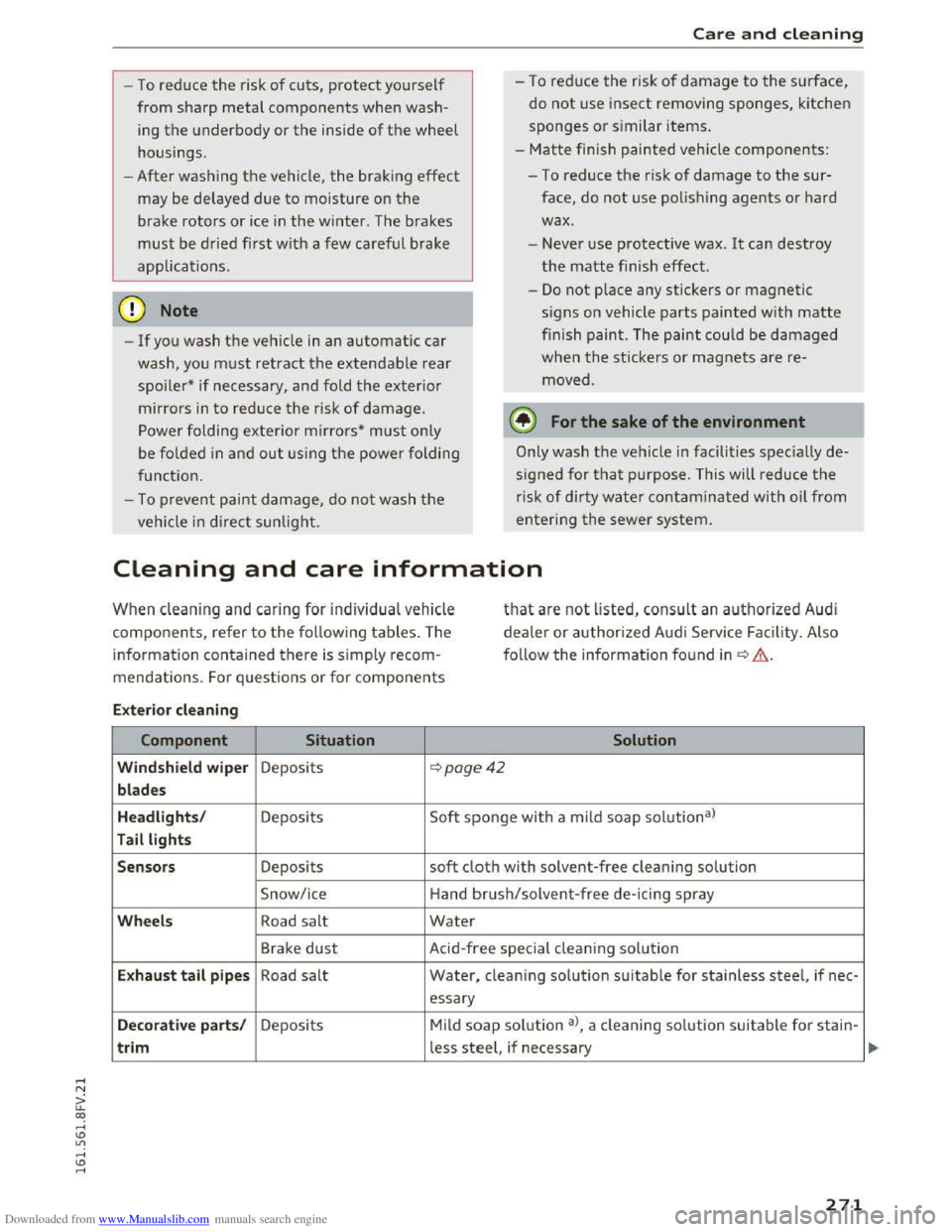
Downloaded from www.Manualslib.com manuals search engine -To reduce the risk of cuts, protect yourself
from sharp metal components when wash
ing th e underbody or the inside of the wheel
housings.
- After
washing the vehicle, the brak ing effect
may be delayed due to moisture on the
brake rotors or ice in the w inter. The brakes
must be dried first w ith a few careful brake
applications.
CD Note
-If you wash the vehicle in an automatic car
wash, yo u must retract the extendable rear
spoiler* if necessary, and fold the exterior
mirrors in to red uce the risk of damage.
Power folding exterior mirrors* must on ly
be fol
ded in and ou t u sing the power folding
function.
-
To p reve nt paint d amage, d o not wash th e
vehicle in dir
ect sunlight.
Care and cleaning
- To red uce the risk of damage to the surface,
do
not use insect removing sponges, kitchen
sponges or s imilar items.
-
Matte finish painted veh icle components:
-To reduce the risk of damage to the sur-
face, do not use polishing agents or hard
wax.
- Never u
se protective wax. It can destroy
the matte finish effect.
-
Do not place any stickers or magnetic
signs on vehicle parts painted with matte
finish paint. The paint could be damaged
when the stickers or magnets are re
moved .
@ For the sake of the environment
Only wash the vehicle in facilities sp ec ia ll y de
signed for that pu rpose. This will reduce the
risk of dirty water contamina ted with oil from
entering the sewer sys tem.
Cleaning and care information
When cleaning and ca ring for individua l vehicle
components, refer to the follow ing tables. The
information contained there is simply recom
mendations. For q uestions or for components
that are not listed, consult an authoriz e d Audi
de a
ler or authorized Audi Service Facility. Also
f o ll
ow the informa tion found in~.&..
Ext erior cleaning
Component Situation Solution
Windshield wiper Deposits ~poge42
blades
Headlights /
Deposits Soft sponge with
a mild soap solutiona)
Tail lights
Sensors
Deposits soft cloth with solvent-free clean ing solution
Snow/ice Hand brush/solvent
-free de-icing spray
Wheels Road salt Water
Brake dust Acid-free special cleaning sol u tion
E x haust tail p ipes Road salt Water, clean ing solution suitable for stainless steel, if nee -
essary
Decorative parts/ Deposits Mild soap solution a>, a cleaning solution suitable for stain-
trim less steel, if necessary
271
Page 280 of 322
Downloaded from www.Manualslib.com manuals search engine Emergency assista nce
-If you have a flat tire, move a safe distance
off the road. Turn off the engine, turn the
emergency flashers on and use other warn
ing devices to alert other motorists.
-Make sure that passengers wait in a safe
place away from the vehicle and well away
from the road and traffic.
-
To help prevent the vehicle from moving
suddenly and possibly slipping off the jack,
always fully
set the parking brake and block
the wheel diagonally opposite the wheel be
ing changed. When one front wheel is lifted
off the ground, placing the Automatic
Transmission in P (Park) will not prevent the
vehicle from moving.
- Before you
change a wheel, be sure the
ground is level and firm. If necessary, use a
sturdy board under the jack.
- Always
store the veh icle tool k it, the jack
and the replaced tire in the luggage com
partment¢ page 176.
Changing a wheel
When you change a wheel, follow the sequence
described
below step-by-step and in exactly that
order .
1. Remove the decorative wheel co ver*. For
more de tails see also¢ page 2 78, Decora
tive wheel covers or c::> page 2 79, Wheels
with wheel bolt caps.
2. Loosen the wheel bolts ¢page 2 79.
3. Locate the proper mounting point for the
jack and align the jack below that point
c::>page280.
4. Raise the car with the jack c::> page 280.
5. Remove the wheel with the flat tire and then
install the s pare ¢ page 281.
6. Tighten all wheel bolts lightly.
7.
Lower the veh icle with the jack .
8. Use the wheel bolt wrench and firml y tighten
all wheel bolts ¢page 279.
9. Replace the decorative wheel cover*.
278
A WARNING
Always read and follow all WARNINGS and in
formation c::> .& in Raising the vehicle on
page
280 and c::>page 282.
After changing a wheel
A wheel change is not complete without the do
ing the following.
.. Always store the vehicle tool kit, the jack* and
the replaced tire in the luggage compartment
c::>page 176.
.. Check the tire pressu re on the spare wheel im
mediately after mounting it.
.,. As soon as possib le, have the tightening tor
que s on all wheel bolts checked with a torque
wrench. The correct tightening torque is 90 ft
lb (120 Nm).
.. Have the flat t ire replac ed as soon as possible .
(0 Tips
-If you notice tha t the wheel bolts are cor
roded and difficult to turn while changing a
t ire,
they s hou ld be replaced before you
check
the tightening torque.
- Drive
at reduced speed unti l yo u have the
tightening torques checked.
-
After changing a wheel, the tire pressure in
all four tires must be checked/corrected and
the tire pressure monitoring indicator must
be stored in the Infotainment c::> page 269.
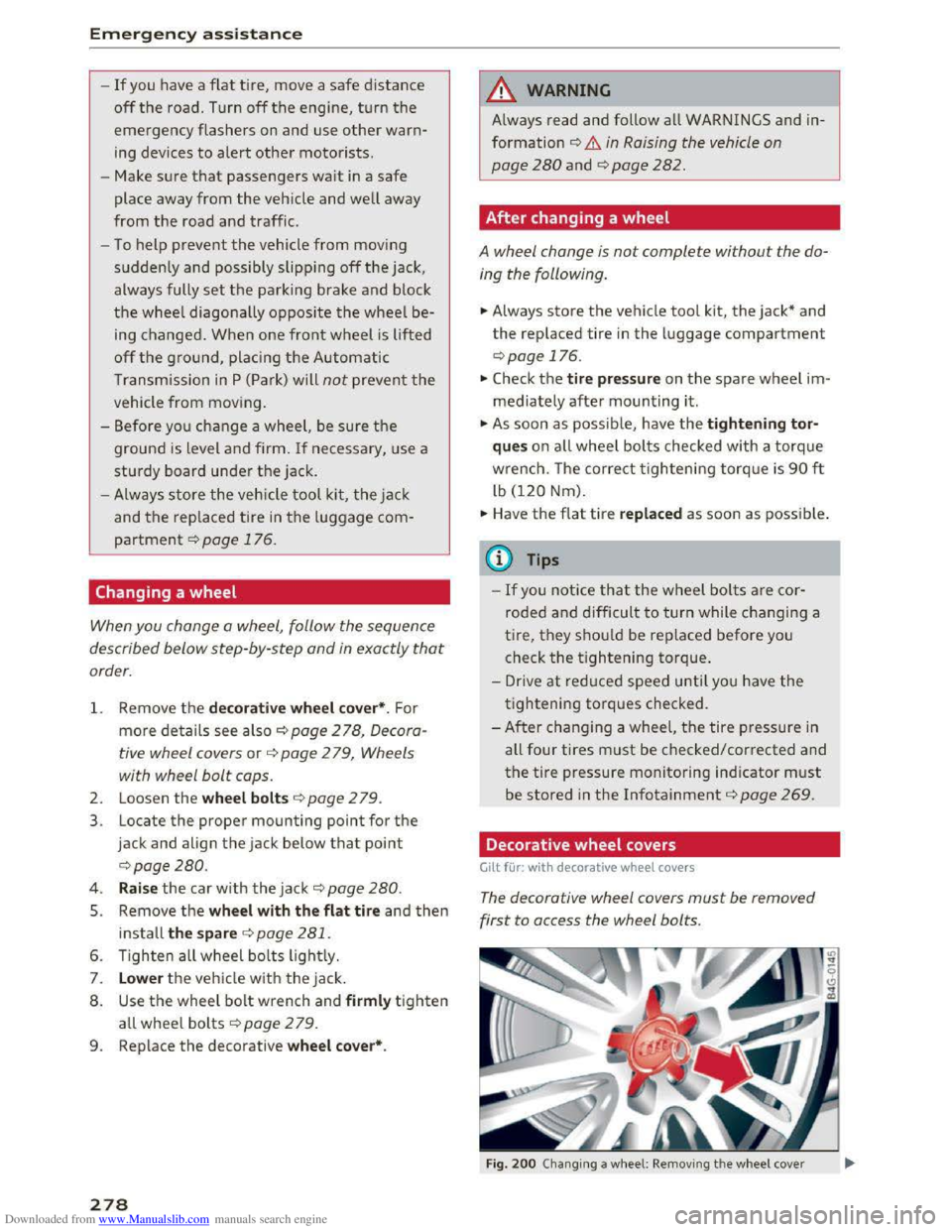
Decorative wheel covers
Gilt for: with decorative wheel covers
The decorative wheel covers must be removed
first to access the wheel bolts.
Fig. 200 Changing a w heel: Removing th e w heel cover