door lock AUDI TT COUPE 2016 Owner's Manual
[x] Cancel search | Manufacturer: AUDI, Model Year: 2016, Model line: TT COUPE, Model: AUDI TT COUPE 2016Pages: 322, PDF Size: 52.86 MB
Page 225 of 322
Downloaded from www.Manualslib.com manuals search engine ride on the front passenger's seat. Children less
than 4 ft 9 in (57 in/1.45 m) tall must sit on a
certified booster seat and properly wear the veh i
cle's three-point lap and shoulder safety belt.
Always
securely latch the passenger seat at the
very rear of its fore and aft adjustment range.
The backrest must be adjusted to an upright po
sition .
A WARNING
If you must install a booster seat child re
straint on the front passenger seat:
-Make sure the booster seat has been de
signed and certified by its manufacturer for
use on a front seat with a passenger front
and side airbag.
- Always follow
the manufacturer's instruc
t i
ons prov ided with the booster seat.
-Always move the passenger seat to the very
rear of its fore and aft adjustment range, as
far away from the airbag as possible .
- Always
make sure that the passenger seat is
securely latched in place before installing
the booster seat. The backrest must be ad
justed to an uprig ht position.
-If the passenger seat cannot be securely
latched in the very rear of its fore and aft
adjustment range, then the passenger front
airbag must be turned off with the ON I OFF
switch.
Securing child seats
Securing a child safety seat using a safety
belt
Safety belts for the rear seats and the front pas
senger can be Locked with the convertible Locking
retractor to properly secure child safety seats.
The safety belts emergency locking retractors for
the rear seats safety belts and for the front pas
senger's seat safety belt have a convertible lock
i ng
retractor for child restraints. The safety belt
must be locked so that belt webbing cannot un
reel. The
retractor can be activated to lock the
safety belt and prevent the safety belt webbing
from loosening up during normal driving. A child
safety seat can only be properly installed when
Child safety
the safety belt is locked so that the chi ld and
child safety seat will stay in place .
Always
remember : Even though your veh icle is
equipped with an Advanced Airbag system, all
children, especia lly those 12 years and younger,
should a lways ride in the back seat properly re
strained for their age and size.
A WARNING
Improperly installed child safety seats in
crease the risk of serious personal injury and
death in a collision.
-
- Always make sure that the safety be lt re
tractor is locked when installing a child
safety seat. An unlocked safety belt retrac
tor cannot hold the child safety seat in place
du ring
normal d riving or in a c rash.
-Always buckle the child safety seat firmly in
place even if a ch ild is not sitting in it. A
loose child
safety seat can fly around during
a
sudden stop or in a co llision.
- Always
make sure that the rear seat back
rest is secu rely latched whenever the rear
safety belt is being used to secure a child re
straint.
-
If the backrest is not secu rely latched, the
chi ld and t he child restraint will be thrown
forward together with the backrest and will
strike parts of the vehicle interior. The child
can
be seriously injured or killed.
- Never
install rear-facing child safety seats
or infant carriers on the front passenger
seat. A child w ill be seriously injured and
can be killed when the passenger a irbag in
f lates.
- The inflating airbag will hit the ch ild safety
seat or infant carrier with great force and
will smash the child safety seat and child
against the backrest, center armrest, door
or roof.
-Always install rear-fac ing ch ild safety seats
or infant carriers on the rear seat.
- Forward-facing child
safety seats or infant
carriers installed on the front passenger's
seat may interfere with the deployment of
the airbag and ca use serious injury to the
child.
223
Page 235 of 322
Downloaded from www.Manualslib.com manuals search engine ..... N
G: CX)
.....
"' U"I
.....
"' .....
Fueling procedure
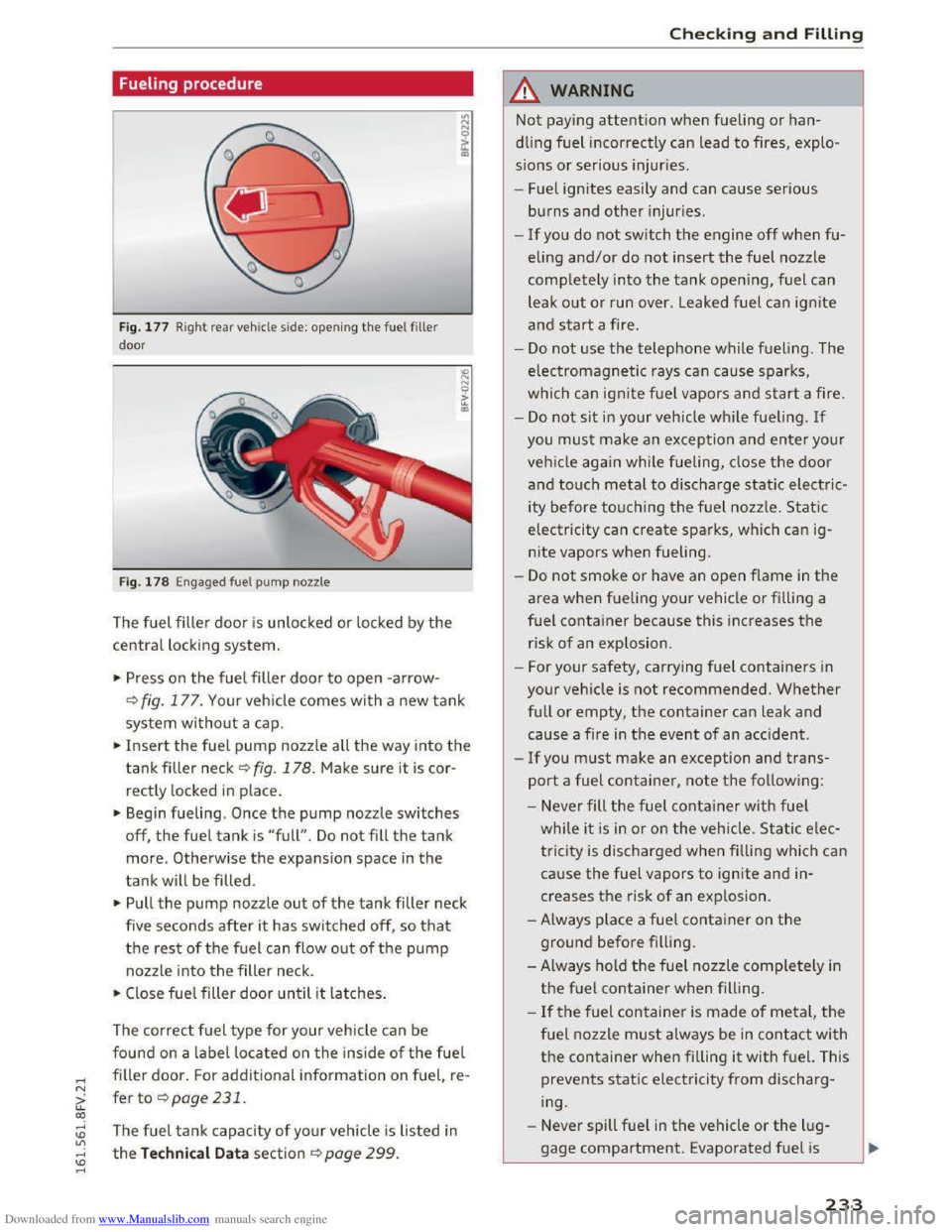
Fig. 177 Right re ar vehicle side: opening the fuel filler
door
Fig. 178 Engaged fuel pump nozzle
The fuel filler door is unlocked or locked by the
central locking system.
.. Press on the fuel filler door to open -arrow-
Q fig. 177. Your vehicle comes with a new tank
system without a cap.
.. Insert the fuel pump nozzle all the way into the
tankfiller neck ~fig. 178. Make sure it is cor
rectly locked
in place.
.. Begin fueling. Once the pump nozzle switches
off, the fuel tank is "full" . Do not fill the tank
more. Otherwise the expansion space in the
tank will be filled .
.. Pull the pump nozzle out of the tank filler neck
five
seconds after i t has switched off, so that
the rest of the fuel can flow out of the pump
nozzle into the filler neck.
.. Close fuel filler door until it latches.
The correct fuel type for your vehicle can be
found on a label located on the inside of the fuel
filler door. For additional information on fuel re-'
fer to ¢page231.
The fuel tank capacity of your vehicle is listed in
the Technical Data section Qpage 299.
Checking and Filling
.&. WARNING
Not paying attention when fueling or han
dling fuel incorrectly can lead to fires, explo
sions or serious injuries.
- Fuel igni
tes easily and can cause serious
burns and other injuries .
-
-If you do not switch the engine off when fu
eling and/or do not insert the fuel nozzle
completely into the tank opening, fuel can
leak
out or run over . Leaked fuel can ignite
and start a fire.
-
Do not use the telephone while fueling . The
electromagnetic rays can cause sparks,
which can ignite fuel vapors and start a fire.
-
Do not sit in your vehicle while fueling. If
you must make an exception and enter your
vehicl e again while fueling, close the door
and touch metal to discharge static electric
ity
before touching the fuel nozzle . Static
electricity can create sparks, which can ig
nite vapors when fueling.
-
Do not smoke or have an open f lame in the
area when fueling your vehicle or filling a
fuel container because this increases the
risk of an explosion .
- For
your safety, carrying fuel containers in
your vehicle is not recommended. Whether
full or empty, the container can leak and
cause a fire in the event of an accident .
-
If you must make an exception and trans
port a fuel container, note the following :
- Never fill
the fuel container with fuel
while it is in or on the vehicle . Static elec
tricity is discharged when filling which can
cause the fuel vapors to ignite and in
creases the risk of an exp losion .
-Always place a fuel container on the
ground before filling .
- Always hold
the fuel nozzle completely in
the fuel container when filling .
-
If the fuel container is made of metal, the
fuel nozzle must always be in contact with
the container when filling it with fuel. This
prevents static electricity from discharg
ing.
- Never
spill fuel in the vehicle or the lug
gage compartment. Evaporated fuel is
233
Page 237 of 322
Downloaded from www.Manualslib.com manuals search engine ..... N
G: CX)
.....
"' U"I
.....
"' .....
.. Guide the reserve canister filler tube into the
funnel and start the emergency fueling.
.. Remove the funnel after refueling and close the
fuel filler door so that it latches shut.
CD Note
Remove any overflowing fuel from the ve hicle
paint immediately.
Fuel filler door emergency release
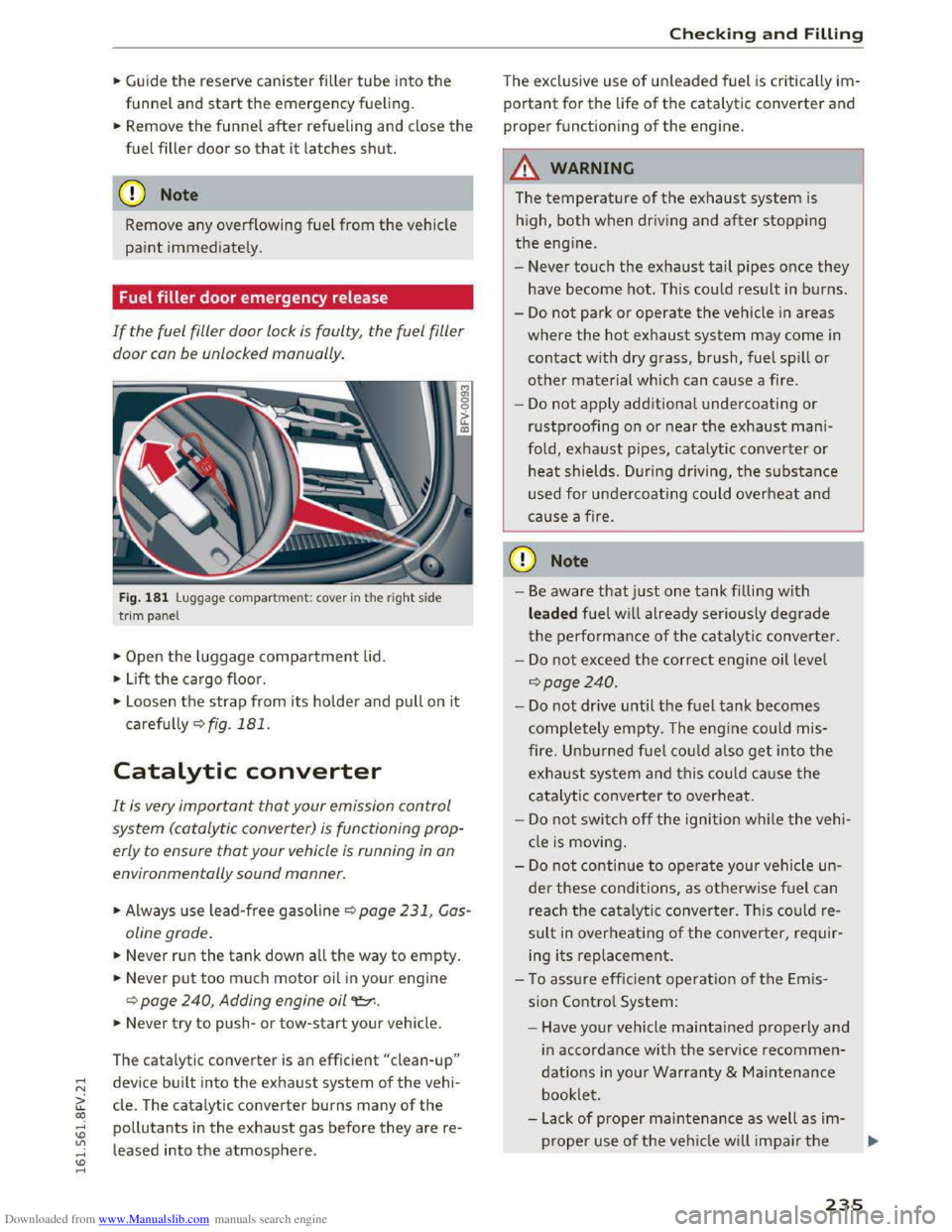
If the fuel filler door lock is faulty, the fuel filler
door con be unlocked manually.
Fig. 181 L uggage compa rtment: cover in t he r ight side
t
rim panel
.,.. Open the luggage compartment lid.
.. L ift the cargo floor .
"'
"' 0 0
it IIl
.,.. Loosen the strap from its holde r and pull on it
carefu lly Qfig. 181.
Catalytic converter
It is very important that your emission control
system (catalytic converter) is functioning prop
erly to ensure
that your vehicle is running in on
environmentally sound manner.
.,.. Always use lead-free gasoline Q page 231, Gas
oline grade .
.. Never run the tank down all the way to empty.
.. Never put too m uch motor oil in your engine
Q page 240, Adding engine oil "t::r..
.. Never try to push-or tow-start your vehicle.
The
catal ytic converter is an efficient "clean-up"
device built into the exhaust system of the vehi
cle. The catalytic
converter burns many of the
pollutants in the exhaust gas before they are re
leased into
the atmosphere .
Checking and Filling
The exclusive use of unleaded fuel is critically im
portant for the life of the catalytic converter and
proper functioning of the engine.
A WARNING
f= - I
The temperature of the exhaust system is
high, both when driving and after stopping
the engine.
- Never
touch the exhaust tail pipes once they
have become hot. This could result in burns.
-Do not park or operate the vehicle in a reas
where the hot exhaust system may come in
contact with dry grass, brush, fuel spill or
other material which can cause a fire .
-
Do not appl y additional undercoating or
r ustproofing on or near the exhaust mani
fold, exhau
st pipes, catalytic converter or
heat shields. During driving, the substance
used for un dercoating could overheat and
cause a fire.
CD Note
-Be aware that just one tank filli ng with
leaded fuel w ill already seriously degrade
the performance of th e c atalytic converter .
-
Do not exceed the correct engine oil leve l
Qpoge240 .
-Do not drive until the fuel tank becomes
completely empty. The engi ne could mis
fire. Unbu r
ned fuel coul d also get into the
exhaust system and this could cause the
ca ta lyt ic co nver ter to overheat.
-Do not swi tch off the ignition whil e the vehi
cl e is moving .
-
Do not continue to operate your vehi cle un
der these condi tions, as o therwise fuel c a n
reach the catalytic converter. This could re
sult in over heating of the converter, requir
ing
its replacement .
- T o assu re
effic ient operatio n of the E mis
sion Contro l System:
-Have your vehicle maintained properly and
in accordance wi th the service recommen
dations in yo ur Warranty & Main tenance
bookle t.
- L ack
of proper maintenance as well as im-
p r
oper use of the veh icle w ill impair the .,..
235
Page 239 of 322
Downloaded from www.Manualslib.com manuals search engine work and do not wear clothing that can
hang down into the engine.
-Limit your exposure to exhaust and chemi
cals to as short a time as possible c::> &..
/Jj._ WARNING
California Proposition 65 Warning:
- Engine
exhaust, some of its constituents,
and certain vehicle components contain or
emit chemicals known to the State of Cali
fornia to cause cancer and birth defects and
reproductive harm. In addition, certain flu
ids
contained in vehicles and certain prod
ucts of component wear contain or emit
chemicals known to the State of California
to cause cancer and birth defects or other
reproductive harm.
-Battery posts, terminals and related acces
sories contain lead
and lead compounds,
chemicals known to the State of California
to cause cancer and reproductive harms.
Wash hands after handling.
CD Note
When filling fluids, be sure not to mix the flu
ids up.
Otherwise severe malfunctions and en
gine damage will occur.
@ For the sake of the environment
You should regularly check the ground under
your vehicle in order to detect leaks quickly. If
there are visible spots from oil or other fluids,
bring your vehicle
to an authorized Audi deal
er or authorized Audi Service Facility to be
checked.
Checking and Filling
Opening the hood
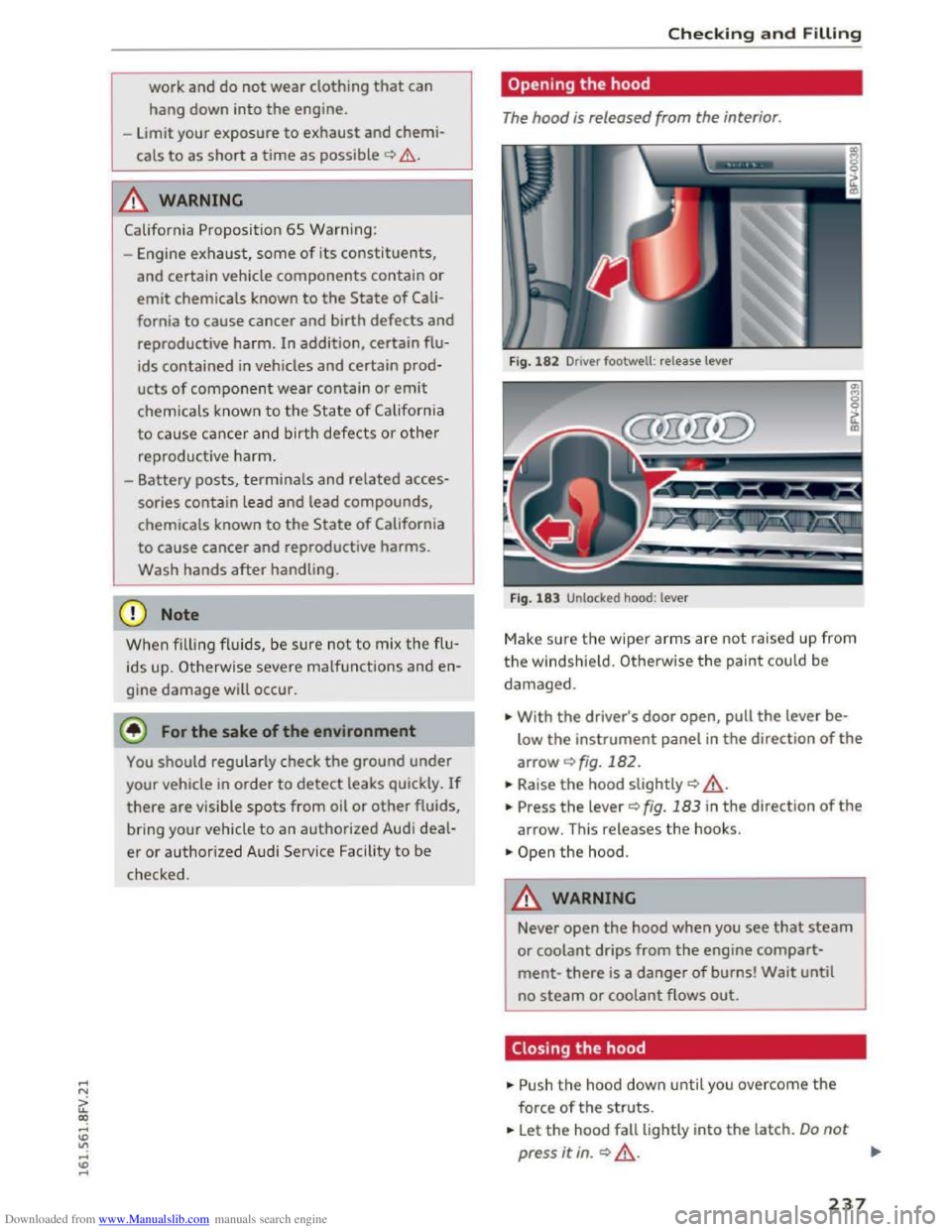
The hood is released from the interior.
Fig. 182 Driver footwell : release lever
Fig.
183 Unlocked hood: lever
Make sure the wiper arms are not raised up from
the windsh ield. Otherwise the paint could be
damaged.
... With the driver's door open, pull the lever be
low the instrument panel in the direction of the
arrowc::>fig.182 .
... Raise the hood slightly c::> ,&.
... Press the lever c::>fig. 183 in the direction of the
arrow. This releases the hooks.
.. Open the hood.
.&. WARNING
Never open the hood when you see that steam
or coolant drips from the engine compart
ment-there is a danger of burns! Wait until
no steam or coolant flows out.
Closing the hood
.. Push the hood down until you overcome the
force of the struts .
... Let the hood fall lightly into the latch. Do not
press it in. c::> ,&. ...
237
Page 288 of 322
Downloaded from www.Manualslib.com manuals search engine Fuses and bulbs
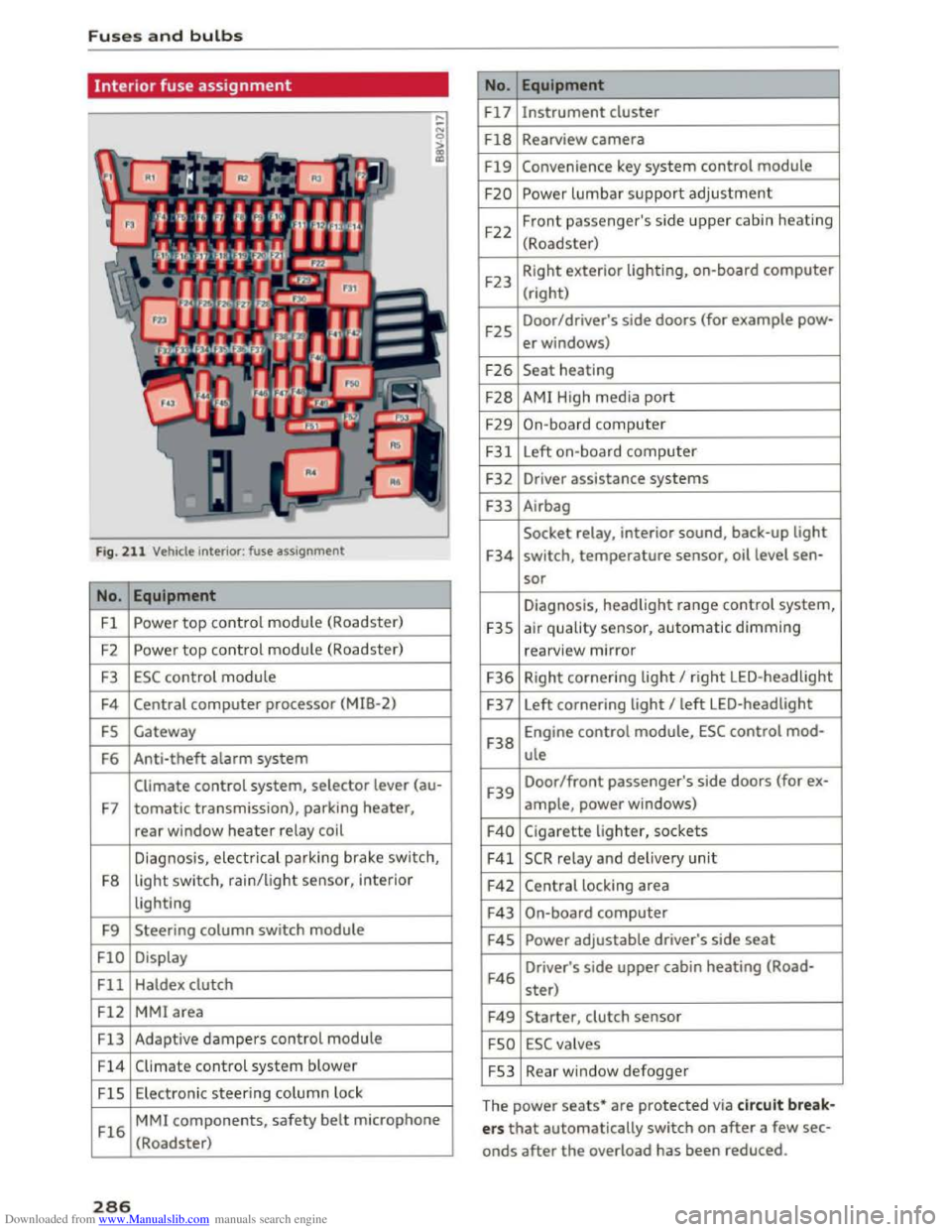
Interior fuse assignment
Fig. 211 Vehicle interior: fuse assignment
No. Equipment
Fl Powe r top control module (Roadster)
F2
Power top control module (Roadster)
F3 ESC control module
F4 Central computer processor (MIB-2)
FS Gateway
F6
Anti-theft alarm system
Climate control system, selector lever (au-
F7 tomatic transmission), parking heater,
rear window heater relay coil
Diagnosis,
electr ical parking brake switch,
F8
light switch, rain/light sensor, inter ior
lighting
F9
Steering column switch module
FlO Display
Fll Haldex clutch
F12 MMI area
Fl3 Adaptive dampers control module
F14 Climate control system blower
FlS Electronic steering column l ock
Fl6
MMI components, safety belt microphone
(Roadster)
286
No . Equipment
Fl7 Instrument cluster
Fl8 Rearview camera
F19 Convenience key system control module
F20 Power lumbar support adjustment
F22
Front passenger's side upper cabin heating
(Roadster)
F23 Right
exterior lighting, on-board computer
(right)
F25 Door/driver's
side doors (for example pow-
er windows)
F26 Seat heating
F28 AMI High media port
F29 On-board computer
F31 Left on-board computer
F32
Driver assistance systems
F33
Airbag
Socket relay, interior sound, back-up light
F34 switch, temperature sensor, oil level sen-
sor
Diagnosis, headlight range control system,
F35 air quality sensor, automatic dimming
rearview mirror
F36 Right cornering light I right LED-headlight
F37 Left
cornering light I left LED-headlight
F38
Engine control module, ESC control mod-
ule
F39
Door/front passenger's side doors (for ex-
ample, power windows)
F40 Cigarette lighter, sockets
F41 SCR relay and delivery unit
F42 Central locking area
F43 On-board computer
F45 Power adjustable driver's side seat
F46
Driver's side upper cabin heating (Road-
ster)
F49 Starter, clutch sensor
FSO ESC valves
FS3 Rear window defogger
The
power seats* are protected via circuit break
ers that automatically switch on after a few sec
onds after the overload has been reduced.
Page 306 of 322
Downloaded from www.Manualslib.com manuals search engine Index
Climate control system (automatic)
Adjusting air vents . . . . . . . . . . . . . . . . . . . . 53
Adjusting
the air vents. . . . . . . . . . . . . . . . . 54
Adjusting the temperature . . . . . . . . . . . . . 53
Air
distribution, air vents . . . . . . . . . . . . . . . 53
AUTO (automatic mode) . . . . . . . . . . . . . . . 53
Blower . . . . . . . . . . . . . . . . . . . . . . . . . . . . . 53
Controls . . . . . . . . . . . . . . . . . . . . . . . . . . . . 53
Defrosting
the windows . . . . . . . . . . . . . . . 54
Drive select . . . . . . . . . . . . . . . . . . . . . . . . . . 80
Rear window defogger . . . . . . . . . . . . . . . . . 54
Recirculation mode . . . . . . . . . . . . . . . . . . . 53
Climate control system (manual)
Adjusting
the air vents . . . . . . . . . . . . . . . . . 54
Closing
Hood . . . . . . . . . . . . . . . . . . . . . . . . . . . . . . 237
W indows . . . . . . . . . . . . . . . . . . . . . . . . . . . 32
Closing/opening by remote
control . . . . . . . . . . . . . . . . . . . . 27
with the central locking switch . . . . . . . . . . 29
with the convenience key . . . . . . . . . . . . . . . 28
Closing and opening
With the door lock . . . . . . . . . . . . . . . . . . . . 30
Cockpit (overview) . . . . . . . . . . . . . . . . . . . . . . 6
Coming home . . . . . . . . . . . . . . . . . . . . . . . . . 38
Command (voice recognition system) . . . . . 104
Compartments . . . . . . . . . . . . . . . . . . . . . . . . 48
Compass in the mirror . . . . . . . . . . . . . . . . . . 42
Compliance . . . . . . . . . . . . . . . . . . . . . . . . . . 297
Connection manager . . . . . . . . . . . . . . . . . . 167
Audi MMI connect app . . . . . . . . . . . . . . . . 167
Bluetooth settings . . . . . . . . . . . . . . . . . . . 168
Data connection . . . . . . . . . . . . . . . . . . . . . 167
Network settings . . . . . . . . . . . . . . . . . . . . 168
Importing/exporting . . . . . . . . . . . . . . . . . 118
Navigating . . . . . . . . . . . . . . . . . . . . . . . . . 133
Searching . . . . . . . . . . . . . . . . . . . . . . . . . . 117
Sending as text message . . . . . . . . . . . . . . 118
Contacting NHTSA . . . . . . . . . . . . . . . . . . . . 178
Control knob with joystick function . . . . . . . . 98
Controls
Multifunction steering wheel . . . . . . . . . . . 20
Convenience key
Indicator light . . . . . . . . . . . . . . . . . . . . . . . 60
Stopping the engine (START ENGINE STOP
button) . . . . . . . . . . . . . . . . . . . . . . . . . . . . . 59
unlocking/locking . . . . . . . . . . . . . . . . . . . . 28
Convenience opening/closing
Convertible child safety seats
Convertib le locking retractor 32
219
Activating . . . . . . . . . . . . . . . . . . . . . . . . . . 225
Deactivating . . . . . . . . . . . . . . . . . . . . . . . . 225
Using to secure a child safety seat . . . . . . 225
Cooling mode (climate control system) . . . . 53
Cooling system
Adding coolant . . . . . . . . . . . . . . . . . . . . . .
242
Coolant level checking . . . . . . . . . . . . . . . . 242
Coolant temperature indicator . . . . . . . . . . . 8
Indicator light . . . . . . . . . . . . . . . . . . . . . . . 12
Cornering light . . . . . . . . . . . . . . . . . . . . . . . . 80
Crash data recorder (EDR) . . . . . . . . . . . . . . . 94
Cruise control system
Changing speed . . . . . . . . . . . . . . . . . . . . . . 73
Preselecting speed . . . . . . . . . . . . . . . . . . . . 73
Switching
off . . . . . . . . . . . . . . . . . . . . . . . . 73
switching on . . . . . . . . . . . . . . . . . . . . . . . . .
72
C up ho lders . . . . . . . . . . . . . . . . . . . . . . . . . . . 48
C urrent consumpt ion 23
Online settings . . . . . . . . . . . . . . . . . . . . . . 168
Options . . . . . . . . . . . . . . . . . . . . . . . . . . . .
168 D
SIM PIN settings . . . . . . . . . . . . . . . . . . . . 168
Connections
refer to Media drives . . . . . . . . . . . . . . . . . 149
Consumer information . . . . . . . . . . . . . . . . . 294
Consumer Information . . . . . . . . . . . . . . . . . 178
Consumption (fuel) . . . . . . . . . . . . . . . . . . . . 23
Contact
Deleting . . . . . . . . . . . . . . . . . . . . . . . . . . . 119
Displaying . . . . . . . . . . . . . . . . . . . . . . . . . . 118
Editing . . . . . . . . . . . . . . . . . . . . . . . . . . . . 118
Favorites . . . . . . . . . . . . . . . . . . . . . . . . . . . 114
304
Data connection
Configuring . . . . . . . . . . . . . . . . . . . . . . . .
127
Data usage . . . . . . . . . . . . . . . . . . . . . . . . . 168
Data encryption
Data protection 166
Audi connect . . . . . . . . . . . . . . . . . . . . . . . 129
Media drives . . . . . . . . . . . . . . . . . . . . . . . . 149
Data recorder . . . . . . . . . . . . . . . . . . . . . . . . . 94
Date . . . . . . . . . . . . . . . . . . . . . . . . . . . . . 23, 166
daylight saving time . . . . . . . . . . . . . . . . . . . 166
Page 307 of 322
Downloaded from www.Manualslib.com manuals search engine Daytime running light . . . . . . . . . . . . . . . . . . 36
Declarat ion of compliance
Audi side assist . . . . . . . . . . . . . . . . . . . . . 297
Cell phone package . . . . . . . . . . . . . . . . . . 297
Convenience key . . . . . . . . . . . . . . . . . . . . . 297
Electronic immobilizer. . . . . . . . . . . . . . . . 297
Garage door opener (Home link) . . . . . . . . 297
Remote control key . . . . . . . . . . . . . . . . . . 297
Defrosting the windshie ld . . . . . . . . . . . . . . . 54
Defrosting (windows) . . . . . . . . . . . . . . . . . . . 54
DEF (instrument cluster) . . . . . . . . . . . . . . . . 23
Deleting
Bluetooth device . . . . . . . . . . . . . . . . . . . .
119
Call list . . . . . . . . . . . . . . . . . . . . . . . . . . . . 119
Contact.... ................... ..... 119
Favorites ... ................... . 114, 137
Home address . . . . . . . . . . . . . . . . . . . . . . 136
Deluxe automatic climate control
refer to Climate control system (automatic) .53
Demo mode
refer to Presentation mode . . . . . . . . . . . . 137
Destination on the map . . . . . . . . . . . . . . . . 133
Determining correct load limit . . . . . . . . . . 263
Digital compass . . . . . . . . . . . . . . . . . . . . . . . 42
Dimensions . . . . . . . . . . . . . . . . . . . . . . . . . . 299
Dimming the rearview mirror . . . . . . . . . . . . 40
Directory .... .. ................. . 117, 133
Connection settings . . . . . . . . . . . . . . . . . . 167
Free text search .......... .. .. .. ..... 117
Memory capacity . . . . . . . . . . . . . . . . . . . . 119
Navigation destination . . . . . . . . . . . . . . . 133
Settings . . . . . . . . . . . . . . . . . . . . . . . . . . . 119
Sort order . . . . . . . . . . . . . . . . . . . . . . . . . . 119
Storing a destination . . . . . . . . . . . . . . . . . 13 7
Symbo ls . . . . . . . . . . . . . . . . . . . . . . . . . . .
133
Directory entry
refer to Contact . . . . . . . . . . . . . . . . . . . . . 118
Display
Multifunction steering wheel . . . . . . . .
20, 22
Navigation map . . . . . . . . . . . . . . . . . . . . . 139
Traffic information . . . . . . . . . . . . . . . . . . 143
also refer to Infotainment system display 166
Distance . . . . . . . . . . . . . . . . . . . . . . . . . . . . . 23
Door/rear lid warning . . . . . . . . . . . . . . . . . . . 19
Driver information system . . . . . . . . . . . . . . . 22
CD/radio display . . . . . . . . . . . . . . . . . . . . . . 19
Door/rear lid warning . . . . . . . . . . . . . . . . . 19
Index
Exterior temperature display . . . . . . . . . . . 19
Indicator lights . . . . . . . . . . . . . . . . . . . . . . . 9
Messages . . . . . . . . . . . . . . . . . . . . . . . . . . . . 9
On-board
computer . . . . . . . . . . . . . . . . . . . 23
Service interval display . . . . . . . . . . . . . . . 249
Switching displays . . . . . . . . . . . . . . . . . 20, 22
Drives
refer to Media drives . . . . . . . . . . . . . . . . . 149
Drive select . . . . . . . . . . . . . . . . . . . . . . . . . . . 79
Driving economically . . . . . . . . . . . . . . . . . . . 57
Driving safely . . . . . . . . . . . . . . . . . . . . . . . . 171
Driving through water . . . . . . . . . . . . . . . . . . 56
Driving time . . . . . . . . . . . . . . . . . . . . . . . . . . 23
Dust filter
refer to Pollutant filter . . . . . . . . . . . . . . . . 52
DVD . . . . . . . . . . . . . . . . . . . . . . . . . . . . . . . . 150
Drive . . . . . . . . . . . . . . . . . . . . . . . . . . . . . . 150
Parental control . . . . . . . . . . . . . . . . . . . . . 162
Voice recognit ion system . . . . . . . . . . . . . 108
Dynamic volume
refer to Entertainment volume . . . . . . . . . 169
E
E-mail 115
Economy route . . . . . . . . . . . . . . . . . . . . . . . 138
Electromechanical parking brake
refer to Parking brake . . . . . . . . . . . . . . . . . 61
Electromechanical steering . . . . . . . . . . . . . . 90
Electronic differentia l lock . . . . . . . . . . . . . . . 87
Electronic immobilizer . . . . . . . . . . . . . . . . . . 25
Electronic speed limiter . . . . . . . . . . . . . . . . . 72
Electronic stabilization control (ESC) . . . . . . 87
Automatic post-collision braking system . . 87
Ind icator light . . . . . . . . . . . . . . . . . . . . . . . 14
Sport mode . . . . . . . . . . . . . . . . . . . . . . . . . 88
Emergency assistance . . . . . . . . . . . . . . . . . 275
Emergency call (911) . . . . . . . . . . . . . . . . . . 117
Emergency flasher . . . . . . . . . . . . . . . . . . . . . 38
Emergency fueling . . . . . . . . . . . . . . . . . . . . 234
Emergency locking the doo rs . . . . . . . . . . . . . 30
Emergency locking the front passenger door 30
Emergency operation
Doors . . . . . . . . . . . . . . . . . . . . . . . . . . . . . .
30
Emergency braking function . . . . . . . . . . . . 62
Fuel filler door . . . . . . . . . . . . . . . . . . . . . . 235
Luggage compartment lid . . . . . . . . . . . . . . 31
305
Page 311 of 322
Downloaded from www.Manualslib.com manuals search engine Locking/unlocking
by remote control . . . . . . . . . . . . . . . . . . . . 27
with the central locking switch . . . . . . . . . . 29
with the convenience key . . . . . . . . . . . . . . . 28
Lock ing and unlock ing
On the door lock. . . . . . . . . . . . . . . . . . . . . . 30
Loss of reception (radio) . . . . . . . . . . . . . . . 148
Low beam headlight . . . . . . . . . . . . . . . . . . . . 36
Lower universal anchorages (Canada) . . . . . 226
Luggage compartment
Cover .. .. .. .. ................... .. .. 50
Increasin g the size . . . . . . . . . . . . . . . . . . . . 50
Loading . . . . . . . . . . . . . . . . . . . . . . . . . . . . 176
Luggage compartment lid
Emergency release . . . . . . . . . . . . . . . . . . . . 31
Opening/closing . . . . . . . . . . . . . . . . . . . . . .
30
Luggage rack . . . . . . . . . . . . . . . . . . . . . . . . . . 49
Lumbar support . . . . . . . . . . . . . . . . . . . . . . . 45
M
Maintenance . . . . . . . . . . . . . . . . . . . . . . . . . 294
Maintenance intervals
Map
249
Audi connect . . . . . . . . . . . . . . . . . . . . . . . 140
Changing the scale. . . . . . . . . . . . . . . . . . . 133
Online . . . . . . . . . . . . . . . . . . . . . . . . . . . . . 142
Opening . . . . . . . . . . . . . . . . . . . . . . . . . . . 133
Operating . . . . . . . . . . . . . . . . . . . . . . . . . . 139
Options menu . . . . . . . . . . . . . . . . . . . . . . . 140
Orientation . . . . . . . . . . . . . . . . . . . . . . . . . 141
Setting as destination . . . . . . . . . . . . . . . . 133
Settings . . . . . . . . . . . . . . . . . . . . . . . . . . . 141
Using crosshairs . . . . . . . . . . . . . . . . . 133, 139
View . . . . . . . . . . . . . . . . . . . . . . . . . . 139, 141
Zooming . . . . . . . . . . . . . . . . . . . . . . . 133,
139
Map contents . . . . . . . . . . . . . . . . . . . . . . . . 139
Map functions . . . . . . . . . . . . . . . . . . . . . . . . 140
Maximum speed . . . . . . . . . . . . . . . . . . . . . . 139
Mechanical key . . . . . . . . . . . . . . . . . . . . . 25, 26
Media
Albums . . . . . . . . . . . . . . . . . . . . . . . . . . . .
160
Artists . . . . . . . . . . . . . . . . . . . . . . . . . . . . . 160
Connection settings . . . . . . . . . . . . . . . . . . 167
Displaying the DVD menu . . . . . . . . . . . . . 162
Favorites . . . . . . . . . . . . . . . . . . . . . . . . . . . 161
Folders . . . . . . . . . . . . . . . . . . . . . . . . . . . .
160
Index
Formats . . . . . . . . . . . . . . . . . . . . . . . . . . . 157
Genres . . . . . . . . . . . . . . . . . . . . . . . . . . . . 160
Options . . . . . . . . . . . . . . . . . . . . . . . . . . . . 162
Playlist . . . . . . . . . . . . . . . . . . . . . . . . . . . . 161
Playlists . . . . . . . . . . . . . . . . . . . . . . . . . . . 160
Sources overview . . . . . . . . . . . . . . . . . . . . 159
Tracks . . . . . . . . . . . . . . . . . . . . . . . . . . . . . 160
Troubleshoot ing . . . . . . . . . . . . . . . . . . . . . 164
Videos...... ....................... 160
Voice recognit ion system . . . . . . . . . . . . . 108
Media center . . . . . . . . . . . . . . . . . . . . . . . . . 160
Media drive . . . . . . . . . . . . . . . . . . . . . . . . . . 149
Media drives
Audi music interface . . . . . . . . . . . . . . . . .
155
Bluetooth audio player . . . . . . . . . . . . . . . 152
CD drive . . . . . . . . . . . . . . . . . . . . . . . . . . . 151
DVD drive . . . . . . . . . . . . . . . . . . . . . . . . . . 150
Jukebox..... .. .. .. ................. 151
Online media . . . . . . . . . . . . . . . . . . . . . . . 154
Restrictions . . . . . . . . . . . . . . . . . . . . . . . . 149
SD card reader . . . . . . . . . . . . . . . . . . . . . . 150
Supported formats . . . . . . . . . . . . . . . . . . 157
Troubleshooting .................... . 164
Wi-Fi audio player .. ................ . 153
Memory capaci
ty
Directory.... .... .. ................. 119
Jukebox . . . . . . . . . . . . . . . . . . . . . . . . . . . . 151
Memory card .. .. .. .. ...
.......... 150, 157
Menu language . . . . . . . . . . . . . . . . . . . . . . . 166
Messages . . . . . . . . . . . . . . . . . . . . . . . . . . . 114
Audi music interface . . . . . . . . . . . . . . . . . 155
also refer to E-mail .................. 115
olsorefertoTextmessage ........ 114,115
Microphone on/off . . . . . . . . . . . . . . . . . . . . 113
Mirror
dimming .. .. .. .. ... ................ . 40
Vanity mirror . . . . . . . . . . . . . . . . . . . . . . . . 40
Mirror compass . . . . . . . . . . . . . . . . . . . . . . . . 42
Mirrors
Adjusting
the exterior mirrors . . . . . . . . . . . 39
MM!
Restarting . . . . . . . . . . . . . . . . . . . . . . . . . 170
Settings . . . . . . . . . . . . . . . . . . . . . . . . . . . 166
Switching on/off . . . . . . . . . . . . . . . . . . . . . 95
System settings . . . . . . . . . . . . . . . . . . . . . 166
System update . . . . . . . . . . . . . . . . . . . . . . 168
Volume settings . . . . . . . . . . . . . . . . . . . . . 169
309
Page 312 of 322
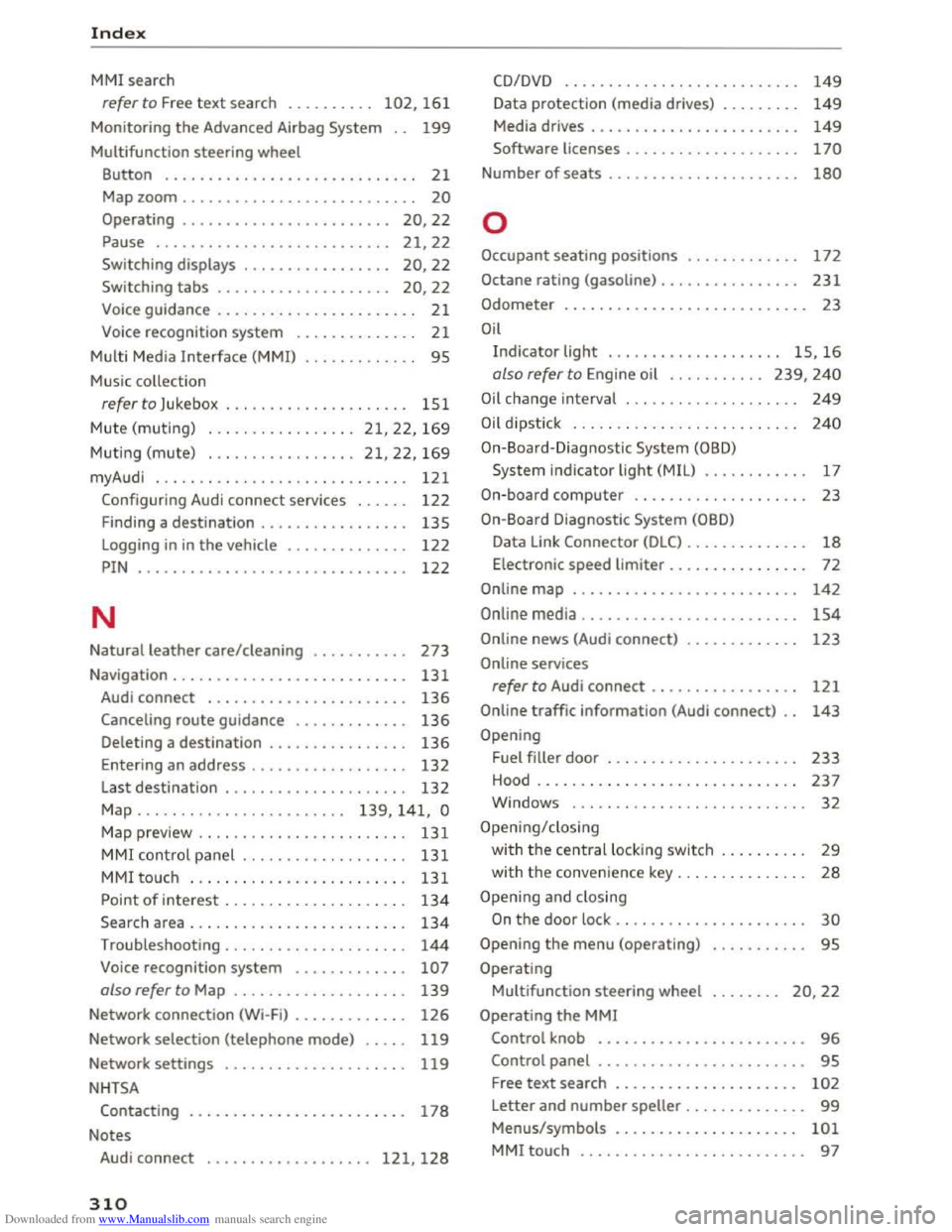
Downloaded from www.Manualslib.com manuals search engine Index
MMI search
refer to Free text search . . . . . . . . . . 102, 161
Monitoring the Advanced Airbag System 199
Multifunction steering wheel
Button . . . . . . . . . . . . . . . . . . . . . . . . . . . . . 21
Map zoom........................... 20
Operating . . . . . . . . . . . . . . . . . . . . . . . . 20, 22
Pause . . . . . . . . . . . . . . . . . . . . . . . . . . . 21, 22
Switching displays . . . . . . . . . . . . . . . . . 20, 22
Sw itch ing tabs . . . . . . . . . . . . . . . . . . . . 20, 22
Voice guidance . . . . . . . . . . . . . . . . . . . . . . . 21
Voice recognition system . . . . . . . . . . . . . . 21
Multi Media Interface (MMI) . . . . . . . . . . . . . 95
Music collection
refer to Jukebox ..................... 151
Mute (muting) ................. 21, 22, 169
Muting (mute) ................. 21, 22, 169
myAudi . . . . . . . . . . . . . . . . . . . . . . . . . . . . . 121
Configuring Audi connect services . . . . . . 122
Finding a destination . . . . . . . . . . . . . . . . . 135
Logging in in the vehicle . . . . . . . . . . . . . . 122
PIN . . . . . . . . . . . . . . . . . . . . . . . . . . . . . . . 122
N
Natural leather care/cleaning 273
Navigation . . . . . . . . . . . . . . . . . . . . . . . . . . . 131
Audi connect . . . . . . . . . . . . . . . . . . . . . . . 136
Canceling route guidance . . . . . . . . . . . . . 136
Deleting a destination . . . . . . . . . . . . . . . . 136
Entering an address . . . . . . . . . . . . . . . . . . 132
Last destination . . . . . . . . . . . . . . . . . . . . . 132
Map . . . . . . . . . . . . . . . . . . . . . . . . 139, 141, 0
Map preview . . . . . . . . . . . . . . . . . . . . . . . . 131
MMI control panel . . . . . . . . . . . . . . . . . . . 131
MMI touc h . . . . . . . . . . . . . . . . . . . . . . . . . 131
Point of interest . . . . . . . . . . . . . . . . . . . . . 134
Search area ........................ .
Troubleshooting
.................... .
Voice recognition system
............ .
also refer to Map ................... .
Network connection (Wi-Fi)
............ .
Network selection (telephone mode)
.... .
Network settings
NHTSA
134
144
107
139
126
119
119
Contacting . . . . . . . . . . . . . . . . . . . . . . . . . 178
Notes
Audi connect
................... 121, 128
310
CD/DVD
Data protection (media drives) ........ .
Media drives
. . . . . . . . . . . . . . . . . . . . . . . .
149
149
149
Software licenses . . . . . . . . . . . . . . . . . . . . 170
Number of seats . . . . . . . . . . . . . . . . . . . . . . 180
0
Occupant seating positions . . . . . . . . . . . . . 172
Octane rating (gasoline) . . . . . . . . . . . . . . . . 231
Odometer . . . . . . . . . . . . . . . . . . . . . . . . . . . . 23
Oil
Indicator light . . . . . . . . . . . . . . . . . . . . 15, 16
also refer to Engine oil . . . . . . . . . . . 239, 240
Oil change interval . . . . . . . . . . . . . . . . . . . . 249
Oil d ipstick . . . . . . . . . . . . . . . . . . . . . . . . . . 240
On-Board-Diagnostic System (OBD)
System indicator light (MIL) . . . . . . . . . . . . 17
On-board computer . . . . . . . . . . . . . . . . . . . . 23
On-Board Diagnostic System (OBD)
Data Link Connector (DLC) . . . . . . . . . . . . . . 18
Electronic speed limiter. . . . . . . . . . . . . . . . 72
Online map . . . . . . . . . . . . . . . . . . . . . . . . . . 142
Online media . . . . . . . . . . . . . . . . . . . . . . . . . 154
Online news (Audi connect) . . . . . . . . . . . . . 123
Online services
refer to Audi connect . . . . . . . . . . . . . . . . . 121
Online traffic information (Audi connect) 143
Opening
Fuel
filler door . . . . . . . . . . . . . . . . . . . . . . 233
Hood . . . . . . . . . . . . . . . . . . . . . . . . . . . . . . 237
Windows ........................... 32
Opening/closing
with t h e central lock ing switch . . . . . . . . . . 29
with th e conven ience key. . . . . . . . . . . . . . . 28
Opening and closing
On the door lock . . . . . . . . . . . . . . . . . . . . . . 30
Opening the menu (operating) 95
Operating
Multifunction steering wheel . . . . . . . . 20, 22
Operating the MMI
Control knob . . . . . . . . . . . . . . . . . . . . . . . . 96
Control panel . . . . . . . . . . . . . . . . . . . . . . . . 95
Free text search . . . . . . . . . . . . . . . . . . . . . 102
Letter and number speller . . . . . . . . . . . . . . 99
Menus/symbols . . . . . . . . . . . . . . . . . . . . . 101
MMI touch . . . . . . . . . . . . . . . . . . . . . . . . . . 97
Page 317 of 322
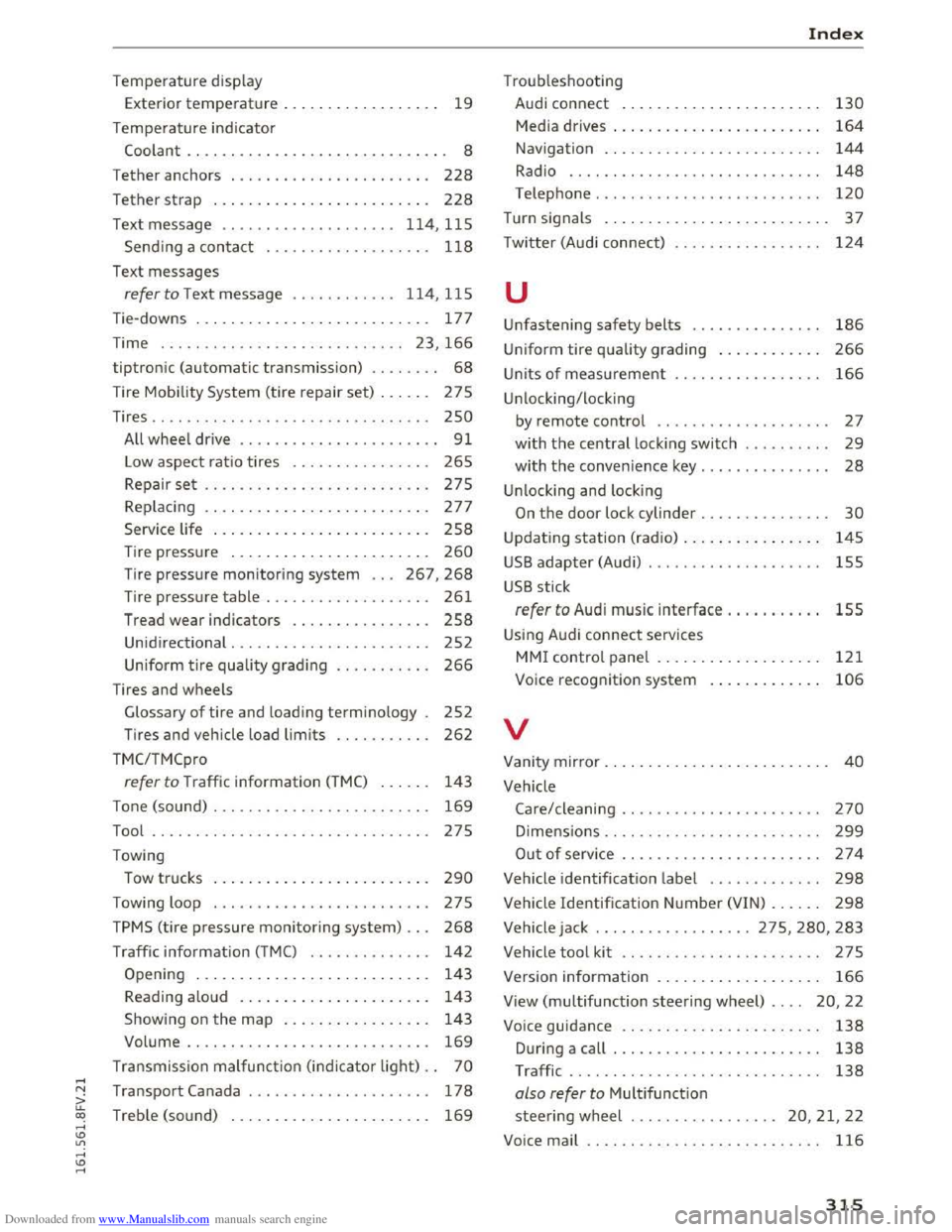
Downloaded from www.Manualslib.com manuals search engine .....
Temperature display
Exterior
temperature . . . . . . . . . . . . . . . . . . 19
Temperature indicator
Coolant . . . . . . . . . . . . . . . . . . . . . . . . . . . . . . 8
T ether anchors . . . . . . . . . . . . . . . . . . . . . . .
228
Tether strap . . . . . . . . . . . . . . . . . . . . . . . . . 228
Text message .. .................. 114, 115
Sending a contact . . . . . . . . . . . . . . . . . . . 118
Text messages
refer to Text message . . . . . . . . . . . . 1 14, 115
Tie-downs . . . . . . . . . . . . . . . . . . . . . . . . . . .
177
Time . . . . . . . . . . . . . . . . . . . . . . . . . . . . 23 , 166
tiptronic (automatic transmission) . . . . . . . . 68
Tire Mobility System (tire repair set) . . . . . . 275
Tires .. .. .. .. .. ................. .. .. . 250
A ll wheel drive . . . . . . . . . . . . . . . . . . . . . . . 91
L ow aspect ratio tires . . . . . . . . . . . . . . . .
265
Repair set .. .. ................. .... . 275
Replacing . . . . . . . . . . . . . . . . . . . . . . . . . . 277
Service life . . . . . . . . . . . . . . . . . . . . . . . . . 258
Tire pressure . . . . . . . . . . . . . . . . . . . . . . . 260
Tire pressure monitoring system . . . 26 7, 268
Tire pressure ta ble . . . . . . . . . . . . . . . . . . . 261
Tread wear indicators . . . . . . . . . . . . . . . .
258
Unidirectional . . . . . . . . . . . . . . . . . . . . . . . 252
Uniform
tire quality grading . . . . . . . . . . . 266
T ires and wheels
Glossary
of tire and loading terminology . 252
Tires and vehicle load limits . . . . . . . . . . . 262
TMC/TMCpro
re fer to Traffic information (TMC) . . . . . . 143
Tone (sound) . . . . . . . . . . . . . . . . . . . . . . . . . 169
Tool .... .. .. .. .. ............. .. .. .. . 275
Towing
Tow trucks . . . . . . . . . . . . . . . . . . . . . . . . .
290
Towing loop . . . . . . . . . . . . . . . . . . . . . . . . . 275
TPMS (tire pressure monitoring system) . . . 268
Traffic information (TMC) . . . . . . . . . . . . . . 142
Opening . . . . . . . . . . . . . . . . . . . . . . . . . . . 143
Reading aloud . . . . . . . . . . . . . . . . . . . . . .
143
Showing on the map . . . . . . . . . . . . . . . . . 143
Volume . . . . . . . . . . . . . . . . . . . . . . . . . . . .
169
Transmission malfunction (indicator light) . . 70
r.1 Transport Canada . . . . . . . . . . . . . . . . . . . . . 178
a: co Treb le (sound) . . . . . . . . . . . . . . . . . . . . . . . 169 .....
Troub leshooting
Audi connect . . . . . . . . . . . . . . . . . . . . . . .
130
Media drives . . . . . . . . . . . . . . . . . . . . . . . . 164
Navigation . . . . . . . . . . . . . . . . . . . . . . . . . 144
Radio . . . . . . . . . . . . . . . . . . . . . . . . . . . . . 148
Telephone . . . . . . . . . . . . . . . . . . . . . . . . . . 120
Turn signals . . . . . . . . . . . . . . . . . . . . . . . . . . 37
T w i
tter (Aud i connect) . . . . . . . . . . . . . . . . . 124
u
Unfastening safety belts . . . . . . . . . . . . . . . 186
Uniform tire quality grading . . . . . . . . . . . . 266
Units of measurement
Unlocking/locking 166
by remote control . . . . . . . . . . . . . . . . . . . . 27
with the central locking switch . . . . . . . . . . 29
with the convenience key. . . . . . . . . . . . . . . 28
Unlocking and locking
On the door lock cylinder . . . . . . . . . . . . . . . 30
Updating station (radio) . . . . . . . . . . . . . . . . 145
USB adapter (Audi) . . . . . . . . . . . . . . . . . . . . 155
USB stick
refer to Audi music interface . . . . . . . . . . . 155
Using Audi connect services
MMI control panel . . . . . . . . . . . . . . . . . . . 121
Voice recognition system 106
v
Vanity mirror . . . . . . . . . . . . . . . . . . . . . . . . . . 40
Vehicle
Care/cleaning . . . . . . . . . . . . . . . . . . . . . . .
270
Dimensions . . . . . . . . . . . . . . . . . . . . . . . . . 299
Out of serv ice . . . . . . . . . . . . . . . . . . . . . . . 274
Vehicle identification label . . . . . . . . . . . . . 298
V ehicl e Identification Number (VIN) . . . . . . 298
Vehicle jack ... .. .. ........... 275, 280, 283
Vehicle
tool kit . . . . . . . . . . . . . . . . . . . . . . . 275
Version information . . . . . . . . . . . . . . . . . . . 166
View (multifunction steering wheel) . . . . 20, 22
Voice guidance . . . . . . . . . . . . . . . . . . . . . . .
138
During a call . . . . . . . . . . . . . . . . . . . . . . . . 138
T raffic . . . . . . . . . . . . . . . . . . . . . . . . . . . . . 138
also refer to Multifunction
steering wheel .
................ 20, 21, 22
Voice
mail . . . . . . . . . . . . . . . . . . . . . . . . . . . 116
315