warning lights AUDI TT COUPE 2016 Owner's Manual
[x] Cancel search | Manufacturer: AUDI, Model Year: 2016, Model line: TT COUPE, Model: AUDI TT COUPE 2016Pages: 322, PDF Size: 52.86 MB
Page 59 of 322
Downloaded from www.Manualslib.com manuals search engine @ Tips
-Determine the depth before driving through
water.
-Do not stop the vehicle, drive in reverse or
switch the engine off when driving through
water.
- Keep in mind that oncoming vehicles may
create waves that raise the water level and
make it too deep for your vehicle to drive
through safely.
- Avoid driving
through salt water (corrosion).
Economical and environmentally-friendly
driving
The amount of fuel consumption, the envi ron
mental impact and the wear to the engine,
b rakes and tires depends mostly on yo ur driving
style. Wit h
an anticipatory and economic driv ing
style, fu
el consumption can be reduced by ap
proximately 10-lSo/o. The following tips will help
you conserve the environment and your money at
the same time.
Anticip atory driv ing
A veh icle uses the most fuel when a ccele rating.
When you drive with anticipation, you do not
need to brake as often and thus acce lerate less.
When possible, let your vehicle coast with a gea r
engaged -for example, when you notice that the
next traffic light is red.
Avoid full acceleration
You should rarely travel at the maximum vehicle
speed. High speeds cause a disproportionately
high increase in fuel consumption, emissions and
traffic noise. Slower driving saves fuel.
Reduce idling time
It pays off to stop the engine, for example when
at railroad crossings or traffic lights with longer
red lights. Stopping the engine for 30-40 sec
onds already saves more fuel than the amount of
extra fuel needed to restart the engine.
It takes a very long time in idle to warm the en
gine up to operating temperature. Wear and
emissions are especially high in the warm-up
Driving
phase. Therefore, you should begin driving im
mediately after starting the engine. Avoid high
RPMs while doing this.
Service regularly
By servic ing you r vehicle regularly, you can help
to reduce fuel consumption before you even start
to drive . The maintenance condition of your vehi
cle not only affects traffic safety and long-term
val ue b ut also impacts fuel co nsumptio n.
A poorly serviced engine can lead to fuel con
sumption that is 10% higher than normal.
Also check the oil level when refueling. The oil
con sumpti on
depends largely on the engine load
and speed. It is no rmal for the oil consumption
of a new engine to reach its lowest point only af
ter a certain amount of use. Therefore, the oil
consumption can only be properly judged after
approximately 3,000 mi (5,000 km) have been
driven.
Avoi d short trip s
The engine and exhaust cleaning system must
reach their optimal operating tempera tu re to ef
fectively reduce consumption and emissions.
A cold engine consumes a disproportionately
high
amount of f u el. The engine is at operating
temperature and consumption has normalized
only after approximately four kilometers.
Q) Note
Do not leave engine idling unattended after
starting. If warning lights should come on to
indicate improper operation, they would go
unheeded. Extended idling also produces
heat, which could result in overheating or
other damage to the vehicle or other proper
ty.
CD Note
-Have your vehicle maintained properly and
in accordance with the service recommenda
tions in your Warranty & M ain tenance book-
let. Lac k of proper mai ntenance as well as
improper use of th e vehi cle w il l impair the
function of the emission control system and
cou ld lead to damage. .,..
57
Page 61 of 322
Downloaded from www.Manualslib.com manuals search engine ...... N
G'. CX)
..... ID VI ..... ID .....
Switching the ignit ion on/off
""To switch the ignition on/off, press the
I START ENGINE STOPI button. Do not press the
brake pedal while doing this.
Starting the engine
"" Press the brake pedal and move the selector
lever
into the P or N position~.&_.
... Press the I START ENGINE STOPI button
~fig. 60. The engine will start.
If the engine should not start immediately, the
starting process is automatically stopped after a
short time. Repeat
the starting process.
.&. WARNING
-I
-Never allow the engine to run in confined
spaces -danger
of asp hyxia tion.
- Never
turn off the engine before the vehicle
has come to a complete stop.
- The brake booster and power steering only
work when
the engine is running. If the en
gine
is off, you have to use more force when
steering
or braking. Because you cannot
steer and brake
as you usually would, this
could lead to crashes and serious injuries.
CD Note
Avoid high engine speed, full throttle, and
heavy engine load
as long as the engine has
not reached operating temperature yet. You
could damage the engine.
@ For the sake of the environment
Do not let the engine run while parked to
warm up. Begin driving immediately. This re
duces unnecessary emission
s.
Tips
-Some noise after starting the engine is nor
mal and is no cause for concern.
-
If you leave the vehicle with the ignition
switched on,
the ignition will switch off af
ter a certain amount of time. Make sure that
electrical equipment such as the exterior
lights are switched off.
Driving
Stopping the engine
... Bring the vehicle to a full stop.
""Move the selector lever into the P position.
... Press the I START ENGINE STOPI button
~page 58, fig. 60.
Emergency off
If it is necessary in unusual circumstances, the
eng i
ne can be switched off while the vehicle is
moving. Briefly press the I START ENGINE STOPI
button twice in a row or press and hold for longer
than
two seconds.
.&. WARNING
!-='
- Never turn off the eng ine before the vehicle
has come to a complete stop.
-
Please note that the brake booster and pow
er steering
only work when the engine is
r unn ing. When
the engine off, you must use
more force
to steer or brake the vehicle. Be
cause the usual steering and braking capa
bility is not available, the risk of accidents or
injuries increases.
- For safety reasons, always park
the vehicle
with the selector lever in the P position.
Otherwise, there
is the risk that the vehicle
could roll.
-
After the engine has been switched off, the
radiator fan can continue to run for up to 10
minutes -even with the ignition switched
off. It can also switch on again after some
time if the coolant temperature rises as the
result of heat buildup or ifthe eng ine com
partment is heated by the sun's rays and the
engine is hot.
CD Note
If the engine has been under heavy load for
an extended period of time, heat builds up in
the engine compartment after the engine is
switched off -there is a risk of damaging the
engine. For this reason, let the engine run for
at idle for approximately two minutes before
shutting it off.
59
Page 63 of 322
Downloaded from www.Manualslib.com manuals search engine ..... N
G: CX)
.....
"' U"I
.....
"' .....
.,.. Hold the master key in the location indicated as
shown in the illustration y») ¢fig. 61. The en
gine will
start.
.. If the engine does not automatically start,
press the I START ENGINE STOP! button again.
{!) Tips
You can view the message again by pressing
the I START ENGINE STOPI button.
Electromechanical
parking brake
Operating
The electromechanical parking brake replaces
the hand brake.
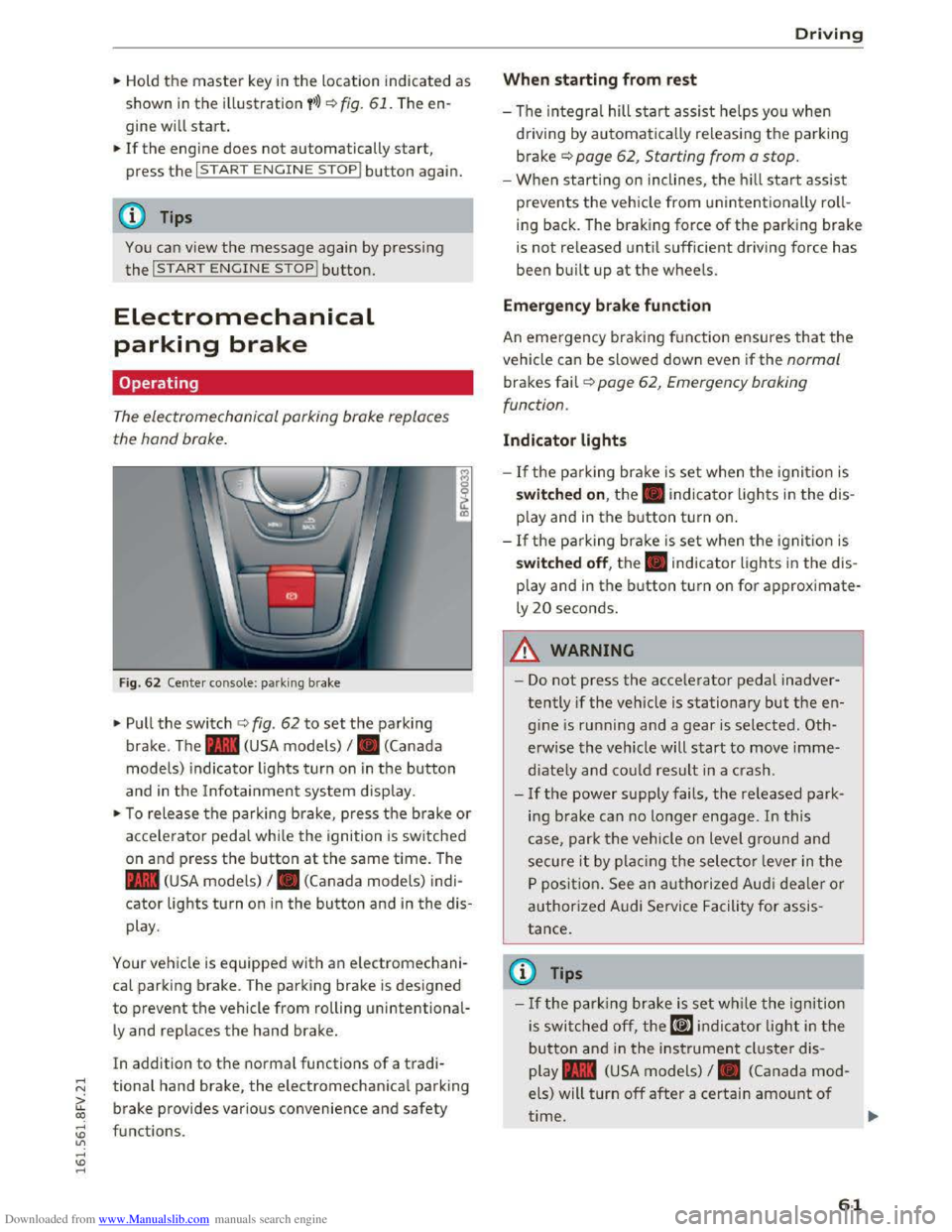
Fig. 62 Center console: park ing brake
.,.. Pull the switch ¢ fig. 62 to set the parking
brake. The . (USA models) I. (Canada
model s) indicator lights turn on in the button
and in the Info tainment system display.
.,.. To release the parking brake, press th e b rake or
acce le rator pedal while the ignition is switched
on and p ress the button at the same time. The
• (USA models) I. (Canada models) indi
cator lights turn on in the button and in the dis
play .
Your vehicle is equipped with an electromechani
cal parking brake. T
he parking brake is designed
to prevent the vehicle from rolling unintentional
ly and replaces the hand brake.
In addition to the normal functions of a tradi
tional hand brake, the electromechanical parking
brake provides various convenience
and safety
functions .
Driving
When starting from rest
-The integral hill start assist helps you when
driving by automatically releasing the parking
brake¢ page 62, Starting from a stop.
-When starting on inclines, the hill start assist
prevents the veh icle from un intentionally roll
ing back . The braking force
of the parking brake
is
not re leased unti l sufficient driving force has
been built up at the wheels.
Emergen cy brake function
An emergency braking fu nction ensures that the
vehicle can be slowed down even if the normal
brakes fail¢ page 62, Emergency braking
functi on.
Indicator lights
- If the parking brake is set when th e ignit io n is
switched on , the. indicator lights in the dis
play
and in the button tur n on .
- I f
the parking brak e is set when the ignit io n is
switched off, the. indicator lights in the dis
play
and in the b utton turn on for approximate
ly 20 seconds.
A WARNING
t-==
-Do not press the acce lerator pedal inadver-
tently if the vehicle is stationary but the en
gine is ru nning and a gear is selected. Oth
erwise the vehicle will start to move imme
diately and co uld result in a crash.
-
If the power supply fails, the released park
ing brake
can no longer engage. In this
case, park t he vehicle on level ground and
secure it by plac ing the selector l eve r in the
P position. See an authorized Audi deale r o r
authorized A udi Service Facil ity for assis
tance.
©Tips
-If the park ing brak e is set while the igni tion
is swi tc h
ed off, the((@)) indi cator light in the
button and in the ins trument cluster dis
play .
(USA models) I. (Canada mod
els) will turn off after a certain amount of
time.
61
Page 64 of 322
Downloaded from www.Manualslib.com manuals search engine Driving
-If driver's door is opened while the ignition
is
switched on, the parking brake sets auto
matically. This prevents unintended rolling
of the vehicle.
- Occasional noises
when the parking brake is
applied
and released are normal and are not
a cause for concern.
-
When the vehicle is parked, the parking
brake goes through a self-test cycle at regu
lar intervals. Any noises associated with this
are normal.
-If the. (USA models) I. (Cana-
da models) indicator lights or llJ indicator
lig ht
turn on, there could be a malfunction
in the park ing brake ~page 11.
-If there is a power failure, the parking brake
will not set if it is released, and it will not
release if it is set~.&.. See an authorized
Audi dealer or authorized Audi Service Fa
cility for
assistance.
Parking
.... Press the brake pedal to stop the vehicle.
.... Pull the switch~ to set the parking brake .
.... Place the selector lever in the P position.
.... Turn the engine off~,&.
.... Turn the steering wheel when parking on in
clines
so that the wheels will roll into the curb
if the vehicle starts moving .
A WARNING
-Always take the vehicle key with you when
leaving the vehicle, even for a short period
of time. This applies particularly when chi l
dren remai n in the vehicle. Otherwise the
children could start the engine, release the
parking brake or operate electrical equip
ment (e.g. power windows). There is the risk
of an accident.
-
When the vehicle is locked, no one -particu
larly
not children should remain in the vehi
cle. Locked
doors make it more difficult for
emergency workers to get into the vehicle,
which
puts lives at risk.
62
Starting from a stop
The start assist function ensures that the park
ing brake
is released automatically upon start
mg.
Stopping and applying parking brake
.... Pull the switch~ to set the parking brake.
Starting and automatically releasing the
parking brake
Requirement: the driver's door must be closed
and the driver's safety belt must be fastened.
.... When you press the accelerator pedal, the
parking brake is automatically released and
your vehicle begins to move.
When stopping at a traffic signal or stopping in
city traffic, the park ing brake can be applied. The
vehicle
does not have to be held with the brake
pedal. The parking brake eliminates the tendency
to creep when a selector lever position is engag
ed. As soon as you press the accelerator pedal,
the parking brake releases automatically and the
vehicle starts to move .
Starting on slope s
When starting on inclines, the hill start assist
prevents the vehicle from unintentionally rolling
back. The braking force
of the parking brake is
not released until sufficient driving force has
been built up at the wheels.
(0 Tips
For safety reasons, the parking brake is re
l
eased automatically onl y when the driver's
safety be lt is fastened and the driver's door is
l ocked.
Emergency braking function
In the event that the conventional brake system
fails or locks.
.... To brake your vehicle in an emergency, pull the
~switch and hold it pulled.
.... As soon as you release the button or accelerate,
the braking stops. .,..
Page 66 of 322
Downloaded from www.Manualslib.com manuals search engine Automatic transmission
Automatic transmission
S tronic
Introduction
Your vehicle is equipped with an electronically
controlled DSG transmission called S tronic. Two
independent clutches transfer the power be
tween the engine and transmission. It allows the
vehicle to accelerate without a noticeable inter
ruption in traction.
The transmission upshifts or downshifts auto
matically. The driving style continuously influen
ces the selection of the driving program.
When a moderate driving style is used, the
transmission selects the most economical driving
mode. The transmission upshifts at a lower RPM
and downshifts at a higher RPM to improve fuel
efficiency.
The
transmi ssion switches to a sporty mode after
a kick-down or when the driver uses a sporty
driving style
characterized by quick accelerator
pedal movements, heavy acceleration, frequent
changes in speed and traveling at the maximum
speed.
If desired, the driver can also select the gears
manually (tiptronic mode).
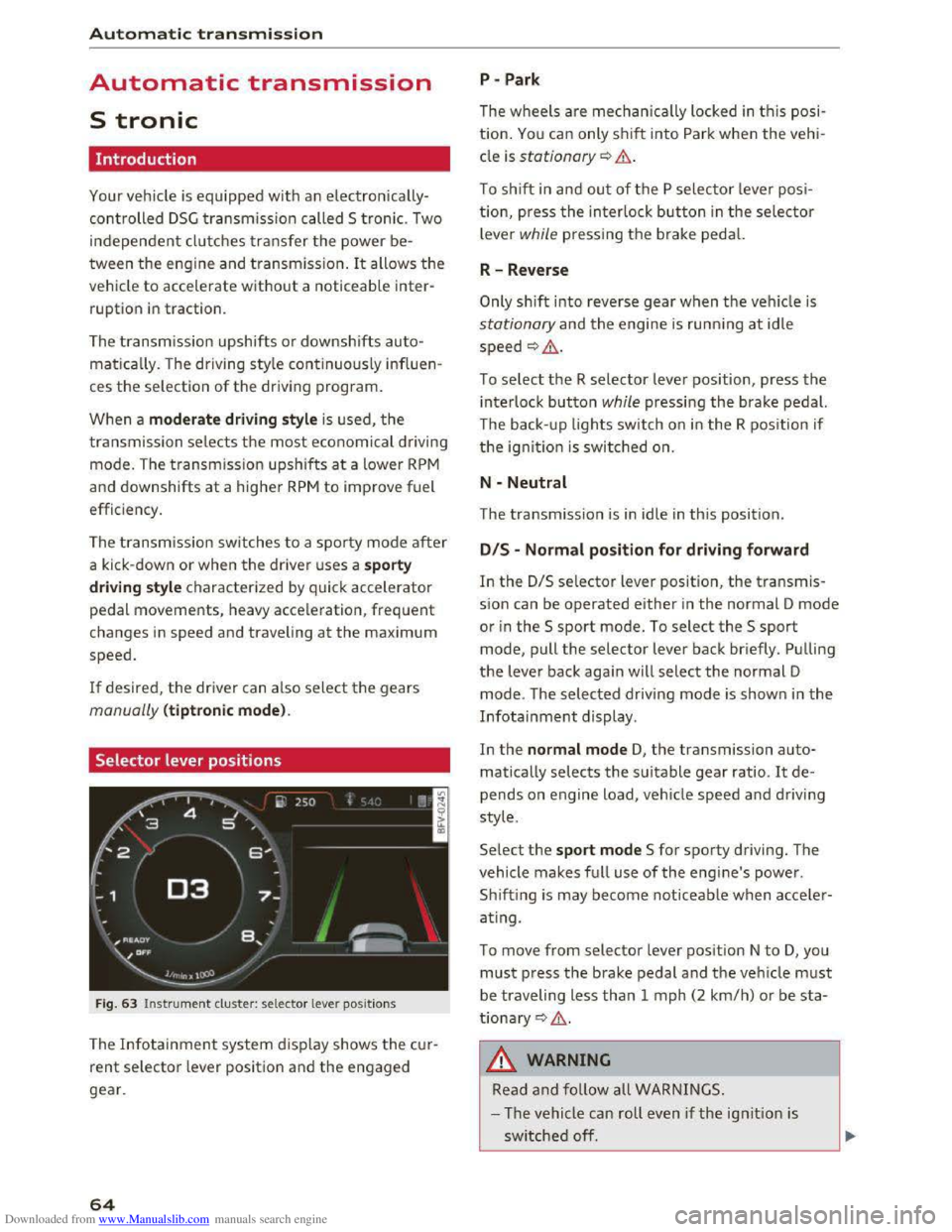
Selector lever positions
Fig. 63 Instrument cluster: selector lever positions
The Infotainment system d isplay shows the cur
rent selector lever position and the engaged
gear.
64
P -Park
The wheels are mechanica lly locked in this posi
tion. You can only shift into Park when the vehi
cle is stationary¢&.
To shift in and out of the P selector lever posi
tion, press the interlock button in the selector
lever while pressing the brake pedal.
R-Reverse
Only shift into reverse gear when the vehicle is
stationary and the engine is running at idle
speed ¢,6.
To select the R selector lever position, press the
interlock button while pressing the brake pedal.
The back- up
lights switch on in the R position if
the ignition is switched on.
N -Neutral
The transmission is in idle in this position.
DIS -Normal position for driving forward
In the D/S selector lever position, the transmis
sion can be operated either in the normal D mode
or in the S sport mode. To select the S sport
mode, pull the selector lever back briefly. Pulling
the lever back again will select the normal D
mode. The selected driving mode is shown in the
Infotainment display.
In
the normal mode D, the transmission auto
matically selects the suitable gear ratio. It de
pends on engine load, vehicle speed and driving
style.
Select the sport mode S for sporty driving. The
vehicle
makes full use of the engine's power.
Sh i
fting is may become noticeable when acce ler
ating.
To move from selector lever position N to D, you
must press the brake pedal and the vehicle must
be traveling less than 1 mph (2 km/h) or be sta
tionary ¢,6.
A WARNING
Read and follow all WARNINGS.
- The vehicle can roll
even if the ignition is
switched off.
Page 68 of 322
Downloaded from www.Manualslib.com manuals search engine Automatic t ra nsmission
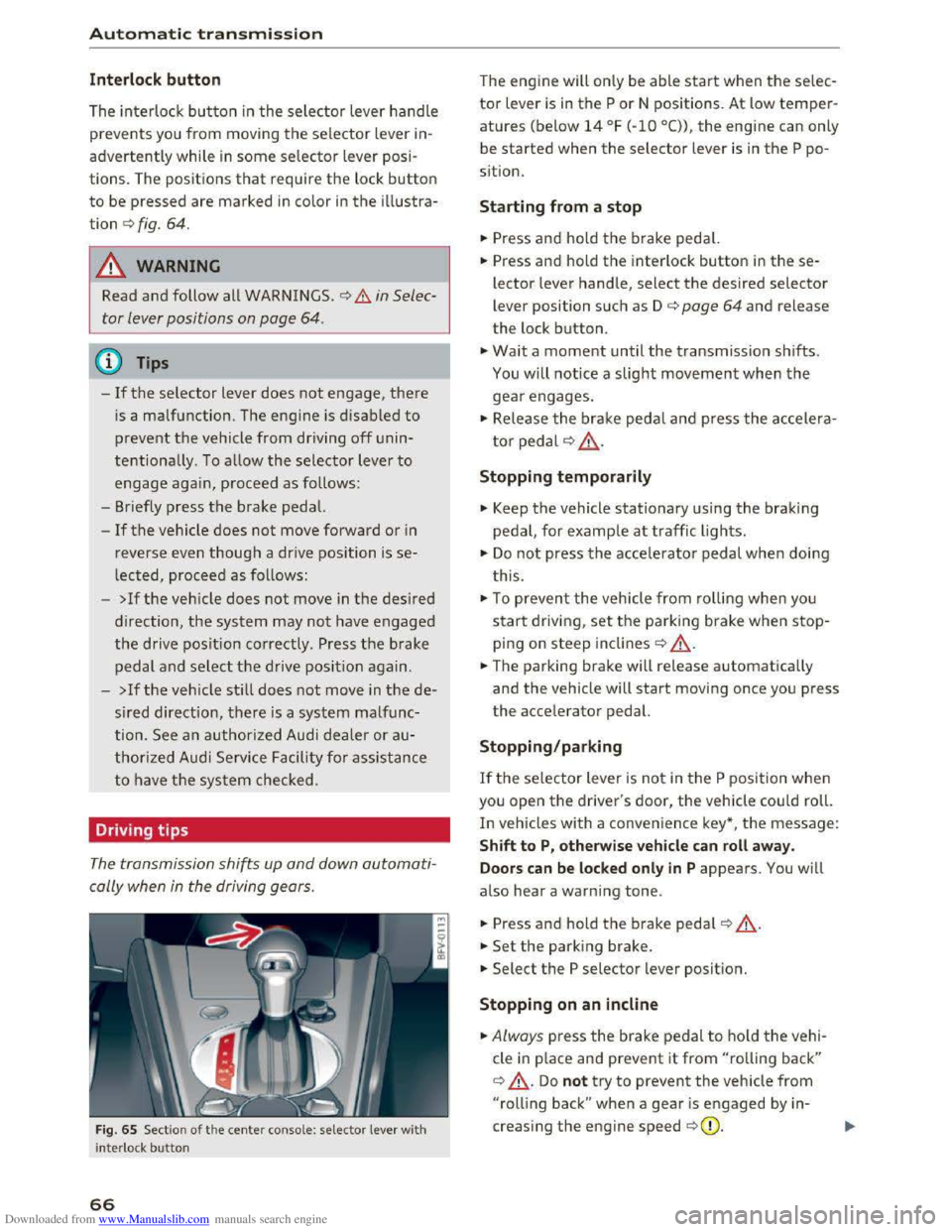
Interlock button
The interlock button in the selector lever handle
prevents you from moving the selector lever in
advertently while in some selector lever posi
tions. The positions that require the lock button
to be pressed are marked in color in the illustra
tion c::> fig. 64.
A WARNING
Read and follow all WARNINGS . c::> .&. in Selec
tor lever positions on page
64.
(!') Tips
-If the selector lever does not engage, there
is a malfunction. The engine is disabled to
prevent the vehicle from driving off unin
tentionally. To allow the selector lever to
engage agai n , proceed as follows :
- Briefly
press the brake pedal.
-If the vehicle does not move forward or in
reverse even though a drive position is se
lected, proceed as follows:
-
>Ifthe vehicle does not move in the desired
direction, the system may not have engaged
the drive position correctly . Press the brake
pedal and select the drive position again.
-
>If the veh icle sti ll does not move in the de
s ired direction, there is a system malfunc
tion. See an authorized Audi dealer or au
thorized Audi Service Facility for assistance
to have the system checked.
Driving tips
The transmission shifts up and down automati
cally when
in the driving gears.
Fig. 65 Sect io n of the cente r conso le: selecto r lever wit h
i nte rlock bu
tton
66
The engine will only be able start when the selec
tor lever is in the P or N positions. At low temper
atures (below 14 °F (-10 °C)), the engine can only
be
started when the selector lever is in the P po
s i
tion.
Starting from a stop
... Press and hold the brake pedal.
... Press and hold the interlock button in these
lector lever handle, select the desired selector
lever position such as D c::> page 64 and release
the lock button .
... Wait a moment until the transmission shifts.
You will notice a slight movement when the
gear engages.
... Release the brake pedal and press the accelera
tor pedal c::> .& ..
Stopping temporaril y
.,. Keep the vehicle stationary using the braking
pedal, for example at traffic lights.
.,. Do not press the accelerat o r pedal when doing
t his .
.,. To preven t the vehicle from ro llin g when you
start driving, set the parking brake when stop
ping on steep inclines c::> ,&..
... The parking brake will release automatically
and the vehicle will start moving once you press
the accelerator pedal.
Stopping/par king
If the selector lever is not in the P position when
you open the driver's door, the vehicle could roll.
In vehicles with a convenience key*, t he message:
S h ift to P, otherwise veh icle can roll awa y.
Door s can be locked only in
P appears. You will
also hear a warning tone .
... Press and hold the b rake pedal c::> ,&. .
... Set the park ing brake .
... Select the P selector lever position.
Stopping on an incl in e
... Always press the brake pedal to ho ld the vehi
cle
in p lace and prevent it from "rolling back"
c::> ,&.. Do not try to prevent the vehicle from
"rolling back" when a gear is engaged by in
creasing the engine speed c::>(D.
Page 75 of 322
Downloaded from www.Manualslib.com manuals search engine The speed is kept constant by modifying engine
power or through an active brake intervention.
A WARNING
-Always pay attention to the traffic around
you when the cruise control is in operation.
You are always responsible for your speed
and the distance between your vehicle and
other vehicles.
- For
reasons of safety, cruise control should
not be used in the city, in stop-and-go traf
fic, on winding roads and when road condi
tions are poor (such as ice, fog, gravel,
heavy rain
and hydroplaning) -you could
have
an accident.
- Switch
the cruise control off temporarily
when driving in turning lanes, highway exits
or in construction zones.
-Please note that unconsciously "resting"
your foot on the accelerator pedal prevents
the cruise control from braking. This is due
to the control system being overridden by
the driver's acceleration.
-If a brake system malfunction such as over
heating occurs when the cruise control sys
tem is switched on, the braking function in
the system may be switched off. The rest of
the cruise control system functions remain
active as long as the (1!;(1)~14 (USA models) I
B (Canada models) indicator light is on.
@ Tips
The brake lights illuminate as soon as the
brakes apply automatically.
Changing speed
Applies to: vehicles with cruise control system
.. To increase/decrease the speed in xx mph (1
km/h) increments, briefly tap the lever up/
down in the 0 10 ¢ page 72, fig. 70 direction
to the first level.
.. To increase/decrease the speed in xx mph (10
km/h) increments, briefly tap the lever up/
down in the 010 ¢page 72, fig. 70 direction
to the second level.
Assist
.. To increase or decrease the speed quickly, hold
the lever in the 0 I 0 direction until the de
sired speed is reached.
Overriding the speed
Applies to: vehicles with cruise control system
You can press the accelerator pedal down to in
crease your speed, for example if you want to
pass someone. The speed you saved earlier will
resume as soon as you let off of the accelerator
pedal.
However, if you are exceeding the stored speed
by a considerable amount for a long time, the
cruise control system will temporarily switch off.
The
lij;lil~14 (USA model s) !Iii (Canada models) in
dicator light in the instrument cluster turns off
and the stored speed is maintained.
Preselecting the speed
Applies to: vehicles with cruise control system
You can pre-select your desired speed while the
vehicle is not moving.
.. Switch on the ignition .
.. Pull the lever into position@¢ page 72,
fig. 70.
.. To increase or decrease the speed, tap the lever
in the 010 direction.
This
function makes i t possible, for example, to
save the speed you want before driving on the
highway. Once on the exp ressway, activate the
cruise control by pulling the lever into position
@.
Switching off
Applies to: vehicles with cruise control system
Temporary deactivation
.. Step on the brake pedal, or
.. Press the lever in direction @ (not locked into
place) 9page 72, fig. 70 .
Switching off completely
.. Press the lever into position @(clicked into
place), or
.. switch the ignition off.
73
Page 77 of 322
Downloaded from www.Manualslib.com manuals search engine Switching on and off
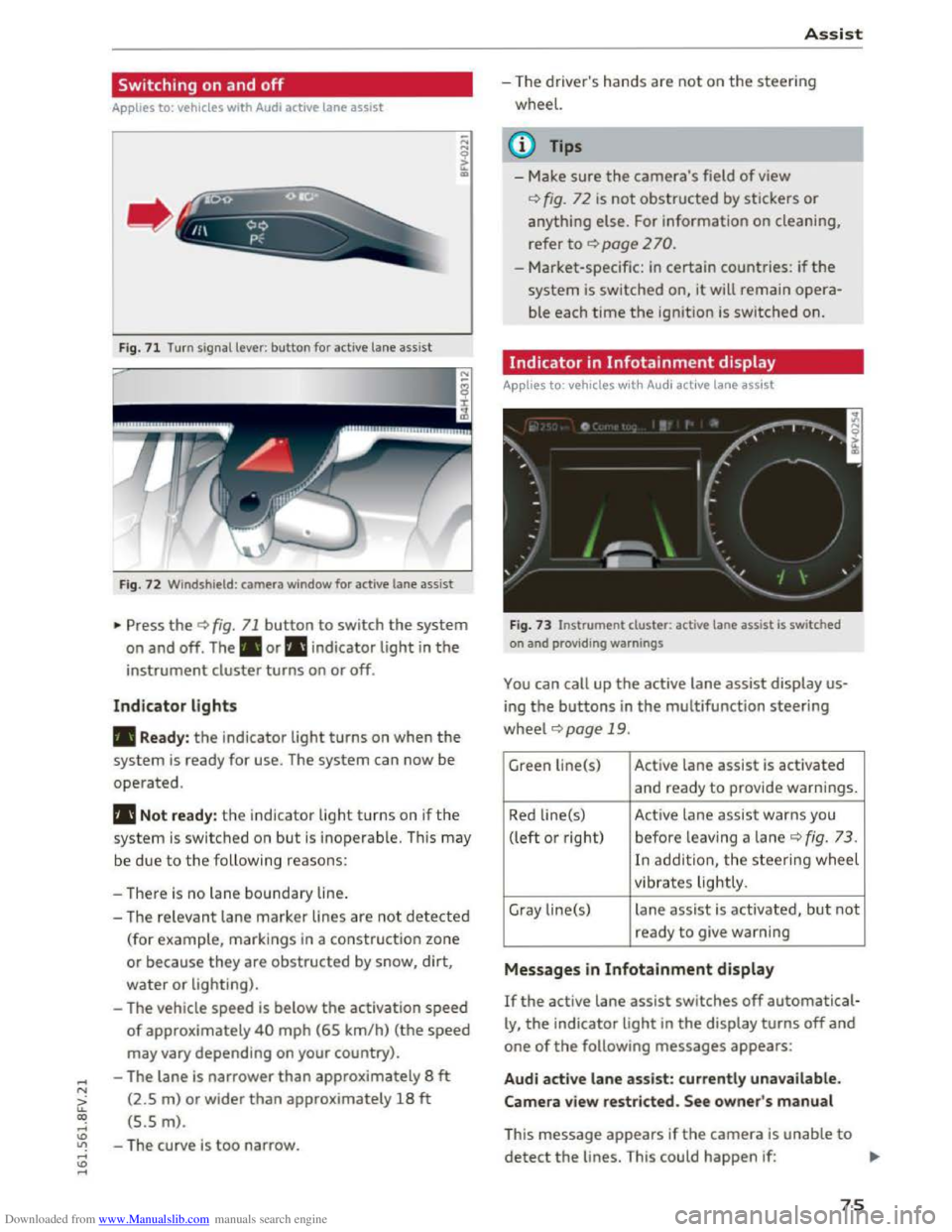
Applies to: vehicles with Audi active lane assist
F ig.
71 Turn signal lever: button for active lane assist
Fig. 72 Windshield : camera window for active lane assist
... Press the¢ fig. 71 button to switch the system
on and off. The . or rl1 indicator light in the
instrument cluster turns on or off.
Indicator lights
• Ready: the indicator light turns on when the
system is ready for use. The system can now be
operated.
rl1 Not ready: the indicator light turns on if the
system is switched on but is inoperable. This may
be
due to the following reasons:
- There
is no lane boundary line.
-
The relevant lane marker lines are not detected
(for example, markings in a construction zone
or because they
are obstructed by snow, dirt,
water or lighting).
- The vehicle
speed is below the activation speed
of approximately 40 mph (65 km/h) (the speed
may vary depending on your country).
- The lane
is narrower than approximately 8 ft
(2.5 m) or wider than approximately 18 ft
(5.5 m).
- The curve
is too narrow.
Assist
-The driver's hands are not on the steering
wheel.
{!) Tips
- Make sure the camera's field of view
¢fig. 72 is not obstructed by stickers or
anything else. For information on cleaning,
refer
to ¢ page 2 70.
- Market-specific: in certain countries: if the
system is switched on, it will remain opera
ble each time the ignition is switched on.
Indicator in Infotainment display
Applies to: vehicles with Audi active lane assist
Fig.
73 Instrument clu ster: active lane assist is switched
on and providing warnings
You can call up the active lane assist display us
ing the buttons in the multifunction steering
wheel ¢page 19 .
Green Li ne(s) Active lane assist is activated
and ready to provide warnings.
Red line(s) Active lane assist warns you
(left or right) before leav ing a lane
¢ fig. 73 .
In addit ion, the steering wheel
vibrates lightly.
Gray line(s)
lane assist is activated, but not
ready to give warning
Messages in Infotainment display
If the active lane assist switches off automatical
ly, the indicator light in the display turns off and
one of the following messages appears:
Audi active lane assist: currently unavailable.
Camera view restricted. See owner's manual
This message appears if the camera is unable to
detect the lines. This could happen if: ..,.
75
Page 90 of 322
Downloaded from www.Manualslib.com manuals search engine Intelligent Technology
its integrated systems cannot always pre
vent collisions -there is still a risk of acci
dents!
-Press the accelerator pedal carefully when
accelerating on even, slippery surfaces such
as ice and snow. The drive wheels can spin
even when these control systems are instal-
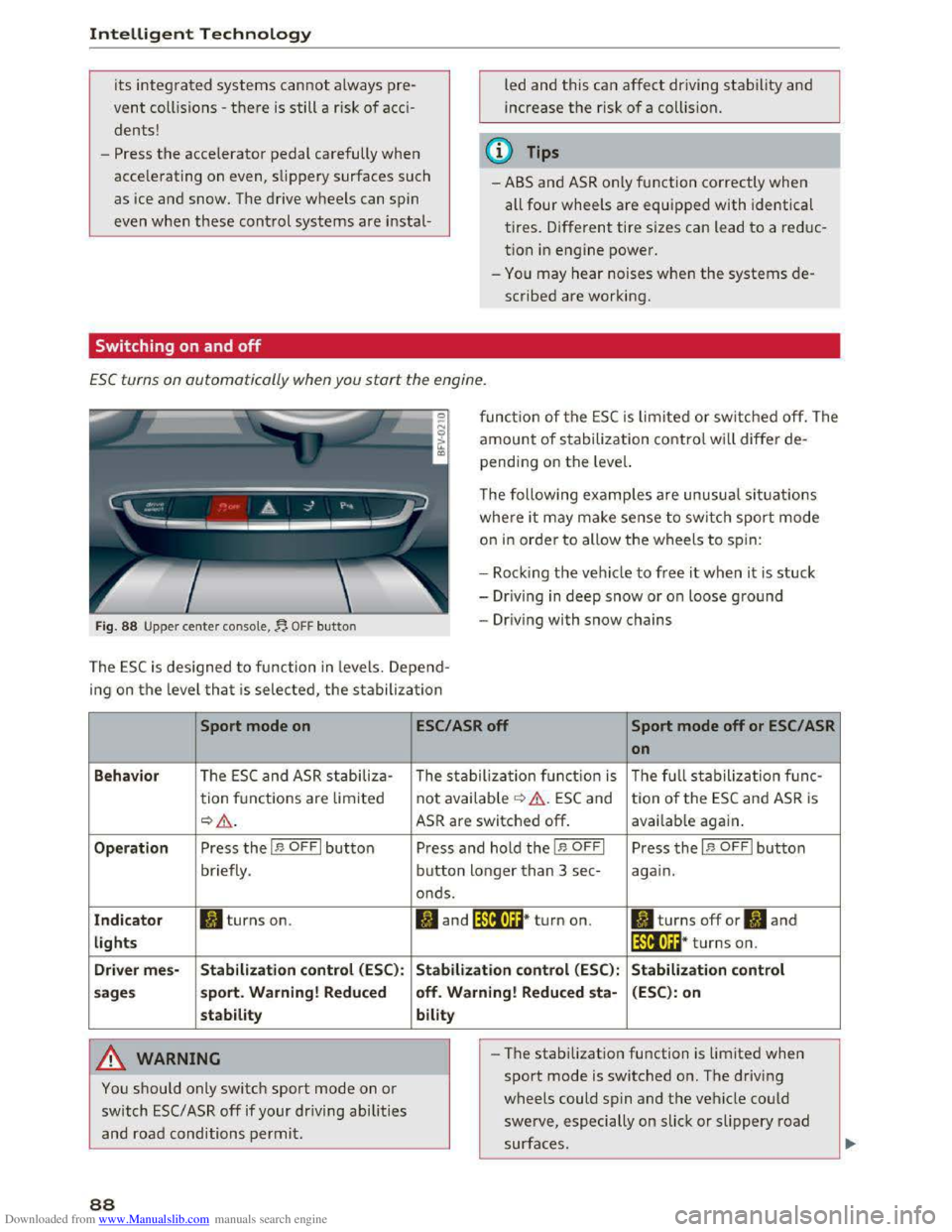
Switching on and off
led and this can affect driving stability and
increase the risk of a collision.
@ Tips
-ABS and ASR only function correctly when
all four wheels are equipped with identical
tires. Different tire sizes can lead to a reduc
tion in engine power.
-You may hear noises when the systems de
scribed are working.
ESC turns on automatically when you start the engine .
Fig. 88 Upper center console,~ OFF button
function of the ESC is limited or switched off. The
amount of stabilization control will differ de
pending on the level.
The following
examples are unusual situations
where it may make sense to switch sport mode
on in order to allow the wheels to spin:
- Rock i
ng the vehicle to free it when it is stuck
-Dr iving in deep snow or on loose ground
-Driving with snow chains
The ESC is designed to function in levels. Depend
ing
on the level that is selected, the stabilization
Sport mode on
Behavior The ESC and ASR stabiliza-
tion functions are lim ited
~&.
Operation Press the I.$ OFFI button
briefly .
Indicator II turns on.
lights
Driver
mes-Stabilization control (ESC):
sages sport.
Warning! Reduced
stability
A WARNING
You should only switch sport mode on or
switch ESC/ ASR off if your driving abilities
and road conditions permit.
88
ESC/ASR off Sport mode off or ESC/ ASR
on
The stabilization function is The full stabilization func-
not available ¢ &. ESC and tion of the ESC and ASR is
ASR are switched off. available again.
Press and hold the I.$ OFFI Press the I.$ OFFI button
button longer than 3 sec-again.
onds.
II and lfif1U~* turn on. II turns off or II and
lfil•l~~* turns on.
Stabilization control (ESC): Stabilization control
off. Warning! Reduced
sta-(ESC): on
bility
- I
-The stabilization function is limited when
sport mode is switched on. The driving
wheels could spin and the vehicle could
swerve, especially on slick or slippery road
surfaces.
Page 94 of 322
Downloaded from www.Manualslib.com manuals search engine Intelligent Technology
Automatic mode (normal operation)
-Automatic extension: the rear spoiler will auto
matically extend when speeds exceed approxi
mately 75 mph (120 km/h)
-Automatic retraction: the rear spoiler will auto
matically retract when speeds decrease to un
der approximately 50 mph (80 km/h).
Manual mode
-Extending manually: briefly tap the~ fig. 89
button to fully extend the rear spoiler.
- Retracting manually:
when driving at speeds
below approximately 10 mph (20 km/h), press
and hold the button to retract the rear spoiler.
When at speeds between 10 mph (20 km/h)
and 75 mph (120 km/h), the rear spoiler will
completely retract when you tap the button.
Indicator lights
Ii) I. Rear spoiler: malfunction!
The
rear spoiler may not have extended due to a
malfunction.
This could change the veh icle's driv
ing characteristics
at high speeds. Do not drive
faster than 85 mph (140 km/h). Drive to an au
thorized Audi dealer or authorized Audi Service
Facility
immediately to have the malfunction cor
rected. The color
of the indicator light depends
on the vehicle speed.
..&. WARNING
-
Driving at higher speeds without the rear
spoiler deployed can impair handling charac
teristics, making
the vehicle harder to con
trol.
- Always
make sure that the spoiler is de
ployed when driving at
speeds ove r 85 mph
(140 km/h). If the rear spoiler warning/indi
cator light in the instrument cluster comes
on, the rear spoiler may not have deployed.
- Never drive
at speeds higher than 85 mph
(140 km/h) ifthe spoiler is not deployed.
Have
the spoiler inspected as soon as possi
ble by an
authorized Audi dealer or qualified
workshop.
- Always obey
speed limits and other traffic
laws.
92
..&. WARNING
Improper operation of the rear spoiler can
cause crushing injuries.
-Always make sure that nobody, especially
children, is
in the way when the rear spoiler
is deployed or retracted.
«J:) Note
-Never push on the vehicle on the rear spoil
er. This could
cause damage.
- To
prevent damage to the rear spoiler do
not lean or place anything on it.
-
-Only operate the rear spoiler manually when
the luggage compartment lid is close and
the rear spoiler moving parts are not
blocked. Otherwise, damage could occur.
(D Tips
Clean the rear spoiler compartment every 2 to
3 months. To function correctly, the rear
spoiler must be free of ice, snow and leaves.
Energy management
The starting ability is optimized
The energy management system manages the
electrical energy distribution
and optimizes the
availability
of electrical energy for starting the
engine.
When a vehicle with a conventiona l energy sys
tem is not driven for a long time, the battery is
drained by equipment (for example the immobil
izer). In
certain circumstances, there could may
not be enough energy to start the engine.
Your vehicle
is equipped with an intelligent ener
gy
management system for distributing electrici
ty. T his sign ificant
ly improves the starting ability
and increases the battery life.
The
energy management system Is made up of
battery diagnosis, Idling current management
and dynamic energy management.
Battery diagnosis
The battery diagnosis determines the battery
charge level. The sensors determine the battery Ill>