warning lights AUDI TT COUPE 2016 Owner's Guide
[x] Cancel search | Manufacturer: AUDI, Model Year: 2016, Model line: TT COUPE, Model: AUDI TT COUPE 2016Pages: 322, PDF Size: 52.86 MB
Page 133 of 322
Downloaded from www.Manualslib.com manuals search engine ..... N
Navigation
Opening navigation
Applies to: veh icles with navigation system
Nav igation
The navigation system directs you to your destination, around traffic incidents and on alternative
routes, if desired.
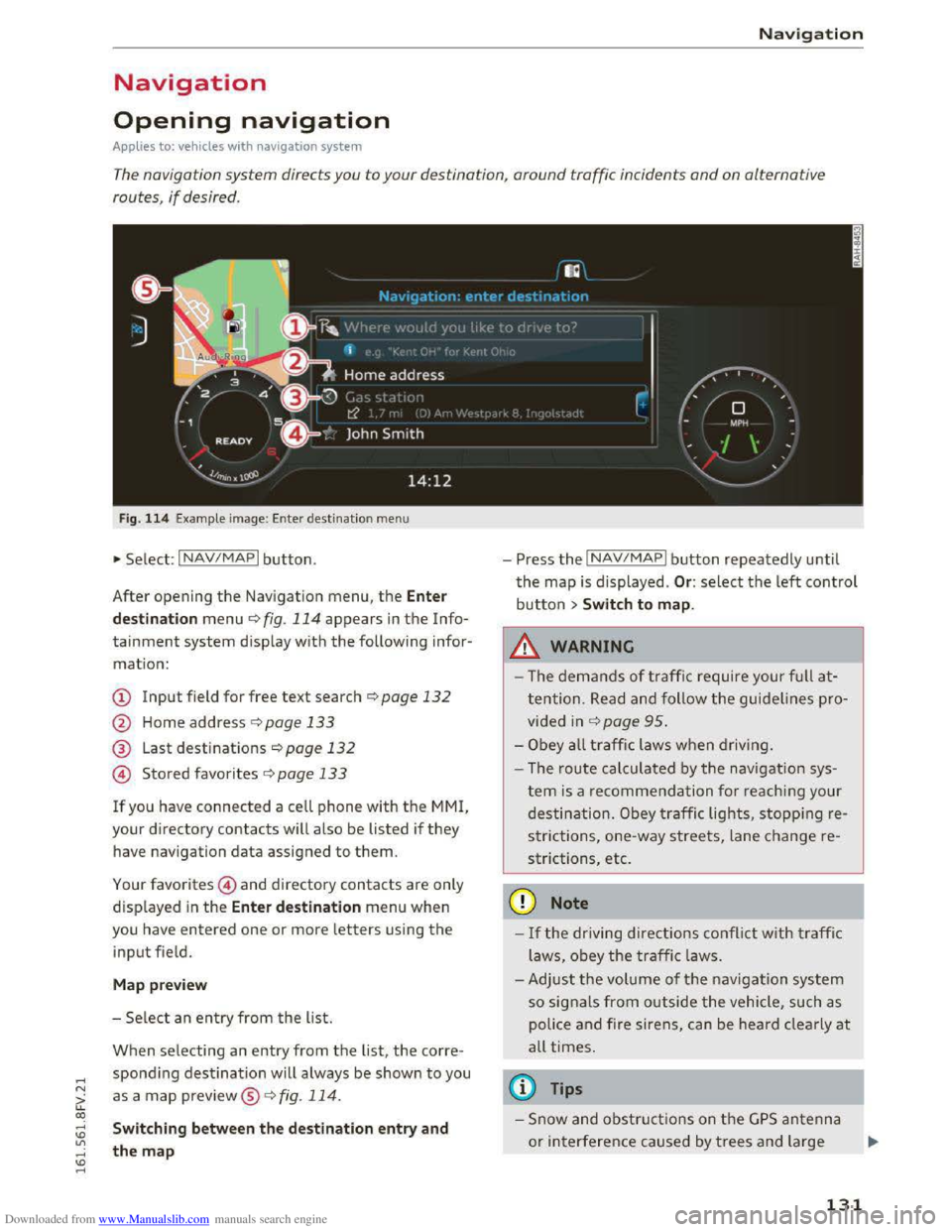
Fig. 114 Example image: Enter destination menu
•Select: INAV/MAPI button.
After opening
the Navigation menu, the Enter
d
est ina tion menu ¢ fig. 114 appears in the Info
tainment system display with the following infor
mation:
CD Input field for free text search¢ page 132
@ Home address r:!;> page 133
® Last destinations¢ page 132
@ Stored favorites C>page 133
If you have connected a cell phone with the MMI,
your directory contacts w ill also be listed if they
have navigation data assigned to them.
Your favorites@) and directory contacts are only
displayed
in the Ente r de stination menu when
you have entered one or more letters using the
input field.
M ap pre view
- Se lect an entry from the list.
When selecting an entry from the list, the corre
spondi ng destination will always be shown to you
as a map preview®~ fig. 114.
Switching between the destination entry and
the map
- Press the INAV/MAPI button repeatedly until
the map is displayed . Or: select the left control
button > Swit ch to map .
_&.WARNING
-The demands of traffic require your ful l at
tention. Read and follow the guidelines pro
vided in r:!;>page 95.
-Obey a ll traffic laws when driving.
- The r
oute calculated by the navigation sys-
tem is a recommendation fo r reaching your
destination. Obey traffic lights, stopping re
s trictions, one-way streets, lane change re
strictions, etc.
CD Note
-If the driving directions conflict with traffi c
laws, obey
the traffic laws.
- Adjust th e
volume of th e navigation system
so signals from outside the vehicle, such as
police
and fire siren s, can be heard cle arly at
all times.
@ Tips
-Snow and obstru ct ions on the G PS antenna
or interference caused by trees and large
- 1
131
Page 173 of 322
Downloaded from www.Manualslib.com manuals search engine ...... N
> u. CX> ...... u:>
"' ...... u:> ......
Safe driving
Basics
Safe driving habits
Please remember -safety first!
This chapter contains important information,
tips, instructions and warnings that you need to
read and observe for your own safety, the safety
of your passengers and others. We have summar
ized here what you need to know about safety
belts, airbags, child restraints as well as child
safety. Your safety is for us priority number 1. Al
ways observe the information and warnings in
this section -for your own safety as well as that
of your passengers.
The information in this section applies to all
model versions of your vehicle. Some of the fea
tures described in this sections may be standard
equipment on some models, or may be optional
equipment on others. If you are not sure, ask
your authorized Audi dealer.
A WARNING
---Always make sure that you follow the in-
structions and heed the WARNINGS in this
Manual. It is in your interest and in the in
terest of your passengers.
-Always keep the complete Owner's Litera
ture in your Audi when you lend or sell your
vehicle so that this important information
will always be available to the driver and
passengers.
-Always keep the Owner's literature handy so
that you can find it easily if you have ques
tions.
Safety equipment
The safety features are part of the occupant re
straint
system and work together to help reduce
the risk
of injury in a wide variety of accident sit
uations.
Your safety and the safety of your passengers
should not be left to chance. Advances in tech
nology have made a variety of features available
to help reduce the risk of injury in an accident .
Safe driving
The following is a list of just a few of the safety
features in your Audi:
-
sophisticated safety belts for driver and all pas-
senger seating positions,
-
safety belt pretensioners,
-safety belt force limiters for the front seats,
-front airbags,
- knee airbags for the front seats*
-side airbags in the front seats,
-side curtain airbags with ejection mitigation
features,
-special LATCH anchorages for child restraints,
-adjustable steering column.
These indiv idual safety features, can work to
gether as a system to he lp protect you and your
passengers in a wide range of accidents. These
features cannot work as a system if they are not
always correctly adjusted and correctly used.
Safety is everybody's responsibility!
Important things to do before driving
Safety is everybody's job! Vehicle and occupant
safety always depends on the informed and care
ful driver.
For your safety and the safety of your passen
gers, before driving always:
... Make sure that all lights and signals are operat
ing correctly .
... Make sure that the tire pressure is correct.
... Make sure that all windows are clean and afford
good vis ibility to the outside.
... Secure all luggage and other items carefu lly
c::> page 176, c::> page 48.
... Make sure that nothing can interfere with the
pedals .
... Adjust front seat and mirrors correctly for your
height.
... Make sure to use the right child restraint cor
rectly
to protect chi Id ren Q page 212, Child
safety.
... Sit properly in your seat and make sure that
your passengers do the same Q page 44, Seats
and storage. ..,.
171
Page 183 of 322
Downloaded from www.Manualslib.com manuals search engine .... N
The warning light. in the instrument cluster
lights up when the ignition is switched on as a re
minder to fasten the safety belts. In addition,
you will
hear a warning tone for a certain period
of time.
Fasten you r safet y belt and make su re that you r
pas sengers also prop erly put on
their safety
b elts .
A WARNING
-Safety belts are the single most effective
means available to reduce the risk of serious
injury and death in automobile accidents .
For your
protection and that of your passen
gers, always correct ly wear safety be lts
when the veh icle is moving .
- Failure
to pay attention to th e warning ligh t
t
hat comes on could lead to persona l injury.
Why safety belts?
Frontal collisions and the law of physics
Frontal crashes create very
strong forces for peo
ple riding in vehicles.
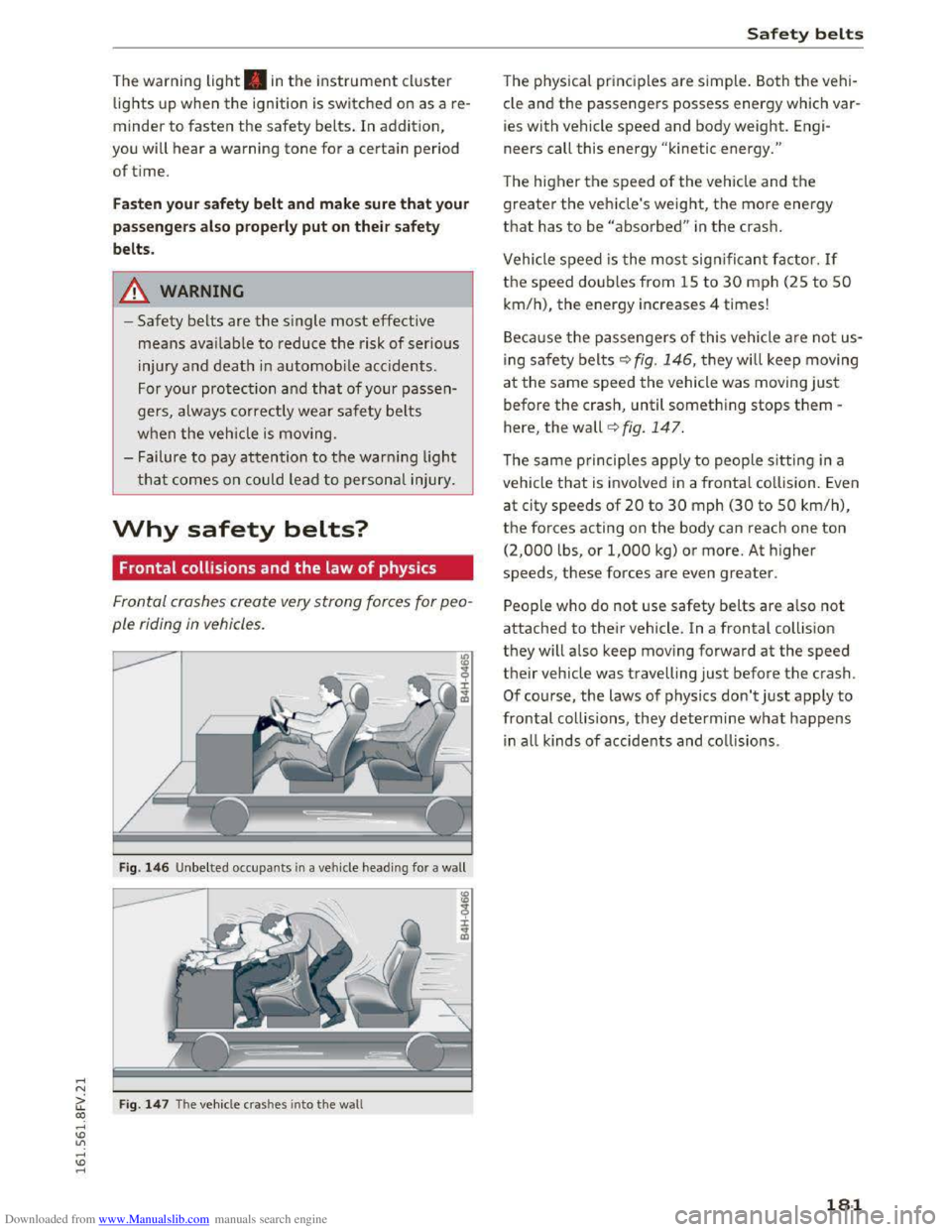
Fig. 146 U nbelted occupants in a veh icle headin g for a wall
Ci: Fig. 14 7 The vehicle crashes into the wall CX)
....
"' U"I
....
"' ....
Safety belt s
The physical principles are simple. Both the vehi
cle and
the passengers possess energy which var
ies with vehicle
speed and body weight. Engi
neers call this energy "kinetic energy."
The higher the speed of the vehicle and the
greater the vehicle's weight, the more energy
that has to be "absorbed" in the crash.
Vehicle speed is the most significan t factor. If
the speed doubles from 15 to 30 mph (25 to 50
km/h), the energy increases 4 times!
B ecau
se the passengers of t his vehicle are not us
ing
saf e ty belts~ fig. 146, they will keep moving
at the same speed the vehicle was moving just
before the crash, until something stops them -
here, the wall~ fig. 147.
The same principles apply to people sitting in a
vehicle
that is invo lved in a frontal co llision. Even
at city speeds of 20 to 30 mph (30 to 50 km/h),
the forces acting on the body can reach one ton
(2,000 lbs, or 1,000 kg) or more. At higher
speeds, these forces are even greater.
People who do not use safety belts are also not
attached to thei r vehicle. In a frontal coll is ion
they will also keep moving forward at the speed
their vehicle was travelling just before the crash .
Of course, the laws of physics don't just apply to
frontal collisions , they determine what happens
in all kinds of accide nts and collisions .
181
Page 241 of 322
Downloaded from www.Manualslib.com manuals search engine Engine oil
Engine oil specifications
The engine oil used must conform to exact speci
fications.
The ser vice interva l disp lay in the instrument
cluster of your vehicle will inform you when it is
time for an oil change . We recommend that you
have your
oil changed by an authorized Audi Serv
ice Advisor.
If you have to top off the oil between oil changes,
use the Audi oil quality standard specified in the
table.
Audi oil quality standard
G
asoline VW S02 00 or
engin e vw S0400
Using the proper engine oil is important for the
functionality and service life of the engine. Your
engine was factory-filled
with a high-quality oil
which
can usually be used throughout the entire
year.
CD Note
Your Limited New Vehicle Warranty does not
cover damage or malfunctions due to failure
to follow recommended maintenance and use
requirements as set forth in the Audi Owner's
Manual and Warranty
& Maintenance booklet.
-
Use only a high quality engine oil that ex-
pressly complies
with the Audi oil quality
standard specified for your vehicle's engine.
Using any other oil can cause serious engine
damage.
-
Do not mix any lubricants or other additives
into the engine oil. Doing so can cause en
gine damage.
Tips
If you need to add oil and there is none availa
ble
that meets the Audi oil quality standard
your engi
ne requires, you may add a tota l of
no more than O.S qt/l of a high-quality "syn
thetic" oil that meets the following spec ifica
tions.
Checking and F illing
-ACEA A3 or API SM with a viscosity grade of
SAE OW-30, SAE SW-30 or SAE SW-40.
-For more information about engine oil that
has been approved for your vehicle, please
contact either your
authorized Audi dealer
or Audi Customer
Relations at
1 (800) 822-2834 o r visit our web site at
www .audiusa .com or www.audicanada .ca.
Engine oil consumption
The engine in your vehicle depends on an ade
quate
amount of oil to lubricate and cool all of
its moving parts.
In order to provide effective lubrication and cool
i ng
of internal engine components, all internal
combustion engines consume a certa in amount
of oil. Oil consumption varies from engine to en
gine and may change significantly over
the life of
the engine. Typically, engines with a specified
break-in period
(see~ page 56) consume more
oil during the break-in period than they consume
after oil consumption has stabilized.
Under normal cond it ions, the rate of oil con
s u
mption depends on th e qu ality and viscos ity of
the oil, the RPM (revolutions per minute) at
which the engine is operated, the ambient tem
perature and road conditions. Further factors are
the amount of oil dilution from water condensa
tion or fuel residue and the oxidation level of the
oil. As any engine is subject to wear as mileage
builds
up, the oil consumption may increase over
t ime
until replacement of worn components may
become necessary.
With all these variab les coming into play, no
standard rate
of oil consumption can be estab
lished
or specified. There is no alternative to reg
ular and frequent checking of the oil level, see
Note .
If the yellow engine oil level warning symbol II
in the instrument cluster lights up, you should
check
the oil level as soon as possible
~page 240. Top off the oil at your earliest con-
venience
Q page 240. ..,..
239
Page 248 of 322
Downloaded from www.Manualslib.com manuals search engine Checking and F illing
~
When a b attery is char ged, it pro duces
hyd rogen gas whi ch i s e xplo sive and
could
cau se pers onal injury.
®
Always kee p the battery well out of
re ach of childre n.
A WARNING
Whenever working on the ba ttery or on the
electrical system, there is the risk of injury,
accident and even fire. Read and heed the fol
lowing
WARNINGS:
- Always wear eye protection. Do not let bat
tery acid or any lead particles get on your
skin or clothing . Shield your eyes. Explosive
gases can cause blindness or other injury.
-
Battery acid contains sul furic acid. Sulfuric
acid
can cause blindness and severe burns.
- Always
wear gloves and eye protection. Do
not tilt the battery because acid could leak
out of the ventilation openi ngs.
- If you
get battery acid in your eyes or on
your skin, immediately rinse with cold wa
ter for several minutes and get medical at
tention.
-
If you should ingest any battery acid, seek
medical attention immediately.
-
Do not expose the battery to an open flame,
electric sparks or an open light.
-
Do not smoke.
-Do not interchange the positive and nega-
tive
cables.
-When working on the battery, be sure not to
short-circuit the terminals with tools or oth
er metal objects. This would cause the bat
tery to heat up very quickly, which could
lead to damage or explosion and personal
injury.
-
When a battery is charged, it produces hy
drogen gas which is explosive and could
cause personal injury .
- Always keep
the battery well out of the
reach of children.
- Before work is
done on the electrical sys
tem, disconnect the negative ground cable.
- Before
performing any work on the electri
cal
system, switch off the engi ne and igni
t i
on as well as any electrical equipment. The
246
-
negative cabl e on the battery m ust be dis
connected. If you are just going to replace a
light bulb,
then it is enough to switch off
the lights.
- Before di
sconnecting the battery, switch off
the anti-theft alarm system! Otherwise you
w ill
set off the alarm.
-
When disconnecting the battery, first dis
connect the negative cabl e and then the
positive cable.
- Before
reconnecting the battery, make sure
all electrical consumers are switched off.
Reconnect
the positive cable first and then
the negative cable. Never interchange the
cables -this could start a fire!
- Never
charge a frozen or a thawed-out bat
tery. It cou ld explode! If a battery has fro
zen,
then i t must be replaced. A discharged
b attery can freeze ove r at 32 °F (O °C).
-Make sure the vent hose is always attached
to the opening on the side of the battery .
- Never
use batteries which are damaged.
There is th e danger of an exp losion! Always
replace a da maged battery .
A WARNING
Cali fornia Proposition 65 Warning:
-
Batter y posts, ter m inals and related acces
sories contain lead a nd lead compounds,
chemicals known to the State of California
to cause cancer and reproductive problems.
Wash
hands after handling .
CD Note
-Do not disconnect the vehicle battery when
the ignition is on or when the engine is run
ning,
otherwise, you will damage electronic
components in the e lectrical system.
-If your veh icle is going to stand for a long
period of time without being driven, protect
the battery from "freezing" , otherwise it
will be damaged and will then have to be re
placed .
Page 270 of 322
Downloaded from www.Manualslib.com manuals search engine Wheels
installation of replacement or alternate tires or
wheels on the vehicle that prevent the TPM S
from functioning properly. Always check the
TPMS malfunction telltale after replacing one or
more ti
res or whee ls on your veh icle to ensure
that the replacement or alternate tires and
wheels
allow the TPMS to conti nue to functi on
p roper ly .
If the Tire Pressure Monitoring System
indicator appears
The tire pressure indicator in the instrument
cluster informs you if the tire pressure is too low
or
if there is a system malfunction.
Using the ABS sensors, th e tire p ressure monitor
i n g
system compares the tire tread circumfer
ence and vibra tion char
acteristi cs of the individ u
al tires.
If the pressure changes in one or more
tires,
this i s indicated in the Infotainment system
d isp lay
with an ind icator light RI and a message .
If only one tire is affected , the location of that
tire will be ind icated.
The tire pressures must be stored in the Infotain
ment system again each time the pressu res
change (switching between partial and full load
pressure) or
after changing or replacing a tire on
your veh icle ¢ page 269. The tire pressure moni
toring system only monitors the tire pressure you
have stored. Refe r
to the tire pressure label for
the recommended tire pressure for your veh icl e
¢page260, fig.195.
Tire tread circumference and vibration character
istics
can change and cause a tire pressure warn
i n g if:
-
the tire p ressure in one or more tires is too low.
-
the tire has structural damage .
-
the tire was replaced or the tire pressure was
changed and
it was not stored¢ page 269.
-the spare tire* is installed .
Indicator lights
RI-Loss of pressure in at l east one tire ¢,&.
Check
t h e tires and rep lace or r epair if necessary.
Check/correct
the p ressures of all four tires and
store
the pressure again in the Infotainment sys
tem ¢ page 269.
268
ffim (T ire Pressure Mon itoring System) Tire
pressure: malfunction!
See owner's manual -if
m appears after switching on the ignition or
while driving and then the RI indicator light in
the instrument cluster also starts to blink for
about one minute and then stays on permanent
ly, there
is a system malfunction . T ry to store the
cor rect tire p ressures ¢ page 269. If the indica
tor light does turn off or turns on again after a
sho
rt per iod of time, d rive to an authori zed Aud i
dealer or
authorized Audi Servi ce Facility immedi
ate ly
to have the ma lfunction corrected .
.&. WARNING
-If the tire pressure indicator appears in the
display, reduce your speed immediately and
avoid any hard steering or brak ing maneu
vers.
Stop as soon as poss ible and check the
tires and
their pressure .
- The driver is responsible
for maintain ing the
correct tire pressures . You must check the
tire pressures regularly .
-
Under certain condit ions (such as a sporty
driving style, wi
nter condit ions or unpaved
roads), the pressure
monitor indica tor may
be delayed.
-
Do not use run-flat tires on your vehicle . Us
ing them when not perm itted can lead to
veh icle damage or accidents.
(D Tips
- The tire pressure monitoring system can al
so stop working when there
is an ESC mal
func tion.
-
Usi ng snow chains may result in a system
ma lfunction .
- The
tires wit h the identification "AO" or
"RO" ¢ page 2 5 7 have been matched with
your Audi tire pressu re monitor ing system .
We rec om mend that you use these tires.
Page 275 of 322
Downloaded from www.Manualslib.com manuals search engine Care and cleaning
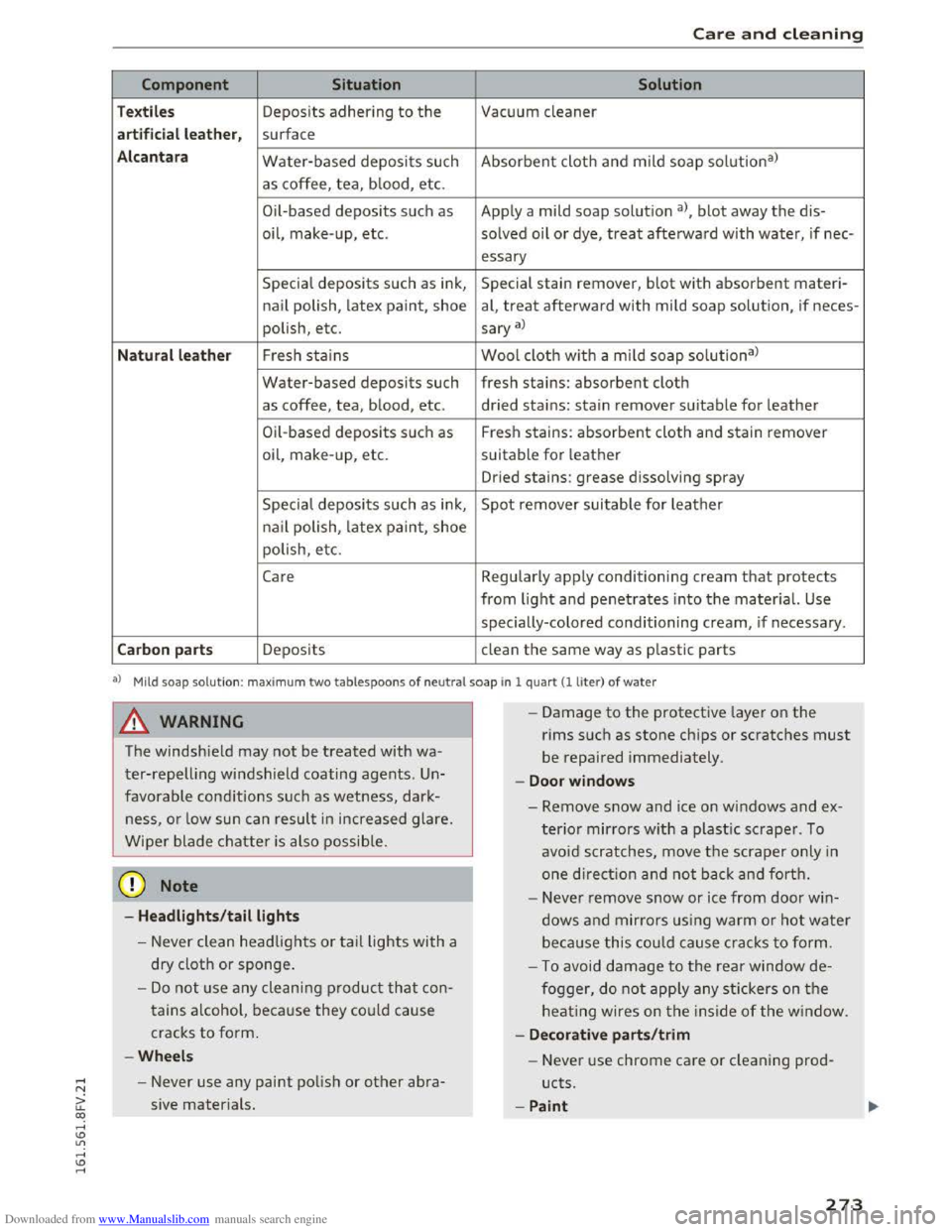
Component Situation Solution
Textiles Deposits adhering to the Vacuum cleaner
a rt ificial leat her , surface
Alc an tara Water-based deposits such Absorbent cloth and mild soap solu tion3>
as coffee, tea, b lood, etc.
O il-based
deposits such as Apply a mild soap solutio n a), blot away the dis-
oil,
make- up, etc. solved oil or dye, treat afterward with water, if nee-
essary
Special deposits such as ink, Special stain remover, blot with absorbent materi-
nail polish, latex paint, shoe al, treat afterward with mild soap solution, if neces-
polish, etc.
sary a)
Natural leather Fresh stains Wool cloth w ith a mild soap solutiona )
Water-based deposits such fresh stains: absorbent cloth
as coffee, tea, blood, etc. dried stains: stain remover suitable for leather
Oil-based deposits su ch as Fresh stains: absorbent cloth and stain remover
oil, make-up, etc. suitable for leather
Dried stains: grease dissolving spray
Specia l deposits such as ink, Spot remover suitable for leather
na il polish, latex paint, shoe
polish, etc.
Care Regularly apply conditioning cream that protects
from light and penetrates into the material. Use
specially-colored conditioning cream, if necessary .
Carbon parts Deposits clean the same way as plastic parts
al M ild soap sol u tion: max im um two tablespoons of ne u tra l soap in 1 quart(! liter) of water
A WARNING
The windshield may not be treated with wa
ter-repelling windshield coating agents. Un
favorable conditions such as wetness, dark
ness, or low sun can result in increased glare.
Wiper blade chatter is also possib le.
@ Note
-Headlights /tail lights
-Never clean headlights or tail lights with a
dry
cloth or sponge.
-Do not use any cleaning product that con
tains a lcohol, because they could cause
cracks to form.
-Wheels
- Never use any paint polish or other abra-
sive materials.
- I
-Damage to the protective layer on the
rims such as stone chips or scratches must
be repaired immediately.
-Doo r window s
-Remove snow and ice on windows and ex-
terior mirrors with a plastic scraper. To
avoid scratches, move the scraper only in
one direction a nd not back and forth.
- Neve r remove snow or ice from door win
dows and mirrors us ing warm o r hot water
beca u
se this could cause cracks to form.
- To avoid damage to the rear window de
fogger, do not apply any stickers on the
heating wires on the inside of the window.
- De corati ve parts/trim
- Never use chrome care or cleaning prod-
ucts.
-Paint
273
Page 291 of 322
Downloaded from www.Manualslib.com manuals search engine ..... N
G: CX)
.....
"' U"I
.....
"' .....
When jump starting or charging the battery,
never connect the negative ground cable to
the battery negative post because the battery
manager system must be able to detect the
battery's state of charge. Always connect the
negative ground cable to the negative ground
post of the battery manager control unit.
Use of jumper cables
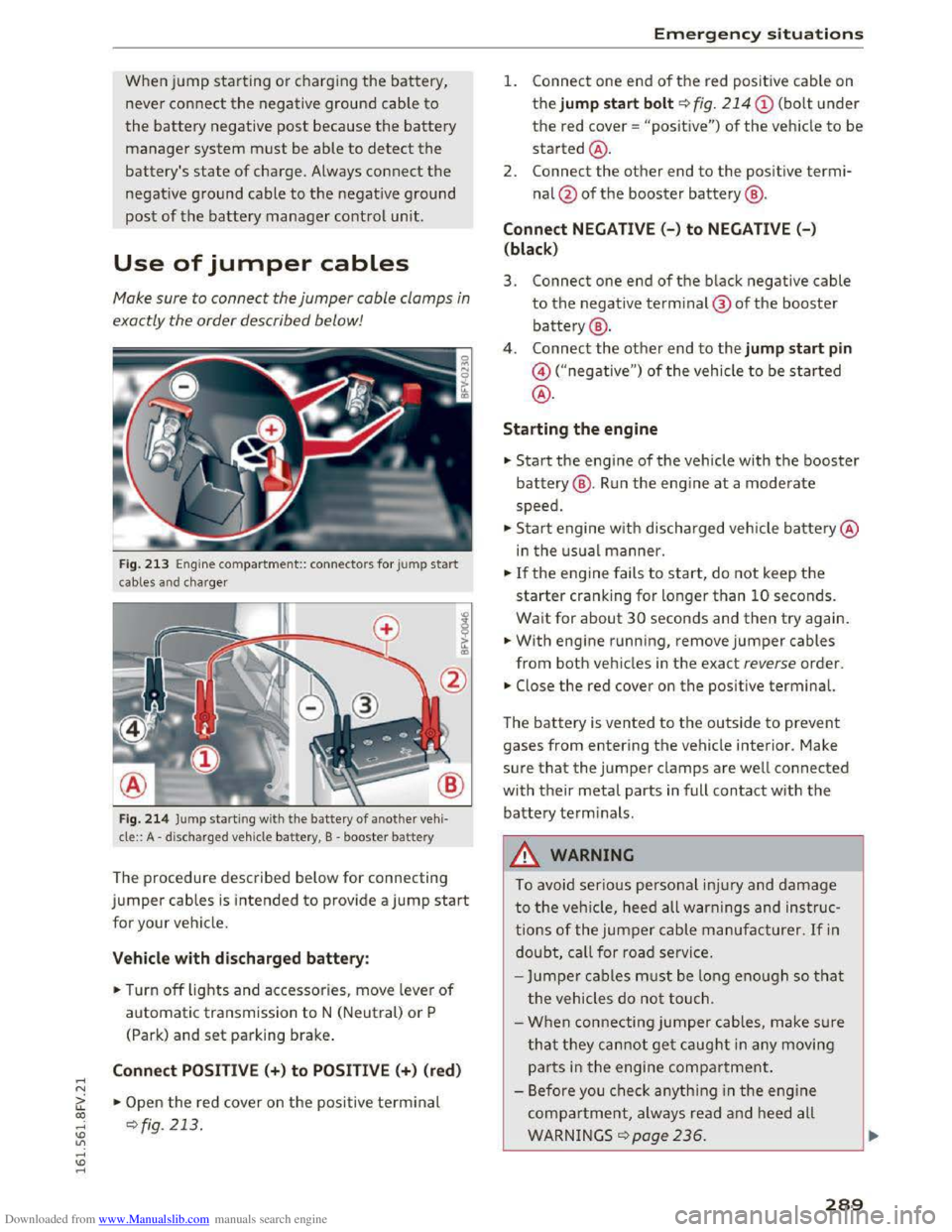
Make sure to connect the jumper cable clamps in
exactly the order described below!
Fig. 213 Engine compa rtment:: connecto rs for jump start
cables and cha rger
Fig.
214 Jump starti ng with the battery of another vehi·
cle:: A -discharged vehicle battery, B -booster battery
The procedure described below for connecting
jumper cables is intended to provide a jump start
for your vehicle.
Vehicle with discharged battery:
.. Turn off lights and accessories, move lever of
automatic transmission to N (Neutral) or P
(Park)
and set parking brake.
Connect POSITIVE (+) to POSITIVE(+) (red)
.,.. Open the red cover on the positive terminal
~fig. 213 .
Emergency situations
1. Connect one end of the red positive cable on
the jump start bolt~ fig. 214
the red cover = "positive") of the veh icle to be
started@ .
2.
Connect the other end to the positi ve termi
nal@of the booster battery@ .
Connect NEGATIVE(-) to NEGATIVE (- )
(black)
3. Connect one end of the black negative cable
to the negative terminal@ of the booster
battery@ .
4 .
Connect the other end to the jump start pin
@("negative") of the vehicle to be started
@.
Starting the engine
.. Start the engine of the vehicle with the booster
battery@. Run the engine at a moderate
speed .
.,.. Start engine w ith discharged vehicle battery@
in the usual manner.
.,.. If the engine fails to start, do not keep the
starter cranking for longer than 10 seconds.
Wait for about 30 seconds and then try again .
.. With engine running, remove jumper cables
from both vehicles in the exact reverse order .
.. Close the red cover on the positive terminal.
The battery is vented to the outside to prevent
gases from entering the vehicle interior. Make
sure that the jumper clamps are well connected
with their metal parts in full contact with the
battery terminals .
.&. WARNING
t-==
To avoid serious personal injury and damage
to the vehicle, heed all warnings and instruc
tions of the jumper cable manufacturer. If in
doubt, call for road service.
-
Jumper cables must be long enough so that
the vehicles do not touch.
-
When connecting jumper cables, make s u re
that they cannot get caught in any moving
parts in the engine compartment.
- Before you check anything in the engine
compartment, always read and heed all
WARNINGS q page 236.
289
Page 303 of 322
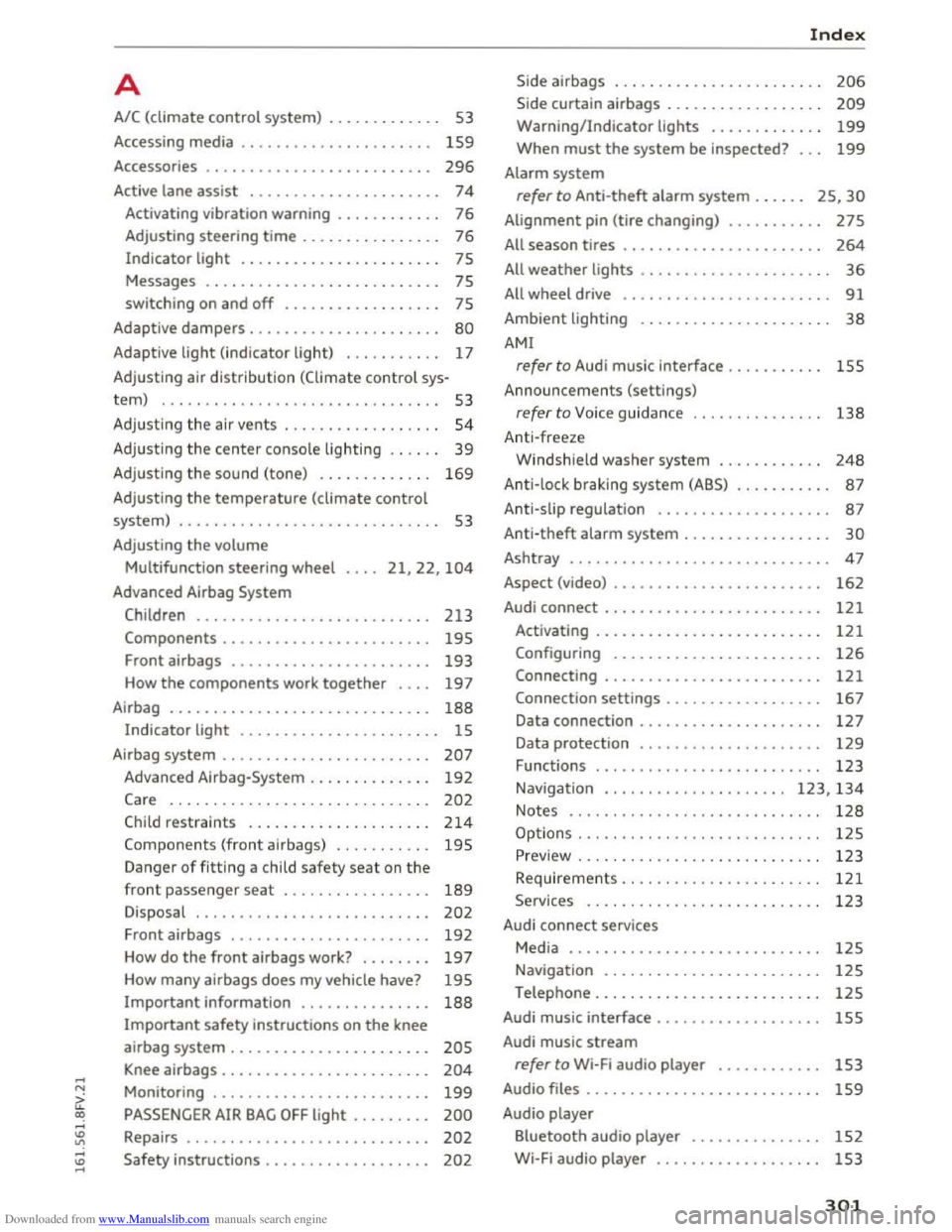
Downloaded from www.Manualslib.com manuals search engine ...... N
G'. CX)
...... ID VI ...... ID ......
A
A/C (climate control system) . . . . . . . . . . . . . 53
Accessing media . . . . . . . . . . . . . . . . . . . . . .
159
Accessories . . . . . . . . . . . . . . . . . . . . . . . . . . 296
Active lane assist .
. . . . . . . . . . . . . . . . . . . . . 74
Activating vibration warning . . . . . . . . . . . . 76
Adjusting steering
time . . . . . . . . . . . . . . . . 76
Indicator light . . . . . . . . . . . . . . . . . . . . . . . 75
Messages . . . . . . . . . . . . . . . . . . . . . . . . . . . 75
switching on and
off . . . . . . . . . . . . . . . . . . 7S
Adaptive dampers . . . . . . . . . . . . . . . . . . . . . . 80
Adaptive light (indicator light) . . . . . . . . . . . 17
Adjusting air
distribution (Climate control sys-
tem) . . . . . . . . . . . . . . . . . . . . . . . . . . . . . . . . S3
Adjusting the air vents . . . . . . . . . . . . . . . . . . 54
Adjusting the center console lighting . . . . . . 39
Adjusting the sound (tone) . . . . . . . . . . . . . 169
Adjusting the temperature (climate control
system) . . . . . . . . . . . . . . . . . . . . . . . . . . . . . . 53
Adjusting
the volume
Multifunction steering wheel
Advanced Airbag
System
21,22, 104
Children ...........................
Components ....................... .
Front airbags
...................... .
How
the components work together ... .
Airbag
............................. .
Indicator light ...................... .
Airbag system
....................... .
Advanced Airbag-System
............. .
Care ..............................
Child restraints .....................
Components (front airbags) .......... .
Danger
of fitting a child safety seat on the
front passenger seat ................ .
Disposal
.......................... .
Front airbags
...................... .
How do
the front airbags work? ....... .
How many airbags does
my vehicle have?
Important information ...............
213
19S
193
197
188
15
207
192
202
214
195
189
202
192
197
195
188
Important safety instructions on the knee
airbag system . . . . . . . . . . . . . . . . . . . . . . .
205
Knee airbags . . . . . . . . . . . . . . . . . . . . . . . . 204
Monitoring . . . . . . . . . . . . . . . . . . . . . . . . . 199
PASSENGER AIR BAG OFF light . . . . . . . . . 200
Repairs . . . . . . . . . . . . . . . . . . . . . . . . . . . . 202
Safety instructions . . . . . . . . . . . . . . . . . . . 202
Index
Side airbags . . . . . . . . . . . . . . . . . . . . . . . . 206
Side curtain airbags . . . . . . . . . . . . . . . . . . 209
Warning/Indicator lights . . . . . . . . . . . . . 199
When must the system be inspected? . . . 199
Alarm system
refer to Anti-theft alarm system . . . . . . 25, 30
Alignment pin (tire changing) . . . . . . . . . . . 275
All season tires . . . . . . . . . . . . . . . . . . . . . . . 264
All weather lights . . . . . . . . . . . . . . . . . . . . . . 36
All wheel drive . . . . . . . . . . . . . . . . . . . . . . . . 91
Ambient lighting . . . . . . . . . . . . . . . . . . . . . . 38
AMI
refer to Audi music interface . . . . . . . . . . . 155
Announcements (settings)
refer to Voice guidance . . . . . . . . . . . . . . . 138
Anti-freeze
Windshield washer system . . . . . . . . . . . .
248
Anti-lock braking system (ABS) . . . . . . . . . . . 87
Anti-slip regulation . . . . . . . . . . . . . . . . . . . . 87
Anti-theft alarm system . . . . . . . . . . . . . . . . . 30
Ashtray ............................. . 47
162 Aspect (video) ............. . ..........
Audi connect . . . . . . . . . . . . . . . . . . . . . . . . . 121
Activating . . . . . . . . . . . . . . . . . . . . . . . . . . 121
Configuring . . . . . . . . . . . . . . . . . . . . . . . . 126
Connecting . . . . . . . . . . . . . . . . . . . . . . . . . 121
Connection settings . . . . . . . . . . . . . . . . . . 167
Data connection . . . . . . . . . . . . . . . . . . . . . 127
Data protection . . . . . . . . . . . . . . . . . . . . . 129
Functions
. ......................... 123
Navigation . . . . . . . . . . . . . . . . . . . . . 123, 134
Notes ............................. 128
Options . . . . . . . . . . . . . . . . . . . . . . . . . . . . 125
Preview . . . . . . . . . . . . . . . . . . . . . . . . . . . . 123
Requirements. . . . . . . . . . . . . . . . . . . . . . .
121
Services . . . . . . . . . . . . . . . . . . . . . . . . . . . 123
Audi connect services
Media . . . . . . . . . . . . . . . . . . . . . . . . . . . . .
12S
Navigation . . . . . . . . . . . . . . . . . . . . . . . . . 12S
Telephone . . . . . . . . . . . . . . . . . . . . . . . . . . 12S
Audi music interface . . . . . . . . . . . . . . . ....
Audi music stream
refer to Wi-Fi audio player ........... .
Audio files
. . . . . . . . . . . . . . . . . . . . . . . . . . .
Audio player
Bluetooth audio player
.............. .
Wi-Fi audio player
.................. .
15S
1S3
159
152
153
301
Page 304 of 322
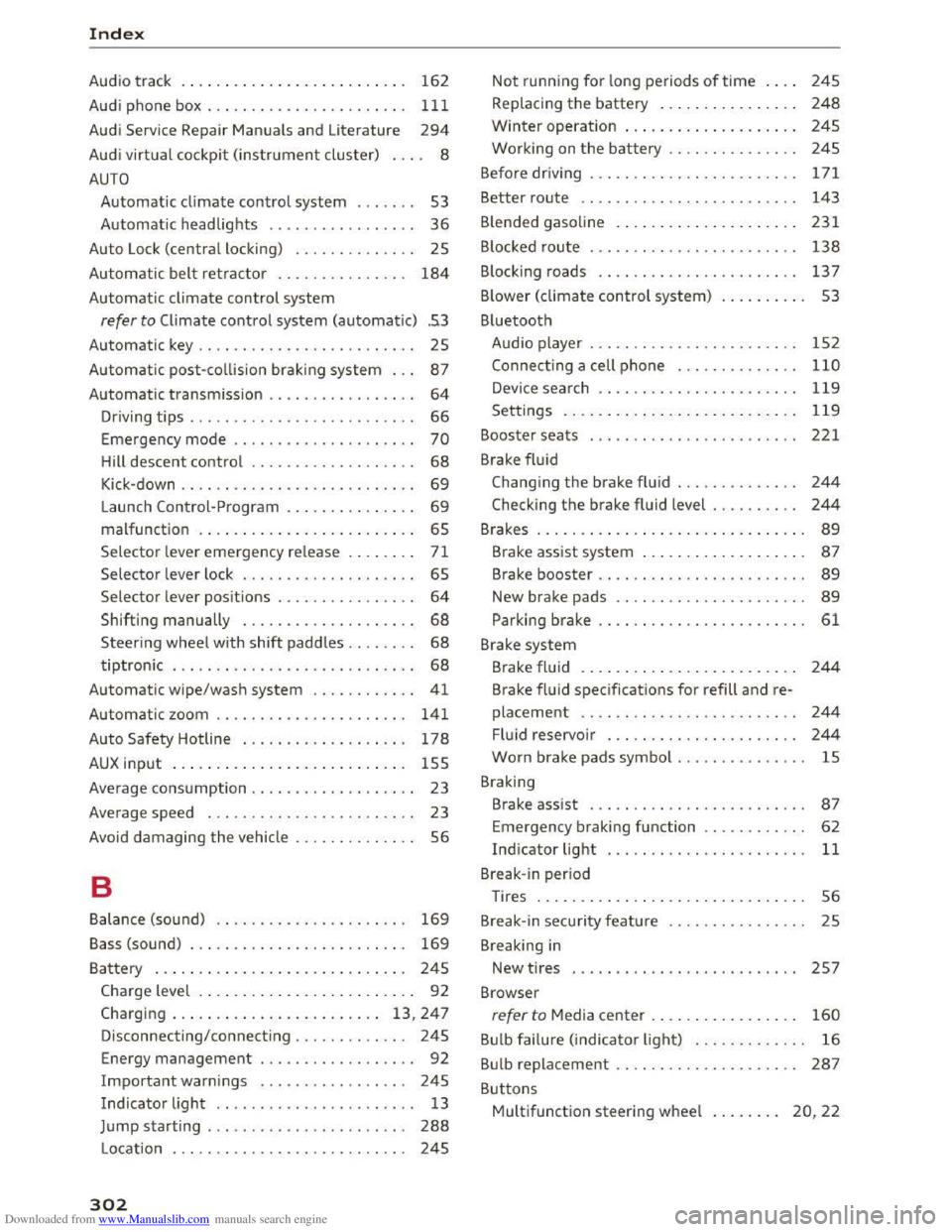
Downloaded from www.Manualslib.com manuals search engine Index
Audio track . . . . . . . . . . . . . . . . . . . . . . . . . . 162
Audi phone
box.................... .. . 111
Audi Service Repair Manuals and Literature 294
Audi virtual cockpit (instrument cluster) . . . . 8
AUTO
Automatic climate control system . . . . . . . 53
Automatic headlights . . . . . . . . . . . . . . . . .
36
Auto Lock (centra l locking) . . . . . . . . . . . . . . 25
Automatic
belt retractor . . . . . . . . . . . . . . . 184
Automatic climate control system
refer to Climate control system (automatic) .53
Automatic key . . . . . . . . . . . . . . . . . . . . . . . . . 25
Automatic post-collision brak ing system . . .
87
Automatic transmission . . . . . . . . . . . . . . . . . 64
Driving tips . . . . . . . . . . . . . . . . . . . . . . . . . . 66
Emergency mode . . . . . . . . . . . . . . . . . . . . . 70
Hill descent control . . . . . . . . . . . . . . . . . . . 68
Kick-down . . . . . . . . . . . . . . . . . . . . . . . . . . . 69
Launch Control-Program . . . . . . . . . . . . . . . 69
malfunction . . . . . . . . . . . . . . . . . . . . . . . . . 65
Selector lever emergency release . . . . . . . . 71
Selector lever lock . . . . . . . . . . . . . . . . . . . . 65
Selector lever positions . . . . . . . . . . . . . . . .
64
Shifting manually . . . . . . . . . . . . . . . . . . . . 68
Steering wheel with shift paddles. . . . . . . . 68
tiptronic . . . . . . . . . . . . . . . . . . . . . . . . . . . . 68
Automatic wipe/wash system . . . . . . . . . . . . 41
Automatic zoom . . . . . . . . . . . . . . . . . . . . . . 141
Auto Safety Hotline . . . . . . . . . . . . . . . . . . . 178
AUX input . . . . . . . . . . . . . . . . . . . . . . . . . . . 155
Average consumption . . . . . . . . . . . . . . . . . . . 23
Average speed . . . . . . . . . . . . . . . . . . . . . . . . 23
Avoid damaging
the vehicle . . . . . . . . . . . . . . 56
B
Balance (sound) . . . . . . . . . . . . . . . . . . . . . . 169
Bass (sound) . . . . . . . . . . . . . . . . . . . . . . . . . 169
Battery . . . . . . . . . . . . . . . . . . . . . . . . . . . . . 245
Charge level . . . . . . . . . . . . . . . . . . . . . . . . . 92
Charging . . . . . . . . . . . . . . . . . . . . . . . . 13, 247
Disconnecting/connecting . . . . . . . . . . . . . 245
Energy management . . . . . . . . . . . . . . . . . . 92
Important warnings . . . . . . . . . . . . . . . . . 245
Indicator light . . . . . . . . . . . . . . . . . . . . . . . 13
Jump starting . . . . . . . . . . . . . . . . . . . . . . .
288
Location . . . . . . . . . . . . . . . . . . . . . . . . . . . 245
302
Not running for long periods of time . . . . 245
Replacing the battery . . . . . . . . . . . . . . . . 248
Winter operat ion . . . . . . . . . . . . . . . . . . . . 245
Working on the battery . . . . . . . . . . . . . . . 24S
Befo re
driv ing . . . . . . . . . . . . . . . . . . . . . . . . 171
Better route . . . . . . . . . . . . . . . . . . . . . . . . . 143
Blended gasoline . . . . . . . . . . . . . . . . . . . . . 231
B locked route . . . . . . . . . . . . . . . . . . . . . . . .
138
Blocking roads . . . . . . . . . . . . . . . . . . . . . . . 13 7
B lower (climate
control system) . . . . . . . . . . 53
Bluetooth Audio player . . . . . . . . . . . . . . . . . . . . . . . .
152
Connect ing a cell phone . . . . . . . . . . . . . . 110
Device search . . . . . . . . . . . . . . . . . . . . . . . 119
Settings . . . . . . . . . . . . . . . . . . . . . . . . . . . 119
Booster seats . . . . . . . . . . . . . . . . . . . . . . . . 221
Brake
fluid
Changing the brake fluid . . . . . . . . . . . . . . 244
Checking the brake fluid level . . . . . . . . . . 244
Brakes . . . . . . . . . . . . . . . . . . . . . . . . . . . . . . . 89
Brake assist system . . . . . . . . . . . . . . . . . . . 87
Brake booster . . . . . . . . . . . . . . . . . . . . . . . . 89
New brake pads . . . . . . . . . . . . . . . . . . . . . . 89
Parking brake . . . . . . . . . . . . . . . . . . . . . . . . 61
Brake system
Brake
fluid . . . . . . . . . . . . . . . . . . . . . . . . . 244
Brake fluid specifications for refill and re
placement . . . . . . . . . . . . . . . . . . . . . . . . .
244
Fluid reservoir . . . . . . . . . . . . . . . . . . . . . . 244
Worn brake pads symbol . . . . . . . . . . . . . . . lS
Braking
Brake assist . . . . . . . . . . . . . . . . . . . . . . . . .
87
Emergency braking function . . . . . . . . . . . . 62
Indicator light . . . . . . . . . . . . . . . . . . . . . . . 11
Break-in period
Tires . . . . . . . . . . . . . . . . . . . . . . . . . . . . . . . 56
Break-in security feature . . . . . . . . . . . . . . . .
25
Breaking in
New tires . . . . . . . . . . . . . . . . . . . . . . . . . . 257
Browser
refer to Media center . . . . . . . . . . . . . . . . . 160
Bulb failure (indicator light) . . . . . . . . . . . . . 16
Bulb replacement . . . . . . . . . . . . . . . . . . . . . 287
Buttons
Multifunction steering wheel . . . . . . . . 20, 22