sport mode AUDI TT COUPE 2016 Owners Manual
[x] Cancel search | Manufacturer: AUDI, Model Year: 2016, Model line: TT COUPE, Model: AUDI TT COUPE 2016Pages: 322, PDF Size: 52.86 MB
Page 16 of 322

Downloaded from www.Manualslib.com manuals search engine Instruments and indicator lights
Drive to an authorized Audi dealer or authorized
Audi Service Facility immediately
to have the
malfunction corrected.
A WARNING
Do not tow your vehicle when there is a mal
function in the electronic steering lock -this
increases the risk of an accident.
~Central indicator light
If the. or II indicator light turns on, check
the message in the instrument cluster.
©-Engine start system
• Engine start sy ste m : malfunction! Please
c ontac t Service
Do not switch the ignition off because you may
not be able to switch it on again.
Drive
to an authorized Audi dealer or authorized
Audi Service Facility immediately
to have the
malfunction corrected.
ml Engine start system: malfunct ion ! Please
conta ct Serv
ice
There is a malfunction in the engine starting sys
tem.
Drive
to an authorized Audi dealer or authorized
Audi Service Facility immediately
to have the
malfunction corrected.
nlfJ Electronic stabilization control (ESC)
and (§)anti-lock braking system (ABS)
If the DJ i ndicator light blinks while driving, the
ESC or ASR (Anti-Slip Regulation) is actively regu
lating.
If the GI indicator light turns on, the system has
switched
the ESC off. In this case, you can switch
the ignition off and then on to switch the ESC on
again. The indicator
light turns off when the sys
tem is functioning fully.
Stabili za tion contro l (ESC): sport . Warning! Re
duc ed stability
14
If the II indicator light turns on, ESC sport
mode was switched on using
the I-" OFFI button
¢page 88. You can turn the ESC on again by
press
the l.e OFFI button again.
Stabilization con trol (ESC): off. Wa rn ing ! Re·
duced stability
If them indicator light turns on, the ESC was re
stricted
or switched off using the 1.n OFFI button
¢page 88. The message ESC OFF also appears.
You can turn the ESC on again by press the
j.P, OFFI button again.
The system switches on when
the ignition is
swi tched on. The. indicator light turns off
when the system is functioning fully.
Stabilization control (ESC): malfunction! See
owner's manual
Stabilization control
(ESC/ ABS): malfunction!
See owner's manual
ABS: malfunct ion! See owner 's manua l
If the J;.j indicator light and the ABS indicator
light~ (USA models) I rlJ (Canada models)
turn on and this message appears, there is a mal
function in the ABS system or electronic differen
tial lock. This also causes the ESC to malfunction.
The brakes
still function with their normal power,
but ABS is not active.
Drive
to an authorized Audi dealer or authorized
Audi Service Facility immediately
to have the
malfunction corrected.
A WARNING
If t he .. (USA models) • (Canada mod
e l
s) bra ke system indicator light turns on to
gether with the ABS and ESC indicator lights,
the ABS/ESC regulating function may have
fai led. Functions
that stabilize the vehicle are
no longer available. This could cause
the vehi
cle
to swerve, which increases the risk that
the vehicle will slide. Drive carefully to the
nearest authorized Audi dealer or authorized
Audi Service Facility and
have the malfunction
corrected.
Page 66 of 322
Downloaded from www.Manualslib.com manuals search engine Automatic transmission
Automatic transmission
S tronic
Introduction
Your vehicle is equipped with an electronically
controlled DSG transmission called S tronic. Two
independent clutches transfer the power be
tween the engine and transmission. It allows the
vehicle to accelerate without a noticeable inter
ruption in traction.
The transmission upshifts or downshifts auto
matically. The driving style continuously influen
ces the selection of the driving program.
When a moderate driving style is used, the
transmission selects the most economical driving
mode. The transmission upshifts at a lower RPM
and downshifts at a higher RPM to improve fuel
efficiency.
The
transmi ssion switches to a sporty mode after
a kick-down or when the driver uses a sporty
driving style
characterized by quick accelerator
pedal movements, heavy acceleration, frequent
changes in speed and traveling at the maximum
speed.
If desired, the driver can also select the gears
manually (tiptronic mode).
Selector lever positions
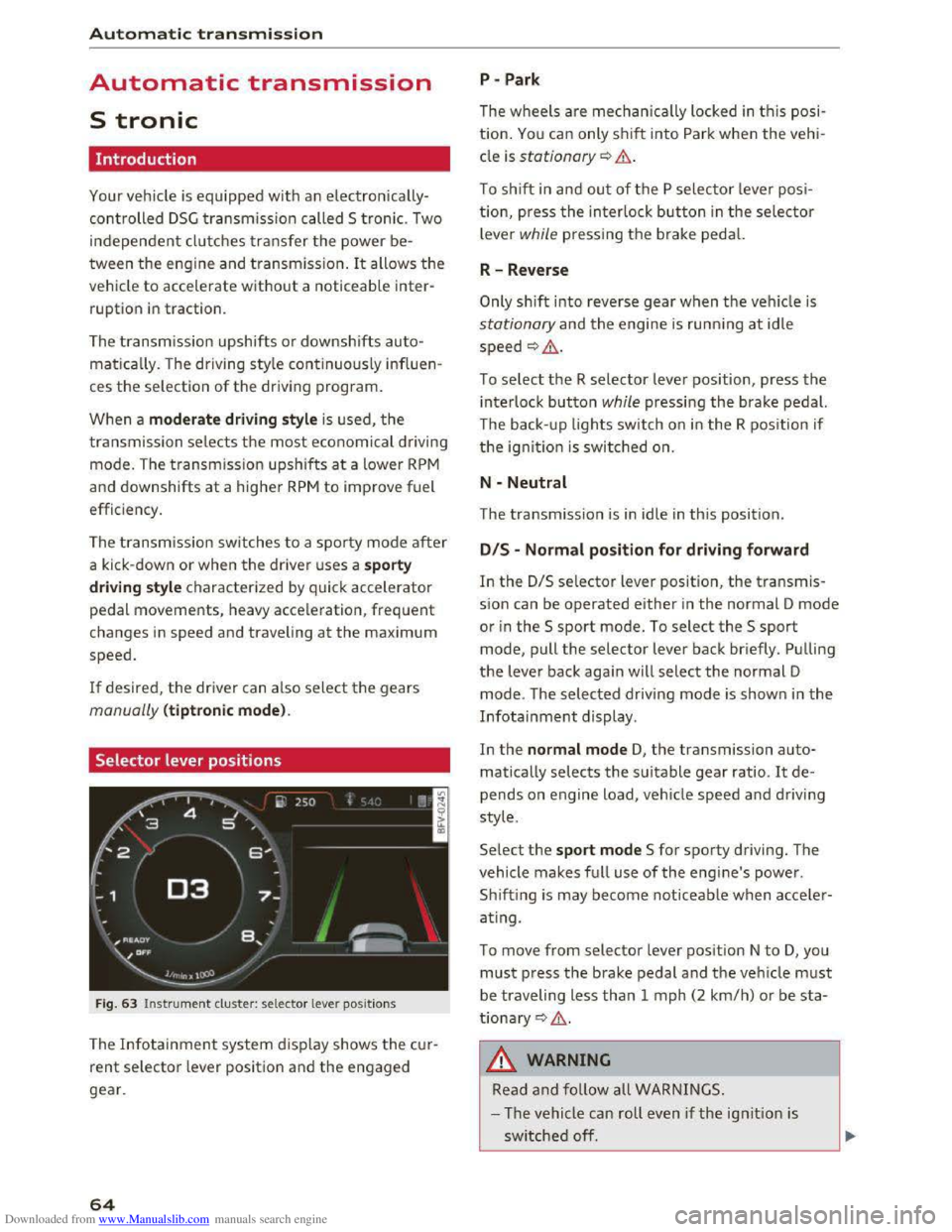
Fig. 63 Instrument cluster: selector lever positions
The Infotainment system d isplay shows the cur
rent selector lever position and the engaged
gear.
64
P -Park
The wheels are mechanica lly locked in this posi
tion. You can only shift into Park when the vehi
cle is stationary¢&.
To shift in and out of the P selector lever posi
tion, press the interlock button in the selector
lever while pressing the brake pedal.
R-Reverse
Only shift into reverse gear when the vehicle is
stationary and the engine is running at idle
speed ¢,6.
To select the R selector lever position, press the
interlock button while pressing the brake pedal.
The back- up
lights switch on in the R position if
the ignition is switched on.
N -Neutral
The transmission is in idle in this position.
DIS -Normal position for driving forward
In the D/S selector lever position, the transmis
sion can be operated either in the normal D mode
or in the S sport mode. To select the S sport
mode, pull the selector lever back briefly. Pulling
the lever back again will select the normal D
mode. The selected driving mode is shown in the
Infotainment display.
In
the normal mode D, the transmission auto
matically selects the suitable gear ratio. It de
pends on engine load, vehicle speed and driving
style.
Select the sport mode S for sporty driving. The
vehicle
makes full use of the engine's power.
Sh i
fting is may become noticeable when acce ler
ating.
To move from selector lever position N to D, you
must press the brake pedal and the vehicle must
be traveling less than 1 mph (2 km/h) or be sta
tionary ¢,6.
A WARNING
Read and follow all WARNINGS.
- The vehicle can roll
even if the ignition is
switched off.
Page 67 of 322
Downloaded from www.Manualslib.com manuals search engine ..... N
G: CX)
.....
"' U"I
.....
"' .....
-Never select R or P while driving, because
this increases the risk of an accident.
- Power
is still transmitted to the wheels
when
the engine is running at idle. To pre
vent
the vehicle from "creeping", you must
keep your foot on the brake in all selector
lever positions (except
P) when the engine is
runn ing. Otherwise,
this increases the risk
of an accident.
-
Do not i nadvertently press the accelerator
peda l when
the veh icle is stopped if a gear is
engaged. Otherwise the vehicle will start to
move immediately, even if the par king brake
is set. This coul d result in a crash.
-
Do not press the accelerator pedal when
changing
the selector lever position while
the vehicle is stationary and the engine is
running.
- Never leave
your vehicle with t he engine
running wh
ile in gear. If you must leave
your vehicle when
the engine is running, set
the parking brake and move the selector lev
er to the P position.
- Before opening
the hood and working on a
running engine, select
the P position with
the selector lever and activate the parking
brake. Always read and
follow the applica
ble warnings
c> page 236, Working in the
engine compartment.
CD Note
Never let the vehicle roll downhill with engine
off and the selector lever in the N position,
because
this could damage the automatic
transmission and cata l
ytic converter .
@ Tips
-Drive select: sporty shifting character istics
can
be selected using the Dynamic driving
mode. The
Infotainment display shows Sas
the selector lever position instead of D.
-If you accidentally select N while driving,
take your
foot off the accelerator pedal im
mediately and
wait for the engine to slow
down
to idle before selecting D or S.
-If there is a powe r failure, the sel ector lever
will not move out of the P position. The
Automatic tran smission
emergency release can be used if this hap
pens. Left-hand drive vehicles
c> page 71.
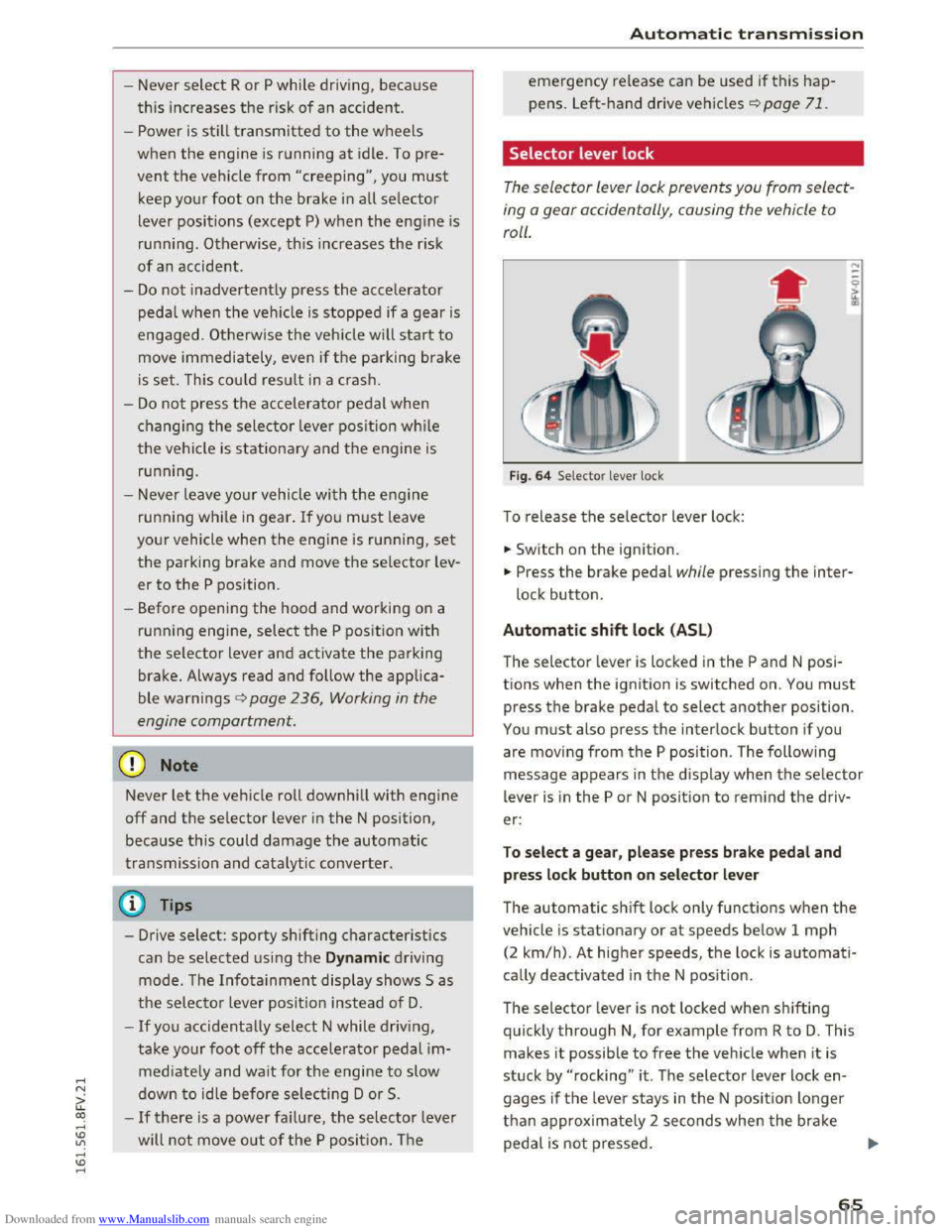
Selector lever lock
The selector lever lock prevents you from select
ing
o gear occidentally, causing the vehicle to
roll.
F ig . 64 Selector lever lock
To release the selector lever lock:
... Switch on the ignition.
... Press the brake pedal while pressing the inter
lock button.
Automatic shift lock (ASL)
The selector lever is locked in the P and N posi
tions when
the ignition is switched on. You must
press the brake pedal to select another position.
You must also press the interlock button if you
are moving
from the P position. The following
message appears in
the display when the selector
lever
is i n the P or N position to rem ind the driv
er:
To sel e ct a g ear, pl ease pr ess brake pedal and
pre
ss lock button on selector le ver
The automatic shift lock only functions when the
vehicle is stationary or at speeds below 1 mph
(2
km/h). At higher speeds, th e lock is automati
cally deactivated in
the N pos ition.
The selector lever
is not locked when shifting
quickly through N, for example from R to D. This
makes
it possible to free the veh icle when it is
stuck by "rocking" it . The selector lever lock en
gages
if the leve r stays in the N posit ion longer
than approx imately 2 seconds when t
he brake
peda l
is not pressed.
65
Page 71 of 322
Downloaded from www.Manualslib.com manuals search engine ..... N
G'. CX)
.... ID IJ' .... ID ....
.,. To shift down one gear, tap the shift paddle Q.
If the shift paddles are tapped while in the D/S
selector lever position, automatic mode switches
off briefly. To switch from manually shifting back
to automatic shifting immediately, tap the shift
paddle 0 Q fig. 67 for 1 second.
To keep shifting using the shift paddles, move
the selector lever to the right out of the D/S posi
tion into
the tiptronic shift gate.
The transmission automatically shifts up or down
before critical
engine speed is reached.
The
transmission only allows manual shifting
when
the engine speed is within the permitted
rang e.
(D Tips
-If you shift to the next lowest gear, the
transmission will only shift if the engine will
not be over-rewed.
- With kick-down, the transmission shifts to a
lower
gear, depending on vehicle speed and
engine speed.
-tiptronic does not work if the transmission
is running in emergency mode.
Kick-down
Kick-down enables maximum acceleration.
When you press the accelerator pedal down be
yond
the resistance point, the automatic trans
mission downshifts into a lower gear, depending
on vehicle speed and engine RPM. It shifts up in
to the next higher gear once the max imum speci
fied
engine RPM is reached.
A WARNING
Please note that the wheels could spin on
s
lick or slippery roads when kick-down is ac
tive.
ll The ESC light turns on continuously and the message Sta·
bilization control (ESC): sport. Warning! Reduced stabil
ity appears temporarily to indicate in the Infotainment
system
that the syste m was deactivate d.
Automatic transmission
Launch Control-Program
The Launch Control Program enables maximum
acceleration.
Requirement: the engine must be at operating
temperature and the steering wheel must not be
turned.
... With the engine running, press the l.eoFFI but
ton briefly one time ll .
.,. Pull the selector lever back out of the D/S posi
tion briefly to select the S pos ition, or press it
toward the right into the tiptronic position or
select the Dynamic driving mode in drive se
lect* Q page 79.
.,. Press the brake pedal firmly with your left foot
and hold it all the way down for at least 1 sec
ond .
... At the same time, press the gas pedal all the
way down with your right foot until the engine
reaches and stays at a high RPM level.
.,. Remove your left foot from the brake.
A WARNING
-Always adapt your driving to the traffic flow.
-
Only use Launch Control when road and traf-
fic conditions allow it and other drivers will
not be endangered or impacted by your driv
ing and the vehicle's acceleration.
-
Please note that the drive wheels can spin
and the vehicle can break away when sport
mode is sw itched on, especially when the
road is slippery.
-
Once the vehicle has started moving, press
the l.t'l OFFI button briefly to turn the sport
mode off.
(D Tips
- The transmission temperature may increase
s ignificantly
after using the launch control
program. If that happens, the program may
not be available for a few minutes. It w ill be
available again after a cool-down period. "'
69
Page 81 of 322
Downloaded from www.Manualslib.com manuals search engine Switching on and off
App lies to: vehicles with Audi side assist
The system can be switched on/off in the Info
tainment system.
"'Select in the Infotainment system: IM ENUI but
ton >Vehicle > left control button >Driver as
sistance >Audi side assist
An activated system will signal every time the ig
nition is switched on by turning the displays in
the exterior mirrors on briefly.
Adjusting the display brightness
Applies to: vehicles with Audi side assist
The display brightness can be adjusted in the In
fotainment system.
"'Select in the Infotainment system: IM ENUI but
ton >Vehicle > left control button >Driver as
sistance >Audi side assist
The display brightness adjusts automatically to
the brightness of the surroundings, both in the
information and in the warning stage. In very
dark or very bright surroundings, the display is
already set to the minimum or maximum level by
the automatic adjustment. In such cases, you
may notice no
change when adjusting the bright
ness, or the change may only be noticeable once
the surroundings change.
Adjust
the brightness to a level where the display
in the information stage will not disrupt your
view forward. If you change the brightness, the
display in the exterior mirror will briefly show the
brightness level in the information stage. The
brightness of the warning stage is linked to the
brightness in the information stage and is adjust
ed along with the information stage adjustment.
-Side assist is not active while you are mak
ing the adjustment.
- Your settings are automatically stored and
assigned to the remote control key being
used.
Assist
Driver messages
Applies to: vehicles with Audi side assist
If the side assist switches off automatically, a
message appears in the Infotainment system dis
play.
@i Audi side assist: currently unavailable.
Sensor vision restricted due to surroundings.
See owner's
manual
The radar sensors' vision is affected. Do not cover
the area in front of the sensors with bike wheels,
stickers, dirt or other objects. Clean the area in
front of the sensors, if necessary q page 77,
fig. 77.
@i Audi side assist: currently unavailable.
See owner's
manual
Side assist cannot be switched on temporarily be
cause there is a malfunction (for example, the
battery charge level may be too low).
@i Audi side assist: malfunction! Please
contact
Service
The system cannot guarantee that it will detect
vehicles correctly and it is switched off. The sen
sors have been displaced or are faulty. Have the
system checked by an authorized Audi dealer or
authorized Audi Service Facility soon.
Audi drive select (drive
settings)
Introduction
Applies to: vehicles with Audi drive select
Drive select makes it possible to experience dif
ferent types of vehicle settings in one vehicle.
The driver can
select from three modes, Comfort,
Auto and Dynamic, using the~.~;\,~ button in the
center console or by using the Infotainment sys
tem. This allows you to switch between a sporty
and a comfortable driving mode, for example. In
the Individual mode, the settings can be adjust
ed to your personal preferences. This makes it
possible to combine settings such as a sporty en-
gine
tuning with light steering. .,.
79
Page 82 of 322
Downloaded from www.Manualslib.com manuals search engine Assist
& WARNING
Using Audi drive select incorrectly can lead to
collisions, other accidents and serious inju
ries.
Description
Applies to: vehicles with Audi drive select
The vehicle setup in each mode depends on the
vehicle's features. However, the engine and
steering are always affected.
Engine and automatic transmission
Depending on the mode, the engine and auto
matic transmission respond more quickly or i n a
more balanced
manner to accelerator pedal
movements.
Adaptive dampers (Audi magnetic ride)*
The adaptive dampers use sensors to record in
formation regarding steering movements, brak
ing and acceleration operations by the driver,
road
surface, driving speed, and load. With dri ve
select, you can adjust the adaptive dampers to
sporty (dynamic), comfortable (comfort) or ba l
anced (auto).
Steering
The power steering adapts. Indirect steering that
moves easily as in comfort mode is especially
suited to long drives on a highway. The dynamic
mode provides sporty, direct steering.
Cruise control system*
The acceleration performance is especially fuel
efficient in efficiency* mode.
Engine sound*
The engine sound is adapted to the applied mode
and can be subtle to sporty.
@ Tips
In some models, the maximum vehicle speed
can only be reached in the auto and dynamic
modes.
80
Selecting the driving mode
Applies to: vehicles with A ud i drive select
You can select between efficiency*, comfort, au
to, dynamic and individual.
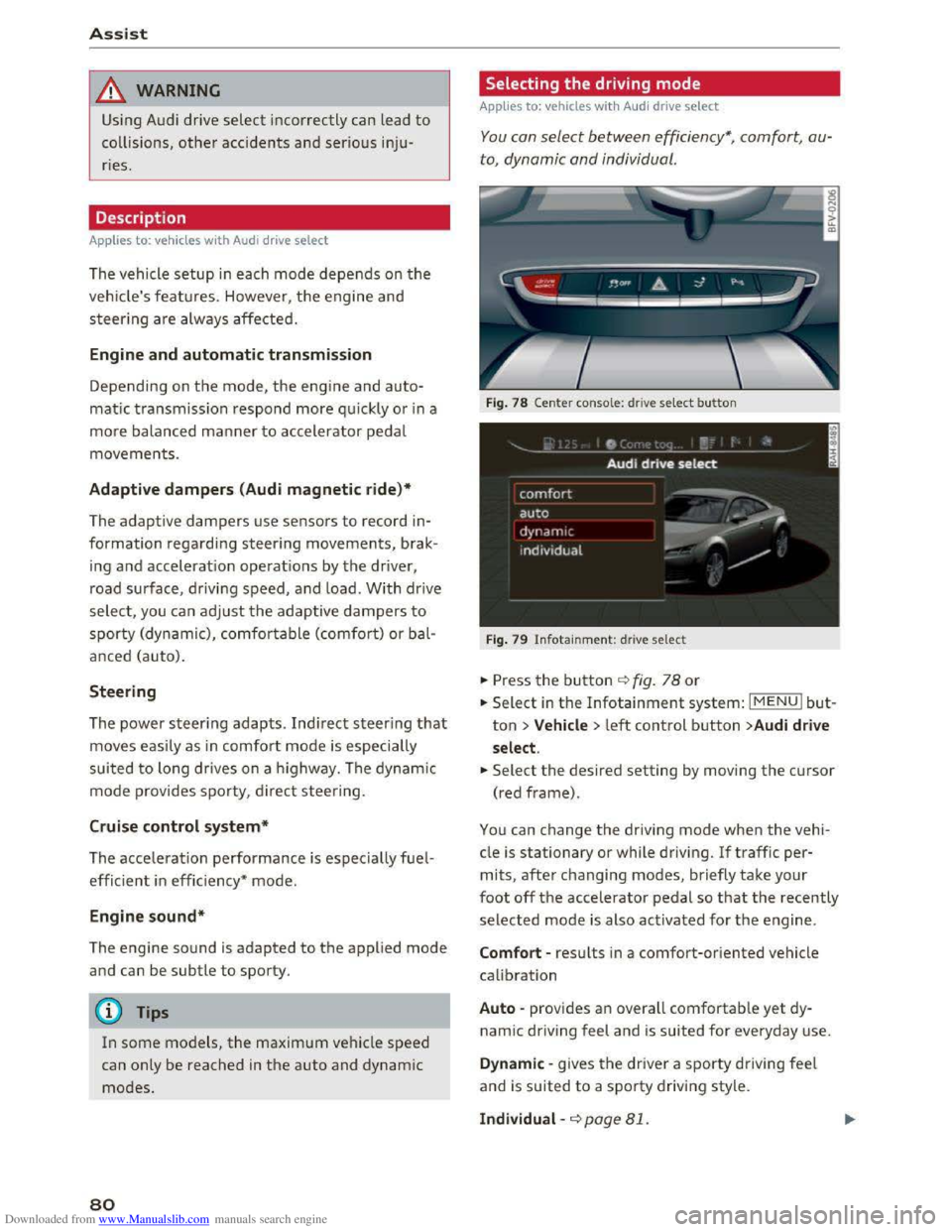
Fig. 78 Center conso le: drive select button
Fig. 79 Infotainment: drive select
.. Press the button ¢fig. 78 or
.. Select in the Infotainment system: IMENUI but
ton >Vehicle > left control button >Audi drive
select .
.. Select the desired setting by moving the cursor
(red frame).
You can change the driving mode when the vehi
cle is stationary or while driving. If traffic per
mits, after changing modes, briefly take your
foot off the accelerator pedal so that the recently
selected mode is also activated for the engine.
Comfort -results in a comfort-oriented vehicle
calibration
Auto -provides an overall comfortable yet dy
namic driving feel and is suited for everyday use.
Dynamic -gives the driver a sporty driving feel
and is suited to a sporty driving style.
Individual -¢page 81.
Page 83 of 322
Downloaded from www.Manualslib.com manuals search engine A WARNING
Pay attention to traffic when operating the
drive select to prevent potential risk of an ac
cident.
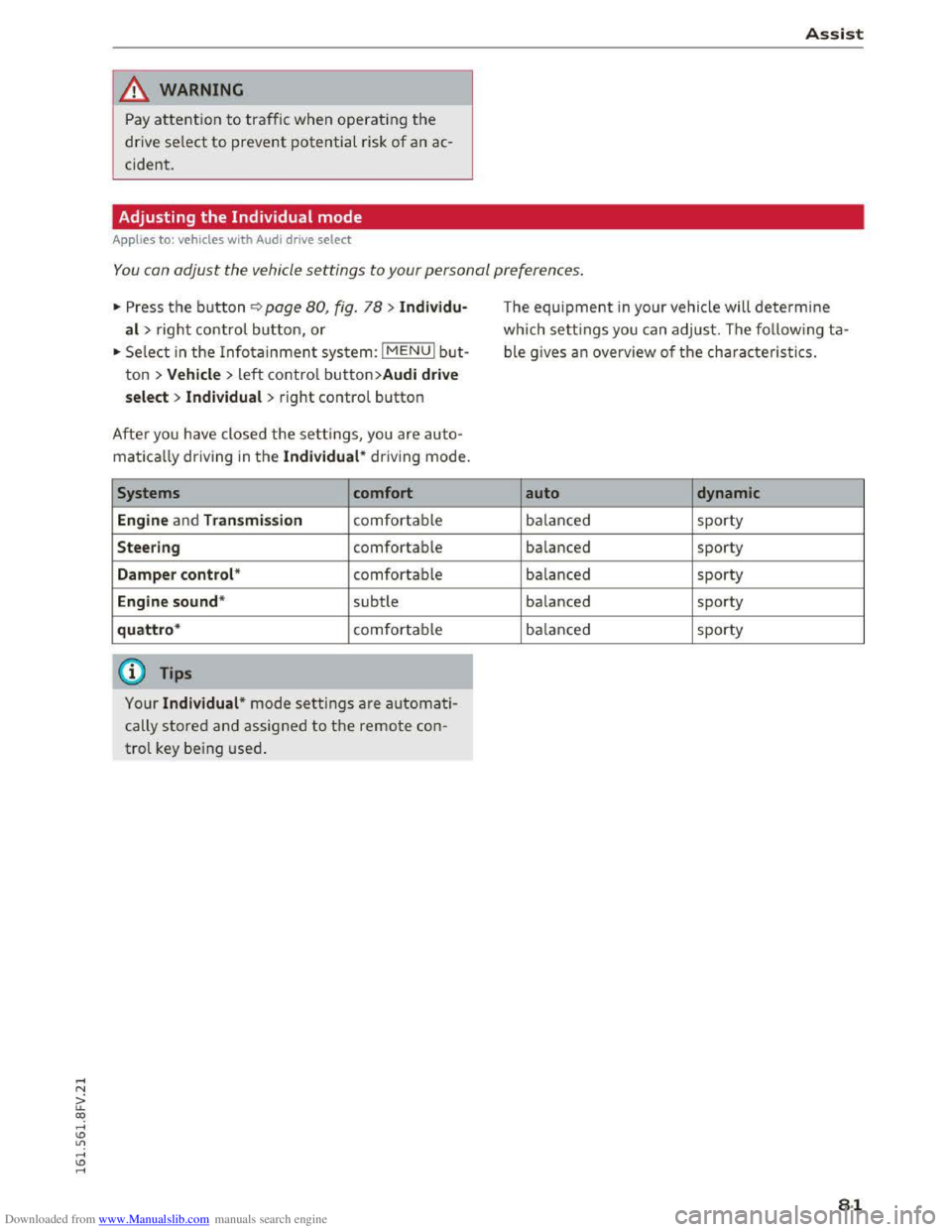
Adjusting the Individual mode
Applies to: vehicles with Audi drive select
Assist
-I
You can adjust the vehicle settings to your personal preferences.
"' Press the button¢ page 80, fig. 78 > Individu·
al> right control button, or
"'Select in the Infotainment system: IMENUI but
ton > Vehicle> left control button>Audi drive
select > Individual
> right control button
After you have closed the settings, you are auto
matically driving in the Individual* driving mode.
Systems comfort
Engine
and Transmission comfortable
Steering comfortable
Damper control* comfortable
Engine sound* subtle
quattro* comfortable
@ Tips
Your Individual* mode settings are automati
cally stored and assigned to the remote con
trol key being used.
The equipment in your vehicle will determine
which settings you can adjust. The following ta
ble gives an overview of the characteristics.
auto dynamic
balanced sporty
balanced sporty
balanced sporty
balanced sporty
balanced sporty
81
Page 90 of 322
Downloaded from www.Manualslib.com manuals search engine Intelligent Technology
its integrated systems cannot always pre
vent collisions -there is still a risk of acci
dents!
-Press the accelerator pedal carefully when
accelerating on even, slippery surfaces such
as ice and snow. The drive wheels can spin
even when these control systems are instal-
Switching on and off
led and this can affect driving stability and
increase the risk of a collision.
@ Tips
-ABS and ASR only function correctly when
all four wheels are equipped with identical
tires. Different tire sizes can lead to a reduc
tion in engine power.
-You may hear noises when the systems de
scribed are working.
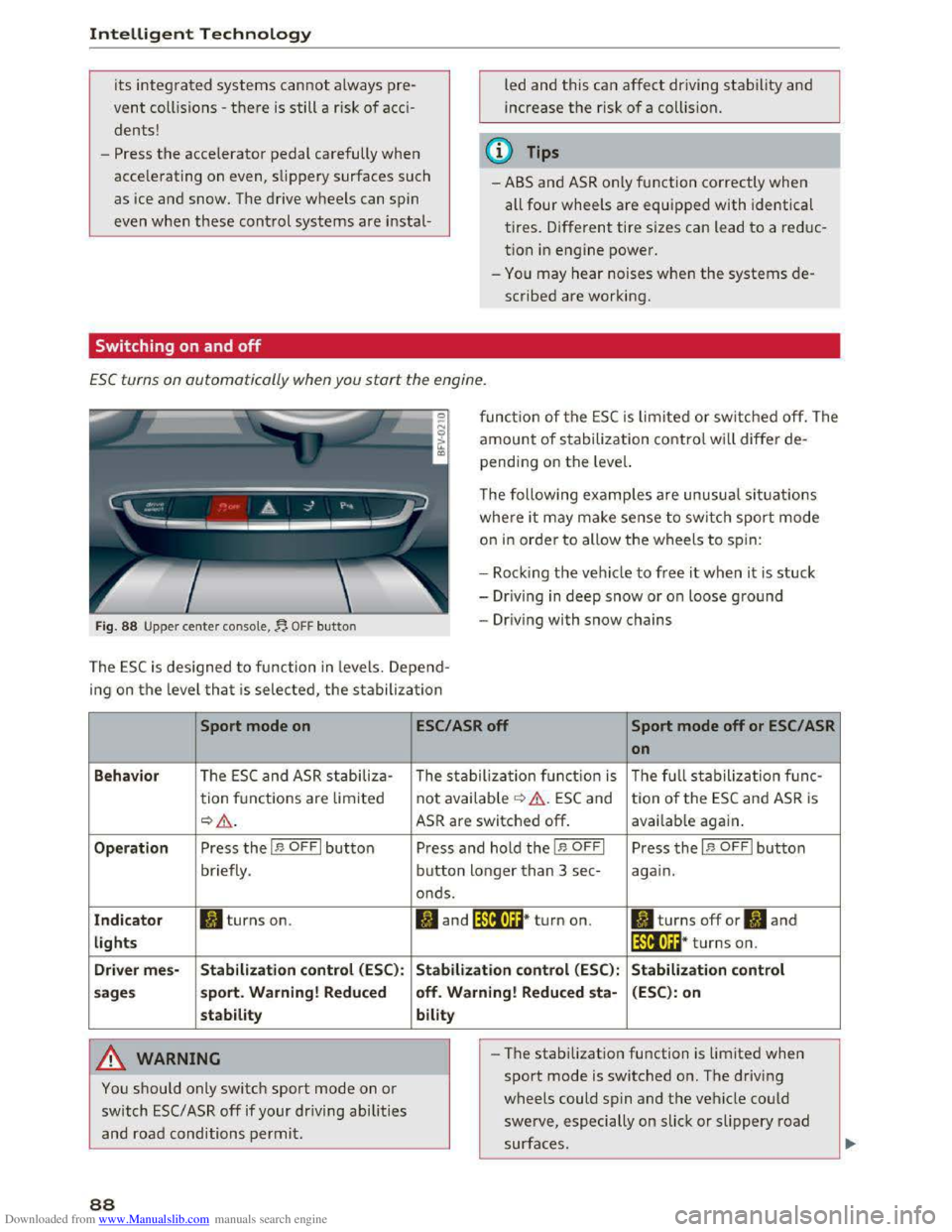
ESC turns on automatically when you start the engine .
Fig. 88 Upper center console,~ OFF button
function of the ESC is limited or switched off. The
amount of stabilization control will differ de
pending on the level.
The following
examples are unusual situations
where it may make sense to switch sport mode
on in order to allow the wheels to spin:
- Rock i
ng the vehicle to free it when it is stuck
-Dr iving in deep snow or on loose ground
-Driving with snow chains
The ESC is designed to function in levels. Depend
ing
on the level that is selected, the stabilization
Sport mode on
Behavior The ESC and ASR stabiliza-
tion functions are lim ited
~&.
Operation Press the I.$ OFFI button
briefly .
Indicator II turns on.
lights
Driver
mes-Stabilization control (ESC):
sages sport.
Warning! Reduced
stability
A WARNING
You should only switch sport mode on or
switch ESC/ ASR off if your driving abilities
and road conditions permit.
88
ESC/ASR off Sport mode off or ESC/ ASR
on
The stabilization function is The full stabilization func-
not available ¢ &. ESC and tion of the ESC and ASR is
ASR are switched off. available again.
Press and hold the I.$ OFFI Press the I.$ OFFI button
button longer than 3 sec-again.
onds.
II and lfif1U~* turn on. II turns off or II and
lfil•l~~* turns on.
Stabilization control (ESC): Stabilization control
off. Warning! Reduced
sta-(ESC): on
bility
- I
-The stabilization function is limited when
sport mode is switched on. The driving
wheels could spin and the vehicle could
swerve, especially on slick or slippery road
surfaces.
Page 91 of 322
Downloaded from www.Manualslib.com manuals search engine ...... N
> u. CX> ...... u:>
"' ...... u:> ......
-There is no vehicle stabilization when ESC/
ASR are switched off.
(D Tips
-When the cruise control system is switched
on, ESC/ ASR cannot be switched off or sport
mode cannot
be switched on.
- Malfunctions in the rear spoiler
or the Audi
magnetic ride may make
it impossible to
switch the ESC/ ASR off or to switch sport
mode on.
Brakes
New brake pads
New brake pads do not achieve their full braking
effect during the first 250 mi (400 km) . They
must be "broken in" first. However, you can com
pensate
for the slightly reduced braking force by
pressing
firmly on the brake pedal. Avoid heavy
braking during the break-in period.
Wear
Brake pad wear depends largely on the way the
vehicle is driven and on operating conditions.
This is especially true
if you are driving frequently
in
the city and on curves or with a sporty driving
style.
Operating noise
Noises may occur when braking depending on the
speed, braking force and outside conditions such
as temperature and humidity.
Effect of water and road salt
In certain situations, for example after driving
through water, in heavy
rain, after overnight con
densation
or after washing your car, the braking
effect can be reduced by moisture or ice on the
brake rotors and brake pads. The brakes
must be
"dried" first with a few careful brake applica
tions.
At higher speeds and with the windshield wipers
turned
on, the brake pads press against the brake
rotors
for a short amount of time. This action
which is
not felt by the driver happens at regular
Intelligent Technology
intervals and facilitates a better reaction time for
the brakes in wet weather.
T
he braking effect can also be reduced if you are
driving on salted roads and you do
not apply the
brakes for Long periods of time. The Layer of salt
on the brake rotors and pads must be worn off
first when the brakes are applied.
Corrosion
Leaving the vehicle parked for Long periods of
time, Low mileage and avoiding heavy braking
can contribute
to corrosion on the brake rotors
and
dirty brake pads.
If you usually avoid heavy braking or ifthere is
corrosion present, occasiona l heavy braking
at
high speeds is recommended to clean the brake
rotors and
pads¢.&..
Brake system malfunction
if you notice that the brake pedal travel has sud
denly gotten Larger, then a brake circuit may have
failed. Drive
to an authorized Audi dealer or au
thorized Audi Service Facility immediately to have
the problem corrected. On the way there, drive
with reduced speed and keep in mind that a Long
braking distance and increased pressure on the
brake pedal will be necessary.
Low brake fluid level
When the brake fluid Level is Low, malfunctions in
the brake system may occur. The brake fluid Level
is electronically monitored.
Brake booster
The brake booster amplifies the pressure you ap
ply to the brake pedal. It only works when the en
gine is running.
A WARNING
-New brake pads do not achieve their full
braking effect during the first 250 mi
(400 km). They must be "broken in" first.
However, you
can compensate for the
slightly reduced braking force by pressing
firmly on the brake pedal. Avoid heavy brak-
ing during
the break-in period. ~
89
Page 217 of 322
Downloaded from www.Manualslib.com manuals search engine ...... N
> u. CX> ...... u:>
"' ..... u:> .....
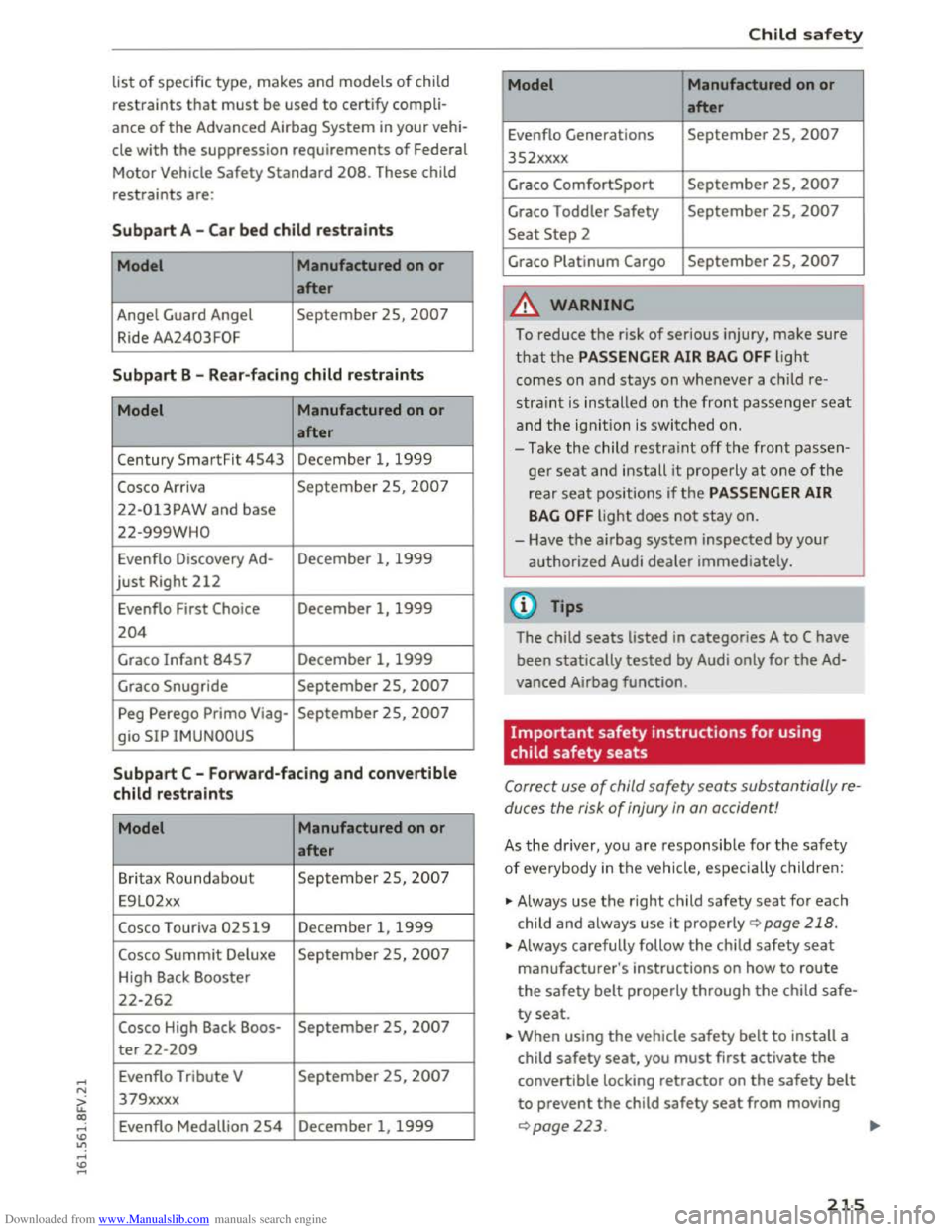
list of specific type, makes and models of child
restraints that must be used to certify compli
ance of the Advanced Airbag System in your vehi
cle with the suppression requirements of Federal
Motor Vehicle
Safety Standard 208. These child
restraints are:
Subpart A -Car bed child restraints
Model Manufactured
on or
after
Angel Guard Angel September 25, 2007
Ride AA2403FOF
Subpart B -Rear-facing child restraints
Model Manufactured
on or
after
Century SmartFit 4543 December 1, 1999
Cosco Arriva September 25, 2007
22-013PAW and base
22-999WHO
Evenflo Discovery Ad-December 1, 1999
just Right 212
Evenflo First Choice December 1, 1999
204
Graco Infant 8457 December 1, 1999
Graco Snugride September 25, 2007
Peg Perego Primo Viag-September 25, 2007
gio SIP IMUNOOUS
Subpart C -Forward -facing and convertible
child restraints
Model Manufactured on or
after
Britax Roundabo ut September 25, 2007
E9 L02xx
Cosco Touriva 02519 December 1, 1999
Cosco Summit Deluxe September 2S, 2007
High Back Booster
22-262
Cosco High Back Boos-September 2S, 2007
ter 22-209
Evenflo Tribute V September 25, 2007
379xxxx
Evenflo Medallion
254 December 1, 1999
Child safety
Model Manufactured on or
after
Evenflo Generations September 25, 2007
352xxxx
Graco
ComfortSport September 25, 2007
Graco Toddler Safety September 25, 2007
Seat Step 2
Grace
Platinum Cargo September 25, 2007
A WARNING
i-=--
To reduce the r isk of serious injury, make sure
that the PASSENGER AIR BAG OFF light
comes on and stays on whenever a child re
stra int is installed on the front passenger se a t
and the ignit ion is switched on.
- T ake
the child restraint off th e front passen
ger seat and install it properly at one of the
rear seat positions if the PASSENGER AIR
BAG OFF light does not stay on.
- Have
the airbag system inspected by your
a u
thorized Audi dealer immediately.
been statically tested by Audi only for the Ad
vanced Airbag function.
Important safety instructions for using
child
safety seats
Correct use of child safety seats substantially re
duces
the risk of injury in an accident!
As the driver, you are responsible for the saf e ty
of eve rybody in the vehicle, especially c hildre n:
.,. Always use the right child safety seat for each
child
and always use it properly i:> page 218.
.,. Always carefully follow the child safety seat
manufacturer's instructions on how to route
the safety belt properly through the child safe
ty seat.
.. When using the vehicle safety belt to install a
child
safety seat, you must first activate the
convertible locking retractor on the safety belt
to prevent the child safety seat from moving
i:>page223. Iii>
215