park assist AUDI TT COUPE 2016 Owners Manual
[x] Cancel search | Manufacturer: AUDI, Model Year: 2016, Model line: TT COUPE, Model: AUDI TT COUPE 2016Pages: 322, PDF Size: 52.86 MB
Page 4 of 322
Downloaded from www.Manualslib.com manuals search engine Table of contents
About this Owner's Manual. . . . . . 5
Cockpit . . . . . . . . . . . . . . . . . . . . . . . . . . . 6
Cockpit overview . . . . . . . . . . . . . . . . . 6
Controls at a glance . . . . . . . . . . . . . . . . . . 6
Instruments and indicator lights 8
Instruments . . . . . . . . . . . . . . . . . . . . . . . . 8
Indicator lights . . . . . . . . . . . . . . . . . . . . . 9
On-Board Diagnostic system
(OBD) . . . . . 17
Driver information system . . . . . . 19
Overview . . . . . . . . . . . . . . . . . . . . . . . . . . . 1 9
Multifunction steering wheel plus . . . . . . 20
Multifunction steering wheel . . . . . . . . . . 22
Tachometer ....................... .
Odome ter
......................... . 23
23
On-boa rd computer . . . . . . . . . . . . . . . . . . 23
Starting and driving . . . . . . . . . . . . . 25
Opening and closing . . . . . . . . . . . . . 25
Cent ral lock ing . . . . . . . . . . . . . . . . . . . . . . 25
L ugg age com pa r
tment lid . . . . . . . . . . . . . 30
Power windows . . . . . . . . . . . . . . . . . . . . . 32
Garage door opener (Home
link) . . . . . . . . 33
Lights and Vision . . . . . . . . . . . . . . . . . 36
Exte rio r ligh ting . . . . . . . . . . . . . . . . . . . . . 36
I
nterior lighting . . . . . . . . . . . . . . . . . . . . . 38
V1s1on . . . . . . . . . . . . . . . . . . . . . . . . . . . . . 39
W indshield wipers . . . . . . . . . . . . . . . . . . . 41
Dig ita l compass . . . . . . . . . . . . . . . . . . . . . 42
Seats and storage . . . . . . . . . . . . . . . . 44
General information . . . . . . . . . . . . . . . . . 44
Front seats . . . . . . . . . . . . . . . . . . . . . . . . . 45
Rear bench seat . . . . . . . . . . . . . . . . . . . . . 46
Ashtray . . . . . . . . . . . . . . . . . . . . . . . . . . . . 47
Cigarette li
ghter and sock et . . . . . . . . . . . 47
Storage . . . . . . . . . . . . . . . . . . . . . . . . . . . . 48
L ugg age com par t
ment . . . . . . . . . . . . . . . 49
Warm and cold . . . . . . . . . . . . . . . . . . . 52
Clima te con trol system . . . . . . . . . . . . . . . 52
Driving ........................... .
General information ........... ..... .
S teer ing . .. .. .
.................... .
2
56
56
58
Starting and stoppin g the engine . . . . . . . 58
E lectromechanical parking brake . . . . . . .
61
Trailer towing . . . . . . . . . . . . . . . . . . . . . . . 63
Automatic transmission . . . . . . . . . 64
S tronic . . . . . . . . . . . . . . . . . . . . . . . . . . . . 64
Driver assistance . . . . . . . . . . . . . . . . . 72
Assist.. .. .. .. .. .. .. .... ....... .. .. 72
E lectronic speed
limiter . . . . . . . . . . . . . . . 72
Speed warning system . . . . . . . . . . . . . . . . 72
Cruise control system . . . . . . . . . . . . . . . . 72
Audi active lane assist . . . . . . . . . . . . . . . .
74
Audi side assist . . . . . . . . . . . . . . . . . . . . . 76
Audi drive select
(drive setti ngs) . . . . . . . . 79
Parking systems 82
Genera l information . . . . . . . . . . . . . . . . . 82
Rear parking system . . . . . . . . . . . . . . . . . 82
Parking system plus . . . . . . . . . . . . . . . . . . 83
Rearv iew camera . . . . . . . . . . . . . . . . . . . .
84
Adjusting th e disp lay and the wa rning
tones... .. .. .. .. .. .. .. .. ....... .. .. 86
Error messages . . . . . . . . . . . . . . . . . . . . .
86
Intelligent Technology . . . . . . . . . . 87
E lectronic stabilization control (ESC) . . . . 87
Brakes . . . . . . . . . . . . . . . . . . . . . . . . . . . . . 89
E lectromechanical steering . . . . . . . . . . . . 90
All w heel drive (quattro) . . . . . . . . . . . . . . 91
Rear spoiler . . . . . . . . . . . . . . . . . . . . . . . . 91
Energy management . . . . . . . . . . . . . . . . . 92
Information abou t data recorded by
vehicle
control modules . . . . . . . . . . . . . . 9 4
Infotainment. . . . . . . . . . . . . . . . . . . . . 95
Multi Media Interface . . . . . . . . . . . . 95
Tra ffic sa fe ty in fo rmation . . . . . . . . . . . . . 95
Introdu ction . . . . . . . . . . . . . . . . . . . . . . . . 95
Switching the MMI on/off . . . . . . . . . . . . . 95
Operat ing t he M MI . . . . . . . . . . . . . . . . . . 95
MMI touch . . . . . . . . . . . . . . . . . . . . . . . . . 97
Control knob with joystick function . . . . . 98
Letter and number speller . . . . . . . . . . . . . 99
Menus and symbo ls . . . . . . . . . . . . . . . . . . 101
Free text search . . . . . . . . . . . . . . . . . . . . . 102
Page 9 of 322
Downloaded from www.Manualslib.com manuals search engine (!) Side assist display ............ .
@ Door handle
@
©
®
Central locking switch
Air
vent with seat heating controls
Lever for:
- Turn signals and high beams .. .
- Active lane assist
........... .
® Multifunction steering wheel with:
- Horn
- Driver's airbag
............. .
- Controls
for the virtual instru-
ment cluster including the driver
information system, audio/video,
telephone, navigation and voice
recognition system
-
Shift paddles .............. .
@ Windshield washer system lever
® starting the engine when there is a
malfunction .. ............... .
@ Adjustable steering column .... .
@ Cruise control lever ........... .
@ Instrument illumination ....... .
@ Hood release ................ .
€3) Light switch ................. .
@ Power exterior mirror adjustment
@ Power windows .............. .
@ Air vent including climate control
system controls .............. .
76
29
37
74
192
68
8
41
60
58
72
39
236
36
39
32
52
Cockpit overview
@ Lockable glove compartment
@ Drives for CD, DVD, SIM/SD cards
@ Front passenger's airbag ...... .
@ Rear window defogger button
@ Depending on equipment, buttons
for:
- drive select .. .
............. .
- Electronic Stabilization
Control
(ESC) ....... .............. .
- Emergency flashers
......... .
- Retractable rear spoiler
...... .
@ Depending on equipment, center
console
with:
-
Multimedia compartment for cell
phone .... .. .............. .
- Audi phone box
........... . .
@ Infotainment system on/off button
@
@
Infotainment system unit
Depending on equipment:
-Storage compartment
-Ashtray ... .. .. ............ .
-
Cup holder . . .. ............ .
@ Parking brake ............... .
@ I START ENGINE STOPl button ...
@ Selector lever (S tronic)
@Tips
150
192
79
87
38
91
155
111
95
47
48
61
58
64
Some the equipment listed here is only instal
led in certain models or is available as an op
tion.
7
Page 12 of 322

Downloaded from www.Manualslib.com manuals search engine Instruments and indicator lights
Electronic Stabilization Control (ESC)
../¢page 14
Electronic Stabilization Control (ESC)
../¢page 14
USA models: anti-lock braking sys
tem (ABS)../
¢page 14
Canada mod els : anti- lock braking
system
(ABS) ../
¢page 14
• Brake
p
ads
¢page 15
10
Elect romechan ical park ing bra ke
¢ page 12
Tire pressure monitoring system../
¢page268
Tire pressure monitoring system
¢page268
Engi ne control
¢ page 15
System indicator light (MIL)
¢page 15
Engine speed limitation
¢page 15
Engine oil level
¢ page 15
Engine oil senso r
¢page 16
Battery charge
¢page 13
Tank system
¢page 16
Was her fluid level
¢page 16
W indshield wipers
¢ page 16
Remote control key
¢page 60
Battery in remote control key
¢page27
Bulb failure indicator*
¢ page 16
Head light range control system
¢page 16
Adaptive light*
¢ page 17
Light/rain sensor *
¢page 17
Transmission
¢ page 70
Steering lock
¢page 13
Engine start system
¢ page 14
Central indicator light
¢page 14
Electromechanical steering../
¢ page 90
Dampe r control*
¢ page 17
Rear spoiler
¢page 91
Speed warning system*
¢page 72
Other indicator lights
•
~ Turn signals
~ !!11!.i ¢page 17
CRUISE
USA models: cruise contro l system*
¢ page 72
Canada models: cruise contro l sys
tem*
¢ page 72
Active lane assist*
¢ page 75
Convenie nce key
¢page 60
Electromechanical parking brake
¢ page 12
Active lane assist*
¢page 75
Audi side ass ist*
¢page 79
• Transmission
.W¢page70
Page 13 of 322

Downloaded from www.Manualslib.com manuals search engine Electromechanical parking brake
c::>page 12
Rear safety belt./
c::>page 17
Rear safety belt./
c::> page 17
High beams
c::> page 37
BRAKE/((D) Brake system
If this indicator light turns on, there is a malfunc
tion in the brake system.
.. (USA models) /. (Canada models)
Brakes: stop vehicle and
check brake fluid level
Stop the vehicle and check the brake fluid level.
See an authorized Audi dealer or authorized Audi
Service Facility
for assistance if necessary.
.. (USA models) /. (Canada models)
Warning!
No brake booster
If brake assist (brake booster) is not working, you
have to use much more force when braking the
vehicle.
See an authorized Audi dealer or author
ized Audi Service Facility
for assistance.
.. (USA models) /. (Canada models)
Brakes: malfunction!
Stop vehicle safely
If the ABS indicator light fJ]l (USA models) I
¢G» (Canada models), the ESC indicator light J;].
and the brake system indicator light .. (USA
models) I. (Canada models) turn on and this
message appears, then the ABS, ESC and braking
distribution are malfunctioning c::> .&..
Drive to your authorized Audi dealer or author
ized Audi Service Facility immediately
to have the
malfunction corrected c::> .&..
.. (USA models) /. (Canada models) Park
ing brake: malfunction! Safely stop vehicle.
Please contact
Service
-If the indicator light and the message appear
when the vehicle is stationary or after switch
ing the ignition on, check if you can release the
parking brake. If you cannot release the park
ing brake, see your authorized Audi dealer or
Instruments and indicator lights
authorized Audi Service Facility. If you can re
lease
the parking brake and the message still
appears, see an authorized Audi dealer or au
thorized Audi Service Facility immediately
to
have the malfunction corrected.
-
If the indicator light and message appear while
driving,
the hill start assist or emergency brak
ing function may be malfunctioning.
It may not
be possible to set the parking brake or release
it once it has been set. Do not park your vehicle
on hills and
see an authorized Audi dealer or
authorized Audi Service Facility
for assistance.
(USA models): if the .. and Ill indicator
lights turn on together, have the brake system
checked immediately by
an authorized Audi deal
er or authorized Audi Service Facility
c::> page 15.
There is also a warning tone when the lights turn
on .
.&. WARNING
-Read and follow the warnings in
c::> page 236, Working in the engine com
partment before opening the hood and
checking the brake
fluid level.
-
If the brake system indicator light does not
turn off or it turns on while driving, the
brake fluid level in the reservoir is too low,
and
this increases the risk of an accident.
Stop
the vehicle and do not continue driv
ing.
See an authorized Audi dealer or au
thorized Audi Service Facility
for assistance.
-
If the brake system indicator light turns on
together with the ABS and ESC indicator
lights,
the ABS/ESC regulating function may
be malfunctioning. Functions that stabilize
the vehicle are no longer available. This
could cause the rear
of the vehicle to
swerve, which increases the risk that the ve
hicle
will slide. Drive carefully to the nearest
authorized Audi dealer
or authorized Audi
Service Facility and have
the malfunction
corrected.
11
Page 14 of 322

Downloaded from www.Manualslib.com manuals search engine Instruments and indicator lights
PARK/(®l/~ Electromechanical parking
brake
If the -(USA models) I. (Canada models)
indicator light turns on, the parking brake was
set.
-(USA models) /. (Canad a models) Park
ing brake: caution! Vehicle parked t o o steep
If the indicator light blinks and the message ap
pears, there is not enough braking power to se
cure
the vehicle. The brakes have overheated. The
vehicle could roll away even on a
small incline .
-
(USA mode ls) I. (Canada models)
Please press brake p edal to re lease parking
brake
T o release the park ing brake, press the brake
pedal and press the Iii button at the same time,
or start driving with hill start assist¢ page 62,
Starting from a stop.
llJ Parking brake: malfunction! See owner's
manual
There is a malfunction in the parking brake. Drive
to an authorized Audi dealer or authorized Audi
Service Facility
immediately to have the malfunc
tion corrected.
Im Parking brake: malfunction! Safe ly stop ve
hicle . Please contact Service
There is a malfunction
in the parking brake. Drive
to an authorized Audi dealer or authorized Audi
Serv ice Facility i
mmediately to have the malfunc
tion corr
ected.
llJ;!:t:)jJJJ~ (USA models) I Im (Canada models)
Please release parking brake.
Release the parking brake if this message ap
pears.
!f1;!:t:l;fJJj (USA mod els) I K@j (Canada models)
Park ing brake auto release unavailable
If this message appears, press the brake pedal
first and then release the parking brake.
llJ;!:t:)j(13~ (USA models) I Im (Can ad a models)
Parking brake: caution! V ehicle parked too
steep
12
If the indicator light blinks and the message ap
pears, there is not enough braking power to se
cure
the vehicle. The brakes have overheated. The
vehicle could roll away even on a
small incline.
11;1;!:t:ljtJ:O ( U SA models) I [@j (C anada models)
Park in g brake: applied
If this message appears, press the brake pedal
first and then release the parking brake if neces
sary.
(D Tips
For additional information on the parking
b rake,
refer to ¢page 61.
- L Cooling syste m
• Turn off engine and check coolant level
T he coo l
ant level is too low.
Do not continue driving and switch the engine
off. Check the coolant level ¢ page 242.
-If the coolant level is too low, add coolant
¢page 242. Only continue driving once the in
dicator light turns off.
• Coolant temperature: too high. Let eng ine
run with vehicle stationary
Let the engine run at idle for a few minutes to
cool off, until the indicator light turns off.
-
If the indicator light does not turn off, do not
conti nue driving the vehicle. See an authorized
Audi dealer or authorized Audi Service Facility
for assistance.
A WARNING
[.=-
-Never open the hood if you can see or hear
steam or coolant escaping from the engine
compartment. This increases the risk of
burns. Wait until you no longer see or hear
steam or coolant escaping.
- The
engine compartment in any vehicle can
be a
dangerous area. Stop the engine and
allow it to cool before working in the engine
compartment. Always follow the informa
tion found in ¢page 236, Working in the
engine compartment.
Page 28 of 322
Downloaded from www.Manualslib.com manuals search engine Opening and closing
visible . You can activate the Connectivity service*
on your vehicle using this PIN code.
Replacing a ke y
If a key is lost, see an authorized Audi dealer or
authorized Audi Service Facility. Have this key de
activa ted. It is important to bri ng all keys wit h
you .
If a key is lost, you should report it to your
insurance company.
Numb er of keys
You can check the number of keys assigned to
your veh icle in the Infotainment system. To do
this, select: the I MENU I button > Vehi cle > left
control button > Service & checks > Vehicle in·
fo rma tion. This way, you can make sure that you
have
all the keys when purchasing a used vehicle.
Electron ic immobilizer
The immobilizer preven ts unauthorized use of
the vehicle.
Unde r certain circumstances, the vehicle may not
be able to start if there is a key from a different
veh icle manufacturer on the key chain.
Data in the master key
When driving, service and maintenance-relevant
data is continuously stored on your remote con
trol key. Your Audi service advisor can read out
this data and tell you about the work your vehi cle
needs. This applies also to vehicles with a con
ven i
ence key*.
Personal comfort settings
If two people use one vehicle , it is recommended
that each person always uses "their own " master
key. When the ignition is turned off or when the
veh icle is locked, personal convenience settings
for the following systems are stored and as
signed to the remote master key.
-
Climate control system
-Parking aid*
- Active
lane assist*
- Si
de assist*
- Drive
select
26
The stored settings are automatically recalled
when you unlock the vehicle, open the doors or
turn on the ignition .
_&WARNING
Always take the vehicle key with you when
leav ing the vehicle, even for a short period of
time. This applies particularly when children
remai n in the vehicle . Otherwise the children
could
start the engine or operate e lectrical
equipment such as power w indows .
@Tips
-1
The operation of the remote control key can
be
temporarily d isrupted by interference from
transmitters in the vic in ity of the vehicle
working
in the same frequency range (e.g. a
cell
phone, rad io equipment). Always check if
your vehicle is locked!
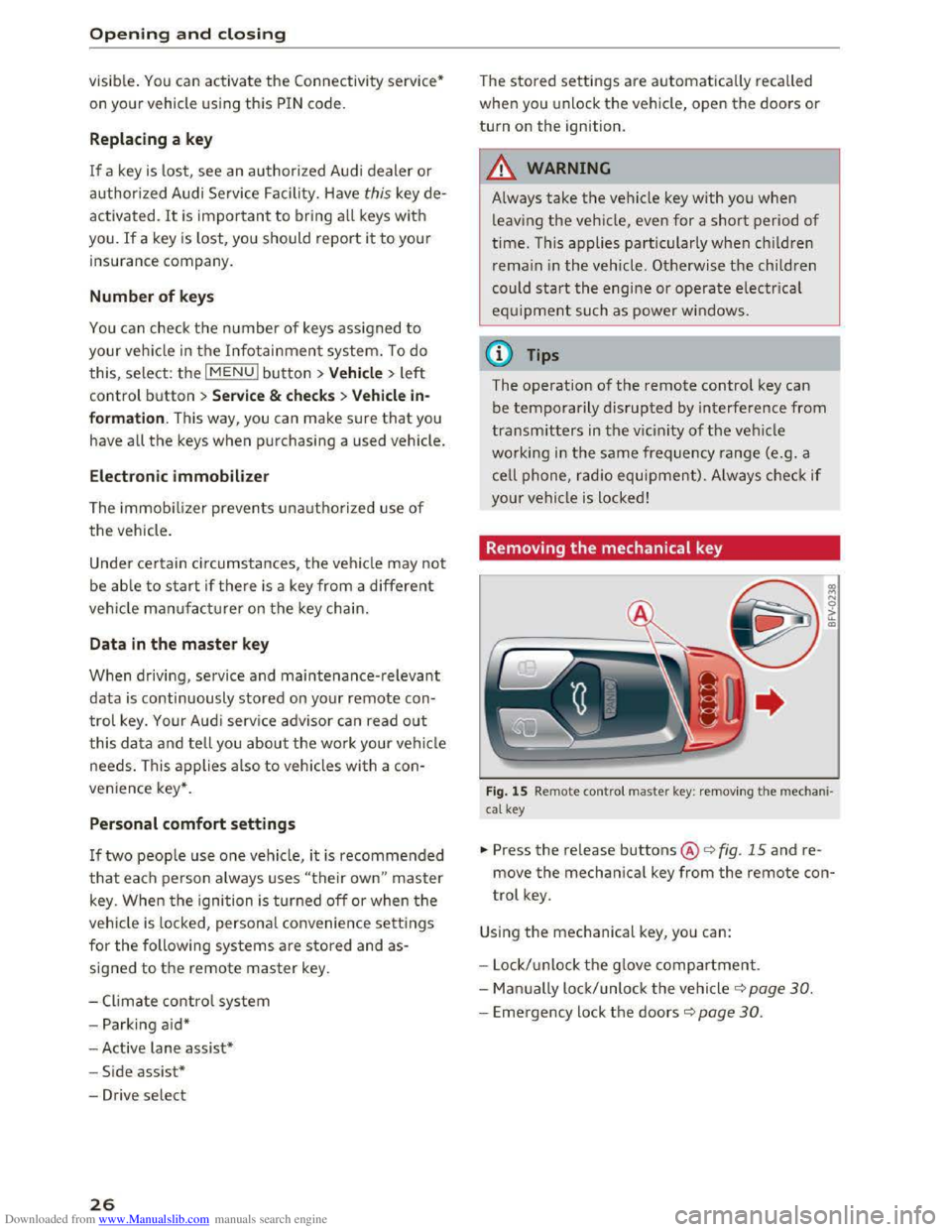
Removing the mechanical key
Fig. 15 Remote contro l master key : remov ing the m ec ha ni·
cal key
.,,. Press the release buttons@<=> fig. 15 and re
move the mechanical key from the remote con
trol key.
Using the mechanical key, you can:
- Lock/ unlock th e g love
compartment.
- Man ually lock/unlock
the vehicle ¢ page 30.
-Emergency lock the doors c::> page 30.
Page 38 of 322
Downloaded from www.Manualslib.com manuals search engine Lights and Vision
Lights and Vision
Exterior Lighting
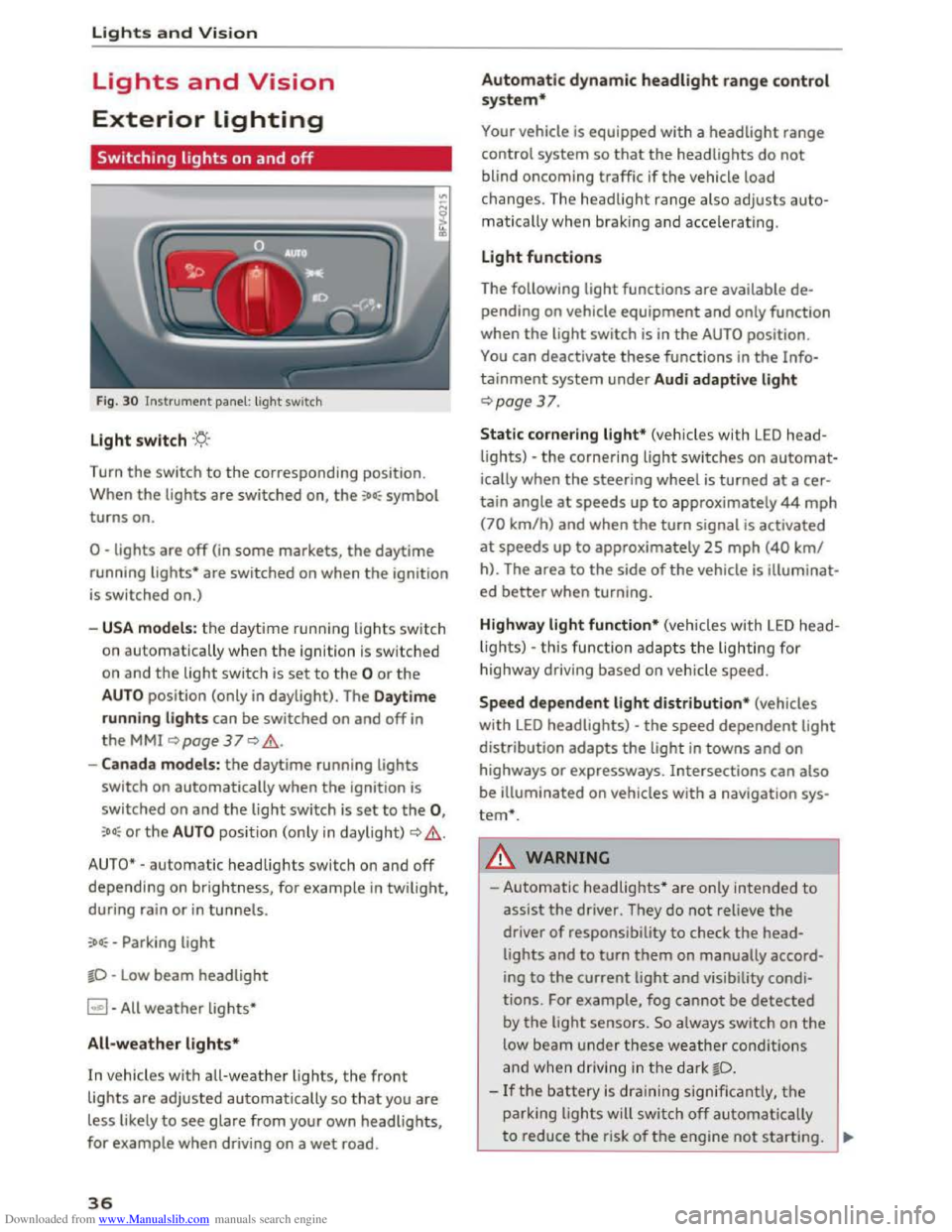
Switching lights on and off
Fig. 30 Instrument panel: light switch
Light switch ·'t/;
Turn the switch to the corresponding position.
When
the lights are switched on, the :oo: symbol
turns on.
0 -lights are off (in some markets, the daytime
running
lights* are switched on when the ignition
is switched on.)
-USA models: the daytime running lights sw itch
on automatica
lly when the ignition is sw itched
on and
the light switch is set to the 0 or the
AUTO position (only in daylight). The Daytime
running lights
can be switched on and off in
the MMI ~page 37 Q &.
-Canada models: the daytime running lights
switch on automatically when the ignition is
switched on and the light switch is set to the 0,
:oo: or the AUTO position (only in daylight) QA .
AUTO* -automatic headlights switch on and off
depending on brightness, for example in twilight,
during rain
or in tunnels.
:oo: -Parking light
~D -Low beam headlight
~ -All weather lights*
All-weather lights*
In vehicles with all-weather lights, the front
lights are adjusted automatically so that you are
less likely
to see glare from your own headlights,
for example when driving on a wet road.
36
Automatic dynamic headlight range control
system*
Your vehicle is equipped with a headlight range
control system
so that the headlights do not
blind oncoming traffic if the vehicle load
changes. The headlight range also
adjusts auto
matically when braking and accelerating .
Light functions
The following light functions are available de
pending on vehicle equipment and only function
when the
light switch is in the AUTO position.
You can deactivate these functions in the Info
tainment system under Audi adaptive light
Qpage 37.
Static cornering light* (vehicles with LED head
lights) -the cornering light switches on automat
ically when the steeri ng wheel is turned at acer
tain angle at speeds up to approximately 44 mph
(70 km/h) and when the turn signal is activated
at speeds up to approxim ately 25 mph (40 km/
h). The area
to the side of the vehicle is illuminat
ed better when turning.
Highway light function* (vehicles with LED head
lights) -this function adapts the lighting for
highwa y driving based on vehicle speed.
Speed dependent light distribution* (vehicles
with LED headlights) -the speed dependent light
distribution adapts the light in towns and on
highways
or expressways. Intersections can also
be illuminated on vehicles
with a navigation sys
tem*.
A WARNING
- Automatic headlights * are only intended to
assist the driver. They do not reliev e the
driver
of responsibility to check the head
lights and to turn them on manually accord
ing to the current ligh t and visibility condi
tions. For example, fog cannot be detected
by
the light sensors . So always switch on the
low beam under these weather conditions
and when
driving in the dark ~D.
-If the battery is dra ining significantly, the
parking lights will switch off automatically
to reduce the risk of the engine not starting . ..,..
Page 63 of 322
Downloaded from www.Manualslib.com manuals search engine ..... N
G: CX)
.....
"' U"I
.....
"' .....
.,.. Hold the master key in the location indicated as
shown in the illustration y») ¢fig. 61. The en
gine will
start.
.. If the engine does not automatically start,
press the I START ENGINE STOP! button again.
{!) Tips
You can view the message again by pressing
the I START ENGINE STOPI button.
Electromechanical
parking brake
Operating
The electromechanical parking brake replaces
the hand brake.
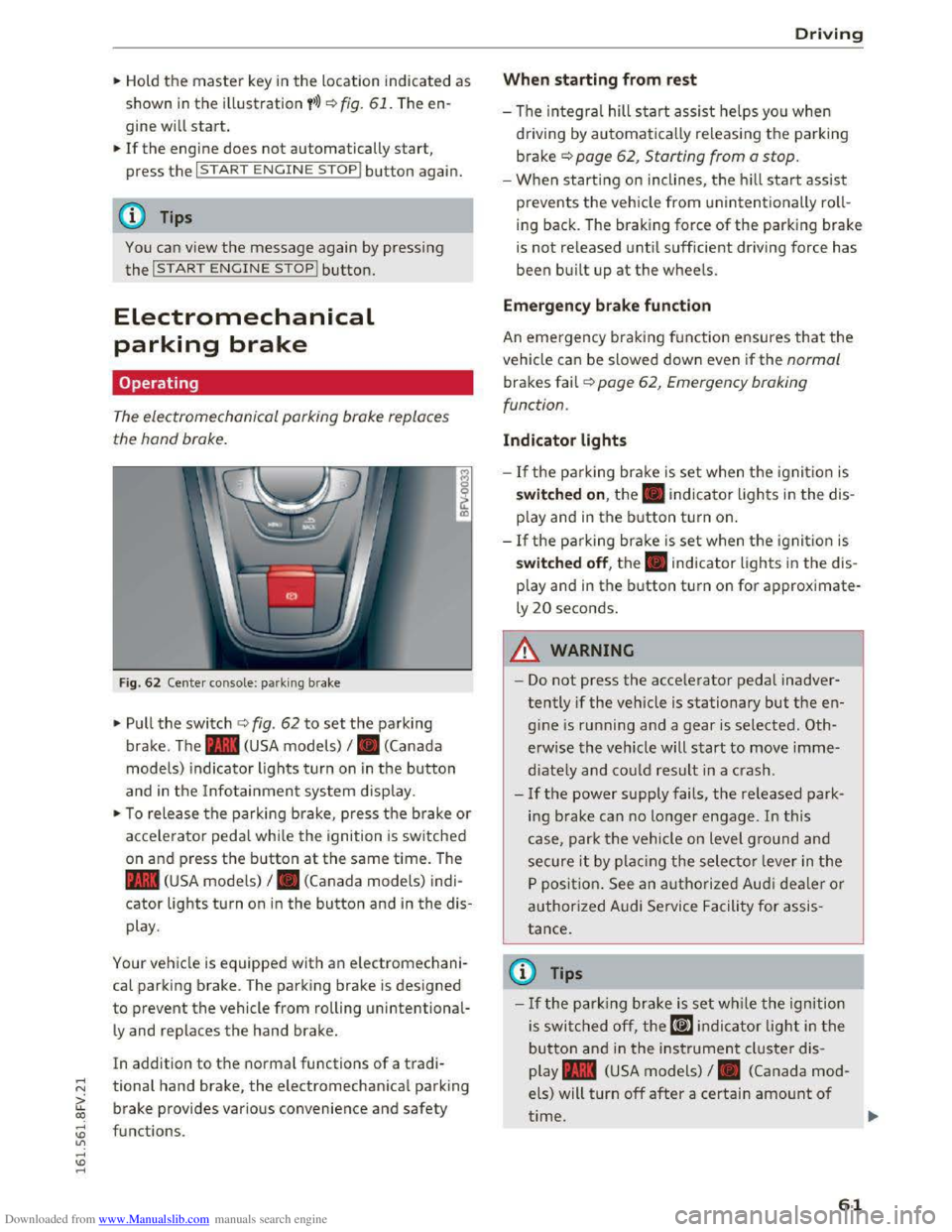
Fig. 62 Center console: park ing brake
.,.. Pull the switch ¢ fig. 62 to set the parking
brake. The . (USA models) I. (Canada
model s) indicator lights turn on in the button
and in the Info tainment system display.
.,.. To release the parking brake, press th e b rake or
acce le rator pedal while the ignition is switched
on and p ress the button at the same time. The
• (USA models) I. (Canada models) indi
cator lights turn on in the button and in the dis
play .
Your vehicle is equipped with an electromechani
cal parking brake. T
he parking brake is designed
to prevent the vehicle from rolling unintentional
ly and replaces the hand brake.
In addition to the normal functions of a tradi
tional hand brake, the electromechanical parking
brake provides various convenience
and safety
functions .
Driving
When starting from rest
-The integral hill start assist helps you when
driving by automatically releasing the parking
brake¢ page 62, Starting from a stop.
-When starting on inclines, the hill start assist
prevents the veh icle from un intentionally roll
ing back . The braking force
of the parking brake
is
not re leased unti l sufficient driving force has
been built up at the wheels.
Emergen cy brake function
An emergency braking fu nction ensures that the
vehicle can be slowed down even if the normal
brakes fail¢ page 62, Emergency braking
functi on.
Indicator lights
- If the parking brake is set when th e ignit io n is
switched on , the. indicator lights in the dis
play
and in the button tur n on .
- I f
the parking brak e is set when the ignit io n is
switched off, the. indicator lights in the dis
play
and in the b utton turn on for approximate
ly 20 seconds.
A WARNING
t-==
-Do not press the acce lerator pedal inadver-
tently if the vehicle is stationary but the en
gine is ru nning and a gear is selected. Oth
erwise the vehicle will start to move imme
diately and co uld result in a crash.
-
If the power supply fails, the released park
ing brake
can no longer engage. In this
case, park t he vehicle on level ground and
secure it by plac ing the selector l eve r in the
P position. See an authorized Audi deale r o r
authorized A udi Service Facil ity for assis
tance.
©Tips
-If the park ing brak e is set while the igni tion
is swi tc h
ed off, the((@)) indi cator light in the
button and in the ins trument cluster dis
play .
(USA models) I. (Canada mod
els) will turn off after a certain amount of
time.
61
Page 64 of 322
Downloaded from www.Manualslib.com manuals search engine Driving
-If driver's door is opened while the ignition
is
switched on, the parking brake sets auto
matically. This prevents unintended rolling
of the vehicle.
- Occasional noises
when the parking brake is
applied
and released are normal and are not
a cause for concern.
-
When the vehicle is parked, the parking
brake goes through a self-test cycle at regu
lar intervals. Any noises associated with this
are normal.
-If the. (USA models) I. (Cana-
da models) indicator lights or llJ indicator
lig ht
turn on, there could be a malfunction
in the park ing brake ~page 11.
-If there is a power failure, the parking brake
will not set if it is released, and it will not
release if it is set~.&.. See an authorized
Audi dealer or authorized Audi Service Fa
cility for
assistance.
Parking
.... Press the brake pedal to stop the vehicle.
.... Pull the switch~ to set the parking brake .
.... Place the selector lever in the P position.
.... Turn the engine off~,&.
.... Turn the steering wheel when parking on in
clines
so that the wheels will roll into the curb
if the vehicle starts moving .
A WARNING
-Always take the vehicle key with you when
leaving the vehicle, even for a short period
of time. This applies particularly when chi l
dren remai n in the vehicle. Otherwise the
children could start the engine, release the
parking brake or operate electrical equip
ment (e.g. power windows). There is the risk
of an accident.
-
When the vehicle is locked, no one -particu
larly
not children should remain in the vehi
cle. Locked
doors make it more difficult for
emergency workers to get into the vehicle,
which
puts lives at risk.
62
Starting from a stop
The start assist function ensures that the park
ing brake
is released automatically upon start
mg.
Stopping and applying parking brake
.... Pull the switch~ to set the parking brake.
Starting and automatically releasing the
parking brake
Requirement: the driver's door must be closed
and the driver's safety belt must be fastened.
.... When you press the accelerator pedal, the
parking brake is automatically released and
your vehicle begins to move.
When stopping at a traffic signal or stopping in
city traffic, the park ing brake can be applied. The
vehicle
does not have to be held with the brake
pedal. The parking brake eliminates the tendency
to creep when a selector lever position is engag
ed. As soon as you press the accelerator pedal,
the parking brake releases automatically and the
vehicle starts to move .
Starting on slope s
When starting on inclines, the hill start assist
prevents the vehicle from unintentionally rolling
back. The braking force
of the parking brake is
not released until sufficient driving force has
been built up at the wheels.
(0 Tips
For safety reasons, the parking brake is re
l
eased automatically onl y when the driver's
safety be lt is fastened and the driver's door is
l ocked.
Emergency braking function
In the event that the conventional brake system
fails or locks.
.... To brake your vehicle in an emergency, pull the
~switch and hold it pulled.
.... As soon as you release the button or accelerate,
the braking stops. .,..
Page 68 of 322
Downloaded from www.Manualslib.com manuals search engine Automatic t ra nsmission
Interlock button
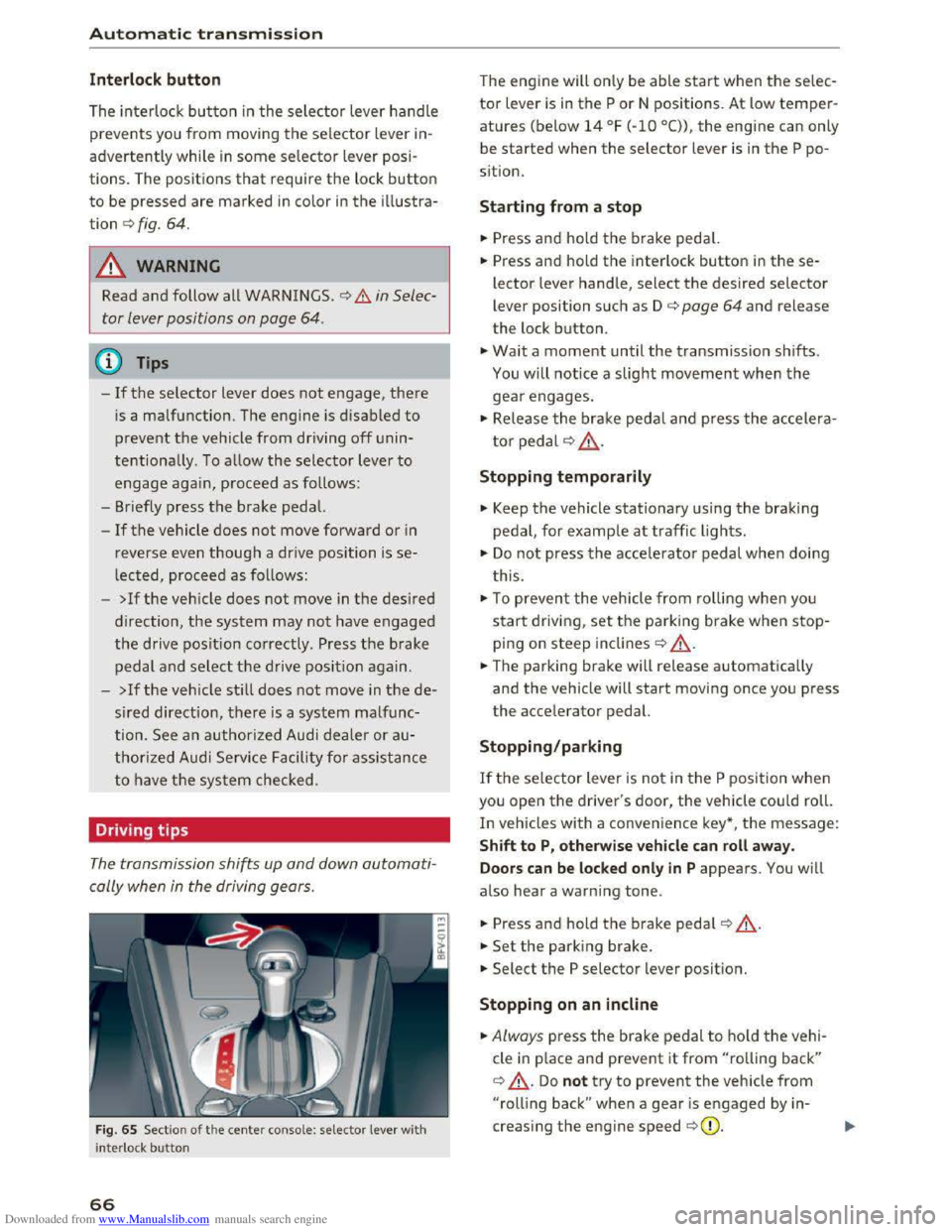
The interlock button in the selector lever handle
prevents you from moving the selector lever in
advertently while in some selector lever posi
tions. The positions that require the lock button
to be pressed are marked in color in the illustra
tion c::> fig. 64.
A WARNING
Read and follow all WARNINGS . c::> .&. in Selec
tor lever positions on page
64.
(!') Tips
-If the selector lever does not engage, there
is a malfunction. The engine is disabled to
prevent the vehicle from driving off unin
tentionally. To allow the selector lever to
engage agai n , proceed as follows :
- Briefly
press the brake pedal.
-If the vehicle does not move forward or in
reverse even though a drive position is se
lected, proceed as follows:
-
>Ifthe vehicle does not move in the desired
direction, the system may not have engaged
the drive position correctly . Press the brake
pedal and select the drive position again.
-
>If the veh icle sti ll does not move in the de
s ired direction, there is a system malfunc
tion. See an authorized Audi dealer or au
thorized Audi Service Facility for assistance
to have the system checked.
Driving tips
The transmission shifts up and down automati
cally when
in the driving gears.
Fig. 65 Sect io n of the cente r conso le: selecto r lever wit h
i nte rlock bu
tton
66
The engine will only be able start when the selec
tor lever is in the P or N positions. At low temper
atures (below 14 °F (-10 °C)), the engine can only
be
started when the selector lever is in the P po
s i
tion.
Starting from a stop
... Press and hold the brake pedal.
... Press and hold the interlock button in these
lector lever handle, select the desired selector
lever position such as D c::> page 64 and release
the lock button .
... Wait a moment until the transmission shifts.
You will notice a slight movement when the
gear engages.
... Release the brake pedal and press the accelera
tor pedal c::> .& ..
Stopping temporaril y
.,. Keep the vehicle stationary using the braking
pedal, for example at traffic lights.
.,. Do not press the accelerat o r pedal when doing
t his .
.,. To preven t the vehicle from ro llin g when you
start driving, set the parking brake when stop
ping on steep inclines c::> ,&..
... The parking brake will release automatically
and the vehicle will start moving once you press
the accelerator pedal.
Stopping/par king
If the selector lever is not in the P position when
you open the driver's door, the vehicle could roll.
In vehicles with a convenience key*, t he message:
S h ift to P, otherwise veh icle can roll awa y.
Door s can be locked only in
P appears. You will
also hear a warning tone .
... Press and hold the b rake pedal c::> ,&. .
... Set the park ing brake .
... Select the P selector lever position.
Stopping on an incl in e
... Always press the brake pedal to ho ld the vehi
cle
in p lace and prevent it from "rolling back"
c::> ,&.. Do not try to prevent the vehicle from
"rolling back" when a gear is engaged by in
creasing the engine speed c::>(D.