battery AUDI TT COUPE 2017 User Guide
[x] Cancel search | Manufacturer: AUDI, Model Year: 2017, Model line: TT COUPE, Model: AUDI TT COUPE 2017Pages: 322, PDF Size: 79.73 MB
Page 71 of 322
CD
CD
.... N
" N ,-I 0
0
Ill co
Selector lever emergency release
If the vehicle's power supply fails, the selector lever can be released in an emergency.
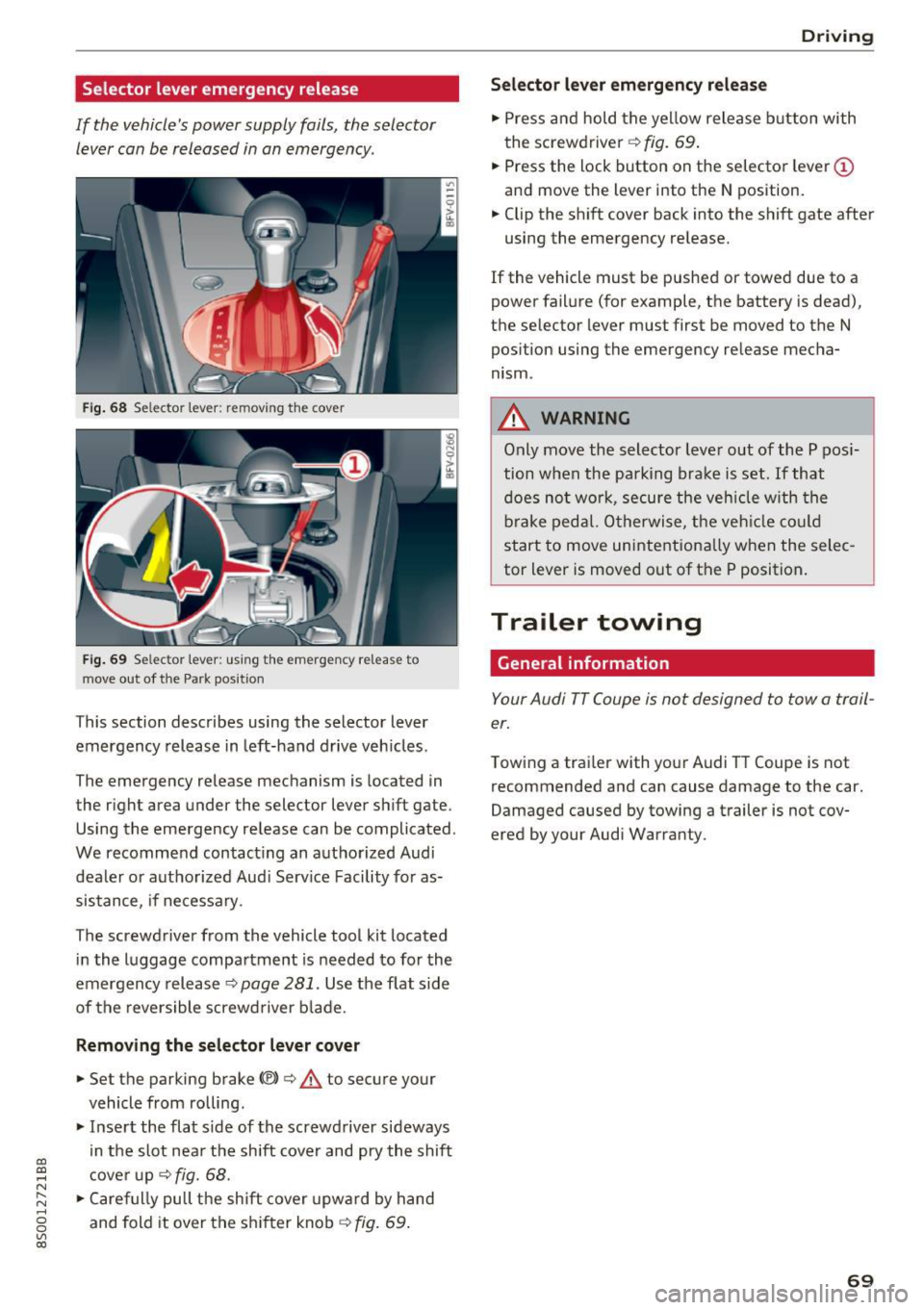
Fig . 68 Selector lever: remov ing t he cover
Fig . 69 Selec tor lever : us ing the eme rgency re lease to
move out of t he Park pos it ion
This section describes using the selector lever
emergency release in left-hand drive veh icles .
The emergency release mechanism is located in
the right area under the selector lever shift gate.
Using the emergency release can be complicated.
We recommend contact ing an authorized Audi
dealer o r authorized Aud i Serv ice Facility fo r as
sistance, if necessary .
The screwdriver from the vehicle tool kit located
i n the luggage compartment is needed to for the
emergency release ¢
page 281. Use the flat side
of the reversible screwd river b lade.
Removing the selector lever c over
.,. Set the parking brake CV)¢ A to secure your
vehicle from ro lling .
.,. In se rt the flat side of the screwdriver sideways
in the slot nea r the shift cover and pry the shift
c ove r up
¢fig. 68 .
.,. Caref ully pull t he shift cover upw ard by hand
and fold it over the sh ifter knob ¢
fig. 69.
Drivi ng
Selector l ever emergency r elease
.,. Press and hold the yellow release b utton with
the screwdriver ¢
fig. 69.
.,. Press the lock button on the selector lever
(D
and move the lever into the N position .
.,. Clip the shift cover back into the shift gate after
using the emergency re lease.
If the vehicle must be pushed or towed due to a
power failure (for example, the battery is dead),
the selector lever must first be moved to the N
pos ition using the emergency re lease mecha
nism.
A WARNING
Only move the selector lever out of the P pos i
tion when the parking bra ke is set. If that
d oes no t wo rk, secure the ve hicle w ith the
bra ke ped al. Otherwise, t he veh icle co ul d
st art to move uninte ntiona lly w hen the selec
tor lever is moved out of the P position.
Trailer towing
General information '
Your Audi TT Coupe is not designed to tow a trail
er.
Towing a trailer with you r Audi TT Coupe is not
recommended and can cause damage to the car.
Damaged caused by towing a trailer is not cov
ered by your Audi Warranty.
69
Page 81 of 322

co
co
.... N
" N .... 0
0
Vl c:o
The display brightness adjusts automatically to
the brightness of the surroundings, both in the information and in the warning stage. In very
dark or very bright surroundings, the automatic
adjustment will set the display to the minimum
or maximum level. In such cases, you may notice no change when adjusting the brightness, or the
change may only be noticeable once the sur roundings change.
Adjust the brightness to a level where the display in the information stage will not disrupt your
view ahead .
If you change the brightness, the dis
play in the exter ior mirror will briefly show the
brightness level in the information stage. The
brightness of the warning stage is linked to the
brightness in the information stage and is adjust
ed along with the information stage.
(D Tips
- Side assist is not active while you are ma k
ing the adjustment.
- Your settings are automatically stored and
assigned to the remote control key being
used.
Messages
Applies to: veh icles with Audi side assist
If the side assist switches off automatically, a
message appears in the Infotainment system dis
play.
@j Audi side assist : cur rently unavailable.
Sensor vision restricted due to surroundings.
See owner's manual
The radar sensors' vision is affected. Do not cover
the area in front of the sensors with bike wheels,
stickers, dirt or other objects . Clean the area in
front of the sensors, if necessary~
page 77,
fig. 80.
@j Audi side assist: currently unavailable.
See owner's manual
Side assist cannot be switched on at this time be
cause there is a malfunction (for example, the
battery charge level may be too low).
Assist
@j Audi side assist: malfunction! Please
contact Service
The system cannot guarantee that it will detect
vehicles correct ly and it has switched off. The
sensors have been moved or are faulty . Have the
system checked by an authorized Audi dealer or authorized Audi Service Facility soon .
Audi drive select (drive
settings)
Introduction
Applies to : vehicles with Audi drive se lect
Drive select makes it possible to experience dif
ferent types of vehicle sett ings in one veh icle .
The driver can select from three modes,
Comfort,
Auto
and Dynamic , using the ~t.~, button in the
center console or by using the Infotainment sys
tem. This allows you to switch between a sporty
and a comfortable driving mode, for example. In
the
Individual mode, the settings can be adjust
ed to your persona l preferences . This makes it
possible to combine settings such as a sporty en
gine setting with light steering.
A WARNING
=
Using Audi drive select incorrectly can lead to
collis ions, other accidents and serious inju
ries .
Description
Applies to: vehicles with Audi drive se lect
The vehicle setup in each mode depends on the
vehicle's features. However, the engine and
steering are always affected .
Engine and automatic transmission
Depending on the mode, the engine and auto
matic transmission respond more quickly or in a
more ba lanced manner to accelerator pedal
movements.
Adaptive dampers (Audi magnetic ride)*
The adaptive dampers use sensors to record in
formation regarding steering movements, brak
ing and acceleration ope rations by the driver,
road surface, driving speed, and load. With d rive .,..
79
Page 95 of 322

co
co
.... N
" N .... 0
0
Vl c:o
Facility immediately to have the malfunction cor
rected. The color of the indicator light depends
on the vehicle speed.
A WARNING
-
Driving at higher speeds without the rear
spoiler deployed can impair handling charac teristics, making the vehicle harder to con
trol.
- Always make sure that the spoiler is de
ployed when driving at speeds over 85 mph
(140 km/h). If the rear spoiler warning/indi
cator light in the instrument cluster comes
on, the rear spoiler may not have deployed.
- Never drive at speeds higher than 85 mph
(140 km/h) if the spoiler is not deployed .
Have the spoiler inspected as soon as possi
ble by an authorized Audi dealer or qualified
workshop.
- Always obey speed limits and other traffic
laws.
A WARNING t =
Improper operation of the rear spoiler can
cause crushing injuries.
-
- Always make sure that nobody, especially
children, is in the way when the rear spoiler
is deployed or retracted.
(D Note
- Never push on the vehicle on the rear spoil
er. This could cause damage.
- To prevent damage to the rear spoiler do
not lean or place anything on it.
- Only operate the rear spoiler manually when
the luggage compartment lid is close and
the rear spoiler moving parts are not
blocked. Otherwise, damage could occur.
@ Tips
Clean the rear spoiler compartment every 2 to
3 months. To function correctly, the rear
spoiler must be free of ice , snow and leaves.
Intelligent Technology
Energy management
The starting ability is optimized
The energy management system manages the
electrical energy distribution and optimizes the
availability of electrical energy for starting the
engtne.
When a vehicle with a conventional energy sys
tem is not driven for a long time, the vehicle bat
tery is drained by equipment (for example, the
immobilizer). In certain circumstances , there
could may not be enough energy to start the en
gine.
Your vehicle is equipped with an intelligent ener
gy management system for distributing electrici
ty. This significantly improves the starting ability
and increases the vehicle battery life.
The energy management system Is made up of
battery diagnosis, idling current management
and dynamic energy management.
Battery diagnosis
The battery diagnosis determines the vehicle bat
tery charge level. The sensors determine the bat
tery voltage, the battery current, and the battery
temperature. The current charge level and the
performance of the vehicle battery are deter
mined based on this.
Idling current management
The idling current management decreases the
energy used while parked. With the engine
switched off , it manages the energy distribution
to the different electrical components. Data from
the battery diagnosis is taken into account for
this.
Depending on the vehicle battery charge level,
electrical equipment is switched off one item af
ter the other to prevent the vehicle battery from draining and to maintain the starting ability.
Dynamic energy management
While driving , dynamic energy management dis
tributes the appropriate amount of energy to the
electrical equipment.
It controls the battery
charge level so that the amount of energy is not ..,_
93
Page 96 of 322
Intelligent Technology
greater than the amount being generated in or
der to maintain an optimal vehicle battery charge
level.
(D Tips
- Energy management cannot overcome the laws of physics. Note that the charge level
and length of the vehicle battery life are
limited.
- When the starting ability is jeopardized, the
(•j indicator light turns on¢ page 13.
What you should know
Maintaining the starting ability is the highest
priority.
A lot of stress is placed on the vehicle battery
when driving short distances, during city driving,
and at cold times of the year. A lot of energy is
used but little is generated. It is also critical
when the engine is not running but electrical
equipment is switched on. In this case, energy is used but none is generated .
In situations like this, energy management will
actively regulate the distribution of energy.
Long periods without use
If you do not drive your vehicle for several days or
weeks, electrical equipment is gradually scaled
back or switched off. This reduces energy use and
ensures the vehicle will be able to start after long
periods of time. Some convenience functions
such as opening with the remote control key may not be available . These convenience functions
will be available again once you switch the igni tion on and start the engine.
With the engine switched off
The vehicle battery will drain if you use Infotain ment functions such as listening to the radio
while the engine is switched off .
If the vehicle's ability to start may be impaired by
the energy use, a message will appear in the In
fotainment system display. The message indi cates that the system will switch off automatically soon .
If you would like to continue using the
functions, you must start the engine.
94
With the engine running
Although e lectrical energy is generated while
driving , the vehicle battery can drain . This can
happen if little energy is generated but much is
used, and the charge level of the vehicle battery
is not optimal.
To restore the balance of energy , components
that require large amounts of energy are tempo
rarily scaled back or switched off. Heating sys
tems in particular require a great deal of energy.
If you notice, for example, that the seat heating*
or rear window defroster is not working, then it has been temporarily reduced or switched off .
These systems are available again as soon as the energy supply has been restored.
In addition, you may notice that the idle speed
has slightly increased . That is normal and no
cause for concern . By increasing the idling speed ,
the additional required energy will be generated
and the vehicle battery will be charged.
Information about data
recorded by vehicle
control modules
Your vehicle is not equipped with a crash data re
corder . This device is installed by some vehicle
manufacturers to record data about crashes so
that it can be analyzed later. Crash data record
ers are also called "Event Data Recorders (EDR)".
In some legal jurisdictions, it is not permitted to
access or download data recorded by pre-instal
led crash data recorders in order to evaluate a
crash without clear consent of the vehicle owner.
Your vehicle is not equipped with a crash data re
corder. However it does contain a variety of elec
tronic control modules for various vehicle sys
tems such as engine function, exhaust treatment
or airbags and safety belts.
These electronic control modules record vehicle
data during normal driving for diagnosis and re
pair purposes. The recording capability of the
electronic control modules is limited to data only
- no sound is recorded. If the control module de
tects a system malfunction or other change in
status, a very limited amount of data is recorded .,,.
Page 99 of 322
CD
CD
.... N
" N .... 0
0
Ill co
police and fire sirens, can be heard easily at
all times.
(D Tips
The M MI switches off automatically if the en
gine is not running and the vehicle battery is
low.
MMI operation
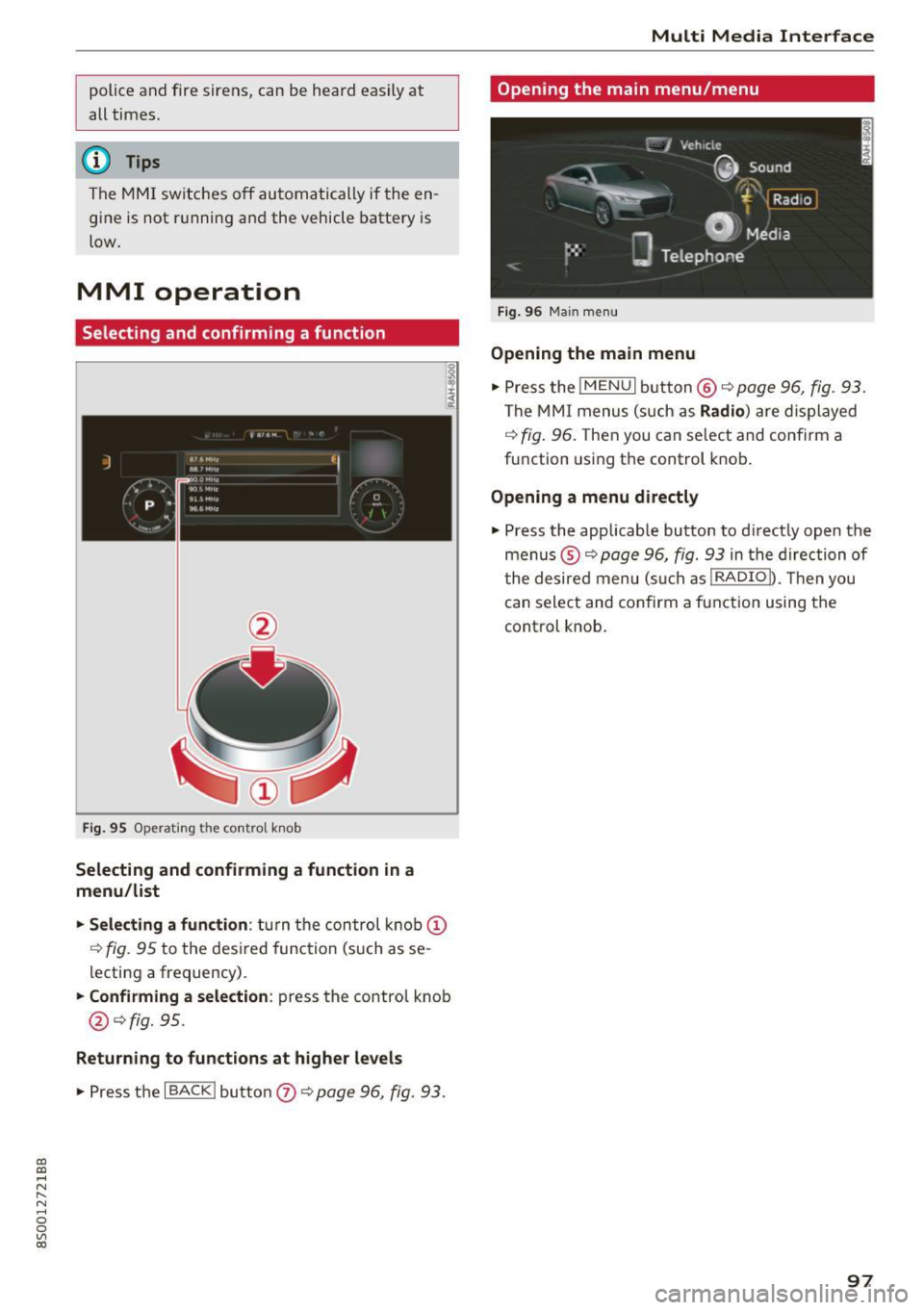
Selecting and confirming a function
Fig. 95 Operat ing the cont ro l knob
Selecting and confirming a function in a
menu/list
"'Selecting a function:
turn the control knob(!)
r:!>fig. 95 to the des ired function (such as se
lecting a frequency).
"'Confirming a selection: press the control knob
@¢fig. 95.
Returning to functions at higher levels
"'P ress the I BACKI button 0 ¢ page 96, fig. 93.
Multi Media Interface
Opening the main menu/menu
Fig. 96 Main menu
Opening the main menu
"'Pressthe lMENUlbutton @¢page96, fig. 93.
The MMI menus (such as Radio) are displayed
¢
fig. 96. Then you can se lect and confirm a
function using the control knob.
Opening a menu directly
"' Press the applicable button to d irectly open the
menus ®¢
page 96, fig. 93 in the direction of
t he desired menu (such as!RADIOn. Then you
can select and confirm a function using the
control knob.
97
Page 160 of 322
Media
When importing, the audio files are automatical
ly sorted into the media center categories based
on the stored addit ional information
¢
page 164. The copied video files are stored in
the media center under the
Videos category.
Playing the Jukebox
Requirement: the Jukebox must contain audio/
video fi les ¢
page 15 7, Adding files to the Juke
box.
The Jukebox is accessed and operated through
the MMI
(D ¢ page 163, fig . 139.
Displaying Jukebox memory capacity
Select: right control button > Jukebox memory
capacity .
Information about the Jukebox memory
cap acity and the number of sto red tracks is dis
p la yed.
Deleting tracks from the Jukebox1
)
Requ irement: the Jukebox must contain audio/
video fi les.
- Delet ing an entry: select an entry from the
Jukebox media center . Select: right control but
ton
> Delete from Jukebox > This entry or En
tire list.
- The status of the deleting process is shown in
the MMI. Jukebox playback stops during the de
leting process and starts again automatically
once the dele tion is complete .
0 Note
Do not import aud io/video files when the en
gine is t urned off because this will drain the
veh icle battery.
(D Tips
- Tracks from aud io CDs cannot be imported
to the Jukebox for legal reasons .
- Files that have already been imported are
automat ically recognized and cannot be
copied to the Jukebox again.
- It is not possible to play audio/v ideo* files
in the CD/DVD* drive while importing them.
1> Not i n the Playback vie w.
158
- Th e Juk ebox does not provide an export
function due to legal reasons .
- Files or tracks without stored additional in
formation a re listed as
Unknown . Audi rec
ommends adding additional information
(such as ID3 tags) to audio files.
- Reset the Jukebox to the factory default set
t ings when selling your vehicle¢
page 175 .
Bluetooth audio player
Applies to: vehicles wi th Blu et oot h
With the Bluetooth audio player, you can play
music wirelessly from your Bluetooth-capable
device (such as a cell phone) through the MMI.
Requirement: the vehicle must be stationary and
the Bluetooth function on your Bluetooth device and the
Bluetooth audio player¢ page 176 in
the MMI must both be sw itched on .
-Connecting a Bluetooth device : press the
!MEDIA ! button. Press the left control button
until the source overview is d isp layed. Select
and confirm
Bluetooth audio player @
opage 163, fig . 140 .
-If necessary, select and confirm, Not connected
> Connect Bluetooth audio player . The Blue
tooth device search starts . Follow the instruc
tions in the MMI.
- Select and confirm the des ired Bluetooth de
vice from the list. The MMI generates a PIN for
the conn ection.
- Select and confirm
Yes .
-Enter the PIN for connecting on your Bluetooth
dev ice .
Or : if the PIN is already displayed on
your Bluetooth device, conf irm it in the Blue
tooth device and in the MMI. The time allowed
for entering the PIN is lim ited to approximately
30 seconds.
The media is started and operated through the
mobile device o r the MMI, depending on the de
vice being used.
(D Tips
- Check fo r any connection requests on your
Bluetooth device.
Page 163 of 322
CD
CD
.... N
" N .... 0
0
Ill co
@ Tips
-Depending on the Internet connection and
network traffic, a connection loss can occur
during playback of on line media services.
-Online media and Internet radio usage de
pends on the service availability of the third
party provider.
- Audi AG simply makes the access to online
media services possible through the MMI
and does not take any responsibility for the
contents of the online media services.
- Always read the chapter ¢ page 132, About
Audi connect.
- Depending on the mobile device used, there
may be interruptions during media playback
and when using the
Audi MMI connect app.
To avoid interruptions when using a mobile device, do not lock the screen on your mo
bile device and keep the
Audi MMI connect
app in the foreground.
- Contact your authorized Audi dealer or au
thorized Audi Service Facility for additional
information about online media.
Multimedia connections
USB adapter for Audi music interface or
USB charging port
Depending on the vehicle equipment, you can
connect your mobile devices (such as a smart
phone or MP3 player) to the Audi music interface
or a USB charging port using a special USB
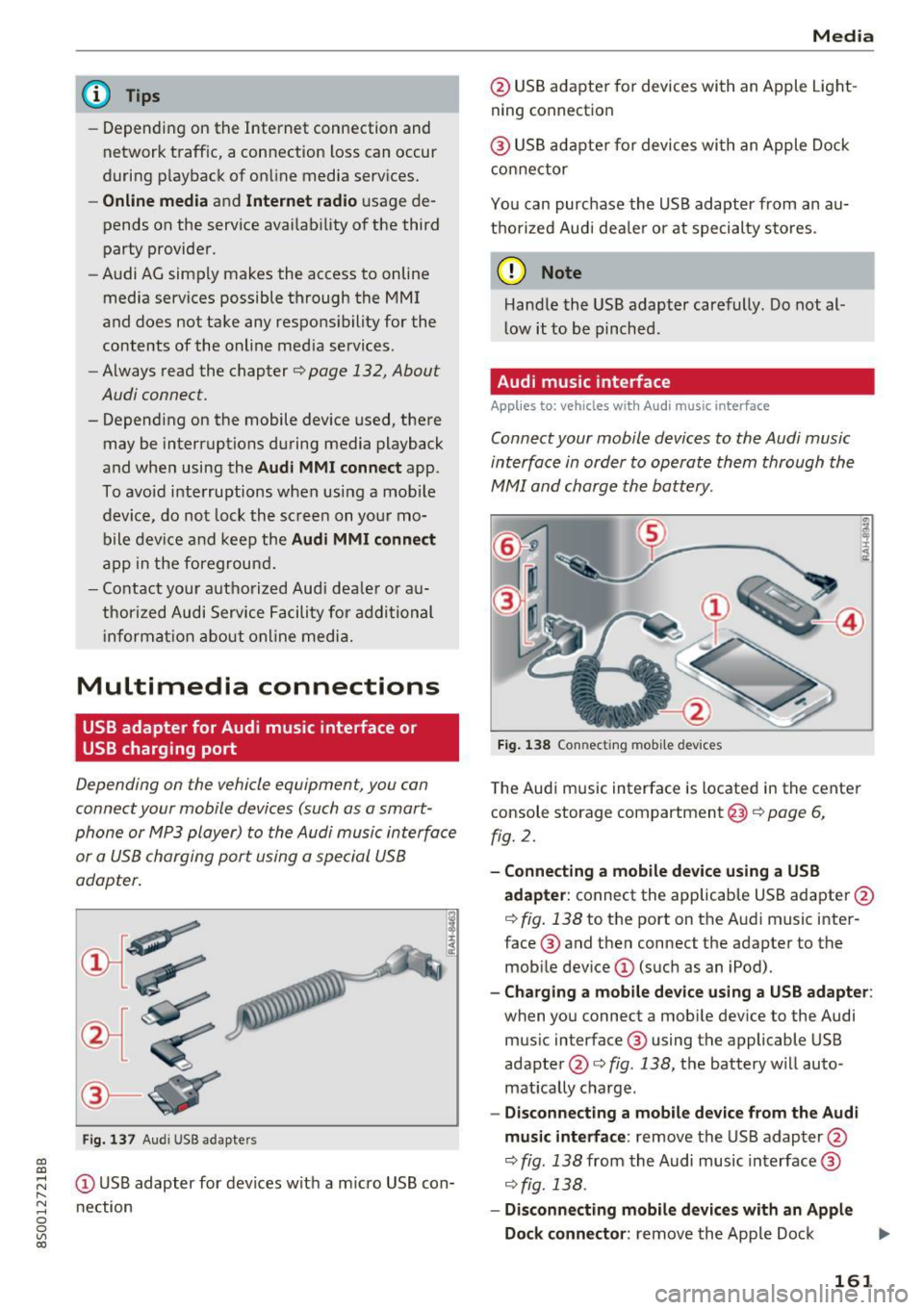
adapter.
I
Fig. 137 Audi USS adapters
(D USB adapter for devices with a micro USB con
nection
Media
@ USB adapter for devices with an Apple Light
ning connection
@ USB adapter for devices with an Apple Dock
connector
You can purchase the USB adapter from an au
thorized Audi dealer or at specialty stores.
(D Note
Handle the USB adapter carefully. Do not al
low it to be pinched.
Audi music interface
App lies to: vehicles wi th Audi music interface
Connect your mobile devices to the Audi music
interface in order to operate them through the
MMI and charge the battery .
Fig. 138 Connecting mobile devices
The Audi music interface is located in the center
console storage compartment@¢ page 6,
fig. 2.
-Connecting a mobile device using a USB
adapter:
connect the applicable USB adapter@
¢ fig. 138 to the port on the Audi music inter
face @ and then connect the adapter to the
mobile device
(D (such as an iPod).
-Charging a mobile device using a USB adapter :
when you connect a mobile device to the Audi
music interface ® using the applicable USB
adapter @¢ fig. 138, the battery will auto
matically charge .
-Disconnecting a mobile device from the Audi
music interface :
remove the USB adapter@
¢ fig . 138 from the Audi music interface @
¢ fig. 138.
-Disconnecting mobile devices with an Apple
Dock connector :
remove the Apple Dock .,,.
161
Page 175 of 322
co
co
.... N
" N .... 0
0
Vl c:o
Audi smartphone interface
Android Auto: to go back to the Android Auto
menu bar, push the contro l knob down. Opening a menu item
Select and confirm a menu item using the MMI
control panel.
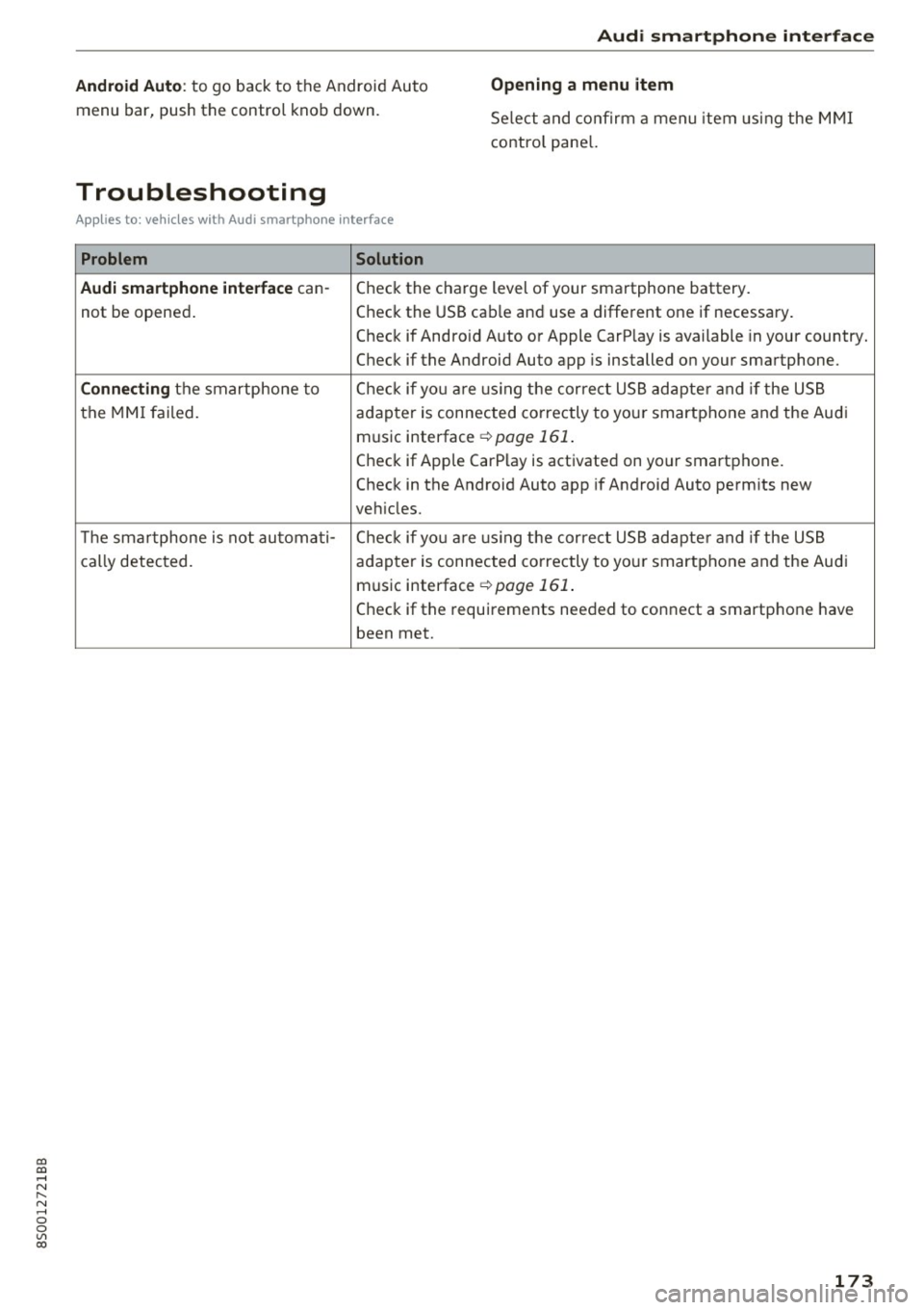
Troubleshooting
A ppl ies to: ve hicles with Audi smartpho ne in terface
Problem Solution
Audi smartphone interface
can-Check the charge level of your smartphone battery.
not be opened . Check the
USB cable and use a different one if necessary.
Check if Android Auto or Apple CarPlay is available in your country.
Check if the Android Auto app is installed on your smartphone.
Connecting the smartphone to Check if yo u ar,e usin g the correct USB adapter and if the USB
the MMI failed. adapter is connected correctly to your smartphone and the Audi
music interface
¢ page 161 .
Check if Apple CarPlay is activated on your smartphone.
Check in the Android Auto app if Android Auto permits new
veh icles.
Th e smartphone is not automa ti- Check if yo u ar,e usin g the correct USB adapter and if the USB
cally detected. adapter is connected correctly to your smartphone and the Audi
music interface
¢ page 161 .
Check if the requirements needed to connect a smartphone have
been met.
173
Page 215 of 322
CD
CD
.... N
" N ...... 0
0
Ill co
-For safety reasons in severe accidents, the
alternator and starter are separated from
the vehicle battery with a pyrotechn ic circuit
interrupter.
- Work on the pyrotechnic circ uit interrupt
er must only be performed by a qualified
technicians who have the experience, in
formation and special tools necessary to
perform the work safely.
- If the vehicle or the circuit interrupter is
scrapped, all app licab le safety precautions
must be followed .
@) For the sake of the environment
Undeployed airbag modu les a nd pretension
ers might be classified as Perch lorate Materi
al -special handling may apply, see
www.dtsc .ca.gov/hazardouswaste/perchlo
rate. When the vehicle or parts of the re
straint system including airbag modules and
safety belts with pretensioners are scrapped,
all applicable laws and regulations must be
observed. Your authorized Audi dealer is fa
m iliar with these requi rements a nd we recom
mend t hat you have you r dealer perform this
service for you.
Other things that can affect Advanced
Airbag performance
Changing the vehicle's suspension system can
change the way that the Advanced Airbag System
performs in a crash . For example, using tire-r im
comb inat ions not approved by Audi, lowering the
ve hicl e, chang ing the stiffness of the suspens io n,
in clud ing the spr ings, suspens ion str uts, shock
absorbers et c. can change the forces that are
measured by the airbag sensors and sent to the
e lectronic contro l unit. Some suspension changes
can, for example, increase the force levels meas
ured by the sensors and make the airbag system
deploy in crashes in wh ich it would not deploy if
the changes had not been made. Other ki nds of
changes may reduce the fo rce levels meas ured by
the sensors and prevent the airbag from deploy
in g when i t should .
Airbag sys tem
A WARNING
-Changing the vehicle's suspension including
use of unapproved tire-rim combinations can
change Advanced Airbag performance and in
crease the risk of serious persona l injury in a
crash.
- Never install suspension components that
do not have the same pe rformance charac
teristics as the components o rigina lly ins tal
led on your vehicle.
- Never use tire-rim combinations t hat have
not been approved by Audi.
Knee airbags
Description of knee airbags
The knee airbag system can provide supplemen
tal protection to prop erly restrained front sea t
occupants.
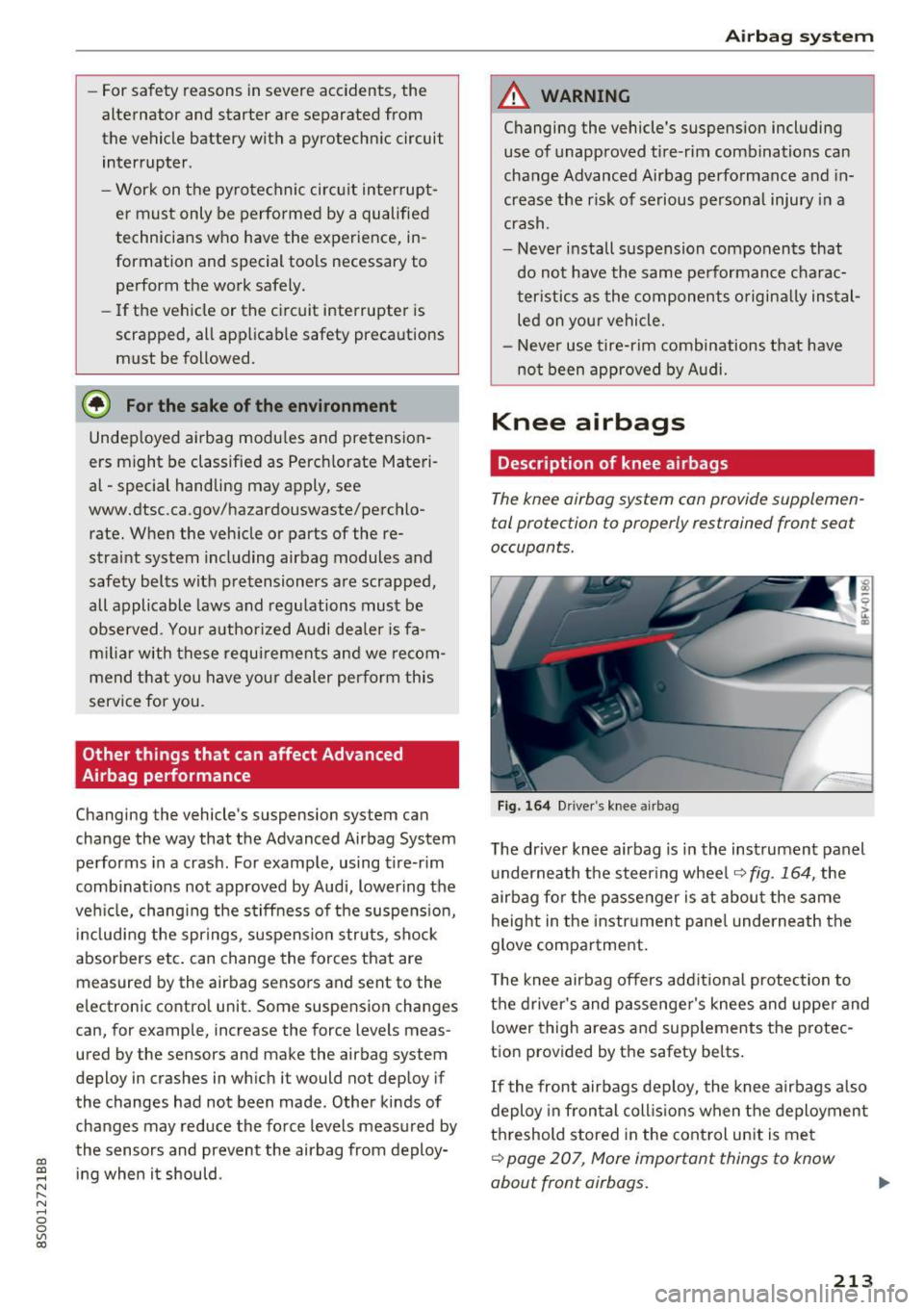
F ig. 16 4 D river 's knee a irbag
The driver knee airbag is in the instrument panel
u nderneath the steering whee l
~fig. 164, the
airbag fo r the p asse nger is at about the same
height in the instr ument pane l underneath the
glove compa rtment.
T he knee airbag offers add itiona l protection to
the driver's and passenge r's knees and uppe r and
lower thigh areas and supp lements the protec
tion provided by the safety be lts .
If the front airbags deploy, the knee airbags a lso
deploy in fron tal coll is ions when the deploymen t
threshold stored in the cont rol un it is me t
~ page 207, More important things to know
about front airbags.
213
Page 246 of 322
Check ing and F illing
Engine compartment
Working in the engine compartment
Special care is required if you are working in the
engine compartment
Fo r wo rk in th e engine compa rtmen t su ch as
c h ec kin g and filli ng flu id s, th ere is a risk of in
j u ry, sc aldin g, ac cide nts, a nd b urn s. For this
rea son, foll ow all the warning s and gener al
s a fe ty p recaution s pr ov ided in the f ollow ing in·
f o rm ation . Th e en gine c omp artmen t is a dan
ger ous are a.
¢ ,&.
_& WARNING
- T urn the engine off.
- Switch the ign ition off .
- Set the parking brake .
- Place the selector lever in the P pos ition.
- let the engine cool down.
- Never open the hood when there is steam or coolant escaping from the engine compart
ment, because there is a risk that you could
be burned . Wait until no steam or coolant is
escaping .
- Keep ch ildren away from the engine com
partment .
- Never spill flu ids on a hot engine. These flu
ids (such as the freeze protection contained
in the coolant) can catch fire .
- Avoid short circu its in the electrical system,
especially to the battery .
- When working in the engine compartment,
remember that the rad iator fan can sw itch
on even if the ign ition is switched off, which
increases the risk of pe rsonal injury .
- Never open the cap on the coolant expan sion tank when the eng ine is warm. The
cooling system is under pressu re .
- To protect your face, hands, and arms from
hot steam or coolant, cover the cap with a
large cloth when opening.
- Do not remove the engine cover under any
circumstances. This increases the risk of
burns.
- If tests need to be performed w ith the en
gine running, there is additional danger d ue
244
to moving components (such as the ribbed
be lt, alternator and rad iator fan) and from
the high voltage ignition system.
- Do not press the acce lerator pedal inadver
tently if a gear is selected when the vehicle
is stationary and the engine is running. Oth
erwise, the vehicle will start to move imme
diately and this could result in an accident .
- Pay attent ion to the following warnings list
ed when work on the fuel system or on the
electrical equipment is required.
- Do not smoke .
- Never work near open flames .
- Always have a working fire extinguisher
nearby
- All work on the battery or elect rical system
in your vehicle can result in injuries, chemi
cal b urns, acc idents or burns . Because of
this, all work must be performed
onl y by an
authorized Audi dealer or authorized Audi
Service Facility.
- To reduce the risk o f electric shock and in
jury, never touch the following components
when the engine is running or is being start•
ed:
- Ign ition cable
- Other components in the electronic high -
vo ltage ign ition system
- If you must check or perform work on the
engine while it is running:
- Set the parking brake and place the selec
tor lever in the P (park) position first .
- Always proceed w ith extreme caution so
that clothing, jewelry or long hair do not
become caught in the radiator fan, fan
belt or other moving components or do
not come into contact with hot compo
nents. Tie back long hair before beginn ing
work and do not wear clothing that can hang down into the engine .
- Lim it your exposure to exhaust and chemi
cals to as short a time as possible
¢ .&. .
A WARNING
California Proposition 65 Warning: