instrument cluster AUDI TT COUPE 2017 User Guide
[x] Cancel search | Manufacturer: AUDI, Model Year: 2017, Model line: TT COUPE, Model: AUDI TT COUPE 2017Pages: 322, PDF Size: 79.73 MB
Page 90 of 322
Intelligent Technology
Intelligent Technology
Electronic stabilization
control (ESC)
Description
Electronic Stabilization Control (ESC) supports
driver safety.
It reduces the risk of slipping and
improves driving stability. ESC detects critical sit
uations such as the vehicle oversteering and un
dersteering or the wheels are spinning. The vehi
cle is stabilized by applying the brakes or reduc
ing engine torque. When ESC engages, the
G1 in
dicator light blinks in the instrument cluster.
The following systems are integrated in the ESC:
Anti-lock braking system (ABS)
ABS prevents the wheels from locking when brak
ing. The vehicle can still be steered even during
hard braking. Apply steady pressure to the brake
pedal. Do not pump the pedal. A pulsing in the
brake pedal indicates that the system is acting to
stabilize the vehicle .
Brake assist system
The brake assist system can decrease braking dis
tance. It increases braking power when the driver
presses the brake pedal quickly in emergency sit
uations . You must press and hold the brake pedal
until the dangerous situation is over .
Anti-slip regulation (ASR)
ASR reduces engine power when the drive wheels
begin spinning and adapts the force to the road
conditions. This makes it easier to start, acceler
ate and drive up hills .
Electronic differential lock (EDL)
EDL applies the brakes to a wheel that starts
spinning and transfers the drive power to the
other driving wheels. This function is not availa
ble at higher speeds.
In extreme cases, EDL automatically switches
off
to keep the brake on the braked wheel from over heating. The vehicle is still working correctly. EDL
will switch on again automatically when condi
tions have returned to normal.
88 Steering
recommendation
The ESC helps to stabilize the vehicle by changing
the steering torque.
Selective wheel torque control
Selective wheel torque control is used when driv
ing on curves. The front whee l on the inside of
the curve or both wheels on the inside of the
cu rve are braked selectively as needed. This al
lows more precise driving in curves. The applica
ble system may not activate when driving in wet
or snowy conditions.
A WARNING
- The ESC and its integrated systems cannot
overcome the limits imposed by natural physical laws. This is especially important
on slippery or wet roads. If the systems be
gin acting to stabilize your vehicle, you
should immediately alter your speed to
match the road and traffic conditions. Do
not let the increased safety provided tempt
you into taking risks. This could increase
your risk of a collision .
- Please note the risk of a collision increases
when driving fast, especially through curves
and on slippery or wet roads, and when driv ing too close to objects ahead. The ESC and
its integrated systems cannot always pre
vent collisions -there is still a risk of acci
dents!
- Press the accelerator pedal carefully when
accelerating on even, slippery surfaces such
as ice and snow. The drive wheels can spin
even when these control systems are instal
led and this can affect driving stability and
increase the risk of a collision.
(j) Tips
-The ABS and ASR only function correctly
when all four wheels have a similar wear
condition. Different tire sizes can lead to a
reduction in engine power.
- You may hear noises when the systems de
scribed are working.
Page 95 of 322

co
co
.... N
" N .... 0
0
Vl c:o
Facility immediately to have the malfunction cor
rected. The color of the indicator light depends
on the vehicle speed.
A WARNING
-
Driving at higher speeds without the rear
spoiler deployed can impair handling charac teristics, making the vehicle harder to con
trol.
- Always make sure that the spoiler is de
ployed when driving at speeds over 85 mph
(140 km/h). If the rear spoiler warning/indi
cator light in the instrument cluster comes
on, the rear spoiler may not have deployed.
- Never drive at speeds higher than 85 mph
(140 km/h) if the spoiler is not deployed .
Have the spoiler inspected as soon as possi
ble by an authorized Audi dealer or qualified
workshop.
- Always obey speed limits and other traffic
laws.
A WARNING t =
Improper operation of the rear spoiler can
cause crushing injuries.
-
- Always make sure that nobody, especially
children, is in the way when the rear spoiler
is deployed or retracted.
(D Note
- Never push on the vehicle on the rear spoil
er. This could cause damage.
- To prevent damage to the rear spoiler do
not lean or place anything on it.
- Only operate the rear spoiler manually when
the luggage compartment lid is close and
the rear spoiler moving parts are not
blocked. Otherwise, damage could occur.
@ Tips
Clean the rear spoiler compartment every 2 to
3 months. To function correctly, the rear
spoiler must be free of ice , snow and leaves.
Intelligent Technology
Energy management
The starting ability is optimized
The energy management system manages the
electrical energy distribution and optimizes the
availability of electrical energy for starting the
engtne.
When a vehicle with a conventional energy sys
tem is not driven for a long time, the vehicle bat
tery is drained by equipment (for example, the
immobilizer). In certain circumstances , there
could may not be enough energy to start the en
gine.
Your vehicle is equipped with an intelligent ener
gy management system for distributing electrici
ty. This significantly improves the starting ability
and increases the vehicle battery life.
The energy management system Is made up of
battery diagnosis, idling current management
and dynamic energy management.
Battery diagnosis
The battery diagnosis determines the vehicle bat
tery charge level. The sensors determine the bat
tery voltage, the battery current, and the battery
temperature. The current charge level and the
performance of the vehicle battery are deter
mined based on this.
Idling current management
The idling current management decreases the
energy used while parked. With the engine
switched off , it manages the energy distribution
to the different electrical components. Data from
the battery diagnosis is taken into account for
this.
Depending on the vehicle battery charge level,
electrical equipment is switched off one item af
ter the other to prevent the vehicle battery from draining and to maintain the starting ability.
Dynamic energy management
While driving , dynamic energy management dis
tributes the appropriate amount of energy to the
electrical equipment.
It controls the battery
charge level so that the amount of energy is not ..,_
93
Page 181 of 322
co
co
.... N
" N .... 0
0
Vl c:o
Voice guidance during phone call: see
¢ page 142, Voice guidance.
Voice guidance volume: yo u ca n ad just the v oice
g uid ance vo lume during ac tive rou te gu idance by
turning the control kno b.
Entertainment fader: the vo lume of au dio play
bac k can be tem pora rily lowe re d w hen the p ark
i n g sys tem or voi ce gui dance is ac tive .
Voice recognition system
App lies to: vehicles with voice recognition system
Short dialog : prom pts in a s horte r format can be
switched on o r off .
Speech dialog system volume : you can adj ust
the vol ume of the prompts by tur ning t he control
knob .
Parking aid*
You can adjust th e signal tone vol ume by tu rnin g
the contro l knob .
-Adjusting the Front volume : select and con
firm
High , Medium or Low.
-Adjusting
the Rear volume : select and confirm
High , Medium or Low .
MMI touch volume*
You can a djust the vo lume of the prom pts for the
M MI to uch* by tu rning the con trol kn ob .
Audi Heartbeat
You can ad just the vo lume of Aud i Heartbeat by
turn ing t he control knob.
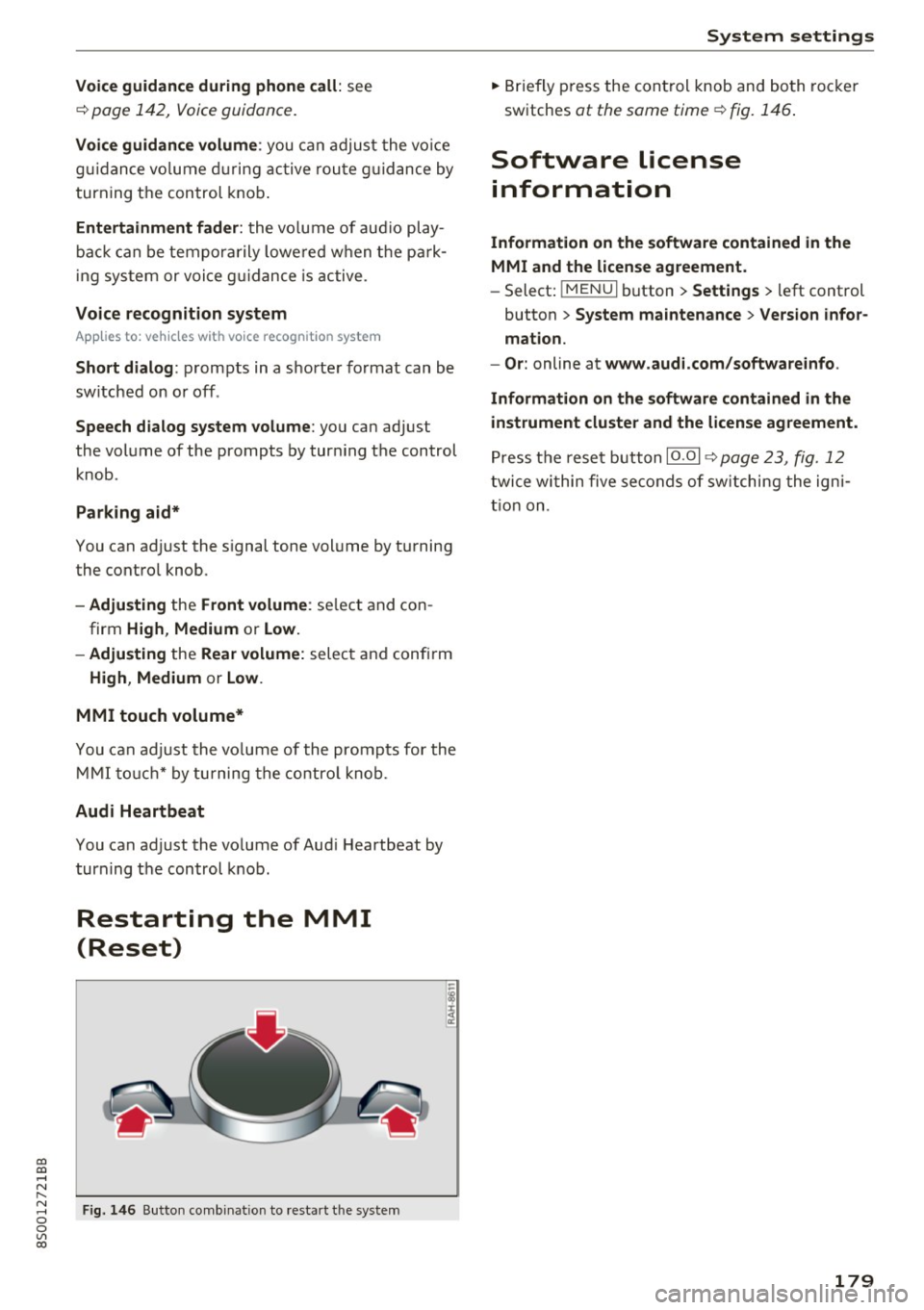
Restarting the MMI
(Reset)
Fig. 146 B ut to n co mbin at io n t o res tar t t he sys te m
-
I
System settings
.. Brie fly press the con trol knob and bo th roc ke r
sw itches
at the same time ¢ fig. 1 46.
Software license
information
Information on the software contained in the
MMI and the license agreement.
- Select: !ME NUI button> Settings > le ft control
button >
System maintenance > Version infor
mation.
- Or :
online at www.audi.com/softwareinfo .
Information on the software contained in the
instrument cluster and the license agreement.
Pr ess t he rese t button 10 .01 ¢ page 23, fig . 12
twi ce wi thin five se conds of sw itching the ig ni
t io n on .
179
Page 192 of 322
Safe ty belts
The warning light . in the instrument cluster
lights up when the ignit ion is switched on as a re
minder to fasten the safety belts. In addition, a
warning tone w ill sound for a certain period of
time.
F a sten you r safet y be lt and make sure that your
pa sse nge rs also prope rly put on thei r safet y
belt s.
_&. WARNING
- Safety belts are the s ingle most effective
means ava ilable to reduce the risk of ser ious
i njury and death in automobile acc idents .
For yo ur protect ion and that of your passen
gers, always co rrectly wea r safety be lts
when the vehicle is moving .
- Failure to pay attention to t he war ning light
that comes on could lead to persona l injury.
Why safety belts?
Frontal collisions and the law of physics
Frontal crashes create very strong forces for peo
ple riding in vehicles.
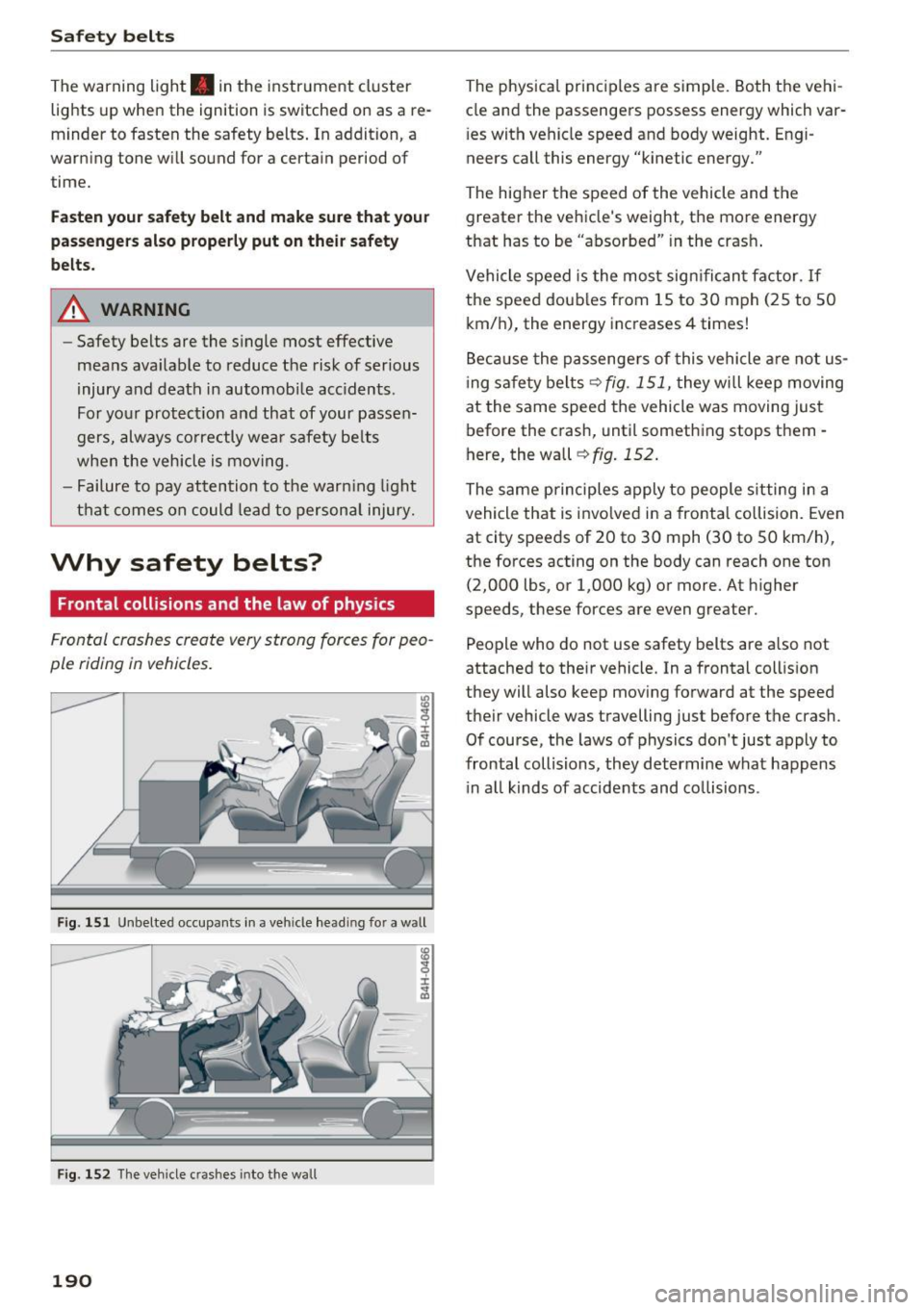
Fig. 151 Unbelte d occupa nts in a ve hicle head in g fo r a w all
I ± ..,. a,
F ig . 1 52 The veh icle c rashes into the w all
190
The physical princ iples are simple . Both the vehi
cle and the passengers possess energy which var
i es with vehicle speed and body weight. Engi
neers call this energy "kinetic energy."
The higher the speed of the vehicle and the greater the vehicle 's we ight, the more energy
that has to be "absorbed" in the crash .
Vehicle speed is the most sign ifican t factor. If
the speed doub les from 15 to 30 mph (25 to 50
km/h), the energy increases 4 times!
Beca use the passenge rs of this vehicle a re not us
i ng safety belts ¢
fig. 151, they w ill keep moving
at the same speed the vehicle was moving just before the crash, until something stops them -
here, the wall
¢ fig . 152 .
The same principles apply to people s itting in a
vehicle that is invo lved in a frontal collision. Even
at city speeds of 20 to 30 mph (30 to 50 km/h),
the forces acting on the body can reach one ton (2,000 lbs , or 1,000 kg) or more. At h igher
speeds, these forces are even greater.
People who do not use safety belts are a lso not
attached to their vehicle. In a frontal coll is ion
they will also keep mov ing forward at the speed
their vehicle was travelling just before the crash .
Of course, the laws of physics don 't just apply to
frontal collisions, they determine what happens i n a ll kinds of accide nts and co llisions .
Page 207 of 322

co
co
.... N
" N .... 0
0
Vl c:o
control unit "decides" whether to fire the front
airbags based on the information received from
the crash sensors. The control unit also "de
cides" whether the safety be lt pretensioners
shou ld be activated.
- An Advanced Airbag with gas generator for the
driver inside the steering wheel hub.
- An Advanced Airbag with gas generator inside
the instrument panel for the front passenger.
- A capacitive passenger detection system under
neath the front passenger seat cover. This sys
tem measures the electrical capacitance of the
person in the seat. The information registered
is sent continuously to the electronic control
unit to regulate deployment of the front Ad
vanced Airbag on the passenger side.
- An airbag monitoring system and indicator
light
El in the instrument cluster.
- A sensor in each front seat registers the dis
tance between the respective seat and the
steering wheel or instrument panel. The infor
mation registered is sent continuously to the
electronic control unit to regulate deployment
of the front Adv a need Airbags.
- The
PASSENGER AIR BAG OFF~; light comes
on and stays on in the headliner¢
page 209,
fig. 163 and tells you when the front Advanced
Airbag on the passenger side has been turned
off.
-A sensor in the safety belt latch for the driver
and for the front seat passenger that senses
whether that safety belt is latched or not and
transm its this information to the electronic
contro l unit.
A WARNING
Damage to the front passenger seat can pre
vent the front airbag from working properly.
- Improper repair or disassembly of the front
passenger and driver seat will prevent the
Advanced Airbag System from functioning properly.
- Repairs to the front passenger seat must be
performed by qualified and properly trained
workshop personnel.
- Never remove the front passenger or driver
seat from the vehicle.
Airbag system
-Never remove the upholstery from the front
passenger seat.
- Never disassemble or remove parts from the
seat or disconnect wires from it.
- Never carry sharp objects in your pockets or
put them on the seat. The capacitive pas
senger detection mat in the front passenger
seat will not function properly if it is punc
tured.
- Never carry things on your lap or carry ob
jects on the front passenger seat. Such ob
jects can influence the capacitance regis
tered by the capacitive passenger detection
system, so that incorrect information is pro
vided to the airbag control unit.
- Never store items under the front passenger
seat. Parts of the Advanced Airbag System
under the passenger seat could be dam
aged , preventing them and the airbag sys
tem from working properly.
- Never place seat covers or replacement up
holstery that have not been specifically ap
proved by Audi on the front seats.
- Seat covers can prevent the Advanced Air
bag System from recognizing child re
straints or occupants on the front passenger
seat and prevent the side airbag in the seat
backrest from deploying properly.
- If a seat heater has been retrofitted or oth
erwise added to the front passenger seat,
never install any child restraint system on
this seat.
- Never use cushions, pillows, blankets, or
similar items on the front passenger seat.
The additional layers prevent the capacitive
passenger detection system from accurately
measuring the capacitance of the child safe
ty seat and/or the person on the seat and
thus keep the Advanced Airbag System from
working properly.
- Never place or use any electrical device
(such as a laptop, CD player, electronic
games device, power inverter or seat heater
for child seats) on the front passenger seat
if the device is connected to the 12-volt
socket or the cigarette lighter socket. Such
devices can influence the capacitance regis
tered by the capacitive passenger detection
205
Page 248 of 322
Checking and Filling
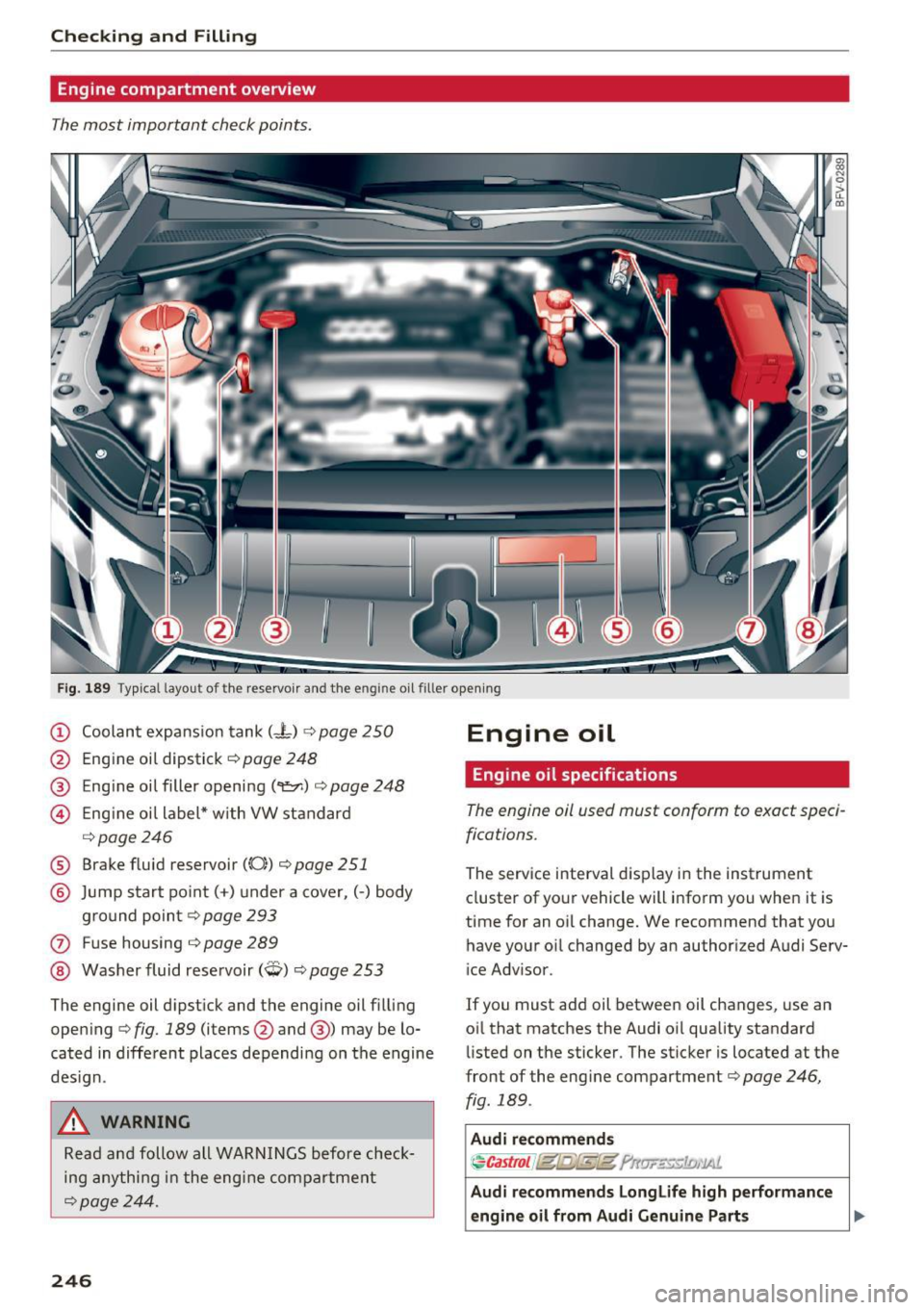
Engine compartment overview
The most important check points.
Fig. 189 Typ ical l ayout of the reservoir and the engine o il filler opening
(D Coolant expansion tank (- t) ¢ page 250
@ Engine oil dipstick¢ page 248
® Engine oil filler opening (
¢ page246
® Brake fluid reservoir ((0)) ¢ page 251
@ Jump start point( +) un der a cover, (-) body
ground point ¢page 293
0 Fuse housing ¢ page 289
@ Washer fluid reservoir (W) ¢ page 253
The engine oil dipstick and the engine oil filling
opening ¢ fig. 189 (items@and @) may be lo
cated in different places depending on the engine
design.
A WARNING
Read and follow all WARNINGS before check
ing anything in the engine compartment
¢page 244.
246
Engine oil
Engine oil specifications
The engine ail used must conform to exact speci
fications.
The serv ice interval d isplay in the instrument
cluster of your vehicle will inform you when it is
time for an oil change. We recommend that you
have your oil changed by an authorized Audi Serv
ice Adv isor.
If you must add oil between oil changes, use an
oil that matches the Audi oi l quality standard
listed on the sticker. The sticker is located at the
front of the eng ine compartment¢ page 246,
fig. 189 .
Audi recommends
~Castrol J@t@fkl!t ?llw..::~c:1£;,'lAl.
Audi recommends Longlife high performance
engine oil from Audi Genuine Parts .,..
Page 249 of 322
Using the proper engine oil is important for the
functionality and s ervice life of the engine. Your
engine was factory-filled with a high -quality oil
which can usually be used throughout the entire
year .
Note
Your Limited New Vehicle Warranty does not
cover damage or malfunctions due to failure
to follow recommended maintenance and use
requirements as set forth in the Audi Owner's Manual and Warranty & Maintenance booklet .
- Use only a high quality engine oil that ex-
pressly complies with the Aud i oil quality
standard specified for your vehicle's engine.
Using any o ther oil can cause serious engine
damage.
- Do not mix any lubricants o r other additives
into the engine oil. Doing so can cause en
gine damage.
@ Tips
If you need to add oil and there is none availa
ble that meets the Audi o il quality standard
your eng ine requ ires, you may add a total of
no more than 0 .5 qt (0,5 l) of a h igh-quali ty
"synthet ic"oil that meets the following speci
fications.
- ACEA A3 or API SM with a v iscosity grade o f
SAE OW-30, SAE SW -30 or SAE SW-40.
- Fo r more information abou t engine o il t ha t
has been approved for your vehicle, please
contact either your authorized Audi dea ler
or Audi Custome r Relat ions at
1 (800) 822-2834 or visit our web site at
www.audiusa.com or www.audican ada.ca .
Engine oil consumption
T he engine in your vehicle depends on an ade
qua te amoun t of oil to lubricate and cool all of
i t s moving par ts.
In order to provide effective lub rication and coo l
ing of in te rnal engine components, a ll internal
~ combustion engines consume a cer tain amount
;:::: of oil. Oil consumption varies from engine to en-
" ~ gine and may change sign ificantly over the life of 0
~ the eng ine . Typically, eng ines with a spec ified c:o
Ch eck ing and Filling
break-in period (see ¢ page 55) consume more
oi l during th e break-in period than they consume
after oil consumption has stabilized.
Under normal cond itions, the rate of oil con
sumption depends on the q uality and viscos ity o f
the oil , the RPM (revolutions per minut e) at
which the engine is operated, the amb ient tem
perature and road condit ions. Further factors are
the amount of oil dilution from w ater condensa
tion or fuel resid ue and the oxidation level of the
o il. As any engine is subject to wear as mileage
builds up, the oi l consumption may increase ove r
t ime unt il repla cement of worn components may
become necessary.
With al l these variables coming into play, no
standard rate of o il consumption can be estab
l ished or spec ified . T he re is no alte rnative to reg
u la r and fre quent chec king of the o il level , see
Note .
If the yellow engine oil level warning symbo l II
in the instrument cluster lights up , you sho uld
check the o il level as soon as possible
¢
page 248 . Top off the o il at your earliest con
venience ¢
page 248.
A WARNING
Before you check anything in the engine com
partment, always read and heed all WARN
INGS¢
page 244 .
(D Note
Driving with an insufficient oil level is likely to
cause severe damage to the engine.
(D Tips
- The oil pressure warning display. is not
an indicator of the oil le vel. Do not rely on
it . Instead, check the oil level in your en·
gine at regular intervals , preferabl y each
time you refuel, and always befo re going
on a long trip.
- If you have the impression your engine con
sumes excessive amounts of oil, we recom
mend that you consult an author ized Audi
dea ler to have the cause of your concern
prope rly diagnosed . Keep in mind that the .,,.
247
Page 275 of 322

co
co
.... N
" N .... 0
0
Vl c:o
Your vehicle has also been equipped with a TPMS
malfunction indicator to indicate when the sys
tem is not operating properly. The TPMS mal
function indicator is combined with the low tire pressure telltale. When the system detects a
malfunction, the telltale will flash for approxi
mately one minute and then remain continuously
illuminated . This sequence will continue upon
subsequent vehicle start-ups as long as the mal
function exists .
When the malfunction indicator is illuminated,
the system may not be able to detect or signal low tire pressure as intended. TPMS malfunctions
may occur for a variety of reasons, including the
installation of replacement or alternate tires or
wheels on the vehicle that prevent the TPMS
from functioning properly . Always check the
TPMS malfunction telltale after replacing one or
more tires or wheels on your vehicle to ensure
that the replacement or alternate tires and
wheels allow the TPMS to continue to function properly.
If the Tire Pressure Monitoring System
indicator appears
The tire pressure indicator in the instrument
cluster informs you if the tire pressure is too low
or if there is a system malfunction .
Using the ABS sensors, the tire pressure monitor
ing system compares the tire tread circumfer
ence and vibration characteristics of the individu
al tires. If the pressure changes in one or more
tires, this is indicated in the Infotainment system
display w ith an indicator light
RE and a message.
If only one tire is affected, the location of that
tire will be indicated.
The tire pressures must be stored in the Infotain
ment system again each time the pressures
change (switching between partial and full load
pressure) or after changing or replacing a tire on
your vehicle
c::;, page 274 . The tire pressure moni
toring system only monitors the tire pressure you have stored. Refer to the tire pressure label for
the recommended tire pressure for your vehicle
¢ page 265, fig. 199.
Wheels
Tire tread circumference and vibration character
istics can change and cause a tire pressure warn
ing if :
- the tire pressure in one or more tires is too low.
- the tire has structural damage.
- the tire was replaced or the tire pressure was
changed and it was not stored
c::;, page 274.
- the spare tire* is installed .
Indicator lights
RE-Loss of pressure in at least one tire c::;, &,.
Check the tires and replace or repair if necessary.
Check/correct the pressures of all four tires and
store the pressure again in the Infotainment sys
tem
¢ page 274.
mm (Tire Pressure Monitoring System) Tire
pressure: malfunction! See owner's manual -If
mm appears after switching on the ignition or
while driving and then the indicator light
RE in
the instrument cluster also starts to blink for
about one minute and then stays on permanent
ly, there is a system malfunction. Try to store the
correct tire pressures
c::;, page 2 74 . If the indica
tor light does turn off or turns on again after a short period of time, drive to an authorized Audi
dealer or authorized Audi Service Facility immedi
ately to have the malfunction corrected.
A WARNING
..-
- If the tire pressure indicator appears in the
display, reduce your speed immediately and
avoid any hard steering or braking maneu
vers. Stop as soon as possible and check the
tires and their pressure.
- The driver is responsible for maintaining the
correct tire pressures . You must check the
tire pressures regularly .
- Under certain conditions (such as a sporty
driving style, winter conditions or unpaved
roads), the pressure monitor indicator may
be delayed.
- Do not use run-flat tires on your vehicle . Us
ing them when not permitted can lead to
vehicle damage or accidents.
273
Page 279 of 322
co
co
.... N
" N .... 0
0
Vl c:o
Care and cleaning
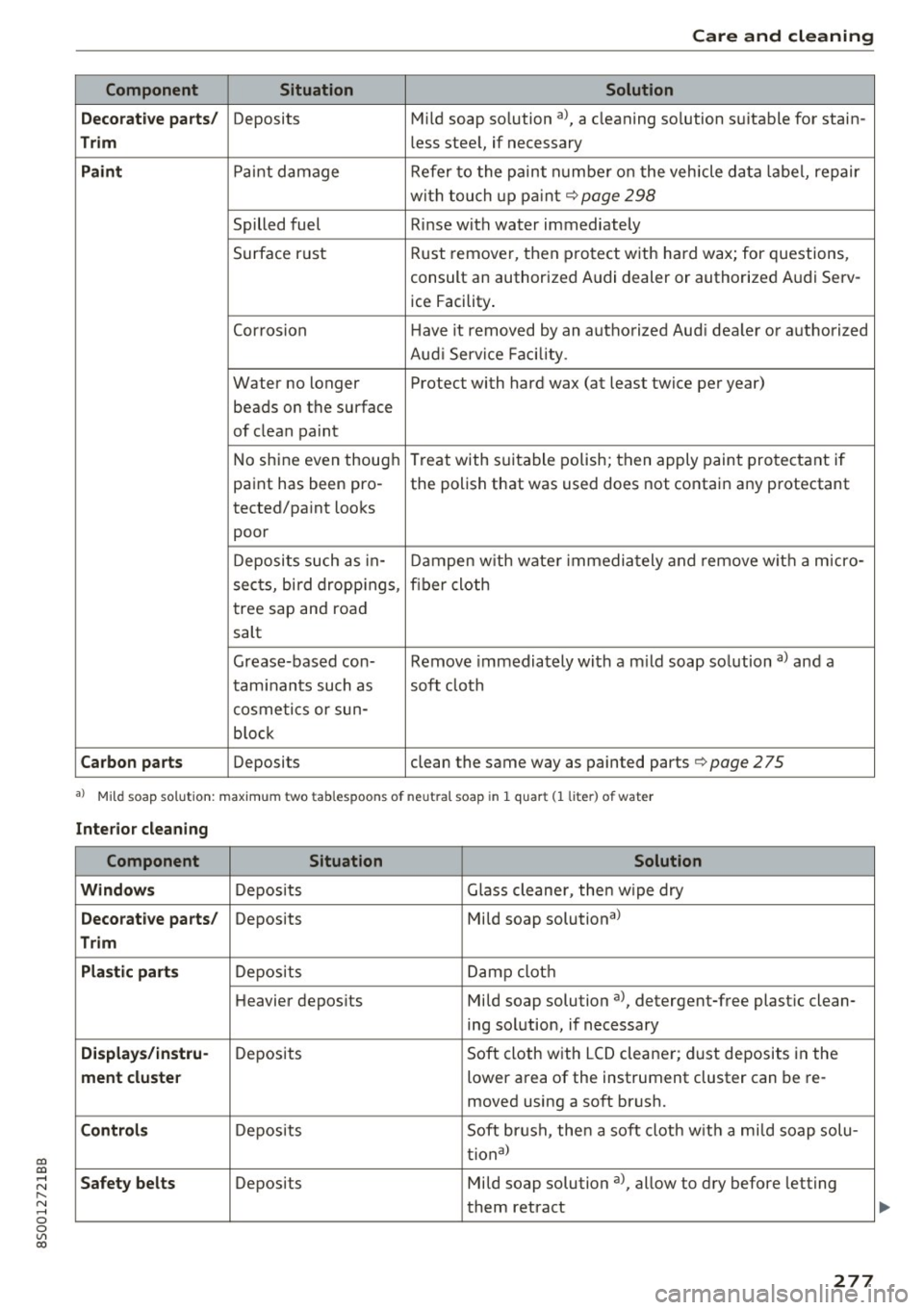
Component Situation Solution
De corat ive p art s/
Deposits Mild
soap so lution al, a cleaning solution suitable for stain-
Tr im less stee l, if necessary
Paint Paint damage Refer to the paint number on the veh icle data label, repair
with touch up pa int
Q page 298
Spilled fuel Rinse with water immediately
Surface rust Rust remover, then protect
with hard wax; for questions,
consult an authorized Audi dealer or authorized Audi Serv- ice Facility .
Corrosion Have it removed by an authorized Aud i dealer or a uthorized
Aud i Service Fac ility .
Water no longer Protect with hard wax (at least twice per year)
beads on the surface
of clean paint
No shine even though Treat with suitable polish; then
apply paint protectant if
paint has been pro -the polish that was used does not contain any protectant
tected/paint looks
poor
Deposits such as in- Dampen w ith wate r immediately and remove w ith a micro-
sects, bird dropp ings, fiber cloth
tree sap and road
salt
Grease-based con- Remove immediately with a m ild soap solution a) and a
tam inants such as soft cloth
cosmetics or sun-
b loc k
Ca rb on p art s Deposits clean the same way as painted parts Q page 2 75
a) Mild soap solution: maximu m two tablespoons of neutral soap in 1 quar t (1 liter) of water
Interio r cle an ing
Component Situation Solution
W indow s
Deposits Glass cleaner, then wipe dry
De corati ve part s/ Deposits Mild soap solutional
Trim
Pla stic part s
Deposits Damp cloth
Heavier depos its Mild soap solution a), detergent-free plastic clean-
ing solution, if necessary
Displa ys/i nstru-Deposits Soft cloth with LCD cleaner; dust deposits in the
ment clust er lower area of the instrument cluster can be re-
moved using a soft brush.
Co ntro ls Deposits Soft brush, then a soft cloth w it h a mi ld soap solu-
tional
S af ety belts Deposits Mild soap solution al, allow to dry before letting
them retract
277
Page 281 of 322
co
co
.... N
" N .... 0
0
Vl c:o
-To avoid damage to the rear window de
fogger, do not apply any stickers on the
heating wires on the inside of the window.
- Decorative part .s/trim
- Never use chrome care or cleaning prod-
ucts .
-Paint
-To reduce the risk of scratches, the vehicle
must be free of dirt and dust before pol
ishing or waxing.
- To prevent paint damage, do not polish or
wax the vehicle in direct sunlight .
- To reduce the risk of paint damage, do not
polish away rust spots .
- Remove cosmetics and sunscreen immedi
ately- these could damage the paint.
-Instrument cluster
- Make sure that the instrument cluster is
switched
off and has cooled off before
cleaning it.
- The instrument cluster and the trim sur
rounding it must not be cleaned with dry
cleaning methods because they could get
scratched.
- Make sure no fluids enter the spaces be
tween the instrument cluster and the
trim, because that could cause damage.
-Controls
- Make sure that no fluids enter the con-
trols, because this could cause damage.
-Safety belts
- Do not remove the safety belts to clean
them.
- Never clean safety belts or their compo
nents chemically or with corrosive fluids
or solvents and never allow sharp objects
to come into contact with the safety belts.
This could cause damage to the belt web bing.
- If there is damage to the webbing, the
connections, the retractors or the buckles
,
have them replaced by an authorized Audi
dealer or authorized Audi Service Facility.
-Textiles/artificial leather/ Alcantara
- Never treat artificial leather/ Alcantara
with leather care products, solvents, floor
Care and cleaning
polish, shoe polish, spot remove or similar
products.
- Have a specialist remove stubborn stains
to prevent damage.
- Never use steam cleaners, brushes, hard
sponges, etc. when cleaning.
- Do not turn on the seat heating* to dry the
seat.
- Objects with sharp edges, such as zippers
or rivets on clothing or belts, can cause
damage to the surface.
- Open hook and loop fasteners, for exam
ple on clothing, can damage seat covers.
Make sure hook and loop fasteners are
closed.
- Natural leather
- Never treat leather with solvents, floor
polish, shoe polish, spot remover or simi
lar products .
- Objects with sharp edges, such as zippers
or rivets on clothing or belts, can cause
damage to the surface.
- Never use steam cleaners, brushes, hard
sponges , etc . when cleaning .
-Do not turn on the seat heating* to dry the
seat .
- To help prevent the leather from fading,
do not leave the vehicle in direct sunlight
for long periods of time. If leaving the ve
hicle parked for long periods of time, you
should cover the leather to protect it from
direct sunlight.
(D Tips
-Insects are easier to remove from paint that
has been freshly waxed.
- Regular waxing can prevent rust spots from
forming .
Placing your vehicle out
of service
If you would like to take your vehicle out of serv-
ice for a longer period of time, contact an author
ized Audi dealer or authorized Audi Service Facili
ty. They will advise you of important measures,
such as corrosion protection, service and storage ""
279