parking brake AUDI TT COUPE 2017 User Guide
[x] Cancel search | Manufacturer: AUDI, Model Year: 2017, Model line: TT COUPE, Model: AUDI TT COUPE 2017Pages: 322, PDF Size: 79.73 MB
Page 68 of 322

Driving - The transmission can overheat and be dam
aged under certain driving and traffic condi
tions such as frequent starts, creeping for a
long time, or stop -and-go traffic. When the
@] or. indicator light turns on, stop the
vehicle at the next opportunity and let the
transmission cool
r=;, page 68 .
-Allowing the vehicle to roll when the engine
is stopped will damage the S tronic trans
mission because it is not lubricated
¢ page 294, Towing with a tow truck.
@ Tips
For safety reasons, the parking brake is re
leased automatically only when the driver's
safety belt is engaged in the buckle.
Hill descent control
The hill descent control system assists the driver
when driving down hills .
Hill descent control is ac tivated when the selec
tor lever is in the Dor S position and you press
the brake pedal. The transmission automatically
selects a gear that is suitable for the hill. Hill de
scent control tries to maintain the speed ach
ieved at the time of braking, within physical and
technical limitations.
If may still be necessary to
adjust the speed with the brakes. Because hill de
scent control cannot shift down farther than 3rd
gear, it may be necessary to shift into tiptronic
mode in very steep areas. In this case, shift man
ually into 1st or 2nd gear in tiptronic mode to
use the engine's braking force to relieve the
brakes .
Hill descent control switches off once the hill lev
els out or you press the accelerator pedal.
On vehicles with a cruise control system*
¢ page 70, hill descent control is also activated
when the speed is set.
A WARNING
Hill descent control cannot overcome physical
limitations, so it may not be able to maintain
a constant speed under all conditions. Always
be ready to apply the brakes.
66
Shifting manually (tiptronic mode)
The tiptronic allows the driver to shift the gears
manually .
Fig. 66 Cente r conso le : sh ift ing ma nually with the selecto r
lever
Fig. 67 Steering whee l: ma nual shifting wit h the shift pad
dles•
Shifting with the selector lever
You can shift into tiptronic mode while stationary
and whi le driving.
.,. To shift into tiptronic mode, push the selector
lever from the D/S setting to the right in the
tiptronic shift gate. Once the transmission has
sw itched modes, the selector lever position
M
is shown in the Infotainment system display
r=;,poge 62, fig. 63 . For example M4 means the
fourth gear is engaged .
.,. To shift up a gear, tap the selector lever for
ward
0 ¢ fig. 66.
.,. To shift down a gear, tap the selector lever to
back
0 .
Shifting with the shift paddles*
You can operate the shift paddles in the D/S or
M
(tiptronic shift gate) selector lever positions.
.,. To shift up one gear, tap the shift paddle
0
r=;,fig. 67.
Page 71 of 322
CD
CD
.... N
" N ,-I 0
0
Ill co
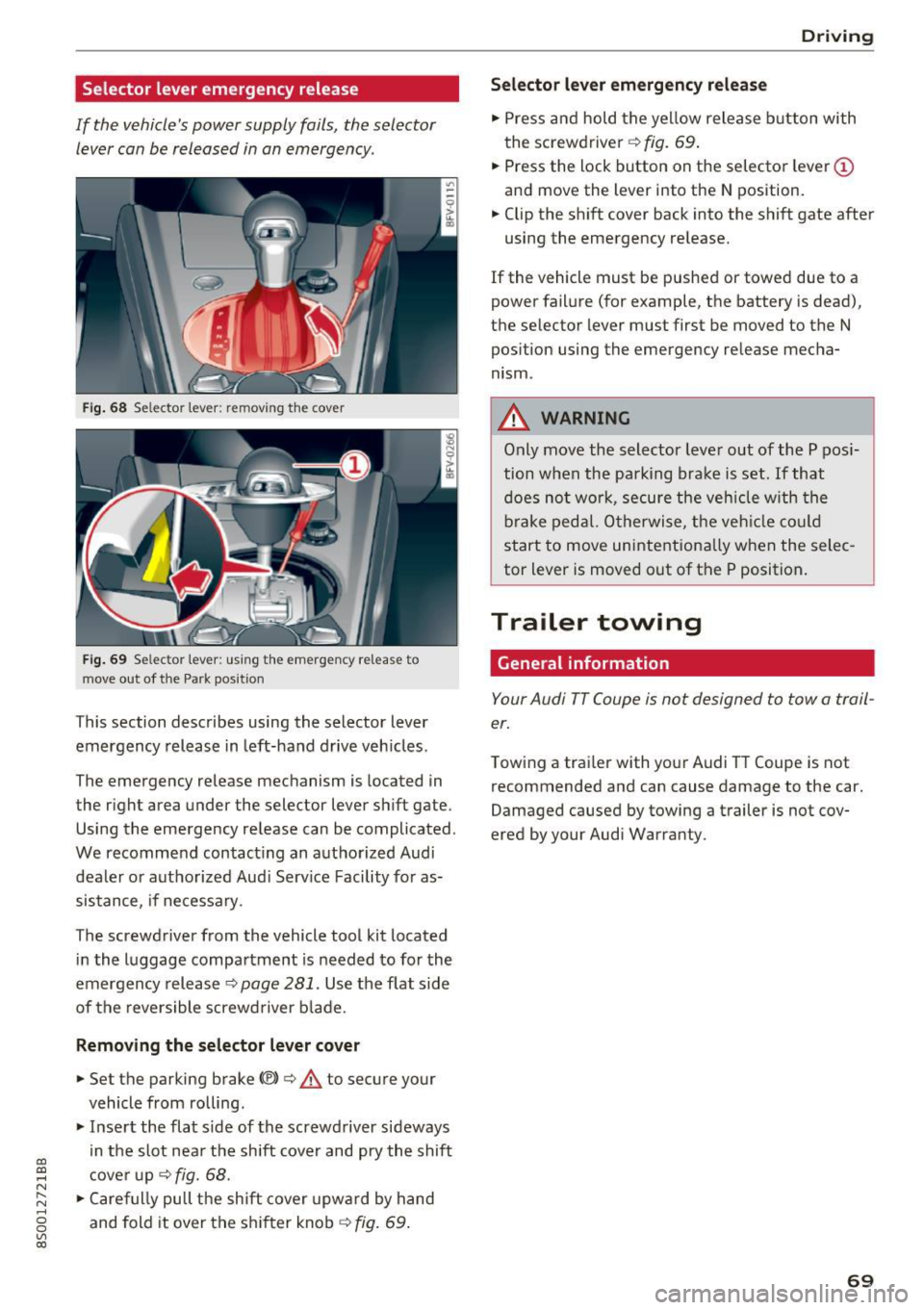
Selector lever emergency release
If the vehicle's power supply fails, the selector lever can be released in an emergency.
Fig . 68 Selector lever: remov ing t he cover
Fig . 69 Selec tor lever : us ing the eme rgency re lease to
move out of t he Park pos it ion
This section describes using the selector lever
emergency release in left-hand drive veh icles .
The emergency release mechanism is located in
the right area under the selector lever shift gate.
Using the emergency release can be complicated.
We recommend contact ing an authorized Audi
dealer o r authorized Aud i Serv ice Facility fo r as
sistance, if necessary .
The screwdriver from the vehicle tool kit located
i n the luggage compartment is needed to for the
emergency release ¢
page 281. Use the flat side
of the reversible screwd river b lade.
Removing the selector lever c over
.,. Set the parking brake CV)¢ A to secure your
vehicle from ro lling .
.,. In se rt the flat side of the screwdriver sideways
in the slot nea r the shift cover and pry the shift
c ove r up
¢fig. 68 .
.,. Caref ully pull t he shift cover upw ard by hand
and fold it over the sh ifter knob ¢
fig. 69.
Drivi ng
Selector l ever emergency r elease
.,. Press and hold the yellow release b utton with
the screwdriver ¢
fig. 69.
.,. Press the lock button on the selector lever
(D
and move the lever into the N position .
.,. Clip the shift cover back into the shift gate after
using the emergency re lease.
If the vehicle must be pushed or towed due to a
power failure (for example, the battery is dead),
the selector lever must first be moved to the N
pos ition using the emergency re lease mecha
nism.
A WARNING
Only move the selector lever out of the P pos i
tion when the parking bra ke is set. If that
d oes no t wo rk, secure the ve hicle w ith the
bra ke ped al. Otherwise, t he veh icle co ul d
st art to move uninte ntiona lly w hen the selec
tor lever is moved out of the P position.
Trailer towing
General information '
Your Audi TT Coupe is not designed to tow a trail
er.
Towing a trailer with you r Audi TT Coupe is not
recommended and can cause damage to the car.
Damaged caused by towing a trailer is not cov
ered by your Audi Warranty.
69
Page 86 of 322
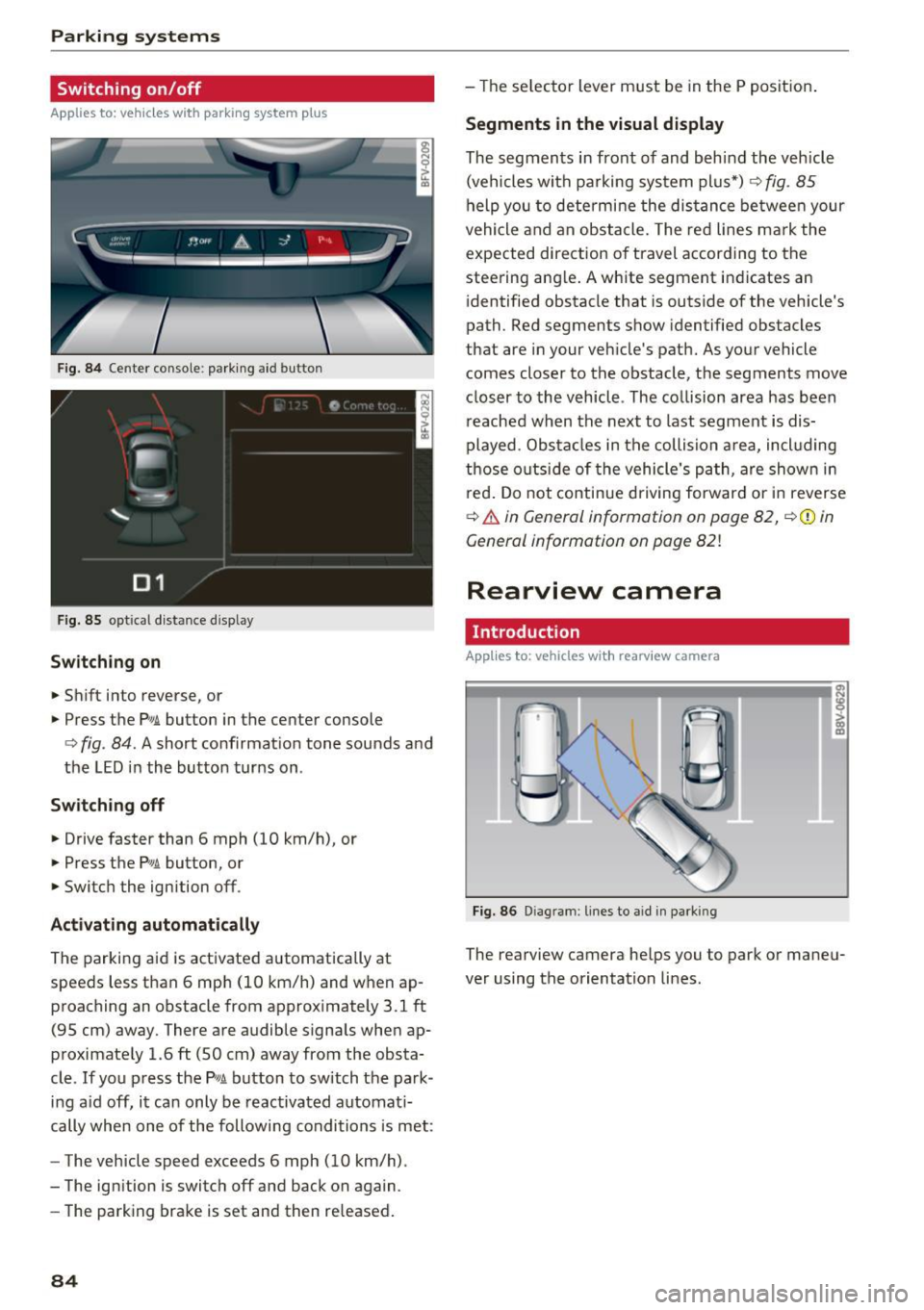
Parking systems
Switching on /off
Applies to: vehicles with parking system p lus
F ig. 84 Center console: park ing aid button
F ig.
85 optical d istance display
Switching on
.,. Shift into reverse, or
.,. Press the
Pw.A. button in the center console
c:> fig. 84. A short confirmat ion tone sounds and
the LED in the button turns on.
Switch ing off
.,. Drive faster than 6 mph (10 km/h), or
.,. Press the
p,,,A button, or
.,. Switch the ignition off .
Activating automatically
The parking aid is activated automatically at
speeds less than 6 mph (10 km/h) and when ap
proaching an obstacle from approximately 3.1 ft
(95 cm) away. There are audible signals when ap
proximately 1.6
ft (SO cm) away from the obsta
cle .
If you press the p,,1~ button to sw itch the park
ing a id off, it can only be reactivated automati
cally when one of the following conditions is met:
- The vehicle speed exceeds 6 mph (10 km/h).
- The ignition is switch off and back on again.
- The parking brake is set and then re leased .
84
-The selector lever must be in the P position .
Segments in the visual display
The segments in front of and behind the vehicle
(vehicles with parking system plus*)
9 fig. 85
help you to determine the distance between your
vehicle and an obstacle. The red lines mark the
expected direction of travel according to the
steering ang le. A white segment indicates an
identified obstacle that is outside of the vehicle's
path. Red segments show identified obstacles
that are in your veh icle's path. As your vehicle
comes closer to the obstacle, the segments
move
closer to the vehicle . The collision area has been
reached when the next to last segment is dis
played. Obstacles in the collision a rea, incl uding
those outside of the vehicle 's path, are show n in
r ed. Do not continue driving forward or in reverse
c:> & in General information on page 82, ¢(Di n
General information on poge
82!
Rearview camera
Introduct ion
Applies to: vehicles with rearview camera
Fig. 86 Dia gram : lines to aid in parking
The rearview camera helps you to park or maneu
ver using the orientation lines .
Page 246 of 322
Check ing and F illing
Engine compartment
Working in the engine compartment
Special care is required if you are working in the
engine compartment
Fo r wo rk in th e engine compa rtmen t su ch as
c h ec kin g and filli ng flu id s, th ere is a risk of in
j u ry, sc aldin g, ac cide nts, a nd b urn s. For this
rea son, foll ow all the warning s and gener al
s a fe ty p recaution s pr ov ided in the f ollow ing in·
f o rm ation . Th e en gine c omp artmen t is a dan
ger ous are a.
¢ ,&.
_& WARNING
- T urn the engine off.
- Switch the ign ition off .
- Set the parking brake .
- Place the selector lever in the P pos ition.
- let the engine cool down.
- Never open the hood when there is steam or coolant escaping from the engine compart
ment, because there is a risk that you could
be burned . Wait until no steam or coolant is
escaping .
- Keep ch ildren away from the engine com
partment .
- Never spill flu ids on a hot engine. These flu
ids (such as the freeze protection contained
in the coolant) can catch fire .
- Avoid short circu its in the electrical system,
especially to the battery .
- When working in the engine compartment,
remember that the rad iator fan can sw itch
on even if the ign ition is switched off, which
increases the risk of pe rsonal injury .
- Never open the cap on the coolant expan sion tank when the eng ine is warm. The
cooling system is under pressu re .
- To protect your face, hands, and arms from
hot steam or coolant, cover the cap with a
large cloth when opening.
- Do not remove the engine cover under any
circumstances. This increases the risk of
burns.
- If tests need to be performed w ith the en
gine running, there is additional danger d ue
244
to moving components (such as the ribbed
be lt, alternator and rad iator fan) and from
the high voltage ignition system.
- Do not press the acce lerator pedal inadver
tently if a gear is selected when the vehicle
is stationary and the engine is running. Oth
erwise, the vehicle will start to move imme
diately and this could result in an accident .
- Pay attent ion to the following warnings list
ed when work on the fuel system or on the
electrical equipment is required.
- Do not smoke .
- Never work near open flames .
- Always have a working fire extinguisher
nearby
- All work on the battery or elect rical system
in your vehicle can result in injuries, chemi
cal b urns, acc idents or burns . Because of
this, all work must be performed
onl y by an
authorized Audi dealer or authorized Audi
Service Facility.
- To reduce the risk o f electric shock and in
jury, never touch the following components
when the engine is running or is being start•
ed:
- Ign ition cable
- Other components in the electronic high -
vo ltage ign ition system
- If you must check or perform work on the
engine while it is running:
- Set the parking brake and place the selec
tor lever in the P (park) position first .
- Always proceed w ith extreme caution so
that clothing, jewelry or long hair do not
become caught in the radiator fan, fan
belt or other moving components or do
not come into contact with hot compo
nents. Tie back long hair before beginn ing
work and do not wear clothing that can hang down into the engine .
- Lim it your exposure to exhaust and chemi
cals to as short a time as possible
¢ .&. .
A WARNING
California Proposition 65 Warning:
Page 283 of 322
CD co .... N
" N .... 0
0
Ill co
Emergency assistance
General information
"' Park the vehicle as far as poss ible from moving
traffic in the event of a breakdown. In the event
of a flat tire, park the vehicle on a leve l surface .
It you are on a steep h ill, be especially careful.
"' Set the parking brake.
"' Place the selector lever in the P position .
"' Switch the emergency flashers on .
"' Have the passengers exit the veh icle . They
shou ld move to a safe place, for example be
hind a guard rail.
_& WARNING
Follow the steps given above. This is for your
protection and the for the safety of other d riv
ers .
Equipment
Vehicle tool kit/tire mobility kit/
compressor
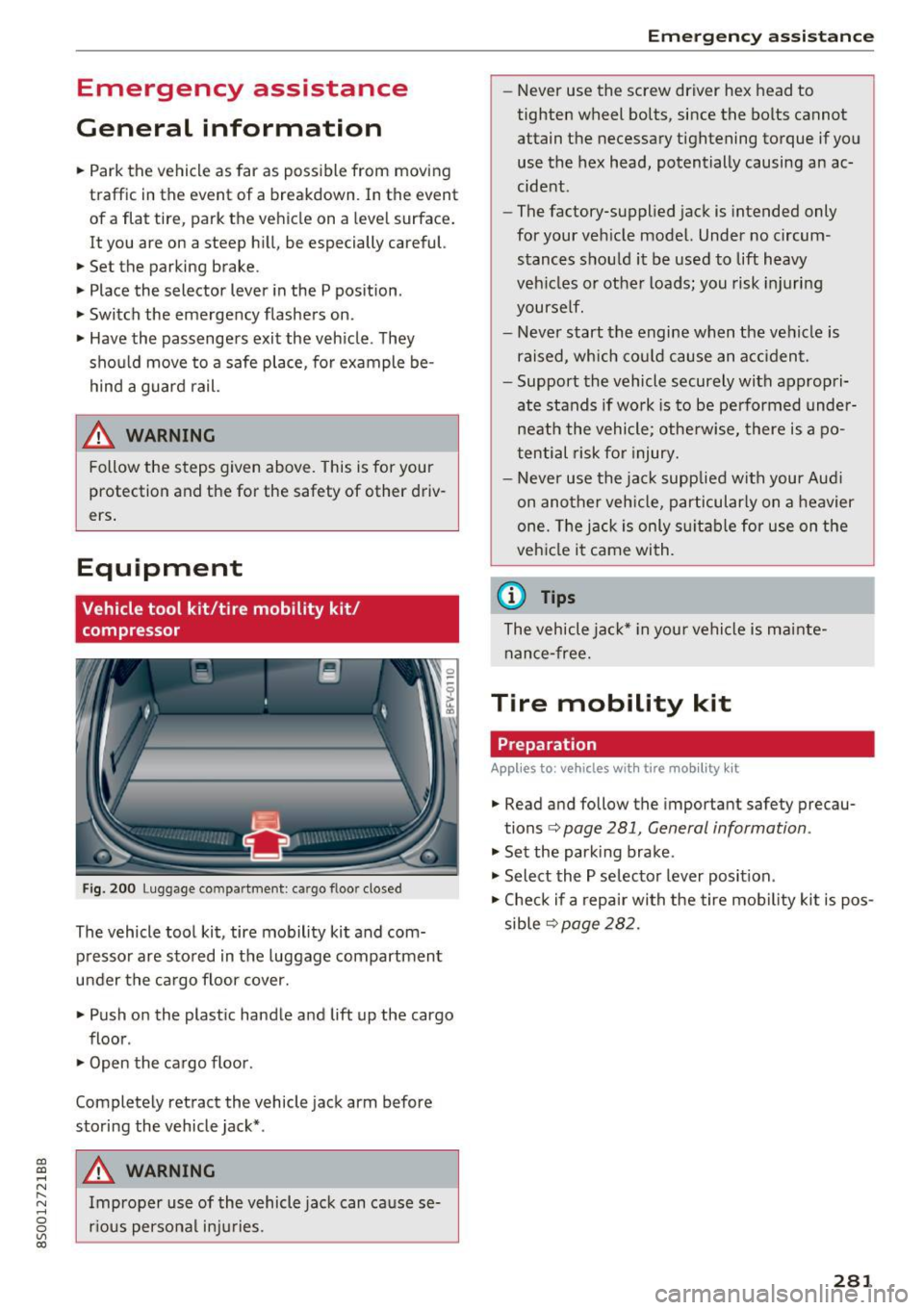
F ig . 200 Luggage co mpa rtment : ca rgo floo r closed
The vehicle tool kit, tire mobility kit and com
p ressor are sto red in the luggage compartment
u nder the ca rgo floor cover.
"' Push on the plast ic handle and lift up the cargo
floor .
"' Open the cargo floor .
Completely ret ract the vehicle jack arm before
storing the vehicle jack* .
_& WARNING
Improper use of the vehicle jac k can ca use se
r ious personal inju ries .
Em ergen cy a ssis tanc e
-Never use the screw driver hex head to
tighten wheel bolts, since the bolts cannot
attain the necessary tightening torque if you
use the hex head, potentially causing an ac
cident .
- The factory-supplied jack is intended only
for your veh icle model. Under no circum
stances shou ld it be used to lift heavy
veh icles or othe r loads; you risk injuring
yourself.
- Never start the engine when the vehicle is
raised, which co uld cause an a ccident.
- Support the vehicle securely with a ppropri
ate stands if wo rk is to be pe rformed under
nea th the vehicle; otherwise, there is a po
tential risk fo r injury.
- Never use the ja ck supp lied with your Aud i
on ano ther veh icle, p articularly on a heavier
one. The jack is only s uitab le for use on the
veh icle it came with.
(D Tips
The vehicle ja ck* in your vehicle is ma inte
nan ce-free.
Tire mobility kit
Preparation
App lies to : vehicles wi th tire mo bility kit
"' Read and follow the important safety precau-
tions <=>
page 281 , General information .
"'Set the park ing brake .
"' Select the P selector lever posit ion .
"' Check if a repair wi th the tire mob ility kit is pos
sible
<=> page 282.
281
Page 286 of 322
Emergency assistance
_& WARNING
You or your passengers could be injured while
changing a wheel if you do not follow these
safety precautions :
- If you have a flat tire, move a safe distance
off the road. Turn off the engine, turn the
emergency flashers on and use other warn
ing devices to alert other motorists.
- Make sure that passengers wait in a safe
place away from the vehicle and well away
from the road and traffic.
- To help prevent the vehicle from moving
suddenly and possibly slipp ing off the jack,
always fully set the parking brake and block
the wheel diagona lly opposite the wheel be
ing changed . When one front wheel is lifted
off the ground, placing the Automatic
Transmission in P (Park) will
not prevent the
vehicle from moving.
- Before you change a wheel, be sure the
ground is level and firm. If necessary, use a
sturdy board under the jack.
- Always store the vehicle tool kit, the jack
and the replaced tire in the luggage com
partment
c:> page 185.
@ Tips
Obey all laws.
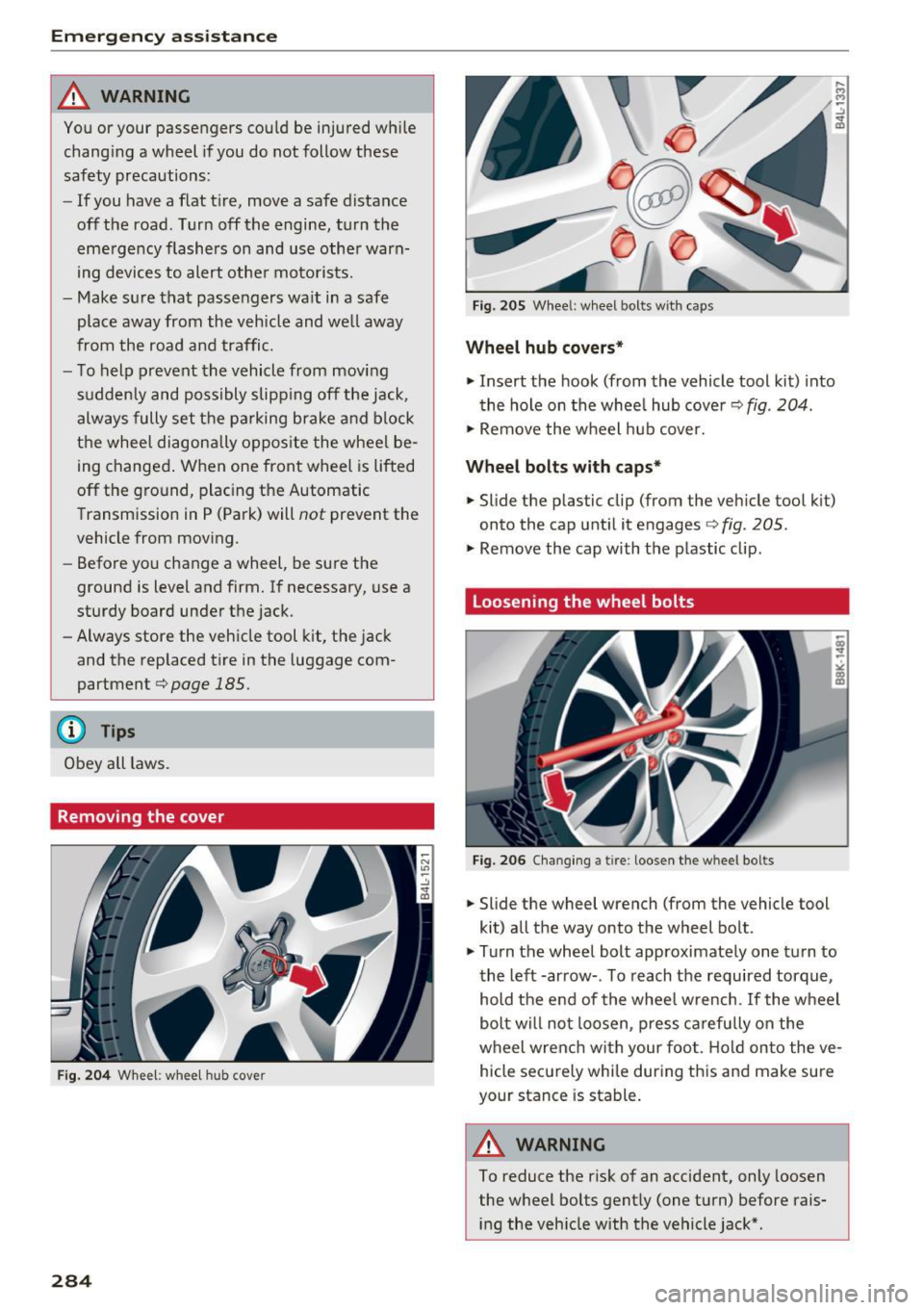
Removing the cover
Fig. 204 Whee l: wheel hub cover
284
Fig. 20S Wheel: wheel bolts with caps
Wheel hub covers*
.. Insert the hook (from the vehicle tool kit) into
the hole on the whee l hub cover
c:> fig . 204.
.. Remove the wheel hub cover.
Wheel bolts with caps*
.. Slide the plastic clip (from the vehicle tool kit)
onto the cap until it engages
c:> fig. 205.
.. Remove the cap with the plastic clip.
Loosening the wheel bolts
Fig. 206 Changing a tire: loosen the wheel bo lts
.. Slide the wheel wrench (from the vehicle tool
kit) all the way onto the wheel bolt .
.,. Turn the wheel bolt approximately one turn to
the left -arrow- . To reach the required torque,
hold the end of the wheel w rench. If the wheel
bolt will not loosen, press carefu lly on the
wheel wrenc h with your foot. Hold on to the ve
hicle securely while during this and make sure
your stance is stable.
&_ WARNING
To reduce the risk of an accident, only loosen
the wheel bolts gently (one turn) before rais
ing the vehicle with the vehicle jack* .
Page 292 of 322

Fuses and bulbs
Interior fuse assignment
Fig. 215 Vehicle inter ior: fuse assignme nt
No. Equipment
Fl Power top control modu
le (Roadster)
F2 Power top control module (Roadster)
F3 ESC control module
F4 Central computer processor (MIB-2)
FS Gateway
F6 Anti-theft alarm system Climate control system, selector lever (au-
F7 tomatic transmission), parking heater,
rear window heater relay coil
Diagnos is, electrical parking brake switch,
F8 light swi tch, rain/light sensor, interior
lighting
F9 Steering column switch module
Fl0 Display
F ll Haldex clutch
F12 MMI area
F 13 Adaptive dampers control module
F14 Climate control system blower
FlS Electronic steering co lumn lock
F16 MMI components, safety be
lt microphone
(Roadster)
290
No . Equipment
F17 Instrument cluster
F18 Rearview camera
F19 Convenience key system control module
F20 Power lumbar support adjustment
F22 Front passenger's side neck heating (Road-
ster)
F23 R
ig ht exterior lighting, on-board compute r
(right)
F 25 Driver's s
ide door (for example power win-
dows)
F26 Seat heating
F28 AMI H igh med ia port
F29 On-board computer
F31 Left on-board computer
F32 Driver assistance systems
F33 Airbag
Socket relay, interior sound, back-up light
F34 switch, temperature sensor, oil level sen-
sor
Diagnosis, headlight range control system,
F35 air quality sensor, automatic dimming
rearview mirror
F36 Right cornering light/ r ight LED-h eadlight
F37 Left cornering light/ left LED-headlight
F38 E
ng ine control module, ESC control mod-
ul e
F39 Front passenger's side door (for example
power windows)
F40 Cigarette lighter, sockets
F41 SCR relay and delivery unit
F42 Central locking area
F43 On-board computer
F45 Power adjustable driver's side seat
F46 Driver's side neck heat ing (Roadster)
F49 Starter, clutch sensor
FS0 ESC valves
F53 Rear window defogger
The power seats* are protected v ia
circuit break
ers
that automatically switch on after a few sec
onds after the overload has been reduced .
Page 295 of 322
CD
CD
.... N
" N ...... 0
0
Ill co
When jump starting or charging the battery,
never connect the negative ground cable to
the battery negative post because the battery
manager system must be able to detect the
battery's state of charge. Always connect the
negative ground cable to the negat ive ground
post of the battery manager control unit .
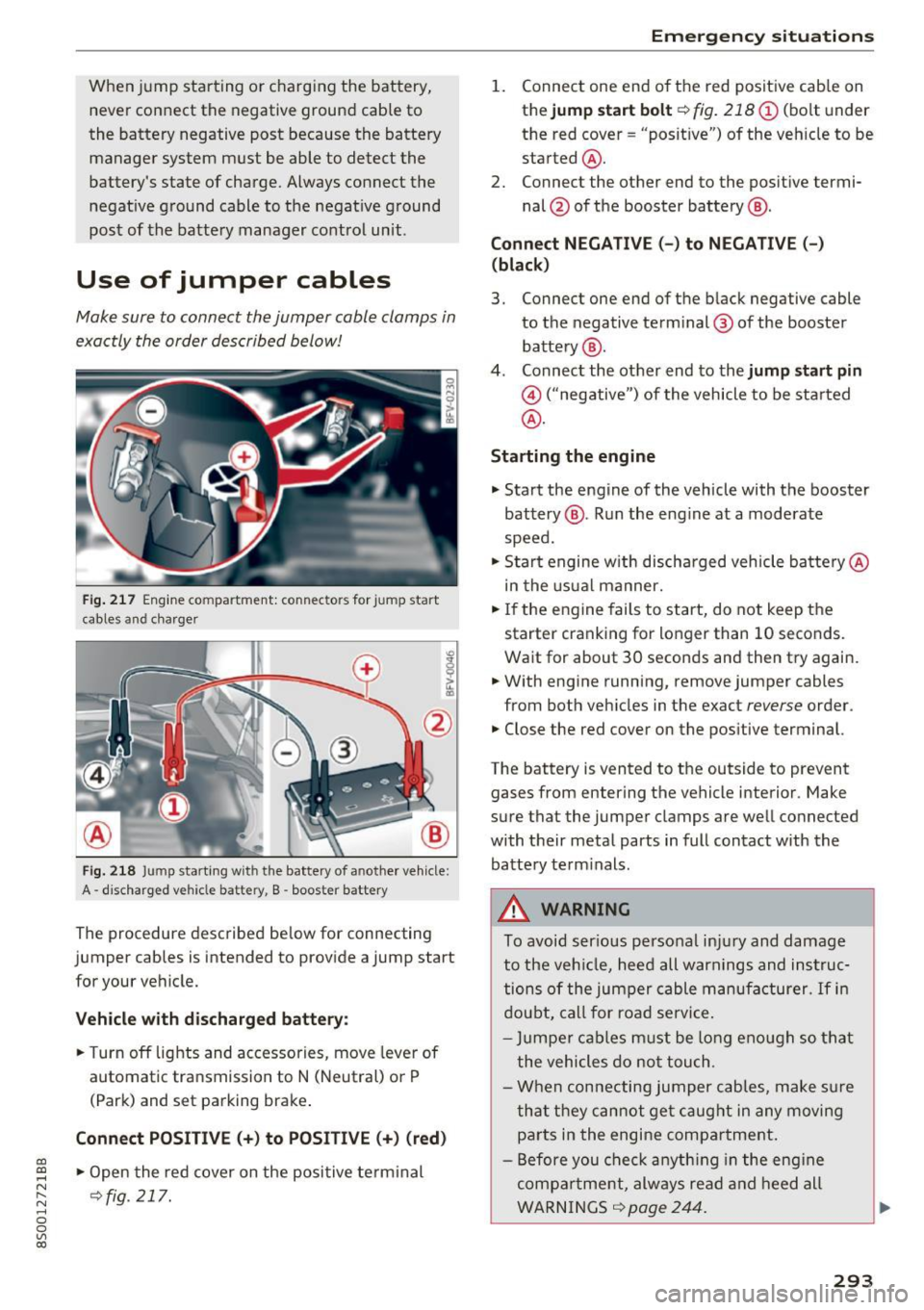
Use of jumper cables
Make sure to connect the jumper cable clamps in
exactly the order described below!
Fig. 217 Engine compartment: connectors for jump start
cables and c harger
Fig. 218 Jump starting w ith the battery of another vehicle :
A -discharged vehicle battery, B -booster battery
The proc edure desc ribed below for connecting
jumper cables is intended to provide a jump start
for your vehicle.
Vehicle with discharged battery:
.. Turn off lights and accessories, move lever of
automatic transmission to N (Neutral) or P
(Park) and set parking brake .
Connect POSITIVE(+) to POSITIVE(+) (red)
.,. Open the red cover on the positive terminal
~fig. 217.
Emergency situations
1. Connect one end of the red positive cab le on
the
jump start bolt~ fig. 218 (D (bolt und er
the red cover= "posit ive") of the veh icle to be
started @.
2. Connect the other end to the posit ive termi-
nal @of the booster battery @.
Connect NEGATIVE (-) to NEGATIVE (- )
(black)
3. Connect one end of the black negative cable
to the negative terminal @ of the booster
battery @.
4. Connect the other end to the
jump start pin
@ ("negative") of the vehicle to be started
@.
Starting the engine
.. Start the engine of the vehicle with the booster
battery @. Run the eng ine at a moderate
speed .
.,. Start engine w ith discharged veh icle battery @
in the usual manner.
.,. If the engine fails to start, do not keep the
starter cranking for longer than 10 seconds.
Wait for about 30 seconds and then try again .
.. With engine running, remove jumper cables
from both vehicles in the exact
reverse order .
.. Close the red cover on the positive terminal.
The battery is vented to the outside to prevent
gases from entering the vehicle interior . Make
sure that the jumper clamps are well connected
with their metal parts in full contact with the battery term inals .
A WARNING
To avoid ser ious personal injury and damage
to the vehicle, heed all warnings and instruc
tions of the jumper cable manufacturer.
If in
doubt, call for road service.
- Jumpe r cables must be long enough so that
the vehicles do not touch .
- When connecting jumper cables, make sur e
that they cannot get caug ht in any moving
parts in the engine compartment.
- Before you check anything in the engine
compa rtment, always read and heed all
WARNINGS ~
page 244 .
293
Page 308 of 322
Index
AUTO Automatic climate control system . . . . . . . 52
Automatic headlights . . . . . . . . . . . . . . . . . 36
Auto Lock (centra l locking) . . . . . . . . . . . . . . 25
Automatic belt retractor . . . . . . . . . . . . . . . 193
Automatic climate control system
refer to Climate control system (automatic) .5.2
Automatic key . . . . . . . . . . . . . . . . . . . . . . . . . 25
Automatic transmission . . . . . . . . . . . . . . . . . 61
Driving tips . . . . . . . . . . . . . . . . . . . . . . . . . . 64
Emergency mode . . . . . . . . . . . . . . . . . . . . . 68
Hill descent contro l . . . . . . . . . . . . . . . . . . . 66
Kick-down . . . . . . . . . . . . . . . . . . . . . . . . . . . 67
La unch Control-Program . . . . . . . . . . . . . . . 67
malfunction . . . . . . . . . . . . . . . . . . . . . . . . . 63
Selector leve r eme rgency release . . . . . . . . 69
Selector leve r lock . . . . . . . . . . . . . . . . . . . . 63
Selector lever positions . . . . . . . . . . . . . . . . 62
Shifting manually . . . . . . . . . . . . . . . . . . . . 66
Steering wheel with shift paddles. . . . . . . . 66
tiptronic . . . . . . . . . . . . . . . . . . . . . . . . . . . . 66
Automatic wipe/wash system
Automatic zoom (navigation) .......... .
Auto Safety Hotline ............ .... .. .
41
145
187
AUX input . . . . . . . . . . . . . . . . . . . . . . . . . . . 161
Average fuel consumption . . . . . . . . . . . . . . . 23
Average speed . . . . . . . . . . . . . . . . . . . . . . . . 23
Avoid damaging the vehicle . . . . . . . . . . . . . . 55
B
BACK button . . . . . . . . . . . . . . . . . . . . . . . . . . 96
Balance (sound) . . . . . . . . . . . . . . . . . . . . . . 178
Bass (sound) . . . . . . . . . . . . . . . . . . . . . . . . . 178
Battery Jump starting . . . . . . . . . . . . . . . . . . . . . . . 292
Before driving . . . . . . . . . . . . . . . . . . . . . . . . 180
Better route (navigation) . . . . . . . . . . . . . . . 149
Blended gasoline . . . . . . . . . . . . . . . . . . . . . 240
Blower (climate control system) . . . . . . . . . . 52
Bluetooth Aud io player . . . . . . . . . . . . . . . . . . . . . . . . 158
Connecting a cell phone . . . . . . . . . . . . . . 114
Settings . . . . . . . . . . . . . . . . . . . . . . . . . . . 176
Boost . . . . . . . . . . . . . . . . . . . . . . . . . . . . . . . . 24
Booster seats . . . . . . . . . . . . . . . . . . . . . . . . 230
Boost pressure indicator . . . . . . . . . . . . . . . . 24
306
Brake fluid
Checking the brake fluid level . . . . . . . . . . 251
Brakes . . . . . . . . . . . . . . . . . . . . . . . . . . . . . . . 89
Brake ass ist system . . . . . . . . . . . . . . . . . . . 88
B rake booster . . . . . . . . . . . . . . . . . . . . . . . . 89
Brake fluid ... ... .. .. ............... 251
Electromechanical parking brake . . . . . . . . 60
Indicator light . . . . . . . . . . . . . . . . . . . . . . . 10
New brake pads . . . . . . . . . . . . . . . . . . . . . . 89
B raking
Brake assist . . . . . . . . . . . . . . . . . . . . . . . . . 88
Emergency braking function . . . . . . . . . . . . 60
Worn brake pads . . . . . . . . . . . . . . . . . . . . . 15
Break-in secu rity feature . . . . . . . . . . . . . . . . 25
Breaking in
New engine . . . . . . . . . . . . . . . . . . . . . . . . . 55
New tires . . . . . . . . . . . . . . . . . . . . . . . . . . 262
Browser
refer to Media center . . . . . . . . . . . . . . . . . 164
Bu lb fai lure (indicator light) . . . . . . . . . . . . . 16
Bulb replacement . . . . . . . . . . . . . . . . . . . . . 291
Buttons Control panel (MMI) . . . . . . . . . . . . . . . . . . 96
Multifunction steering wheel . . . . . . . . 20, 22
C
Cable (USB adapter/AUX connector cable) 161
California Proposition 65 Warning . . . . . . . 244
Battery specific . . . . . . . . . . . . . . . . . . . . . 252
Call list . . . . . . . . . . . . . . . . . . . . . . . . . . . . . 117
Call options . . . . . . . . . . . . . . . . . . . . . . . . . . 124
Capacities Fuel tank. . . . . . . . . . . . . . . . . . . . . . . . . . . 299
Washer fluid reservoir . . . . . . . . . . . . . . . . 299
Care . . . . . . . . . . . . . . . . . . . . . . . . . . . . . . . . 275
Cargo area
refer to Luggage compartment. . . . . . . . . 185
CD drive (med ia drives) . . . . . . . . . . . . . . . . 157
Cell phone Playing music . . . . . . . . . . . . . . . . . . . . . . . 158
olso refer to Telephone . . . . . . . . . . . . . . . 114
Central locking . . . . . . . . . . . . . . . . . . . . . . . . 25
Centra l locking switch . . . . . . . . . . . . . . . . . 29
Emergency locking . . . . . . . . . . . . . . . . . . . . 30
Luggage compartment lid . . . . . . . . . . . . . . 30
Power windows . . . . . . . . . . . . . . . . . . . . . . 32
Page 310 of 322
Index
Contacts Additional directory.............. ....
176
Import ing/exporting . . . . . . . . . . . . . . . . . 123
Memory capaci ty . . . . . . . . . . . . . . . . . . . . 124
Sea rching . . . . . . . . . . . . . . . . . . . . . . . . . . 122
Showing details . . . . . . . . . . . . . . . . . . . . . 123
Storing as dest ination . . . . . . . . . . . . . . . . 141
Control buttons . . . . . . . . . . . . . . . . . . . . . . . 98
Control knob with joystick function . . . . . . .
101
Convenience key
Indicator light . . . . . . . . . . . . . . . . . . . . . . .
58
Stopping the engine (START ENGINE STOP
button) . . . . . . . . . . . . . . . . . . . . . . . . . . . . .
58
Conven ience opening/closing . . . . . . . . . . . . 32
Convertible child safety seats . . . . . . . . . . . 228
Convertible locking retractor
Activating . . . . . . . . . . . . . . . . . . . . . . . . . .
234
Deactivating .. .... ...... ......... .. . 235
Using to secure a child safety seat . . . . . . 234
Cooling mode (climate control system) . . . . 52
Cooling system
Adding coolant . . . . . . . . . . . . . . . . . . . . . .
250
Coolant . . . . . . . . . . . . . . . . . . . . . . . . . . . . 250
Coolant level checking . . . . . . . . . . . . . . . . 250
Coolant temperature indicator . . . . . . . . . . . 8
Indicator light . . . . . . . . . . . . . . . . . . . . . . .
12
Crash data r ecorder (EDR) . . . . . . . . . . . . . . . 94
Crosshairs . . . . . . . . . . . . . . . . . . . . . . . . . . .
137
Cruise cont rol system
Changing speed . . . . . . . . . . . . . . . . . . . . . .
71
Preselecting speed . . . . . . . . . . . . . . . . . . . . 7 1
Switching off . . . . . . . . . . . . . . . . . . . . . . . . 71
sw itch ing on . . . . . . . . . . . . . . . . . . . . . . . . . 70
Cup holders . . . . . . . . . . . . . . . . . . . . . . . . . . . 47
Current fuel consumption . . . . . . . . . . . . . . . 23
D
Data connection . . . . . . . . . . . . . . . . . . . . . . 131
Data protection . . . . . . . . . . . . . . . . . . . 133 , 155
Data recorder . . . . . . . . . . . . . . . . . . . . . . . . . 94
Date ...... .. .. .. .... ......... .... .. .
174
Date display . . . . . . . . . . . . . . . . . . . . . . . . . 174
Daytime running light . . . . . . . . . . . . . . . . . . 36
Declaration of compliance
Audi side assist . . . . . . . . . . . . . . . . . . . . .
304
Ce ll phone package . . . . . . . . . . . . . . . . . . 304
308
Convenience key . . . . . . . . . . . . . . . . . . . . . 304
E lectronic immobili zer . . . . . . . . . . . . . . . . 304
Garage door opener (Homelink) . . . . . . . . 304
Remote control key . . . . . . . . . . . . . . . . . . 304
Defrosting (windows) . . . . . . . . . . . . . . . . . . . 53
DEF (instrument cluster) . . . . . . . . . . . . . . . . 23
Deluxe automatic climate control
refer to Climate control system (automatic) .52
Determ ining correct load limit . . . . . . . . . .
268
Digital compass . . . . . . . . . . . . . . . . . . . . . . . 43
Dimensions . . . . . . . . . . . . . . . . . . . . . . . . . . 299
D imm ing the rearview mirror . . . . . . . . . . . .
40
Directory
refer to Con tacts . . . . . . . . . . . . . . . . . . . . 122
Display
ref er to Audi virtual cockpit (instrument
cluster)
20,22
D istance driven . . . . . . . . . . . . . . . . . . . . . . . . 23
Driver information system . . . . . . . . . . . . 20, 22
Indicator lights . . . . . . . . . . . . . . . . . . . . . . . 9
Messages . . . . . . . . . . . . . . . . . . . . . . . . . . . . 9
On-board computer . . . . . . . . . . . . . . . . . . .
23
Outs ide temperature display. . . . . . . . . . . . 19
Service interval display . . . . . . . . . . . . . . .
254
Drives
refer to Media . . . . . . . . . . . . . . . . . . 155, 163
Drive select . . . . . . . . . . . . . . . . . . . . . . . . . . . 79
Driving econom ically . . . . . . . . . . . . . . . . . . .
55
Driving safely . . . . . . . . . . . . . . . . . . . . . . . . 180
Driving through wat er . . . . . . . . . . . . . . . . . . 55
Driving time . . . . . . . . . . . . . . . . . . . . . . . . . . 23
Dust filter
refer to Pollutant filter . . . . . . . . . . . . . . . . 51
DVD drive (media drives) 156
Dynamic volume
refer to System volume . . . . . . . . . . . . . . . 178
E
E-mail 120
Economical route . . . . . . . . . . . . . . . . . . . . . 142
Electromechanical parking brake . . . . . . . . . 60
Electromechanical steering . . . . . . . . . . . . . . 91
Electronic differential lock . . . . . . . . . . . . . . . 88
Electronic immobilizer . . . . . . . . . . . . . . . . . .
25
Electronic speed limite r . . . . . . . . . . . . . . . . . 70