belt AUDI TT COUPE 2017 Owners Manual
[x] Cancel search | Manufacturer: AUDI, Model Year: 2017, Model line: TT COUPE, Model: AUDI TT COUPE 2017Pages: 322, PDF Size: 79.73 MB
Page 5 of 322
co
co
.... N
" N .... 0
0
Vl c:o
Operating . . . . . . . . . . . . . . . . . . . . . . . . . . 101
Opening the selection/options menu with
the control knob . . . . . . . . . . . . . . . . . . . . 102
Letter/number speller . . . . . . . . . . . . . . . . 102
Free text search . . . . . . . . . . . . . . . . . . . . . 104
Menus and Symbols . . . . . . . . . . . . . . . . . . 105
Voice recognition system . . . . . . . . 108
Operating . . . . . . . . . . . . . . . . . . . . . . . . . . 107
Command overview information . . . . . . . . 108
Commands . . . . . . . . . . . . . . . . . . . . . . . . . 109
Telephone . . . . . . . . . . . . . . . . . . . . . . . . 114
Introduction . . . . . . . . . . . . . . . . . . . . . . . . 114
Setup . . . . . . . . . . . . . . . . . . . . . . . . . . . . . 114
Using the telephone . . . . . . . . . . . . . . . . . 116
Fa vorites . . . . . . . . . . . . . . . . . . . . . . . . . . . 119
Messages . . . . . . . . . . . . . . . . . . . . . . . . . . 119
Listening to voicemail . . . . . . . . . . . . . . . . 121
Emergency call functions . . . . . . . . . . . . . 122
Directory . . . . . . . . . . . . . . . . . . . . . . . . . . . 122
Se ttings . . . . . . . . . . . . . . . . . . . . . . . . . . . 124
Troubleshooting . . . . . . . . . . . . . . . . . . . . . 125
Audi connect . . . . . . . . . . . . . . . . . . . . . 126
Introduction . . . . . . . . . . . . . . . . . . . . . . . . 126
Setup . . . . . . . . . . . . . . . . . . . . . . . . . . . . . 126
Configuration through myAudi . . . . . . . . . 127
Audi connect services . . . . . . . . . . . . . . . . . 128
W i-F i hotspot . . . . . . . . . . . . . . . . . . . . . . . 130
Configur ing the data connect ion . . . . . . . . 131
About Audi connect . . . . . . . . . . . . . . . . . . 132
Troubleshooting . . . . . . . . . . . . . . . . . . . . . 134
N .
. av1gat1on .. ............... .. .... . 135
Opening navigation . . . . . . . . . . . . . . . . . . 135
Ent ering a d estination . . . . . . . . . . . . . . . . 136
Cancel route gu idance . . . . . . . . . . . . . . . . 140
Home address . . . . . . . . . . . . . . . . . . . . . . 141
Favorite s . . . . . . . . . . . . . . . . . . . . . . . . . . . 141
Directory contacts . . . . . . . . . . . . . . . . . . . 141
Addit ional settings . . . . . . . . . . . . . . . . . . 141
Map ..... ... ................... ... . 143
Online map display . . . . . . . . . . . . . . . . . . 146
Accessing traffic information . . . . . . . . . . 147
Troubleshooting . . . . . . . . . . . . . . . . . . . . . 149
Table of contents
Radio ...... .. .. .................. .
150
Opening the radio . . . . . . . . . . . . . . . . . . . 150
Radio funct ions . . . . . . . . . . . . . . . . . . . . . 151
Rad io menu . . . . . . . . . . . . . . . . . . . . . . . . 152
Favorites . . . . . . . . . . . . . . . . . . . . . . . . . . . 152
Additional settings . . . . . . . . . . . . . . . . . . 153
Troubleshooting . . . . . . . . . . . . . . . . . . . . . 154
Med ia ..... ... .. ... ........... ... .. 155
Introduction ... .. .. .... ..... .... .. .. 155
Notes . . . . . . . . . . . . . . . . . . . . . . . . . . . . . 155
Media drives . . . . . . . . . . . . . . . . . . . . . . . . 156
Bluetooth audio player . . . . . . . . . . . . . . . 158
Wi-Fi audio player . . . . . . . . . . . . . . . . . . . 159
Online media and Internet radio . . . . . . . . 160
Multimedia connections . . . . . . . . . . . . . . 161
Playing media . . . . . . . . . . . . . . . . . . . . . . . 163
Additional settings . . . . . . . . . . . . . . . . . . 166
Supported medi a and file formats . . . . . . 168
T roubleshooting . . . . . . . . . . . . . . . . . . . . . 170
Audi smartphone interface . . . . . . 172
Setup . . . . . . . . . . . . . . . . . . . . . . . . . . . . . 172
Operating . . . . . . . . . . . . . . . . . . . . . . . . . . 172
Troubleshooting . . . . . . . . . . . . . . . . . . . . . 173
System settings .................. 174
Settingthedateandtime ............. 174
MM isettings .. .. .. .......... ....... 174
Connection manager . . . . . . . . . . . . . . . . . 175
System update . . . . . . . . . . . . . . . . . . . . . . 177
Sound settings . . . . . . . . . . . . . . . . . . . . . . 178
Vo lume settings . . . . . . . . . . . . . . . . . . . . . 178
Restarting th e MMI (Reset) . . . . . . . . . . . . 179
Softw are license information 179
Safety ..... .. .. .. ............... .. 180
Safe driving . . . . . . . . . . . . . . . . . . . . . . 180
Basi cs . . . . . . . . . . . . . . . . . . . . . . . . . . . . . 180
Cor rec t passenger sea ting positions . . . . . 181
Driver and passenger side footwell . . . . . . 184
Pedal area . . . . . . . . . . . . . . . . . . . . . . . . . . 184
Stowing luggage . . . . . . . . . . . . . . . . . . . . 185
Reporting Safety Defects . . . . . . . . . . . . . . 187
Safety belts . . . . . . . . . . . . . . . . . . . . . . 189
General notes . . . . . . . . . . . . . . . . . . . . . . . 189
Why safety belts? . . . . . . . . . . . . . . . . . . . 190
3
Page 6 of 322
Table of content s
Safety belts . . . . . . . . . . . . . . . . . . . . . . . . 193
Safety belt tensione r . . . . . . . . . . . . . . . . . 195
Airbag system ... . ...... ... .. .. ... 19 7
I mportant info rmation . . . . . . . . . . . . . . . 197
F ront airbags . . . . . . . . . . . . . . . . . . . . . . . 201
Mon itoring the Advanced Airbag System . 209
Knee airbags .. .. ................. ... 213
Side airbags . . . . . . . . . . . . . . . . . . . . . . . . 215
Side curtain airbags . . . . . . . . . . . . . . . . . . 218
Child safety . . . . . . . . . . . . . . . . . . . . . . 221
Important information . . . . . . . . . . . . . . . 221
Ch ild seats . . . . . . . . . . . . . . . . . . . . . . . . . 227
Secur ing ch ild seats . . . . . . . . . . . . . . . . . . 232
L A TCH system (lowe r an chorages a nd
t e thers for chi ldren) . . . . . . . . . . . . . . . . . 235
Addit ional info rmation . . . . . . . . . . . . . . . 239
Maintenance and Care . . . . . . . . . . . 24 0
Checking and Filling . . . . . . . . . . . . . 240
F ue l. .. .. .... .. ... .. ..... ... .. .. ... 24 0
Refueling . . . . . . . . . . . . . . . . . . . . . . . . . . 241
E ng ine compartment . . . . . . . . . . . . . . . . . 244
Eng ine oil . . . . . . . . . . . . . . . . . . . . . . . . . . 246
Cooling system . . . . . . . . . . . . . . . . . . . . . . 250
Brake f luid . .. .. ..... ........... ... . 251
Batte ry . . . . . . . . . . . . . . . . . . . . . . . . . . . . 252
W indshield washe r system . . . . . . . . . . . . 253
Service i nterval d isplay 254
Wheels ... .... .......... ...... ... . 255
Wheels a nd Tires . . . . . . . . . . . . . . . . . . . . 255
T ire press ure monitor ing sys tem 272
Care and cleaning . . . . . . . . . . . . . . . . 275
Gene ral information . . . . . . . . . . . . . . . . . 275
C ar washes . .. .. ............. .... .. . 275
Clean ing and care information . . . . . . . . . 276
P lacing your vehicle out of service . . . . . . 279
Troubleshooting . . . . . . . . . . . . . . . . . 28 1
Emergency assistance . . . . . . . . . . . 281
Gene ral information . . . . . . . . . . . . . . . . . 281
E quipment . . . . . . . . . . . . . . . . . . . . . . . . . 281
Tire mob ility k it . . . . . . . . . . . . . . . . . . . . . 281
Replac ing whee ls . . . . . . . . . . . . . . . . . . . . 283
Spare ti re . . . . . . . . . . . . . . . . . . . . . . . . . . 287
4
Fuses and bulbs . . . . . . . . . . . . . . . . . . 289
E lectrica l fuses . . . . . . . . . . . . . . . . . . . . . . 289
Bu lbs .. ... .. .. .. .. .. .. . ... .... ... .. 291
Emergency situations . . . . . . . . . . . . 292
Genera l . . . . . . . . . . . . . . . . . . . . . . . . . . . . 292
Start ing by push ing or tow ing . . . . . . . . . . 292
Start ing with jumper cables . . . . . . . . . . . 292
Use o f jumper cables . . . . . . . . . . . . . . . . . 293
T owing with a tow truck . . . . . . . . . . . . . . 294
Raising the vehicle . . . . . . . . . . . . . . . . . . . 296
Accessories and technical data . . 298
Technical data . . . . . . . . . . . . . . . . . . . . 298
Vehicle spec ificat ions . . . . . . . . . . . . . . . . 298
Weights . . . . . . . . . . . . . . . . . . . . . . . . . . . 298
D imens ions. . . . . . . . . . . . . . . . . . . . . . . . . 299
Capaci ties . . . . . . . . . . . . . . . . . . . . . . . . . . 299
Gasoline engines . . . . . . . . . . . . . . . . . . . . 300
Consumer information and
technical data . . . . . . . . . . . . . . . . . . . .
301
Consumer information . . . . . . . . . . 301
Warranty coverages . . . . . . . . . . . . . . . . . . 301
Operat ing your vehicle outside the U .S.A.
or Canada . . . . . . . . . . . . . . . . . . . . . . . . . . 301
Audi Se rvice Repair Manuals and
Lite rat ure . . . . . . . . . . . . . . . . . . . . . . . . . . 301
Maintenance. .. .. .. .. ... ... .... ... .. 301
Accessor ies a nd techn ica l changes . . . . . . 303
Index .......... ... ............. ... 305
Page 12 of 322
Instruments and indicator lights
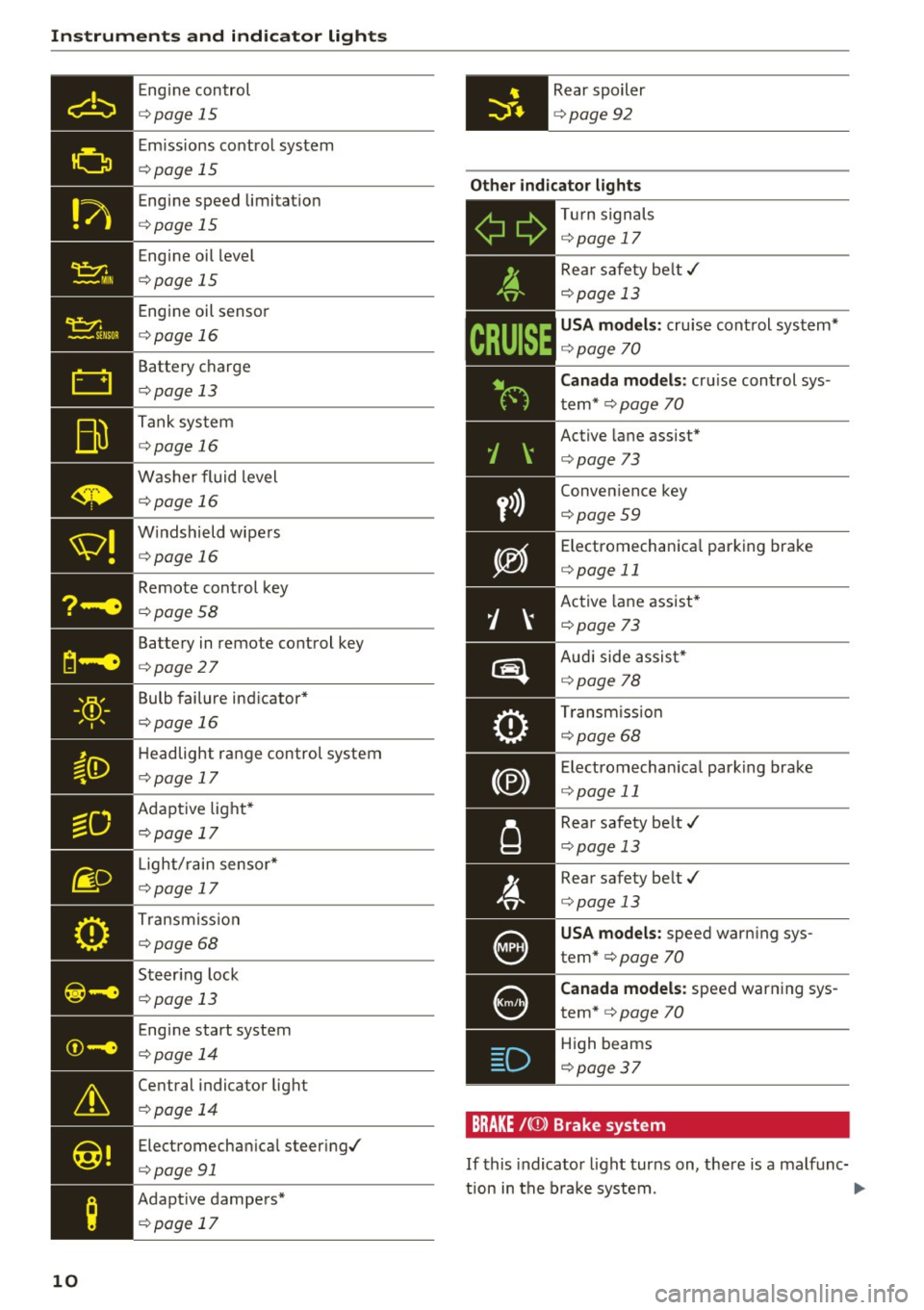
Engine control
c::> page 15
Emi ssions control system
c::> page 15
Engine speed limitat io n
c::> page 15
Engine oil level
c::> page 15
Engine oil senso r
c::> page 16
Battery charge
c::> page 13
Tank system
c::> page 16
Washer fluid level
c::> page 16
W indshield wipe rs
c::> page 16
Remote control key
c::> page 58
Battery in remote control key
c::> page 27
Bulb failure ind icator *
c::> page 16
Headlight range control system
c::> page 17
Adaptive light*
c::> page 17
- Light/
rain sensor*
• c::> page 17
Transmiss ion
c::> page 68 0
. . I I
~-e ... , . , ,.
I .
©-e .... , .. ,
&
Central indicator light
c::> page 14
@!
Electromechan ical steer ing./
c::> page 91
;
Adapt ive dampers*
c::> page 17
10
Rear spoiler
c::> page 92
Other indicator lights
- T
ur n signals
Ii ii c::> page 17
y>))
D
Rea r safety be lt./
c::> page 13
USA mod els : cru ise cont rol system*
c::> page 70
C anada models : cruise control sys
tem *
c::> page 70
Active lane assist*
c::> page 73
Conven ience key
c::> page 59
Electromechanica l park ing brake
c::> page 11
Active lane assist*
¢ page 73
Audi side assist *
c::>page 78
Transm iss io n
c::> page 68
Electromechan ica l park ing brake
c::> page 11
Rear safety belt./
c::> page 13
Rear safety belt./
c::> page 13
USA models: speed warn ing sys
tem"
c::> page 70
Canada models: speed warn ing sys
tem*
c::> page 70
High beams
<=:> page 37
BRAKE /{(JJ) Brak e sys te m
If this indicato r light turns on, there is a malfunc-
tion in the b rake system .
.,.
Page 15 of 322
co
co
.... N
" N .... 0
0
Vl c:o
-If the engine oil level is correct and the indica
tor light still blinks , turn the engine off and do
not continue driving. See an authorized Audi
dealer or authori zed Audi Service Facility for as
sistance.
The oil pressure warning is not an oil level in
dicator. Always check the oil level regularly.
0 Generator/vehicle battery
• Electric system: malfunction! Battery is not
being charged
T here is a malfunction in the alternator or the ve
hicle electrical system.
Drive to an authorized Audi dealer or authorized
Audi Service Facility immediately. Turn off all un
necessary electrical equipment because it will
drain the battery . See your authori zed Audi deal
er or authorized Audi Service Facility if the bat
tery charge level is too low .
(•) Electrical system: low battery charge. Bat·
tery will be charged while driving
The starting ability may be impaired.
If this message turns off after a little while , the
vehicle battery charged enough while driving.
If the message does not turn off, have an author
ized Audi dealer or authorized Audi Service Facili
ty repair the malfunction.
~ Engine stop while driving
• Engine stopped: no power steering or brake
servo possible
There is a malfunction in the engine or in the fuel
supply system .
More force is needed to steer and brake the mov
ing vehicle when the engine is stopped. If the ve
hicle is rolling , try to bring it to a stop off to the
side from moving traffic. See an authorized Audi
dealer or authorized Audi Service Facility for as
sistance .
Instruments and indicator lights
A WARNING
-
If the engine stops while driving, you will
need to use more force to brake the vehicle .
This increases the risk of an accident . There
will still be power steering if the ignition is
switched on while the vehicle is rolling and
there is sufficient battery charge. Otherwise,
you must use greater force when steering.
~ Front safety belt
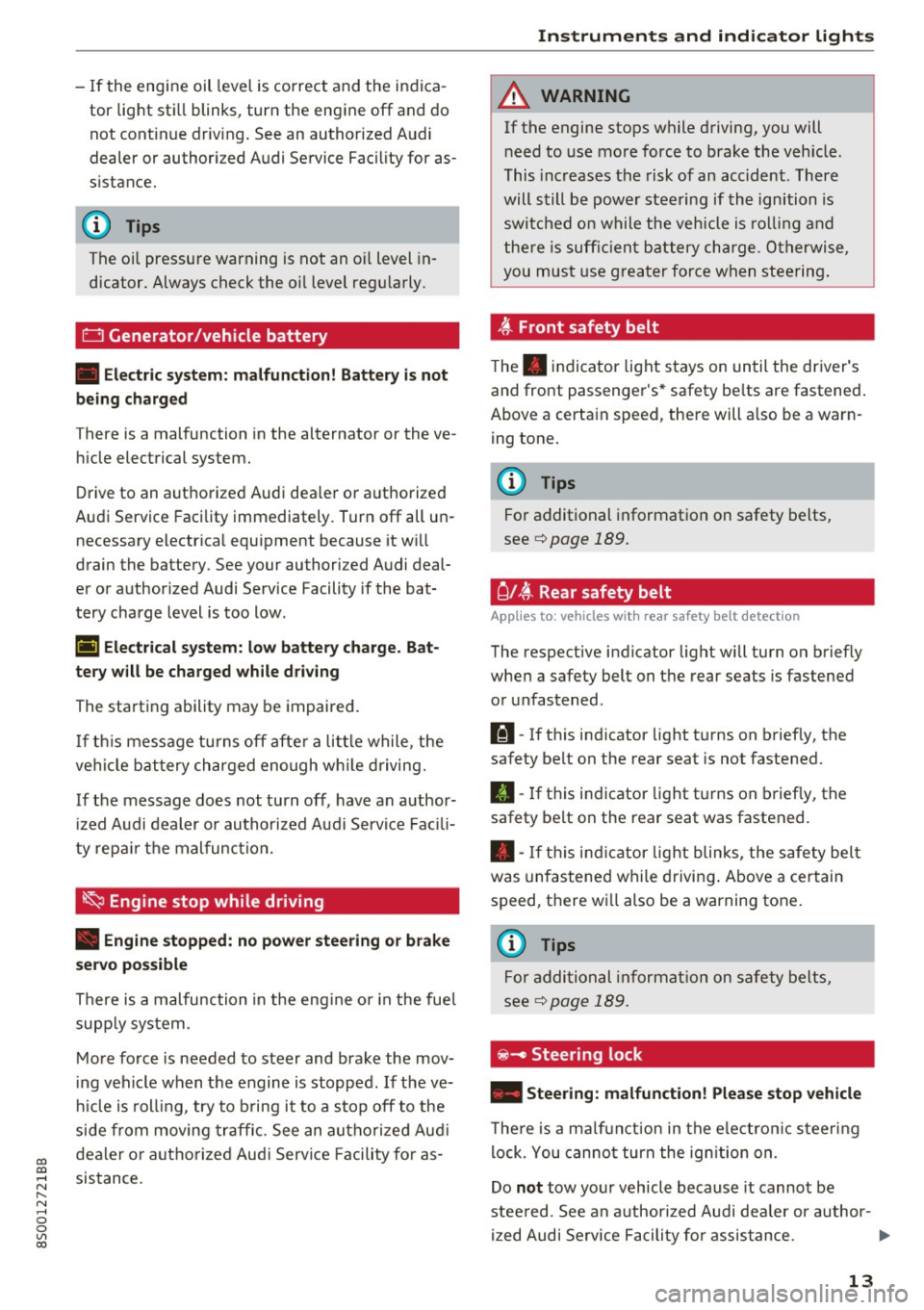
The. indicator light stays on until the driver's
and front passenger's* safety belts are fastened.
Above a certain speed, there will also be a warn ing tone.
@ Tips
For additional information on safety belts,
see
c::> page 189.
C l~ Rear safety belt
Applies to : vehicles with rear safety belt detection
The respective indicator light will turn on briefly
when a safety belt on the rear seats is fastened
or unfastened .
111-If this indicator light turns on briefly, the
safety belt on the rear seat is not fastened.
II-If this indicator light turns on briefly, the
safety belt on the rear seat was fastened.
• -If this indicator light blinks, the safety belt
was unfastened while driving. Above a certain
speed, there will also be a warning tone .
(D Tips
For additional information on safety belts,
see
¢page 189.
~ - Steer ing lock
• Steering: malfunction! Please stop vehicle
There is a malfunction in the electronic steering
lock. You cannot turn the ignition on.
Do
not tow your vehicle because it cannot be
steered. See an authorized Audi dealer or author-
ized Audi Service Facility for assistance.
1111>
13
Page 46 of 322
Sea ts and stor age
Seats and storage
General information
A WARNING
See c> page 180, Safe driving for important
information, tips, suggestions and warnings
that you should read and follow for your own
safety and the safety of yo ur passengers .
Front seats
Power seat adjustment
Appl ies to veh icles with power adjustable seats
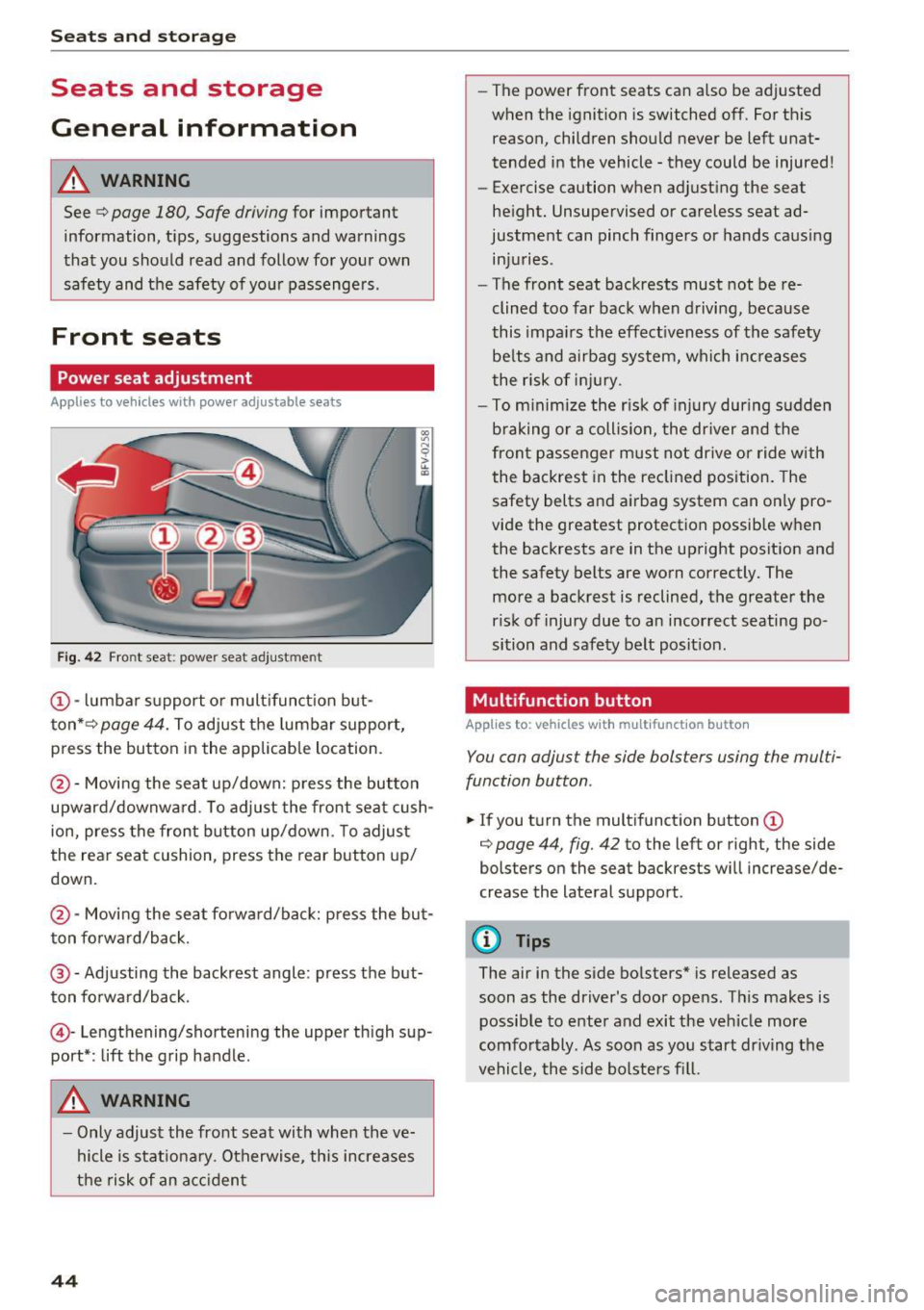
Fig. 42 Front seat: power seat adjustment
@-lumbar s upport or mult ifunct ion but
ton* c>
page 44. To adjust the lumbar support,
press the button in the applicable location.
@ -Moving the seat up/down: press the button
upward/downwa rd . To adjust the front seat cush
ion, press the front button up/down. To adjust
the rear seat cushion, press the rear button up/
down.
@ -Moving the seat fo rwa rd/back: press the bu t
ton fo rward/b ack.
@ -Adjusting the backrest angle : press the but
ton fo rwa rd/back.
© -Lengthening/shortening the upper thigh sup
port* : lift the grip handle.
A WARNING
- Only adjust the front seat with when the ve
hicle is stat iona ry . Otherwise, this increases
the risk of an ac ciden t
44
-The power front seats can also be adjusted
when the ignition is switched off. For this reason, children should never be left unat
tended i n the vehicle -they could be injured!
- Exercise caution when adjusting the seat
he ight. Unsupervised or careless seat ad
justment can pinch fingers or hands caus ing
injuries .
- The front seat backrests must not be re
clined too far back when d riving, because
this impa irs the effect iveness of the safety
be lts and airbag sys tem, which in creases
the risk of i njury.
- To m inimize the r isk of injury during s udden
braking or a collision, the dr iver and the
fron t passenger must no t drive or ride with
the backrest in the re clined position. The
safety belts and airbag system can on ly pro
vide the greatest protection possible w hen
the backrests are in the upright posit ion and
the safety belts are worn correctly. The
more a backrest is reclined, the greater the
ris k of injury due to an incorrect seating po
sition and safety belt posit ion .
Multifunction button
App lies to : vehicles with mult ifunct io n bu tto n
You can adjust the side bolsters using the multi
function button .
.,. If you t urn the mult ifunct ion b utton (D
c> page 44, fig. 42 to the left or right, the side
bolsters on the seat backrests will increase/de
crease the lateral support.
@ Tips
The air in the side bolsters* is released as
soon as the driver's door ope ns. Thi s makes is
possib le to enter and exit the veh icle more
comfo rtably. As soon as you start dr iving the
vehicle, the side bolsters fi ll.
Page 52 of 322
Sea ts and stor age
(D Note
Make sure the safety belt is not pinched in the
backrest lock and damaged when the rear
seat backrest if folded back.
Lowering the cargo floor
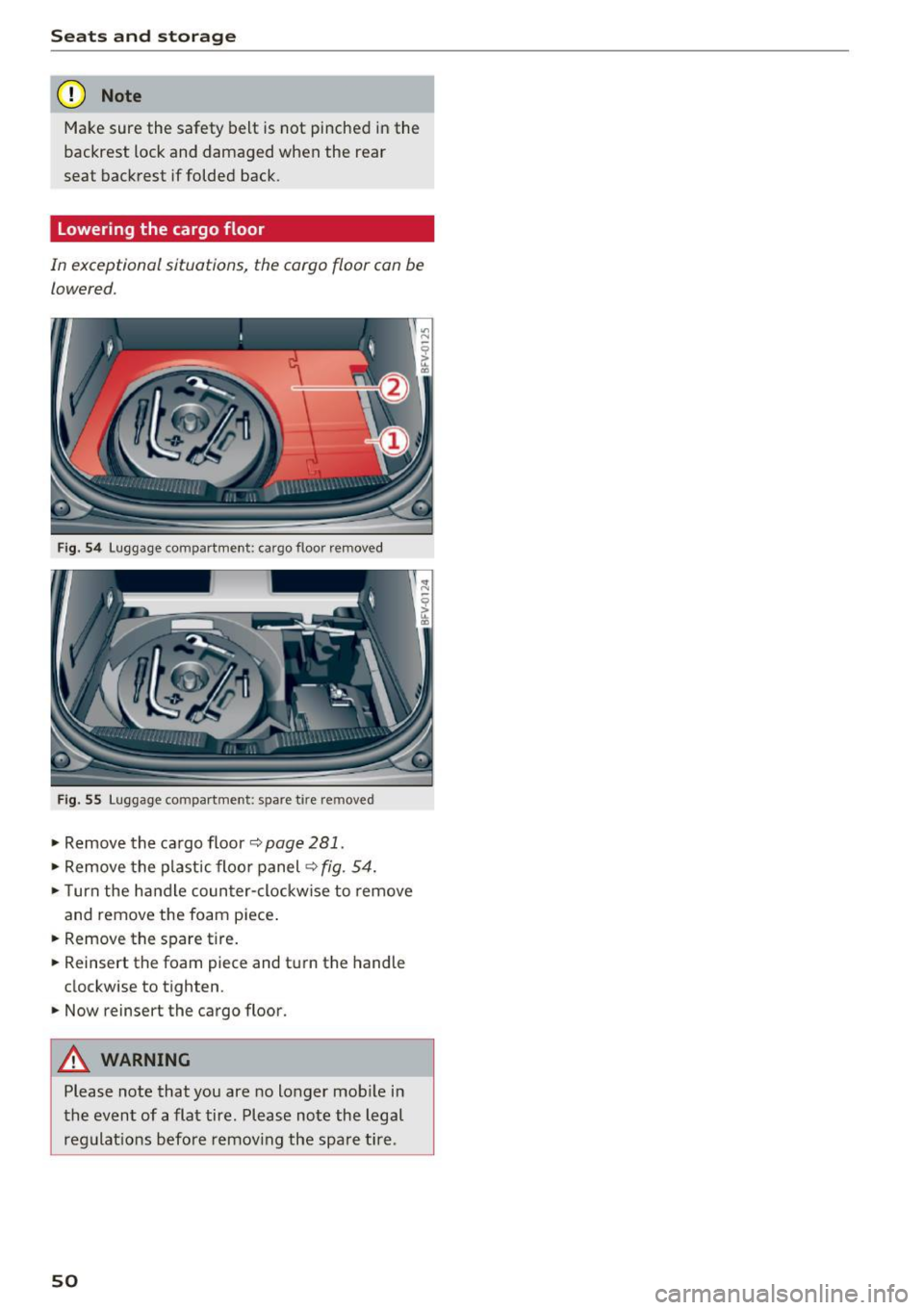
In exceptional situations, the cargo floor can be
lowered.
F ig. 54 Luggage compartme nt: cargo floor removed
Fig. 55 Luggage compartment: spare tire removed
• Remove the cargo floor¢ page 281.
• Remove the plastic floo r panel ¢ fig. 54.
• Turn the handle counter-clockwise to remove
and remove the foam piece .
• Remove the spare tire.
• Reinsert the foam piece and tu rn the handle
clockwise to tighten .
.,. Now reinsert the cargo floor.
A WARNING
Please note that you are no longer mob ile in
the event of a flat tire. Please note the legal
regulat ions before remov ing the spare tire .
50
Page 67 of 322

co
co
.... N
" N .... 0
0
Vl c:o
Starting on a hill
"' Set the parking brake .
"'With the driving gear selected, press the accel
erator pedal carefully. The parking brake will
release automatically if your safety belt is fas
tened .
Under certain circumstances, such as driving in
the mountains, it may be useful to switch tempo
rarily to the manual shift program in order to
manually adjust the gears to the driving condi
tions ¢
page 66.
When parking on a level surface, simply place the
selector lever in the P position. On inclines, acti
vate the parking brake first and then move the selector lever to the P position ¢
page 60. This
prevents the locking mechanism from being
loaded too heavily and will make it easier to
move the selector lever out of the P position .
.8, WARNING
- The vehicle can roll even when the engine is
switched off.
- Unintended vehicle movement can lead to
serious injuries.
- Never leave your vehicle with the engine
running while in gear.
If you must leave
your vehicle when the engine is running, set
the parking brake and move the selector lev
er to the P position.
- Power is still transferred to the wheels
when the engine is running at idle. To pre
vent the vehicle from "creeping", you must keep your foot on the brake when the en
gine is running and the selector lever is in
the D, Sor R position or "tiptronic" mode is
selected.
- Do not inadvertently press the accelerator
pedal when the vehicle is stationary. Other
wise the vehicle will start to move immedi ately, even if the parking brake is set. This
could result in a crash.
- Do not press the accelerator pedal when
changing the selector lever position while
the vehicle is stationary and the engine is running .
Driving
-Never engage the R or P selector level posi
tions while driving. It could cause a crash.
- Before driving down a steep slope, reduce
your speed and shift into a lower gear with "ti ptronic".
- Do not ride the brakes or press the brake
pedal too often or too long when driving
downhill. Constant braking causes the brakes to overheat and substantially re
duces braking performance, increases brak
ing distance or causes complete failure of
the brake system.
- If you must stop on an incline, always hold
the vehicle in place with the foot brake or
parking brake to prevent it from rolling
back .
- Never hold the vehicle on an incline with a
slipping clutch. The clutch opens automati
cally when it becomes too hot from the
overload. The
mJ indicator light turns on
and a message appears ¢
page 68 when
the clutch is overloaded.
- If the engine must run while you are work
ing in the engine compartment with the
hood open, make sure a gear is not engag
ed. The selector lever must be firmly in the
P position and locked in place and the park
ing brake must be set ¢
page 244. Other
wise, the vehicle could begin moving when
increasing the engine speed, even with the
parking brake set .
(!) Note
- When stopping on an incline, do not try to
hold the vehicle in place by pressing the ac
celerator pedal while a driving gear is se
lected. This can cause the automatic trans
mission to overheat and can damage it. Set
the parking brake or press the brake pedal
to prevent the vehicle from rolling.
- Allowing the vehicle to roll when the engine
is stopped and the selector lever is in the N
position will damage the automatic trans
mission because it is not lubricated under
those circumstances.
65
Page 68 of 322

Driving - The transmission can overheat and be dam
aged under certain driving and traffic condi
tions such as frequent starts, creeping for a
long time, or stop -and-go traffic. When the
@] or. indicator light turns on, stop the
vehicle at the next opportunity and let the
transmission cool
r=;, page 68 .
-Allowing the vehicle to roll when the engine
is stopped will damage the S tronic trans
mission because it is not lubricated
¢ page 294, Towing with a tow truck.
@ Tips
For safety reasons, the parking brake is re
leased automatically only when the driver's
safety belt is engaged in the buckle.
Hill descent control
The hill descent control system assists the driver
when driving down hills .
Hill descent control is ac tivated when the selec
tor lever is in the Dor S position and you press
the brake pedal. The transmission automatically
selects a gear that is suitable for the hill. Hill de
scent control tries to maintain the speed ach
ieved at the time of braking, within physical and
technical limitations.
If may still be necessary to
adjust the speed with the brakes. Because hill de
scent control cannot shift down farther than 3rd
gear, it may be necessary to shift into tiptronic
mode in very steep areas. In this case, shift man
ually into 1st or 2nd gear in tiptronic mode to
use the engine's braking force to relieve the
brakes .
Hill descent control switches off once the hill lev
els out or you press the accelerator pedal.
On vehicles with a cruise control system*
¢ page 70, hill descent control is also activated
when the speed is set.
A WARNING
Hill descent control cannot overcome physical
limitations, so it may not be able to maintain
a constant speed under all conditions. Always
be ready to apply the brakes.
66
Shifting manually (tiptronic mode)
The tiptronic allows the driver to shift the gears
manually .
Fig. 66 Cente r conso le : sh ift ing ma nually with the selecto r
lever
Fig. 67 Steering whee l: ma nual shifting wit h the shift pad
dles•
Shifting with the selector lever
You can shift into tiptronic mode while stationary
and whi le driving.
.,. To shift into tiptronic mode, push the selector
lever from the D/S setting to the right in the
tiptronic shift gate. Once the transmission has
sw itched modes, the selector lever position
M
is shown in the Infotainment system display
r=;,poge 62, fig. 63 . For example M4 means the
fourth gear is engaged .
.,. To shift up a gear, tap the selector lever for
ward
0 ¢ fig. 66.
.,. To shift down a gear, tap the selector lever to
back
0 .
Shifting with the shift paddles*
You can operate the shift paddles in the D/S or
M
(tiptronic shift gate) selector lever positions.
.,. To shift up one gear, tap the shift paddle
0
r=;,fig. 67.
Page 96 of 322
Intelligent Technology
greater than the amount being generated in or
der to maintain an optimal vehicle battery charge
level.
(D Tips
- Energy management cannot overcome the laws of physics. Note that the charge level
and length of the vehicle battery life are
limited.
- When the starting ability is jeopardized, the
(•j indicator light turns on¢ page 13.
What you should know
Maintaining the starting ability is the highest
priority.
A lot of stress is placed on the vehicle battery
when driving short distances, during city driving,
and at cold times of the year. A lot of energy is
used but little is generated. It is also critical
when the engine is not running but electrical
equipment is switched on. In this case, energy is used but none is generated .
In situations like this, energy management will
actively regulate the distribution of energy.
Long periods without use
If you do not drive your vehicle for several days or
weeks, electrical equipment is gradually scaled
back or switched off. This reduces energy use and
ensures the vehicle will be able to start after long
periods of time. Some convenience functions
such as opening with the remote control key may not be available . These convenience functions
will be available again once you switch the igni tion on and start the engine.
With the engine switched off
The vehicle battery will drain if you use Infotain ment functions such as listening to the radio
while the engine is switched off .
If the vehicle's ability to start may be impaired by
the energy use, a message will appear in the In
fotainment system display. The message indi cates that the system will switch off automatically soon .
If you would like to continue using the
functions, you must start the engine.
94
With the engine running
Although e lectrical energy is generated while
driving , the vehicle battery can drain . This can
happen if little energy is generated but much is
used, and the charge level of the vehicle battery
is not optimal.
To restore the balance of energy , components
that require large amounts of energy are tempo
rarily scaled back or switched off. Heating sys
tems in particular require a great deal of energy.
If you notice, for example, that the seat heating*
or rear window defroster is not working, then it has been temporarily reduced or switched off .
These systems are available again as soon as the energy supply has been restored.
In addition, you may notice that the idle speed
has slightly increased . That is normal and no
cause for concern . By increasing the idling speed ,
the additional required energy will be generated
and the vehicle battery will be charged.
Information about data
recorded by vehicle
control modules
Your vehicle is not equipped with a crash data re
corder . This device is installed by some vehicle
manufacturers to record data about crashes so
that it can be analyzed later. Crash data record
ers are also called "Event Data Recorders (EDR)".
In some legal jurisdictions, it is not permitted to
access or download data recorded by pre-instal
led crash data recorders in order to evaluate a
crash without clear consent of the vehicle owner.
Your vehicle is not equipped with a crash data re
corder. However it does contain a variety of elec
tronic control modules for various vehicle sys
tems such as engine function, exhaust treatment
or airbags and safety belts.
These electronic control modules record vehicle
data during normal driving for diagnosis and re
pair purposes. The recording capability of the
electronic control modules is limited to data only
- no sound is recorded. If the control module de
tects a system malfunction or other change in
status, a very limited amount of data is recorded .,,.
Page 182 of 322
Safe dri ving
Safe driving
Basics
Safe driving habits
Please remember -safe ty first!
This chapter contains important information,
tips, instructions and warnings that you need to
read and observe for your own safety, the safety
of your passengers and others. We have summar ized here what you need to know about safety
be lts, a irbags, child restra ints as well as child
safety. Your safety is for us
priority number 1 . Al
ways observe the info rmation and wa rn ings in
this section - for your own safety as well as that
of your passengers.
The information i n this section applies to all
model versions of yo ur vehicle . Some of the fea
tures descr ibed in t his sections may be s tanda rd
equipment on some models, or may be optional
equipment on others . If you are not sure, ask
your authorized Audi dealer.
A WARNING
- Always make sure that you follow the in
structions and heed the WARNINGS in th is
Manual.
It is in your interest and in the in
te rest of your passengers .
- Always keep the comp lete Owner's Litera
ture in your A udi when you lend or sell your
vehicle so that this important information
will always be available to the d river and
passenge rs.
- Always keep the Owner 's literature handy so
that you can find it easily if you have ques
t ions.
Safety equipment
The safety features are part of the occupant re
straint system and work together to help reduce
the risk of injury in a wide variety of occident si t
uations.
Your safety and the safety of your passenge rs
should not be left to chance. Advan ces i n tech
nology have made a var iety of features avai lab le
to help reduce the risk of injury in an accident .
180
The following is a list of just a few of the safety
features in your Audi :
- sophis tica ted safety be lts fo r drive r and all pas-
senge r seat ing pos itions,
- safety belt p retensioners,
- safety belt force lim ite rs fo r th e front seats,
- front airbags,
- knee airbags fo r the front seats*
- side airbags in the front seats,
- side curtain airbags with eject ion m itigat ion
features,
- special LATCH anchorages for child restraints,
- adj ustab le steering col umn.
These ind iv idual safety features, can work to
gether as a system to he lp protect you and your
passengers i n a wide range of acc idents. These
fea tures canno t wo rk as a sys tem if they a re not
a lways correc tly adjusted and correct ly used.
Safety is everybody' s responsibilit y!
Important things to do before driving
Safety is everybody's job! Vehicle and occupant
safety always depends on the informed and care
ful driver .
For your safety and the safety of your passen
gers,
before driving alway s:
.. Make sure that all lights and signals are operat
ing correctly .
.. Make sure that the tire pressure is correct .
.. Make sure that all windows are clean and afford
good visibility to the outs ide .
.,. Sec ure all luggage and othe r items ca refully
Q page 185, ~page 47.
.,. Make sure that noth ing can inter fere wi th the
peda ls .
.. Ad just front seat and mirrors cor rectly for your
height.
.. Make sure to use the right child restraint cor
rectly to protect children
Q page 221, Child
safety .
.. Sit p roperly in your seat and make sure t hat
your passenge rs do the same
Q page 44, Seats
and storage.
ll-