radio AUDI TT COUPE 2017 User Guide
[x] Cancel search | Manufacturer: AUDI, Model Year: 2017, Model line: TT COUPE, Model: AUDI TT COUPE 2017Pages: 322, PDF Size: 79.73 MB
Page 111 of 322

co
co
.... N
" N .... 0
0
Vl c:o
Voice recognition system
The majority shown are main commands. This
system also recognizes synonyms in certain cas-es
. For a bu siness add re ss, yo u can also say busi
ness , work , office or at the office .
Commands
Global commands
Applies to: vehicles with voice recogniti on system
You can a lways use the global commands, re
ga rdless of the me nu selected .
Function Say:
Open ing a menu Tel ephon e/ Directory / Navigation / Radio / Medi a/ Audi con -
n ec t*
I Car I Tone
Hav ing the possible commands Help / Help Speech dialog system I Help Telepho ne /
read aloud Help Na vigat ion / Help Map / Help Radio / Help Med ia / He lp
Aud i connect *
Telephone fu nctions Call (XV ), for example Call "John Smith" /
Enter numbe r/ Redial / Di rectory / Read out text me ssage
Navigation funct ions Na vigate to (XY ), for examp le Na vigate to "John Smith" /
Ent er addre ss/ Cancel route guidanc e/ Map / Onl ine d estina -
tion s*
I Online d estination (XV )*
Access ing favorites Favorites > follow the system prompts
Selecting an entry from a list Line (XV )
Scrolling through a list Next page / Previou s page
Corre ct the command g iven Correction
Switching the vo ice recog nition sys-Cancel
tern off
Telephone
Appl ies to: vehicles with vo ice recog nitio n system and telephone
Requirement: a cell phone must be connected to
the MMI
¢page 114 and the Telephone menu
must be open "*
table on page 109.
You can say the following commands depending
o n t he selected menu item :
Function Say:
Call a contact from the dire ctory Call (XV ), for example Ca ll "John Smith"
Se lecting a specific contact number Call (XV ) at work / Private / Landline /Cellphone ,
for example, Call "John Smith" p rivate
Selecting a phone number with an Call/ Call work / Call pri vate / Call land lin e/ Call cell phone
address card open work
Calling a contact from yo ur favor-Tel ephone favorites > After being prompted, say the desired
it es list contact > Dial
Displaying recent calls Recent call s
Calling the last n umbe r dialed Redial
109
Page 114 of 322
Voice recognition system Function
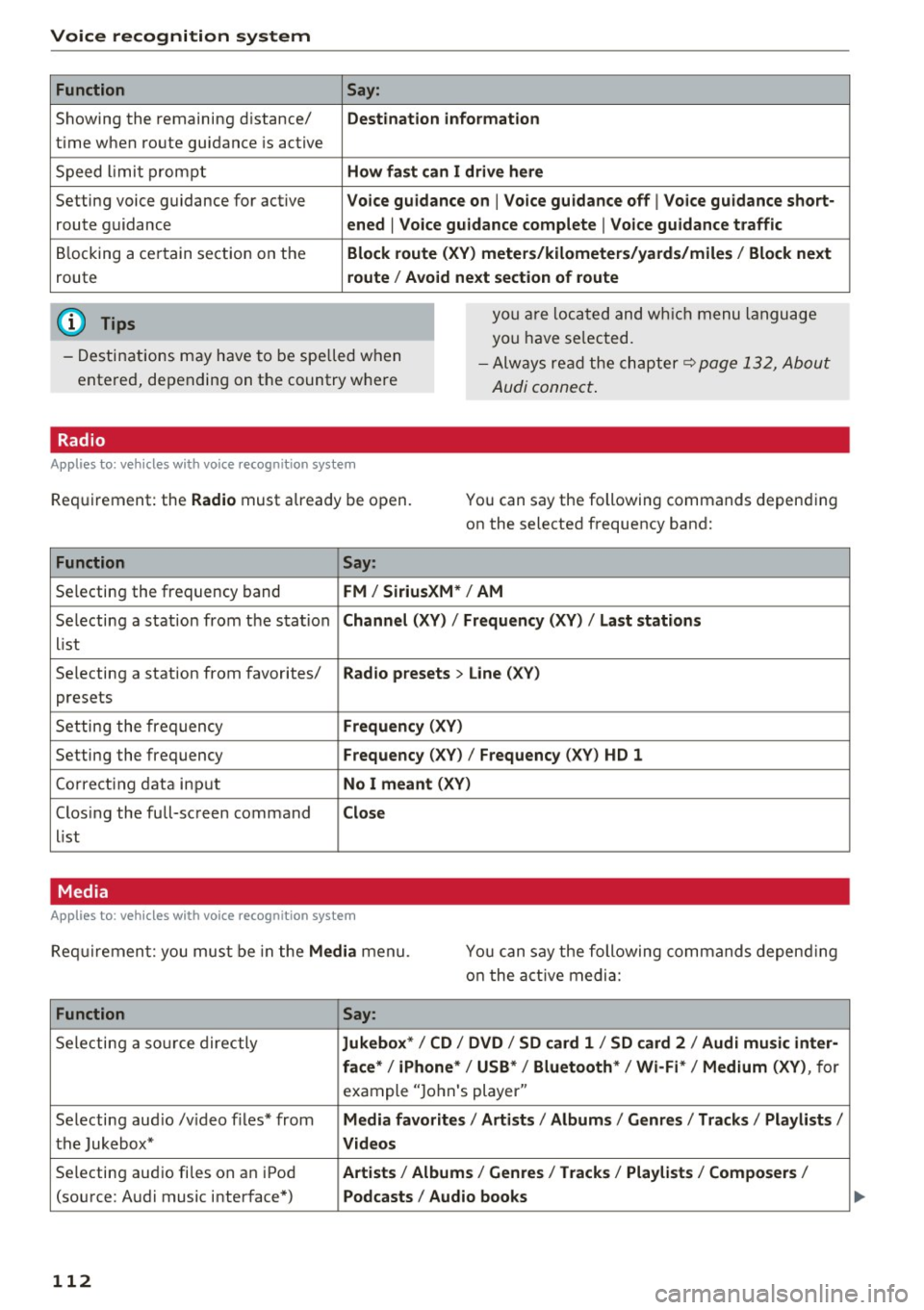
Showing the remaining distance/
t ime when route guidance is active
Speed lim it prompt
Setting voice guidance for active
route guidance
Blocking a certain section on the
route
(D Tips Say:
Destination information
How fast can I drive here
Voice guidance on
I Voice guidance off I Voice guidance short-
ened
I Voice guidance complete I Voice guidance traffic
Block route (XV) meters/kilometers/yards/miles / Block next
route / Avoid next section of route
you are located and which menu language
you have se lected.
- Destinations may have to be spe lled when
entered, depending on the country where -
Always read the chapter~
page 132, About
Audi connect.
Radio
Applies to: vehicles with voice recognition system
Requirement: the Radio must already be open. You can say the following commands depending
on the selected frequency band:
Function Say:
Selecting the frequency band FM/ SiriusXM * / AM
Selecting a station from the station Channel (XV) / !Frequency (XV) / Last stations
list
Selecting a station from favorites/
Radio presets > Line (XV)
presets
Setting the frequency
Frequency (XV)
Setting the frequency Frequency (XV) / Frequency (XV ) HD 1
Cor recting data input No I meant (XY)
Clos ing the full-screen command Close
list
Media
Applies to: vehicles with voice recognition system
Requirement: you must be in the Media menu. You can say the following commands depend ing
o n t he active media:
Function Say:
Selecting a source directly Jukebox*/ CD / DVD / SD card 1 / SD card 2 / Audi music inter-
face*
I iPhone* / USB* / Bluetooth* I Wi-Fi* / Medium (XV), for
example "Jo hn's player "
Selecting aud io /v ideo files* from
Media favorites / Artists / Albums / Genres / Tracks / Playlists /
the Jukebox* Videos
Selecting aud io fi les on a n iPod Artists / Album 1s / Genres / Tracks / Playlists / Composers I
(source: Audi music interface*) Podcasts / Audio books
112
Page 120 of 322
Telephone
-Ending a phone call/cancel dialing: select and
confirm End call. Or : press the control knob.
A ccepting another call: see
q page 118, During
a phone call.
Caller information : the name, phone number or
Unknown appears in the Infotainment system
display depending on if the ca ller has bee n stored
in the directory and if the phone number has
been transmitted. A picture may also be dis
p layed, depending on whether you have assigned
a picture to a contact in your directory and if it
was transferred to your MMI. You can find out if
your cell phone supports this function from your cell phone network provider, your cell phone
owner's manual or at www.audiusa .com/blue
tooth .
{D) Tips
The radio or media playback is muted during a
phone call.
During a phone call
Applies to: vehicles with telephone
Requirement: there must be a call in progress.
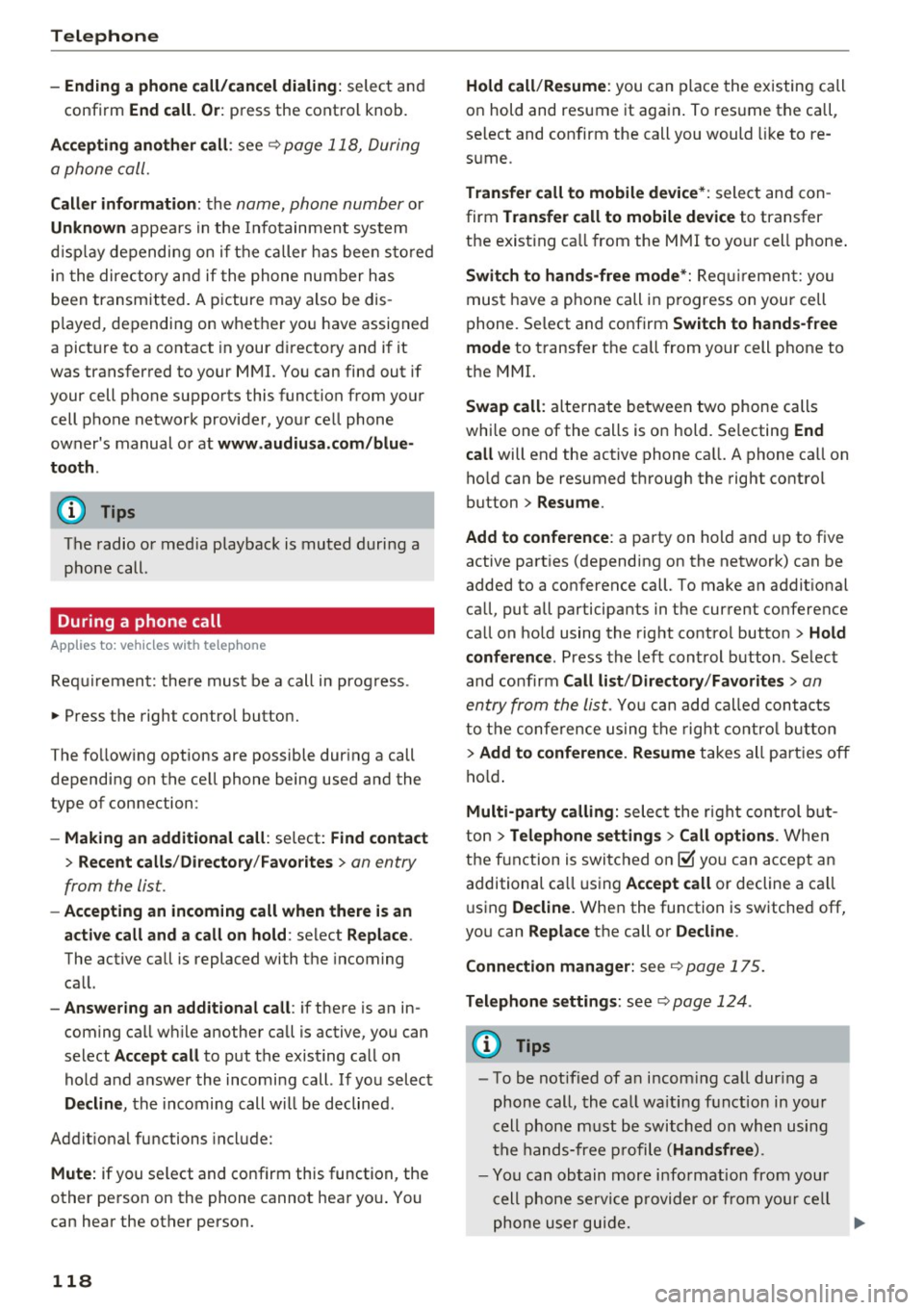
"" Press the right control button.
The fo llowing options are possible during a call
depending on the ce ll phone being used and the
type of connection:
- Making an additional call: select: Find contact
> Recent calls /Directory /Favorites > an entry
from the list.
- Accepting an incoming call when there is an
active call and a call on hold : select Replace .
The active call is replaced with the incoming
call.
- Answering an additional call : if there is an in
coming call w hile another call is active, you can
select Accept call to put the exist ing call on
hold and answer the incomi ng call.
If you select
Decline , the incoming call w ill be declined.
Addit ional functions include:
Mute: if you se lect and confirm this function, the
other person on the phone cannot hear you . You
can hear the other person.
118
Hold call /Resume : you can place the existing call
on hold and resume it again . To res ume the call,
se lect and confirm the call you would like to re
sume .
Transfer call to mobile device* : select and con
firm Transfer call to mobile device to transfer
the exist ing ca ll from the MMI to your cell phone .
Switch to hands-free mode*: Requiremen t: you
must have a phone call in progress on your cell
phone. Select and confirm Switch to hands-free
mode to transfer the call from your cell phone to
the MMI.
Swap call: alternate between two phone calls
while one of the calls is on hold. Se lecting End
call will end the active phone call. A phone call on
hold can be resumed through the right control
button
> Resume .
Add to conference : a party on hold and up to five
active part ies (depending on the network) can be
added to a conference call. To make an addit ional
ca ll, put all participants in the current conference
call on hold using the right control button
> Hold
conference . Press the left control button . Se lect
and confirm Call list/Directory /Favorites
> an
entry from the list.
You can add called contacts
to the conference using the right control button
> Add to conference. Resume takes all part ies off
hold.
Multi-party calling: select the right con trol but
ton
> Telephone settings > Call options . When
the function is switched on~ you can accept an
additional ca ll using Accept call or decline a ca ll
using Decline. When the function is switched off,
you can Replace the call or Decline.
Connection manager: see
qpage 175.
Telephone settings: see q page 124 .
(D Tips
-To be notified of a n incom ing call dur ing a
phone call, the call wa iting function in your
cell phone must be switched on when using
the hands-free profile (Handsfree ).
- You can obtain more information from your
cell phone service provider or from your cell
phone user guide.
Ill>
Page 124 of 322
Telephone
(D Tips
-This service must be set up and activated in
advance by the cell phone service provider.
You can obta in more information from your
cell phone service prov ider.
- The voicemai l number depends on the cell
phone service provider .
Emergency call functions
Appl ies to: ve hicles w ith tele phone
~ Select : I MENU I button >Telephone > left con
trol button >
Enter number > Enter emergency
call number (for example , 911)
> O K.
A WARNING
-
- Beca use your phone works with radio s ig
nals , a connect ion cannot be guaranteed un
der all ci rc u mstances. Do not rely on only
yo ur phone when it comes to essent ial com
mun ication (s uch as a medical eme rgency).
- Always follow the instructions given by the
emergency personnel du ring an emergency
call and only end the call when they instruct
yo u to do so .
(D Tips
Emergency numbers are not the same eve ry
where. Find out which eme rgency number is
used in yo ur current locat ion .
Directory
Opening the directory
Appl ies to: ve hicles w ith tele phone
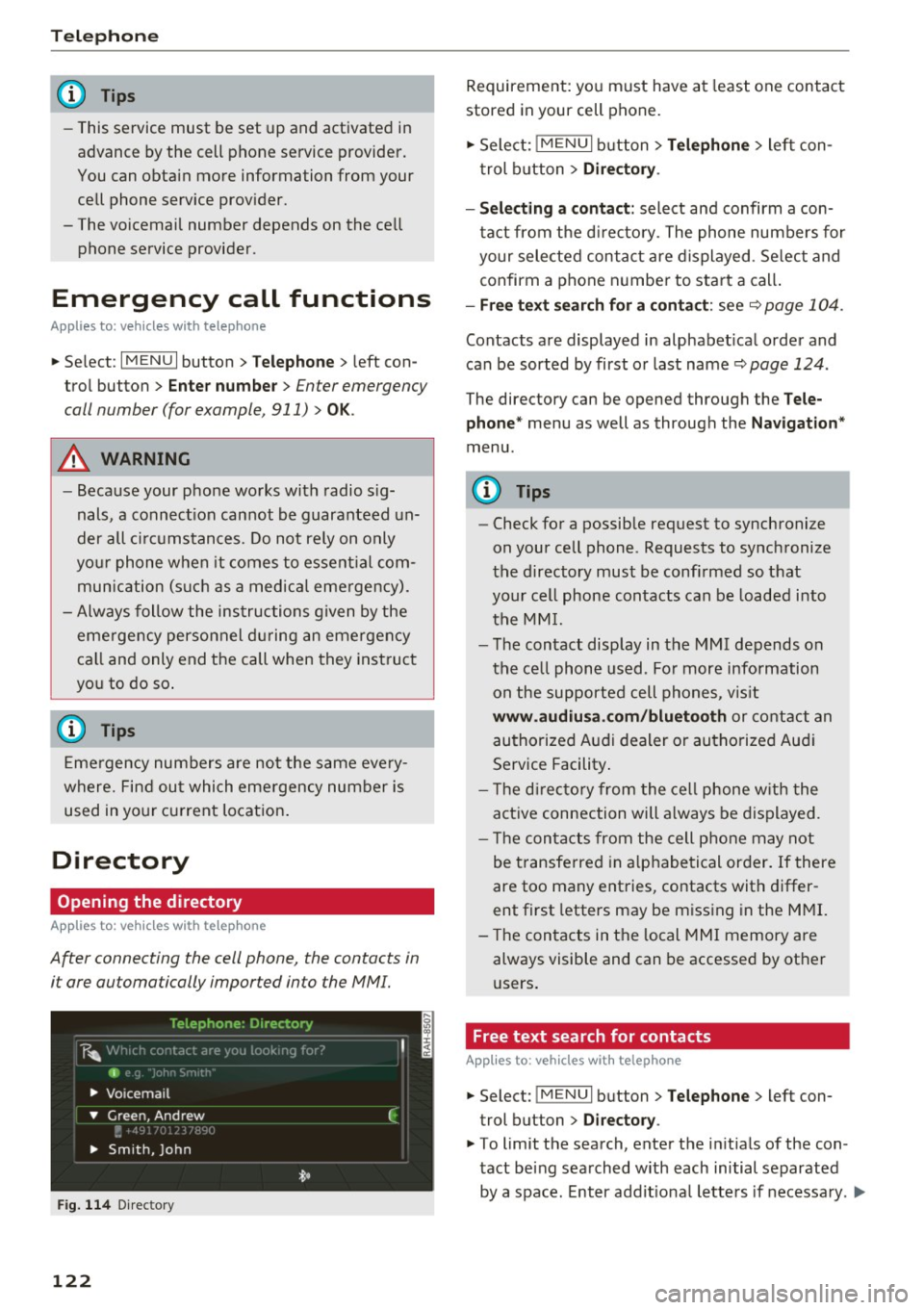
After connecting the cell phone, the contacts in
i t are automatically impor ted in to the MMI.
F ig . 11 4 Direc tory
122
Requirement: yo u must have at least one contact
stored in your cell phone.
~ Select: ! M ENUI button> T el ephone > left con
trol b utton >
Dire ctory .
- Selecting a contact :
select and confirm a con
tact from t he d irectory. The phone numbers for
your selected contact are displayed . Se lect and
confirm a phone n umbe r to sta rt a call .
-Fre e te xt sear ch for a conta ct : see q page 104 .
Contacts a re displayed in alphabet ical order and
can be sorted by first or last name ¢
page 124.
The directo ry can be opened th rough the Tele
phone "
menu as well as through the Navigation "
menu.
(D Tips
-Check for a possible request to synchronize
on your cell phone . Requests to synchronize
the directory must be confirmed so that
your cell phone contacts can be loaded into
the MM I.
- The contact display in the MMI depends on
the ce ll phone used . Fo r more information
on the supported cell phones , vis it
www .audiu sa .com /blu etooth or contact an
authorized Audi dealer or authorized Aud i
Service Facility .
- T he d irecto ry from the cell phone w ith the
active connection will a lways be displayed.
- T he contac ts from the cell phone may not
be transferred in a lphabetical order. If there
are too many entries, contacts with differ
ent first letters may be miss ing in the M MI.
- The contacts in the local MMI memory are
always visible and can be accessed by other
users.
, Free text search for contacts
App lies to : vehicles wi th telepho ne
~ Select: !MENU I button> Telephone > left con
trol button >
Director y.
~ To limit the search , enter the in it ials of the con
tact being searched with each initial separated
by a space. Enter addit iona l letters if necessa ry . .,..
Page 152 of 322
Radio
Radio
Opening the radio
The radio supports the FM, AM and SiriusXM*
(satellite radio) bands. Using the HD Radio re
ceiver also allows you to receive radio stations
on the FM and AM bands in digital format.
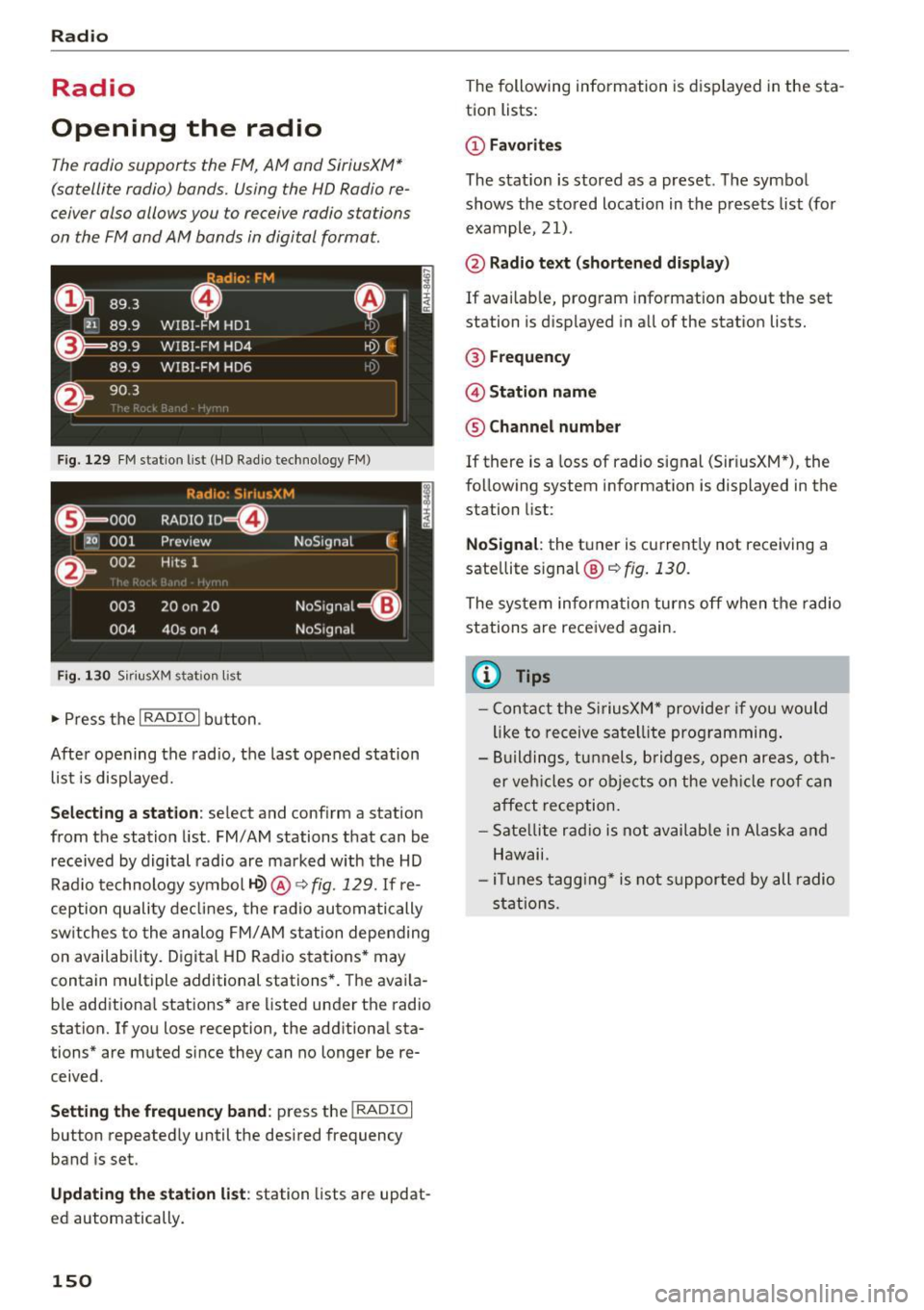
Fig . 129 FM station list (HO Radio technology FM)
Radio: S ir iusXM
E l
0 . 000 RADIO ID m
120 001
Preview NoSignal
&
002 Hits 1
''' .I
003 20 on 20 NoSignal
=Gl
004 40s on 4 NoSignal
Fig. 130 S
iriusXM stat ion list
~ Press the I RADIO I button .
After opening the radio, the last opened station
list is displayed.
.
I
Selecting a station: select and conf irm a station
from the station list. FM/ AM stations that can be
received by digital radio are marked with the HD
Radio technology symbol
1-Q) @ ~ fig. 129. If re
ception quality declines, the radio automatically
sw itches to the analog FM/AM station depending
on availability. Digital HD Radio stations* may
contain multiple additional stations*. The avai la
b le additional stations* are listed under the radio
station. If you lose reception, the additional sta
tions* are muted since they can no longer be re
ceived .
Setting the frequency band : press the I RADIO I
button repeatedly until the desired frequency
band is set.
Updating the station list: station lists are updat
ed automatically .
150
The following information is displayed in the sta
tion lists:
@ Favorites
The stat ion is stored as a preset. The symbol
shows the stored location in the presets list (for
example, 21).
@ Radio text (shortened display)
If available, program information about the set
station is displayed in all of the stat ion lists.
@ Frequency
@ Station name
® Channel number
If there is a Loss of radio signal (Sir i usXM*), the
following system information is displayed in the
station list:
NoSignal : the tuner is current ly not receiving a
sate llite s ignal ®
c::> fig. 130.
The system informa tion turns off when the radio
stations are received again.
@ Tips
- Contact the SiriusXM" provider if you would
like to receive satellite programming.
- Buildings, tunnels, bridges, open areas, oth
er vehicles or objects on the vehicle roof can
affect reception.
- Satellite radio is not available in Alaska and
Hawaii.
- iT unes tagging* is not support ed by all radio
stations.
Page 153 of 322
Radio functions
Free text search
Using the free text search, you can sel ect t he or
der that th e search terms ar e entered in th e in
pu t fi eld. Search in all fr equency bands for a sta
tion name o r program type such as
News ).
891 l,
~ WJ.3
D
H'l.6 WIBI-FM HDl
WJ .7 WIBI-FM HD4
',M
'1M
~
8') .9 WIBI-FM HD6 ~M
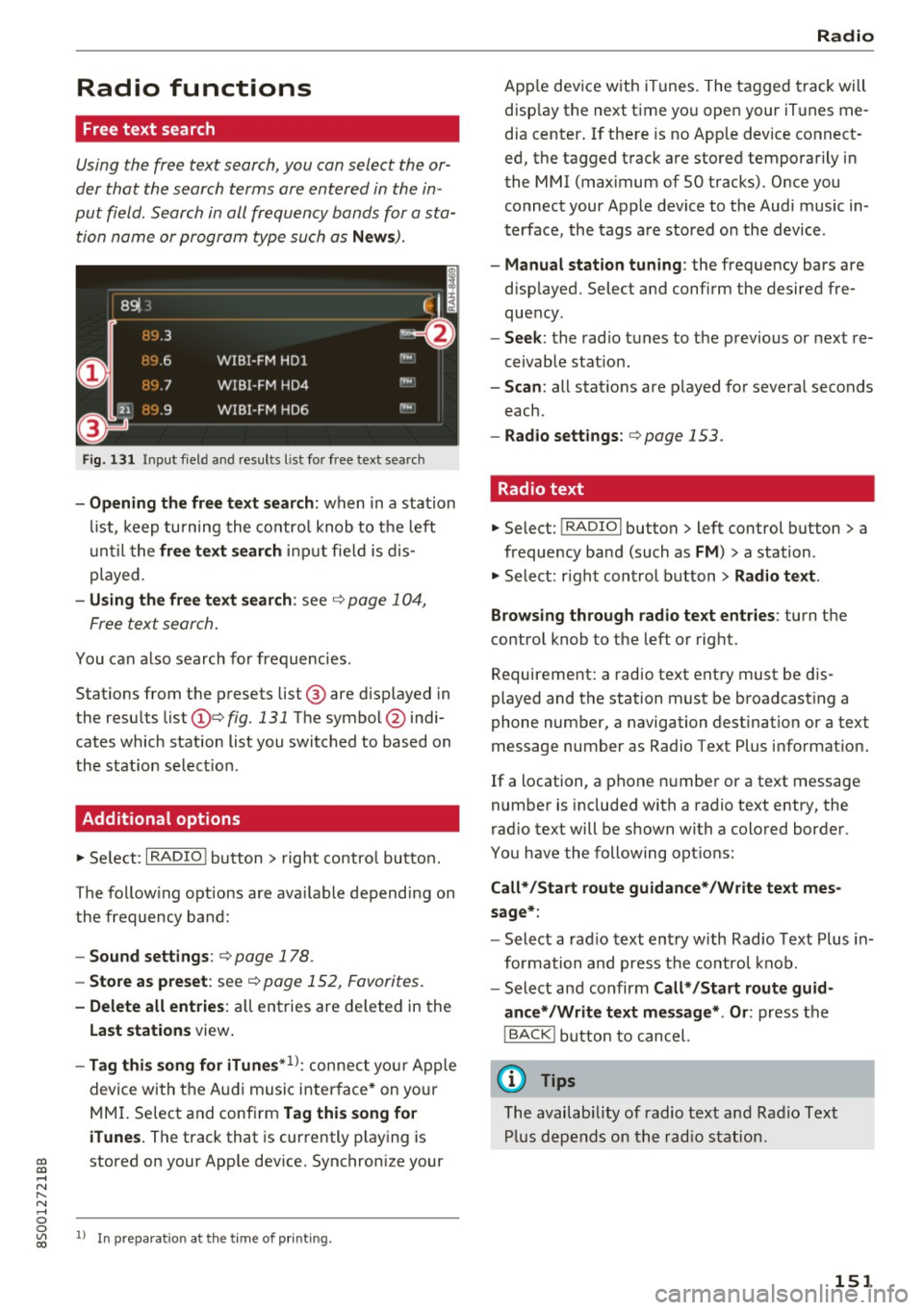
Fig. 131 Input field and resu lts l is t fo r free text searc h
-Opening the free text search: wh en in a sta tion
li st, keep turni ng the co nt rol knob to t he left
until t he
free text search inpu t fie ld is d is
p layed.
- Using the free text search : see c::> page 1 04,
F ree te x t se arch.
You can also search for frequ enci es.
Stat ions from t he p resets list @ are d isp layed in
the resu lts list
(D e::> fig. 131 The symbol @ indi
cates which station list you switched to based on
the s tation selec tion.
Additional options
~ Se le ct: I RADIO ! butto n > right co ntro l bu tton.
The fo llow ing o ptions are ava ilable de pend ing on
th e frequency ban d:
- Sound settings : c::> page 178.
-Store as preset : see c::> page 152, Favorites .
-Delete all entries : all en tries are de lete d in the
Last stations view .
-Tag this song for iTunes*1>: conne ct your Apple
devi ce wi th t he A udi music i nte rfa ce* on yo ur
M MI. Se lec t and conf irm
Tag this song for
iTunes.
The track that is cur rently play ing is
~ stored on y our App le dev ice. Synchron ize your
..... N
" N ..... 0
0
~ l) I n preparat ion at the time of p rinting.
Radio
Ap ple dev ice w it h iTunes . The t agged tra ck will
disp lay the next t ime yo u open your iT unes me
d ia center . If the re is no App le dev ice co nnect
ed, the tagged t rack are stored tempo rarily i n
the MMI (max imum of 50 t racks). Once y ou
connect your App le device to the Au di m usic in
t erface, the tags a re stored o n the device .
-Manual station tuning : the frequency bars are
d isp layed. Select a nd confi rm the desired fre
que ncy.
- Seek : the rad io t unes to the previous or next re
ceivab le stat io n.
- Scan : all stat ions are p layed fo r severa l seconds
each.
- Radio settings: c::>page 153.
Radio text
~ Select: I RADIO I button > left control button > a
frequency band (such as
FM ) > a station .
~ Select: righ t con trol b utton > Radio text.
Browsing through radio text entries :
turn t he
contro l knob to the left o r rig ht.
Requirement: a radio text ent ry must be d is
played and t he station must be b roadcas ting a
phone number, a navigation dest ination or a text
message number as Radio Te xt Plus informat ion .
If a location, a p hone numbe r or a text message
number is included with a radio te xt entry, the
r ad io text will be shown with a colo red borde r.
You have the following opt io ns:
Call*/Start route guidance*/W rite text mes
sage* :
-Select a rad io text en try w ith Rad io Text Plus in
for mation a nd press the co ntrol kn ob .
- Select and confirm
Call* /Start route guid
ance* /Write text message* . Or :
press t he
I BACK ! button t o cancel.
(D Tips
The availabi lity of radio text and R ad io Text
Pl us d ep en ds o n the r adi o s tat ion.
151
Page 154 of 322
Radio
View: additional station information
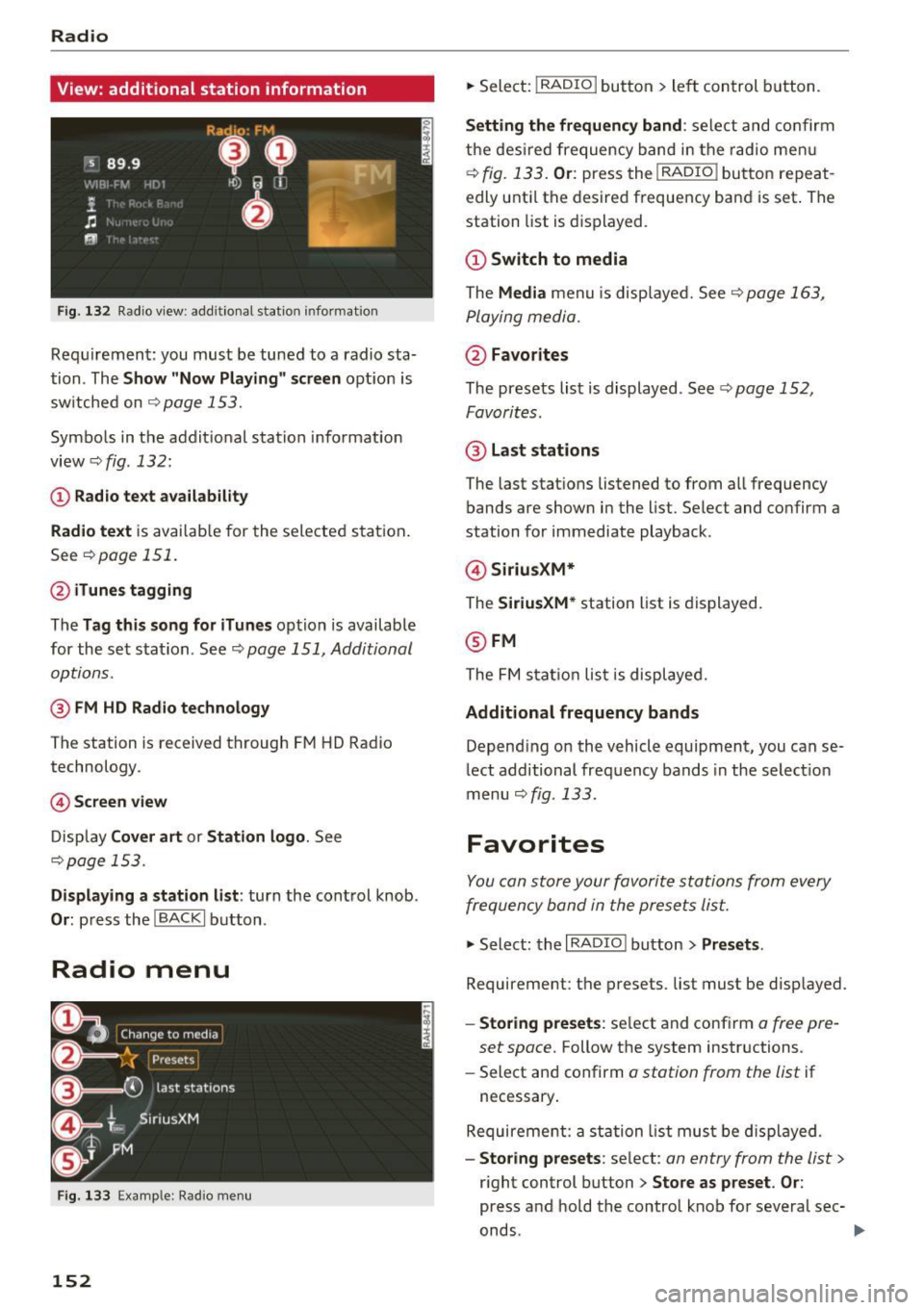
Fig . 13 2 Radio v iew: add itional stat ion informat ion
Req uirement: you must be tuned to a radio sta
tion . The
Show "Now P layin g" s creen opt ion is
sw itche d on
Qpage 153.
Symbo ls in the addit ional station i nformation
view
Q fig. 132:
(D Radio text availability
Rad io text
is avai lab le for the selected station .
See
~ page 151.
@ iTunes tagging
The Tag this song for iTunes option is available
for the se t sta tion . See ~
page 151, Additional
options.
@ FM HD Radio technology
The station is received through F M HD Radio
technology.
© S creen view
Disp lay Cover art or Station logo . See
~page 153.
Displaying a station list: turn the cont rol knob .
Or: press th e !BACKI button .
Radio menu
Fig . 133 E xa mple : Rad io m en u
152
.,. Select: !RADIO I but ton> le ft con trol b utton.
Setting th e frequency band : select and co nfirm
the des ired frequency band in the radio me nu
~ fig. 133. Or: press the I RADIO ! button repeat
edly unti l the desired frequency ba nd is set . The
station list is d is p layed.
@ Switch to media
The Media menu is disp laye d. See~ page 163,
P laying media.
@ Favorites
The presets list is displayed . See Q page 152,
Favorites .
@ Last stat ions
The last stat ions listened to from all frequency
bands are shown in the list. Select and confirm a
station for immediate playback .
@Siriu sXM*
The SiriusXM* station list is d isplayed.
@ FM
The FM s tat io n lis t is displaye d.
Additional frequency bands
Depend ing on the vehicle equipment, you can se
lect additional frequency bands in the select ion
menu
Qfig . 133 .
Favorites
You can store your favorite stations from every
frequency band in the prese ts lis t.
.,. Select: the I RADIO I button > Presets .
Requirement: the presets. list must be d isp layed.
- Sto ring presets : select and conf irm a free pre-
set space.
Follow the system instructions .
- Select and confirm
a station from the list if
necessary .
Require ment: a st ation list mus t be d isplayed .
-Storing presets : select: an entry from the list>
r ight control button > Store as preset . Or :
press and hold the contro l knob fo r severa l sec-
onds .
~
Page 155 of 322
co
co
.... N
" N .... 0
0
Vl c:o
-Di splaying the pre set s list : select: I RADIO I but-
ton
> Presets .
Requirement: the favorites list must be dis
p layed.
- Listening to presets: select and confirm a pre
set from the list.
- Move preset : select a favorite from the list >
right control button>
Move preset. Or: press
and hold the control knob for several seconds .
Select and confirm the locat ion of the selected
favorite .
-Deleting presets: select a preset from the list >
right cont rol button >
Delete preset > Delete
this preset or Delete all presets .
Additional settings
Radio settings
... Se lect : I RADIO ! button > right contro l button >
Radio settings .
The following settings can be selected, depend
ing on the band that is selected:
FM/AM HD Radio*
You can switch HD Radio reception on or off.
Station sorting (SiriusXM*}
You can set the station sort ing for SiriusXM sta
tion lists* by:
-Channel number: the stations are sorted in as
cending order according to their station num
ber.
- Channel name: the stations are listed in alpha
betical order.
- First category, then channel number: the sta
tions are sorted by their category and then by
the ir channel numbers.
- First the category, then the channel name : the
stations are sorted by their category and then
by the ir channel names.
Category filter (SiriusXM*}
The stations shown in the station list can be fi l
tered by your personal preferences and by pro-
Radio
gram type . The program categories that you can
select depend on what is offered by your provid
er. Se lect the
All categories option to deactivate
all filter options and display all available stations
in the satellite station list.
Additional station information
When the function is switched on~ and station
or presets lists are open, the display will switch
after approximate ly five seconds to the
Show
"Now Playing" screen
view Q page 152. Depend
ing on ava ilability, information about the set sta
t ion (such as stat io n name, artist, slide show,
station logo) is displayed in th is view .
Preferred picture view
You can set your preferred picture view for the
Show "Now Playing" screen display Q page 152.
-Station logo: the station logo is displayed, de-
pending on availability .
-Cove r art: the album cover or genre cover is dis-
played, depending on availability.
Gracenote online database*
Requirement: the MMI must be connected to the
Internet. The
Cover art option must be selected
Qpage 153, Preferred picture view.
When the function is switched on~, the album
cover or genre cover for the song that is playing
is loaded from the Gracenote online database,
depend ing on availability.
Subscription status (SiriusXM}*
This option is available when your subscription is
about to expire or has already expired. The expi
ration date fo r your license is displayed.
Call to SiriusXM *: the contact information for
your satellite radio provider is displayed . To call
your sate llite radio provider using the MMI, press
Call to SiriusXM*.
153
Page 156 of 322
Radio
Troubleshooting
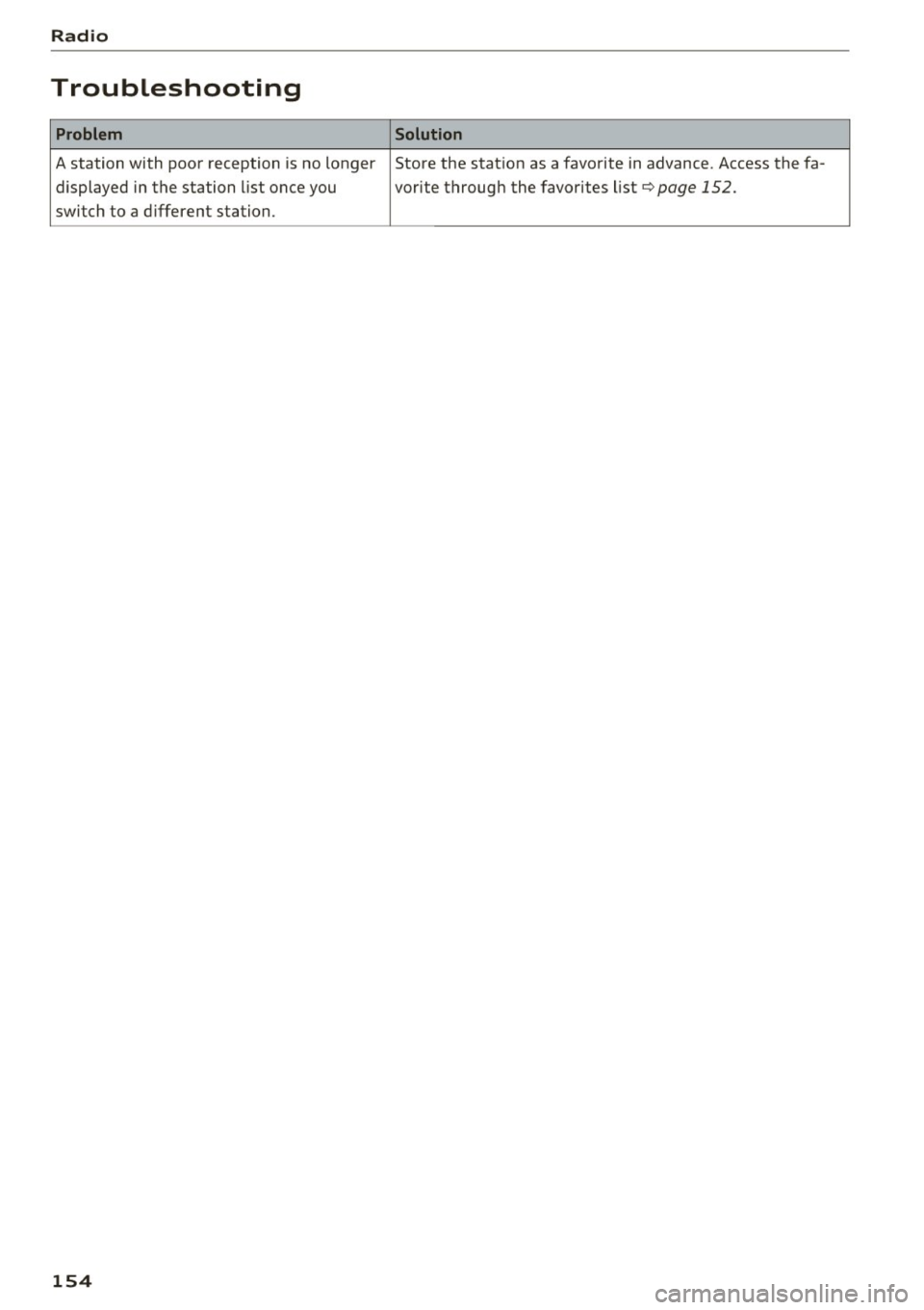
Problem Solution
A station with poor reception is no longer Store the stat ion as a favorite in advance. Access the fa-
displayed in the station list once you vorite through the favorites list
¢page 152.
switch to a different station.
154
Page 161 of 322
-Multiple Bluetooth audio players can be
connected to the MMI, but only one mobile
device can be active.
- Bluetooth protocols AVRCP (1.0/1.3/1.4)
and A2DP are supported.
- Note the volume setting on your Bluetooth
device. Audi recommends setting your mo
bile device to the maximum volume when
using it as a Bluetooth audio player.
- The supported media functions (such as
shuffle) depend on the Bluetooth device be
ing used.
- For more information on the supported de
vices, visit
www.audi.com/bluetooth or
contact your authorized Audi dealer or au
thorized Audi Service Facility.
Wi-Fi audio player
App lies to: ve hicles with Wi-F i
Using the Wi-Fi audio player media source on the
MMI, you can connect and operate your Wi-Fi-ca
pable media player (such as a smartphone) to
wirelessly play music from your media player
li
brary. The media player is connected through the
vehicle's Wi-Fi hotspot. A UPnP Server opp or an
integrated UPnPIDLNA server on your media
player is required to access your media player
li
brary.
Requirement: the Wi-Fi function on your media
player must be switched on. The
Audi MMI con
nect
app or a UPnP server app must be installed
on your media player .
Or: you must be using a
media player with an integrated UPnP/DLNA
server .
-Connecting a media player: press the I MEDIA !
button. Press the left control button until the
sources overview
c:;, page 163 is dis played. Se
lect and confirm
Wi-Fi audio player
(!) ¢page 163, fig . 140 .
-If necessary, select and confirm Wi-Fi off>
Turn on Wi-Fi
to activate Wi-Fi in the MMI. Se
lect
Wi-Fi settings, if necessary. Select the
same settings on the wireless media player
co that are used for the Wi-Fi hotspot. co
;:::: -Starting the Wi-Fi audio player: start the Audi
" ~ MMI connect app or a UPnP server app . Or: al-o
~ low media sharing on your media player. c:o
Media
Operating the media player: the media player is
operated through the MMI.
- Press the left control button repeatedly until
the
Folders menu item appears . Select and con
firm
Folders.
- Playing music from the media player:
select
and confirm
Media center .
Web radio:
see c:;, page 160 .
A WARNING
-As the driver, do not allow usage of the Wi
Fi hotspot to distract you from driving, as
this could increase the risk of an accident.
- It is only safe to use tablets, laptops, mo
bile devices and other similar devices when
the vehicle is stationary because, like all
loose objects, they could be thrown around
the inside of the vehicle in a crash and cause
serious injuries. Store these types of devices
securely while driving.
- Do not use any wireless devices on the front
seats within range of the airbags while driv
ing. Also read the warnings in the chapter
c:;, page 19 7.
@ Note
You are responsible for all precautions taken
for data protection, anti-virus protection and
protection against loss of data on mobile de
vices that are used to access the Internet
through the Wi-Fi hotspot.
(D Tips
- The Wi-Fi connection is reconfigured when
inserting or removing the mini SIM card in
the SIM card reader* . There may be a tem
porary interruption in audio playback, de
pending on the media player.
- Always read the chapter
c:;, page 132, About
Audi connect.
- Please note that a Wi-Fi connection does
not automatically make it possible to use
the Internet. For additional information, see
¢ page 126.
-To avoid interruptions during playback, de
activate the power saving function on the
media player or connect it to a charger.
159