reset AUDI TT COUPE 2017 User Guide
[x] Cancel search | Manufacturer: AUDI, Model Year: 2017, Model line: TT COUPE, Model: AUDI TT COUPE 2017Pages: 322, PDF Size: 79.73 MB
Page 152 of 322
Radio
Radio
Opening the radio
The radio supports the FM, AM and SiriusXM*
(satellite radio) bands. Using the HD Radio re
ceiver also allows you to receive radio stations
on the FM and AM bands in digital format.
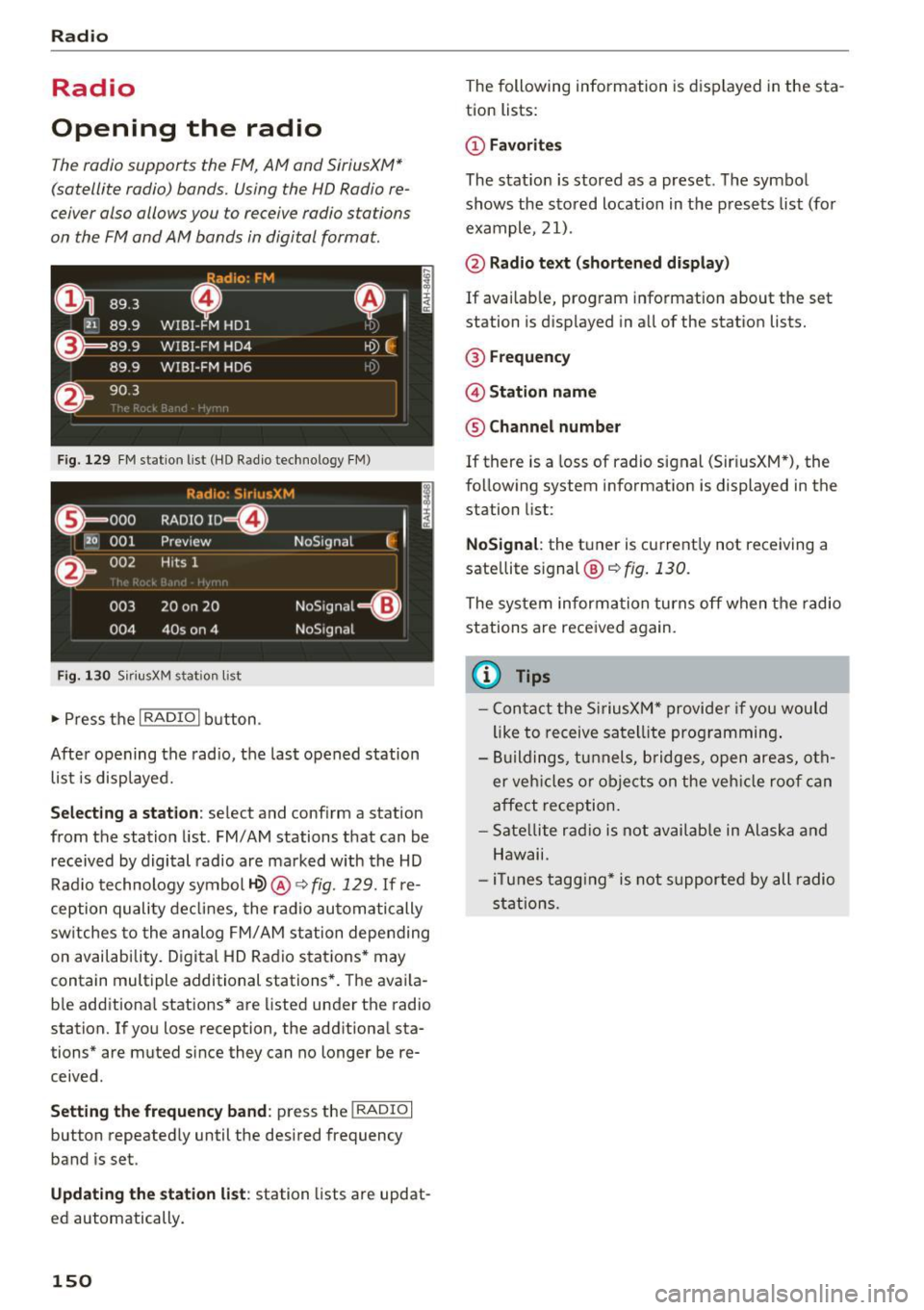
Fig . 129 FM station list (HO Radio technology FM)
Radio: S ir iusXM
E l
0 . 000 RADIO ID m
120 001
Preview NoSignal
&
002 Hits 1
''' .I
003 20 on 20 NoSignal
=Gl
004 40s on 4 NoSignal
Fig. 130 S
iriusXM stat ion list
~ Press the I RADIO I button .
After opening the radio, the last opened station
list is displayed.
.
I
Selecting a station: select and conf irm a station
from the station list. FM/ AM stations that can be
received by digital radio are marked with the HD
Radio technology symbol
1-Q) @ ~ fig. 129. If re
ception quality declines, the radio automatically
sw itches to the analog FM/AM station depending
on availability. Digital HD Radio stations* may
contain multiple additional stations*. The avai la
b le additional stations* are listed under the radio
station. If you lose reception, the additional sta
tions* are muted since they can no longer be re
ceived .
Setting the frequency band : press the I RADIO I
button repeatedly until the desired frequency
band is set.
Updating the station list: station lists are updat
ed automatically .
150
The following information is displayed in the sta
tion lists:
@ Favorites
The stat ion is stored as a preset. The symbol
shows the stored location in the presets list (for
example, 21).
@ Radio text (shortened display)
If available, program information about the set
station is displayed in all of the stat ion lists.
@ Frequency
@ Station name
® Channel number
If there is a Loss of radio signal (Sir i usXM*), the
following system information is displayed in the
station list:
NoSignal : the tuner is current ly not receiving a
sate llite s ignal ®
c::> fig. 130.
The system informa tion turns off when the radio
stations are received again.
@ Tips
- Contact the SiriusXM" provider if you would
like to receive satellite programming.
- Buildings, tunnels, bridges, open areas, oth
er vehicles or objects on the vehicle roof can
affect reception.
- Satellite radio is not available in Alaska and
Hawaii.
- iT unes tagging* is not support ed by all radio
stations.
Page 153 of 322
Radio functions
Free text search
Using the free text search, you can sel ect t he or
der that th e search terms ar e entered in th e in
pu t fi eld. Search in all fr equency bands for a sta
tion name o r program type such as
News ).
891 l,
~ WJ.3
D
H'l.6 WIBI-FM HDl
WJ .7 WIBI-FM HD4
',M
'1M
~
8') .9 WIBI-FM HD6 ~M
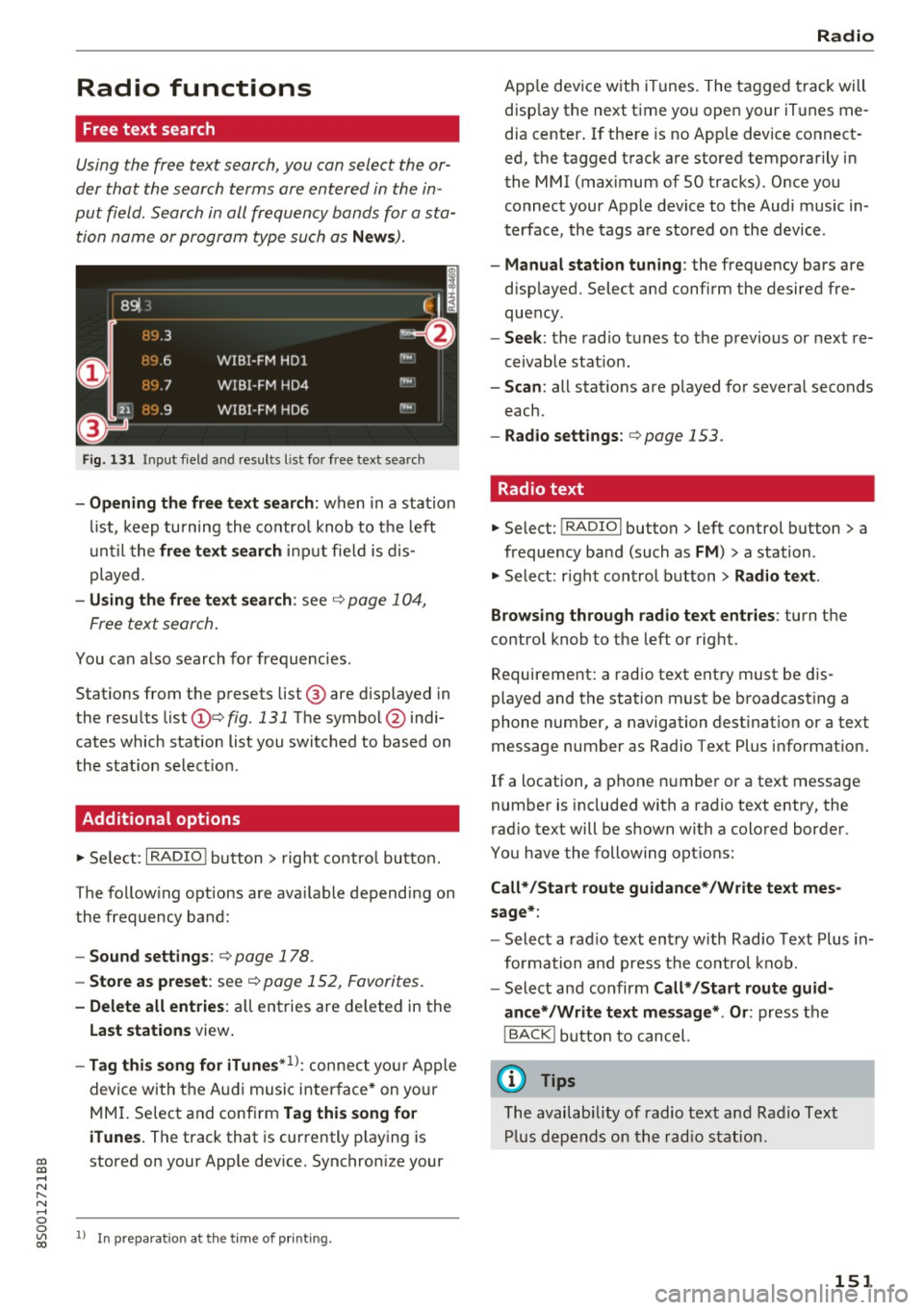
Fig. 131 Input field and resu lts l is t fo r free text searc h
-Opening the free text search: wh en in a sta tion
li st, keep turni ng the co nt rol knob to t he left
until t he
free text search inpu t fie ld is d is
p layed.
- Using the free text search : see c::> page 1 04,
F ree te x t se arch.
You can also search for frequ enci es.
Stat ions from t he p resets list @ are d isp layed in
the resu lts list
(D e::> fig. 131 The symbol @ indi
cates which station list you switched to based on
the s tation selec tion.
Additional options
~ Se le ct: I RADIO ! butto n > right co ntro l bu tton.
The fo llow ing o ptions are ava ilable de pend ing on
th e frequency ban d:
- Sound settings : c::> page 178.
-Store as preset : see c::> page 152, Favorites .
-Delete all entries : all en tries are de lete d in the
Last stations view .
-Tag this song for iTunes*1>: conne ct your Apple
devi ce wi th t he A udi music i nte rfa ce* on yo ur
M MI. Se lec t and conf irm
Tag this song for
iTunes.
The track that is cur rently play ing is
~ stored on y our App le dev ice. Synchron ize your
..... N
" N ..... 0
0
~ l) I n preparat ion at the time of p rinting.
Radio
Ap ple dev ice w it h iTunes . The t agged tra ck will
disp lay the next t ime yo u open your iT unes me
d ia center . If the re is no App le dev ice co nnect
ed, the tagged t rack are stored tempo rarily i n
the MMI (max imum of 50 t racks). Once y ou
connect your App le device to the Au di m usic in
t erface, the tags a re stored o n the device .
-Manual station tuning : the frequency bars are
d isp layed. Select a nd confi rm the desired fre
que ncy.
- Seek : the rad io t unes to the previous or next re
ceivab le stat io n.
- Scan : all stat ions are p layed fo r severa l seconds
each.
- Radio settings: c::>page 153.
Radio text
~ Select: I RADIO I button > left control button > a
frequency band (such as
FM ) > a station .
~ Select: righ t con trol b utton > Radio text.
Browsing through radio text entries :
turn t he
contro l knob to the left o r rig ht.
Requirement: a radio text ent ry must be d is
played and t he station must be b roadcas ting a
phone number, a navigation dest ination or a text
message number as Radio Te xt Plus informat ion .
If a location, a p hone numbe r or a text message
number is included with a radio te xt entry, the
r ad io text will be shown with a colo red borde r.
You have the following opt io ns:
Call*/Start route guidance*/W rite text mes
sage* :
-Select a rad io text en try w ith Rad io Text Plus in
for mation a nd press the co ntrol kn ob .
- Select and confirm
Call* /Start route guid
ance* /Write text message* . Or :
press t he
I BACK ! button t o cancel.
(D Tips
The availabi lity of radio text and R ad io Text
Pl us d ep en ds o n the r adi o s tat ion.
151
Page 154 of 322
Radio
View: additional station information
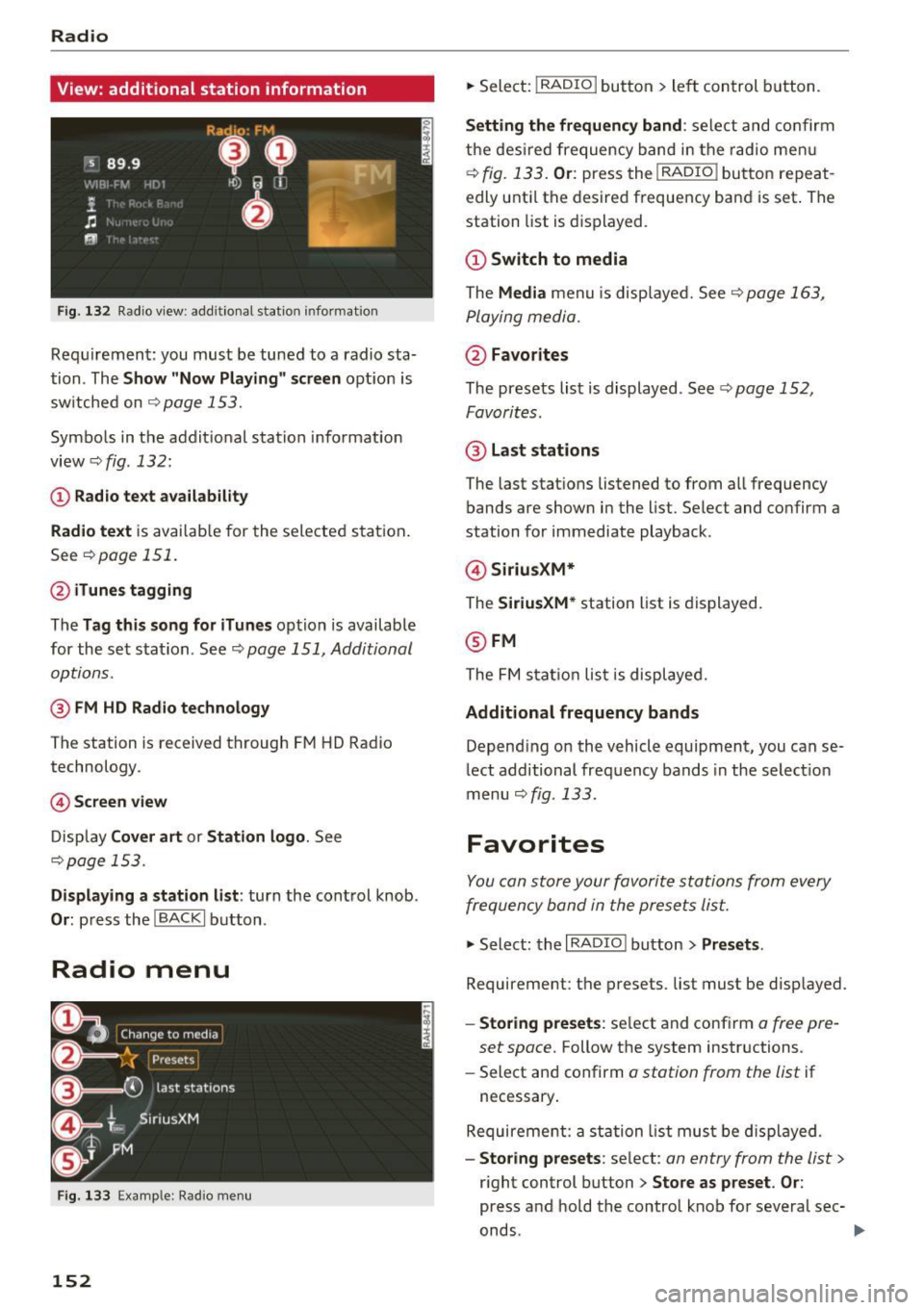
Fig . 13 2 Radio v iew: add itional stat ion informat ion
Req uirement: you must be tuned to a radio sta
tion . The
Show "Now P layin g" s creen opt ion is
sw itche d on
Qpage 153.
Symbo ls in the addit ional station i nformation
view
Q fig. 132:
(D Radio text availability
Rad io text
is avai lab le for the selected station .
See
~ page 151.
@ iTunes tagging
The Tag this song for iTunes option is available
for the se t sta tion . See ~
page 151, Additional
options.
@ FM HD Radio technology
The station is received through F M HD Radio
technology.
© S creen view
Disp lay Cover art or Station logo . See
~page 153.
Displaying a station list: turn the cont rol knob .
Or: press th e !BACKI button .
Radio menu
Fig . 133 E xa mple : Rad io m en u
152
.,. Select: !RADIO I but ton> le ft con trol b utton.
Setting th e frequency band : select and co nfirm
the des ired frequency band in the radio me nu
~ fig. 133. Or: press the I RADIO ! button repeat
edly unti l the desired frequency ba nd is set . The
station list is d is p layed.
@ Switch to media
The Media menu is disp laye d. See~ page 163,
P laying media.
@ Favorites
The presets list is displayed . See Q page 152,
Favorites .
@ Last stat ions
The last stat ions listened to from all frequency
bands are shown in the list. Select and confirm a
station for immediate playback .
@Siriu sXM*
The SiriusXM* station list is d isplayed.
@ FM
The FM s tat io n lis t is displaye d.
Additional frequency bands
Depend ing on the vehicle equipment, you can se
lect additional frequency bands in the select ion
menu
Qfig . 133 .
Favorites
You can store your favorite stations from every
frequency band in the prese ts lis t.
.,. Select: the I RADIO I button > Presets .
Requirement: the presets. list must be d isp layed.
- Sto ring presets : select and conf irm a free pre-
set space.
Follow the system instructions .
- Select and confirm
a station from the list if
necessary .
Require ment: a st ation list mus t be d isplayed .
-Storing presets : select: an entry from the list>
r ight control button > Store as preset . Or :
press and hold the contro l knob fo r severa l sec-
onds .
~
Page 155 of 322
co
co
.... N
" N .... 0
0
Vl c:o
-Di splaying the pre set s list : select: I RADIO I but-
ton
> Presets .
Requirement: the favorites list must be dis
p layed.
- Listening to presets: select and confirm a pre
set from the list.
- Move preset : select a favorite from the list >
right control button>
Move preset. Or: press
and hold the control knob for several seconds .
Select and confirm the locat ion of the selected
favorite .
-Deleting presets: select a preset from the list >
right cont rol button >
Delete preset > Delete
this preset or Delete all presets .
Additional settings
Radio settings
... Se lect : I RADIO ! button > right contro l button >
Radio settings .
The following settings can be selected, depend
ing on the band that is selected:
FM/AM HD Radio*
You can switch HD Radio reception on or off.
Station sorting (SiriusXM*}
You can set the station sort ing for SiriusXM sta
tion lists* by:
-Channel number: the stations are sorted in as
cending order according to their station num
ber.
- Channel name: the stations are listed in alpha
betical order.
- First category, then channel number: the sta
tions are sorted by their category and then by
the ir channel numbers.
- First the category, then the channel name : the
stations are sorted by their category and then
by the ir channel names.
Category filter (SiriusXM*}
The stations shown in the station list can be fi l
tered by your personal preferences and by pro-
Radio
gram type . The program categories that you can
select depend on what is offered by your provid
er. Se lect the
All categories option to deactivate
all filter options and display all available stations
in the satellite station list.
Additional station information
When the function is switched on~ and station
or presets lists are open, the display will switch
after approximate ly five seconds to the
Show
"Now Playing" screen
view Q page 152. Depend
ing on ava ilability, information about the set sta
t ion (such as stat io n name, artist, slide show,
station logo) is displayed in th is view .
Preferred picture view
You can set your preferred picture view for the
Show "Now Playing" screen display Q page 152.
-Station logo: the station logo is displayed, de-
pending on availability .
-Cove r art: the album cover or genre cover is dis-
played, depending on availability.
Gracenote online database*
Requirement: the MMI must be connected to the
Internet. The
Cover art option must be selected
Qpage 153, Preferred picture view.
When the function is switched on~, the album
cover or genre cover for the song that is playing
is loaded from the Gracenote online database,
depend ing on availability.
Subscription status (SiriusXM}*
This option is available when your subscription is
about to expire or has already expired. The expi
ration date fo r your license is displayed.
Call to SiriusXM *: the contact information for
your satellite radio provider is displayed . To call
your sate llite radio provider using the MMI, press
Call to SiriusXM*.
153
Page 157 of 322
co
co
.... N
" N .... 0
0
Vl c:o
Media
Introduction
There are various media drives and connections
avai lable in the MMI. You can play, for example,
audio/video files from the Jukebox* or connect
your mobile device to the Audi mus ic interface*
and operate it through the MMI.
Notes
General information
Media and format restrictions:
the MMI (includ
ing the SD card reader and the USB storage de
vice connection*) was tested with a variety of products and media on the market. However,
there may be cases where individual devices or media and audio/video* files may not be recog
n ized, may play only w ith restrictions or may not
play at all.
Digital Rights Management: please note that
the audio/video files are subject to copyright pro
tection .
The media drives do not play fi les that are pro
tected by ORM and that are ident ified with the
symbol
l'.D .
Data security: never store important data on SD
cards, the Jukebox*, CDs/DVDs or mobile devices .
Audi AG is not responsible for damaged or lost
files and media .
Loading times: the more files/fo lders/play lists
that are on a storage medium, the longer it will
take to load the audio/video files* . Audi recom
mends using storage media that only contain au
dio/video files*. To decrease the t i me it takes to
load audio/v ideo files*, create subfolders (for ex
ample, fo r the art ist or album). The loading time
will also increase when importing fi les.
Additional information : when playing, audio
files are automatically displayed w ith any add i
tional information that is stored (such as the ar
tist, track and album cover). If this information is
not available o n the storage med ium, the MMI
will check the Grace note metadata database .
Media
However, in some cases, the additional informa
tion may not be displayed.
Restricted functionality : reset the Media set
tings
t o the factory default settings if functional
ity is restr icted
<> page 175.
Reset the Jukebox* to the factory default set
t in gs if functiona lity is rest ricted <>
page 175.
For information about the propert ies of support
ed media and fi le formats, see
<>page 168 .
(D Note
You are responsible for all precaut ions taken
for data protection, anti-virus protect ion and
protection against loss of data on mobi le de
v ices that are used to access the Internet
through the Wi-Fi hotspot.
CD/DVD operation
CD/DVD and format restrictions:
the functionali
ty of individual storage media may be limited due
to the variety of blank CDs/DVDs availab le and
the various capacities. Audio CDs or video DVDs
with copy protection, CDs/DVDs that do not con
form to the standard and mult isess ion CDs may
have limited playback or may not play at all . Audi
recommends finaliz ing t he recording process
whe n creat ing mult isess ion CDs. Mult isession is
not supported for DVDs .
Using CDs /DVDs, the CD drive or the DVD drive :
to ensure correct, high-quality playback and to
prevent damage to the drive or disc reading er
ro rs, always store CDs/DVDs in a protective
s leeve and do not expose them to direct sunlight.
Do
not use:
- Damaged, dirty or scratched CDs/DVDs
- Single CDs/DVDs (3 inch/8 cm diameter)
- CD/DVDs that are not round
- CDs/DVDs w ith labels
- Protective rings
- Cleaning CDs
Thermal protection switch: CD/DVD playback
may be temporarily unavailable if outside tem-
peratures are extremely hot or cold. A thermal
llo-
155
Page 160 of 322
Media
When importing, the audio files are automatical
ly sorted into the media center categories based
on the stored addit ional information
¢
page 164. The copied video files are stored in
the media center under the
Videos category.
Playing the Jukebox
Requirement: the Jukebox must contain audio/
video fi les ¢
page 15 7, Adding files to the Juke
box.
The Jukebox is accessed and operated through
the MMI
(D ¢ page 163, fig . 139.
Displaying Jukebox memory capacity
Select: right control button > Jukebox memory
capacity .
Information about the Jukebox memory
cap acity and the number of sto red tracks is dis
p la yed.
Deleting tracks from the Jukebox1
)
Requ irement: the Jukebox must contain audio/
video fi les.
- Delet ing an entry: select an entry from the
Jukebox media center . Select: right control but
ton
> Delete from Jukebox > This entry or En
tire list.
- The status of the deleting process is shown in
the MMI. Jukebox playback stops during the de
leting process and starts again automatically
once the dele tion is complete .
0 Note
Do not import aud io/video files when the en
gine is t urned off because this will drain the
veh icle battery.
(D Tips
- Tracks from aud io CDs cannot be imported
to the Jukebox for legal reasons .
- Files that have already been imported are
automat ically recognized and cannot be
copied to the Jukebox again.
- It is not possible to play audio/v ideo* files
in the CD/DVD* drive while importing them.
1> Not i n the Playback vie w.
158
- Th e Juk ebox does not provide an export
function due to legal reasons .
- Files or tracks without stored additional in
formation a re listed as
Unknown . Audi rec
ommends adding additional information
(such as ID3 tags) to audio files.
- Reset the Jukebox to the factory default set
t ings when selling your vehicle¢
page 175 .
Bluetooth audio player
Applies to: vehicles wi th Blu et oot h
With the Bluetooth audio player, you can play
music wirelessly from your Bluetooth-capable
device (such as a cell phone) through the MMI.
Requirement: the vehicle must be stationary and
the Bluetooth function on your Bluetooth device and the
Bluetooth audio player¢ page 176 in
the MMI must both be sw itched on .
-Connecting a Bluetooth device : press the
!MEDIA ! button. Press the left control button
until the source overview is d isp layed. Select
and confirm
Bluetooth audio player @
opage 163, fig . 140 .
-If necessary, select and confirm, Not connected
> Connect Bluetooth audio player . The Blue
tooth device search starts . Follow the instruc
tions in the MMI.
- Select and confirm the des ired Bluetooth de
vice from the list. The MMI generates a PIN for
the conn ection.
- Select and confirm
Yes .
-Enter the PIN for connecting on your Bluetooth
dev ice .
Or : if the PIN is already displayed on
your Bluetooth device, conf irm it in the Blue
tooth device and in the MMI. The time allowed
for entering the PIN is lim ited to approximately
30 seconds.
The media is started and operated through the
mobile device o r the MMI, depending on the de
vice being used.
(D Tips
- Check fo r any connection requests on your
Bluetooth device.
Page 164 of 322
Media
connector from the Apple device with the re
lease tabs pressed in@
¢page 161, fig. 137 .
The med ia are started and ope ra ted through the
mob ile devi ce or the MM I, depend ing o n the de
vice being used
c;, page 163.
Conne cting two mobile devi ces: if two mob ile
dev ices (for examp le iPod and sma rtphone) are
connec ted at the same time, then both devices
can be used as p layback so urces.
You can connect mobile devices using the ana log
AUX port .
-Connecting a mobile dev ice to the AUX input:
connect the cable ® ¢ fig. 138 to the AUX in
put @ on the Audi music interface and then to
the mob ile device @ (such as an MP3 player or
smartphone).
- Di sconnect ing a mobile device from the AUX
input :
remove the cable®¢ fig. 138 from the
Audi music interface .
-Operat ion: select and confirm the Exte rnal au
dio play er
source @¢ page 163, fig. 139 . The
med ia are started and ope rated through the
mobile device@c:v fig. 138.
.8, WARNING
Dr iv ing requ ires you r complete and und ivided
attent ion . As the d river, you have comple te
respons ibility for safety in traffic . Never oper
ate mobile devices while driving, because this
increases the risk of an accident.
0 Note
- Remove the connector from the Aud i m us ic
interface carefu lly so it is not damaged.
- Use a USB ex tension cable to connect devi
ces tha t have an integrated USB connector
(such as a USB stick) to prevent damage to
your USB device and the Audi m usic inter
face.
- Ext remely high or low temperatures that
can occur inside vehicles can damage mob ile
devices and/or impair their performance.
Never leave mobile devices in the vehicle in
extremely high or low temperatures.
162
(D Tips
- Do not use an additiona l adapter or USB ex
tension cab le to connect mobile devices to
the A udi music interface that already have a
cable or that must be connected w ith a USB
adapter
(¢page 161). They may impair the
functionality.
- You can purchase the AUX connector cab le
from an authorized Audi dea ler or at spe
cialty sto res .
- Functionality is not guaranteed for mob ile
devices that do not conform to the USB 2.0
standard .
- USB hubs are not supported.
- Some versions of the iPod such as the iPod
shuff le cannot be connected to the USB
adapter for devices with Apple Dock connec
to r. Connect these devices us ing a AUX con
necto r cable.
- Video playback th rough the Aud i m usic in
terface is o nly supported if the co nnected
device is recognized as a USB storage device
(for examp le a USB stick). Apple devi ces and
M TP devices (su ch as smartphones) are not
recognized as USB sto rage devices .
- iP od/ iPhone m alfunctions a lso affec t the
operation o f the MMI. Reset you r iPo d/
iPhone if this happens.
- For impo rtant information on operating
your iPod/iPhone, refe r to the user g uide for
the device. Audi recommends updating the
iPod/ iPhone software to the latest version.
- For more information about the Aud i music
interface and suppo rted devices, check the
Audi database for mob ile dev ices at
www .audiusa .com/bluetooth or contact an
authorized Audi dealer or authorized Aud i
Service Facility .
Page 168 of 322
Media
-Move fa vorite : select the des ired entry from
the favorites list. Select the right control but
ton
> Mo ve fav orite. Select and confirm the
desired presets locat ion.
- Delet ing a fa vorite : select the desired entry
from the favorites list. Select the right contro l
button
> Delete fa vo rit e > Del ete this f avorite
or Delete all favorit es.
Additional settings
Options menu
Context -specific functions and settings are ava il
ab le depending on the se lected source.
.,. Press the right contro l bu tton.
Sound settings
See ¢ page 178 .
Input level
Req uirement: a mobi le device must be connected
to the AUX connection cable or to a USB adapter
¢ page 161, Multimedia connections.
The vo lume of the mobile device is adapted to
the MMI. Audi recommends adjusting the vo lume
on the mobile device to 70% of the max imum
volume output.
Bluetooth settings
See ¢ page 176.
Wi-Fi settings
See ¢ page 130, Wi-Fi hotspot .
Connection manager
See ¢page 175.
Additional track information
With the funct ion sw itched on~ and a p laylist
open, vario us information about the current track
(such as artist, album and album cover *) as well
as the p lay ing t ime and the rema ining playing
time are displayed.
l ) The fun ctio n auto matic ally sw itche s off when th e source
is cha nge d.
2> This fun ction is not a vai la bl e fo r all cell phon es.
166
Jukebox m emory capacity *
Information on the J ukebox memo ry capac ity and
the number of stored tracks in the Jukebox is dis
played .
Change playing position
Turn the cont rol knob to the left or r ight. O r:
move you r finge r on the MM I touch contro l pad
from the left to the r igh t.
Shuffle1>
With the function switched on~, all files in the
playlist are p layed and shown in random order .
Repeat track1l
When the funct ion is switched on~, the current
track repeats.
Back to 'Playback '
The options menu is closed. The track currently
playing appears in the playlist
¢ page 165,
fig. 144 .
Play similar music *
The track curre ntly playing is q uick ly ana ly zed
(such as artists, genres, mood , beat) and a sma rt
playlist with simi lar tracks is shown .
Play more ...
A smart playl ist is s hown based on the t rack cur
r ently playing . Yo u can sele ct between a p lay list
with more tracks
by thi s arti st , from thi s album
or of thi s genre.
Set as ringtone*
2l
Requirement: a cell phone must be connected to
t h e MMI. The track c urrently playing must be in
the
Juk ebo x* ¢ page 157 .
The selected track w ill be used as the ri ngtone
for incoming calls.
Gr acenote online databa se *
Requirement: the MMI must be connected to the
Internet. .,.
Page 170 of 322
Media
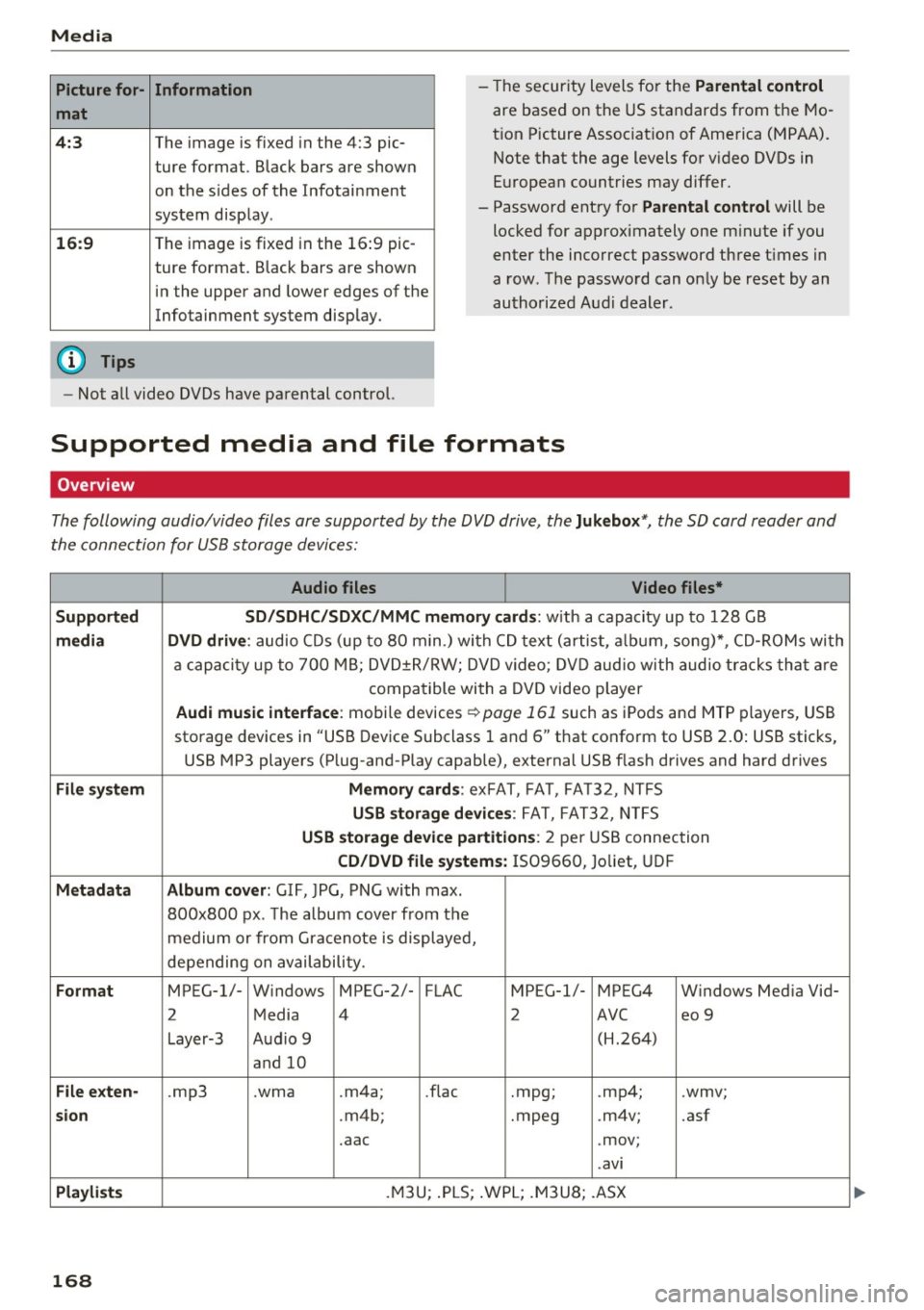
Picture for-
mat
4:3
16:9
(D Tips Information
The
image is fixed in the 4:3 pie-
ture format . Black bars are shown
on the sides of the Infotainment
system display .
The image is fixed in the 16:9 pie-
ture format. Black bars are shown
in the upper and lower edges of the
Infotainment system display. -
Th e security levels for the
Parental control
are based on the US standards from the Mo
t ion Picture Association of America (MPAA).
Note that the age levels for v ideo DVDs in
European countries may differ.
- Password entry for
Parental control will be
locked for approximately one minute if you
enter the incorrect password three times in
a row. The password can only be reset by an
authorized Audi dealer.
- Not all video DVDs have parental control.
Supported media and file formats
Overview
The following audio/video files are supported by the DVD drive, the Jukebox* , the SD card reader and
the connection for USB storage devices:
Audio files Video files*
Supported SD/SDHC/SDXC/MMC mem1ory cards:
w ith a capacity up to 128 GB
media DVD drive : audio CDs (up to 80 min.) with CD text (artist, album, song)*, CD-ROMs with
a capacity up to 700 MB; DVD±R/RW; DVD video; DVD audio with audio tracks that are
compatible with a DVD video player
Audi music interface : mobile devices ~page 161 such as iPods and MTP players, USB
storage devices in "USB Device Subclass 1 and 6" that conform to USB 2.0: USB sticks,
USB MP3 players (Plug-and-Play capable), external USB flash drives and hard drives
File system Memory cards: exFAT, FAT, FA T32, NTFS
USB storage devices: FAT, FAT32, NTFS
USB storage device partitions: 2 per USB connection
CD/DVD file systems: IS09660, Joliet, UDF
Metadata Album cover: GIF, )PG, PNG with max.
800x800 px. The album cover from the
medium or from Gracenote is displayed,
depending on availability.
Format MPEG-1/- Windows MPEG-2/- FLAC MPEG-1/- MPEG4 Windows Media Vid-
2 Media 4
2 AVC
eo 9
Layer-3 Audio 9 (H.264)
and 10
File exten-.mp3 .wma .m4a; .flac
.mpg; .
mp4; .wmv;
sion .m4b; .mpeg .m4v; .asf
.aac .mov;
.avi
Playlists .M3U; .PLS; .WPL ; .M3U8; .ASX
168
...
Page 177 of 322
co
co
.... N
" N .... 0
0
Vl c:o
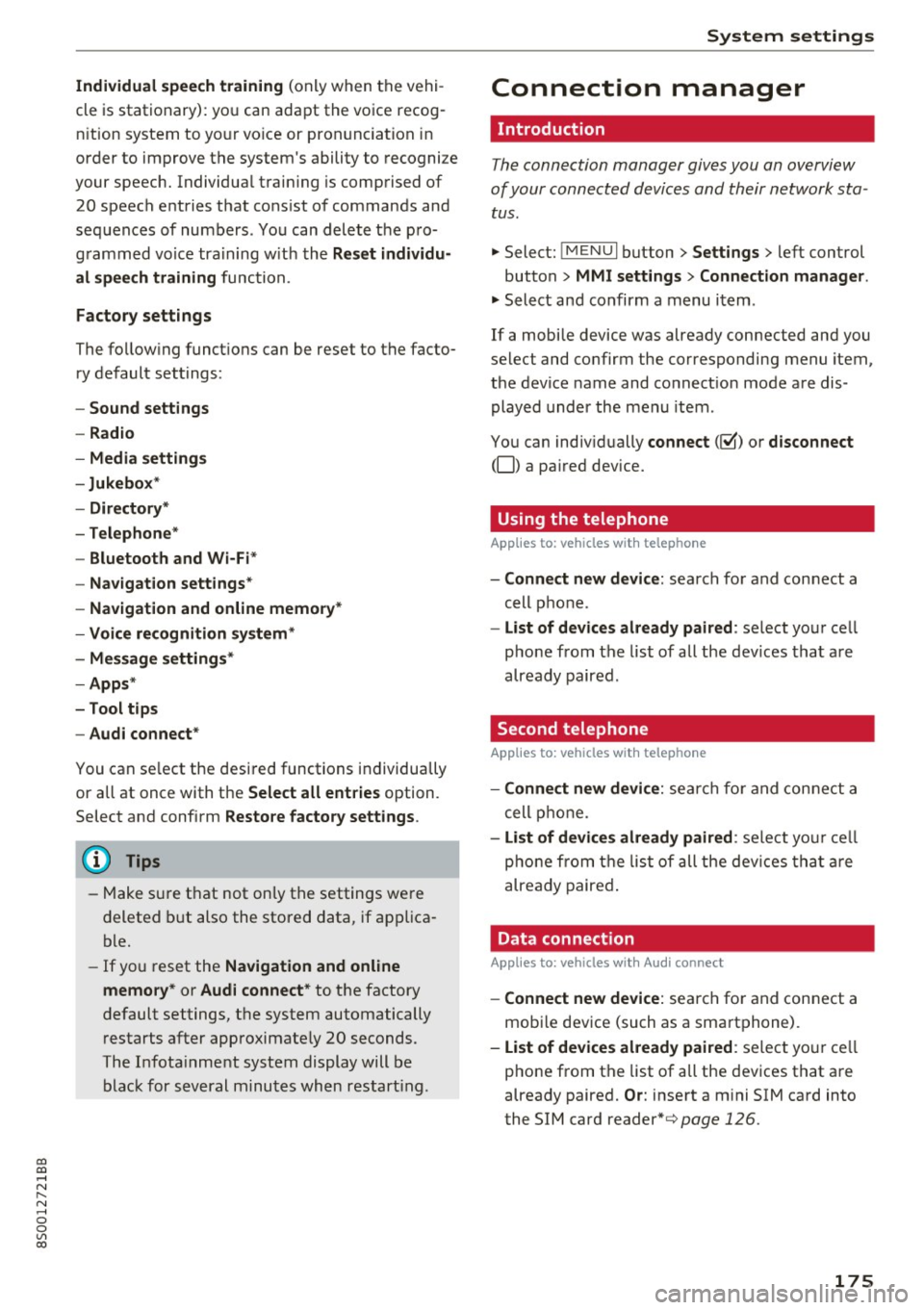
Individual speech training (o nly when the vehi
cle is stationary): yo u can adapt the vo ice recog
n it ion system to yo ur voice or pron unc iation in
order to improve the system's ability to recogni ze
your speec h. Individua l tra in ing is comp rised of
20 speec h entries that cons ist o f comman ds and
sequences of nu mbers . Yo u can delete t he p ro
g ra m med vo ice tr aining w it h t he
Reset individu
al speech training
f unc tion.
Factory settings
The fo llow ing funct io ns can be reset to the facto
ry de fault set tings :
-Sound settings
- Radio
- Media settings
-Jukebox *
- Directory *
- Telephone*
- Bluetooth and Wi -Fi *
- Navigat ion settings *
- Navigation and online memory*
- Voice recognition system*
- Message settings *
-Apps *
- Tool tips
- Audi connect *
You can se lect the desi red functions individually
or all at once with t he
Select all entries option.
Selec t and confi rm
Restore factory settings .
@ Tips
-Make s ure t hat not only t he settings we re
deleted but also the store d data, if ap plica
ble.
- If yo u reset the
Navigation and online
memory* or Audi connect*
to t he factory
default settings, t he system automatically
r estarts after approximate ly 20 seconds.
Th e In fota inm en t system display will b e
b lac k for sev eral minu tes when restar ting.
System settings
Connection manager
Introduction
The connection manager gives you an overview
of your conn ected d evices and their network sta
tus .
"'Select: !M EN UI button> Settings > left control
button >
MMI settings > Connection manager .
"'Select and confirm a m enu i tem .
If a mobi le device was already c onnected and you
select and co nfirm the co rresponding menu item,
the device name and co nnect io n mode a re dis
played under the men u item .
You can ind iv id ually
connect (~) or disconnect
(0) a pa ired device.
Using the telephone
App lies to : vehicles wit h te lepho ne
- Connect new device: searc h fo r a nd con nect a
cell p hone .
- List of devices already paired : select yo ur cell
pho ne from t he list of all th e de vic e s tha t are
alr eady pair ed .
Second telephone
App lies to : vehicles wi th telepho ne
- Connect new device: se arch for an d co nne ct a
c ell p hone.
- List of devices already paired : selec t your c ell
p hon e fr om th e list o f all the dev ices that ar e
a lready paire d.
Data connection
Appl ies to: vehicles wi th Audi connec t
-Connect new device: sea rc h fo r and con nect a
mob ile dev ice (such as a sma rtphone) .
-List of devices already paired : select yo ur cell
p ho ne from t he list of a ll the dev ices t hat a re
already paired.
Or : inse rt a m ini SIM ca rd into
the SIM card reader*¢
page 126.
175