ignition AUDI TT COUPE 2017 Owner's Manual
[x] Cancel search | Manufacturer: AUDI, Model Year: 2017, Model line: TT COUPE, Model: AUDI TT COUPE 2017Pages: 322, PDF Size: 79.73 MB
Page 56 of 322
Warm and cold
"'T o switch the seat heating off, press the~ but-
ton repeatedly unti l the LED turns off.
The seat heating sw itches automatically from
setting 3 to setting 2 after 10 minutes.
When seat h eat ing sh ould not be switched
on
Do n ot turn the seat heating on under the follow
ing circumstances:
- T he seat is unoccupied .
- The seat is covered with a seat cover .
- The seat is covered with a child seat.
- The seat is damp or wet.
A WARNING
Individuals with reduced sensitivity to pain or
temperature could develop burns when using
the seat heating function . To reduce the risk
of injury, these individuals should not use
seat heat ing .
(D Note
To avoid damage to the heat ing elements in
the seats, do not kneel on the seats or place
heavy loads on a small area of the seat .
(D Tips
-The setting for the seat heating on the driv
er's side is ass igned to the key that is in use .
- If the front passenger's seat heating is
turned on, it will not turn on again automat
i cally if more than 10 m inutes have passed
between sw itching the ignition off and
switching i t on again.
54
Page 59 of 322
CD
CD
.... N
" N ...... 0
0
Ill co
Steering
Adjusting the steering wheel position
The steering wheel position is fully adjustable up
and down and forward and back.
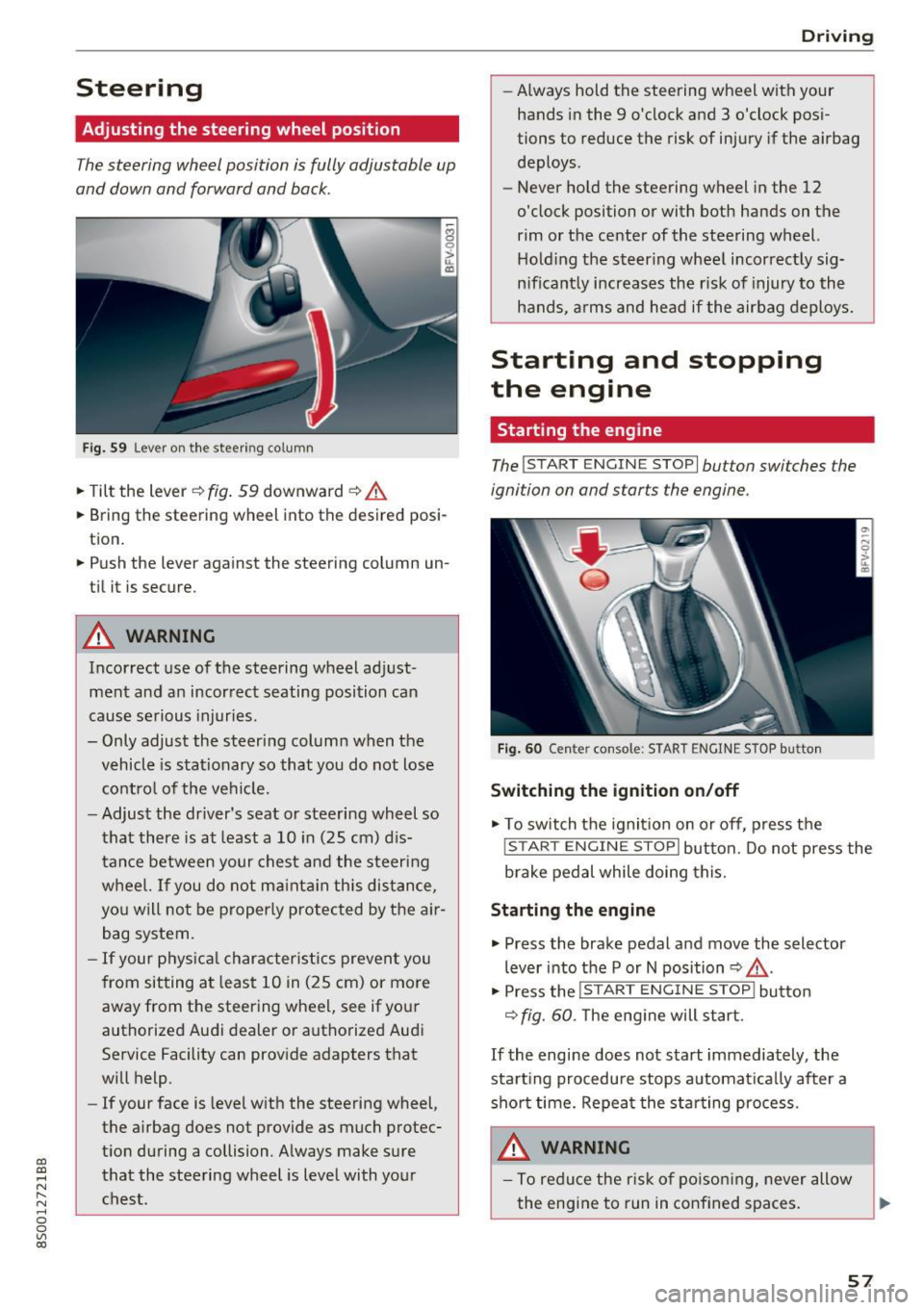
Fi g. 59 Lever on th e steering column
... Tilt the lever c:::> fig . 59 downward c:::> A
... Bring the steering wheel into the desired posi
tion .
... Push the lever against the steering column un
t il it is secure.
A WARNING
Incorrect use of the steering wheel ad just
ment and an incor rect seating posi tion ca n
cause se rious injuries.
- Only adjust the steeri ng column when the
vehicle is stat ionary so that you do not lose
cont ro l of the ve hicl e.
- Adjus t the dr iver's seat or steering wheel so
that there is at least a 10 in (25 cm) d is
t an ce betwee n your chest a nd t he s teering
w heel. If y ou d o not m aint ain this dis tan ce,
yo u will n ot be proper ly protected by the a ir
bag system.
- If your phys ic al characteris tics p reven t you
from sit ting a t least 1 0 in ( 25 cm) or mo re
away from the steering whee l, see if yo ur
authorized Audi dea ler or autho rized Audi
Service Facility can prov ide adapters that
will help.
- If your face is leve l with the steering wheel,
the a irbag does not provide as much protec
t io n during a collision. Always make s ure
tha t the steering wheel is leve l with yo ur
chest.
D rivi ng
-Always hold the steering wheel with your
hands i n the 9 o'clock and 3 o'clock pos i
tions to reduce the risk of injury if the airbag
deploys.
- Never hold the steering wheel in the 12
o'clock position or with both hands on the
rim or the center of the stee ring wheel.
H old ing the steer ing whee l incorrect ly sig
n ificant ly increases the r isk of injury to the
hands, a rms and head if the air bag deploys.
Starting and stopping
the engine
Starting the engine
The ! S TART ENGINE STOPI button switches the
ignition on and starts the engine .
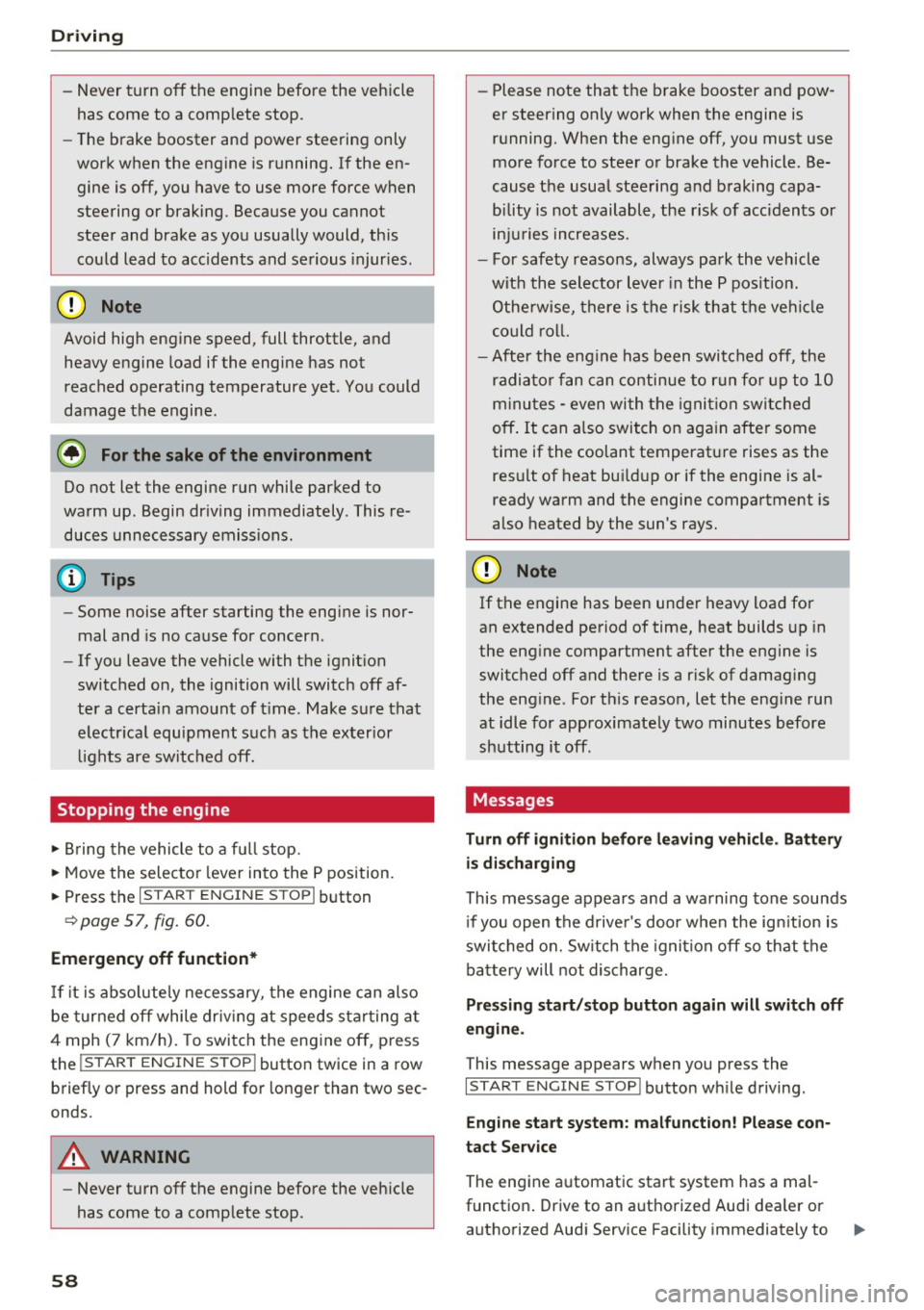
Fig . 60 Center console: START ENGINE STOP b utto n
Switching the ignition on /off
... To switch t he ignit io n on or off, press t he
!START ENGI NE STOPI but ton. Do not press the
brake pedal while doing this.
Starting the engine
... Press the brake pedal a nd move the selector
lever into the P or N position
c:::> ,&. .
... Press the !START ENGINE STOP I butto n
<=:> fig. 60. The eng ine will start.
If the engine does not start immediately, the
sta rt ing procedure stops a utoma tica lly after a
sho rt time. Repea t the s ta rt ing process .
A WARNING
- To redu ce the r is k of p oisoni ng, never allow
the eng ine to run in confined spaces.
57
Page 60 of 322
Driving
-Never turn off the engine before the vehicle
has come to a complete stop.
- The brake booster and power steering only
work when the engine is running. If the en
gine is
off, you have to use more force when
steering or braking. Because you cannot
steer and brake as you usually would, this
could lead to accidents and serious injuries.
(D Note
Avoid high engine speed, full throttle, and
heavy engine load if the engine has not
reached operating temperature yet. You could
damage the engine.
@ For the sake of the environment
Do not let the engine run while parked to
warm up. Begin driving immediately . This re
duces unnecessary emissions.
{D) Tips
-Some noise after starting the engine is nor
mal and is no cause for concern.
- If you leave the vehicle with the ignition
switched on, the ignition will switch
off af
ter a certain amount of time . Make sure that
electrical equipment such as the exterior
lights are switched
off.
Stopping the engine
.,. Bring the vehicle to a full stop.
.,. Move the selector lever into the P position .
... Press the
I START ENGINE STOPI button
¢ page 57, fig. 60.
Emergency off function*
If it is absolutely necessary, the engine can also
be turned
off while driving at speeds starting at
4 mph (7 km/h). To switch the engine
off, press
the
! START ENGINE STOPI button twice in a row
briefly or press and hold for longer than two sec
onds.
_&. WARNING
- Never turn off the engine before the vehicle
has come to a complete stop.
58
- Please note that the brake booster and pow
er steering only work when the engine is
running. When the engine
off, you must use
more force to steer or brake the vehicle. Be
cause the usual steering and braking capa
bility is not available, the risk of accidents or
. . . . mJunes increases.
- For safety reasons, always park the vehicle
with the selector lever in the P position.
Otherwise, there is the risk that the vehicle
could roll.
- After the engine has been switched off, the
radiator fan can continue to run for up to 10
minutes -even with the ignition switched
off. It can also switch on again after some
time if the coolant temperature rises as the
result of heat buildup or if the engine is al
ready warm and the engine compartment is
also heated by the sun's rays.
(D Note
If the engine has been under heavy load for
an extended period of time, heat builds up in
the engine compartment after th@ engine is
switched
off and there is a risk of damaging
the engine . For this reason, let the engine run
at idle for approximately two minutes before
shutting it
off.
Messages
Turn off ignition before leaving vehicle. Battery
is discharging
This message appears and a warning tone sounds
if you open the driver's door when the ignition is
switched on. Switch the ignition
off so that the
battery will not discharge.
Pressing start/stop button again will switch off
engine.
This message appears when you press the
I START ENGIN E STOP ! button while driving.
Engine start system: malfunction! Please con
tact Service
The engine automatic start system has a mal
function. Drive to an authorized Audi dealer or
autho rized Audi Service Facility immediately to
IJlo-
Page 65 of 322
CD
CD
.... N
" N ...... 0
0
Ill co
-Do not inadvertently press the accelerator
pedal when the vehicle is stopped if a gear is
engaged. Otherwise the vehicle will start to
move immediately, even if the parking brake
is set . This could result in a crash .
- Do not press the accelerator pedal when
changing the selector lever position while
the vehicle is stationary and the engine is
running.
- Never leave your vehicle with the engine running while in gear.
If you must leave
your vehicle when the engine is running, set
the parking brake and move the selector lev
er to the P position .
- To decrease the risk of an accident, these
lector lever must be in the P position and
the parking brake must be set before open
ing the hood and working on a running en
gine. Always read and follow the applicable
warnings¢
page 244, Working in the en
gine compartment.
{[) Note
Never let the vehicle roll downhill with engine
off and the selector lever in the
N position,
because this could damage the automatic
transmission and catalytic converter.
@ Tips
- Drive select: sporty shifting characteristics
can be selected using the
Dynamic driving
mode. The Infotainment display shows 5 as
the selector lever position instead of D.
- If you accidentally select N while driving,
take your foot off the accelerator pedal im
mediately and wait for the engine to slow
down to idle before selecting Dor 5 .
- If there is a power failure, the selector lever
will not move out of the P position. The
emergency release can be used if this hap
pens. Left-hand drive vehicles
q page 69.
Driving
Selector lever lock
The selector lever lock prevents you from select
ing a gear accidentally, causing the vehicle to
roll.
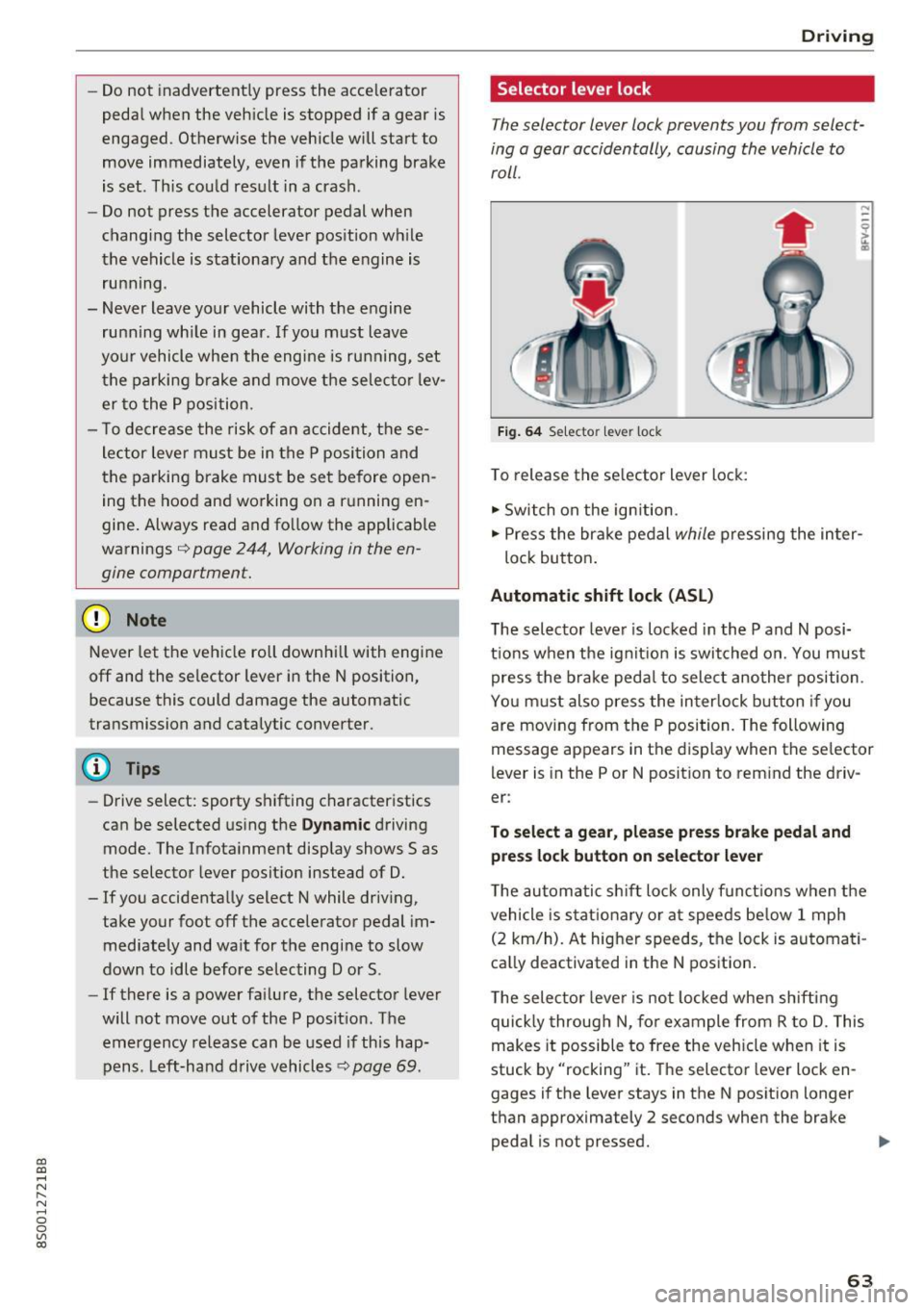
Fig. 64 Selecto r lever lock
To release the selector lever lock:
.,. Switch on the ignition.
.,. Press the brake pedal
while pressing the inter-
lock button.
Automatic shift lock (ASL)
The selector lever is locked in the P and N posi
tions when the ignition is switched on. You must press the brake pedal to select another position.
You must also press the interlock button if you
are moving from the
P position. The following
message appears in the display when the selector
lever is in the P or
N position to remind the driv
er:
To select a gear, please press brake pedal and press lock button on selector lever
The automatic shift lock only functions when the
vehicle is stationary or at speeds below 1 mph
(2 km/h). At higher speeds, the lock is automati
cally deactivated in the N position.
The selector lever is not locked when shifting
quickly through N, for example from R to D. This
makes it possible to free the vehicle when it is
stuck by "rocking" it. The selector lever lock en
gages if the lever stays in the N position longer
than approximately 2 seconds when the brake
pedal is not pressed.
II>-
63
Page 73 of 322
co
co
.... N
" N .... 0
0
Vl c:o
speed and the distance between your vehi
cle and other vehicles.
- For safety reasons, cruise control should not
be used in the city, in stop-and-go traffic, on
winding roads and when road conditions are
poor (such as ice, fog, gravel, heavy rain and
hydroplaning), because this increases the
risk of a n accident.
- Switch the cruise control off temporarily
when driving in turning lanes, highway exits
or in construction zones.
- Please note that unconsciously "resting"
your foot on the accelerator pedal prevents
the cruise control from braking. This is be
cause pressing the accelerator pedal over
rides the cruise control system.
- If a brake system malfunction such as over
heating occurs when the cruise control sys
tem is switched on, the braking function in
the system may be switched off . The rest of
the cruise control system functions remain
active as long as the
@;\1)~14 (USA models) I
ill (Canada models) indicator light is on.
@ Tips
The brake lights turn on when the brakes are
app lied automatica lly.
Changing speed
Applies to: veh icles with c ruise control system
.. To increase/decrease the speed in increments,
briefly
tap the lever toward 010 Q page 70,
fig. 70 up/down to the first level.
.. To increase or decrease the speed in incre
ments,
tap the lever toward 010 Q page 70,
fig. 70 up/down to the second level.
.. To increase or decrease the speed quickly ,
hold
the leve r in the 0 / 0 direction until the de
sired speed is reached .
Overriding the speed
Applies to: veh icles with c ruise control system
You can press the accelerator pedal down to in
crease your speed, for example if you want to
pass someone. The speed you set earlier wi ll re-
Assist
sume as soon as you release the acce lerator ped
al.
However, if you are exceeding the stored speed
by a considerable amount for a long time, the
cruise contro l system will temporarily switch off.
The
(ff;ji )~i4 (USA mode ls) Iii (Canada mode ls) in
dicator light in the instrument cluster turns off
and the stored speed is maintained.
Preselecting the speed
Applies to : vehicles with cruise control system
You can pre-select your desired speed when the
vehicle is stationary.
.. Switch on the ignition.
.. Pull the lever into position (!)
Q page 70,
fig. 70.
.. To increase or decrease the speed, tap the lever
toward
0 10 .
This function makes it possible, for example, to
save the speed you want before driving on the
highway . Once you are on the expressway, acti
vate the cruise control system by pulling the lev
er into position (!).
Switching off
Applies to: vehicles with cruise control system
Temporary deactivation
.. Press the brake pedal, or
.. Press the lever toward@(not locked into
place)
Q poge 70, fig. 70.
Switching off completely
.. Press the lever into position @(clicked into
place), or
.. Switch the ignit ion off .
The speed you stored will be maintained if the cruise control has been switched off temporarily .
To resume the stored speed, release the brake or
clutch pedal and pull the lever to position (!).
Switching the ignition off will erase the stored
speed .
71
Page 75 of 322
CD
CD
.... N
" N ...... 0
0
Ill co
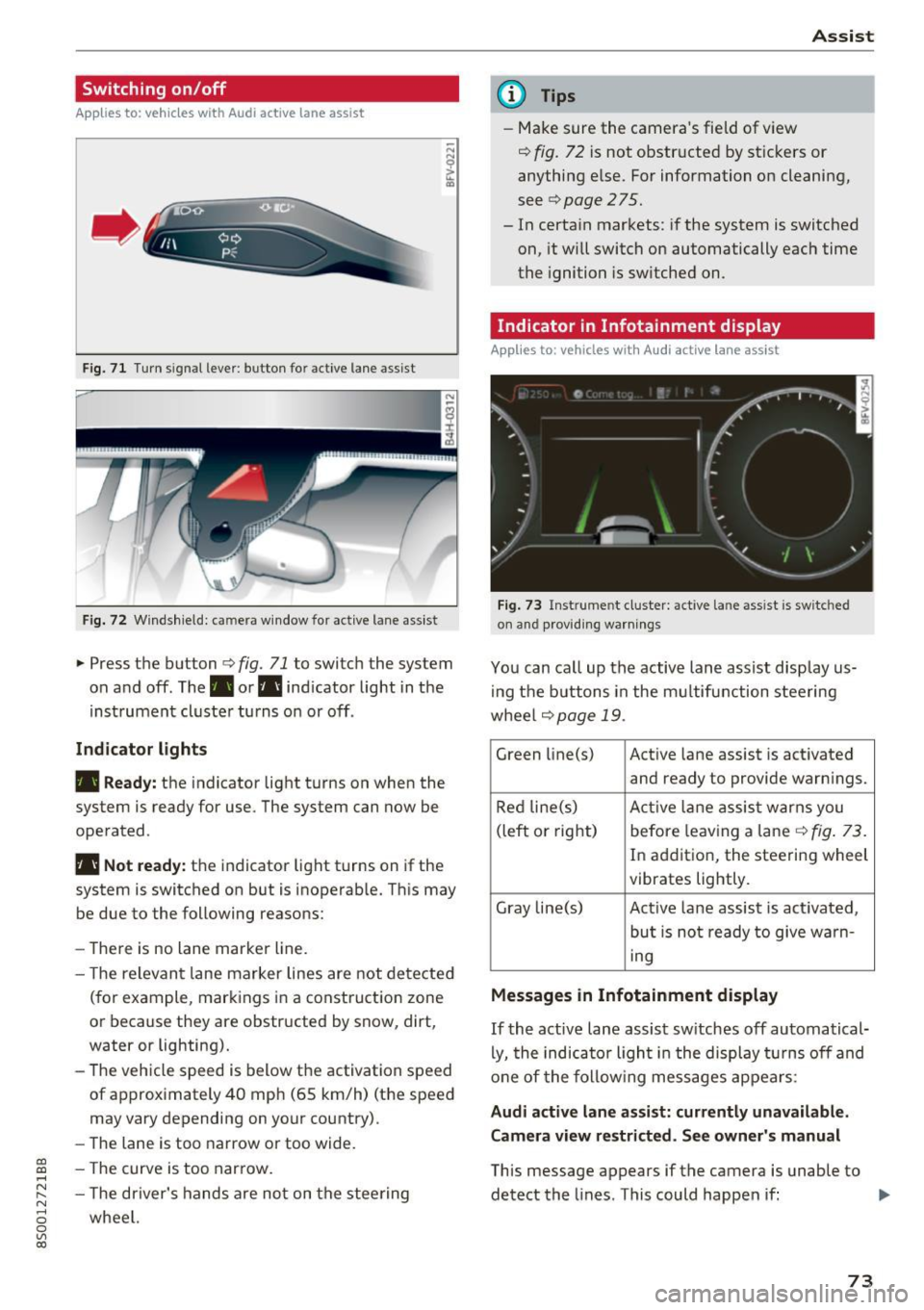
Switching on/off
A ppl ies to: ve hicles with Audi active lane assist
F ig. 7 1 Turn signal lever: button for active la ne assist
F ig. 72 Windsh ield: camera window for active lane assist
... Press the button c> fig. 71 to switch the system
on and off . The . or. indicator light in the
inst rument cluster turns on or off .
Indicator lights
• Rea dy :
the indicator light turns on when the
system is ready for use. The system can now be
operated .
• Not read y: the indicator light turns on if the
system is switched on but is inoperab le. Th is may
be due to the following reasons:
- There is no lane marker line.
- T he relevant lane marker lines are not detected
(for example, mark ings in a construction zone
or because they are obstructed by snow, dirt,
water or lighting).
- The vehicle speed is below the activation speed
of approximately 40 mph (65 km/h) (the speed
may vary depending on your country).
- The lane is too narrow or too wide.
- T he curve is too narrow.
- The driver's hands are not on the steering
wheel.
A ss ist
(D Tips
-Make sure the camera 's field of view
<=> fig. 72 is not obstructed by st ic kers or
anything else. For information on cleaning,
see
¢page 275.
- In certain markets: if the system is switched
on, it wi ll switch on automatically each time
the ignition is switched on .
Indicator in Infotainment di splay
App lies to : vehicles wit h Audi active la ne ass ist
F ig .
73 Inst rume nt cluster: active la n e ass ist is switc hed
on and prov id in g warn ings
You can ca ll up the active lane assist disp lay us
i ng t he b uttons in the mu ltifunction steering
whee l
<=>page 19 .
Green li ne(s) Act ive lane assist is activated
and ready to provide warn ings.
Red line(s) Act ive la ne assis t warns you
(left o r right)
before leav ing a lane
<=> fig . 73.
In addition, the steering wheel
vibrates lightly.
Gray line(s) Active lane assist is act ivated,
but is not ready to give wa rn-
ing
Messages in Infotainment display
If the active lane assist sw itches off automatical
ly, the indicato r ligh t in the display tu rns off and
one of the fo llow ing messages appears :
Audi active lane assi st: currentl y unavai lable .
Came ra v ie w restri cted . See owner's manual
This message appears if the camera is unable to
detect the lines . This could happen if: ..,
73
Page 77 of 322
CD
CD
.... N
" N ...... 0
0
Ill co
use the functions s uch as the lap timer in such
a way that you always ma inta in comp lete con
trol over your vehicle in all traffic s ituations.
@ Tips
You can retrieve information from the trip
computer while the lap timer stopwatch is
running.
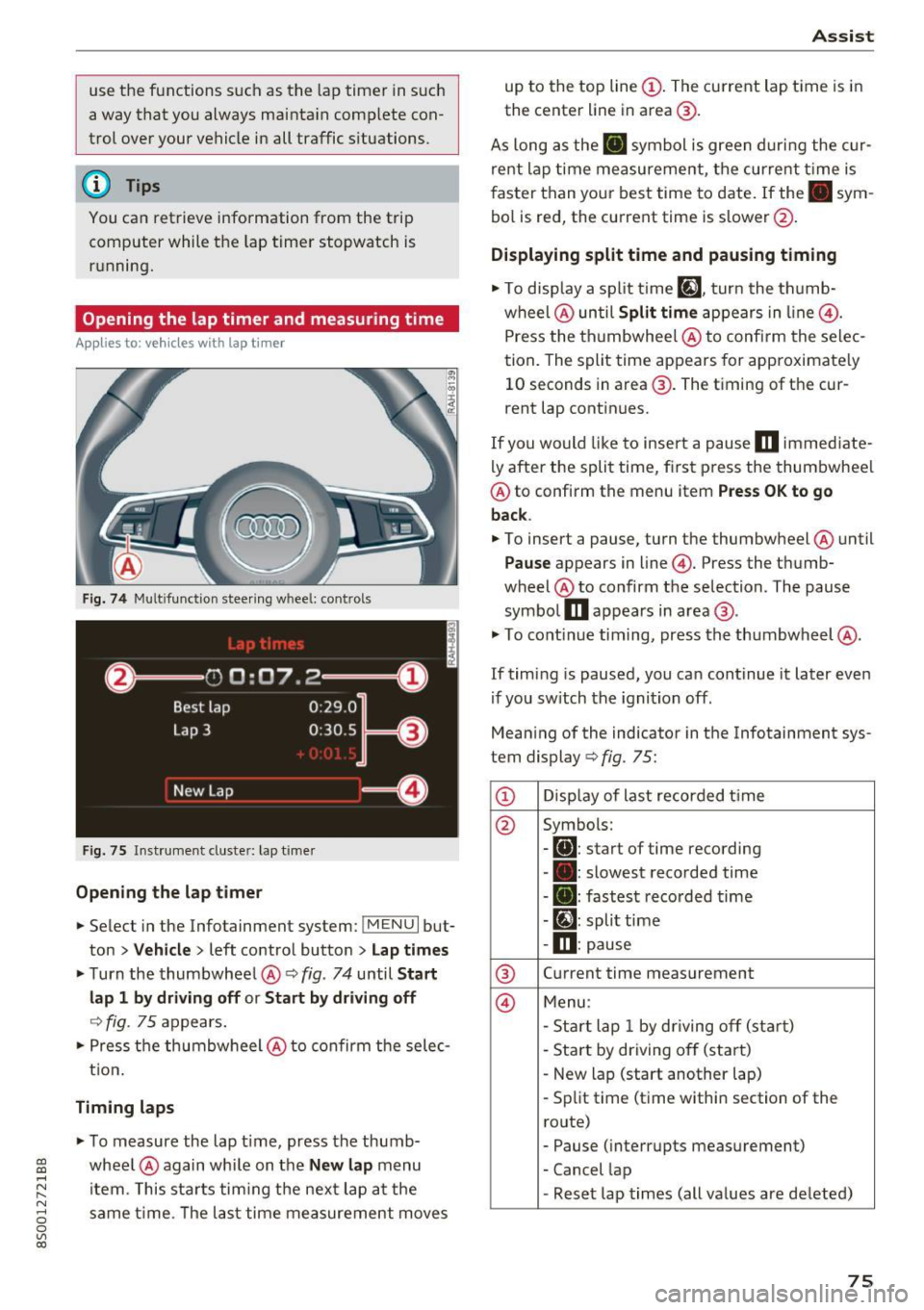
Opening the lap timer and measuring time
A ppl ies to: ve hicles with lap timer
Fig. 7 4 Mult ifu nction stee ring whee l: contro ls
F ig . 7 5 In st ru m ent cluster: lap t imer
Opening the lap timer
.,. Select in the Infotainment system: IMENUI but
ton
> Vehicle > left control butto n > Lap times
.,. Turn the thumbwhee l@ ¢ fig. 74 until Start
lap 1 by dri ving off
or S tart by driv ing off
Q fig . 75 appears.
.,. Press the thumbw heel @to confirm the selec
t ion .
Timing laps
.,. To measure the lap t ime, press the thumb
whee l@ again wh ile on the
New lap menu
item. This sta rts tim ing the nex t lap a t the
same t ime. The las t time measurement moves
A ss ist
up to the top line (D. The current lap t ime is i n
the center line in area @.
As long as the. symbol is green d uri ng the c ur
re nt lap time measurement, the current t ime is
f aster than yo ur best time to date.
If the . sym
bol is red, the cu rrent time is s lower @.
Displaying split time and pausing timing
.. To disp lay a sp lit time [~]. turn the th umb -
wheel @until
Split time appears in line @.
Press the th umbwheel @to confi rm the selec
tion. The split time appears for approximate ly
10 seconds in area @. The t iming of the cur
rent lap continues.
If you would like to insert a pause
m immed iate
ly after the spli t time, first p ress the thumbwhee l
@ to confirm the menu item
Pre ss OK to go
back .
.. To insert a pause, turn the thumbwheel @until
Pause appears in line @. Press the t humb
wheel @to confirm the selection. The pause
symbo l
m appears in area @ .
.. To cont inue timing, press the thumbwheel @.
If timing is paused, you ca n continue it later even
i f you sw itch the ignition off .
Mean ing of the indicator in the Infotainment sys
tem display ¢
fig. 75:
© Disp lay of last recorded t ime
@ Symbols:
-
[OJ: start of time recording
- • : slowest recorded time
- . : fastes t recorded time
- [~): split time
-m : pause
@ Current time meas
urement
© M enu:
- Star t lap 1 by d riving o ff (sta rt)
- Start by driving of f (start)
- New lap (start another lap)
- Split t ime (time within section of the
route)
- Pause ( interrupts measurement)
- Cancel lap
- Reset lap times (all values are deleted)
75
Page 78 of 322

Ass is t
Evaluating recorded times or resetting
Applies to: ve hicles w ith lap t imer
You con evaluate the fastest, slowest and over
age lop times .
Fig. 76 Instrument cluster: lap timer
After evaluating the lap times, you can continue
the current timing round or start over, meaning
start lap 1 again .
• Select in the Infotainment system:
I MENU I but
ton
>V ehicle > left control button > Lap s tatis
t ics.
The display shows the fastest lap" +", the
slowest lap"-" and the average lap time "0".
Turn the thumbwhee l@ downward or upward
to display the individua l lap times.
• Press the thumbwheel @to resume the pa used
lap timing.
• Press the left contro l button on the multifunc
tion steer ing wheel to reset the timer to zero .
Then turn the thumbwheel @and select the
desired setting by moving the cursor (red
frame) . Press the thumbwheel @to confirm
the selection .
• Press the thumbwheel @to restart the lap tim
er for a new lap t iming, if needed.
• Press the
I MENU ! button to exit the lap timer.
Evaluation legend
~ fig. 76:
© All laps
@
II : fastest lap time
® . : slowest lap time
@ $J: average lap t ime
(D Tips
- Saved lap times cannot be individually de
leted from the total res ults.
76
- The saved lap timer va lues wi ll remain after
switching the ignition off.
Audi side assist
Description
App lies to : vehicles wit h Audi side assist
Fig. 77 Senso r detection range
Fig. 78 D isp lay on the exterior mirror
O'I :; 0
> u. m
Side assist helps you monitor your blind spot and
traffic beh ind your vehicle . Within the limits of
the system, it warns you abo ut vehicles that are
coming closer or that are traveling with you with
i n sensor range (!)¢
fig. 77: if a la ne cha nge is
classified as critical, the disp lay @ in the exte rior
mirror¢
fig. 78 turns on.
The display in the left exterior mirror p rovides as
s istance when making a lane change to the left,
whi le the display in the right exte rior m irro r pro
vides ass istance w hen making a lane c hange to
the right.
Information stage
As long as you do not act ivate the turn signal,
s ide ass ist
informs yo u about vehicles that are
de te cted and classified as c rit ical. The display in
the mirro r turns on, but is dim. ..,.
Page 86 of 322
Parking systems
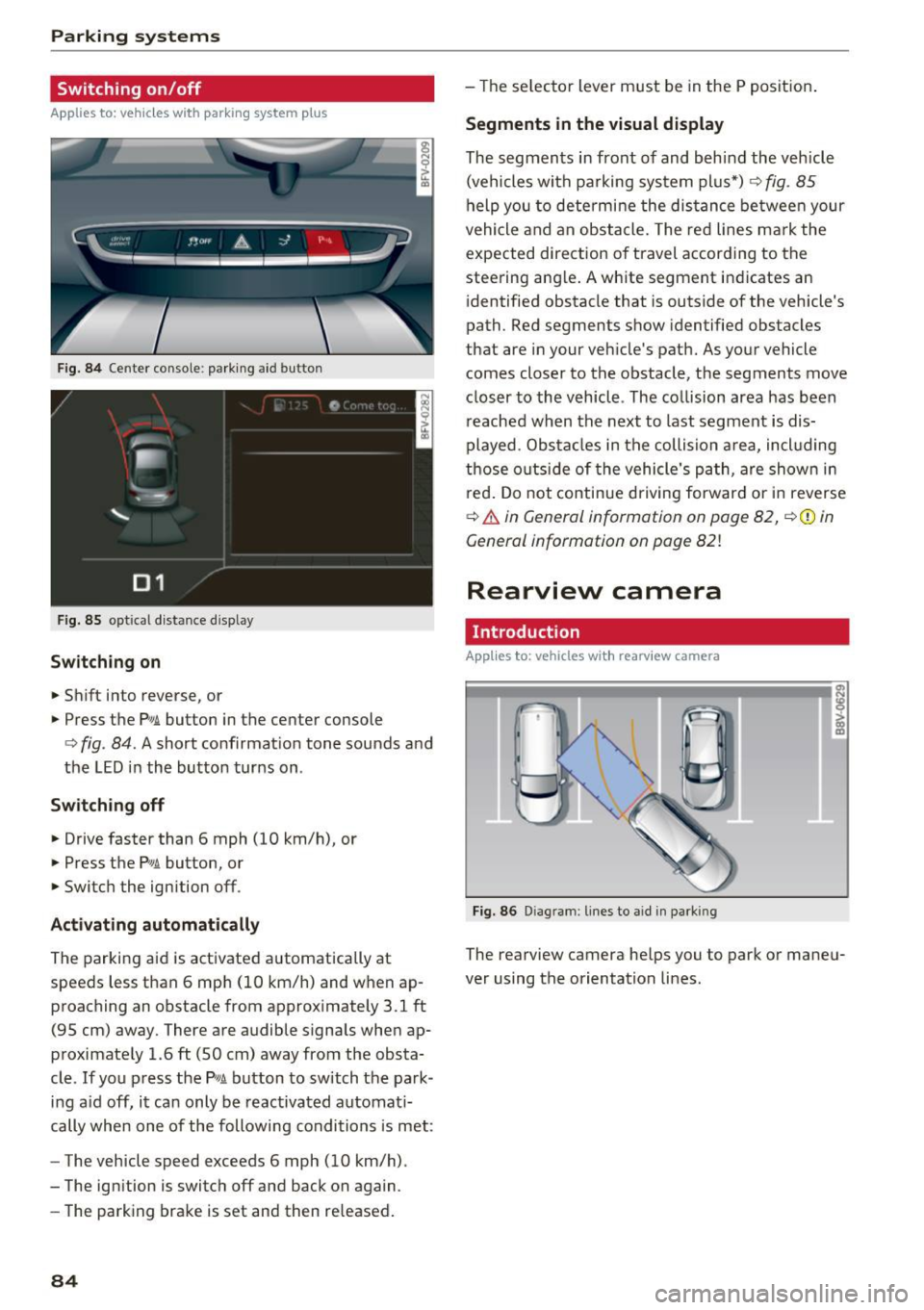
Switching on /off
Applies to: vehicles with parking system p lus
F ig. 84 Center console: park ing aid button
F ig.
85 optical d istance display
Switching on
.,. Shift into reverse, or
.,. Press the
Pw.A. button in the center console
c:> fig. 84. A short confirmat ion tone sounds and
the LED in the button turns on.
Switch ing off
.,. Drive faster than 6 mph (10 km/h), or
.,. Press the
p,,,A button, or
.,. Switch the ignition off .
Activating automatically
The parking aid is activated automatically at
speeds less than 6 mph (10 km/h) and when ap
proaching an obstacle from approximately 3.1 ft
(95 cm) away. There are audible signals when ap
proximately 1.6
ft (SO cm) away from the obsta
cle .
If you press the p,,1~ button to sw itch the park
ing a id off, it can only be reactivated automati
cally when one of the following conditions is met:
- The vehicle speed exceeds 6 mph (10 km/h).
- The ignition is switch off and back on again.
- The parking brake is set and then re leased .
84
-The selector lever must be in the P position .
Segments in the visual display
The segments in front of and behind the vehicle
(vehicles with parking system plus*)
9 fig. 85
help you to determine the distance between your
vehicle and an obstacle. The red lines mark the
expected direction of travel according to the
steering ang le. A white segment indicates an
identified obstacle that is outside of the vehicle's
path. Red segments show identified obstacles
that are in your veh icle's path. As your vehicle
comes closer to the obstacle, the segments
move
closer to the vehicle . The collision area has been
reached when the next to last segment is dis
played. Obstacles in the collision a rea, incl uding
those outside of the vehicle 's path, are show n in
r ed. Do not continue driving forward or in reverse
c:> & in General information on page 82, ¢(Di n
General information on poge
82!
Rearview camera
Introduct ion
Applies to: vehicles with rearview camera
Fig. 86 Dia gram : lines to aid in parking
The rearview camera helps you to park or maneu
ver using the orientation lines .
Page 88 of 322
Parking systems
Switching off
.. Drive faster than 6 mph (10 km/h), or
.. Press the
P"1A button, or
.. Switch the ignition
off.
(D) Tips
- The visual display in the left part of the dis
play should help you detect the critical vehi
cle areas .
- You can change the volume of the sig nals
and the display
¢page 86.
Perpendicular parking
Appl ies to: ve hicles with rea rview ca mera
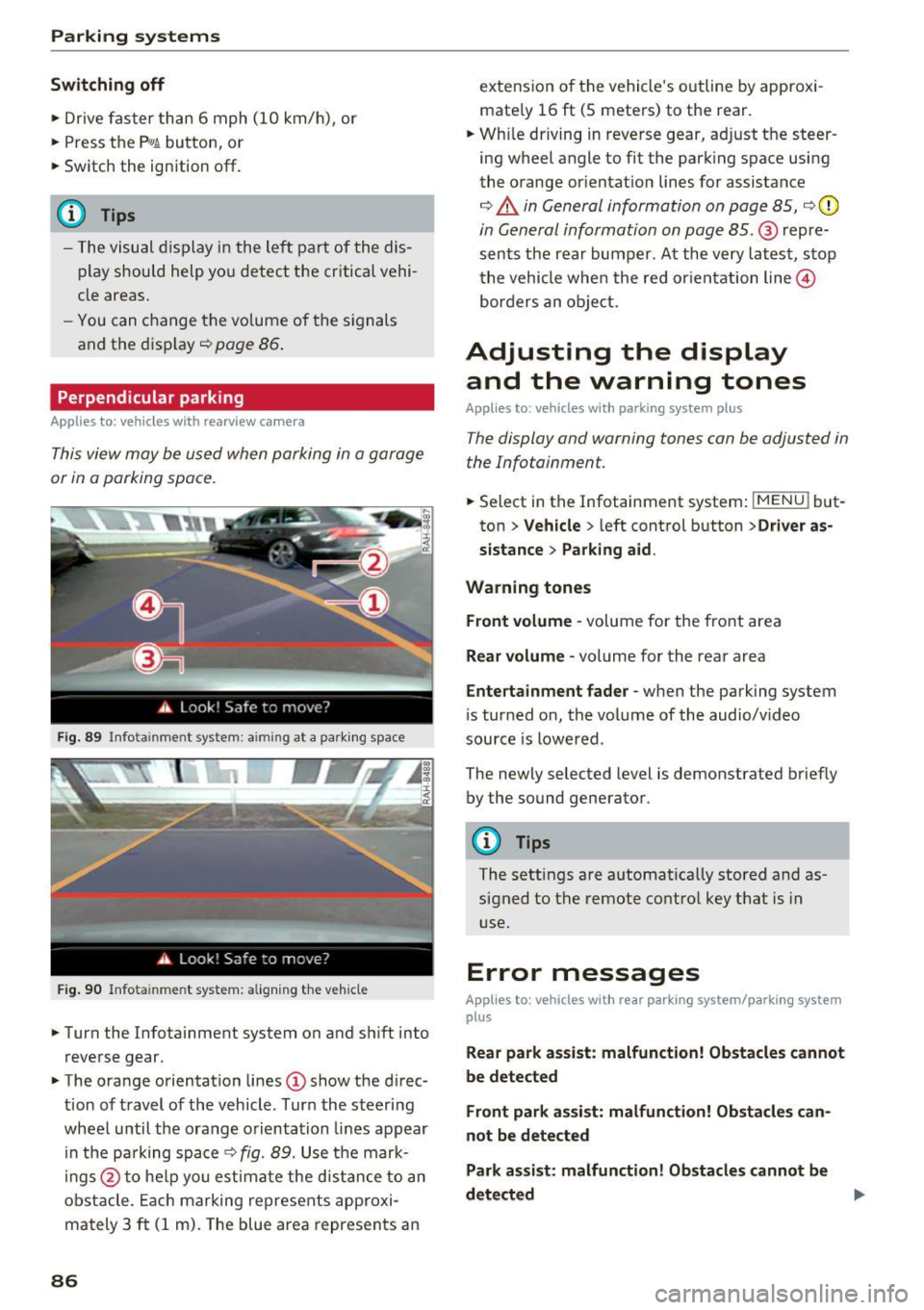
This view may be used when parking in a garage
or in a parking space.
Fig. 89 Info ta inment syste m: aim ing at a pa rking space
Fig. 90 Infota inme nt sys tem: aligning the vehicle
.. Turn the Infotainment system on and shift into
reverse gear.
.. The orange orientation lines
(I) show the direc
tion of travel of the vehicle . Turn the steering
wheel until the orange orientation lines appear
in the pa rking space
c:!;> fig. 89. Use the mark
ings @to help you estimate the d istance to an
obstacle. Each marking represents approxi
mately 3
ft (1 m). The blue area represents an
86
extension of the vehicle 's outline by approxi
mate ly 16
ft (5 meters) to the rear .
.. Wh ile driving in reverse gear, adjust the steer
ing wheel angle to fit the parking space using
the orange orientation lines for assistance
¢ &. in General information on page 85, ¢(D
in General information on page 85. @ repre
sents the rear bumper. At the very latest, stop
the vehicle when the red or ientation line@
borders an object.
Adjusting the display
and the warning tones
Applies to: vehicles with parkin g sys tem plus
The display and warning tones can be adjusted in
the Infotainment.
.. Select in the Infotainment system : IMENUj but
ton
> Vehicle > left control button >Driver as
sistance> Parking aid .
Warning tones Front volume -
volume for the front area
Rear volume -volume for the rear area
Entertainment fader -when the parking system
is turned on, the volume of the audio/video
source is lowered .
The newly selected level is demonstrated briefly by the sound generator.
{!) Tips
The settings are automat ically stored and as
signed to the remote control key that is in
use.
Error messages
App lies to : vehicles wit h rear parking system/parking system
plus
Rear park assist: malfunction! Obstacles cannot
be detected
Front park assist: malfunction! Obstacles can
not be detected
Park assist: malfunction! Obstacles cannot be
detected ..,._