service AUDI TT COUPE 2017 Owner's Manual
[x] Cancel search | Manufacturer: AUDI, Model Year: 2017, Model line: TT COUPE, Model: AUDI TT COUPE 2017Pages: 322, PDF Size: 79.73 MB
Page 63 of 322

co
co
.... N
" N .... 0
0
Vl c:o
-Always take the vehicle key with you when
leaving your vehicle, even for a short period
of time. This applies particularly when chil
dren remain in the vehicle. Otherwise chil
dren could start the engine, release the
parking brake or operate electrical equip
ment such as power windows, which in
creases the risk of an accident.
- No one should remain in the vehicle when it
is locked - especially children. Locked doors
make it more difficult for emergency work
ers to get into the vehicle, which puts lives
at risk.
(D Tips
When stopping at a traffic signal or stopping
in city traffic, you can set the parking brake
manually. The vehicle does not have to be
held with the brake pedal. The parking brake
eliminates the tendency to creep when a se
lector lever position is engaged. As soon as
you press the accelerator pedal, the parking brake releases automatically and your vehicle
starts to move ~page 61.
(D Tips
- Occasional noises when the parking brake is
set and released are normal and are not a
cause for concern.
- The parking brake goes through a self-test
cycle at regular intervals when the vehicle is
stopped. Any noises associated with this are
normal.
- If there is a power failure, the parking brake
will not set if it is released, and it will not
release if it is set
q Li::,.. See an authorized
Audi dealer or authorized Audi Service Fa
cility for assistance.
Starting from a stop
Various convenience and safety functions may be
available when the vehicle begins driving, de
pending on vehicle equipment.
Starting on hills with the parking brake set
Requirement: the driver's door must be closed.
Driving
.. To start driving comfortably when on a hill, set
the parking brake and begin driving as usual.
The braking force of the parking brake does not
release automatically until the wheels build up
enough driving force.
Starting on hills with hill hold assist
Hill hold assist makes it easier to start on hills.
Requirement: the driver's door must be closed
and the engine must be running.
.. To activate hill hold assist, press and hold the
brake pedal for several seconds. The vehicle
must be in an uphill direction of travel.
After releasing the brake pedal, the braking pow er is maintained for a brief moment
q & to pre
vent the vehicle from rolling back when starting .
During this time, you can easily begin to move
your vehicle.
& WARNING ~
App lies to: veh icles with hill hold assist
- If you do not begin driving immediately or
the engine stalls after releasing the brake
pedal, your vehicle may begin to roll back
ward. Press the brake pedal or set the park
ing brake immediately.
- The intelligent technology of hill hold assist
cannot overcome the limitations imposed by
natural physical laws. The increased comfort
offered by hill hold assist should not cause
you to take safety risks.
- Hill hold assist cannot hold the vehicle in
place on all hills (for example, if the ground
is slippery or icy).
- To reduce the risk of an accident, always
make sure the vehicle is situated safely
while stationary.
Automatic transmission
Introduction
Your vehicle is equipped with an electronically
controlled DSG transmission called S tronic. Two
independent clutches transfer the power be-
tween the engine and transmission. It allows the .,..
61
Page 66 of 322
Driving
Interlock button
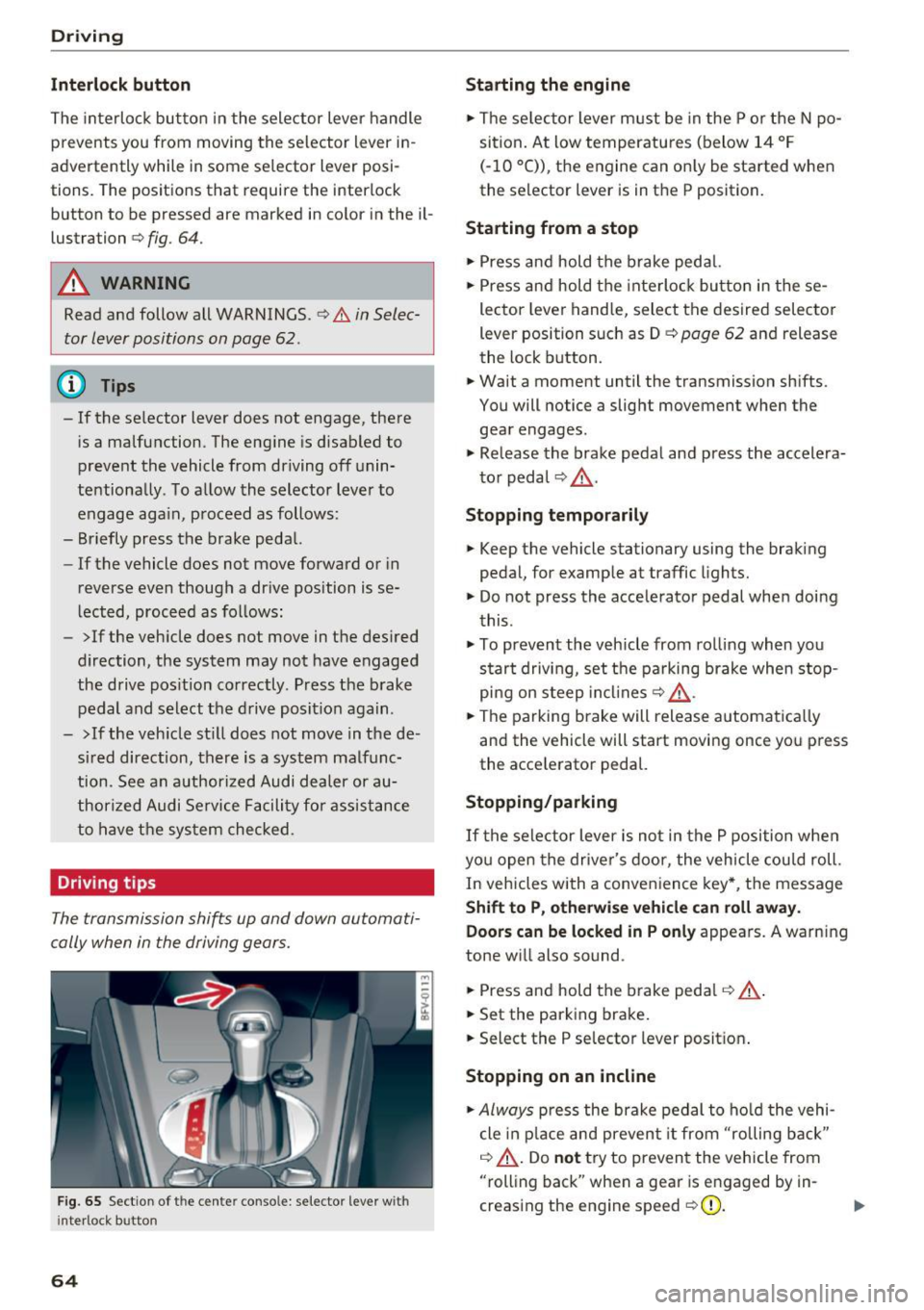
The interloc k but to n in the selector lever handle
prevents you from moving the selector lever i n
advertently while in some se lector lever posi
tions. The posit ions that require the interlock
button to be pressed a re marked in co lor in the il
lustration
¢ fig. 64.
A WARNING
Read and follow all WARNINGS.¢.&. in Selec
tor lever positions on page
62 .
(D Tips
- If the selector lever does not engage, there
is a malfunction . The eng ine is disabled to
prevent the vehicle from driving off unin
te ntionally . To a llow the selector lever to
engage aga in , proceed as follows :
- Briefly press the b rake pedal.
- If the vehicle does not move forward or in
reverse even though a dr ive pos ition is se
l ected, procee d as follows :
- >If the veh icle does not move in the des ired
direction, the system may not have engaged
the drive pos ition correctly . P ress the b rake
pedal and sel ect t he d rive posit ion again .
- >If the veh icle st ill does not move in the de
s ir ed direction, there is a system malfunc
tion. See a n authori zed Audi dea ler or au
thori zed Audi Service Facili ty for assistance
to have t he sys te m c hecked.
Driving tips
The transmission shifts up and down automati
cally when in the driving gear s.
F ig . 65 Sect io n of the cente r conso le: se lecto r lever w it h
i nte rlock b utton
64
Starting the engine
.. The se lec to r lever m ust be in the P o r the N po
si tion. At low temperatu res (below 14 ° F
(- 10 °C)), the e ngine can o nly be sta rted when
the selector lever is in t he P position .
Starting from a stop
.. Press and hold the b rake peda l.
.. Press an d hold the inte rlo ck button in these
lector leve r handle, select the desired selector
lever position such as D
¢ page 62 and release
th e lock button.
.. Wait a moment until the transmission sh ifts.
You will notice a slight movement when the
gea r engages .
.. Re lease the brake pedal and press the accelera
t o r pedal ¢,& .
Stopping temporarily
.. Keep the vehicle stationary using the braking
pedal, for examp le at traffic lights.
.. Do not press the acce lerator pedal whe n doi ng
t his .
.. To prevent the vehicle from ro lling when you
s tar t drivi ng, set t he pa rking brake when stop
pi ng on s teep in cli ne s¢ ,& .
.. The pa rking brake will release a utomat ic all y
and the vehicle will start moving once yo u press
the acce le rator pedal.
Stopping /parking
If the sele ctor lever is not in the P position w he n
yo u open the drive r's door, the vehicle cou ld roll.
In vehicles with a conve nience key*, the message
Shift to P, otherwi se vehicle can roll away.
Doors can be locked in P only
appea rs. A warn ing
tone w ill also sound .
.. Press and hold the brake pedal¢ .&, .
.. Set the parking brake .
.. Select the P selector lever posit io n.
Stopping on an incline
.. Always press the brake pedal to ho ld the vehi
cle in p lace and preven t it from "rolling back"
¢ .&, . D o not try to preven t the vehicle from
"rolling back" when a gea r is e ngaged by in
creas ing the eng ine speed ¢0) .
Page 70 of 322
Driving
-When acce lerating using the launch control
program, all vehicle parts are subject to
heavy loads . Th is can lead to increased
wear.
Emergency mode
In the event of a system malfunction, there is on
emergency program.
If all of the se lecto r lever posit ions are h ighlight
ed wit h a light background in the Infotainment
d isp lay, there is a system malfunction and the S
tron ic transmiss ion is running in the emergency
program . The vehicle can still be driven in emer
gency mode, but only with reduced speed and not in a ll gears . In some cases, the vehicle
can
not drive in rever se.
(D Note
If the transmission runs in emergency mode,
drive to an aut ho rized Aud i deale r or a uthor
ized Aud i Service Fac ility immediately to have
the malfunction corrected.
Transmission malfunction
• Tran smis sion: malfun ction! Please stop ve
hicle and shift to P
There is a malfunc tion in the transmiss ion. Pa rk
the vehicle se curely and do not continue driving.
See an autho rized Au di dea ler o r autho rized Aud i
Serv ice Facility for assistance .
• Transmission: too hot . Please stop vehicle
The transm ission is too hot and can become dam
aged . Stop and let the transm ission cool with the
engine run ning (at id le) in t he P selector leve r po
sition. Then the indicato r ligh t an d the message
tur n off, drive to an a uthorized Aud i dea le r or au
t hor ized Audi Se rvice Facility immed iate ly to have
the ma lfunction co rrected . If the ind icator light
and the driver message do not turn off, do not
continue dr iv ing. See an authorized A udi d ealer
or author ized Audi Se rvice Facility for assistance .
[O] Transmission: malfunction! You can contin
ue driv ing. See owner' s manual
68
Drive to an au thori zed A udi dealer or authori zed
Audi Se rvice Facility immediate ly to have the
malfunction cor rected.
[O] Tran smission: malfunction! You may contin
ue dr iving. No reverse gear
Drive to an authorized A udi dealer or au thorized
Audi Se rvice Fa cility immed iate ly to have the
malfunc tion cor rec ted .
ml Tran smiss ion: malfunction! You may contin
ue driving in D until engine off
Drive the vehicle away from mov ing traff ic and
park . See an author ized Audi dealer or author ized
Audi Se rvice Facility for assis tance.
ml Transmission: too hot . Please adapt driving
style
Continu e driving moderate ly. When the indicator
li ght turns off, you can cont inue driving norma l
l y.
ml Tran smission: Plea se press brake pedal and
select gear again
I f the transm iss ion m alfu nct io ns bec ause the
temperat ure is too high, a message appe ars
when the t ransmission is cooled .
Page 76 of 322
Assist
-The camera field of view¢ page 73, fig. 72 is
dirty or covered in ice. C lean this area on the
windshield.
- The camera field of view is fogged over. Wait
until the fog has cleared before switching the
active lane assist on again.
- The system has been unable to detect the lanes
for an extended period of time due to road con
ditions. Switch active lane assist back on when
the lines are more visible.
Audi active lane assist: currently unavailable.
See owner's manual
There is a temporary active lane assist malfunc
tion. Try switching the active lane assist on aga in
later.
Audi active lane assist: malfunction! See own
er's manual
Drive to an authorized Aud i dea ler or authorized
Audi Service Facility immediately to have the
malfunct ion corrected.
Audi active lane assist: Please take over steer
ing!
This message appears if you are not steering by
yourself. If th is is the case, active lane assist does
not switch off, but it is "not ready" to provide a
warn ing. The system can he lp you keep the veh i
cle in the lane. However, you are responsible for
driving the vehicle and must steer it yourself.
Adjusting the steering time and v ibration
warning
A ppl ie s to: ve hicles w ith Audi active lane assis t
You can adjust individual active lane assist set
tings in the Infotainment system.
Select in the Infotai nment system: I MENU I but
ton>
Vehicle > left control button >Driver assis
tance > Audi active lane assist
l) The correct ive stee ring fu nctio n is not availab le in all mar
kets.
74
Steering time1>
Early: in this setting, the corrective steering hap
pens continuously to help keep the vehicle in the
center of the lane.
Late : in this setting, the system provides correc
tive steering just before a vehicle wheel touches a
detected lane marker line .
Vibration warning
You can switch the addit ional vibration warn ing
i n the steering wheel on or off.
'
@ Tips
In certain markets : your sett ings are stored
automat ica lly and assigned to the remote
control key in use.
Lap timer
Introduction
App lies to: vehicles wi th lap tim er
Lap timer
You can measure and analyze lap times with the
lap timer in the display. The time is measured in
minutes, seconds and 1/10 seconds. With lap
times longer than 60 minutes, the hour is also
shown and the display of 1/10 seconds is re
moved.
The time measurement on an indiv idual lap ends
after 99 hours 59 minutes and 59 seconds. A
new lap starts automatically after that.
The measurement ends after a maximum of 30 laps. You can then eva luate the lap times or start
a new time measurement .
You can contro l the lap timer using the controls
on the multifunction steering wheel
¢ page 75.
A WARNING
Your focus should always be on driv ing your
vehicle safely. As the driver, you have com
p lete respons ibility for safety in traffic. Only
-
Page 80 of 322

Ass is t
system may have detected the vehicle in anoth
er lane that is
not adjacent to your current lane.
- If you are driving through a curve. Side assist
may react to a vehicle that is one lane over
from the adjacent lane .
- If side assist reacts to other objects (such as high or displaced guard rails).
- In poor weather conditions. The side assist
functions are limited.
Do not cover the radar sensors ¢
fig. 80 with
s tickers, deposits, bicycle wheels o r othe r ob
jects, because they wi ll impair the function . For
information on cleaning, see
¢ page 275.
A WARNING
-Always pay attention to traffic and to the
area around your vehicle. Side assist cannot
rep lace a dr iver's attention. The driver alone
is a lways responsible for lane changes and
similar driving maneuvers.
- In some situat ions, the system may not
function or its funct ion may be limited . For
example :
- I f vehicles are approach ing or being left
behind very quickly. The display may not
turn on in time.
- I n poor wea ther conditions such as heavy
rain, snow or heavy mist .
- On very wide lanes, in tight curves, or if
there is a rise in the road su rface. Vehicles
in the adjacent lane may not be detected
because they are outs ide of the sensor
range.
- Audi side assist cannot detect a ll vehicles
under all condit ions, w hich can increase the
risk of accidents .
- Please note that side assist only displays ap
proaching vehicles or vehicles in your blind
spot if your vehicle is travel ing at least
19 mph (30 km/h) .
- In certain situations, the system may not
work or its function may be limited. For ex ample:
- The display may not turn on at the rig ht
time if veh ides are app roaching or passing
very quick ly.
78
- In poor weather cond itions, such as heavy
rain, snow or fog .
- In very wide lanes, in tight c urves or when
there are slopes in the roadway, vehicles
i n the ne ighboring lanes may not be de
tected because they a re outside of the
sensor range.
(D Note
The sensors can be d isp laced by impacts or
damage to the bumper, wheel housing and
underbody. This can impair the system. Have
an authorized Audi dealer or author ized Audi
Service Fac ility check their f unct ion.
(D Tips
- If the w indow glass in the dr iver's door or
front passenger 's door has been tinted, the
display in the exterior mirror may be inco r
rect.
- For an explanat ion on co nform ity w ith the
FCC reg ulations in the Un ited States and the
I n dust ry Canada regulat io ns, see
~ page 304.
Switching on and off
Applies to: vehicles wi th Aud i side ass ist
The system can be switched on/o ff in t he Info
tainment system.
.. Select in the Infotainment system:
IM ENU ! but
ton
> Vehicle > left cont rol b utton >Driver a s
s istanc e > Audi side a ssis t
If the system is activated, the disp lays in t he ex
te rior mi rrors wi ll turn on briefly when the igni
tion is swi tched on.
Adjusting the display brightness
Applies to: vehicles with Audi side ass ist
The display brightness con be adjusted in the In
fotainment system.
.. Select in the Infotainment system : IMENU ! but
ton
> Vehicle > left cont rol button > Driver as-
s is tan ce> Audi side a ssist ...
Page 81 of 322

co
co
.... N
" N .... 0
0
Vl c:o
The display brightness adjusts automatically to
the brightness of the surroundings, both in the information and in the warning stage. In very
dark or very bright surroundings, the automatic
adjustment will set the display to the minimum
or maximum level. In such cases, you may notice no change when adjusting the brightness, or the
change may only be noticeable once the sur roundings change.
Adjust the brightness to a level where the display in the information stage will not disrupt your
view ahead .
If you change the brightness, the dis
play in the exter ior mirror will briefly show the
brightness level in the information stage. The
brightness of the warning stage is linked to the
brightness in the information stage and is adjust
ed along with the information stage.
(D Tips
- Side assist is not active while you are ma k
ing the adjustment.
- Your settings are automatically stored and
assigned to the remote control key being
used.
Messages
Applies to: veh icles with Audi side assist
If the side assist switches off automatically, a
message appears in the Infotainment system dis
play.
@j Audi side assist : cur rently unavailable.
Sensor vision restricted due to surroundings.
See owner's manual
The radar sensors' vision is affected. Do not cover
the area in front of the sensors with bike wheels,
stickers, dirt or other objects . Clean the area in
front of the sensors, if necessary~
page 77,
fig. 80.
@j Audi side assist: currently unavailable.
See owner's manual
Side assist cannot be switched on at this time be
cause there is a malfunction (for example, the
battery charge level may be too low).
Assist
@j Audi side assist: malfunction! Please
contact Service
The system cannot guarantee that it will detect
vehicles correct ly and it has switched off. The
sensors have been moved or are faulty . Have the
system checked by an authorized Audi dealer or authorized Audi Service Facility soon .
Audi drive select (drive
settings)
Introduction
Applies to : vehicles with Audi drive se lect
Drive select makes it possible to experience dif
ferent types of vehicle sett ings in one veh icle .
The driver can select from three modes,
Comfort,
Auto
and Dynamic , using the ~t.~, button in the
center console or by using the Infotainment sys
tem. This allows you to switch between a sporty
and a comfortable driving mode, for example. In
the
Individual mode, the settings can be adjust
ed to your persona l preferences . This makes it
possible to combine settings such as a sporty en
gine setting with light steering.
A WARNING
=
Using Audi drive select incorrectly can lead to
collis ions, other accidents and serious inju
ries .
Description
Applies to: vehicles with Audi drive se lect
The vehicle setup in each mode depends on the
vehicle's features. However, the engine and
steering are always affected .
Engine and automatic transmission
Depending on the mode, the engine and auto
matic transmission respond more quickly or in a
more ba lanced manner to accelerator pedal
movements.
Adaptive dampers (Audi magnetic ride)*
The adaptive dampers use sensors to record in
formation regarding steering movements, brak
ing and acceleration ope rations by the driver,
road surface, driving speed, and load. With d rive .,..
79
Page 84 of 322
Parking systems
Parking systems
General information
A ppl ies to: ve hicles w ith rear pa rk in g sys te m /p ark in g system
p lus
Depending on your vehicle's equipment , various
parking aids will help you when parking and ma
neuvering.
The
rear park ing system is an audible parking aid
that warns you of obstacles
behind the vehicle
¢ page 83.
The parking system plus assists you when park
ing by audibly and visually indicating objects de
tected
in front of and behind the veh icle
¢ page 83.
The rearview camera shows the area behind the
vehicle in the Infotainment system display . The
lines in the rearview camera image help you to
park or maneuver ¢
page 84. The parking sys
tem plus functions are also available
¢ page 83.
& WARNING
- Always look for traffic and check the area
around your vehicle by looking at it directly
as well. The parking system cannot replace
the driver's attention. The driver is always
responsible when entering or leaving a park
ing space and during similar maneuvers .
- Please note that some surfaces , such as
clothing, are not detected by the system .
- Sensors and cameras have blind spots in
which people and objects cannot be detect
ed . Be especially cautious of small children
and animals .
- The sensors can be displaced by impacts or
damage to the radiator gr ille, bumper,
wheel housing and the underbody . The park
ing system may be impaired as a result.
Have an authorized Audi dealer or author
ized Audi Service Facility check their func
tion .
- Make sure the sensors are not obstructed by
stickers, deposits or other materials. If they
are, the sensor function could be impaired.
For additional information on cleaning, see
¢ page 275.
82
(D Note
- Some objects are not detected or displayed
by the system under certain circumstances:
- Objects such as barrier chains, trailer draw
bars, vertical poles or fences
- Objects above the sensors such as wall ex
tensions
- Objects with certain surfaces or structures
such as chain link fences or powder snow
- If you continue driving closer to a low ob
ject, it may disappear from the sensor range. Note that you will no longer be
warned about th is obstacle.
- Keep enough distance from the curb to re
duce the risk of damage to the rims .
@ Tips
-The system may provide a warning even
though there are no obstacles in the cover
age area in some situations, such as :
- certain road surfaces or when there is tall
grass.
- external ultrasonic sources such as from
cleaning vehicles .
- in heavy rain, snow, or thick vehicle ex
haust.
- We recommend that you practice parking in
a traffic -free location or parking lot to be
come familiar with the system . When doing
this, there should be good light and weath
er conditions.
- You can change the volume of the signals.
- What appears in the display is slightly de-
layed.
- The sensors must be kept clean and free of
snow and ice for park aid to operate .
Page 89 of 322
co
co
.... N
" N .... 0
0
Vl c:o
There is a system malfunct ion if the L ED in the
p,g! button blinks when switching on the system .
If the error is not corrected before yo u switch off
the ignition, the L ED in the
P' #A button will blink
the next time you switc h on the parking system
by shifting into reve rse . As long as the error is ac
tive, you can display the error messages in the
second tab of the dr iver information system .
Parking system plus*
If a sensor or speaker is faulty, the .IM symbol
will appear in front of/behind the vehicle i n the
Infotainment d isplay . If a rear sensor is faulty,
only obstacles that are in areas
(D and
@<=:> page 83, fig . 83 are shown . If a front sensor
i s faulty , on ly obsta cles that are in areas @ and
@ are show n.
Drive to an authorized Aud i dealer o r a uthorized
Aud i Service Fac ility immediately to have the
malfunct ion corre cted.
Parking system s
87
Page 93 of 322
co
co
.... N
" N .... 0
0
Vl c:o
brake rotors and pads by caref ull y applying
the brakes several t imes .
-If the front spoiler is damaged or you install
another spoiler, make sure the front wheel
brakes are vent ilated properly. Otherwise,
the brake system could overheat, wh ich re
duces the ir effectiveness .
- Failure of a brake circuit impairs b raking
performance , which increases brak ing dis
tance. Avoid driving the vehicle and have it
towed it to the nearest author ized Audi
dealer or author ized A udi Se rvice Facility.
- Never let the vehicle roll while t he engine is
stopped because this increases the risk of a n
acc iden t.
- If the bra ke booste r is not working, you will
have to press m uch ha rder on the bra ke
ped al to compensate for the lac k of th e
booster.
- Never let the brakes "rub " by pressing the
pedal light ly when bra king is no t actually
ne cessary . T his cause s the brakes to over
hea t and i ncre ases br aking di stance and
ca uses wear.
- B efo re driv ing downh ill a long dis tance on a
steep h ill, decrease your speed and se lec t a
l ower gear . This makes use of the engine
braking effect and relieves the brakes . If
you need to b rake additionally, brake in in
tervals and not continuously.
@ Tips
- If the brake booste r is not working, you
must press the brake pedal with much more
fo rce than normal.
- If you retrofit yo ur vehicle with a front spoil
er, whee l
covers or similar items, make sure
that the air flow to the front whee ls is not
i nterr upted . Otherw ise the brake system
ca n become too hot .
Intelligent Technology
Electromechanical
steering
The electromechanical steering supports the
driver 's steering movements .
Power steering adap ts elec tronically based on
the ve hicle speed.
Indicator light s and message s
• Steering: malfun ction! Please stop vehicle
If this indica to r li ght tur ns on and st ays on and
t hi s message appea rs, the powe r steering may
have failed.
Stop t he vehi cle in a safe location as soon as pos
s ible. Do
not cont inue drivi ng. See an autho riz ed
Audi dealer or authorized A udi Service Fac ility for
assistance .
l;r- ij S teering : malfun ction! You may continue
driving
If the indicator light turns on, the steering wheel
may be more d ifficult to
move or more sensit ive
t h an usua l. Th e steer ing whee l may a lso be at an
angle when d riving s trai ght.
D rive slowly to an a uthorized Audi dea ler or au
t h orized Audi Serv ice Facility to have the mal
funct ion corre cted.
(D Tips
If the . or l;r, ij ind icator light only s tays on
fo r a short time, you may continue d riving.
All wheel drive (quattro)
In all wheel drive, all four wheels are powered.
General information
In all whee l dr ive, the dr iv ing power is divided be
tween all four wheels . This happens automatical
ly depending on you r dr iv ing behav ior as we ll as
t h e cur rent road condi tions. A lso see ~
page 88,
Elec tronic stabilization con trol ( ESC).
T he all whee l dr ive concept is des igned for high
engine power . You r vehicle is except ionally pow
erfu l and has excellent driv ing cha racteristics
bot h unde r normal d rivi ng conditions and o n
91
Page 94 of 322
Intelligent Technology
snow and ice. Always read and follow safety pre
cautions
¢ & .
Winter tires
By using all wheel drive, your vehicle has good
forward motion with standard tires in winter con
ditions. However, in winter we recommend using
winter or all season tires on
all four wheels, be
cause this will improve the
broking effect.
Snow chains
If there are snow chain laws, snow chains must
also be used on vehicles with all wheel drive
¢ page 2 70, Snow chains.
Replacing tires
For vehicles with all wheel drive, only whee ls with
the same rolling circumference should be used .
Avoid using tires with different tread depths
¢ page 262, New tires or wheels.
Offroad vehicle?
Your Aud i is not an offroad vehicle - there is not
enough ground clearance. For this reason, avoid
difficult terrain.
_&. WARNING
-Also, in vehicles with all wheel drive, adapt
your driv ing style to the current road and
t ra ffic conditions. Do not let the increased
safety provided tempt you into taking risks,
because this increases the r isk of an acci
dent.
- The braking ability of your vehicle is limited
to the traction of the wheels. In this way, it
is not different from a two wheel drive vehi
cle. Do not be tempted to accelerate to a
high speed when the road is slippery, be
cause this increases the risk of an accident.
- Note that on wet streets, the front wheels
can "hydroplane" if driving at speeds that
are too high. Unlike front whee l drive
vehicles, the eng ine does not rev highe r sud
denly when the vehicle begins hydroplaning.
For this reason, pay attention to the road
conditions regardless o f your speed.
92
Rear spoiler
Appl ies to: vehicles with retractable rear spoile r
The extendoble rear spoiler increases driving sta
bility.
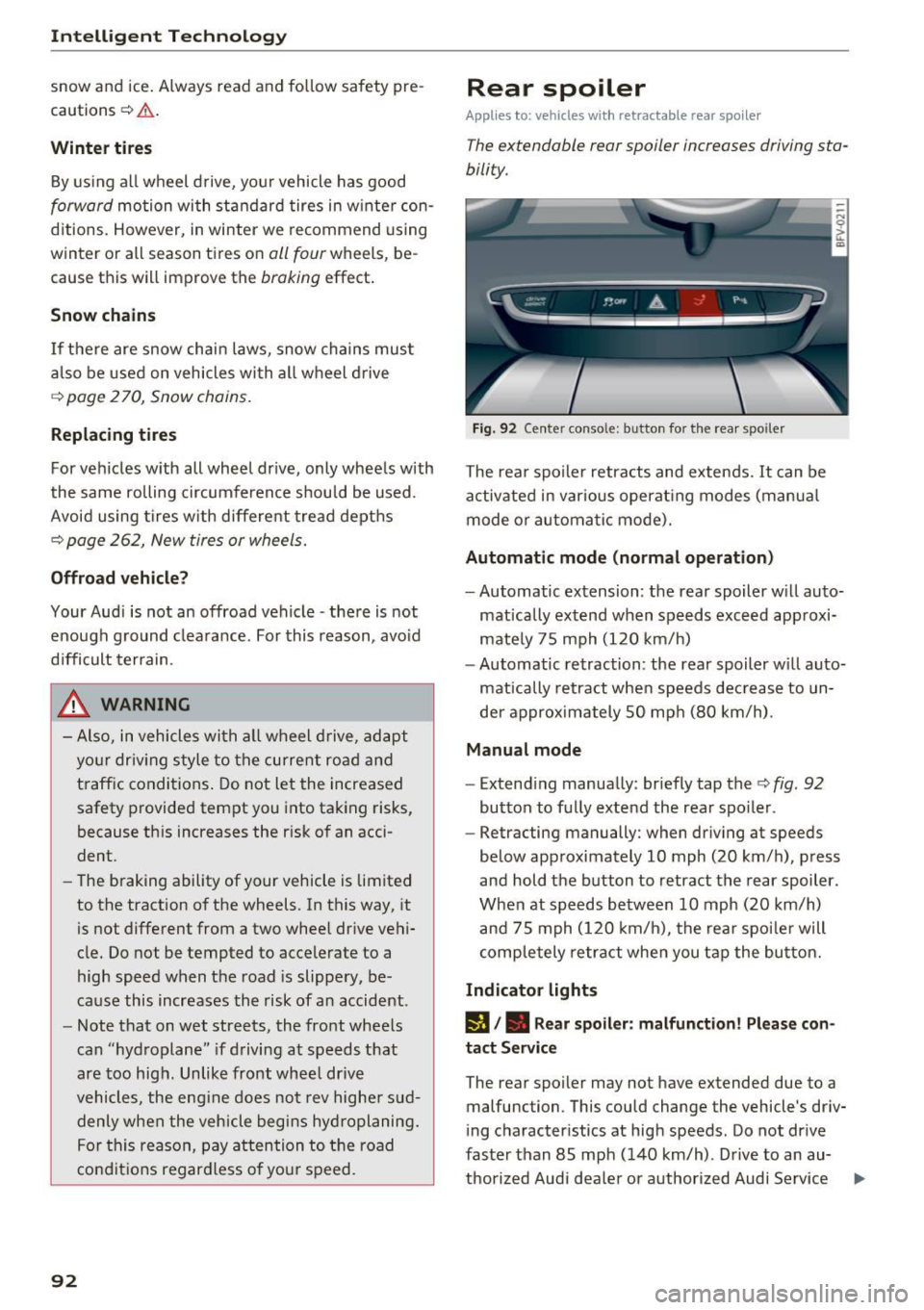
Fig. 92 Center conso le: button for the rear spoiler
The rear spoiler retracts and extends. It can be
activated in various operat ing modes (manua l
mode or automatic mode).
Automatic mode (normal operation)
- Automatic extension: the rear spoiler w ill auto-
mat ically extend when speeds exceed approxi
mately 75 mph
(120 km/h)
- Automatic retraction: the rear spoiler w ill auto
matically retract when speeds decrease to un
der approximately 50 mph (80 km/h).
Manual mode
-Extend ing manually : briefly tap the¢ fig. 92
button to fully extend the rear spoiler .
- Retracting manually: when driving at speeds
below approximately
10 mph (20 km/h), press
and hold the b utton to retract the rear spoiler .
When at speeds be tween
10 mph (20 km/h)
and 75 mph
(120 km/h), the rea r spoi ler will
completely retract when you tap the button.
Indicator lights
IJ,. Rear spoiler: malfunction! Please con
tact Service
The rear spoiler may not have extended due to a
malfunction. This could change the vehicle's driv
ing characteristics at high speeds. Do not drive
faster than 85 mph
(140 km/h) . Drive to an au-
thorized Audi dea ler or authorized Audi Service ..,.