service AUDI TT COUPE 2017 Workshop Manual
[x] Cancel search | Manufacturer: AUDI, Model Year: 2017, Model line: TT COUPE, Model: AUDI TT COUPE 2017Pages: 322, PDF Size: 79.73 MB
Page 162 of 322
Media
-The loading times fo r the a udio data depend
on the media p layer used and the number of
files that it conta ins .
- A maxim um of 2,000 entries per directory
are displayed in the MMI.
- Songs down loaded for off line use using m u
sic streaming services are stored on your
mobile device (such as a smartphone) and
may be DRM protected. The Wi-Fi a udio
player will not play DRM protected files.
- Contact you r authorized Audi dea ler or a u
thorized Audi Service Facility for additional i nformat io n on the Wi-Fi audio player.
Online media and
Internet radio
Applies to: vehicl es w ith Audi connect
You can playback and opera te various online me
dia services and Internet radio using the MMI.
.,. Press the IM EDIA I button. Press the left control
button un til the so urces ove rview
¢page 163,
fig. 140
is d isp layed.
Applies to: using online media and Internet radio
Req uirement:
- The
Audi MMI connect app must be installed
and open o n your mob ile device .
- You must be logged into your myAudi account
in the
Audi MMI connect app and you must
have selected your veh icle.
- The Wi-Fi function on the mobile device and on
the MMI must be switched on.
- If necessary, check in the connection manager
¢
page 175 if the mobile device yo u connected
is selected under the
MMI connect app (~).
-The MMI must be connected to the network.
- The symbol for the
Online media* sou rce @
¢page 163, fig . 140 is shown in the MMI.
Applies to: using online media
Addit io nal requirement:
- A suppor ted on line media serv ice m ust be avail
able in your country.
- You must have an accou nt w ith a supported on
li ne med ia serv ice .
- Depend ing on the online media service, you
must install and open an app on your mob ile
device .
160 Starting Online med
ia
- Press the IM EDIA I button. Press the left contro l
button until the sources overview ¢
page 163
is displayed.
- Select and confirm an o n line media serv ice.
Starting Internet radio
- Press th e I MEDIA i button. Press the left cont rol
button u nti l the sources overview ¢
page 163
is displayed.
- Select and confirm
Internet radio . The In ter net
radio b rowser or the last stat ion that was play
i n g is shown.
- Select ing the station : if necessa ry, select and
confirm a category in the I nte rnet rad io
Brows
er
> a s ta tion.
Online m edia and Internet radio : additional op
tion s
-Press the right control but ton.
The following op tions may be ava ilable, depen d
i ng o n the information shown (s uch as the sta
t ion/ track th at is cur rently playing):
- Sound sett ings : ¢ page 178.
-Wi-Fi settings : see¢ page 130, Wi-Fi hotspot.
- Connection manager : see ¢page 175.
- Add ition al opt ions may be ava ilable, dep end ing
on t he active online media service or In ternet
radio .
A WARNING
-It is on ly safe to use ta blets , laptops, mo
bi le devices and ot her simi lar devices when
the vehicle is stat ionary because, like all
loose objects, they cou ld be thrown around
the inside o f th e ve hicle in a c rash and cause
serio us inju ries. S tore these ty pes of devices
secure ly wh ile driving.
- Do no t use any wire less dev ices on the front
seats wi thin ra nge of the air bags while dr iv
ing . Also read t he war ning s in the chapte r
¢page 197.
0 Note
Please note that there genera lly are add it ion
a l costs when usi ng an on line media se rvice
a ccoun t, es pe ci ally w hen it i s used inte rna
tion ally.
-
Page 163 of 322
CD
CD
.... N
" N .... 0
0
Ill co
@ Tips
-Depending on the Internet connection and
network traffic, a connection loss can occur
during playback of on line media services.
-Online media and Internet radio usage de
pends on the service availability of the third
party provider.
- Audi AG simply makes the access to online
media services possible through the MMI
and does not take any responsibility for the
contents of the online media services.
- Always read the chapter ¢ page 132, About
Audi connect.
- Depending on the mobile device used, there
may be interruptions during media playback
and when using the
Audi MMI connect app.
To avoid interruptions when using a mobile device, do not lock the screen on your mo
bile device and keep the
Audi MMI connect
app in the foreground.
- Contact your authorized Audi dealer or au
thorized Audi Service Facility for additional
information about online media.
Multimedia connections
USB adapter for Audi music interface or
USB charging port
Depending on the vehicle equipment, you can
connect your mobile devices (such as a smart
phone or MP3 player) to the Audi music interface
or a USB charging port using a special USB
adapter.
I
Fig. 137 Audi USS adapters
(D USB adapter for devices with a micro USB con
nection
Media
@ USB adapter for devices with an Apple Light
ning connection
@ USB adapter for devices with an Apple Dock
connector
You can purchase the USB adapter from an au
thorized Audi dealer or at specialty stores.
(D Note
Handle the USB adapter carefully. Do not al
low it to be pinched.
Audi music interface
App lies to: vehicles wi th Audi music interface
Connect your mobile devices to the Audi music
interface in order to operate them through the
MMI and charge the battery .
Fig. 138 Connecting mobile devices
The Audi music interface is located in the center
console storage compartment@¢ page 6,
fig. 2.
-Connecting a mobile device using a USB
adapter:
connect the applicable USB adapter@
¢ fig. 138 to the port on the Audi music inter
face @ and then connect the adapter to the
mobile device
(D (such as an iPod).
-Charging a mobile device using a USB adapter :
when you connect a mobile device to the Audi
music interface ® using the applicable USB
adapter @¢ fig. 138, the battery will auto
matically charge .
-Disconnecting a mobile device from the Audi
music interface :
remove the USB adapter@
¢ fig . 138 from the Audi music interface @
¢ fig. 138.
-Disconnecting mobile devices with an Apple
Dock connector :
remove the Apple Dock .,,.
161
Page 164 of 322
Media
connector from the Apple device with the re
lease tabs pressed in@
¢page 161, fig. 137 .
The med ia are started and ope ra ted through the
mob ile devi ce or the MM I, depend ing o n the de
vice being used
c;, page 163.
Conne cting two mobile devi ces: if two mob ile
dev ices (for examp le iPod and sma rtphone) are
connec ted at the same time, then both devices
can be used as p layback so urces.
You can connect mobile devices using the ana log
AUX port .
-Connecting a mobile dev ice to the AUX input:
connect the cable ® ¢ fig. 138 to the AUX in
put @ on the Audi music interface and then to
the mob ile device @ (such as an MP3 player or
smartphone).
- Di sconnect ing a mobile device from the AUX
input :
remove the cable®¢ fig. 138 from the
Audi music interface .
-Operat ion: select and confirm the Exte rnal au
dio play er
source @¢ page 163, fig. 139 . The
med ia are started and ope rated through the
mobile device@c:v fig. 138.
.8, WARNING
Dr iv ing requ ires you r complete and und ivided
attent ion . As the d river, you have comple te
respons ibility for safety in traffic . Never oper
ate mobile devices while driving, because this
increases the risk of an accident.
0 Note
- Remove the connector from the Aud i m us ic
interface carefu lly so it is not damaged.
- Use a USB ex tension cable to connect devi
ces tha t have an integrated USB connector
(such as a USB stick) to prevent damage to
your USB device and the Audi m usic inter
face.
- Ext remely high or low temperatures that
can occur inside vehicles can damage mob ile
devices and/or impair their performance.
Never leave mobile devices in the vehicle in
extremely high or low temperatures.
162
(D Tips
- Do not use an additiona l adapter or USB ex
tension cab le to connect mobile devices to
the A udi music interface that already have a
cable or that must be connected w ith a USB
adapter
(¢page 161). They may impair the
functionality.
- You can purchase the AUX connector cab le
from an authorized Audi dea ler or at spe
cialty sto res .
- Functionality is not guaranteed for mob ile
devices that do not conform to the USB 2.0
standard .
- USB hubs are not supported.
- Some versions of the iPod such as the iPod
shuff le cannot be connected to the USB
adapter for devices with Apple Dock connec
to r. Connect these devices us ing a AUX con
necto r cable.
- Video playback th rough the Aud i m usic in
terface is o nly supported if the co nnected
device is recognized as a USB storage device
(for examp le a USB stick). Apple devi ces and
M TP devices (su ch as smartphones) are not
recognized as USB sto rage devices .
- iP od/ iPhone m alfunctions a lso affec t the
operation o f the MMI. Reset you r iPo d/
iPhone if this happens.
- For impo rtant information on operating
your iPod/iPhone, refe r to the user g uide for
the device. Audi recommends updating the
iPod/ iPhone software to the latest version.
- For more information about the Aud i music
interface and suppo rted devices, check the
Audi database for mob ile dev ices at
www .audiusa .com/bluetooth or contact an
authorized Audi dealer or authorized Aud i
Service Facility .
Page 166 of 322
Media
Media center
Various categories for selecting audio/video*
files ore available in the media center .
Fig. 141 Example : USB st ick categories
F ig . 142 Example: USB s tick cat egories
~ Press the I MEDIAi but ton. Press the left control
button until the source overview is disp layed.
Se lect and confirm the desired source.
(D Active sourc e
The active source is h ighlighted . T he ac tive
source symbol (!) may change depending on the
connected device, the online media service* or
Internet radio* . As an examp le, a USB stick is
shown
c!;> fig. 141 connected to the Aud i mus ic in
terface* .
Depending on the active source, you can select
audio/video files* from the following categories
and add them to the playlist:
@ Favorites
The Favorit es catego ry appea rs if at least one en
try is stored in the favor ites list . See ~
page 165,
Favor ites.
@ Arti sts
All available artists are d isplayed . Se lect and con
fi rm an art ist , an a lb u m and then a track.
164
@ Album s
All avai lab le albums are displayed . Se lect and
conf irm an a lbum and then a track.
® Genres
All available genres are displayed . Select and
confi rm a gen re (s uch as
Pop ), an a rt ist, an al
bum and then a song.
@ Tracks
All availab le tracks are displayed . Select and con
firm a track .
0 Fo lder s
The folder structure or track/chapter list is dis
played . Se lect a folder , if necessary. Select and
conf irm a track .
@ Playlists
All availab le playlists from the source and the
smart playlists are displayed . Se lect and confirm
a p laylist and then a track .
Smart pla yli sts:
- Last played tra cks :
the last tracks played in the
selected source are displayed .
-Mo st played : the most played songs in these
lected source are displayed.
- S s ta rs to 1 star : tracks from the selected
source are disp layed according to their rating.
- Not rat ed : all files from the selected source
w ithout rating information (for example, in the
ID3 tag) are displayed.
@ Videos*
All availab le video files are displayed . Select and
conf irm a video file .
@ Tips
- Only the categories suppo rted by the medi
um are available . For example, CD/DVD
ROM tracks cannot be selected with catego
ries such as
Art ists , Albums or Genres .
With an iPod (source: Audi music interface
<:!;> page 161), the Podcasts , Aud io books
and Composer s categories are also availa
ble .
Page 167 of 322
CD
CD
.... N
" N .... 0
0
Ill co
-For safety reasons, the video image is only
displayed when the vehicle is stationary. On
ly the sound from the video plays while driv
ing .
- When synchronizing a portable device with
"Cloud" services, playlists may display incor
rectly in the MMI. Use the media center in
the device.
Free text search
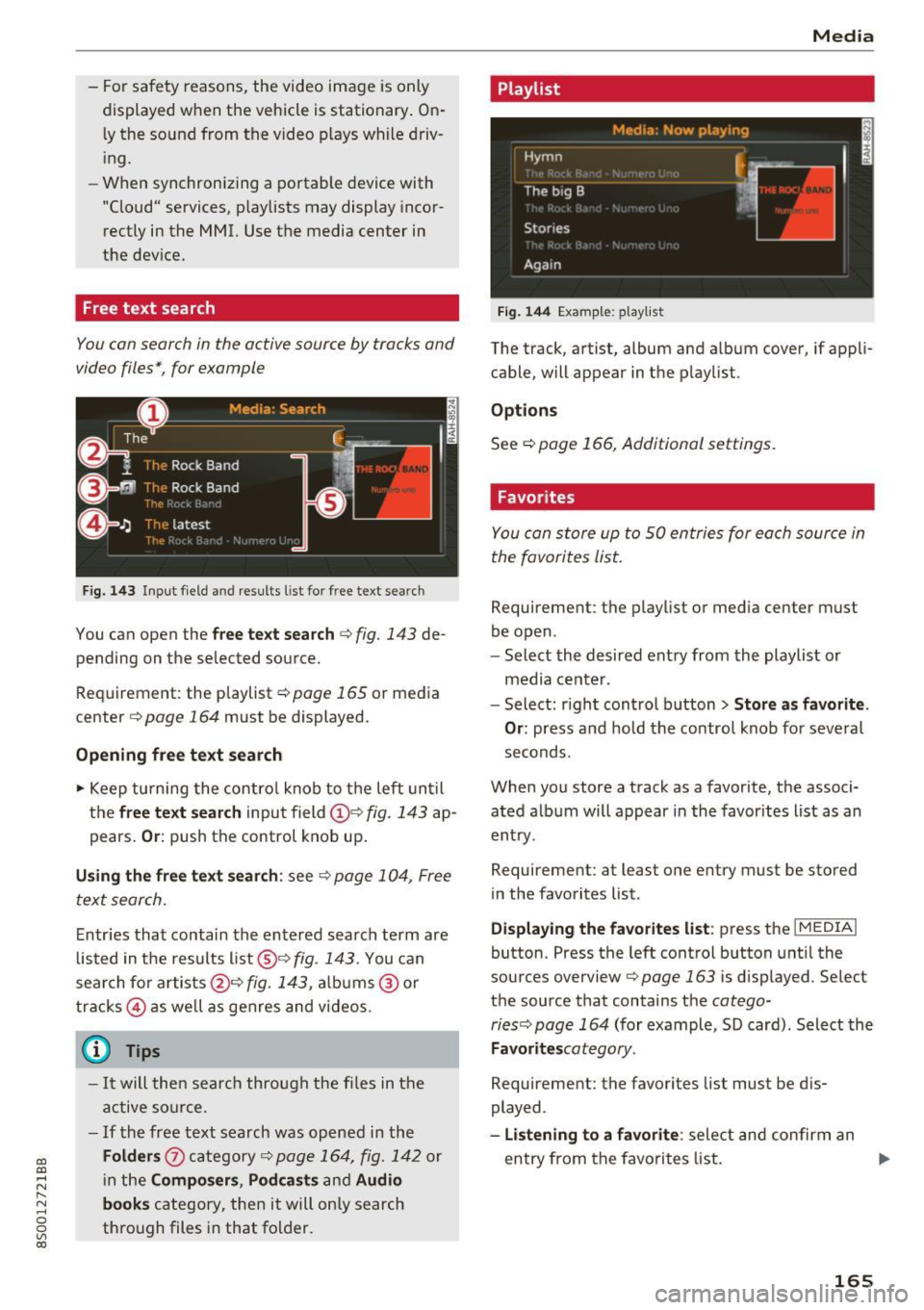
You con search in the active source by tracks and
video files*, for example
Fig. 143 I npu t field and results list for free text sear ch
You can open the free text search c::> fig. 143 de
pend ing on the selected source.
Requirement : the playlist
c::> page 165 or media
center
c::> page 164 must be displayed .
Opening free text search
.,. Keep turning the control knob to the left until
the
free text search input field (D e:> fig. 143 ap
pears.
Or: push the control knob up.
Using the free text search: see c::> page 104, Free
text search.
Entries that contain the entered search term are
listed in the results list@c::>
fig . 143. You can
search for artists@¢
fig. 143, albums @ or
tracks @as well as genres and videos.
Q Tips
-It will then search through the files in the
active source.
- If the free text search was opened in the
Folders 0 category c::> page 164, fig. 142 or
in the
Composers, Podcasts and Audio
books
category, then it will only search
through files in that folder.
Media
Playlist
Fig. 144 Example: playlis t
The track , artist, album and album cover, if appli
cable, will appear in the playlist .
Options
See c::> page 166, Additional settings .
Favorites
You con store up to 50 entries for each source in
the favorites list.
Requirement : the playlis t or media center must
be open .
- Select the desired entry from the playlist or
media center.
- Select: right control button
> Store as favorite.
Or:
press and hold the control knob for several
seconds.
When you store a track as a favorite, the associ ated album will appear in the favorites list as an
entry .
Requiremen t: at least one entry must be stored
in the favorites list.
Displaying the favorites list: press the I MEDIAi
button . Press the left control button until the
sources overview
c::>poge 163 is displayed. Select
the source that contains the
cotego-
ries c::> page 164
(for example, SD card) . Select the
Favoritescotegory .
Requirement: the favorites list must be dis
played .
-Listening to a favorite: select and confirm an
entry from the favorites list . ..,.
165
Page 197 of 322

CD
CD
.... N
" N .... 0
0
Ill co
Unfastening safety belts
Unbuckle the safety belt with the red release
button only after the vehicle has stopped .
,
"\11
Fig . 159 Releas ing the tongue from the buck le
~ Push the red release button on the buckle
Q fig. 159 . The belt tongue will spring out of
the buckle
Q .,&.
~ Let the belt wind up on the retractor as you
guide the belt tongue to its stowed position.
&_ WARNING
Never unfasten safety belt while the vehicle is
moving. Doing so will increase you r risk of be
ing injured or k il led.
Improperly worn safety belts
0 ,-.. N 0 :i:
;ii
Incorrectly positioned safety belts can cause se
vere injuries .
Wearing safety belts improperly can cause seri
ous injury or death. Safety belts can only work
when they are correctly pos itioned on the body .
Improper seating positions reduce the effect ive
ness of safety belts and will even increase the
risk of injury and death by mov ing the safety belt
to crit ica l areas of the body. Imp roper seating
positions also increase the risk of se rious injury
and death when an airbag deploys and strikes an
occupant who is not in the correct seating posi
tion . A driver is responsible for the safety of all
ve hicle occupants and especia lly for children.
Therefore:
~ Never permit anyone to assume an incorrect
seated position in the vehicle while traveling
QA .
Safet y bel ts
&_ WARNING
-Improperly worn safety belts increase the risk
of ser ious personal injury and death whenever
a veh icle is being used .
- Always make sure that all ve hicle occupants
are correctly restrained and stay in a correct
seated position wheneve r the vehicle is be
i n g used.
- Always read and follow a ll WAR NINGS and
o ther impo rtant informat ion
Q page 192.
Safety belt tensioner
How safety belt pretensioners work
In front, side and rear-end collisions above a
particular severity and in a rollover, safety belts
are tensioned automatically .
Pyrotechnic safety belt pretensioners
The safety belts for the front sea ting posit ions
are equipped with safety belt pretensioners. The
system is act ivated by sensors i n front, side and
rear-end collisions of g rea t seve rity and in a ro ll
over . This tightens the belt and takes up belt
s lack
Q &. in Service and disposal of safety belt
pretensioner on page 196.
Taking up the s lack
helps to reduce forward occupant movement dur
ing a collision.
&_ WARNING
-
- It is poss ible for the pretensioners to dep loy
incorrectly.
- The pyrotechnic system can only provide protection for one collision . If the pyrotech
n ic pretens ioners dep loy, the pre tensioning
system must be replaced.
(0 Tips
The pyrotechn ic safety belt pretensioners can
o nly dep loy once .
- The safety belt pretensioners do not deploy
in minor frontal, side and rear-end coll i
sions.
- A fine dust is re leased when the pyrotechnic
safety belt pretensioners dep loy. This is no r
ma l and is not caused by a fi re in the ve hi
cle.
195
Page 198 of 322
Safety belts
-The relevant safety requirements must be
observed when the vehicle or components
of the system are scrapped. A qualif ied
dealership is familiar with these regulations
and will be pleased to pass on the informa
tion to you.
- Be sure to observe all safety, environmental
and other regulations if the vehicle or indi
v idual parts of the system, particularly the
safety belt or airbag, are to be disposed. We
re commend you have your author ized Audi
dealer perform this service for you.
Service and disposal of safety belt preten
sioner
The safety belt pretens ioners are parts of the
safety belts on your Audi. Installing, removing,
servicing or repairing of belt pretensioners can
damage the safety belt system and prevent it
from working correctly in a collision .
There are some important things you have to
know to make sure that the effectiveness of the
system will not be impaired and that discarded
components do not cause injury or pollute the
env ironment.
A WARNING
Improper care, servicing and repai r proce
dures can increase the ris k of personal injury
and death by preventing a safety belt preten
sioner from activating when needed or acti
vating it unexpectedly:
- T he be lt pretensioner system can be activat
ed only once. If belt pretensioners have
been activated, the system must be re
placed.
- Never repair, adjust, or change any parts of
the safety be lt system.
- Safety belt systems including safety belt
pretensioners cannot be repaired . Special
procedures are required for removal, instal
lat ion and disposal of this system.
- For any work on the safety belt system, we
strongly recommend that you see your au
thorized Aud i dealer or qualified technician
who has an Audi approved repair manual,
training and spec ial equipment necessary.
196
® For the sake of the environment
Undeployed airbag modules and pretension
ers might be classified as Perchlorate Materi
al -special handling may apply, see
www.dtsc.ca.gov/hazardouswaste/perchlo
rate . When the vehicle or parts of the re
straint system including airbag modules safe
ty belts with pretensioners are scrapped, all
applicable laws and regulations must be ob
served. Your authorized Aud i dealer is familiar
with these requirements and we recommend
that you have your dealer perform this service
for you.
Page 214 of 322
Airbag syste m
Make sure that the PASSENGER AIR BAG
OFF
11;; li ght comes on and stays on all t he
t ime whenever the ignition is switched on.
A WARNING
-
- If the PA SSEN GER AIR BAG OFF 11;; light
does not go out when an adult is si tting on
the front passe nger seat a fter ta king the
steps described above, make sure the adult is p roperly seated and restrained at one of
the rear seating positions.
- Have the airbag system inspected by your
Audi dealer befo re t ransporting anyone on
the front passenger seat.
@ Tips
If the capacitive passenger detection system
determines that the front passenger seat is
empty, the frontal airbag on the passenge r
side w ill be tu rned off, and the
PASSENGER
AIR BAG OFF
11;; light will stay on.
Repair , care and disposal of the airbags
Parts of the a irbag system are installed at many
different places on your Audi. Installing, remov ing, servic ing or repa iring a part in an area of the
ve hicle can damage a part of an airbag system
and prevent that system from working properly
i n a collision .
There are some important things you have to
know to make sure that the effectiveness of the
system w ill not be impaired and that discarded
components do not cause injury or pollute the
env ironment.
A WARNING
Improper care, serv icing and repai r proce
dures can increase the r is k of personal injury
and death by preventing an airbag from de
ploying when needed or dep loying an airbag
unexpectedly:
-
- Never cover, obstruct, or change the stee r
ing wheel horn pad or airbag cover or the in
strument pane l or modify them in any way.
212
- Never attach any objects s uch as c up ho lders
or telephone mountings to the surfaces cov
ering the a irbag un its.
- For cleaning the horn pad or instrument
panel, use only a soft, dry cloth or one mois
tened w ith plain water. Solvents or cleaners
could damage the airbag cover or change
the st iffness or strength of the material so
that the airbag canno t deploy and p rotect
properly.
- Never repair, adjust , or change any parts of
the airbag system.
- All work on the steering wheel, inst rument
panel, front seats or e lectr ica l system ( in
cluding the installation of a udio eq uipment,
cellular telephones and C B radios, etc.)
m ust be perfo rmed by a qualified techn ician
who has the training and specia l equipment
necessary.
- For any work on the airbag system, we strong ly recommend that you see your au
thorized A udi dealer or qualified workshop.
- Never modify the front b umper or parts of
the vehicle body.
- Always make sure that the side a irbag can
inflate w ithout interference:
- Never install seat covers or replacement
upholstery over the front seatbacks that
have not been specifically approved by
A udi.
- Never use additional seat c ushions that
cover the areas where the side airbags in
flate.
- Damage to the orig inal seat cove rs or to
the seam in the area of the s ide airbag
module mus t alway s be repaired immedi
ate ly by an autho riz ed Au di dealer.
- The a irbag system can deploy on ly once. Af
ter an airbag h as been deployed, i t m ust be
repla ced with new replacement parts de
signed and approved espec ia lly for your
Audi model version . Replacement of com
plete airbag systems or airbag components
must be perfo rmed by qua lified workshops
only. Make su re that any airbag service ac
tion is entered in your A udi Warranty
&
Ma intenance boo klet under AIRBAG RE-
PLAC EM EN T RECORD.
~
Page 215 of 322
CD
CD
.... N
" N ...... 0
0
Ill co
-For safety reasons in severe accidents, the
alternator and starter are separated from
the vehicle battery with a pyrotechn ic circuit
interrupter.
- Work on the pyrotechnic circ uit interrupt
er must only be performed by a qualified
technicians who have the experience, in
formation and special tools necessary to
perform the work safely.
- If the vehicle or the circuit interrupter is
scrapped, all app licab le safety precautions
must be followed .
@) For the sake of the environment
Undeployed airbag modu les a nd pretension
ers might be classified as Perch lorate Materi
al -special handling may apply, see
www.dtsc .ca.gov/hazardouswaste/perchlo
rate. When the vehicle or parts of the re
straint system including airbag modules and
safety belts with pretensioners are scrapped,
all applicable laws and regulations must be
observed. Your authorized Audi dealer is fa
m iliar with these requi rements a nd we recom
mend t hat you have you r dealer perform this
service for you.
Other things that can affect Advanced
Airbag performance
Changing the vehicle's suspension system can
change the way that the Advanced Airbag System
performs in a crash . For example, using tire-r im
comb inat ions not approved by Audi, lowering the
ve hicl e, chang ing the stiffness of the suspens io n,
in clud ing the spr ings, suspens ion str uts, shock
absorbers et c. can change the forces that are
measured by the airbag sensors and sent to the
e lectronic contro l unit. Some suspension changes
can, for example, increase the force levels meas
ured by the sensors and make the airbag system
deploy in crashes in wh ich it would not deploy if
the changes had not been made. Other ki nds of
changes may reduce the fo rce levels meas ured by
the sensors and prevent the airbag from deploy
in g when i t should .
Airbag sys tem
A WARNING
-Changing the vehicle's suspension including
use of unapproved tire-rim combinations can
change Advanced Airbag performance and in
crease the risk of serious persona l injury in a
crash.
- Never install suspension components that
do not have the same pe rformance charac
teristics as the components o rigina lly ins tal
led on your vehicle.
- Never use tire-rim combinations t hat have
not been approved by Audi.
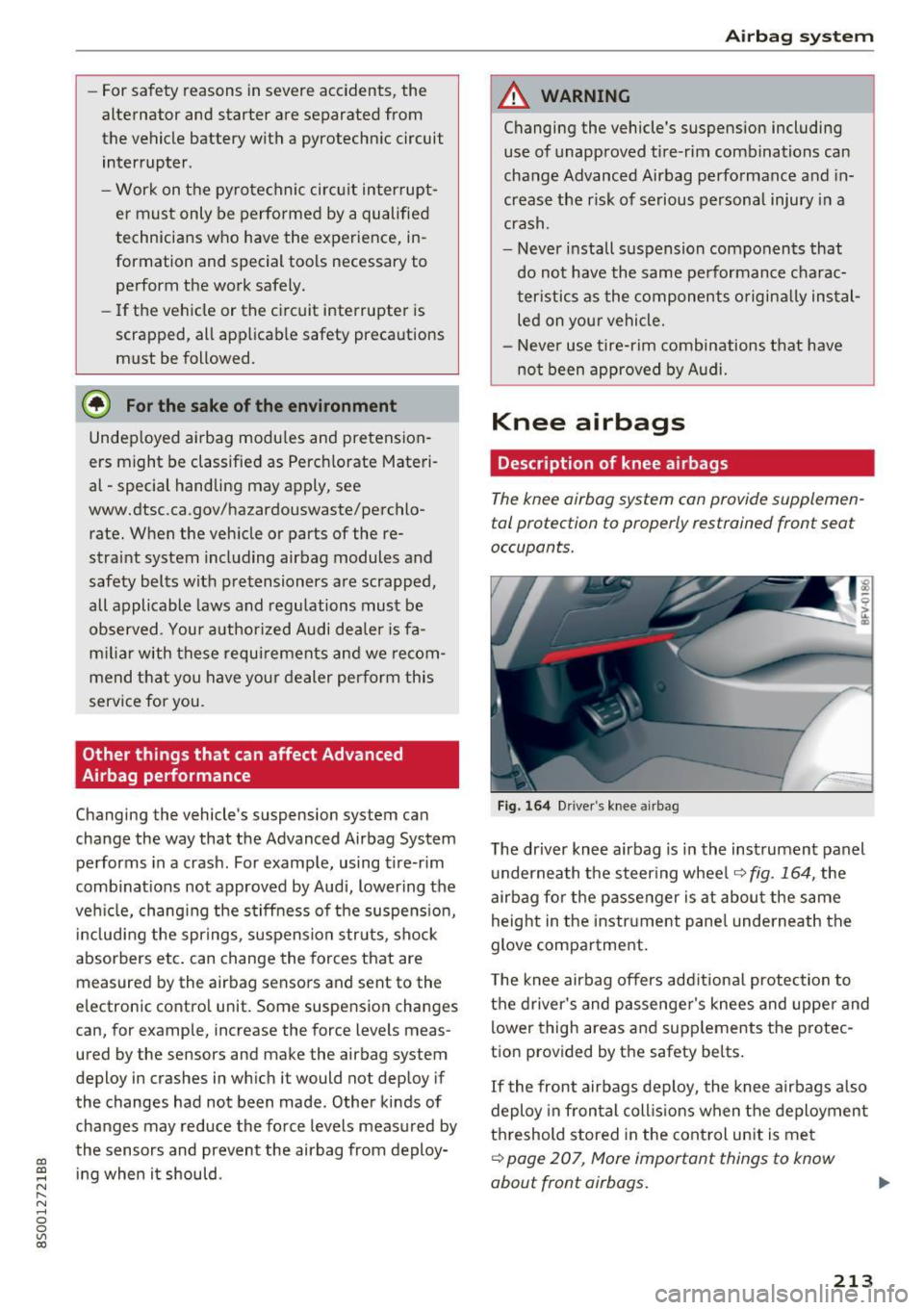
Knee airbags
Description of knee airbags
The knee airbag system can provide supplemen
tal protection to prop erly restrained front sea t
occupants.
F ig. 16 4 D river 's knee a irbag
The driver knee airbag is in the instrument panel
u nderneath the steering whee l
~fig. 164, the
airbag fo r the p asse nger is at about the same
height in the instr ument pane l underneath the
glove compa rtment.
T he knee airbag offers add itiona l protection to
the driver's and passenge r's knees and uppe r and
lower thigh areas and supp lements the protec
tion provided by the safety be lts .
If the front airbags deploy, the knee airbags a lso
deploy in fron tal coll is ions when the deploymen t
threshold stored in the cont rol un it is me t
~ page 207, More important things to know
about front airbags.
213
Page 243 of 322
co
co
.... N
" N .... 0
0
Vl c:o
-If you are unable to determine whether or
not a particular fuel blend meets the speci
ficat ions, ask your service station or its fuel
supplier.
- Do not use fuel for which the contents can
not be identified.
- Fuel system damage and performance prob
lems resulting from the use of fue ls diffe r
ent from those specified are not the respon
s ibility of Audi and are not covered under
the New Veh icle or the Emiss ion Control
System Warrant ies .
- If you experience a loss of fue l economy or
driveability and pe rformance problems due
to the use of one of these fuel blends, we r ecommend that you switch to unblended
fuel.
Gasoline additives
A ma jor concern among many auto manufactur
ers is carbon deposit build-up ca used by the type
of gasoline yo u use.
A lt hough gasoline grades d iffer from one manu
facturer to another, they have cer tain things in
common . A ll gasoline grades contain substances
that can cause deposits to collect on vita l engine
parts, such as fue l injectors and intake valves. Al
though most gasoline brands include additives to
keep engine and fuel systems clean, they are not
equally effective .
Aud i recommends using TOP TIER Detergent Gas
oline. For more informat ion on TOP TIER Dete r
gent Gasoline, please go to the official website
(www.toptiergas .com) .
After an extended period of using inadequate
fuels, carbon deposit build-ups can rob your en
g ine of peak performance.
CD Note
Damage or malfunction due to poor fuel q ual
ity is not covered by the Aud i New Vehicle
Limited Warranty.
Ch eck ing and Filling
Refueling
Fuel filler neck
The fue l filler neck is located on the rig ht rea r
s ide panel behind the fuel fille r flap .
If the power lock ing system shou ld fail, yo u can
st ill open the flap manually -fo r detailed instruc
tio ns see
9 page 243.
You can find the fuel tank capacity of your vehicle
i n
c::;, page 299.
The label on the inside of the f uel fi ller flap tells
you the correct fuel for your vehicle. For more in
f ormat ion about fuel spec ificat ions, see
9 page 240.
Your vehicle fuel tank has an onboard refue lling
vapor recovery system. This feature helps to pre
vent fuel vapors from escaping from the tank and
polluting the environme nt wh ile you refue l yo ur
vehicle . In order to fill the tank p roper ly w hile
pro tect ing t he e nvir onment, p lease follow t his
r efue ling p rocedure ca refully.
_& WARNING
Un der normal opera ting co nd it io ns, neve r car
r y additional f uel con tainers in your car. Gas
canisters and other containers used to trans
port fue l can be dange rous. Such containe rs,
f ull or empty, may leak and could cause a fire
i n a co llision. If you must transpo rt fuel to
use for your lawn mower, snow blower, etc .,
be ve ry careful and always observe local and
sta te laws rega rding the use, transportation
and storage of su ch f uel con tainers. Make cer
t ai n t he co ntain er meets industry standards
(ANSI/AS TM F8S2 -86).
CD Note
Neve r drive your veh icle until the fue l tank is
complete ly empty. The irreg ular s upply of
f u el can cause misfiring. Gasol in e c ould enter
the e xhaust sys tem an d damage the cat aly tic
conve rter.
241