stop start AUDI TT COUPE 2017 Owner's Manual
[x] Cancel search | Manufacturer: AUDI, Model Year: 2017, Model line: TT COUPE, Model: AUDI TT COUPE 2017Pages: 322, PDF Size: 79.73 MB
Page 139 of 322
co
co
.... N
" N .... 0
0
Vl c:o
Entering an address
Appl ies to: vehicles with navigation system
.,. Press t he I NAV/MAPI button repeated ly until
t h e
Ent er de stination menu is d isplayed
¢ page 135, fig. 118 .
.,. Se lect : left control button > Ente r address .
-Se lect and confirm a line (s uch as Street , H ouse
numb er or Country /state )
and enter t he de
s ired information.
- Se lect and confirm
Start rou te guidanc e.
Setting a destinat ion from the map
Appl ies to: vehicles with navigation system
A point on the map can be used as the destina
tion.
.,. Press the I NAV/MAPI button repeatedly until
the map is d isplayed .
-Adjusting the scale : turn the control knob to
the left/right to decrease the map sca le.
- Acti vating c rosshairs : press the control knob.
The crosshairs are shown on the map .
-Mo ving the crosshairs : move the crosshairs to
the destination using the MMI touch contro l
pad .
-Setting as dest inat ion : press the control knob
when the crosshairs are shown . If necessary,
select and confirm
Add as stopover and then
Start route guidance.
- Hiding the cro ssha irs :
press the I BACKI button .
Additional info rmation about the location of
the crossha irs :
if you select map content wi th
crossha irs, the avai lab le information is d isplayed
(such as the name of the c ity or points of inter
est) ®¢
page 143, fig . 124 .
Navigation
Setting a home address/favorite as the
destination
Applies to: vehicles with navigation system
You can quickly and easily start rout e guidance
to your home address using the home address
function. Favorites allow easier access to fre
quently used destinations.
.,. Press the INAV/MAPI button repeatedly unti l
t he
Enter destination men u is displayed
¢ page 135, fig . 118 .
Setting a home address as the destination
Requirement: a home address must be stored
¢page 141.
Your home address is directly shown in the Enter
destination
menu @¢page 135 , fig . 118 .
-Select and confirm the home address.
- Select an d confirm
Start route guidance.
Setting a favorite as the destination
Requirement: a dest inat io n must be stored as a
favorite ¢
page 141.
-Enter one or more letters into the free text
search input fie ld. The favo rites that are found
are shown in the Infotainment system display
a nd marked w it h t he symbol ©¢
page 1 35,
fig. 118.
- Sele ct and confirm the des ired favorite.
- Select and confirm
Start route guidance .
(D Tips
-Add itiona l setti ngs for the home address
can be fo und under ¢
page 141 .
-Add itiona l settings for the favorites can be
found under ¢
page 141.
137
Page 140 of 322
Navigation
Transferring a destination from the directory
A pplies to: ve hicles w ith navigation system
You can navigate directly to destinations in the
directory.
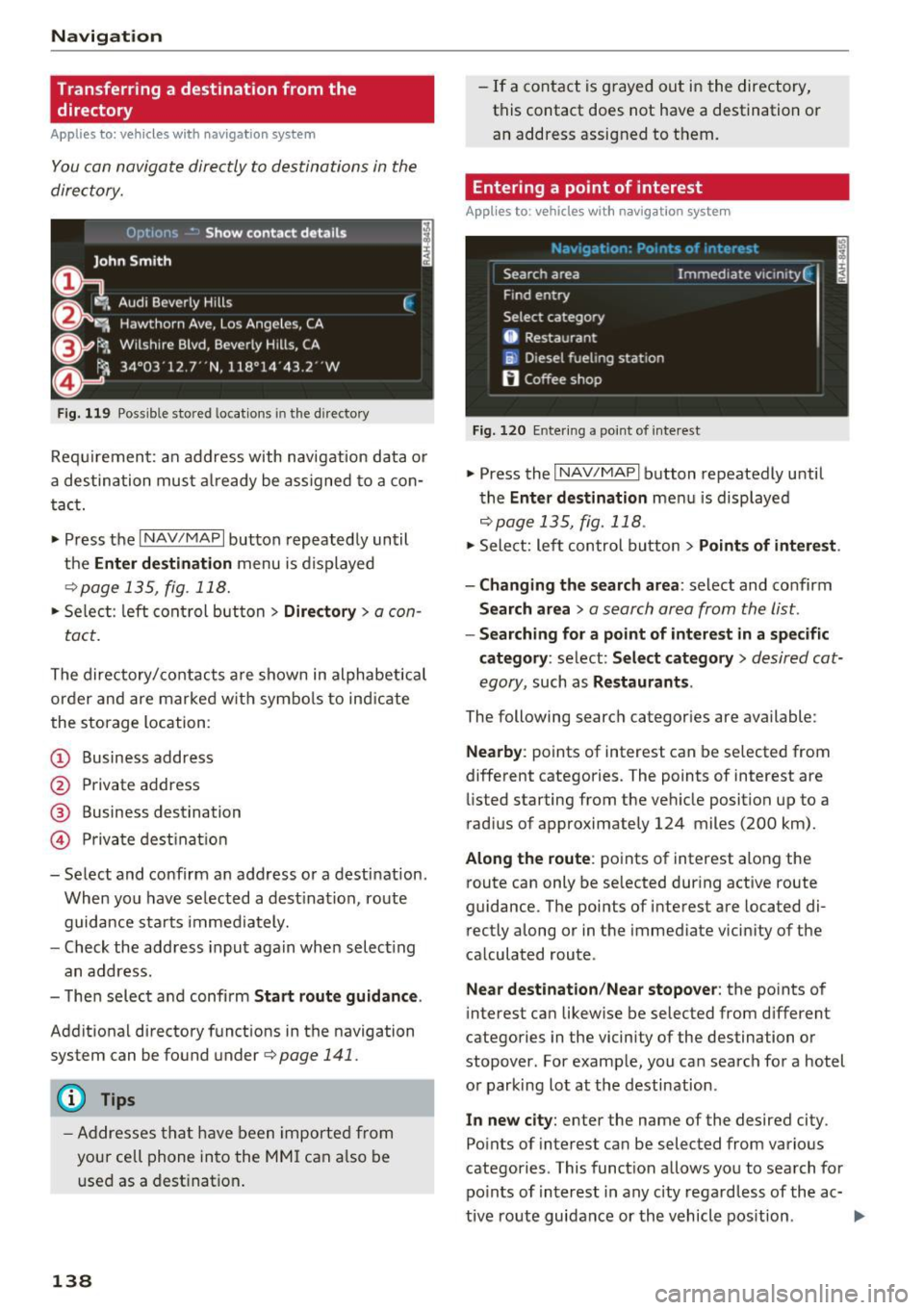
Fig. 119 Possible stored locat ions in the directo ry
Requirement: an address with navigation data or
a destination must already be assigned to a con
tact.
• Press the
I NAV/MAPI button repeatedly until
the
Enter destination menu is displayed
¢page 135, fig . 118.
• Select: left control button > Directory > a con-
tact.
The directory/contacts are shown in alphabetical
order and are marked w ith symbo ls to ind icat e
the storage location :
(D Business address
@ Private address
@ Business destination
© Private destination
- Select and confirm an address or a destination.
When you have selected a destination, route
guidance starts immediately.
- Check the address input again when select ing
an address.
- Then select and confirm
Start route guidance .
Additional directory functions in the navigation
system can be found under¢
page 141.
(D Tips
-Addresses that have been imported from
your cell phone into the MMI can also be
used as a destination.
138
-If a contact is grayed out in the directory,
this contact does not have a destination or
an address assigned to them.
Entering a point of interest
App lies to : vehicles wit h navigat ion syste m
Fig. 120 Entering a point of interest
.. Press the I NAV/MAPI button repeatedly until
the
Enter destination men u is displayed
r=;,p age 135, fig. 118 .
• Sele ct: left control button > Points of interest .
- Changing the search area:
select and confirm
Search area > a search area from the list .
-Searching for a point of interest in a specific
category :
select: Select category > desired cat
egory ,
such as Restaurants .
The following search categor ies are available:
Nearby : points of interest can be selected from
different categories. The points of interest are
listed starting from the vehicle position up to a
r ad ius of approximately 124 miles (200 km).
Along the route: points of interest along the
route can only be selected during active route
guidance. The points of interest are located di
rectly along or in the immediate vicin ity of the
calculated route .
Near destination /Near stopover : the points of
interes t can likewise be selected from d ifferent
categories in the vicinity of the destination or
stopover . For example, you can search for a hotel
or parking lot at the destination.
In new city : enter the name of the desired city .
Points of interest can be selected from various
categories . This function allows you to search for
points of interest in any city regardless of the ac-
tive route guidance or the vehicle position . .._
Page 146 of 322
Navig ation
"' Press the I NAV/MAPI button repeated ly until
the map is disp layed
¢ fig. 125 .
Zo oming in /out on the m ap
- T urn the control knob to the left or to the right .
As an alternat ive, you can a lso zoom in/out on
the map using the MMI touc h
¢page 100. Or:
turn the left thumbwheel on the mu ltifunction
steering wheel*¢
page 20 .
Turning th e cros shair s on /off
- Sw itching the crosshai rs on :
press the control
knob in the map view .
-Sw itching the crossh air s o ff : press the I BACKI
button.
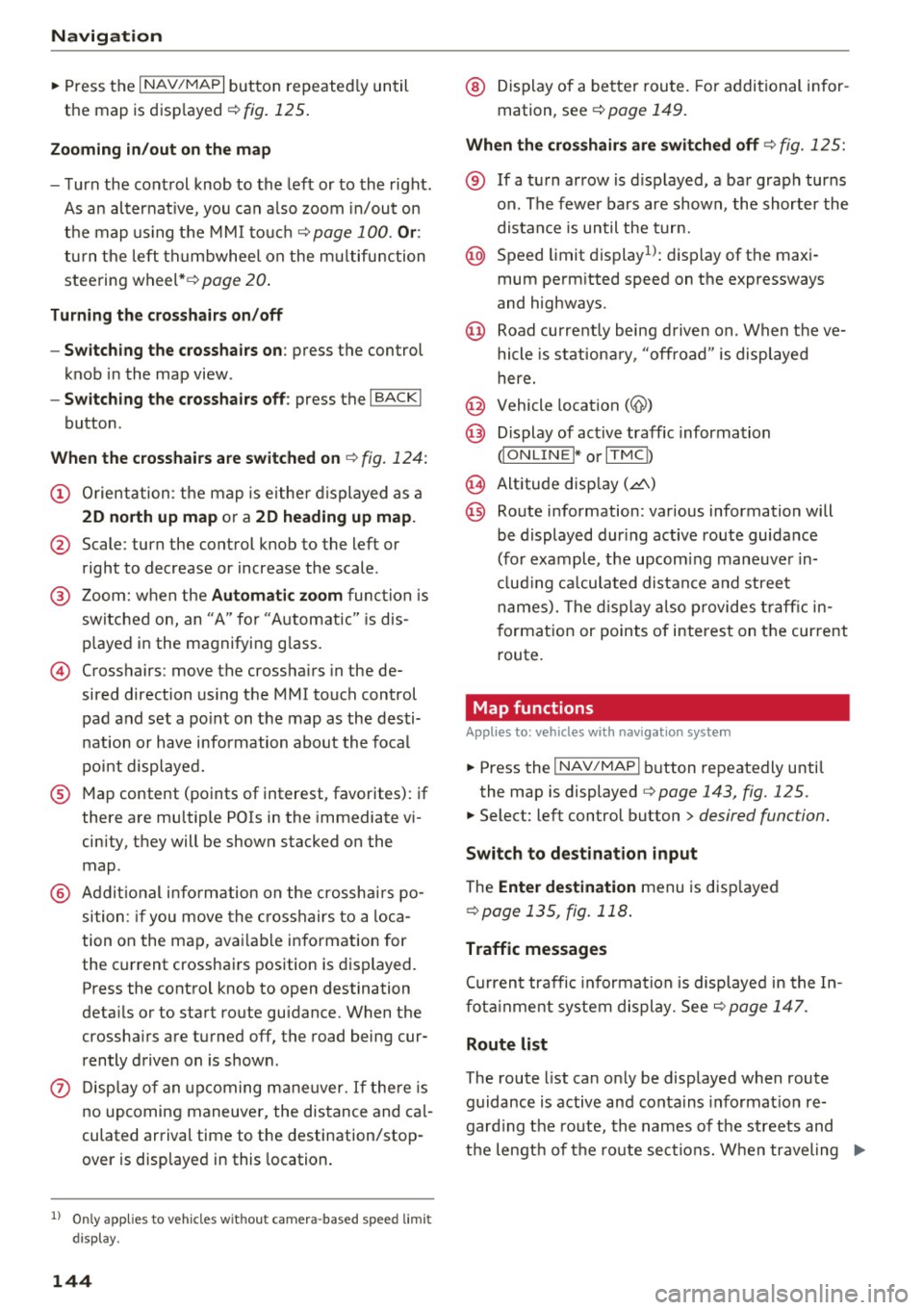
When the crosshairs are switched on ¢ fig. 124:
(D Orientation : the map is eithe r displayed as a
2D n orth up m ap or a 2D hea ding up map.
@ Scale: turn the control knob to the left or
right to decrease or increase the scale .
@ Zoom: when the Automa tic zo om func tion is
sw itched on, an "A" for "Automatic" is dis
p layed in the magnifying g lass.
© Crosshairs: move the crossha irs in the de
sired direction using the MM I touch control
pad and set a po int on the map as the desti
nation or have information about the focal
point displayed.
® Map content (points of interest, favorites) : if
there are mu ltiple POis in the immediate vi
cinity, they will be shown stacked on the
map .
@ Addit io nal info rmation on the crosshairs po
sition : if you move the c rosshairs to a loca
tion on the map, avai lab le information for
the current crossha irs position is displayed.
Press the control knob to open destination
deta ils or to start route guidance. When the
crossha irs are turned off, the road being cur
rently driven on is shown .
0 Display of an upcoming ma neuver. If the re is
n o upcoming maneuver, the distance and cal
culated arrival time to the destination/stop
over is disp layed in this location.
l ) O nly app lies to veh icl es withou t camer a-b as ed speed limi t
dis play .
144
@ Display of a better route. For additional in for
mation, see
¢ page 149.
When the cro ssha ir s are swit ched off ¢ fig. 125:
® If a turn arrow is d isplayed, a bar graph turns
on. The fewe r bars are shown , the shorter the
distance is until the turn.
@ Speed limit display1>: d isp lay of the max i
mum permitted speed on the expressways
and highways.
@ Road current ly being driven on . When t he ve
hicle is stat iona ry, "off road " is displayed
here.
@ Vehicle location (@)
@ Display of active traffic information
dO NLIN EI* or I TM Cb
@ Altitude disp lay (.d\)
@ Route information : various information will
be displayed dur ing active route guidance
(for example, the upcom ing maneuver in
cl ud ing ca lculated distance and street
names). The d isplay a lso provides traff ic in
format ion or points of interest on the current
route.
Map functions
Appl ies to: vehicles wit h navigat ion syste m
"'Press the I NAV/MAP I button repeatedly until
the map is displayed
¢ page 143, fig. 125.
"'Select: left control button > desired function.
Switch to de stination input
The Ente r de stination menu is disp layed
¢ page 135, fig. 118 .
Traffic messages
Cu rrent traffic informa tion is displayed in the In
fot ainment system display. See
¢ page 147.
Route list
The route list can only be displayed when route
guidance is active and conta ins informat ion re
gard ing the ro ute, the names of the streets and
t h e lengt h of t he ro ute sections. When traveling
jll,-
Page 160 of 322
Media
When importing, the audio files are automatical
ly sorted into the media center categories based
on the stored addit ional information
¢
page 164. The copied video files are stored in
the media center under the
Videos category.
Playing the Jukebox
Requirement: the Jukebox must contain audio/
video fi les ¢
page 15 7, Adding files to the Juke
box.
The Jukebox is accessed and operated through
the MMI
(D ¢ page 163, fig . 139.
Displaying Jukebox memory capacity
Select: right control button > Jukebox memory
capacity .
Information about the Jukebox memory
cap acity and the number of sto red tracks is dis
p la yed.
Deleting tracks from the Jukebox1
)
Requ irement: the Jukebox must contain audio/
video fi les.
- Delet ing an entry: select an entry from the
Jukebox media center . Select: right control but
ton
> Delete from Jukebox > This entry or En
tire list.
- The status of the deleting process is shown in
the MMI. Jukebox playback stops during the de
leting process and starts again automatically
once the dele tion is complete .
0 Note
Do not import aud io/video files when the en
gine is t urned off because this will drain the
veh icle battery.
(D Tips
- Tracks from aud io CDs cannot be imported
to the Jukebox for legal reasons .
- Files that have already been imported are
automat ically recognized and cannot be
copied to the Jukebox again.
- It is not possible to play audio/v ideo* files
in the CD/DVD* drive while importing them.
1> Not i n the Playback vie w.
158
- Th e Juk ebox does not provide an export
function due to legal reasons .
- Files or tracks without stored additional in
formation a re listed as
Unknown . Audi rec
ommends adding additional information
(such as ID3 tags) to audio files.
- Reset the Jukebox to the factory default set
t ings when selling your vehicle¢
page 175 .
Bluetooth audio player
Applies to: vehicles wi th Blu et oot h
With the Bluetooth audio player, you can play
music wirelessly from your Bluetooth-capable
device (such as a cell phone) through the MMI.
Requirement: the vehicle must be stationary and
the Bluetooth function on your Bluetooth device and the
Bluetooth audio player¢ page 176 in
the MMI must both be sw itched on .
-Connecting a Bluetooth device : press the
!MEDIA ! button. Press the left control button
until the source overview is d isp layed. Select
and confirm
Bluetooth audio player @
opage 163, fig . 140 .
-If necessary, select and confirm, Not connected
> Connect Bluetooth audio player . The Blue
tooth device search starts . Follow the instruc
tions in the MMI.
- Select and confirm the des ired Bluetooth de
vice from the list. The MMI generates a PIN for
the conn ection.
- Select and confirm
Yes .
-Enter the PIN for connecting on your Bluetooth
dev ice .
Or : if the PIN is already displayed on
your Bluetooth device, conf irm it in the Blue
tooth device and in the MMI. The time allowed
for entering the PIN is lim ited to approximately
30 seconds.
The media is started and operated through the
mobile device o r the MMI, depending on the de
vice being used.
(D Tips
- Check fo r any connection requests on your
Bluetooth device.
Page 275 of 322

co
co
.... N
" N .... 0
0
Vl c:o
Your vehicle has also been equipped with a TPMS
malfunction indicator to indicate when the sys
tem is not operating properly. The TPMS mal
function indicator is combined with the low tire pressure telltale. When the system detects a
malfunction, the telltale will flash for approxi
mately one minute and then remain continuously
illuminated . This sequence will continue upon
subsequent vehicle start-ups as long as the mal
function exists .
When the malfunction indicator is illuminated,
the system may not be able to detect or signal low tire pressure as intended. TPMS malfunctions
may occur for a variety of reasons, including the
installation of replacement or alternate tires or
wheels on the vehicle that prevent the TPMS
from functioning properly . Always check the
TPMS malfunction telltale after replacing one or
more tires or wheels on your vehicle to ensure
that the replacement or alternate tires and
wheels allow the TPMS to continue to function properly.
If the Tire Pressure Monitoring System
indicator appears
The tire pressure indicator in the instrument
cluster informs you if the tire pressure is too low
or if there is a system malfunction .
Using the ABS sensors, the tire pressure monitor
ing system compares the tire tread circumfer
ence and vibration characteristics of the individu
al tires. If the pressure changes in one or more
tires, this is indicated in the Infotainment system
display w ith an indicator light
RE and a message.
If only one tire is affected, the location of that
tire will be indicated.
The tire pressures must be stored in the Infotain
ment system again each time the pressures
change (switching between partial and full load
pressure) or after changing or replacing a tire on
your vehicle
c::;, page 274 . The tire pressure moni
toring system only monitors the tire pressure you have stored. Refer to the tire pressure label for
the recommended tire pressure for your vehicle
¢ page 265, fig. 199.
Wheels
Tire tread circumference and vibration character
istics can change and cause a tire pressure warn
ing if :
- the tire pressure in one or more tires is too low.
- the tire has structural damage.
- the tire was replaced or the tire pressure was
changed and it was not stored
c::;, page 274.
- the spare tire* is installed .
Indicator lights
RE-Loss of pressure in at least one tire c::;, &,.
Check the tires and replace or repair if necessary.
Check/correct the pressures of all four tires and
store the pressure again in the Infotainment sys
tem
¢ page 274.
mm (Tire Pressure Monitoring System) Tire
pressure: malfunction! See owner's manual -If
mm appears after switching on the ignition or
while driving and then the indicator light
RE in
the instrument cluster also starts to blink for
about one minute and then stays on permanent
ly, there is a system malfunction. Try to store the
correct tire pressures
c::;, page 2 74 . If the indica
tor light does turn off or turns on again after a short period of time, drive to an authorized Audi
dealer or authorized Audi Service Facility immedi
ately to have the malfunction corrected.
A WARNING
..-
- If the tire pressure indicator appears in the
display, reduce your speed immediately and
avoid any hard steering or braking maneu
vers. Stop as soon as possible and check the
tires and their pressure.
- The driver is responsible for maintaining the
correct tire pressures . You must check the
tire pressures regularly .
- Under certain conditions (such as a sporty
driving style, winter conditions or unpaved
roads), the pressure monitor indicator may
be delayed.
- Do not use run-flat tires on your vehicle . Us
ing them when not permitted can lead to
vehicle damage or accidents.
273
Page 277 of 322
Care and cleaning
General information
Regular, proper care helps to maintain your vehi
cle's value.
It can a lso be a requirement when
submitting warranty claims for corrosion damage
and paint defects on the body.
The necessary care products can be obtained
from an authorized Audi dealer or authorized
Audi Service Facility . Read and follow the instruc
tions for use on the packaging.
A WARNING
- Us ing clean ing and care products incorrectly
can be dangerous to your health.
- Always store clean ing and care products out
of reach of children to reduce the r isk of po i
son ing .
@ For the sake of the environment
- Preferably purchase env ironmenta lly-friend
l y cleaning products.
- Do not d ispose of leftover cleaning and care
products with household trash.
Car washes
T he longer that deposits remain on the vehicle,
the more the surface may be damaged. High
temperatures such as those caused by sunlight
increase the damag ing effect.
Befor e washing, rinse
off heavy depos its with
p lenty of water.
S tubborn depos its such as bird droppings or tree
sap are best removed with plenty of water and a
microfiber cloth.
A lso, wash t he un derside of yo ur vehicle once
road sa lt stops being used for the season .
Pressure washers
When washi ng your ve hicles w ith a pressure
washer, always follow t he ope rating inst ructions
~ p rovided w ith the pressure washe r. This is espe -
;:::: cially important in regard to the pressu re and
" ~ sp raying distance. Do not d irect the stream of 0
~ water directly onto seals for the side windows, c:o
Ca re and cleaning
doo rs, luggage compartment lid or hood or onto
the tires, rubber hoses, insulating materia l, sen
sors * or camera lenses*. Keep a distance of at
l east 16 in (40 cm).
Do not remove snow and ice with a pressure
washer.
Never use cone nozz les o r high press ure nozzles .
T he water temperatu re must not be above 140 °F
(60 °().
Automatic car washes
Spray off the vehicle before washing.
Make s ure that the windows are closed and the
windshield wipers a re
off. F o llow instructions
f rom the car wash operator, espec ia lly if there
are accessories attached to your veh icle.
If possible, use car washes that do not have
brushes .
Washing
by hand
Clean the ve hicl e starting from the top and wor k
i ng down using a soft sponge o r cleaning br ush.
U se solven t-free cleaning produ cts.
Washing vehicles with matte finish paint
by
hand
T o avo id damag ing the pa int w hen washi ng, fi rst
remove dust and large pa rticl es from you r vehi
cle . Insects, grease spots and fingerprints are
best removed w ith a special cleaner for matte
finish paint.
Apply t he product using a microf iber cloth . To
avoid damaging the paint surface, do not use too
much pressure.
Rinse the ve hicl e thoroug hly w ith wate r. Then
cl ean usi ng a neutral shampoo and a soft micro
fiber cloth .
Rinse the ve hicl e thorough ly aga in and let it air
dry. Remove any wate r residue using a chamois .
WARNING
- On ly wash the vehicle when the ign ition is
off and follow the instr uctions from the car
275
Page 296 of 322
Emergency situations
(D Note
Improper hook -up of ju mper cables can r uin
the generato r.
- Always con nect P OSITIVE( +) to POS ITI VE
( + ), and NEG ATI VE( -) to NEGATIVE( -)
ground post of t he battery manage r contro l
u nit .
- Check that a ll sc rew p lugs on the battery
cells are sc rewed in firmly . If not, t ighten
plugs p rior to connect ing clamp o n negat ive
b attery t erminal.
- Please note t hat the procedure fo r con nect
i ng a jumper cable as desc rib ed above ap
plies specifica lly to the case of yo ur vehicle
being jum p starte d. When you a re giv ing a
ju mp sta rt to anothe r vehicle, do
not con
n e ct t he neg ative( -) ca b le to the neg ative
(- ) termin al o n t he dis ch arged battery @
¢
fig . 21 8. In ste ad, securely connec t the
negative (-) cab le to either a so lid metal
compo nent that is f irm ly bolted to the e n
gine block o r to the engine bloc k itself. If
the battery that is bei ng cha rged does not
vent to the outside, escap ing battery gas
could ignite an d exp lode!
Towing with a tow truck
General hints
Your Audi requires special handling for towing.
The fo llow ing informa tion is to be used by com
mercial tow truck operators who know how to op
era te the ir equipmen t sa fe ly .
- Never tow your Audi. Towing will cause dam
age to the engine and transmi ssion.
- Never wrap the safety chains or winch cables
around the brake l ines .
- To prevent unnecessary damage, your Audi
must be transported with a flat bed truck.
- To load the vehicle on to the flat bed , use the
towing loop found in the vehicle tools and at
tach to the front or rear anchorage
¢ page 294 and ¢page 295.
294
A WARNING
A veh icle being towed is not safe for passe n
ge rs . Neve r allow a nyone to ride in a vehicle
be ing towed, fo r any reason .
Front towing loop
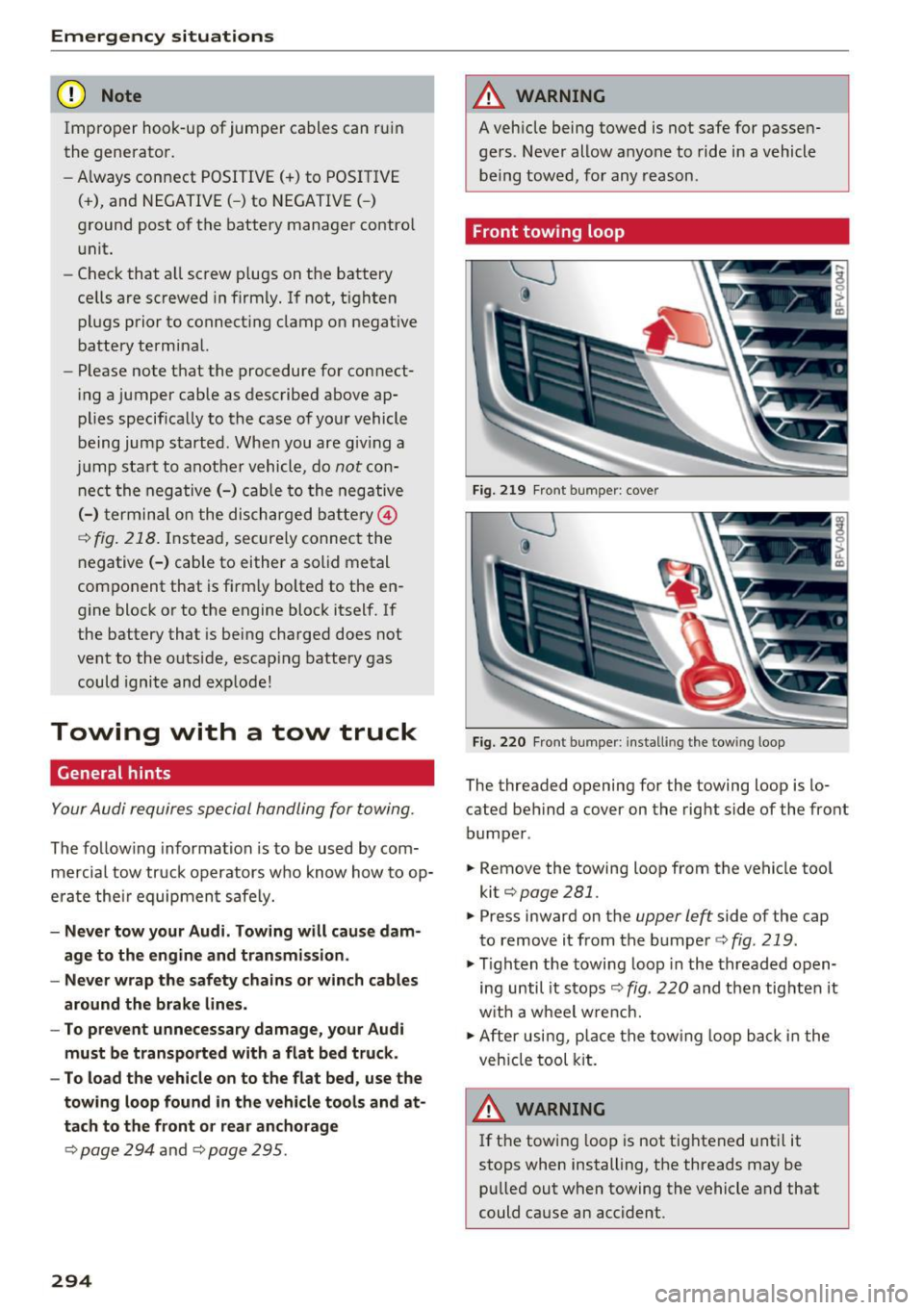
Fig. 219 Fron t bu mpe r: cover
Fig. 2 20 Fron t bumpe r: install ing the tow ing loop
The threaded opening for the towing loop is lo
cated behind a cover on the rig ht side of the front
bumper .
.. Remove the towing loop f rom the vehicle too l
kit¢
page 281 .
.. Press inward on the upper left side of the cap
to remove i t from the bumper ¢
fig. 219 .
.,. Tighten the towing loop in the threaded o pen
ing until it s tops ¢
fig. 220 and then tig hten it
w it h a wheel w re nch.
.,. After usi ng, p lace the tow ing loop b ack in the
veh icle tool kit.
A WARNING
If t he t ow ing l oop is not tig htened unt il it
stops when installing, the threads may be pu lled out when towing the vehicle and that
could cause an accident .
-
Page 310 of 322
Index
Contacts Additional directory.............. ....
176
Import ing/exporting . . . . . . . . . . . . . . . . . 123
Memory capaci ty . . . . . . . . . . . . . . . . . . . . 124
Sea rching . . . . . . . . . . . . . . . . . . . . . . . . . . 122
Showing details . . . . . . . . . . . . . . . . . . . . . 123
Storing as dest ination . . . . . . . . . . . . . . . . 141
Control buttons . . . . . . . . . . . . . . . . . . . . . . . 98
Control knob with joystick function . . . . . . .
101
Convenience key
Indicator light . . . . . . . . . . . . . . . . . . . . . . .
58
Stopping the engine (START ENGINE STOP
button) . . . . . . . . . . . . . . . . . . . . . . . . . . . . .
58
Conven ience opening/closing . . . . . . . . . . . . 32
Convertible child safety seats . . . . . . . . . . . 228
Convertible locking retractor
Activating . . . . . . . . . . . . . . . . . . . . . . . . . .
234
Deactivating .. .... ...... ......... .. . 235
Using to secure a child safety seat . . . . . . 234
Cooling mode (climate control system) . . . . 52
Cooling system
Adding coolant . . . . . . . . . . . . . . . . . . . . . .
250
Coolant . . . . . . . . . . . . . . . . . . . . . . . . . . . . 250
Coolant level checking . . . . . . . . . . . . . . . . 250
Coolant temperature indicator . . . . . . . . . . . 8
Indicator light . . . . . . . . . . . . . . . . . . . . . . .
12
Crash data r ecorder (EDR) . . . . . . . . . . . . . . . 94
Crosshairs . . . . . . . . . . . . . . . . . . . . . . . . . . .
137
Cruise cont rol system
Changing speed . . . . . . . . . . . . . . . . . . . . . .
71
Preselecting speed . . . . . . . . . . . . . . . . . . . . 7 1
Switching off . . . . . . . . . . . . . . . . . . . . . . . . 71
sw itch ing on . . . . . . . . . . . . . . . . . . . . . . . . . 70
Cup holders . . . . . . . . . . . . . . . . . . . . . . . . . . . 47
Current fuel consumption . . . . . . . . . . . . . . . 23
D
Data connection . . . . . . . . . . . . . . . . . . . . . . 131
Data protection . . . . . . . . . . . . . . . . . . . 133 , 155
Data recorder . . . . . . . . . . . . . . . . . . . . . . . . . 94
Date ...... .. .. .. .... ......... .... .. .
174
Date display . . . . . . . . . . . . . . . . . . . . . . . . . 174
Daytime running light . . . . . . . . . . . . . . . . . . 36
Declaration of compliance
Audi side assist . . . . . . . . . . . . . . . . . . . . .
304
Ce ll phone package . . . . . . . . . . . . . . . . . . 304
308
Convenience key . . . . . . . . . . . . . . . . . . . . . 304
E lectronic immobili zer . . . . . . . . . . . . . . . . 304
Garage door opener (Homelink) . . . . . . . . 304
Remote control key . . . . . . . . . . . . . . . . . . 304
Defrosting (windows) . . . . . . . . . . . . . . . . . . . 53
DEF (instrument cluster) . . . . . . . . . . . . . . . . 23
Deluxe automatic climate control
refer to Climate control system (automatic) .52
Determ ining correct load limit . . . . . . . . . .
268
Digital compass . . . . . . . . . . . . . . . . . . . . . . . 43
Dimensions . . . . . . . . . . . . . . . . . . . . . . . . . . 299
D imm ing the rearview mirror . . . . . . . . . . . .
40
Directory
refer to Con tacts . . . . . . . . . . . . . . . . . . . . 122
Display
ref er to Audi virtual cockpit (instrument
cluster)
20,22
D istance driven . . . . . . . . . . . . . . . . . . . . . . . . 23
Driver information system . . . . . . . . . . . . 20, 22
Indicator lights . . . . . . . . . . . . . . . . . . . . . . . 9
Messages . . . . . . . . . . . . . . . . . . . . . . . . . . . . 9
On-board computer . . . . . . . . . . . . . . . . . . .
23
Outs ide temperature display. . . . . . . . . . . . 19
Service interval display . . . . . . . . . . . . . . .
254
Drives
refer to Media . . . . . . . . . . . . . . . . . . 155, 163
Drive select . . . . . . . . . . . . . . . . . . . . . . . . . . . 79
Driving econom ically . . . . . . . . . . . . . . . . . . .
55
Driving safely . . . . . . . . . . . . . . . . . . . . . . . . 180
Driving through wat er . . . . . . . . . . . . . . . . . . 55
Driving time . . . . . . . . . . . . . . . . . . . . . . . . . . 23
Dust filter
refer to Pollutant filter . . . . . . . . . . . . . . . . 51
DVD drive (media drives) 156
Dynamic volume
refer to System volume . . . . . . . . . . . . . . . 178
E
E-mail 120
Economical route . . . . . . . . . . . . . . . . . . . . . 142
Electromechanical parking brake . . . . . . . . . 60
Electromechanical steering . . . . . . . . . . . . . . 91
Electronic differential lock . . . . . . . . . . . . . . . 88
Electronic immobilizer . . . . . . . . . . . . . . . . . .
25
Electronic speed limite r . . . . . . . . . . . . . . . . . 70
Page 311 of 322
co
co
.... N
" N .... 0
0
Vl c:o
Electronic stabilization control (ESC) . . . . . . 88
Indicator light . . . . . . . . . . . . . . . . . . . . . . . 14
Sport mode . . . . . . . . . . . . . . . . . . . . . . . . . 89
E mergency assistance . . . . . . . . . . . . . . . . . 281
Emergency braking function . . . . . . . . . . . . . 60
Emergency flasher . . . . . . . . . . . . . . . . . . . . . 38
Emergency fueling . . . . . . . . . . . . . . . . . . . . 243
Emergency locking the doors . . . . . . . . . . . . . 30
Emergency locking the front passenger door 30
Emergency operation Doors . . . . . . . . . . . . . . . . . . . . . . . . . . . . . . 30
Fuel filler door . . . . . . . . . . . . . . . . . . . . . . 243
L uggage compartment lid . . . . . . . . . . . . . . 31
Emergency release Selector lever . . . . . . . . . . . . . . . . . . . . . . . . 69
Emergency starting . . . . . . . . . . . . . . . . . . . 292
E m issions data . . . . . . . . . . . . . . . . . . . . . . . 298
Energy management . . . . . . . . . . . . . . . . . . .
93
Engine
Coolant . . . . . . . . . . . . . . . . . . . . . . . . . . . . 250
Starting . . . . . . . . . . . . . . . . . . . . . . . . . 57, 58
Starting with jumper cables . . . . . . . . . . . 292
Stopping . . . . . . . . . . . . . . . . . . . . . . . . . . . . 58
Engine compartment
Opening/closing the hood . . . . . . . . . . . . . 245
Overview . . . . . . . . . . . . . . . . . . . . . . . . . . . 246
Safety precautions . . . . . . . . . . . . . . . . . . . 244
Engine control ( indicator light) . . . . . . . . . . . 15
Engine oil . . . . . . . . . . . . . . . . . . . . . . . . . . . 246
Adding .. .. .. ........ ..... ... ... .. . 248
Changing . . . . . . . . . . . . . . . . . . . . . . . . . . 249
Checking the oil level . . . . . . . . . . . . . . . . . 248
Consumption . . . . . . . . . . . . . . . . . . . . . . . 248
Dipstick . . . . . . . . . . . . . . . . . . . . . . . . . . . . 248
Indicator light . . . . . . . . . . . . . . . . . . . . . . . 12
Oil consumption . . . . . . . . . . . . . . . . . . . . . 247
Specification and viscosity . . . . . . . . . . . . . 246
Temperature display . . . . . . . . . . . . . . . . . . 24
Engine speed limitation (indicator light) . . . 15
Entering characters/numbers (speller) . . . . 102
Entering letters (speller) . . . . . . . . . . . . . . . 102
E nvironment
Proper disposal of d rained engine o il . . . . 249
Unleaded gasoline . . . . . . . . . . . . . . . . . . . 240
Exterior lighting . . . . . . . . . . . . . . . . . . . . . . . 36
Index
Exterior mirrors
Adjusting . . . . . . . . . . . . . . . . . . . . . . . . . . .
39
Dimming ... ... .. .. ................. . 40
Heating . . . . . . . . . . . . . . . . . . . . . . . . . . . . .
39
External voice operation . . . . . . . . . . . . . . . . 113
F
Factory default settings (MMI) . . . . . . . . . . 175
Fader (sound) . . . . . . . . . . . . . . . . . . . . . . . . 178
Fastening Booster seats . . . . . . . . . . . . . . . . . . . . . . . 230
Convertible child safety seats . . . . . . . . . . 228
Infant seats . . . . . . . . . . . . . . . . . . . . . . . . 227
Fast forwarding/rewind ing (audio/video
file) . . . . . . . . . . . . . . . . . . . . . . . . . . . . . . . . 163
Fast forwarding (audio/video file) . . . . . . . . 163
Fast route
Favorites Media 142
165
Navigation . . . . . . . . . . . . . . . . . . . . . . . . . 137
Telephone..... .. .. ................ . 119
File formats (med ia drives) . . . . . . . . . . . . . 168
Floor mat s . . . . . . . . . . . . . . . . . . . . . . . . . . . 184
Fog lights/rear fog light(s) . . . . . . . . . . . . . . 36
Folding the rear seats . . . . . . . . . . . . . . . . . . . 49
Foot pedals . . . . . . . . . . . . . . . . . . . . . . . . . . 184
Footwell lighting . . . . . . . . . . . . . . . . . . . . . . 38
For the sake of the environment Environmentally -friendly driving . . . . . . . . 55
Fueling . . . . . . . . . . . . . . . . . . . . . . . . . . . . 242
Leaks. .... .... .. ................. .. 245
Roof rack . . . . . . . . . . . . . . . . . . . . . . . . . . . 48
Free text search . . . . . . . . . . . . . . . . . . . . . . 104
Media . . . . . . . . . . . . . . . . . . . . . . . . . . . . . 165
Navigation . . . . . . . . . . . . . . . . . . . . . . . . . 136
Radio . . . . . . . . . . . . . . . . . . . . . . . . . . . . . 151
T elephone. . . . . . . . . . . . . . . . . . . . . . . . . . 122
Freeze protection Coolant . . . . . . . . . . . . . . . . . . . . . . . . . . . . 250
Frequency band . . . . . . . . . . . . . . . . . . 150, 152
Front airbags Description . . . . . . . . . . . . . . . . . . . . . . . . . 201
How they work . . . . . . . . . . . . . . . . . . . . . . 207
Frontal collisions and the laws of physics . . 190
309
Page 317 of 322

co
co
.... N
" N .... 0
0
Vl c:o
Safety features for occupant restraint and protection . . . . . . . . . . . . . . . . . . . . . . . . . . .
180
Safety instructions
for side curta in a irbags . . . . . . . . . . . . . . .
220
for using chi ld safety seats . . . . . . . . . . . . 225
For using safety belts . . . . . . . . . . . . . . . . 192
Monitoring the Advanced Airbag System . 211
Safety systems ( indicator light) . . . . . . . . . . . 15
Saving fuel
Recupera tion . . . . . . . . . . . . . . . . . . . . . . . .
23
Scan (radio) . . . . . . . . . . . . . . . . . . . . . . . . . . 151
Screen
refer to Audi virtual cockpit (instrument
cluster) . . . . . . . . . . . . . . . . . . . . . . . . . .
20, 22
Screwdriver . . . . . . . . . . . . . . . . . . . . . . . . . . 281
SD card reader . . . . . . . . . . . . . . . . . . . . . . . 156
sos
refer to Voice recognition system . . . . . . . 107
Search
refer to Free text search . . . . . . . . . . . . . . 104
Search area (point of interest) . . . . . . . . . . . 138
Searching for an entry . . . . . . . . . . . . . . . . . 104
Seat heating . . . . . . . . . . . . . . . . . . . . . . . . . . 53
Seating capacity . . . . . . . . . . . . . . . . . . . . . . 189
Seating position
Driver . . . . . . . . . . . . . . . . . . . . . . . . . . . . .
181
Front passenger . . . . . . . . . . . . . . . . . . . . . 182
H ow to adjust the front seats . . . . . . . . . . 182
Incorrect seat position . . . . . . . . . . . . . . . 183
Occupants. . . . . . . . . . . . . . . . . . . . . . . . . . 181
Rear passengers . . . . . . . . . . . . . . . . . . . . . 183
Seats
adj ust ing . . . . . . . . . . . . . . . . . . . . . . . . . . . 44
Correct seating position . . . . . . . . . . . . . .
181
Easy seat entry . . . . . . . . . . . . . . . . . . . . . . . 45
Folding . . . . . . . . . . . . . . . . . . . . . . . . . . . . . 49
Number of seats . . . . . . . . . . . . . . . . . . . . 189
Select ing a source
Multifunction steering wheel .........
22, 0
Selecting a source (media) . . . . . . . . . . . . . .
163
Selection menu . . . . . . . . . . . . 20, 98, 101, 102
Multifunction steering wheel . . . . . . . . . . . 22
Select ive whee l torque contro l . . . . . . . . . . . 88
Selector lever (automatic transmission)
Emergency operation . . . . . . . . . . . . . . . . . .
69
Pos1t1on . . . . . . . . . . . . . . . . . . . . . . . . . . . . 62
Service and disposal
Safety belt pretensioner
Ind ex
196
Service interva l display . . . . . . . . . . . . . . . . . 254
Settings
Directory . . . . . . . . . . . . . . . . . . . . . . . . . . .
124
Map ....... ... .. .. ... ....... .... ... 145
Media . . . . . . . . . . . . . . . . . . . . . . . . . . . . . 166
Navigation . . . . . . . . . . . . . . . . . . . . . . . . . 141
Radio . . . . . . . . . . . . . . . . . . . . . . . . . . . . . 153
System . . . . . . . . . . . . . . . . . . . . . . . . . . . . 174
T elephone. . . . . . . . . . . . . . . . . . . . . . . . . . 124
Setting the language . . . . . . . . . . . . . . . . . . 17 4
Shift paddles (automatic transmission) . . . .
66
Shuffle . . . . . . . . . . . . . . . . . . . . . . . . . . . . . 166
Side airbags
Description . . . . . . . . . . . . . . . . . . . . . . . . .
215
How they work . . . . . . . . . . . . . . . . . . . . . . 217
Side assist . . . . . . . . . . . . . . . . . . . . . . . . . . . . 76
Adjusting the brightness . . . . . . . . . . . . . . . 78
Cleaning the sensors . . . . . . . . . . . . . . . . . 276
Sensor range . . . . . . . . . . . . . . . . . . . . . . . . 77
switching on and off . . . . . . . . . . . . . . . . . . 78
Side curtain airbags . . . . . . . . . . . . . . . . . . . 218
Des cription . . . . . . . . . . . . . . . . . . . . . . . . . 218
How they work . . . . . . . . . . . . . . . . . . . . . . 219
Safety instructions . . . . . . . . . . . . . . . . . . . 220
SIM card reader . . . . . . . . . . . . . . . . . . . . . . 126
Snow cha ins . . . . . . . . . . . . . . . . . . . . . . . . . 270
Socket . . . . . . . . . . . . . . . . . . . . . . . . . . . . . . . 46
Software update
refer to System update (MMI) . . . . . . . . . . 177
Software (MMI)
License
179
Update . . . . . . . . . . . . . . . . . . . . . . . . . . . . 177
Version . . . . . . . . . . . . . . . . . . . . . . . . . . . . 177
Sources of information about child restraints
and their use . . . . . . . . . . . . . . . . . . . . . . . . .
239
Spare tire . . . . . . . . . . . . . . . . . . . . . . . . . . . 287
Speed-dependent volume increase . . . . . . . 178
Speed limiter . . . . . . . . . . . . . . . . . . . . . . . . . 70
Speedometer . . . . . . . . . . . . . . . . . . . . . . . . . 19
Speed warning system . . . . . . . . . . . . . . . . . . 70
Speller . . . . . . . . . . . . . . . . . . . . . . . . . . . . . . 102
Sport mode . . . . . . . . . . . . . . . . . . . . . . . . . . . 89
START Engine STOP button . . . . . . . . . . . . . . 57
Starting (engine) . . . . . . . . . . . . . . . . . . . . . . 57
3 15