tow AUDI TT COUPE 2017 Owner's Manual
[x] Cancel search | Manufacturer: AUDI, Model Year: 2017, Model line: TT COUPE, Model: AUDI TT COUPE 2017Pages: 322, PDF Size: 79.73 MB
Page 98 of 322

Multi Media Interface
Multi Media Interface
Traffic safety information
Aud i recommends performing certa in Infotain
ment system functions, such as entering a desti
nation, only when the vehicle is stat ionary . Al
ways be p repared to stop opera ting the Info tain
ment system i n the interest of your safety and
t he safe ty of other ro ad u sers.
_& WARNING
O nly use the In fotain ment sys tem w hen tra f
fic con ditions permit and always in a way that
allows you to ma inta in complete control ove r
your vehicle.
@ Tips
Cer tain functi ons are no t avail ab le wh ile driv
ing .
Introduction
The Multi Media Interface , or MMI for short,
combines various systems for communication ,
navigation* and entertainment in your Audi . You
can operate the MMI using the MMI control pan
el, the multifunction steering wheel or the voice
recognition system* .
Fig. 93 MMI con trol p an el
MM I cont rol panel overview
CD Control knob with joystick f unction
@ M MI to uch con trol pad* ... .... .
® Left contro l button . ..... ... .. .
© R ight con trol b utton ....... ... .
96
97
9 9
98
98
® Buttons fo r opening men us
directly .... . .. .. .. .... .. .... .
@ IMENU I button
(J) I BACK I button . .. .. .... .. ... . .
MMI On/Off knob with
joystick function
Operating
Fig . 94 MMI O n/Off k nob w it h joys tick functio n
Switching the MMI on /off :
The M MI can be manua lly switched on and off .
97
97
97
- Switching on manually : press the On/O ff kno b
CD¢ fig. 94 briefly . Or: press the !MENU I button
@ ¢page 96, fig. 93 or one of the b uttons to
direct ly open the menus®¢
page 96, fig. 93 .
-Switching off manually : press and hold the
O n/Off knob
CD ¢ fig. 94 unt il t he M MI switches
off. If the MMI ha s been switched off manua lly,
it does
not switch on agai n automatically the
next time the ignition is switched on.
Additional function s:
- Adjusting the volume :
turn the On/Off knob CD
¢fig. 94 .
-Muting (mute) : briefly press the On/Off knob .
-Selecting the previous /next function (for ex-
ample , a radio station/track ):
brief ly press the
On/Off knob toward the left
l
-Fast forwarding/rewinding (fo r example ,
tracks) :
press the On/Off knob longer toward
the rig ht t>t>I or left
l
Adjust the vo lume of the audio system so that
signals from outside th e vehicle, such as
~
Page 103 of 322
co
co
.... N
" N .... 0
0
Vl c:o
@ Tips
The volume of the prompts for the MMI
touch * can be adjusted separately
c:> page 179.
Operating
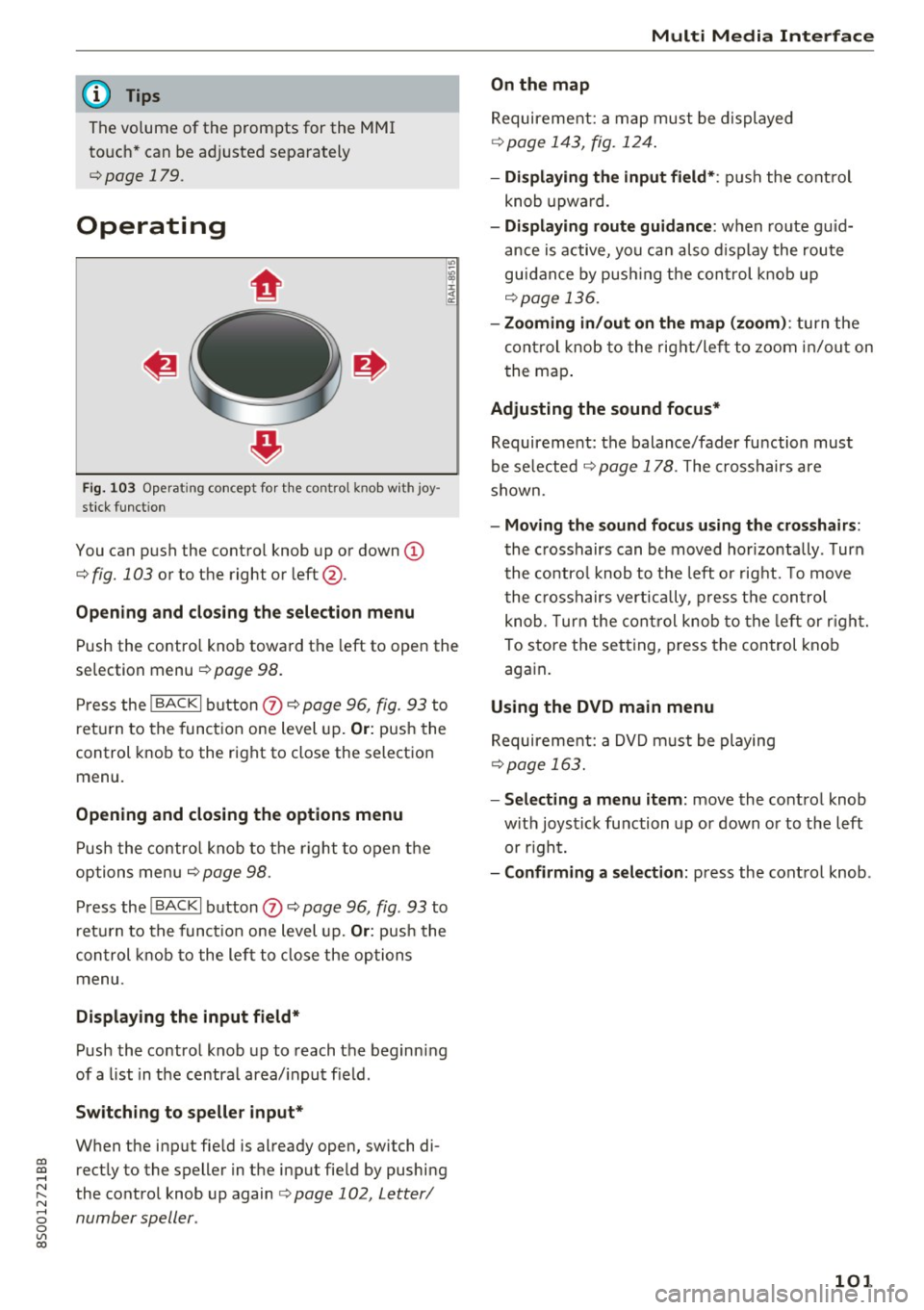
Fig . 103 Operat ing concept for t he cont ro l kn ob wi th joy
stick funct ion
You can push the control knob up or down (D
c:> fig. 103 or to the right or left@.
Open ing and closing th e selecti on menu
Push the contro l knob toward the left to open the
selection menu
c:> page 98 .
Press the I BACKI button (I) c:> page 96, fig. 93 to
r et urn to the function one level up.
Or: push the
control knob to the right to close the selection
menu .
Opening and clo sing th e opt ions menu
Push the contro l knob to the right to open the
options menu
c:> page 98.
Press the I BACKI button (I) c:> page 96, fig . 93 to
ret urn to the funct ion one level up.
Or : push the
control k nob to the left to close the options
menu .
Displaying the input field *
Push the control knob up to reach the beginning
of a list in the centra l area/ input field .
Switching to speller input *
When the input fie ld is already open, switch di
rectly to the speller in the input fie ld by pushing
the control knob up again
c:> page 102, Letter/
number speller .
Multi Media Interfac e
On the map
Requirement: a map must be displayed
c:>page 143, fig. 124 .
- Displ aying th e input field* :
push the cont rol
knob upwa rd .
- Di spl aying rout e gu idance : when route gu id
ance is active, you can also d isplay the route
guidance by push ing the control knob up
c:> page 136.
- Zooming in /out on th e map (zoom ):
turn the
cont rol knob to the right/left to zoom in/out on
t he map .
Adjusting the sound focus*
Requirement: the balance/fader function must
be se lected
c:> page 178 . The crosshairs are
shown.
- Moving th e sound focu s using th e crossh airs :
the crosshairs can be moved hor izontally . Turn
the co ntro l knob to the left o r rig ht. To move
the c rosshairs vertica lly, press the control
knob . T urn the cont rol knob to the left or r ight.
To store the setting, press the control knob again .
Using the DVD main menu
Requirement: a DVD m ust be playing
c:> page 163.
- Selecting a menu item:
move the co ntrol knob
w ith joystick function up or down or to the left
or r ight.
- Confirming a s election: press the control knob .
101
Page 109 of 322

"'
"' ....
N
" N .... 0 0
"' CX)
• Telephone
• Audi connect
• Navigation
• Directory
• Radio
• Med ia
• Sound
• Help
• Help Speech dia log system
• Help Telephone
• Help Audi connect
• Help Navigation
• Help Map
• Help Radio
• Help Media
TELEPHONE
· Enter number
• Delete number/ correc tion
• Directory
• Call (XY)
·business/ private/ land line/ mobile
NAVIG:ATI0N
• Navigate to (XV)
• Business address/ Private address
• Start/ cancel route guidance
· Directory
• Last destinations
• N avigation favorites
• Drive home
• Enter address
• Enter country/ town/ street/ state
• Exclude routt / Exclude route for (XY) km/ m
• M ap
• Day map / Night map
Voice recognition system
• Favor ites
• Call (XY)
• Enter number
• Redial
• Read new tex t message
• N avigate to
(XV)
• Enter address/destination
• Onhne destinations
• Cancel route guidance
• M ap
• Line (XY)
• Next page/ previous page
• Cancel
• N o, l meant
()(Y)
• Correction
• Call list
• Redial
• Call mailbox
• Enter PIN/ delete PI N
• Telephone favori tes
• Exclude ne xt route section / Exclude
nex t street
• Route list
• Calculate alternative routes
· Online destinations
• Special destination
• 20 driving position map/ 20 north position map/ 30 map/ Destination map/ Overview map
AllJC !H C0NNECf
• Audi connect
• Travel information/ Parking Information
• Fuel prices
• Weather
RADIO
• Radio presets
• Last stations
• FM
• FM / AM/ SIRIUS XM
• Station (XY) / Frequency (XY)
• T raffic announcement on/ off
Fig . 108 Co mmand overv ie w
• Flight Information I Train Information
• City events
• Online news
• Twitter
MEDIA
• Jukebo x
• CO/ DVD y
• SO card l / SD card 2
· Audi music Interface/ !Pod/ USB / Bluetooth /
Wl ·Fi / Medium (XV)
• Media favorites/ Artists/ Albums/ Genres/
Tracks/ Playlists / Videos
• Folder up
· Random playback on / off
107
Page 158 of 322
Media
protection switch is installed to protect the CD/
DVD and the laser.
L aser dev ices: laser dev ices are d iv ided into safe
ty classes 1 to 4 in accordance with DIN IEC 76
(CO) 6/VDE 0837. The various types of audio
equipment installed conform to safety class
l.
The laser uses so little power or is sh ielded so
there is no danger when it is used correctly.
Media drives
SD card reader
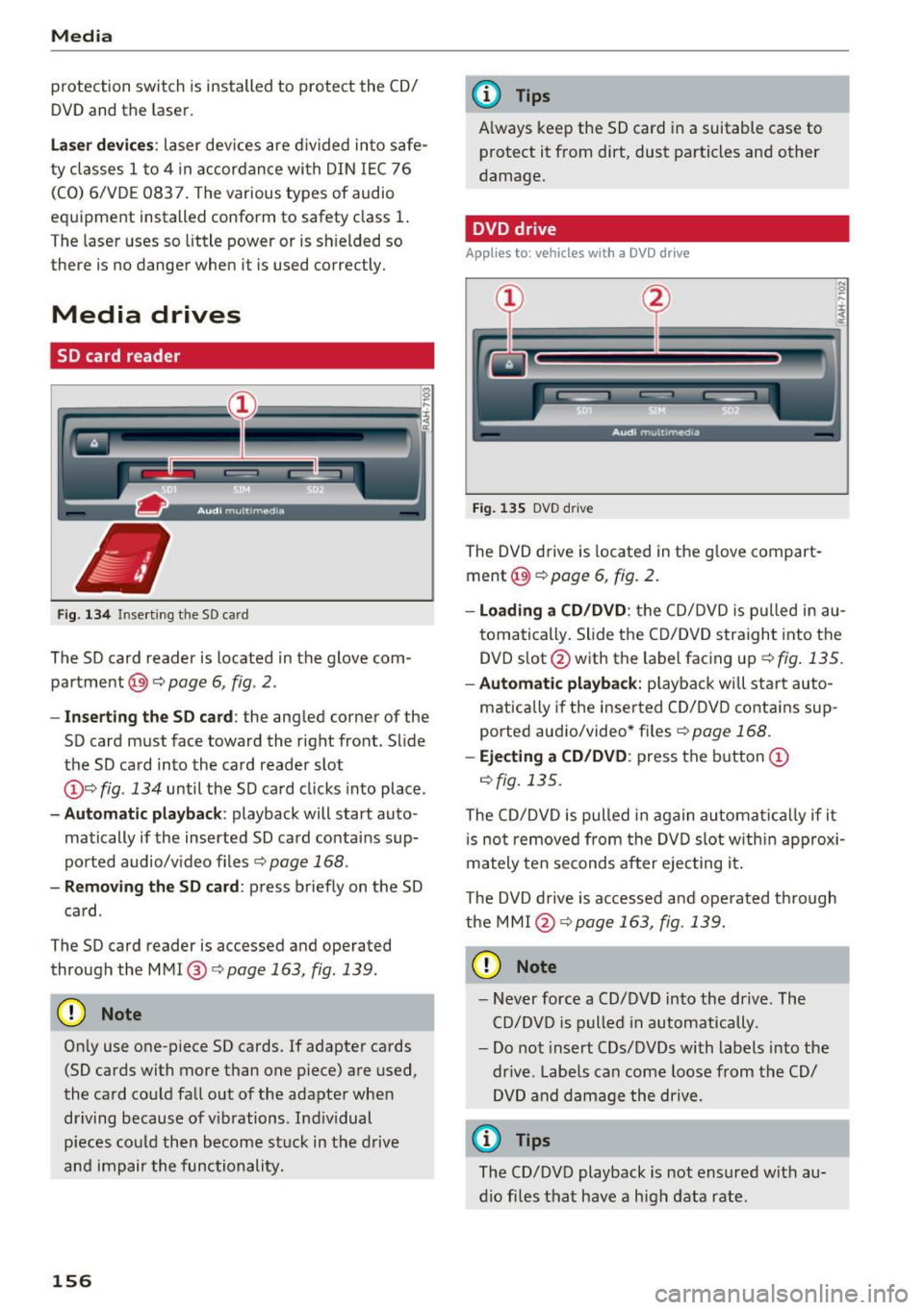
Fig . 134 In serting the SD card
The SD card reader is located in the glove com
pa rtment @)¢
page 6, fig. 2.
- In se rting the SD c ard : the angled corner of the
SD card must face toward the right front. Slide
the SD card into the card reader slot
(J) c:> fig . 134 until the SD card clicks into place .
-Aut om atic playback : playback will start auto
matically if the inserted SD card contains sup
po rted audio/v ideo f iles
c::> page 168 .
-Removing th e SD card : press briefly on the SD
card .
The SD card reader is accessed and operated
through the MMI @c::>
page 163, fig. 139 .
(D Note
Only use one-piece SD cards. If adapter cards
(SD cards with more than one piece) are used,
the card cou ld fall out of the adapter when
dr iving because of v ibrations . Ind iv idual
pieces cou ld then become stuck in the drive
and impair the functionality.
156
@ Tips
A lways keep the SD card in a suitable case to
protect it from dirt, dust particles and other
damage.
DVD drive
Applies to: vehicles with a DVD drive
Fig . 135 DVD dr ive
The DVD drive is located in the g love compart
ment @)
c::> page 6, fig . 2.
-Loadin g a CD /DVD : the CD/DVD is p ulled in au
tomatically . Slide the CD/DVD straight into the
DVD s lot @ with the label facing up
c::>fig . 135.
-Aut om atic playb ack: playback wi ll sta rt auto-
matically if the inse rted CD/DVD contains sup
ported aud io/video* fi les
c::> pag e 168.
-Eje cting a CD /DVD : press the b utton (J)
c::> fig. 135.
The CD/DVD is pulled in again automat ically if it
i s not removed from the DVD slot w ith in a pprox i
mately ten seconds after ejecting it .
The DVD d rive is accessed a nd operated t hrough
the MMI @
c::> page 163, fig. 139.
(D Note
-Never force a CD/DVD into the drive . The
CD/DVD is pulled in automatically.
- Do not insert CDs/DVDs with labels into the
dr ive . Labe ls can come loose from the CD/
DVD and damage the drive.
¢j) Tips
The CD/DVD playback is not ensured with au
d io fi les that have a high data rate .
Page 184 of 322
Safe driving
A WARNING
Drivers who are unbelted, out of position or
too close to the airbag can be seriously in
jured by an airbag as it unfolds . To help re
duce the risk of serious personal injury:
- Always adjust the driver's seat and the steering wheel so that there are at least 10 in (25 cm) between your breastbone and
the steering wheel.
- Always adjust the driver's seat and the
steering wheel so that there are at least 4 in
(10 cm) between the knees and the lower
part of the instrument panel.
- Always hold the steering wheel on the out
side of the steering wheel rim with your
hands at the 9 o'clock and 3 o'clock posi
tions to help reduce the risk of personal in
jury if the driver's airbag inflates.
- Never hold the steering wheel at the 12 o'clock position or with your hands at
other positions inside the steering wheel
rim or on the steering wheel hub. Holding
the steering wheel the wrong way can cause
serious injuries to the hands, arms and head if the driver's airbag inflates
- Pointing the steering wheel toward your
face decreases the ability of the supplemen
tal driver's airbag to protect you in a colli
sion.
- Always sit in an upright position and never
lean against or place any part of your body
too close to the area where the airbags are
located.
- Before driving, always adjust the front seats
properly and make sure that all passengers
are properly restrained.
- Never adjust the seats while the vehicle is
moving. Your seat may move unexpectedly
and you could lose control of the vehicle.
- Never drive with the backrest reclined or
tilted far back! The farther the backrests are
tilted back, the greater the risk of injury due
to incorrect positioning of the safety belt
and improper seating position.
- Children must always ride in child seats ¢
page 221. Special precautions apply
182
when installing a child seat on the front passenger seat¢
page 197.
Proper seating position for the front
passenger
The proper fron t passenger sea ting posi tion is
impor tan t for safe , relaxed driving.
For your own safety and to reduce the risk of in
jury in the event of an accident, we recommend
that you adjust the seat for the front passenger
to the following position:
.,. Adjust the angle of the seatback so that it is in
an upright position and your back comes in full
contact with it whenever the vehicle is moving.
.,. Keep both feet flat on the floor in front of the
front passenger seat.
.,. Fasten and wear safety belts correctly
¢ page 193.
For detailed information on how to adjust the
front passenger's seat, see ¢
page 44.
.&, WARNING
Front seat passengers who are unbelted, out
of position or too close to the airbag can be
seriously injured or killed by the airbag as it
unfolds. To help reduce the risk of serious
personal injury:
- Passengers must always sit in an upright po
sition and never lean against or place any
part of their body too close to the area
where the airbags are located.
- Passengers who are unbelted, out of posi tion or too close to the airbag can be seri
ously injured by an airbag
as it unfolds with
great force in the blink of an eye.
- Always make sure that there are at least
10 in (25 cm) between the front passen
ger's breastbone and the instrument panel.
- Always make sure that there are at least 4 in
(10 cm) between the front passenger's
knees and the lower part of the instrument
panel.
- Each passenger must always sit on a seat of
their own and properly fasten and wear the safety belt belonging to that seat .
~
Page 187 of 322
CD
CD
.... N
" N .... 0
0
Ill co
mats will prevent them from sliding into posi
tions that could interfere with the pedals or im pa ir safe operation of your vehicle in other ways.
.&_ WARNING
Pedals that cannot move freely can result in a
loss of vehicle control and increase the risk of
serious personal injury .
- Always make sure that floor mats are prop
erly secured.
- Never place or install floor mats or other floor coverings in the veh icle that cannot be
properly secured in place to prevent them
from slipp ing and interfering with the ped
als or the ability to contro l the vehicle.
- Never place o r install floor mats or other
floor coverings on top of already installed
floo r mats. Add it ional floor mats and othe r
coverings w ill reduce the size of the peda l
area and interfere with the pedals.
- Always properly reinstall and secure floor
mats that have bee n taken o ut for cleaning.
- Always make sure that objects cannot fall
in to the dr iver footwell while the veh icle is
moving. Objects can be come trapped under
the brake peda l and accelerator pedal caus
ing a loss of vehicle control.
Stowing luggage
Loading the luggage compartment
All luggage and other objects must be properly
stowed and secured in the luggage compart
ment.
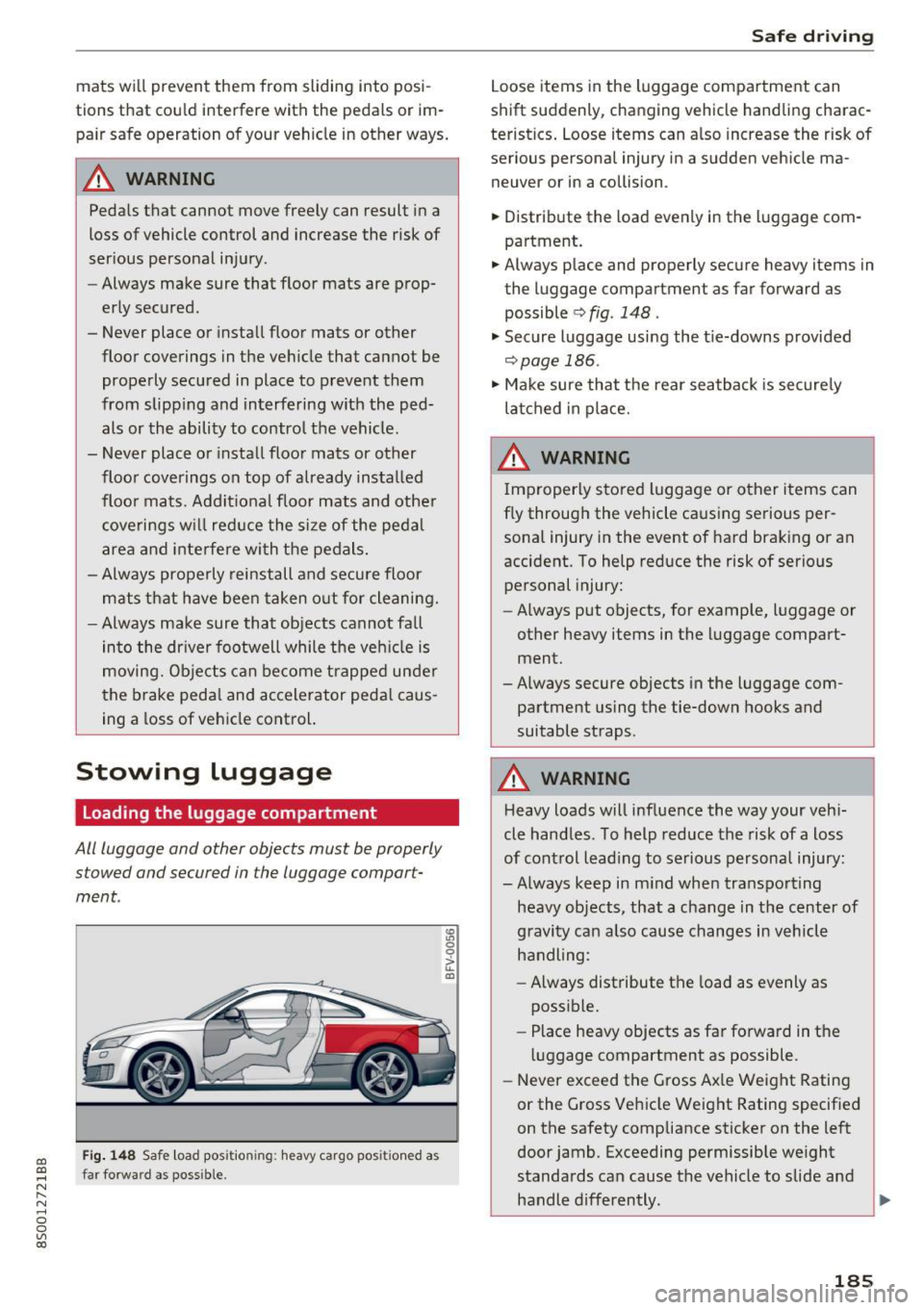
Fig . 14 8 Safe load pos itio ning: heavy cargo posi tioned a s
far forward as poss ib le .
~ 0 0
ii: ID
Saf e drivi ng
Loose items in the luggage compartment can
shift suddenly, changing vehicle handling charac
teristics . Loose items can also increase the risk of
serious personal injury in a sudden veh icle ma
neuver or in a collision .
.,. Distribute the load evenly in the luggage com
partment.
.,. Always place and properly secure heavy items in
the luggage compartment as far forward as possible
¢ fig. 148 .
"' Secure luggage using the t ie-downs provided
¢ page 186.
"' Make sure that the rear seatback is secure ly
la tched in p lace.
.&_ WARNING
Imp roper ly stored luggage or other i tems can
f ly through the vehicle causing serious per
sonal injury in the event of hard braking or an
accident. To help reduce the risk of serio us
personal injury:
- Always put objects, for example, luggage or
other heavy items in the luggage compart
ment.
-Always secure objects in the luggage com
partment using the tie-down hooks and
suitable straps .
.&_ WARNING
-
Heavy loads will influence the way your vehi
cle handles . To help reduce the risk of a loss
of cont rol lead ing to serious personal injury:
-Always keep in m ind when transpo rting
heavy objects, that a change in the center of
gravity can also cause changes in vehicle
handling :
- Always distribute the load as evenly as
poss ible.
- Place heavy objects as far forward in the
luggage compartment as possible.
- Never exceed the Gross Ax le Weight Rating
or the G ross Vehicle Weight Rating specif ied
on the safety compliance sticker on the left
door jamb. Exceeding permissible we ight
standards can cause the vehicle to slide and handle differently.
~
185
Page 197 of 322

CD
CD
.... N
" N .... 0
0
Ill co
Unfastening safety belts
Unbuckle the safety belt with the red release
button only after the vehicle has stopped .
,
"\11
Fig . 159 Releas ing the tongue from the buck le
~ Push the red release button on the buckle
Q fig. 159 . The belt tongue will spring out of
the buckle
Q .,&.
~ Let the belt wind up on the retractor as you
guide the belt tongue to its stowed position.
&_ WARNING
Never unfasten safety belt while the vehicle is
moving. Doing so will increase you r risk of be
ing injured or k il led.
Improperly worn safety belts
0 ,-.. N 0 :i:
;ii
Incorrectly positioned safety belts can cause se
vere injuries .
Wearing safety belts improperly can cause seri
ous injury or death. Safety belts can only work
when they are correctly pos itioned on the body .
Improper seating positions reduce the effect ive
ness of safety belts and will even increase the
risk of injury and death by mov ing the safety belt
to crit ica l areas of the body. Imp roper seating
positions also increase the risk of se rious injury
and death when an airbag deploys and strikes an
occupant who is not in the correct seating posi
tion . A driver is responsible for the safety of all
ve hicle occupants and especia lly for children.
Therefore:
~ Never permit anyone to assume an incorrect
seated position in the vehicle while traveling
QA .
Safet y bel ts
&_ WARNING
-Improperly worn safety belts increase the risk
of ser ious personal injury and death whenever
a veh icle is being used .
- Always make sure that all ve hicle occupants
are correctly restrained and stay in a correct
seated position wheneve r the vehicle is be
i n g used.
- Always read and follow a ll WAR NINGS and
o ther impo rtant informat ion
Q page 192.
Safety belt tensioner
How safety belt pretensioners work
In front, side and rear-end collisions above a
particular severity and in a rollover, safety belts
are tensioned automatically .
Pyrotechnic safety belt pretensioners
The safety belts for the front sea ting posit ions
are equipped with safety belt pretensioners. The
system is act ivated by sensors i n front, side and
rear-end collisions of g rea t seve rity and in a ro ll
over . This tightens the belt and takes up belt
s lack
Q &. in Service and disposal of safety belt
pretensioner on page 196.
Taking up the s lack
helps to reduce forward occupant movement dur
ing a collision.
&_ WARNING
-
- It is poss ible for the pretensioners to dep loy
incorrectly.
- The pyrotechnic system can only provide protection for one collision . If the pyrotech
n ic pretens ioners dep loy, the pre tensioning
system must be replaced.
(0 Tips
The pyrotechn ic safety belt pretensioners can
o nly dep loy once .
- The safety belt pretensioners do not deploy
in minor frontal, side and rear-end coll i
sions.
- A fine dust is re leased when the pyrotechnic
safety belt pretensioners dep loy. This is no r
ma l and is not caused by a fi re in the ve hi
cle.
195
Page 208 of 322

Airbag syste m
system, so that incorrect information is pro
vided to the airbag control unit.
- If you must use a child restraint on the front
passenger seat and the child restraint man
ufacturer's instructions require the use of a
towel, foam cushion or something else to properly position the ch ild restraint, make
certain that the
PASSENGE R AIR BA G OFF
~; light comes on and stays on whenever
the chi ld restraint is installed on the front
passenge r seat.
- If the
PASSENGER AIR BAG OFF~; light
does not come on and stay on, immediate ly
install child restra int in a rea r seating posi
t ion and have the airbag system inspected
by your Audi dealer.
A WARNING
If the front passenger seat gets wet, dry it im
mediately.
- If liquid soaks into the front passenger seat,
this can keep the a irbag system from work
ing properly and may, for instance, deact i
vate the passenger frontal airbag. If this
happens, the PA SSENGER AIR BAG OFF ~;
light will come on and stay on together with
the a irbag ind icator light
m in the inst ru
ment cluster.
- If liquid is pooled on the seat, but has not
soa ked in, this may also keep the airbag sys
tem from wo rking properly and ca use the
passenger frontal a irbag to be enabled
(turned on), even though there is a properly
installed chi ld restraint system on t he seat.
Wet towe ls or other wet things on the seat
c u shion can have the same effect . If the
front passenger frontal airbag is turned on,
the
PASSENGER AIR BAG OFF~; light light
will go out.
How the Advanced Airbag System
components work together
The front Advanced Airbag System and the side
ai rbags s upplement the protection offered by the
front three -po int safety bel ts with p retensioners
and load limiters to he lp reduce the risk of injury
in a wide range of accident and crash situations.
206
Be sure to read the important information about
safety and heed the WARNINGS in this chapter.
Deployment of the Advanced A irbag System and
the ac tiva tion of the sa fe ty belt pretensioners de
pend on the dece leration measured by the c rash
sensors and registered by the electronic contro l
u nit . Crash severity depends on speed and decel
eration as well as the mass and stiffness of the
vehicle or object involved in the crash.
On the passenger side, regard less of safety be lt
use, the front passenger frontal a irbag will be
turned off if the e lectr ica l capacitance measured
by the capacitive passenger detection system on
the front passenger seat is less than the amount
programmed in t he electron ic contro l unit . The
front passenger frontal a irbag w ill also be tur ned
off if the capaci tance measured by the system for
t h e fron t passe nger sea t equals that of a n infan t
of about one year of age in one o f the chi ld sea ts
that was used to certify the Advanced Airbag Sys
tem under Fe d era l Motor Vehicle Safety Standard
208. The
PASSENGER AIR BAG OFF~; light
comes on and stays on to tell you when the front
Advanced Airbag System on the passenger side has been turned off
c> page 209 .
A WARNING
To reduce the risk of injury when an airbag in
flates, always wea r safety belts prope rly.
- If you are un restrained, leaning forward, sit
ting sideways or ou t of position i n any way,
your r is k of injury is much highe r.
- You will also receive ser ious injuries and
could even be killed if yo u ar e u p against the
airbag or too close to i t when it inflates -
eve n with a n Advanced Airb ag
i=>page 197.
Page 212 of 322
Airbag syste m
front seat p assenge r's frontal Advanced Airbag.
Th e PAS SENGER AIR BAG OFF~; light:
-will come o n if the front pa ssenger seat is not
occupied;
- will come on if the e lectr ica l capacitance meas
u red by the c apac itive passenger detec tion sys
tem for the front passenger seat equals the
combined capacitance of an infant up to about
one year of age and one of the rearward-facing
or forward-facing child rest raints listed in Fed
eral Motor Vehicle Safety Standard 208 with
which the Advanced Ai rbag System in your veh i
cle was certif ied; Fo r a listing of the child re
straints that were used to cert ify your vehicle's
compliance with the U .S. Safety Standard
¢ page 223.
-will go out if the front passenger seat is occu
pied by an adult as reg istered by the capacitive
passenger detection system.
- T he
PAS SENG ER AIR BAG OFF~; light must
come on and s tay o n if the ignition is on and . ..
- a car bed has been insta lled on the front pas
senger seat, o r
-a rearward-fac ing ch ild restrai nt has been in
stalled on the front passenger seat , or
- a forward-facing child restra int has bee n in stal
led on the front passenger seat,
- and if the e lectrical capacitance registered on
the front passenger seat is equa l to or less than
the comb ined capac itance of a typical 1 year
o ld infant and one of the rearward-fac ing o r
fo rward -fa cing chi ld restrain ts lis ted in Federal
Motor Veh icle Safety Standard 208 with w hich
the Advanced Airbag System in yo ur vehicle was
certified .
I f the fron t passe nger seat is no t occ upied, the
front ai rbag w ill not dep loy, and the
PASSENGER
AIR BAG OFF~;
light wi ll stay on.
Never i nstall a rearward-facing child rest raint on
t he front passenge r sea t, the safes t place for a
chi ld in any kind of child restraint is at one o f the
seating positions on the rea r seat ¢
page 198,
Child restraints on the front seot -some impor
tant things to know
and ¢ page 221, Child safe
ty .
210
If the PASSENGER AIR BAG OFF~; light
com es on ...
If the PASSENGER AIR BAG OFF~; light comes
on when one of the condit ions listed above is
met, be sure to check the light regularly to make
certain t hat the
PASSENGER AIR BAG OFF~;
light stays on cont inuously whenever the ign ition
i s on . If the
PASSENGER AIR BAG OFF~; light
does not appear on and does not stay on all the
time, stop as soon as it is safe to do so a nd
- reactivate the system by tur ning the ignit ion
off for more than 4 seconds and then tur ning it
on again;
- remove and re install the ch ild restraint. Make
sure that the child restra int is prope rly insta l
led and that the safety belt for the front pas
senge r sea t has bee n corre ct ly rou ted th rough
t he child restraint as desc ribed in the ch ild re
straint man ufact urer's inst ruc tions;
- ma ke sure that the convert ible loc king retr ac
to r on the safety belt for the front passenge r
seat has been activated and that the safety belt has been pulled tight .
- ma ke sure that no e lectrica l device (s uch as a
laptop , CD p layer , e lectronic games device,
power inverte r or seat heater for chi ld seats) is
placed or used on the front passenger seat if
the device is connected to the 12-volt socket or
the c igarette lighter socket;
- make sure that no seat heater has been retro
fitted or otherw ise added to the front passen
ger seat;
- make sure that noth ing can interfere with the
safety belt buckles and that they are not ob
struc ted;
- make sure that there are no wet objects (such
as a wet towe l) and no water or other liquids on
the front passenger seat cushion .
If the PASSENGER AIR BAG OFF~; light still
does not come on ...
If the PASSENGER AIR BAG OFF~; light st ill
does not come on and does not stay on cont in u
ous ly (when the ign ition is switched o n),
- take the child restra int off the front passenger
seat and install it properly at one of the rear
ll-
Page 224 of 322
Child safety
A WARNING
Children on the front seat of any car even with
Advanced Airbags can be seriously injured or
even killed when an airbag inflates. A child in
a rearward-facing child safety seat installed
on the front passenger seat will be seriously
injured and can be killed if the front airbag in
flates.
- The inflating airbag will hit the child safety
seat or infant carrier with great force and
will smash the child safety seat and child
against the backrest, center armrest, or
door.
- Always install rear-facing child safety seats
on the rear seat.
-If you must install a rearward facing child
safety seat on the front passenger seat in
exceptional circumstances and the
PASSEN
GER AIR BAG OFF~;
light does not come
on and stay on, immediately install the rear
facing child safety seat in a rear seating po
sition and have the airbag system inspected
immediately by your Audi dealer.
A WARNING
- Forward-facing child seats installed on the
front passenger seat may interfere with the deployment of the airbag and cause serious
personal injury to the child.
- If exceptional circumstances require the use
of a forward-facing child restraint on the
front passenger's seat, the child's safety and well-being require the following special
precautions to be taken:
- Always make sure that the forward-facing
seat has been designed and certified by its
manufacturer for use on a front passenger
seat with a front and side airbag.
-Always carefully follow the manufacturer's
instructions provided with the child seat
or infant carrier.
- Never install a child restraint without a
properly attached top tether strap if the
child restraint manufacturer's instructions
require the top tether strap to be used.
222
-Never put the forward-facing child re
straint up against or very near the instru
ment panel.
- Always move the front passenger seat to
the highest position in the up and down
adjustment range and move it back to the
rearmost position in the seat's fore and
aft adjustment range, as far away from
the airbag as possible, before installing
the forward-facing child restraint.
-Always make sure that the safety belt up
per anchorage is behind the child restraint
and not next to or in front of the child re
straint so that the safety belt will be prop
erly positioned.
- Always make sure that nothing prevents
the front passenger's seat from being
moved to the rearmost position in its fore
and aft adjustment range.
- Never place objects on the seat (such as a
laptop, CD player, electronic games de
vice, power inverter or seat heater for
child seats). These may influence the elec
trical capacitance measured by the capaci
tive passenger detection system and can
also fly around in an accident and cause
serious personal injury.
- Never place or use any electrical device
(such as a laptop, CD player, electronic
games device, power inverter or seat heat
er for child seats) on the front passenger
seat if the device is connected to the 12-
volt socket or the cigarette lighter socket.
-If a seat heater has been retrofitted or
otherwise added to the front passenger
seat, never install any child restraint sys
tem on this seat.
- Make sure that there are no wet objects
(such as a wet towel) and no water or oth
er liquids on the front passenger seat
cushion.
- Always make sure that the
PASSENGER
AIR BAG OFF~;
light comes on and stays
on all the time whenever the ignition is
switched on.
- If the PASSENGER AIR BAG OFF,;; light
does not come on and stay on, immediate- ly install the forward-facing child seat in a
~