tow AUDI TT COUPE 2017 User Guide
[x] Cancel search | Manufacturer: AUDI, Model Year: 2017, Model line: TT COUPE, Model: AUDI TT COUPE 2017Pages: 322, PDF Size: 79.73 MB
Page 44 of 322
Lights and Vi sion
- When stopping temporarily, such as at a
traffic light, the speed of the windshie ld
wipers automatica lly reduces by one level.
Cleaning windshield wiper blades
Clean the wiper blades when you see wiper
streaks . Clean the wiper blades with a soft towel
and glass cleaner.
~ Pl ace the windshield wiper arms in the service
position ¢
page 42.
~ Fold the windshield wiper arms away from the
windshield .
A WARNING
,--
Dirty windshield wiper blades can impair vi-
sion , which increases the risk of an accident .
Replacing windshield wiper blades
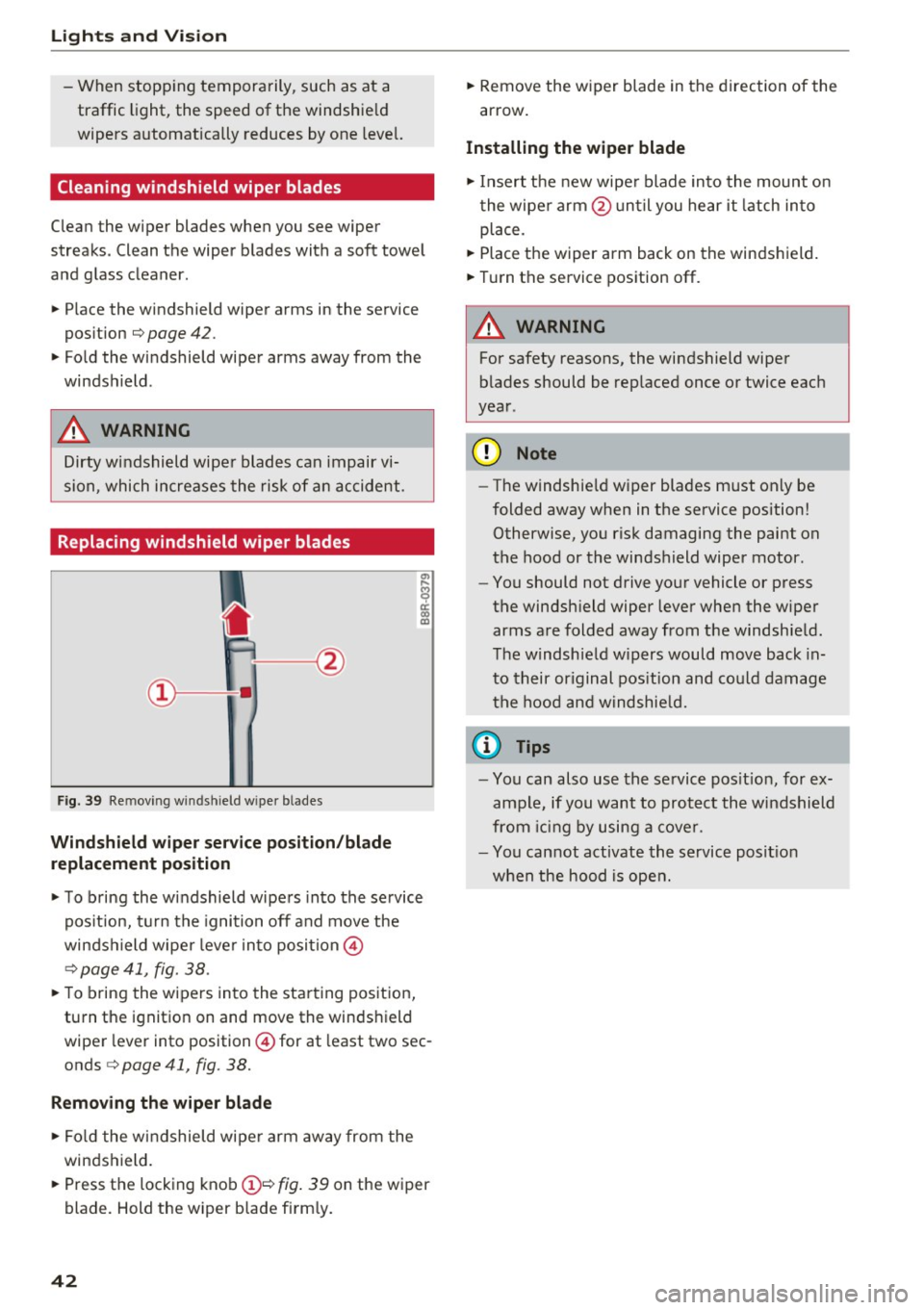
Fig. 39 Re mov ing w indshi eld w iper b lade s
Wind shield wiper ser vice po sition /blade
replacement po sition
~ To b ring the windshield wipers into the service
pos ition, turn the ignition off and move the
windshield wiper lever into position @
¢ page 41, fig. 38.
~ To bring the wipers into the starting position,
turn the ignit ion on and move the windshield
wiper lev er into position @ for at least two sec
onds ¢
page 41, fig. 38.
Remov ing th e wip er bl ade
~ Fo ld the windshield wiper arm away from the
windshield.
~ Press the locking knob(!)¢ fig. 39 on the wiper
blade . Hold the wiper blade firm ly.
42
~ Remove the wiper blade in the direction of the
arrow .
Installing the wipe r blade
~ Insert the new wipe r blade into the mount on
the wipe r arm @un ti l you hear it latch into
place.
~ Place the wiper arm back on the windshield.
~ Turn the service position off.
A WARNING
-
For safety reasons, the windshield wiper
blades should be rep laced once or twice each
year .
@ Note
-The windshield w iper blades must only be
folded away when in the service position!
Otherwise, you risk damaging the paint on
the hood or the windshield wiper motor.
- You should not drive your vehicle or press
the windsh ield wiper lever when the wiper
arms are folded away from the windshield.
T he windshield w ipers would move back in
to their or iginal pos it ion and could damage
the hood and windshie ld.
(D Tips
- You can also use the se rvice pos it ion, for ex
ample, if you want to protect the windshield
from ic in g by using a cover.
- You cannot activate the service posit io n
when the hood is open.
Page 49 of 322
CD
CD
.... N
" N ...... 0
0
Ill co
Storage
Beverage holders
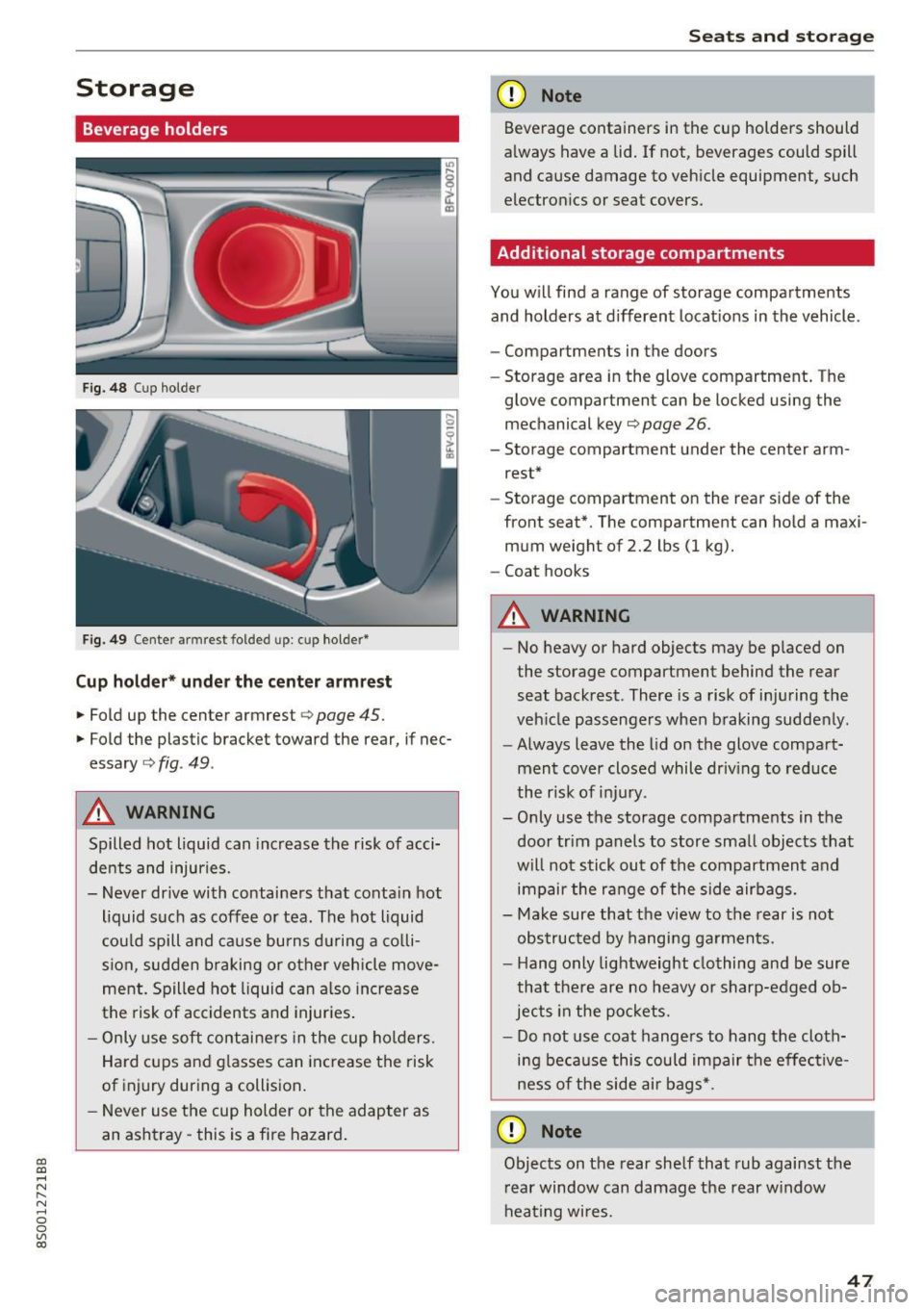
Fig. 48 Cup holder
Fig. 49 Center armrest folded up: cup holder*
Cup holder* under the center armre st
.,. Fold up the center armrest c> page 45.
.,. Fold the plastic bracket toward the rear, if nec
essary
c::> fig . 49 .
A WARNING
Spilled hot liquid can increase the risk of acci
dents and injuries.
- Never drive with containers that conta in hot
liquid such as coffee o r tea. The hot liquid
cou ld spill and ca use bu rns d uring a co lli
sion, sudden braking or other vehicle move
ment. Spilled hot liquid can a lso in crease
the risk of accidents and injur ies .
- Only use soft contai ne rs in the cup ho lders.
Hard cups and g lasses can increase the risk
of injury during a collision .
- Never use the cup holder or the adapter as
an ashtray -this is a fire hazard .
Seats and storag e
(D Note
Beverage containers in the cup holders should
a lways have a lid . If not, beverages could spill
and cause damage to veh icle equipment, such
electron ics or seat covers.
Additional storage compartments
You w ill find a range of storage compartments
and holders at d ifferent locat ions in the vehicle.
- Compartments in the doors
- Storage area in the glove compartment . The
glove compartment can be locked using the
mechanical key¢
page 26.
-Storage compartment under the center arm
rest*
- Storage compartment on the rear side of the
front seat*. The compartment can hold a maxi
mum weight of 2.2 lbs (1 kg).
- Coat hooks
A WARNING
- No heavy or hard objects may be p laced on
the storage compartment behind the rear
seat backrest. There is a risk of inju ring the
veh icle passengers when braking sudde nly .
- Always leave the lid on the glove compa rt
ment cover closed whil e driv ing to red uce
the r isk of inju ry.
- O nly use the storage compartments in the
door trim panels to store sma ll objects tha t
will not stick out of the compartment a nd
impair the ra nge of the side airbags.
- Make sure that the v iew to the rear is not
obs truc ted by hanging ga rments.
- H ang o nly lightweight clothing and be sure
that the re are no heavy or sharp-edged ob
jects in the po ckets.
- Do not use coat hange rs to hang the cloth
ing be ca use this could impair the effec tive
ness of the side air bags*.
(D Note
Objects on the rear she lf that rub against the
r ear window can damage the rear w indow
hea ting wi res .
47
Page 50 of 322
Sea ts and stor age
Roof rack
The roof rack must only be secured in the posi
tioning bolt area.
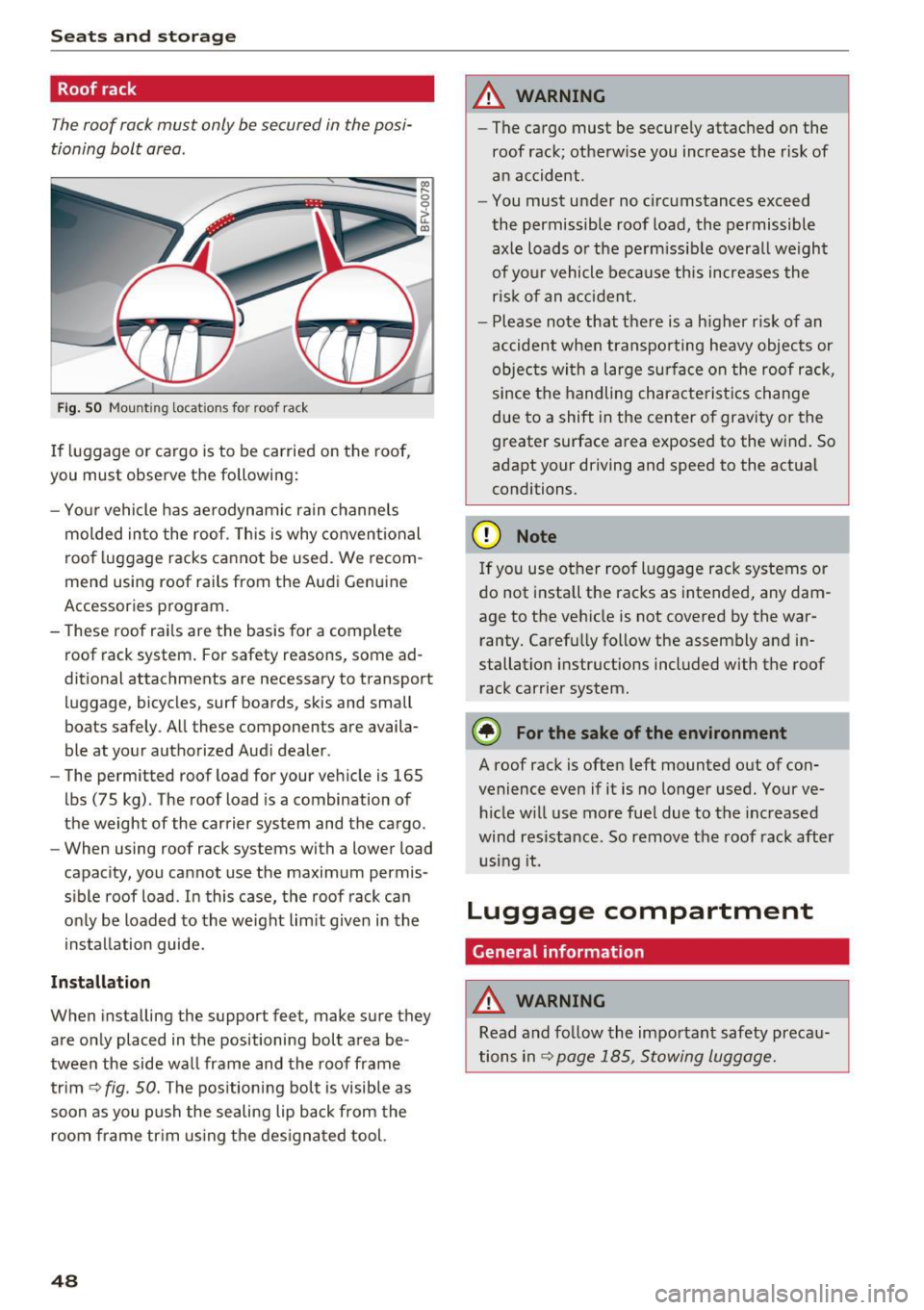
Fig . SO Mount ing locat ions fo r roof rac k
If luggage or cargo is to be carried on the roof,
you must observe the following:
- Yo ur vehicle has ae rodynami c rain channels
molded in to the roof . T h is is why convent ional
roo f luggage racks ca nnot be used . We recom
mend using roof rails from the Aud i Genu ine
Accessories program.
- These roof rai ls are the bas is for a complete
roof rack system . For safety reasons, some ad
ditional attachments are necessary to transport luggage, bicycles, surf boards, skis and small
boats safely . All these components are availa
ble at yo ur authorized Aud i dealer .
- The permitted roof load for your veh icle is 165
lbs (75 kg) . The roof load is a combination of
the weight of the carrier system and the cargo .
- When using roof rack systems with a lower load
capacity, you cannot use the maximum permis
s ible roof load . In this case, the roof rack can
o nly be loaded to the weight lim it given in the
i nstallation guide.
Inst allation
When installing the support feet, make sure they
are only placed in the positioning bolt area be
tween the side wa ll frame and the roof frame
trim ¢
fig. 50. The positioning bolt is visible as
soon as you push the sealing lip back from the
room frame tr im us ing t he des igna ted tool.
48
A WARNING
- The cargo must be secure ly attached on the
roof rack; otherw ise you increase the r isk of
an accident .
- You must u nder no circ umstances exceed
the permissible roof load, the permissible
axle loads o r the pe rm issib le overa ll we ight
of yo ur vehicle be cause this increases the
ris k of an a cc iden t.
- Please note that there is a h igher r is k of an
accident when transporting heavy objec ts or
objec ts wi th a l arge sur face on the roof r ack,
since the handling characterist ics change
due to a shift in the center of gravity or the
greater surface area exposed to the wind . So
adapt your driving and speed to the actual
conditions.
(D Note
If yo u use ot her roof l uggage rack systems or
do not install the racks as intended, any dam
age to the vehicle is not covered by the war ranty . Carefu lly follow the assembly and in
stallation instructions included with the roof
rack carrier system.
® For the sake of the environment
A roof rack is often left mounted out of con
venience even if it is no longer used. Your ve hicle w ill use more fue l due to the inc reased
wind res istance. So remove t he roof rack after
u sing it.
Luggage compartment
General information
A WARNING
Read and fo llow the important safety preca u
tions in
Q page 185, Stowing luggage.
Page 68 of 322

Driving - The transmission can overheat and be dam
aged under certain driving and traffic condi
tions such as frequent starts, creeping for a
long time, or stop -and-go traffic. When the
@] or. indicator light turns on, stop the
vehicle at the next opportunity and let the
transmission cool
r=;, page 68 .
-Allowing the vehicle to roll when the engine
is stopped will damage the S tronic trans
mission because it is not lubricated
¢ page 294, Towing with a tow truck.
@ Tips
For safety reasons, the parking brake is re
leased automatically only when the driver's
safety belt is engaged in the buckle.
Hill descent control
The hill descent control system assists the driver
when driving down hills .
Hill descent control is ac tivated when the selec
tor lever is in the Dor S position and you press
the brake pedal. The transmission automatically
selects a gear that is suitable for the hill. Hill de
scent control tries to maintain the speed ach
ieved at the time of braking, within physical and
technical limitations.
If may still be necessary to
adjust the speed with the brakes. Because hill de
scent control cannot shift down farther than 3rd
gear, it may be necessary to shift into tiptronic
mode in very steep areas. In this case, shift man
ually into 1st or 2nd gear in tiptronic mode to
use the engine's braking force to relieve the
brakes .
Hill descent control switches off once the hill lev
els out or you press the accelerator pedal.
On vehicles with a cruise control system*
¢ page 70, hill descent control is also activated
when the speed is set.
A WARNING
Hill descent control cannot overcome physical
limitations, so it may not be able to maintain
a constant speed under all conditions. Always
be ready to apply the brakes.
66
Shifting manually (tiptronic mode)
The tiptronic allows the driver to shift the gears
manually .
Fig. 66 Cente r conso le : sh ift ing ma nually with the selecto r
lever
Fig. 67 Steering whee l: ma nual shifting wit h the shift pad
dles•
Shifting with the selector lever
You can shift into tiptronic mode while stationary
and whi le driving.
.,. To shift into tiptronic mode, push the selector
lever from the D/S setting to the right in the
tiptronic shift gate. Once the transmission has
sw itched modes, the selector lever position
M
is shown in the Infotainment system display
r=;,poge 62, fig. 63 . For example M4 means the
fourth gear is engaged .
.,. To shift up a gear, tap the selector lever for
ward
0 ¢ fig. 66.
.,. To shift down a gear, tap the selector lever to
back
0 .
Shifting with the shift paddles*
You can operate the shift paddles in the D/S or
M
(tiptronic shift gate) selector lever positions.
.,. To shift up one gear, tap the shift paddle
0
r=;,fig. 67.
Page 69 of 322

co
co
.... N
" N .... 0
0
Vl c:o
~ To shift down one gear, tap the shift paddle 0-
If the sh ift paddles are tapped while in the D/S
selecto r lever posit io n, automatic mode switches
off briefly . To switch from manually shifting back
to a utomatic shifting immediately, tap the shift
paddle G)¢fig . 67for 1 second .
To keep shifting using the shift paddles, move
the sele ctor lever to the right out of the D/S posi
tion into the t ipt ronic shift gate.
The transm ission automatically shifts up o r down
befo re critical engine speed is reached.
The transm ission only a llows manual sh ift ing
when the engine speed is within the permitted
range.
(D Tips
- If you sh ift to the next lowest gear, the
transm ission w ill only shift if the engine w ill
not be over-revved.
- With kick-down, the transmission shifts to a
l ower gear, depending on vehicle speed and
engine speed.
- tiptronic does not wo rk if the t ransmiss ion
i s r unning in emergency mode.
Kick-down
Kick-down enables maximum acceleration.
When you press the accelerator pedal down be
yond the resistance point , the automatic trans
m iss ion downshifts into a lower gear and the en
g ine utilizes its fu ll power , depend ing on veh icle
speed and engine R PM.
It shifts up into t he next
h igher gea r once the maximum spec ified engine
RP M is reached.
A WARNING
Please note that the wheels could spin on
slick or slippery roads when kick-down is ac
tive.
-
l ) T he ESC lig ht turn s on continuous ly and the mess age S ta·
b ili za tion co ntro l (E SC): sport. Warn ing! Red uced st abi l·
ity appe ars te mporar ily in th e I nfotainment syste m to in
di cate tha t the syste m wa s deact ivate d.
D riv ing
Launch Control-Program
The Launch Control Program enables maximum
acceleration .
Requirement: the engine must be at operating
temperature and the steering wheel must not be
turned .
~ With the engine running, press the l1' 0FF I but
ton briefly one t ime
l ).
~ Pull the selector lever back out of the D/S posi
tion briefly to select the S position, or press it
toward the r ight into the tiptron ic position or
select the
Dynamic dr iving mode in dr ive se
lect* ¢
page 79.
~ Press the brake pedal fi rm ly w ith your left foo t
and hold it all the way down for at least 1 sec
ond.
~ At the same time, p ress the gas peda l all the
way down with your right foot until the eng ine
reaches and stays at a high RPM level.
~ Remove your left foot from the brake.
A WARNING
- Always adapt your driving to the t raff ic flow.
- Only use Launch Control when road and traf-
f ic conditions allow it and other drivers will
not be endange red or impacted by your dr iv
ing and the vehicle's acceleration.
- Please note that the d rive wheels can spin
and the vehicle can b reak away when spo rt
mode is switched on, especially when the
road is slippery.
- Once the vehicle has started mov ing, press
the
! .P-O FF I button briefly to turn the spo rt
mode off.
(D Tips
- The transmission temperature may increase
significant ly after using the launch control
prog ram. If that happens, the prog ram may
no t be ava ilable for a few minutes.
It will be
avai lab le again afte r a cool -down period. ..,.
67
Page 71 of 322
CD
CD
.... N
" N ,-I 0
0
Ill co
Selector lever emergency release
If the vehicle's power supply fails, the selector lever can be released in an emergency.
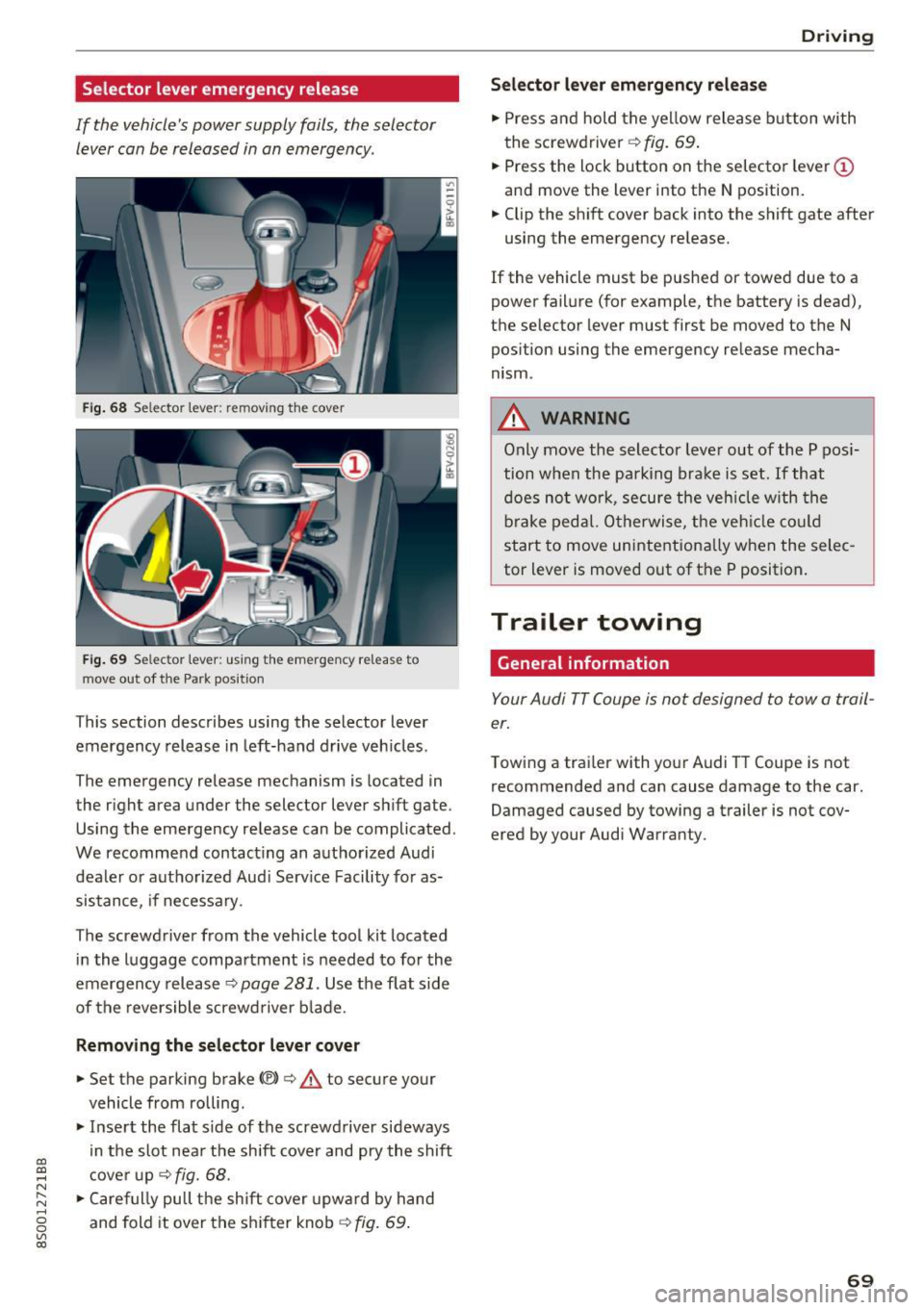
Fig . 68 Selector lever: remov ing t he cover
Fig . 69 Selec tor lever : us ing the eme rgency re lease to
move out of t he Park pos it ion
This section describes using the selector lever
emergency release in left-hand drive veh icles .
The emergency release mechanism is located in
the right area under the selector lever shift gate.
Using the emergency release can be complicated.
We recommend contact ing an authorized Audi
dealer o r authorized Aud i Serv ice Facility fo r as
sistance, if necessary .
The screwdriver from the vehicle tool kit located
i n the luggage compartment is needed to for the
emergency release ¢
page 281. Use the flat side
of the reversible screwd river b lade.
Removing the selector lever c over
.,. Set the parking brake CV)¢ A to secure your
vehicle from ro lling .
.,. In se rt the flat side of the screwdriver sideways
in the slot nea r the shift cover and pry the shift
c ove r up
¢fig. 68 .
.,. Caref ully pull t he shift cover upw ard by hand
and fold it over the sh ifter knob ¢
fig. 69.
Drivi ng
Selector l ever emergency r elease
.,. Press and hold the yellow release b utton with
the screwdriver ¢
fig. 69.
.,. Press the lock button on the selector lever
(D
and move the lever into the N position .
.,. Clip the shift cover back into the shift gate after
using the emergency re lease.
If the vehicle must be pushed or towed due to a
power failure (for example, the battery is dead),
the selector lever must first be moved to the N
pos ition using the emergency re lease mecha
nism.
A WARNING
Only move the selector lever out of the P pos i
tion when the parking bra ke is set. If that
d oes no t wo rk, secure the ve hicle w ith the
bra ke ped al. Otherwise, t he veh icle co ul d
st art to move uninte ntiona lly w hen the selec
tor lever is moved out of the P position.
Trailer towing
General information '
Your Audi TT Coupe is not designed to tow a trail
er.
Towing a trailer with you r Audi TT Coupe is not
recommended and can cause damage to the car.
Damaged caused by towing a trailer is not cov
ered by your Audi Warranty.
69
Page 73 of 322
co
co
.... N
" N .... 0
0
Vl c:o
speed and the distance between your vehi
cle and other vehicles.
- For safety reasons, cruise control should not
be used in the city, in stop-and-go traffic, on
winding roads and when road conditions are
poor (such as ice, fog, gravel, heavy rain and
hydroplaning), because this increases the
risk of a n accident.
- Switch the cruise control off temporarily
when driving in turning lanes, highway exits
or in construction zones.
- Please note that unconsciously "resting"
your foot on the accelerator pedal prevents
the cruise control from braking. This is be
cause pressing the accelerator pedal over
rides the cruise control system.
- If a brake system malfunction such as over
heating occurs when the cruise control sys
tem is switched on, the braking function in
the system may be switched off . The rest of
the cruise control system functions remain
active as long as the
@;\1)~14 (USA models) I
ill (Canada models) indicator light is on.
@ Tips
The brake lights turn on when the brakes are
app lied automatica lly.
Changing speed
Applies to: veh icles with c ruise control system
.. To increase/decrease the speed in increments,
briefly
tap the lever toward 010 Q page 70,
fig. 70 up/down to the first level.
.. To increase or decrease the speed in incre
ments,
tap the lever toward 010 Q page 70,
fig. 70 up/down to the second level.
.. To increase or decrease the speed quickly ,
hold
the leve r in the 0 / 0 direction until the de
sired speed is reached .
Overriding the speed
Applies to: veh icles with c ruise control system
You can press the accelerator pedal down to in
crease your speed, for example if you want to
pass someone. The speed you set earlier wi ll re-
Assist
sume as soon as you release the acce lerator ped
al.
However, if you are exceeding the stored speed
by a considerable amount for a long time, the
cruise contro l system will temporarily switch off.
The
(ff;ji )~i4 (USA mode ls) Iii (Canada mode ls) in
dicator light in the instrument cluster turns off
and the stored speed is maintained.
Preselecting the speed
Applies to : vehicles with cruise control system
You can pre-select your desired speed when the
vehicle is stationary.
.. Switch on the ignition.
.. Pull the lever into position (!)
Q page 70,
fig. 70.
.. To increase or decrease the speed, tap the lever
toward
0 10 .
This function makes it possible, for example, to
save the speed you want before driving on the
highway . Once you are on the expressway, acti
vate the cruise control system by pulling the lev
er into position (!).
Switching off
Applies to: vehicles with cruise control system
Temporary deactivation
.. Press the brake pedal, or
.. Press the lever toward@(not locked into
place)
Q poge 70, fig. 70.
Switching off completely
.. Press the lever into position @(clicked into
place), or
.. Switch the ignit ion off .
The speed you stored will be maintained if the cruise control has been switched off temporarily .
To resume the stored speed, release the brake or
clutch pedal and pull the lever to position (!).
Switching the ignition off will erase the stored
speed .
71
Page 79 of 322

CD
CD
.... N
" N .... 0
0
Ill co
The display remains dim in the information stage
so that your view toward the front is not distur
bed .
Warning stage
If you ac tiva te the tur n signa l, side assist warns
you about veh icles that are detected and classi
f ied as critical. The d isplay in the respec tive m ir
ror blinks brightly. If this happens, ch eck traffic
by glancing in the exterior m irro rs and over you r
shoulder
c:> .&. in General informa tion on
page 78.
(D Tips
You can ad just the brightness on of the dis
play on the rearview mirror
c:> page 78 .
General information
App lies to: ve hicle s with Audi side assist
®
Fig . 79 D rivin g sit u ations
A ss ist
Fig. 80 Rear of the ve hicle : po sition o f the senso rs (exa m·
p le)
Side assist funct ions at speeds above approxi
mately 19 mph (30 km/h) .
@ Approaching vehicles
In certain cases , a veh icle w ill be classified as
c ritical for a lane change even if i t is sti ll some
what far away. The faster a vehicle a pproaches,
the soon er the display in th e exterior m irro r will
turn on.
@ Vehicles tra veling with you
Vehicles traveling with yo u are indica ted in the
exterio r mir ror if they are classified as cr itical for
a lane change. A ll vehicles detected by side assist
are ind icated by th e time they enter your "blind
spot", at the latest .
@ Vehicles y ou are pass ing
If you s low ly pass a vehi cle that s ide assist has
detected (the difference in speed between the
vehicle and your vehicle is less than 9 mph (15 km/h)), the d isplay in the exter ior m irror tu rns
on as soon as the vehicle enters your blind spot .
The display wi ll not turn on if you quickly pass a
vehicle that side assist has detected (the differ ence in speed is greater than 9 mph (15 km/h)).
Functiona l limitat ions
T he radar sensors are des igned to detect the le ft
and right adjacent lanes when the road lanes are
the norma l width . In some situations, the display
in the exte rior mirror may turn on even though
there is no veh icle located in the area that is criti·
ca l for a lane change . For example :
- If the lanes are narrow or if your are driving on the edge of yo ur lane. If t his is the case, the .,..
77
Page 87 of 322
CD
CD
.... N
" N .... 0
0
Ill co
General information
Applies to: vehicles with rearview camera
~ --
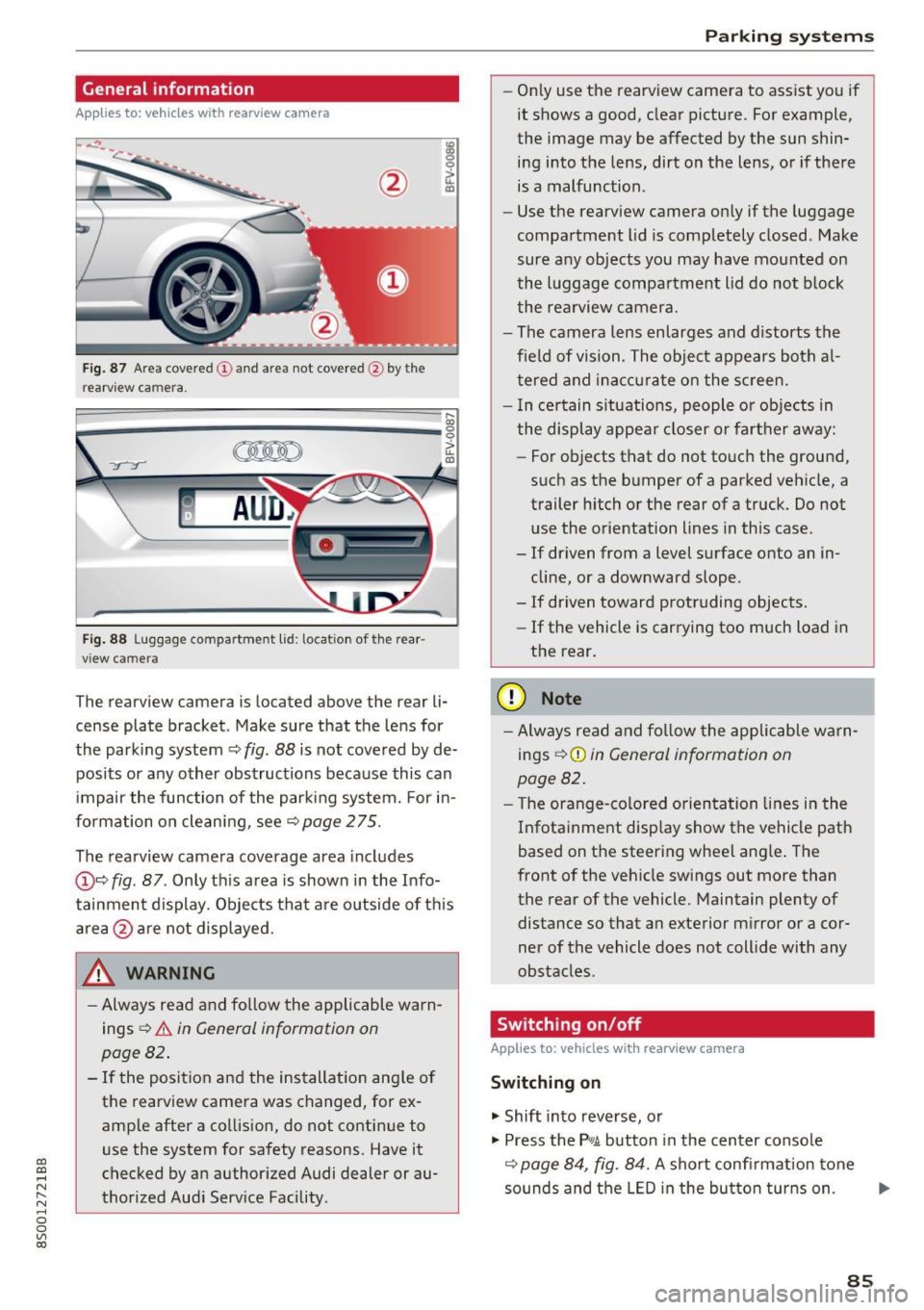
Fig. 87 A re a co vered (!) and a rea not cove red @ by the
r earv iew ca mera.
~
~ ;..------ ::.·~- ,.,.~ _.,- ,,,_-------- g
(Jo00oD ~
Fig. 88 Luggage compartme nt lid: locat io n of t he rear
view c amera
The re arview camera is located above the rear li
cense plate bracket. Make sure that the lens for
the park ing system ~
fig. 88 is not covered by de
posits or any other obstructions because this can
i mpair the function of the par king system. For in
formation on clean ing, see ~
page 275 .
The rearview camera coverage area includes
@ ~ fig . 87 . Only th is area is shown in the Info
tainment display. Objects that a re outside of th is
area @are not displayed.
A WARNING
-Always read and fo llow the applicable warn
ings
~ A in General information on
page 82 .
- If the position and the installation ang le of
the rearview camera was changed, for ex
amp le after a collision , do not continue to
use the system for safety reasons. Have it
checked by an authorized Audi dealer or au
thorized Aud i Serv ice Facility .
Parking systems
-On ly use the rearv iew camera to ass ist you if
it shows a good, clear pictu re. For example,
the image may be affected by the sun shin
ing i nto the lens, dirt on the lens, or if there
is a malfunction .
- Use the rearv iew camera on ly if the luggage
compa rtment lid is completely closed . Make
sure any objects you may have mounted on
the l uggage compa rtment lid do not b lock
the rea rview camera.
- The camera lens enlarges and d istorts the
field of vision . The object appears both a l
t ered and ina ccur ate on the s creen.
- I n ce rtain s itu ations, people or objects in
the display appea r closer or fa rther away:
- For objects t hat do not touc h the grou nd,
such as the bumper of a parked vehicle, a
trailer hitch or the rear of a truck . Do not
u se the orie ntation lines in this case .
- If driven from a level s urface onto an in
cline, or a downward slope .
- If driven toward protruding objects.
- If the vehicle is carrying too much load in
the rear.
(D Note
-Alw ays read and fo llow the applicable w arn
ings
¢ (D in General information on
page 82.
- T he orange-co lored orientation lines in the
Infotainment display show the vehicle path
based on the steering wheel ang le . The
front o f the vehicle swings out more than
the rear of the vehicle. Maintain plenty of distance so that a n exterior m irror or a cor
ner of the vehicle does not coll ide with any
obstacles.
Switching on/off
Applies to: vehicles with rearview camera
Switching on
.. Shift into reverse, or
.. Press the
P,qA button in the center console
~ page 84, fig. 84. A short confi rmation tone
sounds and the LED in the bu tton tur ns on . ...
85
Page 93 of 322
co
co
.... N
" N .... 0
0
Vl c:o
brake rotors and pads by caref ull y applying
the brakes several t imes .
-If the front spoiler is damaged or you install
another spoiler, make sure the front wheel
brakes are vent ilated properly. Otherwise,
the brake system could overheat, wh ich re
duces the ir effectiveness .
- Failure of a brake circuit impairs b raking
performance , which increases brak ing dis
tance. Avoid driving the vehicle and have it
towed it to the nearest author ized Audi
dealer or author ized A udi Se rvice Facility.
- Never let the vehicle roll while t he engine is
stopped because this increases the risk of a n
acc iden t.
- If the bra ke booste r is not working, you will
have to press m uch ha rder on the bra ke
ped al to compensate for the lac k of th e
booster.
- Never let the brakes "rub " by pressing the
pedal light ly when bra king is no t actually
ne cessary . T his cause s the brakes to over
hea t and i ncre ases br aking di stance and
ca uses wear.
- B efo re driv ing downh ill a long dis tance on a
steep h ill, decrease your speed and se lec t a
l ower gear . This makes use of the engine
braking effect and relieves the brakes . If
you need to b rake additionally, brake in in
tervals and not continuously.
@ Tips
- If the brake booste r is not working, you
must press the brake pedal with much more
fo rce than normal.
- If you retrofit yo ur vehicle with a front spoil
er, whee l
covers or similar items, make sure
that the air flow to the front whee ls is not
i nterr upted . Otherw ise the brake system
ca n become too hot .
Intelligent Technology
Electromechanical
steering
The electromechanical steering supports the
driver 's steering movements .
Power steering adap ts elec tronically based on
the ve hicle speed.
Indicator light s and message s
• Steering: malfun ction! Please stop vehicle
If this indica to r li ght tur ns on and st ays on and
t hi s message appea rs, the powe r steering may
have failed.
Stop t he vehi cle in a safe location as soon as pos
s ible. Do
not cont inue drivi ng. See an autho riz ed
Audi dealer or authorized A udi Service Fac ility for
assistance .
l;r- ij S teering : malfun ction! You may continue
driving
If the indicator light turns on, the steering wheel
may be more d ifficult to
move or more sensit ive
t h an usua l. Th e steer ing whee l may a lso be at an
angle when d riving s trai ght.
D rive slowly to an a uthorized Audi dea ler or au
t h orized Audi Serv ice Facility to have the mal
funct ion corre cted.
(D Tips
If the . or l;r, ij ind icator light only s tays on
fo r a short time, you may continue d riving.
All wheel drive (quattro)
In all wheel drive, all four wheels are powered.
General information
In all whee l dr ive, the dr iv ing power is divided be
tween all four wheels . This happens automatical
ly depending on you r dr iv ing behav ior as we ll as
t h e cur rent road condi tions. A lso see ~
page 88,
Elec tronic stabilization con trol ( ESC).
T he all whee l dr ive concept is des igned for high
engine power . You r vehicle is except ionally pow
erfu l and has excellent driv ing cha racteristics
bot h unde r normal d rivi ng conditions and o n
91