lights AUDI TT COUPE 2017 Owner's Guide
[x] Cancel search | Manufacturer: AUDI, Model Year: 2017, Model line: TT COUPE, Model: AUDI TT COUPE 2017Pages: 322, PDF Size: 79.73 MB
Page 131 of 322
co
co
.... N
" N .... 0
0
Vl c:o
Weather
Applies to: vehicles with Audi connect
Information on current weather conditions as
well as weather forecasts for the selected search area (for example,
Nearby ).
~ Select and confirm Weather.
Flight information
Applies to: vehicles with Audi connect
Information on flights and current arrival/depar
ture times in the selected search area .
~ Select and confirm Flight information .
You can select the desi red information using the
right control button.
City events
Applies to: vehicles with Audi connect
Information on events in various categories in
the desired search area .
~ Select and confirm City events > left cont rol
button
> category.
Online news
Applies to: vehicles with Audi connect
You can check the current headlines of your fa
vorite publications in the MMI.
Requirement: your myAudi account must be sub
scr ibed to newsfeeds and your vehicle must be
connected to myAudi
¢ page 127.
~ Select : Online news > desired newsfeed > a
headline.
© Tips
If you have not subscribed to any personal
newsfeeds in your myAudi account, pre -con
figured newsfeeds will be displayed.
Audi connect
Twitter
Applies to: vehicles with Audi connect
You can access the most important functions in
your Twitter account through your MMI.
Requirement:
You must have connected your myAudi account
with Twitter. Additional information on this can
be found in the
Audi connect (myAudi) operating
manua l under
my .audiusa.com .
You must have connected your vehicle wit h
myAudi
¢ page 127.
~ Select Twitter > left control button > desired
function
(for examp le, Trends ).
The following categories can be se lected in the
Twitter menu:
- My tweets: News Feed and the Tweets you have
posted are listed.
- Home : the Tweets for everyone you follow are
displayed.
- Trends : topics on Twitter that are currently
popular within a country .
Different functions are ava ilable depending on
the Twitter category you have selected:
-New tweet: you can post a new tweet using
pre-made templates or using customized tem plates in your myAudi account.
-Refresh: the se lected Twitter function is re
freshed.
- Favorite : set a Tweet as favorite to show you
liked it .
-Retweet : you can quote a Tweet to share i t with
others.
(D Tips
- You can find additional information on con
necting your myAud i account with Twitter in
the
Audi connect (myAudi) operating man
ual at
my.audiusa.com.
- Other settings s uch as account, language,
Tweet security and location settings
cannot
be changed in the MMI. These changes must
be made on the Tw itter website.
129
Page 137 of 322
CD
CD
.... N
" N ...... 0
0
Ill co
Navigation
Opening navigation
Applies to: vehicles with navigation system
Navigation
The navigation system directs you to your destination, around traffic incidents and on alternative
routes, if desired.
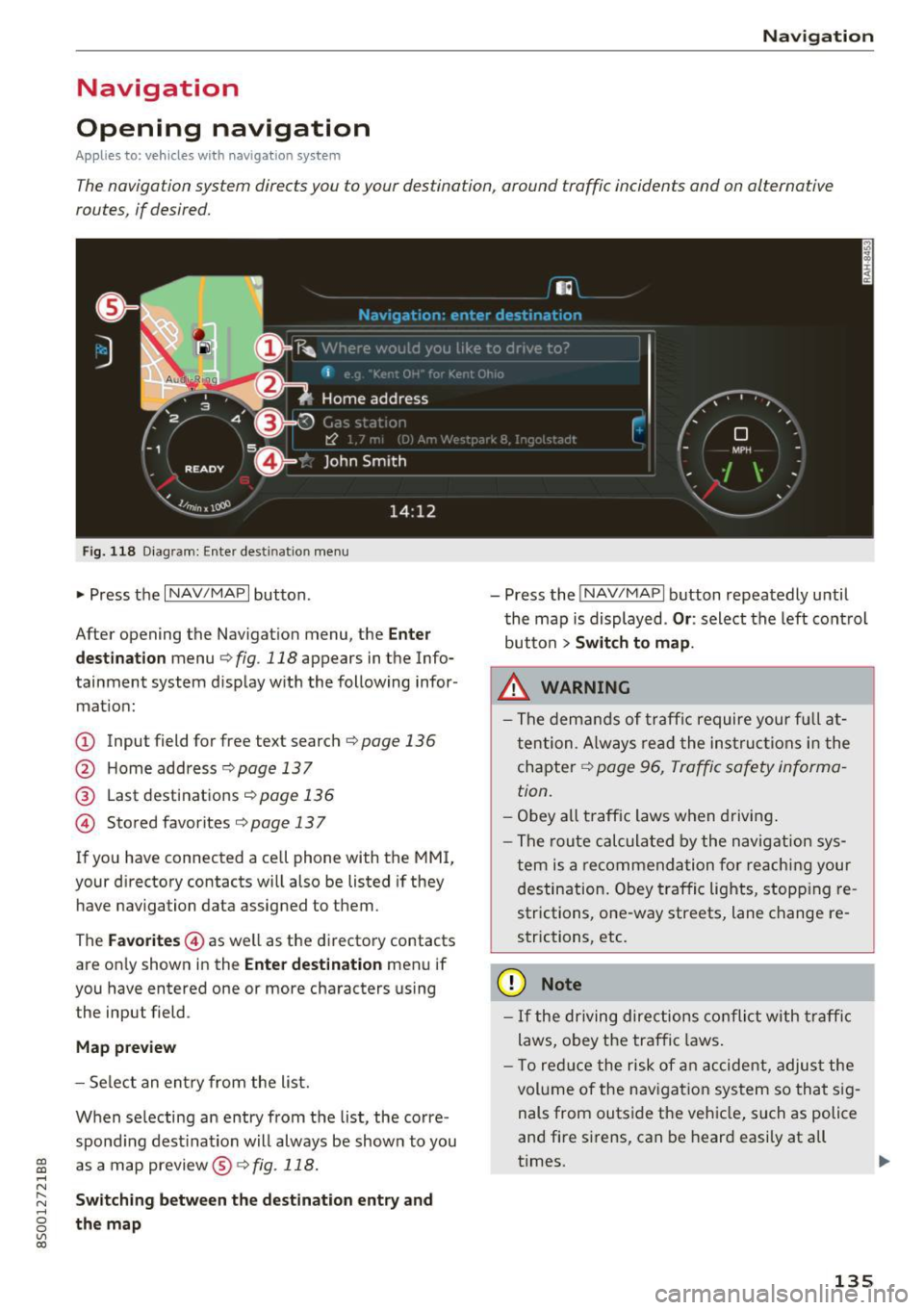
Fig . 118 Diag ram: Enter destination menu
• Press the I NAV/MAPI button.
After opening the Navigation menu, the
Enter
destination
menu c;, fig. 118 appears in the Info
tainment system display with the following infor mat ion:
(!) Input field for free text search c;, page 136
@ Home address <=;>page 137
® Last destinations c;, page 136
@ Stored favorites c;, page 13 7
If you have connected a cell phone with the MMI,
your directory contacts will also be listed if they
have navigation data assigned to them .
The
Favorites @) as well as the directory contacts
are on ly shown in the
Enter destination menu if
you have entered one or more characters using
the input field.
Map preview
- Select an entry from the list.
When se lecting an entry from the list, the corre
spond ing destination will always be show n to you
as a map preview@~
fig. 118.
Switching between the destination entry and
the map
- Press the INAV/MAPI button repeatedly until
the map is displayed .
Or: select the left control
button
> Switch to map .
_&. WARNING
- The demands of traffic require your fu ll at
tention . Always read the instructions in the
chapter
c;, page 96, Traffic safety informa
tion.
- Obey
all traffic laws when driving.
- The route calculated by the navigation sys-
tem is a recommendation for reaching your
destination. Obey traffic lights, stopp ing re
strictions, one-way streets, lane change re
strictions, etc.
(D Note
- If the driving directions conflict with traffic
laws, obey the traffic laws.
- T o reduce the risk of an accident, adjust the
volume of the navigation system so that sig
nals from outside the vehicle, such as police
and fire sirens, can be heard easily at all
times.
-
135
Page 147 of 322
co
co
.... N
" N .... 0
0
Vl c:o
on highways, possible parking lots and rest a reas
are shown, which you can select as a stopover .
POis along the route
Requirement: route gu idance mus t be ac tive .
Searching for points of interest along you r cur
rent ro ute See
¢ page 138.
Additional options on the map
Applies to: ve hicles with navigation system
.,. Press t he I NAV/MAPI button repeated ly until
the map is d isplayed
¢ page 143 , fig. 125.
.,. Press t he right contro l bu tton.
Depending on the f unction selec ted , the follow
i n g options can a lso be se lected unde r the
Map
menu :
Cancel route guidance : see¢ page 140 .
Map settings : see ¢ page 145 .
Route criteria : see ¢page 142 .
Voice guidance : see ¢page 142.
Navigation setting s: see¢ page 141 .
Online traffic data* : see ¢ page 147 .
Show alternative routes : see¢ page 142.
Parking along the route : parking options near
the veh icle are disp layed.
Save current po sition : you can save your current
ve hicle position as a favor ite ¢
page 141 or save
i t as a contact in the directo ry ¢
page 141 .
Audi connect at this locat ion *: allows you to
search for
City events or Weather at the entered
l ocat io n.
Country info rm ation : you can disp lay the appli
cable urban and rural speed limits for any coun
try/state. This information w ill be automatically
shown to you in the route information @
¢
page 143, fig . 125 when the speed lim it is ex
ceeded, if this function is act ivated ¢
page 14 6.
Avoid route *: when route gu idance is active, the
calculated ro ute w ill avoid the area you have
spec ified (max imum : 12 m i (20 km)), if possible .
The navigation system ca lcula tes a n alternat ive
Na vigation
route. The route to be avo ided that you have en
te red applies only to the cur rent route and must
be set agai n, if needed. The areas you have se
l ected to avoid w ill appea r with red and white
shading on the map .
Map settings
Applies to: vehicles wit h navigat ion syste m
.,. Press the INAV/MAPI button repeatedly until
t he map is displayed
¢ page 143, fig . 125 .
.,. Sele ct: r igh t cont rol b utton > Map settings .
Depending on the selected function, the fo llow
i ng setti ngs can be selected:
Map colors
Day /Night :
the map is displayed with a light/
dar k background.
Automatic : when the lights switch on, the map
colors switch from day to n ight .
Map display
Standard
¢ page 143, fig . 124.
Google Earth * ¢page 146 , fig. 126.
Traffic ¢ page 147.
Map orientation
Destination :
th e map i ndic ates the destin ation
and is or ien ted to the no rth .
2D heading up map /2D north up map : the cu r
r ent vehicle pos it ion is d isplayed . T he map is or i
en ted in the d irect io n of t ravel o r to the no rt h .
3D map : when this func tion is sw itched on, the
cu rrent veh icle posit io n is shown on a three-di
mens iona l map and orien ted in the d irec tion of
t ravel. At a sca le o f 62 mi ( 100 k m) and la rge r,
the ma p orientation is to the north.
Overview : th e en tire route from the veh icle pos i
tion to the des tina tion o r the ne xt stopover is dis
played on the map. The m ap s cale depends on
the leng th of the ro ute a nd adapts au tom atically .
The map is orie nte d to the north .
Ill>
145
Page 182 of 322
Safe dri ving
Safe driving
Basics
Safe driving habits
Please remember -safe ty first!
This chapter contains important information,
tips, instructions and warnings that you need to
read and observe for your own safety, the safety
of your passengers and others. We have summar ized here what you need to know about safety
be lts, a irbags, child restra ints as well as child
safety. Your safety is for us
priority number 1 . Al
ways observe the info rmation and wa rn ings in
this section - for your own safety as well as that
of your passengers.
The information i n this section applies to all
model versions of yo ur vehicle . Some of the fea
tures descr ibed in t his sections may be s tanda rd
equipment on some models, or may be optional
equipment on others . If you are not sure, ask
your authorized Audi dealer.
A WARNING
- Always make sure that you follow the in
structions and heed the WARNINGS in th is
Manual.
It is in your interest and in the in
te rest of your passengers .
- Always keep the comp lete Owner's Litera
ture in your A udi when you lend or sell your
vehicle so that this important information
will always be available to the d river and
passenge rs.
- Always keep the Owner 's literature handy so
that you can find it easily if you have ques
t ions.
Safety equipment
The safety features are part of the occupant re
straint system and work together to help reduce
the risk of injury in a wide variety of occident si t
uations.
Your safety and the safety of your passenge rs
should not be left to chance. Advan ces i n tech
nology have made a var iety of features avai lab le
to help reduce the risk of injury in an accident .
180
The following is a list of just a few of the safety
features in your Audi :
- sophis tica ted safety be lts fo r drive r and all pas-
senge r seat ing pos itions,
- safety belt p retensioners,
- safety belt force lim ite rs fo r th e front seats,
- front airbags,
- knee airbags fo r the front seats*
- side airbags in the front seats,
- side curtain airbags with eject ion m itigat ion
features,
- special LATCH anchorages for child restraints,
- adj ustab le steering col umn.
These ind iv idual safety features, can work to
gether as a system to he lp protect you and your
passengers i n a wide range of acc idents. These
fea tures canno t wo rk as a sys tem if they a re not
a lways correc tly adjusted and correct ly used.
Safety is everybody' s responsibilit y!
Important things to do before driving
Safety is everybody's job! Vehicle and occupant
safety always depends on the informed and care
ful driver .
For your safety and the safety of your passen
gers,
before driving alway s:
.. Make sure that all lights and signals are operat
ing correctly .
.. Make sure that the tire pressure is correct .
.. Make sure that all windows are clean and afford
good visibility to the outs ide .
.,. Sec ure all luggage and othe r items ca refully
Q page 185, ~page 47.
.,. Make sure that noth ing can inter fere wi th the
peda ls .
.. Ad just front seat and mirrors cor rectly for your
height.
.. Make sure to use the right child restraint cor
rectly to protect children
Q page 221, Child
safety .
.. Sit p roperly in your seat and make sure t hat
your passenge rs do the same
Q page 44, Seats
and storage.
ll-
Page 192 of 322
Safe ty belts
The warning light . in the instrument cluster
lights up when the ignit ion is switched on as a re
minder to fasten the safety belts. In addition, a
warning tone w ill sound for a certain period of
time.
F a sten you r safet y be lt and make sure that your
pa sse nge rs also prope rly put on thei r safet y
belt s.
_&. WARNING
- Safety belts are the s ingle most effective
means ava ilable to reduce the risk of ser ious
i njury and death in automobile acc idents .
For yo ur protect ion and that of your passen
gers, always co rrectly wea r safety be lts
when the vehicle is moving .
- Failure to pay attention to t he war ning light
that comes on could lead to persona l injury.
Why safety belts?
Frontal collisions and the law of physics
Frontal crashes create very strong forces for peo
ple riding in vehicles.
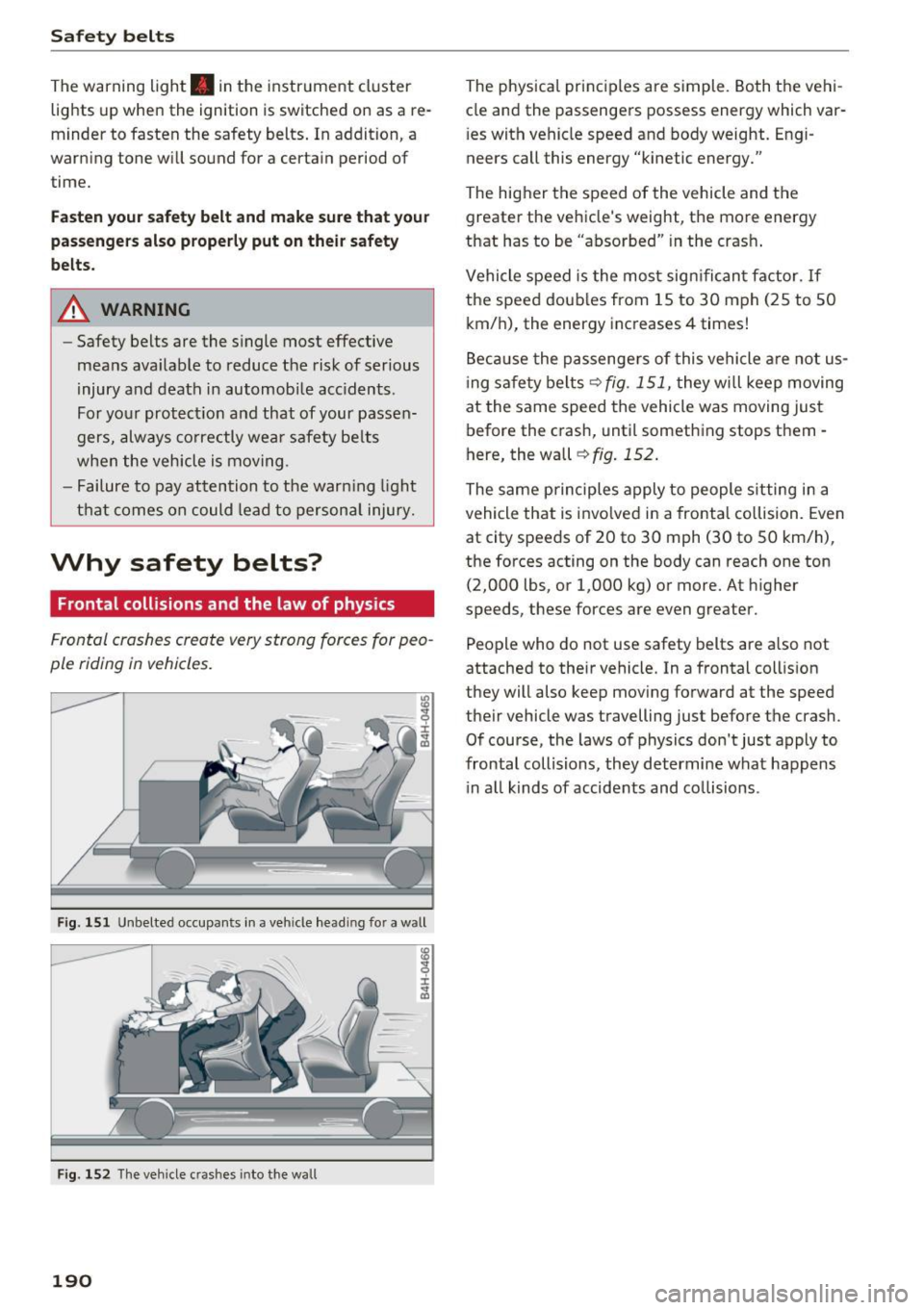
Fig. 151 Unbelte d occupa nts in a ve hicle head in g fo r a w all
I ± ..,. a,
F ig . 1 52 The veh icle c rashes into the w all
190
The physical princ iples are simple . Both the vehi
cle and the passengers possess energy which var
i es with vehicle speed and body weight. Engi
neers call this energy "kinetic energy."
The higher the speed of the vehicle and the greater the vehicle 's we ight, the more energy
that has to be "absorbed" in the crash .
Vehicle speed is the most sign ifican t factor. If
the speed doub les from 15 to 30 mph (25 to 50
km/h), the energy increases 4 times!
Beca use the passenge rs of this vehicle a re not us
i ng safety belts ¢
fig. 151, they w ill keep moving
at the same speed the vehicle was moving just before the crash, until something stops them -
here, the wall
¢ fig . 152 .
The same principles apply to people s itting in a
vehicle that is invo lved in a frontal collision. Even
at city speeds of 20 to 30 mph (30 to 50 km/h),
the forces acting on the body can reach one ton (2,000 lbs , or 1,000 kg) or more. At h igher
speeds, these forces are even greater.
People who do not use safety belts are a lso not
attached to their vehicle. In a frontal coll is ion
they will also keep mov ing forward at the speed
their vehicle was travelling just before the crash .
Of course, the laws of physics don 't just apply to
frontal collisions, they determine what happens i n a ll kinds of accide nts and co llisions .
Page 209 of 322
More important things to know about front
airbags
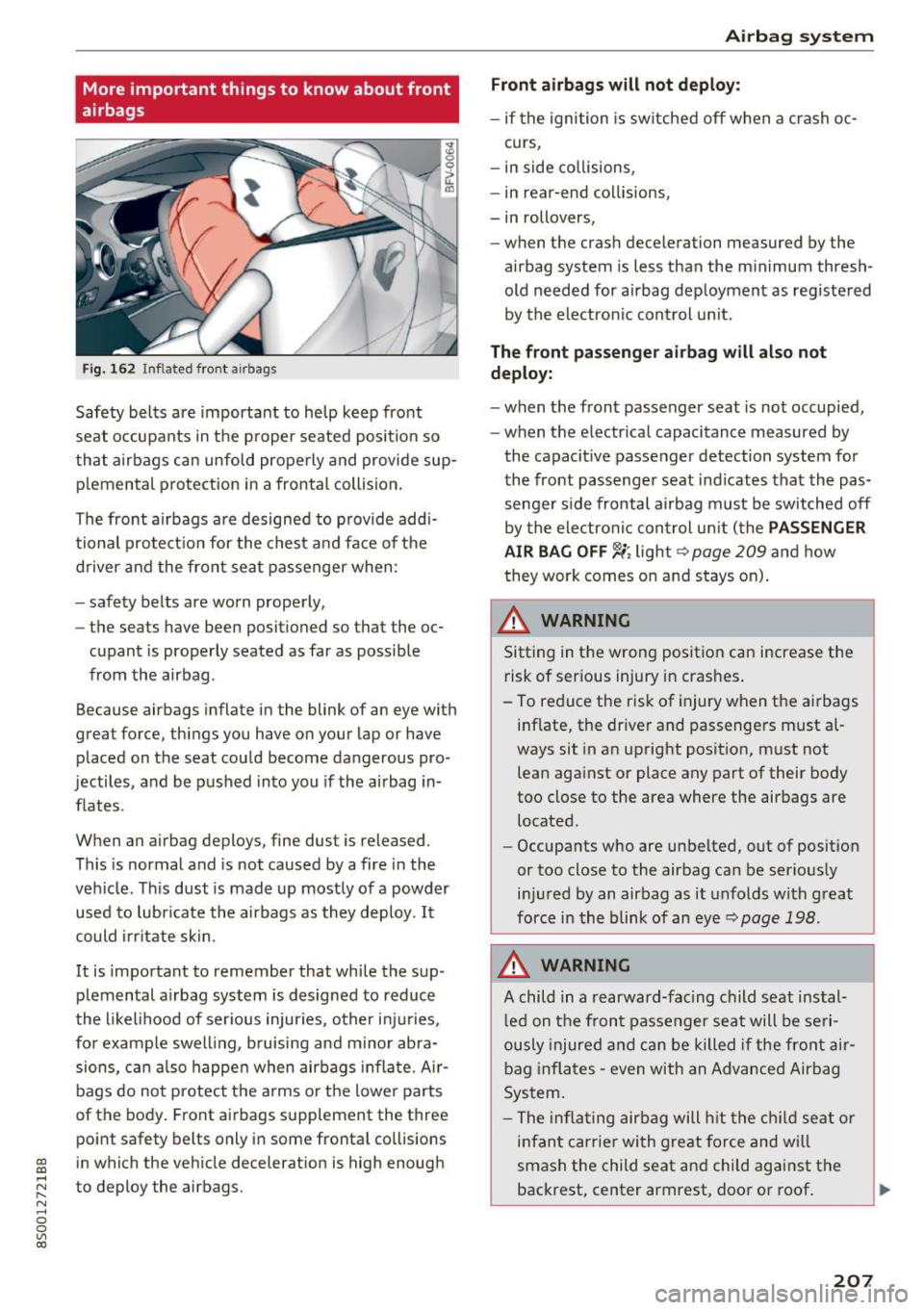
Fig. 162 Inflated front a irbags
Safety bel ts a re important to help keep front
seat occupants in the p roper seated position so
that airbags can unfold properly and provide sup
p lemental protection in a frontal collision.
The front airbags are designed to p rovide addi
tional protect ion for the chest a nd face of the
d river and the front seat passenger when:
- safety belts are worn properly,
- the seats have been positioned so that the oc-
cupant is properly seated as far as possible
from the airbag .
Because airbags inflate in the blink of an eye w ith
great force, things you have on your lap or have placed on the seat cou ld become dangerous pro
jectiles , and be pushed into you if the airbag in
flates .
When an a irbag deploys , fine dust is released.
This is normal and is not caused by a fire in the
veh icle. Th is dust is made up mostly of a powder
used to lubricate the airbags as they deploy . It
could irritate skin.
It is important to remember that while the sup
p lemental a irbag system is designed to reduce
the likel ihood of ser ious injuries, o ther inj uries,
for example swe lling, b ruising and mino r abra
sions, c an a lso happe n when airbags inflate. Ai r
bags do not protect the arms o r the lowe r parts
of the body . Front airbags supplement the three
point safety belts only in some frontal collisions
~ in which the vehicle decelerat ion is high enough ....
~ to deploy the airbags.
N .... 0
0
Ill co
Airb ag sys tem
Front a irbags will not deploy :
-if the ignition is sw itched off when a crash oc-
curs,
- in side co llisions,
- in rear-end col lisions,
- in rollovers,
- when the crash deceleration measured by the
ai rbag system is less than the m inimum thresh
old needed for airbag deployment as registered
by the electron ic con trol un it.
The front pa ssen ger airbag will als o not
deploy:
- when the fron t passenger seat is not occupied,
- when the e lectr ica l capacitance measured by
the capacit ive passenger detection system for
the front passenger seat ind icates that the pas
senger side frontal airbag must be switched off
by the ele ctro nic con trol un it ( the
PASSENGER
AIR BAG OFF
'-i; lights> page 209 and how
they work comes o n and stays on) .
A WARNING
Sitting in the wrong position can increase the
risk of ser ious injury in crashes .
- To reduce the risk of injury when the airbags in flate, the driver and passengers must al
ways sit in an upright posit ion, m ust not
lean aga inst or place any part of their body
too close to the area where the airbags are
located.
- Occupants who are unbelted, out of positio n
or too close to the airbag can be serio usly
i nju red by an airbag as it unfolds with great
force in the blink of an eye~
page 198.
A WARNING
-A child in a rearward-facing child seat ins tal
l ed on the front passenger seat will be se ri
ously injured a nd ca n be killed i f the front air
bag inflates -
even with an Advanced Airbag
System .
- The infla ting airbag will h it the chi ld s eat o r
infant carrier wi th great force and will
smash the child seat and child against the
backrest, center armrest, doo r or roof . .,..
207
Page 249 of 322
Using the proper engine oil is important for the
functionality and s ervice life of the engine. Your
engine was factory-filled with a high -quality oil
which can usually be used throughout the entire
year .
Note
Your Limited New Vehicle Warranty does not
cover damage or malfunctions due to failure
to follow recommended maintenance and use
requirements as set forth in the Audi Owner's Manual and Warranty & Maintenance booklet .
- Use only a high quality engine oil that ex-
pressly complies with the Aud i oil quality
standard specified for your vehicle's engine.
Using any o ther oil can cause serious engine
damage.
- Do not mix any lubricants o r other additives
into the engine oil. Doing so can cause en
gine damage.
@ Tips
If you need to add oil and there is none availa
ble that meets the Audi o il quality standard
your eng ine requ ires, you may add a total of
no more than 0 .5 qt (0,5 l) of a h igh-quali ty
"synthet ic"oil that meets the following speci
fications.
- ACEA A3 or API SM with a v iscosity grade o f
SAE OW-30, SAE SW -30 or SAE SW-40.
- Fo r more information abou t engine o il t ha t
has been approved for your vehicle, please
contact either your authorized Audi dea ler
or Audi Custome r Relat ions at
1 (800) 822-2834 or visit our web site at
www.audiusa.com or www.audican ada.ca .
Engine oil consumption
T he engine in your vehicle depends on an ade
qua te amoun t of oil to lubricate and cool all of
i t s moving par ts.
In order to provide effective lub rication and coo l
ing of in te rnal engine components, a ll internal
~ combustion engines consume a cer tain amount
;:::: of oil. Oil consumption varies from engine to en-
" ~ gine and may change sign ificantly over the life of 0
~ the eng ine . Typically, eng ines with a spec ified c:o
Ch eck ing and Filling
break-in period (see ¢ page 55) consume more
oi l during th e break-in period than they consume
after oil consumption has stabilized.
Under normal cond itions, the rate of oil con
sumption depends on the q uality and viscos ity o f
the oil , the RPM (revolutions per minut e) at
which the engine is operated, the amb ient tem
perature and road condit ions. Further factors are
the amount of oil dilution from w ater condensa
tion or fuel resid ue and the oxidation level of the
o il. As any engine is subject to wear as mileage
builds up, the oi l consumption may increase ove r
t ime unt il repla cement of worn components may
become necessary.
With al l these variables coming into play, no
standard rate of o il consumption can be estab
l ished or spec ified . T he re is no alte rnative to reg
u la r and fre quent chec king of the o il level , see
Note .
If the yellow engine oil level warning symbo l II
in the instrument cluster lights up , you sho uld
check the o il level as soon as possible
¢
page 248 . Top off the o il at your earliest con
venience ¢
page 248.
A WARNING
Before you check anything in the engine com
partment, always read and heed all WARN
INGS¢
page 244 .
(D Note
Driving with an insufficient oil level is likely to
cause severe damage to the engine.
(D Tips
- The oil pressure warning display. is not
an indicator of the oil le vel. Do not rely on
it . Instead, check the oil level in your en·
gine at regular intervals , preferabl y each
time you refuel, and always befo re going
on a long trip.
- If you have the impression your engine con
sumes excessive amounts of oil, we recom
mend that you consult an author ized Audi
dea ler to have the cause of your concern
prope rly diagnosed . Keep in mind that the .,,.
247
Page 275 of 322

co
co
.... N
" N .... 0
0
Vl c:o
Your vehicle has also been equipped with a TPMS
malfunction indicator to indicate when the sys
tem is not operating properly. The TPMS mal
function indicator is combined with the low tire pressure telltale. When the system detects a
malfunction, the telltale will flash for approxi
mately one minute and then remain continuously
illuminated . This sequence will continue upon
subsequent vehicle start-ups as long as the mal
function exists .
When the malfunction indicator is illuminated,
the system may not be able to detect or signal low tire pressure as intended. TPMS malfunctions
may occur for a variety of reasons, including the
installation of replacement or alternate tires or
wheels on the vehicle that prevent the TPMS
from functioning properly . Always check the
TPMS malfunction telltale after replacing one or
more tires or wheels on your vehicle to ensure
that the replacement or alternate tires and
wheels allow the TPMS to continue to function properly.
If the Tire Pressure Monitoring System
indicator appears
The tire pressure indicator in the instrument
cluster informs you if the tire pressure is too low
or if there is a system malfunction .
Using the ABS sensors, the tire pressure monitor
ing system compares the tire tread circumfer
ence and vibration characteristics of the individu
al tires. If the pressure changes in one or more
tires, this is indicated in the Infotainment system
display w ith an indicator light
RE and a message.
If only one tire is affected, the location of that
tire will be indicated.
The tire pressures must be stored in the Infotain
ment system again each time the pressures
change (switching between partial and full load
pressure) or after changing or replacing a tire on
your vehicle
c::;, page 274 . The tire pressure moni
toring system only monitors the tire pressure you have stored. Refer to the tire pressure label for
the recommended tire pressure for your vehicle
¢ page 265, fig. 199.
Wheels
Tire tread circumference and vibration character
istics can change and cause a tire pressure warn
ing if :
- the tire pressure in one or more tires is too low.
- the tire has structural damage.
- the tire was replaced or the tire pressure was
changed and it was not stored
c::;, page 274.
- the spare tire* is installed .
Indicator lights
RE-Loss of pressure in at least one tire c::;, &,.
Check the tires and replace or repair if necessary.
Check/correct the pressures of all four tires and
store the pressure again in the Infotainment sys
tem
¢ page 274.
mm (Tire Pressure Monitoring System) Tire
pressure: malfunction! See owner's manual -If
mm appears after switching on the ignition or
while driving and then the indicator light
RE in
the instrument cluster also starts to blink for
about one minute and then stays on permanent
ly, there is a system malfunction. Try to store the
correct tire pressures
c::;, page 2 74 . If the indica
tor light does turn off or turns on again after a short period of time, drive to an authorized Audi
dealer or authorized Audi Service Facility immedi
ately to have the malfunction corrected.
A WARNING
..-
- If the tire pressure indicator appears in the
display, reduce your speed immediately and
avoid any hard steering or braking maneu
vers. Stop as soon as possible and check the
tires and their pressure.
- The driver is responsible for maintaining the
correct tire pressures . You must check the
tire pressures regularly .
- Under certain conditions (such as a sporty
driving style, winter conditions or unpaved
roads), the pressure monitor indicator may
be delayed.
- Do not use run-flat tires on your vehicle . Us
ing them when not permitted can lead to
vehicle damage or accidents.
273
Page 278 of 322

Care and cleaning
wash operator to reduce the risk of acci
dents.
- To reduce the risk of cuts, protect yourself
from sharp metal components when wash ing the underbody or the inside of the wheel
housings.
- After washing the vehicle, the braking effect
may be delayed due to moisture on the
brake rotors or ice in the winter. This in
creases the risk of an accident. The brakes
must be dried first with a few careful brake
applications.
(D Note
- If you wash the vehicle in an automatic car
wash, you must retract the extendable rear
spoi ler* if necessary, and fold the exterior
mirrors in to reduce the risk of damage.
Power folding exterior mirrors* must only
be folded in and out using the power folding
function .
- To reduce the risk of paint damage, do not
wash the vehicle in direct sunlight. -
To reduce the risk of damage to the surface,
do not use insect removing sponges, kitchen
sponges or similar items.
- Matte finish painted vehicle components:
- To reduce the risk of damage to the sur-
face, do not use polishing agents or hard
wax.
- Never use protective wax. It can destroy
the matte finish effect.
- Do not place any stickers or magnetic
signs on vehicle parts painted with matte
finish paint. The paint could be damaged
when the stickers or magnets are re
moved.
@ For the sake of the environment
Only wash the veh icle in facilities spec ially de
signed for that purpose. This will reduce the
risk of dirty water contaminated with oil from
entering the sewer system.
Cleaning and care information
When cleaning and caring for individual vehicle
components, refer to the following tables. The
information contained there is simply recom
mendations. For questions or for components that
are not listed, consult an authorized Audi
dealer or authorized Audi Service Facility. Also
follow the information found in¢.&. .
Exterior cleaning
Component Situation Solution
Windshield wiper
Deposits ¢ page42
blades
Headlights/
Deposits Soft sponge with
a m ild soap solution a>
Tail lights
Sensors/
Deposits Sensors: soft cloth with solvent-free cleaning solution
Camera lenses Camera lenses: soft cloth with alcohol -free cleaning solu-
tion
Snow/ice Hand brush/solvent-free de-icing spray
Wheels Road salt
Water
Brake dust Acid-free special cleaning solution
Exhaust tail pipes Road salt Water, cleaning solution suitab le for stainless steel, if nee-
essary
276
Page 280 of 322

Care and cleaning
Component Situation Solution
Te xtil es
Deposits adhering to the Vacuum cleaner
artificial le ather, surface
A lcan tara Water-based deposits such Absorbent cloth and mild soap solution3>
as coffee, tea, blood, etc.
Oil-based depos its such as Apply a mild soap solution a>, blot away the dis-
oil, make-up, etc. sol.ved oil or dye, treat afterward with water, if nee-
essary
Special deposits such as ink, Special stain remover, blot with absorbent materi- nai l polish, latex paint, shoe al, treat afterward with mild soap solution, if neces-
polish, etc. sary
a)
Natural le ather Fr esh sta ins Wool cloth w
ith a mi ld soap solutiona l
Water-based deposits such Fresh stains: absorbent cloth
as coffee, tea, blood, etc . dried stains: stain remover suitable for leather
Oi l-based deposits s uch as Fresh stains: absorbent cloth and stain remover
oil, make-up , etc. suitable for leather
dried stains: oil cleaning spray
Special deposits such as ink, Spot remover suitable for leather
na il polish, latex pain t, shoe
polish, etc.
Care Regularly apply conditioning cream that protects
from light and penetrates into the material. Use
specially-colored conditioning cream, if necessa ry .
Carbon parts Deposits clean the same way as plastic parts
al M ild soap sol ution: maxim um two tablesp oons of neutral s oap in 1 quar t (1 liter) of wate r
A WARNING
The windshie ld may not be treated with wa
ter-repell ing windshield coating agents . Un
favorable cond itions s uch as wetness, dark
ness, or low sun can result i n increased glare.
Wipe r blade chatter is also possible.
([) Note
-Headlights /tail lights
- N ever clean headlights or ta il lights with a
dry cloth or sponge .
- Do not use any cleaning p rodu ct that con
tains alcohol, because they co uld cause
cracks to form .
-Wheels
-Never use any paint po lish or other abra-
sive mater ials.
278
-
- Damage to the protective laye r on the
rims such as stone chips or sc ratches must
be repaired immediately.
- Sensors/camera lenses
- Never use warm or hot water to remove
snow or ice from the camera lens . This
could cause the lens to cra ck.
- Never use abrasive cleaning materials or
a lcohol to clean the camera lens. This
could cause s cratches and cracks.
- Door w indow s
- Remove snow and ice on windows and ex -
terior mirrors with a plastic sc rape r. To
avoid scratches, move the scraper only in
one direct ion and not back and forth.
- Neve r remove snow or ice from door win
dows and mirrors us ing warm or hot water
because this could cause cracks to form . ..,.