audio AUDI TT COUPE 2019 User Guide
[x] Cancel search | Manufacturer: AUDI, Model Year: 2019, Model line: TT COUPE, Model: AUDI TT COUPE 2019Pages: 312, PDF Size: 83.95 MB
Page 130 of 312
Audiconnect
ZA\WARNING
Alwaysfollowtheinformationfoundin>AV
inGeneralinformationonpage123.
©)Note
Alwaysfollowtheinformationfoundin9@in
Generalinformationonpage123.
G@)Tips
Formoreinformationonroamingcharges,
contactyourcellphoneserviceprovider.
Appliesto:vehicleswithWi-Fihotspot
Youcan use theMMIasaWi-Fihotspottocon-
nect
uptoeight Wi-FidevicestotheInternet.
Requirement:theignitionmustbeswitchedon.
>Select:[MENU]button>Telephone>rightcon-
trolbutton>Wi-Fisettings.
Dependingonthecountryandthevehicleequip-
ment,thefollowing functionsmaybeavailable:
Wi-Fi
Whenthisfunctionisswitchedon,theMMIWi-Fi
hotspotisactiveandvisibletootherdevices(for
example,laptopsandcellphones).Youcancon-
nectyourWi-FidevicetotheMMIandusetheIn-
ternetconnectionifnecessary.Ifyouswitchoff
theWi-FiintheMMI,theWi-Fihotspotwillbe
deactivated.Therefore,anyotherdevicesaccess-
ingtheWi-Fihotspotwillnolongerbeconnected
totheWi-Fi.
Networkkey
TheWi-Ficonnectionbetweenyourvehicleand
yourWi-Fideviceisencrypted.Toestablishacon-
nection,youmustenterthefollowingvalues
whensettingupyourwirelessdevice.Youcan
changethemifnecessary.
—Accesspoint(SSID):nameoftheWi-Finet-
work.
—Password:arandompasswordwassetatthe
factoryintheMMI.Thepasswordcanbe
changed.Theencryptionmethodrequiresa
128
passwordtobeatleasteightcharacterslong.
Chooseasecurepassword.
—Visibletoothers:yourWi-Finetworkvisibility
can be switchedonoroff.
Networksearch
AlistofavailableWi-Finetworksinyourareais
displayed.
Connectiontopersonalhotspot
TheMMIWi-Fihotspotisactivated.AnMMIIn-
ternetconnectiontoapersonalWi-Fihotspot
(suchasasmartphone)canbeestablished.For
additionalinformation,see>page124.
ZAWARNING
Alwaysfollow theinformationfoundin>A\
inGeneralinformationonpage123.
C)Note
Alwaysfollowtheinformationfoundin>@in
Generalinformationonpage123.
@Tips
InvehicleswithoutAudiconnectInfotain-
ment,the useoftheWi-Fihotspotisonly
possiblefortheWi-Fiaudioplayer*.Adata
connectiontotheInternetcannotbeestab-
lished.
DataPrivacy
Appliesto:vehicleswith AudiconnectInfotainment
AUDIAGcollects,uses,storesandsharesyour
personalinformation,suchascontactdata,vehi-
cledata,usagedata,drivingdataandprecisege-
olocation,inordertoprovideyouwiththeprod-
uctsandservicesyouhavepurchasedorrequest-
ed,andforanumberofotherpurposes,forex-
ample,totrackqualityissues,toperformance
andsafety,tomeetourinternalcomplianceorle-
galrequirementsandtomarkettocustomers
andpotentialcustomers.Foramorecomplete
listofthedatawecollect,howweuseitandwith
whomweshareit,pleasevisityourAudination-
al/salesregionwebsiteatwww.audi.com.
Thecollection,useandsharingmayvarydepend-
ingonyourmodelandmodelyear,your
Page 132 of 312
Navigation
Navigation
Openingnavigation
Appliesto:vehicleswithnavigationsystem
Thenavigationsystemdirectsyoutoyourdestination,aroundtrafficincidents,andonalternative
routes,ifdesired.
Laledanlw-lee1g
“OO
JohnSmith
a2
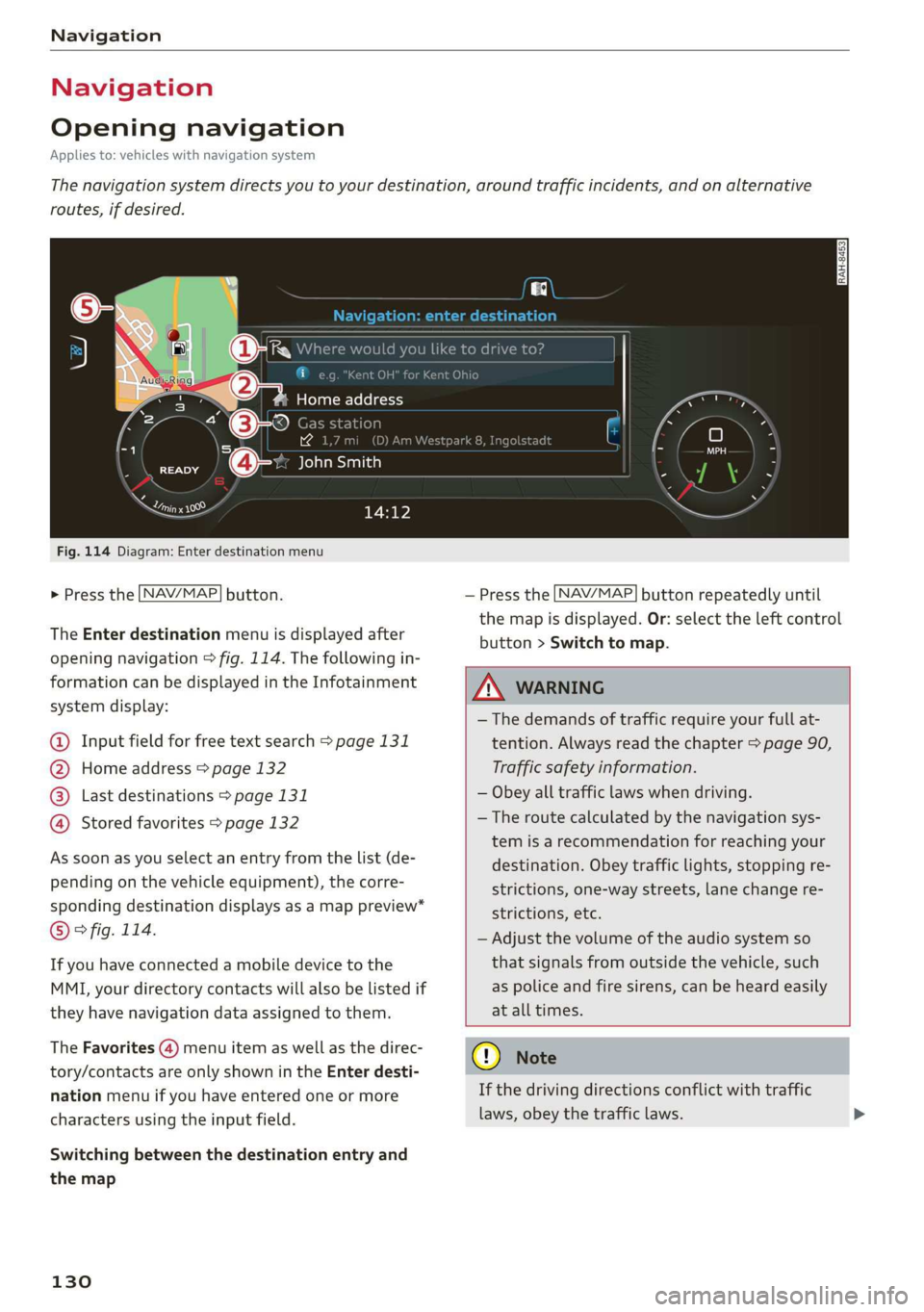
Fig.114Diagram:Enterdestinationmenu
>Pressthe [NAV/MAP]button.
TheEnterdestinationmenuisdisplayedafter
openingnavigation>fig.114.Thefollowingin-
formationcan bedisplayedintheInfotainment
systemdisplay:
@Inputfieldforfreetextsearch>page131
@Homeaddress>page132
Lastdestinations>page131pag
Storedfavorites>page132g'
Assoonasyouselectanentryfromthelist(de-
pendingonthevehicleequipment),thecorre-
spondingdestinationdisplaysasamappreview*
©°fig.114.
Ifyouhaveconnectedamobiledevicetothe
MMI,yourdirectorycontactswillalsobelistedif
they havenavigationdataassignedtothem.
TheFavorites(4)menuitemaswellasthedirec-
tory/contactsareonlyshownintheEnterdesti-
nationmenuifyouhaveenteredoneormore
charactersusingtheinputfield.
Switchingbetweenthedestinationentryand
themap
130
—Pressthe [NAV/MAP]buttonrepeatedlyuntil
themapisdisplayed.Or:selecttheleftcontrol
button>Switchtomap.
ZA\WARNING
— Thedemandsoftrafficrequireyourfullat-
tention.Alwaysreadthechapter>page90,
Trafficsafety information.
—Obeyalltrafficlawswhendriving.
— Theroutecalculatedbythenavigationsys-
temisarecommendationforreachingyour
destination.Obeytrafficlights,stoppingre-
strictions,one-waystreets,lanechangere-
strictions,etc.
—Adjustthevolumeoftheaudiosystemso
thatsignalsfromoutsidethevehicle,such
aspoliceandfiresirens,canbeheardeasily
atalltimes.
@)Note
Ifthedrivingdirectionsconflictwithtraffic
laws,obeythetrafficlaws.
Page 152 of 312
Media
Media
Introduction
Therearevariousmediadrivesandconnections
availableintheMMI.Youcanplay,forexample,
audio/videofilesfromtheJukebox*orconnect
yourmobiledevicetotheAudimusicinterface*
andoperateitthroughtheMMI.
Notes
Mediaandformatrestrictions:theMMI(includ-
ingtheSDcardreaderandtheUSBstoragede-
viceconnection*)wastestedwithavarietyof
productsandmediaavailableinthemarket.
However,theremaybecaseswhereindividualde-
vicesormediaandaudio/video*filesmaynot be
recognized,mayplayonlywithrestrictionsor
maynotplayatall.
DigitalRightsManagement:pleasenotethat
theaudio/videofilesaresubjecttocopyrightpro-
tection.
Themediadrivesdonotplayfilesthatarepro-
tectedbyDRMandthatareidentifiedwiththe
symbolfii.
Datasecurity:neverstoreimportantdataonSD
cards,theJukebox*,CDs/DVDsormobiledevices.
AudiAGisnotresponsiblefordamagedorlost
filesandmedia.
Loadingtimes:themorefiles/folders/playlists
thatareonastoragemedium,thelongeritwill
taketo loadtheaudio/video*files.Audirecom-
mendsusingstoragemediathatonlycontainau-
dio/videofiles*.To decrease thetimeittakesto
loadaudio/videofiles*,createsubfolders(forex-
ample,fortheartistoralbum).Theloadingtime
willalsoincreasewhenimportingfiles.
Additionalinformation:whenplaying,audio
filesareautomaticallydisplayedwithanyaddi-
tionalinformationthatisstored(suchasthear-
tist,trackandalbumcover).Ifthisinformationis
notavailableonthestoragemedium,theMMI
willchecktheGracenotemetadatadatabase.
150
However,insomecases,theadditionalinforma-
tionmaynotbedisplayed.
Restrictedfunctionality:resettheMediaset-
tingstothefactorydefaultsettingsiffunctional-
ityisrestricted>page170.
Iffunctionalityisrestricted,resettheJukebox*to
thefactorydefaultsettings>page170.
Forinformationaboutthepropertiesofsupport-
edmediaandfileformats,see>page164.
@)Note
Alwaysfollowtheinformationfoundin>@in
Generalinformationonpage123.
CD/DVDoperation
CD/DVDandformatrestrictions:thefunctionali-
tyofindividualstoragemediamaybelimiteddue
tothevarietyofblankCDs/DVDsavailable and
thevariouscapacities.AudioCDsorvideoDVDs
withcopyprotection,CDs/DVDsthatdonotcon-
formtothestandard,andmultisessionCDsmay
havelimitedplaybackormaynotplayatall.Audi
recommendsfinalizingtherecordingprocess
whencreatingmultisession CDs.Multisession
DVDsarenotsupported.
UsingCDs/DVDs,theCDdrive ortheDVDdrive:
toensurecorrect,high-qualityplaybackandto
preventdamagetothedriveordiscreadinger-
rors,alwaysstoreCDs/DVDsinaprotective
sleeveand donotexposethemtodirectsunlight.
Donotuse:
—Damaged,dirtyorscratchedCDs/DVDs
—
SingleCDs/DVDswith3in(8cm)diameter
—CD/DVDsthatarenotround
—CDs/DVDswithlabels
—Protectiverings
—CleaningCDs
Thermalprotectionswitch:CD/DVDplayback
maybetemporarilyunavailableifoutsidetem-
peraturesareextremelyhotorcold.Athermal
protectionswitchisinstalledtoprotectthe
CD/DVDandthelaser.
Laserdevices:laserdevicesare dividedintosafe-
tyclasses1to4inaccordancewithDINIEC76>
Page 153 of 312
8S1012721BA
Media
(CO)6/VDE0837.Thevarioustypesofaudio
equipmentinstalledconformtosafetyclass1.
The
laserusessolittlepowerorisshieldedso
thereisnodangerwhenitisusedcorrectly.
Mediadrives
SDcardreader
RAH-7103
Fig.128Glovecompartment:insertingtheSDcard
—InsertingtheSDcard:theangledcornerofthe
SDcard mustfacetowardtherightfrontwhen
inserting.SlidetheSDcardintothecardreader
slot@°fig.128untiltheSDcardclicksinto
place.
—Automaticplayback:playbackwillstartauto-
maticallyiftheinsertedSDcardcontains sup-
portedaudio/videofiles>page164.
—RemovingtheSDcard: pressbrieflyontheSD
card.
TheSDcardreaderisaccessedandoperated
throughtheMMI@)>page158,fig.133.
@Note
Onlyuseone-pieceSDcards.Ifadaptercards
(SDcardswithmorethanonepiece)areused,
thecardcouldfalloutoftheadapterwhen
driving becauseofvibrations.Individual
piecescouldthenbecomestuckinthedrive
andimpairthefunctionality.
@)Tips
AlwayskeeptheSDcardinasuitablecaseto
protectitfromdirt,dustparticles,andother
damage.
peel
Appliesto:vehicleswithaDVDdrive
==
RAH-8828
Fig.129Glovecompartment:DVDdrive
—LoadingaCD/DVD:theCD/DVDispulledinau-
tomatically.SlidetheCD/DVDstraightintothe
DVDslot@)withthelabelfacingup>fig.129.
—Automaticplayback:playbackwillstartauto-
maticallyiftheinsertedCD/DVDcontains sup-
portedaudio/video*files>page164.
—EjectingaCD/DVD:pressthebutton@
>fig.129.
TheCD/DVDispulledinagainautomaticallyifit
isnotremovedfromtheDVDslotwithinapproxi-
matelytensecondsafterejectingit.
TheDVDdriveisaccessedandoperatedthrough
theMMI@)>page158,fig.133.
@)Note
—NeverforceaCD/DVDintothedrive.The
CD/DVDispulledinautomatically.
—DonotinsertCDs/DVDswithlabelsintothe
drive.Labelscancomeloosefromthe
CD/DVDanddamagethedrive.
IG).Tips
CDs/DVDsthatcontainaudiofileswithahigh
dataratemaynotplay.
151
Page 154 of 312
Media
Appliesto:vehicleswithaCDdrive
a
RAH-8826|
Fig.130Glovecompartment:CDdrive
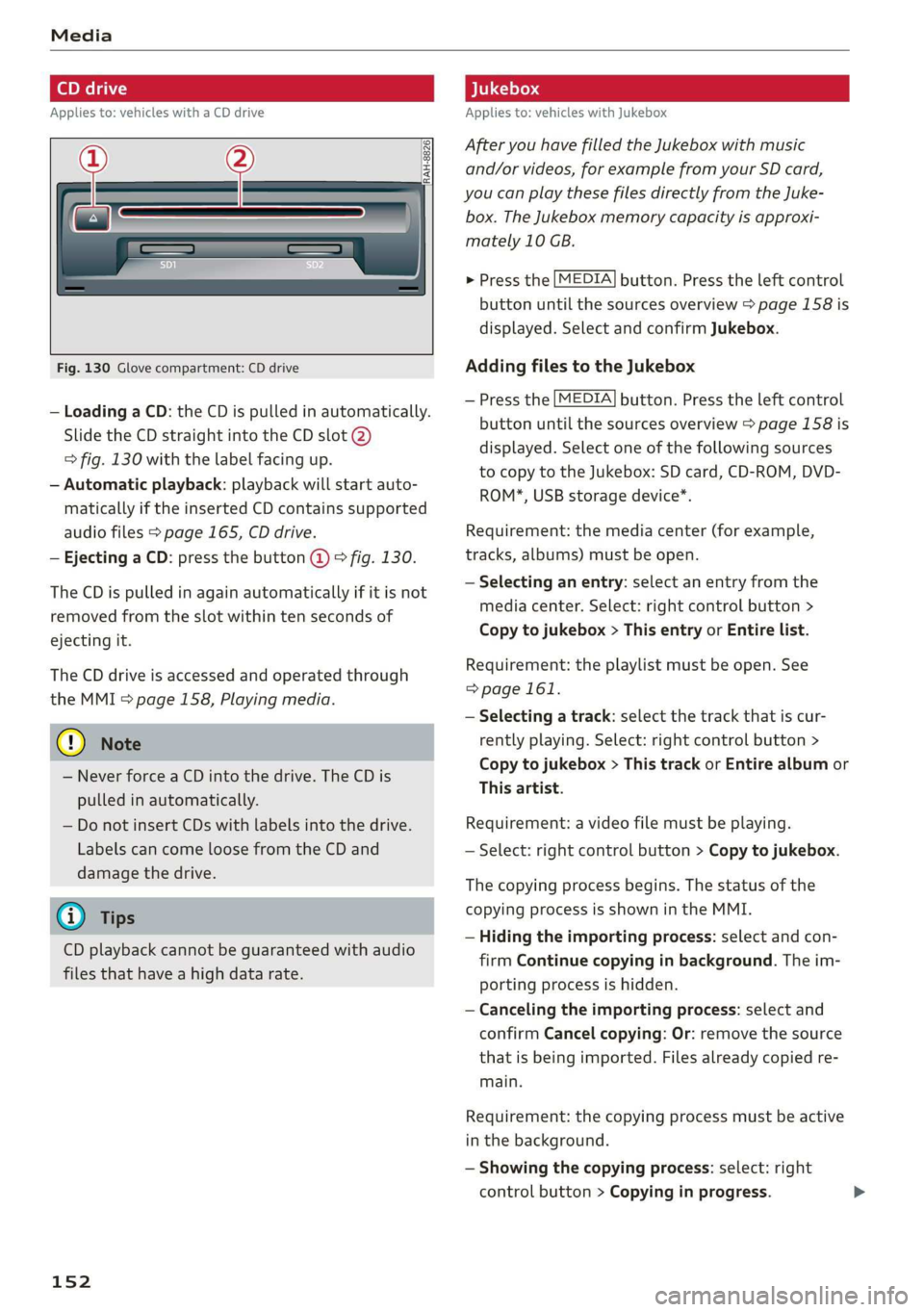
—LoadingaCD: theCDispulledinautomatically.
SlidetheCDstraightintotheCDslot@)
=>fig.130withthelabelfacingup.
—Automaticplayback:playbackwillstartauto-
maticallyiftheinsertedCDcontainssupported
audiofiles>page165,CDdrive.
—Ejecting aCD:pressthebutton@>fig.130.
TheCDispulledinagainautomaticallyifitisnot
removedfromtheslotwithin tensecondsof
ejectingit.
TheCDdriveisaccessedandoperatedthrough
theMMI>page158,Playingmedia.
@)Note
—NeverforceaCDintothedrive.TheCDis
pulledinautomatically.
—DonotinsertCDswithlabelsintothedrive.
LabelscancomeloosefromtheCDand
damagethedrive.
@Tips
CDplaybackcannotbeguaranteedwithaudio
filesthathaveahighdatarate.
152
Appliesto:vehicleswithJukebox
AfteryouhavefilledtheJukeboxwithmusic
and/orvideos,forexamplefrom yourSDcard,
youcanplaythesefilesdirectlyfromtheJuke-
box.TheJukeboxmemorycapacityisapproxi-
mately10GB.
>Pressthe[MEDIA]button.Presstheleftcontrol
buttonuntilthesourcesoverview>page158is
displayed.SelectandconfirmJukebox.
AddingfilestotheJukebox
—Pressthe[MEDIA]button.Presstheleftcontrol
buttonuntilthesourcesoverview>page158is
displayed.Selectoneofthefollowingsources
tocopytotheJukebox:SDcard,CD-ROM,DVD-
ROM*,USBstoragedevice*.
Requirement:themediacenter(forexample,
tracks,albums)mustbeopen.
—Selectinganentry:selectanentryfromthe
mediacenter.Select:rightcontrolbutton>
Copytojukebox>Thisentryor Entirelist.
Requirement:theplaylistmustbe open.See
=>page161.
—Selectingatrack:selectthetrackthatiscur-
rently playing.Select:rightcontrolbutton>
Copytojukebox>ThistrackorEntirealbumor
Thisartist.
Requirement:avideofilemustbeplaying.
—Select:rightcontrolbutton>Copytojukebox.
Thecopyingprocessbegins.Thestatusofthe
copyingprocessisshownintheMMI.
—Hidingtheimportingprocess:selectandcon-
firm
Continuecopyinginbackground.Theim-
portingprocessishidden.
—Cancelingtheimportingprocess:selectand
confirmCancelcopying:Or:removethesource
thatisbeingimported.Filesalreadycopiedre-
main.
Requirement:thecopyingprocessmustbeactive
inthebackground.
—Showingthecopyingprocess:select:right
controlbutton>Copyinginprogress.
Page 155 of 312
8S1012721BA
Media
Whenimporting,theaudiofilesareautomatical-
lysortedintothemediacentercategoriesbased
onthestoredadditionalinformation>page159.
Thecopiedvideofilesarestoredinthemedia
centerundertheVideoscategory.
PlayingtheJukebox
Requirement:theJukeboxmustcontainaudio/
videofiles>page152,AddingfilestotheJuke-
box.
TheJukeboxisaccessedandoperatedthrough
theMMI@)&page158,fig. 133.
DisplayingJukeboxmemorycapacity
Select:rightcontrolbutton>Jukeboxmemory
capacity.InformationabouttheJukeboxmemory
capacityandthenumberofstoredtracksisdis-
played.
DeletingtracksfromtheJukebox!)
Requirement:theJukeboxmustcontainaudio/
videofiles.
—Deletinganentry:selectanentryfromthe
Jukeboxmediacenter.Select:rightcontrolbut-
ton>Deletefromjukebox>ThisentryorEn-
tirelist.
—Thestatusofthedeletingprocessisshownin
theMMI.Jukeboxplaybackstopsduringthede-
letingprocessandstartsagainautomatically
oncethedeletioniscomplete.
©)Note
Donotimportaudio/videofileswhentheen-
gineisturnedoffbecausethiswilldrainthe
vehiclebattery.
G)Tips
—TracksfromaudioCDscannotbeimported
totheJukeboxforlegalreasons.
—Filesthathavealreadybeenimportedare
automaticallyrecognizedandcannotbe
copiedtotheJukeboxagain.
—Itisnotpossibletoplay audio/video*files
intheCD/DVD*drivewhileimportingthem.
NotinthePlaybackview.
—TheJukeboxdoesnotprovideanexport
functionduetolegalreasons.
—Filesortrackswithoutadditionalstoredin-
formationarelistedasUnknown.Audirec-
ommendsaddingadditionalinformation
(suchasID3tags)toaudiofiles.
—Reset theJukeboxtothefactorydefaultset-
tings whensellingyourvehicle>page170.
Bluetoothaudioplayer
Appliesto:vehicleswithBluetoothaudioplayer
WiththeBluetoothaudioplayer,youcanplay
musicwirelesslyfromyourBluetooth-capable
device(suchas acellphone)throughtheMMI.
Requirement:thevehiclemustbestationaryand
theignitionmustbe switchedon.TheBluetooth
settingswillopenonyourmobiledeviceduring
theconnectionsetup.TheBluetoothfunctionand
visibilityoftheMMI=page171andmobilede-
vicemustbeswitchedon.TheBluetoothaudio
player=page171mustbe switchedoninthe
MMI.
—ConnectingaBluetoothdevice:pressthe
MEDIA]button.Presstheleftcontrolbutton
untilthesourcesoverviewisdisplayed.Select
andconfirmBluetoothaudioplayer©)
=>page158,fig.134.
—Ifnecessary,selectandconfirm,Notconnected
>ConnectBluetoothaudioplayer.TheBlue-
toothdevicesearchstarts.Followtheinstruc-
tionsintheMMI.
—
SelectandconfirmthedesiredBluetoothdevice
fromthelist.TheMMIgeneratesaPINforthe
connection.
—SelectandconfirmYes.
—EnterthePINforconnectingonyourBluetooth
device.Or:ifthePINisalreadydisplayedon
yourBluetoothdevice,confirmitintheBlue-
toothdeviceandintheMMI.Thetimeallowed
forenteringthePINislimitedtoapproximately
30seconds.
Themediaisstartedandoperatedthroughthe
mobiledeviceortheMMI,dependingonthede-
vicebeingused.
153
>
Page 156 of 312
—Checkforanyconnectionrequestsonyour
Bluetoothdevice.
—MultipleBluetoothaudioplayerscan be
connectedtotheMMI,butonlyonemobile
devicecanbeactive.
—BluetoothprotocolsAVRCP(1.0/1.3/1.4)
andA2DParesupported.
—NotethevolumesettingonyourBluetooth
device.Audirecommendssettingyourmo-
biledevicetothemaximumvolumewhen
usingitasaBluetoothaudioplayer.
— Thesupportedmediafunctions(suchas
shuffle)dependontheBluetoothdevicebe-
ingused.
—Formoreinformationonsupporteddevices,
visitwww.audiusa.com/bluetoothorcon-
tactanauthorizedAudidealerorauthorized
AudiServiceFacility.
Wi-Fiaudioplayer
Appliesto:vehicleswithWi-Fiaudioplayer
UsingtheWi-Fiaudioplayermediasourceonthe
MMI,youcanconnectandoperateyourWi-Fi-ca-
pablemediaplayer(suchasasmartphone)to
wirelesslyplaymusicfrom yourmediaplayerli-
brary.Themediaplayerisconnectedthroughthe
vehicle'sWi-Fihotspot.AUPnPServerapporan
integratedUPnP/DLNAserveronyourmedia
playerisrequiredtoaccessyourmediaplayerli-
brary.
Requirement:theWi-Fifunctiononyourmedia
playermustbe switchedon.ThemyAudiappora
UPnPserverappmustbeinstalledonyourmedia
player.Or:youmustbeusingamediaplayerwith
anintegratedUPnP/DLNAserver.
—Connectingamediaplayer:pressthe[MEDIA
button.Presstheleftcontrolbuttonuntilthe
sourcesoverview>page158isdisplayed.Se-
lectandconfirm Wi-Fiaudioplayer(7)
=>page158,fig. 134.
—Ifnecessary,selectandconfirmWi-Fiturned
off>TurnonWi-Fito activateWi-Fiinthe
MMI.SelectWi-Fisettings,ifnecessary.Select
thesamesettingsonthewirelessmediaplayer
thatareusedfortheWi-Fihotspot.
154
—StartingtheWi-Fiaudioplayer:startthe
myAudiapporaUPnPserverapp.Or:setme-
diapermissionsonyourmediaplayer.
Operatingthemediaplayer:themediaplayeris
operatedthroughtheMMI.
—Presstheleftcontrolbuttonrepeatedlyuntil
theFoldersmenuitemappears.Selectandcon-
firm
Folders.
—Playingmusicfromthemediaplayer:select
andconfirmMediacenter.
Webradio:see>page155.
ZAWARNING
—Asthedriver,donotallowusageoftheWi-
Fihotspottodistractyoufromdriving,as
thiscouldincreasetheriskofanaccident.
—Itisonlysafe tousetablets,laptops,mobile
devicesandothersimilardeviceswhenthe
vehicleisstationarybecause,likeallloose
objects,theycouldbethrownaroundthein-
sideofthevehicleinacrashandcauseseri-
ousinjuries.Storethesetypesofdevicesse-
curelywhiledriving.
—Donotuseanywirelessdevicesonthefront
seatswithinrangeoftheairbagswhiledriv-
ing.Also readthewarningsinthechapter
=>page188.
@)Note
Alwaysfollowtheinformationfoundin>@in
Generalinformationonpage123.
@Tips
— TheWi-Ficonnectionisreconfiguredwhen
insertingorremovingtheminiSIMcardin
theSIMcardreader*.Theremaybeatem-
poraryinterruptioninaudioplayback,de-
pendingonthemediaplayer.
—Alwaysreadthe chapter>page123,Audi
connect.
—PleasenotethataWi-Ficonnectiondoes
notautomaticallymakeitpossible touse
theInternet.Foradditionalinformation,
see>page123.
Page 157 of 312
8S1012721BA
Media
—Toavoidinterruptionsduringplayback,de-
activatethepowersavingfunctiononthe
mediaplayer orconnectittoacharger.
— Theloadingtimesfortheaudiodatadepend
onthemediaplayerusedandthenumberof
filesthatitcontains.
—Amaximumof2,000entriesperdirectory
aredisplayedintheMMI.
—Songsdownloadedforofflineuseusingmu-
sicstreamingservicesarestoredonyour
mobiledevice(suchasasmartphone)and
maybeDRMprotected.TheWi-Fiaudio
playerwillnotplayDRMprotectedfiles.
—ContactanauthorizedAudidealeror au-
thorizedAudiServiceFacilityforadditional
informationontheWi-Fiaudioplayer.
Onlinemediaand
Internetradio
Appliesto:vehicleswithAudiconnect
Youcanplaybackandoperatevariousonlineme-
diaservicesandInternetradiousingtheMMI.
>»Pressthe[MEDIA]button.Presstheleftcontrol
buttonuntilthesourcesoverview>page158,
fig.134isdisplayed.
Appliesto:usingonlinemediaandInternetradio
Requirement:
—ThemyAudiappmustbeinstalledandopenon
yourmobiledevice.
—YoumustbeloggedintoyourmyAudiaccount
inthemyAudiappandyoumusthaveselected
yourvehicle.
—TheWi-Fifunctiononthemobiledeviceandon
theMMImustbeswitchedon.
—Ifnecessary,checkinthe connectionmanager
=>page170ifthemobiledeviceyouconnected
isselectedundertheMMIconnectapp().
—TheMMImustbeconnectedtothenetwork.
—ThesymbolfortheOnlinemedia*source
=>page158,fig.134isshownintheMMI.
Appliesto:usingonlinemedia
Additionalrequirement:
—Asupportedonlinemediaservicemustbeavail-
ableinthecountrywherethevehicleisbeing
operated.
—Youmusthaveanaccountwithasupportedon-
linemediaservice.
—Dependingontheonlinemediaservice,you
mayneedtoinstallandopenanapponyour
mobiledevice.
StartingOnlinemedia
—Pressthe[MEDIA]button.Presstheleftcontrol
buttonuntilthesourcesoverview>page158is
displayed.
—Selectandconfirm anonlinemediaservice.
StartingInternetradio
—Pressthe|MEDIA]button.Presstheleftcontrol
buttonuntilthesourcesoverview>page158is
displayed.
—SelectandconfirmInternetradio.TheInternet
radiobrowserorthelaststationthatwasplay-
ingisshown.
—Selectingthestation:ifnecessary,selectand
confirmacategoryintheInternetradioBrows-
er>astation.
OnlinemediaandInternetradio::additionalop-
tions
—Presstherightcontrolbutton.
Thefollowingoptionsmaybeavailable,depend-
ingontheinformationshown(suchasthesta-
tion/trackthatiscurrentlyplaying):
—Soundsettings:see>page173.
—Wi-Fisettings:see>page128,Wi-Fisettings.
—Connectionmanager:see>page170.
—Additionaloptionsmaybeavailable,depending
ontheactiveonlinemediaserviceorInternet
radio.
ZA\WARNING
—Itisonlysafe tousetablets,laptops,mobile
devicesandothersimilardeviceswhenthe
vehicleisstationarybecause,likeallloose
objects,theycouldbethrownaroundthein-
sideofthevehicleinacrashandcauseseri-
ousinjuries.Storethesetypesofdevicesse-
curelywhiledriving.
—Donotuseanywirelessdevicesonthefront
seatswithinrangeoftheairbagswhiledriv-
ing.Also readthewarningsinthechapter
>page188.>
155
Page 160 of 312
Media
—Audirecommendssettingthevolumeofa
mobiledeviceconnectedtotheAUXinputto
approximately70%ofthemaximumvol-
ume.
—Functionalityisnotguaranteedformobile
devicesthatdonotconformtotheUSB2.0
specification.
—USBhubsarenotsupported.
—SomeversionsoftheiPodsuchastheiPod
shufflecannotbeconnectedtotheUSB
adapterfordeviceswithAppleDockconnec-
tor.ConnectthesedevicesusingaAUXcon-
nectorcable.
—Videoplaybackthroughthe Audimusicin-
terfaceisonlysupportediftheconnected
deviceisrecognizedasaUSBstoragedevice
(forexampleaUSBstick).Appledevicesand
MTPdevices(such assmartphones)arenot
recognizedasUSBstoragedevices.
—iPod oriPhonemalfunctionsalsoaffectthe
operationoftheMMI.ResetyouriPod or
iPhoneifthishappens.
—Forimportantinformationonoperating
youriPodoriPhone,refertotheuserguide
forthedevice.Audirecommendsupdating
theiPodoriPhonesoftwaretothelatest
version.
—Formoreinformationaboutthe Audimusic
interfaceandsupporteddevices,checkthe
Audidatabaseformobiledevicesatwww.
audiusa.com/mp3orcontactanauthorized
AudidealerorauthorizedAudiServiceFa-
cility.
Playingmedia
Accessingmedia
Youcanstartandoperatevariousmediathrough
theMMIcontrolpanel.
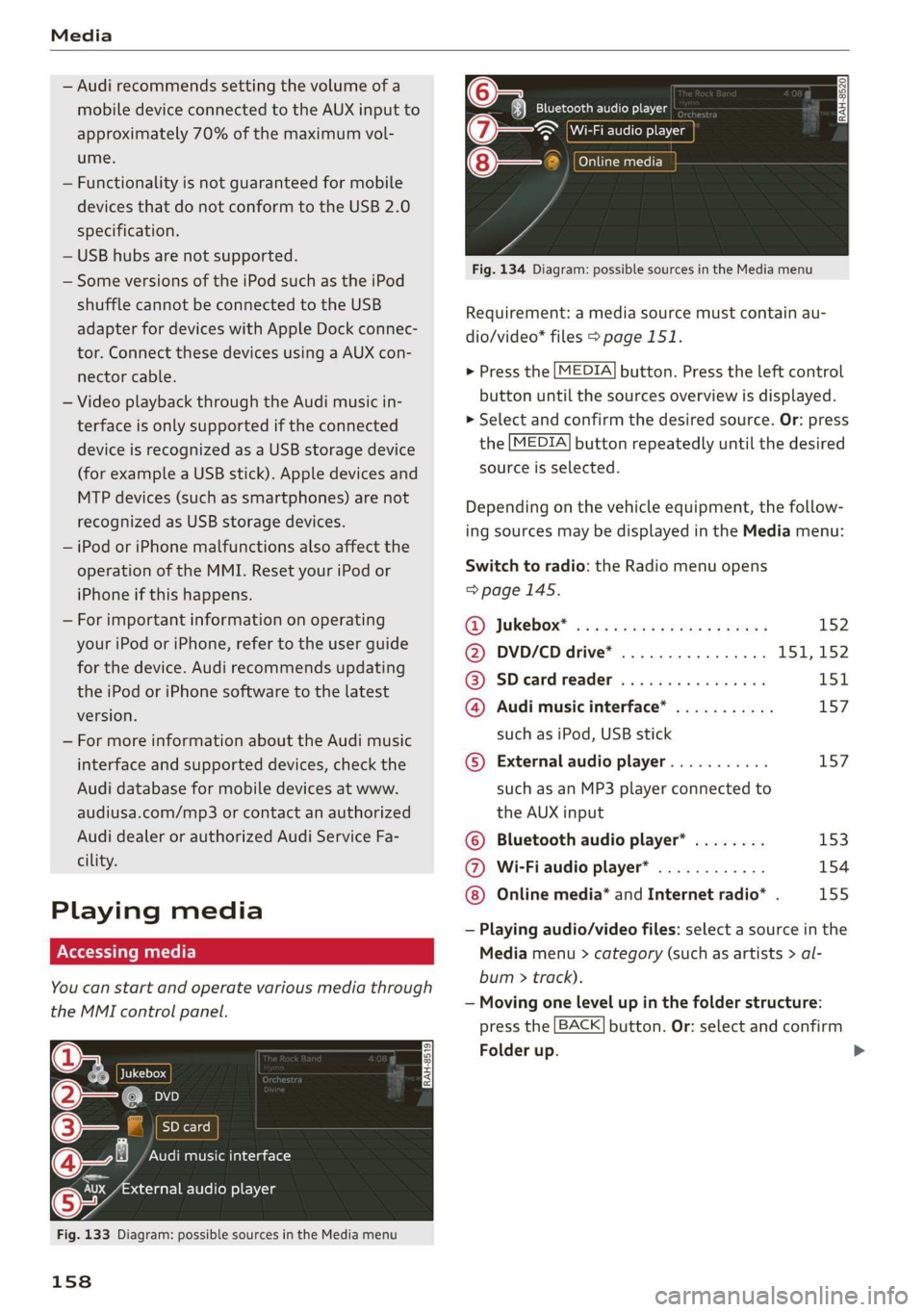
Ue@@|Jukebox
@—eies
[RAH-8519]
@—§Audimusicinterface
evaudioplayer
Fig.133Diagram:possiblesourcesintheMediamenu
158
RAH-8520Bluetoothaudioplayer
=~Wi-Fiaudioplayer
Onlinemedia
Fig.134Diagram:possiblesourcesintheMediamenu
Requirement:amediasourcemustcontainau-
dio/video*files>page151.
>Pressthe[MEDIA]button.Presstheleftcontrol
buttonuntilthesourcesoverviewisdisplayed.
>Selectandconfirmthedesiredsource.Or:press
the[MEDIA]buttonrepeatedlyuntilthedesired
sourceisselected.
Dependingonthevehicleequipment,thefollow-
ingsourcesmaybedisplayedintheMediamenu:
Switchtoradio:the Radiomenuopens
=>page145.
RD):JUKEDOX®wesssserex xsemeveeee152
@DVD/CDdrive*................ISI,152
@SDeardreader................151
@Audimusicinterface*...........157
suchasiPod,USBstick
©Externalaudioplayer...........157
suchasanMP3playerconnectedto
theAUXinput
©Bluetoothaudioplayer*........153
@Wi-Fiaudioplayer*............154
Onlinemedia*andInternetradio”.155
—Playingaudio/videofiles:selectasourceinthe
Mediamenu>category(suchasartists>al-
bum>track).
—Movingonelevelupinthefolderstructure:
pressthe[BACK]button.Or:selectandconfirm
Folderup.
>
Page 161 of 312
8S1012721BA
Media
—Selectingthepreviousornexttrack/chapter
D: presstheOn/OffknobontheMMIcontrol
panelbrieflytotheleftKdorrightDo.
—Fast-forwardingandrewindingaudio/video
files:pressandholdtheOn/Offknobonthe
MMIcontrolpaneltotheleftKdorrightDelfor
alongertime.
—Pausingorresumingplayback:pressthe
On/OffknobontheMMIcontrolpanelbriefly.
@)Tips
—Youcanscrollthroughlonglistsquicklyby
turningthecontrolknobquickly.Thescroll-
ingspeeddependsonthenumberoflisten-
tries.
—Forsafetyreasons,thevideoimageisonly
displayedwhenthevehicleisstationary.On-
lythesoundfromthevideoplayswhiledriv-
ing.
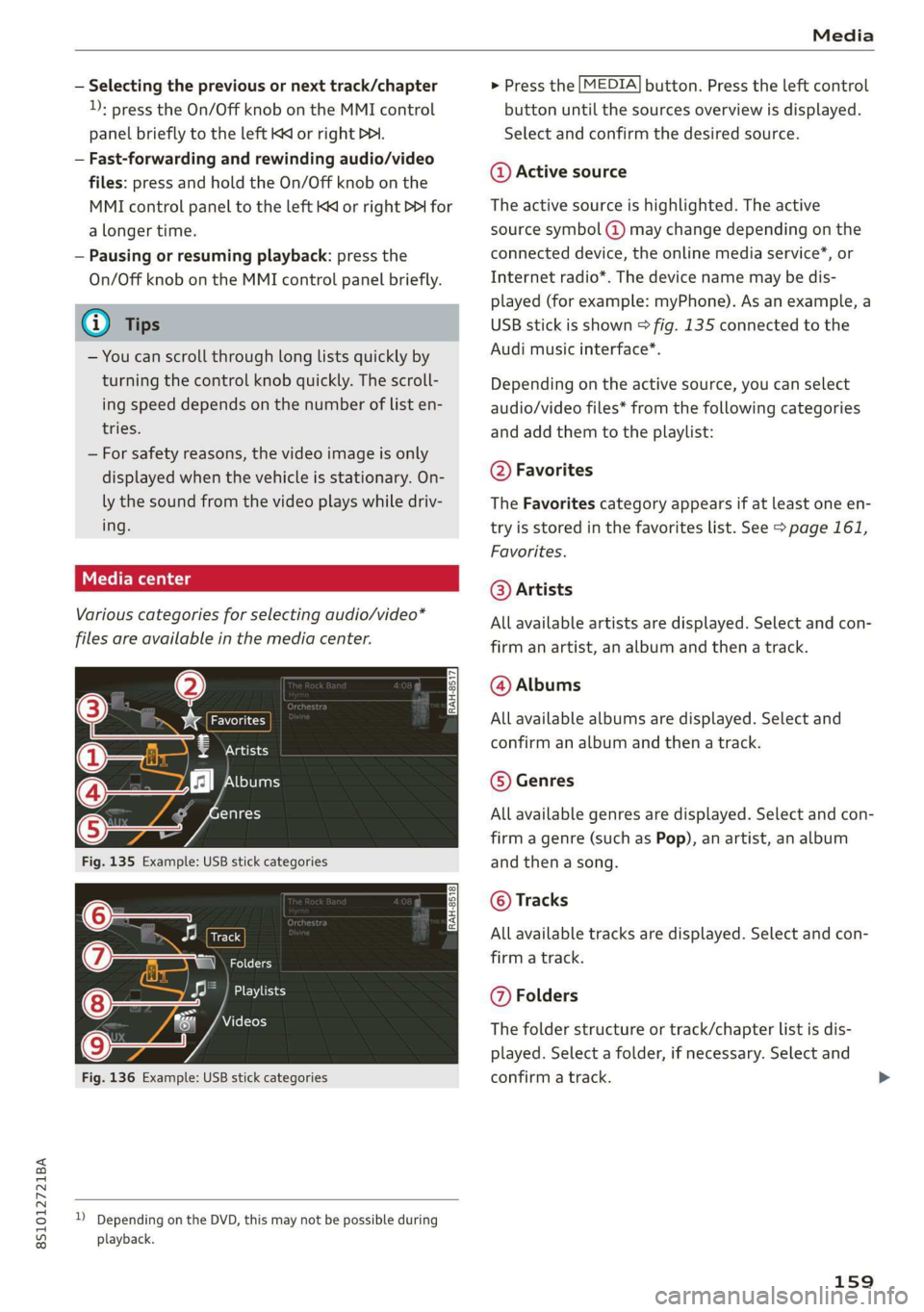
Variouscategoriesfor selectingaudio/video*
filesareavailableinthemediacenter.
ao
€Artists
(4)‘falNeyeraa
ogalg-t)
—
Fig.135Example:USBstickcategories
Track
(7)RNa
Fig.136Example:USBstickcategories
))DependingontheDVD,thismaynotbepossibleduring
playback.
>Pressthe[MEDIA]button.Presstheleftcontrol
buttonuntilthesourcesoverviewisdisplayed.
Selectandconfirmthedesiredsource.
@Activesource
Theactivesourceishighlighted.Theactive
sourcesymbol(@)maychangedependingonthe
connecteddevice,theonlinemediaservice*,or
Internetradio*.Thedevicenamemaybedis-
played(forexample:myPhone).Asanexample,a
USBstickisshown>fig.135connectedtothe
Audimusicinterface*.
Depending ontheactivesource,youcanselect
audio/videofiles*fromthefollowingcategories
andaddthemtotheplaylist:
@Favorites
TheFavoritescategoryappearsifatleastoneen-
tryisstoredinthefavoriteslist.See>page161,
Favorites.
@Artists
Allavailableartistsaredisplayed.Selectandcon-
firmanartist,analbumandthenatrack.
@Albums
Allavailablealbumsaredisplayed.Selectand
confirm analbumandthenatrack.
©Genres
Allavailablegenresaredisplayed.Selectandcon-
firm
agenre(suchasPop),anartist,analbum
andthenasong.
©Tracks
Allavailabletracksaredisplayed.Selectandcon-
firm
atrack.
@Folders
Thefolderstructureortrack/chapterlistisdis-
played.Selectafolder,ifnecessary. Selectand
confirmatrack.
159