audio AUDI TT COUPE 2019 Owner's Manual
[x] Cancel search | Manufacturer: AUDI, Model Year: 2019, Model line: TT COUPE, Model: AUDI TT COUPE 2019Pages: 312, PDF Size: 83.95 MB
Page 162 of 312
Media
Playlists
Allavailableplaylistsfromthe sourceandthe
smartplaylistsaredisplayed.Selectandconfirm
aplaylistandthenatrack.
Smartplaylists:
—Lastplayedtracks:thelasttracksplayedinthe
selectedsourcearedisplayed.
— Mostplayed:themostplayedtracksinthese-
lectedsourcearedisplayed.
—5starsto1star:tracksfromtheselected
sourcearedisplayedaccordingtotheirrating.
—Unrated:allfilesfromtheselectedsource
withoutratinginformation(forexample,inthe
ID3tag)aredisplayed.
©Videos*
Allavailablevideofilesaredisplayed.Selectand
confirmavideofile.
@)Tips
—Onlythecategoriessupportedby themedi-
umareavailable.Forexample,CD/DVD-
ROMtrackscannotbeselectedwithcatego-
riessuchasArtists,AlbumsorGenres.
WithaniPod(source:Audimusicinterface
=page156),thePodcasts,Audio books
andComposerscategoriesarealsoavaila-
ble.
—For safetyreasons,thevideoimageisonly
displayedwhenthevehicleisstationary.On-
lythesoundfromthevideoplayswhiledriv-
ing.
—Whensynchronizingaportabledevicewith
"Cloud“services,playlistsmaydisplayincor-
rectly
intheMMI.Usethemediacenterin
thedevice.
160
a-\-e-yaay1aa)
You cansearchintheactivesourcebytracksand
videofiles*,forexample
RockBand
RockBand
x
ee
Saal
(ees
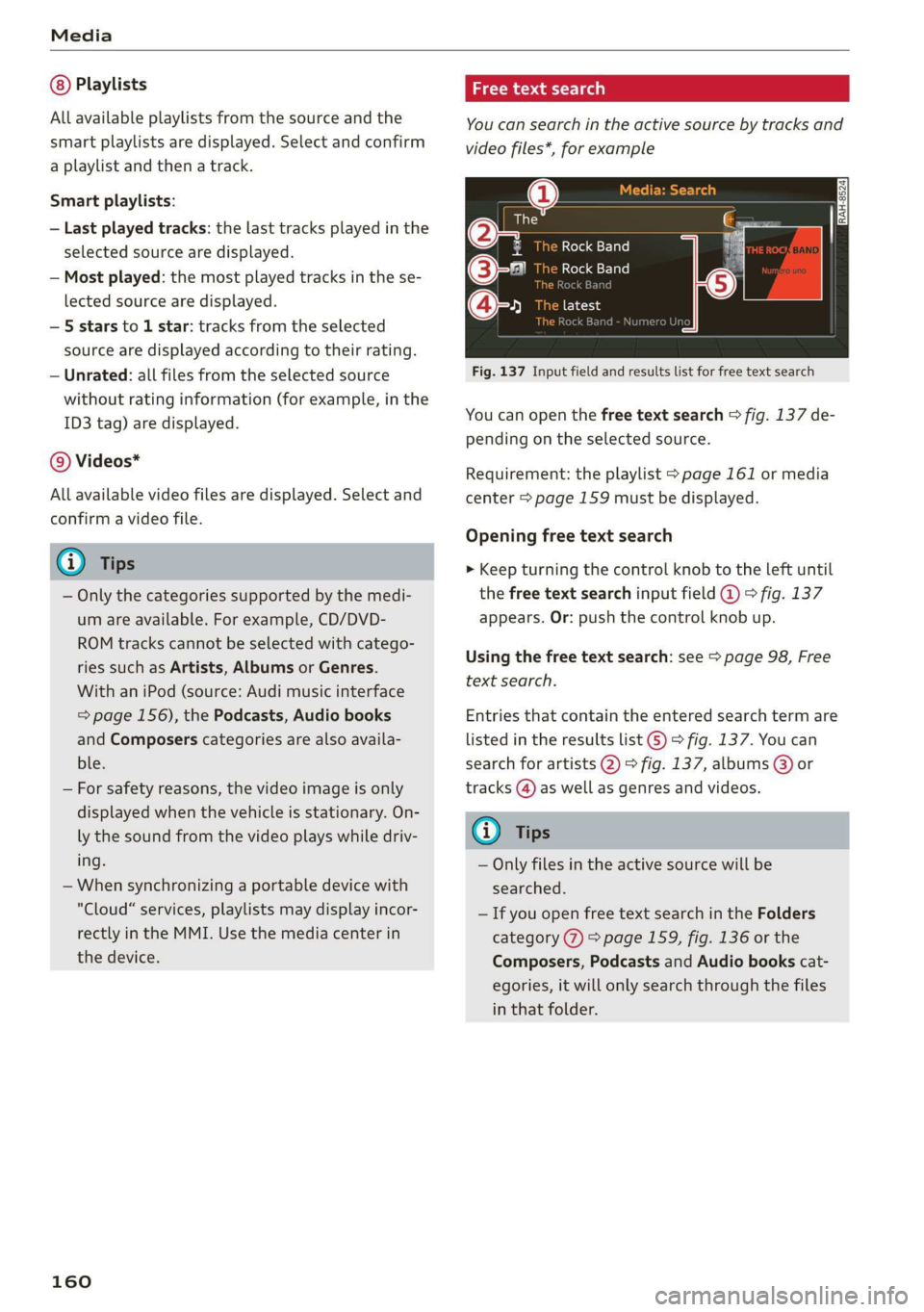
Fig.137Inputfieldandresultslistforfreetextsearch
Nume
Youcanopenthefreetextsearch>fig.137de-
pendingontheselectedsource.
Requirement:theplaylist>page161ormedia
center>page159mustbedisplayed.
Openingfreetextsearch
>Keepturningthecontrolknobtotheleftuntil
thefreetextsearchinputfield@>fig.137
appears.Or:pushthecontrolknobup.
Usingthefreetextsearch:see>page98,Free
textsearch.
Entriesthatcontaintheenteredsearchtermare
listedintheresultslist©)>fig.137.Youcan
searchforartists2)>fig.137,albums@)or
tracks@)aswellasgenresandvideos.
(i)Tips
—Onlyfilesintheactivesourcewillbe
searched.
—IfyouopenfreetextsearchintheFolders
category(7)>page159,fig.136orthe
Composers,PodcastsandAudiobookscat-
egories,itwillonlysearchthroughthefiles
inthatfolder.
Page 165 of 312
8S1012721BA
Media
Audiotrack!)
Youcanmanuallysettheaudiotrack(language
andaudioformat).Thelanguageandaudiofor-
matoptionsdependonthevideoDVD.
Subtitles!)
Youcanmanuallyselectsubtitlesforplayback.
ThelanguagesavailabledependontheDVD.
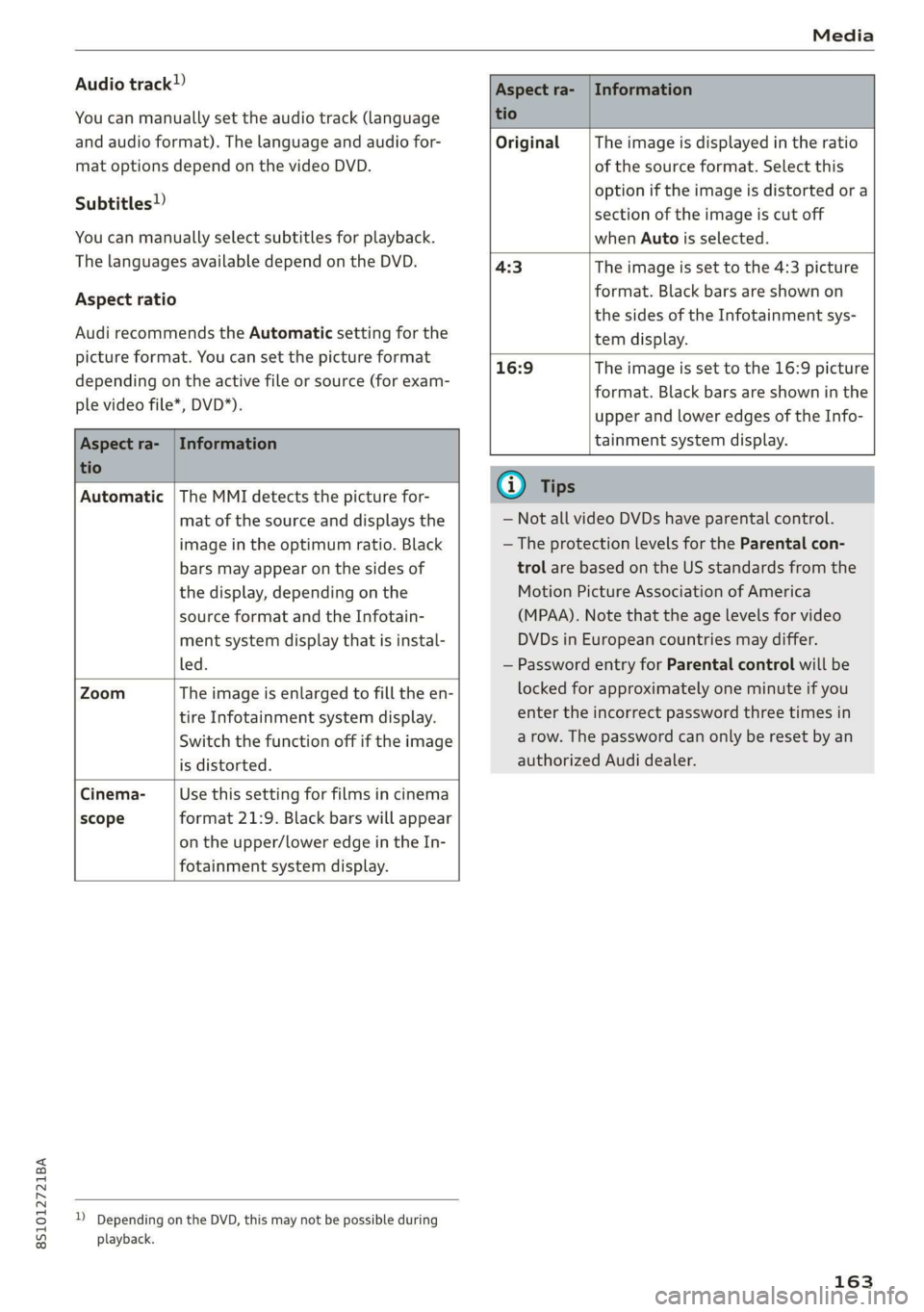
Aspectratio
AudirecommendstheAutomaticsettingforthe
pictureformat.Youcansetthepictureformat
dependingontheactivefileorsource(forexam-
plevideofile*,DVD*).
Aspectra-|Information
tio
OriginalTheimageisdisplayedintheratio
ofthesourceformat.Selectthis
optioniftheimageisdistorted ora
sectionoftheimageiscutoff
whenAutoisselected.
4:3Theimageissettothe 4:3picture
format.Blackbarsareshownon
thesidesoftheInfotainmentsys-
temdisplay.
Aspectra-|Information
tio
16:9 Theimageissettothe16:9picture
format.Blackbarsareshowninthe
upperandloweredgesoftheInfo-
tainmentsystemdisplay.
Automatic|TheMMIdetectsthepicturefor-
matofthesourceanddisplaysthe
imageintheoptimumratio.Black
barsmayappearonthesidesof
thedisplay,dependingonthe
sourceformatandtheInfotain-
mentsystemdisplaythatisinstal-
led.
ZoomTheimageisenlargedtofilltheen-
tireInfotainmentsystemdisplay.
Switchthefunctionoffiftheimage
isdistorted.
Cinema-Usethissettingforfilmsincinema
scopeformat21:9. Blackbarswillappear
ontheupper/loweredgeintheIn-
fotainmentsystemdisplay.
DDependingontheDVD,thismaynotbepossibleduring
playback.
@Tips
—NotallvideoDVDshaveparentalcontrol.
—TheprotectionlevelsfortheParentalcon-
trolarebasedontheUSstandardsfromthe
MotionPictureAssociationofAmerica
(MPAA).Notethattheagelevelsforvideo
DVDsinEuropeancountriesmaydiffer.
—PasswordentryforParentalcontrolwillbe
lockedforapproximatelyoneminuteifyou
entertheincorrectpasswordthreetimesin
arow.Thepasswordcanonlyberesetbyan
authorizedAudidealer.
163
Page 166 of 312
Media
Supportedmediaandfileformats
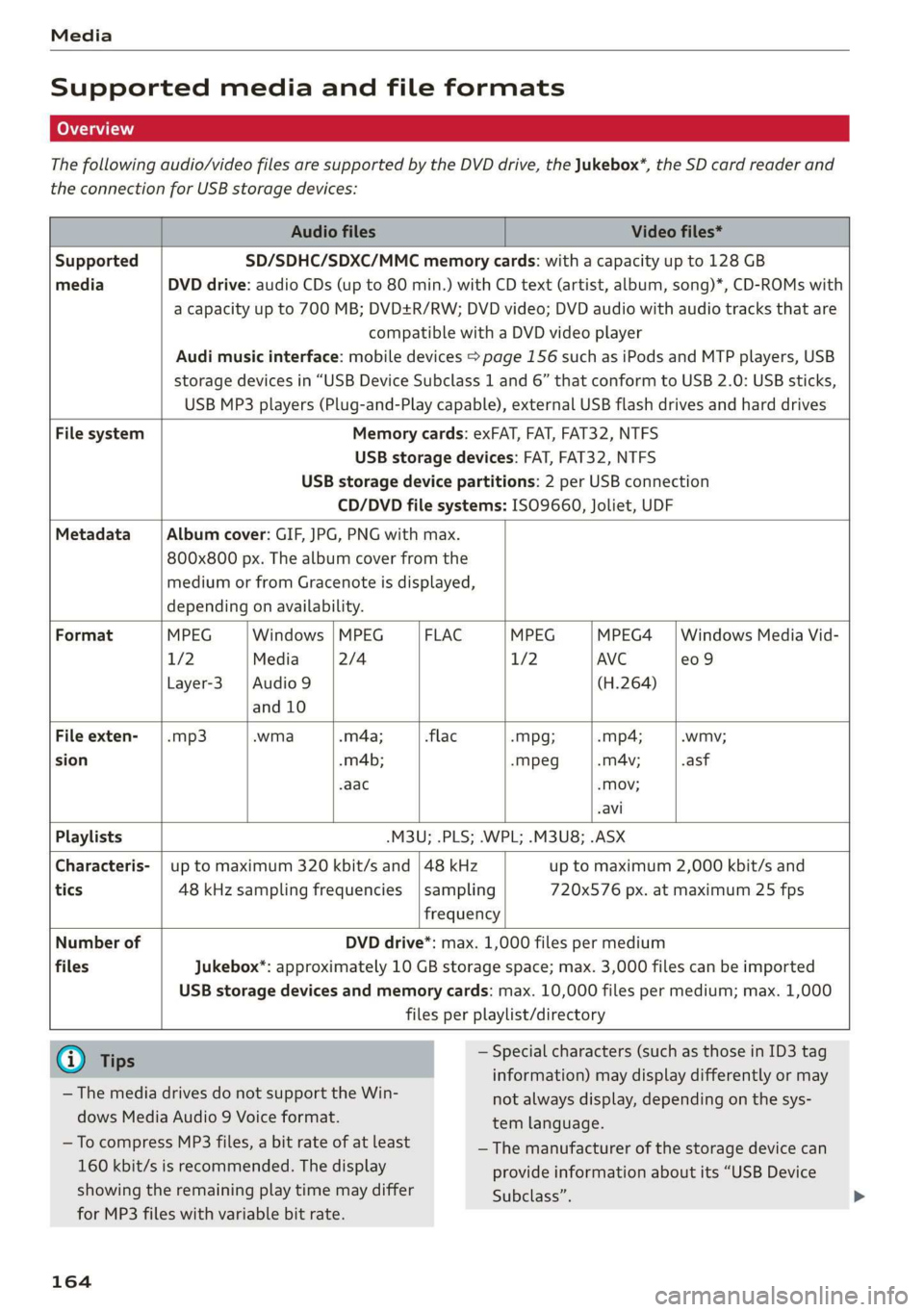
Thefollowingaudio/videofilesaresupportedbytheDVDdrive,theJukebox*,theSDcardreaderand
theconnectionforUSBstoragedevices:
AudiofilesVideofiles*
SupportedSD/SDHC/SDXC/MMCmemorycards:withacapacityupto128GB
mediaDVDdrive:audioCDs(upto80min.)withCDtext(artist,album,song)*,CD-ROMswith
acapacityupto700MB;DVD+R/RW;DVDvideo;DVDaudiowithaudiotracksthatare
compatiblewithaDVDvideoplayer
Audimusicinterface:mobiledevices>page156suchasiPodsandMTPplayers,USB
storagedevicesin“USBDeviceSubclass1and6”thatconformtoUSB2.0:USBsticks,
USBMP3players(Plug-and-Playcapable),externalUSBflashdrivesandharddrives
FilesystemMemorycards:exFAT,FAT,FAT32,NTFS
USBstoragedevices:FAT,FAT32,NTFS
USBstoragedevicepartitions:2perUSBconnection
CD/DVDfilesystems: ISO9660,Joliet,UDF
MetadataAlbumcover:GIF,JPG,PNGwithmax.
800x800px.Thealbumcoverfromthe
mediumorfromGracenoteisdisplayed,
dependingonavailability.
FormatMPEGWindows|MPEGFLACMPEGMPEG4|WindowsMediaVid-
1/2Media2/41/2AVCe09
Layer-3|Audio9(H.264)
and10
Fileexten-|.mp3.wma.m4a;-flac-Mpg;-mp4;.wmy;
sion.m4b;-mpeg.mA4v;.asf
aac-Mov;
avi
Playlists-M3U;.PLS;.WPL;.M3U8;.ASX
Characteris-|uptomaximum320kbit/sand|48kHz uptomaximum2,000kbit/sand
tics48kHzsamplingfrequencies|sampling720x576px.atmaximum25fps
frequency
NumberofDVDdrive*:max.1,000filespermedium
filesJukebox*:approximately10GBstoragespace;max.3,000filescan beimported
USBstoragedevicesandmemorycards:max.10,000filespermedium;max.1,000
filesperplaylist/directory
@Ti—Specialcharacters(suchasthoseinID3tag
ips::::
information)maydisplaydifferentlyormay
notalwaysdisplay,dependingonthesys-
temlanguage.
— ThemediadrivesdonotsupporttheWin-
dowsMediaAudio9Voiceformat.
—ToeeMP3files,abitrateoiatleast—Themanufacturerofthestoragedevicecan
160kbit/sisrecommended.Thedisplayprovideinformationaboutits“USBDevice
showingtheremainingplaytimemaydifferSubclass”.
forMP3fileswithvariablebitrate.
164
Page 167 of 312
8S1012721BA
Media
—SomeMTPplayerfunctionsarenotsupport-
ed,suchasratingmusictracksandvideo
playback.
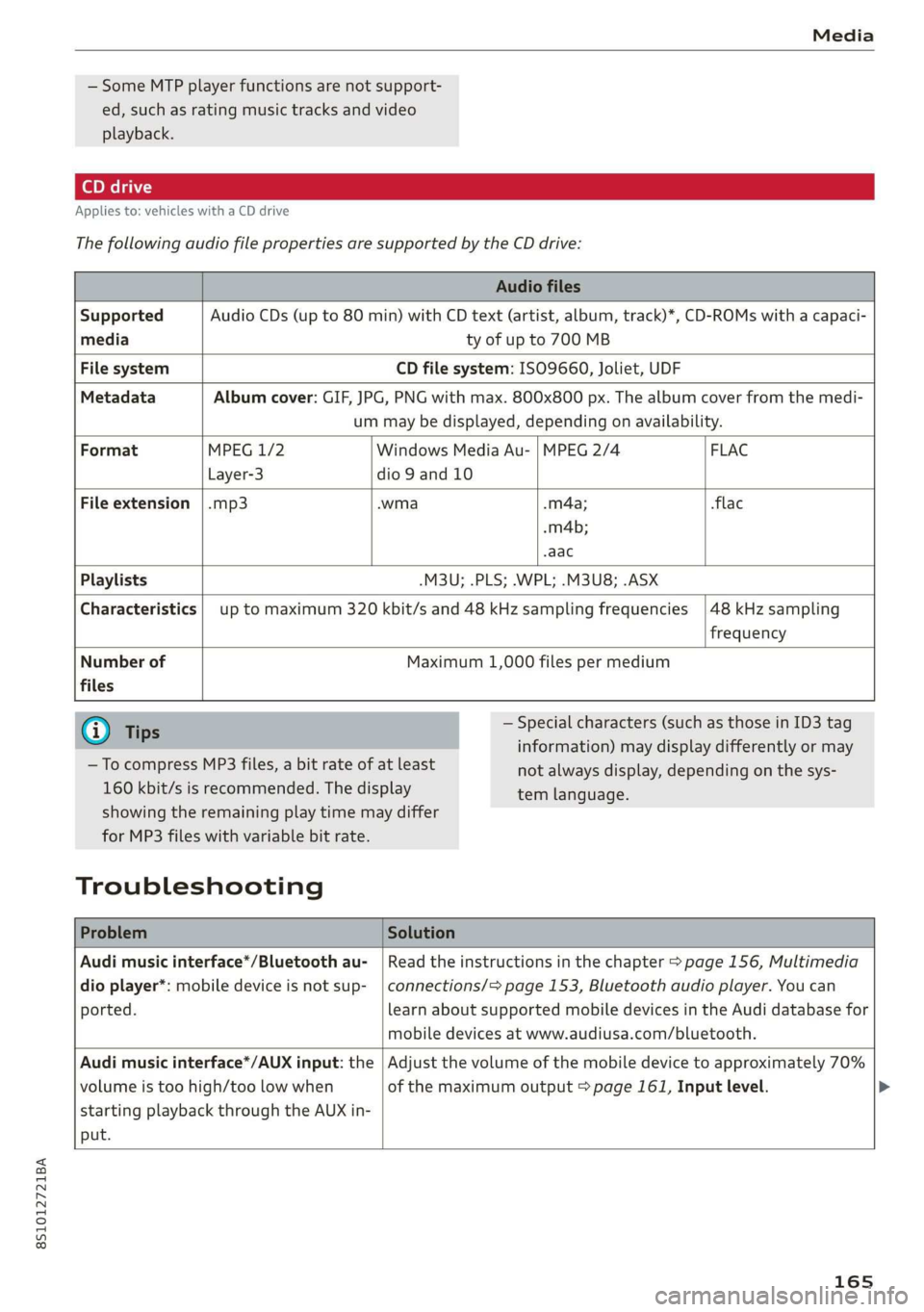
Appliesto:vehicleswithaCDdrive
ThefollowingaudiofilepropertiesaresupportedbytheCDdrive:
Audiofiles
SupportedAudioCDs(upto80min)withCDtext(artist,album,track)*,CD-ROMswithacapaci-
mediatyofupto700MB
FilesystemCDfilesystem:ISO9660,Joliet,UDF
MetadataAlbumcover:GIF,JPG,PNGwithmax.800x800px.Thealbumcoverfromthemedi-
ummaybedisplayed,dependingonavailability.
FormatMPEG1/2WindowsMediaAu-|MPEG2/4 FLAC
Layer-3dio9and10
Fileextension|.mp3.wma.m4a;flac
-m4b;
aac
Playlists-M3U;.PLS;.WPL;.M3U8;.ASX
Characteristicsuptomaximum320kbit/sand48kHzsamplingfrequencies
48kHzsampling
frequency
Numberof
files
Maximum1,000filespermedium
@)Tips
—TocompressMP3files,abitrateofatleast
160kbit/sisrecommended.Thedisplay
—Specialcharacters(suchasthoseinID3tag
information)maydisplaydifferentlyormay
temlanguage.
showingtheremainingplaytimemaydiffer
forMP3fileswithvariablebitrate.
Troubleshooting
notalwaysdisplay,dependingonthesys-
ProblemSolution
Audimusicinterface*/Bluetoothau-
dioplayer*:mobiledeviceisnotsup-
ported.
Readtheinstructionsinthechapter>page156,Multimedia
connections/=>page153,Bluetoothaudioplayer.Youcan
learnaboutsupportedmobiledevicesintheAudidatabasefor
mobiledevicesatwww.audiusa.com/bluetooth.
Audimusicinterface*/AUXinput:the
volumeistoohigh/toolowwhen
startingplaybackthroughtheAUXin-
put.
Adjustthevolumeofthemobiledevicetoapproximately70%
ofthemaximumoutput>page161,Inputlevel.>
165
Page 168 of 312
Media
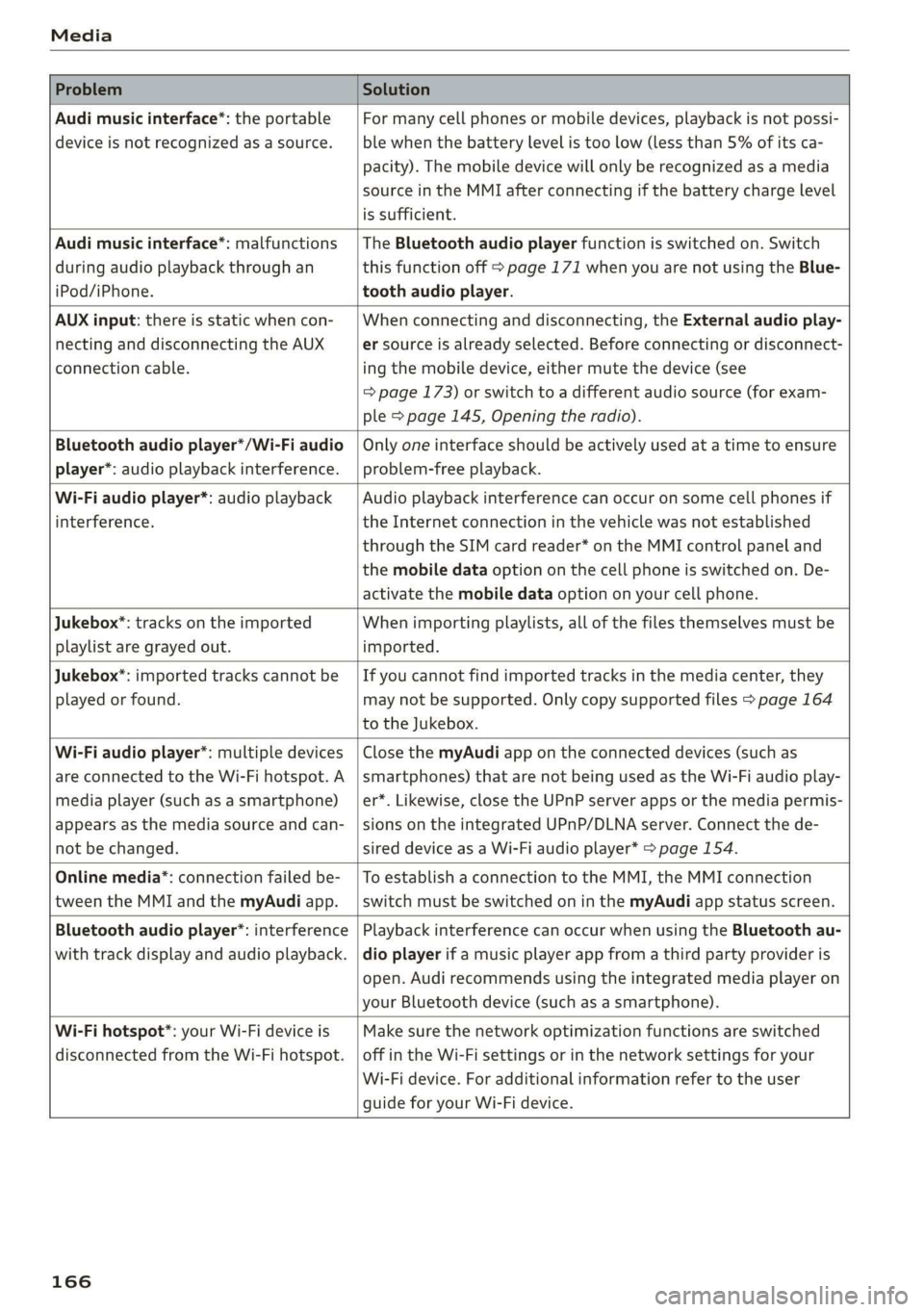
ProblemSolution
Audimusicinterface*:theportable
deviceisnotrecognizedasasource.
Formanycellphonesormobiledevices,playbackisnotpossi-
ble
whenthebatterylevelistoolow(lessthan5%ofitsca-
pacity).Themobiledevicewillonlyberecognizedasamedia
sourceintheMMIafterconnectingifthebatterychargelevel
issufficient.
Audimusicinterface*:malfunctions
duringaudioplaybackthroughan
iPod/iPhone.
TheBluetoothaudioplayerfunctionisswitchedon.Switch
thisfunctionoff>page171whenyouarenotusingtheBlue-
toothaudioplayer.
AUXinput:thereisstaticwhencon-
nectinganddisconnectingtheAUX
connectioncable.
Whenconnectinganddisconnecting,theExternalaudioplay-
ersourceisalreadyselected.Beforeconnectingordisconnect-
ingthemobiledevice,eithermutethedevice(see
=>page173)orswitchtoadifferentaudiosource(forexam-
ple>page145,Openingtheradio).
Bluetoothaudioplayer*/Wi-Fiaudio
player*:audioplaybackinterference.
Onlyoneinterfaceshouldbeactivelyusedatatimetoensure
problem-freeplayback.
Wi-Fiaudioplayer*:audioplayback
interference.
Audioplaybackinterferencecanoccuronsomecellphonesif
theInternetconnectioninthevehiclewasnotestablished
throughtheSIMcardreader*ontheMMIcontrolpaneland
themobiledataoptiononthecellphoneisswitchedon.De-
activatethemobiledataoptiononyourcellphone.
Jukebox®*:tracks ontheimported
playlistaregrayedout.
Whenimportingplaylists,allofthefilesthemselvesmustbe
imported.
Jukebox*:importedtrackscannotbe
playedorfound.
Ifyoucannotfindimportedtracksinthemediacenter,they
maynotbesupported.Onlycopysupportedfiles>page164
totheJukebox.
Wi-Fiaudioplayer*:multipledevices
areconnectedtotheWi-Fihotspot.A
mediaplayer (such asasmartphone)
appearsasthemediasourceandcan-
not bechanged.
ClosethemyAudiappontheconnecteddevices(suchas
smartphones)thatarenotbeingusedastheWi-Fiaudioplay-
er*.Likewise,closetheUPnPserverappsorthemediapermis-
sionsontheintegratedUPnP/DLNAserver.Connectthede-
sireddevice asaWi-Fiaudioplayer*>page154.
Onlinemedia*:connectionfailedbe-
tweentheMMIandthemyAudiapp.
ToestablishaconnectiontotheMMI,theMMIconnection
switchmustbe switchedoninthemyAudiappstatusscreen.
Bluetoothaudioplayer*:interference
withtrackdisplayandaudioplayback.
PlaybackinterferencecanoccurwhenusingtheBluetoothau-
dioplayerifamusicplayerappfromathirdpartyprovideris
open.Audirecommendsusingtheintegratedmediaplayeron
yourBluetoothdevice(suchasasmartphone).
Wi-Fihotspot*:yourWi-Fideviceis
disconnectedfromtheWi-Fihotspot.
Makesurethenetworkoptimizationfunctionsareswitched
offintheWi-Fisettings orinthenetworksettingsforyour
Wi-Fidevice.Foradditionalinformationrefertotheuser
guideforyourWi-Fidevice.
166
Page 173 of 312
8S1012721BA
Systemsettings
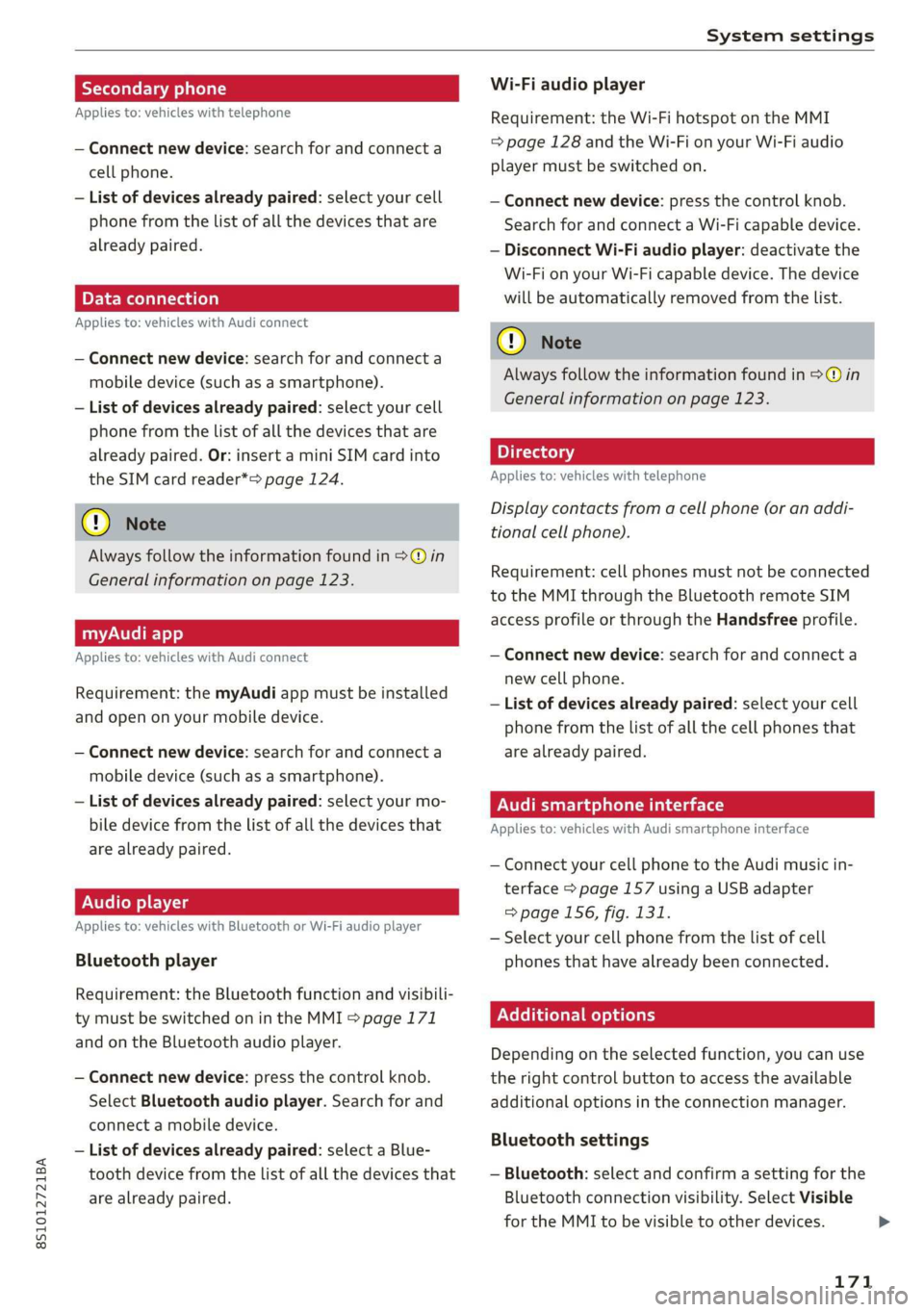
Secondaryphone
Appliesto:vehicleswithtelephone
—Connectnewdevice:searchforandconnecta
cellphone.
—Listofdevicesalreadypaired:selectyourcell
phonefromthelistofallthedevicesthatare
alreadypaired.
PELe-Meolaal-vaale)a)
Appliesto:vehicleswithAudiconnect
—Connectnewdevice:searchforandconnecta
mobiledevice(such asasmartphone).
—Listofdevicesalreadypaired:selectyourcell
phonefromthelistofallthedevicesthatare
alreadypaired.Or: insertaminiSIMcardinto
theSIMcardreader*=page124.
@Note
Alwaysfollow theinformationfoundin>@in
Generalinformationonpage123.
myAudiapp
Appliesto:vehicleswithAudiconnect
Requirement:themyAudiappmustbeinstalled
and
openonyourmobiledevice.
—Connectnewdevice:searchforandconnecta
mobiledevice(such asasmartphone).
—Listofdevicesalreadypaired:selectyourmo-
biledevicefromthelistofallthedevicesthat
arealreadypaired.
Audioplayer
Appliesto:vehicleswithBluetoothorWi-Fiaudioplayer
Bluetoothplayer
Requirement:theBluetoothfunctionandvisibili-
tymustbe switchedonintheMMI>page171
andontheBluetoothaudioplayer.
—Connectnewdevice:pressthecontrolknob.
SelectBluetoothaudioplayer.Searchforand
connectamobiledevice.
—Listofdevicesalreadypaired:selectaBlue-
toothdevicefromthelistofallthedevicesthat
arealreadypaired.
Wi-Fiaudioplayer
Requirement:theWi-FihotspotontheMMI
=page128andtheWi-FionyourWi-Fiaudio
playermustbe switchedon.
—Connectnewdevice:pressthecontrolknob.
SearchforandconnectaWi-Ficapabledevice.
—DisconnectWi-Fiaudioplayer:deactivatethe
Wi-FionyourWi-Ficapabledevice.Thedevice
willbeautomaticallyremovedfromthelist.
@)Note
AlwaysfollowtheinformationfoundinS@in
Generalinformationonpage123.
Appliesto:vehicleswithtelephone
Displaycontactsfromacellphone(oranaddi-
tionalcellphone).
Requirement:cellphonesmustnot beconnected
totheMMIthroughtheBluetoothremoteSIM
accessprofileorthroughtheHandsfreeprofile.
—Connectnewdevice:searchforandconnecta
newcellphone.
—Listofdevicesalreadypaired:selectyourcell
phonefromthelistofallthecellphonesthat
arealreadypaired.
Audismartphoneinterface
Appliesto:vehicleswith Audismartphoneinterface
—ConnectyourcellphonetotheAudimusicin-
terface>page157usingaUSBadapter
=>page156,fig.131.
—Selectyourcellphonefromthelistofcell
phonesthathavealreadybeenconnected.
Additionaloptions
Depending on
theselectedfunction,youcan use
the
rightcontrolbuttontoaccesstheavailable
additionaloptionsintheconnectionmanager.
Bluetoothsettings
—Bluetooth:selectandconfirmasettingforthe
Bluetoothconnectionvisibility.SelectVisible
fortheMMItobevisibletootherdevices.
171
Page 174 of 312
Systemsettings
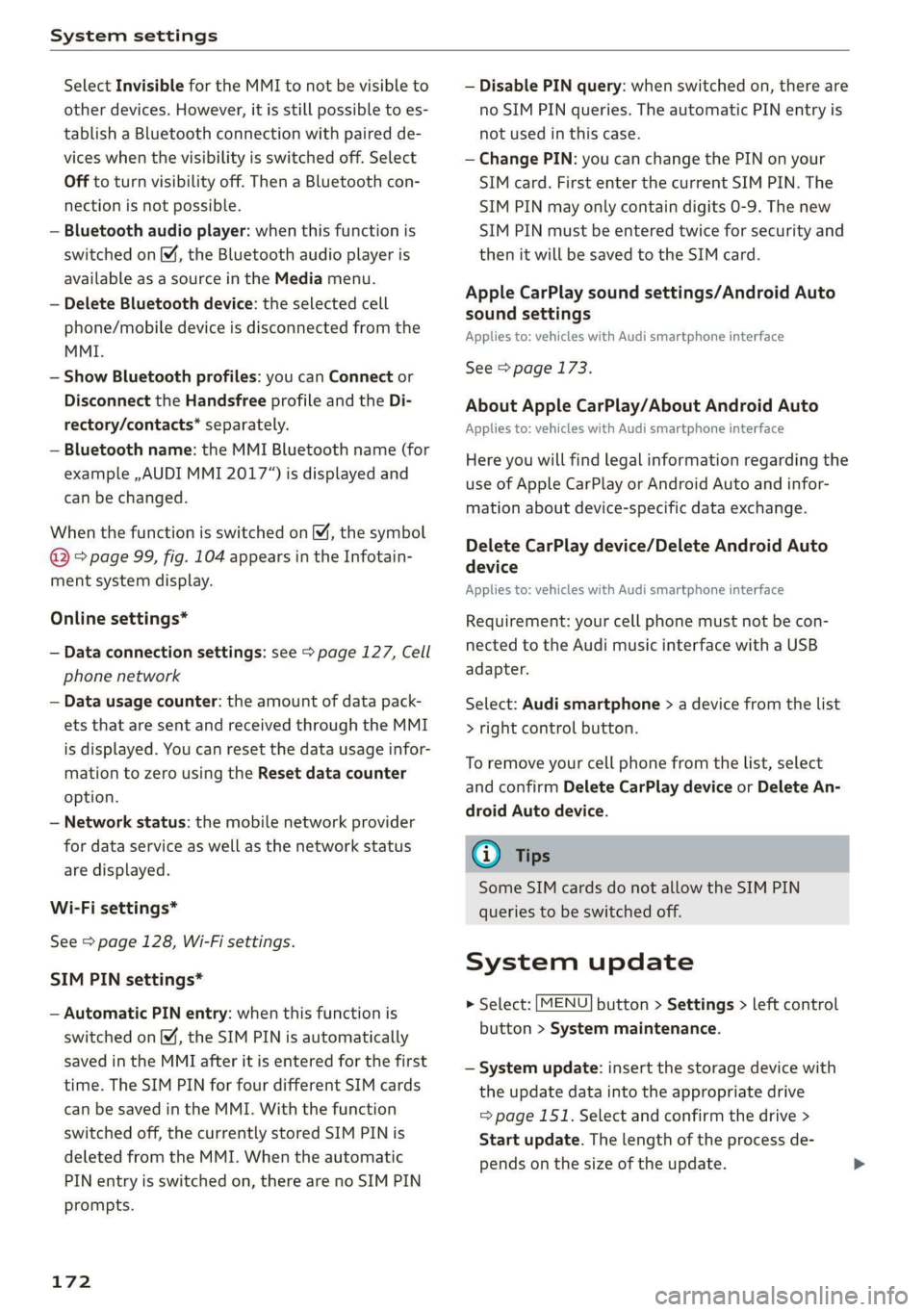
SelectInvisiblefortheMMItonotbevisibleto
otherdevices.However,itisstillpossibletoes-
tablishaBluetoothconnectionwithpairedde-
viceswhenthevisibilityisswitchedoff.Select
Offtoturnvisibilityoff.ThenaBluetoothcon-
nectionisnotpossible.
—Bluetoothaudioplayer:whenthisfunctionis
switchedon[M,theBluetoothaudioplayeris
availableasasourceintheMediamenu.
—DeleteBluetoothdevice:theselectedcell
phone/mobiledeviceisdisconnectedfromthe
MMI.
—ShowBluetoothprofiles:youcanConnector
DisconnecttheHandsfreeprofileandtheDi-
rectory/contacts*separately.
—Bluetoothname:theMMIBluetoothname(for
example,,AUDIMMI2017“)isdisplayedand
canbechanged.
WhenthefunctionisswitchedonM,thesymbol
®&page99,fig.104appearsintheInfotain-
mentsystemdisplay.
Onlinesettings*
—Dataconnectionsettings:see>page127,Cell
phonenetwork
—Datausagecounter:theamountofdatapack-
etsthataresentandreceivedthroughtheMMI
isdisplayed.Youcanresetthedatausageinfor-
mationtozerousingtheResetdatacounter
option.
—Networkstatus:themobilenetworkprovider
fordataserviceaswellasthenetworkstatus
aredisplayed.
Wi-Fisettings*
See>page128,Wi-Fisettings.
SIMPINsettings*
—AutomaticPINentry:whenthisfunctionis
switchedon ©,theSIMPINisautomatically
savedintheMMIafteritisenteredforthefirst
time.TheSIMPINforfourdifferentSIMcards
can be savedintheMMI.Withthefunction
switchedoff,thecurrentlystoredSIMPINis
deletedfromtheMMI.Whentheautomatic
PINentryisswitchedon,therearenoSIMPIN
prompts.
172
—DisablePINquery:whenswitchedon,thereare
noSIMPINqueries.TheautomaticPINentryis
notusedinthiscase.
—ChangePIN:youcanchangethePINonyour
SIMcard.FirstenterthecurrentSIMPIN.The
SIMPINmayonlycontaindigits0-9.Thenew
SIMPINmustbeenteredtwiceforsecurityand
thenitwillbesavedtotheSIMcard.
AppleCarPlaysoundsettings/AndroidAuto
soundsettings
Appliesto:vehicleswithAudismartphoneinterface
See>page173.
AboutAppleCarPlay/AboutAndroidAuto
Appliesto:vehicleswith Audismartphoneinterface
Hereyouwillfindlegalinformationregardingthe
useofAppleCarPlayorAndroidAutoandinfor-
mationaboutdevice-specificdataexchange.
DeleteCarPlaydevice/DeleteAndroidAuto
device
Appliesto:vehicleswithAudismartphoneinterface
Requirement:yourcellphonemustnotbecon-
nectedtotheAudimusicinterfacewithaUSB
adapter.
Select:Audismartphone>adevicefromthelist
>rightcontrolbutton.
Toremoveyourcellphonefromthelist,select
andconfirmDeleteCarPlaydeviceorDeleteAn-
droidAutodevice.
G)Tips
SomeSIMcardsdonotallowtheSIMPIN
queriestobeswitchedoff.
Systemupdate
>Select:[MENU]button>Settings>leftcontrol
button>Systemmaintenance.
—Systemupdate:insertthestoragedevicewith
theupdatedataintotheappropriatedrive
=>page151.Selectandconfirmthedrive>
Startupdate.Thelength oftheprocessde-
pendsonthesizeoftheupdate.
Page 175 of 312
8S1012721BA
Systemsettings
—Resetdriverinstallation:theselectedmedia
driverpackageisresettothesettingsatthe
timeofdelivery.
—Versioninformation:informationontheMMI
softwareversionandthenavigationdatabase*
softwareversionisdisplayed.TheSoftwarein-
formationfunctionalsoprovidesinformation
onthesoftwarecontainedintheMMIandthe
licensingagreement.
Soundsettings
ThesounddistributionandvolumeoftheMMI
canbeadjustedindividually.Thesettingsdepend
onthevehicleequipment.
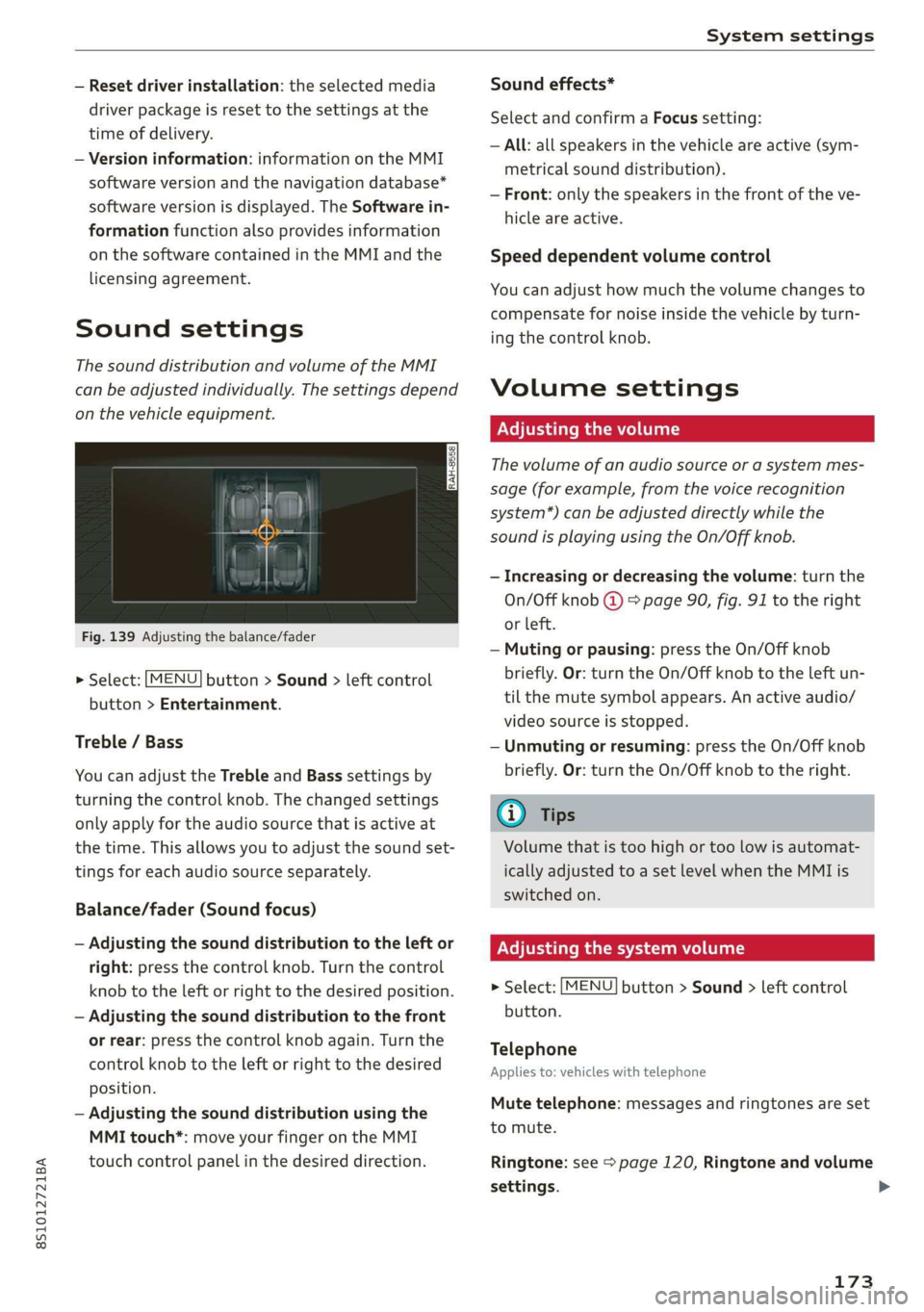
Fig.139Adjusting thebalance/fader
>Select:[MENU]button>Sound>leftcontrol
button>Entertainment.
Treble/Bass
YoucanadjusttheTrebleandBasssettingsby
turningthecontrolknob.Thechangedsettings
onlyapplyfortheaudiosourcethatisactiveat
thetime.Thisallowsyoutoadjustthesoundset-
tingsforeachaudiosourceseparately.
Balance/fader(Soundfocus)
—Adjustingthesounddistributiontotheleftor
right:pressthecontrolknob.Turnthecontrol
knobtotheleftorrighttothedesiredposition.
—Adjustingthesounddistributiontothefront
orrear:pressthecontrolknobagain.Turnthe
controlknobtotheleftorrighttothedesired
position.
—Adjustingthesounddistributionusingthe
MMItouch*:moveyourfingerontheMMI
touchcontrolpanelinthedesireddirection.
Soundeffects*
SelectandconfirmaFocussetting:
—All:allspeakersinthevehicleareactive(sym-
metricalsounddistribution).
—Front:onlythespeakersinthefrontoftheve-
hicleareactive.
Speeddependentvolumecontrol
Youcanadjusthowmuchthevolumechangesto
compensatefornoiseinsidethevehiclebyturn-
ingthecontrolknob.
Volumesettings
Adjusting thevolume
Thevolumeofanaudiosourceorasystemmes-
sage(forexample,fromthevoicerecognition
system*)canbeadjusteddirectlywhilethe
soundisplayingusingtheOn/Offknob.
—Increasingordecreasing thevolume:turnthe
On/Offknob@)9page90,fig.91totheright
orleft.
—Mutingorpausing:presstheOn/Offknob
briefly.Or:turntheOn/Offknobtotheleftun-
tilthemutesymbolappears.Anactiveaudio/
videosourceisstopped.
—Unmutingorresuming:presstheOn/Offknob
briefly.Or:turntheOn/Offknobtotheright.
G)Tips
Volumethatistoohighortoolowisautomat-
icallyadjustedtoasetlevelwhentheMMIis
switchedon.
Adjusting thesystemvolume
>Select:[MENU]button>Sound>leftcontrol
button.
Telephone
Appliesto:vehicleswithtelephone
Mutetelephone:messagesandringtonesareset
tomute.
Ringtone:see=page120,Ringtoneandvolume
settings.
173
Page 176 of 312
Systemsettings
Ringtonevolume:youcanadjustthevolumeof
theselectedringtonebyturningthecontrol
knob.
Messagevolume:youcanadjustthevolumeof
thenotificationforanincomingtextmessageby
turningthecontrolknob.
Microphoneinputlevel: youcanadjustthevol-
umeduringaphonecallbyturningthecontrol
knob.
Navigation
Appliesto:vehicleswithnavigationsystem
Voiceguidance:see>page137,Voiceguidance.
Voiceguidanceduringphonecall:see
=>page137,Voiceguidance.
Voiceguidancevolume:youcanadjustthevoice
guidancevolumeduringactiverouteguidanceby
turningthecontrolknob.
Entertainmentfader:thevolumeofaudioplay-
backcanbetemporarilyloweredwhenthepark-
ingsystemorvoiceguidanceisactive.
Voicerecognitionsystem
Appliesto:vehicleswithvoicerecognitionsystem
Shortdialog:promptsinashorterformatcanbe
switched
onoroff.
Speechdialogsystemvolume:youcanadjust
thevolumeofthepromptsbyturningthecontrol
knob.
Parkingaid*
Youcanadjustthesignaltonevolumebyturning
thecontrolknob.
—AdjustingtheFront volume:selectandcon-
firmHigh,Medium,orLow.
—
AdjustingtheRearvolume:selectandconfirm
High,Medium,orLow.
MMItouchvolume*
Youcanadjustthevolumeofthepromptsforthe
MMItouch*byturningthecontrolknob.
AudiHeartbeat
YoucanadjustthevolumeofAudiHeartbeatby
turningthecontrolknob.
174
RestartingtheMMI
(reset)
RAH-8611
ev
=«=
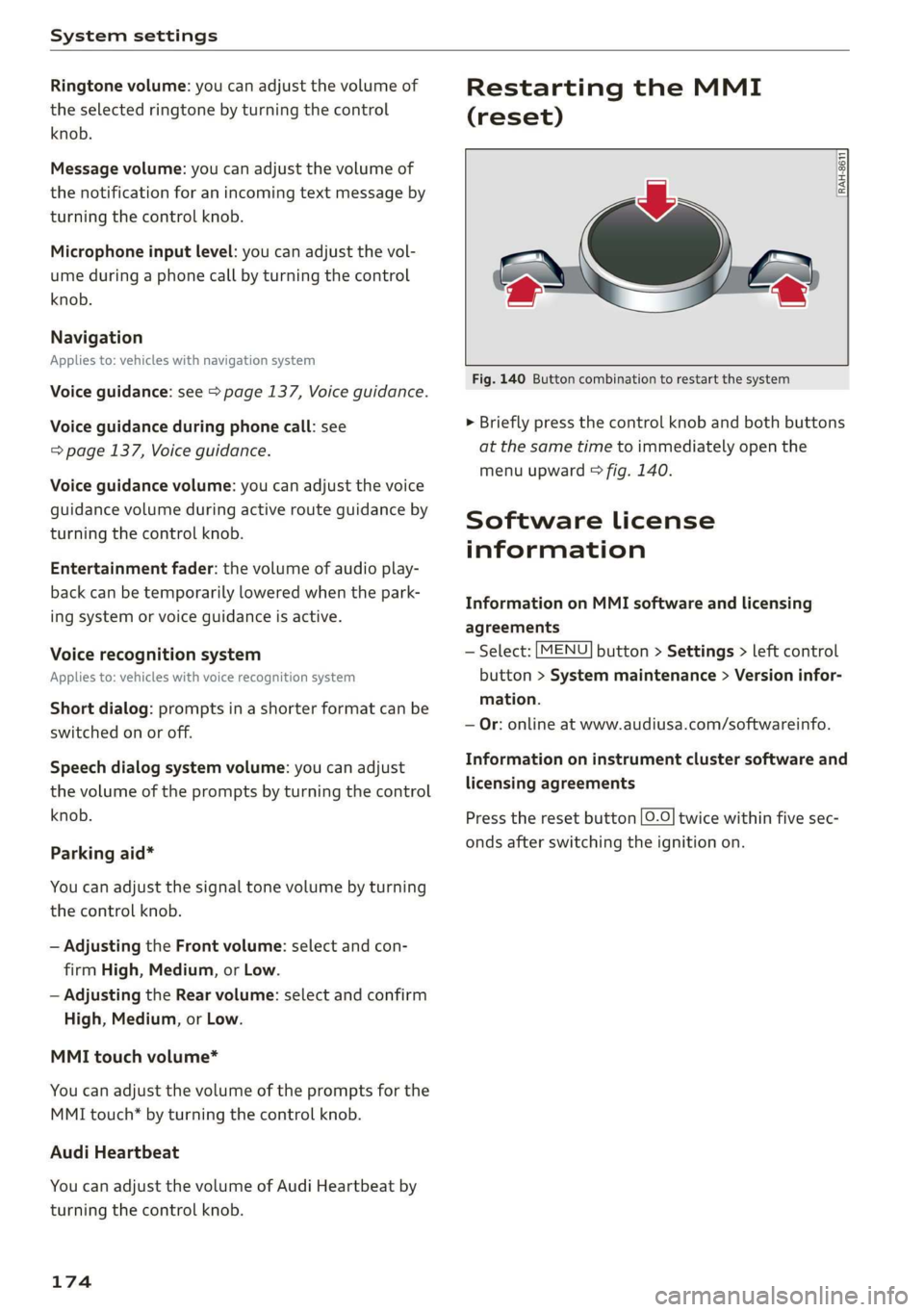
Fig.140Buttoncombinationtorestartthesystem
>Brieflypressthecontrolknob andbothbuttons
atthesametimetoimmediatelyopenthe
menuupward>fig.140.
SoftwareLicense
information
InformationonMMIsoftwareandlicensing
agreements
—Select:[MENU]button>Settings>leftcontrol
button>Systemmaintenance>Versioninfor-
mation.
—Or:onlineatwww.audiusa.com/softwareinfo.
Informationoninstrumentclustersoftwareand
licensingagreements
Presstheresetbutton[0.0]twicewithinfivesec-
ondsafterswitchingtheignitionon.
Page 198 of 312

Airbagsystem
electroniccontrolunittoregulatedeployment
ofthefrontAdvancedAirbags.
—ThePASSENGERAIRBAGOFF3;lightcomes
onandstaysonintheheadliner>page200,
fig.155andtellsyouwhenthefrontAdvanced
Airbagonthepassengersidehasbeenturned
off.
—Asensorinthesafetybeltlatchforthedriver
andforthefrontseatpassengerthatsenses
whetherthatsafetybeltislatchedornotand
transmitsthisinformationtotheelectronic
controlunit.
ZA\WARNING
Damagetothefrontpassengerseatcanpre-
ventthefrontairbagfromworkingproperly.
—Improperrepairordisassemblyofthefront
passengeranddriverseatwillpreventthe
AdvancedAirbagSystemfromfunctioning
properly.
—Repairstothefrontpassengerseatmustbe
performedbyqualifiedandproperlytrained
workshoppersonnel.
—Neverremovethefrontpassengeror driver
seatfromthevehicle.
—Neverremovetheupholsteryfromthefront
passengerseat.
—Neverdisassembleorremovepartsfromthe
seatordisconnectwiresfromit.
—Nevercarrysharpobjectsinyourpocketsor
putthemontheseat.Thecapacitivepassen-
gerdetectionmatinthefrontpassenger
seatwillnotfunctionproperlyifitispunc-
tured.
—Nevercarrythingsonyourlaporcarryob-
jectsonthefrontpassengerseat.Suchob-
jectscaninfluencethecapacitanceregis-
teredby thecapacitivepassengerdetection
system,sothatincorrectinformationispro-
videdtotheairbagcontrolunit.
—Neverstoreitemsunderthefrontpassenger
seat.PartsoftheAdvancedAirbagSystem
underthepassengerseatcouldbedam-
aged,preventingthemandtheairbagsys-
temfromworkingproperly.
—Neverplaceseatcoversorreplacementup-
holsterythathave notbeenspecificallyap-
provedbyAudionthefrontseats.
—SeatcoverscanpreventtheAdvancedAirbag
Systemfromrecognizingchildrestraintsor
occupantsonthefrontpassengerseatand
preventthesideairbagintheseat backrest
fromdeployingproperly.
—Ifaseatheaterhasbeenretrofittedor oth-
erwiseaddedtothefrontpassengerseat,
neverinstallanychildrestraintsystemon
thisseat.
—Neverusecushions,pillows,blankets,or
similaritemsonthefrontpassengerseat.
Theadditionallayerspreventthecapacitive
passengerdetectionsystemfromaccurately
measuringthecapacitanceofthechildsafe-
tyseatand/orthe personontheseatand
thuskeeptheAdvancedAirbagSystemfrom
workingproperly.
—Neverplaceoruseanyelectricaldevice
(suchasalaptop,CDplayer,electronic
gamesdevice,powerinverterorseatheater
forchildseats)onthefrontpassengerseat
ifthedeviceisconnectedtothe12-volt
socketorthecigarettelightersocket.Such
devicescaninfluencethecapacitanceregis-
teredbythecapacitivepassengerdetection
system,so thatincorrectinformationispro-
videdtotheairbagcontrolunit.
—Ifyoumustuseachildrestraintonthefront
passengerseatandthechildrestraintman-
ufacturer'sinstructionsrequirethe useofa
towel,foamcushionorsomethingelseto
properlypositionthechildrestraint,make
certainthatthePASSENGERAIRBAGOFF
3%;lightcomesonandstaysonwhenever
thechildrestraintisinstalledonthefront
passengerseat.
—IfthePASSENGERAIRBAGOFF%;light
doesnotcomeonandstayon,immediately
installchildrestraintinarearseatingposi-
tionandhavetheairbagsysteminspected
byyourAudidealer.
ZAWARNING
Ifthefrontpassengerseat getswet,dryitim-
mediately.
196