infotainment AUDI TT COUPE 2019 Owner's Guide
[x] Cancel search | Manufacturer: AUDI, Model Year: 2019, Model line: TT COUPE, Model: AUDI TT COUPE 2019Pages: 312, PDF Size: 83.95 MB
Page 84 of 312
Parkingaid
@®Tips
—Thevisualdisplayintheleftpartofthedis-
playshouldhelpyoudetectthecriticalvehi-
cleareas.
—Youcanchangethevolumeofthesignals
andthedisplay>page82.
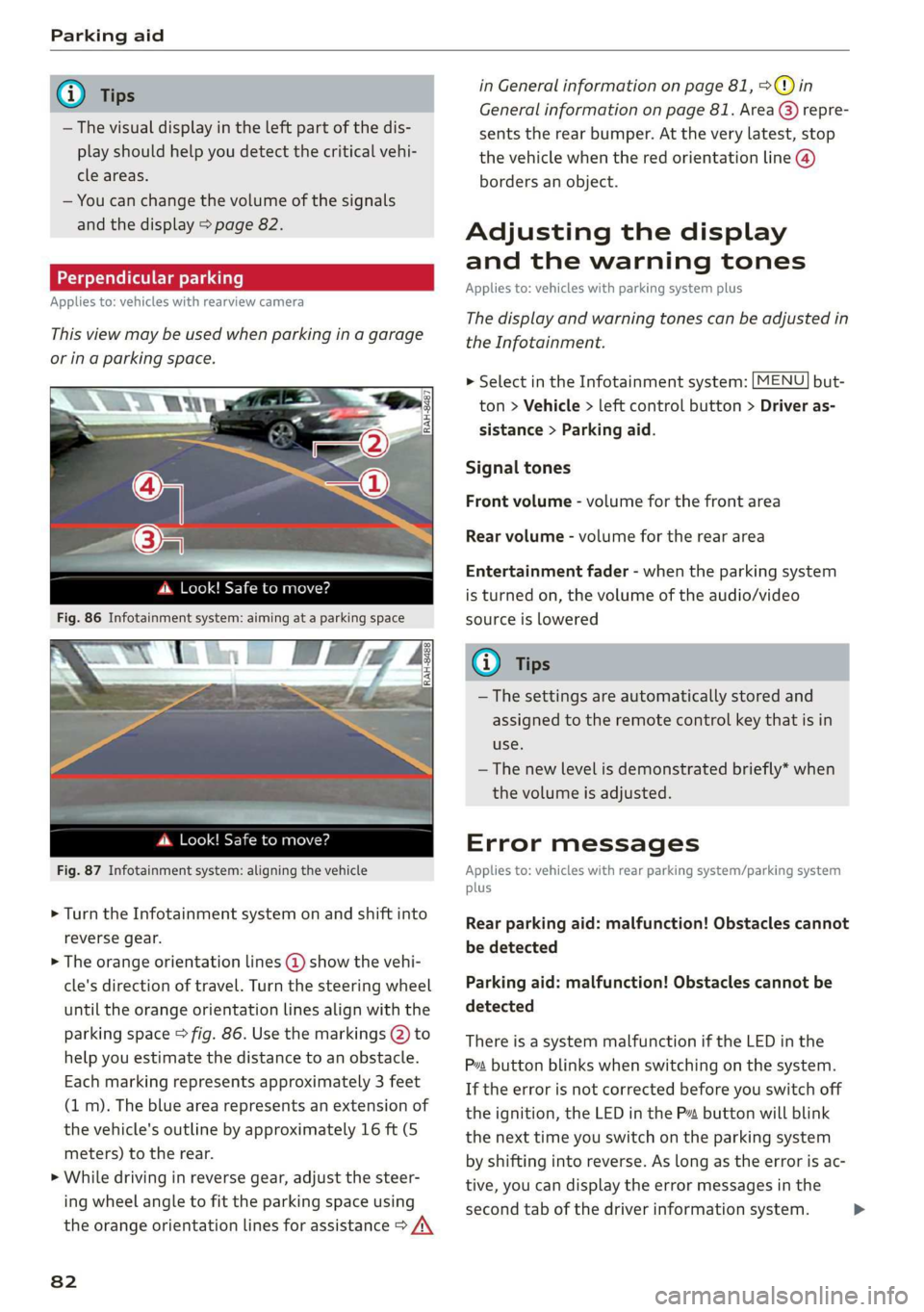
Perpendicularparking
Appliesto:vehicleswithrearviewcamera
Thisviewmaybe usedwhenparkinginagarage
orinaparkingspace.
4d.Look!Safetomove?
Fig.87Infotainmentsystem:aligningthevehicle
>Turn theInfotainmentsystemonandshiftinto
reversegear.
>Theorangeorientationlines@showthevehi-
cle'sdirectionoftravel.Turn thesteeringwheel
untiltheorangeorientationlinesalignwiththe
parkingspace>fig.86.Usethemarkings@)to
helpyouestimatethedistancetoanobstacle.
Eachmarkingrepresentsapproximately3 feet
(1m).Thebluearearepresentsanextensionof
thevehicle'soutlinebyapproximately16ft(5
meters)totherear.
>Whiledrivinginreversegear,adjustthesteer-
ingwheelangletofittheparkingspaceusing
theorangeorientationlinesforassistance>/\
82
inGeneralinformationonpage81,>@)in
Generalinformationonpage81.Area@)repre-
sentstherearbumper.Attheverylatest,stop
thevehiclewhentheredorientationline@)
bordersanobject.
Adjustingthedisplay
andthewarningtones
Appliesto:vehicleswithparkingsystemplus
Thedisplayandwarningtonescanbeadjustedin
theInfotainment.
MENU >SelectintheInfotainmentsystem:but-
ton>Vehicle> leftcontrolbutton>Driveras-
sistance>Parkingaid.
Signaltones
Frontvolume-volumeforthefrontarea
Rearvolume-volumeforthereararea
Entertainmentfader-whentheparkingsystem
isturnedon,thevolumeoftheaudio/video
sourceislowered
G)Tips
—Thesettings areautomaticallystoredand
assignedtotheremotecontrolkeythatisin
use.
— Thenewlevelisdemonstratedbriefly*when
thevolumeisadjusted.
Errormessages
Appliesto:vehicleswithrearparkingsystem/parkingsystem
plus
Rearparkingaid:malfunction!Obstaclescannot
bedetected
Parkingaid:malfunction!Obstaclescannotbe
detected
ThereisasystemmalfunctioniftheLEDinthe
Psbuttonblinkswhenswitchingonthe system.
Iftheerrorisnotcorrectedbeforeyouswitchoff
theignition,theLEDinthePbuttonwillblink
thenexttimeyouswitchontheparkingsystem
byshifting intoreverse.Aslongastheerrorisac-
tive,youcandisplaytheerrormessagesinthe
secondtabofthedriverinformationsystem.>
Page 85 of 312

8S1012721BA
Parkingaid
Parkingsystemplus*
If asensororspeakerisfaulty,theP4symbol
willappearinfrontof/behindthevehicleinthe
Infotainmentdisplay.If arearsensorisfaulty,
onlyobstaclesthatareinareas@)and@)
=>page79,fig.80areshown.Ifafrontsensoris
faulty,onlyobstaclesthatareinareas@)and@)
areshown.
DrivetoanauthorizedAudidealerorauthorized
AudiServiceFacilityimmediatelytohavethe
malfunctioncorrected.
83
Page 92 of 312
MultiMediaInterface
MultiMediaInterface
Trafficsafety
information
AudirecommendsperformingcertainInfotain-
mentsystemfunctions,suchasenteringa desti-
nation,onlywhenthevehicleisstationary.Al-
waysbe preparedtostopoperating theInfotain-
mentsystemintheinterestofyoursafetyand
thesafety ofotherroadusers.
Z\WARNING
Onlyuse theInfotainmentsystemwhenroad,
traffic,weather,andvisibilityconditionsper-
mitandalwaysinawaythatallowsyouto
maintaincompletecontroloveryourvehicle.
@Tips
Certainfunctionsarenotavailablewhiledriv-
ing.
Introduction
TheMultiMediaInterface,orMMIforshort,
combinesvarioussystemsforcommunication,
navigation*andentertainmentinyourAudi.You
canoperatetheMMIusingtheMMIcontrolpan-
el,themultifunctionsteeringwheelorthevoice
recognitionsystem*.
@-TaNDr:
Se2
[RAH-8837|
:
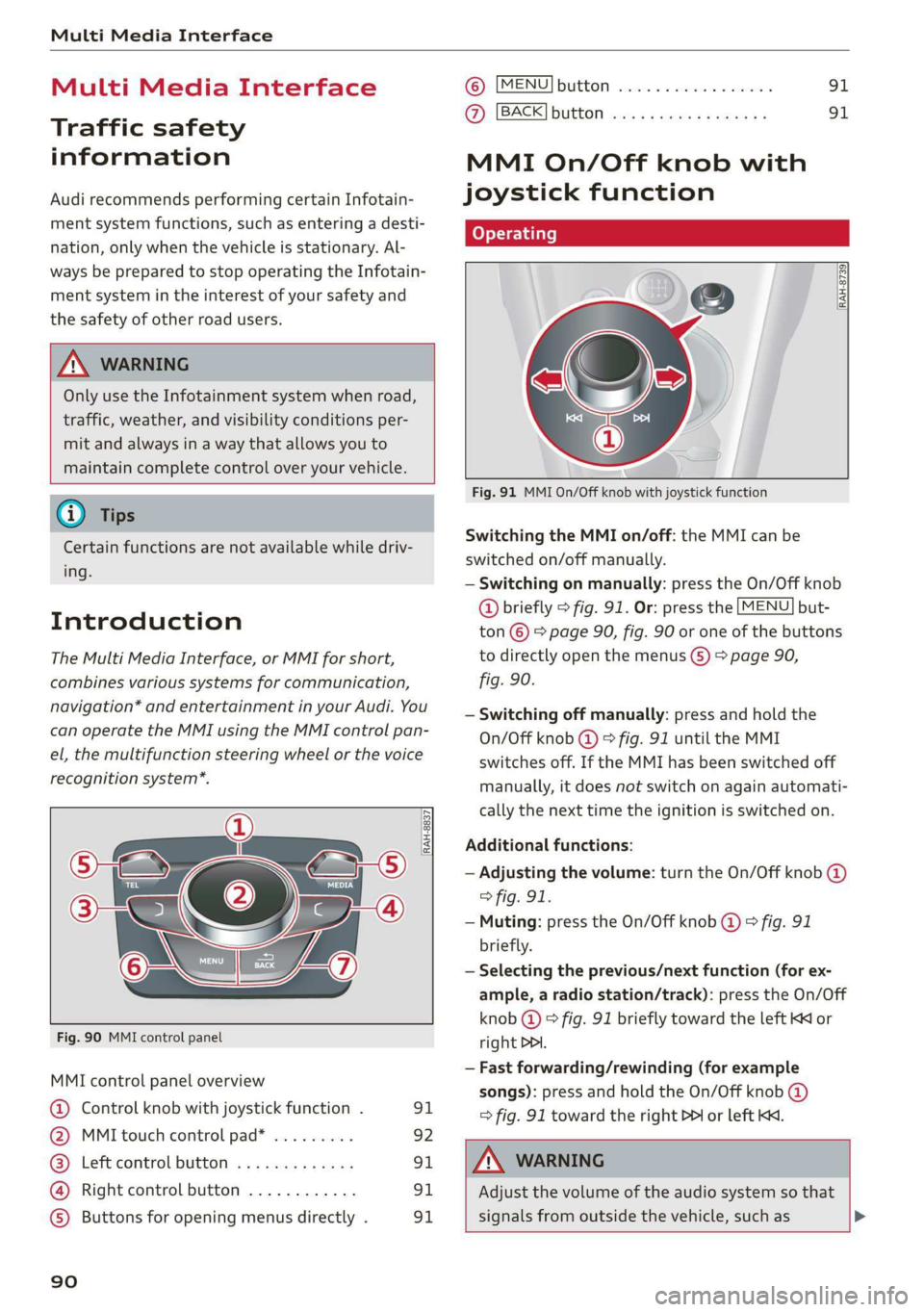
Fig.90MMIcontrolpanel
MMIcontrolpanel overview
@Controlknobwithjoystickfunction.91
@MMItouchcontrolpad*.........92
@®Leftcontrolbutton.............91
@Rightcontrolbutton............91
©)Buttonsforopeningmenusdirectly.91
90
©)[MENU]buttonwc...cosevestan91
AZ):[BACK]buttOoss+ «saysseemusae91
MMIOn/Offknobwith
joystickfunction
Operating
[RAH-8739
Fig.91MMIOn/Offknobwithjoystickfunction
SwitchingtheMMIon/off:theMMIcanbe
switched
on/offmanually.
—Switchingonmanually:presstheOn/Offknob
@briefly>fig.91.Or:pressthe[MENU]but-
ton©>page90,fig.90oroneofthebuttons
todirectlyopenthemenus()>page90,
fig.90.
—Switchingoffmanually:pressandholdthe
On/Offknob@©fig.91untiltheMMI
switchesoff.IftheMMIhasbeenswitchedoff
manually,itdoesnotswitchonagainautomati-
callythenexttimetheignitionisswitchedon.
Additionalfunctions:
—Adjustingthevolume:turntheOn/Offknob@)
>fig.91.
—Muting:presstheOn/Offknob@©fig.91
briefly.
—Selectingtheprevious/nextfunction(forex-
ample,aradiostation/track):presstheOn/Off
knob@)°fig.91brieflytowardtheleftKKor
rightDDI.
—Fastforwarding/rewinding(forexample
songs):pressandholdtheOn/Offknob@)
=>fig.91towardtherightPPIorleftKd.
Z\WARNING
Adjustthevolumeoftheaudiosystemso that
signalsfromoutsidethevehicle,suchas>
Page 94 of 312
MultiMediaInterface
Selectionmenu:throughtheselectionmenu,
youcanopenadditionalfunctionswithinamenu
item(suchas Radio).
Requirement:theselectionmenusymbolmust
bedisplayedintheInfotainmentsystemdisplay
>fig.94.
Openingandclosingtheselectionmenu:press
theleftcontrolbutton>fig.94.Thenyoucanse-
lectandconfirmafunctionusingthecontrol
knob.
Optionsmenu:usingtheoptionsmenu,youcan
selectandconfirmcontext-dependentfunctions
aswellas settingswithinamenuitem(suchas
Radio).
Requirement:theoptionsmenusymbol[+]must
bedisplayedintheInfotainmentsystemdisplay
>fig.94.
Openingandclosingtheoptionsmenu:press
therightcontrolbutton>fig.94.Thenyoucan
selectandconfirmafunctionusingthecontrol
knob.
Informationaboutmenupaths
Thisguideshowsyouataglancethepathsfor
openingadesiredmenuanditssettingsand
functions.
Exampleofapath
>Select:[RADIO]button>leftcontrolbutton>
FM.
Followingthepath
>Pressthe[RADIO]button.
> Presstheleftcontrolbutton.
>Turn thecontrolknobtotheFMmenuitemto
selectit.
>Pressthecontrolknobtoconfirm theselected
FMmenuitem.
>Theselectedandconfirmedfunctionisexecut-
ed.In thisexample,theFMfrequencybandis
set.
92
MMItouch
MMItouchcontrolpad
Appliesto:vehicleswithMMItouch
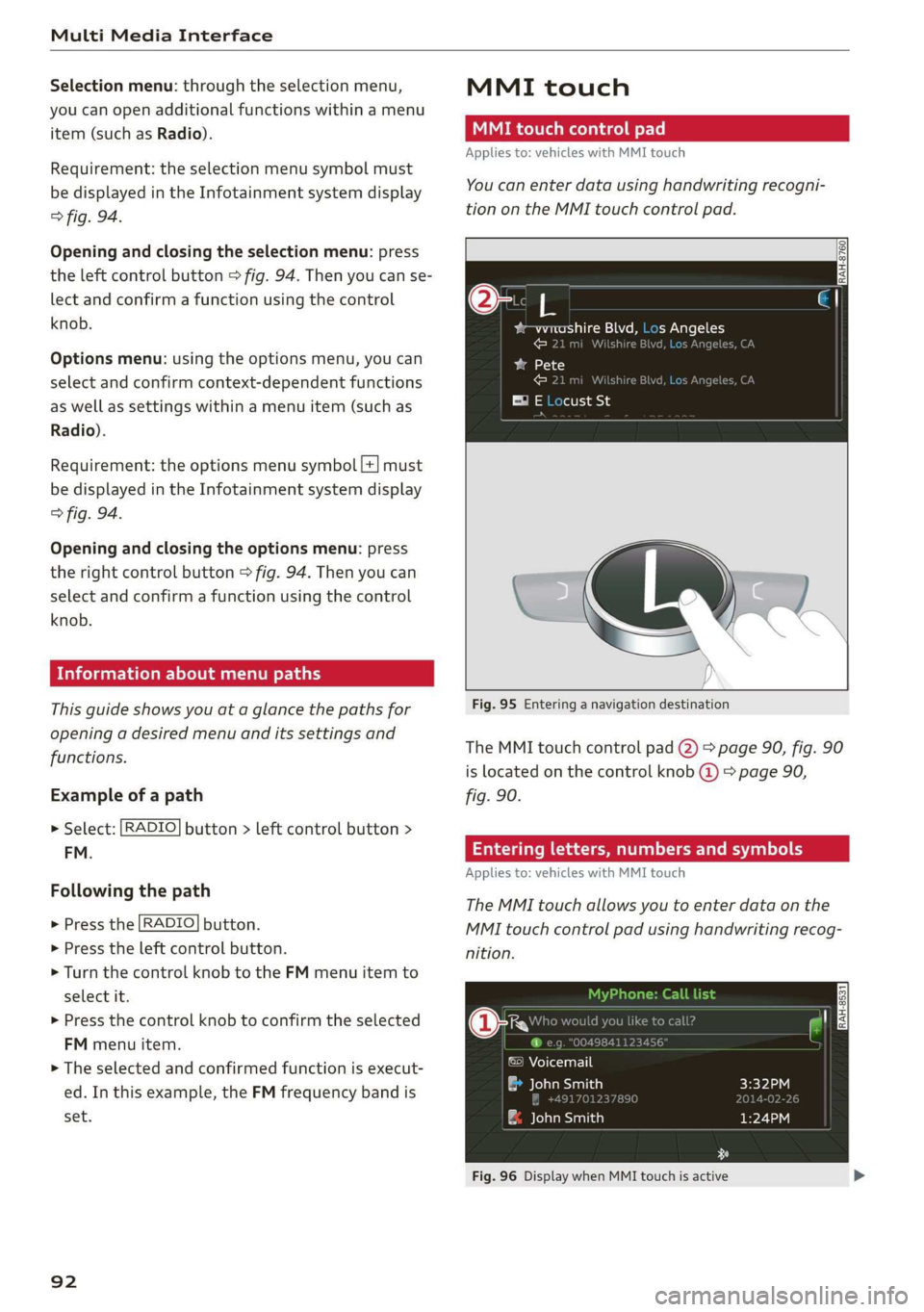
You canenterdatausinghandwritingrecogni-
tionontheMMItouchcontrolpad.
2
yw-wreashireBlvd,LosAngeles
€21miWilshireBiveeC
baa1K)
Fig.95Enteringanavigationdestination
TheMMItouchcontrolpad@)>page90,fig.90
islocatedonthecontrolknob@)>page90,
fig.90.
Enteringletters,numbersandsymbols
Appliesto:vehicleswithMMItouch
TheMMItouchallowsyoutoenterdataonthe
MMItouchcontrolpadusinghandwritingrecog-
nition.
©Voicemail
eeaaa)
&JohnSmith
Fig.96DisplaywhenMMItouchisactive
Page 95 of 312
8S1012721BA
MultiMediaInterface
Requirement:itmustbepossible toentertext or
numbersandthesymbol(@)©fig.96mustap-
pearintheInfotainmentsystemdisplay.
—Initialentry:writeanindividualuppercaseor
lowercaseletterornumber/symbolonthe
MMItouchcontrolpadusingyourfinger.A
symbolthatisrecognizedclearlyby thesystem
isdisplayedintheInfotainmentsystemdisplay
@>page92,fig.95,confirmedwithanaudi-
blesignalifnecessary,andtransferredtothe
inputfield.
—Enteringspaces:moveyourfingeracrossthe
MMItouchcontrolpadfromlefttoright.
—Deletingcharacters:moveyourfingeracross
theMMItouchcontrolpadfromrighttoleft.
—Deletingcharactersquickly:moveyourfinger
quicklyacrosstheMMItouchcontrolpadfrom
righttoleft.
—Selectingtheinputsuggestion:pressthecon-
trolknob.
—Switchingdirectlytotheresultslist:turnthe
controlknobtotheright.
—Openingthespeller:selecttherightcontrol
button>Openspeller.Textornumbersare en-
teredusingthespeller>page96.
CMemeee
Appliesto:vehicleswithMMItouch
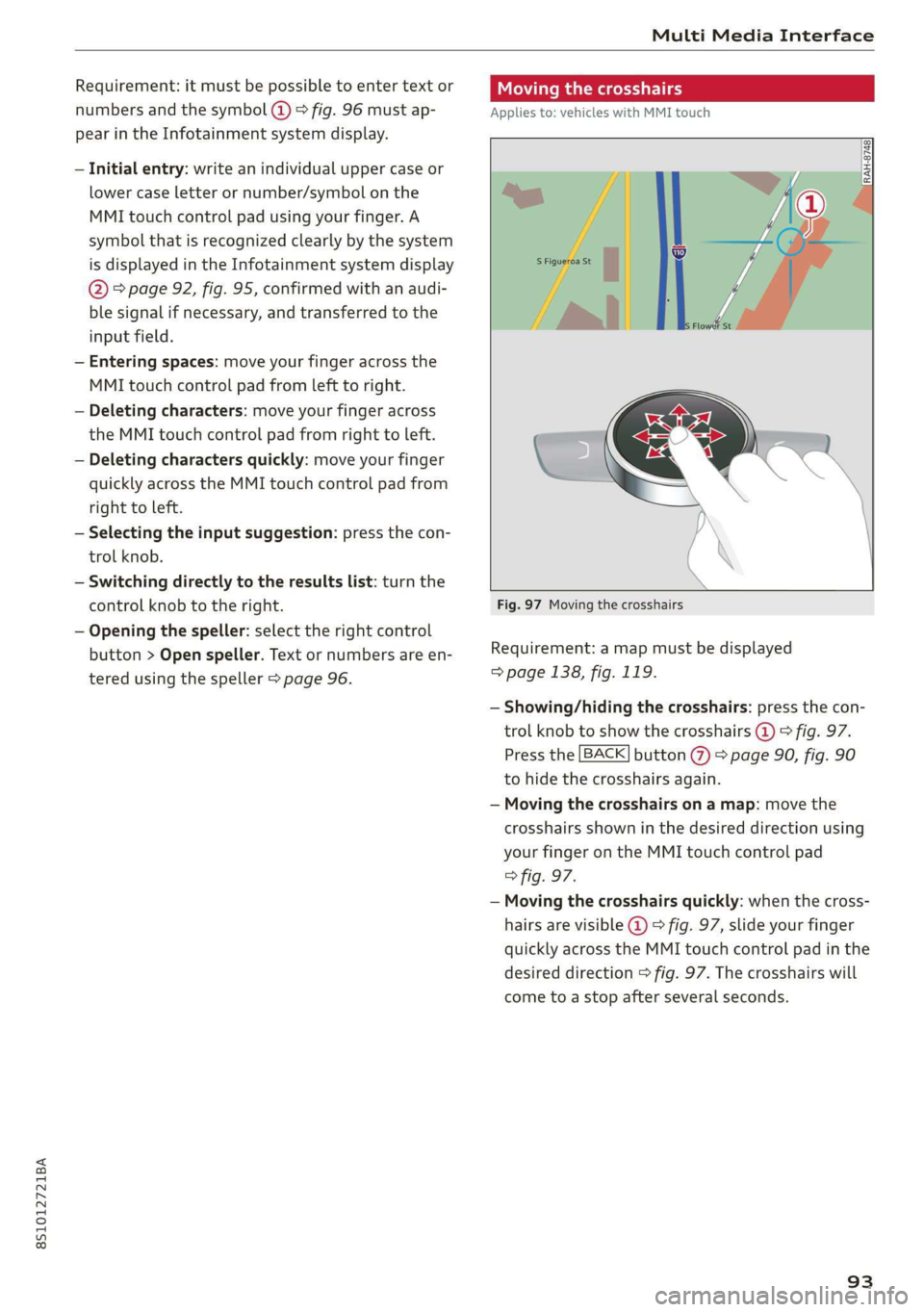
Fig.97Movingthecrosshairs
Requirement:amapmustbedisplayed
=>page138,fig.119.
—Showing/hidingthecrosshairs:pressthecon-
trolknobtoshowthecrosshairs@)9fig.97.
Pressthe[BACK]button(%)>page90,fig.90
tohidethecrosshairsagain.
—Movingthecrosshairsonamap:movethe
crosshairsshowninthedesireddirectionusing
yourfingerontheMMItouchcontrolpad
>fig.97.
—Movingthecrosshairsquickly:whenthecross-
hairsarevisible@)>fig.97,slideyourfinger
quicklyacrosstheMMItouchcontrolpadinthe
desireddirection>fig.97.Thecrosshairswill
cometoastopafterseveralseconds.
93
Page 101 of 312
8S1012721BA
MultiMediaInterface
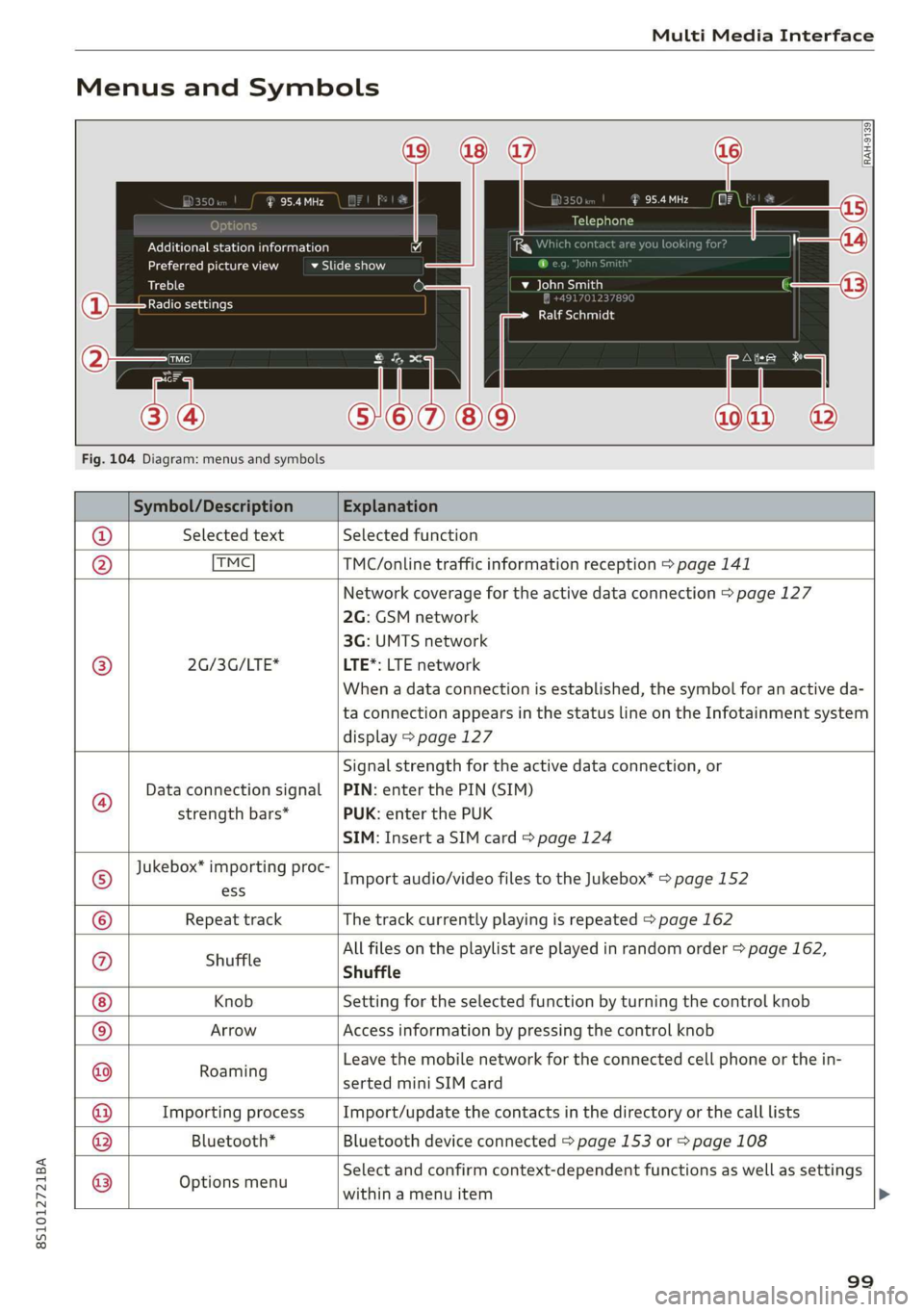
MenusandSymbols
eis
Additionalstationinformation
Preferredpictureview
Treble
Radiosettings
vSlideshow
RAH-9139)
aeaad
Telephone
beta
RalfSchmidt
Fig.104Diagram:menusandsymbols
Symbol/DescriptionExplanation
@SelectedtextSelectedfunction
@TMCTMC/onlinetrafficinformationreception>page141
Networkcoveragefortheactivedataconnection>page127
2G:GSMnetwork
3G:UMTSnetwork
®2G/3G/LTE*LTE*:LTEnetwork
Whenadataconnectionisestablished,thesymbolforanactiveda-
taconnectionappearsinthestatuslineontheInfotainmentsystem
display>page127
®
Data connectionsignal
strengthbars*
Signalstrengthfortheactivedataconnection,or
PIN:enterthePIN(SIM)
PUK:enterthePUK
SIM:InsertaSIMcard>page124
Jukebox*importingproc-
®osImportaudio/videofilestotheJukebox*>page 152
©RepeattrackThetrackcurrentlyplayingisrepeated>page162
Allfilesontheplaylistareplayedinrandomorder>page162,
@shuffleShuffle
KnobSettingfortheselectedfunctionbyturningthecontrolknob
©ArrowAccessinformationbypressingthecontrolknob
ResniingLeavethemobilenetworkfortheconnectedcellphoneorthein-
sertedminiSIMcard
ImportingprocessImport/updatethecontactsinthedirectoryorthecalllists
Bluetooth*Bluetoothdeviceconnected>page153or>page108
®
|O|©
Optionsmenu
Selectandconfirmcontext-dependentfunctionsaswellas settings
withinamenuitem
99
Page 104 of 312
Voicerecognitionsystem
Voicerecognitionsystem
Operating
Appliesto:vehicleswithvoicerecognitionsystem
YoucanoperatemanyInfotainmentfunctions
convenientlybyspeaking.
Requirement:theignitionandtheMMImustbe
switched
on.Asystemlanguagesupportedby
thevoicerecognitionsystemmustbeset.There
mustbenophonecallsinprogressandthepark-
ingaidmustnotbeactive.
>Switchingon:brieflypressthe[2]button@)
=>page14,fig.10onthemultifunctionsteer-
ing
wheelandsaythedesiredcommandafter
theBeep.
>Switchingoff:pressandholdthe|™]button.
Or:saythecommandCancel.
>Pausing:saythecommandPause.Toresume,
pressthe|]button.
>Correcting:pressthe[>]buttononetime©
=>page12,fig.6.Or:saythecommandCorrec-
tion.
Inputassistance
Thesystemguidesyouthroughtheinputwith
visualandaudiofeedback.
—Visualinputassistance:afterswitchingon
voicerecognition,adisplaywithaselectionof
possiblecommandsappears.Thecommand
displaycanbe switchedon/offunder[MENU]>
Settings>leftcontrolbutton>MMIsettings>
Speechdialogsystem.
—Audioinputassistance: tohavethepossible
commandsread,pressthe[2]buttononthe
multifunctionsteeringwheelbrieflyandsay
Help.
Forthesystemtounderstandyou:
Speakclearlyanddistinctly atanormalvolume.
Speaklouderwhendrivingfaster.
Emphasizethewordsinthecommandsevenly
anddonotleavelongpauses.
Donotspeakacommandwhenthevoicerecogni-
tionsystemismakinganannouncement.
102
Closethedoors,thewindows,andthesunroof*
toreducebackgroundnoise.Makesurethatpas-
sengersarenot speakingwhenyouaregivinga
voicecommand.
Onlyusethesystemfromthedriver'sseatbe-
causethehands-freemicrophoneisdirectedto-
wardthatseat.
Additionalsettings
See>page174,Voicerecognitionsystem.
ZAWARNING
—Directyourfullattentiontodriving.Asthe
driver,youhavecompleteresponsibilityfor
safetyintraffic.Onlyuse thefunctionsin
suchawaythatyoualwaysmaintaincom-
pletecontroloveryourvehicleinalltraffic
situations.
—Donotuse thevoicerecognitionsystemin
emergenciesbecauseyourvoicemaychange
instressfulsituations.Thesystemmaytake
longertodialthenumberormaynotbe
abletodialitatall.Dialtheemergency
numbermanually.
G)Tips
— Thedialogpauseswhenthereisanincom-
ingphonecallandwillcontinueifyouig-
norethecall.Thedialogendsifyouanswer
thecall.
—Therearenovoiceguidance*promptswhen
adialogisactive.
—Youcanselectan iteminthelistusingei-
therthevoicerecognitionsystemorthe
controlknob.
Commandoverview
information
Appliesto:vehicleswithvoicerecognitionsystem
Thefollowingoverviewsdescribethecommands
thatcan beusedtooperatetheMMIusingthe
voicerecognitionsystem.
Alternativecommandsareseparatedusinga“/”,
forexamplesay:Telephone/(or)Navigation/
(or)Radio.
Page 111 of 312
8S1012721BA
Telephone
devicesareshownintheInfotainmentsystem
display.Or:searchfortheMMIinyourcell
phonethroughtheBluetoothdevicesearch.
>Selectandconfirmthedesiredcellphonefrom
thelistofdisplayedBluetoothdevices.
>TheMMIgeneratesaPINforthe connection
setup>fig.106.
>SelectandconfirmYes.
>»EnterthePINforconnectingonyourcell
phone.Or:whenthePINisdisplayedonyour
cellphone,confirmthePINonyourcellphone
andintheMMI.Thetimeallowedforentering
thePINislimitedtoapproximately30seconds.
>Payattentiontoanyadditionalsystemprompts
displayedonyourcellphone,forexampleifthe
systemshouldconnectautomaticallyinthefu-
ture.
Dependingonthecellphone,youmay
havetoconfirmdownloadingthedirectorysep-
arately.
Afterconnectingsuccessfully
Afterconnectingsuccessfully,ashortmessage
withinformationabouttheconnectedprofiles
willappear.Youcanalsochangeprofileslater.
Select:[MENU]button>Settings> leftcontrol
button>MMIsettings>Connectionmanager
=>page171.
Inaddition,thecellphonecontactsareautomat-
icallyloadedintheMMIdirectory.Thisprocess
cantakeseveralminutes,dependingonthenum-
berofcontacts.
@)Note
Alwaysfollowtheinformationfoundin>@in
Generalinformationonpage123.
@)Tips
— MakingphonecallsthroughtheMMIisonly
possibleusingtheHandsfreeBluetoothpro-
file.
—Youcan applyadditionalsettings tocon-
nectedmobiledevicesusingthe connection
manager©page170.
—YoucanalsosearchfortheMMIonyourmo-
biledeviceusingtheBluetoothdevice
search.
—Youonlyhavetopairyourdeviceonetime.
Bluetoothdevicesthatarealreadypaired
automaticallyconnecttotheMMIwhenthe
Bluetoothfunctionisswitchedon,when
theyarewithinrange,andwhentheignition
isswitchedon.Thelastconnectedmobile
deviceisgivenfirstpriority.
—AuthorizingtheMMIconnectiononyour
mobiledevicewillmakeitpossibletocon-
nectautomatically.
—Payattentiontoanysystempromptsdis-
playedonyourcellphone,forexampleif
thesystemshouldconnectautomaticallyin
thefuture.Dependingonthecellphone,
youmayalsoneedtodownloadthedirecto-
ryandconfirmaccesstoyourtextmessages
separately.
—Whenleavingthevehicle,theBluetooth
connectiontothemobiledevicewillauto-
maticallydisconnect.Depending onyour
mobiledevice,phonecallsinprogressmay
beautomaticallyredirectedfromtheMMI
toyourmobiledevice sothatyoucancon-
tinuethecallonyourphone.
—Youcanobtainmoreinformationfromyour
mobiledeviceserviceproviderorfromyour
mobiledeviceuserguide. Forinformation
onusingthetelephone,visitwww.audiusa.
com/bluetoothorcontactanauthorizedAu-
didealerorauthorizedAudiServiceFacility.
—Appliesto:vehicleswithoutsecondary
phone:Severalcellphonescanbepairedto
the MMI,butonlyonecellphonecanbeac-
tivelyconnectedtotheMMI.
—Appliesto:vehicleswithoutsecondary
phone:IfaBluetoothdeviceisalreadycon-
nectedtotheMMI,itwillbe disconnected
whenanotherdeviceconnectstotheMMI.
109
Page 116 of 312

Telephone
—Dialingaphonenumber:selectandconfirm@.
Or:pushthecontrolknobdown.Selectand
confirmOK.
—Deletingindividualcharacters:selectandcon-
firm&l.
—Deletingallcharactersenteredatonce:turn
thecontrolknobwiththecharacterselectionto
landpressandholdthecontrolknob.Or:se-
lecttherightcontrolbutton>Clearinputfield.
Tonesequences(DTMF)canbeentereddirectly
intothespellerduringaphonecall.
Acceptingorendingacall
Appliesto:vehicleswithtelephone
—Acceptingacall:selectandconfirmAnswer.
—Decliningacall:selectandconfirmDecline.
—Mutingtheactivecall:selectandconfirm
Mute.
—Endinga phonecall/canceldialing:selectand
confirmEndcall.Or:pressthecontrolknob.
Acceptinganothercall:see>page114,Duringa
phonecall.
Callerinformation:thename, phonenumberor
UnknownappearsintheInfotainmentsystem
displaydependingonifthecallerhasbeenstored
inthedirectoryandifthephonenumberhas
beentransmitted.Apicturemayalsobedis-
played,dependingonwhetheryouhaveassigned
apicturetoacontactinyourdirectoryandifit
wastransferredtoyourMMI.Youcanfindoutif
yourmobiledevicesupportsthisfunctionfrom
yourmobiledevicenetworkprovider,yourmobile
deviceowner'smanual,oratwww.audiusa.com/
bluetooth.
@Tips
Theradioormediaplaybackismutedduringa
phonecall.
Duringaphonecall
Appliesto:vehicleswithtelephone
Requirement:
theremustbeacallinprogress.
>
Presstherightcontrolbutton.
114
Thefollowingoptionsmaybepossibleduringa
calldependingonthemobiledevicebeingused
andthetypeofconnection:
—Makinganadditionalcall:select:Findcontact
>Calllist/Directory/Favorites>anentryfrom
thelist.
—Acceptinganincomingcallwhenthereisan
activecallandacallonhold:selectReplace.
Theactivecallisreplacedwiththeincoming
call.
—Answeringanadditionalcall:ifthereisanin-
comingcallwhileanothercallisactive,youcan
selectAnswertoput theexistingcallonhold
andanswertheincomingcall.IfyouselectDe-
cline,theincomingcallwillbedeclined.
Additionalfunctionsinclude:
Mute:ifyouselectandconfirmthisfunction,the
otherpersononthephonecannothearyou.You
willstillbeabletoheartheotherperson.
Holdcall/Resume:youcanplacetheexistingcall
onholdandresumeitagain.Toresumethecall,
selectandconfirmthecallyouwouldliketore-
sume.
Transfercalltomobiledevice*:selectandcon-
firm
Transfercalltomobiledevicetotransfer
theexistingcallfromtheMMItoyourcellphone.
Switchtohands-freemode*:Requirement:you
musthaveaphonecallinprogressonyourcell
phone.SelectandconfirmSwitchtohands-free
modetotransferthecallfromyourcellphoneto
theMMI.
Swapcall:alternatebetweentwophonecalls
whileoneofthecallsisonhold.SelectingEnd
call willendtheactivephonecall.Aphonecall
onholdcanberesumedusingtherightcontrol
button>Resume.
Addtoconference:apartyonholdanduptofive
activeparties(dependingonthenetwork)canbe
addedtoaconferencecall.Tomakeanadditional
call,putallparticipantsinthecurrentconference
callonholdusingtherightcontrolbutton>Hold
conference.Presstheleftcontrolbutton.Select
andconfirmCalllist/Directory/Favorites>an
entryfromthelist.Youcanaddcalledcontacts
totheconferenceusingtherightcontrolbutton>
Page 117 of 312

8S1012721BA
Telephone
>Addtoconference.Resumetakesallpartiesoff
hold.
Multi-partycalling:selecttherightcontrolbut-
ton>Telephonesettings>Calloptions.When
thefunctionisswitchedon¥youcanacceptan
additionalcallusingAnswerordeclineacallus-
ingDecline.Whenthefunctionisswitchedoff,
youcanReplacethecallorDecline.
Connectionmanager:see>page170.
Telephonesettings:see>page120.
G)Tips
—To benotifiedofanincomingcallduringa
phonecall,thecallwaitingfunctioninyour
cellphonemustbe switchedonwhenusing
thehands-freeprofile(Handsfree).
—Youcanobtainmoreinformationfromyour
mobiledeviceserviceproviderorfromyour
mobiledeviceuserguide.
—Whenleavingthevehicle,theBluetooth
connectiontothemobiledevicewillauto-
maticallydisconnect.Depending onyour
mobiledevice,phonecallsinprogressmay
beautomaticallyredirectedfromtheMMI
toyourmobiledevicesothatyoucancon-
tinuethecallonyourphone.
— Thedisplay ofan incomingphonecallinthe
Infotainmentsystemdisplaymaystill be
visibleforafewsecondsdependingonthe
cellphoneinuse.UsingtheReplaceorDe-
clinefunctionsmaythenendtheactive
phonecall.
Favorites
Appliesto:vehicleswithtelephone
Upto50contacts,inadditiontothe voicemail
number,canbestoredinanyorderinthefavor-
iteslist.
>Select:[MENU]button>Telephone>leftcon-
trolbutton.
—Storinganexistingphonenumber asafavor-
ite:selectandconfirmCalllist/Directory.Se-
lectandconfirmacontactorphonenumber
fromthelist.Select:rightcontrolbutton>
Store asfavorite.Enteranameforthefavorite
orselectasuggestion.SelectandconfirmSave.
—Renamingastoredfavorite:selectandconfirm
Favorites>selectafavoritefromthelist.Se-
lecttherightcontrolbutton>Renamefavor-
ite.
—Movingastoredfavorite:selectandconfirm
Favorites>selectafavoritefromthelist.Se-
lecttherightcontrolbutton>Movefavorite.
Selectandconfirmthelocationoftheselected
favorite.
—Deletingastoredfavorite:selectandconfirm
Favorites>selectafavoritefromthelist.Se-
lect:rightcontrolbutton>Deletefavorite>
DeletethisentryorDeleteallentries.
Messages
Textmessages
Appliesto:cellphoneswithBluetoothMessageAccessProfile
(MAP)
Dependingonthemobiledevicebeingusedand
themobilenetworkcontract,youmaybeableto
receiveandsendtextmessagesusingtheMMI.
Requirement
AcellphonemustbeconnectedtotheMMIvia
BluetoothMAP(MessageAccessProfile)
=>page108.
>Select:[MENU]button>Telephone>leftcon-
trolbutton>textmessage(myPhone)/text
message(secondaryphone)*.
Inbox
Allreceivedtextmessagesaredisplayed.
Sent
Allsenttextmessagesaredisplayed.
Outbox
Alltextmessagestobesentaredisplayed.
Drafts
Displaysalltextmessagesthathavenotyetbeen
sentandstoredtextmessages.
Deleted
Displaysalldeletedtextmessages.
115