infotainment AUDI TT COUPE 2019 Workshop Manual
[x] Cancel search | Manufacturer: AUDI, Model Year: 2019, Model line: TT COUPE, Model: AUDI TT COUPE 2019Pages: 312, PDF Size: 83.95 MB
Page 134 of 312
![AUDI TT COUPE 2019 Workshop Manual Navigation
Enteringanaddress
Appliesto:vehicleswithnavigationsystem
Asanalternativeto freetextsearch,youcanal-
so enteranaddressinstages.
>Pressthe LNAV/MAP]buttonrepeatedlyuntil
the Enterdestin](/img/6/57659/w960_57659-133.png "AUDI TT COUPE 2019 Workshop Manual Navigation
Enteringanaddress
Appliesto:vehicleswithnavigationsystem
Asanalternativeto freetextsearch,youcanal-
so enteranaddressinstages.
>Pressthe LNAV/MAP]buttonrepeatedlyuntil
the Enterdestin")
Navigation
Enteringanaddress
Appliesto:vehicleswithnavigationsystem
Asanalternativeto freetextsearch,youcanal-
so enteranaddressinstages.
>Pressthe LNAV/MAP]buttonrepeatedlyuntil
the Enterdestinationmenuisdisplayed
=>page130,fig.114.
>Select:leftcontrolbutton>Enteraddress.
—Selectandconfirmaline(such asStreet,House
numberorCountry/state)andenterthede-
siredinformation.
—SelectandconfirmStartrouteguidance.
YadeReMealatedthemap
Appliesto:vehicleswithnavigationsystem
Apointonthemapcanbeusedasthedestina-
tion.
>Pressthe LNAV/MAP]buttonrepeatedlyuntil
themapisdisplayed.
—Adjustingthescale:turnthecontrolknobto
theleftorright.
—Activatingcrosshairs:pressthecontrolknob.
Thecrosshairsareshownonthemap.
—Movingthecrosshairs:movethecrosshairsto
thedestinationusingtheMMItouchcontrol
pad.
—Hidingthecrosshairs:pressthe[BACK]button.
—Settingasdestination:pressthecontrolknob
whenthecrosshairsareshown.Selectandcon-
firm
Startrouteguidance.
Additionalinformationaboutthelocationof
thecrosshairs:ifyouselectmapcontentwith
crosshairs,theavailableinformationisdisplayed
(suchasthenameofthecityorpointsofinter-
est)©>page138,fig.119.
132
Settingahomeaddress/favoriteasthe
destination
Appliesto:vehicleswithnavigationsystem
You canquicklyandeasilystartrouteguidance
toyourhomeaddressusingthehomeaddress
function.Favoritesalloweasieraccesstofre-
quentlyuseddestinations.
>Pressthe [NAV/MAP|buttonrepeatedlyuntil
theEnterdestinationmenuisdisplayed
=>page130,fig.114.
Settingahomeaddressasthedestination
Requirement:ahomeaddressmustbestored
=>page136.
Your
HomeaddressisshowndirectlyintheEnter
destinationmenu@)>page130,fig. 114.
—Select:Homeaddress.
Settingafavoriteasthedestination
Requirement:adestinationmustbestoredasa
favorite>page136.
—Enteroneormorelettersintothefreetext
searchinputfield.Thefavoritesthatarefound
areshownintheInfotainmentsystemdisplay
andmarkedwiththesymbol@)>page130,
fig.114.
—Selectandconfirmthedesiredfavorite.
G)Tips
—Additionalsettingsforthehomeaddress
canbefoundunder>page136.
—Additionalsettingsforthefavoritescan be
found under>page136.
Page 137 of 312
8S1012721BA
Navigation
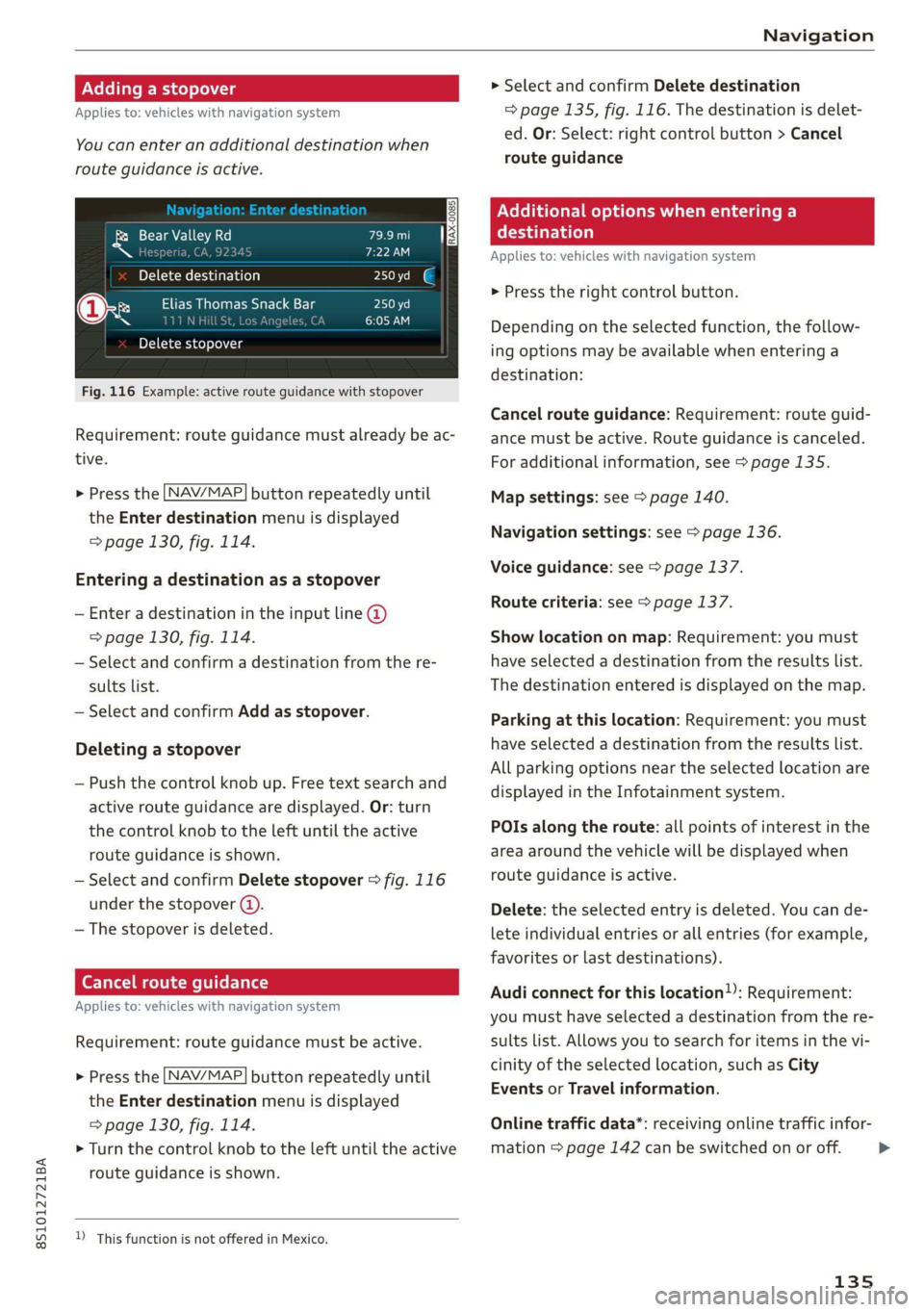
Addingastopover
Appliesto:vehicleswithnavigationsystem
Youcanenteranadditionaldestinationwhen
routeguidanceisactive.
&ToTmIAe}
Ssi
Deletedestination
@xSCMeersteast
aN11h1
Deletestopover
Fig.116Example:activerouteguidancewithstopover
Requirement:routeguidancemustalreadybeac-
tive.
>Pressthe [NAV/MAP|buttonrepeatedlyuntil
the Enterdestinationmenuisdisplayed
=>page130,fig.114.
Enteringadestinationas astopover
—Enteradestinationintheinputline@
=>page130,fig.114.
—Selectandconfirmadestinationfromthere-
sultslist.
—SelectandconfirmAddasstopover.
Deletingastopover
—Pushthecontrolknobup.Freetextsearchand
activerouteguidancearedisplayed.Or:turn
thecontrolknobtotheleftuntiltheactive
routeguidanceisshown.
—SelectandconfirmDeletestopover>fig.116
underthestopover(4).
—Thestopoverisdeleted.
Cancelrouteguidance
Appliesto:vehicleswithnavigationsystem
Requirement:routeguidancemustbeactive.
>Pressthe [NAV/MAP|buttonrepeatedlyuntil
the Enterdestinationmenuisdisplayed
=>page130,fig. 114.
>Turn thecontrolknobtotheleftuntiltheactive
routeguidanceisshown.
D_ThisfunctionisnotofferedinMexico.
>Selectandconfirm Deletedestination
=>page135,fig.116.Thedestinationisdelet-
ed. Or:Select:rightcontrolbutton>Cancel
routeguidance
Nellieme)eRaCelateBe)
(ehaeya)
Appliesto:vehicleswithnavigationsystem
>Presstherightcontrolbutton.
Dependingontheselectedfunction,thefollow-
ingoptionsmaybeavailablewhenenteringa
destination:
Cancelrouteguidance:Requirement:routeguid-
ancemustbeactive.Routeguidanceiscanceled.
Foradditionalinformation,see>page135.
Mapsettings:see>page140.
Navigationsettings:see>page136.
Voiceguidance:see>page137.
Routecriteria:see>page137.
Showlocationonmap:Requirement:youmust
haveselectedadestinationfromtheresultslist.
Thedestinationenteredisdisplayedonthemap.
Parkingatthislocation:Requirement:youmust
haveselectedadestinationfromtheresultslist.
Allparkingoptionsnear theselectedlocationare
displayedintheInfotainmentsystem.
POIsalongtheroute:allpointsofinterestinthe
areaaroundthevehiclewillbedisplayedwhen
routeguidanceisactive.
Delete:theselectedentryisdeleted.Youcande-
leteindividualentriesorallentries(forexample,
favoritesorlastdestinations).
Audiconnectforthislocation):Requirement:
youmusthaveselectedadestinationfromthere-
sultslist.Allowsyoutosearchforitemsinthevi-
cinityoftheselectedlocation,suchasCity
EventsorTravelinformation.
Onlinetrafficdata*:receivingonlinetrafficinfor-
mation>page142can be switchedonoroff.
135
>
Page 144 of 312

Navigation
Onlinetrafficinformation
Appliesto:vehicleswithnavigationsystemandAudiconnect
TheMMIcanreceivereal-timeonlinetrafficinformationaboutcongestion,accidents,roadconstruc-
tion,andotherincidents.
[RAH-8613]
7iccbetterrouteisavailable.—@
alongtheroute:Omin
NogalesSt,Northbound
@Northbound
Northbound
eel
\.
Cerys
@
Fig.122Example:onlinetrafficinformationdisplay*withoutbetterroute
Requirement:therequirementsforAudiconnect
mustbemet>page123.
> Pressthe[NAV/MAP
themapisdisplayed.
>Select:rightcontrolbutton>Onlinetrafficda-
ta>On(™).
>Select:leftcontrolbutton>Trafficmessages.
Thetrafficinformationoverviewisshown.
buttonrepeatedlyuntil
Dependingonvehicleequipment,thefollowing
informationmaybeshowninthetrafficinforma-
tionoverview>fig.122:
@AmessagewillappeariftheMMIcalculatesa
betterrouteforthecurrentrouteguidance.
Moreinformationcanbefound under
=>page143.
@ThestatuslineintheInfotainmentdisplay
indicatesthereceptionoftrafficinformation
TMC]or[ONLINE]).
@®)Thecurrentselectedtrafficmessageisalso
shownasamappreviewintheInfotainment
systemdisplay.
@Color-codedmarkingsalongtherouteindi-
catethetrafficflow.
Trafficdisplay
Green:trafficisflowingfreely.
Yellow:stop-and-gotraffic.
142
Red:congestion.
Shadedmarkingsindicatethelength ofthearea
withcongestion.
Coloredwarningsymbols:thereisatrafficinci-
dentimmediatelyaheadontheroute.
Grayedoutwarningsymbols:trafficincidents
thatarenotonyourroute.
Redwarningsymbols:allwarningsymbolswill
beredwhenrouteguidanceisnotactive.
Thedisplayofcoloredmarkings,warningsym-
bols,etc.canbesetintheMapcontentmenu
>page141.
Youcanswitchoffthereceptionofonlinetraffic
informationatanytime>page142.
Switchingthetrafficmapdisplayon
Foranoptimumtrafficinformationdisplay:
NAV/MAP]button>rightcontrolbutton>Map
settings>Mapdisplay>Traffic.
Page 150 of 312
Radio
Requirement:thefavoriteslistmustbedis-
played.
—Listeningtopresets:selectandconfirm apre-
setfromthelist.
—Moveapreset:selectapresetfromthelist>
rightcontrolbutton>Movepreset.Or:press
andholdthecontrolknobforseveralseconds.
Selectandconfirmthelocationoftheselected
preset.
—Deletingpresets:selecta presetfromthelist>
rightcontrolbutton>Deletepreset>Delete
thispresetorDeleteallpresets.
Additionalsettings
Radiosettings
>Select:[RADIO]button>rightcontrolbutton>
Radiosettings.
Thefollowingsettingscan beselected,depend-
ingonthebandthatisselected:
Stationnames(FM)
Variable:scrollingtexttransmittedby theFM
stationsisshownintheInfotainmentsystemdis-
play.
Fixed:scrollingtexttransmittedby theFMsta-
tionsisnotshownintheInfotainmentsystem
display.Onlythecurrentsectionofthescrolling
textisdisplayed.
FM/AMHDRadio*
YoucanswitchHDRadioreceptiononoroff.
Channelsorting(SiriusXM*)
YoucansetthechannelsortingforSiriusXMsta-
tionlists*by:
—Channelnumber:thechannelsaresortedinas-
cendingorderaccordingtotheirchannelnum-
ber.
—Channelname:thechannelsarelistedinalpha-
beticalorder.
—Firstcategory,thenchannelnumber:thechan-
nelsaresortedbytheircategoryandthenby
theirchannelnumbers.
148
—Firstcategory,thenchannelname:thesta-
tionsaresorted bytheircategoryandthenby
theirchannelnames.
Categoryfilter(SiriusXM*)
Thestationsshowninthestationlistcanbefil-
teredbyyourpersonalpreferencesandbypro-
gramtype.Theprogramcategoriesthatyoucan
selectdependonwhatisofferedbyyourprovid-
er.SelecttheAllcategoriesoptiontodeactivate
allfilteroptionsanddisplayallavailablestations
inthesatellitestationlist.
Show"NowPlaying"screen
Whenthefunctionisswitchedon¥andthesta-
tionsorpresetslistisopen, thedisplaywill
switchtotheShow"NowPlaying"screenview
afterapproximatelyfiveseconds>page147.De-
pendingonavailability,informationabouttheset
station(such asstationname,artistandstation
logo)maybedisplayedinthisview.
Preferredpictureview
Youcansetyourpreferredscreenviewforthe
Show "NowPlaying"screen>page147.
—Stationlogo:thestationlogoisdisplayed,de-
pendingonavailability.
—Coverart:thealbumcoverorgenrecoverisdis-
played,dependingonavailability.
Gracenoteonlinedatabase*
Requirement:theMMImustbeconnectedtothe
Internet.TheCoverartoptionmustbeselected
=page148,Preferredpictureview.
Whenthefunctionisswitchedon(¥,thealbum
coverorgenrecoverforthesongthatisplayingis
loadedfromtheGracenoteonlinedatabase,de-
pendingonavailability.
Subscriptionstatus(SiriusXM)*
Thisoptionisavailablewhenyoursubscriptionis
abouttoexpireorhasalreadyexpired.Theexpi-
rationdateforyourlicenseisdisplayed.
CalltoSiriusXM”*:thecontactinformationfor
yoursatelliteradioproviderisdisplayed.Tocall
yoursatelliteradioproviderusingtheMMI,press
CalltoSiriusXM”*.
Page 165 of 312
8S1012721BA
Media
Audiotrack!)
Youcanmanuallysettheaudiotrack(language
andaudioformat).Thelanguageandaudiofor-
matoptionsdependonthevideoDVD.
Subtitles!)
Youcanmanuallyselectsubtitlesforplayback.
ThelanguagesavailabledependontheDVD.
Aspectratio
AudirecommendstheAutomaticsettingforthe
pictureformat.Youcansetthepictureformat
dependingontheactivefileorsource(forexam-
plevideofile*,DVD*).
Aspectra-|Information
tio
OriginalTheimageisdisplayedintheratio
ofthesourceformat.Selectthis
optioniftheimageisdistorted ora
sectionoftheimageiscutoff
whenAutoisselected.
4:3Theimageissettothe 4:3picture
format.Blackbarsareshownon
thesidesoftheInfotainmentsys-
temdisplay.
Aspectra-|Information
tio
16:9 Theimageissettothe16:9picture
format.Blackbarsareshowninthe
upperandloweredgesoftheInfo-
tainmentsystemdisplay.
Automatic|TheMMIdetectsthepicturefor-
matofthesourceanddisplaysthe
imageintheoptimumratio.Black
barsmayappearonthesidesof
thedisplay,dependingonthe
sourceformatandtheInfotain-
mentsystemdisplaythatisinstal-
led.
ZoomTheimageisenlargedtofilltheen-
tireInfotainmentsystemdisplay.
Switchthefunctionoffiftheimage
isdistorted.
Cinema-Usethissettingforfilmsincinema
scopeformat21:9. Blackbarswillappear
ontheupper/loweredgeintheIn-
fotainmentsystemdisplay.
DDependingontheDVD,thismaynotbepossibleduring
playback.
@Tips
—NotallvideoDVDshaveparentalcontrol.
—TheprotectionlevelsfortheParentalcon-
trolarebasedontheUSstandardsfromthe
MotionPictureAssociationofAmerica
(MPAA).Notethattheagelevelsforvideo
DVDsinEuropeancountriesmaydiffer.
—PasswordentryforParentalcontrolwillbe
lockedforapproximatelyoneminuteifyou
entertheincorrectpasswordthreetimesin
arow.Thepasswordcanonlyberesetbyan
authorizedAudidealer.
163
Page 171 of 312
![AUDI TT COUPE 2019 Workshop Manual 8S1012721BA
Systemsettings
Systemsettings
Settingthedateand
time
Youcanset theclocktimemanuallyorusingthe
GPS.
>Select:[MENU]button>Settings>leftcontrol
button>MMIsettings>Date&time.
>Or:select:](/img/6/57659/w960_57659-170.png "AUDI TT COUPE 2019 Workshop Manual 8S1012721BA
Systemsettings
Systemsettings
Settingthedateand
time
Youcanset theclocktimemanuallyorusingthe
GPS.
>Select:[MENU]button>Settings>leftcontrol
button>MMIsettings>Date&time.
>Or:select:")
8S1012721BA
Systemsettings
Systemsettings
Settingthedateand
time
Youcanset theclocktimemanuallyorusingthe
GPS.
>Select:[MENU]button>Settings>leftcontrol
button>MMIsettings>Date&time.
>Or:select:[MENU]button>Vehicle>leftcon-
trolbutton>Vehiclesettings>Date&time.
Automaticsetting
Whenthisfunctionisswitchedon©,thetime
anddateareautomaticallyset.
Time
Requirement:theAutomaticsettingmustbe
switchedoff.
Pressthecontrolknob.YoucansettheTime
manuallybyturningandpressingthecontrol
knob.
Date
Requirement:theAutomaticsettingmustbe
switchedoff.
Pressthecontrolknob.YoucansettheDate
manuallybyturningandpressingthecontrol
knob.
Timezone
Whenselectingtheappropriatetimezone,a
samplingofcountriesinthiszonewillbelisted.
Automatictimezone*
Whenthisfunctionisswitchedon@,thetime
willautomaticallyadjusttothecorresponding
timezone.
Timeformat
Ifyouselect24h,theclockwilldisplay,forexam-
ple,13:00.IfyouselectAM/PM,theclockwill
display,forexample,1:00PM.
D_TheQistandardmakesitpossibletocharge yourmobile
devicewirelessly.
Dateformat
IfyouselectDD.MM.YYYY,thedatedisplaywill
show,forexample,31.08.2017.Ifyouselect
MM/DD/YYVY,thedatedisplaywillshow,forex-
ample,08/31/2017.IfyouselectYYYY-MM-DD,
thedatedisplaywillshow,forexample,
2017-08-31.
MMIsettings
>Select:[MENU]button>Settings>leftcontrol
button>MMIsettings.
Language
Youcanchangethedisplaylanguageaswellas
thelanguageforthevoiceguidance*andvoice
recognitionsystem*.
Thenumberoflanguagesavailabledependson
themarket.
Measurementunits
Thefollowingmeasurementunitscanbesetde-
pendingonavailability:Speed,Distance,Tem-
perature,Fuelconsumption,Volume,Pressure.
Mobiledeviceremindersignal
Appliesto:vehicleswithAudiphonebox
Requirement:yourcellphonemustbeQi-capa-
ble)orconnectedtotheAudimusicinterface@
withaUSBadaptercable>page111,fig.107.
Whenthedeviceremindersignalisswitchedon,
youwillbenotifiedthatyourmobiledeviceisstill
intheAudiphonebox*whenyouleavethevehi-
cle.YoucanselectbetweenSpokencue,Signal
toneandOff.
Mobiledeviceremindersignalvolume:youcan
adjusttheremindersignalvolumebyturningthe
controlknob.
Switchoffpop-up:whenthefunctionisswitched
on[M,themessagesintheInfotainmentsystem
displayregardingthechargingstatusofyourcell
phoneinthe Audiphonebox*arehidden.There-
mindernottoforgetyourcellphonewhenleav-
ingthevehicleislikewiseswitchedoff.
169
Page 249 of 312
8S1012721BA
CheckingandFilling
@)Note
— Theconcentrationofanti-freezingagent
mustbeadjustedtothevehicleoperating
conditionsandtheclimate.Aconcentration
thatistoohighcanleadtovehicledamage.
—Neveraddradiatoranti-freezeorotheraddi-
tivestothewasherfluid.
—Donotuseaglasscleanerthat contains
paintsolvents,becausethiscoulddamage
thepaint.
Serviceintervaldisplay
Theserviceintervaldisplaydetectswhenyourve-
hicleisdueforservice.
Theserviceintervaldisplayworksintwostages:
—Inspectionoroilchangereminder:afteracer-
taindistancedriven,amessageappearsinthe
Infotainmentsystemdisplayeachtimetheig-
nitionisswitchedonoroff.Theremainingdis-
tanceortimeisdisplayedbriefly.
—Inspectionoroilchangedue:ifyourvehicle
hasreached aninspection oroilchangeinterval
orbothintervalsatthesametime,themes-
sageInspectiondue!orOilchangedue!orOil
changeandinspectiondue!appearsbrieflyaf-
terswitchingtheignitionon/off.
Checkingserviceintervals
Youcan checktheremainingdistanceortimeun-
tilthenextoilchangeornextinspection.Select
intheInfotainmentsystem:the[MENU]button>
Vehicle> leftcontrolbutton>Service&checks>
Serviceintervals.
Resettingtheindicator
AnauthorizedAudidealerorauthorizedAudi
ServiceFacilitywillresettheserviceintervaldis-
playafterperformingservice.
Ifyouhavechangedtheoilyourself,youmustre-
settheoilchangeinterval.
Toresetthedisplay,selectintheInfotainment
system:the[MENU]button>Vehicle> leftcon-
trolbutton>Service&checks>Serviceintervals
>Resetoilchangeinterval.
C@)Note
—Onlyresettheoilchangeindicatoriftheoil
waschanged.
—Followingtheserviceintervalsiscriticalto
maintainingtheservicelifeandvalueof
yourvehicle,especiallytheengine.Evenif
themileageonthevehicleislow,donotex-
ceedthetimeforthenextservice.
247
Page 267 of 312
8S1012721BA
Wheels
No.109.GradesBandArepresenthigher levels
ofperformanceonthelaboratorytestwheelthan
theminimumrequiredbylaw.
Z\WARNING
Thetractiongradeassignedtothistireis
basedonstraight-aheadbrakingtraction
tests,anddoesnotincludeacceleration,cor-
nering,hydroplaningorpeaktractioncharac-
teristics.
ZAWARNING
Thetemperaturegradeforthistireisestab-
lishedforatirethatisproperlyinflatedand
notoverloaded.Excessivespeed,underinfla-
tion,orexcessiveloading,eitherseparatelyor
incombination,can cause heatbuildupand
possibletirefailure.
ZAWARNING
Temperaturegradesapplytotiresthatare
properlyinflatedandnotoverorunderinflat-
ed.
Tirepressuremonitoring
system
(1)Generalnotes
Eachtire,includingthespare(ifprovided),
should becheckedmonthlywhencoldandinflat-
edtotheinflationpressurerecommendedbythe
vehiclemanufactureronthevehicleplacardor
tireinflationpressurelabel.(Ifyourvehiclehas
tiresofadifferentsizethanthesizeindicatedon
thevehicleplacardortireinflationpressurela-
bel,youshoulddeterminethepropertireinfla-
tionpressureforthosetires).
Asanaddedsafetyfeature,yourvehiclehasbeen
equippedwithatirepressuremonitoringsystem
(TPMS)thatilluminatesalowtirepressuretell-
talewhenoneormoreofyourtiresissignificant-
lyunder-inflated.Accordingly,whenthelowtire
pressuretelltaleilluminates,youshouldstopand
checkyourtiresassoonaspossible,andinflate
themtotheproperpressure.Drivingonasignifi-
cantlyunder-inflatedtirecausesthetiretoover-
heatandcanleadtotirefailure.Under-inflation
alsoreducesfuelefficiencyandtiretreadlife,
andmayaffectthevehicle'shandlingandstop-
pingability.
PleasenotethattheTPMSisnotasubstitutefor
propertiremaintenance,anditisthedriver'sre-
sponsibilitytomaintaincorrecttirepressure,
evenifunder-inflationhasnotreachedthelevel
totriggerillumination oftheTPMSlowtirepres-
suretelltale.
YourvehiclehasalsobeenequippedwithaTPMS
malfunctionindicatortoindicatewhenthesys-
temisnotoperatingproperly.TheTPMSmal-
functionindicatoriscombinedwiththelowtire
pressuretelltale.Whenthesystemdetectsa
malfunction,thetelltalewillflashforapproxi-
matelyone minuteandthenremaincontinuously
illuminated.Thissequencewillcontinueupon
subsequentvehiclestart-upsaslongasthe mal-
functionexists.
Whenthemalfunctionindicatorisilluminated,
thesystemmaynotbeabletodetectorsignal
lowtirepressureasintended.TPMSmalfunctions
mayoccurforavarietyofreasons,includingthe
installationofreplacementoralternatetiresor
wheelsonthevehiclethatpreventtheTPMS
fromfunctioningproperly.Alwayscheck the
TPMSmalfunctiontelltaleafterreplacingoneor
moretiresorwheelsonyourvehicletoensure
thatthereplacementoralternatetiresand
wheelsallowtheTPMStocontinuetofunction
properly.
IftheTirePressureMonitoringSystem
indicatorappears
Appliesto:vehicleswithTirePressureMonitoringSystemin-
dicator
Thetirepressureindicatorintheinstrument
clusterinformsyouifthetirepressureistoolow
orifthereisasystemmalfunction.
UsingtheABSsensors,thetirepressuremonitor-
ingsystemcomparesthetiretreadcircumference
andvibrationcharacteristicsoftheindividual
tires.Ifthepressurechangesinoneormore
tires,thisisindicatedintheInfotainmentsystem
displaywithanindicatorlight@andamessage.>
265
Page 268 of 312
Wheels
Ifonlyonetireisaffected,thelocationof that
tirewillbeindicated.
ThetirepressuresmustbestoredintheInfotain-
mentsystemagaineachtimethepressures
change(switchingbetweenpartialandfullload
pressure)orafterchangingorreplacingatireon
yourvehicle>page266.Thetirepressuremoni-
toringsystemonlymonitorsthetirepressureyou
havestored.Refertothetirepressurelabelfor
therecommendedtirepressureforyourvehicle
=>page258,fig. 192.
Tiretreadcircumferenceandvibrationcharacter-
isticscanchangeandcauseatirepressurewarn-
ingif:
—Thetirepressureinoneormoretiresistoolow
—Thetirehasstructuraldamage
—Thetirewasreplacedorthetirepressurewas
changedanditwasnotstored>page266
—Thespare tire*isinstalled
Indicatorlights
®-Lossofpressureinatleastonetire>A\.
Checkthetiresandreplaceorrepairifnecessary.
Check/correctthepressuresofallfourtiresand
storethepressureagainintheInfotainmentsys-
tem>page266.
AirePressureMonitoringSystem)Tirepres-
sure:malfunction!Seeowner'smanual-iffo
appearsafterswitchingontheignitionorwhile
drivingandthenthe@)indicatorlightinthein-
strumentclusteralsostartstoblinkforabout
oneminuteandthenstaysonpermanently,there
isasystemmalfunction.Trytostorethecorrect
tirepressures>page266.Iftheindicatorlight
doesturnofforturnsonagainafterashortperi-
odoftime,drivetoanauthorizedAudidealeror
authorizedAudiServiceFacilityimmediatelyto
havethe malfunctioncorrected.
ZA\WARNING
—Ifthetirepressureindicatorappearsinthe
display,reduceyourspeedimmediatelyand
avoidanyhardsteeringorbrakingmaneu-
vers.Stopassoonaspossibleandcheckthe
tiresandtheirpressure.
266
—Thedriverisresponsibleformaintainingthe
correcttirepressures.Youmustcheckthe
tirepressuresregularly.
—Undercertainconditions(suchasasporty
drivingstyle,winterconditionsorunpaved
roads),thepressuremonitorindicatormay
bedelayed.
—Donotuserun-flattiresonyourvehicle.Us-
ingthemwhennotpermittedcanlead tove-
hicledamageoraccidents.
G)Tips
—Thetirepressuremonitoringsystemcanal-
sostopworkingwhenthereisanESCmal-
function.
—Usingsnowchainsmayresultinasystem
malfunction.
—Thetireswiththeidentification“AO”
=page255havebeenmatchedwithyour
Auditirepressuremonitoringsystem.Using
thesetiresisrecommended.
Storingtirepressures
Appliesto:vehicleswithTirePressureMonitoringSystemin-
dicator
Ifthetirepressurechangesoratireisreplaced,
itmustbeconfirmedinthe Infotainmentsys-
tem.
>Beforestoringthetirepressures,makesurethe
tirepressuresinallfourtiresmeetthespeci-
fiedvaluesandareadaptedtotheload
=>page257.
>Switchtheignitionon.
>SelectintheInfotainmentsystem:the[MENU
button>Vehicle>leftcontrolbutton>Service
&checks>Tirepressuremonitoring.
@)Tips
Donotstorethetirepressuresifsnowchains
areinstalled.
Page 269 of 312
8S1012721BA
Wheels
Tirepressuremonitoring
system
(1)Generalnotes
Eachtire,includingthespare(ifprovided),
should becheckedmonthlywhencoldandinflat-
edtotheinflationpressurerecommendedbythe
vehiclemanufactureronthevehicleplacardor
tireinflation pressurelabel.(Ifyourvehiclehas
tiresofadifferentsizethanthesizeindicatedon
thevehicleplacardortireinflationpressurela-
bel,youshoulddeterminethepropertireinfla-
tionpressureforthosetires).
Asanaddedsafetyfeature,yourvehiclehasbeen
equippedwithatirepressuremonitoringsystem
(TPMS)thatilluminatesalowtirepressuretell-
talewhenoneormoreofyourtiresissignificant-
lyunder-inflated.Accordingly,whenthelowtire
pressuretelltaleilluminates,youshouldstopand
checkyourtiresassoonaspossible,andinflate
themtotheproperpressure.Drivingonasignifi-
cantlyunder-inflatedtirecausesthetiretoover-
heatandcanleadtotirefailure.Under-inflation
alsoreducesfuelefficiencyandtiretreadlife,
andmayaffectthevehicle'shandlingandstop-
pingability.
PleasenotethattheTPMSisnotasubstitutefor
propertiremaintenance,anditisthedriver'sre-
sponsibilitytomaintaincorrecttirepressure,
evenifunder-inflationhasnotreachedthelevel
totriggerillumination oftheTPMSlowtirepres-
suretelltale.
YourvehiclehasalsobeenequippedwithaTPMS
malfunctionindicatortoindicatewhenthesys-
temisnot operatingproperly.TheTPMSmal-
functionindicatoriscombinedwiththelowtire
pressuretelltale.Whenthesystemdetectsa
malfunction,thetelltalewillflashforapproxi-
matelyoneminuteandthenremaincontinuously
illuminated.Thissequencewillcontinueupon
subsequentvehiclestart-ups aslongasthemal-
functionexists.
Whenthemalfunctionindicatorisilluminated,
thesystemmaynotbeabletodetectorsignal
lowtirepressureasintended.TPMSmalfunctions
mayoccurforavarietyofreasons,includingthe
installationofreplacementoralternatetiresor
wheelsonthevehiclethatpreventtheTPMS
fromfunctioningproperly.Alwayscheck the
TPMSmalfunctiontelltaleafterreplacingoneor
moretiresorwheelsonyourvehicletoensure
thatthereplacementoralternatetiresand
wheelsallowtheTPMStocontinuetofunction
properly.
Appliesto:vehicleswithtirepressuremonitoringsystem
Thetirepressuremonitoringsystemmonitors
thepressureinthefourtireswhendriving.
Thesystemusessensorsthatmeasurethetem-
peratureandpressureinthetires.Thedatais
sentfromthesesensorstothecontrolmoduleby
radiofrequency.
Thetirepressuremonitoringsystemshowsthe
currentpressuresandtemperaturesofthetires
intheInfotainmentsystemwhiledriving
=page268.Italsocomparesthecurrenttire
pressureswiththestoredtirepressuresandgives
awarningifthetirepressureisdifferentfrom
whatisstored>page268.
Thesystemdoesnotdetectifthestoredtire
pressuresmatchtherecommendedtirepres-
sures.Youmuststorethetirepressuresagainin
eachofthefollowingsituations>page269:
—Eachtimethetirepressureschange,forexam-
plewhentheloadinthevehiclechanges
—Afterreplacingatire
—Ifwheelswithnewwheelsensorsareused
Z\WARNING
—Thetirepressuremonitoringsystemassists
thedriverinmonitoringtirepressures.The
driverisresponsibleforhavingthetiresin-
flatedtothecorrectpressure.
—Donotchangethetirepressurewhenthe
temperatureofthetireisextremelyhigh.
Thiscouldresultinseriousdamagetothe
tireandevencausethetiretoburst,increas-
ingtheriskofanaccident.
—Atirewithlowpressureflexesmore.This
heatsthetireuptoomuch.Thiscouldcause|>
267