ad blue AUDI TT COUPE 2020 User Guide
[x] Cancel search | Manufacturer: AUDI, Model Year: 2020, Model line: TT COUPE, Model: AUDI TT COUPE 2020Pages: 280, PDF Size: 98.79 MB
Page 138 of 280
Telephone
Outbox
All text messages to be sent are displayed.
Drafts
Displays all text messages that have not yet been
sent and stored text messages.
Deleted
Displays all deleted text messages.
@) Tips
Messages that are deleted in the MMI are also
deleted in the mobile device automatically.
Write text message
Applies to: cell phones with Bluetooth Message Access Profile
(MAP)
MENU > Select: button > Telephone > left con-
trol button > text message (myPhone)/text
message (secondary phone)*.
Write new text message
Select and confirm the desired template from the
list. Enter a recipient. Select and confirm Send.
Reply*
Select and confirm the desired template from the
list. Select and confirm Send.
Message options
Applies to: cell phones with Bluetooth Message Access Profile
(MAP)
MENU > Select: button > Telephone > left con-
trol button > text message (myPhone)/text
message (secondary phone)* > Inbox/Sent/
Outbox > right control button.
The following options may be available depend-
ing on the selected menu.
Reply*
A reply can be sent for the selected message in
the Inbox.
D_ Not available in all languages.
136
Forward
The selected text message can be forwarded to a
different recipient.
Send again*
The selected text message can be resent.
Delete this text message*
The selected text message can be deleted.
Read out!)
You can have the MMI read an open text mes-
sage.
Text messaging settings*
To display when a new text message is received,
enable the Text message notifications. New text
messages are indicated with an envelope M in
the Infotainment system display status line.
Connection manager
See > page 190.
Bluetooth settings
See > page 192.
Online settings*
See > page 192.
Wi-Fi settings*
See > page 147.
Telephone settings
See > page 140.
@) Tips
Messages that are deleted in the MMI are also
deleted in the mobile device automatically.
Applies to: cell phones with Bluetooth Message Access Profile
(MAP)
Depending on the type of cell phone used, you
can receive and send e-mails through the MMI. >
Page 139 of 280
![AUDI TT COUPE 2020 User Guide 8S1012721BB
Telephone
Requirement: your mobile device must be con-
nected to the MMI via Bluetooth Message Access
Profile (Bluetooth MAP) > page 129.
> Select: [MENU] button > Telepho](/img/6/57658/w960_57658-138.png "AUDI TT COUPE 2020 User Guide 8S1012721BB
Telephone
Requirement: your mobile device must be con-
nected to the MMI via Bluetooth Message Access
Profile (Bluetooth MAP) > page 129.
> Select: [MENU] button > Telepho")
8S1012721BB
Telephone
Requirement: your mobile device must be con-
nected to the MMI via Bluetooth Message Access
Profile (Bluetooth MAP) > page 129.
> Select: [MENU] button > Telephone > left con-
trol button > e-mail (myPhone)/e-mail (secon-
dary phone)*.
Write new e-mail
— Using a template: select and confirm the de-
sired template from the list.
— Enter one or more recipients.
— Select and confirm Send.
Inbox
All received e-mails are displayed.
Sent
All sent e-mails are displayed.
Outbox
All e-mails that will be sent are displayed.
Drafts
All saved e-mails that have not been sent yet are
displayed.
@) Note
Read the information about Audi connect, and
be sure to note the connectivity costs section
=> page 142.
G) Tips
To ensure that your sent e-mails are received,
connect your cell phone to the Wi-Fi hotspot*
in the vehicle so that the e-mail app on your
cell phone continues to have Internet access.
If you are still not receiving e-mails even
though you have a successful connection,
then contact your e-mail service provider or
your cell phone service provider.
) Not available in all languages.
Message options
Applies to: cell phones with Bluetooth Message Access Profile
(MAP)
> Select: [MENU] button > Telephone > left con-
trol button > e-mail (myPhone)/e-mail (secon-
dary phone)* > Inbox/Sent/Outbox > right
control button.
The following options may be available depend-
ing on the selected menu.
Store as template
Ten e-mail templates are stored in the MMI. You
can save up to 10 additional templates of your
own.
— Create an e-mail.
— Select and confirm Store as template.
Resume last edited e-mail
The last e-mail in progress can be resumed.
Reply*
A reply can be sent for the selected e-mail in the
Inbox.
Reply to all*
A reply can be sent for the selected e-mail in the
Inbox and it will be sent to all of the entered re-
cipients.
Forward
The selected e-mail can be forwarded to a differ-
ent recipient.
Delete this message*
The selected e-mail can be deleted.
Read out)
You can have the MMI read an open e-mail.
E-mail settings*
To display when a new e-mail is received, activate
the E-mail notifications. New e-mails are indicat-
ed with an envelope & in the Infotainment sys-
tem display status line.
137
Page 140 of 280
Telephone
Connection manager
See > page 190.
Bluetooth settings
See > page 192.
Online settings*
See > page 192.
Wi-Fi settings*
See > page 147.
Telephone settings
See > page 140.
() Tips
Messages that are deleted in the MMI are also
automatically deleted in the connected cell
phone.
Listening to voicemail
Applies to: vehicles with telephone
MENU > Select: button > Telephone > left con-
trol button. Select and confirm Call list/Direc-
tory/Favorites > Voicemail.
Requirement: there must be no voicemail num-
ber stored.
> Entering the voicemail number: enter the de-
sired number. Select and confirm OK.
Requirement: a voicemail number must be stor-
ed.
> Dialing the voicemail number: select and con-
firm
Voicemail.
@) Tips
This service must be set up and activated in
advance by the cell phone service provider.
Emergency call functions
Applies to: vehicles with telephone
> Select: [MENU] button > Telephone > left con-
trol button > Dial number > Enter emergency
call number (for example, 911) > OK.
138
Z\ WARNING
— Because your phone works with radio sig-
nals, a connection cannot be guaranteed un-
der all circumstances. Do not rely on only
your phone when it comes to essential com-
munication (such as a medical emergency).
— Always follow the instructions given by the
emergency personnel during an emergency
call and only end the call when they instruct
you to do so.
() Tips
Emergency numbers are not the same every-
where. Find out which emergency number is
used in your current location.
Directory
Opening the directory
Applies to: vehicles with telephone
After connecting the cell phone, the contacts in it
are automatically imported into the MMI.
Requirement: you must have at least one contact
stored in your cell phone.
MENU > Select: button > Telephone > left con-
trol button > Directory.
> Selecting a contact: select and confirm a con-
tact from the directory. The phone numbers for
your selected contact are displayed. Select and
confirm a phone number to start a call.
> Free text search for a contact: see > page 119.
Contacts are displayed in alphabetical order and
can be sorted by first or last name > page 140,
Sort order.
(i) Tips
— Check for a possible request to synchronize
on your cell phone. Requests to synchronize
the directory must be confirmed so that
your cell phone contacts can be loaded into
the MMI.
—The directory from the cell phone with the
active connection will always be displayed.
— The contacts from the mobile device may
not be transferred in alphabetical order. If >
Page 142 of 280
Telephone
@) Tips
— For more information about the myAudi ac-
count, visit my.audi.com.
—The imported contacts are stored in the lo-
cal memory of the directory.
—A maximum of 1,000 contacts can be im-
ported. You can check the directory memory
capacity at any time > page 140.
— Contacts that were downloaded from a mo-
bile device cannot be exported.
— There should be no other files or folders on
the storage medium containing the contacts
to be imported.
Settings
Telephone settings
Applies to: vehicles with telephone
> Select: [MENU] button > Telephone > right con-
trol button > Telephone settings.
Call options*
Multi-party calling: can be switched on/off.
Ringtone and volume settings!)
Using the Mute telephone function, you can
switch the ringtone on your MMI on or off. You
can play the ringtones using the Ringtone func-
tion. Select and confirm an entry from the list.
For the Ringtone volume/Message volume set-
tings, see > page 193. The Microphone input
level can be adjusted during a phone call using
the control knob.
@ Tips
— Several mobile devices can be paired with
the MMI, but only two* mobile devices can
be actively connected.
— To delete all paired Bluetooth devices, the
Bluetooth function can be reset to the fac-
tory default settings > page 190.
)) Depends on the connected cell phone.
140
Additional options
Applies to: vehicles with telephone
> Select: [MENU] button > Telephone > right con-
trol button.
— Connection manager: See > page 190.
— Bluetooth settings: See > page 192.
— Online settings*: See > page 192.
— Wi-Fi settings”: See > page 147.
Directory settings
Applies to: vehicles with telephone
> Select: [MENU] button > Telephone > left con-
trol button > Directory > right control button >
Contact settings.
Memory capacity
Shows the Memory capacity for the directory.
You can manage up to 17,000 contacts with the
MMI directory. You can load up to 4,000 contacts
from your cell phone into each directory. You can
also import up to 1,000 contacts from a storage
device.
Sort order
You can sort the contacts in your directory alpha-
betically according to Last name or First name.
Import contacts/Export contacts
See > page 139.
Download directory
To update the contacts in the MMI, you can man-
ually download your mobile device contacts. De-
pending on the mobile device, you may need to
disconnect and reconnect the Bluetooth connec-
tion to update the contacts.
Hide contacts without phone number
When this function is switched on, grayed-out
contacts that have no phone numbers stored for
them will be hidden in the directory.
Page 143 of 280
8S1012721BB
Telephone
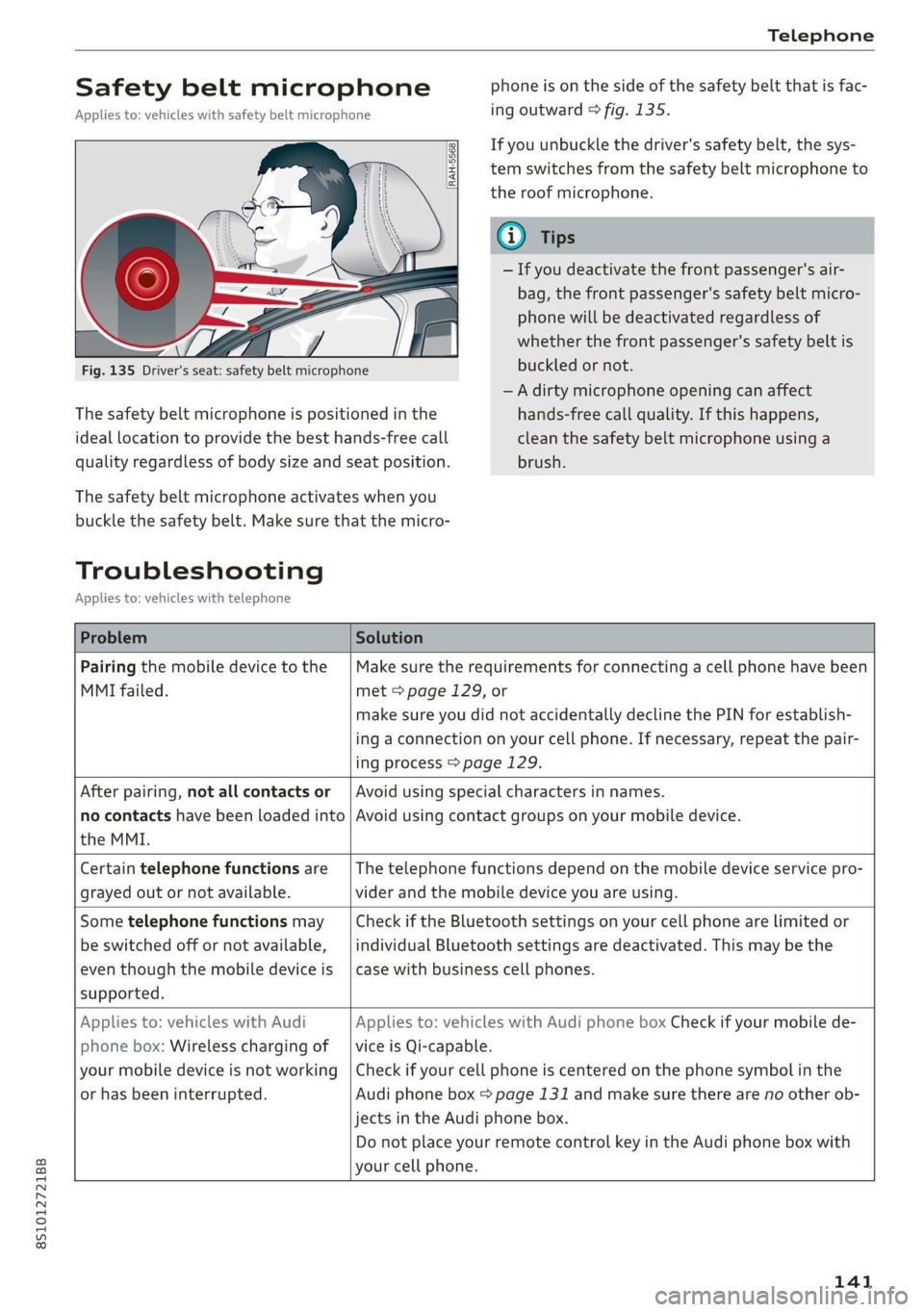
Safety belt microphone
Applies to: vehicles with safety belt microphone
phone is on the side of the safety belt that is fac-
ing outward > fig. 135.
The safety belt microphone is positioned in the
ideal Location to provide the best hands-free call
quality regardless of body size and seat position.
If you unbuckle the driver's safety belt, the sys-
tem switches from the safety belt microphone to
the roof microphone.
G Tips
— If you deactivate the front passenger's air-
bag, the front passenger's safety belt micro-
phone will be deactivated regardless of
whether the front passenger's safety belt is
buckled or not.
—A dirty microphone opening can affect
hands-free call quality. If this happens,
clean the safety belt microphone using a
brush.
The safety belt microphone activates when you
buckle the safety belt. Make sure that the micro-
Troubleshooting
Applies to: vehicles with telephone
Problem Solution
Pairing the mobile device to the
MMI failed.
Make sure the requirements for connecting a cell phone have been
met > page 129, or
make sure you did not accidentally decline the PIN for establish-
ing a connection on your cell phone. If necessary, repeat the pair-
ing process > page 129.
After pairing, not all contacts or
no contacts have been loaded into
the MMI.
Avoid using special characters in names.
Avoid using contact groups on your mobile device.
Certain telephone functions are
grayed out or not available.
The telephone functions depend on the mobile device service pro-
vider and the mobile device you are using.
Some telephone functions may
be switched off or not available,
even though the mobile device is
supported.
Check if the Bluetooth settings on your cell phone are limited or
individual Bluetooth settings are deactivated. This may be the
case with business cell phones.
Applies to: vehicles with Audi
phone box: Wireless charging of
your mobile device is not working
or has been interrupted.
Applies to: vehicles with Audi phone box Check if your mobile de-
vice is Qi-capable.
Check if your cell phone is centered on the phone symbol in the
Audi phone box = page 131 and make sure there are no other ob-
jects
in the Audi phone box.
Do not place your remote control key in the Audi phone box with
your cell phone.
141
Page 175 of 280

8S1012721BB
Media
Playing the Jukebox
Requirement: the Jukebox must contain audio/
video files > page 172, Adding files to the
Jukebox.
The Jukebox is accessed and operated through
the MMI @) > page 178, fig. 155.
Displaying Jukebox memory capacity
Select: right control button > Jukebox memory
capacity. Information about the Jukebox memory
capacity and the number of stored tracks is dis-
played.
Deleting tracks from the Jukebox)
Requirement: the Jukebox must contain audio/
video files.
— Deleting an entry: select an entry from the
Jukebox media center. Select: right control but-
ton > Delete from jukebox > This entry or En-
tire list.
— The status of the deleting process is shown in
the MMI. Jukebox playback stops during the de-
leting process and starts again automatically
once the deletion is complete.
@) Note
Do not import audio/video files when the en-
gine is turned off because this will drain the
vehicle battery.
@) Tips
— Tracks from audio CDs cannot be imported
to the Jukebox for legal reasons.
— Files that have already been imported are
automatically recognized and cannot be
copied to the Jukebox again.
— It is not possible to play audio/video files
in the CD/DVD* drive while importing them.
— The Jukebox does not provide an export
function due to legal reasons.
— Files or tracks without additional stored in-
formation are listed as Unknown. Audi rec-
ommends adding additional information
(such as ID3 tags) to audio files.
)) Not in the Playback view.
— Reset the Jukebox to the factory default set-
tings when selling your vehicle > page 190.
Bluetooth audio player
Applies to: vehicles with Bluetooth audio player
With the Bluetooth audio player, you can play
music wirelessly from your Bluetooth-capable de-
vice (such as a cell phone) through the MMI.
Requirement: the vehicle must be stationary and
the ignition must be switched on. The Bluetooth
settings will open on your mobile device during
the connection setup. The Bluetooth function and
visibility of the MMI = page 192 and mobile de-
vice must be switched on. The Bluetooth audio
player > page 192 must be switched on in the
MMI.
— Connecting a Bluetooth player: press the
MEDIA] button. Press the left control button
until the sources overview is displayed. Select
and confirm Bluetooth audio player ©)
=> page 178, fig. 156.
—If necessary, select and confirm, Not connected
> Connect Bluetooth audio player. The Blue-
tooth device search starts. Follow the instruc-
tions in the MMI.
— Select and confirm the desired Bluetooth device
from the list. The MMI generates a PIN for the
connection.
— Select and confirm Yes.
— Enter the PIN for connecting on your Bluetooth
device, or if the PIN is already displayed on your
Bluetooth device, confirm it on the Bluetooth
device. The time allowed for entering the PIN is
limited to approximately 30 seconds.
The media is started and operated through the
mobile device or the MMI, depending on the de-
vice being used.
@® Tips
— Check for any connection requests on your
Bluetooth device.
— Multiple Bluetooth audio players can be
connected to the MMI, but only one mobile
device can be active.
173
Page 176 of 280
Media
— Bluetooth protocols AVRCP (1.0/1.3/1.4)
and A2DP are supported.
— Note the volume setting on your Bluetooth
device. Audi recommends setting your mo-
bile device to the maximum volume when
using it as a Bluetooth audio player.
— The supported media functions (such as
shuffle) depend on the Bluetooth device be-
ing used.
—Aselection of supported Bluetooth devices
can be found in the database for tested mo-
bile devices at www.audi.com/bluetooth.
Wi-Fi audio player
Applies to: vehicles with Wi-Fi audio player
Using the Wi-Fi audio player media source on the
MMI, you can connect and operate your Wi-Fi-ca-
pable media player (such as a smartphone) to
wirelessly play music from your media player li-
brary. The media player is connected through the
vehicle's Wi-Fi hotspot. A UPnP Server app or an
integrated UPnP/DLNA server on your media
player is required to access your media player Li-
brary.
Requirement: the Wi-Fi function on your media
player must be switched on. The myAudi app or a
UPnP server app is installed on your media play-
er, or your media player has an integrated UPnP/
DLNA server.
— Connecting a media player: press the [MEDIA
button. Press the left control button until the
sources overview > page 178 is displayed. Se-
lect and confirm Wi-Fi audio player (7)
=> page 178, fig. 156.
— If necessary, select and confirm Wi-Fi turned
off > Turn on Wi-Fi to activate Wi-Fi in the
MMI. Select Wi-Fi settings, if necessary. Select
the same settings on the wireless media player
that are used for the Wi-Fi hotspot.
— Starting the Wi-Fi audio player: Start the
myAudi app or an UPnP server app, or allow
media sharing on your device.
174
Operating the media player: the media player is
operated through the MMI.
— Press the left control button repeatedly until
the Folders menu item appears. Select and con-
firm Folders.
— Playing music from the media player: select
and confirm Media center.
Web radio: see > page 175.
ZX WARNING
— As the driver, do not allow usage of the Wi-
Fi hotspot to distract you from driving, as
this could increase the risk of an accident.
—To reduce the risk of an accident, only use
Audi connect services and the Wi-Fi hotspot
only if the traffic situation permits it. Read
and follow the guidelines provided in
=> page 111, Traffic safety information.
— It is only safe to use tablets, laptops, mobile
devices and other similar devices when the
vehicle is stationary because, like all loose
objects, they could be thrown around the in-
side of the vehicle in a crash and cause seri-
ous injuries. Store these types of devices se-
curely while driving. Also read the warnings
in the chapter > page 52.
@) Note
Always follow the information found in 9@ in
General information on page 142.
G) Tips
— The Wi-Fi connection is reconfigured when
inserting or removing the mini SIM card in
the SIM card reader*. There may be a tem-
porary interruption in audio playback, de-
pending on the media player.
— Always read the chapter > page 142, Audi
connect.
— Please note that a Wi-Fi connection does
not automatically make it possible to use
the Internet. For additional information,
see > page 142.
—To avoid interruptions during playback, de-
activate the power saving function on the
media player or connect it to a charger.
Page 180 of 280
Media
Audi dealer or authorized Audi Service Fa-
cility.
Playing media
Jukebox @-
>< @ ovo
=
PNT tarte
CA ,
(Sa audio player
Fig. 155 Infotainment system: possible sources in the Me-
dia menu
6 3} Bluetooth audio player
> Wi-Fi audio player
foyal atwaatel-)
Fig. 156 Infotainment system: possible sources in the Me-
dia menu
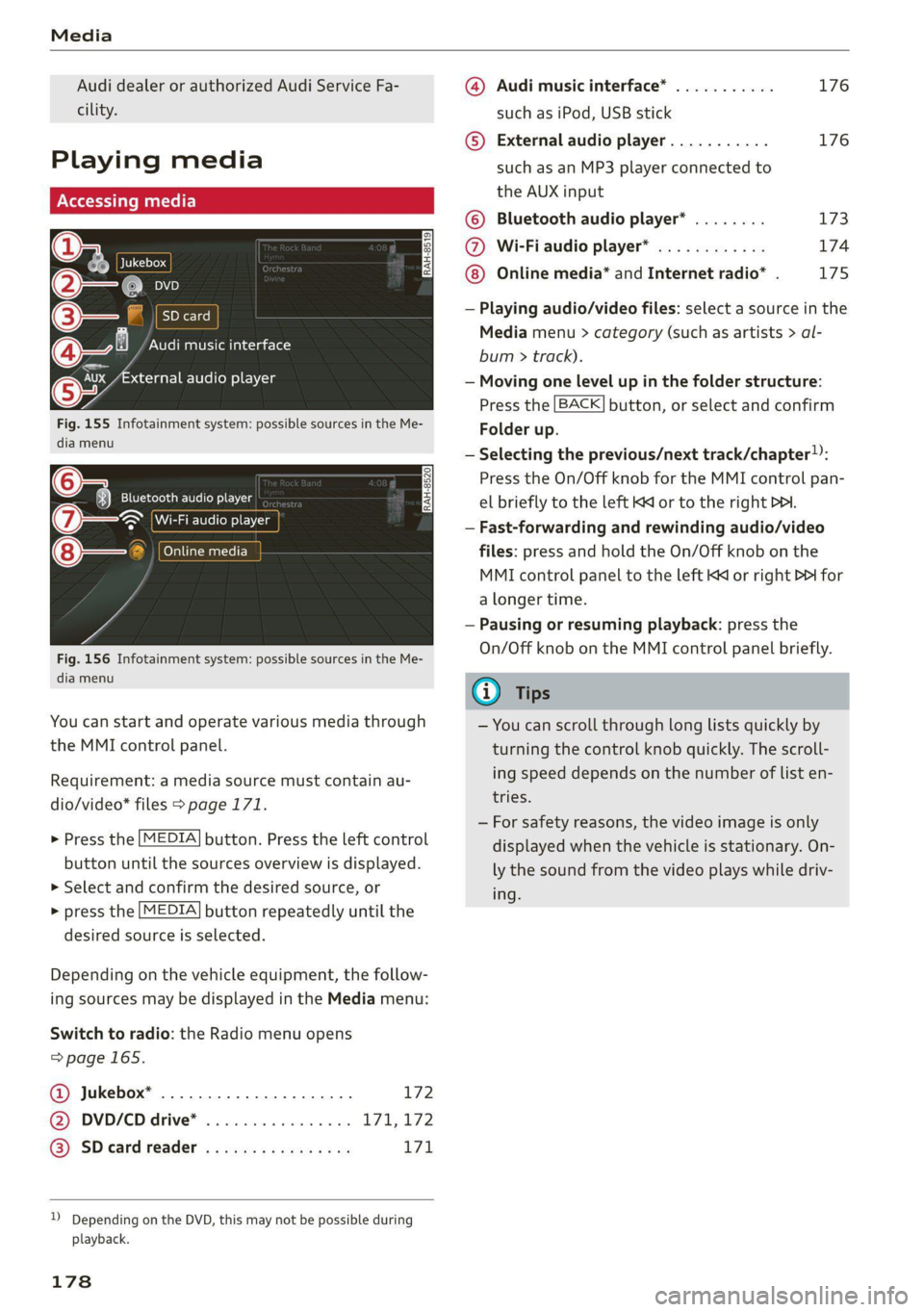
You can start and operate various media through
the MMI control panel.
Requirement: a media source must contain au-
dio/video* files > page 171.
> Press the [MEDIA] button. Press the left control
button until the sources overview is displayed.
> Select and confirm the desired source, or
> press the [MEDIA] button repeatedly until the
desired source is selected.
Depending on the vehicle equipment, the follow-
ing sources may be displayed in the Media menu:
Switch to radio: the Radio menu opens
=>page 165.
Jukebox* ................0000. 172 ®
@ DVD/CD drive* ................ L711, 172
@) SD card reader « s eces ss eee ys oe 171
)) Depending on the DVD, this may not be possible during
playback.
178
@ Audi music interface* ........... 176
such as iPod, USB stick
© External audio player........... 176
such as an MP3 player connected to
the AUX input
© Bluetooth audio player* ........ 173
@ Wi-Fiaudio player* ............ 174
Online media* and Internet radio* . 175
— Playing audio/video files: select a source in the
Media menu > category (such as artists > al-
bum > track).
— Moving one level up in the folder structure:
Press the [BACK] button, or select and confirm
Folder up.
— Selecting the previous/next track/chapter)):
Press the On/Off knob for the MMI control pan-
el briefly to the left Kd or to the right Pe.
— Fast-forwarding and rewinding audio/video
files: press and hold the On/Off knob on the
MMI control panel to the left Kd or right Pb for
a longer time.
— Pausing or resuming playback: press the
On/Off knob on the MMI control panel briefly.
G) Tips
— You can scroll through long lists quickly by
turning the control knob quickly. The scroll-
ing speed depends on the number of list en-
tries.
— For safety reasons, the video image is only
displayed when the vehicle is stationary. On-
ly the sound from the video plays while driv-
ing.
Page 183 of 280
8S1012721BB
Media
— Move favorite: select the desired entry from
the favorites list. Select the right control but-
ton > Move favorite. Select and confirm the de-
sired favorites location.
— Deleting a favorite: select the desired entry
from the favorites list. Select the right control
button > Delete favorite > Delete this favorite
or Delete all favorites.
Additional settings
Context-specific functions and settings are avail-
able depending on the selected source.
> Press the right control button.
Sound settings
See > page 193.
Input level
Requirement: a mobile device must be connected
to the AUX connection cable or to a USB adapter
=>page 176.
The volume of the mobile device is adapted to
the MMI. Audi recommends adjusting the volume
on the mobile device to 70% of the maximum
volume output.
Bluetooth settings
See > page 192.
Wi-Fi settings
See > page 147, Wi-Fi settings.
Connection manager
See > page 190.
Show "Now Playing" screen
With the function switched on ¥ and a playlist
open, various information about the current track
(such as artist, album and album cover*) as well
as the playing time and the remaining playing
time are displayed.
) The function automatically switches off when the source is
changed.
2) This function is not available for all cell phones.
Jukebox memory capacity*
Information on the Jukebox memory capacity and
the number of stored tracks in the Jukebox is dis-
played.
Rewind/Fast forward
Turn the control knob to the left or right, or move
your finger on the MMI touch control pad from
the left to the right.
Shuffle»)
With the function switched on, all files in the
playlist are played and shown in random order.
Repeat track!)
When the function is switched on, the current
track repeats.
Back to 'Playback'
The options menu is closed. The track currently
playing appears in the playlist > page 180,
fig. 160.
Play similar music*
The track currently playing is quickly analyzed for
features such as artist, genres, mood, and beat,
and a smart playlist with similar tracks will be
shown.
Play more...
A smart playlist is shown based on the track cur-
rently playing. You can select between a playlist
with more tracks by this artist, from this album
or of this genre.
Set as ringtone*”)
Requirement: a mobile device must be connected
to the MMI. The track currently playing must be
in the Jukebox* > page 172.
The selected track will be used as the ringtone
for incoming calls.
181
Page 187 of 280

8S1012721BB
Media
not always display, depending on the sys-
tem language.
Troubleshooting
Problem Solution
Audi music interface*/Bluetooth au-
dio player*: mobile device is not sup-
ported.
Read the instructions in the chapter > page 176, Multimedia
connections/=> page 173, Bluetooth audio player.
Audi music interface*/AUX input: the
volume is too high/too low when
starting playback through the AUX in-
put.
Adjust the volume of the mobile device to approximately 70%
of the maximum output > page 181, Input level.
Audi music interface*: the portable
device is not recognized as a source.
For many cell phones or mobile devices, playback is not possi-
ble when the battery level is too low (less than 5% of its ca-
pacity). The mobile device will only be recognized as a media
source in the MMI after connecting if the battery charge level
is sufficient.
Audi music interface*: malfunctions
during audio playback through an
iPod/iPhone.
The Bluetooth audio player function is switched on. Switch
this function off > page 192 when you are not using the Blue-
tooth audio player.
AUX input: there is static when con-
necting and disconnecting the AUX
connection cable.
When connecting and disconnecting, the External audio play-
er source is already selected. Before connecting or disconnect-
ing the mobile device, either mute the device (see
=> page 193) or switch to a different audio source (for exam-
ple > page 165, Opening the radio).
Bluetooth audio player*/Wi-Fi audio
player*: audio playback interference.
Only one interface should be actively used at a time to ensure
problem-free playback.
Wi-Fi audio player*: audio playback
interference.
Audio playback interference can occur on some cell phones if
the Internet connection in the vehicle was not established
through the SIM card reader* on the MMI control panel and
the mobile data option on the cell phone is switched on. De-
activate the mobile data option on your cell phone.
Jukebox”: tracks on the imported
playlist are grayed out.
When importing playlists, all of the files themselves must be
imported.
Jukebox*: imported tracks cannot be
played or found.
If you cannot find imported tracks in the media center, they
may not be supported. Only copy supported files > page 183
to the Jukebox.
Wi-Fi audio player*: multiple devices
are connected to the Wi-Fi hotspot. A
media player (such as a smartphone)
appears as the media source and can-
not be changed.
Close the myAudi app on the connected devices (such as
smartphones) that are not being used as the Wi-Fi audio play-
er*. Likewise, close the UPnP server apps or the media permis-
sions on the integrated UPnP/DLNA server. Connect the de-
sired device as a Wi-Fi audio player* > page 174.
Online media*: connection failed be-
tween the MMI and the myAudi app.
To establish a connection to the MMI, the MMI connection
switch must be switched on in the myAudi app status screen.
185