heating AUDI TT COUPE 2020 User Guide
[x] Cancel search | Manufacturer: AUDI, Model Year: 2020, Model line: TT COUPE, Model: AUDI TT COUPE 2020Pages: 280, PDF Size: 98.79 MB
Page 90 of 280
Assist systems
Switching the system on
Applies to: vehicles with cruise control system
@ #
©
f°
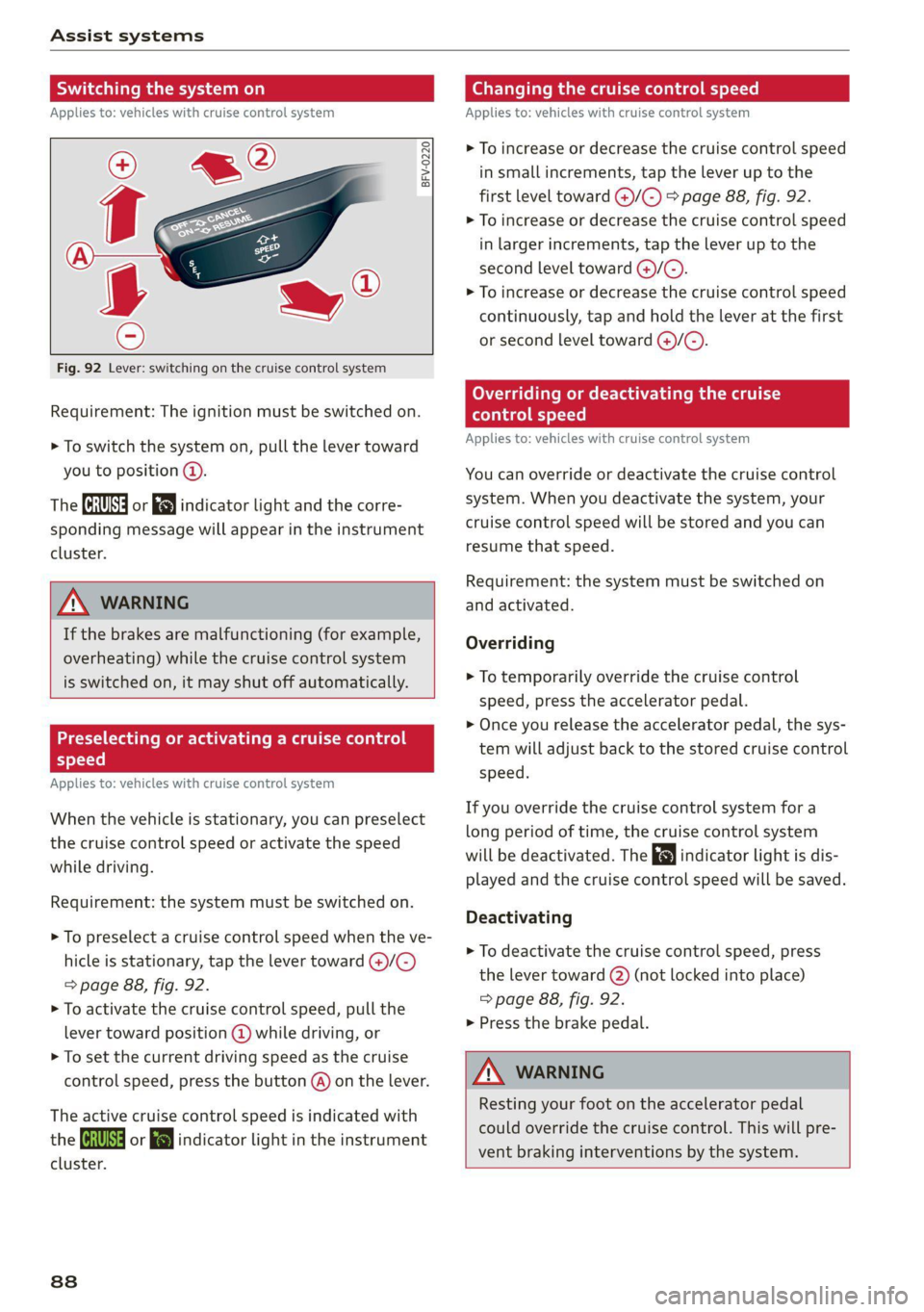
Fig. 92 Lever: switching on the cruise control system
Requirement: The ignition must be switched on.
> To switch the system on, pull the lever toward
you to position @).
The (a or 8] indicator light and the corre-
sponding message will appear in the instrument
cluster.
ZA WARNING
If the brakes are malfunctioning (for example,
overheating) while the cruise control system
is switched on, it may shut off automatically.
Preselecting or activating a cruise control
Cy ey-t-te)
Applies to: vehicles with cruise control system
When the vehicle is stationary, you can preselect
the cruise control speed or activate the speed
while driving.
Requirement: the system must be switched on.
> To preselect a cruise control speed when the ve-
hicle is stationary, tap the lever toward @)/G)
=> page 88, fig. 92.
> To activate the cruise control speed, pull the
lever toward position @ while driving, or
> To set the current driving speed as the cruise
control speed, press the button @) on the lever.
The active cruise control speed is indicated with
the ICRUISE| or i=} indicator light in the instrument
cluster.
838
Changing the cruise control speed
Applies to: vehicles with cruise control system
> To increase or decrease the cruise control speed
in small increments, tap the lever up to the
first level toward @)/G) > page 88, fig. 92.
> To increase or decrease the cruise control speed
in larger increments, tap the lever up to the
second level toward ()/C).
> To increase or decrease the cruise control speed
continuously, tap and hold the lever at the first
or second level toward @/G).
Overriding or deactivating the cruise
control speed
Applies to: vehicles with cruise control system
You can override or deactivate the cruise control
system. When you deactivate the system, your
cruise control speed will be stored and you can
resume that speed.
Requirement: the system must be switched on
and activated.
Overriding
> To temporarily override the cruise control
speed, press the accelerator pedal.
> Once you release the accelerator pedal, the sys-
tem will adjust back to the stored cruise control
speed.
If you override the cruise control system for a
long period of time, the cruise control system
will be deactivated. The indicator light is dis-
played and the cruise control speed will be saved.
Deactivating
> To deactivate the cruise control speed, press
the lever toward (2) (not locked into place)
=> page 88, fig. 92.
> Press the brake pedal.
A WARNING
Resting your foot on the accelerator pedal
could override the cruise control. This will pre-
vent braking interventions by the system.
Page 91 of 280
8S1012721BB
Assist systems
Switching the system off
Applies to: vehicles with cruise control system
When you switch the system off completely, the
cruise control speed will be deleted.
Requirement: the system must be switched on.
> To switch the system off, press the lever toward
@ (locked into place) > page 88, fig. 92, or
> Switch the ignition off.
Applies to: vehicles with cruise control system
ICRUISE| / 3) Speed control system: currently un-
available. See owner's manual
If the indicator light turns on and this message
appears, the cruise control system has been deac-
tivated. There is a temporary malfunction, for ex-
ample the brakes are overheating. Switch the
cruise control system on again later.
Audi active lane assist
Applies to: vehicles with Audi active lane assist
Active lane assist detects lane marker lines with-
in the limits of the system using a camera in the
windshield. If you are approaching a detected
lane marker line and it appears likely that you
will leave the lane, the system will warn you with
corrective steering. You can override this steering
at any time. If you pass over a line, the steering
wheel will vibrate lightly. In order for this warn-
ing vibration to occur, it must first be switched
on in the Infotainment system. Active lane assist
is ready for operation when the lane marker line
is detected on at least one side of the vehicle.
The system is designed for driving on express-
ways and highways and so it only activates at
speeds above approximately 40 mph (65 km/h)
(depending on the market).
Applies to vehicles with side assist*: If you acti-
vate a turn signal when active lane assist is ready
and it classifies a lane change as critical because
D_ The corrective steering function is not available in all mar-
kets.
of vehicles traveling alongside you or approach-
ing you, there will be noticeable corrective steer-
ing shortly before you leave the lane. This will at-
tempt to keep your vehicle in the lane.
Applies to vehicles without side assist*: When
the system is ready, it will not warn you if you ac-
tivate the turn signal before crossing the lane
marker line. In this case, it assumes that you are
changing lanes intentionally.
Z\ WARNING
— The system warns the driver that the vehicle
is leaving the lane using corrective steering.
The
driver is always responsible for keeping
the vehicle within the lane.
— The system can assist the driver in keeping
the vehicle in the lane, but it does not drive
by itself. Always keep your hands on the
steering wheel.
— Corrective steering may not occur in certain
situations, such as during heavy braking.
— There may be cases where the camera does
not recognize all lane marker lines. Correc-
tive steering can only take place on the side
of the vehicle where lane marker lines are
detected.
— Other road structures or objects could possi-
bly be identified unintentionally as lane
marker lines. As a result, corrective steering
may be unexpected or may not occur.
— The camera view can be restricted, for exam-
ple by vehicles driving ahead or by rain,
snow, heavy spray light shining into the
camera or by dirt on the window. This can
result in active lane assist not detecting the
lane marker lines or detecting them incor-
rectly.
— In certain situations where visibility is low,
the vehicle may switch internally from “ear-
ly” to “late” steering correction )).
— Under certain conditions such as ruts in the
road, an inclined roadway or crosswinds, the
corrective steering alone may not be enough
to keep the vehicle in the middle of the lane.
89
Page 107 of 280
8S1012721BB
Intelligent Technology
Intelligent Technology
Electronic Stabilization
Control (ESC)
Electronic Stabilization Control (ESC) supports
driver safety. It reduces the risk of slipping and
improves driving stability. ESC detects critical sit-
uations such as the vehicle oversteering and un-
dersteering or the wheels are spinning. The
brakes are applied or the engine torque is re-
duced in order to stabilize the vehicle. When the
ESC engages, the B indicator light blinks in the
instrument cluster.
The following systems are integrated in the ESC:
Anti-lock braking system (ABS)
ABS prevents the wheels from locking when brak-
ing. The vehicle can still be steered even during
hard braking. Apply steady pressure to the brake
pedal. Do not pump the pedal. A pulsing in the
brake pedal indicates that the system is acting to
stabilize the vehicle.
Brake assist system
The brake assist system can decrease braking dis-
tance. It increases braking power when the driver
presses the brake pedal quickly in emergency sit-
uations. You must press and hold the brake pedal
until the dangerous situation is over.
Anti-Slip Regulation (ASR)
ASR reduces drive power when the wheels begin
spinning and adapts the power to the road condi-
tions. This will increase the driving stability.
Electronic Differential Lock (EDL)
The EDL applies the brakes to wheels that are
slipping and transfers the drive power to the oth-
er wheels. This function is not available at higher
speeds.
In extreme cases, EDL automatically switches off
to keep the brake on the braked wheel from over-
heating. The vehicle is still functioning correctly.
EDL will switch on again automatically when con-
ditions have returned to normal.
Power steering
The ESC can also support vehicle stability
through steering.
Selective wheel torque control
Selective wheel torque control is used when driv-
ing on curves. Braking is targeted toward the
wheels on the inside of the curve as needed. This
allows more precise driving in curves.
Automatic post-collision braking system
The automatic post-collision braking system can
help to reduce the risk of sliding and of addition-
al collisions after an accident. If the airbag con-
trol module detects a collision above a certain ve-
hicle speed, the vehicle is braked by the ESC.
The vehicle does not brake automatically if one of
the following occurs:
— The driver presses the accelerator pedal
— The braking force generated by the pressed
brake pedal is greater than the braking force
that would be initiated by the system
— The ESC, the brake system, or the vehicle elec-
trical system is not functioning
ZA\ WARNING
—The ESC and its integrated systems cannot
overcome the limits imposed by natural
physical laws. This is especially important on
slippery or wet roads. If the systems begin
acting to stabilize your vehicle, you should
immediately alter your speed to match the
road and traffic conditions. Do not let the in-
creased safety provided tempt you into tak-
ing risks. This could increase your risk of a
collision.
— Please note the risk of a collision increases
when driving fast, especially through curves
and on slippery or wet roads, and when driv-
ing too close to objects ahead. There is still
a risk of accidents because the ESC and its
integrated systems cannot always prevent
collisions.
— Accelerate carefully when driving on
smooth, slippery surfaces such as ice and
snow. The drive wheels can spin even when
these control systems are installed and this
105
Page 201 of 280

8S1012721BB
Checking and Filling
Fuel filler door emergency release
If the fuel filler door lock is faulty, the fuel filler
door can be unlocked manually.
rsFV.0033
|
Fig. 166 Luggage compartment: cover in the right side
trim panel
> Open the luggage compartment lid.
> Lift the cargo floor.
> To unlock the fuel filler door, loosen the loop
from the retainer and then pull on the loop
carefully > fig. 166 >@).
> Press on the left side of the fuel filler door to
open it > page 196, fig. 162.
@® Note
Only pull on the loop until you feel resistance.
You will not hear it release. If you continue to
pull, you could damage the emergency re-
lease mechanism.
Emissions control
system
General information
Z\ WARNING
The temperature of the exhaust system is
high, both when driving and after stopping
the engine.
— Never touch the exhaust tail pipes once they
have become hot. This could result in burns.
— Do not park your vehicle over flammable
materials such as grass or leaves because
the high temperature of the emissions sys-
tem could start a fire.
— Do not apply underbody protectant in the
exhaust system area, because this increases
the risk of fire.
(el e-] Nad (mcl akg
Follow the safety precautions > page 199, Gener-
al information.
The vehicle may only be driven with unleaded
gasoline, or the catalytic converter will be de-
stroyed.
Never drive until the tank is completely empty.
The irregular supply of fuel that results from that
can cause engine misfires. Uncombusted fuel
could enter the exhaust system, which could
cause overheating and damage to the catalytic
converter.
On Board Diagnostic System (OBD)
The On Board Diagnostic System monitors the
engine and transmission components that influ-
ence emissions.
7m
8
2 z 6
Fig. 167 Footwell on left side of the vehicle: connection
port for the On Board Diagnostic System (OBD)
On Board Diagnostic System
Engine data can be read out at the On Board Di-
agnostic System connection port using a special
testing device > fig. 167.
Indicator light
If the S indicator light blinks or turns on, there
is a malfunction that is causing poor emissions
quality and that could damage the catalytic con-
verter. Drive slowly to an authorized Audi dealer
or authorized Audi Service Facility to have the
malfunction corrected.
199
Page 209 of 280

8S1012721BB
Checking and Filling
Coolant Freeze protec-
additive tion
Warm min. 40% min. -13 °F
regions max. 45% (-25 °C)
Cold min. 50% max. -40 °F
regions max. 55% (-40 °C)
@) Note
— Before the start of winter, have an author-
ized Audi dealer or authorized Audi Service
Facility check if the coolant additive in your
vehicle matches the percentage appropriate
for the climate. This is especially important
when driving in colder climates.
— If the appropriate coolant additive is not
available in an emergency, do not add any
other additive. You could damage the en-
gine. If this happens, only use water and re-
store the correct mixture ratio with the
specified coolant additive as soon as possi-
ble.
— Only refill with new coolant.
— Radiator sealant must not be mixed with
the coolant.
— Due to the risk of engine damage, the cool-
ing system should only be refilled by an au-
thorized Audi dealer or authorized Audi
Service Facility. An authorized Audi dealer or
authorized Audi Service Facility can also pro-
vide you with important information about
the recommended coolant additive.
Checking coolant
RAZ-0539
MIN
Fig. 173 Engine compartment - coolant expansion tank
(diagram): @) cover; @) markings
Observe the safety precautions > page 200, Gen-
eral information.
Checking the coolant level
> Park the vehicle on a level surface.
>» Switch the ignition off.
> Open the hood > page 201.
> Check the coolant level in the coolant expan-
sion tank > page 202, fig. 170 using the outer
markings @) > fig. 173. The coolant level must
be between the markings @) when the engine is
cold. When the engine is warm it can be slight-
ly above the upper marking.
Adding coolant
Requirement: there must be a residual amount of
coolant in the expansion tank >@.
If you must add coolant, use a mixture of water
and coolant additive. Mixing the coolant additive
with distilled water is recommended.
> Allow the engine to cool.
> Place a large, thick towel on the coolant expan-
sion tank cap.
>» Remove the cover () > fig. 173 carefully to the
left > A\.
» Add the correct mixture ratio of coolant
> page 206 up to the upper marking @)
> fig. 173.
> Make sure that the fluid level remains stable.
Add more coolant if necessary.
> Close the cap securely.
Coolant loss usually indicates that there is a leak.
Immediately drive your vehicle to an authorized
Audi dealer or authorized Audi Service Facility
and have the cooling system inspected. If the
cooling system is not leaking, coolant loss can re-
sult from the coolant boiling due overheating
and then being forced out of the cooling system.
Z\ WARNING
— The engine compartment in any vehicle can
be a dangerous area. Stop the engine and al-
low it to cool before working in the engine
compartment. Always follow the informa-
tion found in > page 200, General informa-
tion.
— Never open the hood if you can see or hear
steam or coolant escaping from the engine
compartment. This increases the risk of >
207
Page 241 of 280
8S1012721BB
Care and cleaning
— Wheels
— Never use any paint polish or other abra-
sive materials.
— Damage to the protective layer on the
rims, such as stone chips or scratches,
must be repaired immediately.
— Camera lenses
— Never use warm or hot water to remove
snow or ice from the camera lens. This
could cause the lens to crack.
— Never use abrasive cleaning materials or
alcohol to clean the camera lens. This
could cause scratches and cracks.
— Power top
— Remove bird droppings immediately.
— Never use gasoline, spot remover, ben-
zene, paint thinner or other solvents to re-
move.
— Door windows
— Remove snow and ice on windows and ex-
terior mirrors with a plastic scraper. To re-
duce the risk of scratches, move the scra-
per only in one direction and not back and
forth.
— Never remove snow or ice from door win-
dows and mirrors using warm or hot water
because this could cause cracks to form.
—To reduce the risk of damage to the rear
window defogger, do not apply any stick-
ers on the heating wires on the inside of
the window.
— Decorative parts and trim
— Never use chrome care or cleaning prod-
ucts.
— Paint
—To reduce the risk of scratches, the vehicle
must be free of dirt and dust before pol-
ishing or waxing.
—To prevent paint damage, do not polish or
wax the vehicle in direct sunlight.
—To reduce the risk of paint damage, do not
polish away rust spots.
— Remove cosmetics and sunscreen immedi-
ately because they could damage the
paint.
— Decorative decals
—To reduce the risk of damage, do not use
any rough powder or abrasive cleaning
products.
— To reduce the risk of damage, do not pol-
ish decorative decals that have a matte or
printed finish.
— Due to the risk of damage, do not use an
ice scraper to remove snow and ice on win-
dows with decorative decals on them.
— Instrument cluster
— Make sure that the instrument cluster is
switched off and has cooled off before
cleaning it.
— The instrument cluster and the trim sur-
rounding it must not be cleaned with dry
cleaning methods because they could get
scratched.
— Make sure no fluids enter the spaces be-
tween the instrument cluster and the
trim, because that could cause damage.
— Controls
— Make sure that no fluids enter the con-
trols, because this could cause damage.
— Safety belts
— Do not remove the safety belts to clean
them.
— Never clean safety belts or their compo-
nents with chemicals or with corrosive flu-
ids or solvents and never allow sharp ob-
jects to come into contact with the safety
belts. This could cause damage to the belt
webbing.
— If there is damage to the webbing, the
connections, the retractors, or the buck-
les, have them replaced by an authorized
Audi dealer or authorized Audi Service Fa-
cility.
— Textiles, artificial leather, and Alcantara
— Never treat artificial leather or Alcantara
with leather care products, solvents, floor
polish, shoe polish, spot remover, or simi-
lar products.
— Have a cleaning specialist remove stub-
born stains to reduce the risk of damage.
— Never use steam cleaners, brushes, hard
sponges, etc. when cleaning.
239
Page 242 of 280
Care and cleaning
— Do not turn on the seat heating* to dry
the seat.
— Objects with sharp edges, such as zippers
or rivets on clothing or belts, can cause
damage to the surface.
— Open hook and loop fasteners, for exam-
ple on clothing, can damage seat covers.
Make sure hook and loop fasteners are
closed.
— Natural leather
— Never treat leather with solvents, floor
polish, shoe polish, spot remover or simi-
lar products.
— Objects with sharp edges, such as zippers
or rivets on clothing or belts, can cause
damage to the surface.
— Never use steam cleaners, brushes, hard
sponges, etc. when cleaning.
— Do not turn on the seat heating” to dry
the seat.
—To help prevent the leather from fading,
do not leave the vehicle in direct sunlight
for long periods of time. If leaving the ve-
hicle parked for long periods of time, you
should cover the leather to protect it from
direct sunlight.
@ Tips
— Insects are easier to remove from paint that
has been freshly waxed.
— Regular waxing can prevent rust spots from
forming.
— Decorative decals can age due to environ-
mental conditions, which can result in dam-
age such as brittleness. The color may fade
if exposed to excessive sunlight.
Taking your vehicle out
of service
If you would like to take your vehicle out of serv-
ice for a long period of time, contact an author-
ized Audi dealer or authorized Audi Service Facili-
ty. They will advise you of important measures,
such as corrosion protection, service, and storage
procedures. Also follow the information about
the vehicle battery > page 209.
240
Page 255 of 280

8S1012721BB
Fuses and bulbs
fuse assignme
No. | Equipment
RAZ-0795)
PO ee
15°16°17-18 19 20 21
Pr ily ip y ips :}
3839 |4142
32°33:34 35:36 37
40 49
74
F20 | Power lumbar support adjustment
Front passenger's side neck heating (Road-
F22
ster)
Right vehicle electrical system control
F24
module
F25 | Driver side door
F26 | Seat heating
Vehicle electrical system control module
bad (terminal 30)
F28 | AMI High media port
F29 | Vehicle electrical system control module
F32 | Driver assistance systems
F33 | Airbag
Sockets, interior sound, tail light switch,
F34 | temperature sensor, oil level sensor, neck
heating, garage door opener
Fig. 200 Vehicle interior: fuse assignment
No. Equipment
Diagnosis, headlight range control, air
quality sensor, automatic dimming rear-
view mirror, center instrument panel
switch module
F35
F4 Central computer processor (MIB-2) F36 | Right cornering light / right LED headlight
FS: Gateway (diagnostics) F37 | Left cornering light / left LED headlight
Fo Selector lever (automatic transmission)
F7
Climate control system controls, rear win-
dow defogger, tire pressure monitoring
Engine control module, ESC control mod-
F38
ule
F39 | Front passenger side door
F8
Switch for the electromechanical parking
brake, light switch, rain/light sensor, inte-
rior lighting, diagnostic connector, roof
electronics F40
| Cigarette lighter, sockets
F41 | Fuel tank diagnosis
F42 | Central locking area
FQ Steering column switch module
F44 | All wheel drive clutch control module
F10 Vehicle positioning
F45 | Power adjustable driver's side seat
Fil
All wheel drive clutch, left vehicle electri-
cal system control module
F46 | Driver's side neck heating (Roadster)
F49 | Engine start, clutch sensor
FI2 Infotainment components
F52 | Control module for suspension control
F1l4 Climate control system blower fan
F53 | Rear window defogger
Fis Electronic steering column lock
F16
Infotainment system components, safety
belt microphone
PL? Instrument cluster
F18 Rearview camera
F19
Convenience access control module
The power seats* are protected via circuit break-
ers that automatically switch on after a few sec-
onds after the overload has been reduced.
253
Page 274 of 280

Index
Recinculationimode sxcviss 2 x cisco 0 causes 2 axees 70
R@CUPerAtOMieas. & + ines ao anes @ 2 owe ow Hare 15
Refueling « & sso s 2 sews ao es + o sew so oe 196
Remote control
Garage door opener............-.00-055 28
Remote'control-key 0.0522 eee 22 eee ee eee 19
Convenience opening and closing......... 27
Key replacement............. eee eee ee 19
LED « cone a omen 2 2 wens 8 o women = 2 meme oe wens 20
Mechanical key......... 0.00 eee e ee eee 20
Personalization..............00000000. 19
Replacing the battery.................. 20
Unlocking and locking............-...0. 21
Removing the caps (wheel bolts)......... 244
Removing the wheel hub covers.......... 244
Repait'S sews o ¢ eau sy nee 2 2 eee ga ewe ge 257
Replacement key... 0.6... c0e sec enone eee 19
Replacement parts..............-.0 eee ee 259
Replacing windshield wiper blades......... 42
Reporting Safety Defects..............-. 259
Reset
refer'to Restart (MMI) .....cc.0. ceases 194
Restart (MMI)... 0... cece eee 194
Reverse
(automatic transmission) .......... 80
Rewinding (audio/video file)............. 178
RiIMS& « seas 1 + vases © 6 spss © < semen aH emmem oF 228
Cleaning. ....... ccc eee eee eee 236
Ringtone settingS.......... 0c s eee eae 140
Roof load... ... 2... cece eee eee 67, 263
Roof rack... eee eee 67
also refer to Roof rack............000005 67
Route criteria... 1.6... eee eee eee eee 156
Route guidance
refer to Navigation................-.. 149
Running direction (tires)..............-. 246
S
Safety
Telephone ss = s seus = y exws te eee se ees 129
Safety belt microphone................. 141
Safety belts... 0... ... eee cece eee 49
GCLEAMING's + + seis = weer + ¢ ewe = Hae G2 Re 238
LOCKING sie 5 6 svsiie oo eeweee vo ween @ @ seen 9 we 61
Securing child safety seats.............. 60
272
Saving fuel
Energy consumers ...... 0.002 cece cease 15
REGUPECRAELON s + maze a s neue 5s moeE wo See 8 15
Scan (fad O)iewws ¢ s sess a o aeas ss ee oP ES 166
Screwdriver. .... 2... cece cece eee eee 241
SD card reader............0 eee eee eee 171.
SDS
refer to Voice recognition system........ 123
Search
refer to Free text search............... 119
Search area (point of interest)............ 152
Searching for anentry.............-.... 119
Seat heating. ...... 0... cee eee eee eee 71
Seats
ACjUStING aexx sv ose% s ree es eee ep eee 46
Adjusting the rearseats..............0. 48
Cleaning......... cee eee eee eee 238
Easy S@at entry: sens « y sae ¢ 5 sae go ees 47
POlAING isis « = essen ow recon vo eS = HEHE Be Ae 66
Secondary phone.............+..-. 130, 190
Selecting a source (media).............. 178
Selection Menu... .....ceeeaes 112; 116; 117
Selective door unlocking............00005 18
Selective wheel torque control........... 105
Selector lever (automatic transmission)
Emergency operation...............00. 86
POSIEOM es 3 2 cei: yo cere 2 o ore oo ee Yo 79
Service interval display................. 212
Settings
DireGtony’s s ssasw + iawem a 2 manera © araeom @ 2 ae 140
Map... .. 2. cc eee eee ee eee 160
Medidios ¢ 5 seus x cea & game & 3 Heeee § Eee 181
NaVvigatlOnssin s wasn + wasen as eam w ¥ memes 156
Radio... ieee eee eee eee 168
SVSUEIIx ¢ & nevaw » E NATH S E BGR % & SGEUR TS Re 189
Tele PhONe wscea <2 vow ve meee oo sem oo a 140
Wi-Fi hotspot........... 0.00 cece eee 147
Setting the language ..........ceee veces 189
Shiftlightiindicator’s « sss x x wm o v vmnwm 6 2 3 15
Shift paddles (automatic transmission) ..... 83
SHUPPlG cs s = gow = e sees ep Hewes ee pee 181
Sid@aSsiStewe 2 wan: 2 y weme xs seme 5 5 ewer 8 2 93
Adjusting the brightness................ 95
Cleaning the sensors..........-....--- 236
SENSOFTANGE » aeons «2 sem s Yea 4 ese EG 94
Switching on and off................... 95
Page 277 of 280
8S1012721BB
Index
Personal-hotspot ween: «occ s weer wv eae 143
Using ahotspot.............0. eee 144
also refer to Wi-Fi...........e005- 147,174
WindGetlectors « a icze sawe ¢ ¢ aovew & & seine 2 33
Windows
Cleaning and removing ice............. 237
Convenience opening and closing......... 27
Defrosting.......... 0.0 cece eee eee ee 71
Opening and closiig wis ss vows ac eaws a x ve 26
Power windows’ « « scams s © srassa 6 a asare a a 00a 26
Windshield
Cleaning....... 0... cece eee eee 4l
D@frOStING « xaccx & s Secs = & eevee 3 ¢ Saree Fs 71
also refer to Windshield................ 41
Windshield washer system........... 41,211
Reservoir capacity’. «sires x cusses © x snes © 263
Windshield wipers
Cleaning wiper blades...............0-. 42
FOlAING {UD : seus = : eenu oe sees x ye eS a ee 42
Replacing windshield wiper blades........ 42
Switching on and off...............0--- 4l
Winter operation
Battery... 0.2... cee eee eee eee 209
Cat WaSNES sews s ¢ news + ¢ seu 2 o eome 2 2 oe 235
Coolingisystemn « wen x x ansne » x castene 6 o ctnee 206
Defrosting the windows................ 71
Removing ice from windows............ 237
Seat heating « « ccs so caer » wees a 6 ween oo o 71
Snow chains................2....00005 228
Tins: « wean = 3 maven & 2 Wome ae coReE Fa ee E 228
Windshield washer system............. 211
Winter titeSicsos <2 avr 2 o aren wo some ¥ 2 sens 228
xX
Xenon headlights ........0.eseeceeeeeaes 36
Z
ZOOM (MAP) « vee = = wees s ¥ Hews es 13,151,158
275