key battery AUDI TT COUPE 2020 Owners Manual
[x] Cancel search | Manufacturer: AUDI, Model Year: 2020, Model line: TT COUPE, Model: AUDI TT COUPE 2020Pages: 280, PDF Size: 98.79 MB
Page 11 of 280
8S1012721BB
Quick access
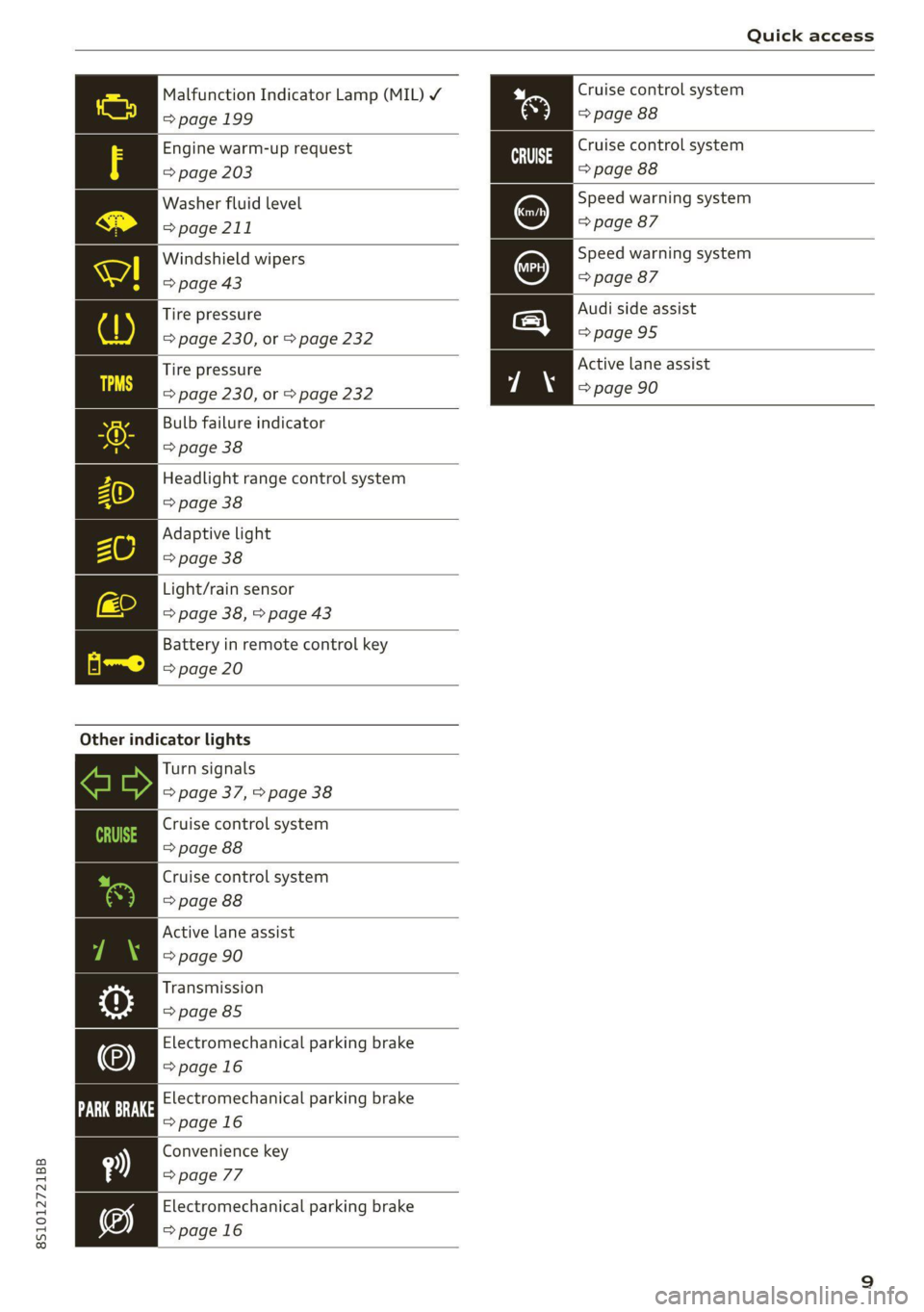
Malfunction Indicator Lamp (MIL) Y Cruise control system
=> page 199 => page 88
Engine warm-up request
=> page 203
Washer fluid level
=> page 211
Cruise control system
=> page 88
Speed warning system
=> page 87
Speed warning system
=> page 87
Windshield wipers
=> page 43
Audi side assist
>page 95
Tire pressure
=> page 230, or > page 232
Active lane assist
=> page 90
Tire pressure
=> page 230, or > page 232
Bulb failure indicator
> page 38
Headlight range control system
=> page 38
Adaptive light
> page 38
Light/rain sensor
=> page 38, > page 43
Battery in remote control key
=> page 20
Other indicator lights
Turn signals
=> page 37, > page 38
Cruise control system
=> page 88
Cruise control system
> page 88
Active lane assist
=> page 90
Transmission
=> page 85
Electromechanical parking brake
>page 16
Electromechanical parking brake
=>page 16
Convenience key
=> page 77
Electromechanical parking brake
=>page 16
Page 22 of 280

Opening and closing
from transmitters near the vehicle working
in the same frequency range (such as a cell
phone or radio equipment). Always check if
your vehicle is locked!
— For an explanation on conformity with the
FCC regulations in the United States and the
Industry Canada regulations, see
=> page 260.
Removing the mechanical key
BFV-0279
Fig. 12 Remote control master key: removing the mechani-
cal key
> Press the release buttons @ > fig. 12 and re-
move the mechanical key from the remote con-
trol key.
Using the mechanical key, you can:
— Lock or unlock the glove compartment.
— Manually lock or unlock the vehicle > page 23.
— Mechanically lock the doors > page 23.
LED and batteries in the remote control key
BFV-0280
Fig. 13 Remote control key: removing the battery holder
20
BFV-0277
Fig. 14 Remote control key (rear side): removing the bat-
tery holder
LED on the remote control key
The LED @) informs you of the remote control key
operation.
> If you press a button briefly, the LED blinks
once.
> If you press and hold a button (convenience
opening/closing), the LED blinks several times.
> If the LED does not blink, the remote control
key battery is drained. The BS indicator light
turns on and the message Remote control key:
replace key battery appears in the driver infor-
mation system. Replace the battery in the re-
mote control key.
Replacing the remote control key battery
> Press the release buttons (@ > fig. 13 and re-
move the mechanical key.
> Press the release buttons @) > fig. 14 on the
battery holder and pull the battery holder out
of the remote control key in the direction of the
arrow at the same time.
> Insert the new battery with the “+” facing
down.
> Slide the battery holder carefully into the re-
mote control key.
> Insert the mechanical key.
@) For the sake of the environment
Discharged batteries must be disposed of us-
ing
methods that will not harm the environ-
ment. Do not dispose of them in household
trash.
Page 23 of 280

8S1012721BB
Opening and closing
@) Tips
Replacement batteries for the remote control
key must meet the same specifications as the
original battery.
Unlocking and locking by remote control
BFV-0240
Fig. 15 Remote control key: button programming
> To unlock the vehicle, press the & button
> fig. 15.
> To lock the vehicle, press the & button once.
> To unlock the luggage compartment lid, press
the < button.
> To trigger the alarm, press the red [PANIC] but-
ton.
The vehicle horn and emergency flashers
will activate.
> To switch off the alarm, press the red [PANIC
button again.
If you unlock the vehicle but then do not open
any of the doors, the luggage compartment lid,
or the hood within a short period time, the vehi-
cle will lock again automatically. This feature pre-
vents the vehicle from being accidentally left un-
locked for a long period of time.
The settings in the Infotainment system deter-
mine if the entire vehicle or only the driver's door
is unlocked when unlocking the vehicle
=> page 23.
Z\ WARNING
No one, especially children, should stay in the
vehicle when it is locked from the outside, be-
cause the windows can no longer be opened
from the inside > page 24. Locked doors
make it more difficult for emergency workers
to get into the vehicle, which puts lives at risk.
@) Tips
— Only use the remote control key when you
are within view of the vehicle.
— The selector lever must be in the P position
on vehicles with a convenience key*; other-
wise the vehicle will not lock.
— Do not use the vehicle key to lock and un-
lock when you are inside the vehicle. Other-
wise, you could trigger the anti-theft
alarm*. If this happens, press the @ unlock
button.
— Only use the panic function in an emergen-
cy.
Unlocking and locking with the
oN BN
Applies to: vehicles with convenience key
The doors and luggage compartment lid can be
unlocked and locked without using the remote
control key.
BFV-0007
Fig. 16 Door handle: sensor for locking
Unlocking the vehicle
> Grip the door handle. The door unlocks auto-
matically.
> Pull on the door handle to open the door.
Locking the vehicle
> Place the selector lever in the "P" position; oth-
erwise, the vehicle cannot be locked.
> To lock the vehicle, close the door and touch
the sensor in the door handle once > fig. 16. Do
not hold the door handle while doing this.
21
Page 24 of 280
Opening and closing
Deactivating the unlock function
You can deactivate the unlock function with the
convenience key (keyless access) for one locking
and unlocking cycle.
> Place the selector lever in the "P" position; oth-
erwise, the vehicle cannot be locked.
> Close the door.
> Press the ff lock button on the convenience key
and touch the sensor on the door handle (driv-
er's door) one time within five seconds of press-
ing the button > fig. 16. Do not grasp the door
handle while locking the vehicle, or else the ve-
hicle will not lock.
> To check if the function has been deactivated,
wait at least 10 seconds and pull the door han-
dle again. The door should not open.
After that, it will only be possible to unlock the
vehicle using the remote control key or by me-
chanically unlocking the lock cylinder. Keyless ac-
cess will be active again after the next time the
vehicle is locked/unlocked.
You can unlock and lock the vehicle at every door.
The convenience key must no be more than ap-
proximately 5 feet (1.5 m) away from the door
handle. The function should not be impaired if
the convenience key is in your jacket pocket or in
your briefcase, for example.
If you hold the door handle while locking, this
can impair the locking function.
The door cannot be opened for a brief period di-
rectly after locking it. This way you have the op-
portunity to check if the doors locked correctly.
The settings in the Infotainment system deter-
mine if the entire vehicle or only one of the doors
is unlocked when unlocking the vehicle
=> page 23.
Av WARNING
No one, especially children, should stay in the
vehicle when it is locked from the outside, be-
cause the windows can no longer be opened
from the inside > page 24. Locked doors
make it more difficult for emergency workers
to get into the vehicle, which puts lives at risk.
22
ZA WARNING
Read and following all WARNINGS. > A\ in
Key set on page 19
@) Tips
If your vehicle is left standing for a long peri-
od of time, note the following:
—To prevent the vehicle battery from dis-
charging, the energy management gradual-
ly switches off convenience functions that
are not needed. You then may no longer be
able to unlock your vehicle with the sensors.
— For an explanation on conformity with the
FCC regulations in the United States and the
Industry Canada regulations, see
=> page 260.
ete era vuuisea)
2 Ss 3 g
> c
ao
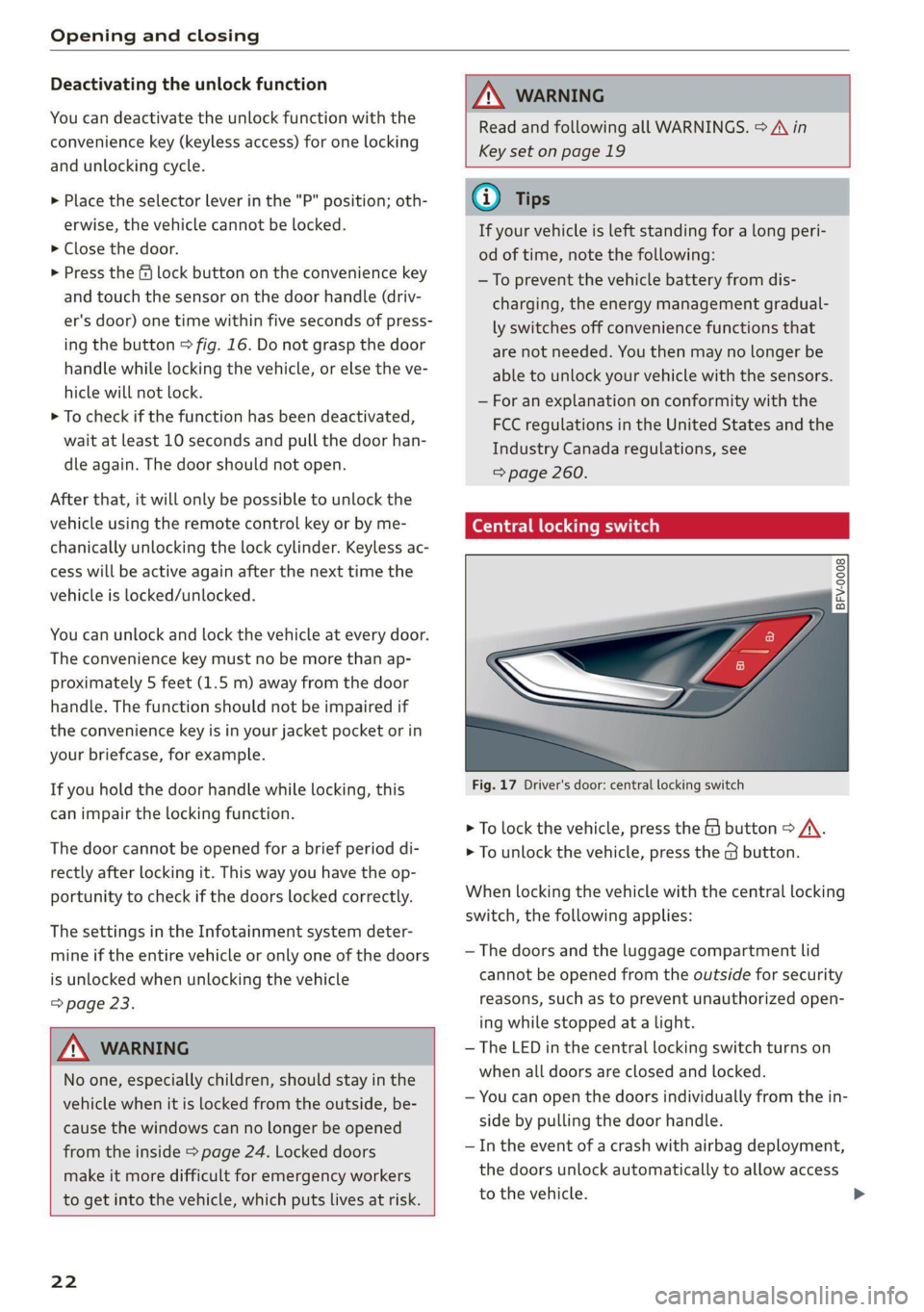
Fig. 17 Driver's door: central locking switch
> To lock the vehicle, press the & button > A\.
> To unlock the vehicle, press the @ button.
When locking the vehicle with the central locking
switch,
the following applies:
— The doors and the luggage compartment lid
cannot be opened from the outside for security
reasons, such as to prevent unauthorized open-
ing while stopped at a light.
— The LED in the central locking switch turns on
when all doors are closed and locked.
— You can open the doors individually from the in-
side by pulling the door handle.
— In the event of a crash with airbag deployment,
the doors unlock automatically to allow access
to the vehicle.
Page 34 of 280
Power top
— Visibility to the rear is limited when operat-
ing the power top. Avoid operating the top
while driving in reverse.
@) Note
—To prevent damage to the power top:
— do not store any objects in the power top
storage compartment.
— make sure there is enough space above
the vehicle when opening or closing the
power top.
0} Tips
— To prevent the vehicle battery from draining
unnecessarily, do not open or close the pow-
er top repeatedly when the engine is switch-
ed off.
— A message will appear in the instrument
cluster if there is a malfunction in the power
top > page 32.
— The power top can also be operated manual-
ly temporarily if there is a malfunction
= page 33, Power top emergency opera-
tion. An authorized Audi dealer or author-
ized Audi Service Facility should diagnose
and correct the cause of the malfunction as
soon as possible.
— If the vehicle is parked with the power top
open, the vehicle interior is not protected
from
damaging weather or unauthorized ac-
cess. Lock any items you leave behind in the
luggage compartment. Close the power top
before leaving the vehicle.
— The side windows automatically lower
slightly when opening or closing the power
top.
32
Power top convenience opening and closing
Applies to: vehicles with power top
BFV-0271
16:
ES
@)
”
4
y
2) 3
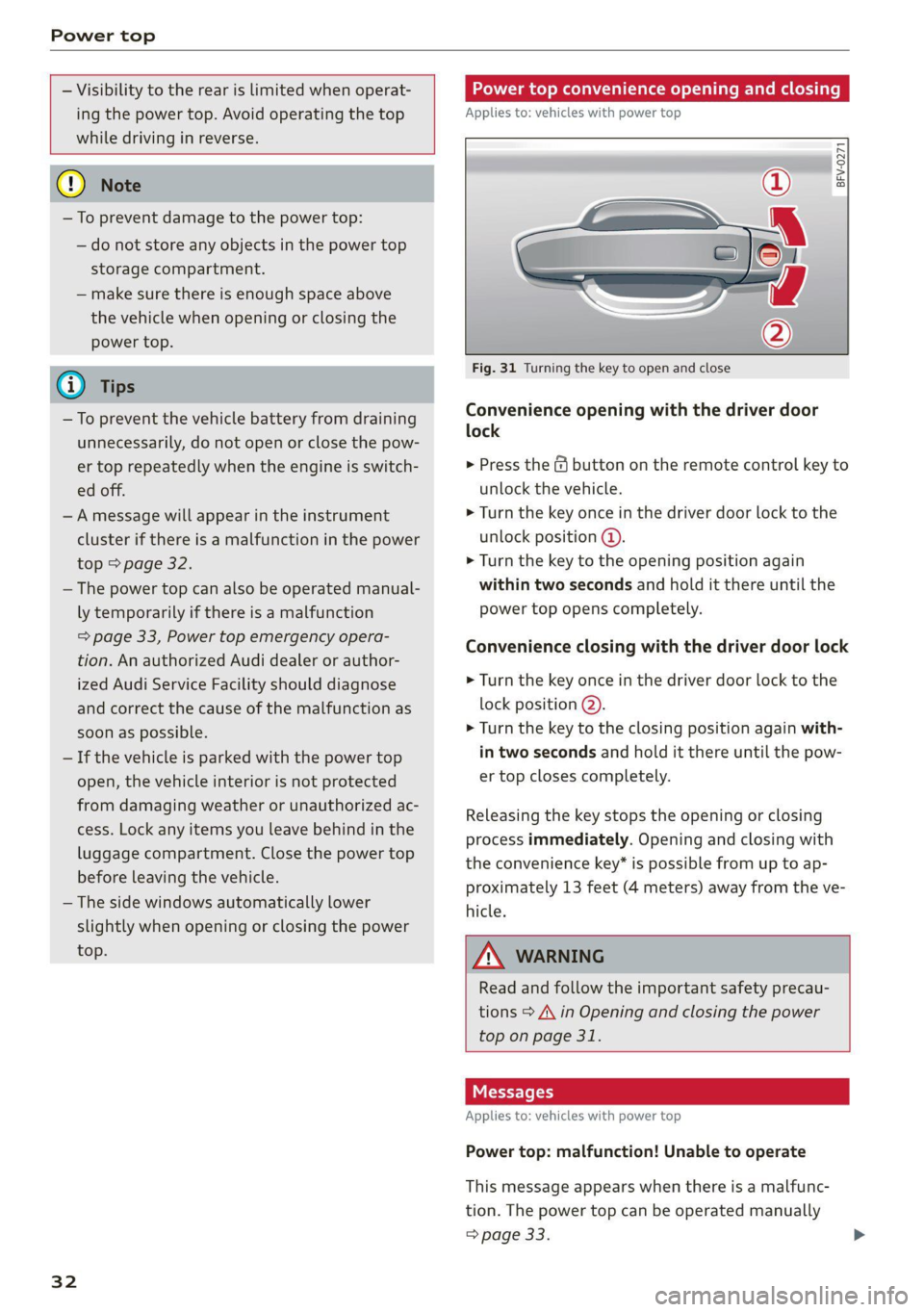
Fig. 31 Turning the key to open and close
Convenience opening with the driver door
lock
> Press the &@ button on the remote control key to
unlock the vehicle.
> Turn the key once in the driver door lock to the
unlock position @.
> Turn the key to the opening position again
within two seconds and hold it there until the
power top opens completely.
Convenience closing with the driver door lock
> Turn the key once in the driver door lock to the
lock position @).
> Turn the key to the closing position again with-
in two seconds and hold it there until the pow-
er top closes completely.
Releasing the key stops the opening or closing
process immediately. Opening and closing with
the convenience key* is possible from up to ap-
proximately 13 feet (4 meters) away from the ve-
hicle.
ZA WARNING
Read and follow the important safety precau-
tions > A\ in Opening and closing the power
top on page 31.
Messages
Applies to: vehicles with power top
Power top: malfunction! Unable to operate
This message appears when there is a malfunc-
tion. The power top can be operated manually
> page 33.
Page 65 of 280
8S1012721BB
Stowing and using
Stowing and using
Power sources
When the ignition is switched on, you may be
able to use multiple power sources for external
devices, depending on the vehicle equipment.
12 volt sockets
You can connect electrical accessories to the 12
volt sockets. The power usage must not exceed
120 watts.
The 12 volt sockets are labeled with the 12V
symbol. They are located in the front center con-
sole and on the side trim panel in the luggage
compartment”.
USB ports
Applies to: vehicles with USB port
You can charge mobile devices using the USB
ports. The USB ports are labeled with the «<> or
(4 symbol or CHARGE ONLY.
ZA WARNING
—To reduce the risk of fatal injury, store all
connected devices securely when driving so
that they do not move around inside the ve-
hicle when braking or in the event of an acci-
dent.
— Incorrect usage can lead to serious injuries
or burns. To reduce the risk of injuries, never
leave children unattended in the vehicle
with the vehicle key.
@) Note
— Read the operating manuals for the con-
nected devices.
—To reduce the risk of damage to the vehicle
electrical system, never attempt to charge
the vehicle battery by connecting accesso-
ries that provide power to the power sour-
ces.
— Do not connect any device whose network
class (voltage) does not match the network
class designed for the socket.
— Disconnect the connectors from the power
sources carefully to reduce the risk of dam-
aging them.
Storage
Cup holders
Applies to: vehicles with cup holders
Fre} KR So
g > c oO
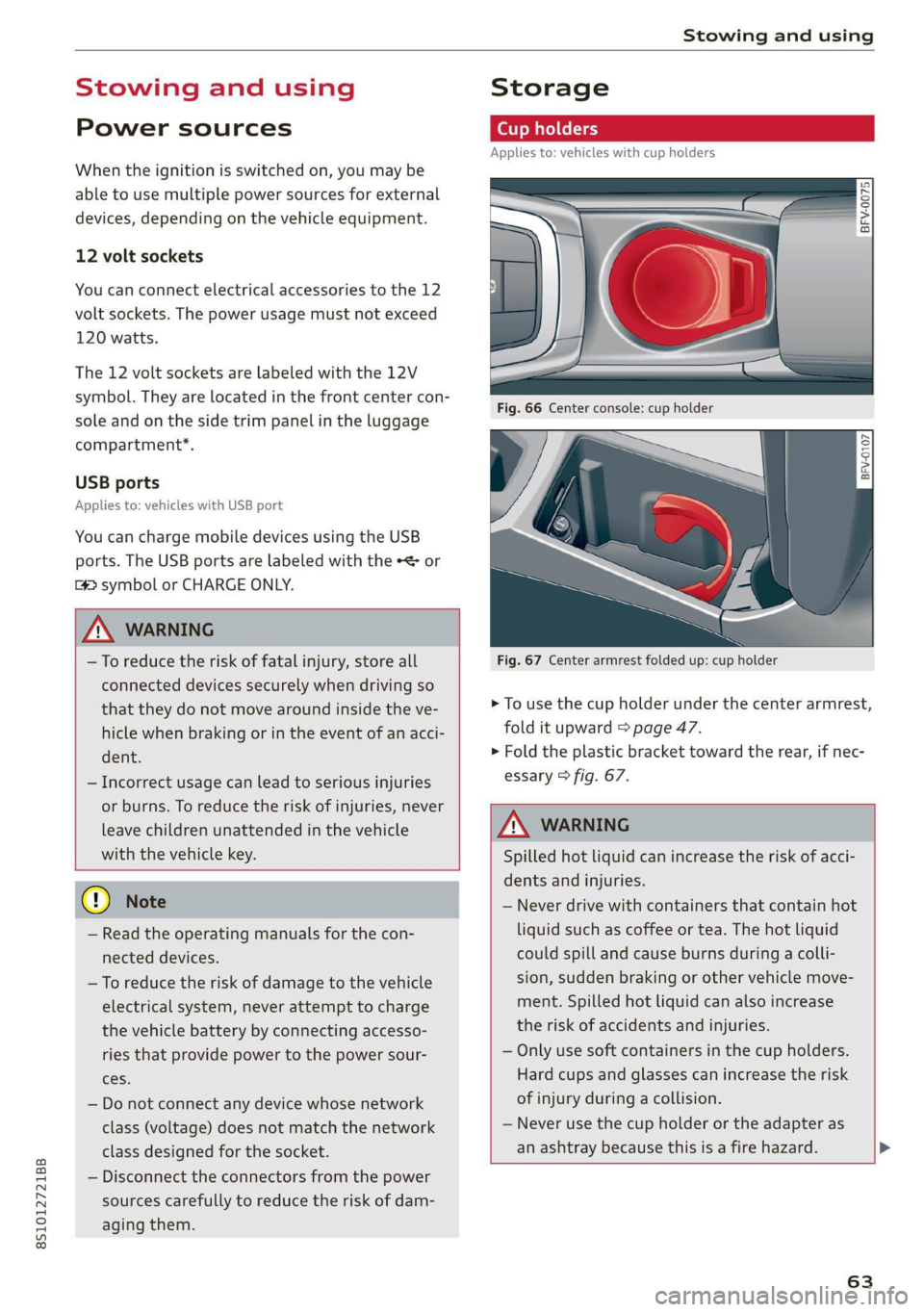
Fig. 67 Center armrest folded up: cup holder
> To use the cup holder under the center armrest,
fold it upward > page 47.
> Fold the plastic bracket toward the rear, if nec-
essary > fig. 67.
Z\ WARNING
Spilled hot liquid can increase the risk of acci-
dents and injuries.
— Never drive with containers that contain hot
liquid such as coffee or tea. The hot liquid
could spill and cause burns during a colli-
sion, sudden braking or other vehicle move-
ment. Spilled hot liquid can also increase
the risk of accidents and injuries.
— Only use soft containers in the cup holders.
Hard cups and glasses can increase the risk
of injury during a collision.
— Never use the cup holder or the adapter as
an ashtray because this is a fire hazard.
63
Page 74 of 280
Warm and cold
of injury, these individuals should not use seat
heating.
@) Note
To reduce the risk of damage to the seat heat-
ing elements, do not kneel on the seats or
place heavy pressure on one area of the seat.
@) Tips
— The setting for the seat heating on the driv-
er's side is assigned to the key that is in use.
— If the front passenger's seat heating is
turned on, it will not turn on again automat-
ically if more than 10 minutes have passed
between switching the ignition off and
switching it on again.
re aati}
Applies to: vehicles with neck heating
BFV-0177
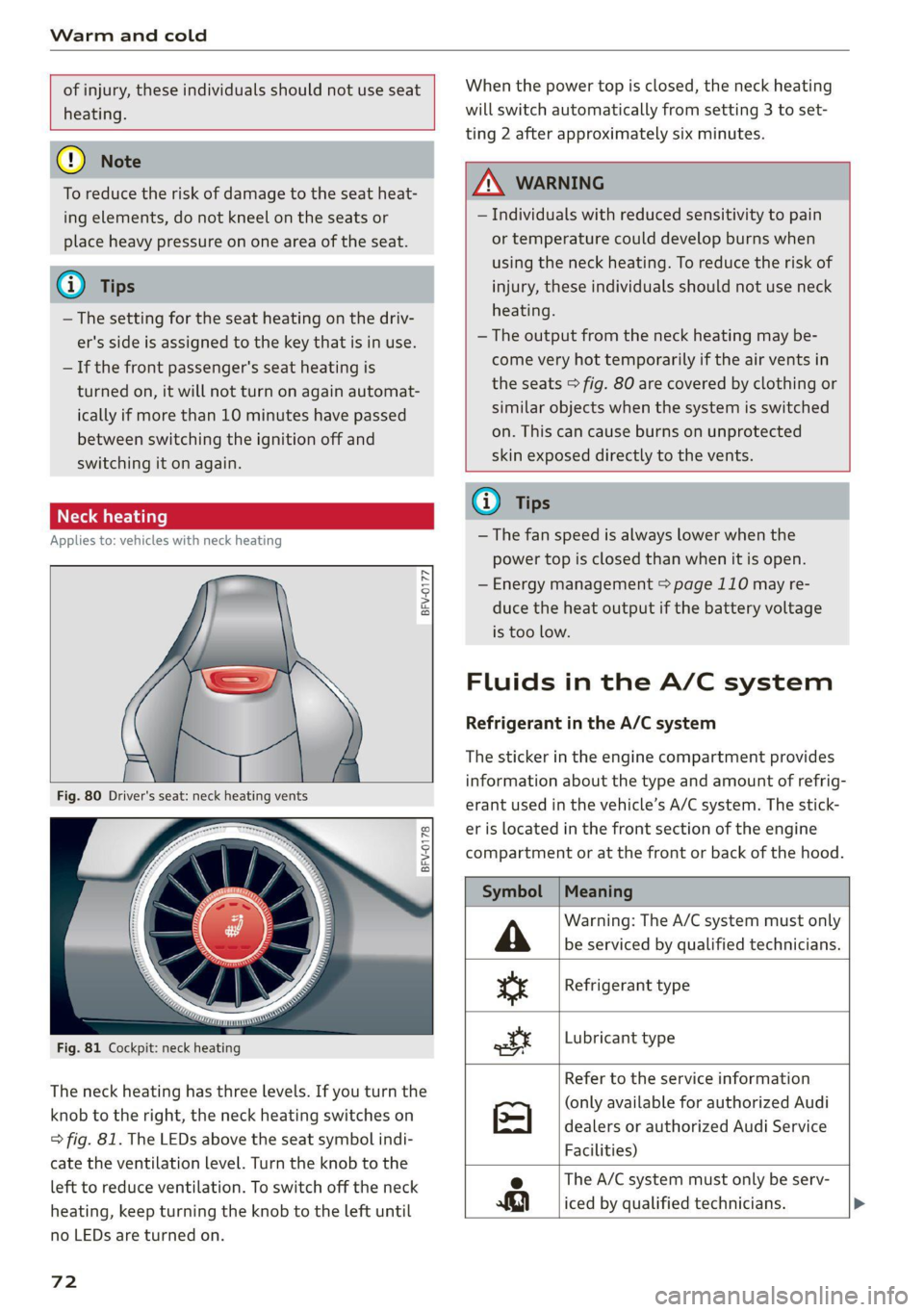
BFV-0178
Fig. 81 Cockpit: neck heating
The neck heating has three levels. If you turn the
knob to the right, the neck heating switches on
=> fig. 81. The LEDs above the seat symbol indi-
cate the ventilation level. Turn the knob to the
left to reduce ventilation. To switch off the neck
heating, keep turning the knob to the left until
no LEDs are turned on.
72
When the power top is closed, the neck heating
will switch automatically from setting 3 to set-
ting 2 after approximately six minutes.
ZA WARNING
— Individuals with reduced sensitivity to pain
or temperature could develop burns when
using the neck heating. To reduce the risk of
injury, these individuals should not use neck
heating.
— The output from the neck heating may be-
come very hot temporarily if the air vents in
the seats > fig. 80 are covered by clothing or
similar objects when the system is switched
on. This can cause burns on unprotected
skin exposed directly to the vents.
@ Tips
— The fan speed is always lower when the
power top is closed than when it is open.
— Energy management > page 110 may re-
duce the heat output if the battery voltage
is too low.
Fluids in the A/C system
Refrigerant in the A/C system
The sticker in the engine compartment provides
information about the type and amount of refrig-
erant used in the vehicle’s A/C system. The stick-
er is located in the front section of the engine
compartment or at the front or back of the hood.
Symbol
A
ss
ott
Meaning
Warning: The A/C system must only
be serviced by qualified technicians.
Refrigerant type
Lubricant type
Refer to the service information
(only available for authorized Audi
dealers or authorized Audi Service
Facilities)
e The A/C system must only be serv-
iced by qualified technicians. >
Page 78 of 280
![AUDI TT COUPE 2020 Owners Manual Driving
Stopping the engine
> Bring the vehicle to a full stop.
> Press the [START ENGINE STOP] button.
Emergency off function*
If it is absolutely necessary, the engine can also
be](/img/6/57658/w960_57658-77.png "AUDI TT COUPE 2020 Owners Manual Driving
Stopping the engine
> Bring the vehicle to a full stop.
> Press the [START ENGINE STOP] button.
Emergency off function*
If it is absolutely necessary, the engine can also
be")
Driving
Stopping the engine
> Bring the vehicle to a full stop.
> Press the [START ENGINE STOP] button.
Emergency off function*
If it is absolutely necessary, the engine can also
be turned off while driving at speeds starting at
4 mph (7 km/h). To stop the engine, press the
START ENGINE STOP] button twice in a row or
press and hold it one time.
Z\ WARNING
— Never turn off the engine before the vehicle
has come to a complete stop. Switching it
off before the vehicle has stopped may im-
pair the function of the brake booster and
power steering. You may need to use more
force when braking or steering. Because you
cannot brake and steer as you usually would,
this could lead to accidents and serious inju-
ries.
— If you leave the vehicle, switch the ignition
off and take the vehicle key with you. If you
do not do this, the engine could be started
and electrical equipment such as the power
windows could be activated. This can lead to
serious injuries.
— For safety reasons, always park the vehicle
with the selector lever in the P position.
Otherwise, there is the risk that the vehicle
could roll unintentionally.
@) Note
If the engine has been under heavy load for
an extended period of time, heat builds up in
the engine compartment after the engine is
switched off and there is a risk of damaging
the engine. For this reason, let the engine run
at idle for approximately two minutes before
shutting it off.
@) Tips
For up to 10 minutes after stopping the en-
gine, the radiator fan may turn on again auto-
matically or it may continue to run, even if the
ignition is switched off.
76
Messages
Pressing the start/stop button again will switch
off the engine
This message appears when you press the
START ENGINE STOP] button while driving.
Engine start system: malfunction! Please con-
tact Service
The engine automatic start system has a mal-
function. Drive immediately to an authorized
Audi dealer or authorized Audi Service Facility to
have the malfunction repaired. To start the en-
gine, press and hold the |START ENGINE STOP
button.
Remote control key: hold back of key
against the designated area. See owner's man-
ual
This message appears if there is no convenience
key inside the vehicle or if the system does not
recognize the key. The convenience key may not
be recognized, for example, if it is covered by an
object that disrupts the signal (such as a brief-
case), or if the key battery is weak. Electronic de-
vices such as cell phones can also interfere with
the signal.
To still be able to start or stop the engine, see
= page 77, Starting the engine when there is a
malfunction.
B Remote control key: key not detected. Is the
key
still in the vehicle?
The B indicator light turns on and this message
appears if the convenience key was removed from
the vehicle when the engine was running. If the
convenience key is no longer in the vehicle, you
cannot switch the ignition on or start the engine
once you stop it. You also cannot lock the vehicle
from the outside.
Please press the brake pedal
This message appears if you do not press the
brake pedal when starting the engine.
Please select N or P
Page 98 of 280
Assist systems
The display brightness adjusts automatically to
the brightness of the surroundings, both in the
information and in the warning stage. In very
dark or very bright surroundings, the automatic
adjustment will set the display to the minimum
or maximum level. In such cases, you may notice
no change when adjusting the brightness, or the
change may only be noticeable once the sur-
roundings change.
Adjust the brightness to a level where the display
in the information stage will not disrupt your
view ahead. If you change the brightness, the dis-
play in the exterior mirror will briefly show the
brightness level in the information stage. The
brightness of the warning stage is linked to the
brightness in the information stage and is adjust-
ed along with the information stage.
@) Tips
— Side assist is not active while you are mak-
ing the adjustment.
— Your settings are automatically stored and
assigned to the remote control key being
used.
Messages
Applies to: vehicles with Audi side assist
If the side assist switches off automatically, a
message appears in the Infotainment system dis-
play.
Audi side assist: currently unavailable.
Sensor vision restricted due to surroundings.
See owner's manual
The radar sensor vision is impaired. Do not cover
the area in front of the sensors with bike wheels,
stickers, dirt or other objects. Clean the area cov-
ering the sensors, if necessary > page 94,
fig. 102.
Audi side assist: currently unavailable.
See owner's manual
Side assist cannot be switched on at this time be-
cause there is a malfunction (for example, the
battery charge level may be too low).
96
Audi side assist: malfunction! Please
contact Service
The system cannot guarantee that it will detect
vehicles correctly and it has switched off. The
sensors have been moved or are faulty. Have the
system checked by an authorized Audi dealer or
authorized Audi Service Facility soon.
Audi drive select (drive
settings)
Introduction
Applies to: vehicles with Audi drive select
Drive select makes it possible to experience dif-
ferent types of vehicle characteristics in one vehi-
cle. With different driving modes, the driver can
switch the setting, for example from sporty to
comfortable. In the Individual mode, the set-
tings can be adjusted to your personal preferen-
ces. This makes it possible to combine settings
such as a sporty drivetrain setting with comforta-
ble steering.
Z\ WARNING
Using Audi drive select incorrectly can lead to
collisions, other accidents and serious inju-
ries.
Applies to: vehicles with Audi drive select
The vehicle setup in each mode depends on the
vehicle's features.
Engine and automatic transmission
Depending on the mode, the engine and auto-
matic transmission respond more quickly or ina
more balanced manner to accelerator pedal
movements.
Suspension control (Audi magnetic ride)*
The suspension control uses sensors to record in-
formation regarding steering movements, brak-
ing and acceleration operations by the driver, as
well as information about the road surface, driv-
ing speed, and load. With drive select, you can
adjust the suspension control to sporty (dynam-
ic), comfortable (comfort) or balanced (auto). >
Page 267 of 280

8S1012721BB
Balanice:(SOUNG), swasi = sisvine se wv wecius ws erases oo 193
Band
refer to Frequency band............... 165
Bassi(SOunad), cus 5 2 semsere © x srens 2 seme a 0 om 193
Battenyisicas wv exsweue 3 x wisueee 3 v cmsamus 2 0 muses 2 a « 209
Charging ........ 6.0. c cece cece eens 210
WinterOperation s ava: « x sews « 2 eews 2 ewe 209
Better route (navigation)................ 163
Blower... 2.2... cece cece ee eee eee eee 70
Bluetooth
Audio playét occ <2 seus 3 e ees ge een ees 173
Connecting acellphone............... 129
Settings........... 00.02 ee eee eee 192
BOOSt:. « ciwseis 6 6 cease 0 0, oramne wo aoncaiie ww antes 8 8 15
Boost pressure indicator................. 15
Brake fluid
Checking the brake fluid level........... 208
BrakeStass oo ssc: a 3 aise so coc 6 comees 3 eee 107
Brake assist... 2.0... 0. eee eee ee eee 105
Brake assist systeM.............0--005 105
Brake fllid....... ee eee eee eee 208
Electromechanical parking brake......... 77
Emergency braking function............. 77
New brake pads cass cee es omen ao cee 107
Break-in security feature..............0.. 24
Breaking in
New brake pads................-.00-- 107
Newtires......... 0.00.00. cece eee eee 220
Browser
refer to Media center .............0000- 179
Bulbireplacenienith: s « accu s © mews 3 ¢ mere sve 254
Buttons
Control.panel (MMI) ws « sews ss wows so 4 111,
Cc
Cable (USB adapter/AUX connector cable).. 176
California Proposition 65 Warning........ 201
Battery specific:. = 2 csevs se sewn 2s wewe 2 os 209
Calllist vous: » x sagem 5 2 que og AWE Ye ee 133
Cal
OpeOnSic: « « sees x o mew se eee 2 eee 140
Capacities
Fuebtankia coccass oo comms «a verve wo suena @ 2 oe 263
Washer fluid reservoir............00005 263
Gar keys + « snes % « snes © o arava © ¥ onenemn © o seoo 19
Garwash s icca ss mews + wai vv owen we ee 235
Catalytic‘converter « cess 2 wees 2 2 wewe es wes 199
CD drive (media drives) ...........0..006 172
Cell phone
Playing music.............. 0c eee eee 173
also refer to Telephone................ 129
Cell phone compartment
refer to Audi phone box............... 131
Centerartiirests: « 2 wes s 2 ewes 2 o oe ¢ » ees 47
Céftral lOCKING’: s = secs s 5 eaves & ¥ ace & eee 18
AULO LOK « ccinss 2 o seen 2 sens 2 o eerie 2 wees 18
Convenience key.......... 0.00 eee eee 21
Convenience opening and closing......... 27
Mechanically unlocking and locking....... 23
Remote control key.............--000-5 21
Setting... 6.6... e cece 23
Central locking switch.................-. 22
Ceramic brakes. 1.1... . cee eee ee eee ee 107
Gentifications s « sucscm oo snawere wo mene so oma 5 260
Changing light bulbs................... 254
Charging
refer to Power sourceS...... 0.0.00 0 eee 63
Charging the battery (mobile devices). 131, 176
Child -safety‘seats:. . nw 6c eve ae eee ee eee 58
Securing to the top tether anchor........ 62
Securing with a safety belt.............. 60
Securing with LATCH .........0ceeeeveee 60
ClaSSIOVIEW is ¢ » nawin = 2 news + awn ws Wane 8 & 13
GLEAMING sows « « sew 5 2 Rou: ae ee ee wR 235
Cleaning Alcantara.............-.00005. 238
Cleaning artificial leather............... 238
Cleaning carbon components........ 237, 238
Cleaning controls.................2.00. 238
Cleaning decorative parts andtrim........ 237
Cleaning exhaust tail pipes.............. 236
Cleaning plastic parts.................. 238
Cleaning taiblights's s ces x s may ao ewe oo: 236
Cleaning textiles = cars + & exes s = aces s ¢ ees 238
Cleaning the wind deflector............. 237
Climate control system (automatic)........ 70
Drive SQlCCEcsis x says 5 2 ones x 2 owes 3 2 gare 96
GLOGK sim < nan 3 5 pemR aE REE & x OEE
Closing
Convenience closing..............-+.-. 27
HOOd ... eee eee eee 201
Luggage compartment lid............... 24
WINKOWS!. 2 cscs: 2 iorsm ou aamewe oo eee a 288 26
Cockpit (OVERVIEW): « sss 2 seme 2 gems = ee 6