ignition AUDI TT COUPE 2020 Owner's Manual
[x] Cancel search | Manufacturer: AUDI, Model Year: 2020, Model line: TT COUPE, Model: AUDI TT COUPE 2020Pages: 280, PDF Size: 98.79 MB
Page 49 of 280
8S1012721BB
Sitting correctly and safely
AN WARNING
The power front seats can also be adjusted
when the ignition is switched off. For this rea-
son, children should never be left unattended
in the vehicle because they could be injured.
Ittihad Celameleiacoya)
Applies to: vehicles with multifunction button
You can adjust the side bolsters using the multi-
function button.
> If you turn the multifunction button @
=> page 46, fig. 51 to the left or right, the side
bolsters on the seat backrests will increase or
decrease the lateral support.
@ Tips
The air in the side bolsters* is released as
soon as the driver's door opens. This makes is
possible to enter and exit the vehicle more
comfortably. As soon as you start driving the
vehicle, the side bolsters fill.
Easy seat entry
Applies to: vehicles with easy entry function
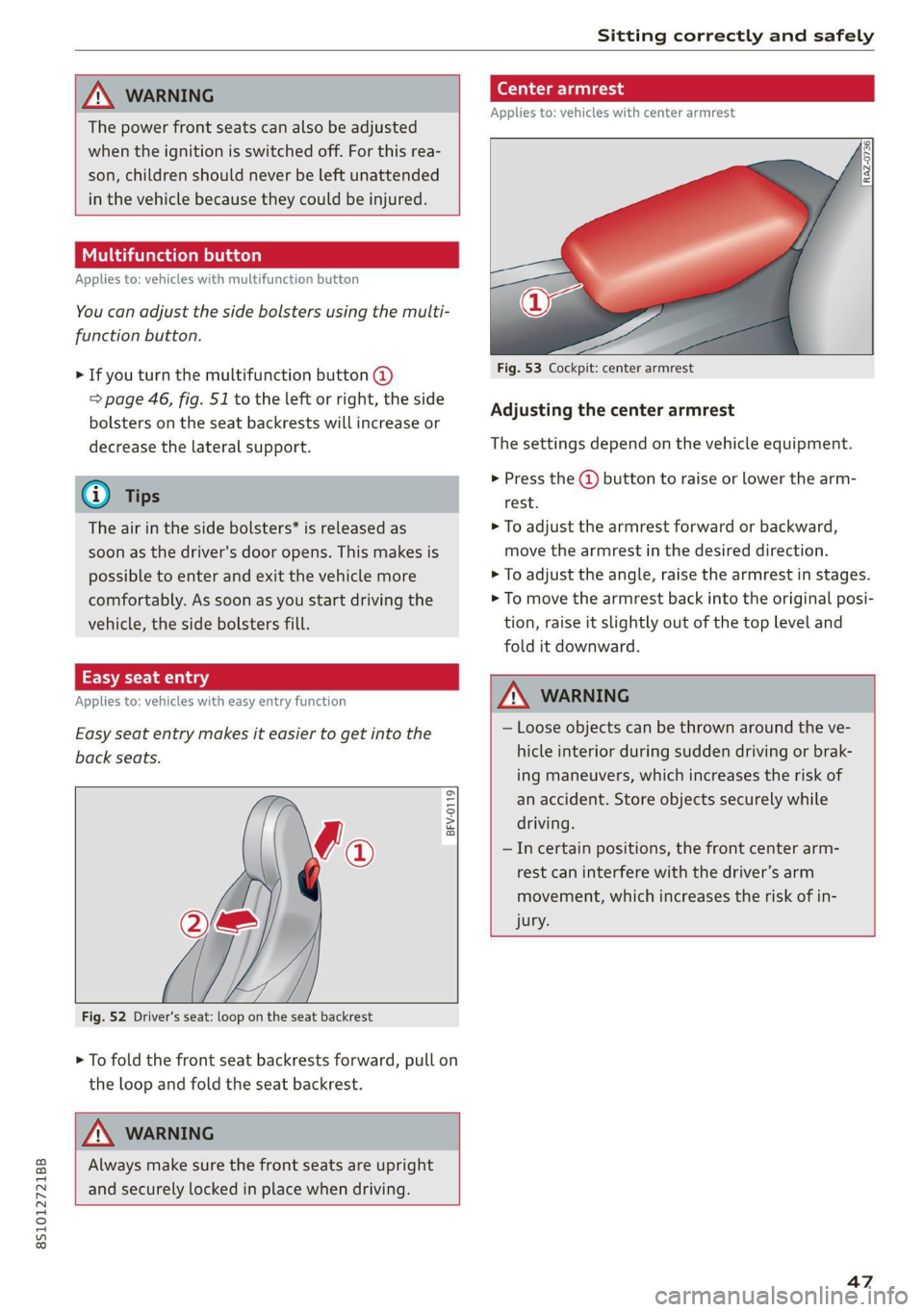
Easy seat entry makes it easier to get into the
back seats.
BFV-0119
Fig. 52 Driver's seat: loop on the seat backrest
> To fold the front seat backrests forward, pull on
the loop and fold the seat backrest.
A\ WARNING
Always make sure the front seats are upright
and securely locked in place when driving.
(ead
Applies to: vehicles with center armrest
Fig. 53 Cockpit: center armrest
Adjusting the center armrest
The settings depend on the vehicle equipment.
> Press the @ button to raise or lower the arm-
rest.
> To adjust the armrest forward or backward,
move the armrest in the desired direction.
> To adjust the angle, raise the armrest in stages.
> To move the armrest back into the original posi-
tion, raise it slightly out of the top level and
fold it downward.
ZA WARNING
— Loose objects can be thrown around the ve-
hicle interior during sudden driving or brak-
ing maneuvers, which increases the risk of
an accident. Store objects securely while
driving.
—Incertain positions, the front center arm-
rest can interfere with the driver’s arm
movement, which increases the risk of in-
jury.
47
Page 55 of 280

8S1012721BB
Sitting correctly and safely
Safety systems monitoring
The Ea indicator light in the instrument cluster
monitors the safety systems such as the airbags
(including the control modules, sensors, and wir-
ing) and the belt tensioners. It turns on when you
switch the ignition on and turns off after several
seconds.
If the Ea indicator light does not turn on when
the ignition is switched on, does not turn off af-
ter several seconds, or turns on or flashes while
driving, there may be a malfunction in one of the
safety systems. Drive to an authorized Audi deal-
er or authorized Audi Service Facility immediately
to have the malfunction corrected.
A WARNING
Have the malfunction in the safety systems in-
spected immediately. Otherwise, there is a
risk that the systems may not activate during
an accident, which increases the risk of seri-
ous or fatal injury.
53
Page 57 of 280

8S1012721BB
Sitting correctly and safely
The locations of the airbags are labeled with
“AIRBAG”. The following airbags are installed in
your vehicle:
Driver's airbag
Front passenger's airbag
Side airbags
Applies to: Coupe: Head curtain airbag with
ejection mitigation
©
©0080
Knee airbags
Airbags offer the best possible protection in your
vehicle during an accident when they are used to-
gether with safety belts that are fastened cor-
rectly, and when passengers are sitting in the cor-
rect seating position. Airbags are a supplementa-
ry restraint system and do not replace safety
belts.
Applies to: Coupe: Airbags may deploy during
head-on, side-impact, or rollover collisions.
Applies to: Roadster: Airbags may deploy during
head-on or side-impact collisions.
The deployment area for the airbag system can-
not be defined for every situation, since the cir-
cumstances surrounding accidents can vary wide-
ly. Factors that play an important role include the
condition of the object that the vehicle hits (hard
or soft), the angle of impact, vehicle speed, etc.
The deciding factor for the deployment of the air-
bag system is the deceleration that occurs during
an accident. Sensors in the vehicle are designed
to detect the severity of an accident in conjunc-
tion with the control module, and to provide a
targeted and timely deployment of the restraint
system. If the vehicle deceleration that is meas-
ured during an accident is below the specified
reference values in the control module, then the
airbags will not deploy, even though the vehicle
may be severely damaged from the accident. In
these cases, the vehicle occupants will be pro-
tected by the safety belts if they are fastened and
worn correctly.
The deployment of the front passenger's airbag
will depend on the occupancy of the seat
=> page 55.
Each deployed airbag is filled with gas. When this
occurs, the airbag covers open and the airbags
unfold with great force into the deployment zone
within milliseconds. Inflated airbags reduce the
movement of passengers wearing safety belts in
the direction of the impact and thus help to re-
duce the risk of injury. They can help to protect
the head, upper body, and lap, for example. How-
ever, there is the possibility that airbag deploy-
ment can cause injuries.
The airbag system only works when the ignition
is turned on.
If you or other vehicle passengers have physical
limitations that prevent sitting in a correct posi-
tion, modifications to the vehicle may be neces-
sary. For more information, contact an author-
ized Audi dealer or authorized Audi Service Facili-
ty, or call Audi customer support at
1-800-822-2834.
) Tips
Applies to: Coupe
The side curtain airbags in your vehicle have
ejection mitigation functions. This reduces
the risk of being ejected from the vehicle inte-
rior during an accident, especially in the event
of a vehicle rollover.
Advanced airbag system
Fig. 62 Headliner: indicator light to display the status of
the front passenger's airbag
The Advanced Airbag System in your vehicle has
been certified to comply with the requirements
of the United States Federal Motor Vehicle Safety
Standard (FMVSS) 208, as well as Canada Motor
Vehicle Safety Standard (CMVSS) 208 as applica-
ble at the time your vehicle was manufactured.
According to these requirements, the front Ad-
vanced Airbag System on the passenger’s side
55
>
Page 58 of 280

Sitting correctly and safely
has been certified for “suppression” for infants
approximately 12 months old and younger, and
for “low risk deployment” for children aged 3 to
6 years old (as defined in the standard).
The advanced airbag system will activate or deac-
tivate the front passenger's airbag based on the
occupancy of the seat. If a front airbag deploys
during an accident, the deployment force will
adapt to the passenger.
Components
The advanced airbag system consists of the fol-
lowing components:
— Front airbags in the steering wheel and in the
instrument panel on the front passenger's side:
these can protect the front passengers during
an accident
— Passenger occupant detection sensor in the
front passenger's seat: this detects if the front
passenger's seat is occupied (for example, by a
person or a small child in a child safety seat)
— Seat position sensors on the front seats: these
determine the distance between the seat and
the steering wheel or instrument panel
— Sensors in the front seat belt latch: these de-
tect if the safety belts are fastened
—The PASSENGER AIR BAG OFF #, ON @
indicator light in the headliner:this indicates if
the front passenger's airbag is activated or de-
activated
- indicator light in the instrument cluster:
this monitors the function of the Advanced Air-
bag System components to ensure they are
functioning correctly
How the components function together
The passenger occupant detection sensor in the
front passenger's seat detects if the front pas-
senger's seat is occupied. The passenger occu-
pant detection sensor measures the electrical ca-
pacity on the front passenger’s seat. The pas-
senger's airbag is activated or deactivated de-
pending on the electrical capacity that is meas-
ured.
The passenger's airbag is activated if:
56
— The electrical capacity is higher than the
threshold stored in the control module
— The electrical capacity is the same as or greater
than the electrical capacity of a typical adult
The passenger's airbag is deactivated if:
— The electrical capacity is lower than the thresh-
old stored in the control module
— The electrical capacity is the same as or less
than the electrical capacity of a typical one-
year-old child in a child safety seat that has
been used for certification in accordance with
FMVSS 208
If the front passenger's airbag is activated, the
PASSENGER AIR BAG ON @ indicator light
will turn on. If the front passenger's airbag is de-
activated, the PASSENGER AIR BAG OFF #;
indicator light will turn on.
The deployment force of the front airbags adapts
based on whether or not the safety belt is used
and the distance between the seat and the steer-
ing wheel/instrument panel. For example, if a
person is too close to the front airbag, the front
airbag will deploy with less force to help reduce
the risk of injury.
Meaning of PASSENGER AIR BAG OFF #4, ON
® indicator light
When the ignition is switched on, the system de-
tects whether the front passenger's seat is occu-
pied. PASSENGER AIR BAG OFF #7, ON @
will turn on for several seconds during this proc-
ess. Then it will indicate whether the front pas-
senger's airbag is activated or deactivated.
— PASSENGER AIR BAG OFF 8%: the front
passenger's airbag is deactivated and will not
deploy in the event of an accident.
— PASSENGER AIR BAG ON ®: the front pas-
senger's airbag is activated and could deploy in
the event of an accident.
If a change to the occupancy status of the front
passenger's seat is detected
PASSENGER AIR BAG OFF #, ON @ will
flash for several seconds and will then display the
status of the front passenger's airbag.
Page 65 of 280
8S1012721BB
Stowing and using
Stowing and using
Power sources
When the ignition is switched on, you may be
able to use multiple power sources for external
devices, depending on the vehicle equipment.
12 volt sockets
You can connect electrical accessories to the 12
volt sockets. The power usage must not exceed
120 watts.
The 12 volt sockets are labeled with the 12V
symbol. They are located in the front center con-
sole and on the side trim panel in the luggage
compartment”.
USB ports
Applies to: vehicles with USB port
You can charge mobile devices using the USB
ports. The USB ports are labeled with the «<> or
(4 symbol or CHARGE ONLY.
ZA WARNING
—To reduce the risk of fatal injury, store all
connected devices securely when driving so
that they do not move around inside the ve-
hicle when braking or in the event of an acci-
dent.
— Incorrect usage can lead to serious injuries
or burns. To reduce the risk of injuries, never
leave children unattended in the vehicle
with the vehicle key.
@) Note
— Read the operating manuals for the con-
nected devices.
—To reduce the risk of damage to the vehicle
electrical system, never attempt to charge
the vehicle battery by connecting accesso-
ries that provide power to the power sour-
ces.
— Do not connect any device whose network
class (voltage) does not match the network
class designed for the socket.
— Disconnect the connectors from the power
sources carefully to reduce the risk of dam-
aging them.
Storage
Cup holders
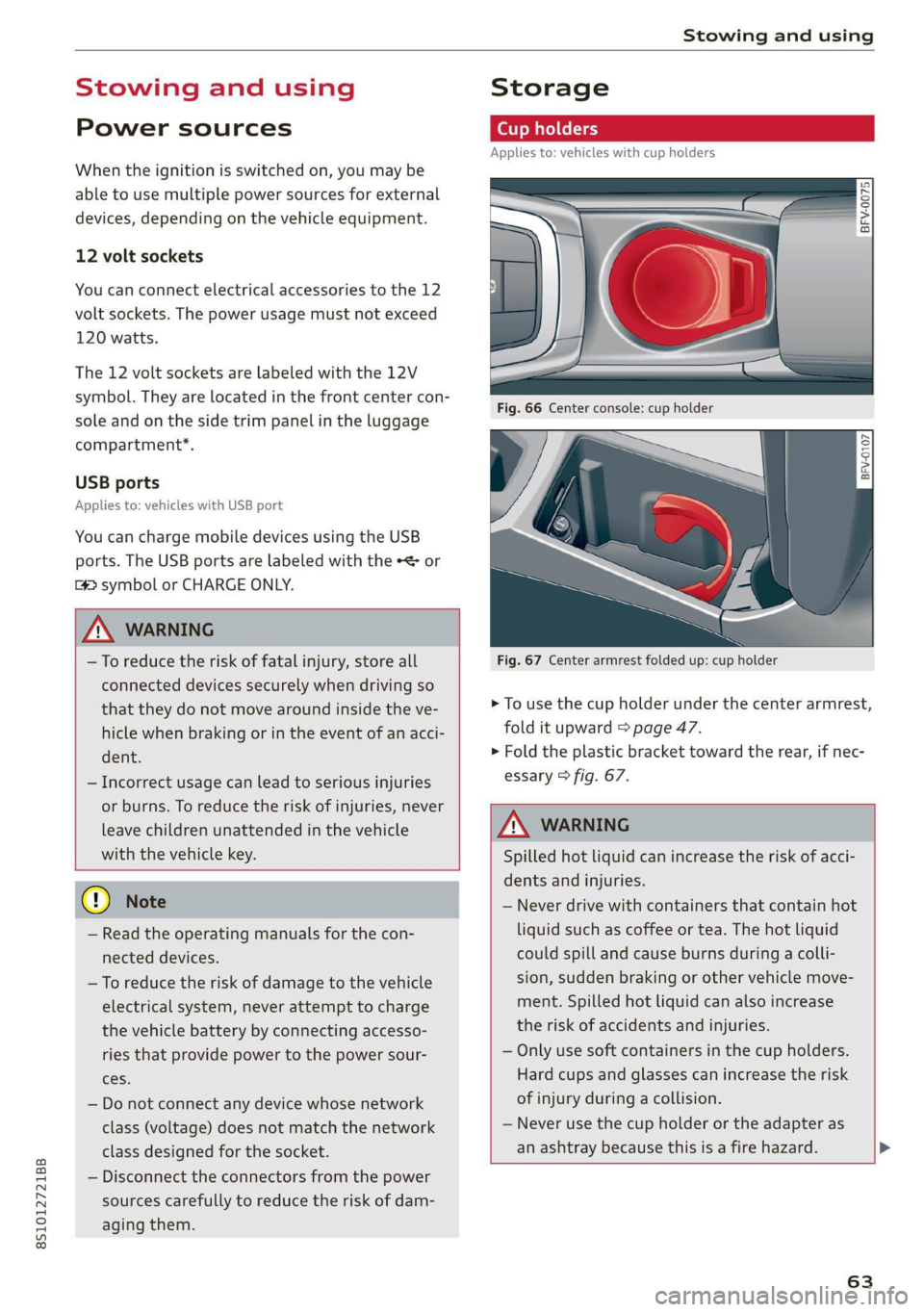
Applies to: vehicles with cup holders
Fre} KR So
g > c oO
Fig. 67 Center armrest folded up: cup holder
> To use the cup holder under the center armrest,
fold it upward > page 47.
> Fold the plastic bracket toward the rear, if nec-
essary > fig. 67.
Z\ WARNING
Spilled hot liquid can increase the risk of acci-
dents and injuries.
— Never drive with containers that contain hot
liquid such as coffee or tea. The hot liquid
could spill and cause burns during a colli-
sion, sudden braking or other vehicle move-
ment. Spilled hot liquid can also increase
the risk of accidents and injuries.
— Only use soft containers in the cup holders.
Hard cups and glasses can increase the risk
of injury during a collision.
— Never use the cup holder or the adapter as
an ashtray because this is a fire hazard.
63
Page 73 of 280
![AUDI TT COUPE 2020 Owners Manual 8S1012721BB
Warm and cold
— Automatic* recirculation mode: auto recircula-
tion needs to be activated in the Infotainment
system. Select in the Infotainment system:
MENU] button > Vehicle >](/img/6/57658/w960_57658-72.png "AUDI TT COUPE 2020 Owners Manual 8S1012721BB
Warm and cold
— Automatic* recirculation mode: auto recircula-
tion needs to be activated in the Infotainment
system. Select in the Infotainment system:
MENU] button > Vehicle >")
8S1012721BB
Warm and cold
— Automatic* recirculation mode: auto recircula-
tion needs to be activated in the Infotainment
system. Select in the Infotainment system:
MENU] button > Vehicle > left control button >
Vehicle settings > Air conditioning > Auto re-
circulation. The air quality sensor that is de-
signed for diesel and gasoline exhaust auto-
matically switches the recirculation mode on or
off depending on the level of pollutants in the
outside air.
In recirculation mode, the air inside the vehicle is
circulated and filtered. This prevents the unfil-
tered air outside the vehicle from entering the
vehicle interior. Switching recirculation mode on
when driving through a tunnel or when sitting in
traffic is recommended > A\.
Pressing the <> button, AUTO or the &Y button
switches recirculation mode off.
® Defrosting
The windshield and side windows are defrosted
or cleared of condensation as quickly as possible.
The maximum amount of air flows mainly from
the vents below the windshield. Recirculation
mode switches off. The temperature is controlled
automatically.
The AUTO button switches the defroster off.
& Rear window defogger
If the rear window defogger is activated when
the ignition is switched on, the battery manage-
ment determines based on the battery charge if
it is possible to turn on. Otherwise, the rear win-
dow defogger functions with the engine running
and switches off automatically after approxi-
mately 10 - 20 minutes, depending on the out-
side temperature.
To prevent the rear window defogger from
switching off automatically, press and hold the
& button for more than two seconds. This re-
mains stored up to approximately 15 minutes af-
ter turning off the ignition.
ZX WARNING
You should not use the recirculation mode for
an extended period since no fresh air is drawn
in. With the air-conditioning switched off, the
windows can fog up, which increases the risk
of an accident.
Adjusting the vents
BFV-0222
Fig. 78 Cockpit: adjusting the air vents
To adjust the direction of air flow, turn the
ridged outer adjustment wheel @) © fig. 78.
To adjust the amount of air flow, move the lever
@ on the air vent. To stop the air flow, move the
lever all the way to the left.
Sea Clair)
Fig. 79 Air vents: seat heating
Pressing the #/ button switches the seat heating
on at the highest setting (level 3). The LEDs indi-
cate the temperature level. To reduce the tem-
perature, press the button again. To switch the
seat heating off, press the button repeatedly un-
til the LED turns off.
ZA\ WARNING
Individuals with reduced sensitivity to pain or
temperature could develop burns when using
the seat heating function. To reduce the risk >
71
Page 74 of 280
Warm and cold
of injury, these individuals should not use seat
heating.
@) Note
To reduce the risk of damage to the seat heat-
ing elements, do not kneel on the seats or
place heavy pressure on one area of the seat.
@) Tips
— The setting for the seat heating on the driv-
er's side is assigned to the key that is in use.
— If the front passenger's seat heating is
turned on, it will not turn on again automat-
ically if more than 10 minutes have passed
between switching the ignition off and
switching it on again.
re aati}
Applies to: vehicles with neck heating
BFV-0177
BFV-0178
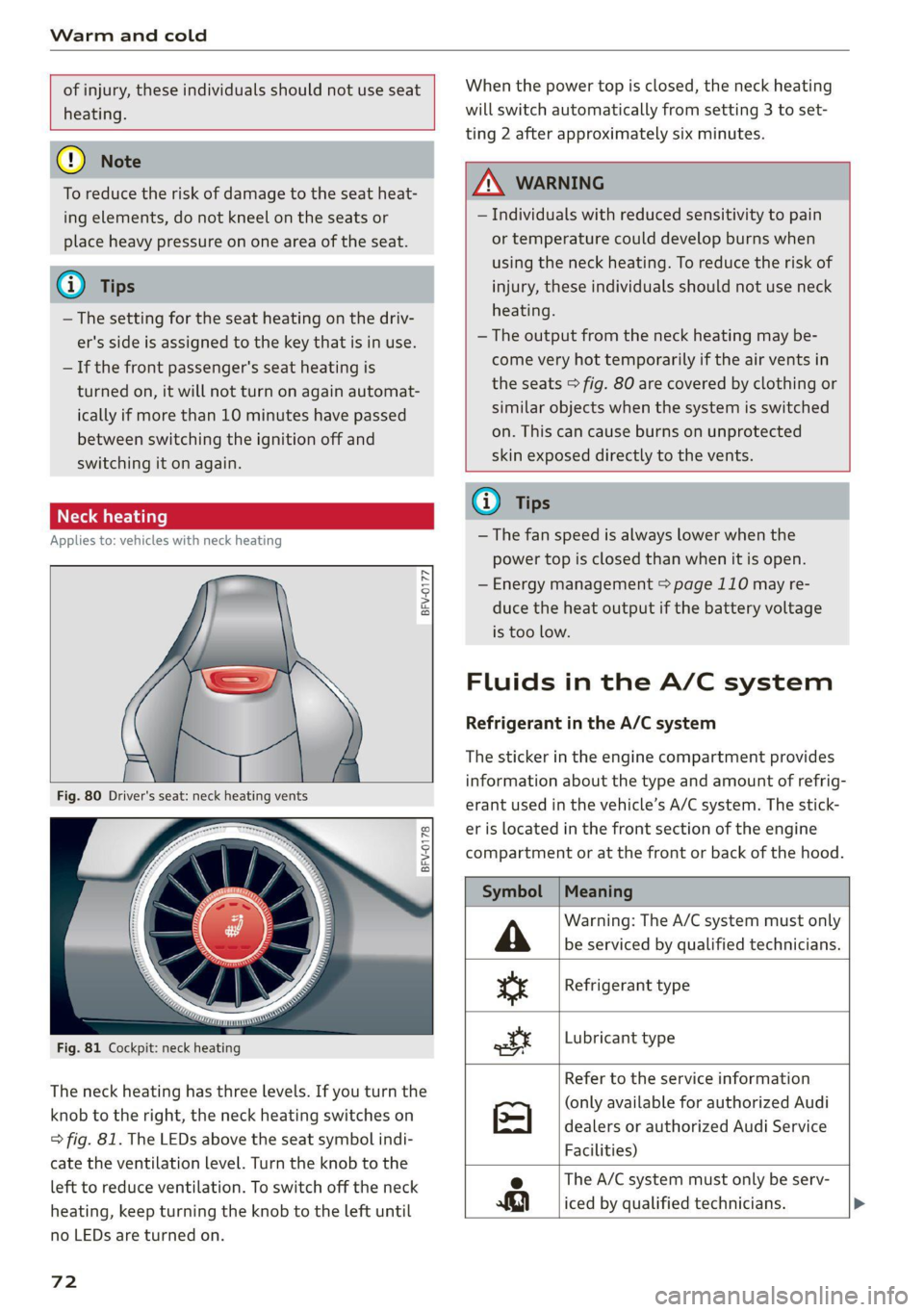
Fig. 81 Cockpit: neck heating
The neck heating has three levels. If you turn the
knob to the right, the neck heating switches on
=> fig. 81. The LEDs above the seat symbol indi-
cate the ventilation level. Turn the knob to the
left to reduce ventilation. To switch off the neck
heating, keep turning the knob to the left until
no LEDs are turned on.
72
When the power top is closed, the neck heating
will switch automatically from setting 3 to set-
ting 2 after approximately six minutes.
ZA WARNING
— Individuals with reduced sensitivity to pain
or temperature could develop burns when
using the neck heating. To reduce the risk of
injury, these individuals should not use neck
heating.
— The output from the neck heating may be-
come very hot temporarily if the air vents in
the seats > fig. 80 are covered by clothing or
similar objects when the system is switched
on. This can cause burns on unprotected
skin exposed directly to the vents.
@ Tips
— The fan speed is always lower when the
power top is closed than when it is open.
— Energy management > page 110 may re-
duce the heat output if the battery voltage
is too low.
Fluids in the A/C system
Refrigerant in the A/C system
The sticker in the engine compartment provides
information about the type and amount of refrig-
erant used in the vehicle’s A/C system. The stick-
er is located in the front section of the engine
compartment or at the front or back of the hood.
Symbol
A
ss
ott
Meaning
Warning: The A/C system must only
be serviced by qualified technicians.
Refrigerant type
Lubricant type
Refer to the service information
(only available for authorized Audi
dealers or authorized Audi Service
Facilities)
e The A/C system must only be serv-
iced by qualified technicians. >
Page 77 of 280
8S1012721BB
Driving
— Utilize the engine braking effect.
— Avoid driving short distances when possible.
G) Tips
The amount of noise produced by the vehicle
can increase significantly when driving with a
sporty style. Show respect to others around
you and the environment with the way you op-
erate your vehicle, especially at night.
Starting and stopping
the engine
Starting the engine
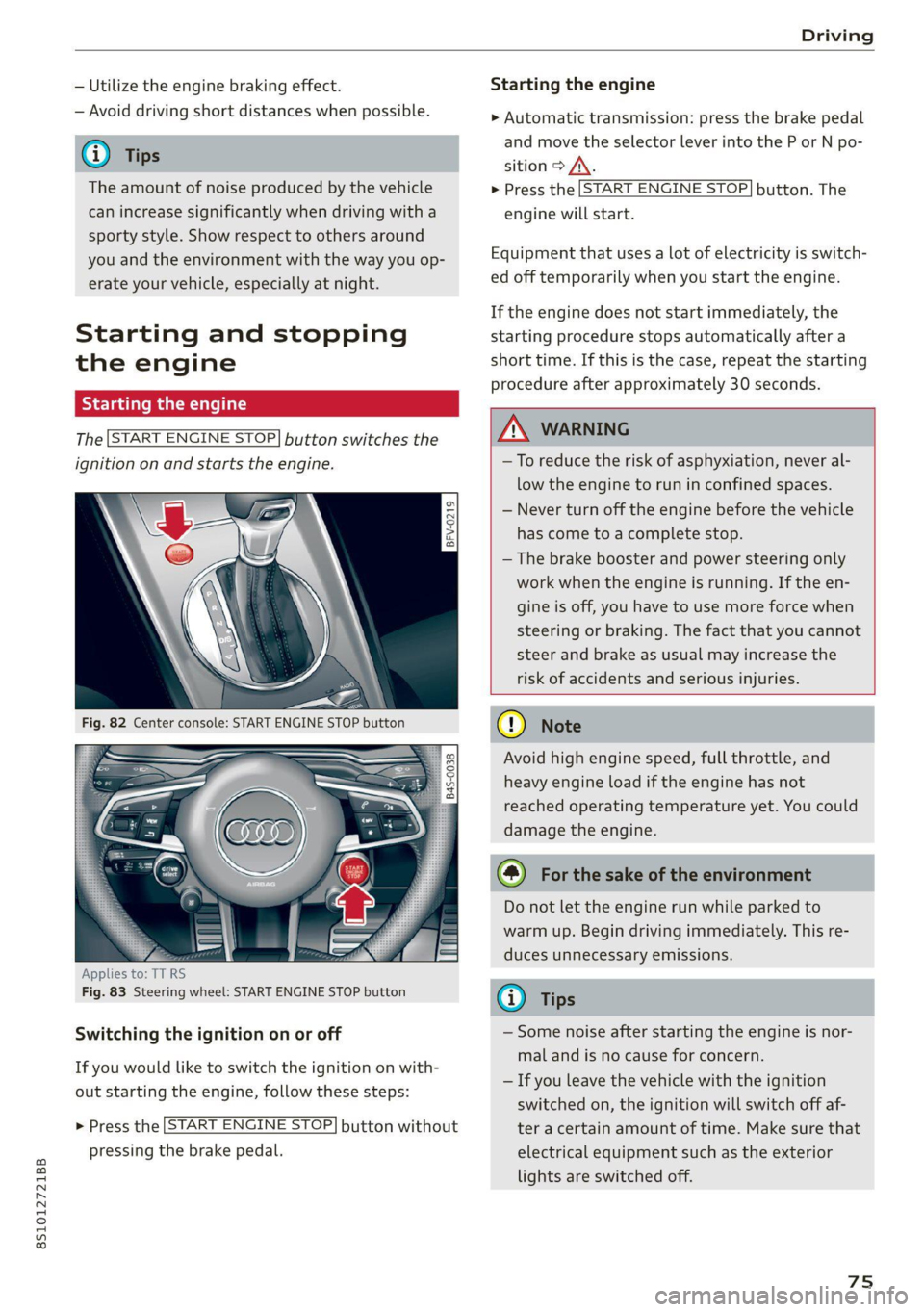
The [START ENGINE STOP] button switches the
ignition on and starts the engine.
a
Sg
x > ie o
Applies to: TT RS
Fig. 83 Steering wheel: START ENGINE STOP button
Switching the ignition on or off
If you would like to switch the ignition on with-
out starting the engine, follow these steps:
> Press the [START ENGINE STOP] button without
pressing the brake pedal.
Starting the engine
> Automatic transmission: press the brake pedal
and move the selector lever into the P or N po-
sition > A\.
> Press the [START ENGINE STOP] button. The
engine will start.
Equipment that uses a lot of electricity is switch-
ed off temporarily when you start the engine.
If the engine does not start immediately, the
starting procedure stops automatically after a
short time. If this is the case, repeat the starting
procedure after approximately 30 seconds.
ZA WARNING
—To reduce the risk of asphyxiation, never al-
low the engine to run in confined spaces.
— Never turn off the engine before the vehicle
has come to a complete stop.
— The brake booster and power steering only
work when the engine is running. If the en-
gine is off, you have to use more force when
steering or braking. The fact that you cannot
steer and brake as usual may increase the
risk of accidents and serious injuries.
() Note
Avoid high engine speed, full throttle, and
heavy engine load if the engine has not
reached operating temperature yet. You could
damage the engine.
@) For the sake of the environment
Do not let the engine run while parked to
warm up. Begin driving immediately. This re-
duces unnecessary emissions.
(i) Tips
— Some noise after starting the engine is nor-
mal and is no cause for concern.
— If you leave the vehicle with the ignition
switched on, the ignition will switch off af-
ter a certain amount of time. Make sure that
electrical equipment such as the exterior
lights are switched off.
75
Page 78 of 280
![AUDI TT COUPE 2020 Owners Manual Driving
Stopping the engine
> Bring the vehicle to a full stop.
> Press the [START ENGINE STOP] button.
Emergency off function*
If it is absolutely necessary, the engine can also
be](/img/6/57658/w960_57658-77.png "AUDI TT COUPE 2020 Owners Manual Driving
Stopping the engine
> Bring the vehicle to a full stop.
> Press the [START ENGINE STOP] button.
Emergency off function*
If it is absolutely necessary, the engine can also
be")
Driving
Stopping the engine
> Bring the vehicle to a full stop.
> Press the [START ENGINE STOP] button.
Emergency off function*
If it is absolutely necessary, the engine can also
be turned off while driving at speeds starting at
4 mph (7 km/h). To stop the engine, press the
START ENGINE STOP] button twice in a row or
press and hold it one time.
Z\ WARNING
— Never turn off the engine before the vehicle
has come to a complete stop. Switching it
off before the vehicle has stopped may im-
pair the function of the brake booster and
power steering. You may need to use more
force when braking or steering. Because you
cannot brake and steer as you usually would,
this could lead to accidents and serious inju-
ries.
— If you leave the vehicle, switch the ignition
off and take the vehicle key with you. If you
do not do this, the engine could be started
and electrical equipment such as the power
windows could be activated. This can lead to
serious injuries.
— For safety reasons, always park the vehicle
with the selector lever in the P position.
Otherwise, there is the risk that the vehicle
could roll unintentionally.
@) Note
If the engine has been under heavy load for
an extended period of time, heat builds up in
the engine compartment after the engine is
switched off and there is a risk of damaging
the engine. For this reason, let the engine run
at idle for approximately two minutes before
shutting it off.
@) Tips
For up to 10 minutes after stopping the en-
gine, the radiator fan may turn on again auto-
matically or it may continue to run, even if the
ignition is switched off.
76
Messages
Pressing the start/stop button again will switch
off the engine
This message appears when you press the
START ENGINE STOP] button while driving.
Engine start system: malfunction! Please con-
tact Service
The engine automatic start system has a mal-
function. Drive immediately to an authorized
Audi dealer or authorized Audi Service Facility to
have the malfunction repaired. To start the en-
gine, press and hold the |START ENGINE STOP
button.
Remote control key: hold back of key
against the designated area. See owner's man-
ual
This message appears if there is no convenience
key inside the vehicle or if the system does not
recognize the key. The convenience key may not
be recognized, for example, if it is covered by an
object that disrupts the signal (such as a brief-
case), or if the key battery is weak. Electronic de-
vices such as cell phones can also interfere with
the signal.
To still be able to start or stop the engine, see
= page 77, Starting the engine when there is a
malfunction.
B Remote control key: key not detected. Is the
key
still in the vehicle?
The B indicator light turns on and this message
appears if the convenience key was removed from
the vehicle when the engine was running. If the
convenience key is no longer in the vehicle, you
cannot switch the ignition on or start the engine
once you stop it. You also cannot lock the vehicle
from the outside.
Please press the brake pedal
This message appears if you do not press the
brake pedal when starting the engine.
Please select N or P
Page 80 of 280

Driving
> Place the selector lever in the “P” position.
> Turn the engine off > A\.
> Turn the steering wheel when parking on in-
clines so that the wheels will roll into the curb
if the vehicle starts moving.
ZA WARNING
— If the parking brake is set, it can release au-
tomatically when the accelerator pedal is
pressed. To reduce the risk of an accident,
do not inadvertently press the accelerator
pedal and always shift into “P” when the ve-
hicle is stopped.
— Emergency braking should only be used in
an emergency, when the when the standard
brake pedal is malfunctioning or obstructed.
During emergency braking, your vehicle will
brake similar to heavy braking. ESC and the
associated components (ABS, ASR, EDL) can-
not overcome the laws of physics. In corners
and when road or weather conditions are
bad, a full brake application can cause the
vehicle to skid or the rear end to swerve,
which increases the risk of an accident.
— If the power supply fails, you cannot set the
parking brake once it is released. In this
case, park the vehicle on level ground and
secure it by placing the selector lever in the
P position. See an authorized Audi dealer or
authorized Audi Service Facility for assis-
tance.
— If you leave the vehicle, switch the ignition
off and take the vehicle key with you. This
applies particularly when children remain in
the vehicle. Otherwise children could start
the
engine, release the parking brake or op-
erate electrical equipment such as power
windows, which increases the risk of an acci-
dent.
— No one should remain in the vehicle when it
is locked - especially children. Locked doors
make it more difficult for emergency work-
ers to get into the vehicle, which puts lives
at risk.
78
@) Note
Do not leave your vehicle unattended while
the engine is running, because this increases
the risk of an accident.
@) Tips
— Noises when the parking brake is set and re-
leased are normal and are not a cause for
concern.
— The parking brake goes through a self-test
cycle at regular intervals when the vehicle is
stopped. Any noises associated with this are
normal.
Starting to drive
Various convenience and safety functions may be
available when the vehicle begins driving, de-
pending on vehicle equipment.
Starting on hills with the parking brake set
Requirement: the driver's door must be closed.
> To start driving comfortably when on a hill, set
the parking brake and begin driving as usual.
The braking force of the parking brake does not
release automatically until the wheels build up
enough driving force.
Starting on hills with hill hold assist
If you take your foot off of the brake pedal when
driving on hills, the braking force will be held for
several seconds. At that time, you can start driv-
ing without the vehicle rolling backward.
Requirement: the driver's door must be closed,
the engine must be on, and the vehicle must be
traveling uphill.
> To activate hill hold assist, press and hold the
brake pedal for several seconds while the vehi-
cle is stationary.
ZX WARNING
—To reduce the risk of an accident, always
make sure the vehicle is situated safely
while stationary.
— If the parking brake is set, it can release au-
tomatically when the accelerator pedal is >