instrument cluster AUDI TT COUPE 2020 Owner's Guide
[x] Cancel search | Manufacturer: AUDI, Model Year: 2020, Model line: TT COUPE, Model: AUDI TT COUPE 2020Pages: 280, PDF Size: 98.79 MB
Page 233 of 280

8S1012721BB
Wheels
If the tire pressure monitoring indicator
appears
Applies to: vehicles with Tire Pressure Monitoring System in-
dicator
The tire pressure indicator in the instrument
cluster informs you if the tire pressure is too low
or if there is a system malfunction.
Using the ABS sensors, the tire pressure monitor-
ing system compares the tire tread circumference
and vibration characteristics of the individual
tires. If the pressure changes in one or more
tires, this is indicated in the Infotainment system
display with an indicator light (J and a message.
If only one tire is affected, the location of that
tire will be indicated.
The tire pressures must be stored in the Infotain-
ment system again each time the pressures
change (switching between partial and full load
pressure) or after changing or replacing a tire on
your vehicle > page 231. The tire pressure moni-
toring system only monitors the tire pressure you
have stored. Refer to the tire pressure label for
the recommended tire pressure for your vehicle
=> page 223, fig. 180.
Tire tread circumference and vibration character-
istics can change and cause a tire pressure warn-
ing if:
— The tire pressure in one or more tires is too low
— The tire has structural damage
— The tire was replaced or the tire pressure was
changed and it was not stored > page 231
— The spare tire* is installed
Indicator lights
@ - Loss of tire pressure in at least one tire
=> AX. Check the tires and replace or repair if nec-
essary. Check/correct the pressures of all four
tires and store the pressure again in the Infotain-
ment system > page 231.
ia (Tire Pressure Monitoring System) Tire pres-
sure: malfunction! See owner's manual - if io
appears after switching on the ignition or while
driving and then the @ indicator light in the in-
strument cluster also starts to blink for about
one minute and then stays on permanently, there
is a system malfunction. Try to store the correct
tire pressures > page 231. If the indicator light
does turn off or turns on again after a short peri-
od of time, drive to an authorized Audi dealer or
authorized Audi Service Facility immediately to
have the malfunction corrected.
ZA\ WARNING
—If the tire pressure indicator appears in the
display, reduce your speed immediately and
avoid any hard steering or braking maneu-
vers. Stop as soon as possible and check the
tires and their pressure.
— The driver is responsible for maintaining the
correct tire pressure. You must check the
tire pressure regularly.
— Under certain conditions (such as a sporty
driving style, winter conditions, or unpaved
roads), the tire pressure monitoring system
indicator may be delayed.
— Do not use run-flat tires on your vehicle. Us-
ing them when not permitted can lead to ve-
hicle damage or accidents.
@) Tips
—The tire pressure monitoring system can al-
so stop working when there is an ESC mal-
function.
— Using snow chains may result in a system
malfunction.
— The tire pressure monitoring system in your
Audi was calibrated with “Audi Original
Tires” > page 220. Using these tires is rec-
ommended.
Storing tire pressures
Applies to: vehicles with Tire Pressure Monitoring System in-
dicator
If the tire pressure changes or a tire is replaced,
it must be confirmed in the Infotainment sys-
tem.
> Before storing the tire pressures, make sure the
tire pressures in all four tires meet the speci-
fied values and are adapted to the load
= page 222.
> Switch the ignition on.
231
Page 236 of 280

Wheels
ZA WARNING
Read and follow the important information
and notes > page 232.
Storing new tire pressures
Applies to: vehicles with tire pressure monitoring system
The tire pressure specifications must be stored
correctly for the tire pressure monitoring system
to function reliably.
It is always necessary to store the tire pressures
when the tire pressures are modified, for exam-
ple due to a change in load or when new sensors
are installed.
> Before storing the tire pressures, make sure the
tire pressures of all four tires meet the speci-
fied values and are adapted to the load
=> page 223, fig. 180. Only correct and store
the pressure in tires whose temperature is ap-
proximately the same as the ambient tempera-
ture. If the temperature of the tire is higher
than the ambient air temperature, the tire
pressure must be increased approximately
3.0 PSI (0.2 bar) above the value on the sticker.
> Switch the ignition on.
> Select in the Infotainment system: [MENU] but-
ton > Service & checks > Tire pressure monitor-
ing > Store tire pressure > Yes, store now. Af-
ter storing the tire pressures, the tire pressure
monitoring system measures the current pres-
sures while driving and stores them as the new
specified pressures.
> If the changed tire pressures are not displayed
in the Infotainment system, drive the vehicle
for approximately 10 minutes so that the sen-
sor signal from the wheels is received again.
During this adaptation phase, --.-- is displayed
for the pressure and temperature and the tire
pressure monitoring system is only partially
available. It only provides a warning if one or
more tire pressures is below the minimum per-
mitted specified pressure.
If the @ indicator light turns on and the mes-
sage Tire pressure: wheel change detected.
Please check all tires and store pressures in
MMI also appears, the system has detected that
234
the position of the sensors has changed because
of a tire rotation, or that new sensors were instal-
led. Store the new tire pressures.
Z\ WARNING
Read and follow the important information
and notes > page 232.
Malfunctions
Applies to: vehicles with tire pressure monitoring system
If the tire pressure monitoring system is not
available, the is indicator light appears in the
instrument cluster display along with the mes-
sage Tire pressure: malfunction! See owner's
manual.
If the iis indicator light appears after switching
the ignition on or while driving and the @ indi-
cator light also blinks for approximately one mi-
nute and then stays on, there is system malfunc-
tion. The following are examples of situations
that could cause a malfunction:
— If the message appears at the end of the adap-
tation phase, the system may not detect one or
several of the wheel sensors necessary for pres-
sure monitoring. This may result from one or
more wheels without wheel sensors or with in-
compatible wheel sensors being installed.
—Awheel sensor or another component has
failed.
— Using snow chains can affect the function of
the system because of the shielding effect of
the chains.
— The tire pressure monitoring system is not
available due to a malfunction.
— Transmitters with the same frequency, such as
headphones or remote-controlled devices, may
cause a temporary system malfunction due to
the strong electromagnetic field.
The iis indicator light and the message turn off
once the tire pressure monitoring system is avail-
able again. If you cannot correct the malfunction
and the iis indicator light stays on, drive imme-
diately to an authorized Audi dealer or author-
ized Audi Service Facility to have the malfunction
repaired.
Page 240 of 280
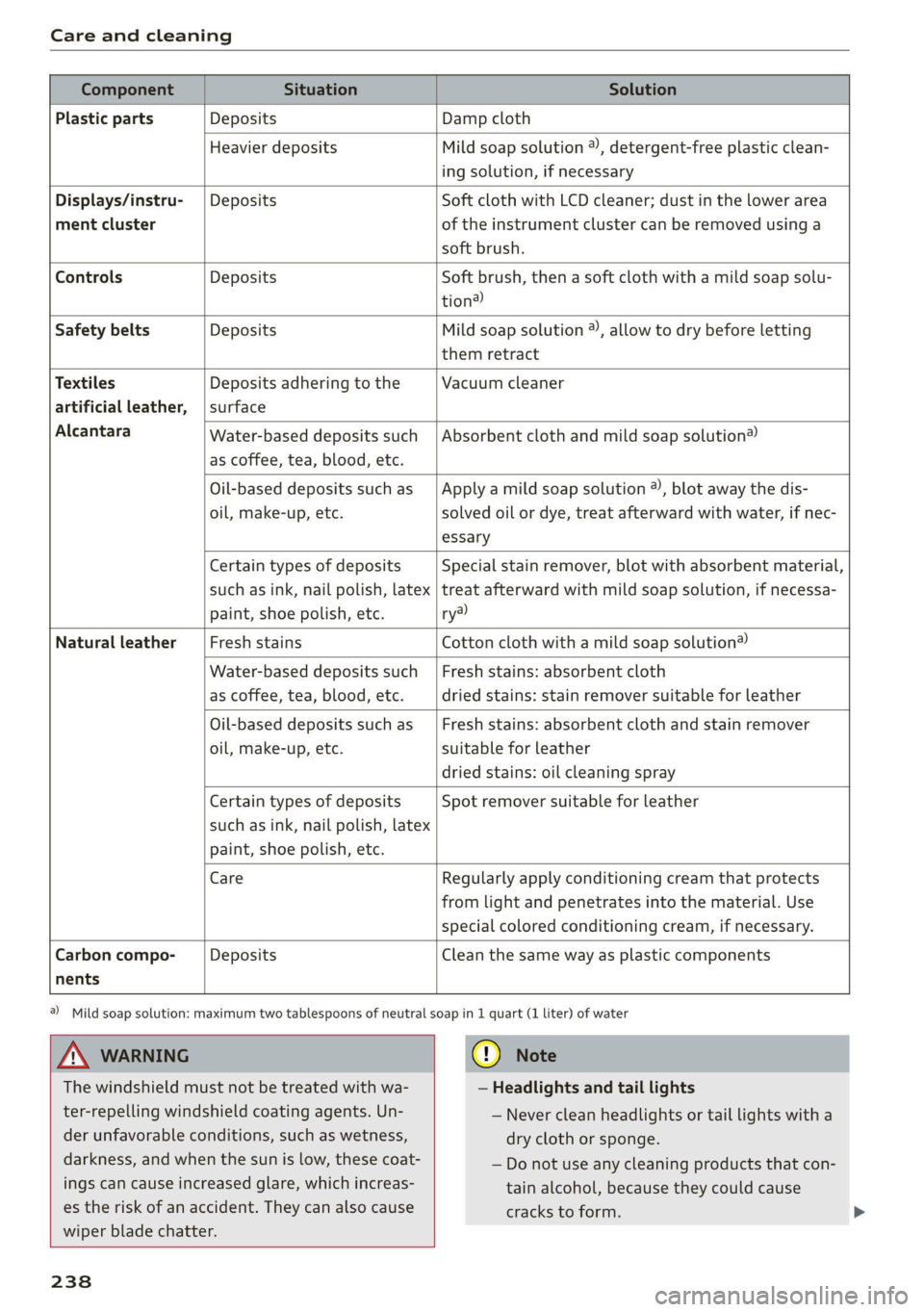
Care and cleaning
Component Situation Solution
Plastic parts Deposits Damp cloth
Heavier deposits Mild soap solution ®, detergent-free plastic clean-
ing solution, if necessary
Water-based deposits such
as coffee, tea, blood, etc.
Displays/instru- | Deposits Soft cloth with LCD cleaner; dust in the lower area
ment cluster of the instrument cluster can be removed using a
soft brush.
Controls Deposits Soft brush, then a soft cloth with a mild soap solu-
tion®
Safety belts Deposits Mild soap solution ®, allow to dry before letting
them retract
Textiles Deposits adhering to the Vacuum cleaner
artificial leather, | surface
Alcantara Absorbent cloth and mild soap solution®
Oil-based deposits such as
oil, make-up, etc.
Apply a mild soap solution ®), blot away the dis-
solved oil or dye, treat afterward with water, if nec-
essary
Certain types of deposits
such as ink, nail polish, latex
paint, shoe polish, etc.
Special stain remover, blot with absorbent material,
treat afterward with mild soap solution, if necessa-
ry?)
Natural leather Fresh stains Cotton cloth with a mild soap solution®
Water-based deposits such
as coffee, tea, blood, etc.
Fresh stains: absorbent cloth
dried
stains: stain remover suitable for leather
Oil-based deposits such as
oil, make-up, etc.
Fresh stains: absorbent cloth and stain remover
suitable for leather
dried stains: oil cleaning spray
Certain types of deposits
such as ink, nail polish, latex
paint, shoe polish, etc.
Spot remover suitable for leather
nents
Care Regularly apply conditioning cream that protects
from light and penetrates into the material. Use
special
colored conditioning cream, if necessary.
Carbon compo- Deposits Clean the same way as plastic components
A WARNING
The windshield must not be treated with wa-
ter-repelling windshield coating agents. Un-
der
unfavorable conditions, such as wetness,
darkness, and when the sun is low, these coat-
ings can cause increased glare, which increas-
es the risk of an accident. They can also cause
wiper blade chatter.
238
@) Mild soap solution: maximum two tablespoons of neutral soap in 1 quart (1 liter) of water
@) Note
— Headlights and tail lights
— Never clean headlights or tail lights with a
dry cloth or sponge.
— Do not use any cleaning products that con-
tain alcohol, because they could cause
cracks to form.
Page 241 of 280
8S1012721BB
Care and cleaning
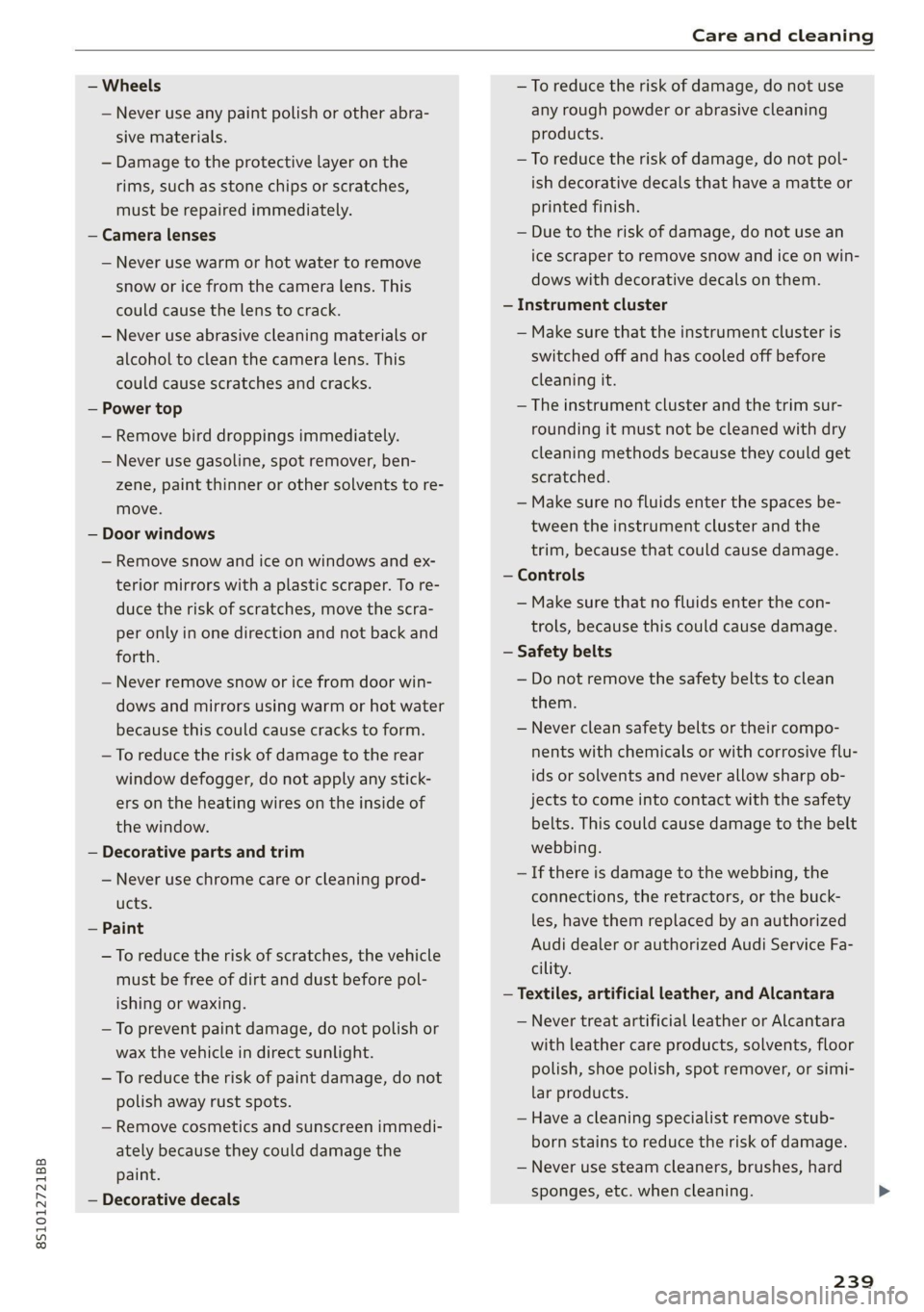
— Wheels
— Never use any paint polish or other abra-
sive materials.
— Damage to the protective layer on the
rims, such as stone chips or scratches,
must be repaired immediately.
— Camera lenses
— Never use warm or hot water to remove
snow or ice from the camera lens. This
could cause the lens to crack.
— Never use abrasive cleaning materials or
alcohol to clean the camera lens. This
could cause scratches and cracks.
— Power top
— Remove bird droppings immediately.
— Never use gasoline, spot remover, ben-
zene, paint thinner or other solvents to re-
move.
— Door windows
— Remove snow and ice on windows and ex-
terior mirrors with a plastic scraper. To re-
duce the risk of scratches, move the scra-
per only in one direction and not back and
forth.
— Never remove snow or ice from door win-
dows and mirrors using warm or hot water
because this could cause cracks to form.
—To reduce the risk of damage to the rear
window defogger, do not apply any stick-
ers on the heating wires on the inside of
the window.
— Decorative parts and trim
— Never use chrome care or cleaning prod-
ucts.
— Paint
—To reduce the risk of scratches, the vehicle
must be free of dirt and dust before pol-
ishing or waxing.
—To prevent paint damage, do not polish or
wax the vehicle in direct sunlight.
—To reduce the risk of paint damage, do not
polish away rust spots.
— Remove cosmetics and sunscreen immedi-
ately because they could damage the
paint.
— Decorative decals
—To reduce the risk of damage, do not use
any rough powder or abrasive cleaning
products.
— To reduce the risk of damage, do not pol-
ish decorative decals that have a matte or
printed finish.
— Due to the risk of damage, do not use an
ice scraper to remove snow and ice on win-
dows with decorative decals on them.
— Instrument cluster
— Make sure that the instrument cluster is
switched off and has cooled off before
cleaning it.
— The instrument cluster and the trim sur-
rounding it must not be cleaned with dry
cleaning methods because they could get
scratched.
— Make sure no fluids enter the spaces be-
tween the instrument cluster and the
trim, because that could cause damage.
— Controls
— Make sure that no fluids enter the con-
trols, because this could cause damage.
— Safety belts
— Do not remove the safety belts to clean
them.
— Never clean safety belts or their compo-
nents with chemicals or with corrosive flu-
ids or solvents and never allow sharp ob-
jects to come into contact with the safety
belts. This could cause damage to the belt
webbing.
— If there is damage to the webbing, the
connections, the retractors, or the buck-
les, have them replaced by an authorized
Audi dealer or authorized Audi Service Fa-
cility.
— Textiles, artificial leather, and Alcantara
— Never treat artificial leather or Alcantara
with leather care products, solvents, floor
polish, shoe polish, spot remover, or simi-
lar products.
— Have a cleaning specialist remove stub-
born stains to reduce the risk of damage.
— Never use steam cleaners, brushes, hard
sponges, etc. when cleaning.
239
Page 255 of 280

8S1012721BB
Fuses and bulbs
fuse assignme
No. | Equipment
RAZ-0795)
PO ee
15°16°17-18 19 20 21
Pr ily ip y ips :}
3839 |4142
32°33:34 35:36 37
40 49
74
F20 | Power lumbar support adjustment
Front passenger's side neck heating (Road-
F22
ster)
Right vehicle electrical system control
F24
module
F25 | Driver side door
F26 | Seat heating
Vehicle electrical system control module
bad (terminal 30)
F28 | AMI High media port
F29 | Vehicle electrical system control module
F32 | Driver assistance systems
F33 | Airbag
Sockets, interior sound, tail light switch,
F34 | temperature sensor, oil level sensor, neck
heating, garage door opener
Fig. 200 Vehicle interior: fuse assignment
No. Equipment
Diagnosis, headlight range control, air
quality sensor, automatic dimming rear-
view mirror, center instrument panel
switch module
F35
F4 Central computer processor (MIB-2) F36 | Right cornering light / right LED headlight
FS: Gateway (diagnostics) F37 | Left cornering light / left LED headlight
Fo Selector lever (automatic transmission)
F7
Climate control system controls, rear win-
dow defogger, tire pressure monitoring
Engine control module, ESC control mod-
F38
ule
F39 | Front passenger side door
F8
Switch for the electromechanical parking
brake, light switch, rain/light sensor, inte-
rior lighting, diagnostic connector, roof
electronics F40
| Cigarette lighter, sockets
F41 | Fuel tank diagnosis
F42 | Central locking area
FQ Steering column switch module
F44 | All wheel drive clutch control module
F10 Vehicle positioning
F45 | Power adjustable driver's side seat
Fil
All wheel drive clutch, left vehicle electri-
cal system control module
F46 | Driver's side neck heating (Roadster)
F49 | Engine start, clutch sensor
FI2 Infotainment components
F52 | Control module for suspension control
F1l4 Climate control system blower fan
F53 | Rear window defogger
Fis Electronic steering column lock
F16
Infotainment system components, safety
belt microphone
PL? Instrument cluster
F18 Rearview camera
F19
Convenience access control module
The power seats* are protected via circuit break-
ers that automatically switch on after a few sec-
onds after the overload has been reduced.
253
Page 266 of 280

Index
A
A/C (climate control system) .............. 70
ACCESSOFIES .. 0... eee 63, 259
Active lame'assistyes « . serie so sucesso emmice 2 0 89
Activating vibration warning............. 91
Adjusting steering time................. 91
Cleaning the camera area.............. 236
Indicator light.......... 2.0.00 ee eee eee 90
M@SSAGES eeews » « sous & 5 see Y & ewe e Bees 90
Switching ON/OFF. « essere so ana + vor ve ow 90
Adaptive light « eis: . sisin as nae a 6 came oo as 96
Adjusting the additional display........... 14
Adjusting the air distribution............. 70
Adjusting the center console lighting....... 39
Adjusting the sound..............-..00- 193
Adjusting the temperature............... 70
Adjusting the vents..............--.000- 71
Airbag system... .. eee eee eee 52
Alarm system
refer to Anti-theft alarm system.......... 24
Alignment pin (tire change) .............. 241
All-weather lights.................00000- 36
ALL:S@aSON TNeS iiss so comers oe veausin & asennes a e ae 228
All Whee lOrive soon so ioe « a asus ¥ & amines 109
Alternative
routes . cscs scan ei cae ee bere 156
AMbISntliGhting!s « = sess = = mews ov sows « 2 ee 39
AMI
refer to Audi music interface........... 176
Android Auto
refer to Audi smartphone interface...... 187
Announcements (settings)
refer to Voice guidance. ...........0005 157
Anti-freeze
Windshield washer system............. 211
Anti-lock braking system (ABS)........... 105
Anti-Slip Regulation.................05. 105
Anti-theft alarm system............000008 24
Anti-theft wheel bolts.................. 244
Apple CarPlay
refer to Audi smartphone interface...... 187
APIMIROSE. csconere « 0 ccusece 0 © sonsee a 0 anesera «oi miaeern « » 47
Aspect ratio (Video) ...... 6... cece eee eee 181
ASR
refer to Anti-Slip Regulation............ 105
264
Audi connect
refer toconnect....... 0. eee eee eee eee 142
Audi connect Infotainment
Personal hotspot.............e0ee cece 143
Services overview. ............0000005 145
Audi magnetic ride
refer to Suspension control.............. 96
Audi music interface. .............0000- 176
Audi music stream
refer to Wi-Fi...............00 ee 147,174
Audiosiles, coves «x suncaws x x sane w a ctayave « erenene 178
Audio player
Bluetooth audio player................ 173
Wi-Fi audio players.: ss esses eesse specs 174
Audio track. ...... 0. cece eee eee eee 181
Audi phone box.............-.000 eee 131
Audi smartphone interface.......... 187,191
Audi virtual cockpit
refer to Instrument cluster.............. 10
AUTO
Automatic climate control system........ 70
Automatic headlights.................. 36
Auto Lock (central locking) ............... 18
Automatic climate control system
refer to Climate control system (automatic) . 70
Automatic post-collision braking system... 105
Automatic transmission............-...5- 79
Driving tips..... 6... 0. cee eee eee eee 81
Emergency mode............-...000005 85
Hilldeseent control spews x 2 cxwn 2 a wows « was 83
KKIGKSG OWN sczssis 0 oncies «a openius « syescem 2 cnerte 84
Malfunction... 0.0... 0... eee e eee 81
Selector lever emergency release......... 86
Selector: lever LOK scazee + x sesinae + 6 sevens a 6 ssn 81
Selector lever positions................. 79
ShIPEING MANUALLY’: asus « ¢ neues a e eee & ex 83
Steering wheel with shift paddles........ 83
tiptronic.. 2... eee eee eee 83
Automatic wiper/washer system........... 41
Automatic zoom (navigation) ............ 160
AUXANPUE « swcsinn o ceswae ¥ eames as eM ao auDe 176
Average fuel consumption..............05 15
Average speed .... cs ec ccc eee cc eens ees 15
B
BACK button ; « exes s news s + Baws =v eee 9 ve 111
Page 268 of 280
Index
ColOmmumber's « o esisne xe cunccis w o sccweme x a sesame 262
COMING NOME sic: e esivs x 6 mies ao see a» Hers 38
Commands (voice recognition system) ..... 123
COMPArtiMenitSies « x eews 5 e caw 5 o ewe ov eR 63
Compass inthe Mitr: ¢ cess se cams st ews § 43
Compliance........ 6.0... c cece eee ee eee 260
Conference call...................2000. 134
CONNECE. ee eee ee 142
Data Privacy ss ¢ ¢ #2eu ss wenn so eae 5 3 res 256
TiifotainmentQex. 6 2 sesso so semis so sons oo on 142
Infotainment services............00005 144
Connection MaMager’s wise a © swiss x 6 cima as 190
Connections
refer to Media..............0000- 170, 178
Connection settingS............... 0. ee 190
Consumer information.................. 257
Consumption
Reducing........-. cece eee ee eee eee 74
Consumption (U!D) . aiccas seo ssaeie ao winzaoe e « aie 15)
COMPACTS seisse sc a aac aw esauius a x auoRTNE © a AnaKiK® 138
Additional directory.............-..00. 191
Importing/exporting.............ee eee 139
Memoryicapacityscis «+ sssss 6 & cavsves v 6 socewss 140
Searching........... 26 eee eee eee 139
Showing détails: s css sv sees vv heen seve 139
Storingias:destinationien « wivsuis « wevem ao ow 155
Gontrol bUttONS wie 2 wee 2 wes oe ewe 2 oon 13
Control buttons (operating the MMI)...... 112
Control knob with joystick function........ 116
Convenience key..........0--0 eee eee eee 19
Indicatorlight » meu < » mews 2 ewooy 5 won a 5 76
Unlocking and locking...............005 21
Convenience opening and closing
Setting. ........ 0.00... 27
WINGOWS's « cmos § 5 aaeae aE aROw § mee 4 YES 27.
EGOlING MOE: « x sass 5 & mens Fa ee xe 70
Cooling system
Adding coolants ese. = enve se seen ye oes 207
Checking the coolant level............. 207
Coolant........ 20... c ee eee eee eee eee 206
Coolant
temperature indicator........... 10
Crank (power top emergency operation)..... 34
Crosshairs... 0.2.0... 00. c cece eee eee ee 151
Cruise control system .............22-008- 87
Cup holders. ... 2... cc cece eee eee ee eee 63
Current fuel consumption................ 15
266
D
Data Privacy............... 0.00.0 0.00. 256
Date... . cece eee cee 189
Date display.............. 0... e eee eee 189
Daytime running light................00. 36
Declaration of compliance............... 260
Defrosting (Windows) ........0 000s seen uues ZL
DEF (instrument cluster) . « cen. se eee cs eas 10
Deluxe automatic climate control
refer to Climate control system (automatic) . 70
Determining correct load limit........... 227
Digital COMPASS « xa se esau 2 eases a Rew as 43
Digital Rights Management.............. 170
Dimensions ............ 000 cece eee eee 262
Dimming the rearview mirror............. 40
Directory
referto Contacts cs ss cees sb ews sf eee 138
Display
Cl@aNiNG es = « sewe s eee se eee ss ewe ees 238
DispOSdlees ¢ = sees » meen < ¥ eee s Fee ee 257
DISTANCE CHIVEN « sav ¢ @ secon oF RaeR 4B aa 8 15
Doors
Mechanically unlocking and locking....... 23
Driver information system................ 12
Energy CONSUMENS wai so wes oo eer oe EW 1S
On-board computer...............00--- 15
SWItCHING VIEWS: « sawe ¢ x mecns 2 3 Sees gb 13
Drives
referto Media.......0..eceeeeeee 170,178
DrivGiSGlects « « wear 2 x eews 4 s Queen ao eee ea: 96
Driving through water.............ee eee 74
Driving time... 1.6... cece eee is
Driving tips
Driving through water..............0005 74
Efficient. Giving « «cosa 2 a sais vw anne a 6 wos 74
Driving tracks. sxcos 2 ¢ awn 2 2 seen ooo eis © 2 oe 79
Dust filter
refer to Pollutant filter..............00. 69
DVD drive (media drives)................ 171
Dynamic volume
refer to System volume............00-5 193
E
EP railisas ss x vocasne a a cantons w senstene © © veowene a ot eas 136
Economicalroute ss snus ¢ seasons a ¢ ween eo sree 156
Page 270 of 280

Index
Frequency bande. «2 sews 6s eomeos vo eee 165, 167
also refer to Frequency band........... 165
Fuel... eee eee eee 195
ACGITIVES= 5 sas 3 ogan & & Gaiee G o He aE 196
Current fuel consumption............... 15
Fueldisplay......... ccc cece eee ee eens 10
Fuel gauge............. eee eee eee eee 12
Fuel tank capacity’. « csc0. s cees ss roses 263
GaSOLIMe. « esowwse « smemns = 9 soswer ¢ onemeeere «ser 195
Reducing fuel consumption............. 74
Saving fuel saws x ¢ ewe + o eew + oe cae > yee 96
Fueling
Fuel filler door emergency release....... 199
Fuel gauge......... eee cece ee eee eee 12
Fuel tank capacity................00-5 263
Opening the fuel filler door............ 196
With reserve canister (emergency fueling) . 198
Fuses
Assignment... ..... 0.0 e cece neces 253
Replacing « cass < sews « < een 6 x eee 8 t mew 252
G
GALA
refer to Speed dependent volume control. 193
Garage door opener... 1.2... see e eee eee 28
Garment hooks swears « ¢ saws a 2 eee 2 o new ¥ ea 64
GaSOliNGeu: + ¢ sews & e eee Fo Rw Ee OS ee 195
TACGIRIVES eo ceive = caves oe wastes 8 ermeoon wae 196
Gasoline mixture. ..............000005 195
GAWR
refer to Gross Axle Weight Rating (GAWR) . 263
Global commands (voice recognition sys-
TON) s ewe & 5 eee ¢ Homen Boe Heme gy dem go oe 124
Glossary of tire and loading terminology... 216
Glove compartment..............-00000- 64
G meter
referito Sport displaySius « s news « » eeu ges 15
Gross Axle Weight Rating (GAWR)........ 263
Gross Vehicle Weight Rating (GVWR)...... 263
GVWR
refer to Gross Vehicle Weight
Rating (GVWR) « essise << assess wo astm ¥ a ave 263
H
Hand streets s snscn « + sassems xo amueces ov omen + 8 ose 130
Hands'Free Profiles. s «swe «case as news oe 130
268
Headlight range control system........... 36
Headlights ss swes ¢ saves 2 0 rene 2 arenes owe 37
Cleaning.......... 02. c eee eee eee 236
Headlight range control system.......... 36
Washer system...........-.00 02 eee 41
Heated
Exterior MiMnOnsis » essa 2 5 sicawus sx osnaee 5 exe 40
Rear window............ 0c eee eee ee 71
SOatSiex x x ners x ¥ poueE +e SRUOS FE EF 71
Washer nozZles « csisrs s ocsuri s waniee a 6 sassere 41
Hexisockets wsiia ce neve a mie ao eawen © oa 241
HFP
refer to Hands Free Profile............. 129
Hill.descent control... = cscs ss comers ve econ ve 83
Hill:hold:assists. scciia s weea as row a meee ae 78
also refer to Hill hold assist............. 78
Home address...........0.0000005 151,155
HomeLink
refer to Garage door opener............. 28
HOM... eee 6
Hotspot
refer to Wi-Fi.............-.000- 147,174
I
Ignition (indicator light)................- 16
Imbalance (wheels) ..........-.000 eee ae 222
Immobilizer
refer to Electronic immobilizer........... 19
Importing and exporting (contacts)....... 139
Tndicator liGhts:. . .raceca a soesnae o 4 oxonese 6 6 ounce 0 a 7
Input
Using the MMI touch.................. 113
Using the:spellet cows + 5 yewig sy seme & 3 ee 117
Input
level. (media) wis « ¢ wees ss opus 5 2 ee 181
Inspection interval..............022-00- 212
Instrument cluster...............-.000-5 10
GleaniG ies + + same x x wees x HEEE EE ROR GES 238
Failure isc se sonics ao accnena ae asuies 2 a ctewera wa one 10
MessageS... 0.6... cece eee ee eee eee 16
OPGhAtiniGis « s wows se wows se wows ge eee ae 12
Service interval display................ 212
Switching tabs.......... 0... e eee eee 12
Instruments
Adjusting the lighting.................. 39
Interior lighting.................000 eee 39
Interior monitoring.............-.0-005- 24
Page 272 of 280

Index
Memory capacity
Directory... 2... cece eee eee eee 139
JUKEDOX « seven x ¢ geass meme oy eee e Ree 172
Memory card
SDicard reader’. s samc v siwass av onsen x 2 aso 171
Supported types and formats........... 183
MENU BDutttomi. « sessas © & accans a 6 vamaes oo raise & 114.
Menu language
refer to Setting the language........... 189
Menu paths (Owner's Manual)............ 113
Menus and symbols...........ceeee vee 120
MeSSAQESS: 5 & eaias 5 mews 6 ocr ve eT ve 135
also refer to E-mail...............000- 136
MIRROM COMPASS). » scsace » « cernose w o sxawer » 0 mewweds » 43
Mirrors
Adjusting the exterior mirrors........... 40
DIMMING « = ees < ween + ee 5 roe 8 eee 40
MainityAPror’s, cesses 6 0 cameos ow sximnaree ww camewe © © 41
MMI
refer to Multi Media Interface.......... 111
MMI search
refer to Free text search............... 119
MMI touch.... 2.2.0.0 cece ee eee eee eee 113
Mobile device
refer to Telephone................-00- 129
Mobile device reminder signal............ 189
Mobile hotspot
refer to Personal hotspot.............. 143
MP3
referto Jukebox’. + sivas c cea ce sees ccs 172
Multifunction steering wheel
BUEONS cs « cecwous « x secmeus « 2 secmowe = stones @ 9 12, 14
Operating ........ 6... c cece ee eee eee ee 12
Multi Media Interface...............00. 111
Music collection
refer to Jukebox.......... 0000 e eee eee 172
MUte cee eee eee eee 193
also refer to Muting.............-.++- 193
Muting.......... 0.00.00. e ee eee eee 14
MmyAUdi... 6... ee eee eee 144
N
Natural leather care and cleaning......... 238
NAV/MAP button ...... 0.0.0 149
270
NaVIQatlON « «& socius ¥ & ssceens w 6 cenein 6 ane ee
Control panel (MMI) ..........--00 0 eee
alsorefer to Map: : vswes ss sens 2 2 eves ce
Octane rating (gasoline)................
Odometer. .... 0... cece
RESGttiniG sass + 2 sccas x 6 Geen ce ee; ae 8
Oil
refer to Engine Oil. « s sss ss been es eees
On-board computer .......... 000s ee eee
ON/OM KNOB MMM] cies x s seas 3 cee a ees
On Board Diagnostic System (OBD)... 199,
Online destinations
refer to Point of interest search.........
OMliING aps « secs s 5 sacs x = aces ss GER eee
Online media........... 0. eee eee eee
Online services
referto COnNeCts «= seca es rows se pews ee
Opening
Convenience Opening « « «eevee ence es vewas
Fuel filler door. ......... 2.0000 eee eee
Opening and closing
refer to Unlocking and locking........
Operating
Instrument cluster.................00.
Multifunction steering wheel............
Multi Media Interface.................
Voice recognition system..............
Optional equipment number.............
Options menu................
Overviews (COCkpity rec «suns «5 wenn oo aaa « 5
P
Paint damages « «eine ve aaron + 6 wens » ves
Pain numiber’s « 2 sess @ 2 sree 2s rasan 2s eae
Panice BUtON « saws ¢ ¢ area oo eee oe ewe v Be
Paniefunction:s ¢ = sees ss sews ¢ e eee so eee ge
Parental CONtrOl « = wees ¢ = sex « o eee sv Bee
255