light AUDI TT COUPE 2020 Owners Manual
[x] Cancel search | Manufacturer: AUDI, Model Year: 2020, Model line: TT COUPE, Model: AUDI TT COUPE 2020Pages: 280, PDF Size: 98.79 MB
Page 4 of 280
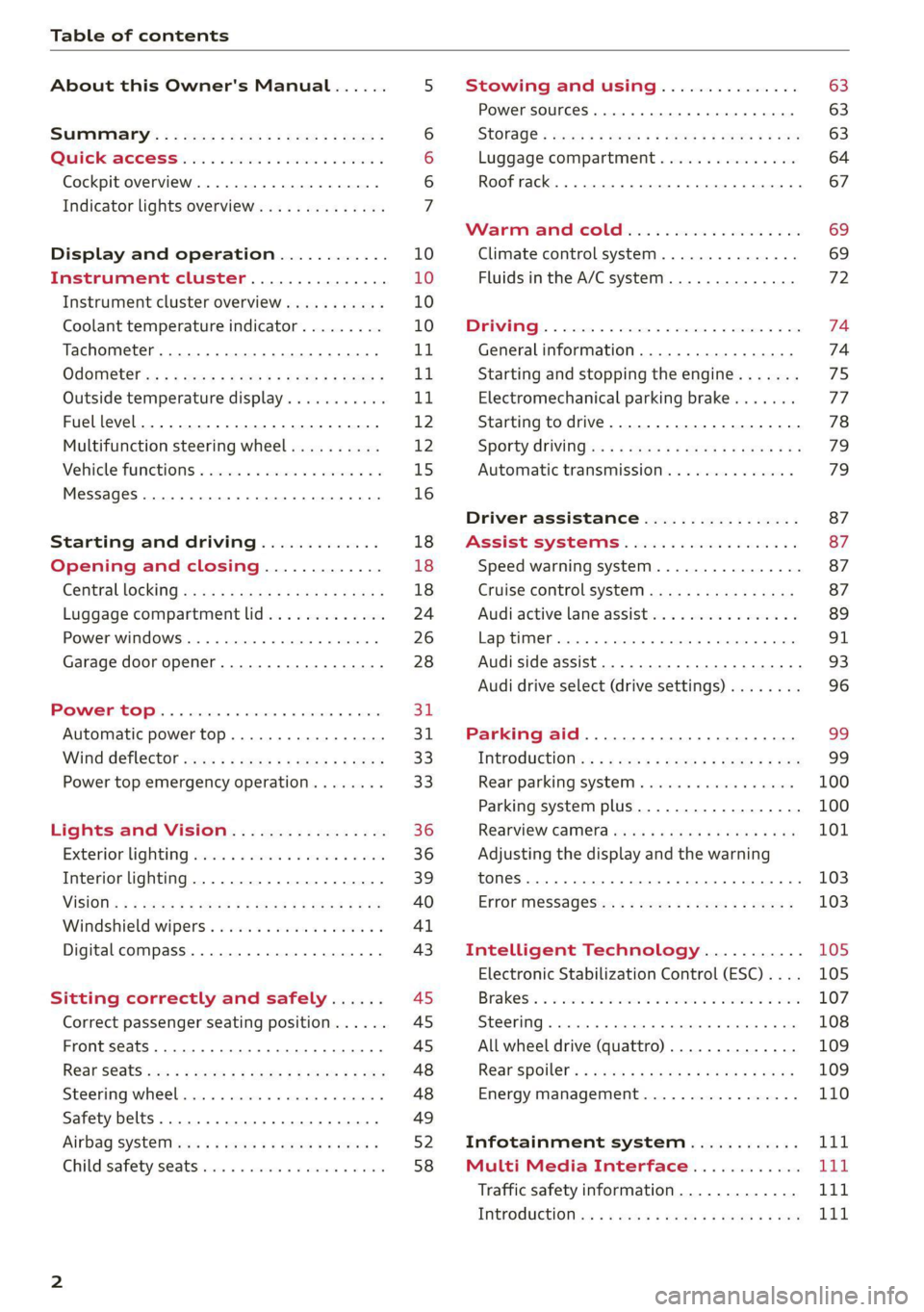
Table of contents
About this Owner's Manual......
SUMIMALY: ; « ss6% : osen ss sean cs poe s
QC CCeS Skis: si esis a 6 ores os ewe
Cockpit overview.............-000005
Indicator lights overview...........0.
Display and operation............
Instrument cluster...............
Instrument cluster overview...........
Coolant temperature indicator.........
Tachometer.......... 0.0 eee eee eee
Odometer as = s eee = seen ge zee a tows e
Outside temperature display...........
Fuellevel.......... 0. cece eee eee eee
Multifunction steering wheel..........
Vehicle functions « se-0 2. ese ve eee ees
MessageS ... 0... eee eee eee
Starting and driving.............
Opening and closing.............
Central locking 2.2% ieee seven a eevee
Luggage compartment lid.............
Power windows.............0.00 0005
Garage door opener...............0..
POWER EOPE: « «cece 0 csv « o semiens 6 0 eens
Automatic power top.................
Wind deflector ecax « x came + 5 yom 2 4 ews
Power top emergency operation........
Lights and Vision.................
Exterior lighting ssivses + « ssa 3s inane 9 & sou
Interior lighting. ................000.
VISION s « s saas ss sees Fo Hees Eo ee ee
Windshield wipers..............00005
Digital compass................0000.
Sitting correctly and safely......
Correct passenger seating position......
Front seats .......... 00sec eee eee
R@ar S@atS sces s = sees ¢ ¢ cee oo ete gg oes
Steerimg' wheelies «+ eau a x conse 0 sessvas
Safety belts. ....... 0... eee eee eee
Airbag SYStEMise. x + ones + © amie 2s eee
Child safety seats... 00.2... cece eens
NOD
OO
10 18
18
18
24
26
28
31 31 33 33
36 36 39
40
41
43
45 45
45
48
48
49
Ey
Stowing and using............... 63
Power SourceS...... 00... c eee eee 63
StOraGe « coun s 2 ween s 2 MEWS 4 a REE 5p eS 63
Luggage compartment............... 64
Roof rack... 6.66. e ee eee eee eee eee 67
Warrriiandicoleiis « 6 sis os wiwia sos 69
Climate control system............... 69
Fluids in the A/C system. ............. 72
PD EIING: escssay « & wnsunets © 8 sommes 5 ¢ see Oo 74
Generalinformation................. 74
Starting and stopping the engine....... 75
Electromechanical parking brake....... 77
Starting to drive..... 02... eee eee 78
Sporty Criving'ss < « exes xe een xe pews x ee 79
Automatic transmission.............. 79
Driver assistance................. 87
Assist systems................00. 87
Speed warning system...............- 87
Cruise control system.............0-5 87
Audi active lane assist................ 89
LAPRIMIOG enesnin « © csansiza « oxensms 9 © ecesere oe tee 91
Audi side assist 93
Audi drive select (drive settings)........ 96
Parking aid....................... 99
IMEROGUCtION ax = x eae x 2 ney 5s goes & & Hees 99
Rear parking system ........0...-00 0% 100
Parking system plus.............-.04. 100
RearvieW Camera cw + x cya so nema « gas 101
Adjusting the display and the warning
TONES 2. eee 103
ErtOr MeSSAGCSix. « = sown « = sem ee eee s 103
Intelligent Technology........... 105
Electronic Stabilization Control (ESC).... 105
Brakes’: so isemwe o eames av omceme 2 2 mess 6 ase 107
Steering... ..... cece eee ee eee ee 108
All wheel drive (quattro).............. 109
Rearspoiler's « css i essa s ¢ oes se sores 109
Energy management................. 110
Infotainment system............ 111
Multi Media Interface............ Lid
Traffic safety information............. VT
INEROGUCHON sc 2 « ween + eam s 2 wane ooo Bow Lit
Page 9 of 280
8S1012721BB
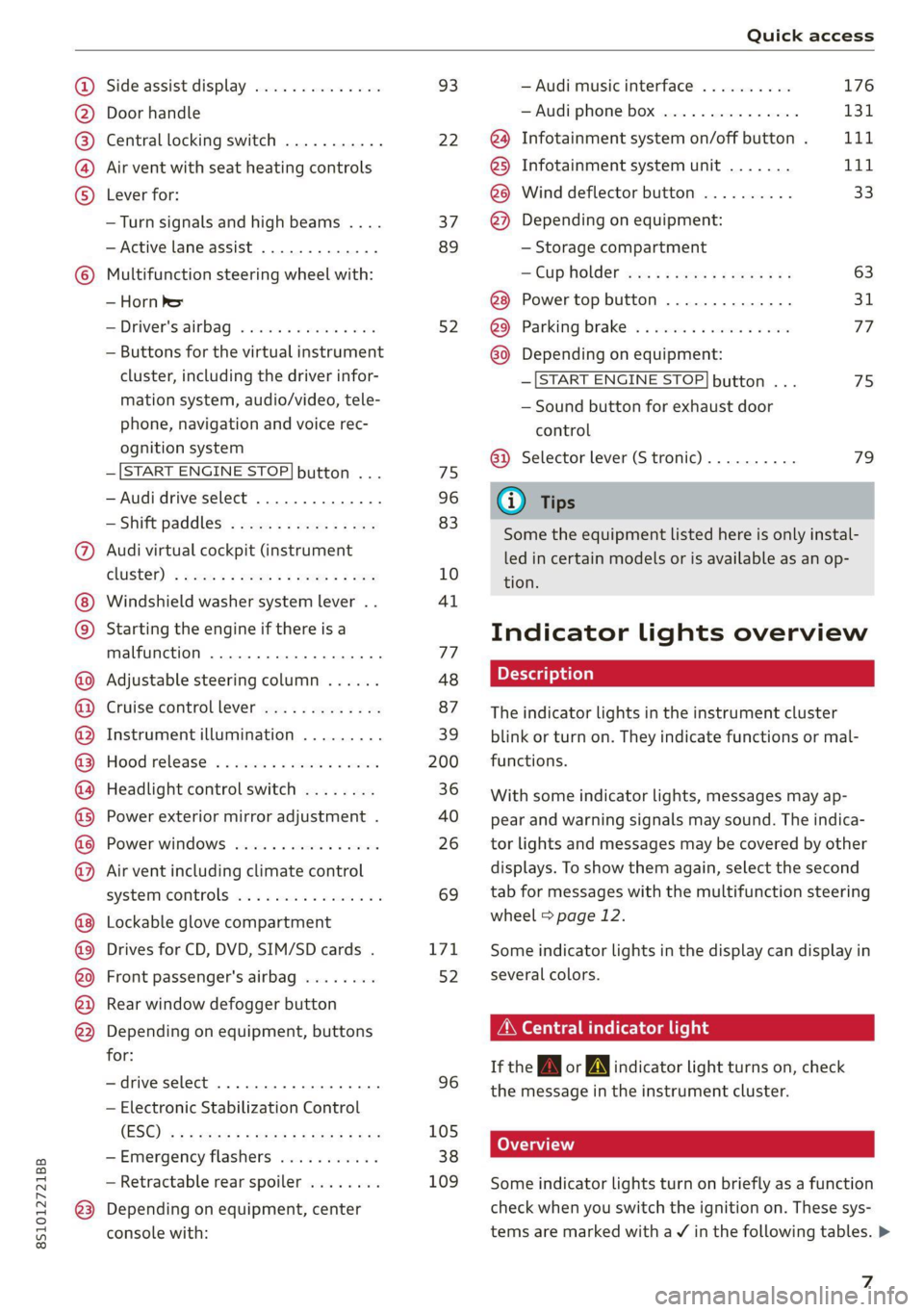
Quick access
OOOO
©
Q®OOO®D
OOGOOOOOOD
OO
OC
Side assist display ..............
Door handle
Central locking switch ...........
Air vent with seat heating controls
Lever for:
—Turn signals and high beams ....
— Active lane assist .............
Multifunction steering wheel with:
— Horn Pe
— Driver's airbag ...............
— Buttons for the virtual instrument
cluster, including the driver infor-
mation system, audio/video, tele-
phone, navigation and voice rec-
ognition system
—[START ENGINE STOP] button ...
— Audi drive select ..............
—Shift paddles ................
Audi virtual cockpit (instrument
ClUStEL): = xcnu ¢ = awe ¢ 2 sees 2 5 ee
Windshield washer system lever ..
Starting the engine if there is a
malfunction ..............00 eee
Adjustable steering column ......
Cruise controllever .............
Instrument illumination .........
Hood
release « . sees vs eee ss oes
Headlight control switch ........
Power exterior mirror adjustment .
Power windows ................
Air vent including climate control
systemmcontrols ica es cece wrens a v=
Lockable glove compartment
Drives for CD, DVD, SIM/SD cards .
Front passenger's airbag ........
Rear window defogger button
Depending on equipment, buttons
for:
—drive select ..............0004
— Electronic Stabilization Control
(ES@) s ¢ ¢ sete ss qewe to wees 2 nae
—Emergency flashers ...........
— Retractable rear spoiler ........
Depending on equipment, center
console with:
93
22
37
89
52
75
96
83
10
4l
77
48
87
39
200
36
40
26 69
171
52
96
105
38
109
— Audi musicinterface .......... 176
— Audi phone box ............... 131
@) Infotainment system on/off button . LLL
@) Infotainment system unit ....... 111
@8 Wind deflector button .......... 33
@) Depending on equipment:
— Storage compartment
— CUP HOLMER ses x eens x eee cee 63
Power top button .............. 31
@ Parking’ brake: « + cs ss wows so sors 77
G0 Depending on equipment:
—[START ENGINE STOP] button ... 7s
— Sound button for exhaust door
control
@) Selector lever (S tronic).......... 79
@) Tips
Some the equipment listed here is only instal-
led in certain models or is available as an op-
tion.
Indicator lights overview
The indicator lights in the instrument cluster
blink or turn on. They indicate functions or mal-
functions.
With some indicator lights, messages may ap-
pear and warning signals may sound. The indica-
tor lights and messages may be covered by other
displays. To show them again, select the second
tab for messages with the multifunction steering
wheel © page 12.
Some indicator lights in the display can display in
several colors.
A\ Central indicator light
If the A or indicator light turns on, check
the message in the instrument cluster.
Some indicator lights turn on briefly as a function
check when you switch the ignition on. These sys-
tems are marked with a V in the following tables. >
z
Page 10 of 280
Quick access
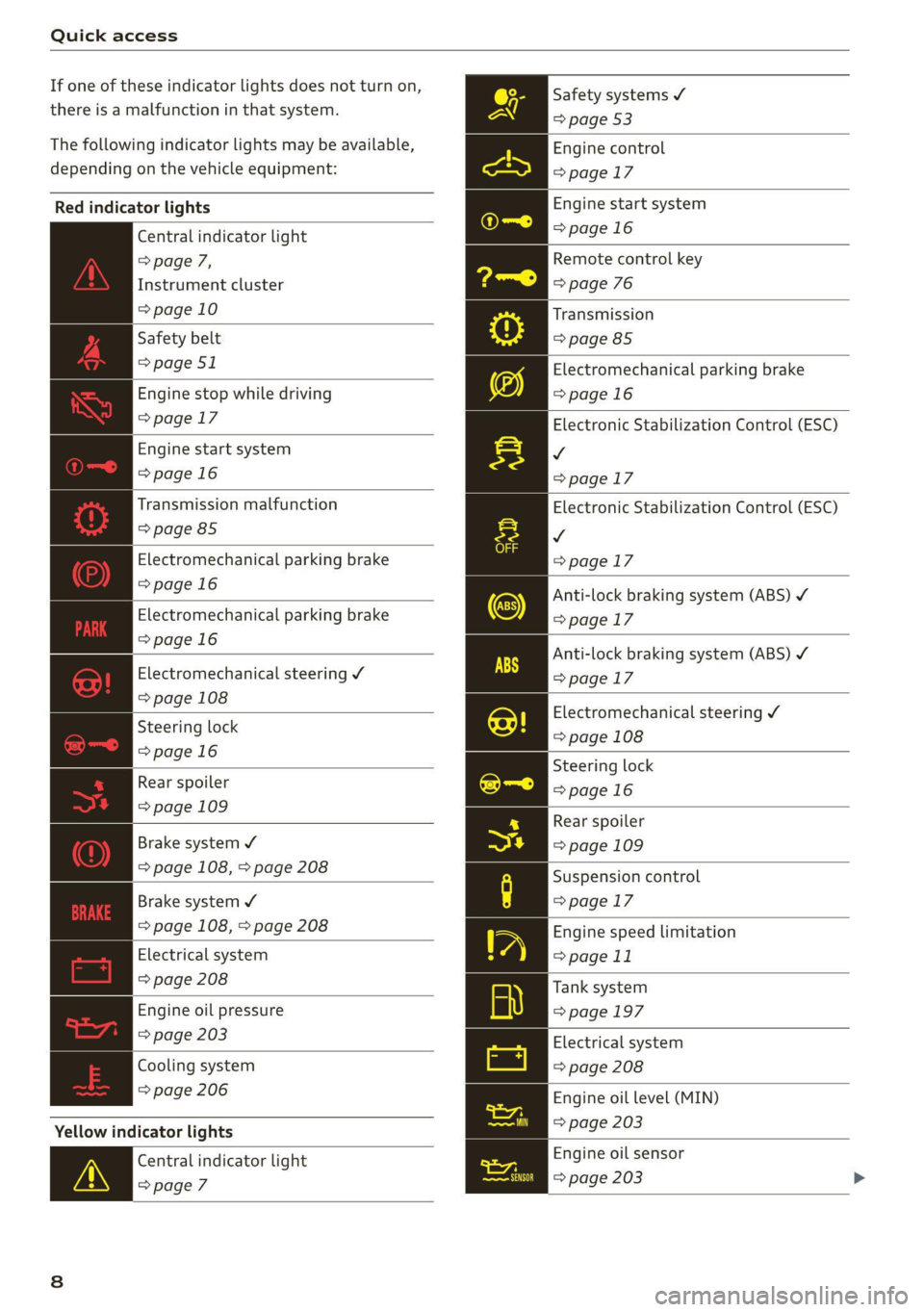
If one of these indicator lights does not turn on,
there is a malfunction in that system.
The following indicator lights may be available,
depending on the vehicle equipment:
Red indicator lights
Central indicator light
> page 7,
Instrument cluster
=>page 10
Safety belt
=> page 51
Engine stop while driving
=>page 17
Engine start system
=>page 16
Transmission malfunction
=> page 85
Electromechanical parking brake
=>page 16
Electromechanical parking brake
=>page 16
Electromechanical steering Y
=> page 108
Steering lock
=>page 16
Rear spoiler
=> page 109
Brake system 4
=> page 108, > page 208
Brake system ¥
=> page 108, > page 208
Electrical system
=> page 208
Engine oil pressure
=> page 203
Cooling system
=> page 206
Yellow indicator lights
Central indicator light
>page 7
Safety systems ¥
=> page 53
Engine control
>page 17
Engine start system
=>page 16
Remote control key
=> page 76
Transmission
=> page 85
Electromechanical parking brake
=>page 16
Electronic Stabilization Control (ESC)
v
>page 17
Electronic Stabilization Control (ESC)
v
>page 17
Anti-lock braking system (ABS) ¥
>page 17
Anti-lock braking system (ABS) ¥
>page 17
Electromechanical steering ¥
=> page 108
Steering lock
=>page 16
Rear spoiler
=> page 109
Suspension control
>page 17
Engine speed limitation
=> page 11
Tank system
=>page 197
Electrical system
=> page 208
Engine oil level (MIN)
=> page 203
Engine oil sensor
=> page 203
Page 11 of 280
8S1012721BB
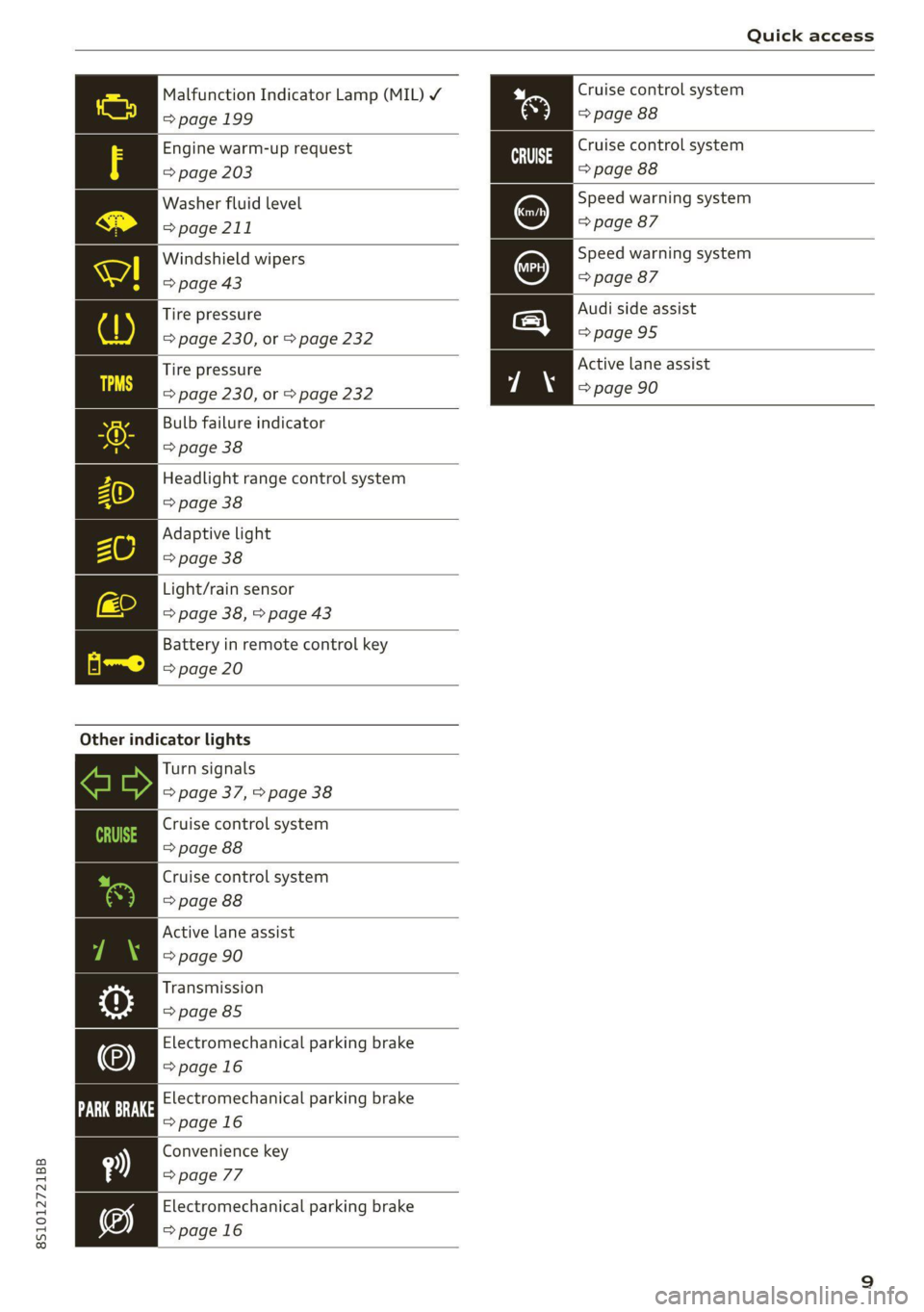
Quick access
Malfunction Indicator Lamp (MIL) Y Cruise control system
=> page 199 => page 88
Engine warm-up request
=> page 203
Washer fluid level
=> page 211
Cruise control system
=> page 88
Speed warning system
=> page 87
Speed warning system
=> page 87
Windshield wipers
=> page 43
Audi side assist
>page 95
Tire pressure
=> page 230, or > page 232
Active lane assist
=> page 90
Tire pressure
=> page 230, or > page 232
Bulb failure indicator
> page 38
Headlight range control system
=> page 38
Adaptive light
> page 38
Light/rain sensor
=> page 38, > page 43
Battery in remote control key
=> page 20
Other indicator lights
Turn signals
=> page 37, > page 38
Cruise control system
=> page 88
Cruise control system
> page 88
Active lane assist
=> page 90
Transmission
=> page 85
Electromechanical parking brake
>page 16
Electromechanical parking brake
=>page 16
Convenience key
=> page 77
Electromechanical parking brake
=>page 16
Page 12 of 280

Instrument cluster
Instrument cluster
Instrument cluster overview
The instrument cluster is the central information center for the driver.
3:50™
12/5/2018
elo
a
Fig. 3 Instrument cluster overview (Audi virtual cockpit)
Engine coolant temperature ~E ... 10
Left dial
—Tachometer ..........-...00- 11
Tab area
Central area
Status line (one or two lines)
Right dial
— Convenience display
Fuel. level BY « < sos xs exes ss eas: 12
Right additional display with speed-
ometer
Left additional display with:
SIGEAP sss sieves oo seme ow oaRe sw He 79
— Audi drive select mode ......... 96
©8
©OHO©
CO
©
ZA\ WARNING
If there is a severe malfunction in the instru-
ment cluster, the display may turn off. The A
indicator light may also turn on. Stop the ve-
hicle safely. See an authorized Audi dealer or
authorized Audi Service Facility for assistance.
G) Tips
— You can select the units used for tempera-
ture, speed and other measurements in the
Infotainment system.
10
— Speeds are displayed in mph (miles per
hour) or km/h (kilometers per hour).
— If there is a malfunction in the instrument
cluster, DEF will appear in the trip odometer
display. Have the malfunction corrected as
soon as possible.
Coolant temperature
indicator
The coolant temperature display @ > page 10,
fig. 3 only functions when the ignition is switch-
ed on. To reduce the risk of engine damage,
please observe the following notes about the
temperature ranges.
Cold range
If only the LEDs at the bottom of the gauge turn
on, the engine has not reached operating tem-
perature yet. Avoid high engine speeds, full accel-
erating and heavy engine loads.
Normal range
The engine has reached its operating tempera-
ture once the LEDs up to the center of the gauge
turn on. If the Bg indicator light in the instru-
ment cluster display turns on, the coolant tem-
perature is too high > page 206.
Page 13 of 280

8S1012721BB
Instrument cluster
@) Note
— Auxiliary headlights and other accessories in
front of the air intake impair the cooling ef-
fect of the coolant. This increases the risk of
the engine overheating during high outside
temperatures and heavy engine load.
— The front spoiler also helps to distribute
cooling air correctly while driving. If the
spoiler is damaged, the cooling effect will
be impaired and the risk of the engine over-
heating will increase. See an authorized
Audi dealer or authorized Audi Service Fa-
cility for assistance.
Tachometer
The tachometer @) > page 10, fig. 3 displays the
engine speed in revolutions per minute (RPM).
The beginning of the red zone in the tachometer
indicates the maximum permissible engine speed
for all gears once the engine has been broken in.
Before reaching the red zone, you should shift in-
to the next higher gear, choose the "D" or "S" se-
lector lever position, or remove your foot from
the accelerator pedal.
Engine speed limitation
Applies to: vehicles with center armrest
If the Ba indicator light turns on, the engine will
be automatically limited to the RPM displayed in
the instrument cluster. This will protect the en-
gine components, for example during a cold start
or from overheating.
The engine speed limitation deactivates once the
engine is no longer in the critical temperature
range and you have released the accelerator ped-
al once.
If the engine speed limitation was activated by
an engine control malfunction, the By indicator
light also turns on. Make sure the engine speed
does not go above the speed displayed, for exam-
ple when downshifting. Drive to an authorized
Audi dealer or authorized Audi Service Facility im-
mediately to have the malfunction corrected.
CG) Note
The needle in the tachometer may only be in
the red area of the gauge for a short period of
time before there is a risk of damaging the
engine. The location where the red zone be-
gins varies depending on the engine.
Odometer
11:30"
Fig. 4 Instrument cluster: odometer and reset button
The trip odometer and odometer are displayed in
the status line ©) > page 10, fig. 3.
The trip odometer shows the distance driven
since it was last reset. It can be used to measure
short distances. The odometer shows the total
distance that the vehicle has been driven.
Resetting the trip odometer
> Press the reset button 0.0] on the instrument
cluster. The trip odometer will be reset to zero.
Gi) Tips
Distances are displayed in mi (miles) or km
(kilometers).
Outside temperature
display
The outside temperature is displayed in the sta-
tus line ©) > page 10, fig. 3.
If your vehicle is stationary or if you are driving at
very low speeds, the temperature displayed in
the instrument cluster may be slightly higher
than the actual temperature outside due to heat
radiating from the engine.
11
Page 14 of 280

Instrument cluster
At temperatures below 41 °F (+5 °C), a snowflake
symbol appears in front of the temperature dis-
play > A.
ZA WARNING
Do not assume the roads are free of ice based
on the outside temperature display. Be aware
that there may be ice on roads even when the
outside temperature is around 41 °F (+5 °C)
and that ice can increase the risk of accidents.
Fuel level
The display @ > page 10, fig. 3 only works when
the ignition is switched on. When the display has
reached the reserve mark, a red LED turns on and
the iy indicator light turns on > page 197.
For the tank capacity in your vehicle, refer to the
Technical Data > page 263.
@) Note
Never drive until the tank is completely emp-
ty. The irregular supply of fuel that results
from that can cause engine misfires. Uncom-
busted fuel will then enter the exhaust sys-
tem. This can cause overheating and damage
to the catalytic converter.
Multifunction steering
wheel
87.6 MHz
cS BAL
90.0 MHz
90.5 MHz
91.5 MHz
TRON Lard
Fig. 5 Driver information system display
12
Fig. 6 Left side of multifunction steering wheel
Requirement: the ignition must be switched on.
The driver information system contains multiple
tabs @ that display various information (2).
The following tabs may be available, depending
on vehicle equipment:
First tab Vehicle functions
Second tab | Driver messages (this is only dis-
played if at least one indicator
light/message is being displayed)
=>page 16
Third tab Radio > page 165
Media
> page 170
Fourth tab | Telephone > page 129
Fifth tab Navigation > page 149
Map > page 158
Sixth tab Sound®> page 189
Audi connect > page 142
Settings > page 189
@®lk2] button
Switching tabs: press the|<>] button repeatedly
until the desired tab is shown (for example, Ra-
dio).
@ [VIEW] button
Changing the view > page 13.
©®|[] button
Return to functions at higher levels.
© DJand [control buttons
Open/close the selection menu or options menu
=> page 13.
Page 17 of 280
8S1012721BB
Instrument cluster
Vehicle functions
On-board computer
Depending on the vehicle equipment, you may be
able to access the following information in this
order on the on-board computer > page 10, fig. 3
@:
—Time and date > page 189
— Average consumption
— Short-term memory overview
— Long-term memory overview
— Energy consumers > page 15
— Driver assistance
The short-term memory collects driving informa-
tion from the time the ignition is switched on un-
til it is switched off. If you continue driving within
two hours after switching the ignition off, the
new values are included when calculating the cur-
rent trip information.
Unlike the short-term memory, the long-term
memory is not erased automatically. You can se-
lect the time period for evaluating trip informa-
tion yourself.
Energy consumers*
The Energy consumers view lists other equip-
ment that is currently affecting fuel consump-
tion. The display shows up to three equipment
items. The equipment using the most power is
listed first. If more than three items using power
are switched on, the equipment that is currently
using the most power is displayed. A chart also
shows you the current total of all other consum-
ers.
Fuel consumption
The current fuel consumption can be shown using
a bar graph. The average consumption stored in
the short-term memory is also displayed. If the
bar is green, your vehicle is saving fuel (for exam-
ple, using recuperation).
Engine oil temperature display and boost
atelte- hele
Applies to: vehicles with engine oil temperature display/boost
indicator
The
engine oil temperature display and boost in-
dicator are only shown in the enhanced view or in
the sport view > page 13.
Engine oil temperature indicator =
The engine has reached its operating tempera-
ture when the engine oil temperature is between
176 °F (80 °C) and 248 °F (120 °C) under normal
driving conditions. The engine oil temperature
may be higher if there is heavy engine load and
high temperatures outside. This is not a cause for
concern as long as the = => page 203 or EA
= page 203 indicator lights do not turn on.
Boost indicator
The current engine load (meaning the current
boost pressure) is indicated by a bar.
Shift light indicator
Applies to: vehicles with shift light indicator
The
shift light indicator informs the driver when
the rpm limit is reached.
Accessing the shift light indicator
Requirement: tiptronic mode must be activated
> page 83.
> Select the sport view > page 13. The shift light
indicator is displayed with green, yellow and
red ranges in the upper areas of the tachome-
ter.
The shift light indicator will blink red when ap-
proaching the engine speed limit. Shift to the
next highest gear at the right time.
Sy eame ENE
Applies to: vehicles with Sport displays
Depending on the vehicle equipment, the sport
displays may include the G-meter, the engine da-
ta and the tire pressure monitoring system. You
can access the sport displays in the central area
or in the additional display in the driver informa-
tion system. >
15
Page 18 of 280
![AUDI TT COUPE 2020 Owners Manual Instrument cluster
Accessing the sport displays in the central
area
> Open the first Vehicle tab (trip computer) using
the [<>] button on the multifunction steering
wheel.
> Select on the mul](/img/6/57658/w960_57658-17.png "AUDI TT COUPE 2020 Owners Manual Instrument cluster
Accessing the sport displays in the central
area
> Open the first Vehicle tab (trip computer) using
the [<>] button on the multifunction steering
wheel.
> Select on the mul")
Instrument cluster
Accessing the sport displays in the central
area
> Open the first Vehicle tab (trip computer) using
the [<>] button on the multifunction steering
wheel.
> Select on the multifunction steering wheel: left
control button > Sport displays.
> Turn the left thumbwheel on the multifunction
steering wheel until the desired sport display
appears in the instrument cluster.
Accessing the sport displays in the additional
display
> Select on the multifunction steering wheel:
right control button > Additional display.
> Select the desired additional display.
G meter*
The G meter displays the longitudinal and lateral
acceleration. The maximum values that are
reached are stored and displayed when the vehi-
cle is stationary.
> To reset the stored values, select on the multi-
function steering wheel: right control button >
Reset values.
Engine data*
The engine data displays the current power and
torque.
Tire pressure monitoring system*
The tire pressure monitoring system displays the
current tire pressures and temperature. Also see
=> page 232, Tire pressure monitoring system.
Messages
@)Electromechanical parking brake
If the Zi Hh © indicator light turns on, the
parking brake has been set.
Zin / © Parking brake: warning! Vehicle
parked too steep
If the indicator light blinks and the message ap-
pears, there is not enough braking power to se-
cure the vehicle. The brakes have overheated. The
vehicle could roll away, even on a small incline.
16
gw Parking brake: malfunction! Please contact
Service
There is a malfunction in the parking brake. Drive
to an authorized Audi dealer or authorized Audi
Service Facility immediately to have the malfunc-
tion corrected. Do not park the vehicle on hills,
because it could roll.
[email protected] / {@) Parking brake: warning! Vehicle
parked too steep
The braking force may not be enough to secure
the vehicle from rolling away. Park the vehicle in
a place with less of an incline.
WN / {@) Parking brake: applied
The parking brake is set. Press and hold the brake
pedal
to release the parking brake.
@~- Steering lock
|e —e| Steering: malfunction! Please stop vehicle
There is a malfunction in the electronic steering
lock. You cannot turn the ignition on.
Do not tow your vehicle because it cannot be
steered. See an authorized Audi dealer or author-
ized Audi Service Facility for assistance.
|e—e| Steering lock: malfunction! Please contact
Service
There is a malfunction in the electronic steering
lock.
Drive immediately to an authorized Audi dealer
or authorized Audi Service Facility to have the
malfunction repaired.
Z\ WARNING
Do not tow your vehicle when there is a mal-
function in the electronic steering lock - this
increases the risk of an accident.
oem ae eee Ll)
BS Engine start system: malfunction! Please
contact Service
Do not switch the ignition off because you may
not be able to switch it on again.
Page 19 of 280
8S1012721BB
Instrument cluster
Drive to an authorized Audi dealer or authorized
Audi Service Facility immediately to have the
malfunction corrected.
S&S Engine start system: malfunction! Please
contact Service
There is a malfunction in the engine start system.
Drive immediately to an authorized Audi dealer
or authorized Audi Service Facility to have the
malfunction repaired.
\ Engine stop while driving
If the S indicator light turns on, there may bea
malfunction in the engine or fuel supply.
More force is needed to steer and brake the mov-
ing vehicle when the engine is stopped. If the ve-
hicle is rolling, try to bring it to a stop off to the
side from moving traffic. See an authorized Audi
dealer or authorized Audi Service Facility for as-
sistance.
ZA WARNING
If the engine stops while driving, you will
need to use more force to brake the vehicle.
This increases the risk of an accident. There
will still be power steering if the ignition is
switched on while the vehicle is rolling and
there
is sufficient battery charge. Otherwise,
you must use greater force when steering.
53/2 Electronic Stabilization Control (ESC)
If the B indicator light blinks while driving, the
ESC or ASR (Anti-Slip Regulation) is actively regu-
lating.
If the BB indicator light turns on, the system has
switched the ESC off. In this case, you can switch
the ignition off and then on to switch the ESC on
again. The indicator light turns off when the sys-
tem is fully functional.
If the B indicator light turns on, ESC was
switched off using the |2] button > page 106.
Stabilization control (ESC/ABS): malfunction!
See owner's manual
If the I indicator lamp and the fs / &) ABS in-
dicator lamp turn on and the driver message ap-
pears, the ABS or electronic differential lock is
malfunctioning. This also causes the ESC to mal-
function. The brakes still function with their nor-
mal power, but ABS is not active.
Drive to an authorized Audi dealer or authorized
Audi Service Facility immediately to have the
malfunction corrected.
@ Tips
For additional information on ESC and ABS,
see > page 105.
<5 Engine control
If the BS indicator light turns on if there is a mal-
function in the engine control. Drive slowly to an
authorized Audi dealer or authorized Audi Service
Facility to have the engine checked.
9 Suspension control
Applies to: vehicles with Audi drive select
If the | ¢ | indicator light turns on, then there is a
malfunction in the suspension control. Drive im-
mediately to an authorized Audi dealer or author-
ized Audi Service Facility to have the malfunction
repaired.
17